Introduction
Skim How to Use This Guide for the documentation map, then Key Platform Capabilities for module and integration entry points. First-time operators should continue to Getting Started — Recommended Setup Sequence (steps 1–12 tab map: Account Settings — Recommended setup order, then steps 13–15 in Listings, Bookings, and Tenants; optional reads: Getting Started — Optional setup deep dives); sign-in recovery: Resetting a Management User Password then Getting Started — Lockout catch-up after password recovery; other blockers: Get Help & Support Habit-specific shortcuts live under Related below.
Complete Getting Started — Recommended Setup Sequence (steps 1–12 on Account Settings tabs per Recommended setup order, then steps 13–15 in Listings, Bookings, and Tenants) and Onboarding a New Property — Step 7 go-live verification before you add operational data at scale. Guided walkthrough of settings steps 4–12: Onboarding a New Property. When sign-in was restored mid-setup, see Getting Started — Lockout catch-up after password recovery. Hub: Recommended setup order. Workflow pairing after go-live: Setup sequence after go-live. Module names during setup: Key Platform Capabilities below.
Welcome to the Vivin Platform, an all-in-one, AI-driven software platform purpose-built for managing coliving and flex living properties. It replaces spreadsheets and fragmented tools with a fully integrated system that centralises operations, finance, distribution, communication, and administrative tasks — giving property managers complete control and real-time visibility over their business.
Powered by artificial intelligence at its core, Vivin automates repetitive work, surfaces actionable insights, and enables property managers to scale their portfolios without scaling their teams.
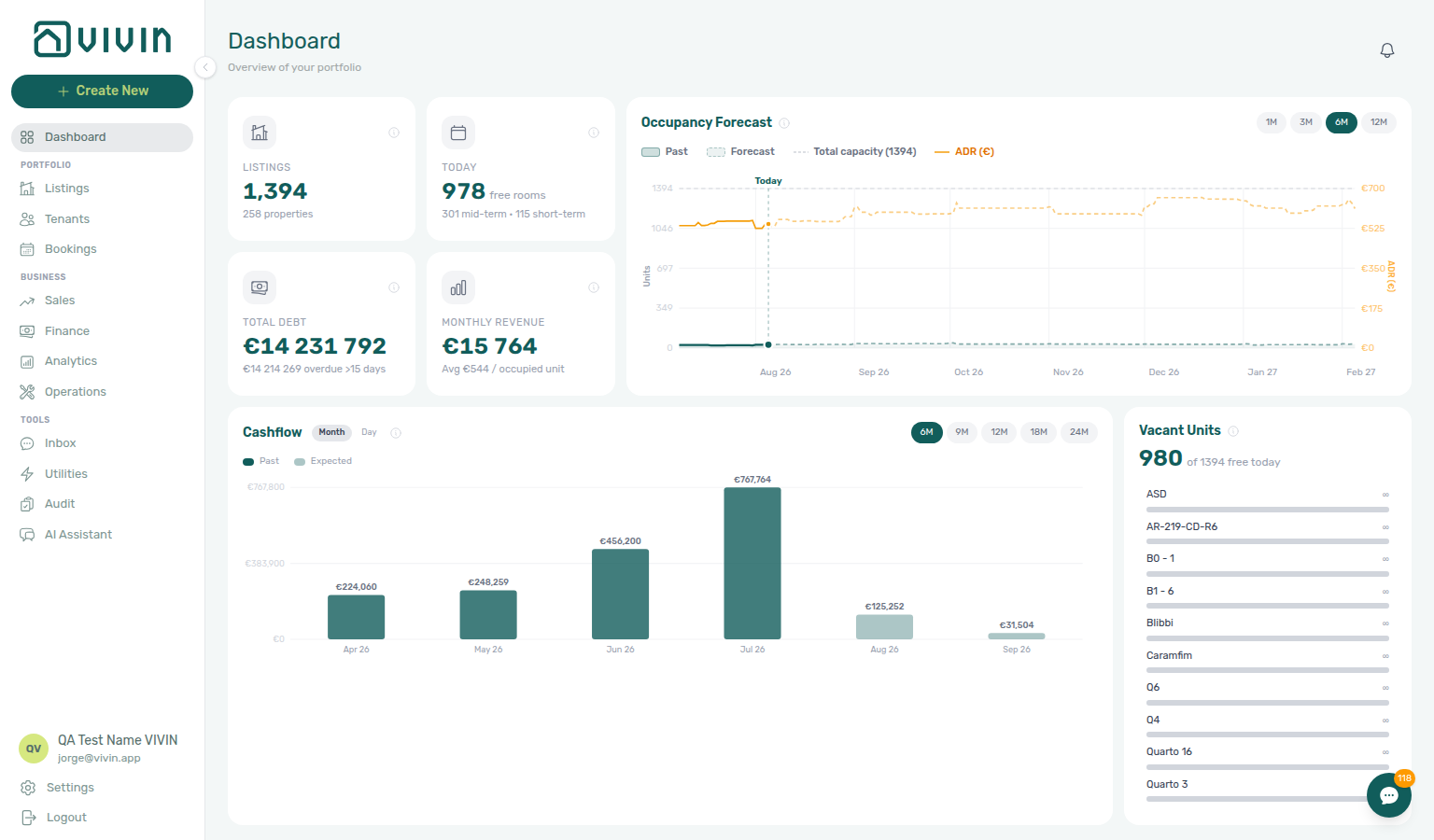
After you sign in, the Dashboard is the default landing view. The same management shell — left navigation, workspace, and account controls — stays consistent as you move between modules:
Who This Guide Is For
Audience and role context here pairs with How to Use This Guide (which section to open first) and Key Platform Capabilities (module map). Administrators onboarding a workspace should continue to Getting Started — Recommended Setup Sequence.
This documentation is designed for property managers, operations teams, and administrators who use Vivin daily. It assumes no prior technical knowledge and explains all features in clear, accessible language.
How to Use This Guide
Use this map with Key Platform Capabilities when you need a module or concept name before diving into Modules or Concepts. Escalation paths: Get Help & Support and Using in-app support.
This guide is organized into these sections:
- Getting Started — Interface layout, core terminology, and the Recommended Setup Sequence (steps 1–12 Account Settings tab map: Recommended setup order; steps 13–15 Listings, Bookings, Tenants; go-live: Onboarding a New Property — Step 7)
- Management Frontend Deep Links — Bookmarkable
platform.vivin.approutes for modules, tabs, settings, and entity sidebars (pair URLs with screenshots on that page) - Modules — Detailed documentation for each core feature of the platform
- Concepts — In-depth explanations of how key systems work (booking lifecycle, payment allocation, integrations, in-product AI, and Landlord / Tenant MCP for external AI clients)
- Common Workflows — Step-by-step guides for frequently performed tasks
- Account Settings — Configuration reference for your entire workspace
- API Reference — HTTP authentication, listings, bookings, webhooks, and error handling for integrations
- Get Help & Support — Escalation paths: email, status page, and in-app Vivin tickets when your role has Support access (includes product screenshots of the help entry points)
- Using in-app support — Vivin support tickets inside the management app when your role has the Support permission (separate from Operations tickets you raise for your own properties)
- Glossary & FAQ — Key terms and answers to common questions (including invoiced floor (rent) and credit note follow-up when Finance already exported charges)
If you are setting up Vivin for the first time, start with the Getting Started guide.
Key Platform Capabilities
Module rows below link into Modules screen docs; platform-wide rows pair with Concepts and API Reference. Bookmark daily routes from Management Frontend Deep Links after you know your workflow.
Core Modules
| Module | What It Does | Learn More |
|---|---|---|
| Dashboard | Real-time KPIs plus occupancy and cash-flow forecasts, with a Vacant Units panel to prioritise leasing actions | Dashboard |
| Listings | Your property portfolio inventory — create and manage properties and their individual units | Listings |
Legacy /properties URLs | Older bookmarks under /properties redirect into Listings; portfolio editing is in Listings | Properties (legacy URLs) |
| Bookings | Manage all tenant reservations — list and timeline views, payment plans, contracts, and booking lifecycle | Bookings |
| Inbox | Portfolio-wide WhatsApp workspace at /inbox — all tenant conversations, labels, pause-bot, and a reply composer synced with each booking’s Communication tab | Inbox |
| Tenants | Tenant-first workspace for profiles, activity status, booking history, and debt visibility | Tenants |
| Sales | Portfolio availability and monthly rent editing, plus channel status for linked marketplaces | Sales |
| Finance | Automate invoicing and payment tracking with virtual IBANs, credit card payments, and financial dashboards | Finance |
| Analytics | Portfolio KPI workspace (Overview, Revenue, Occupancy, ADR, RevPAR, Maintenance) for a configurable date range — separate from Sales calendar pricing | Analytics |
| Audit | Portfolio-wide table of manual availability blocks (/audit, Tools) so stale holds do not quietly block revenue — same Listings permission as the inventory workspace | Audit · Deep Links — Audit |
| Operations | Coordinate day-to-day tasks — maintenance tickets, check-in/check-out management, and operational cash flows | Operations |
| Utilities | Track utility expenses with AI-powered invoice reading and automated tenant billing | Utilities |
| Notifications | Full notification history at /notifications (search, read/unread filters); on desktop Dashboard, the header bell slide-over splits General alerts and Inbox message pings; operator Payments category rows include payment overdue alerts that row-click into the related booking | Notifications |
| AI Chat | Conversational assistant for portfolio questions (roles granted AI / MCP; see module doc for access) | AI Chat |
| Property & listing details (booking engine) | Rich content and booking-engine configuration for properties and units, edited from Listings (Full integration pill) | Booking engine details |
Platform-Wide Capabilities
Beyond the core modules, Vivin includes several platform-wide capabilities:
| Capability | What It Does | Learn More |
|---|---|---|
| Integrations & Distribution | Connect with every major European rental marketplace and distribute across all channels from one place | Integrations & Distribution |
| Automation & AI | Tenant support automation (WhatsApp and email), operator AI Assistant (internal), predictive analytics, and booking-to-contract pipelines | Automation & AI |
| Tenant Portal | White-labelled web portal for tenants to view contracts, pay rent, and submit maintenance requests | Tenant Portal |
| Tenant Services Marketplace | Cross-sell and upsell services (cleaning, gym, insurance, etc.) directly to tenants | Services Marketplace |
Integrations & Developers
| Topic | What It Covers | Learn More |
|---|---|---|
| API Reference | REST endpoints for listings, availability, booking creation, webhooks, and integration error handling | API Reference |
| AI usage ledger | Account-scoped internal LLM token cost (GET /ai-usage, GET /ai-usage/summary) for landlord_chat (AI Assistant) and utility_bill_extraction (Utilities PDF reader) — no management UI screen yet | AI usage API · FAQ — How do I see AI token usage for my account? |
| MCP (AI clients) | Model Context Protocol servers that expose Core-backed tools to external assistants — Landlord MCP for account-scoped portfolio operations, Tenant MCP for booking-scoped tenant automation | Landlord MCP · Tenant MCP |
What Makes Vivin Different
Platform differentiators here pair with Key Platform Capabilities (module and integration map) and Platform-Wide Capabilities (tenant portal, automation, distribution). First-time configuration: Getting Started — Recommended Setup Sequence and Optional setup deep dives.
- AI-Driven — From smart invoice reading and tenant chatbots to the operator AI Assistant (internal) and portfolio analytics, automation is woven through the platform to reduce manual work and improve decision-making.
- Flexible — Configurable per property, per unit, and per booking. Adapt contract types, payment rules, fee structures, and channel distribution to match your business model.
- Automated — End-to-end workflows from booking confirmation to signed contract, from utility bill to tenant charge, from payment reminder to collection — all without manual steps.
- Scalable — Manage 10 or 1,000 units from the same dashboard. Multi-property, multi-channel, multi-team support built in from day one.
Introduction section cross-reference
Use the headings in this page for the topic you need. Related modules and workflows are linked from individual answers where they help the next step.
Introduction hub subsection index
This index pairs capability tables and Related hub subsections — use it when platform overview spans modules, setup, concepts, or escalation.
Related
Related below is the documentation map when platform overview spans setup, modules, workflows, or escalation.
Setup sequence after go-live
Post-go-live pairing starts with Getting Started — Recommended Setup Sequence (steps 1–15) and Onboarding a New Property — Step 7. When a step is blocked, continue to Support — Setup sequence escalation.
- Setup steps 1–3 (General Information, Preferences, Users) — Complete before Onboarding a New Property; greyed-out + Create New rows usually mean step 3 permissions are missing (FAQ — Navigation & shortcuts)
- Setup steps 4–12 — Onboarding a New Property (property wizard Steps 1–6 mirror settings configuration; Steps 1–6 of the workflow walk owners through integrations)
- Setup steps 13–15 (Listings, Bookings, Tenants) — First operational data; pair with Processing a New Booking once reservations exist
- After steps 13–15 — Onboarding a New Property — Step 7 go-live verification before you escalate Listings/Multicalendar display defects
- Optional setup sections on Getting Started — Optional setup deep dives map to workflows: Entering Monthly Utility Bills (Utilities & Bills Included), Managing a Check-in / Managing a Check-out (Operations, tickets & cash flows), Handling a Late Payment (Finance & Tenants), Notification triage (Communication, Sales & alerts), Portfolio KPI review (Dashboard & portfolio KPIs), Manual block hygiene (Audit & Account Settings)
- When a settings tab, property wizard step, or module permission still blocks progress after self-serve docs, open Get Help & Support or Using in-app support — cite the matching setup step and pair with Support — Setup sequence escalation
Documentation map & escalation
- Getting Started — Interface layout, session behaviour, and the Recommended Setup Sequence hub (steps 1–12 Account Settings: Recommended setup order; steps 13–15 Listings, Bookings, Tenants) before you add inventory; Lockout catch-up after password recovery when sign-in was restored mid-onboarding;
- Onboarding a New Property — Guided walkthrough of setup steps 4–12; Step 7 — Verify in Listings after steps 13–15
- Modules — Screen-by-screen reference for each management workspace (see Core Modules and Key Platform Capabilities above for the module map);
- Concepts — Underlying models (booking lifecycle, payment allocation, integrations, MCP);
- Common Workflows — Step-by-step guides for day-to-day operator tasks
- Account Settings — Workspace-wide configuration that shapes module behaviour; setup sequence tab map: Recommended setup order and Tab cross-reference;
- Common Workflows — Task-oriented guides that depend on settings configured during setup (hub: Common Workflows section cross-reference, Setup sequence after go-live)
- API Reference — HTTP contracts for partners and custom integrations (including partial vs full feeds);
- Management Frontend Deep Links — Bookmarkable
platform.vivin.approutes paired with module screenshots - Glossary — Short definitions for terms used across this site (hub: Glossary cluster cross-reference, Setup sequence vocabulary, Setup sequence after go-live)
- FAQ & Troubleshooting — Quick answers when something does not match expectations (hub: FAQ — Section cross-reference, Setup sequence after go-live; including Settings & tenant communications during steps 10–12)
- Get Help & Support — Escalation paths when a setup tab, wizard step, or daily operations block you (hub: Support — Section cross-reference, Setup sequence after go-live, Setup sequence escalation)
- Using in-app support — Vivin product tickets when platform behaviour is unclear (distinct from Operations tickets)
Navigation & bookmarks
Bookmark routes pair with Key Platform Capabilities module names and Management Frontend Deep Links. Missing records: Create New menu.
- Management Frontend Deep Links — Bookmarkable module routes, tab anchors,
/notificationsvs Dashboard bell, and booking-engine details query params - Create New menu — Global + slide-out shortcuts into module modals (tenants, bookings, properties, tickets, and more); payment overdue after Booking or Transfer → Handling a Late Payment — Step 1
- FAQ — Permission denied toast — Red You do not have permission to perform this action. toast when RBAC blocks a save; fix in Users → Role Permissions
- Deep Links — Account Settings —
/settings/*tab routes paired with workspace configuration in Account Settings - Settings > Interface language — Personal UI locale before you share deep links with multilingual operators
Settings that shape platform behaviour
Getting Started — Recommended Setup Sequence steps 1–12. Tenant segments: Settings > Tenant categories.
- Settings > Preferences — In-app notifications — Account-wide alert categories that shape Dashboard bell and
/notificationsbehaviour - Settings > Tenant categories — Segment portal modules and integration defaults before daily module work across the portfolio
- Settings > Services — Operator catalogue for tenant portal add-ons configured during or after setup
- Settings > Emails — Communication Rules and lifecycle templates hub for automated tenant outreach
- Settings > Integrations — Marketplace connections, invoicing providers, and calendar feeds alongside partner API keys
- Settings > Invoicing & Payments — Due dates, deposit rules, and export providers that shape Finance and booking payment plans
- Settings > Interface language — Personal UI locale for operators who triage alerts and deep links in multiple languages
Deeper concept reads
Platform-Wide Capabilities, and Integrations & Developers. Tenant-facing: Tenant Portal. External AI: Landlord MCP vs Tenant MCP.
- Payment Allocation — Two-layer payment model, invoiced floor, and credit note reject/revert warnings
- Booking Lifecycle — Computed Upcoming → Ongoing → Ended / Canceled status model, list filters, and Timeline
- Create New menu — Universal quick-create panel for properties, bookings, and Operations tickets; payment overdue after Booking or Transfer → Handling a Late Payment — Step 1
- Tenant Portal — Booking-scoped self-service (payments, contract signing, maintenance Requests, Services catalogue); segment gates: Portal access by tenant category
- FAQ — Tenant contract signing blocked — No PDF yet, mandatory Your Details gates, category locks, or Lease purpose; portal signing vs paper upload on Contract Info
- Services Marketplace — Operator catalogue and tenant Request Service flows on the payment plan; pairs with Settings > Tenant categories per segment
- Landlord MCP · Tenant MCP — External AI clients that wrap the same Core API as the management app (see also Integrations & Developers above) (Landlord MCP section cross-reference, Tenant MCP section cross-reference; hub)
Recommended operator workflows
- Onboarding a New Property — Guided walkthrough of Getting Started — Recommended Setup Sequence steps 4–12; finish with Step 7 — Verify in Listings after setup steps 13–15
- Resetting a Management User Password — Recover management sign-in; after Step 3, continue with Getting Started — Lockout catch-up after password recovery
- Processing a New Booking — Booking lifecycle and payment allocation when a reservation is first created
- Portfolio KPI review — Weekly Finance + occupancy reconciliation (deposit disputes, pending manual receipts)
- Notification triage — Dashboard bell vs
/notificationswhen payment or booking alerts need follow-up; payment overdue → Handling a Late Payment — Step 1 - Handling a Late Payment — Collections workflow when Dashboard debt KPIs need follow-up; upstream path from Notifications — Payment overdue alerts
- Managing a Check-in — Arrival-week workflow after Upcoming lifecycle status
- Managing a Check-out & Deposit Refund — Departure-week settlement paired with Finance → Deposits
- Cancelling a Booking — Early termination workflow paired with normal check-out
- Entering Monthly Utility Bills — Monthly supplier billing paired with Bills Included and Utilities modules
- Manual block hygiene — Audit pass when occupancy deep links show unexpected blocks
Operator habit hubs
Day-to-day operator habits (lockout catch-up, pending receipts, payment triage, handoffs, and related playbooks) live on the Common Workflows habit hub.
Deep-link anchors for habit hubs
Lockout catch-up after password recovery
Notification row-click navigation
Payment alert to receivables triage
Finance debt receivables triage
Handling a Late Payment collections
Finance Income status drill-down
Cash flow forecast drill-down
Confirmation alert triage
Portfolio segmentation by tenant category
Pending manual receipt approval
Reject/revert mistaken receipts
Same-day turnover coordination
When a check-out and check-in share one unit on the same calendar day, run Managing a Check-out — Steps 1–2 on the departing stay before Managing a Check-in — Step 4 hands keys to the incoming guest.
- Common Workflows — Same-day turnover coordination — Hub matrix (
operations-check-in-out-check-outs-next-7-days.png,operations-add-ticket-modal.png,bookings-timeline-day-week-month-and-sidebar.mp4) - Operations module — Same-day turnover coordination — Check-in & Check-out week lists primary entry
- Bookings module — Same-day turnover coordination — Timeline Week scale overlap on one unit row
- Managing a Check-out — Step 2 — Turnover ticket before incoming Step 4
- Check-out collections before refund — Outgoing In Debt before incoming key handover
- Glossary — Same-day turnover — Shared-unit arrival/departure overlap definition
- FAQ — Same-day turnovers — Four-step operator habit
Check-out final utilities handoff
Departure-week final utility overages pair with Entering Monthly Utility Bills — Steps 2–4 before Managing a Check-out — Step 6 unlocks Ready To Refund.
- Common Workflows — Check-out final utilities handoff — Hub matrix (
utilities-allocations-review-flow.mp4,bookings-detail-payment-plan-tab-schedule.png,bookings-detail-deposit-tab-ready-to-refund-toggle.png) - Utilities module — Check-out final utilities handoff — Allocations / Bills canonical posting
- Bookings module — Check-out final utilities handoff — Payment Plan / Deposit tab settlement path
- Entering Monthly Utility Bills — Step 4 — Overage line verification before refund
- Managing a Check-out — Step 6 — Charge settlement gate before Step 5
- Same-day turnover coordination — Outgoing Step 6 before incoming key handover
- Glossary — End-of-Booking cost split — End of Booking charge time on final-cycle overages
- FAQ — Check-out final utilities handoff — Symptom table for final overage blocking refund
- Check-out collections before refund — Rent/fee arrears — distinct mesh
Check-out collections before refund
Departure-week rent/fee arrears pair with Handling a Late Payment — Steps 1–4 before Managing a Check-out — Step 5 unlocks Ready To Refund — distinct from utility Check-out final utilities handoff and duplicate Check-out ledger cleanup before refund.
- Common Workflows — Check-out collections before refund — Hub matrix (
workflows-check-out-coordination-flow.mp4,bookings-detail-payment-plan-tab-schedule.png,finance-contract-values-in-debt-filter.png,bookings-detail-deposit-tab-ready-to-refund-toggle.png) - Bookings module — Check-out collections before refund — Payment Plan / Deposit tab settlement path
- Finance module — Check-out collections before refund — Portfolio Contract Values In Debt filter for departure-week arrears
- Managing a Check-out — Step 6 — Charge settlement gate before Step 5
- Handling a Late Payment — Step 1 — Collections when Ready To Refund is blocked
- Check-out final utilities handoff — Utility overage lines — distinct mesh
- Pending manual receipt approval — Step 6b departure receipt mesh
- FAQ — Check-out collections before refund — Symptom table for rent/fee In Debt blocking Ready To Refund
- Check-out ledger cleanup before refund — Duplicate transfers — distinct mesh
Check-out ledger cleanup before refund
Departure-week duplicate departure transfers pair with Reject/revert mistaken receipts on booking Transactions before Managing a Check-out — Step 5 unlocks Ready To Refund — distinct from rent Check-out collections before refund and utility Check-out final utilities handoff.
- Common Workflows — Check-out ledger cleanup before refund — Hub matrix (
bookings-detail-transactions-revert-modal-info-banner.png,finance-transactions-bulk-reject-selected-bar.png,bookings-detail-deposit-tab-ready-to-refund-toggle.png) - Bookings module — Check-out ledger cleanup before refund — Transactions Reject / Revert on departure-week duplicates
- Finance module — Check-out ledger cleanup before refund — Portfolio Transactions bulk Reject selected
- Reject/revert mistaken receipts — Duplicate transfer cleanup before Ready To Refund
- Managing a Check-out — Step 6 — Canonical departure-week duplicate cleanup before Step 5
- Check-out collections before refund — Real arrears contrast (tenant did not pay)
- Pending manual receipt approval — Step 6b departure receipt mesh
- FAQ — Check-out ledger cleanup before refund — Symptom table for phantom In Debt / duplicate departure transfers
- Check-out vs cancellation — Ended vs Canceled lifecycle exit — distinct mesh
- Cancellation collections before void — Policy void — distinct mesh
Check-out vs cancellation
Lifecycle exit questions pair with Managing a Check-out for completed stays (Ended) vs Cancelling a Booking for policy voids (Canceled) — distinct from mistaken rows (Cancel Booking vs Delete Booking), departure-week Check-out collections before refund, and pre-cancel Cancellation collections before void.
- Common Workflows — Check-out vs cancellation — Hub matrix (
workflows-cancel-booking-refund-modal-flow.mp4,bookings-cancel-booking-modal-refund-types.png,bookings-list-canceled-tab.png,bookings-detail-deposit-tab-ready-to-refund-toggle.png) - Managing a Check-out — Step 7 — Normal completed stay → Ended
- Cancelling a Booking — Step 4 — Policy void → Canceled
- Bookings module — Check-out vs cancellation — Cancel booking modal, Canceled / Ended filters
- Finance module — Check-out vs cancellation — Deposits refund queue on both paths
- Check-out collections before refund — Departure-week arrears on Ended path
- Cancellation collections before void — Pre-cancel arrears on Canceled path
- FAQ — Check-out vs cancellation — Symptom table for Ended vs Canceled routing
Cancellation collections before void
Pre-cancel rent/fee arrears pair with Handling a Late Payment — Steps 1–4 before Cancelling a Booking — Step 4 unlocks policy void — distinct from departure-week Check-out collections before refund, duplicate Check-out ledger cleanup before refund, and utility Check-out final utilities handoff.
- Common Workflows — Cancellation collections before void — Hub matrix (
finance-contract-values-in-debt-filter.png,bookings-detail-transactions-approve-payment-modal.png,bookings-cancel-booking-modal-refund-types.png,workflows-cancel-booking-refund-modal-flow.mp4) - Cancelling a Booking — Step 2 — Canonical pre-cancel settlement before void
- Bookings module — Cancellation collections before void — Payment Plan unpaid lines before Cancel booking
- Finance module — Cancellation collections before void — Portfolio Contract Values In Debt filter
- Handling a Late Payment — Cancellation collections before void — Steps 1–4 before policy void
- Check-out collections before refund — Departure-week arrears contrast (completed stay)
- Check-out ledger cleanup before refund — Duplicate transfers contrast
- Pending manual receipt approval — Step 2a settlement receipt mesh
- FAQ — Cancellation collections before void — Symptom table for In Debt blocking Cancel booking
- Wrong tenant on a booking — Valid stay with wrong profile — distinct mesh
- Cancel Booking vs Delete Booking — Duplicate row vs policy void — distinct mesh
Wrong tenant on a booking
Valid Upcoming reservations linked to the wrong tenant profile pair with Change tenant on Contract Info — distinct from duplicate-row Cancel Booking vs Delete Booking (Delete Booking), policy void Check-out vs cancellation, and tenant master-data edits in the Tenants directory.
- Common Workflows — Wrong tenant on a booking — Hub matrix (
bookings-detail-change-tenant-control.png,bookings-detail-change-tenant-modal.png,bookings-detail-change-tenant-flow.mp4) - Bookings module — Wrong tenant on a booking — Change tenant control and reassignment guards
- Tenants module — Wrong tenant on a booking — Profile directory vs reservation reassignment contrast
- Processing a New Booking — Step 6 — Post-import profile check
- Processing a New Booking — Step 1 — Duplicate import → Delete, not Change tenant
- Cancel Booking vs Delete Booking — Duplicate row vs wrong profile decision table
- FAQ — Wrong tenant on a booking — Eligibility and symptom table
Cancel Booking vs Delete Booking
Mistaken or duplicate reservations pair with Delete Booking (soft-archive) while real policy voids pair with Cancel booking and its refund dialog — distinct from wrong-profile Wrong tenant on a booking (Change tenant), lifecycle exit Check-out vs cancellation, and building-level Portfolio retirement decisions.
- Common Workflows — Cancel Booking vs Delete Booking — Hub matrix (
bookings-cancel-booking-modal-refund-types.png,bookings-list-canceled-tab.png,finance-transactions-type-summary-cards.png,workflows-cancel-booking-refund-modal-flow.mp4) - Bookings module — Delete Booking (soft archive) — Soft-archive control on Contract Info
- Cancelling a Booking — Step 4 — Policy void → Cancel booking
- Processing a New Booking — Step 1 — Duplicate import → Delete Booking
- Finance module — Manual Transactions hidden after Delete Booking
- Wrong tenant on a booking — Valid stay with wrong profile — distinct mesh
- Check-out vs cancellation — Ended vs Canceled lifecycle exit — distinct mesh
- FAQ — Cancel Booking vs Delete Booking — Decision table and symptom routing
Portfolio retirement decisions
Unsure whether to Archive property on Listings → Portfolio, Cancel booking for a real void, or Delete Booking on one mistaken reservation — three scopes that pair with Cancel Booking vs Delete Booking for reservation-level void vs cleanup and Manual block hygiene before building sunsetting.
- Common Workflows — Portfolio retirement decisions — Hub matrix (
listings-archived-populated-table.png,listings-archived-unarchive-sidebar.png,bookings-cancel-booking-modal-refund-types.png,finance-transactions-type-summary-cards.png) - Listings module — Archived properties — Archive property / Unarchive on Listings → Portfolio
- Bookings module — Delete Booking (soft archive) — Mistaken-row cleanup at reservation scope
- Cancelling a Booking — Step 4 — Policy void → Cancel booking
- Manual block hygiene — Clear holds before building Archive
- Cancel Booking vs Delete Booking — Reservation void vs cleanup — distinct mesh
- Glossary — Archived property — Building scope vs reservation soft-archive
- FAQ — Portfolio retirement decisions — Three-way decision table and symptom routing
Archive property (building-level)
Building Archive on Listings → Portfolio retires a whole property from active pickers without deleting booking or finance history — pair Manual block hygiene before sunsetting and Portfolio retirement decisions when scope is unclear (Archive vs Cancel vs Delete).
- Common Workflows — Archive property (building-level) — Hub matrix (
listings-archived-populated-table.png,listings-archived-unarchive-sidebar.png) - Listings module — Archived properties — Archive / Unarchive danger zone on Edit property sidebar
- FAQ — Archive a property — Step-by-step Archive / Unarchive
- Manual block hygiene — Clear holds before building Archive
- Onboarding a New Property — Step 7 — Unarchive mistaken go-live Archive
- Portfolio retirement decisions — Three-way scope table when unsure Archive vs Cancel vs Delete
- Glossary — Archived property — Building scope vs reservation soft-archive
- Cancel Booking vs Delete Booking — Reservation void vs cleanup — distinct mesh
Utility overage collections
Mid-stay and month-end utility overage arrears pair with Entering Monthly Utility Bills — Steps 2–4 posting and Handling a Late Payment — Steps 1–4 collections — distinct from departure-week Check-out final utilities handoff.
- Common Workflows — Utility overage collections — Hub matrix (
utilities-allocations-row-breakdown-expanded.png,bookings-detail-transactions-approve-payment-modal.png,finance-contract-values-in-debt-filter.png,utilities-allocations-review-flow.mp4) - Utilities module — Utility overage collections — Allocations / Bills canonical posting before collections
- Finance module — Utility overage collections — Portfolio Contract Values In Debt filter for overage lines
- Entering Monthly Utility Bills — Step 4 — Overage line verification before collections
- Handling a Late Payment — Step 1 — Collections after bill posting
- Check-out final utilities handoff — Departure-week subset contrast (not only mid-stay mesh)
- Pending manual receipt approval — Step 4b / Step 6b overage receipt mesh
- FAQ — Utility overage collections — Symptom table for unpaid utility overage on Payment Plan
Property setup to first arrival handoff
Go-live inventory pairs Onboarding a New Property — Steps 1–7 with Managing a Check-in — Steps 1–4 about one week before the first guest moves in — finish Access Lockers, Tenant category, and portfolio verify on Step 7 before arrival-week planning.
- Common Workflows — Property setup to first arrival handoff — Hub matrix (
listings-property-edit-access-lockers-tab.png,workflows-operations-check-in-out-planning-view.png,workflows-onboarding-property-wizard.mp4) - Listings module — Property setup to first arrival handoff — Access Lockers and portfolio verify on go-live
- Operations module — Property setup to first arrival handoff — Check-in & Check-out Next 7 days after setup
- Onboarding a New Property — Step 7 — Upstream go-live verify before first arrival
- Managing a Check-in — Step 1 — Downstream arrival-week entry (~7 days out)
- New inventory to first booking handoff — Upstream first Upcoming reservation on new property
- Confirmation to check-in handoff — Portal gates between first booking and arrival week
- Glossary — Tenant category — Property-level defaults before portal gates
- FAQ — Property setup to first arrival handoff — Symptom table for go-live → first arrival week
New inventory to first booking handoff
Go-live inventory pairs Onboarding a New Property — Steps 1–7 with Processing a New Booking — Steps 1–6 to create or confirm the first Upcoming stay — finish Listings verify on Step 7 before duplicate checks or manual Add booking.
- Common Workflows — New inventory to first booking handoff — Hub matrix (
listings-module-overview.png,bookings-add-booking-modal.png,workflows-onboarding-property-wizard.mp4) - Listings module — New inventory to first booking handoff — Portfolio verify on go-live Step 7
- Bookings module — New inventory to first booking handoff — First Upcoming status tabs / Add booking on new inventory
- Onboarding a New Property — Step 7 — Upstream go-live verify before first reservation
- Processing a New Booking — Step 1 / Step 6 — Duplicate check and confirmation gates
- Property setup to first arrival handoff — Downstream ~7-day arrival planning after first booking
- Confirmation alert triage — First Booking created / Payment received alerts
- Glossary — Tenant category — Property-level defaults before portal gates
- FAQ — New inventory to first booking handoff — Symptom table for go-live → first reservation
Confirmation to check-in handoff
Upcoming Contract Info portal gates and Transactions confirmation receipts must clear via Processing a New Booking — Steps 5b–6 before Managing a Check-in — Step 1 (~7 days out).
- Common Workflows — Confirmation to check-in handoff — Hub matrix (
bookings-detail-contract-method-of-payments.png,workflows-operations-check-in-out-planning-view.png,booking-lifecycle-status-tabs-flow.mp4) - Bookings module — Confirmation to check-in handoff — Contract Info portal gates on Upcoming imports
- Operations module — Confirmation to check-in handoff — Check-in & Check-out Next 7 days after Step 6
- Processing a New Booking — Step 6 — Upstream portal sanity before handoff
- Managing a Check-in — Step 1 — Downstream arrival-week entry
- New inventory to first booking handoff — Upstream first Upcoming reservation
- Confirmation alert triage — Alert-driven entry before Step 6 portal checks
- Pending manual receipt approval — Step 5b confirmation receipts before handoff
- FAQ — Confirmation to check-in handoff — Symptom table for Upcoming → arrival week
Check-in to check-out handoff
Ongoing stays after Managing a Check-in — Step 4 key handover pair with Managing a Check-out — Step 1 departure-week planning (~7 days out).
- Common Workflows — Check-in to check-out handoff — Hub matrix (
operations-check-in-out-check-outs-next-7-days.png,bookings-timeline-view.png) - Operations module — Check-in to check-out handoff — Check-outs pill + Next 7 days on Ongoing stays
- Bookings module — Check-in to check-out handoff — Timeline departure bars on Ongoing rows
- Managing a Check-in — Step 4 — Upstream key handover prerequisite
- Managing a Check-out — Step 1 — Downstream departure-week entry
- Confirmation to check-in handoff — Upstream Upcoming → arrival week contrast
- Check-out final utilities handoff — Final overages before deposit release
- Same-day turnover coordination — Shared-unit departure + arrival same calendar day
- FAQ — Check-in to check-out handoff — Symptom table for Ongoing → departure week
Occupancy KPI to block hygiene handoff
Analytics Occupancy / RevPAR dips without a rate change pair Portfolio KPI review — Step 3 with Manual block hygiene — Steps 1–5 before you edit Sales → Pricing or account-wide Settings → Tenant categories.
- Common Workflows — Occupancy KPI to block hygiene handoff — Hub matrix (
analytics-kpi-occupancy-tab.png,audit-manual-blocks-workspace.png,audit-manual-blocks-filter-scroll.mp4) - Analytics module — Occupancy KPI to block hygiene handoff — Occupancy tab dip without rate change
- Audit module — Occupancy KPI to block hygiene handoff — Manual Blocks portfolio workspace
- Portfolio KPI review — Step 3 — Upstream Ranking dip signal
- Manual block hygiene — Step 1 / Step 5 — Downstream Tools → Audit pass and reconciliation
- Portfolio segmentation by tenant category — When segment — not holds — explains the dip
- Glossary — Manual unavailability (manual block) — Hold semantics before calendar edits
- FAQ — Occupancy KPI to block hygiene handoff hub — Symptom table for KPI dip → block hygiene
Walkthrough media
MP4 clips complement PNG screenshots on workflow and module guides — start at Common Workflows — Walkthrough media.
- Common Workflows — Walkthrough media — Canonical MP4 index for step-by-step operator guides
- Modules — Module pages with embedded clips (Analytics tab switching, Operations mobile shell, Finance drill-downs)
- Account Settings — Settings clips (ChatBot Save, Support new-ticket flow)
- Onboarding a New Property — Property wizard MP4 beside setup steps 4–12
- Booking lifecycle — Status filters and Timeline MP4 beside lifecycle concepts
Month-end invoicing (fixed date)
Month-end bulk export pairs with Settings > Invoicing — Default invoice date (save fixed Invoice date before Finance → Transactions bulk Issue allocation) and Bulk Hostkit invoicing on the same amber toolbar banner — turn Use today as invoice date back on after the batch.
- Common Workflows — Month-end invoicing (fixed date) — Hub matrix (
settings-invoicing-invoice-date-toggle.png,finance-transactions-fixed-invoice-date-banner.png,finance-transactions-bulk-toolbar-fixed-invoice-date-banner.png) - Settings > Invoicing — Default invoice date — Use today as invoice date toggle and saved Invoice date
- Finance — Month-end invoicing with a fixed date — Six-step operator habit on Transactions
- Portfolio KPI review — Month-end invoicing (fixed date) — Step 7 sign-off contrast
- Bulk Hostkit invoicing — Hostkit Issue allocation pacing on same bulk toolbar
- Pending manual receipt approval — Clear Pending mesh before month-end export
- Glossary — Fixed invoice date — Amber banner and account-wide document dating
- FAQ — Month-end invoicing (fixed date) hub — Symptom table + toggle reset after batch
Bulk Hostkit invoicing
Month-end Issue allocation / Invoice selected on many Finance → Transactions rows paces Hostkit API calls — pair Month-end invoicing (fixed date) for fixed Invoice date before bulk export.
- Common Workflows — Bulk Hostkit invoicing — Hub matrix (
finance-transactions-bulk-selection-bar.png,settings-invoicing-hostkit-series.png) - Settings > Integrations — Hostkit API pacing — Per-listing keys and HTTP 429 backoff
- Settings > Invoicing — Hostkit invoice series — FR series before bulk export
- Finance — Invoice automation — Bulk Issue allocation / Invoice selected toolbar
- Month-end invoicing (fixed date) — Fixed Invoice date + amber toolbar banner (
finance-transactions-bulk-toolbar-fixed-invoice-date-banner.png) - Portfolio KPI review — Bulk Hostkit invoicing — Step 7 month-end sign-off
- FAQ — Bulk Hostkit invoicing hub — Symptom table + per-guide mesh
- FAQ — Bulk Hostkit invoicing slow — HTTP 429 pacing — leave batch running; refresh Transactions before re-issue
Rent reduction after invoicing
Change monthly rent and Contract Values → Edit amount enforce the invoiced floor after Finance export — pair Bulk Hostkit invoicing when external rent relief surfaces Not issued credit note rows (Issue credit notes (N)).
- Common Workflows — Rent reduction after invoicing — Hub matrix (
bookings-detail-change-monthly-rent-modal.png,bookings-detail-contract-values-invoiced-floor-edit-amount.png,bookings-rent-reduction-invoiced-floor-flow.mp4) - Bookings — Changing contract dates and rent — Contract Info → Change monthly rent entry point
- Finance — Invoiced floor and rent edits — Why repricing starts on the booking, not Transactions
- Bulk Hostkit invoicing — Issue credit notes Hostkit pacing after external rent relief
- Month-end invoicing (fixed date) — Fixed Invoice date before first bulk export
- Portfolio KPI review — Rent reduction after invoicing — Step 7 month-end repricing sign-off
- FAQ — Rent reduction after invoicing hub — Symptom table + per-guide mesh
- FAQ — Lower rent below invoiced — Modal walkthrough + MP4
Deeper workflow reads
- Onboarding a New Property — Guided walkthrough of Getting Started — Recommended Setup Sequence steps 4–12
- Resetting a Management User Password — Recover management sign-in; continue with Getting Started — Lockout catch-up
- Processing a New Booking — Booking lifecycle and payment allocation when a reservation is first created
- Portfolio KPI review — Weekly Finance + occupancy reconciliation
- Notification triage — Dashboard bell vs
/notificationswhen alerts need follow-up - Handling a Late Payment — Collections when Dashboard debt KPIs need follow-up
- Using in-app support — Vivin product tickets when self-serve docs do not unblock progress
Modules where capabilities surface
Permission-gated modules: FAQ — Navigation & shortcuts.
- Dashboard — Post-login KPI snapshot and bell notification triage (default landing view) (guide subsection index; section cross-reference; Deeper workflow reads; hub)
- Analytics — Month-range portfolio KPI charts (Overview, Revenue, Occupancy, ADR, RevPAR, Maintenance) when your role includes Analytics access (guide subsection index; section cross-reference; Deeper workflow reads; hub)
- Bookings — Reservation lifecycle, Payment plan, Deposit, and Communication tabs; Other filters → Tenant category when accounts define segments (guide subsection index; section cross-reference; Deeper workflow reads; hub)
- Finance — Ledgers, payment approval, invoiced-floor guards, and Deposits; Other filters → Tenant category for month-end segment checks (guide subsection index; section cross-reference; Deeper workflow reads; hub)
- Listings — Property wizard, Channels, and Bills Included ceilings (guide subsection index; section cross-reference; Deeper workflow reads; hub)
- Properties workspace — Legacy
/propertiesURL redirects into Listings (guide subsection index; section cross-reference; Deeper workflow reads; hub) - Booking engine details — Rich marketplace payload editor via the Full integration pill (guide subsection index; section cross-reference; Deeper workflow reads; hub)
- Sales — Portfolio availability, monthly rent editing, and channel manager connections (guide subsection index; section cross-reference; Deeper workflow reads; hub)
- Tenants — Tenant directory, With Debt segmentation, profile sidebars, and Tenant category filter (guide subsection index; section cross-reference; Deeper workflow reads; hub)
- Utilities — Bills Included ceilings, supplier Connections, and AI bill upload (guide subsection index; section cross-reference; Deeper workflow reads; hub)
- Operations — Tickets, cash flows, check-in/out queues, and linked cash flows (guide subsection index; section cross-reference; Deeper workflow reads; hub)
- Inbox — Portfolio WhatsApp triage when chatbot rules escalate to operators (guide subsection index; section cross-reference; Deeper workflow reads; hub)
- Notifications — Full
/notificationshistory with search and row-click navigation; Payment overdue alerts when scheduled charges are overdue (guide subsection index; section cross-reference; Deeper workflow reads; hub) - Audit — Manual Blocks and Discounts during month-end reconciliation (guide subsection index; section cross-reference; Deeper workflow reads; hub)
- AI Chat — AI Assistant paired with Landlord MCP and Automation & AI (guide subsection index; section cross-reference; Deeper workflow reads; hub)
Key glossary terms
- Invoiced floor (rent) — Rent edits on live bookings after Finance export
- Credit note (payment reject/revert) — Finance Transactions reject/revert accounting follow-up; concept walkthrough: Payment Allocation — Correcting mistaken receipts; workflow hub: Common Workflows — Reject/revert mistaken receipts
- Deposit dispute — Finance → Deposits and booking Deposit tab freeze before refund
- Glossary — End-of-Booking cost split — Charge Time → End of Booking splits daily overage across every occupied unit; still-staying roommates stay in the denominator
- Glossary — Change history — Operator-initiated edits on Listings setup and Bookings Changelog; create-time defaults excluded
- Glossary — Archived booking ledger visibility — Delete Booking hides manual/provider_platform rows on Finance → Transactions; vIBAN and credit card stay visible
- Glossary — Full term list