Dashboard
You land on Dashboard after sign-in, but complete Getting Started — Recommended Setup Sequence (steps 1–12 per Recommended setup order, then steps 13–15 in Listings, Bookings, and Tenants) before you rely on KPI cards for account-wide decisions. After go-live, pair daily triage with Portfolio KPI review and Notification triage. Lockout catch-up: Getting Started — Lockout catch-up after password recovery.
Start with KPI cards (top-left grid) for the daily snapshot, then Occupancy Forecast and the second-row Cash Flow Forecast + Vacant Units. Triage the Notifications bell (desktop) into Notifications and follow Recommended daily operator flow for the standard scan order. Guide subsection map: Dashboard guide subsection index (widget sections + Related subsections). Habit-specific shortcuts live under Related below.
The Dashboard is the first screen after login and gives operators a live snapshot of portfolio performance and financial health.
Reconcile KPI cards with Analytics month-range charts and Finance Debt Aging; pair Sales occupancy heatmaps when Vacant Units disagrees with channel availability. When Total Debt or Monthly Revenue spikes for one tenant segment, scope Finance — Tenant category filter (or Bookings — Other filters) before account-wide rate or portal changes — same habit as Portfolio KPI review — Step 6. Poll AI usage API during Portfolio KPI review — Step 7 when landlord_chat or utility_bill_extraction volume should explain operational cost alongside debt reconciliation. When the header bell or /notifications surfaces a payment overdue row, continue with Handling a Late Payment — Step 1.
Open the Dashboard directly at platform.vivin.app or platform.vivin.app/. See Deep Links for all management frontend routes.
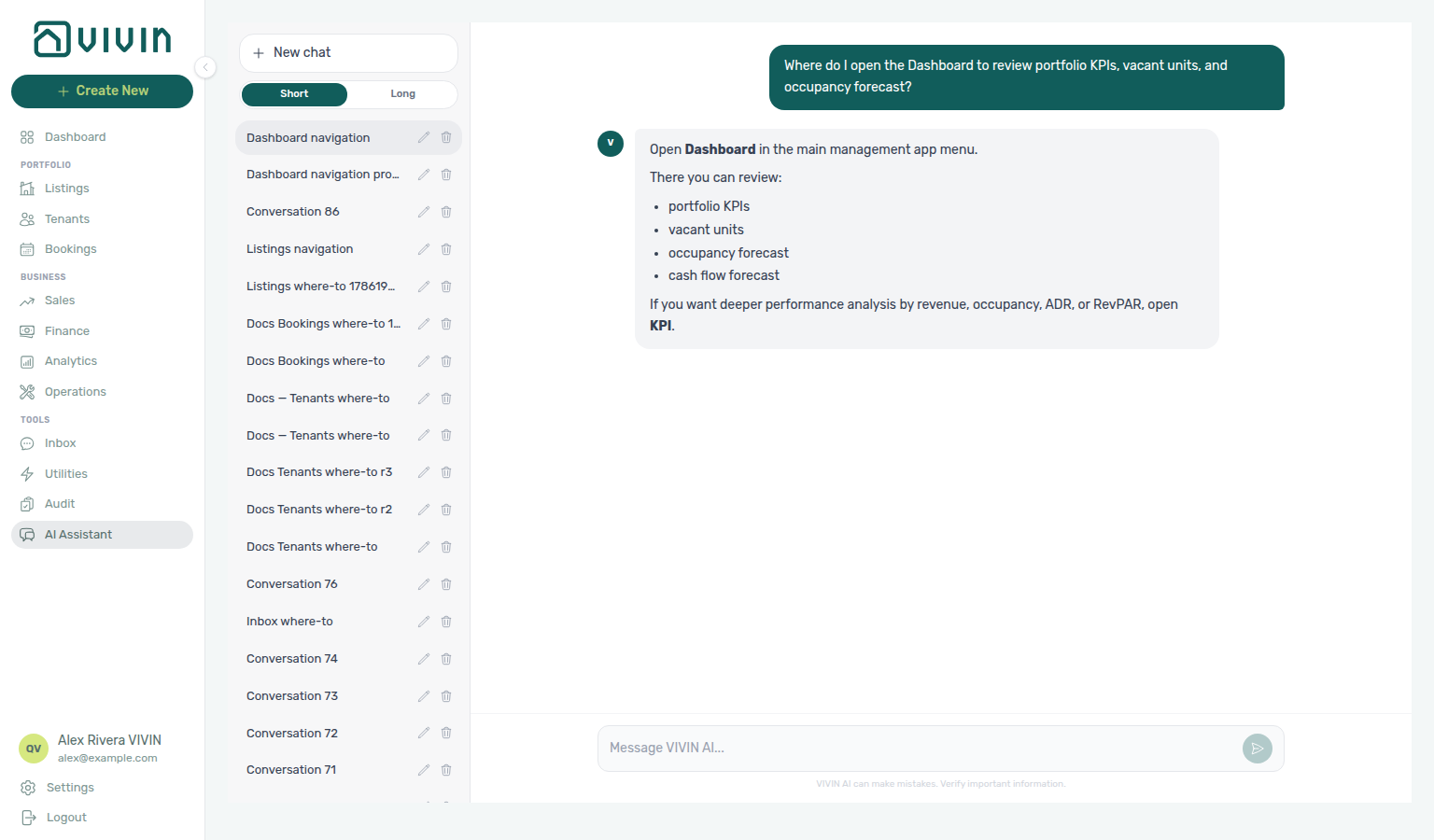
Not sure which screen is the daily portfolio pulse? Ask AI Chat “Where do I open the Dashboard to review portfolio KPIs, vacant units, and occupancy forecast?” — then open Dashboard (ai-chat-product-context-dashboard-reply.png, ai-chat-product-context-dashboard-flow.mp4). The assistant may point deeper ADR/RevPAR analysis at KPI; the sidebar label for those charts is Analytics. Ledgers stay on Finance. Habit: Portfolio KPI review.
Need the daily portfolio pulse — KPI cards, vacant units, and occupancy forecast (not Finance cash/debt ledgers, and not Analytics month-range charts)? Ask AI Chat “Where do I open the Dashboard to review portfolio KPIs, vacant units, and occupancy forecast?” — then open Dashboard (ai-chat-product-context-dashboard-reply.png, ai-chat-product-context-dashboard-flow.mp4). The assistant typically says Dashboard in the main management menu (and may point deeper analysis at KPI / Analytics). Canonical route: / (home after sign-in).
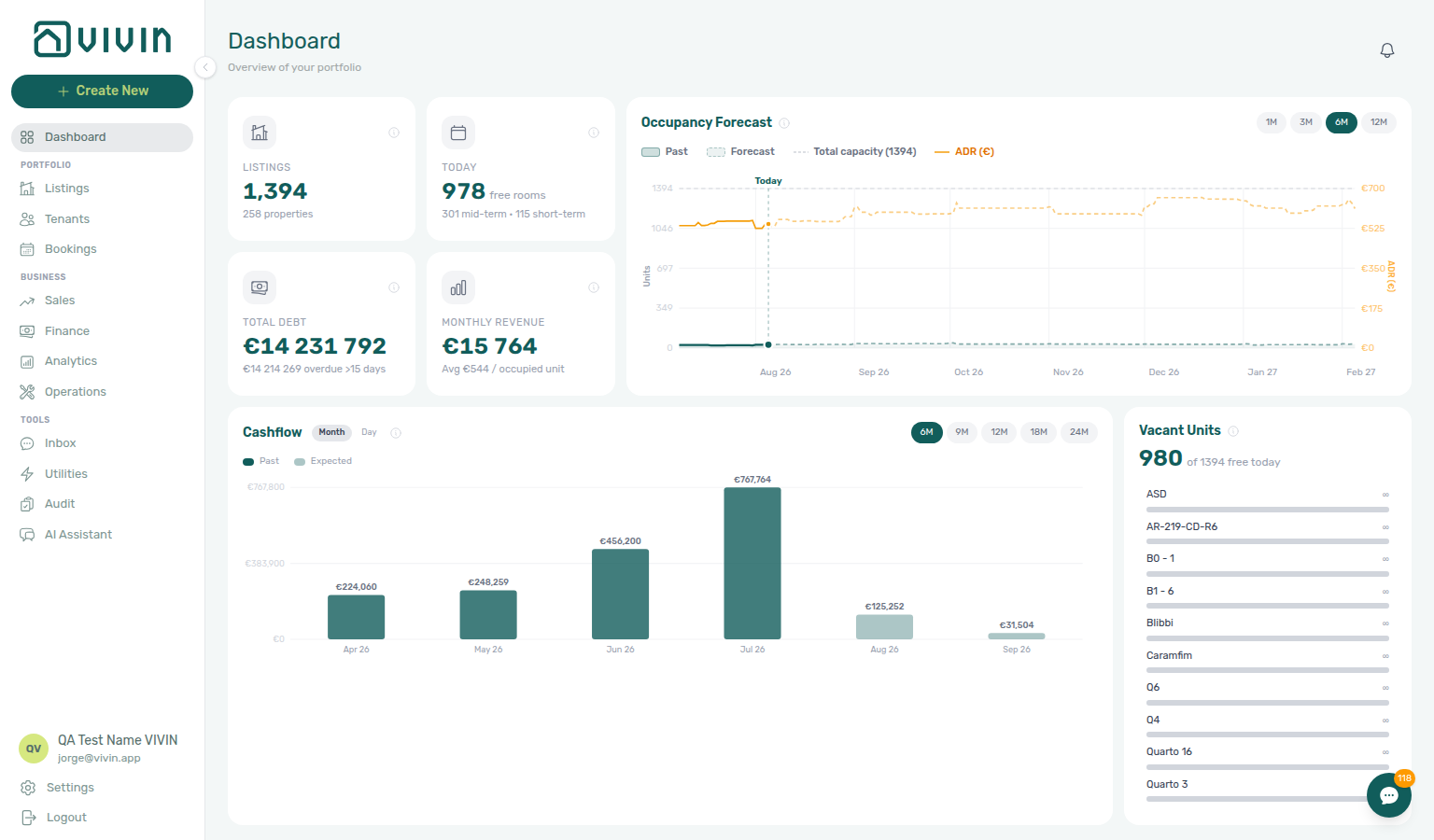
The capture above emphasizes the top row (KPI cards + Occupancy Forecast). On shorter laptop screens the main workspace may require a small downward scroll to bring Cash Flow Forecast and Vacant Units into view — they stay on the same / route, not a separate page. The image in Vacant Units shows the second row with the full management shell at desktop width.
The current layout is organized into two rows:
- Top row: four KPI cards + Occupancy Forecast
- Bottom row: Cash Flow Forecast + Vacant Units
Partial data refresh
If portfolio numbers look stale, use Retry on the banner (or reload the page) before escalating — see FAQ & Troubleshooting.
When shared Dashboard stats need a refresh, a banner under the page header offers Retry. Other widgets that already rendered may stay visible — refresh before treating KPI figures as current.
KPI cards (top-left grid)
Total Debt and Monthly Revenue pair with Finance — Overview and Handling a Late Payment — Step 1 when payment overdue alerts row-click into bookings; Today pairs with Sales — Overview and Vacant Units. Segment spikes: Finance — Tenant category filter.
Card-by-card definitions and committed PNG closeups: Glossary — Dashboard KPI cards. Distinct from the seven-card Finance → Overview strip.
The KPI card area contains these four cards:
| UI label | What it tells you |
|---|---|
| Listings | Total number of rentable listings. Subtitle shows the number of properties. |

| Today | Headline: how many listings count as free rooms today (suffix free rooms in the UI). Subtitle: only when at least one occupied-side bucket is non-zero, the card shows mid-term stays, short-term (channel) stays, and manual blocks (manual or channel calendar blocks), each as its own segment joined by ·; segments with zero are omitted, so an all-free day often has no subtitle line. Hover the card’s info icon for the full rules (each listing counted once; calendar rows tied to a booking are ignored for these subtitle totals). Refunded-but-active stays still count as occupied for this headline so the free-room count matches Sales → Overview and Multicalendar Available now — revenue and debt KPIs on the same page keep using non-refunded booking sets. |
The Today count is recomputed on each page load so it stays aligned with Sales → Overview Today and Multicalendar → Available now, even when other Dashboard widgets still come from cached snapshots refreshed on a schedule. After a booking ends, is canceled, or a manual block is added, refresh the page (or wait for the toolbar refresh indicator) before you treat a stale free-room number as authoritative. When Preferences → Vacant Unit Preference is Include manual blocks, manually blocked but unbooked listings count toward Today the same way they do on Sales → Available Now; OTA/iCal blocks and booking-linked holds still occupy the unit.

| Total Debt | Total tenant underpayment (negative balance) summed for ongoing bookings only — same notion Finance uses for “total debt” on live stays. Subtitle shows the € amount of that debt on bookings older than 15 days (not the whole debt figure repeated). Hover the info icon for the in-app definition of ongoing bookings and overdue debt. |
| Monthly Revenue | Sum of monthly rent from ongoing bookings. Subtitle shows average monthly rent per occupied unit; the card tooltip also notes month-over-month trend. |

Use these cards for a quick daily check of supply, utilization pressure, and receivables risk.
Card titles and segments such as free rooms, mid-term, short-term, and manual blocks follow your interface language — the behaviour described here matches the English management app.
The Total Debt KPI matches Finance’s “total debt” logic for ongoing bookings. The card subtitle is the portion of that ongoing debt on stays older than 15 days — see FAQ — Dashboard Total Debt subtitle — hover the info icon for the in-app rules (illustrated in dashboard-kpi-total-debt-tooltip.png). Until Approve payments clears pending manual receipts, headline and subtitle may lag recorded bank deposits — FAQ — Pending manual in-payment on /notifications, Glossary — Pending manual in-payment (Finance). The Finance Overview Total Debt card uses the same balance rule but includes ended bookings in the all-time headline — use Finance > KPI strip for the full receivables picture, Uncovered Debt, and Manual Payments context, and the Dashboard card for live-portfolio risk at a glance. For booking-level rows, open Debt Aging on Finance — FAQ — Bookings that owe money. Reconcile both during Portfolio KPI review — Dashboard Total Debt subtitle, Notification triage — Step 4 (alert-driven entry), and Handling a Late Payment — Step 1. See FAQ — Dashboard Total Debt subtitle, Glossary — Dashboard KPI cards, and Glossary — Uncovered Debt.
Occupancy Forecast
Occupancy gaps here pair with Analytics — Occupancy tab, Sales — Multicalendar, and Manual block hygiene when blocks suppress counts — reconcile during Portfolio KPI review — Step 6.
Chart behaviour, horizon controls, and ADR (€) legend: Glossary — Occupancy Forecast (Dashboard). Distinct from month-range Analytics — Occupancy and from Finance Overview cash flow (collections history).
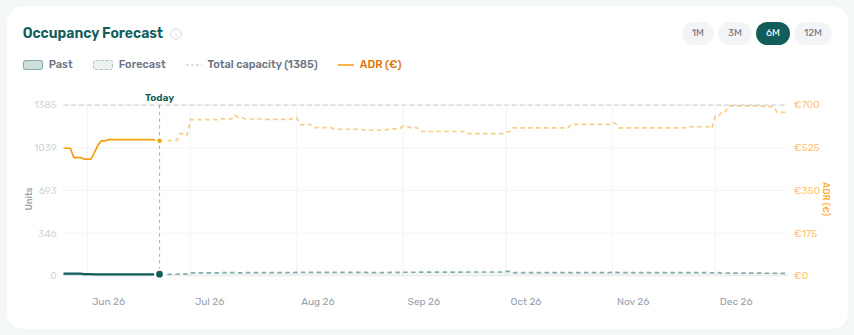
The Occupancy Forecast chart (top-right) combines a short Past strip with a Forecast segment on one continuous timeline.
- Past and Forecast share the same date axis; the vertical “today” marker separates them.
- Each day shows how many listings count as occupied from active (non-canceled) bookings, using each booking’s occupancy span (including listing unavailability windows when they apply).
- Legend/context lines include Total capacity and ADR (€) — ADR is the average monthly rent among units counted occupied that day.
- Horizon buttons 1M, 3M, 6M, 12M set how far forward the chart runs in calendar months from today (not a fixed “months × 30 days” window).
Both forecast charts use the same timeline math:
- Forward: through the end of N calendar months from today (matching the selected 1M / 3M / 6M / 12M).
- Past: a short look-back whose length scales with that selection but stays capped so longer horizons (for example 6M or 12M) do not stretch the past portion of the axis unrealistically.
Hover the chart title’s info icon in the product for the in-app summary.
Use this chart to identify upcoming occupancy gaps and compare them with expected pricing efficiency.
Cash Flow Forecast
Rent-due timing pairs with Finance — Contract Values and Settings > Invoicing & Payments — Payment deadlines — distinct from Operations — Cash Flows expenses. The same hybrid Past / Expected series also appears on Finance — Cash flow forecast (Cash flow forecast drill-down). Collections follow-up: Handling a Late Payment.
Rent-due timing chart vs Operations expenses and Finance collections: Glossary — Cash Flow Forecast (Dashboard).
Cash Flow Forecast here is the Dashboard rent-due chart only. Operations → Cash Flows is a different feature: booking-unrelated income and expense lines your team records. The Glossary spells out both under Cash Flow and Cash Flow Forecast (Dashboard) (letter C).
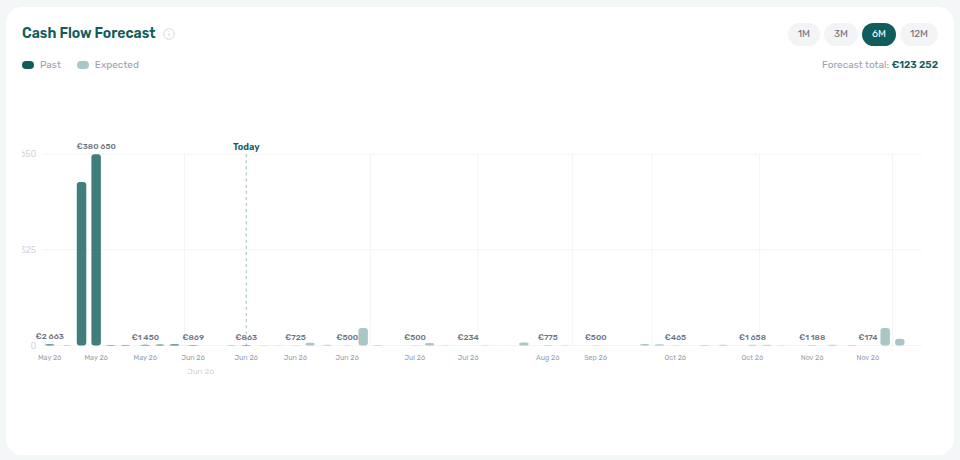
The Cash Flow Forecast chart (bottom-left) visualizes expected rent on each calendar day in the same timeline window as Occupancy Forecast.
- For each day, the chart sums monthly rent from active (non-canceled) bookings whose contract covers that day and whose due day (rent collection day) matches that calendar date — so spikes align with when rent is due, not necessarily when cash is banked.
- Past (darker bars) vs Expected (lighter bars) follows the today marker; amounts before today are still “expected” in the modeling sense but styled as historical context.
- The horizontal axis compresses days with zero due rent and expands days with payments so due dates stay readable when the range is long.
- Forecast total (top-right of the chart card) is the sum of expected amounts from after today through the end of the selected forward window.
- Uses the same 1M / 3M / 6M / 12M horizon controls as Occupancy Forecast.
Hover the chart title’s info icon for the in-app explanation.
Use this chart to estimate near-term cash availability and spot weaker collection periods.
Vacant Units
Vacancy prioritization pairs with Listings — unit sidebar, Sales — Availability popover stays on the day you clicked (day or bar click on Availability over time, not this today-only list), and Audit when Manual block hygiene explains suppressed Today counts.
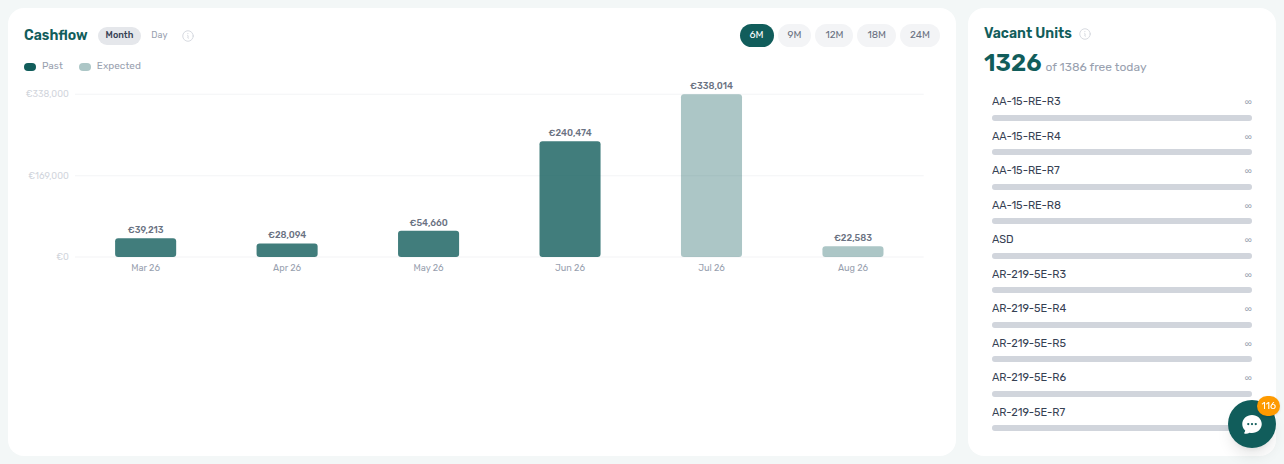
The Vacant Units panel (bottom-right) highlights listings that are free today: no active booking and, by default, no manual block on that listing. When Preferences → Vacant Unit Preference is Include manual blocks, a manually blocked but unbooked unit can appear here (physical-occupancy view); OTA/iCal blocks and booking-linked unavailabilities still exclude the row. For a specific future day (or a fortnight / month bucket), use Sales → Overview → Availability over time instead — that popover stays on the period you clicked. Illustrated panel behaviour: Glossary — Vacant Units (Dashboard).
- Headline value shows how many units are free today.
- List is sorted by consecutive free days from today (longer projected availability appears first).
- Each row includes a relative vacancy bar for quick prioritization.
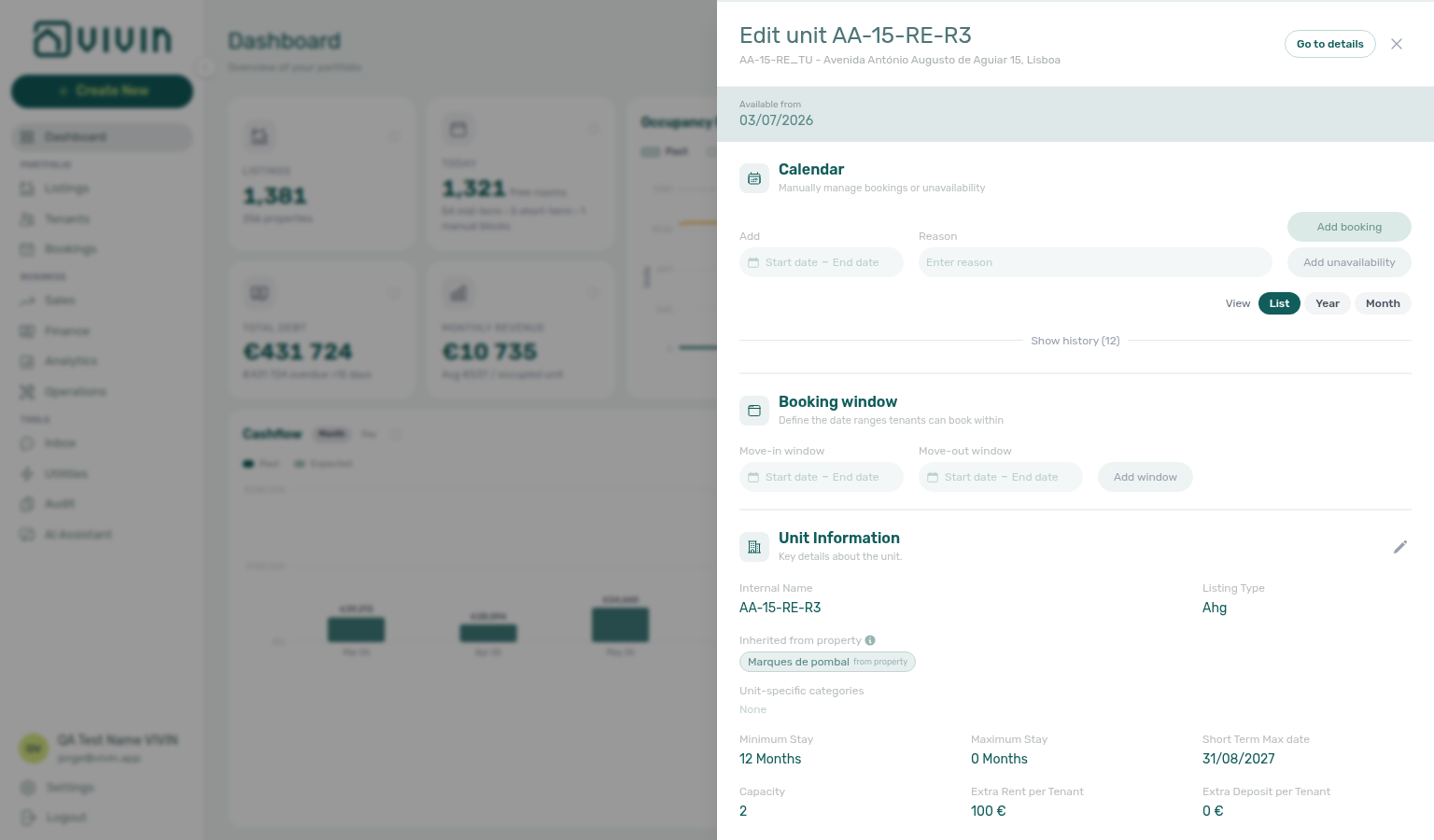
- Click a row to act on that unit without leaving the Dashboard:
- Roles with Listings edit access open the same listing edit sidebar used in the Listings module in place over the Dashboard (availability, pricing, and setup fields — close with the sidebar’s dismiss control to return to the snapshot).
- View-only listing access (no edit permission) navigates to the deep-linkable unit route
/listings/unit/:listingIdinstead.
Use this panel to prioritize commercial actions on units with prolonged vacancy, then open the listing sidebar or unit page directly from the row you care about.
When Today or Vacant Units counts look lower than Sales or Analytics occupancy suggests, run Manual block hygiene or cross-check Audit for stale manual blocks that still suppress availability — see Portfolio KPI review.
Notifications bell (desktop)
Bell triage pairs with Notifications module, Inbox module (Inbox sub-tab), and Notification triage — payment overdue rows on General continue to Handling a Late Payment — Step 1. Most General bell rows open Notification detail in-panel; use /notifications for row-click into Bookings / Tenants / Listings — see Notification row-click navigation, Payment alert to receivables triage, Confirmation alert triage, FAQ — Notification row-click navigation, and Glossary — Notification row navigation.
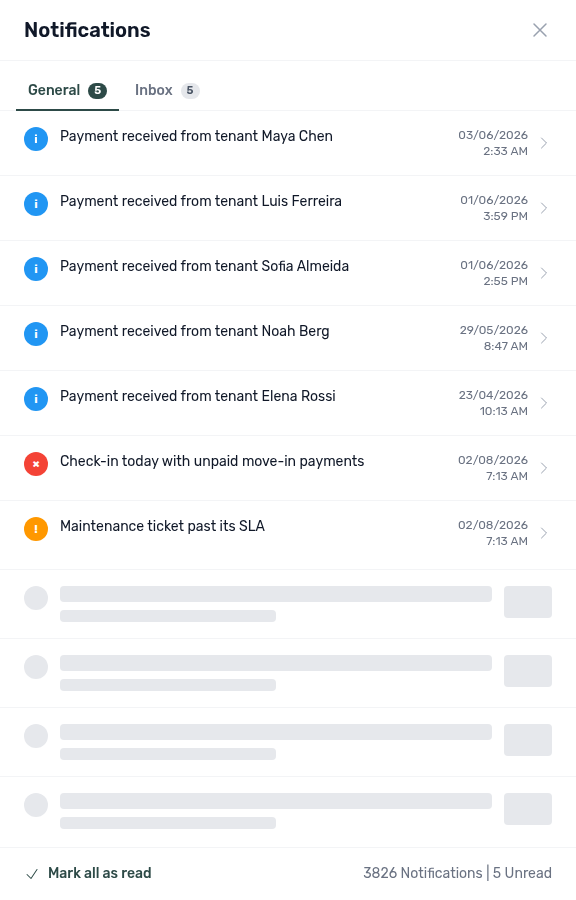
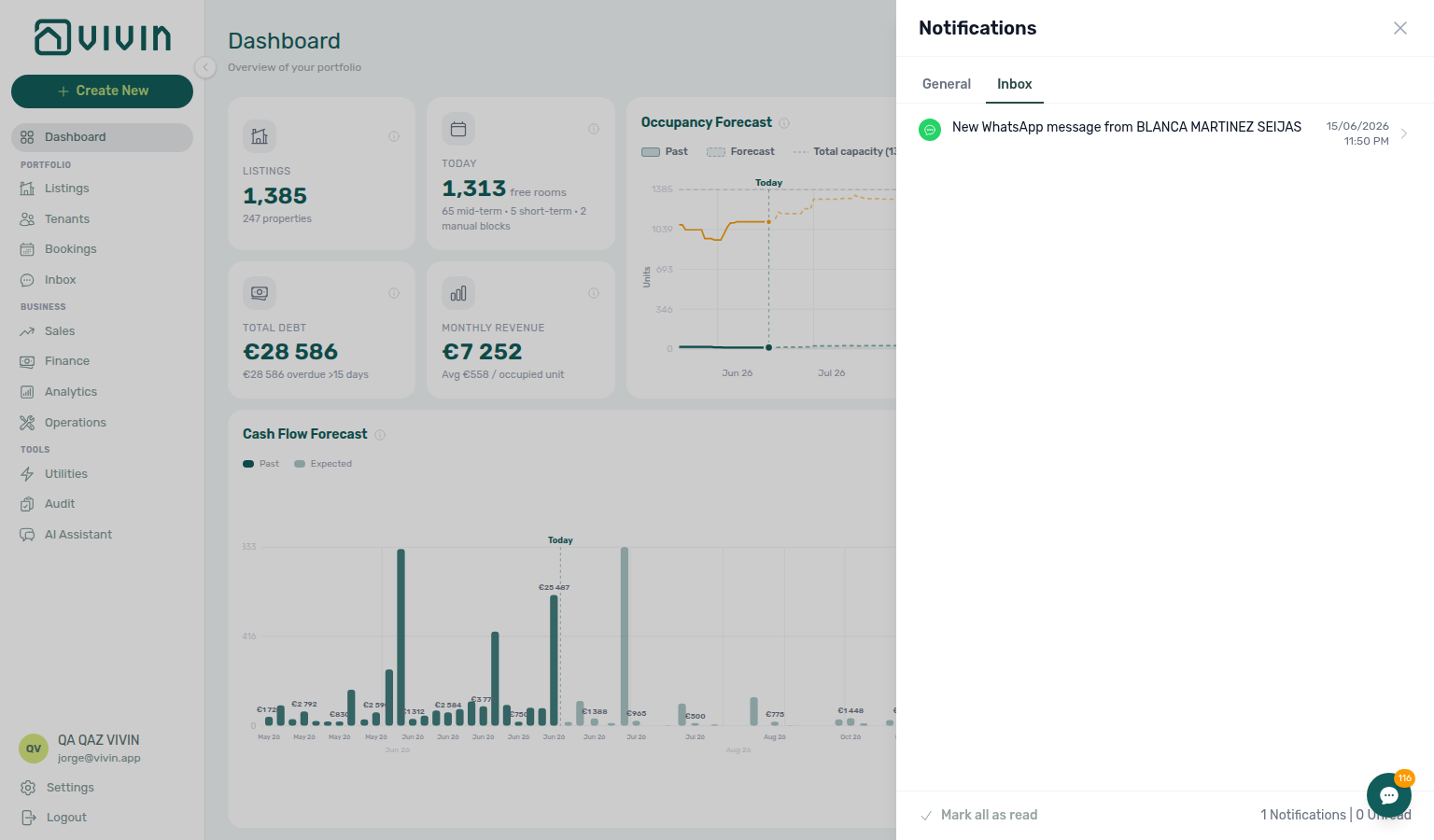
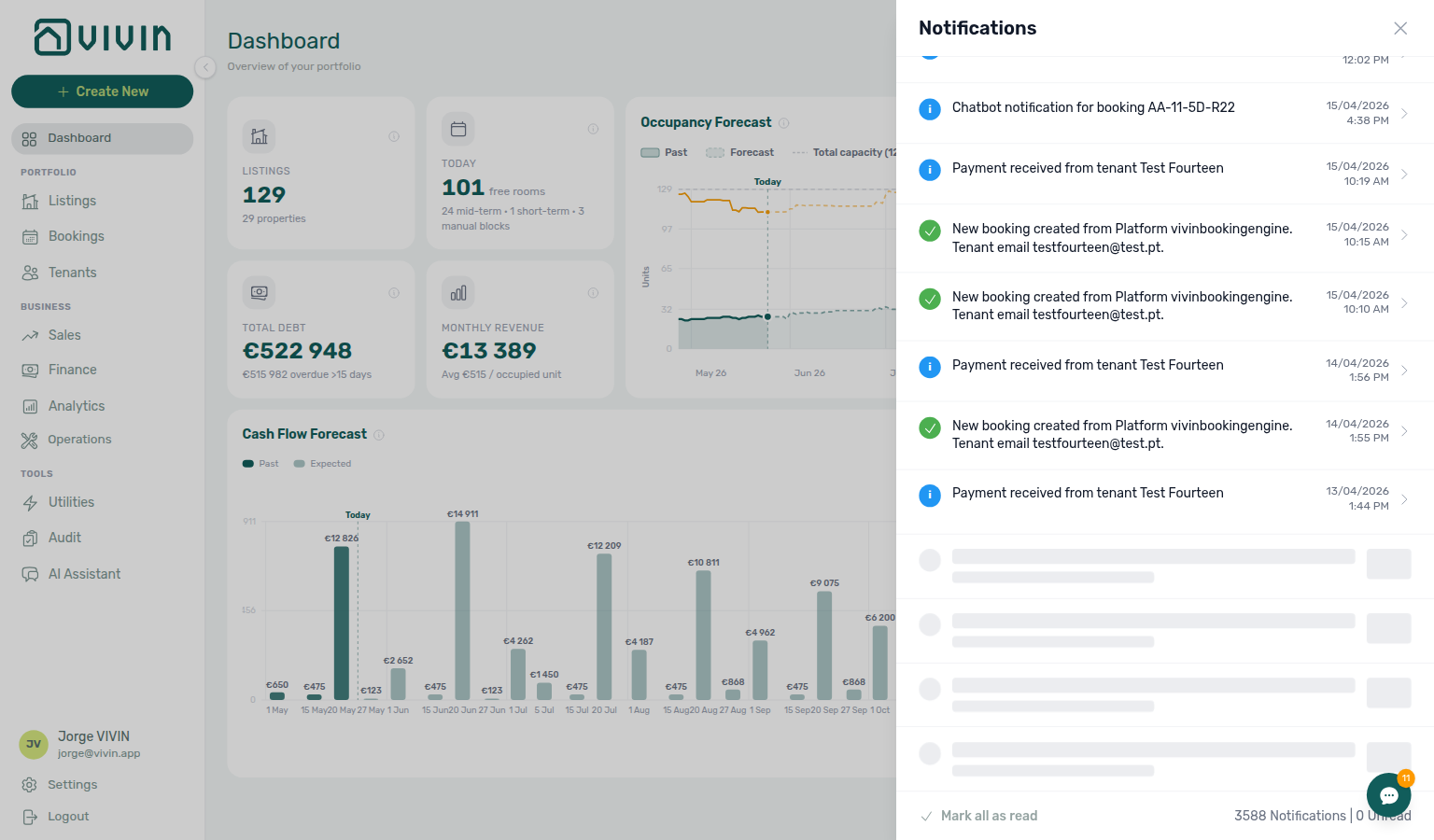
On desktop widths, the page header includes a bell that opens a Notifications slide-over with General and Inbox sub-tabs when the WhatsApp global inbox release is active. General covers payment, ticket, and booking alerts; Inbox covers inbound WhatsApp and email message notifications (coalesced per conversation). Each sub-tab shows its own unread badge; Mark all as read clears only the active tab. Inbox rows with a link navigate straight to the conversation; General rows without a link open in-panel Notification detail (sub-tabs hide until you tap the header back arrow). Scroll the panel list to load additional history; while the next batch loads, skeleton rows appear at the bottom. See Inbox module and the Notifications module capture. Use /notifications for search, read-status filters, and the End of list marker on the full history page.
Inbox sub-tab (inbound WhatsApp / email message notifications — coalesced per conversation):
When you scroll near the bottom of that panel, the next batch loads with skeleton rows at the end of the list (no End of list line on Dashboard):
Recommended daily operator flow
This scan order mirrors Portfolio KPI review and Notification triage — open the full pairing matrix when one widget disagrees with Analytics or Finance.
- Scan KPI cards for debt and revenue deviations.
- Check Occupancy Forecast for capacity risk in upcoming weeks/months.
- Review Cash Flow Forecast for expected inflow timing.
- Work through Vacant Units to target leasing actions.
Dashboard guide subsection index
Dashboard section cross-reference
Use the sections above for this module. Related pages are linked from Related below when present, or from Modules.
Related
Related below links this module to settings, concepts, workflows, and escalation paths.
Documentation map & escalation
- Modules hub — Hub pairing matrix across operator workspaces
- Getting Started — Post-login shell before you rely on KPI cards
- Glossary — Term definitions used across Dashboard follow-up (debt, deposits, invoiced floor)
- FAQ — Analytics (KPI workspace) — When Dashboard cards disagree with Analytics charts
- Get Help & Support — Escalate when partial-load banners persist after Retry
Upstream & downstream workflows
- Portfolio KPI review — Month-end reconciliation between Dashboard cards and Analytics/Sales
- Handling a Late Payment — Collections workflow from Total Debt or overdue signals
- Processing a New Booking — New reservations that shift Total debt and move-in KPIs on this snapshot
- Managing a Check-out & Deposit Refund — Deposit and debt KPIs during departure week
- Cancelling a Booking — When Total Debt or move-in KPIs point to reservations that should be voided instead of chased
- Entering Monthly Utility Bills — Close Missing bill gaps when Vacant Units or operational KPIs need utility context
- Notification triage — Dashboard bell slide-over vs full
/notificationsinbox - Notifications — Payment overdue alerts — Operator Payments category rows from the bell or
/notificationsthat row-click into Bookings - Manual block hygiene — Audit pass when Vacant Units or Today counts look lower than Sales or Analytics suggest
Deeper workflow reads
See Upstream & downstream workflows above for the same guides.
Navigation & bookmarks
Bookmark routes pair with Management Frontend Deep Links and Create New menu.
- Management Frontend Deep Links — Dashboard — Bookmark
/and notification bell behaviour - Create New menu — Global + shortcuts without leaving the post-login snapshot
- FAQ — Permission denied toast — Red You do not have permission to perform this action. toast when RBAC blocks a save; fix in Users → Role Permissions
- Settings > Interface language — Personal UI locale and per-user notification opt-outs
Settings that shape Dashboard KPIs
- Settings > Preferences — In-app notifications — Mute Dashboard bell categories account-wide before personal opt-out
- Settings > Preferences — Account toggles that shape move-in auto-cancel and debt KPI signals
- Settings > Tenant categories — Segment portal adoption checks when Total debt KPI follow-up needs online-payment context
- Settings > Emails — Payment reminder Communication Rules whose outcomes surface as Dashboard KPI and bell alerts
Deeper concept reads
- Payment Allocation — Two-layer receipts, invoiced-floor rent edits, and credit note reject/revert warnings
- Booking Lifecycle — Computed Upcoming → Ongoing → Ended / Canceled status model behind occupancy KPIs
- Integrations & Distribution — Unified snapshot across mid-term marketplace and short-term channel bookings
- Tenant Portal — Total debt KPI follow-up when tenants pay online through the portal
- FAQ — Tenant contract signing blocked — No PDF yet, mandatory Your Details gates, category locks, or Lease purpose; portal signing vs paper upload on Contract Info
- Services Marketplace — Ancillary portal revenue that can shift Total debt and Income KPIs after service requests post
- Landlord MCP — External portfolio tools that may return the same KPI snapshots before you open Finance drill-downs
Operator modules (pairing surfaces)
- Analytics Module — Overview tab — Longer-range portfolio KPI bar grid when your role includes Analytics access
- Sales Module — Overview tab — Listing-centric occupancy heatmap and Today KPIs that pair with Vacant Units and Occupancy Forecast here
- Finance Module — Detailed debt, payments, and cash flow management
- Finance — Tenant category filter — In Debt triage by segment when KPI cards spike for one cohort
- Finance > Deposits — Portfolio refund queue when Dashboard KPIs surface departure-week balances
- Bookings Module — Reservation lifecycle when bell rows row-click into bookings
- Bookings — Tenant categories — Mirror segment filter when KPI follow-up clusters on one cohort
- Tenants — Tenant category filter — Profile-count cross-check before account-wide portal changes after KPI triage
- Listings Module — Inventory and vacancy context
- Audit Module — Cross-portfolio manual blocks and Discounts when KPI follow-up needs contract-value triage
- Inbox module — Reply to Dashboard bell Inbox rows without opening each booking Communication tab first
- Notifications module — In-app notification preferences — Full
/notificationsinbox and category behaviour behind the Dashboard bell - Utilities — Overview tab — Days Missing Data chart when bill gaps affect operational planning alongside Vacant Units
- AI Chat module — Natural-language summaries that should be reconciled against these KPI cards
- Properties workspace — Legacy
/propertiesURLs that redirect into Listings from the same shell
Operator habit hubs
Day-to-day operator habits (lockout catch-up, pending receipts, payment triage, handoffs, and related playbooks) live on the Common Workflows habit hub.
Deep-link anchors for habit hubs
Lockout catch-up after password recovery
Pending manual receipt approval
Notification row-click navigation
Payment alert to receivables triage
Finance debt receivables triage
Finance Income status drill-down
Cash flow forecast drill-down
Confirmation alert triage
New inventory to first booking handoff
Property setup to first arrival handoff
Confirmation to check-in handoff
Check-in to check-out handoff
Check-out final utilities handoff
Same-day turnover coordination
WhatsApp per-booking messaging
Bot reasoning (audit)
ChatBot settings
Rent reduction after invoicing
Reject/revert mistaken receipts
Check-out ledger cleanup before refund
Utility overage collections
Cancellation collections before void
Check-out collections before refund
Handling a Late Payment collections
Check-out vs cancellation
Deposit missing on Finance Deposits
Occupancy KPI to block hygiene handoff
Partly collected security deposit
Month-end invoicing (fixed date)
Bulk Hostkit invoicing
Portfolio segmentation by tenant category
Directory list refresh
When a list needs a refresh instead of showing rows, use Retry or reload the page. Zero rows after a successful load means your filters matched nothing — widen filters or clear search.
See FAQ — Directory list refresh and Glossary — Directory list refresh.
Key glossary terms
- Credit note (payment reject/revert) — When Total Debt KPI follow-up finds duplicate or already-invoiced receipts on Transactions
- Deposit dispute — When Total Debt or check-out follow-up finds contested deposit retention before refund
- Glossary — End-of-Booking cost split — Charge Time → End of Booking splits daily overage across every occupied unit; still-staying roommates stay in the denominator
- Glossary — Change history — Operator-initiated edits on Listings setup and Bookings Changelog; create-time defaults excluded
- Glossary — Archived booking ledger visibility — Delete Booking hides manual/provider_platform rows on Finance → Transactions; vIBAN and credit card stay visible
- Glossary — Finance tenant category cache refresh — Recategorizing a tenant updates
booking.tenantCategoryIdimmediately; ledger tabs reflect it on reload, while Overview can lag up to ~10 minutes - Glossary — Full term list
API & companion guides
- API Reference — Listings & Availability — Partner partial pulls whose
unavailabilitiesshould reconcile with Vacant Units and Occupancy Forecast here - API Reference hub — Partner HTTP contracts and partial vs full feeds
Module documentation hubs
- Dashboard module — Hub for post-login KPI snapshot, Occupancy/Cash Flow forecasts, Vacant Units, and bell notification triage (this page)
- Analytics module — Month-range portfolio KPI charts (Overview, Revenue, Occupancy, ADR, RevPAR, Maintenance) with rankings and heatmaps (hub)
- Listings module — Property wizard, Channels tab, Archived inventory, and unit management (hub)
- Finance module — Portfolio ledgers (Overview, Income, Contract Values, Transactions, Payouts, Deposits) with payment approval and deposit settlement (hub)
- Tenants module — Tenant directory, profile sidebars, With Debt segmentation, and table expand for linked bookings (hub)
- Sales module — Portfolio availability, monthly rent editing, and channel manager connections (hub)
- Operations module — Maintenance tickets, cash flows, check-in/out coordination, Draft ticket queues, and linked cash flows (hub)
- Utilities module — Bills Included ceiling model, Connections, AI bill upload, and tenant overage charges on payment plans (hub)
- Inbox module — Portfolio-wide WhatsApp workspace with Dashboard bell Inbox sub-tab deep links (hub)
- Notifications module — Full
/notificationshistory with search, filters, and row-click navigation (hub) - AI Chat module — AI Assistant using Landlord MCP tools for portfolio Q&A (hub)
- Audit module — Portfolio-wide Manual Blocks and Discounts contract-value review (hub)
- Properties workspace — Legacy
/propertiesURL redirects into Listings (hub) - Booking engine details — Rich marketplace payload editor via the Full integration pill (hub)
- Account Settings — Workspace-wide financial policies, templates, integrations, and operational defaults (hub)
- API Reference hub — Partner HTTP contracts, Swagger onboarding, and partial vs full feeds (hub)