API Reference
Complete Getting Started — Recommended Setup Sequence (steps 1–12 on Account Settings tabs per Recommended setup order, then steps 13–15 in Listings, Bookings, and Tenants) and Onboarding a New Property — Step 7 go-live verification before you provision partner integrations or poll live listing feeds. Guided walkthrough of settings steps 4–12: Onboarding a New Property. Configure steps 11–12 (Integrations, Integration field capability, Tenant categories default for integrations) before requesting Bearer keys from [email protected]. When sign-in was restored mid-setup, see Getting Started — Lockout catch-up after password recovery. Workflow pairing after go-live: Setup sequence after go-live.
This section contains the technical documentation for integrating with the Vivin platform via its REST API. It is intended for external partners, channel managers, and third-party platforms that want to:
- Pull listings with real-time pricing and availability
- Submit bookings into the Vivin system
- Map their own property/unit identifiers to Vivin's internal listings
Property managers automating outside the browser should read Management session authentication (Core API JWT + refresh cookie, curl examples, and session sequence) or use Landlord MCP — not the integration Bearer keys below.
For how channels, calendars, and the booking engine fit together in the product (operator-facing), start with Integrations & Distribution. For Webhook terminology and how callbacks differ from polling, see the Glossary entry (it links to Webhooks & notifications).
New partners: Authentication → Listings & Availability → Property & Unit Mapping → Creating Bookings. Catalogue publishers also need Full listing feeds; calendar subscribers need iCal feeds instead of JSON pulls. After first writes, read Booking Lifecycle & Validations and configure Webhooks & Notifications when you want push updates. Tenant-visible behaviour after import: Tenant Portal (including Portal access by tenant category); booking-scoped automation: Tenant MCP. Each sub-guide opens with First-time workspace setup and a Finding your way in this guide tip that points to key sections and companion guides. Habit-specific shortcuts live under Related below.
Before You Start
Credential requests pair with Try requests in Swagger once you receive your Bearer key. Catalogue publishers need Partial vs full integration feeds before polling GET …/listings/full. Operator automation contrast: Management session authentication (not partner Bearer keys).
To integrate with Vivin you will need:
- An API key (Bearer token) issued by the Vivin team
- The base URL of the Vivin API environment you are connecting to
- Agreement on which external IDs will be used to map your listings to Vivin's
Contact [email protected] to request API credentials and onboarding support.
Try requests in Swagger
Swagger Try it out pairs with Authentication (Authorize dialog) and Listings & Availability (field meanings in JSON). Publish-ingest partners continue to Full listing feeds; calendar subscribers use iCal feeds instead.
Each provisioned integration ships an OpenAPI (Swagger) UI on the same API host you call with your integration API key. These documents stay enabled so partners can inspect paths, models, and Try it out flows. (The internal Core API catalogue at /api may be turned off on some hosts; that is separate from integration Swagger.)
During onboarding, Vivin confirms your base URL and the path prefix for your document (for example https://api.example.com/ical-integration for the iCal integration module). The guides below use the pattern GET /{platform}-integration/listings — substitute the prefix you were given.
Integration Swagger route prefixes
Each provisioned partner integration exposes its own OpenAPI UI at https://<api-host>/<route-prefix> on the same host you call with your Bearer key. Vivin ships separate documents for these route prefixes (exact access depends on which integration was provisioned for your account):
| Route prefix | Typical partner / channel |
|---|---|
uniplaces-integration | Uniplaces |
inlife-integration | Inlife |
roomless-integration | RoomLess (Spacest) |
housinganywhere-integration | Housing Anywhere |
spotahome-integration | Spotahome |
ical-integration | iCal / calendar feeds |
vivin-booking-engine-integration | White-label booking engine |
channex-integration | Channex |
erasmus-life-integration | Erasmus Life Lisboa |
kiwi-integration | Kiwi (single-landlord partial feed) |
capital-rooms-integration | Capital Rooms (single-landlord partial feed) |
porta85-integration | Porta85 (single-landlord partial feed) |
lisbeyond-integration | Lisbeyond (single-landlord partial feed) |
Your onboarding email names the prefix and base URL for your integration only — you do not need every row above. Paths inside each document follow the same shapes described in this section (GET …/listings, POST …/bookings, and platform-specific webhooks where applicable).
- Open the Swagger URL in a browser.
- Click Authorize, choose the Bearer scheme, and paste your API key (with or without the
Bearerprefix, per the form hint). - Expand listings (or the group your integration exposes) and execute the calls you need.
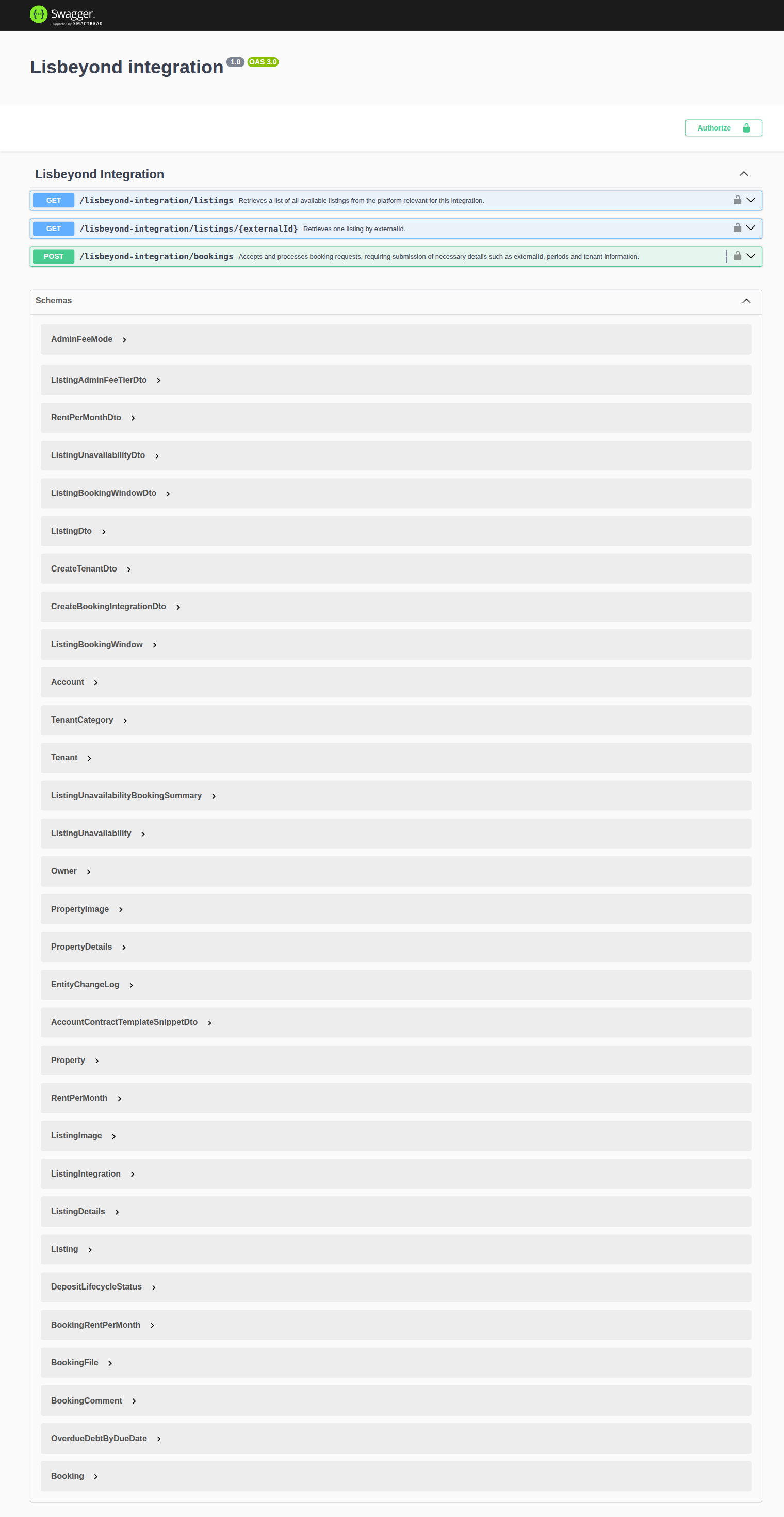
The capture below shows a typical listings group with schema and execute controls — your exact titles and path segments follow your integration slug.
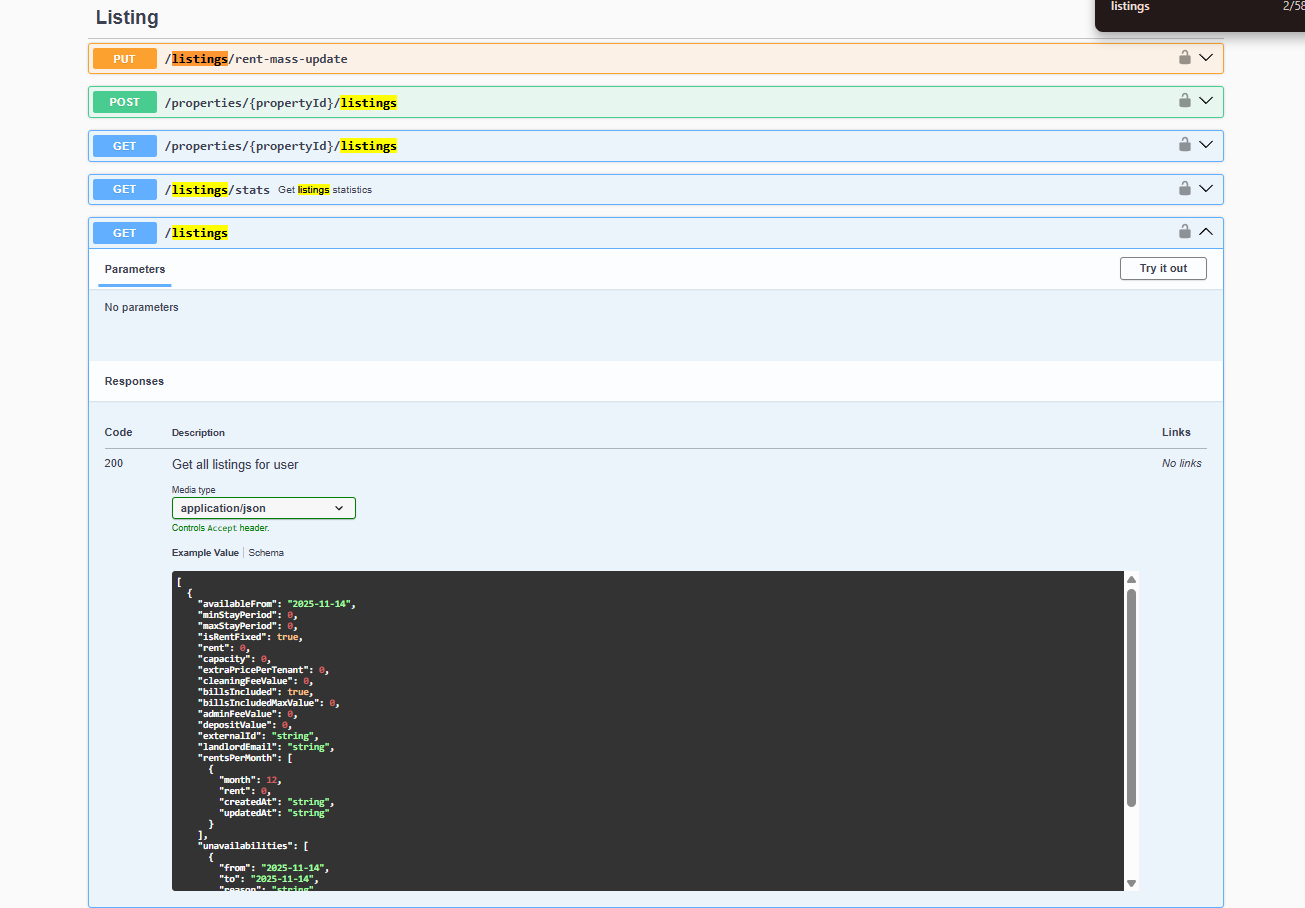
For listing payloads and field meanings after you receive JSON, continue with Listings & Availability and Creating Bookings.
Partial vs full integration feeds
Transport depth here pairs with Property & Unit Mapping (landlordKey, externalId) and operator Integration field capability (field coverage matrix). Booking import after partial pulls: Creating Bookings → Booking Lifecycle & Validations.
Vivin exposes two depths of outbound listing JSON for major marketplace partners. Both use the same Bearer API key on your provisioned route prefix; they differ in payload shape and use case.
| Feed | Typical path pattern | Purpose |
|---|---|---|
| Partial | GET /{platform}-integration/listings and GET /{platform}-integration/listings/:externalId | Calendar, pricing, availability windows, and booking-oriented fields — the shared ListingDto shape described in Listings & Availability. No photos, address, amenities, or marketing copy — Catalogue fields. Linked-only (a Channels mapping is required). Poll this for sync and booking import. |
| Full | GET /{platform}-integration/:landlordKey/listings/full (+ single-listing variants where documented) | Rich property/listing payload shaped for the partner’s publish feed (descriptions, amenities, photos, partner-specific blocks). Includes units not yet on Channels, keyed by the Vivin listing id — Which listings appear. Poll when you ingest the complete listing catalogue for listing creation/update on the channel. |
landlordKey is the path segment before listings/full. Vivin resolves it to an account by matching either the stored account landlordKey or that account’s integration email for the platform (case-insensitive). Housing Anywhere inbound webhooks use that same path key and echo full-feed listingReference as listing_external_reference. Uniplaces inbound is a single global POST /uniplaces-integration/webhook — the listing comes from offer_api_reference (full-feed reference_id). Inlife full-feed rows split stored propertyId_roomId into listing id + room.id. Full catalogue arrays are longer than partial GET /listings until every unit has a Channels mapping — Which listings appear. Exact schemas are named in each integration’s Swagger (for example UniplacesFullFeedListingDto, Spotahome full feed models, InlifeFullFeedListingDto). See Full listing feeds — landlordKey, Housing Anywhere listingReference, Inlife id and room.id, and Webhooks & Notifications — Uniplaces.
Platforms with a full feed in Core API today include Uniplaces, Spotahome, Housing Anywhere, and Inlife. Other route prefixes in the table above may expose partial GET …/listings only. Path patterns, landlordKey, Housing Anywhere costs (euros on partial, cents on full), Housing Anywhere booking-window calendar blocks, Spotahome’s legacy /listings/feed route, Inlife recognised cities (unknown cities omitted from the catalogue), and Inlife propertyId_roomId (id + room.id) are documented in Full listing feeds.
Partial-only integrations (no full publish feed)
These route prefixes are provisioned for partial listing pulls and booking import using the shared ListingDto shape. They do not expose GET …/:landlordKey/listings/full in Core API today:
| Route prefix | Partner / channel | Notes |
|---|---|---|
channex-integration | Channex | Partial GET …/listings + GET …/listings/:externalId; inbound webhooks where provisioned — see your Swagger group |
roomless-integration | RoomLess (Spacest) | Partial listing pull; extra unavailabilities row before availableFrom — RoomLess nights before move-in |
erasmus-life-integration | Erasmus Life Lisboa | Partial listing pull only |
kiwi-integration | Kiwi | Single-landlord partial feed — see Kiwi, Capital Rooms, Porta85 & Lisbeyond |
capital-rooms-integration | Capital Rooms | Single-landlord partial feed — see Kiwi, Capital Rooms, Porta85 & Lisbeyond |
porta85-integration | Porta85 | Single-landlord partial feed — see Kiwi, Capital Rooms, Porta85 & Lisbeyond |
lisbeyond-integration | Lisbeyond | Single-landlord partial feed — see Kiwi, Capital Rooms, Porta85 & Lisbeyond |
ical-integration | iCal / OTA calendars | Per-listing text/calendar export — iCal feeds, not JSON GET /listings |
vivin-booking-engine-integration | White-label booking engine | Partial read surface plus write routes — Booking Engine API |
Poll partial feeds on the schedule your integration agreement defines; use Listings & Availability for field meanings and Housing Anywhere costs when your prefix is housinganywhere-integration. Housing Anywhere partial costs[] is whole euros; the full catalogue is cents — Euros vs cents. Housing Anywhere partial rows also turn booking windows into extra unavailabilities — Housing Anywhere booking windows.
Kiwi, Capital Rooms, Porta85 & Lisbeyond (single-landlord partial feeds)
Kiwi (kiwi-integration), Capital Rooms (capital-rooms-integration), Porta85 (porta85-integration), and Lisbeyond (lisbeyond-integration) share the same partial ListingDto shape and routes as other marketplaces (GET /listings, GET /listings/:externalId, POST /bookings), but Vivin scopes each feed to one provisioned landlord account (server env — not a path landlordKey). Controllers return 503 when that account id is unset.
| Behaviour | Multi-tenant partial feeds (e.g. Uniplaces, RoomLess) | Kiwi / Capital Rooms / Porta85 / Lisbeyond |
|---|---|---|
Which listings appear on GET /listings | Units linked on Channels (Which listings appear) | All listings on the scoped account (linked or not) |
externalId when no channel link exists | Row omitted | Vivin listing UUID (listing.id) |
| Extra identification field | — | Optional listingInternalName (unit internal name) so partners can match by name |
GET /listings/:externalId / POST /bookings with a UUID | Channel externalId only | Channel externalId first; if missing, UUID-guarded lookup on the scoped account |
These prefixes are not self-serve Settings → Integrations cards for every workspace — Vivin provisions the route, Bearer secret, and account scope with the partner. Exercise the OpenAPI pages at {API host}/kiwi-integration, {API host}/capital-rooms-integration, {API host}/porta85-integration, and {API host}/lisbeyond-integration after you receive credentials — see Try requests in Swagger. Field meanings: Listings & Availability. Booking enqueue: Creating Bookings.
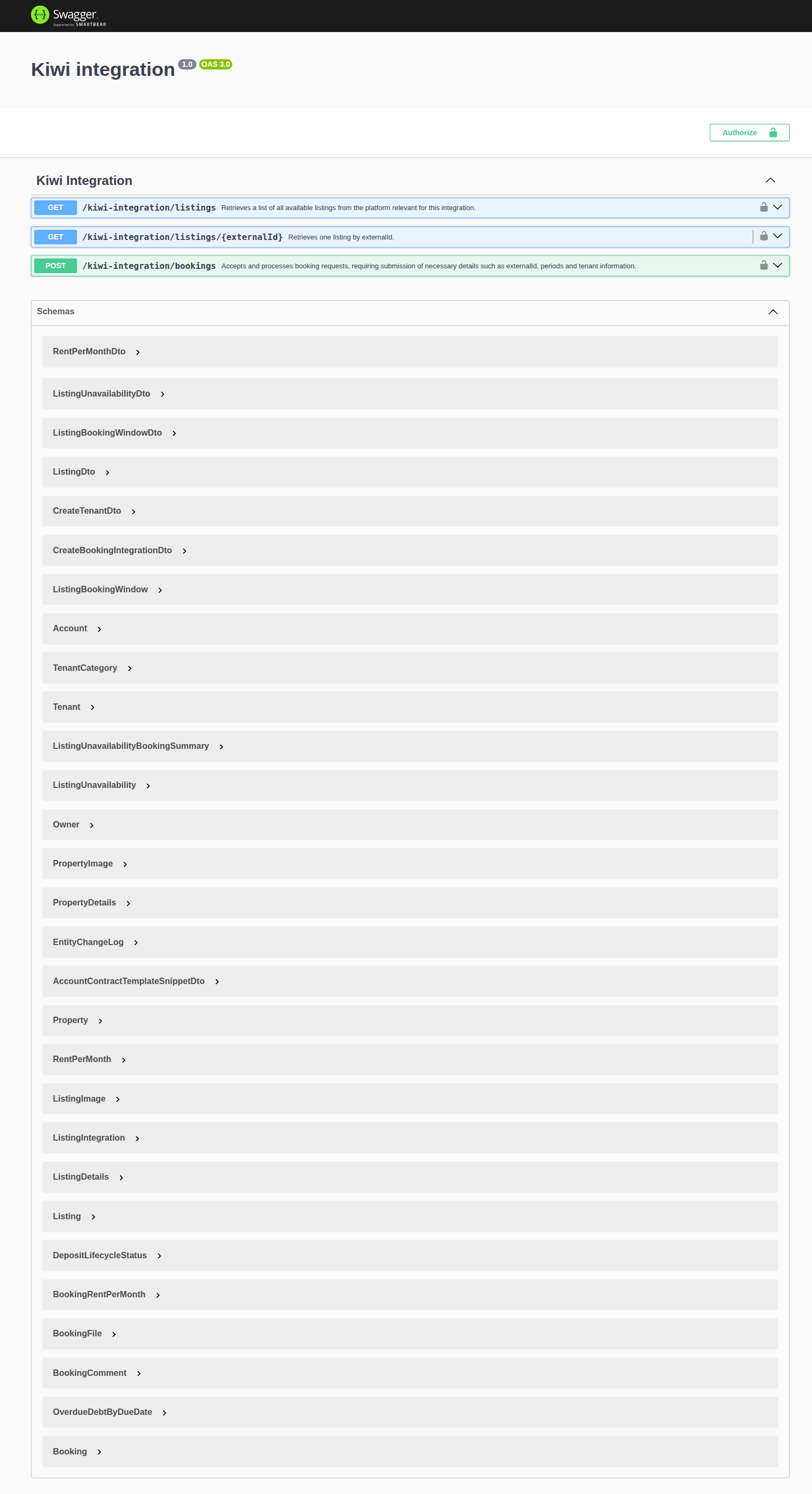
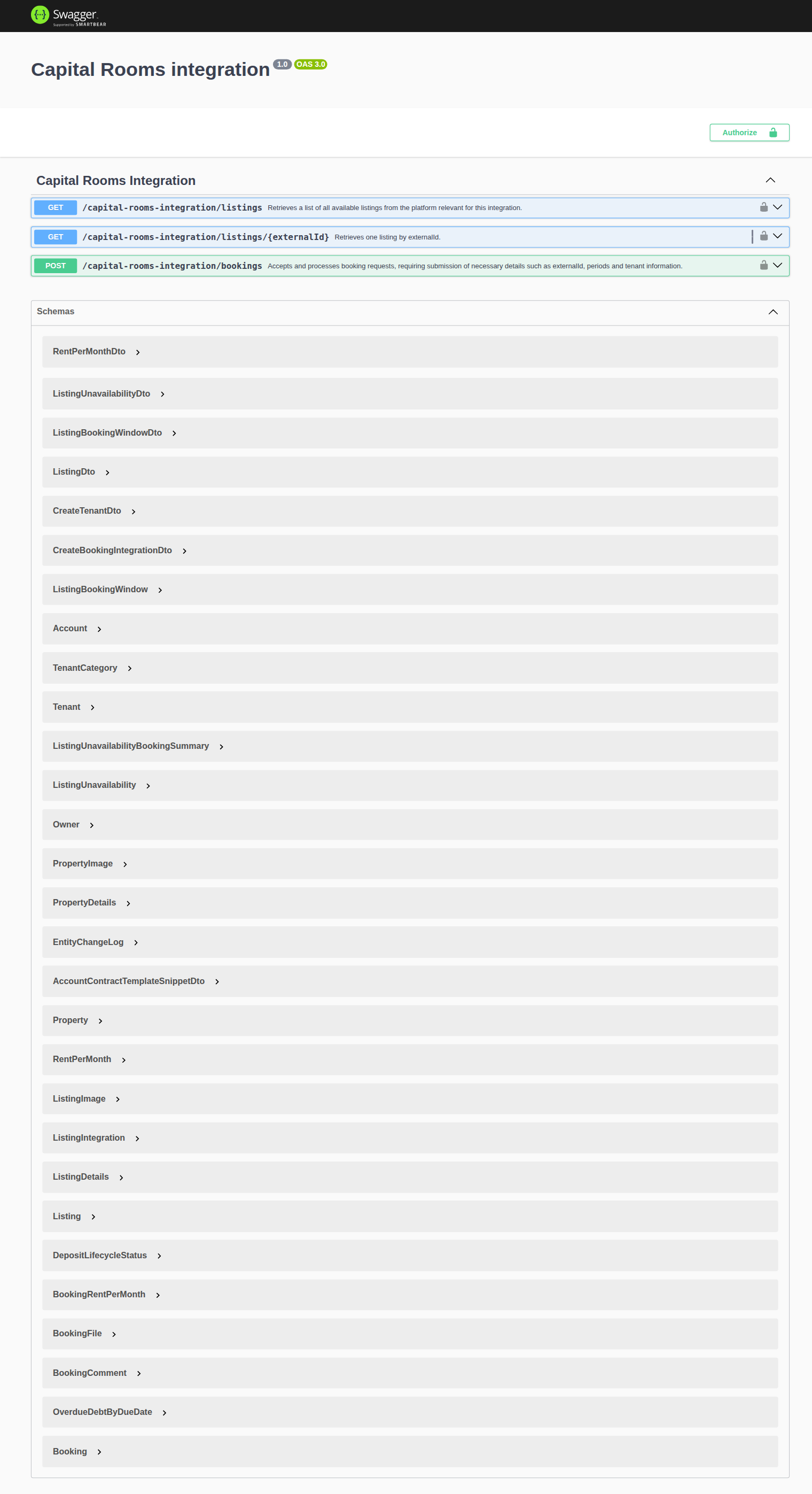
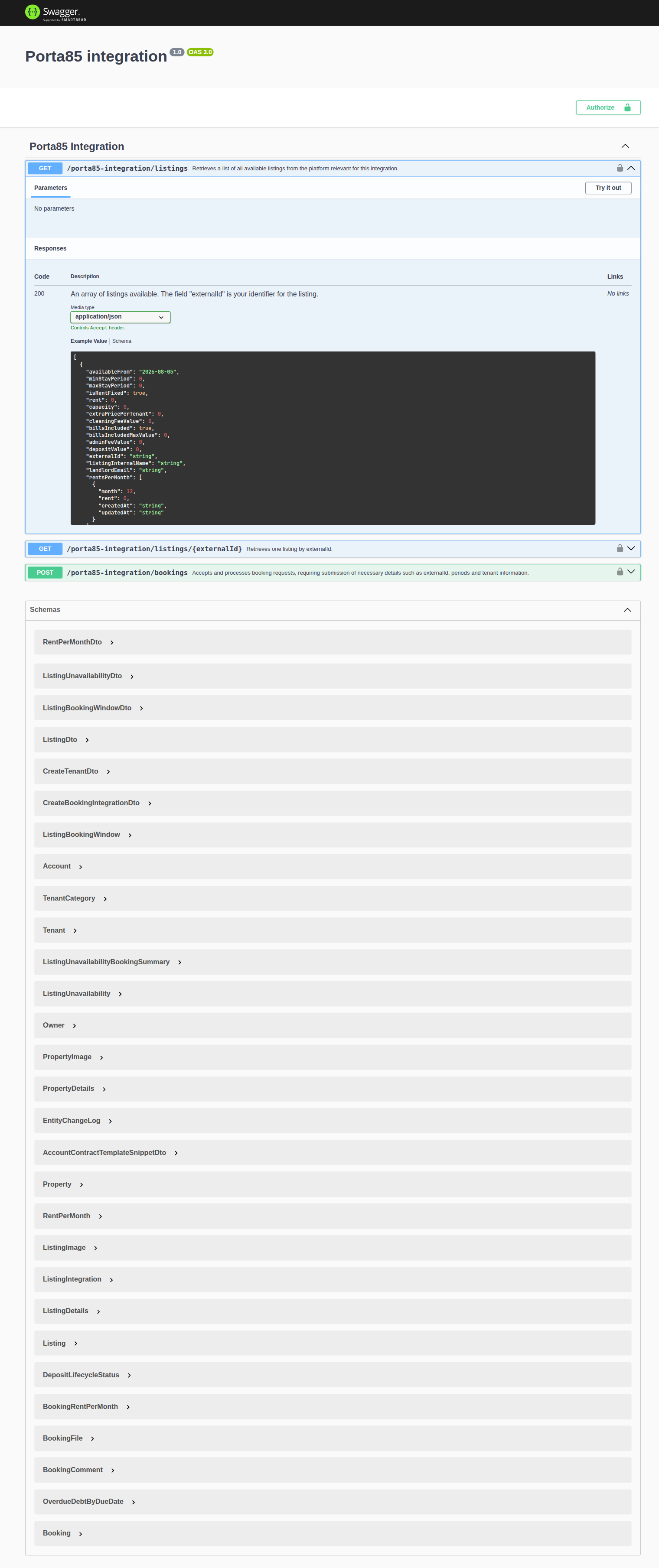
iCal availability export uses a separate module — GET /ical-integration/listings/{listingId}/iCal (no JSON GET /listings). See iCal feeds for retrofeed behaviour, response headers, and operator horizon settings.
The Vivin Booking Engine adds write routes (PUT /listing, POST /property-listing) and GET …/housemates on top of the partial listing + booking surface — see Booking Engine API.
Operator-facing guidance on which payload fields are required per marketplace — and how they map to Listings / Full integration pill — lives in Integration field capabilities and Property & listing details (booking engine). Partial vs full is a transport split; the capability matrix explains field coverage.
Available Guides
| Guide | Description |
|---|---|
| Authentication | Partner integration Bearer token on every request |
| Management session | Operator Core API sign-in (POST /auth/login, refresh cookie, JWT) |
| AI usage | Account-scoped LLM token ledger (GET /ai-usage, GET /ai-usage/summary) |
| MCP OAuth | OAuth 2.1 Authorization Server for Claude.ai / ChatGPT MCP connectors |
| Listings & Availability | Partial ListingDto pull — pricing, availability, calendar blocks; usable rent; no catalogue fields; no local rent cap |
| Full listing feeds | Partner-shaped publish feeds (Uniplaces, Spotahome, HA, Inlife) |
| iCal feeds | Per-listing text/calendar export and retrofeed |
| Creating Bookings | Submit a new booking into Vivin; honour listing Capacity and stay bounds |
| Booking Engine API | White-label engine — listing updates, property create, housemates |
| Property & Unit Mapping | How external IDs are mapped to Vivin listings |
| Booking Lifecycle & Validations | What happens after a booking is submitted and what validations are enforced |
| Webhooks & Notifications | Receive real-time updates on booking status changes |
| Error Handling | Standard error responses and how to handle them |
API guide cross-reference
Use this table when one integration guide naturally leads into another — each row links to the API guides you should read before or after the primary topic./authentication.md#authentication-section-cross-reference)** tables for longer matrices and **Related** subsection anchors (for example Authentication — Companion API guides, Webhooks & Notifications — Upstream & downstream workflows). Setup sequencing: Related — Setup sequence after go-live.
Use this table when one integration guide naturally leads into another — each row links to the API guides you should read before or after the primary topic.
| Guide | Pair with these API guides |
| --------------------------------------------------------------------------------------- | ------------------------------------------------------------------------------------------------------------------------------------------------------------------------------------------------------------------------------------------------------------------------------------------------------------------------------------------------------------------------------------------------------------------------------------------------------------------------------------------------------------------------------------------------------------------------------------------------------------------------------------------------------------------------------------------------------------------------------------------------------------------------------------------------------------------------------------------------------------------------------------------------------------------------------------------------------------------------------------------------------------------------------------------------------------------------------------------------------------------------------------------------------------------------------------------------------------------------------------------------------------------------------------------------------------------------------------------ | ----------------------------------------------------------------------------------------------------------------------------------------------------------------------------------------------------------------------------------------------------------------------------------------------------------------------------------------------------------------------------------------------------------------------------------------------------------------------------------------------------------------------------------------------------------------- |
| API hub subsection index | Introduction hub subsection index (platform overview), Getting Started hub subsection index (onboarding sections), Concepts hub subsection index (underlying models), Modules hub subsection index (screen workspaces), Common Workflows hub subsection index (operational procedures), Account Settings hub subsection index (setup tabs), FAQ subsection cross-reference (operator troubleshooting), Glossary deep-dive index (integrator terms), Available Guides (sub-guide table), Partial vs full integration feeds (transport split) |
| Authentication | Listings & Availability (first authorized read), Error Handling (401 / 403), Management session (operator JWT — not partner Bearer) — section cross-reference, Setup sequence after go-live |
| Management session | Authentication (partner Bearer contrast), AI usage (LLM cost ledger), Error Handling (refresh and session expiry), Tenant Portal (operator vs tenant-facing URLs), Tenant MCP (booking-scoped automation contrast), Notifications — Payment overdue alerts → Handling a Late Payment — Step 1, Glossary — Credit note (payment reject/revert), Glossary — Invoiced floor (rent) — section cross-reference, Setup sequence after go-live |
| AI usage | Management session (JWT + account_settings.module), Automation & AI — Management AI Assistant (landlord_chat), Automation & AI — AI Invoice Reader (utility_bill_extraction), AI Chat module, Utilities — Bills tab, Error Handling, Glossary — AI usage ledger, Glossary — Deposit lifecycle status — section cross-reference, Setup sequence after go-live, Key glossary terms |
| MCP OAuth | Landlord MCP — Connector OAuth (operator narrative), AI / MCP — Connector OAuth (settings UI), Management session (browser login contrast), Error Handling (access_denied on refresh) — section cross-reference, Setup sequence after go-live |
| Listings & Availability | Full listing feeds (publish catalogue vs partial pull), Property & Unit Mapping (externalId keys), iCal feeds (calendar export instead of JSON) — section cross-reference, Setup sequence after go-live |
| Full listing feeds | Listings & Availability (partial sync and booking import), Property & Unit Mapping (landlordKey and externalId), Webhooks & Notifications (listing.updated) — section cross-reference, Setup sequence after go-live |
| iCal feeds | Listings & Availability (JSON partial pull contrast), Property & Unit Mapping (per-listing UUID in feed URLs) — section cross-reference, Setup sequence after go-live |
| Creating Bookings | Property & Unit Mapping (externalId on POST /bookings), Booking Lifecycle & Validations (enqueue pipeline; honour listing JSON Capacity / stay / availableFrom — Honour listing), Error Handling (validation 400s), Settings > Tenant categories (default for integration-created tenants), Glossary — Tenant category, Tenant Portal (portal credentials and payment schedules after import), Tenant MCP (booking-scoped automation), Notifications — Payment overdue alerts → Handling a Late Payment — Step 1, Glossary — Credit note (payment reject/revert), Glossary — Invoiced floor (rent) — section cross-reference, Setup sequence after go-live |
| Booking Engine API | Listings & Availability (partial read), Creating Bookings (POST /bookings), Property & Unit Mapping (write routes and externalId), Settings > Tenant categories (engine-created tenant segments), Glossary — Tenant category, Notifications — Payment overdue alerts → Handling a Late Payment — Step 1, Glossary — Credit note (payment reject/revert), Glossary — Invoiced floor (rent) — section cross-reference, Setup sequence after go-live |
| Property & Unit Mapping | Listings & Availability (confirm externalId in GET /listings), Creating Bookings (booking create lookup), Full listing feeds (landlordKey scoping) — section cross-reference, Setup sequence after go-live |
| Booking Lifecycle & Validations | Creating Bookings (201 enqueue vs final booking), Webhooks & Notifications (booking.* events), Error Handling (async validation failures), Settings > Tenant categories (integration-created tenant segments), Glossary — Tenant category, Booking lifecycle (computed UI statuses), Tenant Portal (tenant-visible lifecycle and payments), Tenant MCP (booking-scoped automation), Notifications — Payment overdue alerts → Handling a Late Payment — Step 1, Glossary — Credit note (payment reject/revert), Glossary — Invoiced floor (rent) — section cross-reference, Setup sequence after go-live |
| Webhooks & Notifications | Booking Lifecycle & Validations (event timing vs enqueue), Listings & Availability (listing.updated / unavailability.* payloads), Authentication (inbound webhook signing), Settings > Tenant categories (default for integrations on booking.* imports), Glossary — Tenant category, Notifications — Payment overdue alerts → Handling a Late Payment — Step 1, Glossary — Credit note (payment reject/revert), Glossary — Invoiced floor (rent) — section cross-reference, Setup sequence after go-live |
| Error Handling | Authentication (401 / 403), Booking Lifecycle & Validations (business-rule 400s), Creating Bookings (retry policy on enqueue), Notifications — Payment overdue alerts → Handling a Late Payment — Step 1, Glossary — Credit note (payment reject/revert), Glossary — Invoiced floor (rent) — section cross-reference, Setup sequence after go-live |
| Setup sequence after go-live | Getting Started — Recommended Setup Sequence (steps 1–15), Onboarding a New Property — Step 7, Support — Setup sequence escalation, FAQ — Settings & tenant communications, Onboarding a New Property (guided steps 4–12) |
| Documentation map & escalation | Introduction — Section cross-reference, FAQ — Section cross-reference, Support — Section cross-reference, Common Workflows section cross-reference, Using in-app support |
| Navigation & bookmarks | Management session authentication, Management Frontend Deep Links, Create New menu, Try requests in Swagger |
| Settings & payload editors | Integration field capabilities, Settings > Integrations, Settings > Tenant categories, Property & listing details (booking engine) |
| Deeper concept reads | Integrations & Distribution, Landlord MCP · Tenant MCP, Booking lifecycle, Payment Allocation; reciprocal Deeper API reads anchors on concept sub-guides |
| Deeper workflow reads | Common Workflows — Workflow cross-reference, Common Workflows — Deeper API reads; reciprocal Deeper workflow reads anchors on API Reference sub-guides |
| Recommended operator workflows | Common Workflows — Workflow cross-reference, Onboarding a New Property, Processing a New Booking, Portfolio KPI review |
| Lockout catch-up after password recovery | Sign-in restored after password reset; onboarding, alert, or month-end backlog accumulated during lockout | Common Workflows — Lockout catch-up after password recovery, Getting Started — Lockout catch-up after password recovery, Resetting a Management User Password |
| Lockout catch-up after password recovery | Operational backlog mesh after sign-in recovery | Common Workflows — Lockout catch-up after password recovery, Getting Started — Lockout catch-up after password recovery, Resetting a Management User Password — Step 3 |
| Walkthrough media | MP4 walkthroughs beside PNG screenshots | Common Workflows — Walkthrough media, Modules, Account Settings |
| Notification row-click navigation | /notifications row-click before operator validates imported bookings | Common Workflows — Notification row-click navigation, Webhooks & Notifications (in-app rows after booking.* events), Notification triage, Glossary — Notification row navigation |
| Payment alert to receivables triage | payment overdue in-app rows after partner import or webhook | Common Workflows — Payment alert to receivables triage, Processing a New Booking, Handling a Late Payment — Step 1, Notifications — Payment overdue alerts |
| Finance debt receivables triage | Portfolio Top debtors after partner import alert triage | Common Workflows — Finance debt receivables triage, Finance module, FAQ — Finance debt receivables triage hub, Pending manual receipt approval, Handling a Late Payment collections (Steps 1–6 after triage surfaces) |
| Handling a Late Payment collections | Partner imports / webhooks → operator Steps 1–6 collections follow-through | Common Workflows — Handling a Late Payment collections hub, Creating Bookings, Payment alert to receivables triage, Finance debt receivables triage, FAQ — Handling a Late Payment collections hub |
| Finance Income status drill-down | Partner imports that skew Income Scheduled segments — reconcile before month-end sign-off | Common Workflows — Finance Income status drill-down, Creating Bookings, FAQ — Finance Income status drill-down hub (finance-overview-income-status-in-debt-modal.png, finance-overview-income-drill-down-flow.mp4) |
| Cash flow forecast drill-down | Import-driven collections lag on Cash flow forecast month bars | Common Workflows — Cash flow forecast drill-down, Finance Income status drill-down, FAQ — Cash flow forecast drill-down hub (finance-overview-cash-flow-all-payments-modal.png, finance-overview-cash-flow-drill-down-flow.mp4) |
| Same-day turnover coordination | Back-to-back partner imports on one unit same calendar day | Common Workflows — Same-day turnover coordination, Creating Bookings, Booking Lifecycle & Validations, FAQ — Same-day turnovers |
| Check-out final utilities handoff | Departure-week final overages after first Ongoing partner imports | Common Workflows — Check-out final utilities handoff, Entering Monthly Utility Bills, Managing a Check-out — Step 6, FAQ — Check-out final utilities handoff |
| Check-out collections before refund | Partner imports still need operator departure-week rent/fee collections before deposit release | Common Workflows — Check-out collections before refund, Handling a Late Payment, Managing a Check-out — Step 6, FAQ — Check-out collections before refund (workflows-check-out-coordination-flow.mp4, finance-contract-values-in-debt-filter.png) |
| Check-out ledger cleanup before refund | Partner imports do not prevent duplicate manual receipt recording before deposit release | Common Workflows — Check-out ledger cleanup before refund, Reject/revert mistaken receipts, Managing a Check-out — Step 6, FAQ — Check-out ledger cleanup before refund (bookings-detail-transactions-revert-modal-info-banner.png, finance-transactions-bulk-reject-selected-bar.png) |
| Check-out vs cancellation | Partner POST /bookings imports reach Ended or Canceled only through operator workflow choice | Common Workflows — Check-out vs cancellation, Booking Lifecycle & Validations, Managing a Check-out, Cancelling a Booking, FAQ — Check-out vs cancellation (workflows-cancel-booking-refund-modal-flow.mp4, bookings-list-canceled-tab.png) |
| Cancellation collections before void | Partner POST /bookings imports do not settle pre-cancel rent/fee arrears before policy void | Common Workflows — Cancellation collections before void, Cancelling a Booking, Handling a Late Payment, FAQ — Cancellation collections before void (finance-contract-values-in-debt-filter.png, bookings-cancel-booking-modal-refund-types.png, workflows-cancel-booking-refund-modal-flow.mp4) |
| Wrong tenant on a booking | Partner POST /bookings imports may match wrong tenant profile — operator Change tenant | Common Workflows — Wrong tenant on a booking, Creating Bookings, Booking Lifecycle & Validations, FAQ — Wrong tenant on a booking (bookings-detail-change-tenant-control.png, bookings-detail-change-tenant-flow.mp4) |
| Cancel Booking vs Delete Booking | Partner imports need operator Cancel booking vs Delete Booking — API does not soft-archive | Common Workflows — Cancel Booking vs Delete Booking, Creating Bookings, Bookings module, FAQ — Cancel Booking vs Delete Booking (bookings-cancel-booking-modal-refund-types.png, workflows-cancel-booking-refund-modal-flow.mp4) |
| Portfolio retirement decisions | Partner imports do not Archive property, Cancel booking, or Delete Booking — operator retirement scope | Common Workflows — Portfolio retirement decisions, Listings & Availability, Listings — Archived properties, FAQ — Portfolio retirement decisions (listings-archived-populated-table.png, listings-archived-unarchive-sidebar.png, finance-transactions-type-summary-cards.png) |
| Archive property (building-level) | Partner listing feeds do not Archive property — operator building retirement on Listings | Common Workflows — Archive property (building-level), Listings & Availability, Listings — Archived properties, FAQ — Archive a property (listings-archived-populated-table.png, listings-archived-unarchive-sidebar.png) |
| Utility overage collections | Partner imports still need operator utility bill posting before overage collections | Common Workflows — Utility overage collections, Entering Monthly Utility Bills, Handling a Late Payment, FAQ — Utility overage collections |
| Property setup to first arrival handoff | Go-live listing feeds → first arrival week after partner imports | Common Workflows — Property setup to first arrival handoff, Onboarding a New Property — Step 7, Managing a Check-in — Step 1, FAQ — Property setup to first arrival handoff |
| New inventory to first booking handoff | Go-live listing feeds → first Upcoming import after partner POST /bookings | Common Workflows — New inventory to first booking handoff, Onboarding a New Property — Step 7, Processing a New Booking — Step 1, FAQ — New inventory to first booking handoff |
| Confirmation to check-in handoff | POST /bookings imports → Upcoming portal gates before operator arrival-week planning | Common Workflows — Confirmation to check-in handoff, Creating Bookings, Booking Lifecycle & Validations, FAQ — Confirmation to check-in handoff (bookings-detail-contract-method-of-payments.png, workflows-operations-check-in-out-planning-view.png) |
| Check-in to check-out handoff | Partner imports → Ongoing operator departure-week planning after key handoff | Common Workflows — Check-in to check-out handoff, Booking Lifecycle & Validations, Managing a Check-in, Managing a Check-out, FAQ — Check-in to check-out handoff (operations-check-in-out-check-outs-next-7-days.png, bookings-timeline-view.png) |
| Occupancy KPI to block hygiene handoff | Partner feeds do not explain Analytics Occupancy dips — operator Tools → Audit after KPI review | Common Workflows — Occupancy KPI to block hygiene handoff, Portfolio KPI review — Step 3, Manual block hygiene — Step 1, FAQ — Occupancy KPI to block hygiene handoff hub (analytics-kpi-occupancy-tab.png, audit-manual-blocks-workspace.png) |
| Confirmation alert triage | Upcoming Booking created / Payment received after POST /bookings enqueue | Common Workflows — Confirmation alert triage, Processing a New Booking — Step 5b / Step 6, Pending manual receipt approval |
| Portfolio segmentation by tenant category | Settings > Tenant categories, Bookings — Other filters, Glossary — Tenant category, FAQ — Finance tenant category filter parity |
| Reject/revert mistaken receipts | Common Workflows — Reject/revert mistaken receipts, Payment Allocation — Correcting mistaken receipts, FAQ — Reject or revert an incoming payment |
| Month-end invoicing (fixed date) | Fixed Invoice date before bulk Issue allocation — no partner API for document dating | Common Workflows — Month-end invoicing (fixed date), Settings > Invoicing — Default invoice date, Finance — Month-end invoicing with a fixed date, FAQ — Month-end invoicing (fixed date) hub (settings-invoicing-invoice-date-toggle.png, finance-transactions-bulk-toolbar-fixed-invoice-date-banner.png) |
| Bulk Hostkit invoicing | No partner API for Hostkit bulk Issue allocation — operator Finance → Transactions pacing after imports | Common Workflows — Bulk Hostkit invoicing, Integrations — Hostkit API pacing, Finance — Invoice automation, FAQ — Bulk Hostkit invoicing hub (finance-transactions-bulk-selection-bar.png, settings-invoicing-hostkit-series.png) |
| Rent reduction after invoicing | No partner API for invoiced floor — operators use booking workspace + Issue credit notes after export | Common Workflows — Rent reduction after invoicing, Booking Lifecycle & Validations, Finance — Invoiced floor and rent edits, FAQ — Lower rent below invoiced (bookings-detail-change-monthly-rent-modal.png, bookings-rent-reduction-invoiced-floor-flow.mp4) |
| Modules shaped by partner integrations | Listings, Bookings, Sales, Finance, Modules — Module cross-reference |
| Key glossary terms | Glossary cluster cross-reference, Webhook, Partial vs full integration feeds, Glossary — Credit note (payment reject/revert), Glossary — Deposit lifecycle status |
Related
Related below is the documentation map when partner HTTP behaviour spans settings, concepts, workflows, or escalation paths.
Setup sequence after go-live
Post-go-live pairing starts with Getting Started — Recommended Setup Sequence (steps 11–15 for partner traffic) and Onboarding a New Property — Step 7. Credential requests: [email protected].
- Setup steps 1–10 — Complete operator workspace basics (Recommended setup order) before requesting partner Bearer keys; property managers automating outside the browser use Management session authentication after step 3 (Users)
- Setup steps 11–12 (Integrations, Integration field capability, Tenant categories default for integrations) — Channel credentials, calendar horizons, and payload field expectations before
[email protected]onboarding; operator context: Integrations & Distribution - Setup step 13 (Listings) — Property wizard,
externalIdmapping, and Channels tab before firstGET /listings, full listing feeds, or iCal feeds export - Setup steps 14–15 (Bookings, Tenants) — Validate imported reservation shape and tenant segments after partner
POST /bookingsor channel import - After steps 13–15 — Onboarding a New Property — Step 7 go-live verification before escalating partner pull or webhook defects
- After go-live partner traffic — Processing a New Booking (operator triage on imports), Creating Bookings and Booking Lifecycle & Validations (enqueue vs final booking), Webhooks & Notifications (push updates), Error Handling (retries and
401/403) - Partner credential requests — Email
[email protected](distinct from in-app Vivin support tickets in Get Help & Support)
Documentation map & escalation
- Getting Started — Recommended setup order before provisioning partner integrations;
- Introduction — Platform overview and how documentation sections connect;
- Common Workflows — Operator procedures after partner imports and webhook events;
- Concepts — Booking lifecycle, payment allocation, integrations, and automation models behind API payloads;
- Modules — Screen-by-screen reference for management workspaces that consume partner data;
- Account Settings — Integrations tab, field-capability matrix, and workspace defaults that shape outbound feeds;
- Glossary — Term definitions used across API guides and operator docs (hub: Glossary cluster cross-reference, Setup sequence vocabulary, Setup sequence after go-live)
- FAQ & Troubleshooting — Management-app answers distinct from partner HTTP integration retries (hub: FAQ — Section cross-reference, Setup sequence after go-live)
- Get Help & Support — Request API credentials or onboarding via
[email protected](hub: Support — Section cross-reference, Setup sequence after go-live) - Using in-app support — Vivin product tickets when integration behaviour is unclear in the management app
Navigation & bookmarks
Bookmark routes pair with Management Frontend Deep Links for operator validation of partner imports. Operator JWT contrast: Management session authentication.
- Management session authentication — Operator Core API JWT and refresh cookie (distinct from partner Bearer keys in Authentication)
- Management Frontend Deep Links — Bookmarkable
/settings/integrations, channel-manager routes, and module tabs for support escalations - Deep Links — Account Settings —
/settings/integrationFieldCapabilityand integration tab paths after onboarding - Create New menu — Sidebar shortcuts into Bookings and Listings modals when validating partner imports in the UI
- FAQ — Permission denied toast — Red You do not have permission to perform this action. toast when RBAC blocks a save; fix in Users → Role Permissions
- Try requests in Swagger — OpenAPI route prefixes and Try it out flows on this page
Settings & payload editors
Payload editors pair with Partial vs full integration feeds and Integration field capabilities. Tenant segments: Settings > Tenant categories.
- Integration field capabilities — Read-only matrix of partial vs full partner payload fields
- Settings > Integrations — Connect marketplaces, invoicing providers, and calendar feeds alongside API keys
- Settings > Tenant categories — Default for integrations segment before channel imports assign new tenants
- Property & listing details (booking engine) — Rich content operators edit before full-feed partners ingest payloads
- Settings > Emails — Lifecycle and Communication Rules for imported reservation outreach
- Settings > Preferences — In-app notifications — Account-wide alerts operators triage after webhook or import failures
Deeper concept reads
, Integrations & Distribution, and external MCP guides. Tenant-facing after import: Tenant Portal. Each bullet below also links the matching concept sub-guide Deeper API reads subsection (companion HTTP guides from the concept side).
- Integrations & Distribution — Operator-facing channel setup, calendars, and how marketplace data maps to Listings
- Landlord MCP — Account-scoped MCP tools that wrap the same Core API for external AI clients (distinct from integration Bearer keys)
- Tenant MCP — Booking-scoped MCP tools for tenant-facing automation after partner imports
- Booking lifecycle — Status transitions partners receive vs operator invoiced floor rules on live bookings
- Payment Allocation — Two-layer receipts and invoiced-floor guards on imported booking payment schedules
- Tenant Portal — What tenants see after partner imports create bookings with payment schedules; segment gates: Portal access by tenant category
- FAQ — Tenant contract signing blocked — No PDF yet, mandatory Your Details gates, category locks, or Lease purpose; portal signing vs paper upload on Contract Info
- Services Marketplace — Tenant portal add-ons distinct from partner listing payloads
- Automation & AI — In-product AI and chatbot channels versus external MCP clients
Deeper workflow reads
Each API sub-guide also has its own Deeper workflow reads subsection with reciprocal [Deeper API reads](../workflows/processing-a-new-booking.md#deeper-api-reads) anchors on workflow sub-guides — for example Creating Bookings — Deeper workflow reads, Webhooks & Notifications — Deeper workflow reads, Management session — Deeper workflow reads.
- Onboarding a New Property — Channel setup, mapping, and first-reservation verification
- Processing a New Booking — Partner enqueue, white-label direct bookings, and import overlap checks
- Managing a Check-in — Arrival-week status transitions and calendar pseudo rows
- Managing a Check-out & Deposit Refund — Departure closure, deposit settlement, and receipt guards
- Handling a Late Payment — Operator JWT reconciliation and payment webhook context
- Cancelling a Booking — Cancellation validation, calendar release, and rebook enqueue
- Entering Monthly Utility Bills — Supplier ledger scripts and overage receipt events
- Portfolio KPI review — Portfolio JWT reads and occupancy reconciliation pulls
- Notification triage — Webhook-driven in-app rows and Landlord MCP alert follow-up
- Manual block hygiene — Availability pulls, iCal blocks, and overlap validation
- Resetting a Management User Password — Management JWT refresh vs integration Bearer keys
- Using in-app support — JWT and permission failures worth citing on Vivin product tickets
- Creating Bookings — Partner
POST /bookingsenqueue behind channel imports - Booking Lifecycle & Validations — Async validation pipeline vs operator computed list filters
- Webhooks & Notifications — Outbound
booking.*andlisting.*events that trigger in-app alerts - Listings & Availability — Partial
GET /listingspulls paired with onboarding and KPI reconciliation - Management session authentication — Operator Core API JWT for scripts that cannot use partner Bearer keys
- Error Handling — Retry policy when partner imports return
409overlap or422business-rule responses
Recommended operator workflows
- Onboarding a New Property — Verify
externalId, channels, and integration defaults before first partner pull - Processing a New Booking — Operator workflow after partner
POST /bookingsenqueue succeeds - Managing a Check-in — Arrival-week prep on imported stays after webhook or import alerts
- Managing a Check-out & Deposit Refund — Settlement workflow paired with partner booking imports
- Handling a Late Payment — Step 1 — Collections on imported payment schedules when portal visibility lags partner status; upstream path from Notifications — Payment overdue alerts
- Portfolio KPI review — Reconcile imported booking volume with Finance and Analytics
- Notification triage — Row-click routes from
/notificationswhen webhook or import alerts fire - Manual block hygiene — Audit pass when partial listing
unavailabilitiesdisagree with Sales heatmaps
Operator habit hubs
Day-to-day operator habits (lockout catch-up, pending receipts, payment triage, handoffs, and related playbooks) live on the Common Workflows habit hub.
Deep-link anchors for habit hubs
Notification row-click navigation
Payment alert to receivables triage
Finance debt receivables triage
Handling a Late Payment collections
Finance Income status drill-down
Cash flow forecast drill-down
Confirmation alert triage
Lockout catch-up after password recovery
Portfolio segmentation by tenant category
Pending manual receipt approval
Reject/revert mistaken receipts
Same-day turnover coordination
Partner POST /bookings imports and iCal back-to-back rows can place departure and arrival on one unit the same calendar day — operators reconcile with Processing a New Booking — Step 1 before treating overlap as a duplicate.
- Common Workflows — Same-day turnover coordination — Hub matrix (
operations-add-ticket-modal.png,bookings-timeline-day-week-month-and-sidebar.mp4) - Creating Bookings —
POST /bookingsimports that can stack on one unit - Booking Lifecycle & Validations — Async validation vs overlapping Upcoming rows
- iCal feeds — Short-term pseudo rows on turnover day
- Operations module — Same-day turnover coordination — Check-in & Check-out week lists primary entry
- Glossary — Same-day turnover — Shared-unit overlap vocabulary
- FAQ — Same-day turnovers — Operator habit after partner import
Check-out final utilities handoff
Partner POST /bookings imports and webhooks that reach Ended lifecycle still need operator-side utility bill entry before deposit release — integration payloads do not post landlord supplier bills.
- Common Workflows — Check-out final utilities handoff — Hub matrix (
utilities-allocations-review-flow.mp4,bookings-detail-payment-plan-tab-schedule.png,bookings-detail-deposit-tab-ready-to-refund-toggle.png) - Entering Monthly Utility Bills — Steps 2–4 — Operator posting mesh after import
- Managing a Check-out — Step 6 — Settlement gate before refund queue
- Booking Lifecycle & Validations — Ended status vs outstanding utility lines
- Glossary — End-of-Booking cost split — End of Booking charge time on final-cycle overages
- Utilities module — Check-out final utilities handoff — Allocations / Bills canonical posting
- FAQ — Check-out final utilities handoff — Symptom table for final overage blocking refund
- Check-out collections before refund — Rent/fee arrears — distinct mesh
Check-out collections before refund
Partner POST /bookings imports and webhooks do not record tenant rent/fee payments or clear In Debt rows — operators run Handling a Late Payment — Steps 1–4 before Managing a Check-out — Step 5 on departure-week arrears.
- Common Workflows — Check-out collections before refund — Hub matrix (
workflows-check-out-coordination-flow.mp4,bookings-detail-payment-plan-tab-schedule.png,finance-contract-values-in-debt-filter.png,bookings-detail-deposit-tab-ready-to-refund-toggle.png) - Handling a Late Payment — Steps 1–4 — Operator collections mesh after import
- Managing a Check-out — Step 6 — Settlement gate before refund queue
- Booking Lifecycle & Validations — Ongoing / Ended vs outstanding rent/fee lines
- Check-out final utilities handoff — Utility overage lines — distinct mesh
- Bookings module — Check-out collections before refund — Payment Plan / Deposit tab settlement path
- FAQ — Check-out collections before refund — Symptom table for rent/fee In Debt blocking Ready To Refund
- Check-out ledger cleanup before refund — Duplicate transfers — distinct mesh
Check-out ledger cleanup before refund
Partner POST /bookings imports and webhooks do not prevent duplicate manual receipt recording — operators run Reject/revert mistaken receipts on departure-week Transactions before Managing a Check-out — Step 5.
- Common Workflows — Check-out ledger cleanup before refund — Hub matrix (
bookings-detail-transactions-revert-modal-info-banner.png,finance-transactions-bulk-reject-selected-bar.png,bookings-detail-deposit-tab-ready-to-refund-toggle.png) - Reject/revert mistaken receipts — Reject / Revert duplicate after import
- Managing a Check-out — Step 6 — Settlement gate before refund queue
- Booking Lifecycle & Validations — Ongoing / Ended vs phantom duplicate lines
- Check-out collections before refund — Real arrears — distinct mesh
- Bookings module — Check-out ledger cleanup before refund — Transactions Reject / Revert settlement path
- FAQ — Check-out ledger cleanup before refund — Symptom table for phantom In Debt / duplicate departure transfers
- Check-out vs cancellation — Ended vs Canceled lifecycle exit — distinct mesh
- Cancellation collections before void — Policy void — distinct mesh
Check-out vs cancellation
Partner POST /bookings imports and webhooks do not choose lifecycle exit — operators run Managing a Check-out — Step 7 for completed stays (Ended) or Cancelling a Booking — Step 4 for policy voids (Canceled).
- Common Workflows — Check-out vs cancellation — Hub matrix (
workflows-cancel-booking-refund-modal-flow.mp4,bookings-cancel-booking-modal-refund-types.png,bookings-list-canceled-tab.png,bookings-detail-deposit-tab-ready-to-refund-toggle.png) - Booking Lifecycle & Validations — Ended vs Canceled status after operator action
- Managing a Check-out — Step 7 — Normal completed stay → Ended
- Cancelling a Booking — Step 4 — Policy void → Canceled
- Bookings module — Check-out vs cancellation — Cancel booking modal, Canceled / Ended filters
- Check-out collections before refund — Departure-week arrears on Ended path
- Cancellation collections before void — Pre-cancel arrears on Canceled path
- FAQ — Check-out vs cancellation — Symptom table for Ended vs Canceled routing
Cancellation collections before void
Partner POST /bookings imports and webhooks do not record tenant rent/fee settlement — operators run Handling a Late Payment — Steps 1–4 before Cancelling a Booking — Step 4.
- Common Workflows — Cancellation collections before void — Hub matrix (
finance-contract-values-in-debt-filter.png,bookings-detail-transactions-approve-payment-modal.png,bookings-cancel-booking-modal-refund-types.png,workflows-cancel-booking-refund-modal-flow.mp4) - Cancelling a Booking — Step 2 — Canonical pre-cancel settlement before void
- Handling a Late Payment — Cancellation collections before void — Steps 1–4 before policy void
- Booking Lifecycle & Validations — Canceled vs Ended status after collections clear
- Check-out collections before refund — Departure-week arrears contrast (completed stay)
- Check-out ledger cleanup before refund — Duplicate transfers contrast
- Bookings module — Cancellation collections before void — Payment Plan settlement path before void
- FAQ — Cancellation collections before void — Symptom table for In Debt blocking Cancel booking
- Wrong tenant on a booking — Valid stay with wrong profile — distinct mesh
- Cancel Booking vs Delete Booking — Duplicate row vs policy void — distinct mesh
Wrong tenant on a booking
Partner POST /bookings imports and webhooks do not reassign tenant profiles — when a valid Upcoming reservation links to the wrong existing tenant (duplicate email/NIF match, picker mistake), operators run Change tenant on Contract Info via Processing a New Booking — Step 6 — distinct from duplicate-row Delete Booking.
- Common Workflows — Wrong tenant on a booking — Hub matrix (
bookings-detail-change-tenant-control.png,bookings-detail-change-tenant-modal.png,bookings-detail-change-tenant-flow.mp4) - Creating Bookings — Tenant resolution on
POST /bookingsenqueue - Booking Lifecycle & Validations — Upcoming reassignment guards before check-in
- Bookings module — Wrong tenant on a booking — Change tenant control and reassignment guards
- Processing a New Booking — Step 1 — Duplicate import → Delete, not Change tenant
- Cancel Booking vs Delete Booking — Duplicate row vs wrong profile decision table
- FAQ — Wrong tenant on a booking — Eligibility and symptom table
Cancel Booking vs Delete Booking
Partner POST /bookings imports and webhooks do not choose Cancel booking vs Delete Booking — operators run Cancelling a Booking — Step 4 for policy voids or Delete Booking on Processing a New Booking — Step 1 for duplicate imports — distinct from Change tenant on valid stays.
- Common Workflows — Cancel Booking vs Delete Booking — Hub matrix (
bookings-cancel-booking-modal-refund-types.png,bookings-list-canceled-tab.png,finance-transactions-type-summary-cards.png,workflows-cancel-booking-refund-modal-flow.mp4) - Creating Bookings —
POST /bookingsenqueue does not soft-archive or cancel - Booking Lifecycle & Validations — Canceled vs soft-archived row visibility after operator action
- Bookings module — Delete Booking (soft archive) — Operator soft-archive control
- Processing a New Booking — Step 1 — Duplicate import → Delete Booking
- Wrong tenant on a booking — Valid stay with wrong profile — distinct mesh
- FAQ — Cancel Booking vs Delete Booking — Decision table and symptom routing
Portfolio retirement decisions
Partner POST /bookings imports and listing feed pulls do not Archive property, Cancel booking, or Delete Booking — operators run Manual block hygiene — Step 5 before building Archive on Listings → Portfolio, Cancelling a Booking — Step 4 for policy voids, or Delete Booking on Processing a New Booking — Step 1 for duplicate imports.
- Common Workflows — Portfolio retirement decisions — Hub matrix (
listings-archived-populated-table.png,listings-archived-unarchive-sidebar.png,finance-transactions-type-summary-cards.png) - Listings & Availability — Partner pull surfaces before building Archive
- Creating Bookings — Partner imports land before operator retirement choices
- Listings module — Archived properties — Building Archive / Unarchive operator control
- Bookings module — Delete Booking (soft archive) — Reservation soft-archive operator control
- Cancel Booking vs Delete Booking — Reservation void vs cleanup — distinct mesh
- FAQ — Portfolio retirement decisions — Three-way decision table and symptom routing
Archive property (building-level)
Partner listing feed pulls and POST /bookings imports do not Archive property — operators retire buildings from Listings → Portfolio after Manual block hygiene — Step 5, distinct from reservation-level Cancel Booking vs Delete Booking.
- Common Workflows — Archive property (building-level) — Hub matrix (
listings-archived-populated-table.png,listings-archived-unarchive-sidebar.png) - Listings & Availability — Partner pull surfaces before building Archive
- Listings module — Archived properties — Building Archive / Unarchive operator control
- Portfolio retirement decisions — Three-way scope table when unsure Archive vs Cancel vs Delete
- Manual block hygiene — Portfolio retirement decisions — Clear holds before building Archive
- FAQ — Archive a property — Step-by-step Archive / Unarchive
- Glossary — Archived property — Building scope vs reservation soft-archive
Utility overage collections
Partner POST /bookings imports do not post landlord supplier bills or tenant overage lines — operators run Entering Monthly Utility Bills — Steps 2–4 before Handling a Late Payment — Steps 1–4 collections on mid-stay overage arrears.
- Common Workflows — Utility overage collections — Hub matrix (
utilities-allocations-row-breakdown-expanded.png,finance-contract-values-in-debt-filter.png,utilities-allocations-review-flow.mp4) - Entering Monthly Utility Bills — Steps 2–4 — Operator posting mesh after import
- Handling a Late Payment — Step 1 — Collections after bill posting
- Check-out final utilities handoff — Departure-week subset contrast
- Glossary — End-of-Booking cost split — End of Booking charge time on final-cycle overages
- Utilities module — Utility overage collections — Allocations / Bills canonical posting
- FAQ — Utility overage collections — Symptom table for unpaid utility overage on Payment Plan
Property setup to first arrival handoff
Partner listing feeds and POST /bookings imports still need operator-side Onboarding a New Property — Steps 1–7 before Managing a Check-in — Step 1 — integration payloads do not configure Access Lockers or Tenant category defaults.
- Common Workflows — Property setup to first arrival handoff — Hub matrix (
listings-property-edit-access-lockers-tab.png,workflows-onboarding-property-wizard.mp4,workflows-operations-check-in-out-planning-view.png) - Onboarding a New Property — Step 7 — Operator verify after partner imports land
- Managing a Check-in — Step 1 — Arrival-week entry (~7 days out)
- Listings & Availability — Partner pull surfaces before go-live verify
- Creating Bookings — First Upcoming import on new inventory
- Booking Lifecycle & Validations — Upcoming status before first Ongoing stay
- Listings module — Property setup to first arrival handoff — Access Lockers canonical setup
- FAQ — Property setup to first arrival handoff — Symptom table for go-live → first arrival week
New inventory to first booking handoff
Partner listing feeds and POST /bookings imports still need operator-side Onboarding a New Property — Steps 1–7 before Processing a New Booking — Step 1 — integration payloads do not replace Listings verify or duplicate-import checks on new inventory.
- Common Workflows — New inventory to first booking handoff — Hub matrix (
listings-module-overview.png,bookings-add-booking-modal.png,workflows-onboarding-property-wizard.mp4) - Onboarding a New Property — Step 7 — Operator verify after partner imports land
- Processing a New Booking — Step 1 / Step 6 — Duplicate check and confirmation gates
- Listings & Availability — Partner pull surfaces before go-live verify
- Creating Bookings — First Upcoming import on new inventory
- Booking Lifecycle & Validations — Upcoming status before first Ongoing stay
- Bookings module — New inventory to first booking handoff — First Upcoming status tabs after import
- FAQ — New inventory to first booking handoff — Symptom table for go-live → first reservation
Confirmation to check-in handoff
POST /bookings imports create Upcoming reservations — partner payloads do not clear portal Contract Info gates or confirmation receipt approval. Finish Processing a New Booking — Steps 5b–6 before Managing a Check-in — Step 1.
- Common Workflows — Confirmation to check-in handoff — Hub matrix (
bookings-detail-contract-method-of-payments.png,workflows-operations-check-in-out-planning-view.png,booking-lifecycle-status-tabs-flow.mp4) - Creating Bookings —
POST /bookingsimport surface on new reservations - Booking Lifecycle & Validations — Status and portal validation rules after import
- Tenant Portal — Tenant-visible contract signing gates on Upcoming stays
- Bookings module — Confirmation to check-in handoff — Contract Info portal gates on Upcoming imports
- Processing a New Booking — Step 6 — Upstream portal sanity before handoff
- Managing a Check-in — Step 1 — Downstream arrival-week entry
- Confirmation alert triage — Webhook / alert entry before Step 6 portal checks
- FAQ — Confirmation to check-in handoff — Symptom table for Upcoming → arrival week
Check-in to check-out handoff
Partner POST /bookings imports transition to Ongoing after operator key handover — departure-week planning and Ready To Refund gates are operator-side after Managing a Check-in — Step 4. Finish Managing a Check-out — Step 1 for ~7 days before departure.
- Common Workflows — Check-in to check-out handoff — Hub matrix (
operations-check-in-out-check-outs-next-7-days.png,bookings-timeline-view.png) - Booking Lifecycle & Validations — Ongoing status and departure-week transitions
- Bookings module — Check-in to check-out handoff — Timeline departure bars on Ongoing rows
- Operations module — Check-in to check-out handoff — Check-outs pill + Next 7 days
- Managing a Check-in — Step 4 — Upstream prerequisite on mid-stay
- Managing a Check-out — Step 1 — Downstream departure-week entry
- Confirmation to check-in handoff — Upstream Upcoming → arrival week contrast
- FAQ — Check-in to check-out handoff — Symptom table for Ongoing → departure week
Occupancy KPI to block hygiene handoff
Partner listing feeds and POST /bookings imports do not clear stale manual blocks — when Analytics Occupancy / RevPAR dips without a rate change, pair Portfolio KPI review — Step 3 with Manual block hygiene — Step 1 before repricing or tenant-category rule edits.
- Common Workflows — Occupancy KPI to block hygiene handoff — Hub matrix (
analytics-kpi-occupancy-tab.png,audit-manual-blocks-workspace.png,audit-manual-blocks-filter-scroll.mp4) - Listings & Availability — Partner pull surfaces before hold cleanup on unit Calendar
- Creating Bookings — Timeline overlap from forgotten holds on channel import
- Portfolio KPI review — Step 3 — Upstream Ranking dip signal
- Manual block hygiene — Step 1 — Downstream Tools → Audit pass
- Analytics module — Occupancy KPI to block hygiene handoff — Occupancy tab dip without rate change
- Audit module — Occupancy KPI to block hygiene handoff — Manual Blocks portfolio workspace
- FAQ — Occupancy KPI to block hygiene handoff hub — Symptom table for KPI dip → block hygiene
Walkthrough media
MP4 clips complement PNG screenshots on workflow and module guides — start at Common Workflows — Walkthrough media.
- Common Workflows — Walkthrough media — Canonical MP4 index for step-by-step operator guides
- Modules — Module pages with embedded clips (Analytics tab switching, Operations mobile shell, Finance drill-downs)
- Account Settings — Settings clips (ChatBot Save, Support new-ticket flow)
- Onboarding a New Property — Property wizard MP4 beside setup steps 4–12
- Booking lifecycle — Status filters and Timeline MP4 beside lifecycle concepts
Month-end invoicing (fixed date)
Partner POST /bookings imports and invoicing webhooks do not set fixed document dates — operators save Invoice date under Settings → Invoicing before bulk Issue allocation on Finance → Transactions after import settlement. Pair Bulk Hostkit invoicing on the same amber toolbar banner.
- Common Workflows — Month-end invoicing (fixed date) — Hub matrix (
settings-invoicing-invoice-date-toggle.png,finance-transactions-fixed-invoice-date-banner.png,finance-transactions-bulk-toolbar-fixed-invoice-date-banner.png) - Settings > Invoicing — Default invoice date — Use today as invoice date toggle and saved Invoice date
- Finance — Month-end invoicing with a fixed date — Six-step operator habit on Transactions
- Creating Bookings — Partner imports land before operator month-end export
- Bulk Hostkit invoicing — Hostkit Issue allocation pacing on same bulk toolbar
- Pending manual receipt approval — Clear Pending mesh before month-end export
- Glossary — Fixed invoice date — Amber banner and account-wide document dating
- FAQ — Month-end invoicing (fixed date) hub — Symptom table + toggle reset after batch
Bulk Hostkit invoicing
Partner HTTP has no Hostkit bulk invoicing API — operators run Issue allocation / Invoice selected on Finance → Transactions after imports settle. Pair Month-end invoicing (fixed date) when uniform document dates matter.
- Common Workflows — Bulk Hostkit invoicing — Hub matrix (
finance-transactions-bulk-selection-bar.png,settings-invoicing-hostkit-series.png) - Settings > Integrations — Hostkit API pacing — Per-listing keys and HTTP 429 backoff
- Settings > Invoicing — Hostkit invoice series — FR series before bulk export
- Finance — Invoice automation — Bulk Issue allocation / Invoice selected toolbar
- Creating Bookings — Partner imports land before operator month-end export
- Month-end invoicing (fixed date) — Fixed Invoice date before Hostkit batch
- FAQ — Bulk Hostkit invoicing hub — Symptom table + per-guide mesh
- FAQ — Bulk Hostkit invoicing slow — HTTP 429 pacing — refresh before re-issue
Rent reduction after invoicing
Partner HTTP has no rent-floor override — operators enforce invoiced floor on Bookings after Finance export, then Issue credit notes on Transactions when external accounting registers relief. Pair Bulk Hostkit invoicing for Hostkit pacing.
- Common Workflows — Rent reduction after invoicing — Hub matrix (
bookings-detail-change-monthly-rent-modal.png,bookings-rent-reduction-invoiced-floor-flow.mp4) - Creating Bookings — Partner imports land before operator month-end repricing
- Booking Lifecycle & Validations — Status rules on live bookings with exported rent
- Finance — Invoiced floor and rent edits — Why repricing starts on the booking workspace
- Bulk Hostkit invoicing — Issue credit notes after external rent relief
- Month-end invoicing (fixed date) — Fixed Invoice date before first bulk export
- FAQ — Rent reduction after invoicing hub — Symptom table + per-guide mesh
- FAQ — Lower rent below invoiced — Modal walkthrough + MP4
Modules shaped by partner integrations
- Listings — Property wizard, Channels tab, Bills Included ceilings, and
externalIdmapping - Sales — Portfolio availability, monthly rent editing, and channel manager connections
- Bookings — Imported reservation detail, payment plans, and contract generation after partner create
- Finance — Portfolio ledgers, payment approval, and deposit settlement on imported schedules
- Audit — Manual Blocks that affect
unavailabilitiesin partial listing pulls; Discounts export for partner-imported contract values - Utilities — Bill entry and tenant overage when partner
billsIncludedMaxValueceilings are exceeded - Operations — Maintenance tickets and check-in/out coordination on imported stays
- Dashboard — Post-login KPI snapshot distinct from partner listing pulls
- Analytics — Month-range portfolio charts for reconciling imported booking volume
- Tenants — Tenant directory and profile enrichment after partner imports
- Inbox — Portfolio WhatsApp triage when chatbot rules escalate imported tenants
- Notifications — Full
/notificationshistory with search and row-click navigation; Payment overdue alerts when imported schedules are overdue - AI Chat — AI Assistant using Landlord MCP tools for portfolio Q&A
Key glossary terms
- Webhook — Push callbacks documented in Webhooks & notifications
- Invoiced floor (rent) — Rent edits on live bookings after Finance export
- Glossary — End-of-Booking cost split — Charge Time → End of Booking splits daily overage across every occupied unit; still-staying roommates stay in the denominator
- Glossary — Change history — Operator-initiated edits on Listings setup and Bookings Changelog; create-time defaults excluded
- Glossary — Archived booking ledger visibility — Delete Booking hides manual/provider_platform rows on Finance → Transactions; vIBAN and credit card stay visible
- Glossary — Finance tenant category cache refresh — Recategorizing a tenant updates
booking.tenantCategoryIdimmediately; ledger tabs reflect it on reload, while Overview can lag up to ~10 minutes - Glossary — Full term list
API hub subsection index
This index pairs integration sub-guides and Related hub subsections — use it when partner HTTP spans credentials, payload depth, webhooks, or operator follow-up.
- FAQ — AI token usage — Poll GET /ai-usage / GET /ai-usage/summary with management JWT;
landlord_chat+utility_bill_extraction; no management UI screen yet - FAQ — Automatic check-in email — Trigger matrix, 15-day cutoff, paper upload vs portal signing, Nuki-only toggle, Send / Resend on Contract Info
- FAQ — WhatsApp and email per booking — Bookings → Communication tab when tenant chatbot is enabled; Inbox for portfolio-wide triage
- FAQ — Deposit missing on Finance Deposits — Default ~3 months date range; clear or widen before triaging older move-outs or dispute row actions
- FAQ — Pending manual in-payment on /notifications — Alert persists until Approve payments clears Finance or booking Transactions
- FAQ — Uncovered Debt KPI — Finance Total Debt minus deposit offsets; pair with Debt Aging and In debt drill-down
- FAQ — Dashboard Total Debt subtitle — Post-login Total Debt card headline vs >15 days subtitle; ongoing bookings only
- FAQ — Analytics (KPI workspace) — Portfolio KPIs vs Sales/Listings/Dashboard; refresh Retry
- FAQ — Lower rent below invoiced — Change monthly rent clamps and Contract Values → Edit amount blocks net below exported invoice totals; use credit notes in accounting when you truly need a reduction
- FAQ — Finance Income status drill-down hub — Symptom table for segment vs Debt Aging
- FAQ — Finance Income status drill-down — Overview Income chart (Paid / Scheduled / In debt); click a segment for month-scoped payment-line modal; Debt Aging for booking-level receivables
- FAQ — Cash flow forecast drill-down hub — Symptom table for collections vs Income / Dashboard
- FAQ — Cash flow forecast drill-down — Month / Day bar-click habit
- FAQ — Phone shows Operations only — Mobile phone user agent locks operators with Operations access to
/operations; iPads and narrow desktop browsers keep the full module list - FAQ — Notification row-click navigation — On
/notifications, row click marks unread then openslink,bookingId,tenantId,listingId, orpropertyId(first match); Dashboard bell General rows stay in-panel unlesslinkis set - FAQ — Bookings that owe money — Top debtors and overdue buckets on Finance → Overview; Total Debt KPI is not a table
- FAQ — Fixed rent on variable unit — Variable listing + equal rent every contract month → booking stores fixed headline Monthly rent; payment plan unchanged