Concepts
Complete Getting Started — Recommended Setup Sequence (steps 1–12 on Account Settings tabs per Recommended setup order, then steps 13–15 in Listings, Bookings, and Tenants) and Onboarding a New Property — Step 7 go-live verification before you rely on concept deep dives for day-to-day troubleshooting. Guided walkthrough of settings steps 4–12: Onboarding a New Property. Each concept sub-guide opens with a First-time workspace setup tip tailored to that concept's setup prerequisites and a Finding your way in this guide tip with section anchors. When sign-in was restored mid-setup, see Getting Started — Lockout catch-up after password recovery. Concept reads that pair with optional setup sections: Payment Allocation (step 5+), Booking Lifecycle (step 14+), Tenant Portal and Integrations & Distribution (steps 11–12). Workflow pairing after go-live: Setup sequence after go-live.
Skim Reference for bookmarkable routes, then Core Systems for lifecycle and ledger models. Tenant-facing behaviour: Tenant Experience; channels and automation: Platform Capabilities. Checklist-style procedures live in Common Workflows; screen-by-screen detail in Modules. Each concept sub-guide opens with a First-time workspace setup tip tailored to that concept's setup prerequisites and a Finding your way in this guide tip with section anchors. Habit-specific shortcuts live under Related below.
This section provides in-depth explanations of how Vivin's key systems work under the hood. While the Modules documentation describes what each screen does and the Common Workflows section shows how to complete specific tasks, the Concepts pages explain why things work the way they do — the underlying models, rules, and logic that drive the platform.
If you are new to Vivin, skim Getting Started first for interface layout, portfolio hierarchy, and shared terminology — then return here for deeper system behavior.
Read these pages when you want to understand the reasoning behind a feature's behavior, troubleshoot unexpected results, or make informed decisions about how to configure your account.
If you already know the behavior you need but want a checklist-style procedure, open Common Workflows. For short “why doesn’t this work?” answers across modules, use FAQ & Troubleshooting; for definitions of terms used on this site, see Glossary.
Product maps
These click paths open the same screens Core Systems and Tenant Experience explain in depth — then bookmark routes from Reference.
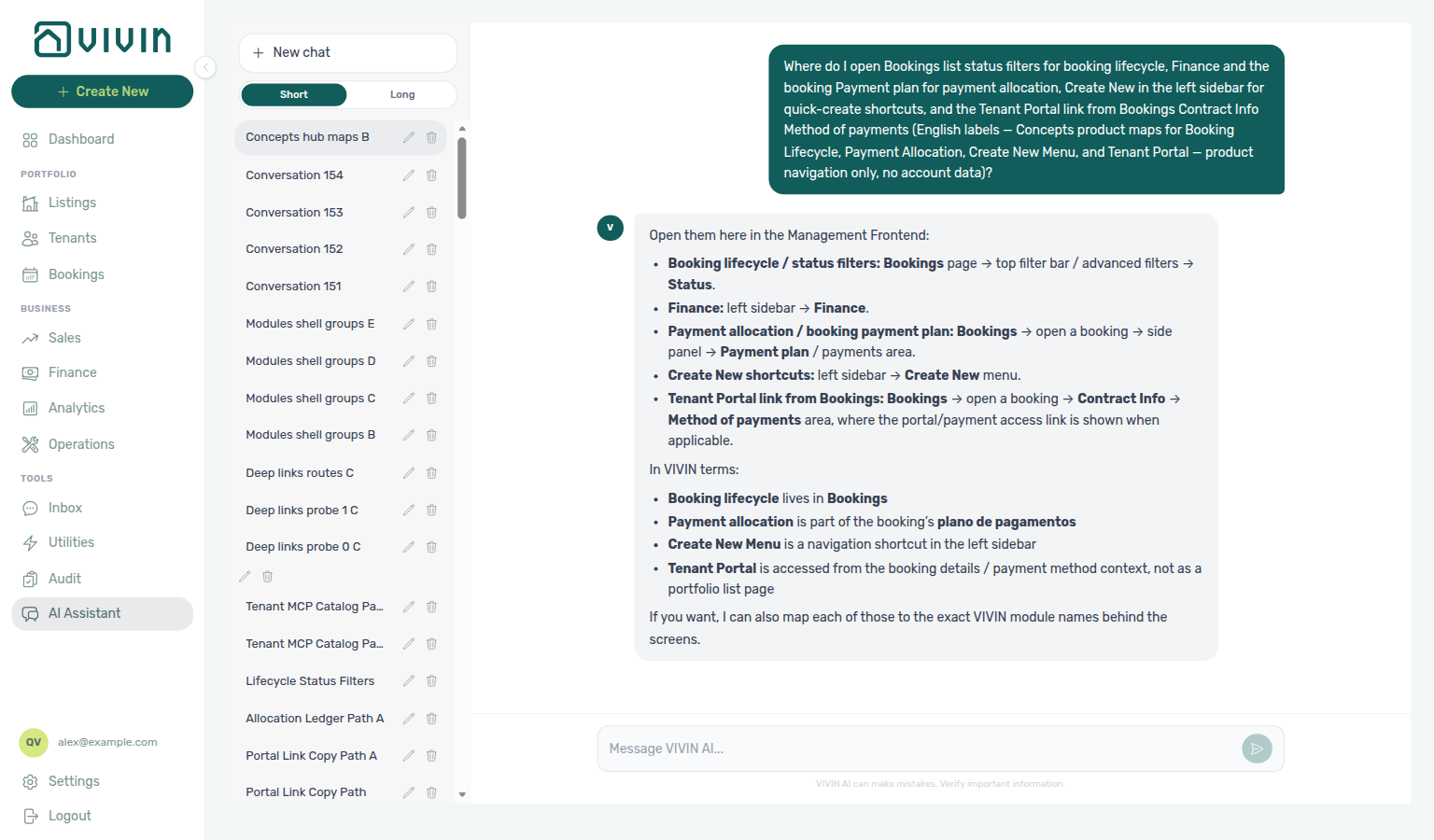
Ask AI Chat “Where do I open Bookings list status filters for booking lifecycle, Finance and the booking Payment plan for payment allocation, Create New in the left sidebar for quick-create shortcuts, and the Tenant Portal link from Bookings Contract Info Method of payments (English labels — Concepts product maps for Booking Lifecycle, Payment Allocation, Create New Menu, and Tenant Portal — product navigation only, no account data)?” — then open those surfaces (ai-chat-product-context-concepts-hub-reply.png, ai-chat-product-context-concepts-hub-flow.mp4). The assistant typically points at Bookings status filters, Finance plus the booking Payment plan, left-sidebar Create New, and Bookings → Contract Info → Method of payments for the Tenant Portal link. Same grounding external MCP clients get from get-vivin-context-overview (or get-vivin-context-bookings-tenants / get-vivin-context-finance). Deep guides: Booking Lifecycle, Payment Allocation, Create New Menu, Tenant Portal.
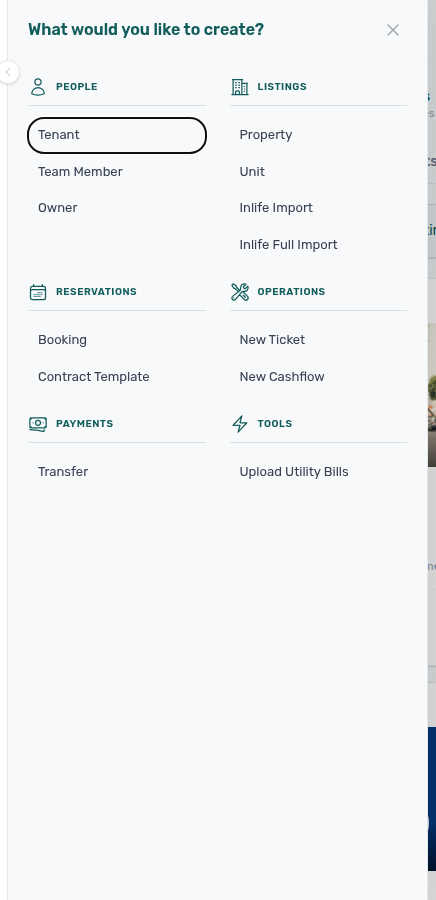
Many of the behaviors below surface in the same management hub you use every day. For example, the + Create New slide-out is a cross-module shortcut; which rows are enabled follows your role’s create permissions (see Create New Menu):
Reference
Bookmarkable routes here pair with Create New Menu (shortcut targets) and Core Systems module rows that expand each deep-link destination.
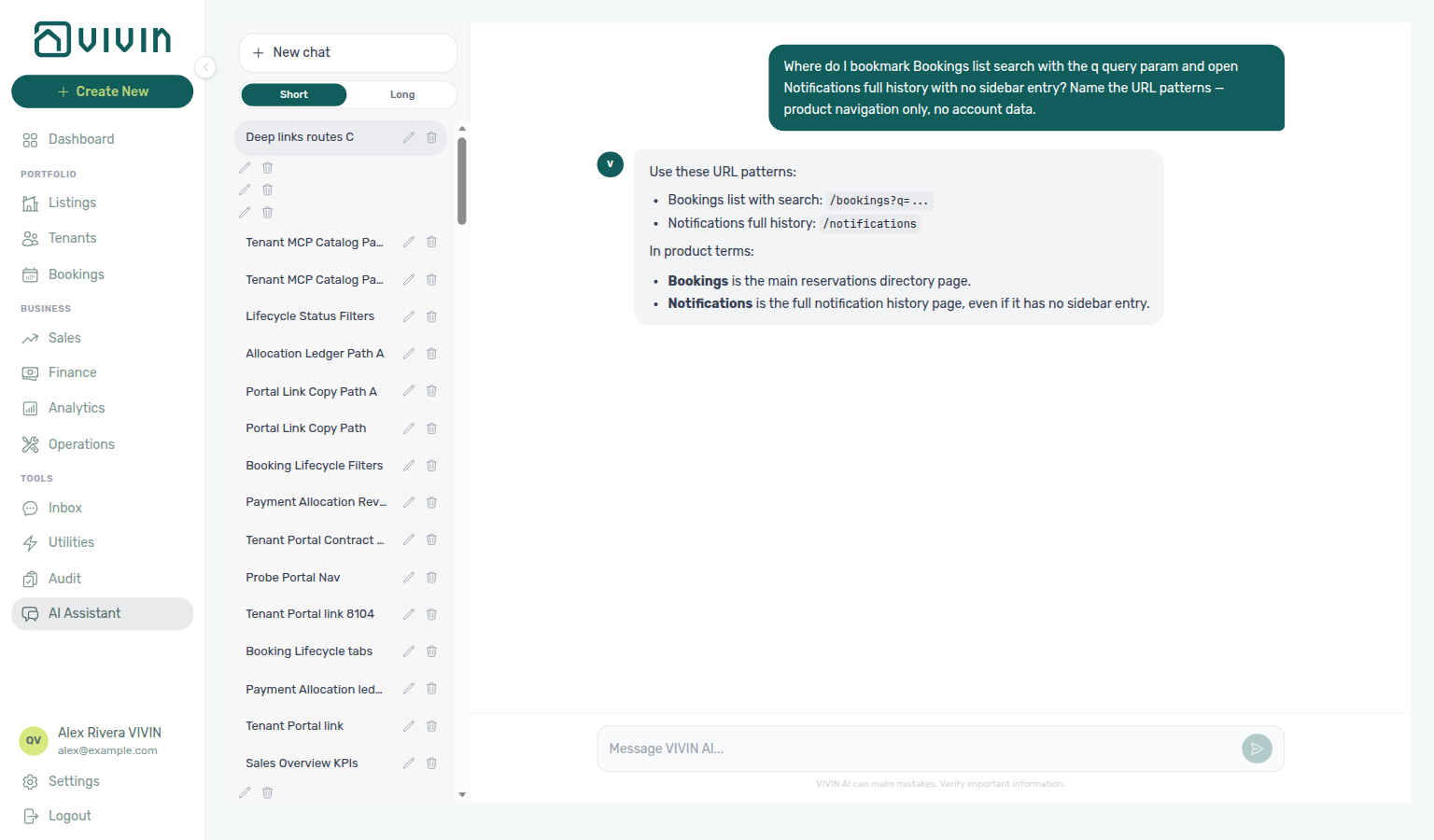
- Management Frontend Deep Links — Direct URL routes for platform.vivin.app. Use these links to open specific modules, tabs, or pages from emails, bookmarks, or shared links. Ask AI Chat for Bookings search (
/bookings?q=…) and Notifications (/notifications) URL patterns (ai-chat-product-context-deep-links-reply.png,ai-chat-product-context-deep-links-flow.mp4). The page pairs route tables with screenshots for Bookings, Tenants, Listings, and the full Notifications inbox so you can match a URL to what appears after sign-in. The same page documents Audit (/audit) for manual availability blocks alongside other Tools routes. Route-to-module pairing: Management Frontend Deep Links section cross-reference. For how the Dashboard bell differs from/notifications, see Deep Links — Notifications and the Notifications module.
Core Systems
Lifecycle and ledger concepts here pair with Tenant Experience (portal self-service) and Platform Capabilities (channels and MCP). Screen docs: Modules.
- Booking Lifecycle — How bookings progress through statuses and what triggers each transition. Essential reading for understanding when and why to change a booking's status. Includes list status filter and Timeline walkthrough videos beside the lifecycle tab screenshots. Topic-to-module pairing: Booking Lifecycle section cross-reference.
- Payment Allocation — How the two-layer payment model works, including allocation priority, overpayment handling, correcting mistaken receipts (approve, reject, revert, and credit note follow-up when charges were invoiced), and invoiced floor (rent) when lowering scheduled rent below exported invoice totals. Read this before configuring payment priorities or investigating a payment discrepancy. Topic-to-module pairing: Payment Allocation section cross-reference.
- Utilities module — Bills Included ceiling model, supplier Connections, AI bill upload, and tenant overage charges on Payment plan. Pair with Entering Monthly Utility Bills for the monthly operator workflow (guide subsection index; section cross-reference; Deeper workflow reads; hub)
- Operations module — Maintenance tickets, operational cash flows, check-in/out queues, Draft ticket KPI filtering, and linked cash flows. Pair with Managing a Check-in and Managing a Check-out for turnover weeks (guide subsection index; section cross-reference; Deeper workflow reads; hub)
- Dashboard module — Post-login Today, Total debt, Vacant Units, and forecast KPI snapshot. Pair with Notification triage for bell alerts and Portfolio KPI review for month-end reconciliation (guide subsection index; section cross-reference; Deeper workflow reads; hub)
- Analytics module — Month-range KPI workspace (Overview, Revenue, Occupancy, ADR, RevPAR, Maintenance) with ranking tables and heatmaps. Requires Analytics module permission — see FAQ — How is Analytics different from the Dashboard? (guide subsection index; section cross-reference; Deeper workflow reads; hub)
- Listings module — Property wizard, Channels tab, Archived inventory, and unit management. Pair with Onboarding a New Property for the setup wizard (guide subsection index; section cross-reference; Deeper workflow reads; hub)
- Properties workspace — Legacy
/propertiesURL redirect table into Listings. Pair with Onboarding a New Property when old bookmarks land mid-setup (guide subsection index; section cross-reference; Deeper workflow reads; hub) - Booking engine details — Rich marketplace payload editor via the Full integration pill. Pair with Integrations & Distribution and Full listing feeds (guide subsection index; section cross-reference; Deeper workflow reads; hub)
- Finance module — Portfolio ledgers (Overview, Income, Contract Values, Transactions, Payouts, Deposits) with Approve payments permission gating. Pair with Handling a Late Payment and Payment Allocation (guide subsection index; section cross-reference; Deeper workflow reads; hub)
- Tenants module — Tenant directory, profile sidebars, With Debt segmentation, and table expand. Pair with Processing a New Booking for profile enrichment after reservation creation (guide subsection index; section cross-reference; Deeper workflow reads; hub)
- Sales module — Portfolio Overview KPIs, Multicalendar availability timeline, Pricing monthly rent grid, and Channels manager. Pair with Onboarding a New Property for marketplace linking and Integrations & Distribution for calendar sync strategy (guide subsection index; section cross-reference; Deeper workflow reads; hub)
- Inbox module — Portfolio-wide WhatsApp triage (
/inbox) with Dashboard bell Inbox sub-tab deep links. Pair with Notification triage and ChatBot settings (guide subsection index; section cross-reference; Deeper workflow reads; hub) - Notifications module — Full
/notificationsalert history with search and All / Unread / Read filters. Pair with Notification triage and Deep Links — Notifications (guide subsection index; section cross-reference; Deeper workflow reads; hub) - Audit module — Portfolio-wide Manual Blocks (unavailabilities) and Discounts (discounted contract values) with filters, export, and booking sidebar drill-down. Pair with Manual block hygiene and Portfolio KPI review (guide subsection index; section cross-reference; Deeper workflow reads; hub)
- AI Chat module — AI Assistant using Landlord MCP tools for portfolio Q&A. Pair with Automation & AI and Landlord MCP (guide subsection index; section cross-reference; Deeper workflow reads; hub)
- Account Settings — Workspace-wide financial policies, user access, communication templates, integrations, and operational defaults. Pair with Onboarding a New Property and Getting Started — Recommended Setup Sequence.
- API Reference — Partner HTTP contracts (partial vs full listing feeds, booking import, webhooks, Swagger). Pair with Integrations & Distribution, Account Settings Integrations tab, and Integration field capability.
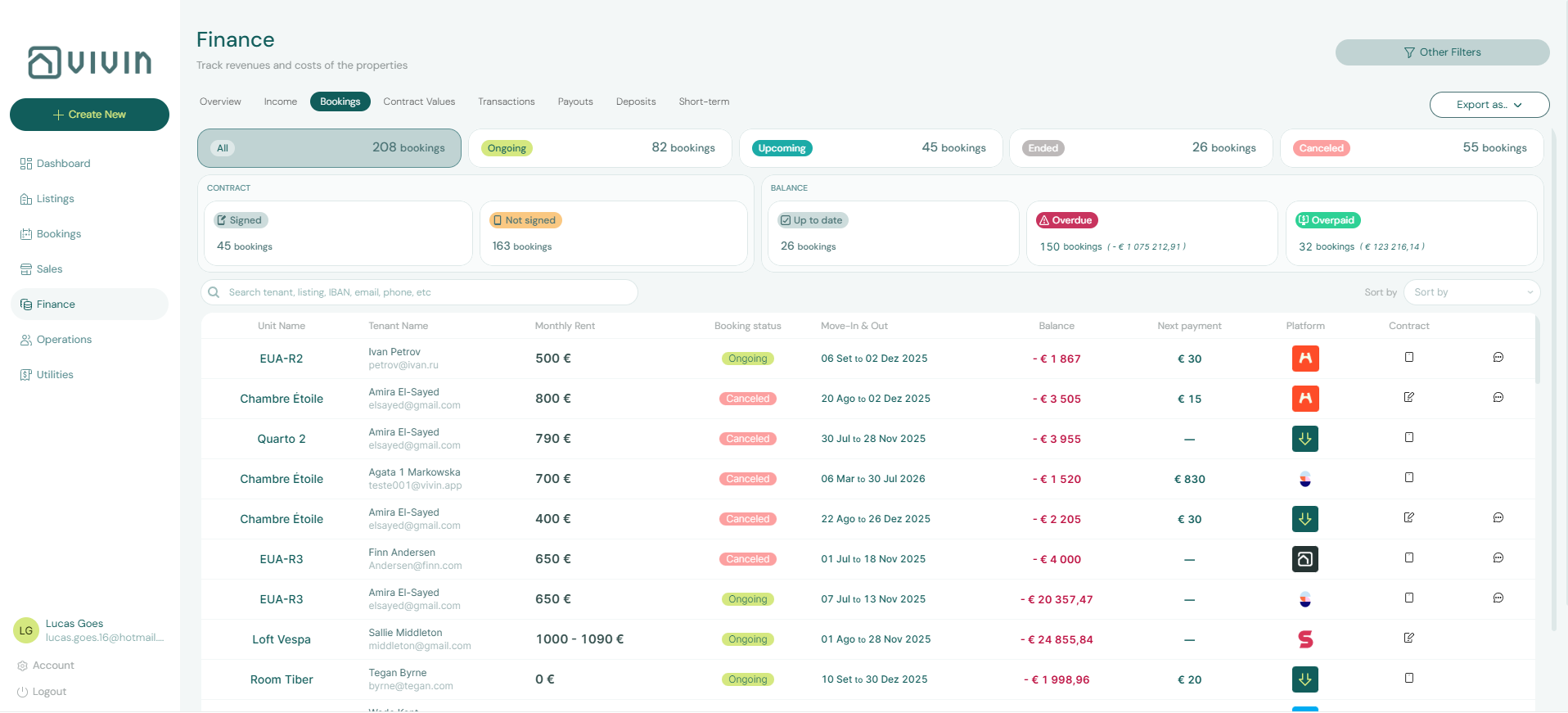
- Create New Menu — How the cross-module Create New entry points work from the management hub (tenants, bookings, properties, tickets, and more). Topic-to-category pairing: Create New Menu section cross-reference.
Tenant Experience
Portal and tenant-scoped automation pair with Payment Allocation (scheduled charges) and Settings > Tenant categories (segment gates). Booking-scoped MCP: Tenant MCP.
- Tenant Portal — What tenants see and can do in the web portal, how authentication works, and which settings control portal behavior. Tab-to-operator pairing: Tenant Portal section cross-reference.
- Tenant MCP — How the Tenant Model Context Protocol server exposes booking-scoped tools (data, portal links, chatbot rules, maintenance) to external AI clients — complementary to the web portal. Topic-to-tool pairing: Tenant MCP section cross-reference.
- Services Marketplace — How to offer extra services (cleaning, gym, insurance, etc.) to tenants and generate additional revenue through cross-selling and upselling. Topic-to-module pairing: Services Marketplace section cross-reference.
Platform Capabilities
Channels and automation here pair with API Reference (partner HTTP) and Landlord MCP (account-scoped external clients). Operator AI: AI Chat.
- Integrations & Distribution — How Vivin connects with every major European rental marketplace, Airbnb, Booking.com, and your own website via the white label booking engine. Covers calendar synchronisation, automatic booking import, and channel management. Topic-to-module pairing: Integrations & Distribution section cross-reference.
- Property & listing details (booking engine) — How rich property and unit fields are grouped for marketplace payloads and the booking engine; who can use the Full integration pill in Listings, tab reference, legacy URL redirects, and bookmarkable query params.
- Automation & AI — How Vivin uses artificial intelligence across the platform — from the tenant chatbot and smart invoice reading to predictive analytics, automated workflows, and external MCP clients (see Landlord and Tenant MCP below). Sales and Analytics surfaces combine charts and operator workflows; published rents are edited in Sales > Pricing, not by an in-app auto-pricing engine. Start with the channel map on that page when you need a single picture of how the management UI, MCP servers, and messaging channels all reach the Core API. Topic-to-surface pairing: Automation & AI section cross-reference.
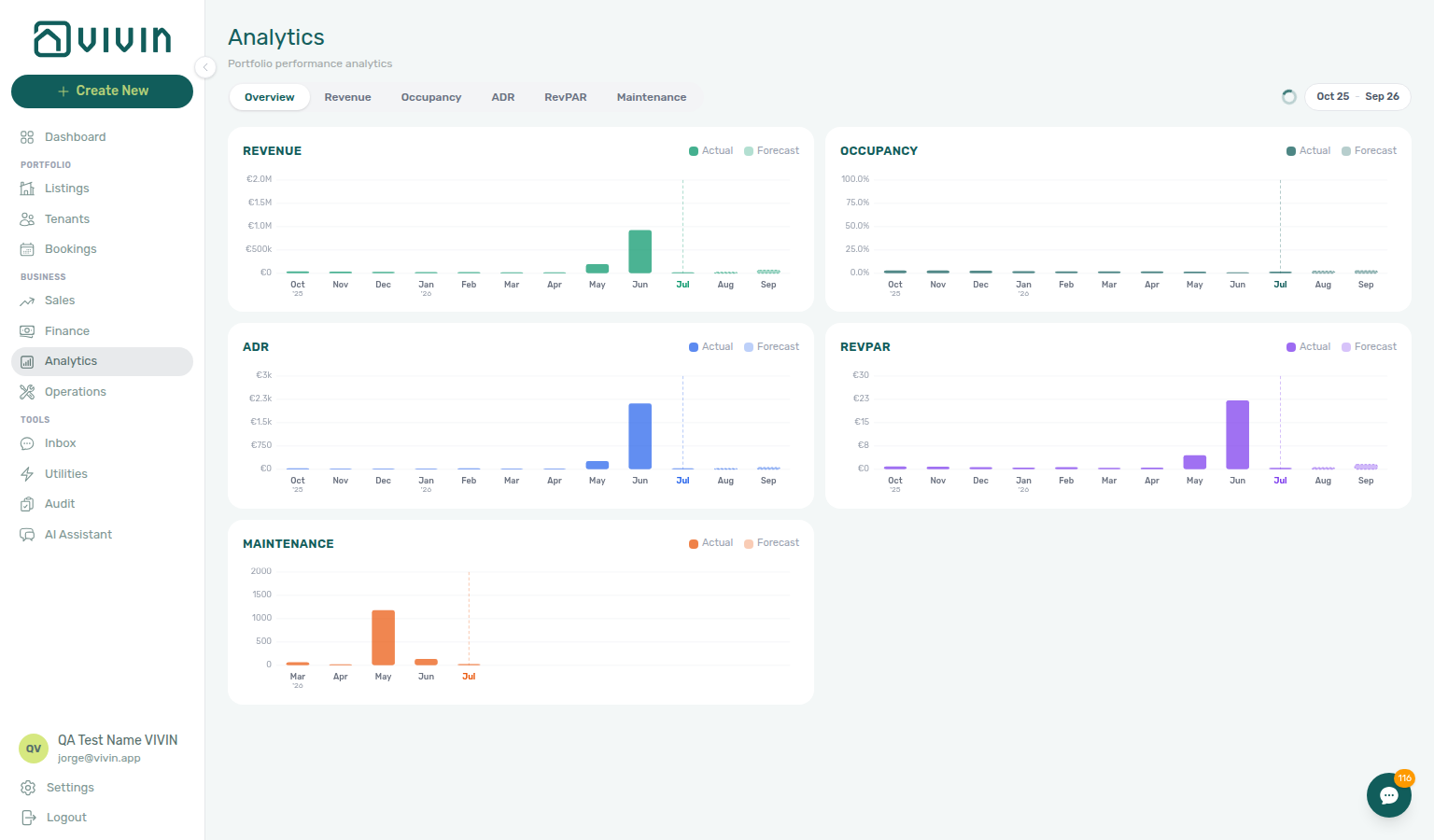
- Analytics (KPI workspace) — Portfolio charts at
/analytics(Overview, Revenue, Occupancy, ADR, RevPAR, Maintenance) for a configurable month range — distinct from Sales calendars and per-listing rent grids. Requires Analytics module permission (analytics.module).
- AI Chat — The in-management AI Assistant for roles granted the AI / MCP permission (
/ai-chat, Tools in the sidebar): natural-language portfolio Q&A using live account data. Distinct from the tenant chatbot under Account Settings → Chatbot and from Landlord/Tenant MCP servers. - Landlord MCP — How the Landlord Model Context Protocol server exposes Core API operations to external AI clients (tools, auth, permissions), and how it differs from tenant-scoped MCP. Topic-to-tool pairing: Landlord MCP section cross-reference.
Concept cross-reference
This table is the primary pairing matrix for concept pages — each sub-guide also opens with a First-time workspace setup tip and a Finding your way in this guide tip with section anchors. Hub map: the Finding your way tip at the top of this page. Setup sequencing: Related — Setup sequence after go-live. Longer matrices: Booking Lifecycle section cross-reference and Related subsection anchors (for example Booking Lifecycle — Turnover, cancellation, and collections workflows, Payment Allocation — Layer 2 receipts, approval, and corrections, Tenant Portal — Portal setup and tenant-facing workflows).
Use this table when one concept page naturally leads into another — each row links to the guides you should read before or after the primary topic. Each sub-guide also opens with a First-time workspace setup tip for that concept's setup prerequisites and a Finding your way in this guide tip with section anchors.
| Concept | Pair with these concepts |
| --------------------------------------------------------------------------------------- | ---------------------------------------------------------------------------------------------------------------------------------------------------------------------------------------------------------------------------------------------------------------------------------------------------------------------------------------------------------------------------------------------------------------------------------------------------------------------------------------------------------------------------------------------------------------------------------------------------------------------------------------------------------------------------------------------------------------------------------------------------------------------------------------------------------------------------------------------------------------------------------------------------------------------------------------------------------------------------------------------------------------------------------------------------------------------------------------------------------------------- | ---------------------------------------------------------------------------------------------------------------------------------------------------------------------------------------------------------------------------------------------------------------------------------------------------------------------------------------------------------------------------------------------------------------------------------------------------------------------------------------------------------------------------------------------------------------------- |
| Concepts hub subsection index | Modules hub subsection index (screen workspaces), Introduction hub subsection index (platform overview), Getting Started hub subsection index (onboarding sections), Common Workflows hub subsection index (operational procedures), Account Settings hub subsection index (setup tabs), API hub subsection index (partner HTTP guides), FAQ subsection cross-reference (troubleshooting deep-dives), Support hub subsection index (escalation steps), Glossary deep-dive index (term definitions), Core Systems (lifecycle and ledger models), Reference (bookmarkable routes) |
| Booking Lifecycle | Payment Allocation (scheduled charges and list filters), Tenant Portal (contract signing and check-in triggers), Integrations & Distribution (imported channel reservations), Notifications — Payment overdue alerts (Ongoing stays → Handling a Late Payment — Step 1). Topic table: Booking Lifecycle section cross-reference |
| Payment Allocation | Booking Lifecycle (status tabs on unpaid rows), Tenant Portal (tenant-initiated payments), Services Marketplace (add-on charges on the payment plan), Notifications — Payment overdue alerts, Handling a Late Payment — Step 1, Managing a Check-out — Step 6b (departure-week pending receipts), Payment Allocation — Correcting mistaken receipts, Common Workflows — Reject/revert mistaken receipts |
| Tenant Portal | Payment Allocation (portal payments and receipts), Services Marketplace (tenant add-on catalogue), Automation & AI (chatbot channel vs portal self-service), Settings > Tenant categories (portal modules and editable fields per segment), Glossary — Tenant category. Topic table: Tenant Portal section cross-reference |
| Tenant MCP | Landlord MCP (account-wide vs booking-scoped tools), Tenant Portal (portal links and booking context), Automation & AI (channel map and chatbot rules), Settings > Tenant categories (portal modules and Communications / Email per segment), Processing a New Booking (assign category before portal mail), Glossary — Tenant category. Topic table: Tenant MCP section cross-reference |
| Services Marketplace | Tenant Portal (visibility and purchase flows), Payment Allocation (Layer 1 schedule lines), Booking Lifecycle (timing: booking, check-in, or mid-stay), Settings > Tenant categories (Allow to see services and portal module gates per segment), Bookings — Tenant categories stays open, Glossary — Tenant category. Topic table: Services Marketplace section cross-reference |
| Integrations & Distribution | API Reference (partner HTTP contracts), Deep Links (settings and channel-manager routes), Booking Lifecycle (imported reservation status), Settings > Tenant categories (default for integration-created tenants), Glossary — Tenant category. Topic table: Integrations & Distribution section cross-reference |
| Management Frontend Deep Links | Create New Menu (shortcut targets after create), Integrations & Distribution (/settings/integrations and channel tabs), Automation & AI (/ai-chat and /inbox routes), Settings > Tenant categories (/settings/tenantCategories), Bookings — Tenant categories stays open, Finance — Tenant category filter, Tenants — Tenant category filter. Topic table: Management Frontend Deep Links section cross-reference |
| Create New Menu | Deep Links (bookmark module routes opened after create), Booking Lifecycle (new reservation status), Integrations & Distribution (channel imports vs manual Booking), Notifications — Payment overdue alerts, Handling a Late Payment — Step 1. Topic table: Create New Menu section cross-reference |
| Automation & AI | Landlord MCP (portfolio automation), Tenant MCP (booking-scoped automation), Tenant Portal (tenant self-service alongside chatbot), Settings > Tenant categories (Communication Rules audience and Communications / Email toggle), Emails — Audience tenant categories, Notifications — Payment overdue alerts, Handling a Late Payment — Step 1, Glossary — Tenant category. Topic table: Automation & AI section cross-reference |
| Landlord MCP | Tenant MCP (scope contrast), API Reference (auth and HTTP contracts), Automation & AI (channel map and AI Assistant), AI usage API (landlord_chat ledger), Settings > Tenant categories (default for integration-created tenants and create-booking follow-through), Processing a New Booking, FAQ — Assign tenant category for direct booking, Glossary — Tenant category. Topic table: Landlord MCP section cross-reference |
| Analytics (KPI workspace) | Dashboard (post-login KPI snapshot), Portfolio KPI review (month-end reconciliation), Sales (pricing vs occupancy charts), Finance — Tenant category filter, Bookings — Tenant categories stays open, Portfolio KPI review — Step 6, Glossary — Tenant category. Topic table: Analytics section cross-reference |
| Dashboard | Analytics (month-range charts), Notification triage (bell vs /notifications), Booking Lifecycle (Today KPI and lifecycle mix). Topic table: Dashboard section cross-reference |
| Utilities | Payment Allocation (overage lines on Payment plan), Entering Monthly Utility Bills (monthly operator workflow), Listings (Bills Included ceilings at property level). Topic table: Utilities section cross-reference |
| Operations | Bookings (turnover and ticket context), Finance (tenant payments — not operational Cash Flows), Managing a Check-in / Managing a Check-out. Topic table: Operations section cross-reference |
| Finance | Payment Allocation (Layer 1 vs Layer 2), Bookings — Transactions, Handling a Late Payment, Finance — Tenant category filter, Bookings — Tenant categories stays open, Glossary — Tenant category, FAQ — Finance tenant category filter parity. Topic table: Finance section cross-reference |
| Bookings | Booking Lifecycle (status filters and Timeline), Finance — Contract Values, Notification triage, Bookings — Tenant categories stays open, Settings > Tenant categories, Glossary — Tenant category. Topic table: Bookings section cross-reference |
| Listings | Onboarding a New Property (property wizard), Integrations & Distribution (channel sync), Sales — Channels. Topic table: Listings section cross-reference |
| Properties workspace (legacy /properties) | Listings (redirect target), Legacy properties guide subsection index, Deep Links — Listings, Onboarding a New Property, Notifications — Payment overdue alerts, Handling a Late Payment — Step 1. Topic table: Legacy properties section cross-reference |
| Booking engine details | Listings (Full integration pill entry), Integrations & Distribution (white label + partner feeds), API Reference — Full listing feeds. Topic table: Booking engine details section cross-reference |
| Sales | Analytics (portfolio KPI charts vs pricing grids), Bookings — Timeline, Integrations & Distribution (calendar propagation). Topic table: Sales section cross-reference |
| Tenants | Handling a Late Payment (With Debt triage), Payment Allocation (reject/revert receipts), Bookings (contract-level actions), Tenants — Tenant category filter, Settings > Tenant categories, Glossary — Tenant category. Topic table: Tenants section cross-reference |
| Notifications | Notification triage (row-click routes), Dashboard (bell vs /notifications), Deep Links — Notifications, Notifications — Payment overdue alerts, Handling a Late Payment — Step 1. Topic table: Notifications section cross-reference |
| Inbox | Automation & AI (WhatsApp channel map), Bookings — Communication, Notification triage (Inbox bell sub-tab). Topic table: Inbox section cross-reference |
| Audit | Manual block hygiene, Portfolio KPI review, Bookings — Timeline. Topic table: Audit section cross-reference |
| AI Chat | Landlord MCP (shared tool surface), Automation & AI (channel map), AI usage API (landlord_chat ledger), Portfolio KPI review (verify assistant summaries). Topic table: AI Chat section cross-reference |
| Account Settings | Onboarding a New Property (go-live checklist), Integrations & Distribution (marketplace credentials), Payment Allocation (due dates and priorities). Tab matrix: Account Settings — Tab cross-reference |
| API Reference | Integrations & Distribution (partner distribution), Account Settings — Integrations (credentials UI), Booking engine details (rich payload editor). Topic table: API guide cross-reference |
| Setup sequence after go-live | Getting Started — Recommended Setup Sequence (steps 1–15), Onboarding a New Property — Step 7, Support — Setup sequence escalation, FAQ — Settings & tenant communications, Onboarding a New Property (guided steps 4–12) |
| Documentation map & escalation | Introduction — Section cross-reference, FAQ — Section cross-reference, Support — Section cross-reference, Common Workflows section cross-reference, Using in-app support |
| Navigation & bookmarks | Management Frontend Deep Links, Create New menu, Settings > Interface language, FAQ — Navigation & shortcuts |
| Settings that shape concept behaviour | Account Settings — Tab cross-reference, Settings > Tenant categories, Settings > Emails, Support — Settings that shape escalations |
| Deeper workflow reads | Booking Lifecycle, Payment Allocation, Tenant Portal, Integrations & Distribution, Automation & AI, Landlord MCP, Tenant MCP, Onboarding a New Property |
| Recommended operator workflows | Common Workflows — Workflow cross-reference, Onboarding a New Property, Portfolio KPI review, Notification triage |
| Lockout catch-up after password recovery | Sign-in restored after password reset; onboarding, alert, or month-end backlog accumulated during lockout | Common Workflows — Lockout catch-up after password recovery, Getting Started — Lockout catch-up after password recovery, Resetting a Management User Password |
| Lockout catch-up after password recovery | Operational backlog mesh after sign-in recovery | Common Workflows — Lockout catch-up after password recovery, Getting Started — Lockout catch-up after password recovery, Resetting a Management User Password — Step 3 |
| Walkthrough media | MP4 walkthroughs beside PNG screenshots | Common Workflows — Walkthrough media, Modules, Account Settings |
| Notification row-click navigation | /notifications row-click into module routes from concept reads | Common Workflows — Notification row-click navigation, Deep Links — Notifications, Notifications module, Notification triage |
| Payment alert to receivables triage | payment overdue alerts on lifecycle and ledger concepts | Common Workflows — Payment alert to receivables triage, Payment Allocation, Booking Lifecycle, Handling a Late Payment — Step 1 |
| Finance debt receivables triage | Portfolio receivables surfaces after single-booking alert triage | Common Workflows — Finance debt receivables triage, Handling a Late Payment collections (Steps 1–6 after triage surfaces), Payment Allocation, Glossary — Finance Debt Aging, FAQ — Finance debt receivables triage hub |
| Handling a Late Payment collections | Receivables triage surfaces → Handling a Late Payment Steps 1–6 on ledger models | Common Workflows — Handling a Late Payment collections hub, Handling a Late Payment, Payment Allocation, FAQ — Handling a Late Payment hub (finance-overview-income-chart-debt-aging.png, notifications-row-navigate-to-booking-detail.png, finance-overview-debt-aging-walkthrough-flow.mp4) |
| Finance Income status drill-down | Income status segments on ledger concepts — payment-line modal vs booking receivables | Common Workflows — Finance Income status drill-down, Payment Allocation, FAQ — Finance Income status drill-down hub (finance-overview-income-status-in-debt-modal.png, finance-overview-income-drill-down-flow.mp4) |
| Cash flow forecast drill-down | Collections history vs scheduled receivables on ledger concepts | Common Workflows — Cash flow forecast drill-down, Finance Income status drill-down, Glossary — Cash flow forecast (Finance Overview) (finance-overview-cash-flow-all-payments-modal.png, finance-overview-cash-flow-drill-down-flow.mp4) |
| Same-day turnover coordination | Shared-unit departure + arrival overlap on lifecycle models | Common Workflows — Same-day turnover coordination, Booking Lifecycle, Glossary — Same-day turnover, FAQ — Same-day turnovers |
| Check-out final utilities handoff | Final-cycle utility overage models before deposit release | Common Workflows — Check-out final utilities handoff, Payment Allocation, Glossary — End-of-Booking cost split, FAQ — Check-out final utilities handoff |
| Check-out collections before refund | Departure-week rent/fee In Debt on ledger and allocation models before deposit release | Common Workflows — Check-out collections before refund, Payment Allocation, Handling a Late Payment, FAQ — Check-out collections before refund (workflows-check-out-coordination-flow.mp4, finance-contract-values-in-debt-filter.png) |
| Check-out ledger cleanup before refund | Duplicate departure transfers leave phantom In Debt on ledger models before refund | Common Workflows — Check-out ledger cleanup before refund, Payment Allocation — Correcting mistaken receipts, Reject/revert mistaken receipts, FAQ — Check-out ledger cleanup before refund (bookings-detail-transactions-revert-modal-info-banner.png, finance-transactions-bulk-reject-selected-bar.png) |
| Check-out vs cancellation | Completed stay → Ended vs policy void → Canceled on lifecycle models | Common Workflows — Check-out vs cancellation, Booking Lifecycle, Managing a Check-out, Cancelling a Booking, FAQ — Check-out vs cancellation (workflows-cancel-booking-refund-modal-flow.mp4, bookings-list-canceled-tab.png) |
| Cancellation collections before void | Pre-cancel rent/fee In Debt on ledger models before policy void | Common Workflows — Cancellation collections before void, Payment Allocation, Cancelling a Booking, FAQ — Cancellation collections before void (finance-contract-values-in-debt-filter.png, bookings-cancel-booking-modal-refund-types.png, workflows-cancel-booking-refund-modal-flow.mp4) |
| Wrong tenant on a booking | Booking–tenant profile link on lifecycle models — Change tenant vs Delete | Common Workflows — Wrong tenant on a booking, Booking Lifecycle, Bookings — Change tenant, FAQ — Wrong tenant on a booking (bookings-detail-change-tenant-control.png, bookings-detail-change-tenant-flow.mp4) |
| Cancel Booking vs Delete Booking | Soft-archive vs policy void on lifecycle and ledger models — Delete Booking vs Cancel booking | Common Workflows — Cancel Booking vs Delete Booking, Booking Lifecycle, Bookings module, FAQ — Cancel Booking vs Delete Booking (bookings-cancel-booking-modal-refund-types.png, workflows-cancel-booking-refund-modal-flow.mp4) |
| Portfolio retirement decisions | Building Archive vs reservation Cancel vs Delete on lifecycle and inventory models | Common Workflows — Portfolio retirement decisions, Listings — Archived properties, Bookings — Delete Booking, FAQ — Portfolio retirement decisions (listings-archived-populated-table.png, listings-archived-unarchive-sidebar.png, finance-transactions-type-summary-cards.png) |
| Archive property (building-level) | Building-level Archive / Unarchive on inventory models — history preserved | Common Workflows — Archive property (building-level), Listings — Archived properties, Glossary — Archived property, FAQ — Archive a property (listings-archived-populated-table.png, listings-archived-unarchive-sidebar.png) |
| Utility overage collections | Mid-stay utility overage arrears on ledger and allocation models | Common Workflows — Utility overage collections, Payment Allocation, Entering Monthly Utility Bills, Handling a Late Payment |
| Property setup to first arrival handoff | Go-live inventory → first arrival week on lifecycle and portal models | Common Workflows — Property setup to first arrival handoff, Booking Lifecycle, Glossary — Tenant category, FAQ — Property setup to first arrival handoff |
| New inventory to first booking handoff | Go-live inventory → first Upcoming reservation on lifecycle models | Common Workflows — New inventory to first booking handoff, Booking Lifecycle, Glossary — Tenant category, FAQ — New inventory to first booking handoff |
| Confirmation to check-in handoff | Upcoming portal and receipt models before arrival-week planning on lifecycle concepts | Common Workflows — Confirmation to check-in handoff, Booking Lifecycle, Tenant Portal, FAQ — Confirmation to check-in handoff (bookings-detail-contract-method-of-payments.png, workflows-operations-check-in-out-planning-view.png, booking-lifecycle-status-tabs-flow.mp4) |
| Check-in to check-out handoff | Ongoing mid-stay → departure-week planning on lifecycle and ledger models | Common Workflows — Check-in to check-out handoff, Booking Lifecycle, Managing a Check-in, Managing a Check-out, FAQ — Check-in to check-out handoff (operations-check-in-out-check-outs-next-7-days.png, bookings-timeline-view.png) |
| Occupancy KPI to block hygiene handoff | Analytics Occupancy / RevPAR dip without rate change on lifecycle and KPI models | Common Workflows — Occupancy KPI to block hygiene handoff, Booking Lifecycle, Glossary — Manual unavailability (manual block), FAQ — Occupancy KPI to block hygiene handoff hub (analytics-kpi-occupancy-tab.png, audit-manual-blocks-workspace.png) |
| Confirmation alert triage | Upcoming confirmation alerts on new reservations | Common Workflows — Confirmation alert triage, Booking Lifecycle, Processing a New Booking — Step 5b |
| Portfolio segmentation by tenant category | Review only corporate, short-stay, or unassigned tenants across reservations, receivables, and profiles | Common Workflows — Portfolio segmentation by tenant category, Settings > Tenant categories, Bookings — Tenant categories stays open, Finance — Tenant category filter, Tenants — Tenant category filter, Glossary — Tenant category |
| Pending manual receipt approval | Common Workflows — Pending manual receipt approval, Finance — Pending manual payments, FAQ — Manual receipt still pending |
| Reject/revert mistaken receipts | Common Workflows — Reject/revert mistaken receipts, Payment Allocation — Correcting mistaken receipts, FAQ — Reject or revert an incoming payment |
| Month-end invoicing (fixed date) | Fixed Invoice date before bulk Issue allocation — toggle Use today back on after batch | Common Workflows — Month-end invoicing (fixed date), Payment Allocation, Glossary — Fixed invoice date, FAQ — Month-end invoicing (fixed date) hub (settings-invoicing-invoice-date-toggle.png, finance-transactions-bulk-toolbar-fixed-invoice-date-banner.png) |
| Bulk Hostkit invoicing | Month-end Issue allocation / Invoice selected paces Hostkit — refresh Transactions before re-issue | Common Workflows — Bulk Hostkit invoicing, Integrations & Distribution — Hostkit invoicing, Finance — Invoice automation, FAQ — Bulk Hostkit invoicing hub (finance-transactions-bulk-selection-bar.png, settings-invoicing-hostkit-series.png) |
| Rent reduction after invoicing | Invoiced floor blocks rent cuts — external credit notes then Issue credit notes | Common Workflows — Rent reduction after invoicing, Payment Allocation — Correcting mistaken receipts, Bookings — Rent reduction after invoicing, FAQ — Lower rent below invoiced (bookings-detail-change-monthly-rent-modal.png, bookings-rent-reduction-invoiced-floor-flow.mp4) |
| Modules where concepts surface | Modules — Module cross-reference, Bookings, Finance, Support — Module documentation hubs |
| Deeper concept reads | Booking Lifecycle, Payment Allocation, Tenant Portal, Integrations & Distribution, Automation & AI, Landlord MCP, Tenant MCP |
| Deeper API reads | Booking Lifecycle, Payment Allocation, Tenant Portal, Integrations & Distribution, Automation & AI, Landlord MCP, Tenant MCP, API hub subsection index; reciprocal links from API Reference — Deeper concept reads |
| Key glossary terms | Glossary cluster cross-reference, Glossary — Setup sequence vocabulary, Payment Allocation — Correcting mistaken receipts |
Concepts hub subsection index
This index pairs concept sections and Related hub subsections — use it when behaviour spans lifecycle models, tenant-facing surfaces, channels, or escalation hubs.
Related
Related below links concept reads to modules, workflows, settings, and escalation paths./booking-lifecycle.md#turnover-cancellation-and-collections-workflows), Payment Allocation — Layer 2 receipts, approval, and corrections, Tenant Portal — Portal setup and tenant-facing workflows, Booking Lifecycle — Deeper concept reads, Booking Lifecycle — Deeper API reads).
Setup sequence after go-live
Post-go-live pairing starts with Getting Started — Recommended Setup Sequence (steps 1–15) and Onboarding a New Property — Step 7. When a step is blocked, continue to Support — Setup sequence escalation.
- Setup steps 1–3 (General Information, Preferences, Users) — Complete before Onboarding a New Property; greyed-out + Create New rows usually mean step 3 permissions are missing (FAQ — Navigation & shortcuts)
- Setup steps 4–12 — Onboarding a New Property (property wizard Steps 1–6 mirror settings configuration; pair with Integrations & Distribution and Tenant Portal optional sections on Getting Started — Recommended Setup Sequence)
- Setup steps 13–15 (Listings, Bookings, Tenants) — First operational data; pair with Booking Lifecycle and Payment Allocation once reservations exist
- After steps 13–15 — Onboarding a New Property — Step 7 go-live verification before you escalate lifecycle or payment behaviour that disagrees with concept pages
- Optional setup sections on Getting Started — Recommended Setup Sequence map to concept reads: Payment Allocation and Booking Lifecycle (finance and reservations), Tenant Portal and Services Marketplace (portal add-ons), Integrations & Distribution and API Reference (channels), Automation & AI and Landlord MCP / Tenant MCP (external clients)
- When a settings tab, property wizard step, or module permission still blocks progress after self-serve docs, open Get Help & Support or Using in-app support — cite the matching setup step and pair with Support — Setup sequence escalation
Documentation map & escalation
- Getting Started — Interface layout and Recommended Setup Sequence before deep dives;
- Introduction — Platform overview and how documentation sections connect (Introduction — Section cross-reference);
- Modules — Screen-by-screen reference for each management workspace (see Core Systems above for concept-to-module pairing);
- Common Workflows — Procedures that apply these concepts in practice (hub: Common Workflows section cross-reference, Setup sequence after go-live)
- Account Settings — Workspace-wide financial policies, templates, integrations, and operational defaults; setup sequence tab map: Recommended setup order and Tab cross-reference;
- API Reference — HTTP contracts when concepts meet external integrations (including partial vs full feeds);
- Glossary — Short definitions for terms used on concept and module pages (hub: Glossary cluster cross-reference, Setup sequence vocabulary, Setup sequence after go-live)
- FAQ & Troubleshooting — Answers aligned with lifecycle, payments, and portal behaviour (hub: FAQ — Section cross-reference, Setup sequence after go-live)
- Get Help & Support — Escalation when concept behaviour does not match the live product (hub: Support — Section cross-reference, Setup sequence after go-live, Setup sequence escalation)
- Using in-app support — Vivin product tickets when concept behaviour is unclear
Navigation & bookmarks
Bookmark routes pair with Management Frontend Deep Links and Reference deep-link docs. Missing records: Create New menu.
- Management Frontend Deep Links — Bookmarkable module routes, tab anchors,
/notificationsvs Dashboard bell, and booking-engine details query params - Create New menu — Global + slide-out shortcuts into module modals (tenants, bookings, properties, tickets, and more)
- FAQ — Permission denied toast — Red You do not have permission to perform this action. toast when RBAC blocks a save; fix in Users → Role Permissions
- Deep Links — Account Settings —
/settings/*tab routes paired with integration, notification, and portal concept behaviour - Settings > Interface language — Personal UI locale before you share deep links with multilingual operators
Settings that shape concept behaviour
Per-concept First-time workspace setup tips. Tenant segments: Settings > Tenant categories.
- Settings > Preferences — In-app notifications — Account-wide alert categories that gate notification surfaces referenced on concept pages
- Settings > Emails — Communication Rules and lifecycle templates across booking, portal, and collections concepts
- Settings > Chatbot — Tenant messaging channel paired with Automation & AI and Inbox
- Settings > Integration field capability — Partner payload matrix alongside Integrations & Distribution
- Settings > Invoicing & Payments — Due dates, deposit rules, and export providers that shape Payment Allocation
- Settings > Services — Tenant add-on catalogue configured with Services Marketplace
- Settings > Tenant categories — Portal segments, default for integrations, and portfolio filters on Bookings, Finance, and Tenants
Recommended operator workflows
- Onboarding a New Property — Apply lifecycle, payments, and integration concepts during the property wizard; pair with Getting Started — Recommended Setup Sequence (steps 1–3 before, steps 13–15 + Step 7 after)
- Processing a New Booking — Booking lifecycle and payment allocation when a reservation is first created
- Handling a Late Payment — Step 1 — Collections when payment allocation and portal visibility matter; upstream path from Notifications — Payment overdue alerts
- Managing a Check-in — Arrival-week workflow after Upcoming lifecycle concepts
- Managing a Check-out & Deposit Refund — Deposit settlement, deposit dispute, and Deposit lifecycle status after long stays
- Cancelling a Booking — Termination workflow alongside Booking Lifecycle status rules
- Entering Monthly Utility Bills — Monthly supplier billing paired with Bills Included and Utilities concepts
- Portfolio KPI review — Reconciliation tying Analytics, Finance, and Operations signals together
- Common Workflows — Reject/revert mistaken receipts — Hub matrix when duplicate or invoiced receipts need Reject / Revert
- Notification triage — Row-click routes from
/notificationsinto Deep Links module routes - Manual block hygiene — Audit pass when occupancy deep links show unexpected blocks
- Resetting a Management User Password — Recover access when a lockout blocks concept validation in the management app
Operator habit hubs
Day-to-day operator habits (lockout catch-up, pending receipts, payment triage, handoffs, and related playbooks) live on the Common Workflows habit hub.
Deep-link anchors for habit hubs
Lockout catch-up after password recovery
Notification row-click navigation
Payment alert to receivables triage
Finance debt receivables triage
Handling a Late Payment collections
Finance Income status drill-down
Cash flow forecast drill-down
Same-day turnover coordination
Check-out final utilities handoff
Check-out collections before refund
Check-out ledger cleanup before refund
Check-out vs cancellation
Cancellation collections before void
Wrong tenant on a booking
Cancel Booking vs Delete Booking
Portfolio retirement decisions
Archive property (building-level)
Utility overage collections
Property setup to first arrival handoff
New inventory to first booking handoff
Confirmation to check-in handoff
Check-in to check-out handoff
Occupancy KPI to block hygiene handoff
Confirmation alert triage
Portfolio segmentation by tenant category
Pending manual receipt approval
Reject/revert mistaken receipts
Month-end invoicing (fixed date)
Bulk Hostkit invoicing
Rent reduction after invoicing
Walkthrough media
MP4 clips complement PNG screenshots on workflow and module guides — start at Common Workflows — Walkthrough media.
- Common Workflows — Walkthrough media — Canonical MP4 index for step-by-step operator guides
- Modules — Module pages with embedded clips (Analytics tab switching, Operations mobile shell, Finance drill-downs)
- Account Settings — Settings clips (ChatBot Save, Support new-ticket flow)
- Onboarding a New Property — Property wizard MP4 beside setup steps 4–12
- Booking lifecycle — Status filters and Timeline MP4 beside lifecycle concepts
Deeper workflow reads
, Payment Allocation — Deeper workflow reads, Tenant Portal — Deeper workflow reads. Each workflow sub-guide reciprocates with its own Deeper workflow reads subsection and [Deeper workflow reads](../concepts/booking-lifecycle.md#deeper-workflow-reads) anchors on Concepts & settings bullets — for example Processing a New Booking, Onboarding a New Property. Meta-hubs reciprocate: Account Settings — Deeper workflow reads, Getting Started — Deeper workflow reads, Introduction — Deeper workflow reads, Common Workflows hub — Deeper workflow reads.
- Onboarding a New Property — Apply lifecycle, payments, and integration concepts during the property wizard
- Processing a New Booking — Booking lifecycle and payment allocation when a reservation is first created
- Handling a Late Payment — Collections when Payment Allocation and portal visibility matter
- Cancelling a Booking — Termination workflow alongside Booking Lifecycle status rules
- Portfolio KPI review — Reconciliation tying Analytics, Finance, and Operations signals together
- Entering Monthly Utility Bills — Monthly supplier billing paired with Bills Included and Utilities concepts
- Notification triage — Row-click routes from
/notificationsinto Deep Links module routes - Manual block hygiene — Audit pass when occupancy deep links show unexpected blocks
Modules where concepts surface
Permission-gated modules: FAQ — Navigation & shortcuts.
- Bookings — Reservation lifecycle, Payment plan, Deposit, and Communication tabs
- Finance — Ledgers, payment approval, invoiced-floor guards, and Deposits
- Listings — Property wizard, Channels, and Bills Included ceilings
- Properties workspace — Legacy
/propertiesbookmarks that redirect into Listings (guide subsection index) - Booking engine details — Rich marketplace payload via the Full integration pill
- Operations — Tickets, cash flows, check-in/out queues, and linked cash flows
- Inbox — Portfolio WhatsApp triage when chatbot rules escalate to operators
- Notifications — Full
/notificationshistory with search and row-click navigation - Notifications — Payment overdue alerts — Operator Payments category rows when scheduled charges are overdue
- AI Chat — AI Assistant paired with Landlord MCP
- Audit — Manual Blocks and Discounts during month-end reconciliation
Deeper concept reads
Payment Allocation — Deeper concept reads, Tenant Portal — Deeper concept reads. Each sub-guide also has Deeper workflow reads for operator procedures.
- Booking Lifecycle — Computed status model, list filters, and Timeline (section cross-reference; Deeper concept reads)
- Payment Allocation — Two-layer receipts, invoiced-floor rent, and reject/revert corrections (section cross-reference; Deeper concept reads)
- Tenant Portal — Booking-scoped tenant self-service, contract signing, and payments (section cross-reference; Deeper concept reads)
- FAQ — Tenant contract signing blocked — No PDF yet, mandatory Your Details gates, category locks, or Lease purpose; portal signing vs paper upload on Contract Info
- Integrations & Distribution — Marketplace calendar sync, booking imports, and white-label engine (section cross-reference; Deeper concept reads)
- Automation & AI — Channel map, chatbot, in-app assistant, and MCP clients (section cross-reference; Deeper concept reads)
- Landlord MCP — Account-scoped external automation (section cross-reference; Deeper concept reads)
- Tenant MCP — Booking-scoped external automation (section cross-reference; Deeper concept reads)
- Management Frontend Deep Links — Bookmarkable management routes (section cross-reference; Deeper concept reads)
- Create New Menu — Global + slide-out shortcuts (section cross-reference; Deeper concept reads)
- Services Marketplace — Portal add-on catalogue and fulfilment (section cross-reference; Deeper concept reads)
Deeper API reads
Integrations & Distribution — Deeper API reads, Landlord MCP — Deeper API reads. API Reference Deeper concept reads bullets link back here with reciprocal [Deeper API reads] anchors.
- Booking Lifecycle — Computed status vs integration validation and webhook events
- Payment Allocation — Layer 1 schedules from partner enqueue and error shapes
- Tenant Portal — White-label and import APIs that provision portal access
- Integrations & Distribution — Full/partial feeds, iCal, webhooks, and mapping guides
- Automation & AI — Management session, auth, and inbound channel HTTP
- Landlord MCP — Portfolio JWT bootstrap and listing/booking HTTP behind tools
- Tenant MCP — Booking-scoped session bootstrap and underlying integration routes
- Management Frontend Deep Links — Sign-in and mapping guides before bookmark routes
- Create New Menu — Programmatic booking and listing verification alternatives
- Services Marketplace — Enqueue vs portal catalogue boundaries on partner HTTP
Key glossary terms
- Invoiced floor (rent) — Rent edits on live bookings after Finance export
- Credit note (payment reject/revert) — Finance Transactions reject/revert accounting follow-up; concept walkthrough: Payment Allocation — Correcting mistaken receipts; workflow hub: Common Workflows — Reject/revert mistaken receipts
- Deposit dispute — Finance → Deposits and booking Deposit tab freeze before refund
- Glossary — End-of-Booking cost split — Charge Time → End of Booking splits daily overage across every occupied unit; still-staying roommates stay in the denominator
- Glossary — Change history — Operator-initiated edits on Listings setup and Bookings Changelog; create-time defaults excluded
- Glossary — Archived booking ledger visibility — Delete Booking hides manual/provider_platform rows on Finance → Transactions; vIBAN and credit card stay visible
- Glossary — Full term list