Modules
Complete Getting Started — Recommended Setup Sequence (steps 1–12 on Account Settings tabs per Recommended setup order, then steps 13–15 in Listings, Bookings, and Tenants) and Onboarding a New Property — Step 7 go-live verification before you add operational data at scale in the modules below. Guided walkthrough of settings steps 4–12: Onboarding a New Property. When sign-in was restored mid-setup, see Getting Started — Lockout catch-up after password recovery. Each module sub-guide opens with a First-time workspace setup tip tailored to that module's setup step. Workflow pairing after go-live: Setup sequence after go-live.
First-time administrators should complete Getting Started — Recommended Setup Sequence (steps 1–12 tab map: Account Settings — Recommended setup order; steps 13–15 Listings, Bookings, Tenants) before daily module work. Underlying models: Concepts. Bookmark daily routes from Management Frontend Deep Links. Each module sub-guide opens with a First-time workspace setup tip tailored to that module's setup step and a Finding your way in this guide tip with section anchors. Habit-specific shortcuts live under Related below.
The Vivin Platform is organized into core modules, each handling a specific area of your property management operations. Click any module below to view its full documentation.
Shell and navigation
Permission-gated entries (Analytics, Audit, AI Chat, Inbox) are explained in FAQ — Navigation & shortcuts.
Ask AI Chat “Where do I find the Portfolio, Business, and Tools sidebar groups in the management app (English labels — Portfolio with Listings Bookings Tenants; Business with Sales Finance Analytics Operations; Tools with Inbox Utilities Audit and AI Assistant)? Confirm each group’s modules — product navigation only, no account data.” — then scan the left rail (ai-chat-product-context-modules-hub-reply.png, ai-chat-product-context-modules-hub-flow.mp4). The assistant typically lists Portfolio (Listings, Bookings, Tenants), Business (Sales, Finance, Analytics, Operations), and Tools (Inbox, Utilities, Audit, AI Assistant). Same grounding external MCP clients get from get-vivin-context-overview (or get-vivin-context-platform). Dashboard sits above those groups; Settings and profile stay at the bottom of the rail.
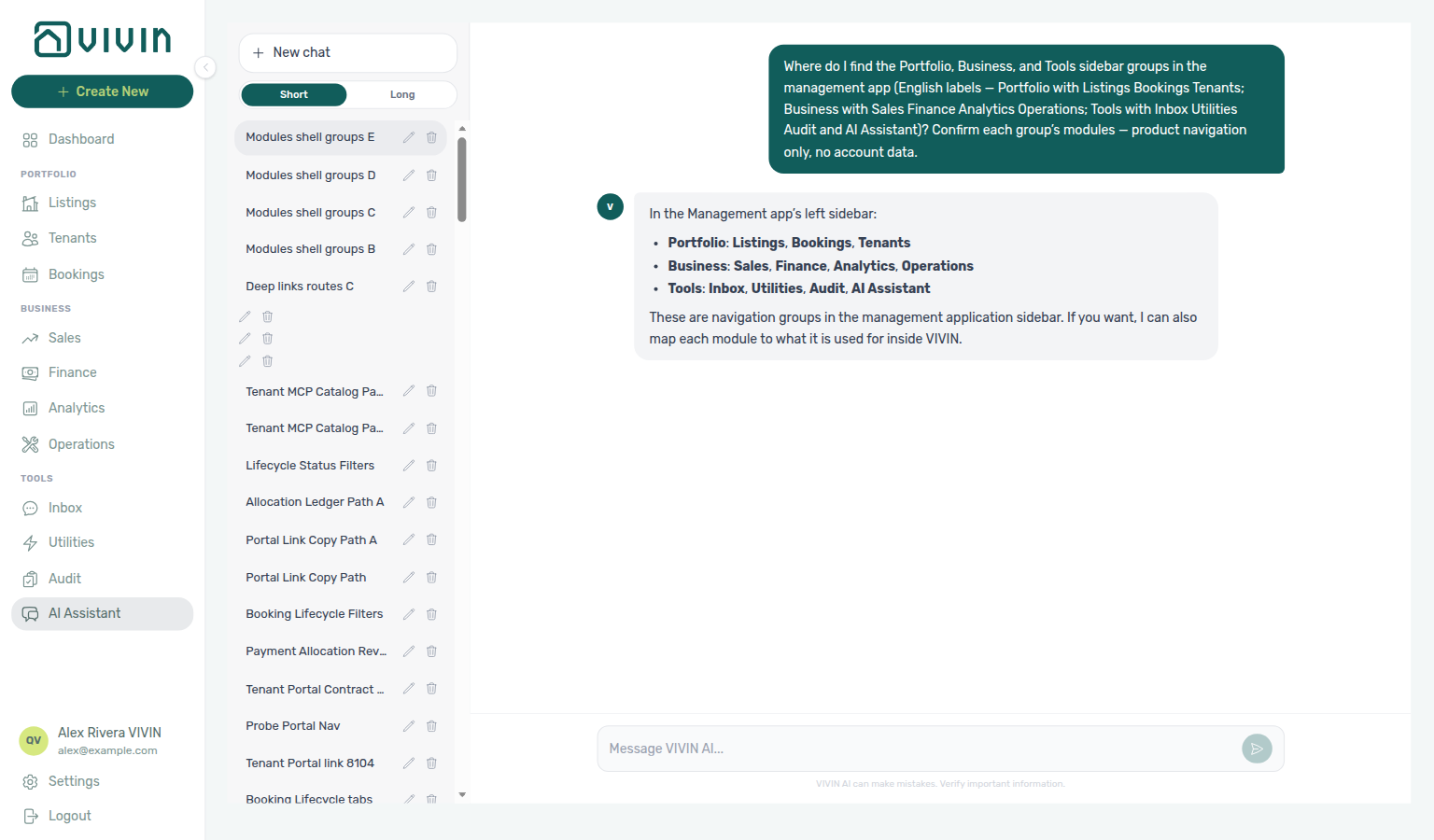
Every module keeps the same management shell: logo and + Create New at the top of the left rail, grouped module links (Portfolio, Business, Tools), and your account section at the bottom. Under Portfolio, Listings, Bookings, and Tenants cover inventory, reservations, and tenant profiles. Under Business, the sidebar order is Sales, Finance, Analytics (KPI workspace at /analytics when your role has the Analytics module permission, analytics.module), then Operations. Without Analytics permission, that entry is hidden and /analytics shows the standard permission state (see Deep Links — Analytics). Under Tools, Inbox (/inbox, desktop only when the tenant chatbot is enabled — portfolio-wide WhatsApp triage; see Inbox) is listed first alongside Utilities, Audit at /audit (manual availability blocks for portfolio-wide review when your role has Listings access — see Audit below and Deep Links — Audit), and AI Chat for Vivin internal accounts. When your role includes Support, a floating Help & Support control (bottom-right on desktop) opens the Vivin support ticket experience from any screen without changing the URL first — drawer Status stays open while you add a second workflow state; see Using in-app support. The screenshot below is the Dashboard landing view; when you open Bookings, Finance, or any other module, the sidebar layout stays consistent while the main workspace changes.
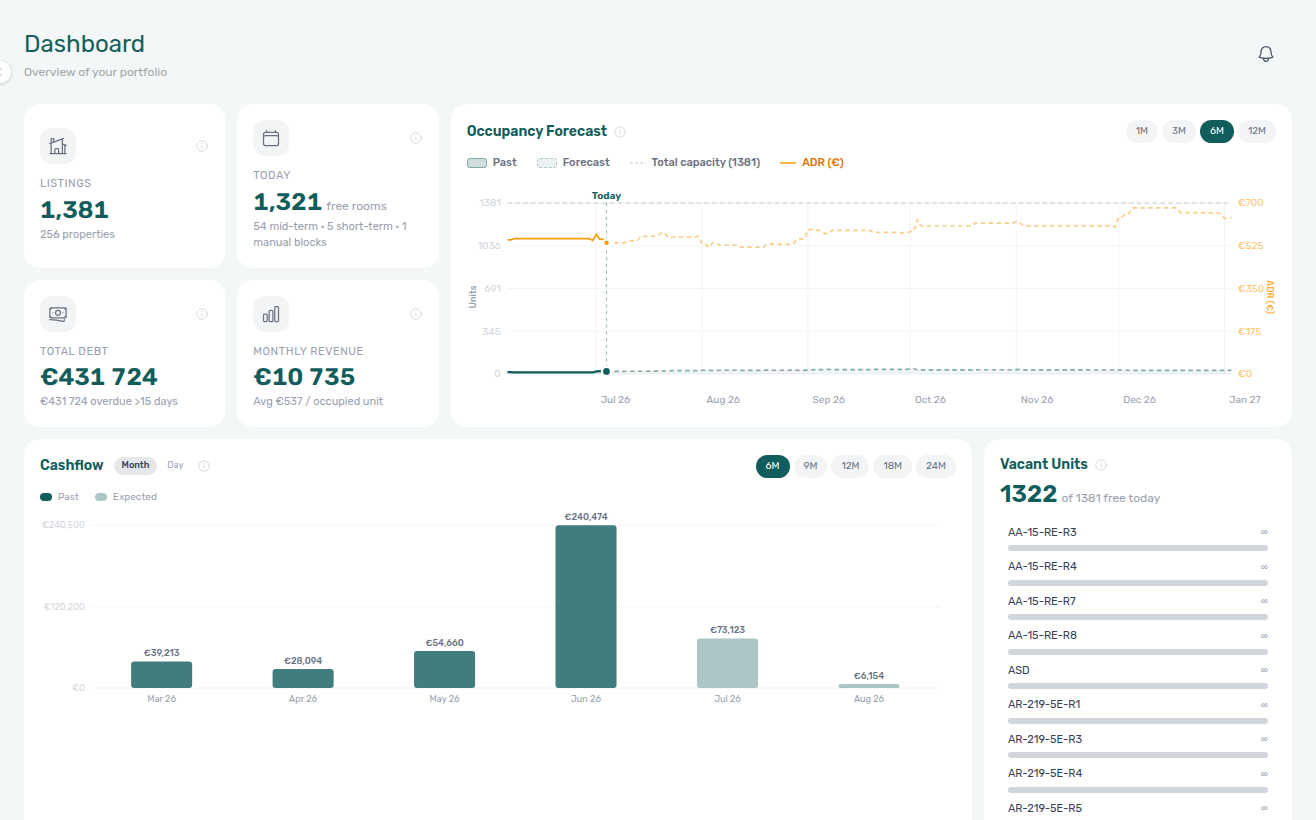
Dashboard
Your real-time business overview. Track KPI cards for Listings, Today (free rooms), Total Debt, and Monthly Revenue, then monitor Occupancy Forecast, Cash Flow Forecast, and Vacant Units to guide daily operator actions. Guide subsection map: Dashboard guide subsection index.
Listings
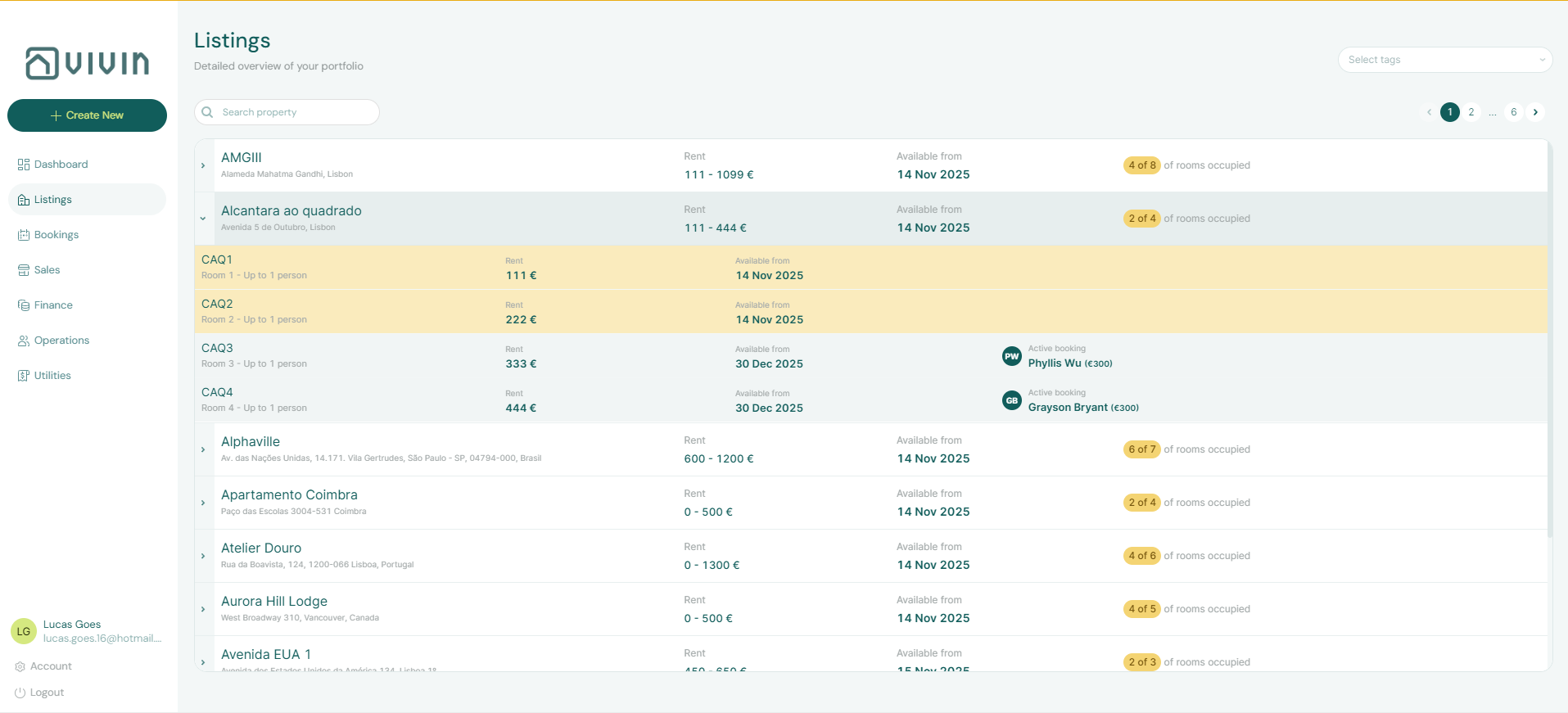
Your property portfolio inventory and primary sidebar entry for portfolio setup. Create and manage properties and their individual units, configure contract terms, payment settings, access codes, and email customization. Use Listings when you need full property+unit hierarchy workflows and unit-level operations. When Property Payments Active is on, unpaid portal charges can surface payment overdue alerts — see Handling a Late Payment — Step 1.
The workspace has two top-level tabs: Portfolio (/listings) for active properties and Archived (/listings/archived) for properties you have archived without deleting history — archive and unarchive from the property edit sidebar. See Archived properties. Guide subsection map: Listings guide subsection index.
Legacy /properties URLs
Older /properties paths redirect into Listings so bookmarks keep working. There is no separate card-based “properties workspace” screen. When payment overdue alerts cluster on one tenant segment at redirected inventory, scope Bookings — Tenant categories or Finance — Tenant category filter before account-wide portal changes. Guide subsection map: Legacy properties guide subsection index.
Bookings
Your operational command center for tenant reservations. Full lifecycle management from initial enquiry and booking confirmation, to check-in, stay, and check-out. Automatic contract generation with digital signatures, centralised tenant profiles, and document storage. Change monthly rent and Contract Values → Edit amount enforce an invoiced floor when Finance already exported a month — lowering invoiced rent still needs credit notes outside Vivin (FAQ).
Use the List view for filters, export, and row-level actions, or switch to Timeline (/bookings/timeline) for a Gantt-style chart by unit — Day, Week, and Month scales, optional calendar blocks, and booking detail from bar clicks. Large portfolios paginate unit rows on the chart (scroll vertically for more listings — see Bookings — Timeline listing-axis loading). Clear Only bookings to spot manual or channel blocks on the same rows; for portfolio-wide hold triage (filter, export, column sort), use Audit (Manual block hygiene).
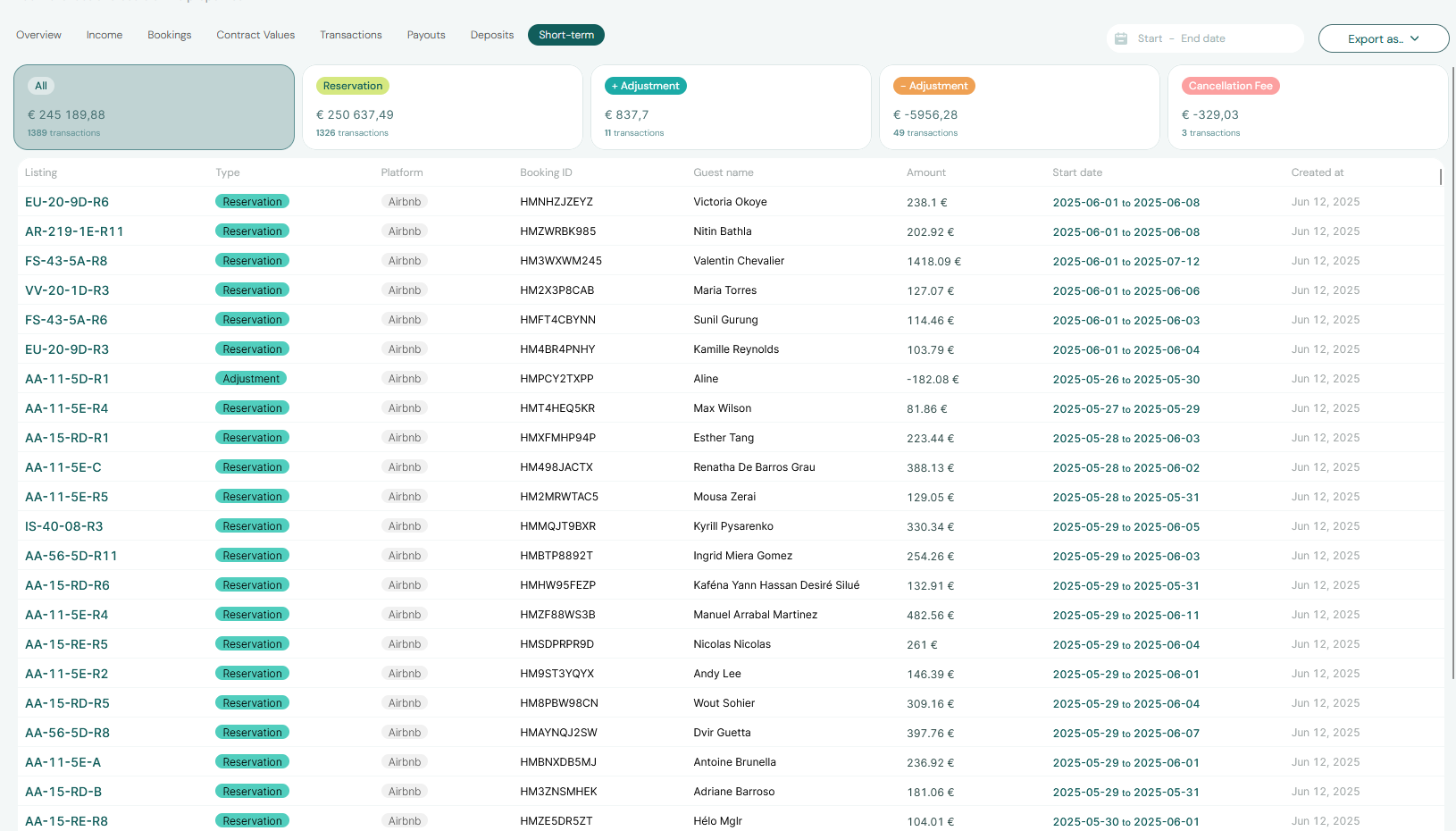
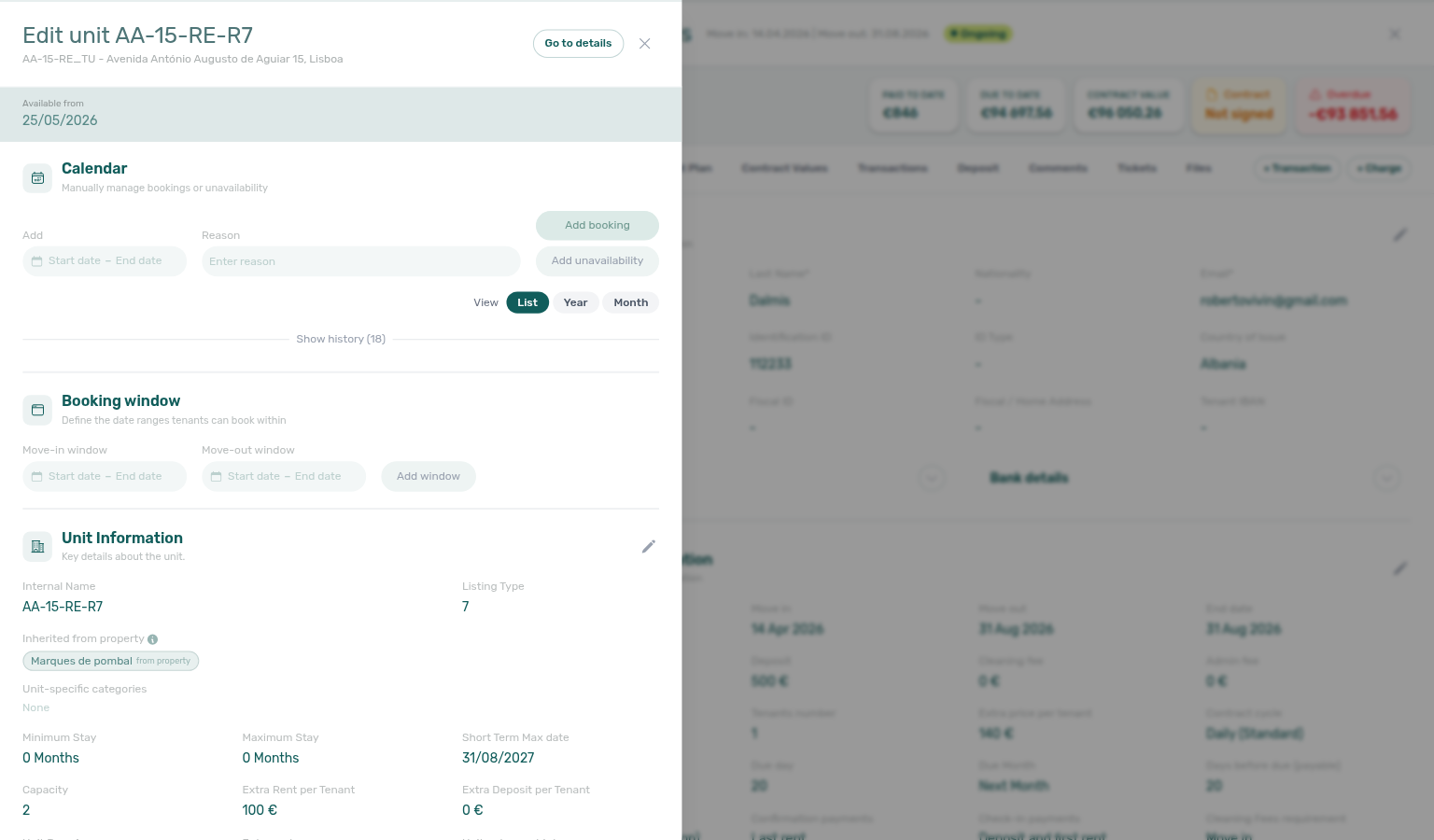
When your account defines tenant categories, toolbar Tenant categories narrows the portfolio to reservations whose tenant profile carries the selected segment(s) — OR-combined with No tenant category for unassigned tenants. The menu stays open while you add a second choice. See Bookings — Tenant categories. Guide subsection map: Bookings guide subsection index.
Inbox
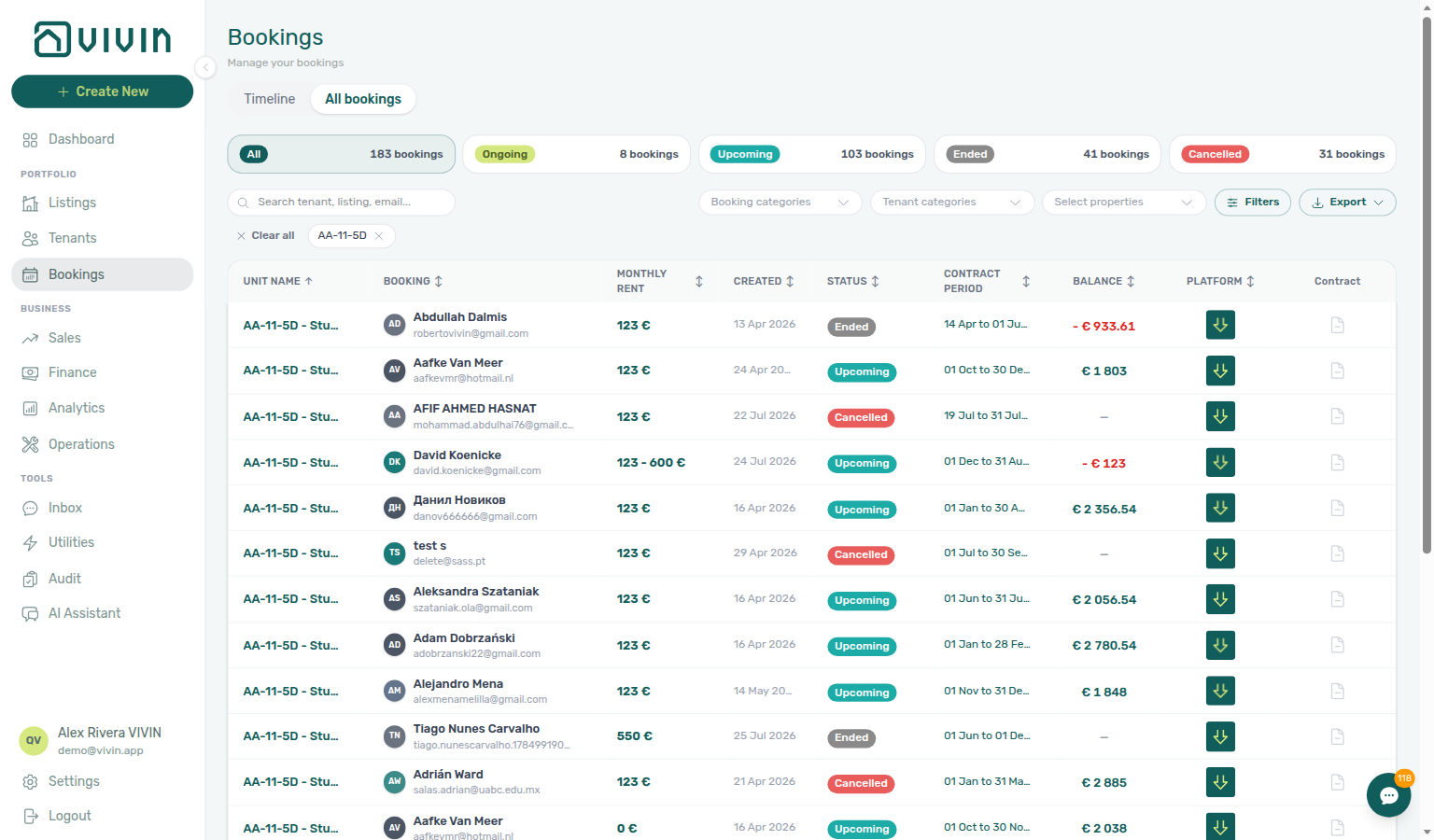
Portfolio-wide WhatsApp workspace at /inbox (Tools → Inbox in the sidebar): all tenant conversations across bookings in a WhatsApp Web–style two-pane view, with search, listing context on each row, booking details in the thread header, labels, pause-bot, and a reply composer that stays in sync with each booking’s Communication tab. The Dashboard bell adds an Inbox sub-tab for inbound message notifications with deep links into conversations. Before chasing payment overdue threads on WhatsApp, row-click General alerts and scope Bookings — Tenant categories when collections cluster on one tenant category. Requires Bookings module permission and a connected Status Bot line. Guide subsection map: Inbox guide subsection index.
Tenants
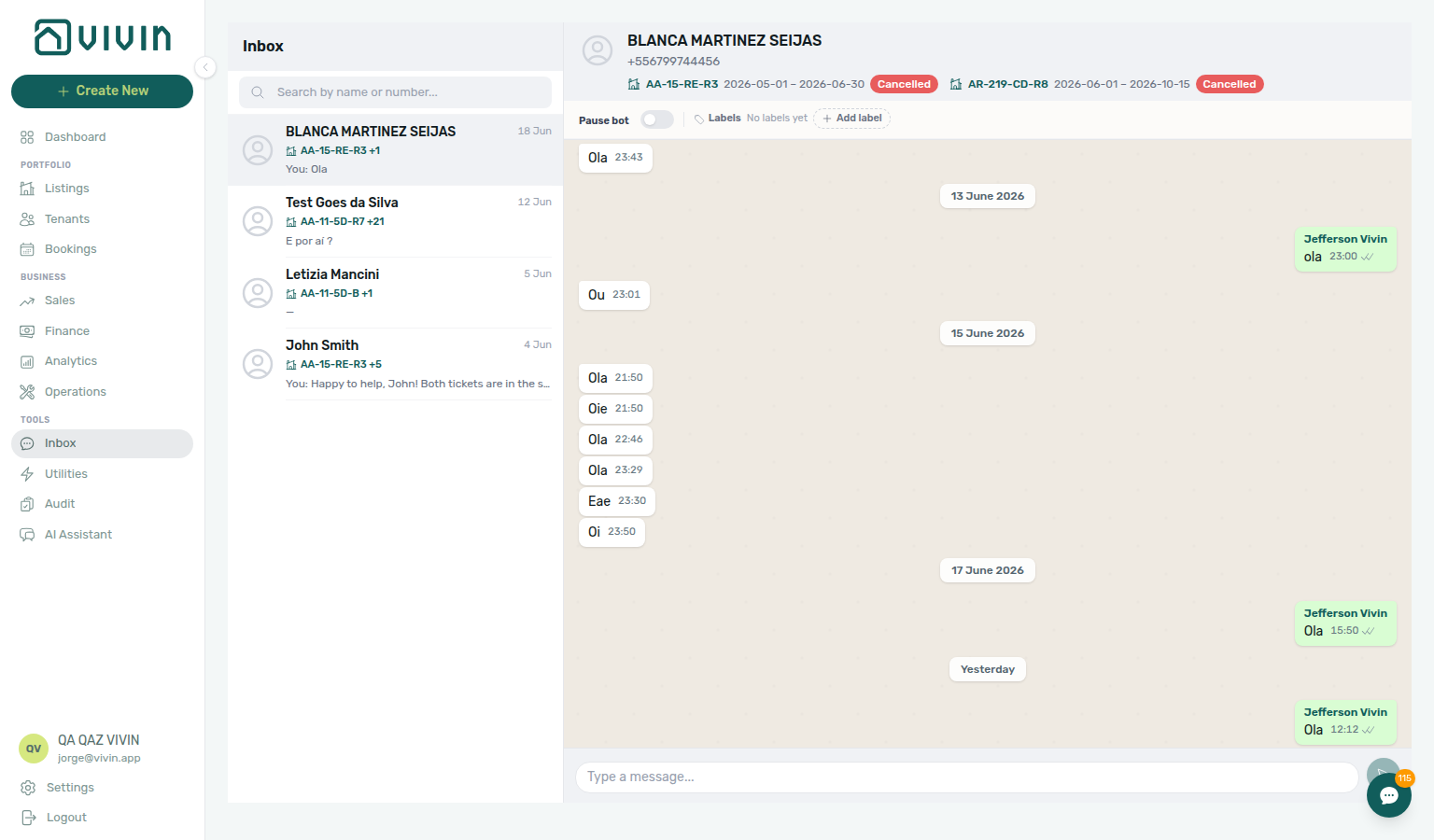
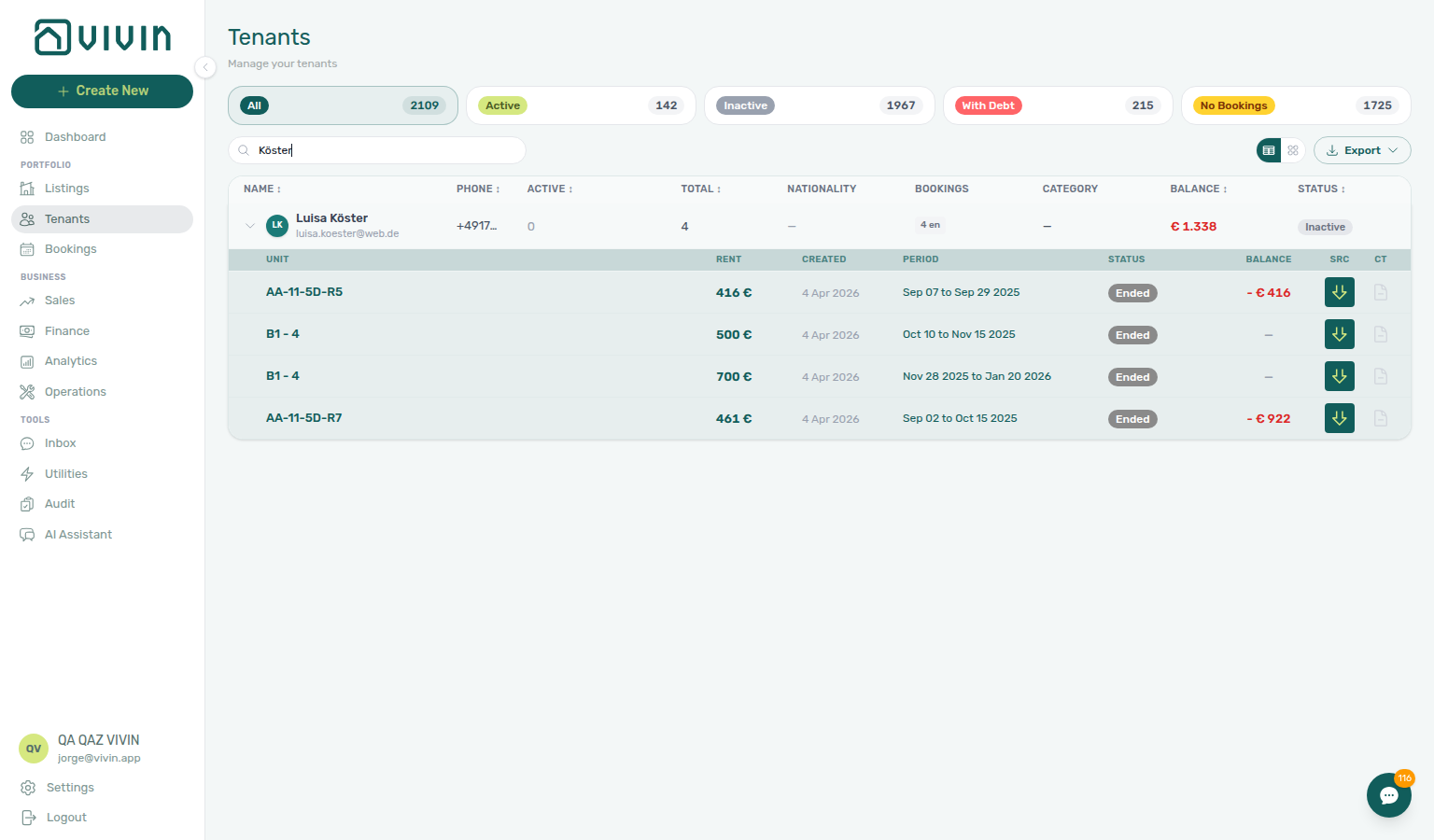
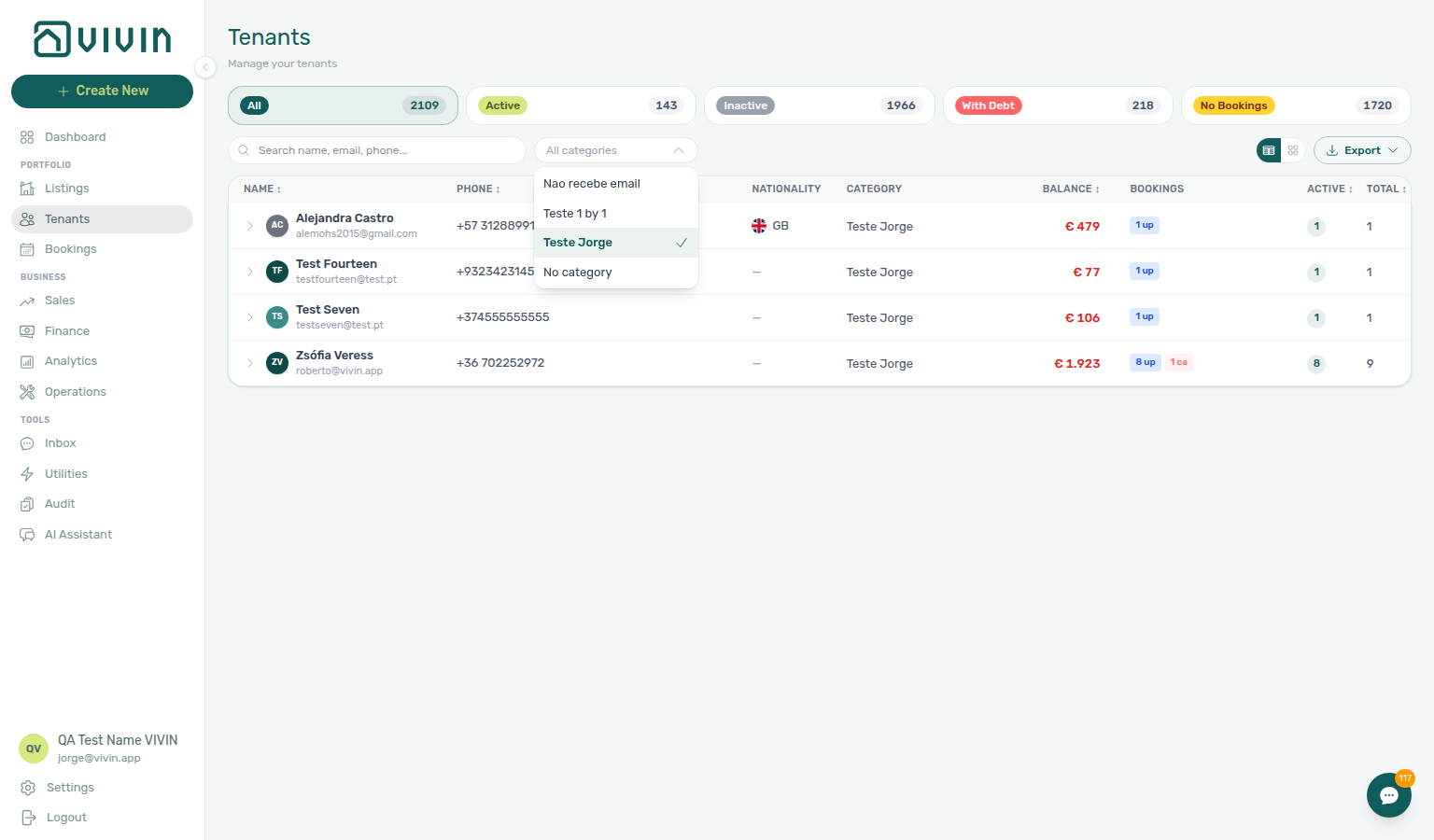
Your tenant-centric workspace for search, segmentation, and profile management. Review active/inactive/debt status, open tenant-level sidebars for booking and payment context, and maintain personal, billing, and bank details from one module. When tenant categories exist, the toolbar All categories dropdown narrows the directory to tenants assigned a segment on Tenant Info (or No category for unassigned profiles) and stays open while you add a second choice — same server-side filter as Bookings — Tenant categories. From With Debt, triage collections — mistaken receipts cleared via Reject / Revert may need credit notes when Finance already invoiced the charge (Handling a Late Payment). Switch to table view to expand a tenant row into an inline booking sub-table (unit, rent, balance) without opening every profile — see [Glossary — Tenants table expand](../glossary.md#tenants-table-exp. Guide subsection map: Tenants guide subsection index.
The Tenants navigation item is gated by Tenants module permission (tenants.module). If a role does not have Tenants module access, Tenants will not be usable.
Sales
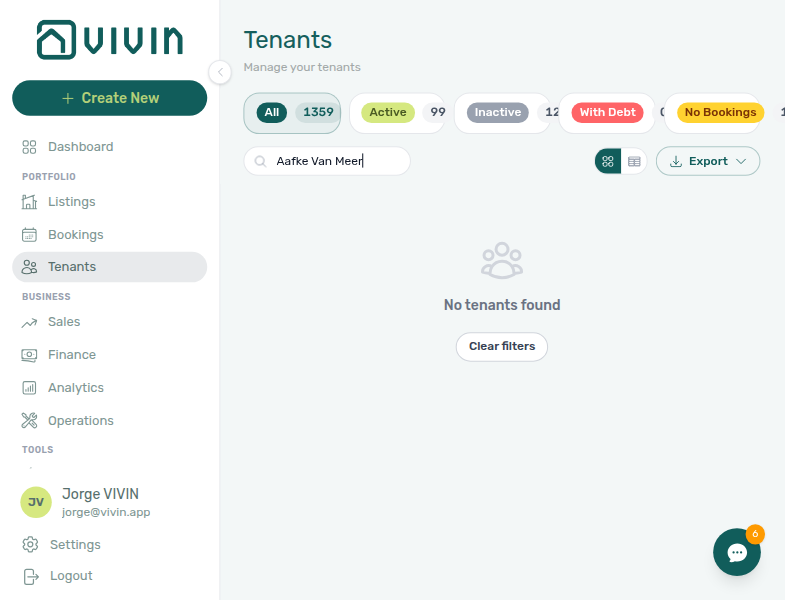
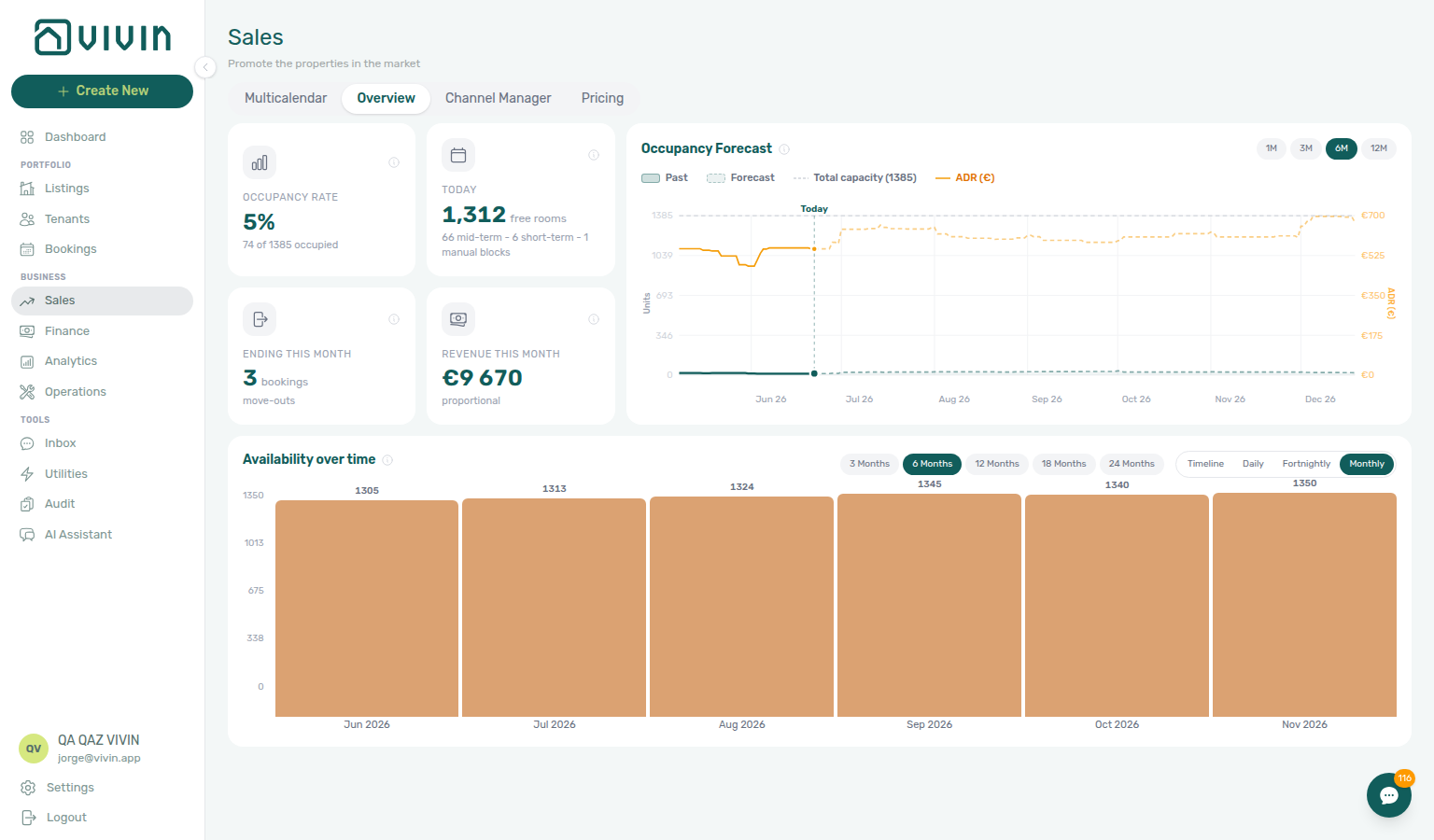
Review portfolio availability, occupancy forecasts, and where units go free on Overview; edit monthly rent per listing in bulk on Pricing (with occupancy context behind each cell); and manage channel manager links on Channels. Rates are operator-controlled in the product — there is no separate in-app engine that auto-rewrites your published prices. For portfolio-wide KPI charts across a date range, use Analytics when your role includes Analytics module access. Channel-imported reservations with unpaid schedules can surface payment overdue rows — continue with Handling a Late Payment — Step 1. Guide subsection map: Sales guide subsection index.
Finance
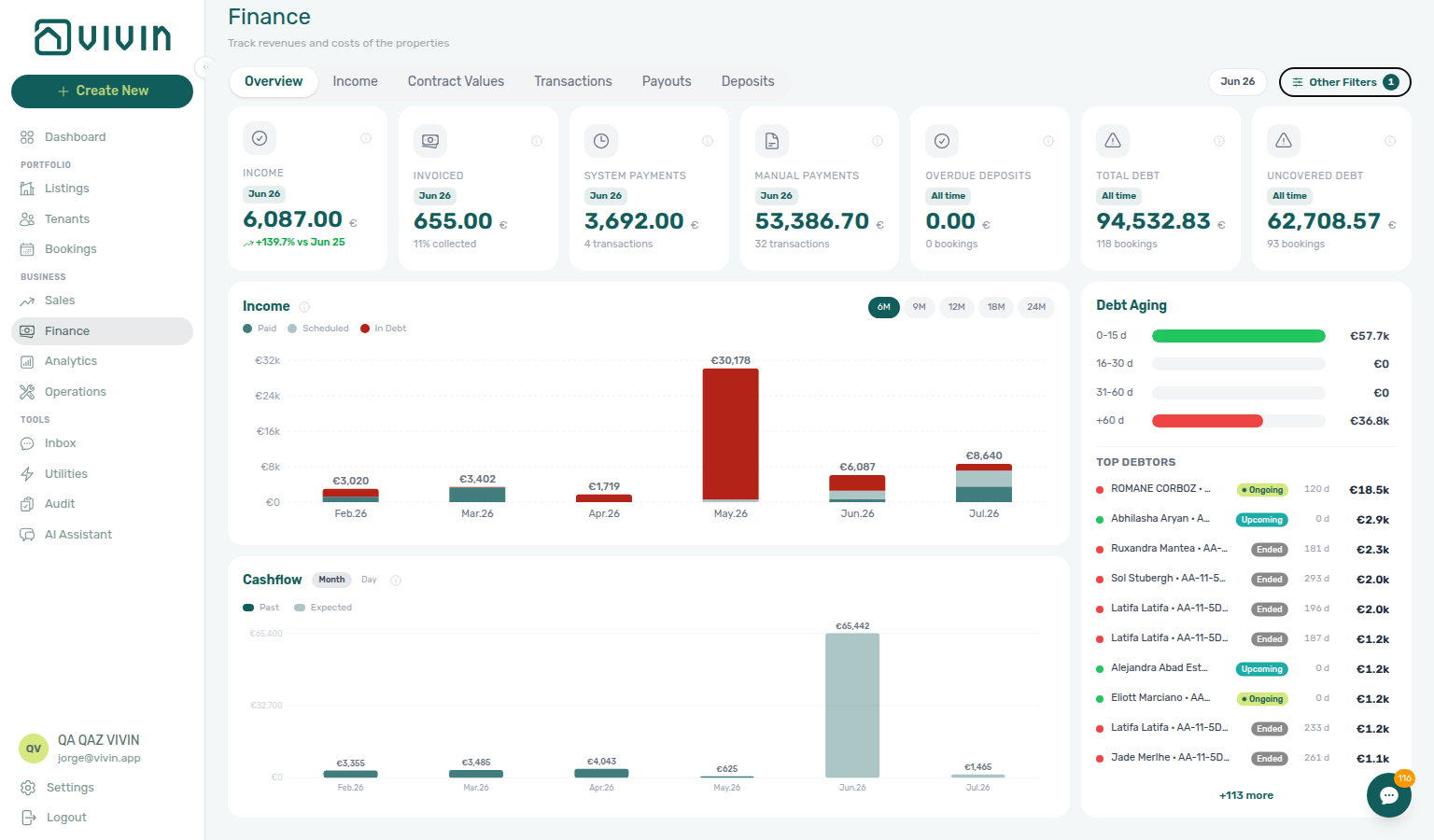
Automate rent collection with virtual IBANs and credit card payments. Track income and expenses, generate automated invoices, manage deposits, and access comprehensive financial dashboards with revenue tracking, Debt Aging, and exportable reports. When payment overdue alerts row-click into a booking, confirm balances on Contract Values or Payment Plan — see Handling a Late Payment — Step 1. When your account defines tenant categories, Other filters → Tenant → Tenant category narrows every Finance tab that honours Other filters to bookings whose tenant profile carries the selected segment(s) — same OR-combined server filter as Bookings and Tenants. See Finance — Tenant category filter. Guide subsection map: Finance guide subsection index. On Overview, use Debt Aging or the Income chart In debt segment to triage receivables. On Transactions, Approve pending manual receipts or bulk Reject selected when a duplicate was recorded — reject and revert modals warn about credit notes when charges were already invoiced (Payment Allocation — Correcting mistaken receipts). Rent edits on bookings respect the invoiced floor once months are exported — see Finance — Invoiced floor and rent edits. On Deposits, the toolbar date range defaults to about the last three months — clear or widen it when older move-outs, disputes, or Refund Due Date rows fall outside the default window (Glossary — Finance Deposits date range; Managing a Check-out).
Analytics
Portfolio KPI workspace at /analytics (sidebar Business > Analytics, after Finance) when your role includes the Analytics module permission (analytics.module). Use it for configurable date-range charts across Overview, Revenue, Occupancy, ADR, RevPAR, and Maintenance — a different surface from Sales availability calendars and per-listing pricing grids. During month-end review, pair Revenue trends with payment overdue triage via Handling a Late Payment — Step 1. When weak metrics look tied to one tenant segment, scope Finance — Tenant category filter during Portfolio KPI review — Step 6. Guide subsection map: Analytics guide subsection index.
Without Analytics module access, the nav entry is hidden and opening /analytics directly shows the standard permission state. Administrators adjust access in Users and roles.
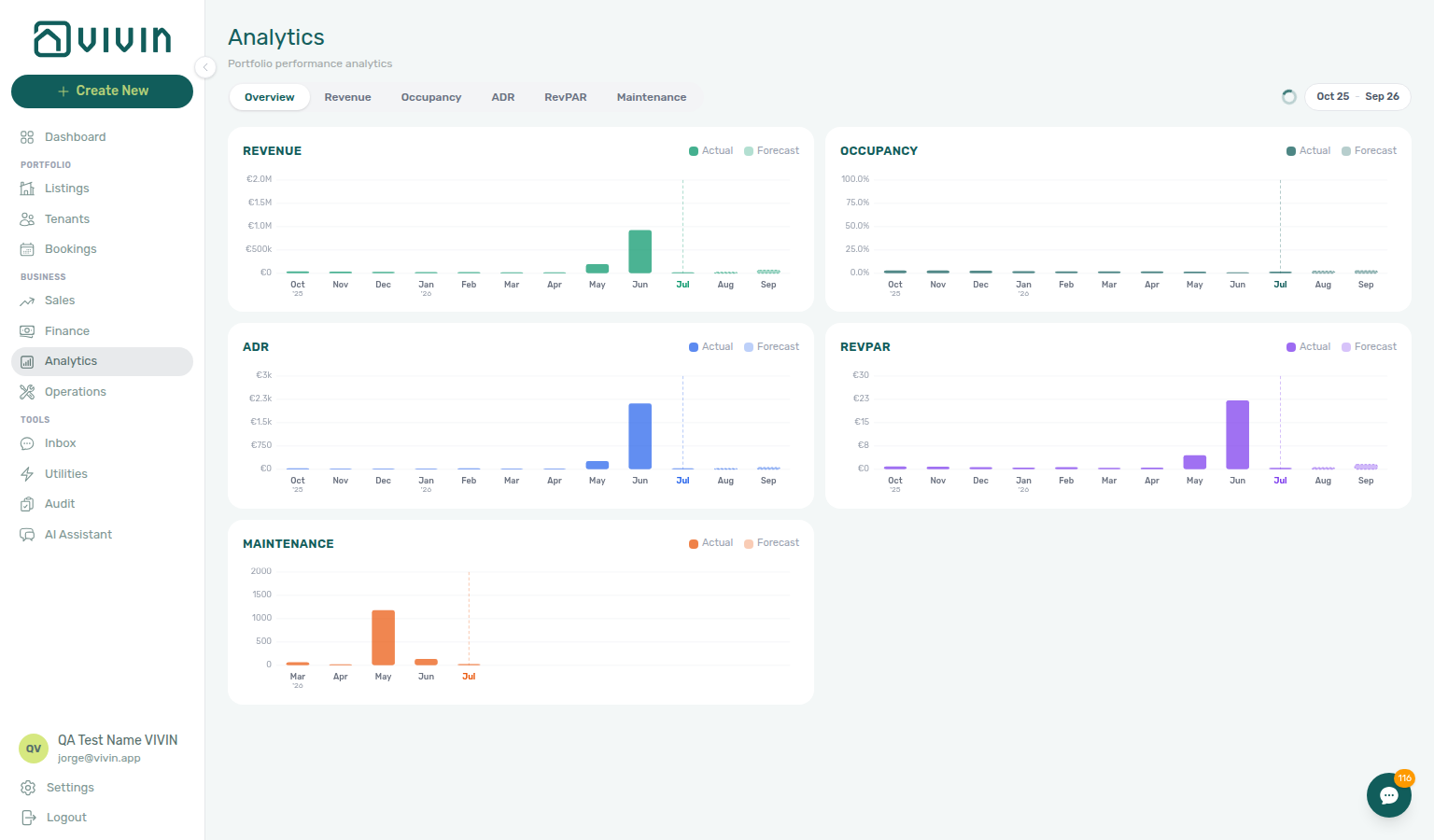
Go to Analytics module → · Bookmarkable Analytics routes →
Audit
Cross-portfolio Audit workspace with two tabs: Manual Blocks (unavailabilities) and Discounts (discounted contract values). Open Tools → Audit (/audit) when your role includes Listings module access — the same permission guard as the Listings module.
The Manual Blocks tab lists blocks with Search, Date range, and Created by filters, clickable column headers for server-side sort, a Blocked nights per month chart (full filtered set), infinite-scroll pagination, and Export. Created by stays open while you add a second teammate so two operators stay in one view. Blocks are created in day-to-day work from a unit’s Calendar in Listings via Add unavailability. Step-by-step hygiene: Manual block hygiene.
The Discounts tab (/audit/discounts) surfaces every discount on contract values — KPI cards, filters, export, and row drill-down to booking Contract Values. When discounts cluster on one tenant category, pair with Finance — Tenant category filter and Tenants — Tenant category filter — see Audit — Discounts tab.
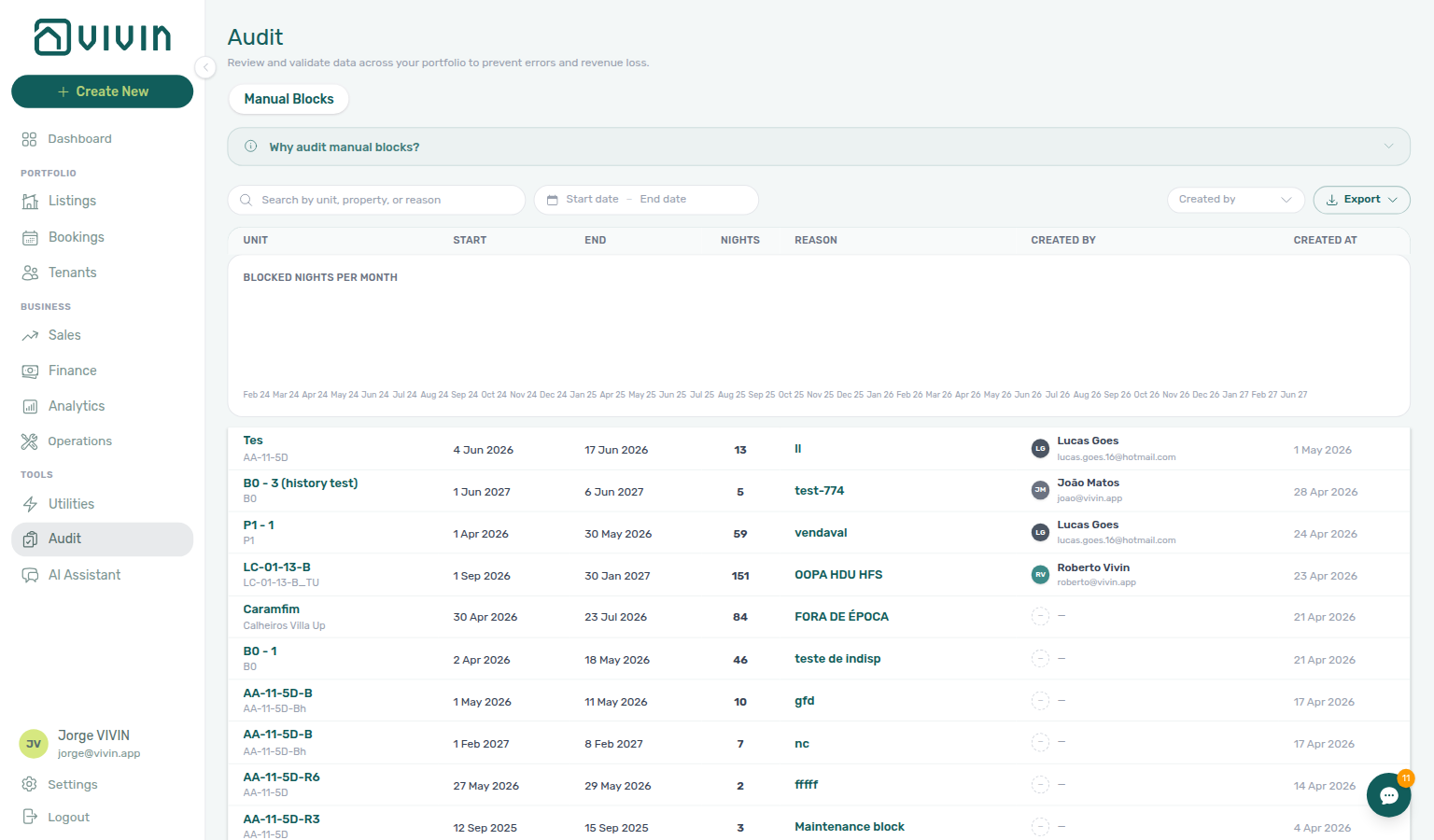
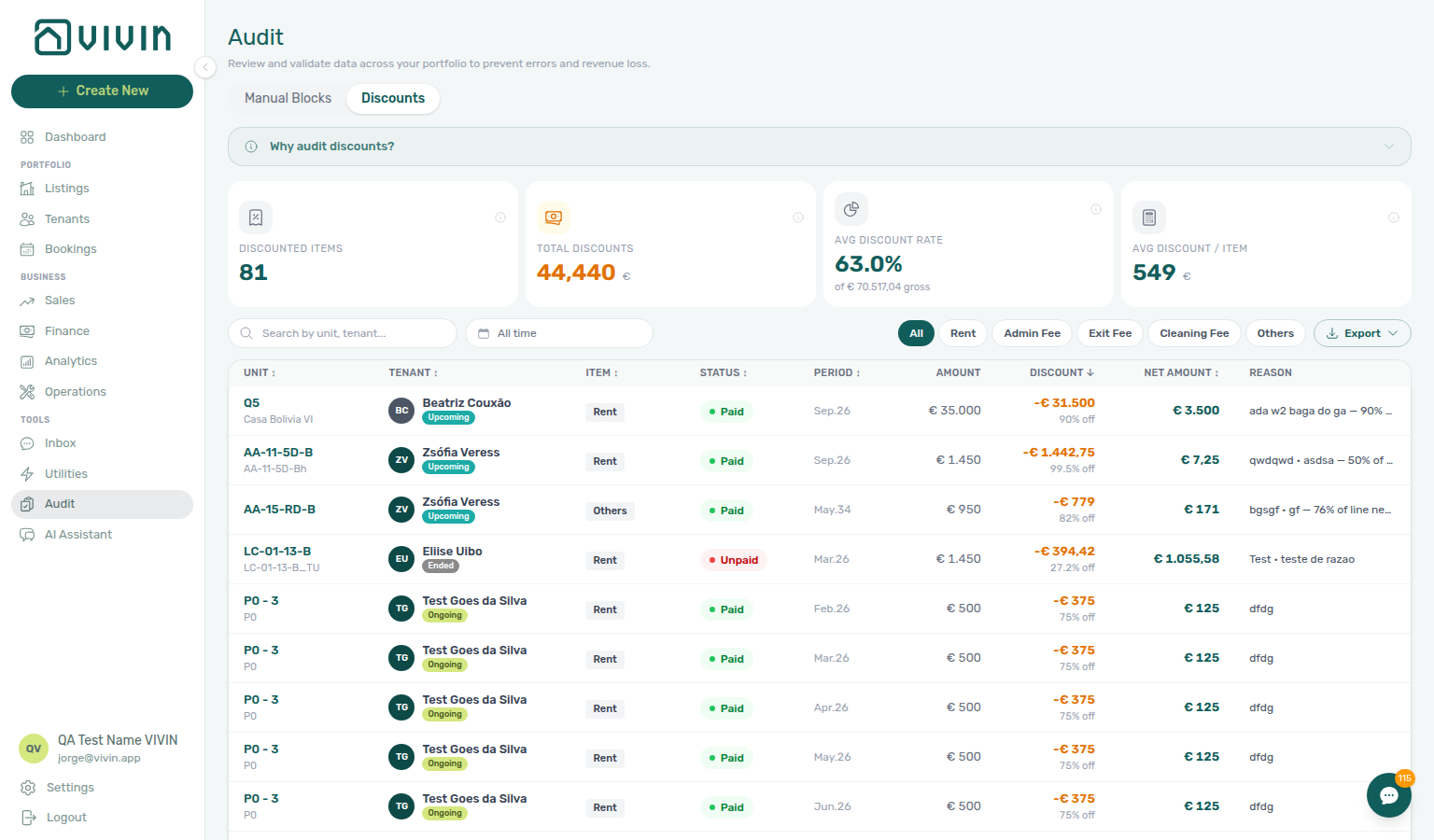
Guide subsection map: Audit guide subsection index.
Go to Audit → · Bookmarkable Audit routes →
Operations
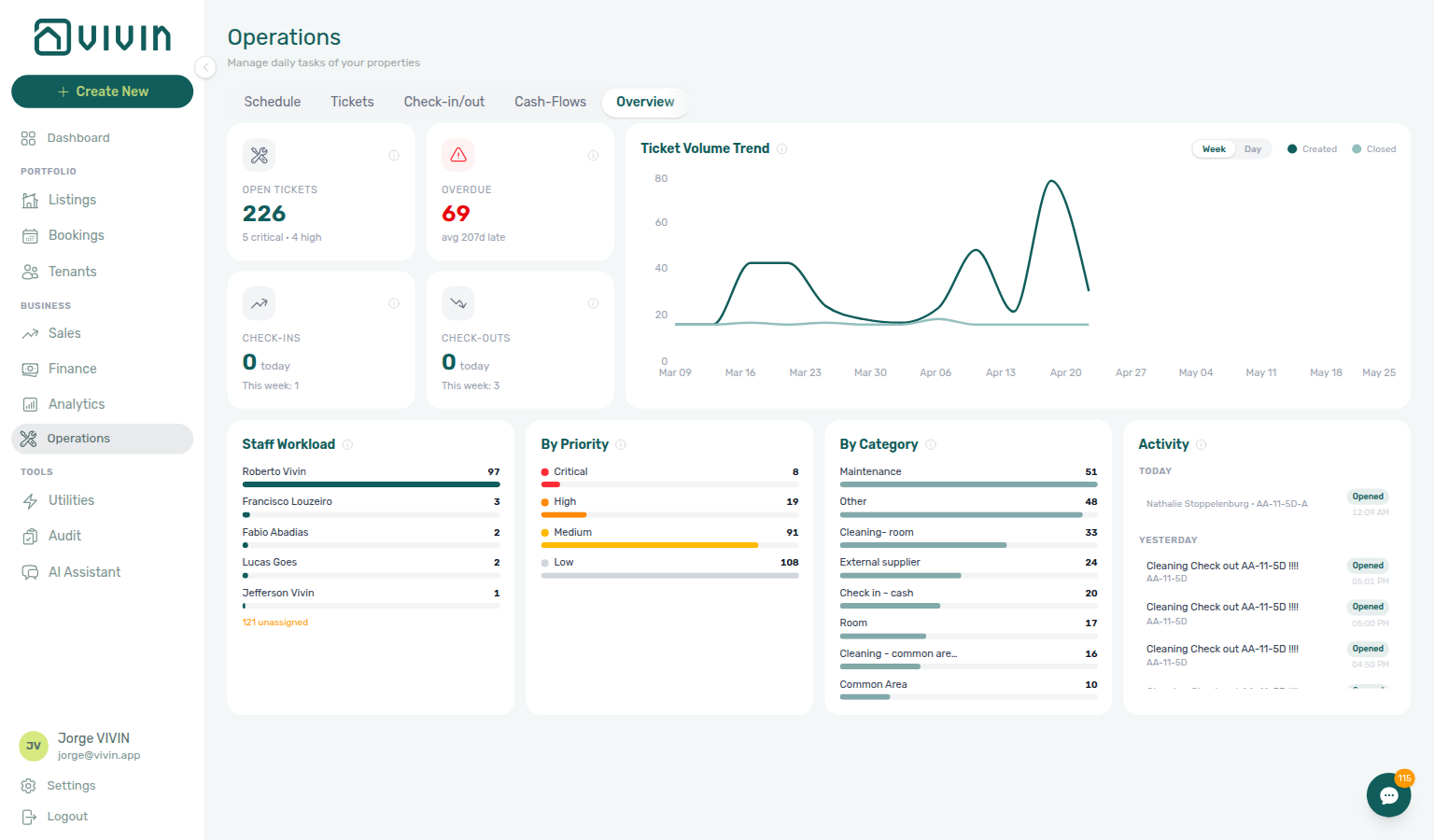
Coordinate day-to-day property operations from a single workspace. Manage maintenance tickets with Cost allocation (including linked cash flows), Draft display status for far-future schedule dates, check-in and check-out planning (including deposit disputes and same-day turnover coordination), and the operational Cash Flows ledger with supplier cost history. Guide subsection map: Operations guide subsection index.
Utilities
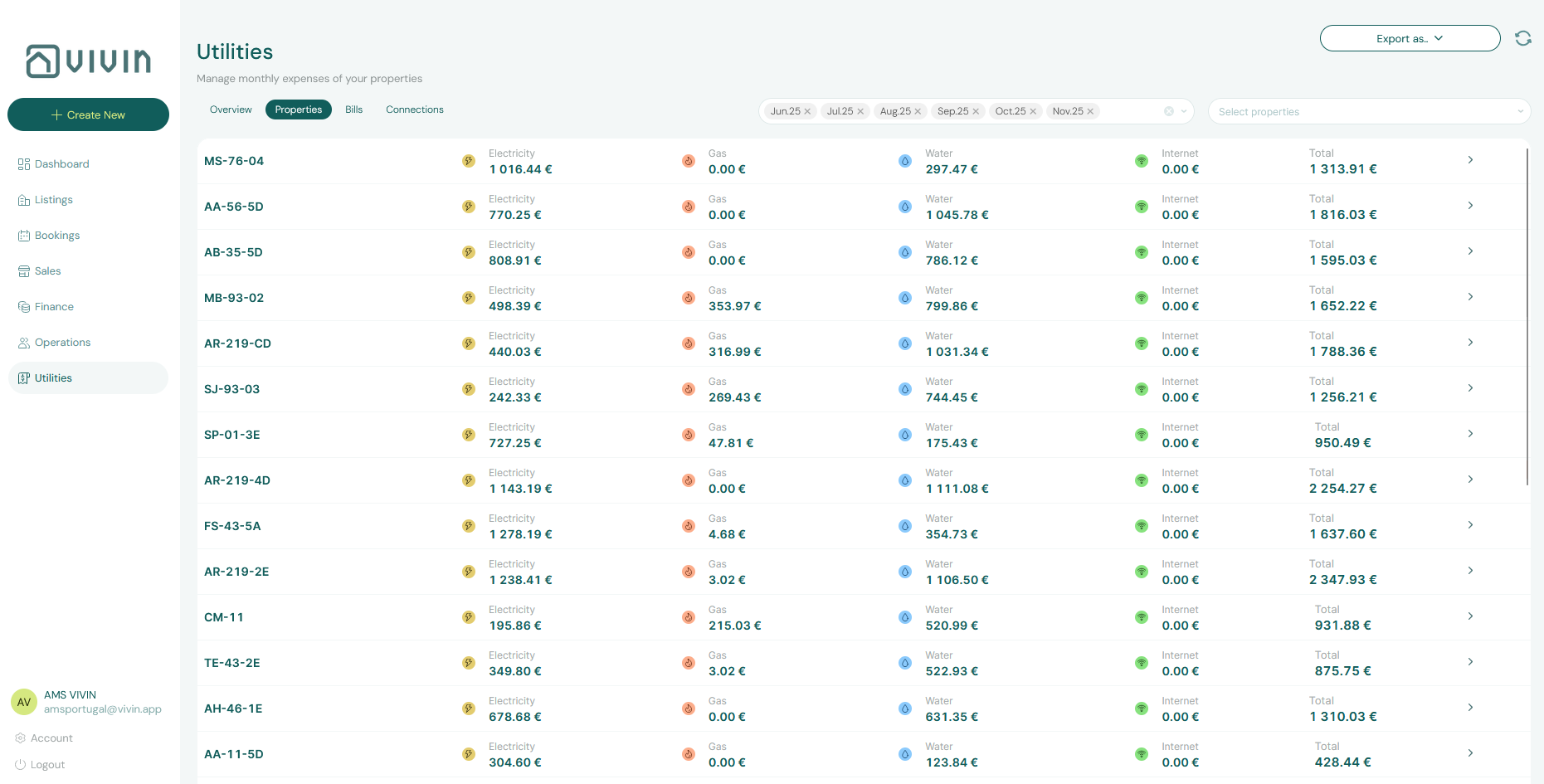
Track utility expenses with AI-powered invoice reading that automatically detects properties and extracts billing data. Smart cost distribution methods (by room, usage, or days of stay) and automated tenant overage calculations eliminate manual billing. When correcting mistaken overage receipts after Finance invoiced them, Reject modals warn about credit notes — see Entering Monthly Utility Bills. When unpaid overages cluster on one tenant category, scope Finance — Tenant category filter (Step 4 of that workflow). Guide subsection map: Utilities guide subsection index.
AI Chat
Chat with the VIVIN AI Assistant to get instant answers about your portfolio, occupancy, revenue, upcoming move-ins, and coliving overview. Ask questions in natural language and receive data-backed responses without leaving the platform. When answers cite Total debt or unpaid schedules, confirm against payment overdue rows — row-click opens the booking for Handling a Late Payment — Step 1. When answers cite one tenant category disproportionately, scope Finance — Tenant category filter or Bookings — Tenant categories before account-wide policy changes.
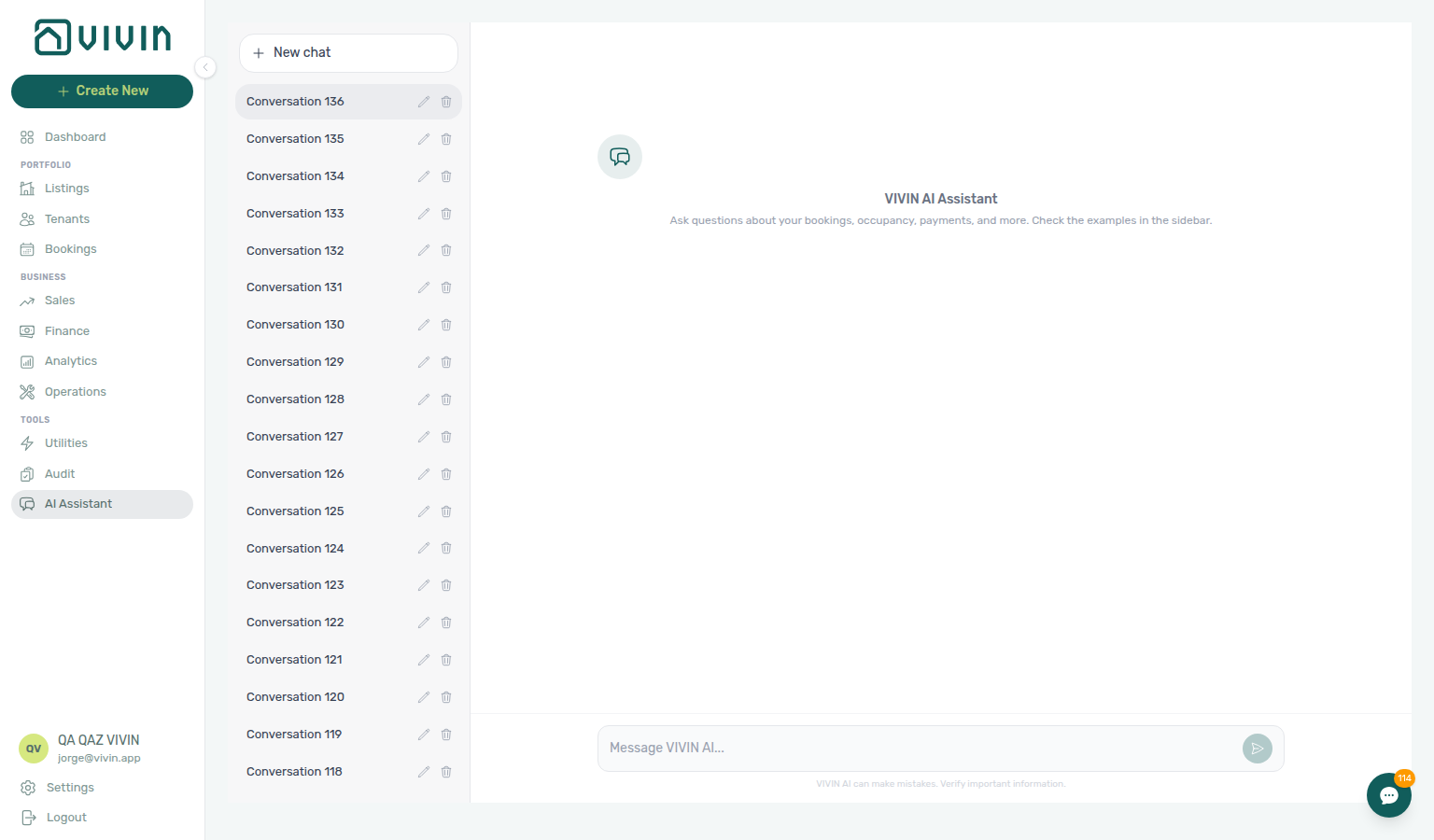
Guide subsection map: AI Chat guide subsection index.
Notifications
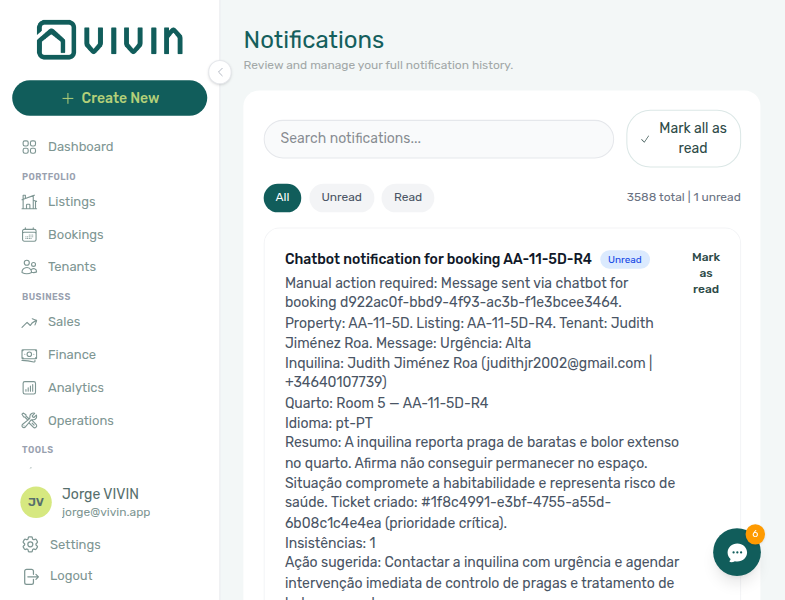
Review and manage your full notification history. Search, filter by read/unread status, and mark notifications as read. Covers bookings, payments, tickets, and system alerts — including payment overdue rows in the operator Payments category (row-click opens the related booking for Handling a Late Payment — Step 1). When Payments alerts cluster on one tenant category, scope Bookings — Tenant categories or Finance — Tenant category filter before account-wide reminder changes. Guide subsection map: Notifications guide subsection index.
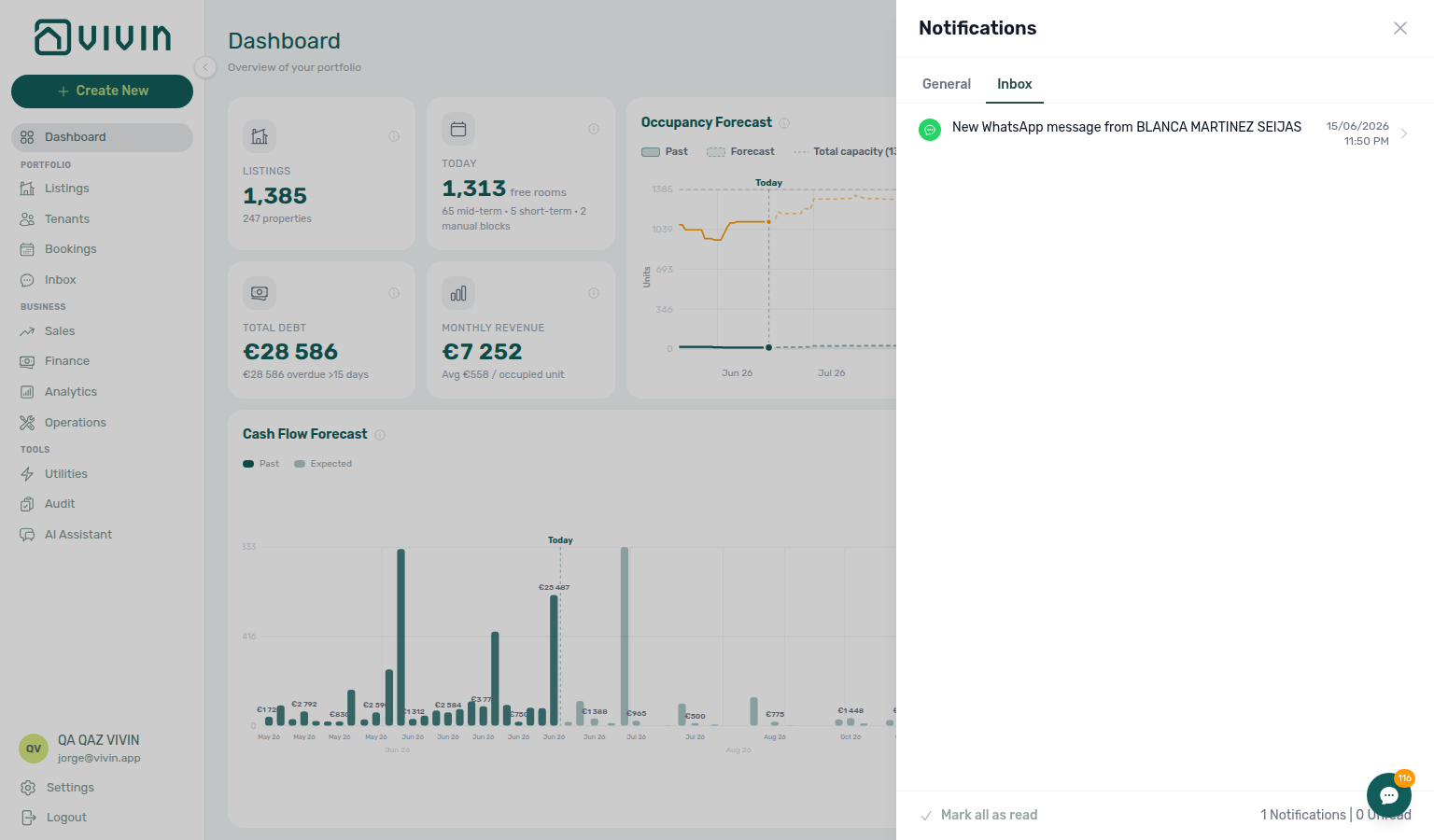
There is no dedicated Notifications item in the left sidebar. On desktop Dashboard, the header bell opens a slide-over with General and Inbox sub-tabs: General for payment, ticket, and booking alerts; Inbox for inbound WhatsApp and email message pings (one row per conversation, with deep links to /inbox or booking Communication). Each sub-tab has its own unread badge; Mark all as read clears only the active sub-tab. The bell has no search or All / Unread / Read filters — open /notifications for the full mixed history, search, and one-click navigation into Bookings, Tenants, or Listings from General rows (Glossary — Notification row navigation; workflow: Notification triage). On other routes and on narrow (mobile) viewports, bookmark /notifications directly. For portfolio-wide replies, use Tools → Inbox at /inbox when the tenant chatbot is enabled.
Property & listing details (booking engine)
Configure rich property and unit content for the white-label booking engine and channels from Listings (choose the Full integration pill in the property or unit sidebar). Legacy /booking-engine-details/* URLs redirect into Listings. Partner HTTP surfaces that ingest this content: Booking Engine API and Full listing feeds. Engine-sourced bookings with unpaid schedules can surface payment overdue rows — row-click opens the booking for Handling a Late Payment — Step 1. When overdue rows cluster on one tenant category, scope Bookings — Tenant categories or Finance — Tenant category filter before account-wide reminder changes.
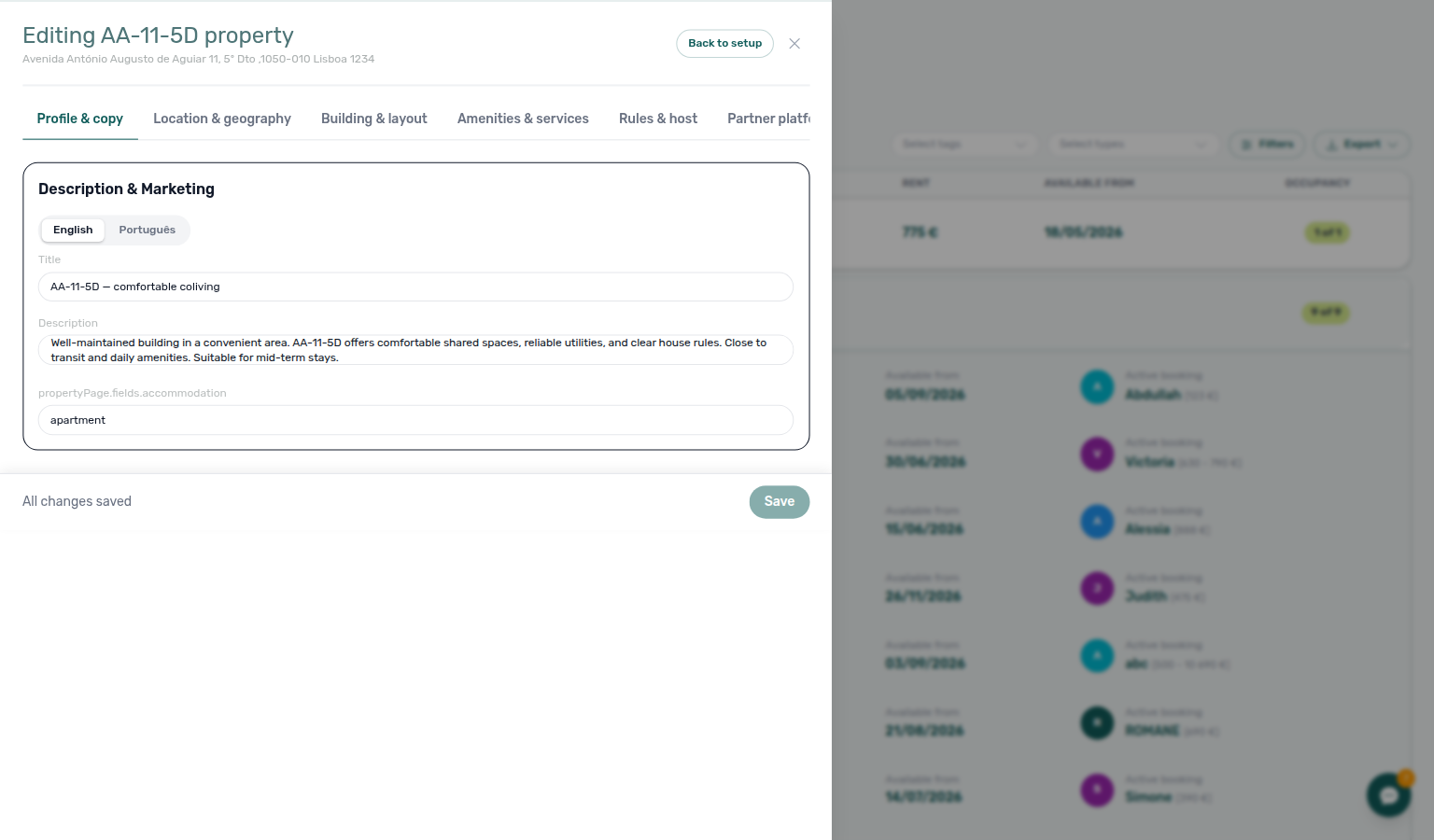
Guide subsection map: Booking engine details guide subsection index.
Module cross-reference
Use this table when one module naturally leads into another — each row links to the workspaces you should open before or after the primary module./dashboard/index.md#dashboard-section-cross-reference)** tables for longer matrices. Setup sequencing: Related — Setup sequence after go-live.
Use this table when one module naturally leads into another — each row links to the workspaces you should open before or after the primary module. Each sub-guide also opens with a First-time workspace setup tip for that module's step in Getting Started — Recommended Setup Sequence. Individual modules with longer pairing matrices: Dashboard (guide subsection index), Analytics (guide subsection index), Bookings (guide subsection index), Finance (guide subsection index), Listings (guide subsection index), Sales (guide subsection index), Operations (guide subsection index), Tenants (guide subsection index), Utilities (guide subsection index), Audit (guide subsection index), Notifications (guide subsection index), AI Chat (guide subsection index), Inbox (guide subsection index), Legacy /properties URLs (guide subsection index), Booking engine details (guide subsection index).
| Module | Pair with these modules |
| --------------------------------------------------------------------------------------- | ------------------------------------------------------------------------------------------------------------------------------------------------------------------------------------------------------------------------------------------------------------------------------------------------------------------------------------------------------------------------------------------------------------------------------------------------------------------------------------------------------------------------------------------------------------------------------------------------------------------------------------------------------------------------------------------------------------------------------------------------------------------------------------------------------------------------------------------------------------------------------------------------------------------------------------------------------------------------------------------------------------------------------------------------------------------------------------------------------------------------------------------------------------- | -------------------------------------------------------------------------------------------------------------------------------------------------------------------------------------------------------------------------------------------------------------------------------------------------------------------------------------------------------------------------------------------------------------------------------------------------------------------------------------------------------------------------------------------------------------------------------------------------------- | --- | ----------------------------------------------------------------------------------- | --------------------------------------------------------------- | -------------------------------------------------------------------------------------------------------------------------------------------------------------------------------------------------------------------------------------------------------------------------------------------------------------------------------------------------------------------------------------------------------------------------------------------------------------------------------------------------------------------------------------------------------------------------------------------------------------------- |
| Modules hub subsection index | Concepts hub subsection index (underlying models), Introduction hub subsection index (platform overview), Getting Started hub subsection index (onboarding sections), Common Workflows hub subsection index (operational procedures), Account Settings hub subsection index (setup tabs), API hub subsection index (partner HTTP guides), FAQ subsection cross-reference (troubleshooting deep-dives), Support hub subsection index (escalation steps), Glossary deep-dive index (term definitions), Shell and navigation (management shell), Module cross-reference (workspace pairing matrix) |
| Dashboard | Analytics (month-range KPIs), Finance (Debt Aging), Sales (occupancy heatmaps), Dashboard guide subsection index, Settings > Tenant categories (Finance — Tenant category filter when KPI cards spike for one segment), Notifications (bell triage; payment overdue → Handling a Late Payment — Step 1) |
| Listings | Sales (Channels), Bookings, Utilities (Connections), Audit (manual blocks), Listings guide subsection index, Settings > Tenant categories (default segment on new direct bookings), Notifications (portal-enabled properties → Handling a Late Payment — Step 1) |
| Bookings | Tenants, Finance, Operations, Sales (Timeline / Multicalendar overlap), Bookings guide subsection index, Notifications (overdue charge alerts → Handling a Late Payment — Step 1), Settings > Tenant categories (Other filters → Tenant category) |
| Tenants | Bookings, Finance (With Debt / Contract Values), Tenants guide subsection index, Settings > Tenant categories (All categories toolbar filter) |
| Sales | Analytics, Dashboard, Listings, Bookings (Timeline), Sales guide subsection index, Portfolio KPI review — Step 6 (Select tags / Select listing types vs Bookings — Tenant categories), Notifications (channel imports → Handling a Late Payment — Step 1) |
| Finance | Bookings, Tenants, Operations (ticket cash flows), Utilities (tenant overages), Finance guide subsection index, Notifications (overdue charge alerts), Settings > Tenant categories (Other filters → Tenant category) |
| Analytics | Dashboard, Sales, Finance, Operations (Maintenance tab), Analytics guide subsection index, Settings > Tenant categories (Finance — Tenant category filter during Step 6 segmentation), Notifications (month-end receivables → Handling a Late Payment — Step 1) |
| Audit | Listings (unit Calendar blocks), Bookings (Timeline), Sales (Multicalendar), Audit guide subsection index, Settings > Tenant categories (Finance — Tenant category filter when Discounts clusters on one segment), Notifications (Discounts receivables → Handling a Late Payment — Step 1) |
| Operations | Bookings, Finance, Listings (access codes), Operations guide subsection index, Settings > Tenant categories (portal rules during check-in/out), Tenants (Tenant category filter), Notifications (overdue charge alerts during turnover → Handling a Late Payment — Step 1) |
| Utilities | Listings (Bills Included ceilings), Bookings (Payment plan overages), Finance, Utilities guide subsection index, AI usage API (utility_bill_extraction ledger), Settings > Tenant categories (Finance — Tenant category filter when overages cluster), Notifications (overdue utility overage lines → Handling a Late Payment — Step 1) |
| Inbox | Notifications, Inbox guide subsection index, Bookings (Communication tab), Settings > Tenant categories (Bookings — Tenant categories before WhatsApp collections chase), Notifications — Payment overdue alerts (bell General before WhatsApp chase → Handling a Late Payment — Step 1) |
| Notifications | Inbox, Notifications guide subsection index, Dashboard (bell slide-over), Bookings (row navigation), Handling a Late Payment — Step 1 (payment overdue), Settings > Tenant categories (Bookings — Tenant categories when Payments alerts cluster) |
| AI Chat | Dashboard, Finance (validate answers), AI Chat guide subsection index, Landlord MCP (external clients), AI usage API (landlord_chat ledger), Notifications (overdue balances → Handling a Late Payment — Step 1), Settings > Tenant categories (Finance — Tenant category filter when assistant debt answers cite one segment) |
| Booking engine details | Listings, Sales (Channels), Booking engine details guide subsection index, API Reference (partner feeds), Settings > Tenant categories (Other filters → Tenant category when engine bookings cluster), Notifications (engine bookings → Handling a Late Payment — Step 1) |
| Legacy /properties URLs | Listings (all portfolio work), Legacy properties guide subsection index, Sales, Bookings, Settings > Tenant categories (Finance — Tenant category filter when overdue alerts cluster on redirected inventory), Notifications (collections on redirected inventory → Handling a Late Payment — Step 1) |
| Setup sequence after go-live | Getting Started — Recommended Setup Sequence (steps 1–15), Onboarding a New Property — Step 7, Support — Setup sequence escalation, FAQ — Settings & tenant communications, Onboarding a New Property (guided steps 4–12) |
| Documentation map & escalation | Introduction — Section cross-reference, FAQ — Section cross-reference, Support — Section cross-reference, Common Workflows section cross-reference, Using in-app support |
| Navigation & bookmarks | Management Frontend Deep Links, Create New menu, Settings > Interface language, FAQ — Navigation & shortcuts |
| Settings that shape modules | Account Settings hub subsection index, Tab cross-reference, Settings > Tenant categories, Settings > Integrations, Support — Settings that shape escalations |
| Deeper concept reads | Payment Allocation, Booking Lifecycle, Integrations & Distribution, Tenant Portal · Automation & AI |
| Deeper API reads | AI usage API (landlord_chat, utility_bill_extraction), Management session (operator JWT), Common Workflows — Deeper API reads |
| Deeper workflow reads | Step-by-step procedures in high-traffic modules | Bookings — Deeper workflow reads, Finance — Deeper workflow reads, Listings — Deeper workflow reads, Tenants — Deeper workflow reads, Operations — Deeper workflow reads, Sales — Deeper workflow reads |
| Recommended operator workflows | Common Workflows — Workflow cross-reference, Processing a New Booking, Portfolio KPI review, Notification triage |
| Lockout catch-up after password recovery | Sign-in restored after password reset; module backlog accumulated during lockout | Common Workflows — Lockout catch-up after password recovery, Getting Started — Lockout catch-up after password recovery, Resetting a Management User Password |
| Lockout catch-up after password recovery | Sign-in restored after password reset; module backlog accumulated during lockout | Common Workflows — Lockout catch-up after password recovery, Getting Started — Lockout catch-up after password recovery, Resetting a Management User Password |
| Walkthrough media | MP4 walkthroughs beside PNG screenshots | Common Workflows — Walkthrough media, Modules, Account Settings |
| Partly collected security deposit | Security deposit paid above zero but below Amount | Common Workflows — Partly collected security deposit, Finance — Deposits status summary cards, Bookings — Deposit tab, Glossary — Deposit lifecycle status, FAQ — Partly collected security deposit |
| Notification row-click navigation | /notifications row-click into Bookings, Tenants, or Listings before bulk mark-read | Common Workflows — Notification row-click navigation, Notifications module, Dashboard module, Notification triage — Step 4, FAQ — Notification row-click |
| Payment alert to receivables triage | Ongoing/Ended payment overdue alerts → receivables surfaces before collections | Common Workflows — Payment alert to receivables triage, Notifications — Payment overdue alerts, Finance module, Bookings module, Handling a Late Payment — Step 1 |
| Confirmation alert triage | Upcoming Booking created / Payment received / Pending manual in-payment before mark-read | Common Workflows — Confirmation alert triage, Processing a New Booking — Step 5b / Step 6, Pending manual receipt approval |
| Occupancy KPI to block hygiene handoff | Analytics Occupancy / RevPAR dip without rate change — stale manual holds before pricing or category edits | Common Workflows — Occupancy KPI to block hygiene handoff, Analytics module, Audit module, Manual block hygiene, FAQ — Occupancy KPI to block hygiene handoff hub (analytics-kpi-occupancy-tab.png, audit-manual-blocks-workspace.png, audit-manual-blocks-filter-scroll.mp4) |
| New inventory to first booking handoff | Property wizard → first Upcoming reservation on new inventory | Common Workflows — New inventory to first booking handoff, Onboarding a New Property — Step 7, Processing a New Booking — Step 1, FAQ — New inventory to first booking handoff (listings-module-overview.png, bookings-add-booking-modal.png, workflows-onboarding-property-wizard.mp4) | | Property setup to first arrival handoff | Go-live inventory → first arrival week (~7 days before move-in) | Common Workflows — Property setup to first arrival handoff, Onboarding a New Property — Step 7, Managing a Check-in — Step 1, FAQ — Property setup to first arrival handoff (listings-property-edit-access-lockers-tab.png, workflows-operations-check-in-out-planning-view.png, workflows-onboarding-property-wizard.mp4) |
| Confirmation to check-in handoff | Upcoming portal gates → arrival-week planning (~7 days before move-in) | Common Workflows — Confirmation to check-in handoff, Processing a New Booking — Step 6, Managing a Check-in — Step 1, FAQ — Confirmation to check-in handoff (bookings-detail-contract-method-of-payments.png, booking-lifecycle-status-tabs-flow.mp4) |
| Check-in to check-out handoff | Ongoing mid-stay → departure-week planning (~7 days before move-out) | Common Workflows — Check-in to check-out handoff, Managing a Check-in — Step 4, Managing a Check-out — Step 1, FAQ — Check-in to check-out handoff (operations-check-in-out-check-outs-next-7-days.png, bookings-timeline-view.png) |
| Same-day turnover coordination | Shared-unit departure + arrival on the same calendar day | Common Workflows — Same-day turnover coordination, Managing a Check-out — Step 2, Managing a Check-in — Step 4, FAQ — Same-day turnovers (operations-add-ticket-modal.png, bookings-timeline-day-week-month-and-sidebar.mp4) |
| Check-out final utilities handoff | Final supplier bills + utility overage lines before deposit release | Common Workflows — Check-out final utilities handoff, Entering Monthly Utility Bills — Step 4, Managing a Check-out — Step 6, FAQ — Check-out final utilities handoff (utilities-allocations-review-flow.mp4, bookings-detail-payment-plan-tab-schedule.png, utilities-bills-tab-missing-toggle.png) |
| Portfolio segmentation by tenant category | Review only corporate, short-stay, or unassigned tenants across reservations, receivables, and profiles | Common Workflows — Portfolio segmentation by tenant category, Settings > Tenant categories, Bookings — Other filters, Finance — Tenant category filter, Tenants — Tenant category filter, Glossary — Tenant category |
| Pending manual receipt approval | Common Workflows — Pending manual receipt approval, Finance — Pending manual payments, FAQ — Manual receipt still pending |
| Reject/revert mistaken receipts | Common Workflows — Reject/revert mistaken receipts, Payment Allocation — Correcting mistaken receipts, FAQ — Reject or revert an incoming payment |
| Check-out ledger cleanup before refund | Tenant paid once but duplicate transfer blocks Ready To Refund | Common Workflows — Check-out ledger cleanup before refund, Reject/revert mistaken receipts, Managing a Check-out, FAQ — Check-out ledger cleanup before refund hub |
| Utility overage collections | Unpaid utility overage lines on Payment Plan after bill posting | Common Workflows — Utility overage collections, Entering Monthly Utility Bills — Step 4, Handling a Late Payment — Step 1, FAQ — Utility overage collections hub |
| Cancellation collections before void | Pre-cancel rent/fee arrears block Cancel booking until Payment Plan settles | Common Workflows — Cancellation collections before void, Cancelling a Booking — Step 2, Handling a Late Payment — Step 1, FAQ — Cancellation collections before void hub |
| Check-out collections before refund | Rent/fee In Debt on Payment Plan blocks Ready To Refund before deposit release | Common Workflows — Check-out collections before refund, Managing a Check-out — Step 6, Handling a Late Payment — Step 1, FAQ — Check-out collections before refund hub |
| Handling a Late Payment collections | Receivables triage surfaces → Handling a Late Payment Steps 1–6 collections follow-through | Common Workflows — Handling a Late Payment collections hub, Finance debt receivables triage, Payment alert to receivables triage, FAQ — Handling a Late Payment collections hub |
| Check-out vs cancellation | Completed stay → Ended vs policy void → Canceled — not Delete Booking for mistaken rows | Common Workflows — Check-out vs cancellation, Managing a Check-out — Step 7, Cancelling a Booking — Step 4, FAQ — Check-out vs cancellation |
| Deposit missing on Finance Deposits | Booking Deposit tab shows data but Finance → Deposits row is hidden — default ~3 months toolbar date range | Common Workflows — Deposit missing on Finance Deposits, Finance — Deposits tab, Bookings — Deposit tab, FAQ — Deposit missing on Finance Deposits (finance-deposits-date-range-toolbar-default.png, finance-deposits-date-range-clear-flow.mp4) |
| Key glossary terms | Glossary cluster cross-reference, Glossary — Setup sequence vocabulary, Payment Allocation — Correcting mistaken receipts |
Step-by-step onboarding: Getting Started — Recommended Setup Sequence (steps 1–12 tab map: Account Settings — Recommended setup order;). Guided settings walkthrough: Onboarding a New Property. Definitions behind linked terms: Glossary (hub: Glossary cluster cross-reference, Setup sequence vocabulary, Setup sequence after go-live). Troubleshooting during setup: FAQ & Troubleshooting (hub: FAQ — Section cross-reference, Setup sequence after go-live). Escalation when self-serve docs do not unblock setup: Get Help & Support (hub: Support — Section cross-reference, Setup sequence after go-live, Setup sequence escalation).
Modules hub subsection index
This index pairs module sections and Related hub subsections — use it when daily work spans multiple workspaces, permission-gated routes, or escalation hubs.
| Subsection | When to open it | Pair with |
| ---------------------------------------------------------------------------------------- | ------------------------------------------------------------------------------ | ----------------------------------------------------------------------------------------------------------------------------------------------------------------------------------------------------------------------------------------------------------------------------------------------------------------------------------------------------------------------------------------------------------------------------------------------------------------------------------------------------------------------------------------------------------------- | --- | ----------------------------------------------------------------------------------- | -------------------------------------- | ---------------------------------------------------------------------------------------------------------------------------------------------------------------------------------------------------------------------------------------------------------------------------------------------------------------------------------------------------------------------------------------------------------------- |
| Shell and navigation | Sidebar groups and permission-gated entries | Dashboard, Management Frontend Deep Links |
| Dashboard | Post-login KPI snapshot | Analytics, Dashboard guide subsection index, Notification triage |
| Listings | Portfolio inventory and Channels | Bookings, Sales (Channels), Listings guide subsection index |
| Legacy /properties URLs | Old bookmarks that redirect | Listings, Legacy properties guide subsection index, How legacy URLs redirect → |
| Bookings | Reservation lifecycle and Timeline | Finance, Finance guide subsection index, Bookings guide subsection index, Tenants, Concepts — Booking Lifecycle |
| Inbox | Portfolio WhatsApp triage | Notifications, Notifications guide subsection index, Bookings — Communication, Inbox guide subsection index |
| Tenants | Tenant directory and With Debt | Bookings, Tenants guide subsection index, Handling a Late Payment |
| Sales | Availability heatmaps and pricing grids | Analytics, Listings, Sales guide subsection index |
| Finance | Ledgers, deposits, and payment approval | Bookings, Bookings guide subsection index, Finance guide subsection index, Concepts — Payment Allocation |
| Analytics | Month-range KPI workspace | Sales, Analytics guide subsection index, Portfolio KPI review |
| Audit | Manual blocks and discounts | Bookings — Timeline, Manual block hygiene, Audit guide subsection index |
| Operations | Tickets and operational cash flows | Managing a Check-in, Managing a Check-out, Operations guide subsection index |
| Utilities | Bills Included and supplier connections | Entering Monthly Utility Bills, Listings, AI usage API (utility_bill_extraction), Utilities guide subsection index |
| AI Chat | Vivin-internal AI Assistant | Landlord MCP, Automation & AI, AI usage API (landlord_chat), AI Chat guide subsection index |
| Notifications | Full /notifications history | Dashboard (bell slide-over), Notification triage, Notifications guide subsection index |
| Property & listing details (booking engine) | Rich marketplace payload editor | Listings, API Reference — Full listing feeds, Booking engine details guide subsection index |
| Setup sequence after go-live | Post-setup module work after steps 1–15 | Getting Started — Recommended Setup Sequence, Onboarding a New Property — Step 7 |
| Documentation map & escalation | Cross-hub navigation during troubleshooting | Introduction — Section cross-reference, FAQ — Section cross-reference, Support — Section cross-reference |
| Navigation & bookmarks | Deep links and global + shortcuts | Management Frontend Deep Links, Create New menu |
| Settings that shape modules | Account-wide defaults (steps 1–12) | Account Settings hub subsection index, Tab cross-reference, Settings > Tenant categories |
| Deeper concept reads | Underlying models behind module screens | Concepts hub subsection index, Payment Allocation |
| Deeper workflow reads | Operator procedures in Bookings, Finance, Listings, Tenants, Operations, Sales | Bookings — Deeper workflow reads, Finance — Deeper workflow reads, Listings — Deeper workflow reads, Tenants — Deeper workflow reads, Operations — Deeper workflow reads, Sales — Deeper workflow reads, Common Workflows — Deeper API reads |
| Deeper API reads | Operator JWT ledger and month-end AI cost review | AI usage API, Management session, Portfolio KPI review, Entering Monthly Utility Bills |
| Recommended operator workflows | Day-to-day procedures after go-live | Common Workflows hub subsection index, Workflow cross-reference, Processing a New Booking |
| Walkthrough media | MP4 walkthroughs beside PNG screenshots | Common Workflows — Walkthrough media, Modules, Account Settings |
| Partly collected security deposit | Security deposit Partially paid above zero but below Amount | Common Workflows — Partly collected security deposit, Finance — Deposits status summary cards, Bookings — Deposit tab, Glossary — Deposit lifecycle status, FAQ — Partly collected security deposit |
| Notification row-click navigation | /notifications row-click before bulk mark-read | Common Workflows — Notification row-click navigation, Notifications module, Notification triage — Step 4 |
| Payment alert to receivables triage | payment overdue alert → receivables rank | Common Workflows — Payment alert to receivables triage, Finance module, Handling a Late Payment — Step 1 |
| Confirmation alert triage | Upcoming confirmation alerts before mark-read | Common Workflows — Confirmation alert triage, Processing a New Booking — Step 5b, Pending manual receipt approval |
| Occupancy KPI to block hygiene handoff | Occupancy / RevPAR dip without rate change | Common Workflows — Occupancy KPI to block hygiene handoff, Analytics module, Audit module, Manual block hygiene |
| New inventory to first booking handoff | Property wizard → first Upcoming reservation | Common Workflows — New inventory to first booking handoff, Listings module, Bookings module, Processing a New Booking — Step 1 | | Property setup to first arrival handoff | Go-live inventory → first arrival week | Common Workflows — Property setup to first arrival handoff, Listings — Access Lockers tab, Operations — Check-in & Check-out tab, Managing a Check-in — Step 1 |
| Confirmation to check-in handoff | Upcoming portal gates → arrival-week planning | Common Workflows — Confirmation to check-in handoff, Bookings — Contract Info tab, Operations — Check-in & Check-out tab, Managing a Check-in — Step 1 |
| Check-in to check-out handoff | Ongoing mid-stay → departure-week planning | Common Workflows — Check-in to check-out handoff, Operations — Check-in & Check-out tab, Bookings — Timeline view, Managing a Check-out — Step 1 |
| Same-day turnover coordination | Shared-unit departure + arrival on the same calendar day | Common Workflows — Same-day turnover coordination, Operations — Check-in & Check-out tab, Bookings — Timeline view, Sales — Multicalendar tab |
| Check-out final utilities handoff | Final supplier bills + overage lines before deposit release | Common Workflows — Check-out final utilities handoff, Utilities — Allocations tab, Bookings — Payment Plan tab, Managing a Check-out — Step 6 |
| Portfolio segmentation by tenant category | Review only one tenant segment across Bookings, Finance, and Tenants | Common Workflows — Portfolio segmentation by tenant category, Settings > Tenant categories, Bookings — Tenant categories stays open, Finance — Tenant category filter |
| Pending manual receipt approval | Recorded bank transfers still pending until Approve payments | Common Workflows — Pending manual receipt approval, Finance — Pending manual payments, FAQ — Manual receipt still pending |
| Reject/revert mistaken receipts | Duplicate or invoiced receipt cleanup across Finance and Bookings | Common Workflows — Reject/revert mistaken receipts, Payment Allocation — Correcting mistaken receipts |
| Check-out ledger cleanup before refund | Phantom In Debt when tenant paid once — duplicate on ledger | Common Workflows — Check-out ledger cleanup before refund, Bookings — Deposit tab, Finance — Transactions Tab |
| Utility overage collections | Unpaid utility overage on Payment Plan after bill posting | Common Workflows — Utility overage collections, Utilities — Allocations tab, Finance — Contract Values tab, FAQ — Utility overage collections hub |
| Cancellation collections before void | Pre-cancel rent/fee arrears block Cancel booking until settlement | Common Workflows — Cancellation collections before void, Bookings — Payment Plan tab, Finance — Contract Values tab, FAQ — Cancellation collections before void hub |
| Check-out collections before refund | Rent/fee In Debt blocks Ready To Refund before deposit release | Common Workflows — Check-out collections before refund, Bookings — Deposit tab, Managing a Check-out — Step 6, FAQ — Check-out collections before refund hub |
| Handling a Late Payment collections | Triage surfaces → collections Steps 1–6 after Debt Aging / alert row-click | Common Workflows — Handling a Late Payment collections hub, Finance — Debt Aging panel, Notifications — Payment overdue alerts, FAQ — Handling a Late Payment collections hub |
| Check-out vs cancellation | Completed stay → Ended vs policy void → Canceled lifecycle exit | Common Workflows — Check-out vs cancellation, Glossary — Check-out vs cancellation hub, Bookings — Cancel booking modal, Managing a Check-out — Step 7, FAQ — Check-out vs cancellation |
| Deposit missing on Finance Deposits | Finance → Deposits row hidden by toolbar date range — not missing data | Common Workflows — Deposit missing on Finance Deposits, Finance — Deposits tab, Glossary — Finance Deposits date range, FAQ — Deposit missing on Finance Deposits |
| Key glossary terms | Definitions cited on module pages | Glossary deep-dive index, Glossary cluster cross-reference |
Related
Related below is the documentation map when module behaviour spans settings, concepts, workflows, or escalation paths.
Setup sequence after go-live
Post-go-live pairing starts with Getting Started — Recommended Setup Sequence (steps 1–15) and Onboarding a New Property — Step 7. When a step is blocked, continue to Support — Setup sequence escalation.
- Setup steps 1–3 (General Information, Preferences, Users) — Complete before Onboarding a New Property; greyed-out + Create New rows usually mean step 3 permissions are missing (FAQ — Navigation & shortcuts)
- Setup steps 4–12 — Onboarding a New Property (property wizard Steps 1–6 mirror settings configuration; Steps 1–6 of the workflow walk owners through integrations)
- Setup steps 13–15 (Listings, Bookings, Tenants) — First operational data in the modules above; pair with Processing a New Booking once reservations exist
- After steps 13–15 — Onboarding a New Property — Step 7 go-live verification before you escalate Listings/Multicalendar display defects
- Optional setup sections on Getting Started — Recommended Setup Sequence map to modules and workflows: Entering Monthly Utility Bills (Utilities), Managing a Check-in / Managing a Check-out (Operations), Handling a Late Payment (Finance), Notification triage (Notifications / Inbox), Portfolio KPI review (Dashboard / Analytics), Manual block hygiene (Audit)
- After the first full month on live inventory — optional AI usage API poll (
landlord_chat,utility_bill_extraction) during Portfolio KPI review; see Deeper API reads - When a settings tab, property wizard step, or module permission still blocks progress after self-serve docs, open Get Help & Support or Using in-app support — cite the matching setup step and pair with Support — Setup sequence escalation
Documentation map & escalation
- Getting Started — Management shell layout and Recommended Setup Sequence hub (steps 1–12 Account Settings: Recommended setup order; steps 13–15 Listings, Bookings, Tenants) before you open individual modules; Lockout catch-up after password recovery when sign-in was restored mid-onboarding;
- Introduction — Platform overview and how documentation sections connect (Introduction — Section cross-reference);
- Common Workflows — Task-oriented guides that span multiple modules in the Module cross-reference table (hub: Common Workflows section cross-reference, Setup sequence after go-live)
- Concepts — Underlying models (booking lifecycle, payment allocation, integrations, MCP);
- Account Settings — Workspace-wide rules that shape module behaviour; setup sequence tab map: Recommended setup order and Tab cross-reference;
- API Reference — Partner HTTP contracts that complement operator module docs (including partial vs full feeds);
- AI usage API — Account-scoped internal LLM token ledger (
GET /ai-usage,GET /ai-usage/summary) forlandlord_chat(AI Chat) andutility_bill_extraction(Utilities — Bills tab); no management UI screen yet — see FAQ — How do I see AI token usage for my account? and Deeper API reads - Glossary — Term definitions used across module docs (hub: Glossary cluster cross-reference, Setup sequence vocabulary)
- FAQ & Troubleshooting — Quick answers when module behaviour disagrees across workspaces (hub: FAQ — Section cross-reference; including Analytics (KPI workspace) when KPI figures disagree and Settings & tenant communications during steps 10–12)
- Get Help & Support — Escalation when a module is blocked by permissions or account state (hub: Support — Section cross-reference, Setup sequence escalation)
- Using in-app support — Vivin product tickets when module behaviour is unclear
Navigation & bookmarks
Bookmark routes pair with Shell and navigation sidebar groups and Management Frontend Deep Links. Missing records: Create New menu.
- Management Frontend Deep Links — Bookmarkable routes into each module and tab (including Notifications bell vs
/notificationsand booking-engine details query params) - Create New menu — Sidebar shortcuts into module modals without a dedicated deep link
- FAQ — Permission denied toast — Red You do not have permission to perform this action. toast when RBAC blocks a save; fix in Users → Role Permissions
- Settings > Interface language — Personal UI locale before you walk operators through multi-module screens
Settings that shape modules
Per-module First-time workspace setup tips. Tenant segments: Settings > Tenant categories.
- Settings > Preferences — In-app notifications — Account-wide alert categories that shape Dashboard bell and
/notifications - Settings > Preferences — Enable deposit disputes — Account toggle before Mark as Disputed on booking Deposit tabs
- Settings > Invoicing & Payments — Due dates, deposit rules, and export providers that shape Finance and booking payment plans
- Settings > Emails — Communication Rules and lifecycle templates across Bookings Communication tabs
- Settings > Tenant categories — Segment portal modules across Bookings, Finance, and Tenants after setup
- Settings > Integrations — Marketplace connections, invoicing providers, and calendar feeds paired with Listings Channels and Sales
- Settings > Integration field capability — Partner payload matrix when channel sync affects Listings and Sales
- Settings > Users and roles — Module permissions (
analytics.module,tenants.module, Approve payments, Listings for Audit)
Deeper concept reads
Tenant-facing: Tenant Portal. External AI: Landlord MCP · Tenant MCP.
- Payment Allocation — Two-layer receipts, invoiced floor, and credit note reject/revert warnings across Finance and Bookings
- Booking Lifecycle — Computed Upcoming → Ongoing → Ended / Canceled status model, list filters, and Timeline; compare Bookings → Timeline with Sales → Multicalendar for time-on-axis views
- Integrations & Distribution — Marketplace calendar sync, booking imports, and white-label direct bookings
- Tenant Portal — Tenant self-service paired with Bookings, Finance, and Operations modules
- FAQ — Tenant contract signing blocked — No PDF yet, mandatory Your Details gates, category locks, or Lease purpose; portal signing vs paper upload on Contract Info
- Services Marketplace — Tenant portal add-ons that post to Bookings Payment plan and Finance Contract Values
- Automation & AI — In-product AI Chat, tenant chatbot channels, and external MCP clients
- Landlord MCP · Tenant MCP — External AI clients that wrap the same Core API as the management app (Landlord MCP section cross-reference, Tenant MCP section cross-reference; hub)
Deeper API reads
Month-end cost review: Portfolio KPI review — Step 7.
- AI usage API — Poll
GET /ai-usage/summaryfor internal LLM token cost (landlord_chatfrom AI Chat,utility_bill_extractionfrom Utilities — Bills tab); requires management JWT +account_settings.module— Management session - Management session — Operator JWT login before scripting
GET /ai-usage - Portfolio KPI review — Month-end habit to reconcile AI spend with chat and utility-bill extraction adoption
- Entering Monthly Utility Bills —
utility_bill_extractionvolume driver when operators use the AI invoice reader
Deeper workflow reads
High-traffic module sub-guides reciprocate with per-module Deeper workflow reads subsections — Bookings, Finance, Listings, Tenants, Operations, Sales, Dashboard, Analytics, Notifications, Inbox, Utilities, Audit, AI Chat, Properties workspace, Booking engine details. Meta-hubs: Account Settings — Deeper workflow reads, Concepts — Deeper workflow reads, Getting Started — Deeper workflow reads, Introduction — Deeper workflow reads, Support — Deeper workflow reads, FAQ — Deeper workflow reads, Glossary — Deeper workflow reads. Each workflow sub-guide links back via [Deeper workflow reads](../modules/bookings/index.md#deeper-workflow-reads) anchors on Module documentation hubs bullets.
- Bookings module — Reservation lifecycle, Timeline, and sidebar tabs (guide subsection index; Deeper workflow reads; hub)
- Finance module — Portfolio ledgers, payment approval, and deposit settlement (guide subsection index; Deeper workflow reads; hub)
- Listings module — Property wizard, Channels tab, unit calendar, and Archived inventory (guide subsection index; Deeper workflow reads; hub)
- Tenants module — Tenant directory, With Debt segmentation, and profile sidebars (guide subsection index; Deeper workflow reads; hub)
- Operations module — Maintenance tickets, check-in/out coordination, and operational cash flows (guide subsection index; Deeper workflow reads; hub)
- Sales module — Portfolio availability heatmaps, Multicalendar, and Channels tab (guide subsection index; Deeper workflow reads; hub)
- Dashboard module — Post-login KPI snapshot, forecasts, Vacant Units, and bell notification triage (guide subsection index; Deeper workflow reads; hub)
- Analytics module — Month-range portfolio KPI charts with rankings and heatmaps (guide subsection index; Deeper workflow reads; hub)
- Notifications module — Full
/notificationshistory with search, filters, and row-click navigation (guide subsection index; Deeper workflow reads; hub) - Inbox module — Portfolio-wide WhatsApp workspace with Dashboard bell Inbox sub-tab deep links (guide subsection index; Deeper workflow reads; hub)
- Utilities module — Bills Included ceiling model, Connections, AI bill upload, and tenant overage charges (guide subsection index; Deeper workflow reads; hub)
- Audit module — Portfolio-wide Manual Blocks and Discounts contract-value review (guide subsection index; Deeper workflow reads; hub)
- AI Chat module — AI Assistant using Landlord MCP tools for portfolio Q&A (guide subsection index; Deeper workflow reads; hub)
- Properties workspace — Legacy
/propertiesURL redirects into Listings (guide subsection index; Deeper workflow reads; hub) - Booking engine details — Rich marketplace payload editor via the Full integration pill (guide subsection index; Deeper workflow reads; hub)
- Processing a New Booking — Spans all three modules during import and confirmation
- Onboarding a New Property — Listings-first setup before first booking
- Handling a Late Payment — Finance-led collections with Bookings Payment plan context
- Portfolio KPI review — Month-end reconciliation across Finance, Listings filters, and Bookings segments
Recommended operator workflows
- Onboarding a New Property — Guided walkthrough of Getting Started — Recommended Setup Sequence steps 4–12; finish with Step 7 — Verify in Listings after setup steps 13–15
- Processing a New Booking — + Create New → Booking wizard, fiscal-ID lookup, and confirmation payment allocation
- Managing a Check-in — Arrival-week Operations prep, unpaid move-in charges, and same-day turnover coordination
- Managing a Check-out & Deposit Refund — Departure-week settlement across Finance → Deposits and booking Deposit tabs
- Handling a Late Payment — Collections workflow across Finance, Bookings, and Tenants With Debt; upstream path from Notifications — Payment overdue alerts
- Cancelling a Booking — Refund types, deposit settlement, and calendar release paired with Manual block hygiene
- Entering Monthly Utility Bills — Monthly supplier billing paired with the Utilities module
- Portfolio KPI review — Month-end walkthrough across Dashboard, Analytics, Sales, and Finance
- Notification triage — Bell slide-over vs
/notificationswhen alerts span multiple modules; payment overdue → Handling a Late Payment — Step 1 - Manual block hygiene — Audit hygiene when Vacant Units or Sales heatmaps disagree with Listings inventory
- Resetting a Management User Password — Recover access when a lockout blocks module work
- Using in-app support — Vivin product tickets when module behaviour is blocked by permissions or account state
- Property & listing details (booking engine) — Rich marketplace copy via the Full integration pill during onboarding (guide subsection index; section cross-reference; Deeper workflow reads; hub)
Operator habit hubs
Day-to-day operator habits (lockout catch-up, pending receipts, payment triage, handoffs, and related playbooks) live on the Common Workflows habit hub.
Deep-link anchors for habit hubs
Lockout catch-up after password recovery
Partly collected security deposit
Notification row-click navigation
Payment alert to receivables triage
Finance debt receivables triage
Finance Income status drill-down
Cash flow forecast drill-down
Confirmation alert triage
Occupancy KPI to block hygiene handoff
New inventory to first booking handoff
Property setup to first arrival handoff
Confirmation to check-in handoff
Check-in to check-out handoff
Same-day turnover coordination
Check-out final utilities handoff
WhatsApp per-booking messaging
Rent reduction after invoicing
Month-end invoicing (fixed date)
Bulk Hostkit invoicing
Portfolio segmentation by tenant category
Pending manual receipt approval
Reject/revert mistaken receipts
Check-out ledger cleanup before refund
Utility overage collections
Cancellation collections before void
Check-out collections before refund
Handling a Late Payment collections
Check-out vs cancellation
Deposit missing on Finance Deposits
Walkthrough media
MP4 clips complement PNG screenshots on workflow and module guides — start at Common Workflows — Walkthrough media.
- Common Workflows — Walkthrough media — Canonical MP4 index for step-by-step operator guides
- Modules — Module pages with embedded clips (Analytics tab switching, Operations mobile shell, Finance drill-downs)
- Account Settings — Settings clips (ChatBot Save, Support new-ticket flow)
- Onboarding a New Property — Property wizard MP4 beside setup steps 4–12
- Booking lifecycle — Status filters and Timeline MP4 beside lifecycle concepts
Directory list refresh
When a list needs a refresh instead of showing rows, use Retry or reload the page. Zero rows after a successful load means your filters matched nothing — widen filters or clear search.
See FAQ — Directory list refresh and Glossary — Directory list refresh.
Key glossary terms
- Invoiced floor (rent) — Rent edits on Bookings after Finance export
- Credit note (payment reject/revert) — Finance Transactions reject/revert accounting follow-up; concept walkthrough: Payment Allocation — Correcting mistaken receipts; workflow hub: Common Workflows — Reject/revert mistaken receipts
- Deposit dispute — Finance → Deposits and booking Deposit tab freeze before refund
- Glossary — End-of-Booking cost split — Charge Time → End of Booking splits daily overage across every occupied unit; still-staying roommates stay in the denominator
- Glossary — Change history — Operator-initiated edits on Listings setup and Bookings Changelog; create-time defaults excluded
- Glossary — Archived booking ledger visibility — Delete Booking hides manual/provider_platform rows on Finance → Transactions; vIBAN and credit card stay visible
- Glossary — Full term list