Creating bookings
POST /<prefix>/bookings sends a booking confirmed on your platform to the landlord's VIVIN account.
Before you start
| Item | Value |
|---|---|
| Base URL | https://api.vivin.app/<prefix>, for example /uniplaces-integration. Every partner prefix accepts bookings, single-landlord ones included; ical-integration does not |
| Authentication | Authorization: Bearer <partner-token> (Authentication) |
| The unit | Linked to your platform, so your listing ID is its externalId (Property and unit mapping) |
| The dates | Checked as free with GET /<prefix>/listings/{externalId}, which is always live (Listings and availability) |
| How it works | VIVIN answers 201 when it has queued the request, then creates the booking in the background, usually within a minute |
Airbnb and Booking.com bookings reach VIVIN through the landlord's own connections to those channels, not through this route.
Create a booking
POST /<prefix>/bookings HTTP/1.1
Host: api.vivin.app
Authorization: Bearer <partner-token>
Content-Type: application/json
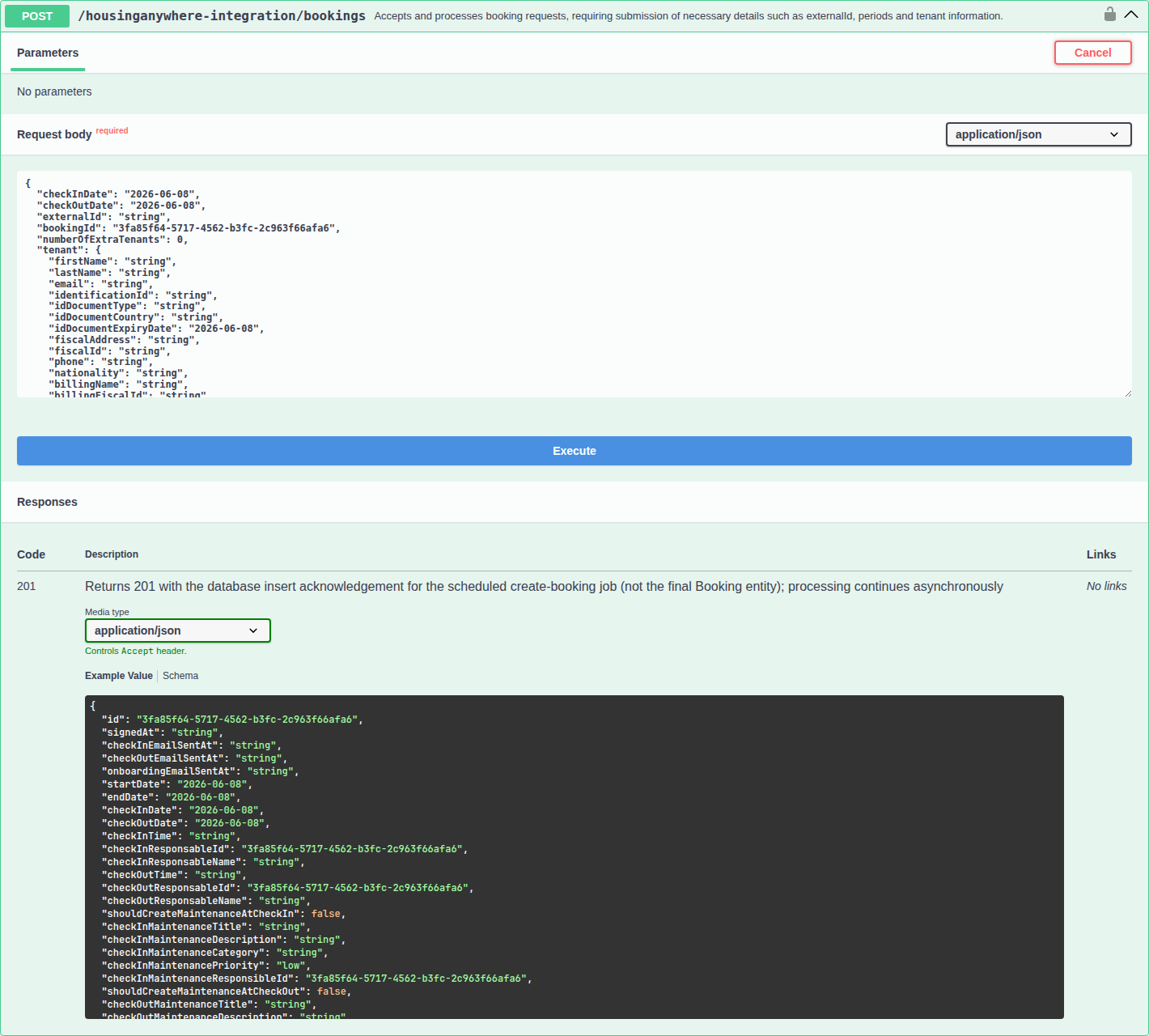
On your Swagger page, the body is listed as CreateBookingIntegrationDto.
Request fields
| Name | Type | Required | Description |
|---|---|---|---|
checkInDate | string, YYYY-MM-DD | Yes | Move-in date. The check-in time comes from the landlord's settings |
checkOutDate | string, YYYY-MM-DD | Yes | Move-out date. Must be after checkInDate: VIVIN does not check it for you |
externalId | string, 1–256 characters | Yes | Your listing ID for the unit. On single-landlord prefixes, the VIVIN unit ID that the feed returns for unlinked units also works |
bookingId | string, UUID | Recommended | Your reservation ID. VIVIN stores it on the booking and uses it to drop duplicates (Idempotency and retries) |
numberOfExtraTenants | integer, 0 or more | No | Despite its name, the total number of occupants, lead tenant included. 0, 1 or no value: one person. 3: the lead tenant plus two others |
platformProviderPaymentValue | number, 0 or more | Yes, in practice | What your platform collected from the tenant for this stay and pays to the landlord. Shown as Provider platform payment on the booking and recorded as a Provider platform payment on the tenant's payment plan. Without a value above 0, the booking fails in the background. Exceptions below |
otaCommissionValue | number, 0 or more | No | Your platform's commission on the stay. Stored on the booking for reference. It does not change the payment plan |
tenant | object | Yes | The lead tenant (Tenant fields) |
- Amounts are in the landlord account's currency and are stored with two decimals.
platformProviderPaymentValueexceptions: for Inlife and the Vivin Booking Engine, VIVIN works the amount out from the unit's rent when you leave it out. For Inlife, when you send exactly the base rent of a stay with more than one occupant, VIVIN adds the extra-occupant charge.- The body accepts only these fields. Any other top-level key, such as
rent,depositValue,checkInTimeorsecondTenant, returns400 property <name> should not exist.
Tenant fields
| Name | Type | Required | Description |
|---|---|---|---|
firstName | string, up to 128 characters | Yes | |
lastName | string, up to 128 characters | No | |
email | string, up to 128 characters | Yes | The tenant signs in to the tenant portal with it and gets every email there. VIVIN does not check the format: a typo means the tenant receives nothing |
fiscalId | string, up to 128 characters | No | The tenant's tax number, for example a NIF in Portugal |
phone | string, up to 64 characters | No | For example +15555550100 |
nationality | string, 2 letters | No | The tenant's two-letter ISO 3166-1 country code, in either letter case, for example PT |
- Existing tenants are reused. VIVIN looks in the landlord's account for a tenant with the same email (in any letter case) or the same
fiscalId. When it finds one, it adds the booking to that tenant and leaves their details unchanged. - Other keys inside
tenant(ID document, addresses, billing or bank details) are accepted and discarded. There is no field for a second tenant or a guarantor: the tenant adds those in the tenant portal, or the landlord's team does. - Only presence and length are checked. A misspelled email or a one-letter name is accepted, so check tenant values on your side.
Example request
{
  "checkInDate": "2027-02-01",
  "checkOutDate": "2027-06-30",
  "externalId": "abc-123",
  "bookingId": "550e8400-e29b-41d4-a716-446655440000",
  "numberOfExtraTenants": 2,
  "platformProviderPaymentValue": 650,
  "tenant": {
    "firstName": "Casey",
    "lastName": "Sample",
    "email": "[email protected]",
    "phone": "+15555550100",
    "fiscalId": "123456789"
  }
}
curl -X POST https://api.vivin.app/uniplaces-integration/bookings \
  -H "Authorization: Bearer <partner-token>" \
  -H "Content-Type: application/json" \
  -d @booking.json
Response
201 Created means VIVIN has queued your request. The body is a receipt for the queued request, not the booking:
{
  "identifiers": [{ "id": "4f7c2a9e-1b3d-4e8f-9a6b-2c5d7e8f0a1b" }],
  "generatedMaps": [
    {
      "id": "4f7c2a9e-1b3d-4e8f-9a6b-2c5d7e8f0a1b",
      "createdAt": "2026-09-26T10:15:02.123Z"
    }
  ],
  "raw": [
    {
      "id": "4f7c2a9e-1b3d-4e8f-9a6b-2c5d7e8f0a1b",
      "createdAt": "2026-09-26T10:15:02.123Z"
    }
  ]
}
- The
ididentifies the queued request, not a booking. No route looks it up, but keep it in your logs for support. generatedMapsandrawcan carry more keys than shown. Check the status code only.- Swagger shows the full booking model as the
201response. The real body is the one above.
Errors
These errors come back at once, and nothing is queued. Problems with the dates or the unit are found later, in the background (Booking lifecycle and validations).
| Status | message | Cause | What to do |
|---|---|---|---|
400 | checkInDate must be a valid ISO 8601 date string (or checkOutDate) | Missing or malformed date | Send YYYY-MM-DD |
400 | externalId should not be empty, externalId must be a string | Missing, empty or non-string externalId | Send your listing ID |
400 | bookingId must be a UUID | bookingId is not a UUID | Send a UUID, or leave the field out |
400 | numberOfExtraTenants must not be less than 0 (or the two amount fields) | A negative value or a value that is not a number | Send a number, 0 or more |
400 | tenant must be a non-empty object | tenant is missing or {} | Send the tenant |
400 | property <name> should not exist | A top-level field this route does not accept | Remove it |
400 | A required value is missing. | tenant.firstName or tenant.email is missing or empty | Send both |
400 | A value is too long for its field. | externalId over 256 characters, a tenant value over its limit | Shorten the value |
400 | A numeric value is out of range. | An amount of 100,000,000 or more | Check the amount |
400 | A value has an invalid format. | numberOfExtraTenants is not a whole number | Send an integer |
400 | Request body must be a JSON object, or a JSON parser message | The body is not a JSON object, or the JSON is malformed | Send one JSON object |
401 | Missing integration credentials and others | Missing or wrong partner token | See Authentication |
404 | Listing not found for <platform> with externalId <id> (or with listingId <id>) | Single-landlord prefixes only: the ID matches no unit of that landlord, or the unit is not in your feed | Take the ID from the feed |
415 | Unsupported Media Type: <type> | No Content-Type header, or a type the API does not read | Add the header |
503 | This integration is not configured yet. Contact VIVIN support. | Single-landlord prefixes only, until VIVIN finishes the setup | Contact VIVIN. Retrying does not help |
503 | The service is busy. Please try again in a moment. | VIVIN is briefly overloaded and did not queue the booking | Retry after the seconds in the Retry-After header |
Partner routes have no rate limit and never return 409 or 422: a conflict such as overlapping dates shows up as a background failure. The error body is described in Error handling.
What VIVIN fills in
The booking takes its contract terms from the landlord's setup, like a booking created in the app with the unit's own values:
| Term | Where it comes from |
|---|---|
| Rent | The unit's rent for the booked months, plus the Markup on your platform's card under Settings → Integrations → Booking Platforms, plus Extra Rent per Tenant for each occupant after the first |
| Deposit | The unit's deposit, plus Extra Deposit per Tenant for each occupant after the first |
| Fees and payment terms | Cleaning, admin and exit fees, bills included, the contract type, Confirmation payments, Check-in payments and due dates, from the property and Settings → Payments |
| Check-in and check-out times | The landlord's defaults |
| Tenant category | A tenant with no category gets the one marked Default for integration-created tenants under Settings → Categories, if the landlord marked one |
After the booking is created, the landlord's normal onboarding runs: depending on their settings, the contract and onboarding email for the tenant, payment details, scheduled messages, and check-in and check-out tasks.
What happens next
VIVIN processes queued requests one at a time, about every 30 seconds, not necessarily in the order they arrived. The booking can still fail then, for example when the dates overlap another stay, the externalId is not linked for your platform, or platformProviderPaymentValue is missing. A stay that breaks the unit's capacity or stay limits is created with a warning for the landlord.
Your platform is not told the result. To confirm it, read GET /<prefix>/listings/{externalId} again: once the booking exists, its dates appear as a new entry in unavailabilities. Every check, its message and who is notified are in Booking lifecycle and validations.
Idempotency and retries
bookingIdis your idempotency key. A request whosebookingIdyour platform already imported into that account is queued, then dropped without a second booking or a notification, even when the first booking has other dates or was cancelled.- Never resend a request that returned
201, and never reuse abookingIdto change or rebook a stay: ask the landlord to change it in VIVIN. - After a timeout or a
5xx, wait a few minutes and read the unit. Resend with the samebookingIdonly if the dates are still missing fromunavailabilities. - No partner route changes or cancels a booking. Uniplaces and Housing Anywhere can cancel through their webhooks.
The full duplicate rules are in Retries and duplicates.
Troubleshooting
| Symptom | Likely cause and fix |
|---|---|
201, but the dates never appear in unavailabilities | The booking was refused in the background, or the queue is long. The landlord has the reason (How failures are reported) |
| The booking was created for one person instead of two | numberOfExtraTenants counts every occupant. Send 2 for two people |
400 A required value is missing. | tenant.firstName or tenant.email is missing or an empty string |
| The tenant's details in VIVIN differ from what you sent | VIVIN reused an existing tenant with the same email or tax number, and kept their details |
The landlord sees Tenant <name> already has an active booking | The tenant's category does not allow Multiple concurrent bookings. The landlord can allow it under Settings → Categories |
Related
- Listings and availability: check a unit and its blocked dates before you book
- Property and unit mapping: where the
externalIdcomes from - Booking lifecycle and validations: the background checks and duplicates
- Webhooks and notifications: the Uniplaces and Housing Anywhere webhooks
- Error handling: status codes and the error body