Full listing feeds
A full listing feed gives Uniplaces, Spotahome, Housing Anywhere, Inlife and Spacest a landlord's whole catalogue in the marketplace's own JSON format, ready to publish.
Before you start
| Item | Value |
|---|---|
| Platforms | Uniplaces, Spotahome, Housing Anywhere, Inlife and Spacest |
| Base URL | https://api.vivin.app/<prefix>, for example /uniplaces-integration |
| Authentication | Authorization: Bearer <partner-token>, the same token as your other routes (Authentication) |
| Landlord key | Each request names one landlord account in the path (The landlord key) |
| Use it for | Creating and updating listings on your marketplace: photos, address, descriptions, amenities, prices and blocked dates. For calendar and price sync of linked units, the partial feed is enough |
| Freshness | The bulk feed is rebuilt about every 10 minutes. The single-listing route is always live |
Endpoints
| Method | Path | Returns |
|---|---|---|
GET | /<prefix>/{landlordKey}/listings/full | Every listing of one landlord account |
GET | /<prefix>/{landlordKey}/listings/{externalId}/full | One listing of that account |
| Platform | Prefix | Bulk response |
|---|---|---|
| Uniplaces | uniplaces-integration | JSON array, snake_case |
| Spotahome | spotahome-integration | { "properties": [ … ] }, following Spotahome's JSON Feed format |
| Housing Anywhere | housinganywhere-integration | JSON array, amounts in cents |
| Inlife | inlife-integration | JSON array |
| Spacest | roomless-integration | { "listings": [ … ] }, snake_case, following Spacest's field reference |

List a landlord's catalogue
GET /<prefix>/{landlordKey}/listings/full
Path parameters
| Name | Type | Required | Description |
|---|---|---|---|
landlordKey | string | Yes | The landlord key or the Integration Email (The landlord key) |
Example request
curl https://api.vivin.app/uniplaces-integration/[email protected]/listings/full \
  -H "Authorization: Bearer <partner-token>"
Response
200 OK with every listing that qualifies (Which listings appear), in the platform's shape. A landlord key that matches no account is not an error: you get 200 with [] (for Spotahome, { "properties": [] }; for Spacest, { "listings": [] }).
Errors
| Status | message | Cause | What to do |
|---|---|---|---|
400 | landlordKey must be a non-empty value | The key segment is blank | Put the landlord key in the path |
401 | Missing integration credentials and others | Missing or wrong partner token | See Authentication |
503 | The service is busy. Please try again in a moment. | VIVIN is briefly overloaded | Retry after the seconds in the Retry-After header |
The bulk route never returns 404: a unit that does not qualify is simply not in the array.
Retrieve one catalogue listing
GET /<prefix>/{landlordKey}/listings/{externalId}/full returns one object in the same shape as an item of the bulk feed. It is not wrapped in properties (Spotahome) or listings (Spacest). For Spotahome, and for a room it is the whole apartment entry that holds the room (Spotahome).
Path parameters
| Name | Type | Required | Description |
|---|---|---|---|
landlordKey | string | Yes | As above. The listing must belong to the matched account |
externalId | string | Yes | Your linked ID for the unit, or the VIVIN unit ID that the feed exports for unlinked units |
Example request
curl https://api.vivin.app/housinganywhere-integration/[email protected]/listings/a1b2c3/full \
  -H "Authorization: Bearer <partner-token>"
Errors
| Status | message | Cause | What to do |
|---|---|---|---|
404 | Listing not found for <platform> with externalId <id> | The landlord key matches no account, the ID is neither a linked unit of that account nor its VIVIN unit ID, the property is archived, or the unit is Excluded from feed | Check the key and take the ID from the bulk feed |
404 | Listing not available | The unit has no usable rent | Ask the landlord to set a rent |
404 | Listing not available: region is not supported by Inlife | Inlife only: the city is not one Inlife accepts (Inlife) | Ask the landlord to fix the city |
400, 401, 503 | As in List a landlord's catalogue |
The landlord key
The {landlordKey} path segment picks the VIVIN account whose listings you receive. It accepts either:
- the account's landlord key, which VIVIN gives you during onboarding (exact match), or
- the Integration Email the landlord entered on your platform's card under Settings → Integrations → Platform Integrations (letter case is ignored). If several accounts use the same email, the feed covers all of them.
The Housing Anywhere webhook takes the same key (Webhooks and notifications).
Which listings appear
| Feed | Units included |
|---|---|
Partial: GET /<prefix>/listings | Only units linked to your platform in the unit's Channels section |
Full: GET /<prefix>/{landlordKey}/listings/full | Every unit of the account, linked or not |
That is why the full feed can hold more listings than the partial one. It still leaves a unit out when:
- the unit is archived, or its property is archived,
- the landlord set your platform to Excluded from feed on the unit's Integrations tab, under Integration listings,
- it has no usable rent: a fixed rent of 0, or a variable rent with no monthly rents or with a month at 0 (your platform's markup never turns a rent of 0 into a price),
- (Inlife only) its city is not one Inlife accepts,
- (Spacest only) it has a block with no end date that starts on or before its first free day, so it has no night to offer.
A unit that appears only in the full feed cannot be booked with POST /<prefix>/bookings until it is linked in Channels. The Uniplaces and Housing Anywhere webhooks accept it by its VIVIN unit ID (Property and unit mapping).
Listing IDs
Each feed has one field that identifies the unit. Store it and use it on the single-listing route and in webhooks.
| Platform | ID field | Linked unit | Unlinked unit |
|---|---|---|---|
| Uniplaces | reference_id | Your Uniplaces external ID | The VIVIN unit ID (a UUID) |
| Spotahome | id (whole units) or bedrooms[].room_id (rooms) | Your Spotahome external ID | The VIVIN unit ID |
| Housing Anywhere | listingReference | Your Housing Anywhere external ID | The VIVIN unit ID |
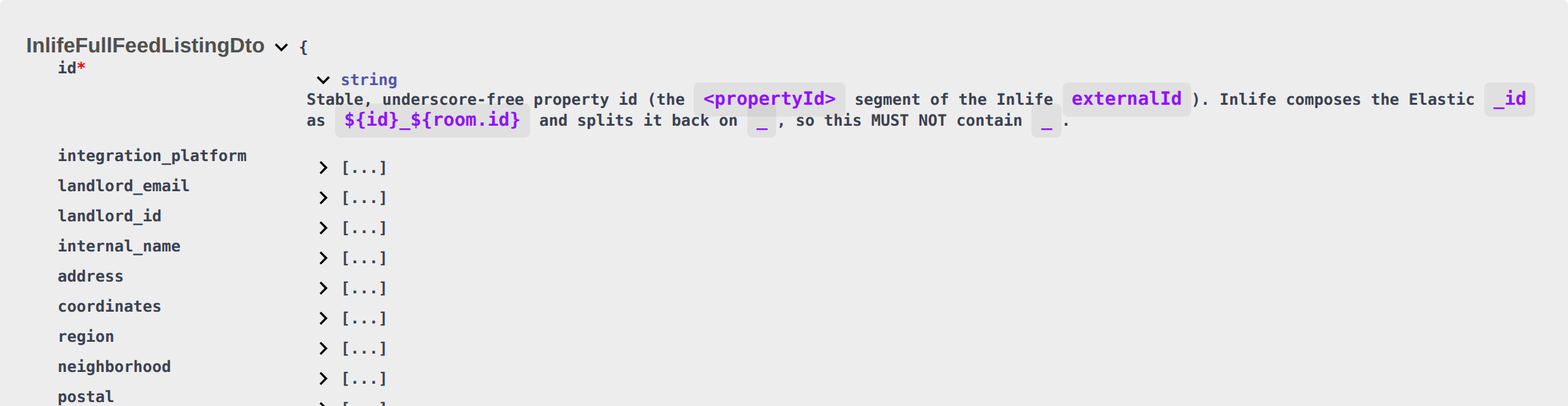
| Inlife | id and room.id | Your ID split in two (see below) | Both hold the VIVIN unit ID |
| Spacest | id | Your Spacest external ID | The VIVIN unit ID |
- Spotahome rooms: the apartment entry's
idis the VIVIN property ID, and each room is identified by itsroom_id. Use theroom_idon the single-listing route. - Spacest: every entry also carries
vivin_id, the VIVIN unit ID, whether or not the unit is linked, andlandlord_key, the landlord it belongs to (Spacest). - Send the same value back in webhooks:
offer_api_referencefor Uniplaces,listing_external_referencefor Housing Anywhere (Webhooks and notifications). - Inlife: the stored key is Inlife's
propertyId_roomId. The feed splits it:idis the property ID androom.idthe room ID, and neither contains_. If the stored key has no_(a studio saved with its property ID only),idis that key androom.idis the VIVIN unit ID. Do not put the joined value inid. The partial feed andPOST /bookingsstill use the joinedpropertyId_roomId.
What the feed contains
The feed is built from what the landlord fills in on the Integrations tab of the property and unit editors (copy, location, amenities, rules and partner-specific fields) and from the photos on their Photos tab.
| Platform | Main fields |
|---|---|
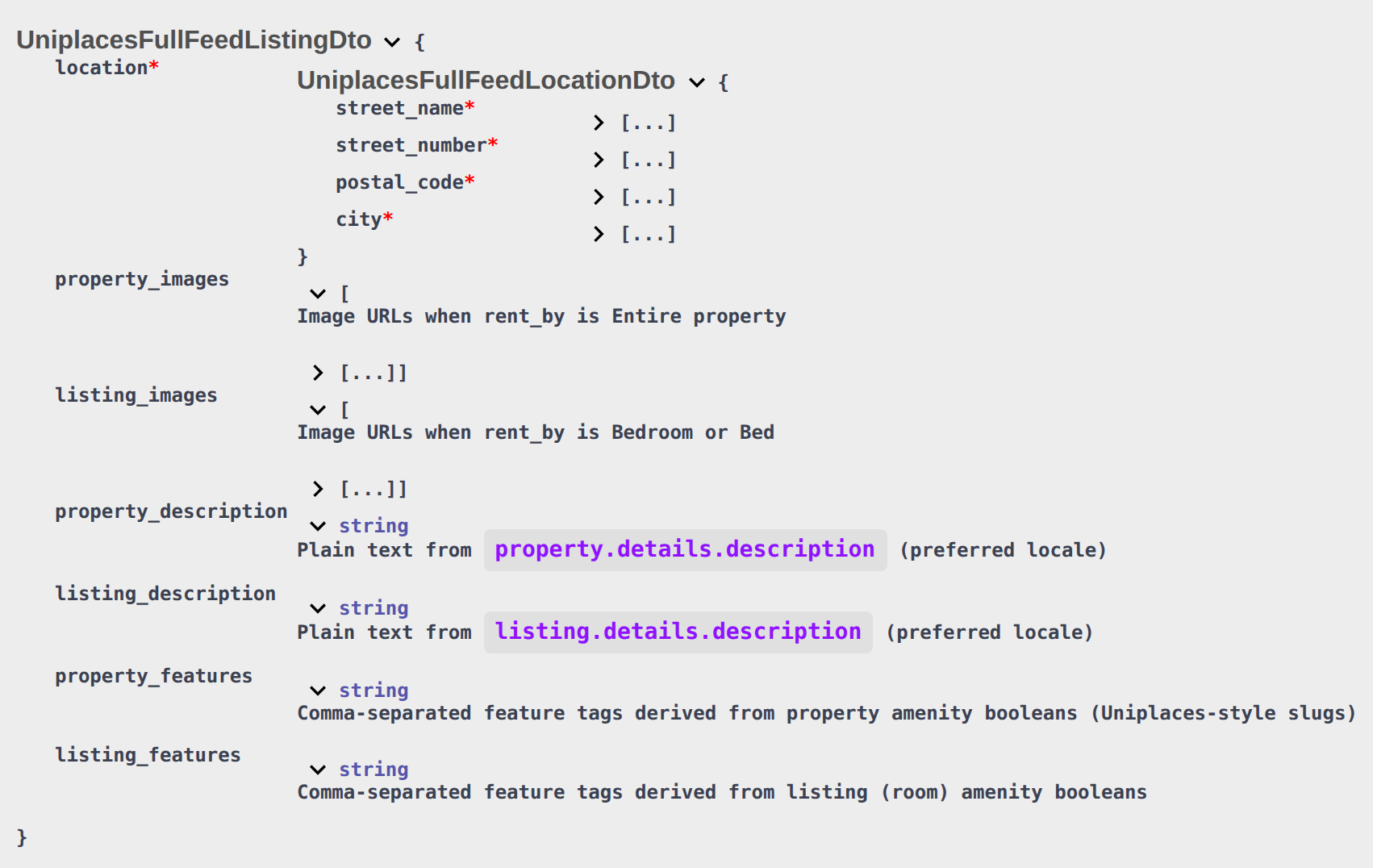
| Uniplaces | reference_id, property_reference_id, property_type, rent_by, contract_type, location, available_from, listing_pricing, property_elements, property_images (every photo of a whole property; for rooms and beds, the shared areas such as kitchen, living room and building), listing_images (rooms and beds only: the photos of the room itself), property_description, listing_description, property_features, listing_features, property_rules, property_size, floor, blocked_periods, landlord_email, original_listing_url, updated_at |
| Spotahome | id, type, copy (title and description), suitability, location, pricing, area, availabilities, instant_booking, stay, status, property (images, bathrooms, amenities), bedrooms[] (one per room) |
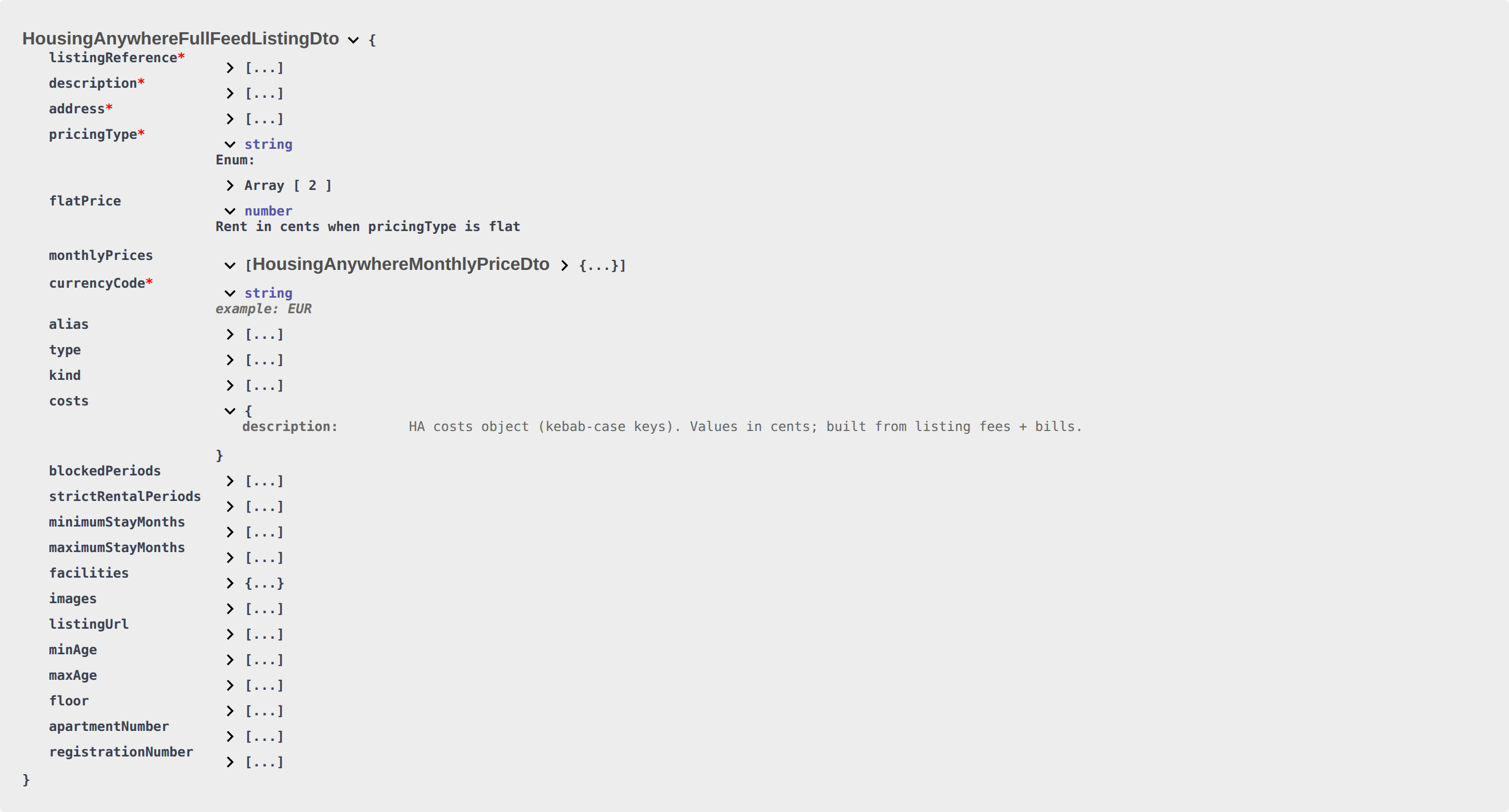
| Housing Anywhere | listingReference, description, address, pricingType, flatPrice or monthlyPrices, currencyCode, type, kind, costs, blockedPeriods, minimumStayMonths, maximumStayMonths, facilities, images, minAge / maxAge, floor, registrationNumber |
| Inlife | id, title and description per language, address, coordinates, region, neighborhood, photos, amenity counts and flags, house rules, securityDeposit, extraAdministrativeFee, landlord_email, room (rent, stay limits, photos, unavailability), creationDate, modificationDate, updated |
| Spacest | id, vivin_id, landlord_key, type, status, title, description, external_id, address, room and building (rooms and beds) or apartment (whole units), pricing, contract, availability, tenant_requirements, adminFeeValue, adminFeeMode, adminFeeTiers |
landlord_email(Uniplaces, Inlife) is the Integration Email from your platform's card, not the landlord's login or a per-unit contact. Uniplaces leaves the field out when the card has none.- Placeholder images are removed: stock-image hosts such as
picsum.photos,placehold.coordummyimage.comnever appear. - Photo URLs are permanent: a URL changes only when the landlord replaces or removes the photo, so you can compare URLs to detect photo changes. A photo that was just added can briefly go out as a signed link that expires after about a week, until its permanent URL is ready.
- The Wi-Fi password is never included, only the fact that the unit has Wi-Fi.
- New fields can be added at any time. Ignore fields you do not use.
Prices
- Rent includes the Markup on the landlord's card for your platform. Deposit and fees do not.
- Currency: Uniplaces, Housing Anywhere and Spacest state it (
currency_code,currencyCode,pricing.currency). It is the Currency (ISO 4217) set under the property's Integrations → Fees & legal, otherwise the account currency. - Housing Anywhere amounts are in cents in the full feed: divide by 100. The partial feed uses normal amounts.
- Part months: Uniplaces gets
contract_type, the property's Contract day type:daily(charged by the day),fortnightly(by the half month) ormonthly(whole months, also sent for properties paid in installments).
| Uniplaces | Spotahome | Housing Anywhere | Inlife | |
|---|---|---|---|---|
| Fixed rent | listing_pricing.rents | pricing.monthly | pricingType: "flat", flatPrice | room.rent, room.fixedRent: true |
| Variable rent | rents = the highest month | monthly = 12 monthly rents, January to December | pricingType: "monthly", 12 monthlyPrices | room.fixedRent: true; room.rent, room.minRent and room.maxRent = the highest month; no per-month prices |
| Deposit | listing_pricing.deposit.value | pricing.deposit | costs["security-deposit"] | securityDeposit |
| Admin fee | listing_pricing.admin_fee.value | pricing.admin_fee | costs["administration-fee"] | extraAdministrativeFee |
| Bills included | listing_pricing.bills: true | bills: [{ "name": "all", "option": "included", "value": "0" }] only when every bill is included with no monthly limit; no bills when bills have a limit or are not included | No bills cost line | billsIncluded: true |
| Cleaning | cleaning / cleaning_included booleans only | servicesAndExpenses → periodicCleaning | costs["cleaning-fee"]: payableAt is monthly for Every Month, or move-in for a one-time cleaning fee (One-Time Fee at Booking Confirmation, One-Time Fee at Move-in, or advance when Advance Payments is on) | cleaningLadyPrice |
| Extra tenant | Not published | Not published | Not published | room.extraTenantsPrice (0 when the unit sleeps one) |
- For a variable-rent unit, charge each month from its own rent: Housing Anywhere
monthlyPrices, Spotahomemonthly(12 values), orrentsPerMonthon the partial feed. Do not apply the Uniplaces headline to every month. - Spotahome rooms carry
monthly,depositandadmin_feeinbedrooms[].pricing. The top-levelpricingthen holds only bills and services. - The exit fee, the local rent cap and the extra deposit per tenant are not in any feed.
- A property can set its deposit by stay length (Per stay duration). The feeds above carry one deposit: the property's base number of rents. A booking you send pays the deposit of its own length.
The Housing Anywhere costs object lists only positive amounts the tenant pays, each with value (cents), payableBy, payableAt, required, refundable and isEstimated. Bills included in the rent are left out. When bills are not included and the property has a monthly bills amount, it appears as an estimated other-additional-costs line. membership-fee (at move-in) and parking (monthly) come from the property's Membership fee amount under Integrations → Fees & legal and Parking fee amount under Integrations → Parking & cleaning. For example, 850 rent with an 850 deposit:
{
  "listingReference": "a1b2c3",
  "currencyCode": "EUR",
  "pricingType": "flat",
  "flatPrice": 85000,
  "costs": {
    "security-deposit": {
      "value": 85000,
      "payableBy": "tenant",
      "payableAt": "move-in",
      "required": true,
      "refundable": true,
      "isEstimated": false
    }
  }
}
Blocked dates
Each feed lists the nights the unit cannot be booked: bookings and the landlord's blocks.
| Platform | Field | End date means | Block with no end date |
|---|---|---|---|
| Uniplaces | blocked_periods[] → from, to | to = last blocked night (inclusive) | Left out |
| Spotahome | availabilities.occupancies[] → from, to (in bedrooms[] for rooms) | to = last blocked night (inclusive) | to: null |
| Housing Anywhere | blockedPeriods[] → startDate, endDate | endDate = first free day (exclusive) | Left out |
| Inlife | room.unavailability[] → start, end | end = last blocked night (inclusive) | end: null |
| Spacest | availability.occupation_periods[] → from_date, to_date | to_date = last blocked night (inclusive) | Left out; available_to ends the day before |
A stay from the night of 1 May 2027 to the night of 31 August 2027 appears as:
- Uniplaces and Spotahome:
"from": "2027-05-01", "to": "2027-08-31" - Housing Anywhere:
"startDate": "2027-05-01", "endDate": "2027-09-01" - Inlife:
"start": "2027-05-01", "end": "2027-08-31"
In each case the next check-in can be on 1 September.
- Overlapping blocks (sharing at least one night) are merged into one range.
- Blocks that ended before today are left out. Housing Anywhere also moves a past
startDateforward to today. - Spotahome gets one form only:
occupancieswhen the unit has blocked nights, otherwiseavailable_fromandavailable_to(the latest move-out date of the unit's booking window, ornull). Each booking or block is its own occupancy, and the free nights between two of them stay free, even when they are fewer than the minimum stay. When the unit becomes available later than the day after its last block (the landlord's notice period), the nights up to that date are sent as a block too. - Booking windows: when a unit has an open booking window, the nights before its earliest move-in and after its latest move-out are published as blocked on Uniplaces, Spotahome, Inlife and Spacest. Housing Anywhere (
minimumStayMonths,maximumStayMonths), Inlife (room.periodStayMin,room.periodStayMax) and Spotahome (stay, in days) also recalculate the stay limits from the window length. Housing AnywhereblockedPeriodsdoes not get these extra blocks. - Calendar Block (days): if the landlord set it on your platform's card, you may see a block of about two years, starting where the unit's furthest-out block ends once that date is further away than the number of days set.
Platform specifics
Spotahome
- Apartments: the rooms of one property are one
roomsharedentry. Itsidis the VIVIN property ID, and each room is abedrooms[]row with its ownroom_id,pricing,availabilities,stay,amenities, photos andinstant_booking. A whole unit is its own entry: astudiowhen its Accommodation contains "studio" or it has 0 bedrooms, otherwise anapartment. A whole unit sends nobedrooms[]rows. - Photos:
property.imagesholds the property's photos, topped up with the rooms' photos when there are fewer than 5. Each room'sbedrooms[].imagesholds exactly that room's own photos. A whole apartment or studio sends its own photos first, then the property's. A photo is never sent twice in the same list. Spotahome asks for at least 5 images; when fewer than 5 different photos exist, the feed sends the ones there are, so add photos on the Photos tab to reach 5. - Text:
copy.title.enis the English title from the Integrations tab, otherwise a title built from the bedrooms and the location, such as "5-bedroom shared apartment in Bonfim, Porto". Titles and descriptions in other languages are sent under their own language key (pt,es, …). A room with no English text of its own sends nocopy, so Spotahome shows the apartment's. - Location:
cityis the Feed city slug from Integrations → Location when set. Otherwise it is the property's City (or its Region) as a Spotahome city ID: lowercase, no accents, words joined by_, local names in English (Lisboa →lisbon).addressholds the street, floor and neighbourhood, and the street number goes instreet_number. A country, postal code or coordinates the property does not have are sent empty. - Features: apart from
furnished(alwaysyes) and the suitabilitygender(anyunless the property is restricted), amenities, suitability, the number of bathrooms and bills are sent only when they are set in VIVIN. - Stay:
stay.min_daysandstay.max_daysare the unit's minimum and maximum stay converted to days at 30 days a month, as whole numbers. A unit with no minimum set (or 0) is sent as30; no maximum isnull. When instant booking is on,instant_booking.min_months_stayis the minimum stay in months, at least 1.
Inlife
Inlife accepts only certain cities. VIVIN reads the property's City, then its Region, from Integrations → Location, ignoring case and accents.
| Inlife region | Names that match |
|---|---|
| Lisboa | Lisbon, Lisboa, Lisbonne |
| Porto | Porto, Oporto |
| Madrid | Madrid |
| Barcelona | Barcelona |
| Roma | Rome, Roma |
| Milan | Milan, Milano |
| Sevilla | Seville, Sevilla |
| Valencia | Valencia |
| Aveiro | Aveiro |
| Braga | Braga |
A unit with any other city is left out of the bulk feed, and its single-listing route returns 404 Listing not available: region is not supported by Inlife. The Inlife partial feed does not apply this check.
room.availableFrom, room.firstAvailability, creationDate, modificationDate and updated are Unix epoch milliseconds. room.firstAvailability is the earliest date, from today on, that is either availableFrom or the day after a blocked range ends. The blocked-date rows are the exception: start and end are YYYY-MM-DD text.
{
  "room": {
    "availableFrom": 1819756800000,
    "firstAvailability": 1819756800000,
    "unavailability": [
      { "start": "2027-05-01", "end": "2027-08-31", "added": "2026-09-20" }
    ]
  }
}
Spacest
Spacest's feed is served under the roomless-integration prefix, with the same partner token as the other RoomLess routes.
- IDs:
idis your Spacest external ID once the unit is linked, otherwise the VIVIN unit ID.vivin_idis always the VIVIN unit ID, so it stays the same when a unit gets linked.landlord_keyis the landlord key of the unit's account (The landlord key); when the account has none, it is the Integration Email you called the feed with. - Units: a room or a bed is a
roomentry with aroomobject (room_typeisprivatefor a room,sharedfor a bed) and abuildingobject for the apartment. All rooms of one property sharebuilding.id, the VIVIN property ID. A whole unit is anapartmententry, or astudiowhen its Accommodation contains "studio" or it has 0 bedrooms.apartment.num_bedroomsis 1 to 4; 4 means 4 or more. statusis alwaysonline. A unit that is archived, Excluded from feed, has no valid rent, or is blocked from its first free day with no end date (for example a stay with no move-out date) leaves the feed, and its single-listing route returns404. Treat a unit that disappears as removed; it comes back with the sameidonce it can be booked again.- Text:
titleis the unit's title from the Integrations tab, otherwise the property's, otherwise one built from the facts, such as "Private room in a 4-bedroom apartment in Arroios, Lisbon". English is used first, then Portuguese, Spanish or any other language.external_idis the landlord's own unit code,building.external_idthe property code. - Prices:
pricing.monthly_rentis the fixed rent, or the highest month of a variable rent. A variable rent also sendspricing.prices[]: one entry per calendar month for the next 12 months, from the 1st to the last day (inclusive); a month with no rent of its own is left out.currencyis the unit's real currency.depositisnullwhen there is none. When bills are not included,billslists every bill asfalse, since VIVIN does not record which bills a rent covers. - Admin fee:
adminFeeValue,adminFeeModeandadminFeeTierskeep the names and meaning of the partial feed (Admin fee). WhenadminFeeModeistiered, charge the tier that matches the stay length and ignoreadminFeeValue. - Stay:
contract.min_monthsis the minimum stay in whole months (rounded up, at least 1);contract.max_monthsisnullwhen there is no maximum. - Availability:
available_fromis the unit's first free day, or today.available_tois the latest move-out date of the booking window the feed follows (the first one a stay can still start in), or the day before a block with no end date, whichever is earlier; otherwisenull.occupation_periodslists the unit's bookings and blocked dates from today on, overlapping ones merged, both dates inclusive.instantly_bookablefollows the property's instant booking setting. - Address: a required field VIVIN does not have (
street,number,zip,city,country_code) is sent as an empty string, and missing coordinates asnull.streetfalls back to the property's full address when it has no street name. - Tenant requirements:
genderisfemaleormalefor a restricted property, otherwiseany.occupationis["student"]or["professional"]only for a property restricted to students or workers.min_age,max_age,pets_allowedandsmokers_allowedare sent only when they are set. - Photos: the image URLs are permanent (see What the feed contains).
- Values VIVIN does not hold are left out rather than guessed: energy class, house type, number of floors, notice period, contract type, average bills cost and the listing URL.
Spotahome legacy feed
Spotahome also has an older feed in an earlier { "properties": [ … ] } format. Use the full feed for new work, and keep this one only if your integration already depends on it.
| Method | Path | Returns |
|---|---|---|
GET | /spotahome-integration/listings/feed | The units linked to Spotahome in Channels, every account |
GET | /spotahome-integration/listings/feed/{key} | The same, for one landlord |
{key}is the company name in the domain of the landlord's Integration Email: for[email protected], the key issample-homes. It is not the landlord key of the full feed.- The key only identifies a landlord on a company domain. A
gmail.comIntegration Email gives no key, so that landlord is left out of the keyed feed. Another shared domain, such asoutlook.com, gives one key (outlook) for every landlord on it. - Both routes use the partner token and the standard errors.
Polling
- The bulk feeds are rebuilt about every 10 minutes per landlord key, so polling more often returns the same data. The single-listing routes are always live: use them to check one unit right before you publish it.
- Partner routes have no rate limit.
updated_at(Uniplaces) andupdated(Inlife) change when the listing record is edited, not when a booking or block is added. Re-read the blocked dates on every pull.- Import bookings with
POST /<prefix>/bookingsor your webhook, whichever feed you poll (Creating bookings).
Troubleshooting
| Symptom | Likely cause and fix |
|---|---|
| The bulk feed is an empty array | The landlord key matched no account. Check the key or the Integration Email with the landlord |
| The full feed has more listings than the partial feed | Expected: the full feed includes units not linked to your platform yet |
| A listing is in the full feed but a booking for it fails | It is not linked in Channels. Book it through your webhook by its VIVIN unit ID, or ask the landlord to link it |
| Housing Anywhere prices look 100 times too high | The full feed is in cents |
| An Inlife unit is missing | Its city is not in the Inlife list. The single-listing route says so |
Related
- Listings and availability: the partial feed for calendar and price sync
- Property and unit mapping: how units are linked to your platform's IDs
- Webhooks and notifications: the Uniplaces and Housing Anywhere webhooks
- Authentication: the partner token
- Integrations settings: where landlords set the Integration Email, Markup and Calendar Block