Full listing feeds
A full listing feed gives Uniplaces, Spotahome, Housing Anywhere and Inlife a landlord's whole catalogue in the marketplace's own JSON format, ready to publish.
Before you start
| Item | Value |
|---|---|
| Platforms | Uniplaces, Spotahome, Housing Anywhere and Inlife |
| Base URL | https://api.vivin.app/<prefix>, for example /uniplaces-integration |
| Authentication | Authorization: Bearer <partner-token>, the same token as your other routes (Authentication) |
| Landlord key | Each request names one landlord account in the path (The landlord key) |
| Use it for | Creating and updating listings on your marketplace: photos, address, descriptions, amenities, prices and blocked dates. For calendar and price sync of linked units, the partial feed is enough |
| Freshness | The bulk feed is rebuilt about every 10 minutes. The single-listing route is always live |
Endpoints
| Method | Path | Returns |
|---|---|---|
GET | /<prefix>/{landlordKey}/listings/full | Every listing of one landlord account |
GET | /<prefix>/{landlordKey}/listings/{externalId}/full | One listing of that account |
| Platform | Prefix | Bulk response |
|---|---|---|
| Uniplaces | uniplaces-integration | JSON array, snake_case |
| Spotahome | spotahome-integration | { "properties": [ … ] }, following Spotahome's JSON Feed format |
| Housing Anywhere | housinganywhere-integration | JSON array, amounts in cents |
| Inlife | inlife-integration | JSON array |

List a landlord's catalogue
GET /<prefix>/{landlordKey}/listings/full
Path parameters
| Name | Type | Required | Description |
|---|---|---|---|
landlordKey | string | Yes | The landlord key or the Integration Email (The landlord key) |
Example request
curl https://api.vivin.app/uniplaces-integration/[email protected]/listings/full \
  -H "Authorization: Bearer <partner-token>"
Response
200 OK with every listing that qualifies (Which listings appear), in the platform's shape. A landlord key that matches no account is not an error: you get 200 with [] (for Spotahome, { "properties": [] }).
Errors
| Status | message | Cause | What to do |
|---|---|---|---|
400 | landlordKey must be a non-empty value | The key segment is blank | Put the landlord key in the path |
401 | Missing integration credentials and others | Missing or wrong partner token | See Authentication |
503 | The service is busy. Please try again in a moment. | VIVIN is briefly overloaded | Retry after the seconds in the Retry-After header |
The bulk route never returns 404: a unit that does not qualify is simply not in the array.
Retrieve one catalogue listing
GET /<prefix>/{landlordKey}/listings/{externalId}/full returns one object in the same shape as an item of the bulk feed. For Spotahome, it is not wrapped in properties.
Path parameters
| Name | Type | Required | Description |
|---|---|---|---|
landlordKey | string | Yes | As above. The listing must belong to the matched account |
externalId | string | Yes | Your linked ID for the unit, or the VIVIN unit ID that the feed exports for unlinked units |
Example request
curl https://api.vivin.app/housinganywhere-integration/[email protected]/listings/a1b2c3/full \
  -H "Authorization: Bearer <partner-token>"
Errors
| Status | message | Cause | What to do |
|---|---|---|---|
404 | Listing not found for <platform> with externalId <id> | The landlord key matches no account, the ID is neither a linked unit of that account nor its VIVIN unit ID, the property is archived, or the unit is Excluded from feed | Check the key and take the ID from the bulk feed |
404 | Listing not available | The unit has no usable rent | Ask the landlord to set a rent |
404 | Listing not available: region is not supported by Inlife | Inlife only: the city is not one Inlife accepts (Inlife) | Ask the landlord to fix the city |
400, 401, 503 | As in List a landlord's catalogue |
The landlord key
The {landlordKey} path segment picks the VIVIN account whose listings you receive. It accepts either:
- the account's landlord key, which VIVIN gives you during onboarding (exact match), or
- the Integration Email the landlord entered on your platform's card under Settings → Integrations → Booking Platforms (letter case is ignored). If several accounts use the same email, the feed covers all of them.
The Housing Anywhere webhook takes the same key (Webhooks and notifications).
Which listings appear
| Feed | Units included |
|---|---|
Partial: GET /<prefix>/listings | Only units linked to your platform in the unit's Channels section |
Full: GET /<prefix>/{landlordKey}/listings/full | Every unit of the account, linked or not |
That is why the full feed can hold more listings than the partial one. It still leaves a unit out when:
- the unit is archived, or its property is archived,
- the landlord set your platform to Excluded from feed on the unit's Full integration tab, under Integration listings,
- it has no usable rent: a fixed rent of 0, or a variable rent with no monthly rents or with a month at 0,
- (Inlife only) its city is not one Inlife accepts.
A unit that appears only in the full feed cannot be booked with POST /<prefix>/bookings until it is linked in Channels. The Uniplaces and Housing Anywhere webhooks accept it by its VIVIN unit ID (Property and unit mapping).
Listing IDs
Each feed has one field that identifies the unit. Store it and use it on the single-listing route and in webhooks.
| Platform | ID field | Linked unit | Unlinked unit |
|---|---|---|---|
| Uniplaces | reference_id | Your Uniplaces external ID | The VIVIN unit ID (a UUID) |
| Spotahome | id | Your Spotahome external ID | The VIVIN unit ID |
| Housing Anywhere | listingReference | Your Housing Anywhere external ID | The VIVIN unit ID |
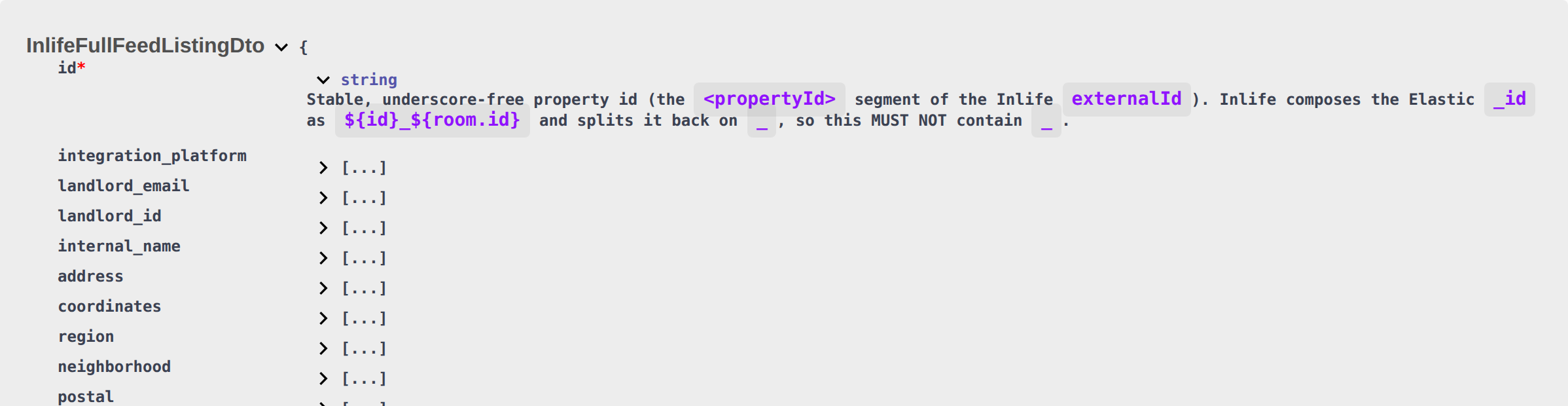
| Inlife | id and room.id | Your ID split in two (see below) | Both hold the VIVIN unit ID |
- Send the same value back in webhooks:
offer_api_referencefor Uniplaces,listing_external_referencefor Housing Anywhere (Webhooks and notifications). - Inlife: the stored key is Inlife's
propertyId_roomId. The feed splits it:idis the property ID androom.idthe room ID, and neither contains_. If the stored key has no_(a studio saved with its property ID only),idis that key androom.idis the VIVIN unit ID. Do not put the joined value inid. The partial feed andPOST /bookingsstill use the joinedpropertyId_roomId.
What the feed contains
The feed is built from what the landlord fills in on the Full integration tab of the property and unit editors (copy, location, amenities, rules and partner-specific fields) and from the photos on their Photos tab.
| Platform | Main fields |
|---|---|
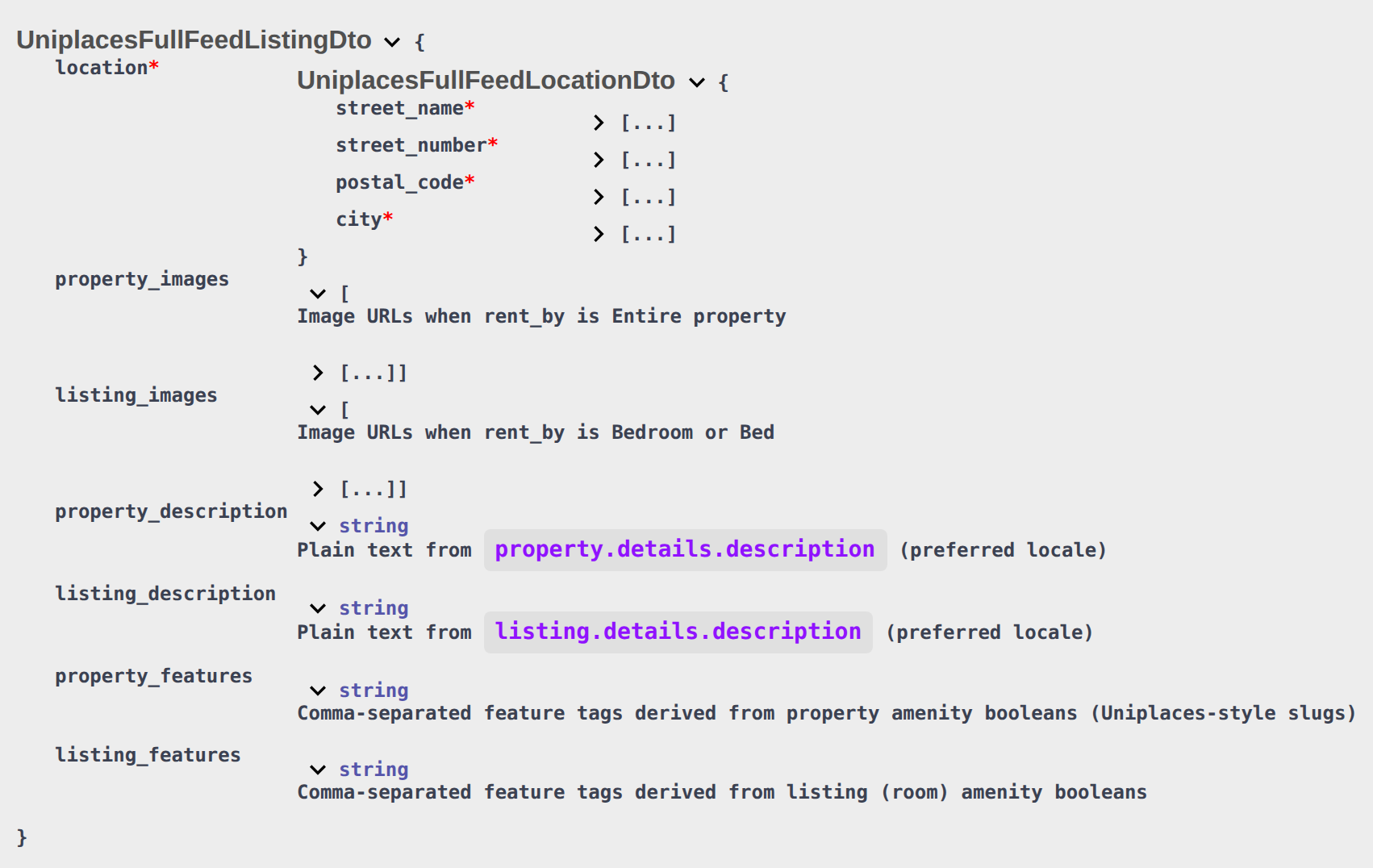
| Uniplaces | reference_id, property_reference_id, property_type, rent_by, location, available_from, listing_pricing, property_elements, property_images (whole properties) or listing_images (rooms and beds), property_description, listing_description, property_features, listing_features, property_rules, property_size, floor, blocked_periods, landlord_email, original_listing_url, updated_at |
| Spotahome | id, type, copy (title and description), suitability, location, pricing, area, availabilities, instant_booking, stay, status, property (images, bathrooms, amenities), bedrooms[] for rooms |
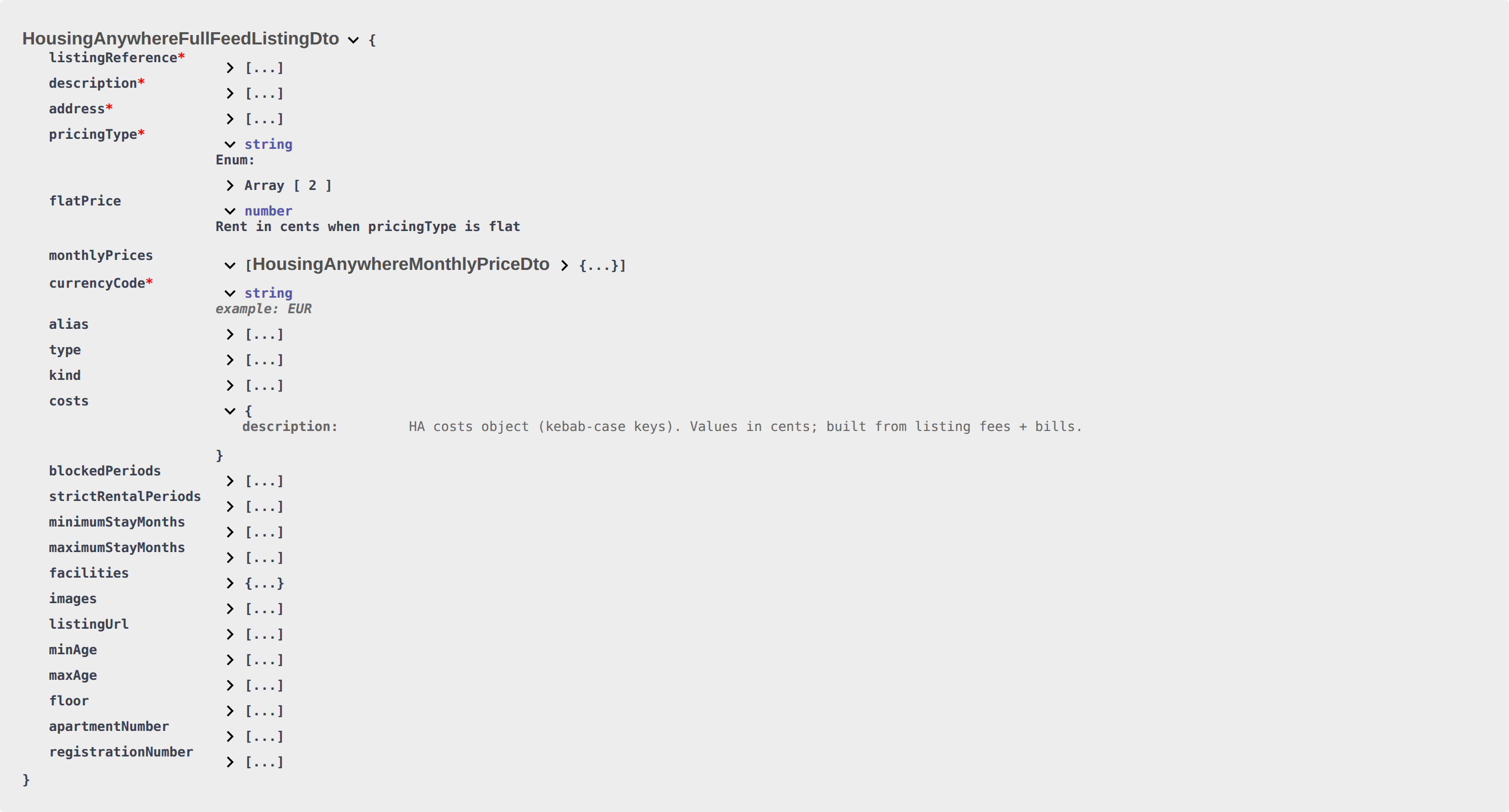
| Housing Anywhere | listingReference, description, address, pricingType, flatPrice or monthlyPrices, currencyCode, type, kind, costs, blockedPeriods, minimumStayMonths, maximumStayMonths, facilities, images, minAge / maxAge, floor, registrationNumber |
| Inlife | id, title and description per language, address, coordinates, region, neighborhood, photos, amenity counts and flags, house rules, securityDeposit, extraAdministrativeFee, landlord_email, room (rent, stay limits, photos, unavailability), creationDate, modificationDate, updated |
landlord_email(Uniplaces, Inlife) is the Integration Email from your platform's card, not the landlord's login or a per-unit contact. Uniplaces leaves the field out when the card has none.- Placeholder images are removed: stock-image hosts such as
picsum.photos,placehold.coordummyimage.comnever appear. - The Wi-Fi password is never included, only the fact that the unit has Wi-Fi.
- New fields can be added at any time. Ignore fields you do not use.
Prices
- Rent includes the Markup on the landlord's card for your platform. Deposit and fees do not.
- Currency: Uniplaces and Housing Anywhere state it (
currency_code,currencyCode). It is the Currency (ISO 4217) set under the property's Full integration → Partner platforms, otherwise the account currency. - Housing Anywhere amounts are in cents in the full feed: divide by 100. The partial feed uses normal amounts.
| Uniplaces | Spotahome | Housing Anywhere | Inlife | |
|---|---|---|---|---|
| Fixed rent | listing_pricing.rents | pricing.monthly | pricingType: "flat", flatPrice | room.rent, room.fixedRent: true |
| Variable rent | rents = the highest month | monthly = the highest month | pricingType: "monthly", 12 monthlyPrices | room.fixedRent: true; room.rent, room.minRent and room.maxRent = the highest month; no per-month prices |
| Deposit | listing_pricing.deposit.value | pricing.deposit | costs["security-deposit"] | securityDeposit |
| Admin fee | listing_pricing.admin_fee.value | pricing.admin_fee | costs["administration-fee"] | extraAdministrativeFee |
| Bills included | listing_pricing.bills: true | bills: [{ "name": "all", "option": "included", "value": "0" }] | No bills cost line | billsIncluded: true |
| Cleaning | cleaning / cleaning_included booleans only | servicesAndExpenses → periodicCleaning | costs["cleaning-fee"], monthly | cleaningLadyPrice |
| Extra tenant | Not published | Not published | Not published | room.extraTenantsPrice (0 when the unit sleeps one) |
- For a variable-rent unit, charge each month from its own rent: Housing Anywhere
monthlyPrices, orrentsPerMonthon the partial feed. Do not apply the Uniplaces or Spotahome headline to every month. - Spotahome rooms carry
monthly,depositandadmin_feeinbedrooms[].pricing. The top-levelpricingthen holds only bills and services. - The exit fee, the local rent cap and the extra deposit per tenant are not in any feed.
The Housing Anywhere costs object lists only positive amounts the tenant pays, each with value (cents), payableBy, payableAt, required, refundable and isEstimated. Bills included in the rent are left out. When bills are not included and the property has a monthly bills amount, it appears as an estimated other-additional-costs line. membership-fee (at move-in) and parking (monthly) come from the property's Membership fee amount and Parking fee amount under Full integration → Partner platforms. For example, 850 rent with an 850 deposit:
{
  "listingReference": "a1b2c3",
  "currencyCode": "EUR",
  "pricingType": "flat",
  "flatPrice": 85000,
  "costs": {
    "security-deposit": {
      "value": 85000,
      "payableBy": "tenant",
      "payableAt": "move-in",
      "required": true,
      "refundable": true,
      "isEstimated": false
    }
  }
}
Blocked dates
Each feed lists the nights the unit cannot be booked: bookings and the landlord's blocks.
| Platform | Field | End date means | Block with no end date |
|---|---|---|---|
| Uniplaces | blocked_periods[] → from, to | to = last blocked night (inclusive) | Left out |
| Spotahome | bedrooms[].availabilities.occupancies[] → from, to (shared rooms only) | to = last blocked night (inclusive) | to: null |
| Housing Anywhere | blockedPeriods[] → startDate, endDate | endDate = first free day (exclusive) | Left out |
| Inlife | room.unavailability[] → start, end | end = last blocked night (inclusive) | end: null |
A stay from the night of 1 May 2027 to the night of 31 August 2027 appears as:
- Uniplaces and Spotahome:
"from": "2027-05-01", "to": "2027-08-31" - Housing Anywhere:
"startDate": "2027-05-01", "endDate": "2027-09-01" - Inlife:
"start": "2027-05-01", "end": "2027-08-31"
In each case the next check-in can be on 1 September.
- Overlapping blocks (sharing at least one night) are merged into one range.
- Blocks that ended before today are left out. Housing Anywhere also moves a past
startDateforward to today. - Spotahome whole apartments and studios carry no occupancy list. They publish
availabilities.available_fromandavailable_to(the latest move-out date of the unit's booking window, ornull). - Booking windows: when a unit has an open booking window, the nights before its earliest move-in and after its latest move-out are published as blocked on Uniplaces, Spotahome rooms and Inlife. Housing Anywhere (
minimumStayMonths,maximumStayMonths), Inlife (room.periodStayMin,room.periodStayMax) and Spotahome (stay, in days) also recalculate the stay limits from the window length. Housing AnywhereblockedPeriodsdoes not get these extra blocks. - Calendar Block (days): if the landlord set it on your platform's card, you may see a block of about two years, starting where the unit's furthest-out block ends once that date is further away than the number of days set.
Platform specifics
Spotahome
- Photos: Spotahome gets the unit's own photos only, not the property's. Spotahome asks for at least 5 images, so when a unit has 1 to 4 photos the feed repeats them to reach 5.
- Location:
cityis a lowercase slug of the property's City, or the Feed city slug from Full integration → Partner platforms when set. A property with no country is sent asES. - Stay:
stay.min_daysandstay.max_days(also onbedrooms[]for rooms) are the unit's minimum and maximum stay converted to days at 30 days a month, as strings. A unit with no minimum set is sent as"30"; no maximum isnull. When instant booking is on,instant_booking.min_months_stayis the minimum stay in months, at least 1.
Inlife
Inlife accepts only certain cities. VIVIN reads the property's City, then its Region, from Full integration → Location & geography, ignoring case and accents.
| Inlife region | Names that match |
|---|---|
| Lisboa | Lisbon, Lisboa, Lisbonne |
| Porto | Porto, Oporto |
| Madrid | Madrid |
| Barcelona | Barcelona |
| Roma | Rome, Roma |
| Milan | Milan, Milano |
| Sevilla | Seville, Sevilla |
| Valencia | Valencia |
| Aveiro | Aveiro |
| Braga | Braga |
A unit with any other city is left out of the bulk feed, and its single-listing route returns 404 Listing not available: region is not supported by Inlife. The Inlife partial feed does not apply this check.
room.availableFrom, room.firstAvailability, creationDate, modificationDate and updated are Unix epoch milliseconds. room.firstAvailability is the earliest date, from today on, that is either availableFrom or the day after a blocked range ends. The blocked-date rows are the exception: start and end are YYYY-MM-DD text.
{
  "room": {
    "availableFrom": 1819756800000,
    "firstAvailability": 1819756800000,
    "unavailability": [
      { "start": "2027-05-01", "end": "2027-08-31", "added": "2026-09-20" }
    ]
  }
}
Spotahome legacy feed
Spotahome also has an older feed in an earlier { "properties": [ … ] } format. Use the full feed for new work, and keep this one only if your integration already depends on it.
| Method | Path | Returns |
|---|---|---|
GET | /spotahome-integration/listings/feed | The units linked to Spotahome in Channels, every account |
GET | /spotahome-integration/listings/feed/{key} | The same, for one landlord |
{key}is the company name in the domain of the landlord's Integration Email: for[email protected], the key issample-homes. It is not the landlord key of the full feed.- The key only identifies a landlord on a company domain. A
gmail.comIntegration Email gives no key, so that landlord is left out of the keyed feed. Another shared domain, such asoutlook.com, gives one key (outlook) for every landlord on it. - Both routes use the partner token and the standard errors.
Polling
- The bulk feeds are rebuilt about every 10 minutes per landlord key, so polling more often returns the same data. The single-listing routes are always live: use them to check one unit right before you publish it.
- Partner routes have no rate limit.
updated_at(Uniplaces) andupdated(Inlife) change when the listing record is edited, not when a booking or block is added. Re-read the blocked dates on every pull.- Import bookings with
POST /<prefix>/bookingsor your webhook, whichever feed you poll (Creating bookings).
Troubleshooting
| Symptom | Likely cause and fix |
|---|---|
| The bulk feed is an empty array | The landlord key matched no account. Check the key or the Integration Email with the landlord |
| The full feed has more listings than the partial feed | Expected: the full feed includes units not linked to your platform yet |
| A listing is in the full feed but a booking for it fails | It is not linked in Channels. Book it through your webhook by its VIVIN unit ID, or ask the landlord to link it |
| Housing Anywhere prices look 100 times too high | The full feed is in cents |
| An Inlife unit is missing | Its city is not in the Inlife list. The single-listing route says so |
Related
- Listings and availability: the partial feed for calendar and price sync
- Property and unit mapping: how units are linked to your platform's IDs
- Webhooks and notifications: the Uniplaces and Housing Anywhere webhooks
- Authentication: the partner token
- Integrations settings: where landlords set the Integration Email, Markup and Calendar Block