Unit editor
The unit editor holds what belongs to one rentable unit: its calendar, stay limits and capacity, door access, booking windows, monthly rent, nightly short-term pricing, channel links and marketplace content.
Before you start
- Where: Portfolio → Listings, expand a property and click a unit row. The same editor opens from Vacant Units on the Dashboard, a unit name in Sales or the Bookings Timeline, and the Unit button on a booking.
- Permissions: Listings → Sidebar opens the editor; Listings → Edit is needed to save any change, including blocks, photos and channel links. Add booking on the calendar needs Create → Bookings. See Listings.
- Settings that add fields: Enable unit address and Show internal access codes in Settings → Global Settings; Dual pricing enabled in Settings → Payments adds Local Rent Cap.
Screen tour
The header reads Edit unit and the unit name. A banner shows the unit's Available from date (Not set when none). The tabs are the same as on the property editor: Setup, Full integration, Photos, and Inventory and Comments when switched on.
Setup has these sections, in this default order. Each user can reorder them in Settings → Personal Settings → Tab order (Edit unit · Setup).
| Section | What it holds |
|---|---|
| Calendar | Bookings and blocks, and the Add row for new ones. |
| Unit Information | Name, type, stay limits, capacity, cleaning days, categories and door access. |
| Booking window | The date ranges tenants can book within. |
| Rent pricing | The monthly rent, fixed or by month. |
| Contract | Which contract template this unit's bookings use. |
| Changelog | Recent edits to the unit, its channels and pricing. |
| Short term | Nightly pricing and rules sent to Airbnb and Booking.com. |
| Channels | The unit's link on each booking platform. |
Archive and Delete are at the bottom of Setup.
Calendar
| Element | Meaning |
|---|---|
| Add row | Start date, End date and an optional Reason, then Add block or Add booking. |
| List / Year / Month | The view. List shows current and upcoming items; Show history (N) reveals past ones and Load more (N) the rest. |
| A booking | Details opens it. Channel Manager stays show the marketplace logo (Airbnb, Booking.com and so on). |
| +N prep days | Preparation days blocked after a stay, which the booking engine shows as unavailable. Their length is set under Booking Defaults in Settings → Global Settings. |
| A block | Edit block and Delete block. Blocks imported from a channel calendar are labelled by platform (for example Airbnb Guest) and can be deleted but not edited. |
Unit Information
| Field | Meaning |
|---|---|
| Internal Name, Listing Type | The unit's name in VIVIN and its type. Types come from Settings → Categories → Listing Types. |
| Address | Only when Enable unit address is on. |
| Minimum Stay, Maximum Stay | In months. 0 means no limit. |
| Short Term Max date | From this date on, the unit shows as blocked in the calendar Airbnb and Booking.com sync from. Empty uses the date set for the account in Settings → Integrations. |
| Capacity | How many people. Above 1, Extra Rent per Tenant and Extra Deposit per Tenant apply to each additional tenant. |
| Room cleaning days | Shown to this unit's tenant in the tenant portal. |
| Inherited from property, Unit-specific categories | Property categories (change them on the property) and the unit's own. |
| Unit Door Access | Disabled, Nuki Locker (pick a connected lock) or Manual, with the Tenant code and Unit entrance hint; plus Internal code and Internal hint with internal codes on. |
| Has electronic lock | Yes / No, used only by the late check-in fee (Skip units with an electronic lock in Settings → Payments). It does not hide or unlock the door fields. |
Booking window
Move-in window and Move-out window set the earliest and latest check-in and check-out dates tenants can book within. Add window adds another range. Partner marketplaces receive these windows with the listing.
Rent pricing
- Is the monthly rent fixed? Yes, it's fixed with one Rent value, or No, it varies with a rent for each month.
- Local Rent Cap appears when Dual pricing enabled is on in Settings → Payments. On new bookings each month's rent line is capped at this amount, and anything above it is billed as a separate charge in the Others category chosen there.
Contract and Changelog
- Contract shows the template this unit's bookings will use: Uses this unit's own contract, Inherited from property name, Uses the account default contract or No contract template resolved. Upload templates in Contract.
- Changelog lists recent edits to this unit, its channels and pricing.
Short term
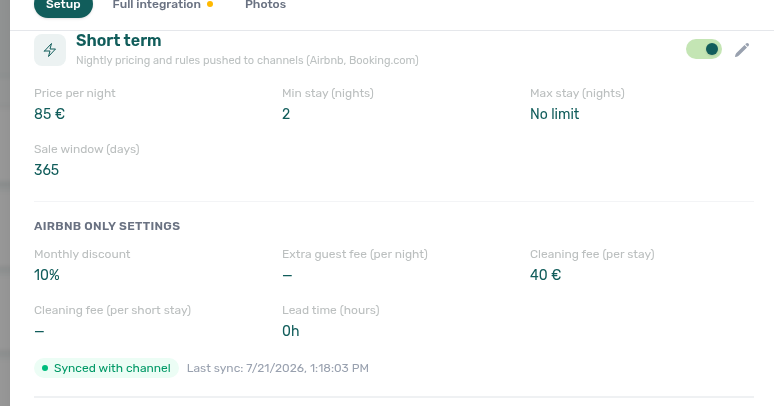
Short term sets the nightly prices and rules VIVIN sends to Airbnb and Booking.com through Channel Manager. Monthly rents and contracts are not affected. With the switch off, the section explains what it does.
| Field | Meaning |
|---|---|
| Price per night | The base nightly price. The calendar icon next to it (Nightly calendar) sets prices for date ranges. |
| Min stay (nights), Max stay (nights) | How long a stay can be. A max stay that is not set reads No limit. |
| Sale window (days) | How far ahead guests can book: dates further out are closed on Airbnb and Booking.com and reopen as the calendar advances. 0 means no limit. It starts at 365 when short term is switched on; leaving the field empty keeps the current value. |
| Monthly discount | Percent off stays of 28 nights or more. |
| Extra guest fee (per night), after Guests included | A nightly fee for each guest above that number. |
| Cleaning fee (per stay), Cleaning fee (per short stay) | The cleaning fees Airbnb charges. |
| Lead time (hours) | Minimum notice between booking and check-in. 0 means bookable until check-in. Airbnb only. |
| Channel discounts (Airbnb) | Read-only: weekly, monthly, length-of-stay, last-minute or early-bird discounts configured on Airbnb. Edit them there. |
| Sync badge | Synced with channel (with Last sync), Sync pending right after a save, or Sync error. |
Price per night, the stay limits and the sale window go to Airbnb and Booking.com. Everything from Monthly discount to Lead time (hours) sits under Airbnb only settings and goes to Airbnb only.
Channels
One row per booking platform, connected platforms first.
| Control | What it does |
|---|---|
| Add listing URL | Links this unit to its ad on that platform, so VIVIN can match the platform's bookings and calendar to the unit. |
| Edit listing URL | Changes the link. |
| Remove integration | Removes the link. |
| Not connected | The platform has no link for this unit. |
An Airbnb row with a link but no edit controls is connected through Channel Manager; manage it in Sales → Channel Manager. Platform accounts, markups and calendar settings live in Integrations.
Full integration for a unit
The unit Full integration tab works like the property one, with Fill with AI included. Its readiness checks are: unit marketing title, a description of at least 50 characters, Room area (sqm), at least one photo, and a rent above 0 (every monthly rent entered, if the rent varies).
| Section | What it holds |
|---|---|
| Profile & copy | Title, description and Area (sqm), in English and Portuguese. |
| Room fixtures | Furniture, appliances and comfort, bathroom, and room rules and features. |
| Partner platforms | Fields specific to each partner, including the instant-booking limits (see Turn on instant booking). |
| Integration listings | One switch each for Inlife, Uniplaces, Roomless (Spacest), Spotahome, Housing Anywhere, VIVIN (the booking engine), EduPortugal and Erasmus Life: Included in feed (the default) or Excluded from feed. Airbnb, Booking.com and Idealista are not listed here. |
Tasks
Edit the unit details
- Click the pencil on the section (for example Unit Information).
- Change the fields.
- Click Update.
Set short-term pricing
- In Short term, turn on the switch in the section header, then click the pencil.
- Set Price per night, Min stay (nights), Max stay (nights) and Sale window (days).
- Under Airbnb only settings, set Monthly discount, the extra guest fee, the cleaning fees and Lead time (hours).
- Click Update. The badge reads Sync pending, then Synced with channel.
To price particular nights, open Nightly calendar while editing, set a price for a range with Apply, or use Reset to base price. Nights without their own price sell at Price per night; booked and blocked nights keep their price in case they free up.
The unit must also be linked to its Airbnb or Booking.com listing with Full integration in Sales → Channel Manager.
Keep a unit off one marketplace
- Open Full integration → Integration listings and click the pencil.
- Set that platform to Excluded from feed.
- Click Update. The unit stays in VIVIN and on the other platforms.
Archive or delete a unit
At the bottom of Setup:
- Archive → Yes, archive hides the unit but keeps its history. VIVIN refuses it while the unit has an active or upcoming booking. See Archive or restore a property or unit.
- Delete → Yes, delete removes the unit. This cannot be undone, and VIVIN refuses it while the unit has an active or upcoming booking, so archive a unit with booking history instead.
Rules and limits
- Clearing Short Term Max date removes the unit's own date on Update; the account date then applies.
- Monthly discount must be at least as high as any shorter-stay discount already on that Airbnb listing (for example a weekly discount). If it is lower, VIVIN refuses the save and says which discount and from how many nights it applies.
- A unit with no rent, or with a month at 0 on a varying rent, is not sent to partner marketplaces.
- Changes to rent and terms apply to new bookings only.
Troubleshooting
| Problem | Cause | Fix |
|---|---|---|
| Update does not save | Your role has Listings → Sidebar but not Listings → Edit. | Ask an admin to grant Listings → Edit. |
| The monthly discount is refused | Airbnb has a larger shorter-stay discount on that listing. | Raise Monthly discount to at least the figure in the message, or lower the other discount on Airbnb. |
| Sync error after a pricing change | A value the channel does not accept. | Read the message, correct the values and click Update again. |
| Sync error saying the mapping is incomplete or invalid | The unit's link to the channel listing is stuck. | In Sales → Channel Manager, set the unit to No integration for that channel, then link it to the listing again. Editing the cell alone often does not clear it. |
| A blocked date from Airbnb cannot be edited | Blocks imported from a channel calendar are read-only. | Change it on the platform, or delete it here. |
| Delete is refused | The unit has an active or upcoming booking. | Cancel or end the booking first. |
Related
- Listings: the portfolio list and blocking dates.
- Property editor: what all units of a property share.
- Sales: monthly prices in bulk and channel links.
- Integrations: channel accounts, markups and calendar settings.
- Cleaning up manual blocks: reviewing and cleaning up blocks.