Inbox
Configure Chatbot and Emails (setup steps 11–12) and complete core setup steps 13–15 before portfolio WhatsApp triage here — pair with Notification triage. Requires Bookings module permission and a connected Status Bot line. Workflow pairing: Modules — Setup sequence after go-live.
Confirm Prerequisites and Interface Overview, then triage Dashboard bell — Inbox sub-tab vs the full /inbox route. Booking-scoped threads: Relationship to Bookings Communication. Guide subsection map: Inbox guide subsection index (triage surfaces + Related subsections). Non-linear operator habits (Lockout catch-up, Pending manual receipt approval, Reject/revert mistaken receipts, Partly collected security deposit, Booking sidebar tab load failures, Notification row-click navigation, Payment alert to receivables triage, Confirmation alert triage, Finance debt receivables triage, Finance Income status drill-down, Cash flow forecast drill-down, Portfolio segmentation by tenant category) have matching Related subsections below. Full pairing matrix: Inbox section cross-reference · Modules — Module cross-reference.
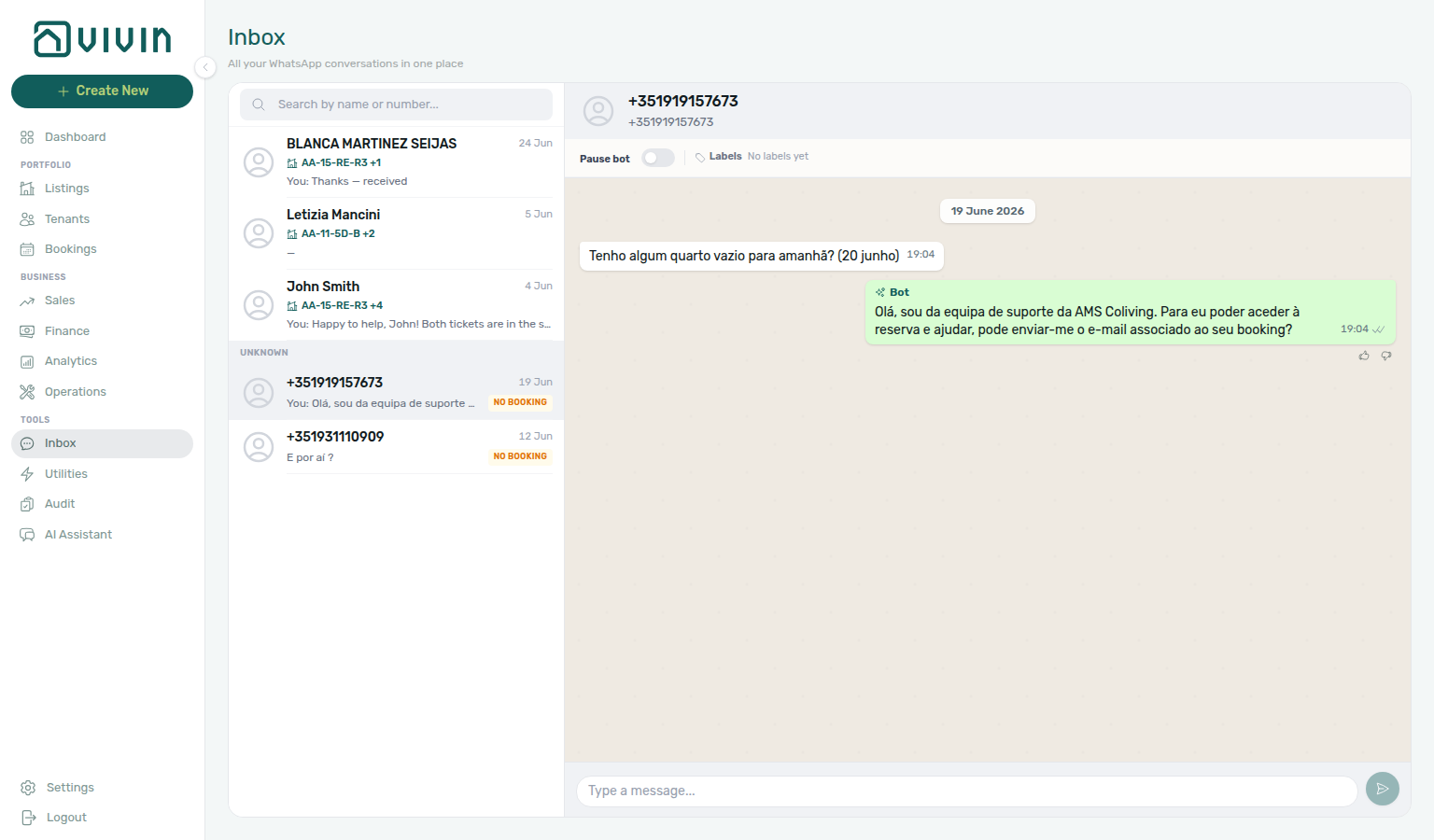
The Inbox module (/inbox) is a portfolio-wide WhatsApp workspace: every tenant conversation on your connected business line appears in one two-pane view styled like WhatsApp Web inside Vivin (light theme, cream thread background, green outgoing bubbles). Use it when you triage messages without opening each booking’s Communication tab first.
Tools → Inbox in the sidebar and the Dashboard bell Inbox sub-tab ship with the WhatsApp global inbox release on the management frontend develop line (June 2026). If your environment does not yet show Inbox under Tools, use Bookings → Communication per reservation until your workspace is updated.
Clear alert noise via Notifications and Dashboard bell Inbox; open the same thread from Bookings → Communication per reservation. Tenant threads here are separate from landlord AI Chat — see Automation & AI — Choosing surfaces and AI usage API (landlord_chat only). General bell rows include payment overdue — row-click into the booking, then Handling a Late Payment — Step 1 before you chase the tenant on WhatsApp. When overdue threads cluster on one tenant category, scope Bookings — Other filters tenant category or Finance — Tenant category filter first — see Glossary — Tenant category. Full pairing matrix: Modules — Module cross-reference.
User Roles and Access
| Role | Access |
|---|---|
| Property Manager | Full access when the role includes Bookings module permission |
| Admin | Full access |
| Viewer | Read-only where Bookings access allows opening conversations |
The Tools → Inbox link uses the same Bookings module gate (bookings.module) as the Bookings workspace. Inbox is desktop-only in the sidebar (mobileVisible: false) — on narrow viewports, open /inbox from a bookmark or a Dashboard bell notification deep link.
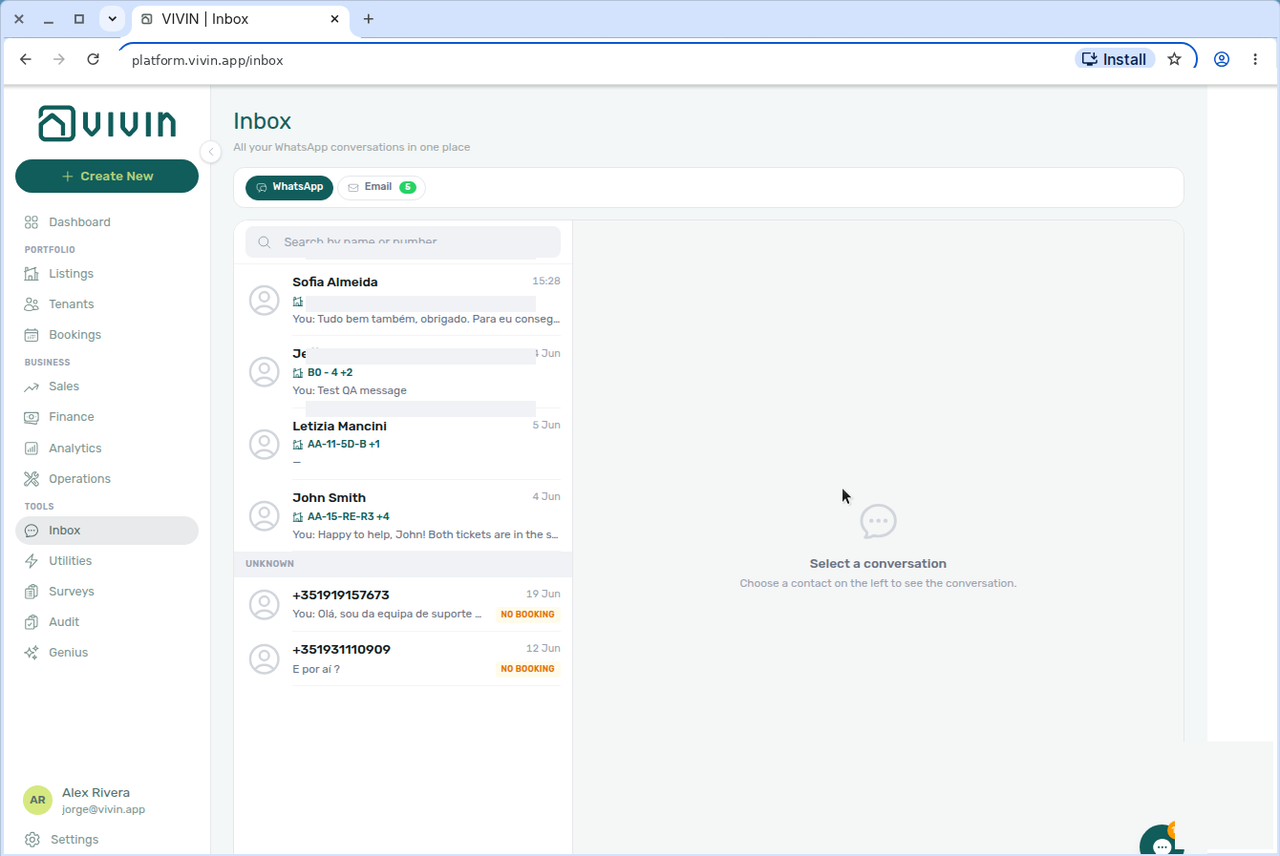
Open the Inbox at platform.vivin.app/inbox. Deep-link a conversation with ?contact=<phoneDigits> — for example after clicking an Inbox row on the Dashboard bell. See Deep Links — Inbox.
Prerequisites
- Tenant chatbot enabled on the account (
isTenantChatBotEnabled) — Vivin turns this on when your workspace is provisioned for WhatsApp/email tenant messaging. When it is off, the Tools → Inbox link and Dashboard bell Inbox sub-tab are greyed out with a short tooltip; use Bookings → Communication only after enablement. See Chatbot gating and ChatBot settings. - Status Bot connected under Settings → ChatBot → Status Bot (UAZAPI WhatsApp business line)
- At least one inbound or outbound WhatsApp message on the account (empty state otherwise)
- Bookings module permission on your role
Interface Overview
Two-pane triage pairs with Bookings — Communication for full reservation context and Dashboard bell — Inbox sub-tab for alert-driven entry. Full pairing matrix: Inbox section cross-reference.
Conversation list (left)
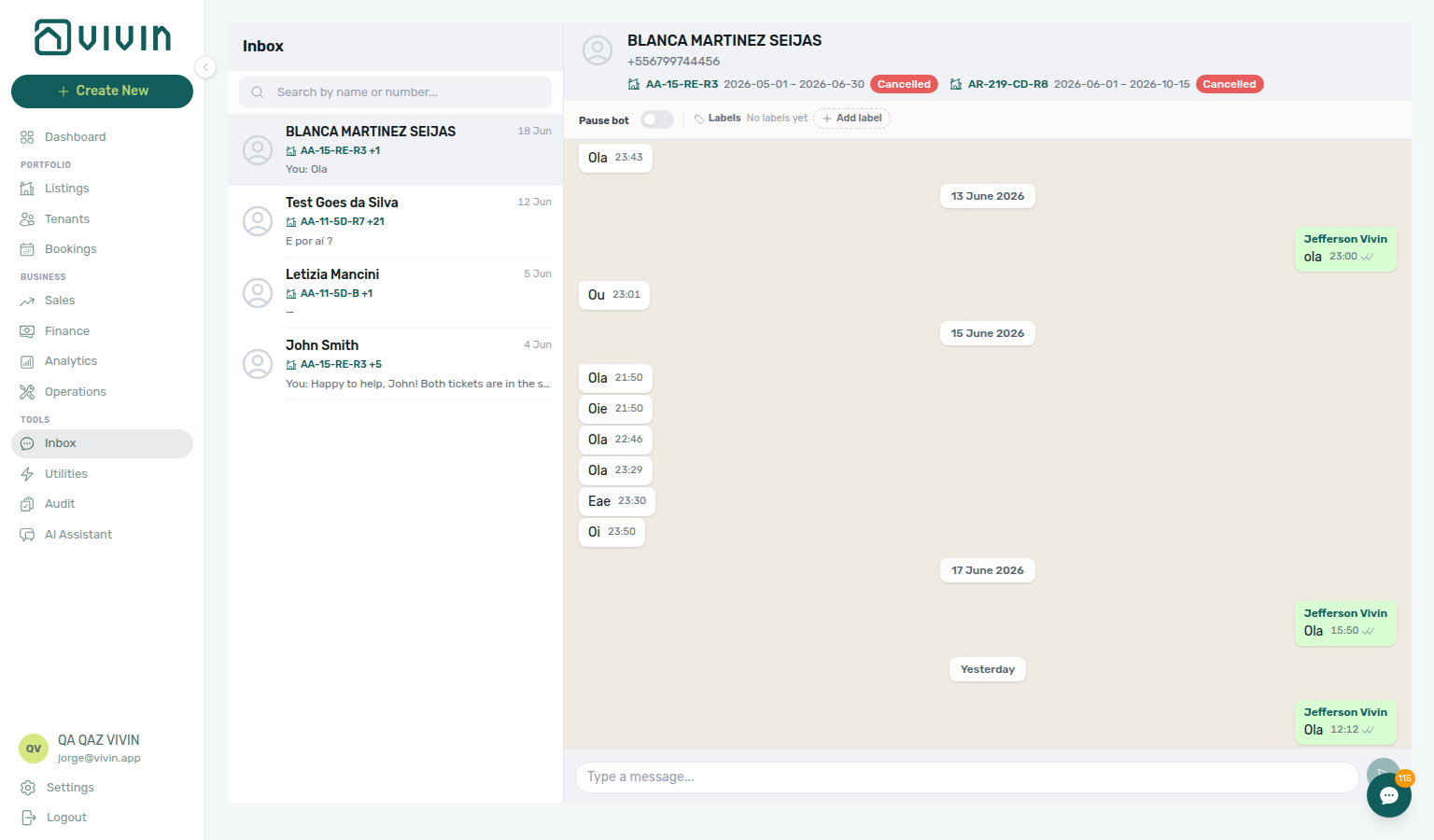
The list column is intentionally narrow (about 280–360px on desktop) so the thread pane keeps most of the width — similar to WhatsApp Web’s contact rail. A 52px grey header strip shows the Inbox title; Search sits in a compact row directly below.
- Header + search — grey strip with the Inbox title and a pill-shaped Search field (debounced server search by tenant name or phone).
- Known contacts — rows linked to a tenant/booking show a 40px avatar, tenant display name (14px), listing internal name on a green line with a home icon (11px —
+Nwhen the contact has multiple units), last message preview (12px, prefixed with You: when you sent the last message), and relative time on the right (11px). Row padding is tight so more conversations fit without scrolling. - Unknown section — numbers with WhatsApp history but no matching booking appear under an Unknown heading with an amber No booking badge on the row; you can still read and reply.
- Select a row to load the thread on the right. The URL clears
?contact=after you pick a different conversation manually.
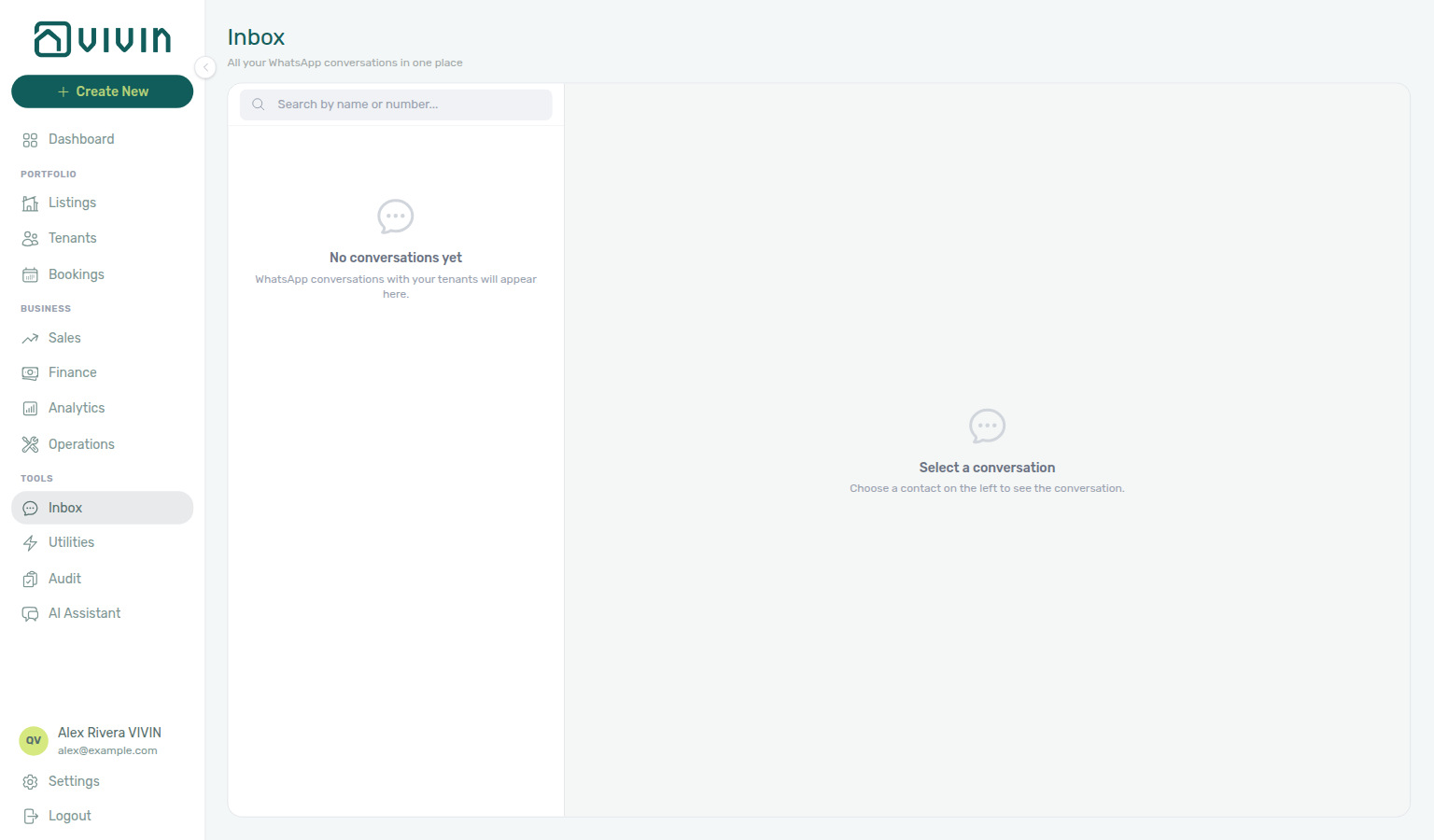
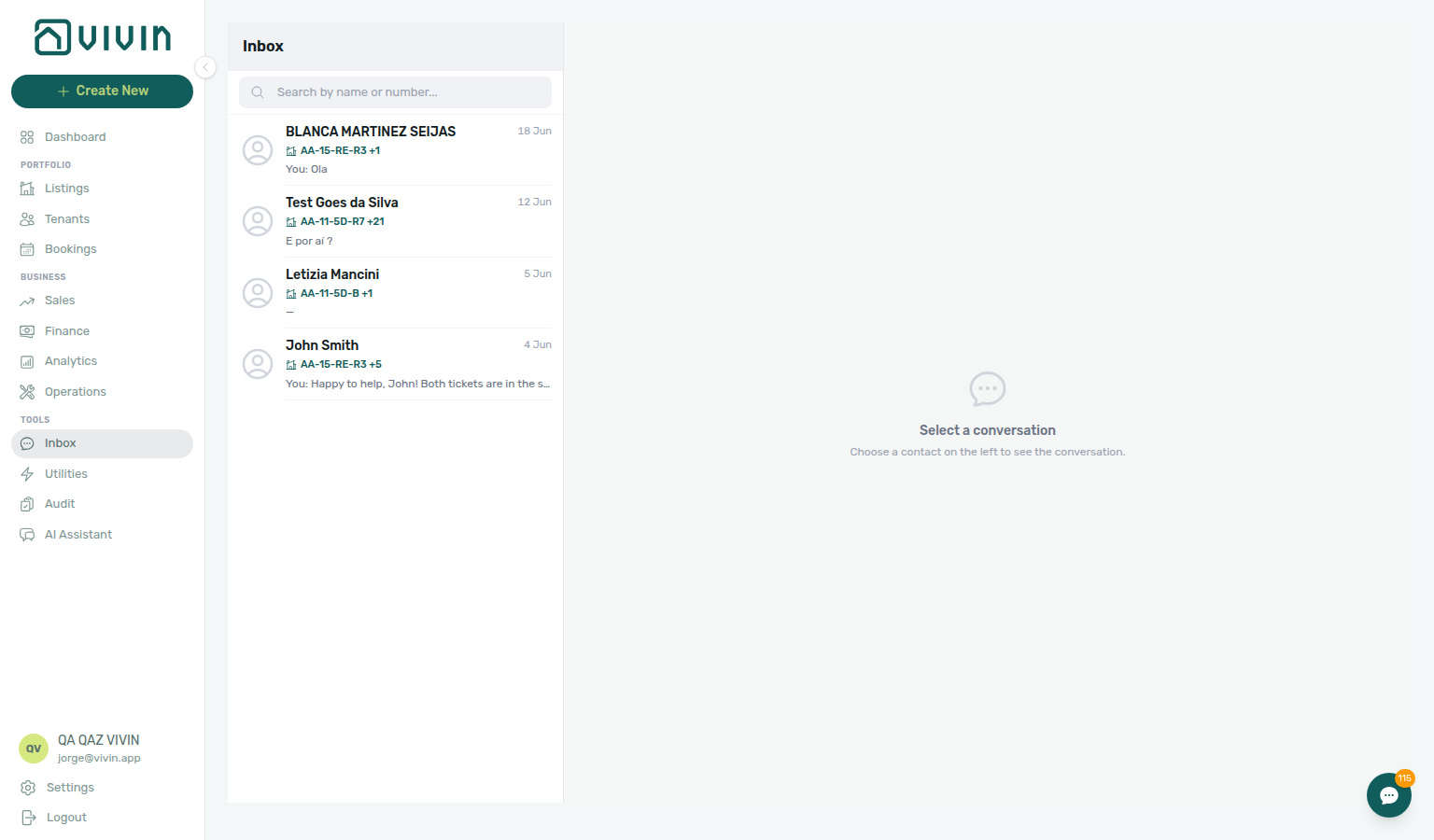
When nothing is selected yet, the right pane prompts you to pick a contact — the list on the left still loads normally:
Use Search to narrow the list by tenant name or phone. Matching is server-side with a short debounce; only rows that match stay visible:
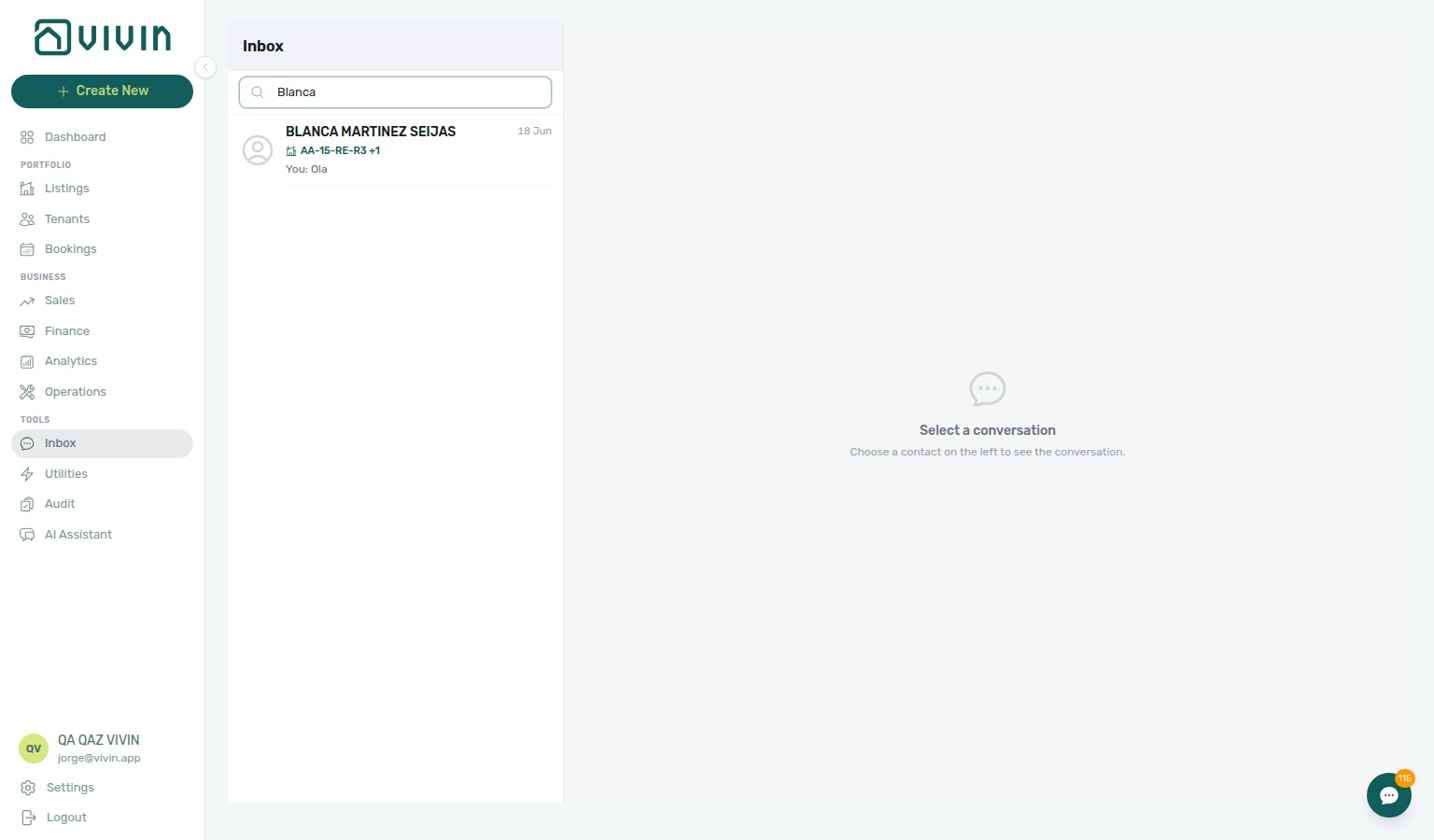
Inbox empty-state and search captures refreshed 2026-06-19 01:00 UTC (VIVIN_DOCS_BASE_URL=http://localhost:5173 VIVIN_DOCS_RECORD_API=$VITE_API_BASE_URL npx tsx tools/capture-inbox-empty-state-screenshot.ts and tools/capture-inbox-search-filter-screenshot.ts with VIVIN_DOCS_INBOX_SEARCH=Blanca — compact list column #1812 follow-up).
Thread and composer (right)
- Conversation header — grey bar with avatar, tenant name (clickable to open the Tenant sidebar on known contacts), phone number, and current booking context for that contact: listing internal name, stay dates, and the shared booking status badge (one chip per linked reservation).
- WhatsApp-style bubbles — cream thread background with day separators; white incoming and green outgoing bubbles (same shared renderer as Bookings → Communication → WhatsApp).
- Labels bar — add/remove UAZAPI labels and use Pause bot when your account configures a pause label (
chatBotPauseLabelId). The bar is the same shared component as Bookings → Communication → WhatsApp — label and pause-bot changes on either surface mirror instantly.

Inbox labels-bar capture refreshed 2026-06-19 01:00 UTC (VIVIN_DOCS_BASE_URL=http://localhost:5173 VIVIN_DOCS_RECORD_API=$VITE_API_BASE_URL npx tsx tools/capture-inbox-labels-pause-bot-screenshot.ts).
- Reply composer — send operator messages from the account business line; state mirrors the per-booking Communication tab (changes on either surface stay in sync).
- Contact header — click the tenant name in the grey header bar to open the Tenant sidebar without leaving Inbox.
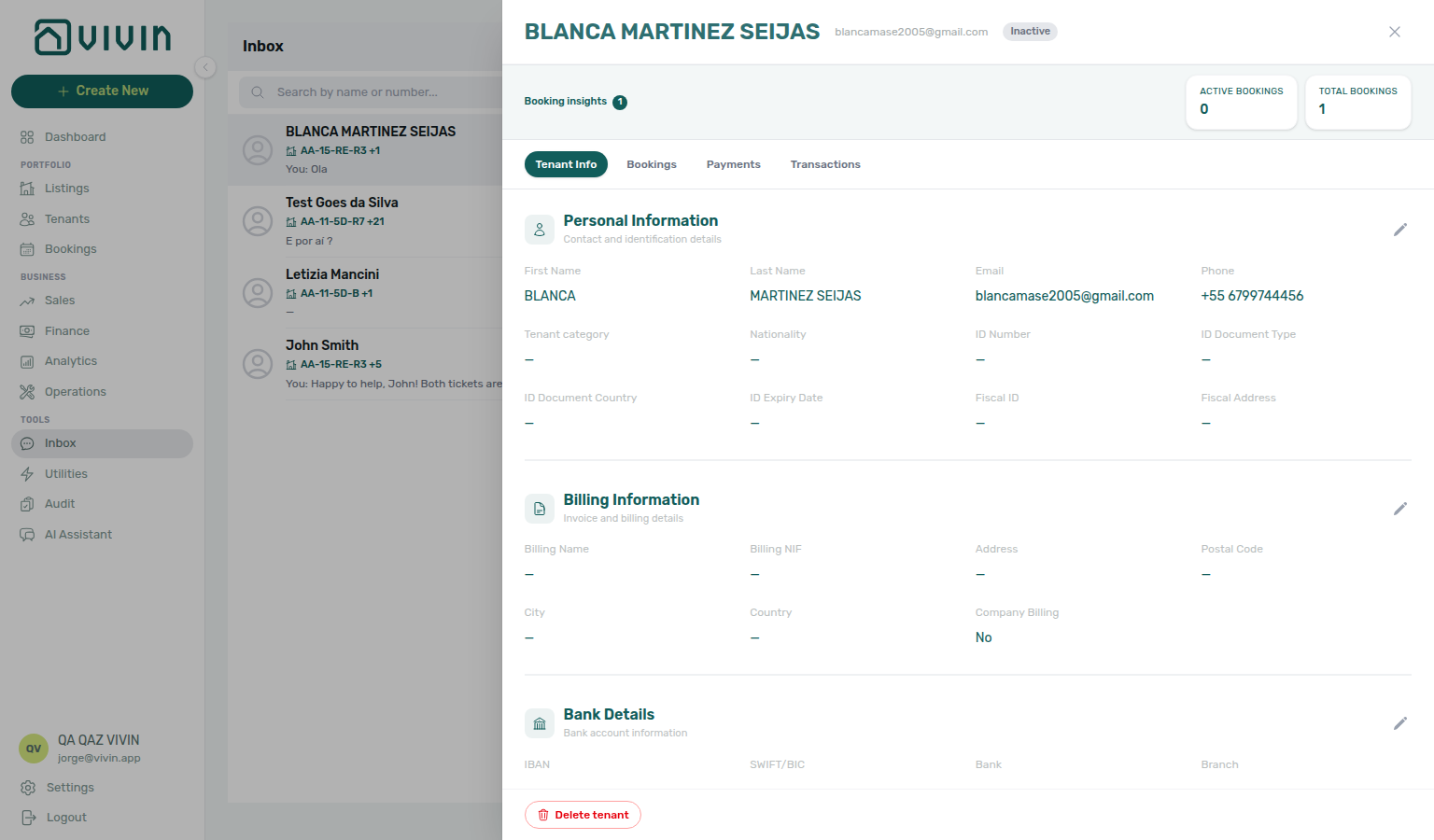
Inbox tenant-sidebar-from-header capture refreshed 2026-06-19 01:00 UTC (VIVIN_DOCS_BASE_URL=http://localhost:5173 VIVIN_DOCS_RECORD_API=$VITE_API_BASE_URL npx tsx tools/capture-inbox-tenant-sidebar-from-header-screenshot.ts).
When no conversation is selected, the right pane shows a neutral empty state prompting you to pick a contact.

Inbox overview capture refreshed 2026-06-19 01:00 UTC (VIVIN_DOCS_BASE_URL=http://localhost:5173 VIVIN_DOCS_RECORD_API=$VITE_API_BASE_URL npx tsx tools/capture-inbox-module-overview-screenshot.ts — WhatsApp Web restyle #1812, compact conversation list column, Tools nav section).
Dashboard bell — Inbox sub-tab
Bell Inbox rows deep-link here or to booking Communication — pair General payment overdue alerts with Handling a Late Payment — Step 1 before you chase on WhatsApp. Full pairing matrix: Inbox section cross-reference.
On desktop Dashboard, the header bell slide-over splits into two sub-tabs:
| Sub-tab | Contents |
|---|---|
| General | Payment received, payment overdue, tickets, bookings, and other platform alerts |
| Inbox | Inbound WhatsApp and email message notifications (one row per conversation) |
Each sub-tab shows its own unread badge on the tab label. Mark all as read clears only the active sub-tab — not the other category.
Inbox rows show a channel icon (WhatsApp or email) instead of the coloured alert glyph used on General. Clicking a row that carries a backend link marks it read, closes the panel, and navigates straight to the conversation — typically /inbox?contact=… or the booking Communication deep link. Rows without a link still open Notification detail inside the panel (same as General).
Inbound messages are coalesced per conversation: a new message on an existing thread bumps that notification to the top and marks it unread again instead of creating duplicate rows.
Row labels on the Inbox sub-tab mirror who sent the latest message:
| Channel | Summary pattern (English UI) | Body preview |
|---|---|---|
New WhatsApp message from {tenant name} when Vivin matches the phone to a tenant record; otherwise New WhatsApp message from +{digits} (never a raw WhatsApp JID) | Last inbound message text, or New WhatsApp message when empty | |
New email from {sender} — sender name when Gmail provides it, otherwise the From address | Email snippet or subject line |
The same coalescing and summary patterns apply when those rows appear on the full /notifications page mixed with General alerts (the full page has no Inbox category pill — use the Dashboard bell Inbox sub-tab when you only want message notifications). See Notifications — Dashboard bell vs. full module.
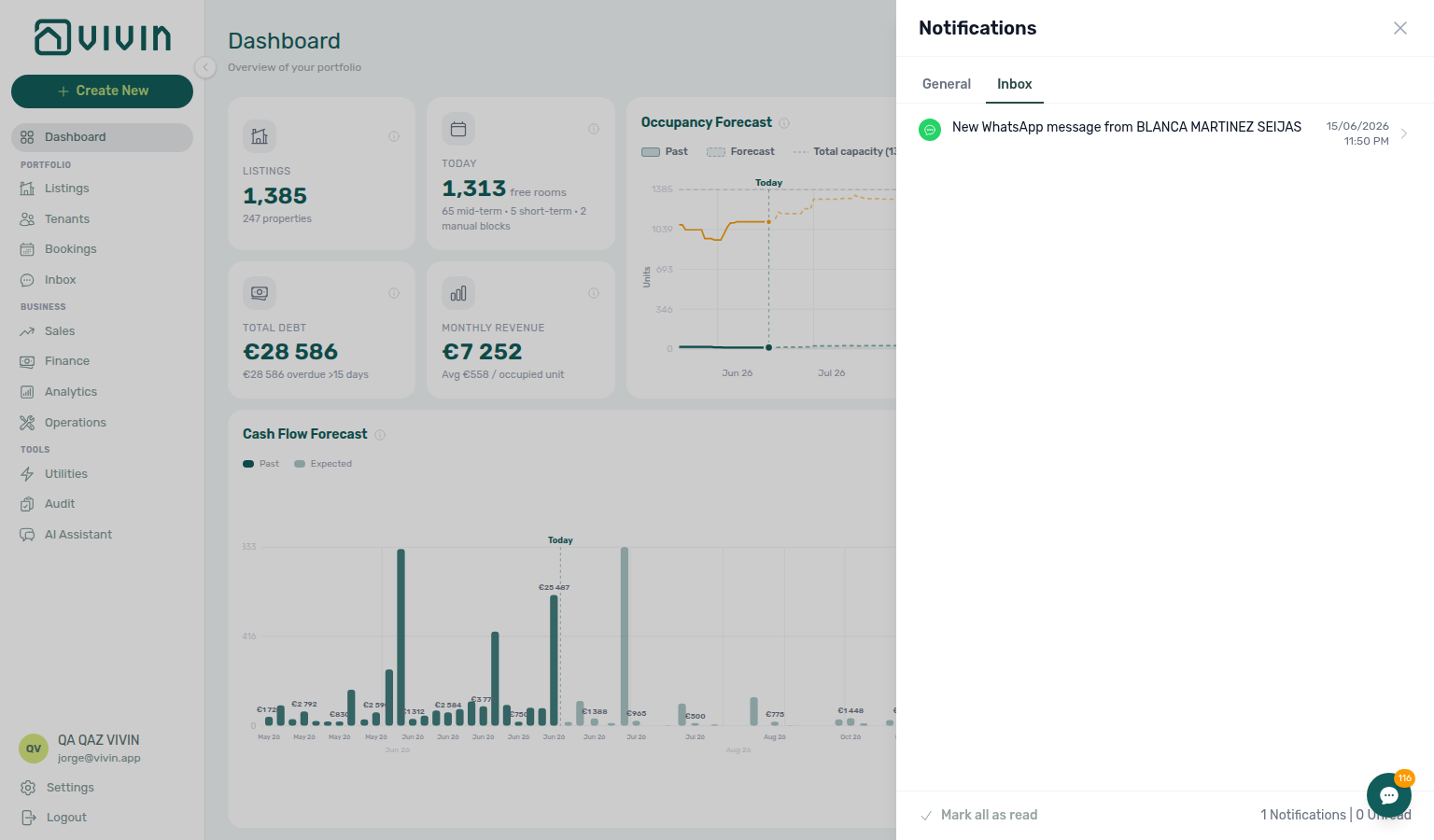
Bell Inbox sub-tab capture refreshed 2026-06-17 14:15 UTC (npx tsx tools/capture-notifications-dashboard-bell-inbox-tab-screenshot.ts — develop NotificationsPanel #1812).
Chatbot gating
When isTenantChatBotEnabled is off, enable the tenant chatbot via Vivin support then pair Settings → ChatBot — Status Bot before reopening Tools → Inbox. Full pairing matrix: Inbox section cross-reference.
The global Inbox depends on the same account-level tenant chatbot flag as Bookings → Communication. When isTenantChatBotEnabled is false, Vivin blocks Inbox entry points instead of showing an empty two-pane workspace:
| Surface | Behaviour when chatbot is off |
|---|---|
| Tools → Inbox | Nav item stays visible but greyed out (opacity-50, not clickable). Hover shows The tenant chatbot is not enabled for this account. |
| Dashboard bell → Inbox sub-tab | Sub-tab label is greyed out and not clickable; unread counts on that tab are hidden. Hover shows Activate the Chatbot to get tenant messages right here. General alerts still work normally. |
/inbox URL | Direct navigation is not the primary path when the integration is off — operators should contact Vivin to enable the tenant chatbot, then pair Status Bot under ChatBot settings. |
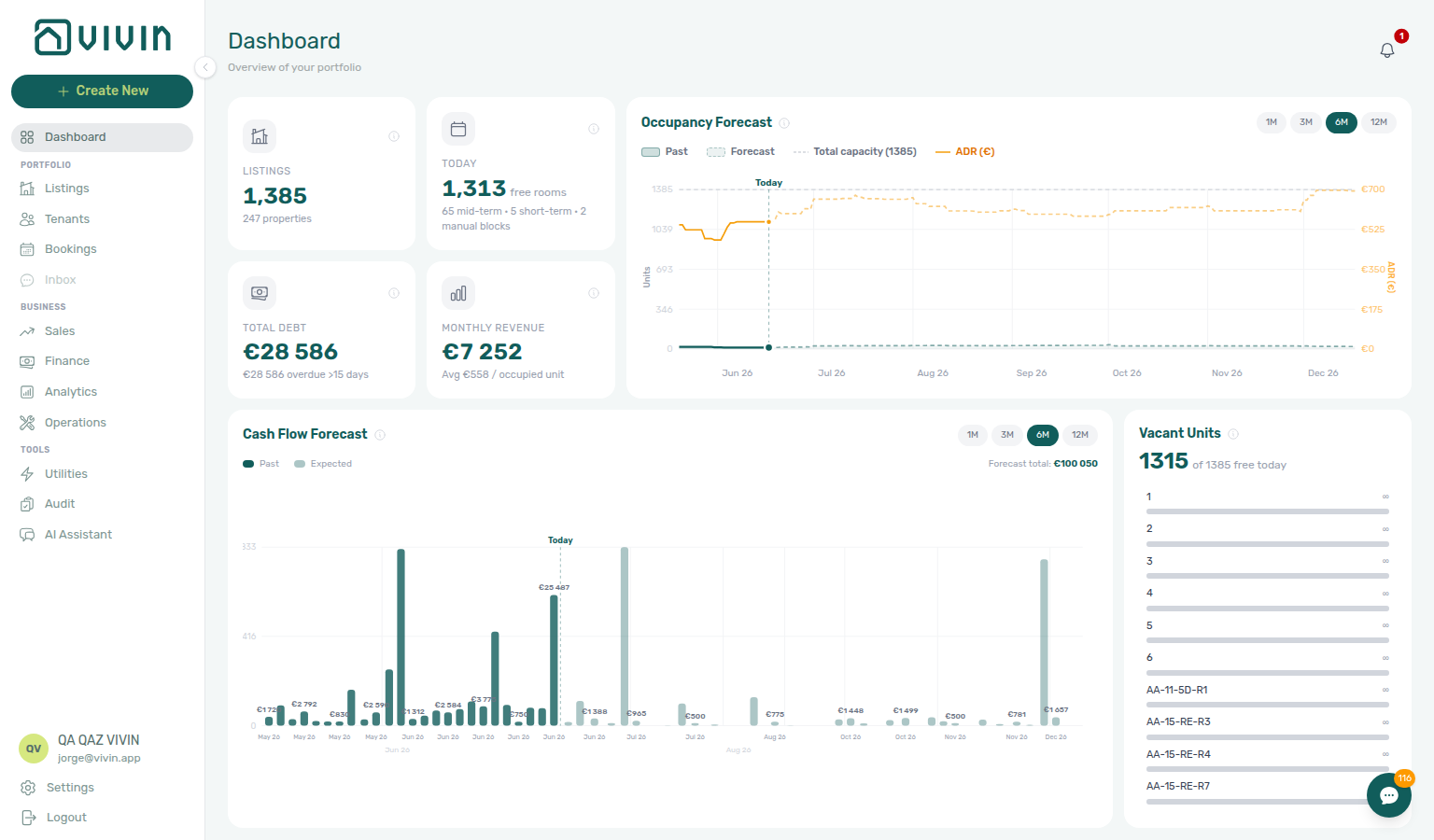
Sidebar Inbox chatbot-disabled capture refreshed 2026-06-17 20:15 UTC (VIVIN_DOCS_BASE_URL=http://localhost:5173 VIVIN_DOCS_RECORD_API=$VITE_API_BASE_URL npx tsx tools/capture-inbox-sidebar-chatbot-disabled-screenshot.ts — patches GET /accounts for docs capture only).
This mirrors Bookings → Communication, which shows Unlock your communication history inside the booking sidebar when the same flag is off. After Vivin enables the integration, refresh the session — Tools → Inbox, the bell Inbox sub-tab, and per-booking Communication all become active without a separate product toggle on your side.
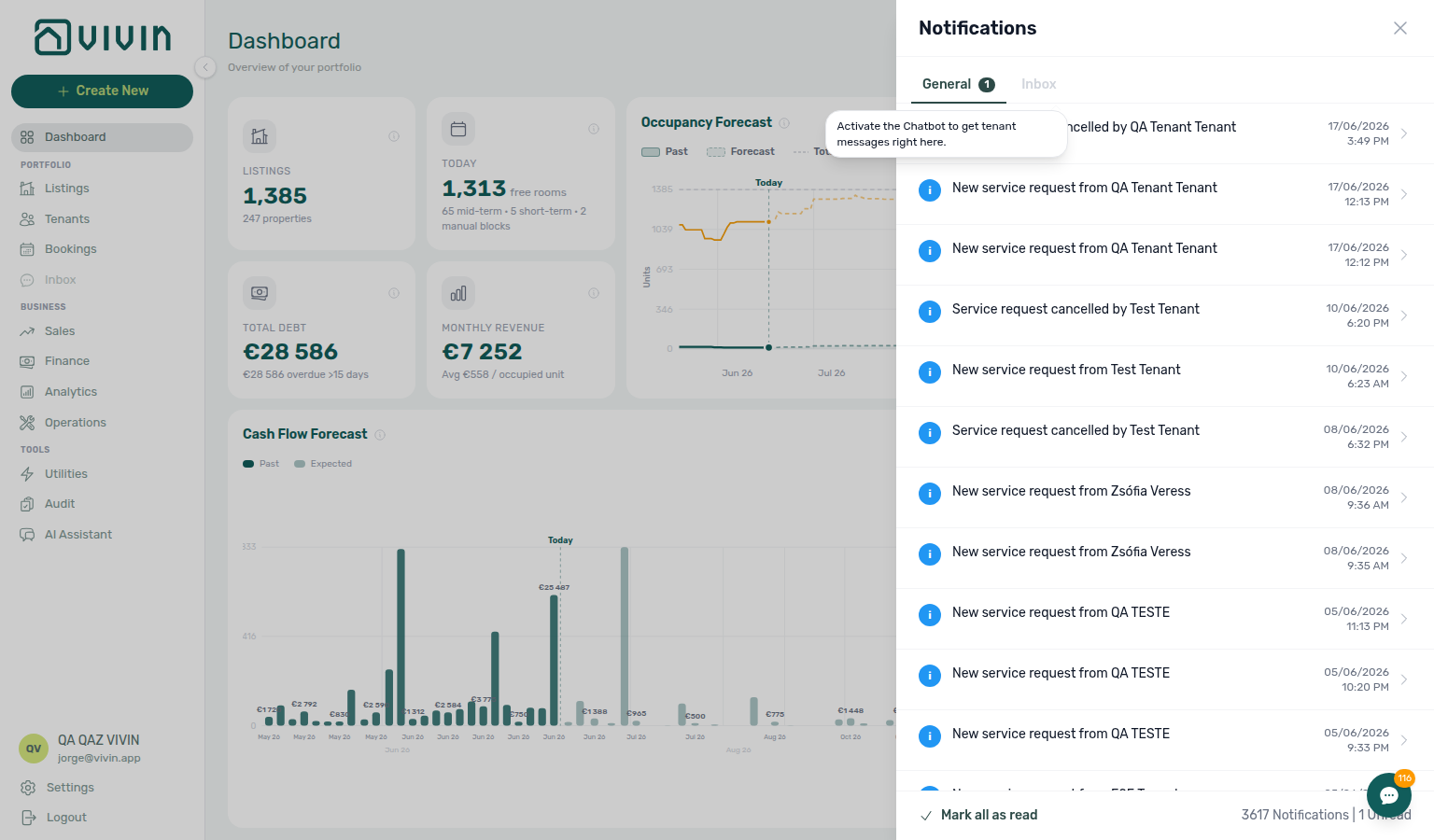
Bell Inbox chatbot-disabled capture refreshed 2026-06-17 18:05 UTC (VIVIN_DOCS_BASE_URL=http://localhost:5173 VIVIN_DOCS_RECORD_API=$VITE_API_BASE_URL npx tsx tools/capture-notifications-dashboard-bell-inbox-chatbot-disabled-screenshot.ts — patches GET /accounts for docs capture only).
Relationship to Bookings Communication
Use Inbox for cross-booking triage; open Bookings → Communication when you need payment-plan, ticket, or file context on one reservation. If Communication or Tickets inside the booking sidebar fails to load, use Refresh or Retry — other tabs stay available (FAQ — Communication or Tickets load failure). FAQ: Where do I read WhatsApp and email for one booking?. Full pairing matrix: Inbox section cross-reference.
| Surface | Best for |
|---|---|
Inbox (/inbox) | Cross-booking triage, unknown numbers, quick replies without opening a reservation first |
| Bookings → Communication | Full booking context (payment plan, tickets, files) while messaging one tenant |
| Bell → General | Payment/ticket/booking alerts — not message threads; use Inbox sub-tab for WhatsApp pings |
Both Inbox and Bookings → Communication read and write the same UAZAPI chat state. Labels, Pause bot, and sent messages stay aligned. Hub matrix: Common Workflows — WhatsApp per-booking messaging. FAQ: Where do I read WhatsApp and email for one booking?.
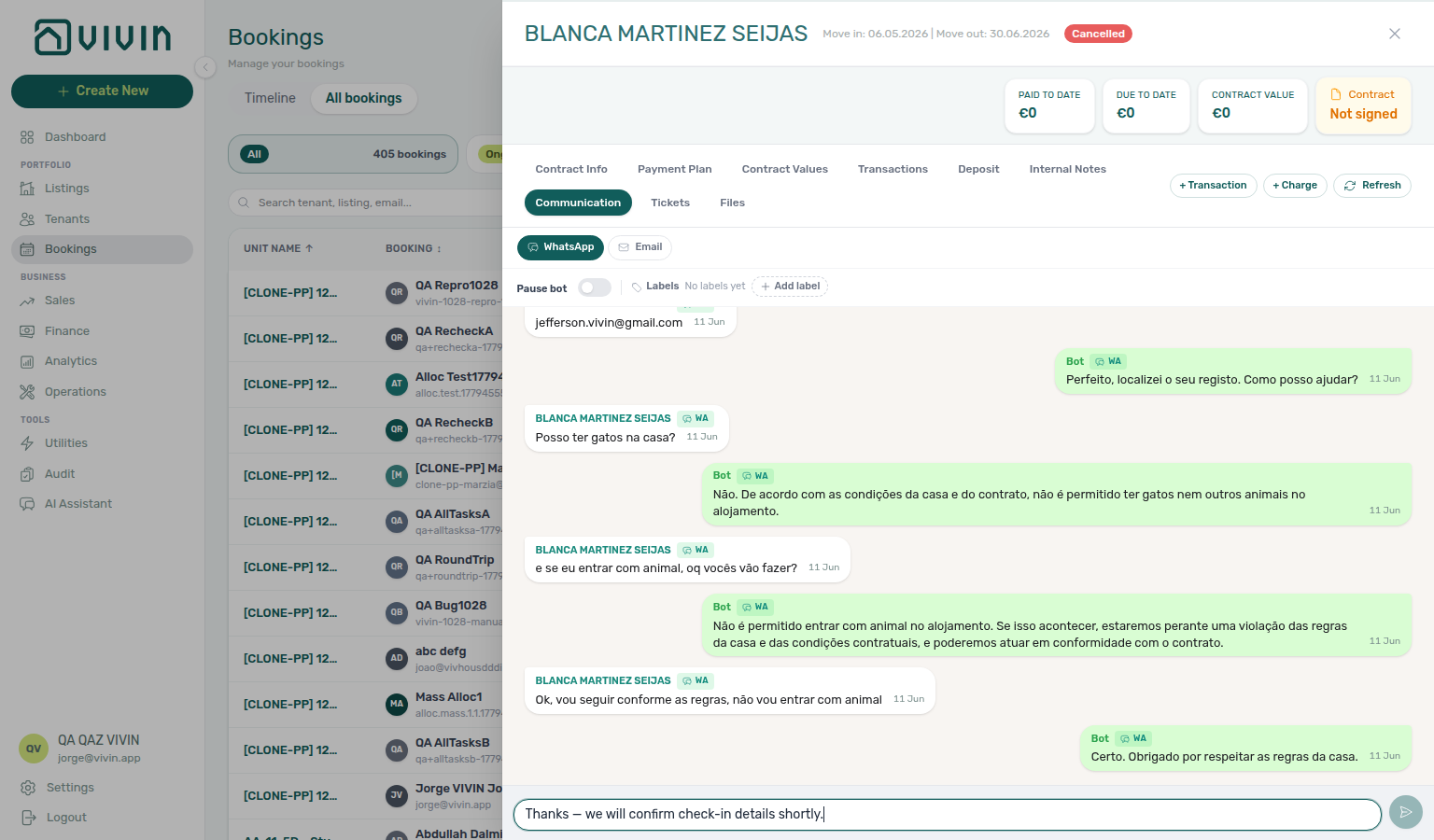

WhatsApp per-booking messaging
Cross-booking Inbox pairs with Bookings → Communication when operators need Payment Plan / Tickets context — hub parity: Common Workflows — WhatsApp per-booking messaging. Full pairing matrix: Inbox section cross-reference · Module cross-reference.
- Common Workflows — WhatsApp per-booking messaging — Hub matrix (
bookings-detail-communication-tab-whatsapp-thread.png,inbox-module-overview.png,inbox-module-triage-flow.mp4) - Glossary — WhatsApp per-booking messaging hub — Surface table + per-guide/module mesh reciprocal hub
- Relationship to Bookings Communication — When to stay in Inbox vs open one booking
- Dashboard bell — Inbox sub-tab — Alert-driven entry from Dashboard
- Common Workflows — Notification row-click navigation —
New WhatsApp message from …on/notificationsvs bell Inbox - Notification triage — Step 2 — Full
/notificationsinbox with message rows - Notification triage — WhatsApp per-booking messaging — Message pings on Step 2 bell Inbox
- Handling a Late Payment — WhatsApp per-booking messaging — Collections outreach on Step 3
- Managing a Check-in — WhatsApp per-booking messaging — Arrival-week threads before Step 4
- Managing a Check-out — WhatsApp per-booking messaging — Departure settlement on Step 6
- Processing a New Booking — WhatsApp per-booking messaging — Confirmation follow-up on Step 6
- Cancelling a Booking — WhatsApp per-booking messaging — Void outreach before Step 4
- Entering Monthly Utility Bills — WhatsApp per-booking messaging — Overage bill questions on Step 4
- Portfolio KPI review — WhatsApp per-booking messaging — Month-end message backlog on Step 7
- Manual block hygiene — WhatsApp per-booking messaging — Blocked-date questions on Step 3
- Onboarding a New Property — WhatsApp per-booking messaging — First tenant threads on Step 7 go-live
- Using in-app support — WhatsApp per-booking messaging — Self-serve Inbox / Communication before filing
- Resetting a Management User Password — WhatsApp per-booking messaging — Lockout-delayed bell Inbox after Step 3
- FAQ — WhatsApp per-booking messaging hub — Cross-booking Inbox vs Bookings → Communication symptom table
Bot reasoning (audit)
Cross-booking bot triage before booking Communication. Hub parity: Glossary — Bot reasoning (audit) hub · Common Workflows — Bot reasoning (audit). Full pairing matrix: Inbox section cross-reference · Module cross-reference.
- Common Workflows — Bot reasoning (audit) — Hub matrix (
bookings-detail-communication-tab-bot-reasoning-expanded.png) - Glossary — Bot reasoning (audit) hub — Surface table + per-guide/module mesh reciprocal hub
- Bookings — Bot reasoning (audit) — Canonical Communication Reasoning control
- ChatBot settings — Read-only audit vs editable persona / IF/THEN
ChatBot settings
Account Settings → ChatBot pairs with Communication thread review — cross-booking bot triage before booking communication. Hub parity: Glossary — ChatBot settings hub · Common Workflows — ChatBot settings. Full pairing matrix: Inbox section cross-reference · Module cross-reference.
- Common Workflows — ChatBot settings — Hub matrix (
settings-chatbot-tab-overview.png,settings-chatbot-status-bot-connected.png,settings-chatbot-save-rule-flow.mp4) - Glossary — ChatBot settings hub — Surface table + per-guide/module mesh reciprocal hub
- ChatBot settings — Persona, IF/THEN rules, Status Bot pairing
- Glossary — Bot reasoning (audit) hub — Thread audit after rule changes
Rent reduction after invoicing
Collections threads about rent relief pair with Bookings → Contract Info → Change monthly rent when the Already invoiced months banner blocks lower nets — cross-booking Inbox lacks Payment Plan invoiced-floor context. Hub parity: Common Workflows — Rent reduction after invoicing. Full pairing matrix: Inbox section cross-reference · Module cross-reference.
- Common Workflows — Rent reduction after invoicing — Hub matrix (
bookings-detail-change-monthly-rent-modal.png,bookings-rent-reduction-invoiced-floor-flow.mp4) - Bookings — Changing contract dates and rent — Contract Info repricing entry point
- Bookings — Contract Values tab — Per-line Edit amount under the same floor
- Finance — Invoiced floor and rent edits — Why edits start on the booking, not Finance → Transactions
- Relationship to Bookings Communication — Open booking for Change monthly rent
- Processing a New Booking — Rent reduction after invoicing — Confirmation month already invoiced on Step 3
- Handling a Late Payment — Rent reduction after invoicing — Collections goodwill after Step 4
- Portfolio KPI review — Rent reduction after invoicing — Month-end repricing sign-off on Step 7
- Cancelling a Booking — Rent reduction after invoicing — Settlement repricing during Step 2b
- Managing a Check-in — Rent reduction after invoicing — Pre-move-in goodwill
- Managing a Check-out — Rent reduction after invoicing — Departure-week goodwill adjustments
- Notification triage — Rent reduction after invoicing — Row-click to invoiced booking on Step 4
- Entering Monthly Utility Bills — Rent reduction after invoicing — Month-end bill cycle on Step 5
- Manual block hygiene — Rent reduction after invoicing — Hold cleanup on Step 5
- Using in-app support — Rent reduction after invoicing — Self-serve before filing tickets
- Resetting a Management User Password — Rent reduction after invoicing — Lockout-delayed repricing after Step 3
- FAQ — Rent reduction after invoicing hub — WhatsApp rent-relief threads needing invoiced-floor context on Communication symptom table
Month-end invoicing (fixed date)
Cross-booking threads citing wrong invoice document dates pair with Settings → Invoicing fixed Invoice date before Finance → Transactions bulk Issue allocation — not a messaging bug. Hub parity: Common Workflows — Month-end invoicing (fixed date). Full pairing matrix: Inbox section cross-reference · Module cross-reference.
- Common Workflows — Month-end invoicing (fixed date) — Hub matrix (
settings-invoicing-invoice-date-toggle.png,finance-transactions-fixed-invoice-date-banner.png,finance-transactions-bulk-toolbar-fixed-invoice-date-banner.png) - Invoicing — Default invoice date — Account-wide toggle + Save
- Common Workflows — Bulk Hostkit invoicing — Issue allocation after fixed date is saved
- Relationship to Bookings Communication — Open booking for receivables context
- Finance — Month-end invoicing with a fixed date — Toggle Use today back on after batch
- Processing a New Booking — Month-end invoicing (fixed date) — First-month bulk export after confirmation (Step 6b)
- Handling a Late Payment — Month-end invoicing (fixed date) — Collections batch during Step 6b
- Portfolio KPI review — Month-end invoicing (fixed date) — Step 7 sign-off mesh
- Notification triage — Month-end invoicing (fixed date) — Alert cleanup before bulk Issue allocation (Step 5)
- Entering Monthly Utility Bills — Month-end invoicing (fixed date) — Finish Missing data + overage Pending (Steps 4b–5)
- Manual block hygiene — Month-end invoicing (fixed date) — Clear stale holds before Issue allocation (Step 5)
- Using in-app support — Month-end invoicing (fixed date) — Self-serve before filing wrong-date tickets
- Resetting a Management User Password — Month-end invoicing (fixed date) — Lockout-delayed month-end export after Step 3
- FAQ — Month-end invoicing (fixed date) hub — Cross-booking threads about wrong invoice dates needing fixed Invoice date symptom table
Bulk Hostkit invoicing
Cross-booking threads about slow invoicing or HTTP 429 errors pair with Finance → Transactions bulk toolbar — refresh before re-issue. Hub parity: Common Workflows — Bulk Hostkit invoicing. Full pairing matrix: Inbox section cross-reference · Module cross-reference.
- Common Workflows — Bulk Hostkit invoicing — Hub matrix (
finance-transactions-bulk-selection-bar.png,settings-invoicing-hostkit-series.png) - Common Workflows — Month-end invoicing (fixed date) — Fixed Invoice date before bulk Issue allocation
- Settings > Invoicing — Hostkit invoice series — Required FR code before Issue allocation
- Finance — Invoice automation — Bulk Issue allocation / Invoice selected toolbar
- Finance — Issuing credit notes (integrated invoicing) — Issue credit notes (N) after invoiced Reject / Revert
- Relationship to Bookings Communication — Collections threads about month-end export
- Finance — Bulk Hostkit invoicing — Transactions toolbar reference
- Processing a New Booking — Bulk Hostkit invoicing — First-month Issue allocation after confirmation (Step 6b)
- Handling a Late Payment — Bulk Hostkit invoicing — Collections month-end mesh (Step 6b)
- Portfolio KPI review — Bulk Hostkit invoicing — Step 7 month-end sign-off
- Managing a Check-in — Bulk Hostkit invoicing — Move-in Pending mesh (Step 6b)
- Managing a Check-out — Bulk Hostkit invoicing — Departure-week mesh (Step 6b)
- Onboarding a New Property — Bulk Hostkit invoicing — First month-end on new inventory
- Cancelling a Booking — Bulk Hostkit invoicing — Settlement bulk export (Step 6b)
- Notification triage — Bulk Hostkit invoicing — Alert cleanup before bulk export (Step 5)
- Entering Monthly Utility Bills — Bulk Hostkit invoicing — Finish Missing data + overage Pending (Steps 4b–5)
- Manual block hygiene — Bulk Hostkit invoicing — Clear stale holds before Issue allocation (Step 5)
- Using in-app support — Bulk Hostkit invoicing — Self-serve Hostkit pacing before filing tickets
- Resetting a Management User Password — Bulk Hostkit invoicing — Lockout-delayed month-end export after Step 3
- FAQ — Bulk Hostkit invoicing slow — Hostkit HTTP 429 pacing and refresh-before-reissue habit
- FAQ — Bulk Hostkit invoicing hub — Cross-booking threads about bulk Issue allocation Hostkit pacing symptom table
Directory list load failures
Cross-booking Inbox (/inbox) first-fetch failures block conversation triage — use page Retry or refresh before you assume zero threads. Tab-scoped Communication / Tickets errors inside one booking are Booking sidebar tab load failures, not whole-module directory recovery. Hub parity: Common Workflows — Directory list load failures. Full pairing matrix: Inbox section cross-reference · Module cross-reference.
- Common Workflows — Directory list load failures — Hub matrix (
inbox-module-overview.png,notifications-module-load-failure.png) - Conversation list (left) — Portfolio-wide thread list after first fetch succeeds
- Dashboard bell — Inbox sub-tab — Bell Inbox uses the same data layer
- Notification triage — Directory list load failures —
/notificationsTry again before message alert row-click (Step 2) - Booking sidebar tab load failures — Tab-scoped Refresh after thread opens a booking
- FAQ — Directory list load failures — Whole-module vs empty thread list
- FAQ — Directory list load failures hub — Cross-booking Inbox load failure vs booking-sidebar tab error symptom table
- Glossary — Directory list load failures hub — Surface table + per-guide/module mesh reciprocal hub
Inbox guide subsection index
This index pairs Inbox triage surfaces with Related subsections — use it when bell Inbox rows deep-link here but you need booking-level Payment plan context. Full pairing matrix: Inbox section cross-reference.
Inbox section cross-reference
Use this table when one Inbox surface or workflow naturally leads into another module, settings tab, or concept — each row links to the docs you should read before or after triaging a conversation.
Related
Related below links this module to settings, concepts, workflows, and escalation paths. Pair Documentation map & escalation with Modules hub — Documentation map & escalation; pair Upstream & downstream workflows with Common Workflows — Workflow cross-reference. Topic-to-section pairing in sections above: Inbox guide subsection index · Inbox section cross-reference. Full hub matrix: Module cross-reference · Modules hub subsection index.
Documentation map & escalation
Documentation-map bullets pair with Introduction — Section cross-reference and FAQ — Section cross-reference. Hub parity: Modules hub — Documentation map & escalation. Full pairing matrix: Inbox section cross-reference · Module cross-reference.
- Modules hub — Hub pairing matrix across operator workspaces
- Deep Links — Inbox — Bookmark
/inboxand?contact=deep links - FAQ — Where do I read WhatsApp and email for one booking? — Inbox vs booking Communication when triaging the same tenant
- Get Help & Support — Escalate when chatbot gating or Status Bot pairing blocks Inbox access
Upstream & downstream workflows
Workflow bullets pair with Common Workflows — Workflow cross-reference. Full pairing matrix: Inbox section cross-reference · Module cross-reference.
- Notification triage (section cross-reference; Deeper workflow reads; hub) — General vs Inbox bell workflow; payment overdue → Handling a Late Payment — Step 1 (section cross-reference; Deeper workflow reads; hub) on General rows before you chase on WhatsApp
- Managing a Check-in (section cross-reference; Deeper workflow reads; hub) — Confirm portal links and access codes before key handover on active threads
- Managing a Check-out & Deposit Refund (section cross-reference; Deeper workflow reads; hub) — WhatsApp disputes about deductions during departure week
- Handling a Late Payment — Step 1 (section cross-reference; Deeper workflow reads; hub) — Collections when WhatsApp threads surface overdue balances; upstream path from payment overdue row-click on Dashboard bell General
- Processing a New Booking (section cross-reference; Deeper workflow reads; hub) — Confirm channel enquiries that arrive as WhatsApp threads before a reservation exists
- Cancelling a Booking (section cross-reference; Deeper workflow reads; hub) — Early termination messages tenants sometimes raise over WhatsApp
- Portfolio KPI review (section cross-reference; Deeper workflow reads; hub) — Month-end pass that should include WhatsApp escalations surfaced during inbox triage
Deeper workflow reads
Workflow reads pair with Common Workflows hub subsection index and Workflow cross-reference. Each workflow sub-guide reciprocates with [Deeper workflow reads](../modules/inbox/index.md#deeper-workflow-reads) anchors on Module documentation hubs bullets — hub parity: Modules hub — Deeper workflow reads. Full pairing matrix: Inbox section cross-reference · Module cross-reference.
- Notification triage — General vs Inbox bell workflow; payment overdue → Handling a Late Payment — Step 1 on General rows before you chase on WhatsApp (section cross-reference; Deeper API reads; hub)
- Managing a Check-in — Confirm portal links and access codes before key handover on active threads (section cross-reference; Deeper API reads; hub)
- Managing a Check-out & Deposit Refund — WhatsApp disputes about deductions during departure week (section cross-reference; Deeper API reads; hub)
- Handling a Late Payment — Step 1 — Collections when WhatsApp threads surface overdue balances (section cross-reference; Deeper API reads; hub)
- Processing a New Booking — Confirm channel enquiries that arrive as WhatsApp threads before a reservation exists (section cross-reference; Deeper API reads; hub)
- Cancelling a Booking — Early termination messages tenants sometimes raise over WhatsApp (section cross-reference; Deeper API reads; hub)
- Portfolio KPI review — Month-end pass that should include WhatsApp escalations surfaced during inbox triage (section cross-reference; Deeper API reads; hub)
Settings & chatbot configuration
Settings bullets pair with Account Settings — Tab cross-reference. Full pairing matrix: Inbox section cross-reference · Module cross-reference.
- Settings → ChatBot — WhatsApp pairing and tenant-facing bot rules
- Settings > Preferences — In-app notifications — Account-wide Inbox messages category master and personal opt-outs that gate bell pings
- Settings > Emails — Communication Rules for email channel parity with WhatsApp bot IF/THEN rules
- Settings > Tenant categories — Segment portal and payment rules; pair with Bookings — Other filters tenant category and Finance — Tenant category filter when WhatsApp collections cluster on one cohort
- Settings > Interface Language — UI locale for Inbox labels and mobile Operations language control
- Settings > My Profile — Display name shown on outbound WhatsApp messages and internal
@mentionthreads
Operator modules (pairing surfaces)
Module hub bullets pair with Modules — Module cross-reference. Full pairing matrix: Inbox section cross-reference · Module cross-reference.
- Bookings — Communication tab — Full booking context while messaging one tenant
- Notifications module — Full
/notificationshistory vs Dashboard bell - Notifications — Payment overdue alerts — Operator Payments category rows on bell General before you open the same tenant on Inbox
- Notifications — Dashboard bell vs full module — Inbound WhatsApp/email pings with deep links into
/inboxor booking Communication - Tenants module — Profile sidebar when a conversation needs fiscal-ID or debt context
- Tenants — Tenant category filter — Profile-count cross-check before you change communication rules account-wide after inbox triage
- Bookings — Other filters tenant category — Portfolio segment filter when overdue threads involve mixed tenant profiles
- Finance — Tenant category filter — In Debt triage by segment before you paste payment links in WhatsApp
- AI Chat module — Vivin-internal portfolio Q&A when inbox volume suggests a cross-booking question
- Audit — Discounts tab — Cross-portfolio discount context when WhatsApp threads involve mid-stay repricing disputes
Deeper concept reads
Concept reads pair with Concepts hub subsection index and Concept cross-reference. Full pairing matrix: Inbox section cross-reference · Module cross-reference.
- Automation & AI — Chatbot escalation path when threads need operator takeover (section cross-reference; hub)
- Tenant Portal — Tenants may message on WhatsApp instead of using the web portal for payments or maintenance (section cross-reference; hub)
- FAQ — Tenant contract signing blocked — No PDF yet, mandatory Your Details gates, category locks, or Lease purpose; portal signing vs paper upload on Contract Info
- Integrations & Distribution — WhatsApp inbox is enabled separately from marketplace channel credentials in Settings (section cross-reference; hub)
- Services Marketplace — Ancillary charge questions tenants sometimes raise over WhatsApp before Payment plan settlement (section cross-reference; hub)
- Payment Allocation — Two-layer receipts, invoiced-floor rent edits, and credit note reject/revert warnings (section cross-reference; hub)
- Booking Lifecycle — Computed Upcoming → Ongoing → Ended / Canceled status model behind thread header badges (section cross-reference; hub)
- Tenant MCP — External automation that reads and writes the same WhatsApp threads as Inbox (section cross-reference; hub)
- Landlord MCP — Account-scoped portfolio reads when inbox volume suggests a cross-booking question (section cross-reference; hub)
Lockout catch-up after password recovery
Operational backlog after sign-in recovery pairs with Resetting a Management User Password — Step 3. Hub parity: Common Workflows — Lockout catch-up after password recovery. Full pairing matrix: Inbox section cross-reference · Module cross-reference.
- Common Workflows — Lockout catch-up after password recovery — Hub matrix when sign-in was restored and WhatsApp threads accumulated during lockout
- Getting Started — Lockout catch-up after password recovery — Canonical operational backlog mesh
- Notification triage — Clear Inbox category bell rows before replying to stale threads
- Relationship to Bookings Communication — When to stay in Inbox vs open one booking sidebar
- Pending manual receipt approval — Payment threads may cite stale debt until Finance clears Pending receipts
Pending manual receipt approval
Receipt approval pairs with Finance — Pending manual payments and Bookings — Transactions tab. Hub parity: Common Workflows — Pending manual receipt approval. Full pairing matrix: Inbox section cross-reference · Module cross-reference.
-
Common Workflows — Pending manual receipt approval — Hub matrix when tenants ask about transfers still pending until Approve payments confirms them
-
Finance — Pending manual payments — Amber Pending chip on Finance → Transactions
-
Bookings — Transactions tab — Per-row Approve payment before replying that a transfer is received
-
Notification triage — Step 4 — Pending manual in-payment rows that row-click into booking sidebars
-
FAQ — Manual receipt still pending — Script for tenant messages when approval is still required
-
FAQ — Pending manual receipt approval hub — Symptom table for Approve payments / amber Pending
Reject/revert mistaken receipts
Receipt cleanup pairs with Finance — Row actions on in-payment rows and Bookings — Row actions on in-payment rows. Hub parity: Common Workflows — Reject/revert mistaken receipts. Full pairing matrix: Inbox section cross-reference · Module cross-reference.
-
Common Workflows — Reject/revert mistaken receipts — Hub matrix when duplicate receipts need Reject / Revert before confirming payment status to a tenant
-
Finance — Row actions on in-payment rows — Portfolio reject/revert after inbox triage
-
Bookings — Row actions on in-payment rows — Per-booking cleanup from thread-linked reservations
-
Payment Allocation — Correcting mistaken receipts — Two-layer model and credit note follow-up
-
Handling a Late Payment — Step 1 — Re-triage after reject/revert before collections messages
-
FAQ — Reject/revert mistaken receipts hub — Symptom table for Reject / Revert / Issue credit notes
Check-out ledger cleanup before refund
Duplicate-transfer cleanup pairs with Reject/revert mistaken receipts and Managing a Check-out. Hub parity: Common Workflows — Check-out ledger cleanup before refund. Full pairing matrix: Inbox section cross-reference · Module cross-reference.
-
Common Workflows — Check-out ledger cleanup before refund — Hub matrix when tenant insists they paid but ledger shows phantom In Debt before deposit release
-
Reject/revert mistaken receipts — Reject / Revert duplicate before Ready To Refund
-
Managing a Check-out — Step 6 — Canonical departure-week duplicate cleanup before refund
-
Common Workflows — Check-out collections before refund — Real arrears contrast (tenant did not pay)
-
Bookings — Transactions tab — Confirm duplicate pair before reassuring tenant in chat
-
Handling a Late Payment — Step 1 — Collections only after ledger cleanup rules out duplicate
-
FAQ — Check-out ledger cleanup before refund hub — Symptom table for phantom In Debt / Ready To Refund blocked when tenant paid once
Utility overage collections
Tenant WhatsApp questions about utility bills pair with Entering Monthly Utility Bills posting and collections. Hub parity: Common Workflows — Utility overage collections. Full pairing matrix: Inbox section cross-reference · Module cross-reference.
-
Common Workflows — Utility overage collections — Hub matrix when tenant disputes utility overage on Payment Plan via WhatsApp
-
Bookings — Communication tab — Per-booking WhatsApp before portfolio Inbox
-
Entering Monthly Utility Bills — Step 4 — Confirm overage posted before outreach
-
Utilities — Allocations tab — Overage math to cite in replies
-
Handling a Late Payment — Step 3 — Collections after bill posting confirmed
-
FAQ — Utility overage collections hub — Symptom table for unpaid utility overage on Payment Plan after bill posting
Cancellation collections before void
Pre-cancel cancel-blocked inquiries pair with Cancelling a Booking and Handling a Late Payment. Hub parity: Common Workflows — Cancellation collections before void. Full pairing matrix: Inbox section cross-reference · Module cross-reference.
-
Common Workflows — Cancellation collections before void — Hub matrix when tenant asks to cancel but In Debt blocks Cancel booking until settlement
-
Cancelling a Booking — Step 2 — Settle before reassuring tenant cancel is possible
-
Handling a Late Payment — Steps 1–4 — Collections when arrears are real
-
Bookings — Payment Plan tab — Confirm unpaid lines before chat reply
-
Reject/revert mistaken receipts — Duplicate settlement before void outreach
-
Common Workflows — Check-out collections before refund — Departure-week contrast
-
FAQ — Cancellation collections before void hub — Symptom table for In Debt blocking Cancel booking until Payment Plan settles
Check-out collections before refund
Tenant departure-week payment disputes pair with Managing a Check-out and Handling a Late Payment — confirm ledger before chat reassurance. Hub parity: Common Workflows — Check-out collections before refund. Full pairing matrix: Inbox section cross-reference · Module cross-reference.
-
Common Workflows — Check-out collections before refund — Hub matrix when tenant insists they paid but rent In Debt blocks refund
-
Managing a Check-out — Step 6 — Confirm Payment Plan before WhatsApp reply
-
Handling a Late Payment — Steps 1–4 — Collections when arrears are real
-
Bookings — Payment Plan tab — Unpaid lines on threaded booking
-
Reject/revert mistaken receipts — Duplicate settlement contrast
-
Common Workflows — Check-out ledger cleanup before refund — Tenant paid once — Revert duplicate, not collections outreach
-
Common Workflows — Cancellation collections before void — Pre-cancel cancel-blocked contrast
-
FAQ — Check-out collections before refund hub — Symptom table for rent/fee In Debt blocking Ready To Refund before deposit release
Handling a Late Payment collections
Tenant payment disputes on WhatsApp pair with booking Payment Plan / Transactions before Handling a Late Payment outreach — confirm ledger before chat reassurance. Hub parity: Common Workflows — Handling a Late Payment collections hub. Full pairing matrix: Inbox section cross-reference · Module cross-reference.
- Common Workflows — Handling a Late Payment collections hub — Hub matrix when inbox threads need collections Steps 1–6 (
bookings-detail-communication-tab-whatsapp-thread.png,notifications-row-navigate-to-booking-detail.png) - Bookings — Communication tab — Step 3 outreach with Payment Plan visible
- Handling a Late Payment — Steps 1–4 — Collections when arrears are real
- Bookings — Payment Plan tab — Unpaid lines on threaded booking
- Reject/revert mistaken receipts — Tenant insists they paid — Revert duplicate first
- Payment alert to receivables triage — Alert-driven entry before WhatsApp chase
- Common Workflows — WhatsApp per-booking messaging — Inbox vs Communication surface choice
- FAQ — Handling a Late Payment collections hub — Symptom table for triage surface → collections step pairing
Check-out vs cancellation
Tenant WhatsApp threads about early departure need lifecycle routing — policy void → Cancelling a Booking vs completed occupancy → Managing a Check-out. Hub parity: Common Workflows — Check-out vs cancellation. Full pairing matrix: Inbox section cross-reference · Module cross-reference.
- Common Workflows — Check-out vs cancellation — Hub matrix: tenant messaging before exit routing (
inbox-conversation-thread.png,bookings-cancel-booking-modal-refund-types.png) - Bookings — Communication tab — Per-booking thread with Payment Plan visible
- Managing a Check-out — Completed stay departure coordination
- Cancelling a Booking — Policy void tenant communication
- Bookings — Check-out vs cancellation — Confirm status before promising refund timeline
- Common Workflows — WhatsApp per-booking messaging — Three-surface messaging mesh
- FAQ — Check-out vs cancellation — Symptom table for lifecycle exit routing
Deposit missing on Finance Deposits
Tenant deposit disputes on WhatsApp should pair with booking Deposit tab review, then clear Finance → Deposits toolbar date range when portfolio row actions are missing. Hub parity: Common Workflows — Deposit missing on Finance Deposits. Full pairing matrix: Inbox section cross-reference · Module cross-reference.
- Common Workflows — Deposit missing on Finance Deposits — Hub matrix (
inbox-conversation-thread.png,finance-deposits-date-range-clear-flow.mp4) - Bookings — Communication tab — Per-booking tenant messaging before Finance triage
- Bookings — Deposit tab — Mark disputed / Resolve dispute on booking vs Finance row chips
- Finance — Deposits tab — Portfolio dispute actions after clearing range
- Managing a Check-out — Deposit missing on Finance Deposits — Step 5 refund triage after clearing range
- FAQ — Deposit missing on Finance Deposits — Symptom table for toolbar date range triage
Partly collected security deposit
Deposit shortfalls pair with Finance — Deposits status summary cards and Bookings — Deposit tab. Hub parity: Common Workflows — Partly collected security deposit. Full pairing matrix: Inbox section cross-reference · Module cross-reference.
- Common Workflows — Partly collected security deposit — Hub matrix when Paid on the deposit is above zero but below Amount
- Finance — Deposit lifecycle status cards — Partial paid card for portfolio triage (#2091)
- Finance — Deposit status filter — Other filters → Deposit status → Partial paid on Bookings and Finance (#2090)
- Operations — Tickets toolbar search — Paste the full sequential ticket ID (for example
S259,T27) in toolbar Search (#2074) - FAQ — Find a ticket by its ID — Paste the full sequential ticket ID (for example
S259,T27) in Operations → Tickets toolbar Search (#2074) - FAQ — Skip automatic check-in/out tickets for one booking — Turn off Use unit contract rents and other contract details on Add booking to reveal CI/CO ticket checkboxes (#1140)
- FAQ — Same-day turnovers — Check-out + check-in on one unit same day: Operations → Check-in & Check-out, Timeline / Multicalendar, turnover tickets
- FAQ — Manual payments after Delete Booking — Delete Booking hides manual/provider_platform rows on Finance → Transactions; vIBAN and credit card stay visible (#1897)
- Glossary — Directory list load failures — First-fetch directory failures show Retry / Try again; distinct from filter-empty states and booking-sidebar tab errors
- Glossary — Vacant Unit Preference — Include manual blocks counts operator holds as free on Dashboard / Sales vacancy surfaces (#1427)
- FAQ — Communication or Tickets load failure — Tab-scoped Refresh (Communication) or Retry (Tickets); other booking sidebar tabs stay usable
- Bookings — Deposit tab — Partially paid badge and remaining helper on a single reservation
- FAQ — Partly collected security deposit — Distinct from Partial Paid rent on Payment Plan
- Finance — Deposit lifecycle status cards — Deposit lifecycle status row (#2091)
- Glossary — Deposit lifecycle status —
depositStatuspill vocabulary (Partial Paid vs rent Partial Paid) - Finance — Deposit lifecycle status cards — Deposit lifecycle status row on Finance → Deposits; click Partial paid for collection shortfalls (#2091)
- Manual block hygiene — Partly collected security deposit — Partial paid card when debt KPIs stay high after holds cleared (Step 5)
- Resetting a Management User Password — Partly collected security deposit — Lockout-delayed deposit triage after Step 3
- Using in-app support — Partly collected security deposit — File Finance module tickets when partial filter or badge behaviour is wrong
Booking sidebar tab load failures
Cross-booking Inbox triage opens Bookings → Communication when operators need Payment Plan or Tickets on one reservation — if the tab shows Could not load messages, use header Refresh; portfolio-wide Tools → Inbox load failures are Directory list load failures. Hub parity: Glossary — Booking sidebar tab load failures hub · Common Workflows — Booking sidebar tab load failures. Full pairing matrix: Inbox section cross-reference · Module cross-reference.
- Common Workflows — Booking sidebar tab load failures — Hub matrix (
bookings-detail-communication-tab-whatsapp-thread.png,inbox-module-overview.png) - Glossary — Booking sidebar tab load failures hub — Surface table + per-guide/module mesh reciprocal hub
- Relationship to Bookings Communication — When to open booking sidebar from a thread
- Notification triage — Booking sidebar tab load failures — Alert row-click then tab fails
- Handling a Late Payment — Booking sidebar tab load failures — Collections Communication (Step 3)
- Bookings — Sidebar tab load failures — Tab-by-tab error copy
- FAQ — Communication or Tickets load failure — Tab-scoped recovery controls
Notification row-click navigation
Dashboard bell Inbox rows with a backend link deep-link to /inbox?contact=… — contrast General /notifications row-click that opens Bookings, Tenants, or Listings before you reply on WhatsApp. Hub parity: Common Workflows — Notification row-click navigation. Full pairing matrix: Inbox section cross-reference · Module cross-reference.
- Common Workflows — Notification row-click navigation — Hub matrix (
notifications-dashboard-bell-inbox-tab.png,inbox-module-triage-flow.mp4,notifications-row-navigation-flow.mp4) - Notifications module — Notification row-click navigation — Canonical
/notificationsrow-click pairing - Dashboard — Notification row-click navigation — Bell General vs full
/notificationsrow-click - Bookings — Notification row-click navigation — Booking sidebar when General alert carries
bookingId - Tenants — Notification row-click navigation — Tenant profile when alert carries
tenantId - Operations — Notification row-click navigation — Turnover-week alerts that row-click into Bookings first
- Listings — Notification row-click navigation — Property or unit sidebar when alert carries
listingIdorpropertyId - Utilities — Notification row-click navigation — Overage payment overdue alerts after bill cycle
- Sales — Notification row-click navigation — Channel-import alerts before Multicalendar review
- Analytics — Notification row-click navigation — Month-range KPI charts after row-click opens booking context
- AI Chat — Notification row-click navigation — Verify assistant-cited alerts by row-click before operational follow-up
- Audit — Notification row-click navigation — Discounts / Manual Blocks month-end review after row-click
- Legacy
/propertiesURLs — Notification row-click navigation — Legacy bookmarks that land in Listings during alert triage - Booking engine details — Notification row-click navigation — Engine-sourced alerts before Full integration payload edits
- Dashboard bell — Inbox sub-tab —
linkrows that navigate to/inbox?contact=… - Relationship to Bookings Communication — When row-click lands on booking Communication instead of Inbox
- WhatsApp per-booking messaging —
New WhatsApp message from …on/notificationsvs bell Inbox - Notification triage — Step 2 — Full
/notificationsinbox with message rows mixed into General alerts - Notification triage — Step 4 — Row-click before Step 5
- Payment alert to receivables triage — Ongoing/Ended payment overdue on General (not bell Inbox)
- Confirmation alert triage — Upcoming Booking created / Payment received row-click
- Handling a Late Payment — Notification row-click navigation — payment overdue on Step 1 after alert row-click
- FAQ — Notification row-click navigation — Target field order (
link,bookingId,tenantId,listingId,propertyId)
Payment alert to receivables triage
Ongoing/Ended payment overdue alerts live on Dashboard bell General and /notifications — row-click into Bookings / Finance and finish Handling a Late Payment — Step 1 before you chase the same tenant on WhatsApp in Inbox. Hub parity: Common Workflows — Payment alert to receivables triage. Full pairing matrix: Inbox section cross-reference · Module cross-reference.
- Common Workflows — Payment alert to receivables triage — Hub matrix (
notifications-row-navigate-to-booking-detail.png,notifications-row-navigation-flow.mp4,finance-overview-debt-aging-walkthrough-flow.mp4) - Notifications module — Payment alert to receivables triage — Payments category row-click entry
- Dashboard — Payment alert to receivables triage — Total Debt KPI after alert row-click
- Bookings — Payment alert to receivables triage — Payment Plan / Transactions on opened booking
- Finance — Payment alert to receivables triage — Overview → Debt Aging after single-booking triage
- Tenants — Payment alert to receivables triage — With Debt cross-check on tenant profile
- Operations — Payment alert to receivables triage — Unpaid move-in lines before key handover on Check-in & Check-out
- Listings — Payment alert to receivables triage — Property Payments Active portal charges on listing bookings
- Utilities — Payment alert to receivables triage — Utility overage lines behind overdue alerts
- Sales — Payment alert to receivables triage — Channel-import schedules behind overdue alerts
- Analytics — Payment alert to receivables triage — Revenue trend may lag until receivables clear
- AI Chat — Payment alert to receivables triage — Validate assistant debt answers after receivables triage
- Audit — Payment alert to receivables triage — Discounts review when receivables lag behind goodwill lines
- Legacy
/propertiesURLs — Payment alert to receivables triage — Collections on bookings tied to redirected properties - Booking engine details — Payment alert to receivables triage — Engine-sourced schedules behind overdue alerts
- Notifications — Payment overdue alerts — General bell rows (not bell Inbox)
- Dashboard bell — Inbox sub-tab — Contrast General payment overdue with message pings on Inbox
- Relationship to Bookings Communication — Open booking Transactions from thread when debt is disputed in chat
- Notification row-click navigation — Row-click on
/notificationsbefore WhatsApp outreach - Pending manual receipt approval — Amber Pending before collections messages
- Handling a Late Payment — Step 1 — Canonical receivables triage before Inbox chase
- Handling a Late Payment — Payment alert to receivables triage — payment overdue on Step 1 after alert row-click
- Portfolio KPI review — Payment alert to receivables triage — Month-end alert batch on Step 7
- FAQ — Payment alert to receivables triage — Alert-type contrast table
- FAQ — Payment alert to receivables triage hub — payment overdue on General before WhatsApp chase symptom table
Finance debt receivables triage
Tenant WhatsApp debt questions should cite self-serve Debt Aging Top debtors after you clear Pending receipts — not headline Total Debt alone. Hub parity: Common Workflows — Finance debt receivables triage. Full pairing matrix: Inbox section cross-reference · Module cross-reference.
- Common Workflows — Finance debt receivables triage — Hub matrix (
finance-overview-income-chart-debt-aging.png,finance-overview-debt-aging-walkthrough-flow.mp4) - Payment alert to receivables triage — Single-booking alert triage before portfolio surfaces
- Finance — Finance debt receivables triage — Debt Aging Top debtors canonical surface
- Pending manual receipt approval — Clear amber Pending before Top debtors sign-off
- Dashboard — Finance debt receivables triage — Total Debt headline vs Finance drill-down
- Bookings — Finance debt receivables triage — Payment Plan on opened booking
- Handling a Late Payment — Finance debt receivables triage — Debt Aging on Step 1 before outreach
- Portfolio KPI review — Finance debt receivables triage — Month-end Top debtors on Step 7
- FAQ — Finance debt receivables triage hub — Symptom table for four-surface triage
- Interface overview — Portfolio-wide message triage
- Payment alert to receivables triage — payment overdue on General before WhatsApp chase
Finance Income status drill-down
Tenant debt questions on WhatsApp threads — confirm Income → In debt payment lines or Debt Aging Top debtors before collections outreach. Hub parity: Common Workflows — Finance Income status drill-down. Full pairing matrix: Inbox section cross-reference · Module cross-reference.
- Common Workflows — Finance Income status drill-down — Hub matrix (
finance-overview-income-status-in-debt-modal.png,finance-overview-income-drill-down-flow.mp4) - Finance debt receivables triage — Debt Aging Top debtors when payment-line modal is not enough
- Finance — Income status drill-down — Stacked Income chart canonical surface
- FAQ — Finance Income status drill-down hub — Symptom table for segment vs Debt Aging
- FAQ — Finance Income status drill-down — Paid / Scheduled / In debt segment-click habit
- Portfolio KPI review — Finance Income status drill-down — Month-end Income reconciliation on Step 7
- WhatsApp per-booking messaging — Collections context before Income segment read
- Payment alert to receivables triage — Alert row-click before portfolio segment triage
Cash flow forecast drill-down
Tenant payment questions on WhatsApp threads — confirm Cash flow forecast All payments before collections outreach. Hub parity: Common Workflows — Cash flow forecast drill-down. Full pairing matrix: Inbox section cross-reference · Module cross-reference.
- Common Workflows — Cash flow forecast drill-down — Hub matrix (
finance-overview-cash-flow-all-payments-modal.png,finance-overview-cash-flow-day-view.png,finance-overview-cash-flow-drill-down-flow.mp4) - Finance Income status drill-down — Paid / Scheduled / In debt segments — not collections history
- Finance — Income chart and cash flow forecast — Canonical Cash flow forecast chart surface
- FAQ — Cash flow forecast drill-down hub — Symptom table for collections vs Income / Dashboard
- FAQ — Cash flow forecast drill-down — Month / Day bar-click habit
- Portfolio KPI review — Cash flow forecast drill-down — Month-end collections reconciliation on Step 7
- WhatsApp per-booking messaging — Collections context before Cash flow forecast read
- Payment alert to receivables triage — Alert row-click before portfolio collections triage
Confirmation alert triage
WhatsApp or email threads opened from confirmation-week alerts should pair with Bookings → Transactions Approve when the related /notifications row shows Payment received — finish Processing a New Booking — Step 5b before clearing unread on /notifications. Hub parity: Common Workflows — Confirmation alert triage. Full pairing matrix: Inbox section cross-reference · Module cross-reference.
- Common Workflows — Confirmation alert triage — Hub matrix (
notifications-row-navigation-flow.mp4) - Relationship to Bookings Communication — Thread context with Payment Plan visible
- Notification triage — Confirmation alert triage — Canonical Steps 4 / 5 path
- Notifications — Payment received alerts — Upstream alert rows
- Bookings — Confirmation alert triage — Transactions / Contract Info on Upcoming imports
- Operations — Confirmation alert triage — Turnover prep after confirmation receipts approved
- Listings — Confirmation alert triage — Channel import bookings on go-live properties
- Utilities — Confirmation alert triage — First bill cycle after go-live alerts
- Sales — Confirmation alert triage — Channel-import Upcoming alerts before Channels linking
- Analytics — Confirmation alert triage — Upcoming alerts during month-end KPI review
- AI Chat — Confirmation alert triage — Assistant-cited confirmation backlog before bulk mark-read
- Audit — Confirmation alert triage — Month-end Discounts review after confirmation receipts approved
- Legacy
/propertiesURLs — Confirmation alert triage — First alerts after legacy redirects land in Listings - Booking engine details — Confirmation alert triage — White-label Upcoming alerts before payload sync
- Processing a New Booking — Step 5b — Approve before bulk-clear
- FAQ — Processing a New Booking hub — Confirmation-week mesh
- FAQ — Confirmation alert triage hub — WhatsApp thread after Payment received row-click symptom table
New inventory to first booking handoff
First-reservation WhatsApp threads on go-live properties pair with Bookings → Communication after Processing a New Booking — Step 4 — not tenant notify-landlord before Onboarding — Step 7 completes. Hub parity: Common Workflows — New inventory to first booking handoff. Full pairing matrix: Inbox section cross-reference · Module cross-reference.
- Bookings — New inventory to first booking handoff — Communication tab on first Upcoming stay
- Onboarding a New Property — Step 7 — Upstream go-live verify
- Processing a New Booking — Step 4 — Contract send before Inbox-only replies
- Confirmation alert triage — Payment received row-click → thread
- Common Workflows — New inventory to first booking handoff — Hub matrix (
bookings-detail-communication-tab-whatsapp-thread.png,bookings-add-booking-modal.png) - WhatsApp per-booking messaging — Per-reservation composer vs cross-booking Inbox
- Property setup to first arrival handoff — Downstream arrival-week threads
- FAQ — New inventory to first booking handoff — Symptom table for property wizard → first reservation
Property setup to first arrival handoff
First-arrival WhatsApp threads on go-live properties pair with Bookings → Communication when operators need Payment Plan or Contract Info on the same reservation — not tenant notify-landlord for access codes. Hub parity: Common Workflows — Property setup to first arrival handoff. Full pairing matrix: Inbox section cross-reference · Module cross-reference.
- Bookings — Property setup to first arrival handoff — Communication tab on first Upcoming stay
- Operations — Property setup to first arrival handoff — Check-in & Check-out after message triage
- Listings — Property setup to first arrival handoff — Access Lockers before key handover replies
- Managing a Check-in — Step 4 — Canonical access handover — not Inbox-only codes
- Onboarding a New Property — Step 7 — Upstream go-live verify
- Common Workflows — Property setup to first arrival handoff — Hub matrix (
bookings-detail-communication-tab-whatsapp-thread.png,workflows-operations-check-in-out-planning-view.png) - WhatsApp per-booking messaging — Per-reservation composer vs cross-booking Inbox
- FAQ — Property setup to first arrival handoff — Symptom table for go-live → first arrival week
Confirmation to check-in handoff
WhatsApp threads during confirmation week should not replace Processing a New Booking — Step 6 portal gates — finish ledger/contract checks before arrival planning. Hub parity: Common Workflows — Confirmation to check-in handoff. Full pairing matrix: Inbox section cross-reference · Module cross-reference.
- Bookings — Communication tab — Booking-scoped thread after confirmation closes
- Confirmation alert triage — WhatsApp thread after Payment received row-click
- Bookings — Confirmation to check-in handoff — Contract Info portal gates on Upcoming imports
- Managing a Check-in — Step 1 — Downstream arrival-week entry
- Common Workflows — Confirmation to check-in handoff — Hub matrix (
bookings-detail-contract-method-of-payments.png,workflows-operations-check-in-out-planning-view.png,booking-lifecycle-status-tabs-flow.mp4) - Processing a New Booking — Step 6 — Upstream portal sanity before handoff
- Pending manual receipt approval — Step 5b confirmation receipts before handoff
- FAQ — Confirmation to check-in handoff — Symptom table for Upcoming → arrival week
Check-in to check-out handoff
Tenant WhatsApp threads during departure week should pair with Managing a Check-out — Steps 1–6 — not revisit Managing a Check-in prep after keys handed over. Hub parity: Common Workflows — Check-in to check-out handoff. Full pairing matrix: inbox-section-cross-reference · Module cross-reference.
- Bookings — Communication tab — Departure-week settlement context on threaded reply
- Bookings — Check-in to check-out handoff — Reservation-level handoff timing
- Operations — Check-in to check-out handoff — Check-outs turnover tickets
- Managing a Check-in — Step 4 — Upstream keys handed over
- Managing a Check-out — Step 1 — Downstream departure-week entry
- Common Workflows — Check-in to check-out handoff — Hub matrix (
operations-check-in-out-check-outs-next-7-days.png,bookings-timeline-view.png) - Check-out collections before refund — Payment disputes during departure week
- FAQ — Check-in to check-out handoff — Symptom table for Ongoing → departure week
Check-out final utilities handoff
Departure-week utility bill questions on WhatsApp pair with Bookings → Communication when operators need Payment Plan overage context — cross-booking Inbox lacks allocation math. Hub parity: Common Workflows — Check-out final utilities handoff. Full pairing matrix: Inbox section cross-reference · Module cross-reference.
- Common Workflows — WhatsApp per-booking messaging — Communication tab vs Inbox triage scope
- Bookings — Check-out final utilities handoff — Communication tab with Payment Plan visible
- Utilities — Check-out final utilities handoff — Allocations math behind tenant bill questions
- Entering Monthly Utility Bills — Step 4 — Upstream overage posting verification
- Managing a Check-out — Step 6 — Settlement before deposit release
- Common Workflows — Check-out final utilities handoff — Hub matrix (
bookings-detail-communication-tab-whatsapp-thread.png,utilities-allocations-review-flow.mp4) - FAQ — Check-out final utilities handoff — Symptom table for final utility overage blocking refund
Same-day turnover coordination
Turnover-week WhatsApp threads on departing vs arriving tenants pair with Bookings → Communication when operators need Payment Plan context — hub parity: Common Workflows — Same-day turnover coordination. Full pairing matrix: Inbox section cross-reference · Module cross-reference.
- Common Workflows — Same-day turnover coordination — Hub matrix (
bookings-detail-communication-tab-whatsapp-thread.png,bookings-timeline-day-week-month-and-sidebar.mp4) - Bookings — Communication tab — Per-booking threads with turnover context
- Bookings — Same-day turnover coordination — Timeline overlap on shared units
- Operations — Same-day turnover coordination — Turnover ticket on Check-in & Check-out
- Managing a Check-out — Same-day turnover coordination — Departure settlement on Step 2 before incoming arrival
- Managing a Check-in — Same-day turnover coordination — Arrival-week threads before Step 4
- Notification triage — Same-day turnover coordination — Message alerts on turnover week via Step 4
- FAQ — Same-day turnovers — Four-step operator habit
- Glossary — Same-day turnover — Shared-unit vocabulary
Occupancy KPI to block hygiene handoff
Tenant WhatsApp questions about blocked dates pair with hub Common Workflows — Occupancy KPI to block hygiene handoff — check Tools → Audit holds before replying that the unit is available. Hub parity: Common Workflows — Occupancy KPI to block hygiene handoff. Full pairing matrix: Inbox section cross-reference · Module cross-reference.
- Common Workflows — Occupancy KPI to block hygiene handoff — Hub matrix (
inbox-module-overview.png,audit-manual-blocks-filter-scroll.mp4) - Bookings — Communication tab — Per-reservation thread after hold cleanup
- Manual block hygiene — Step 3 — Reason / End scan when tenant asks about blocked dates
- Listings — Calendar — Per-unit hold edit
- WhatsApp per-booking messaging — Booking-scoped composer vs portfolio Inbox
- FAQ — Occupancy KPI to block hygiene handoff hub — Symptom table for blocked-date WhatsApp threads
- Managing a Check-in — Occupancy KPI to block hygiene handoff — Timeline overlap from stale holds on Step 1
- Managing a Check-out — Occupancy KPI to block hygiene handoff — Calendar bars persist after Step 7
- Cancelling a Booking — Occupancy KPI to block hygiene handoff — Availability not restored on Step 5
- Entering Monthly Utility Bills — Occupancy KPI to block hygiene handoff — Dashboard vs Analytics vacancy mismatch on Step 5
- Notification triage — Occupancy KPI to block hygiene handoff — Vacant Units vs Analytics on Step 1
- Resetting a Management User Password — Occupancy KPI to block hygiene handoff — Lockout-delayed KPI review after Step 3
- Using in-app support — Occupancy KPI to block hygiene handoff — Calendar edit blocked after block hygiene
- Handling a Late Payment — Occupancy KPI to block hygiene handoff — Vacant Units vs Multicalendar holds on Step 1
Portfolio segmentation by tenant category
Segment filters pair with Settings > Tenant categories and Portfolio KPI review — Step 6. Hub parity: Common Workflows — Portfolio segmentation by tenant category. Full pairing matrix: Inbox section cross-reference · Module cross-reference.
- Common Workflows — Portfolio segmentation by tenant category — Hub matrix when portal or payment threads cluster on one tenant segment
- Bookings — Other filters — Tenant category on reservations linked from threads
- Finance — Tenant category filter — Ledger segmentation when debt questions cluster on one cohort
- Tenants — Tenant category filter — Profile context before segment-wide template changes
- Settings > Tenant categories — Portal modules and communication rules by segment
- Settings > Emails — Lifecycle templates that differ by tenant category
Key glossary terms
Glossary rows pair with Glossary cluster cross-reference. Full pairing matrix: Inbox section cross-reference · Module cross-reference.
-
Glossary — End-of-Booking cost split — Charge Time → End of Booking splits daily overage across every occupied unit; still-staying roommates stay in the denominator (#2111)
-
Operations — Property-level ticket search — Property-name matches share the top relevance tier with unit hits; building-scoped rows float first under an active Property filter (#2089)
-
Glossary — Change history — Operator-initiated edits on Listings setup and Bookings Changelog; create-time defaults excluded (#2093)
-
FAQ — Booking Changelog scope — Operator-initiated edits only; create-time defaults excluded (#2093)
-
Glossary — Archived booking ledger visibility — Delete Booking hides manual/provider_platform rows on Finance → Transactions; vIBAN and credit card stay visible (#1897)
-
Bookings — Provider platform payment — Non-rejected provider platform in-payment blocks Delete Booking until Reject or assign (#2076)
-
FAQ — Delete Booking on integration reservation — Clear pending provider platform in-payment with Reject or assign before soft-archive (#2076)
-
Listings — Property edit sidebar pills — Setup / Full integration / Photos pills on property and unit edit sidebars; replaced the old Go to details shortcut (#2082)
-
Glossary — Finance tenant category cache refresh — Recategorizing a tenant on Tenants → Tenant Info force-refreshes Finance caches so Contract Values, Overview, and Deposits filters match within seconds (#2088)
-
FAQ — Finance tenant category filter parity — Finance Other filters drawer lists segments on cached bookings only; mirror Bookings / Tenants when a segment is missing
-
FAQ — Assign tenant category for direct booking — Add booking has no category field; assign on Tenants → Tenant Info or + Create New → Tenant before contract mail
-
Glossary — SIMAR water contract ID — SIMAR (Loures e Odivelas) water bills use Cód. Local in Connections — not Nº de Contador; leading zeros stripped (#2110)
-
FAQ — SIMAR water bill property match — Cód. Local in Connections — not Nº de Contador; strip leading zeros (#2110)
-
Glossary — Per-booking maintenance ticket opt-out — Add booking checkboxes skip automatic CI/CO tickets for one reservation only; property rule unchanged (#1140)
-
FAQ — Cancel Booking vs Delete Booking — Cancel for real stays with settlement; Delete soft-archives mistaken/test rows (#1897 / #2076)
-
Glossary — Archived property — Archive retires a building to Listings → Archived without deleting bookings; distinct from Delete Booking (reservation soft-archive) — Listings — Archived properties
-
FAQ — Archive a property — Edit property sidebar Archive / Unarchive on Listings; building-level — not Delete Booking or Cancel booking
-
FAQ — Portfolio retirement decisions — Archive property (building) vs Cancel booking vs Delete Booking (reservation soft-archive) — three-way decision table
-
Tenant category — Bookings, Finance, and Tenants segmentation when WhatsApp collections cluster on one cohort
-
Notification row navigation — Bell rows that deep-link into bookings, Finance, or Inbox
-
FAQ — Notification row-click navigation — On
/notifications, row click marks unread then openslink,bookingId,tenantId,listingId, orpropertyId(first match); Dashboard bell General rows stay in-panel unlesslinkis set -
FAQ — Phone shows Operations only — Mobile phone user agent locks operators with Operations access to
/operations; iPads and narrow desktop browsers keep the full module list -
Deposit dispute — Check-out deposit threads that operators sometimes resolve over WhatsApp before Finance → Deposits
-
Invoiced floor (rent) — Rent relief blocked below exported invoice totals when tenants ask about mid-stay repricing in chat
-
FAQ — Bulk Hostkit invoicing slow — Vivin paces Hostkit API calls and retries HTTP 429 during bulk Issue allocation / Invoice selected; refresh Transactions before re-issuing
-
FAQ — AI token usage — Poll GET /ai-usage / GET /ai-usage/summary with management JWT;
landlord_chat+utility_bill_extraction; no management UI screen yet -
FAQ — Automatic check-in email — Trigger matrix, 15-day cutoff, paper upload vs portal signing, Nuki-only toggle, Send / Resend on Contract Info
-
FAQ — Deposit missing on Finance Deposits — Default ~3 months date range; clear or widen before triaging older move-outs or dispute row actions
-
FAQ — Pending manual in-payment on /notifications — Alert persists until Approve payments clears Finance or booking Transactions
-
FAQ — Uncovered Debt KPI — Finance Total Debt minus deposit offsets; pair with Debt Aging and In debt drill-down
-
FAQ — Dashboard Total Debt subtitle — Post-login Total Debt card headline vs >15 days subtitle; ongoing bookings only
-
FAQ — Analytics (KPI workspace) — Portfolio KPIs vs Sales/Listings/Dashboard; load-failure Try again
-
FAQ — Lower rent below invoiced — Change monthly rent clamps and Contract Values → Edit amount blocks net below exported invoice totals; use credit notes in accounting when you truly need a reduction
-
FAQ — Reject or revert an incoming payment — Reject pending rows or Revert confirmed ones; Finance → Transactions uses Reject selected bulk-only; modals warn about credit notes when Finance already invoiced
-
FAQ — Finance Income status drill-down — Overview Income chart (Paid / Scheduled / In debt); click a segment for month-scoped payment-line modal; Debt Aging for booking-level receivables
-
FAQ — Permission denied toast — Red You do not have permission to perform this action. toast when RBAC blocks a save; fix in Users → Role Permissions
-
FAQ — Bookings that owe money — Top debtors and overdue buckets on Finance → Overview; Total Debt KPI is not a table
-
FAQ — Fixed rent on variable unit — Variable listing + equal rent every contract month → booking stores fixed headline Monthly rent; payment plan unchanged
API & companion guides
API bullets pair with API Reference hub. Full pairing matrix: Inbox section cross-reference · Module cross-reference.
- API Reference — Webhooks & Notifications — Partner HTTP callbacks (distinct from Dashboard bell Inbox pings) when channel traffic creates booking events
Module documentation hubs
Module hub bullets pair with Modules — Module cross-reference. Full pairing matrix: Inbox section cross-reference · Module cross-reference.
- Inbox module — Portfolio-wide WhatsApp workspace with Dashboard bell Inbox sub-tab deep links (this page)
- Dashboard module — Post-login KPI snapshot and bell Inbox sub-tab (hub)
- Bookings module — Reservation lifecycle and per-booking Communication tab (hub)
- Notifications module — Full
/notificationshistory with search and filters (hub) - Tenants module — Tenant directory and profile sidebars (hub)
- Finance module — Portfolio ledgers and payment approval (hub)
- Operations module — Maintenance tickets and cash flows (hub)
- AI Chat module — Vivin-internal AI Assistant using Landlord MCP tools (hub)
- Audit module — Manual Blocks and Discounts review (hub)
- Account Settings — Workspace-wide ChatBot and notification defaults (hub)
- API Reference hub — Partner HTTP contracts and partial vs full feeds (hub)