Utilities
Enable utility types under Invoicing & Payments — Utilities (setup step 7) and finish Listings (step 13) before supplier billing here — see Getting Started — Utilities & Bills Included (optional) and Entering Monthly Utility Bills.
Scope with Portfolio scoping (Select properties), then Overview tab for KPIs. Supplier setup: Connections tab → Bills tab entry workflow → Cost map tab and Allocations tab for tenant charges. Guide subsection map: Utilities guide subsection index (tab sections + Related subsections). Habit-specific shortcuts live under Related below.
The Utilities module tracks and manages monthly property expenses for electricity, water, gas, and internet.
Open the Utilities module at platform.vivin.app/utilities. Tab routes include /utilities (Overview, default), /utilities/connections, /utilities/bills, /utilities/timeline, /utilities/cost-map, and /utilities/allocations. Legacy paths /utilities/overview and /utilities/properties redirect to /utilities. Unknown tab slugs also normalise to /utilities. See Deep Links for the full route table.
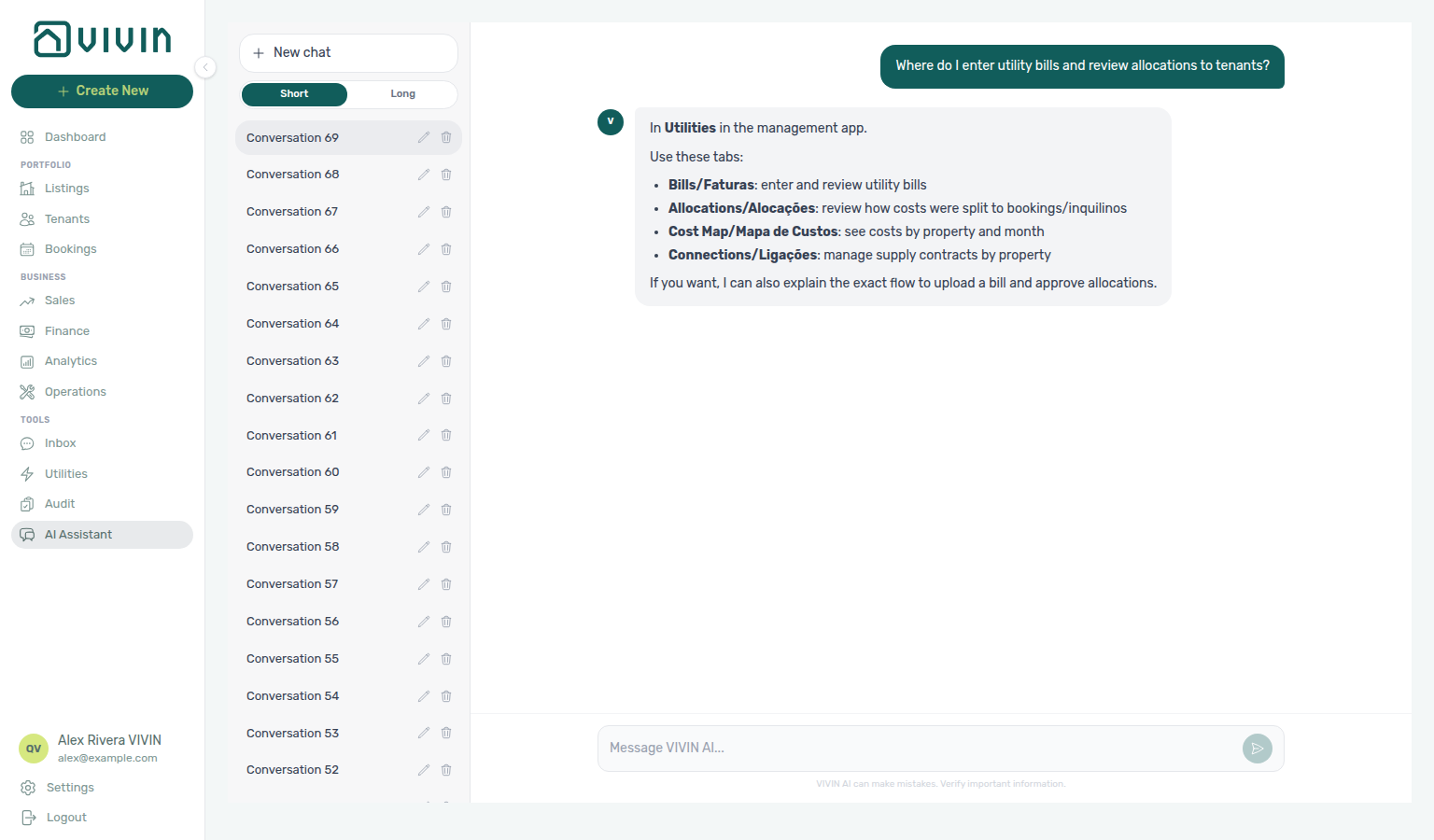
Not sure which Tools item holds supplier bills and tenant cost splits? Ask AI Chat “Where do I enter utility bills and review allocations to tenants?” — then open Tools → Utilities (ai-chat-product-context-utilities-reply.png, ai-chat-product-context-utilities-flow.mp4). Use Bills for entry, Allocations for splits, Cost map for property × month, and Connections for supply contracts. Month-end habit: Entering Monthly Utility Bills.
Need supplier bills and tenant cost splits (not Account Settings overage rules, and not Finance ledgers)? Ask AI Chat “Where do I enter utility bills and review allocations to tenants?” — then open Tools → Utilities (ai-chat-product-context-utilities-reply.png, ai-chat-product-context-utilities-flow.mp4). The assistant typically says Utilities in the left menu (may omit the Tools group name). Canonical route: /utilities. Month-end habit: Entering Monthly Utility Bills.
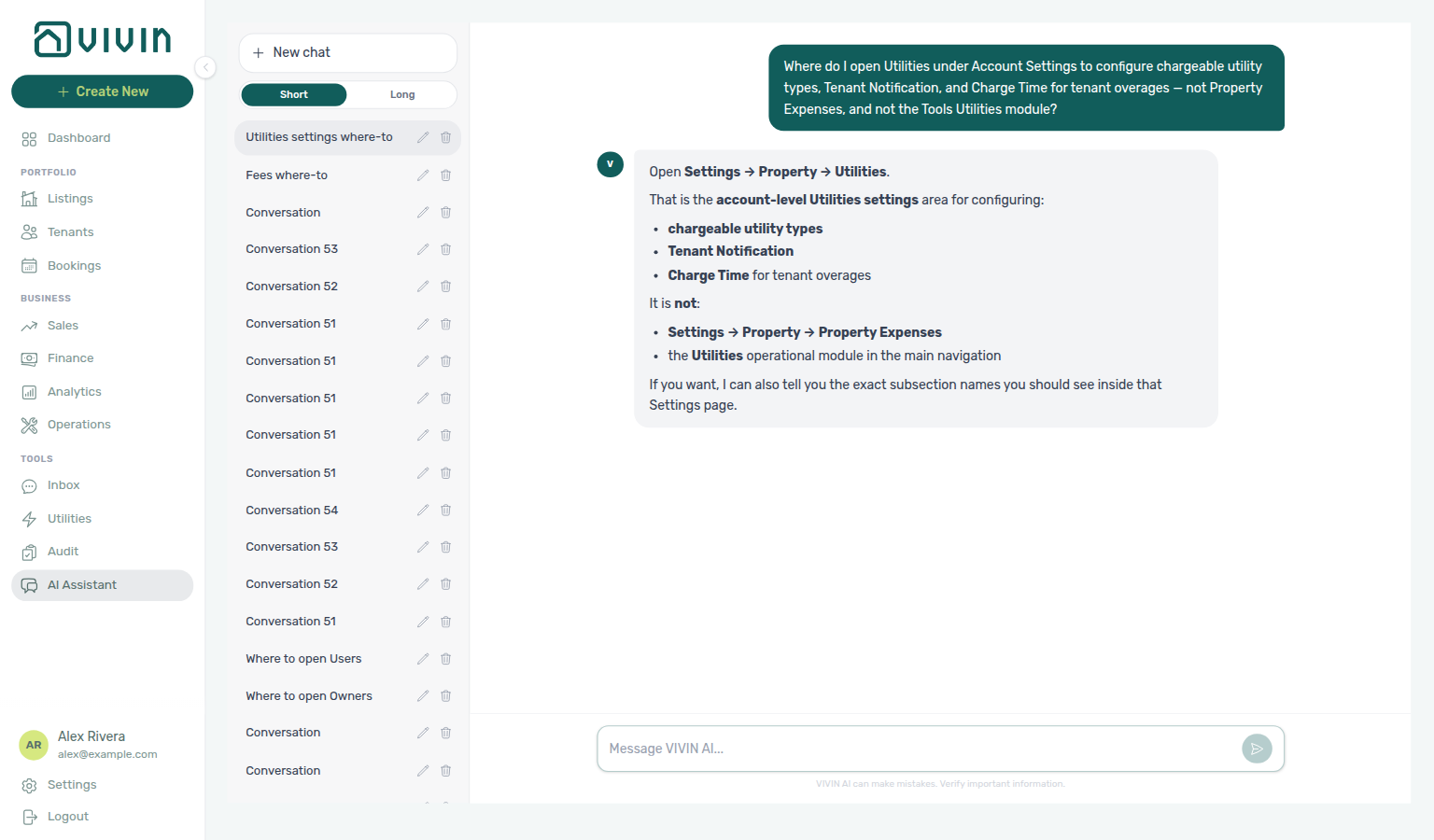
Chargeable utility types, Tenant Notification, and Charge Time live on Settings → System → Global Settings (Utilities card; /settings/utilities redirects here) — not this module. Ask AI Chat “Where do I open Utilities under Account Settings to configure chargeable utility types, Tenant Notification, and Charge Time for tenant overages — not Property Expenses, and not the Tools Utilities module?” (ai-chat-product-context-utilities-settings-reply.png, ai-chat-product-context-utilities-settings-flow.mp4). The assistant may still say Settings → Property → Utilities (while excluding Property Expenses and the Tools module); follow Settings → System → Global Settings instead. Full walkthrough media also lives on Payments, Invoicing & Utilities — Utilities.
Configure Bills Included ceilings in Listings Step 3; charge tenant overages through Bookings Payment plan and reconcile in Finance. When approved overage lines pass due date without pay-in, payment overdue alerts row-click into the booking — continue with Handling a Late Payment — Step 1. When overages cluster on one tenant category, scope Finance — Tenant category filter (Step 4 of Entering Monthly Utility Bills) — mirror Bookings — Tenant categories or Tenants — Tenant category filter when Finance Overview still shows the old segment
Its primary purpose is threefold: giving you a clear view of your utility costs across your entire portfolio, automatically reading utility bills using AI, and automatically calculating the tenant overage (the portion of a utility bill that exceeds the included amount and is charged back to the tenant).
Portfolio scoping (Select properties)
Most Utilities tabs expose Select properties in the header (desktop) or tab toolbar. The control is a multi-select server-driven search picker: opening the menu prefetches about 10 buildings, typing runs debounced server search, and scrolling near the bottom loads the next page — the same paged pattern as Finance → Other filters → Property and Sales → Pricing. With an active query, internalName matches rank above address-only hits before pagination — see Glossary — Picker search ranking.
Owner-linked logins already see only their buildings in this picker — they cannot widen the menu to the rest of the account (owner-scope-utilities-property-picker.png).
Current builds (June 2026 performance pass) use that picker for Utilities instead of downloading the legacy bulk GET /properties list on every cold load — the menu pages through GET /properties/search (prefetch ~10, debounced query, infinite scroll). Selected buildings appear as removable chips; Clear all resets scope on tabs that show the chip row (for example Cost map and Connections).
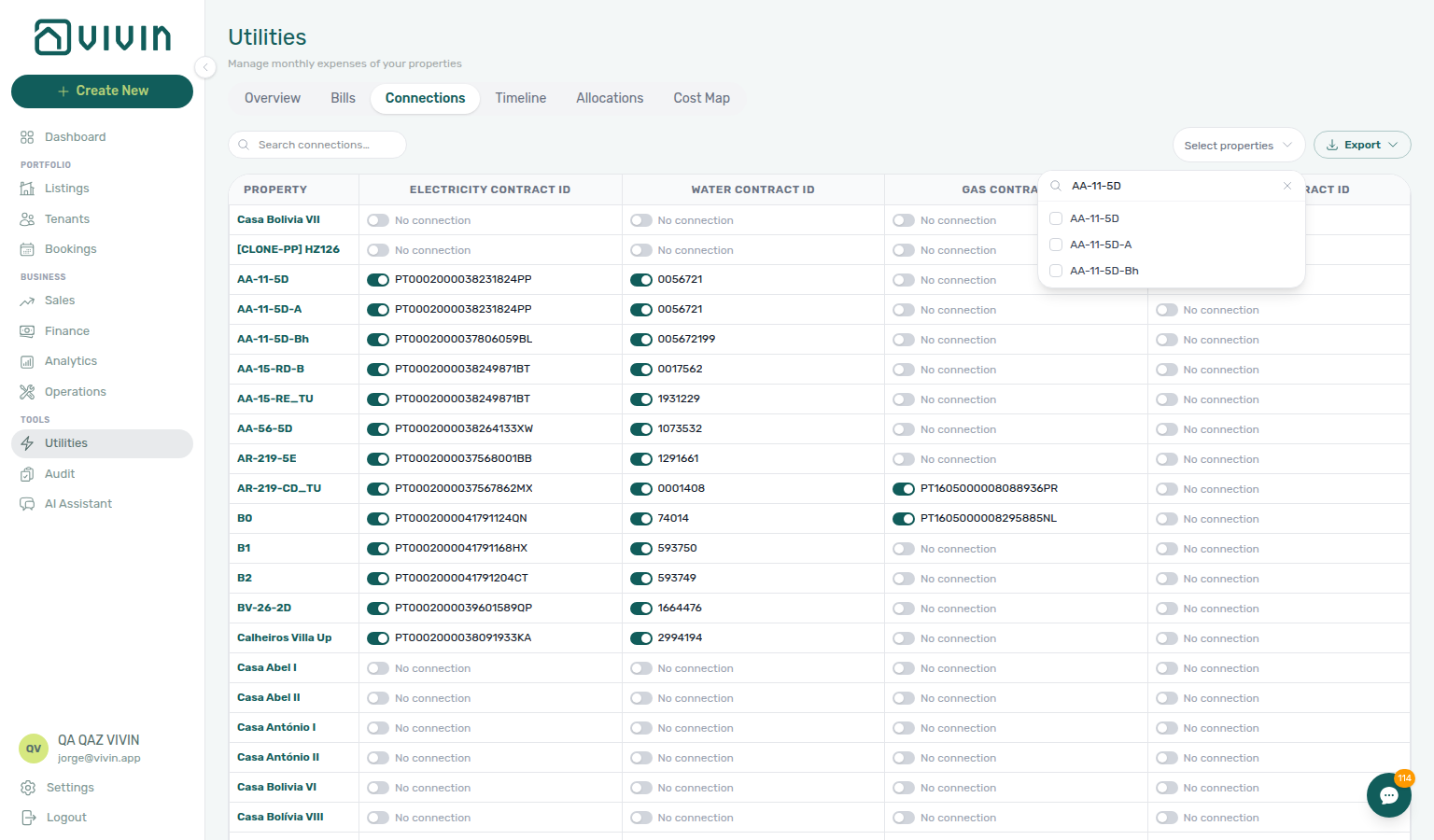
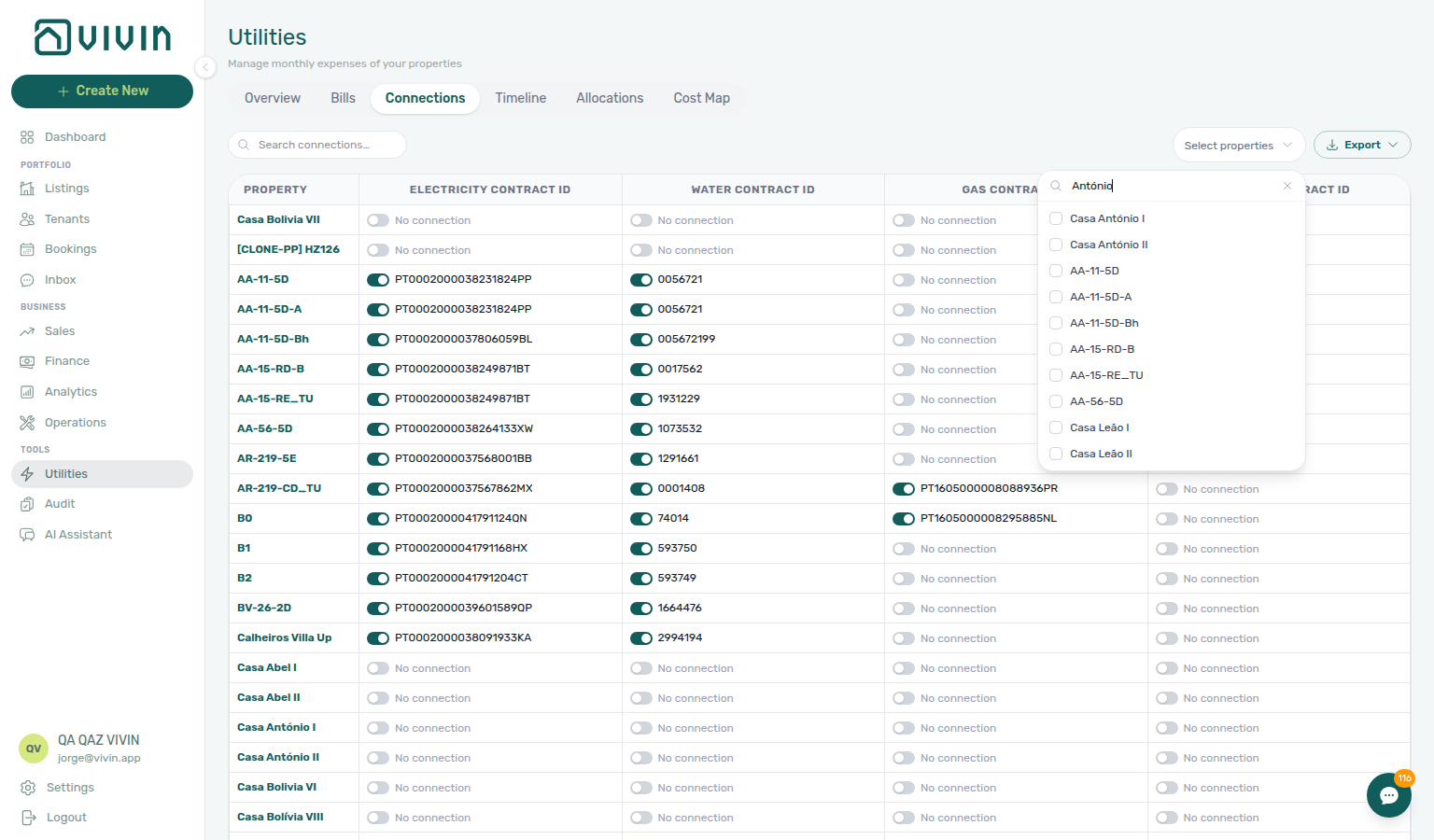
Tabs that honour the same selection include Overview (desktop header), Connections, Bills, Timeline, Cost map, and Allocations — narrow scope before exporting grids or interpreting Cost map colouring on large portfolios.
Tab refresh
Each tab loads on its own. Use Retry where shown; on Cost map, reload the page or leave and reopen the tab (no Retry control there).
Each Utilities tab loads its own data. When a tab needs a refresh:
| Tab | What to do |
|---|---|
| Overview, Connections, Bills, Timeline, Allocations | Use Retry on the card |
| Cost map | Reload the browser tab, or leave and reopen Cost map. After Recalculate Allocations that you started on this tab finishes, Vivin reloads Cost map for you. |
Zero rows after a successful load means your filters matched nothing (for example Timeline before any bills exist). See Glossary — Directory list refresh.
How Utility Billing Works
Vivin uses a ceiling model for tenant utility billing. When you create a property, you define a Bills Included amount for each utility — the maximum cost that is absorbed into the rent. If the actual monthly bill exceeds that ceiling, the tenant is automatically charged the difference.
- Bills Included (electricity) on a property: €50/month
- Actual electricity bill for March: €73
- Tenant overage charge: €23 (added to their payment schedule)
- If the bill had been €42, the tenant pays nothing extra — Utilities → Allocations shows a Covered row with Extra to charge € 0,00 (the period was calculated; a bill is not missing)
For this system to work, two things must be set up:
- Utility account IDs linked to each property (configured in the property wizard Step 2, managed in the Connections tab)
- Bills Included amounts configured on the property (Step 3 of the property wizard)
Overview tab
Overview pairs with Dashboard and the monthly rhythm in Entering Monthly Utility Bills — segment gaps with Finance — Tenant category filter.
The Overview tab is the central dashboard for utility expenses across your entire portfolio. It loads with the current month selected, and you can navigate to any past month using the month selector.
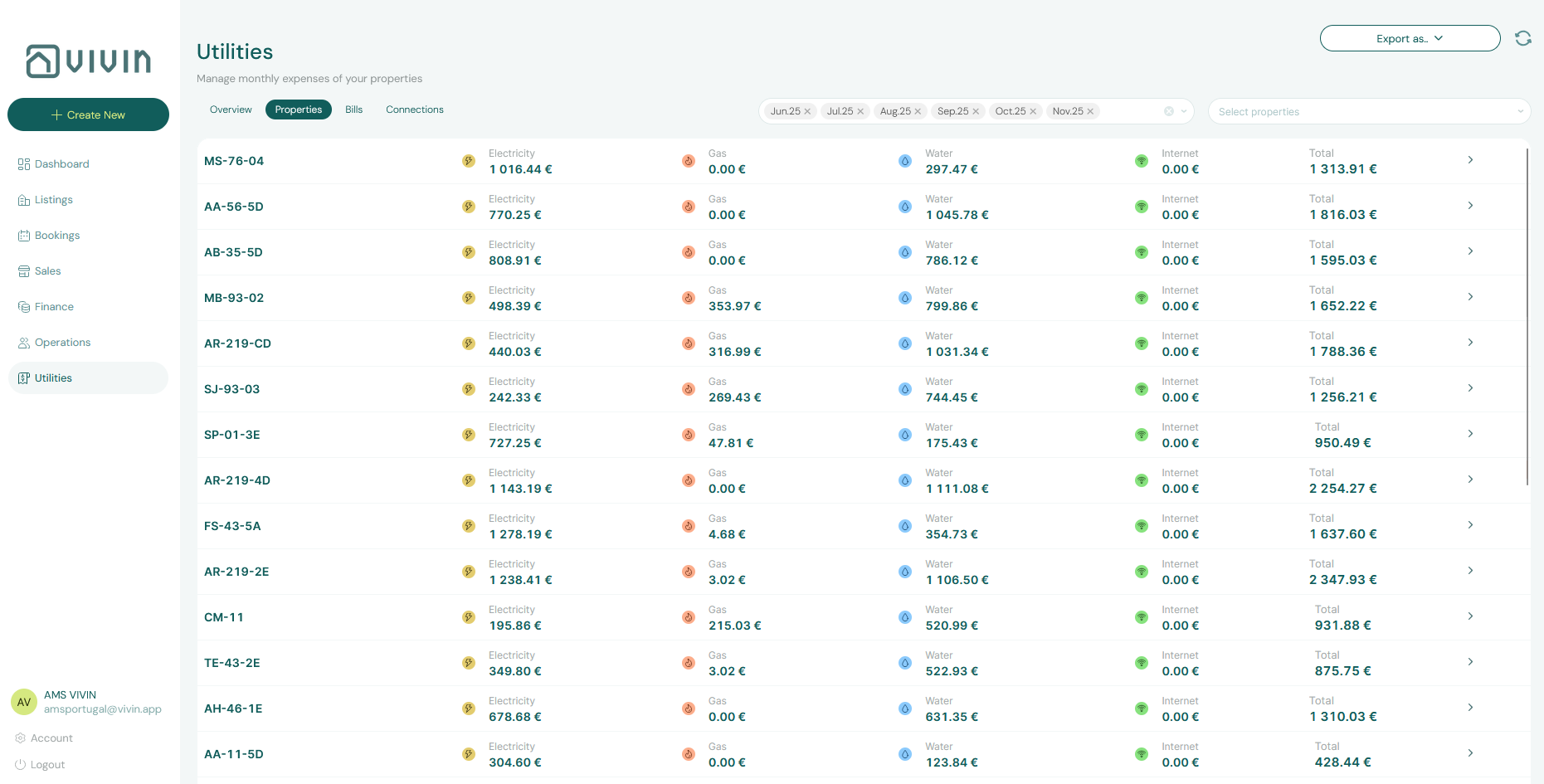
The overview shows a list of all utility bills for the selected period. For each entry you can see the property, utility type, billing amount, and whether the bill has been paid or is still outstanding.
Below the list, the tab includes two key charts:
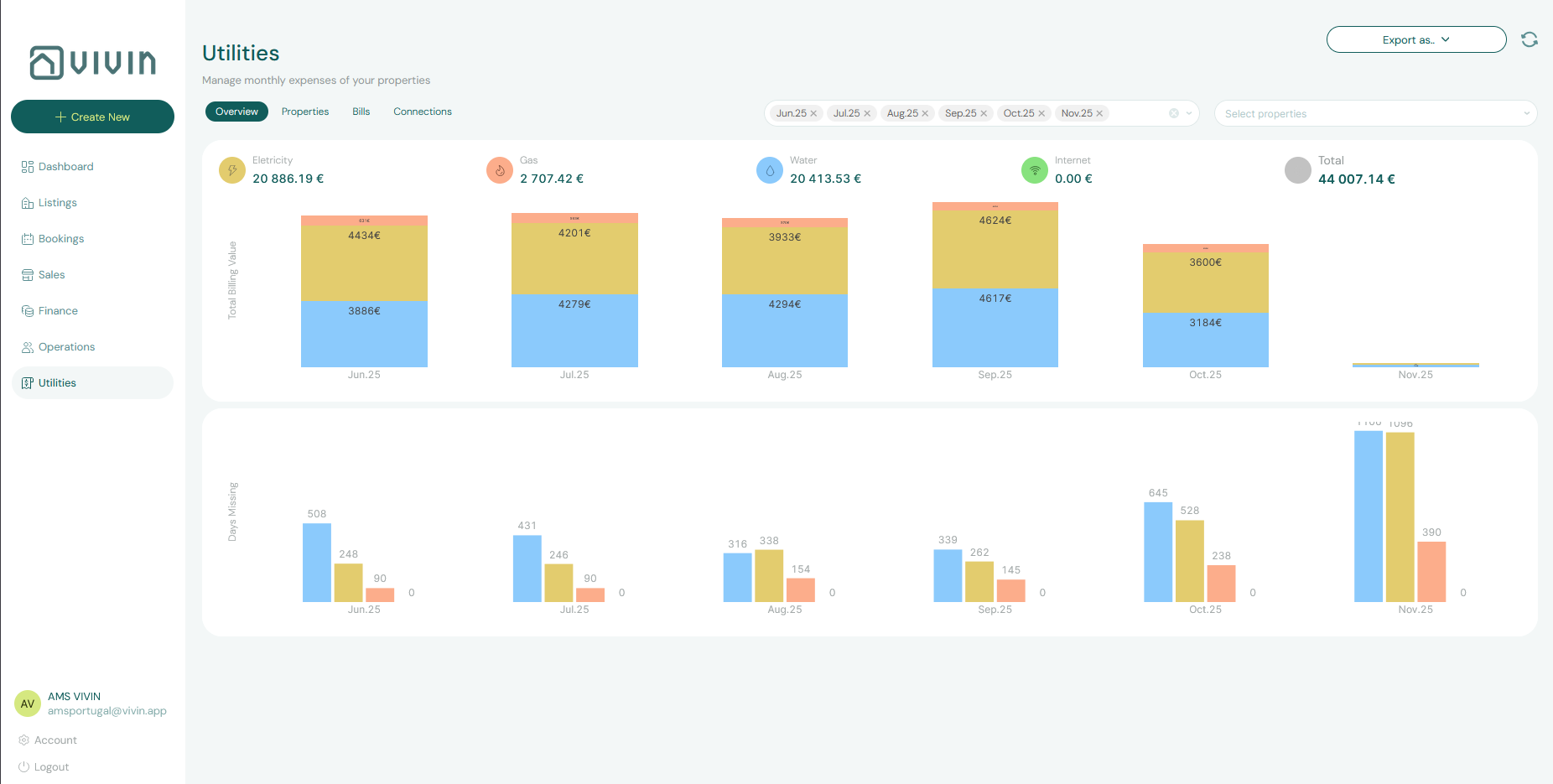
Total Expense Value Over Time A stacked bar chart showing utility costs month by month. Each bar is segmented by utility type (electricity, gas, water, internet), each in a distinct color. This lets you:
- Identify seasonal cost spikes (e.g., higher gas bills in winter)
- Spot sudden increases that may indicate a leak or equipment fault
- Track whether your overall utility spend is trending up or down
Days Missing Data by Utility Type A stacked bar chart showing how many days of bill data are missing for each utility type in each month. Missing data gaps mean the system cannot calculate accurate tenant overages for those periods. Use this chart to identify which properties need bills entered for past months.
Filter by property (desktop)
There is no separate “Properties” sub-tab. Legacy URLs /utilities/properties and /utilities/overview redirect to Overview (/utilities).
On desktop, use Select properties in the Overview header (next to the month / date-range control) to limit the bill list and charts to one or more buildings. The picker uses the paged server search pattern — you do not need every property loaded before you can filter. That scoped view is what you use when you want a property-by-property read of costs, connections context, and bill history without leaving Overview.
Use a scoped Overview when reviewing a property’s operational costs or preparing an owner statement — it is the single place to see monthly utility costs, which account IDs apply, and bills entered for that slice of the portfolio.
If this list needs a refresh — Use Retry on Overview, or reload the page. See Tab refresh.
Connections tab
The Connections tab (/utilities/connections) is a property × utility contract-ID matrix. Each row is one property; columns are Electricity, Water, Gas, and Internet contract IDs. Use it to view or maintain the configuration layer that tells Vivin which utility account belongs to which building — the same IDs you can seed in Step 2 of the property wizard.
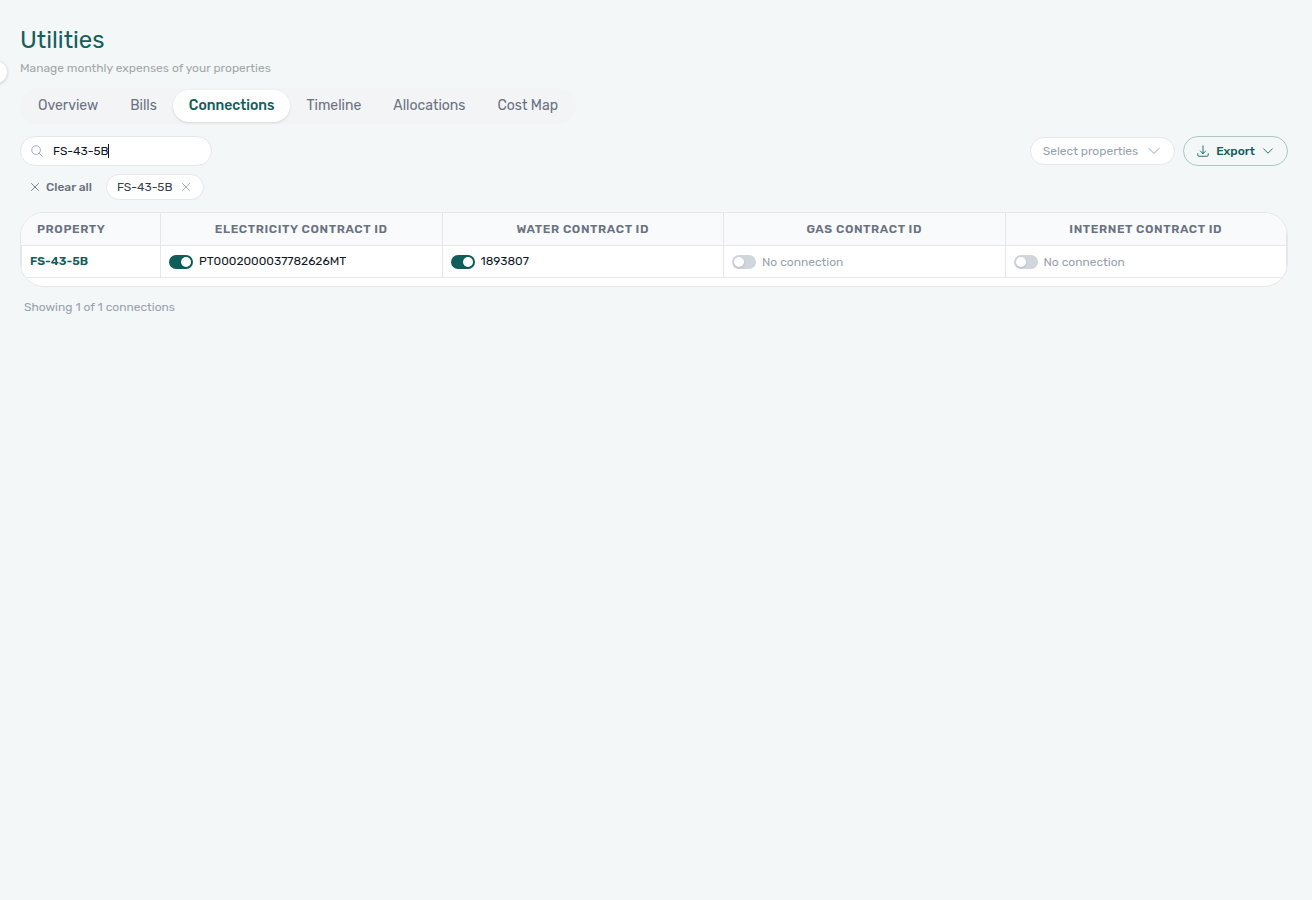
Grid layout and permissions
| Element | Behaviour |
|---|---|
| Property (sticky left column) | Internal property label for each row |
| Utility columns | One contract ID cell per service |
| Read-only | Users without utilities.edit_connections see the full matrix but an amber banner explains they cannot edit — ask an administrator to enable Utilities → Edit connections in Role Permissions |
| Search | Filters rows by property name |
| Select properties | Multi-select server-driven picker — chips + Clear all on tabs that show the chip row |
| Export | CSV or Excel for rows currently loaded in the filtered grid |
Contract IDs are first set in Step 2 of property creation; update them here when a provider changes references without reopening the property editor.
SIMAR water bills use Cód. Local / Código de Local from the supplier PDF — not Nº de Contador. Strip leading zeros before you save (for example 0181474 → 181474). EPAL follows a similar Código de Local rule; SIMAS and most other operators still use the meter number. See Glossary — SIMAR water contract ID and FAQ — SIMAR water bill property match.
When two or more properties use the same contract ID for a utility type (one physical meter or supplier account serving multiple buildings), Vivin treats that as a shared connection. Timeline and Cost map attribute daily utility intensity across every property tied to that ID — not only the row you happened to filter. Keep sibling properties on the same contract ID aligned in this grid before you interpret Cost map colouring or Allocations rows for a subset of the portfolio.
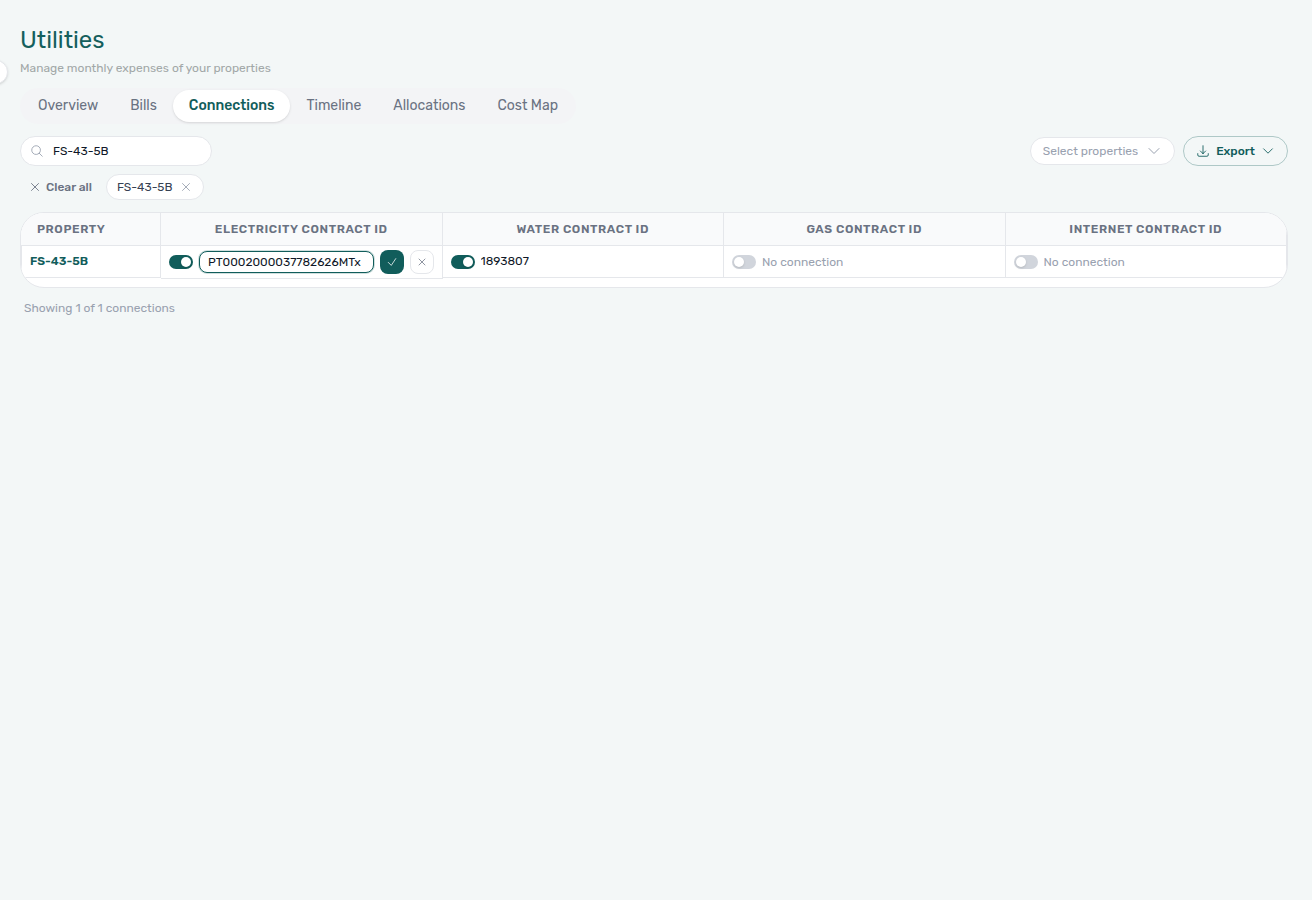
Editing a cell (inline)
Users with Edit connections permission:
- Click a cell (or No connection) to enter inline edit mode.
- Type the contract ID (meter number, customer reference, or similar). Check and cancel appear only after the value differs from what is saved.
- Save with the check control or Enter; Cancel edit with ✕ or Escape — nothing is written until you save.
While editing, the small on/off toggle beside the input is a draft control: off clears the box, on restores the saved ID. Use Save (or Escape) to keep or discard that draft. Turning the toggle off in the editor does not open Remove contract ID — that confirm is only for the read-mode switch below.
Turning a utility off (No connection)
Each cell has an on/off toggle in read mode:
- On (teal) — a contract ID is saved. Click the toggle to turn off. Vivin opens Remove contract ID and names the ID. Cancel keeps the connection; Remove clears it. Bills then stop matching that ID automatically.
- Off (grey) — no ID on file. The cell shows No connection. Click the toggle to turn on and type a new ID — nothing is saved until you enter a value and Save.
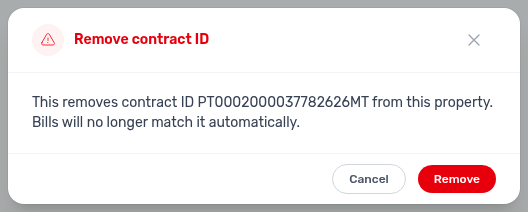
Once a valid ID is saved, bill imports and manual Bills entries can match the property automatically. See FAQ — Turn off a utility connection.
Scrolling and large portfolios
The grid windows property rows client-side for performance: an initial batch of about 30 properties renders first, then about 5 more rows load as you scroll (skeleton rows at the bottom). A footer shows Showing X of Y connections for the current Search and Select properties scope. Changing search or property chips resets from the first batch.
On accounts with hundreds of properties, the default unfiltered grid may mix internal test labels with production rows in the first loaded batch. Use Search connections (property code or name) or Select properties to scope the grid to the buildings you care about, then scroll and Export — the download always reflects loaded rows only, not the server total in the footer.
When the filtered slice is larger than the first batch, the footer shows how many rows are on screen versus the server total (for example Showing 30 of 103 connections after scoping with Search connections):
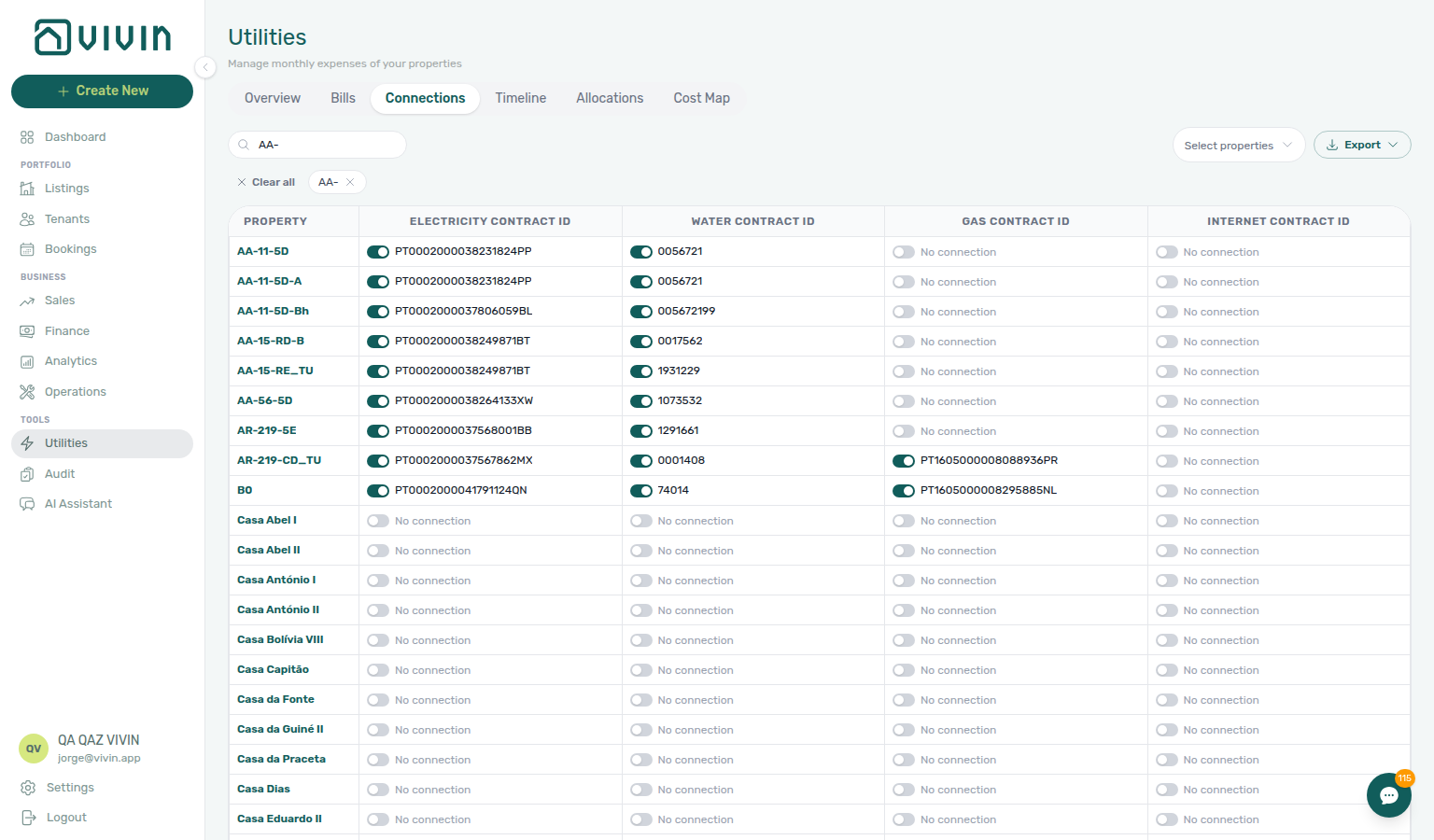
Export includes only loaded rows — scroll until the footer shows every connection you expect before downloading a full portfolio extract (or narrow with Search / Select properties first so each batch is meaningful).
If this list needs a refresh — Use Retry on Connections, or reload the page. See Tab refresh.
If a property has No connection for a utility type, Vivin cannot associate bills for that service with the building. Save a real contract ID for every active utility you bill, or leave unused services off (No connection) so the grid matches the supplier statements.
Bills tab
Bills pairs with Automation & AI — AI invoice reader, After you upload, Entering Monthly Utility Bills — Step 2, and AI usage API (utility_bill_extraction on GET /ai-usage/summary when you monitor PDF extraction volume at month-end) — scope with Select properties before bulk actions.
The Bills tab is the detailed ledger of every utility bill entered into the system. This is where day-to-day bill management happens.
Use Select properties in the tab toolbar when you enter or audit bills for one building at a time — the same paged picker scopes Received, Missing, and bulk Download selected / Delete selected actions. See Entering Monthly Utility Bills for the monthly operator rhythm.
On desktop, the tab bar includes an Add Bill shortcut in the header row (same entry point as in-tab controls). Inside the tab, use the Received / Missing toggles: Received is the main bill ledger; Missing lists simulated gaps from billing history so you can chase bills before overage math drifts. Select type next to Select properties is a multi-select — tick more than one service without closing the menu. See Select type stays open.
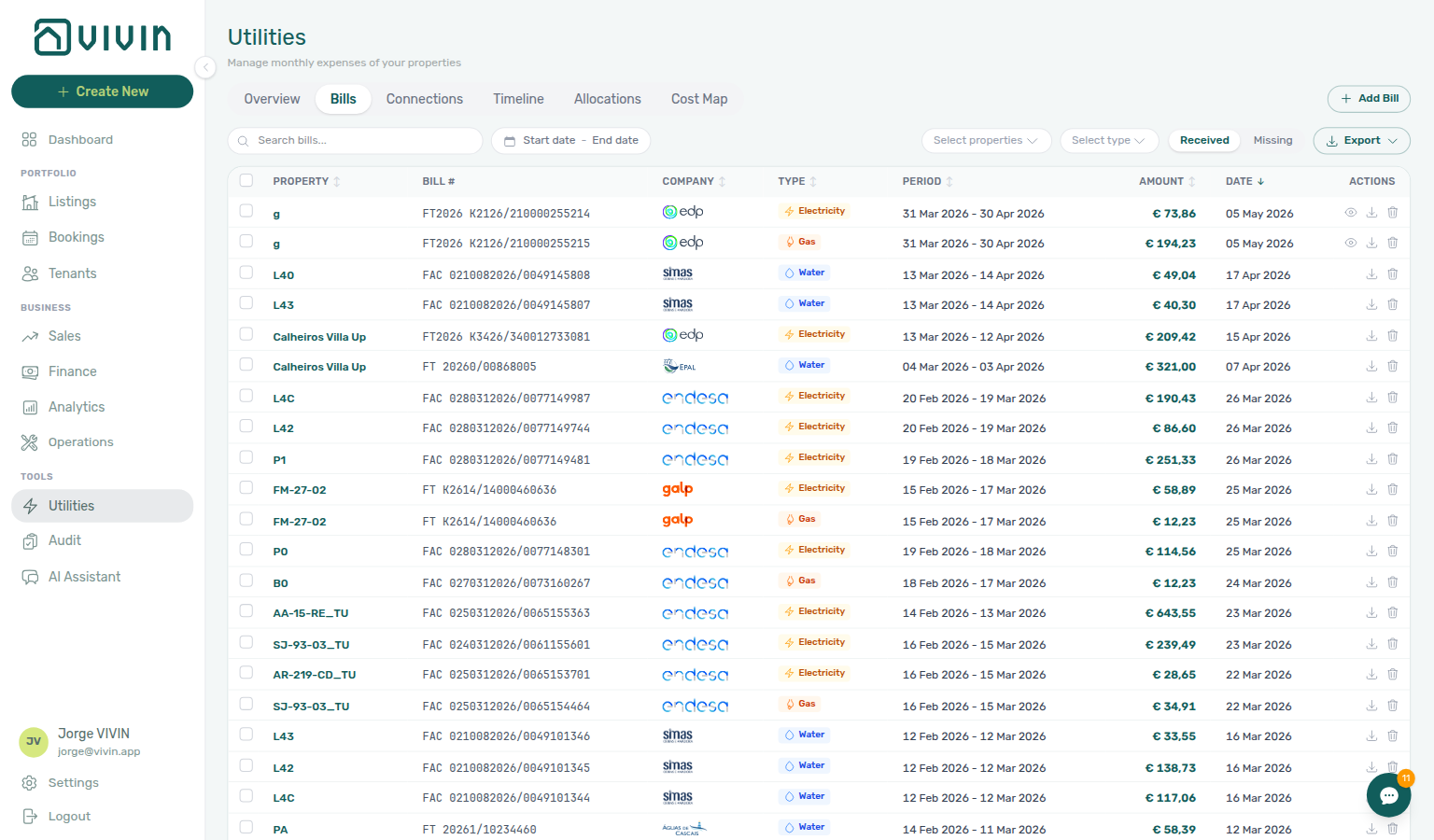
Switch to Missing when you want a proactive gap list instead of scrolling the Overview Days Missing Data chart. Vivin simulates expected billing periods from your Connections history and flags rows where no Received bill exists yet. Each row shows the property, utility type, expected period, estimated amount, and days overdue (with an OVERDUE badge when the gap exceeds your account deadline). Use Add Bill from a row or the header shortcut to enter the missing statement.
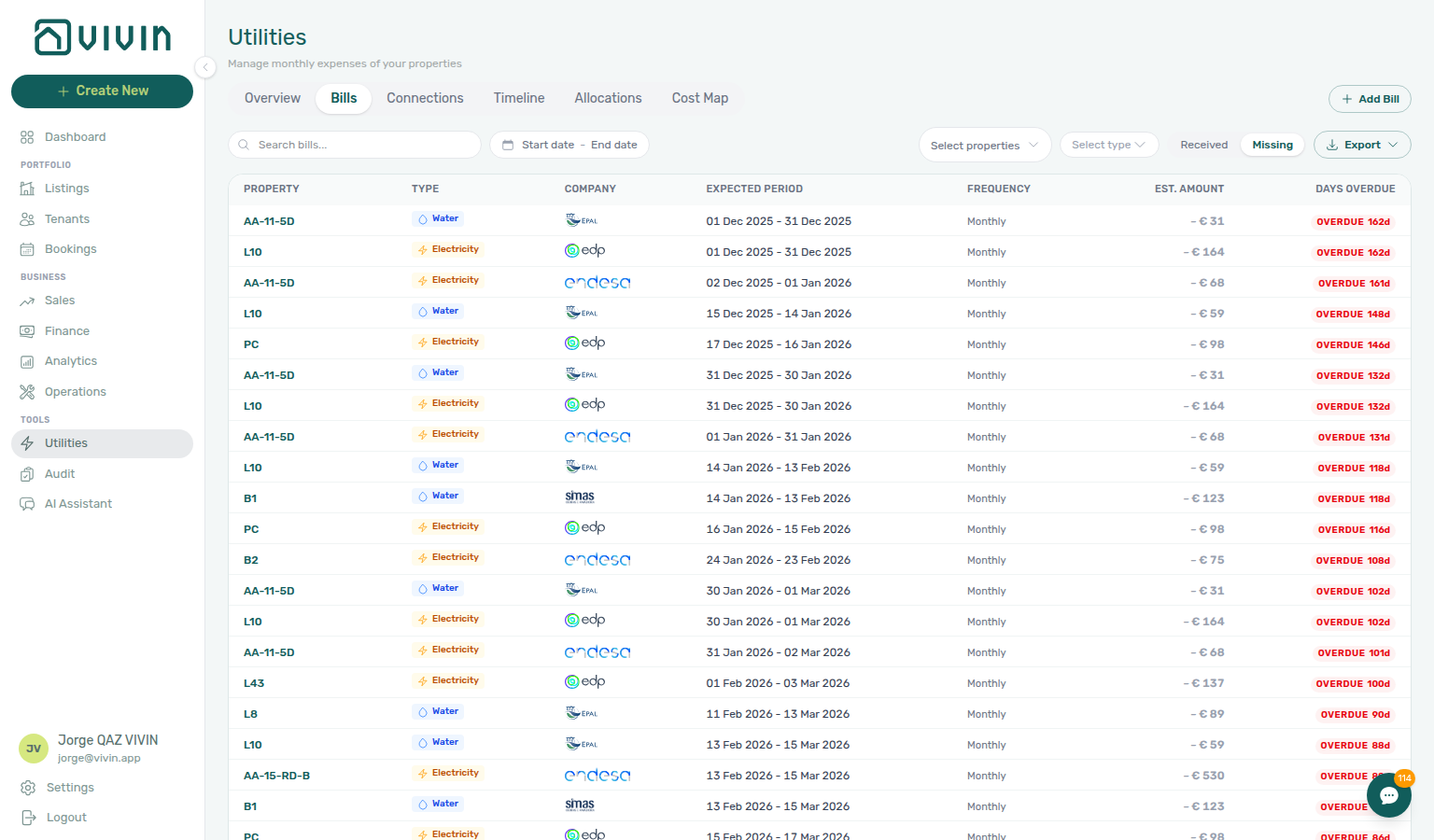
Each bill entry shows:
| Column | Description |
|---|---|
| Property | Which property this bill belongs to |
| Utility Type | Electricity, Gas, Water, or Internet |
| Billing Period | The month or date range this bill covers |
| Amount | The total billed amount |
| Status | Paid, Unpaid, or Overdue |
Filtering Bills
Use the filter controls above the list to narrow down by:
- Select properties — one or more buildings (same paged picker as the rest of Utilities). Scope a house first so the ledger is not mixing unrelated rows.
- Select type — Electricity, Gas, Water, and Internet. Tick more than one service; the ledger shows bills that match any of the types you picked. The menu stays open after each tick — see Select type stays open.
- Received / Missing — Received is the bill ledger; Missing is the gap list. Date range and Search bills further narrow the same slice.
- Clear all — removes search, type chips, date range, and property chips together.
Select type stays open while you pick
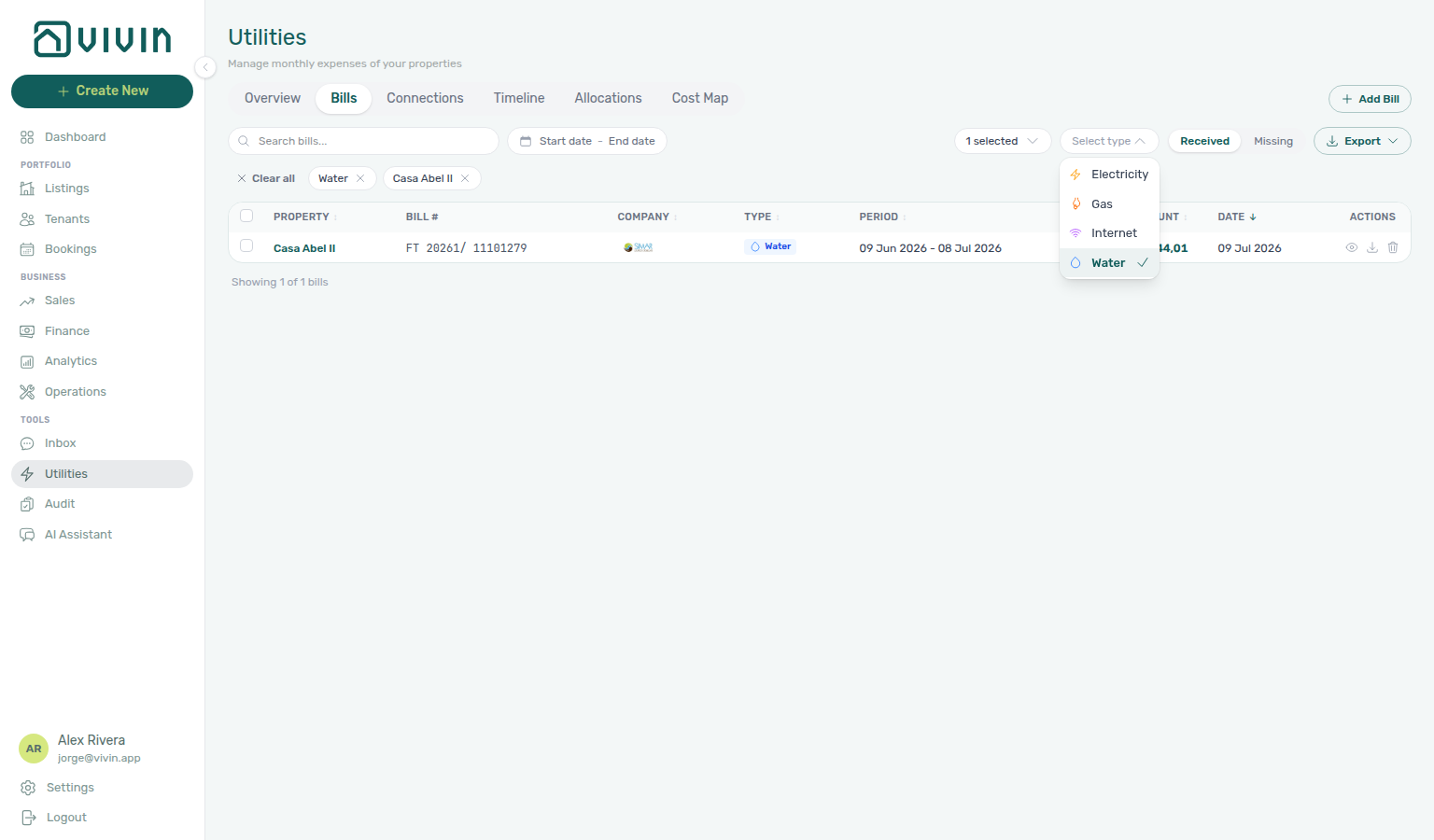
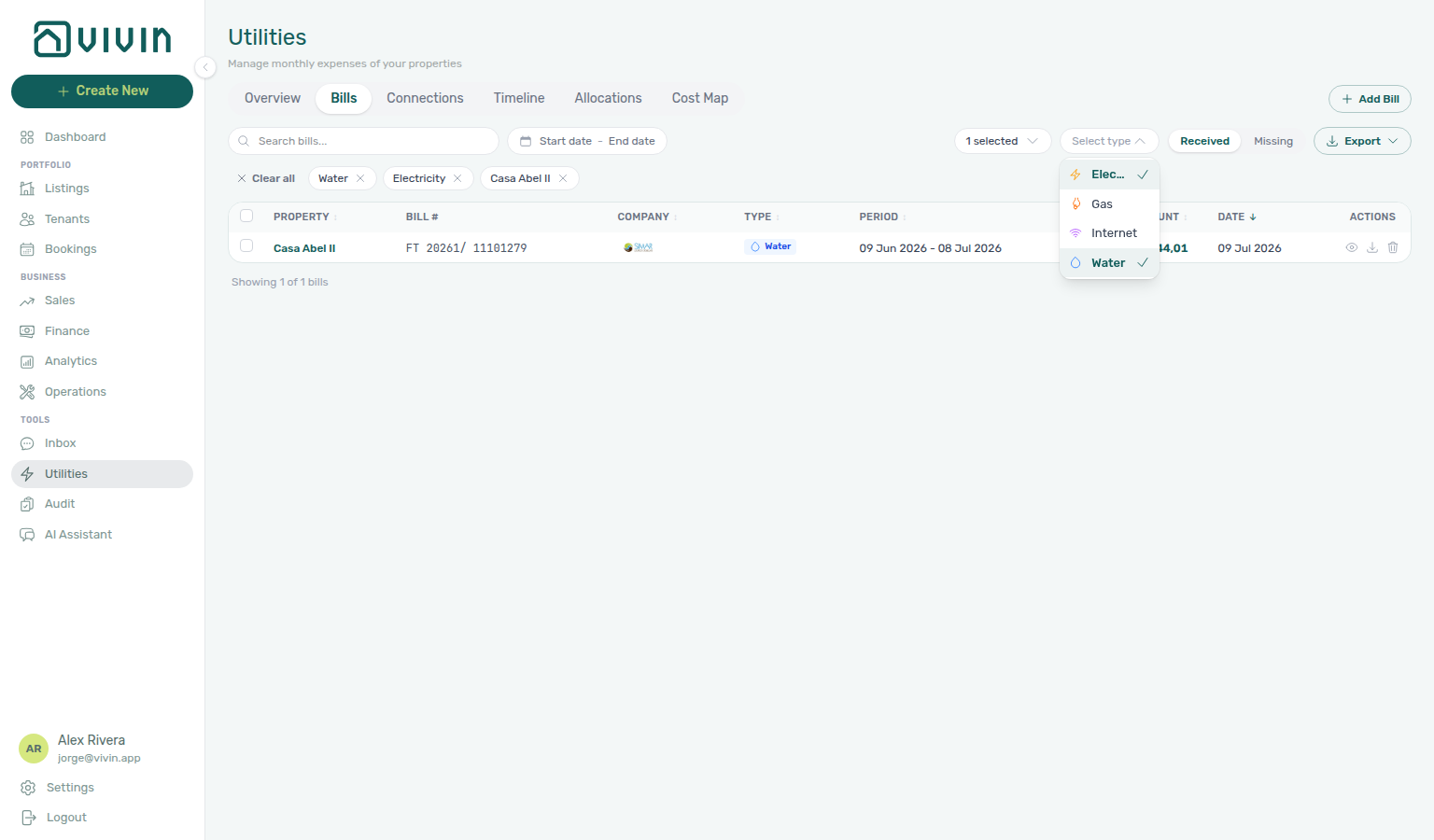
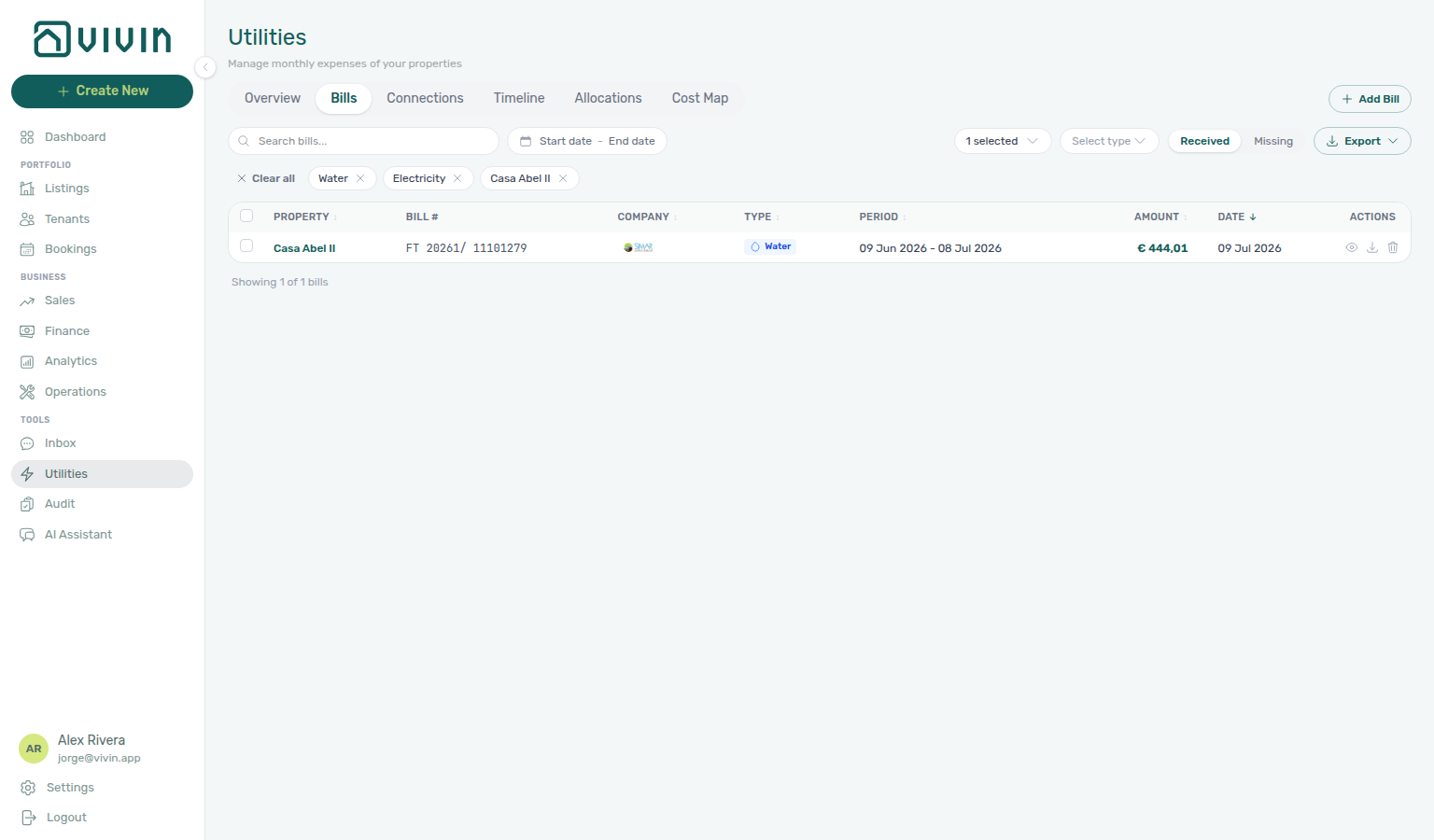
Open Select type, then tick a service. A chip appears under the toolbar; the menu stays open so you can tick a second service. You do not need to open Select type again.
Scope Select properties first when you want a known building in view (for example Casa Abel II), then open Select type. Tick Water, then Electricity. Both stay checked in the open list. Dismiss the menu when the chips look right — same stay-open habit as Listings — Select types, Operations — Category, and Allocations — Booking status.
Bulk selection (Received ledger)
On the Received ledger, use the row checkboxes (or the header checkbox to select every row currently visible in the table) to act on multiple bills at once. When at least one row is selected, a floating bar appears at the bottom of the workspace:
| Control | Purpose |
|---|---|
| N selected | Count of checked rows in the current view. |
| Clear | Unchecks every selected row without changing bill data. |
| Delete selected | Opens a confirmation modal, then permanently removes the chosen bills. Deletion cannot be undone — prefer narrow Property / date filters before bulk delete on shared workspaces. |
| Download selected | Downloads a PDF for each selected bill that has an attached file. Rows without a stored PDF are skipped; when one or more downloads fail, Vivin shows a toast so you know the batch did not fully succeed — see Glossary — Export and download issues. |
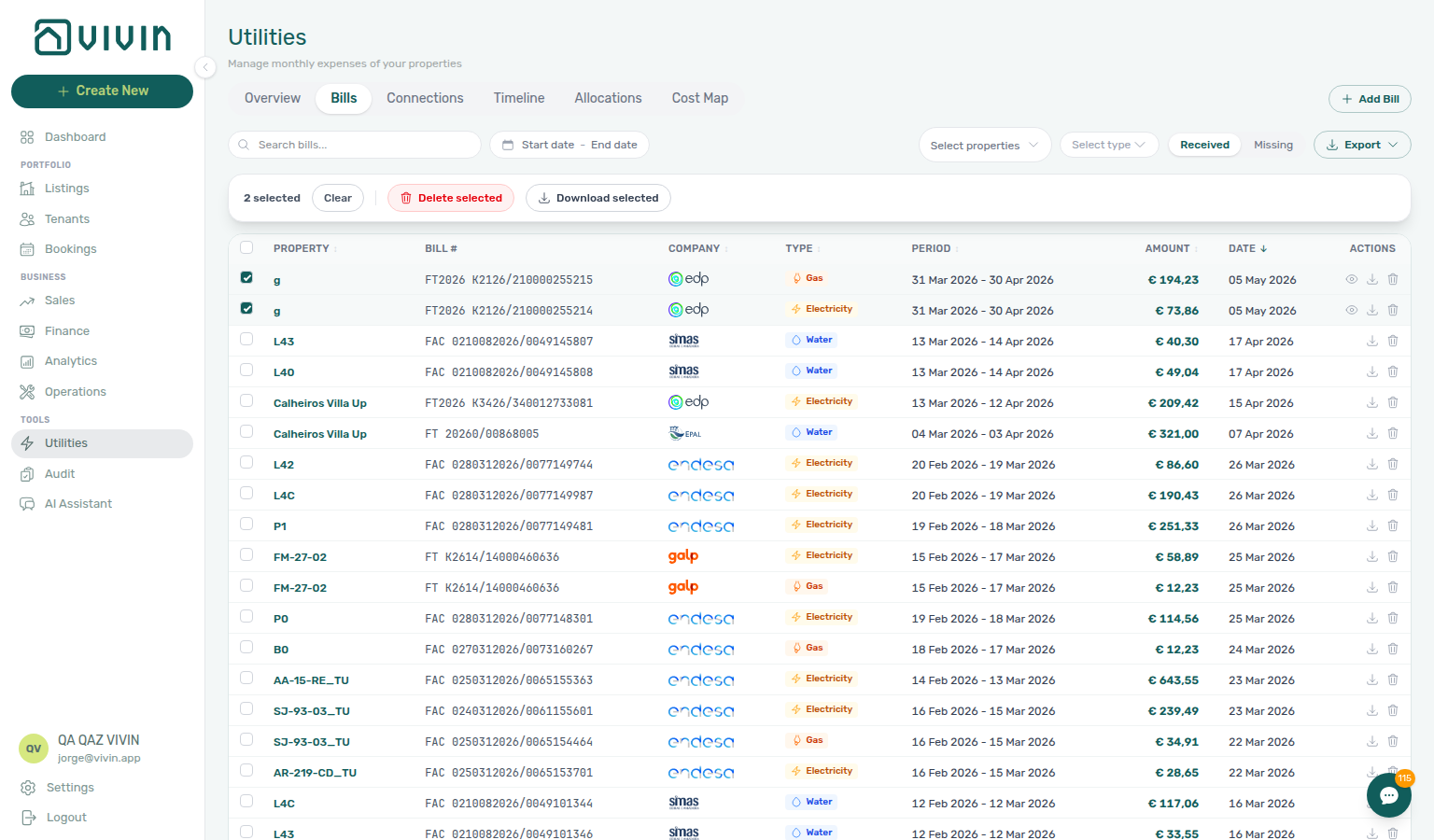
Bulk actions apply to the Received ledger only (not the Missing gap list). Header select all affects rows currently loaded in the table — scroll to load more pages before selecting a large portfolio slice, or narrow filters first so every target row is on screen.
If this list needs a refresh — Use Retry on Bills, or reload the page. See Tab refresh.
AI Invoice Reader
Vivin includes an AI-powered invoice reader that automates the process of entering utility bills. Instead of manually typing in each bill's details, you can upload the bill document and the AI will:
- Automatically detect the utility type (water, electricity, gas, internet) from the document content.
- Identify the correct property and billing period without manual input, by matching account identifiers and addresses.
- Extract key data — provider name, billed amount, consumption values, and billing dates — directly from the document.
This eliminates the tedious and error-prone process of manual data entry, especially when processing dozens of bills across multiple properties each month.
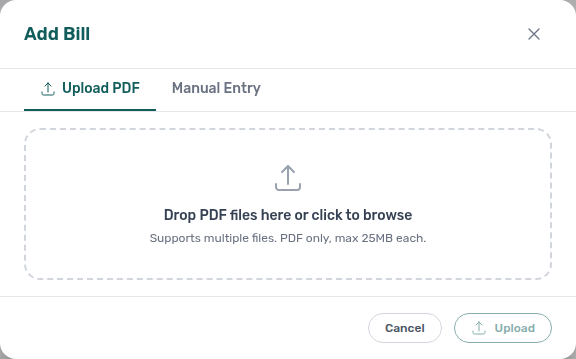
From the Bills tab, use Add Bill (header shortcut on desktop) and stay on Upload PDF to queue one or more PDFs; switch to Manual Entry when you prefer typed fields or need to fix AI output. Vivin internal operators can also open + Create New > Tools > Upload Utility Bills from any screen — that opens the Upload Bills dialog (PDF-only batch upload) without the Manual tab on the same modal:
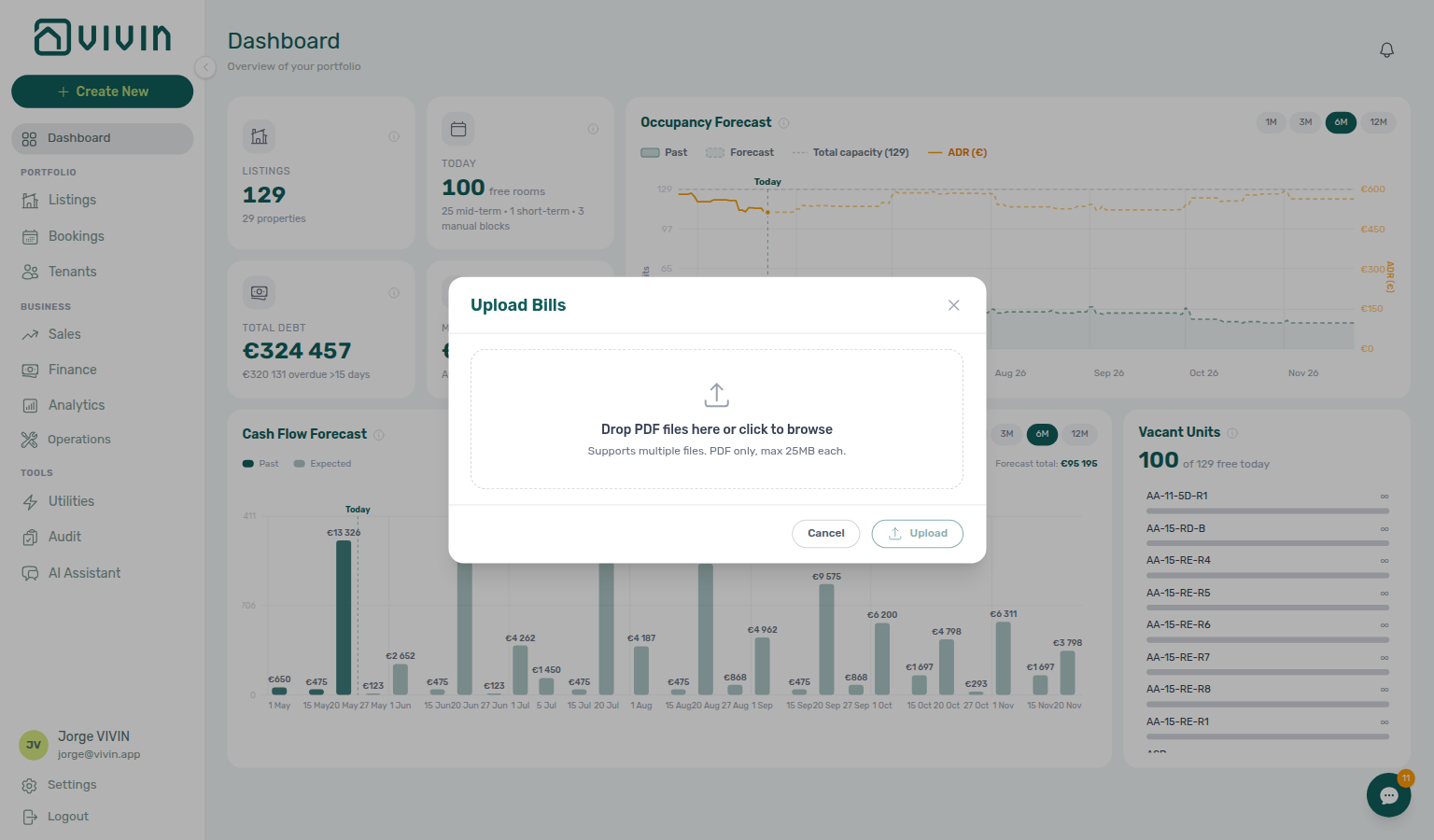
The Add Bill path in Utilities keeps Upload PDF and Manual Entry on one modal when you are already on the Bills ledger. Both entry points call the same extraction API; see Create New Menu > Tools.
After you upload
Upload answers as soon as Vivin has saved the invoice on Received. Tenant overage rows on Allocations can still appear a moment later — you can Close and keep working.
When the batch finishes, a banner summarises the files you sent. Each file also has its own line:
| Banner or file line | What it means | What to do |
|---|---|---|
| N processed successfully (green) and Bills created successfully on the file | That PDF is already on Received. | Close. Open Allocations or Overview when you want to review overages. |
| Already uploaded (amber) | That invoice is already on Received (same property, period, and bill number). | Close — do not send the same PDF again. Combined batches can read 2 processed successfully, 1 already uploaded. |
| Unconfirmed — check the Bills list (amber) | The connection dropped while Vivin was saving. The invoice may already be on Received. | Open Received and search for that statement before you upload the file again. |
Processing... / Waiting... appear while files in a multi-PDF batch run one after another. When every file is done, the footer becomes Close.
This banner is not Recalculate Allocations on Cost map. A finished rebuild there shows Deleted N, created M — that count is the successful finish for the rebuild, not this upload summary.
See FAQ — What does the Upload PDF banner mean? and Entering Monthly Utility Bills — Step 2.
Each successful PDF read is recorded in the account-scoped AI usage ledger as utility_bill_extraction — poll GET /ai-usage/summary (management JWT) when you reconcile adoption spikes during Portfolio KPI review — Step 7. There is no management-frontend screen for this ledger yet; costs are internal USD metering, not tenant invoices. See FAQ — How do I see AI token usage for my account?.
For the AI Invoice Reader to match bills to properties automatically, ensure that your Connections tab has up-to-date account IDs for each property-utility pairing. The AI uses these identifiers to determine which property a bill belongs to. SIMAR (Loures e Odivelas) water PDFs must use Cód. Local in Connections — not the meter number; see Glossary — SIMAR water contract ID and FAQ — SIMAR water bill property match.
Adding a New Bill Manually
If you prefer to enter a bill manually (or the AI reader needs correction), click + Add Bill, open the Manual Entry tab, and fill in:
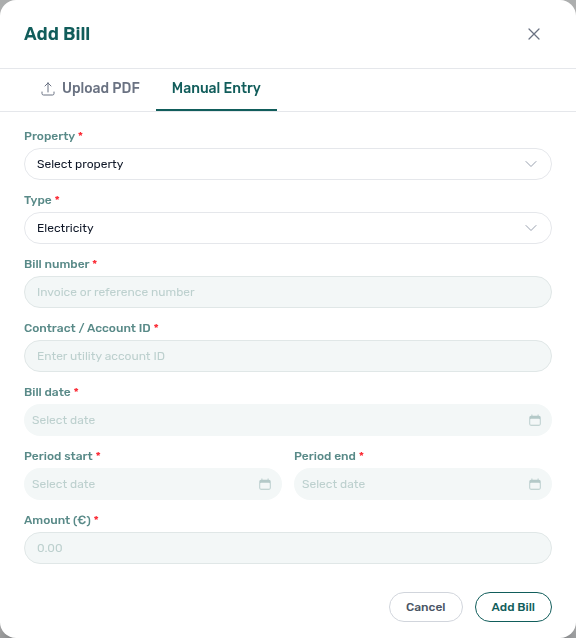
- Property — which property this bill is for
- Utility type — the service provider type
- Billing period — the month or date range the bill covers
- Amount — the billed amount (what you owe to the utility company)
- Due date — when the bill must be paid
Once saved, the system compares the bill amount against the Bills Included ceiling for that property and utility type. If the bill exceeds the ceiling, the system creates an overage charge in the relevant tenants' payment schedules automatically.
Bills must be entered for the correct billing period. An electricity bill covering March must have March as its period — if you enter it in April with April as the period, the overage calculation will be assigned to the wrong month and wrong tenants.
Timeline tab
The Timeline tab (/utilities/timeline) is a horizontal calendar grid: each row is a property (with utility coverage shown as coloured segments), and columns are days or weeks depending on zoom. It answers “where do we have bill coverage, and where are we blind?” at a glance.
Header tools (desktop)
- Search properties — narrows which property rows stay visible (matches property names).
- Select properties — same multi-select pattern as Overview: pick one or more buildings to scope the grid; combine with search when you have a large portfolio.
- Clear all — appears when search or property chips are active; removes filters in one click.
- Legend (next to the tab strip on wide screens) — Covered (green fill) means bill data is present for that slice of time; Today is a vertical marker; Deposit refund deadline is a separate marker used when the product highlights that cut-over in the header (useful when reconciling utility periods around move-outs).
Zoom
- Use Daily vs Weekly in the timeline toolbar to switch column granularity (the control is labelled Daily / Weekly in the UI).
- Today jumps the scroll position so the current date is in view after you have been exploring past or future months.
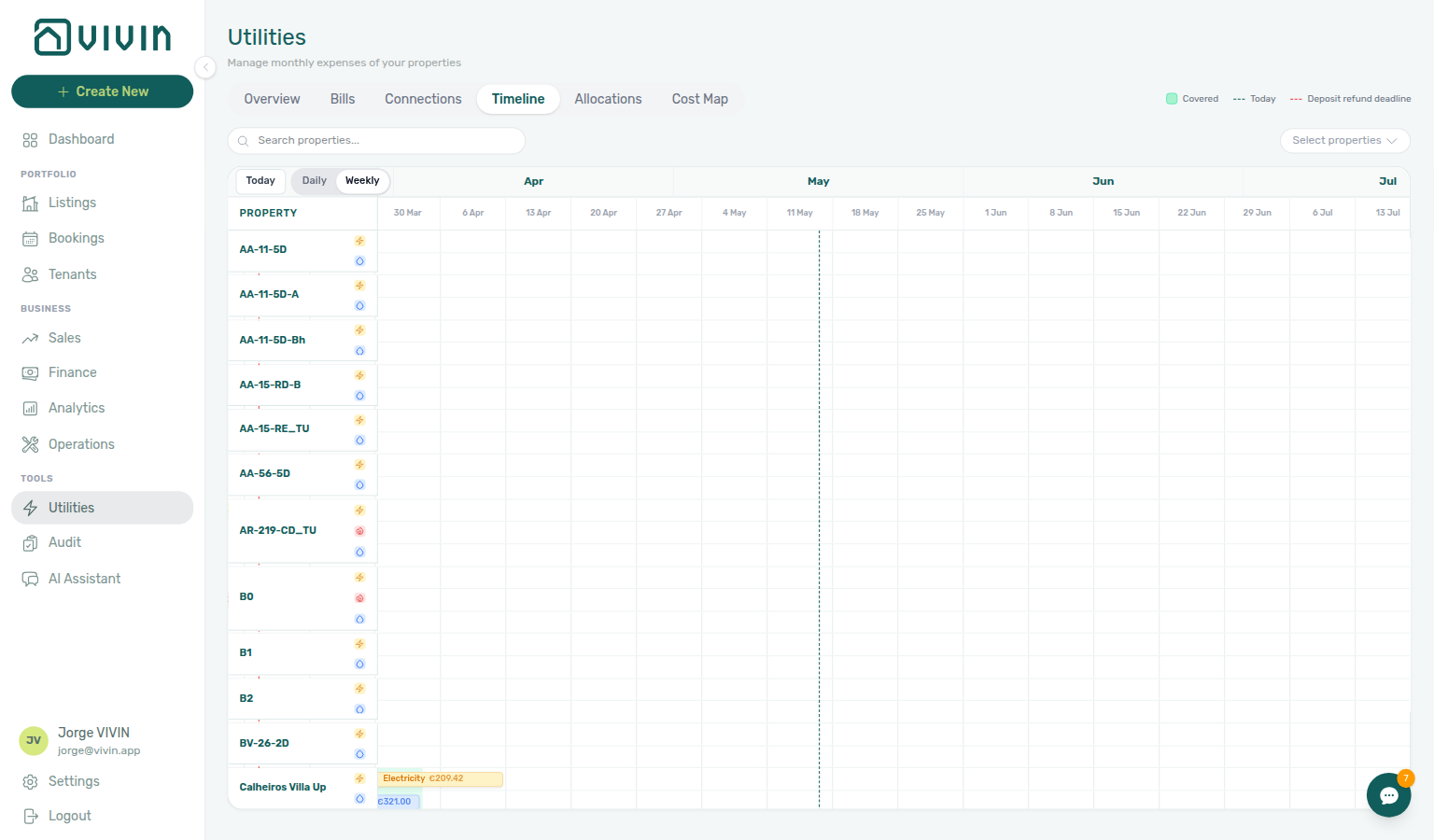
Empty state
If there are no utility bills yet, the tab shows an empty state explaining that you need bills before timelines render—start from the Bills tab or your ingestion workflow, then return here.
When you open a bill PDF from the timeline grid and the file cannot be fetched, Vivin shows a toast instead of a blank preview — see Glossary — Export and download issues.
Property rows in the grid load in the same infinite-scroll batches as the Connections tab (about 30 properties first, then about 5 per scroll). Scroll vertically through a large portfolio to load additional rows before assuming every building is visible. Loaded rows are ordered by property internal name using natural numeric sort (same ordering as Listings unit lists).
If this list needs a refresh — Use Retry on Timeline, or reload the page. See Tab refresh.
Cost map tab
Cost map pairs with Sales — Multicalendar for occupancy context and Listings — Bills Included ceilings. Ask AI Chat (or WhatsApp Genius) for per-property June totals (total cost, absorbed cost, cost per occupied room-day) — that is not Operations Cash Flows.
The Cost map tab (/utilities/cost-map) maps daily utility intensity to listings (rooms/units) under each property. You get a wide matrix: properties and their units on the vertical axis, days on the horizontal axis, and cell colouring that reflects occupancy / booking context and whether utility cost could be attributed for that day.
The matrix is computed on the server (GET /bills/cost-map, cached per property selection) and fetched only when you open this tab — switching away from Cost map does not keep reloading the heavy join in the background. Expect a short skeleton while the first batch arrives; property/listing sidebars still load their own lightweight data for drill-through.
If this list needs a refresh — On Cost map, reload the page or leave and reopen the tab (no Retry control). After Recalculate Allocations that you started on this tab finishes, Vivin reloads Cost map for you. If you left Cost map during a rebuild, reload when the button is idle again. See Tab refresh.
Legend (desktop, next to the tab strip)
- Mid-term — long-stay / coliving style occupancy colouring.
- Short-term — short-stay or channel-heavy stays (including iCal-style short-term where applicable).
- Manual block — operator-defined calendar blocks that affect occupancy display.
- Vacant — no qualifying stay on that day for that unit.
- No data — the cell cannot be coloured because underlying bill or mapping data is missing.
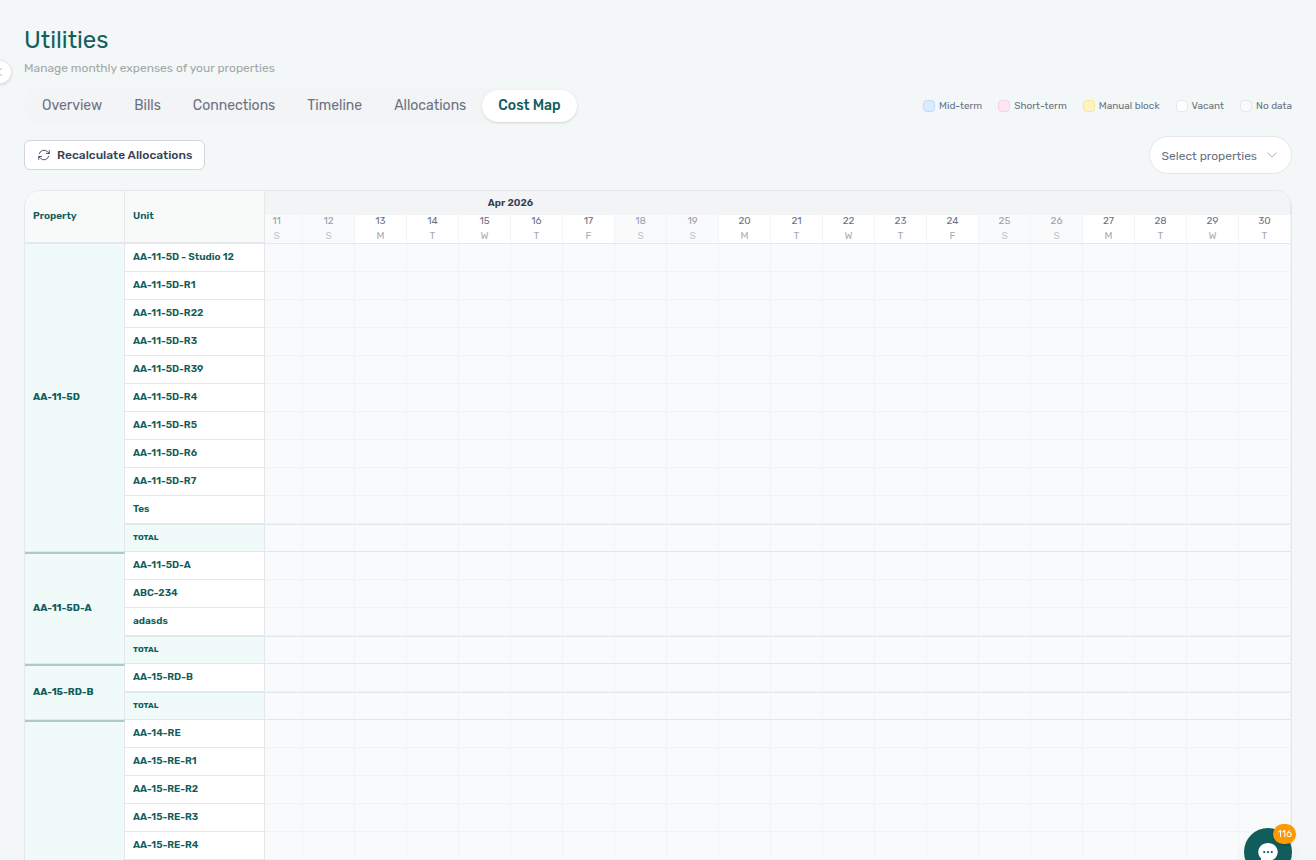
Property scope
Use Select properties in the tab header (when shown) to limit the matrix to specific buildings—especially important on accounts with many properties so the grid stays readable.
Shared utility connections warning
If your selection includes a property that shares a contract ID with another building you did not select, an amber banner appears above the matrix:
- Title: Shared utility connections detected
- Body: explains that cost allocation may be wrong while sibling properties stay out of scope
- List: each affected property, utility type, and the missing property names marked (not selected)
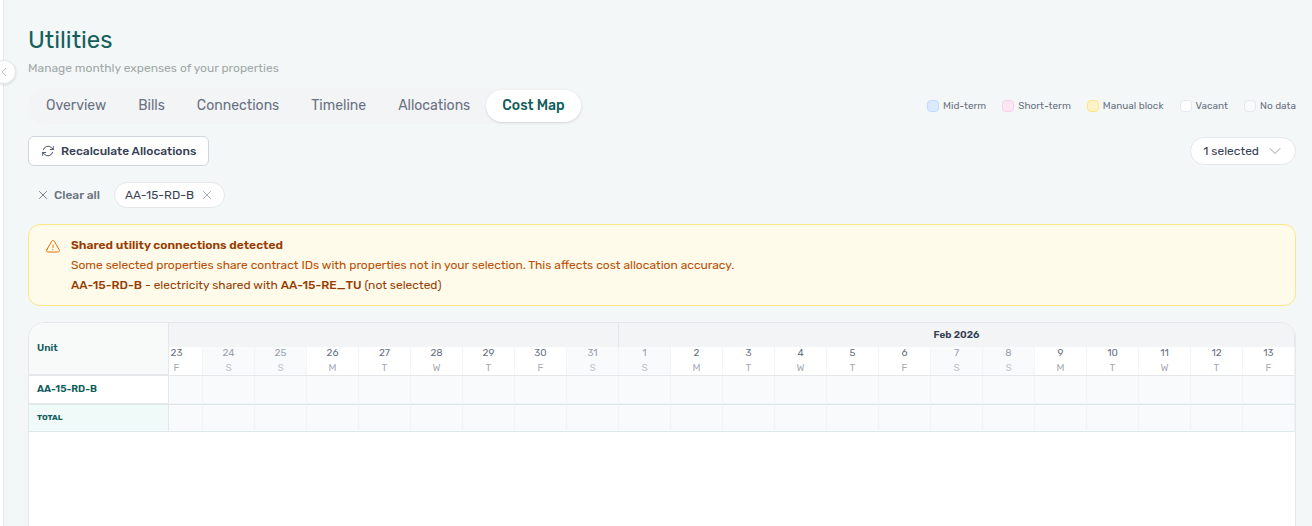
Add every property on that shared contract to Select properties (or clear the filter to load the full portfolio) before you rely on cell colouring or run Recalculate Allocations. The same contract-ID sharing is visible on the Connections tab when multiple rows show identical IDs in a column. Month-end operators: see Entering Monthly Utility Bills — Step 3 when overage review starts on Overview but Cost map intensity still looks off for one building.
Shared meters count once
When several buildings share one supplier contract (the same physical meter), Cost map counts that bill once, then splits the daily cost across occupied rooms on every building in the group. Occupied rooms on the same day show the same euro share — not a full copy of the invoice on each property.
- Open Utilities → Cost map.
- Open Select properties, search the cluster, and tick every sibling. The menu stays open while you pick (same habit as Bookings — Timeline Select properties). Close the menu when the chips list the full group.
- If a sibling is still missing, the amber Shared utility connections detected banner stays up. Occupied rooms on the buildings you did select can show the whole day’s bill (example: €32.55 on LC-01-13-A alone).
- After every sibling is in scope, the banner disappears. Each occupied room shows its share (example: €4.07 on LC-01-13-A, LC-01-13-B, and rooms on LC-01-13). Hover a Total cell to read the day total and occupied-room count.
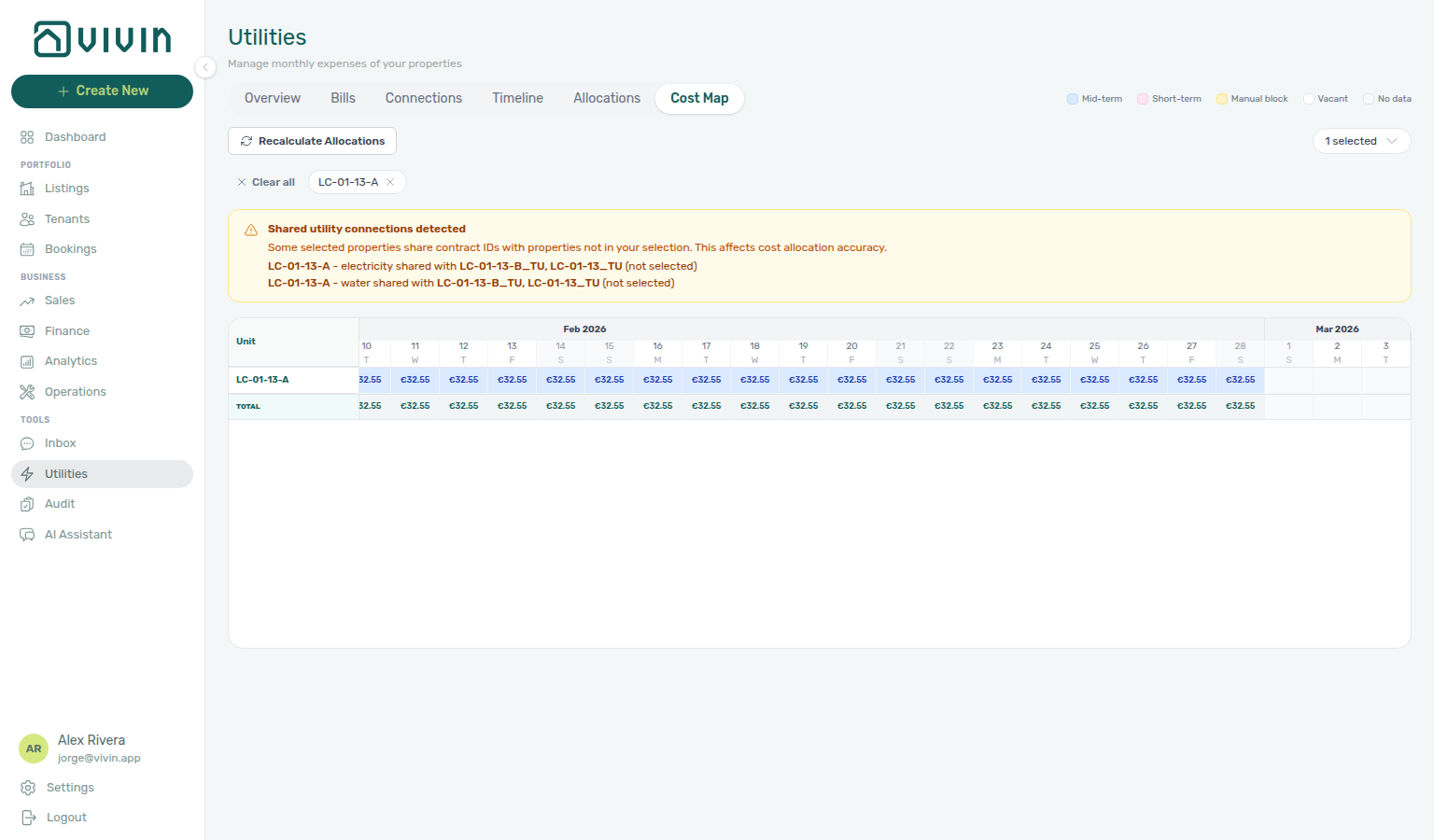
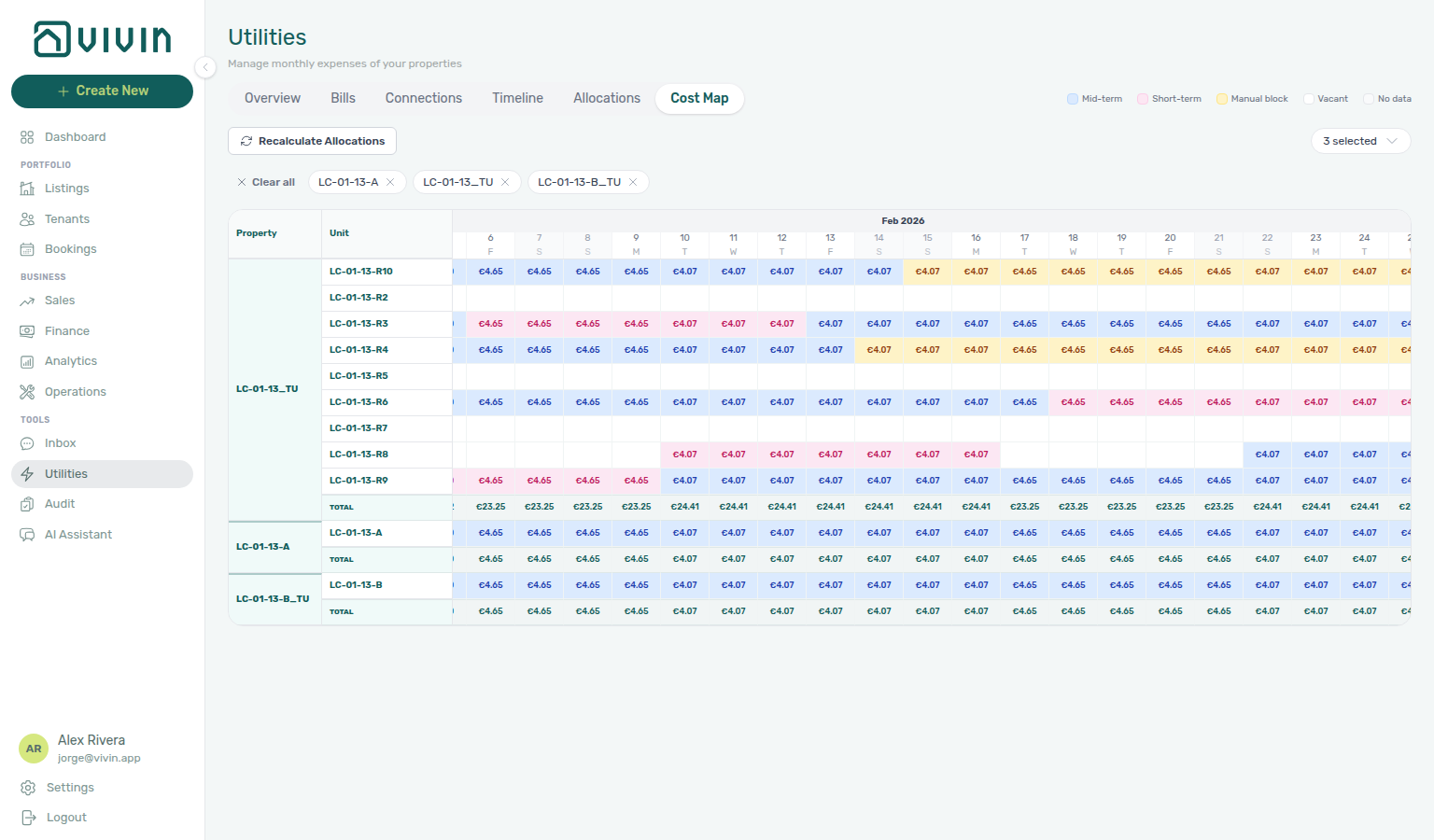
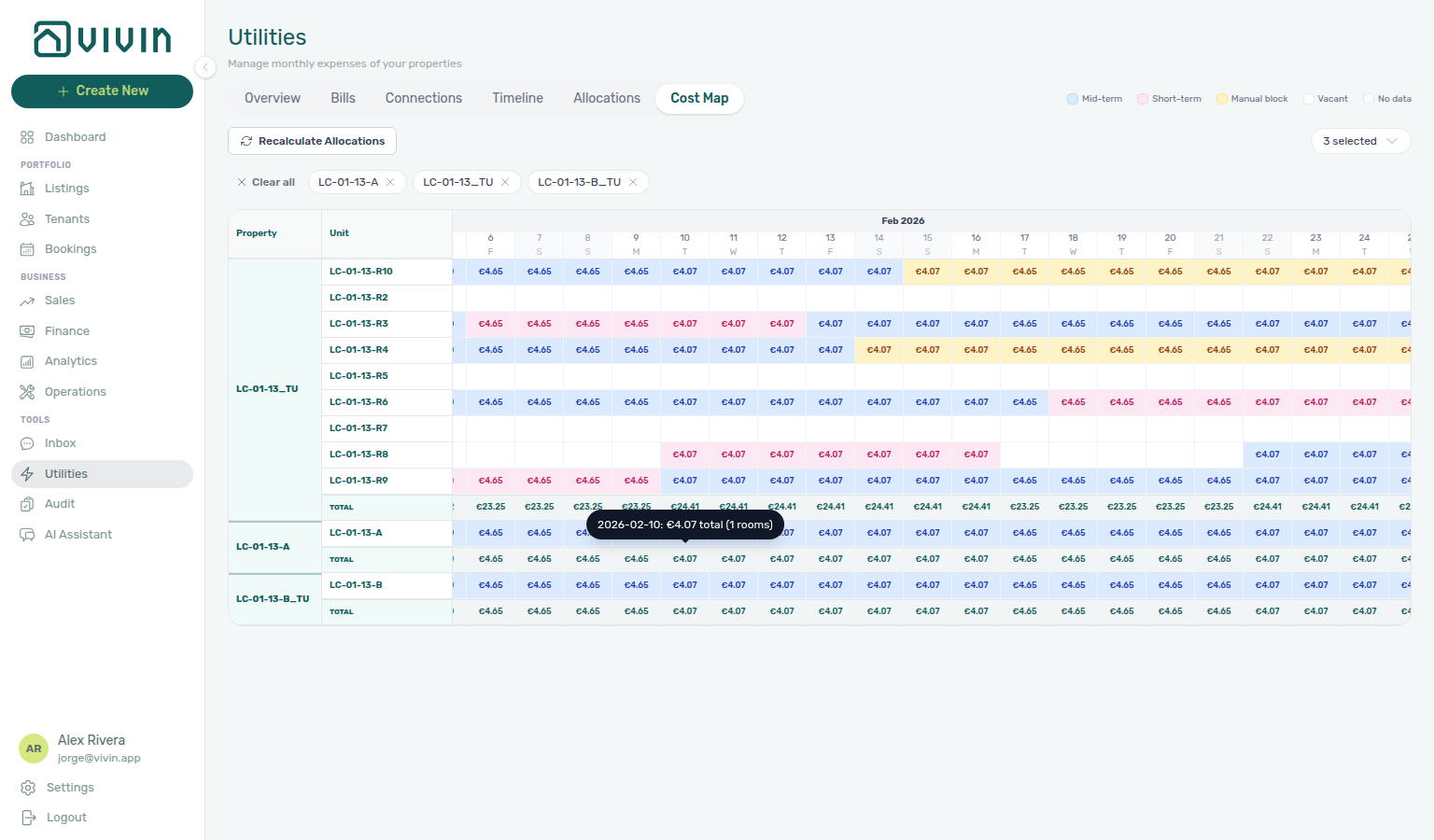
See FAQ — Same daily amount on Cost map and Glossary — Shared utility connection.
Recalculate Allocations
Recalculate Allocations sits on the Cost map filter bar (refresh icon), opposite Select properties. Use it only when pending allocation rows still look wrong after you already corrected bills or connections — prefer those edits first, then rebuild.
Click the button once. The rebuild can take a few minutes. While it runs, the label becomes Recalculating... and the control is disabled — you can keep working in other modules. If you leave Cost map and come back before it finishes, the button still shows Recalculating.... If a rebuild is already running, another click does not start a second one — the button just stays on Recalculating... until that run ends.
When the run finishes, Vivin shows Deleted N, created M next to the button. That count is the successful finish — keep working. If you stayed on Cost map after you clicked, Cost map then reloads so the matrix matches the new rows. If you left and returned (or you opened Cost map while a rebuild was already running), reload the page when the button is idle again. This line is not the Upload PDF banner on Add Bill.
The rebuild is account-wide: it replaces pending, rejected, and Covered allocation rows from your current bills. Approved (charged) rows stay. Covered is rebuilt on purpose — a later bill can turn a within-budget period into an overage, and a stale Covered row would hide that work. A calendar block (Absorbed) on the same unit does not overwrite a booking’s Covered line — see Calendar blocks do not replace Covered. You need Approve payments (the same permission as Allocations approve/reject). Owner-linked logins cannot run it — that stays with full-account staff.


Drill-through
Clicking relevant cells or rows can open the property or listing sidebars in place so you can adjust Listings settings (for example bills-included ceilings or unit context) without losing your place in Utilities.
Allocations tab
Allocations pairs with Bookings — Payment Plan tab and Entering Monthly Utility Bills — Step 4 — triage unpaid lines via Notifications — Payment overdue alerts.
The Allocations tab (/utilities/allocations) lists utility costs allocated to bookings with a status: pending review, approved (charged through the product’s “charged” state), rejected, or Covered (calculated, nothing to charge). Use it to reconcile what the system proposes to bill tenants against what you expect from Finance and each booking’s payment plan. For a single stay, you can also Approve or Reject a pending overage on booking (or tenant) Contract Values — same Approve payments grant, without leaving the reservation.
Summary row
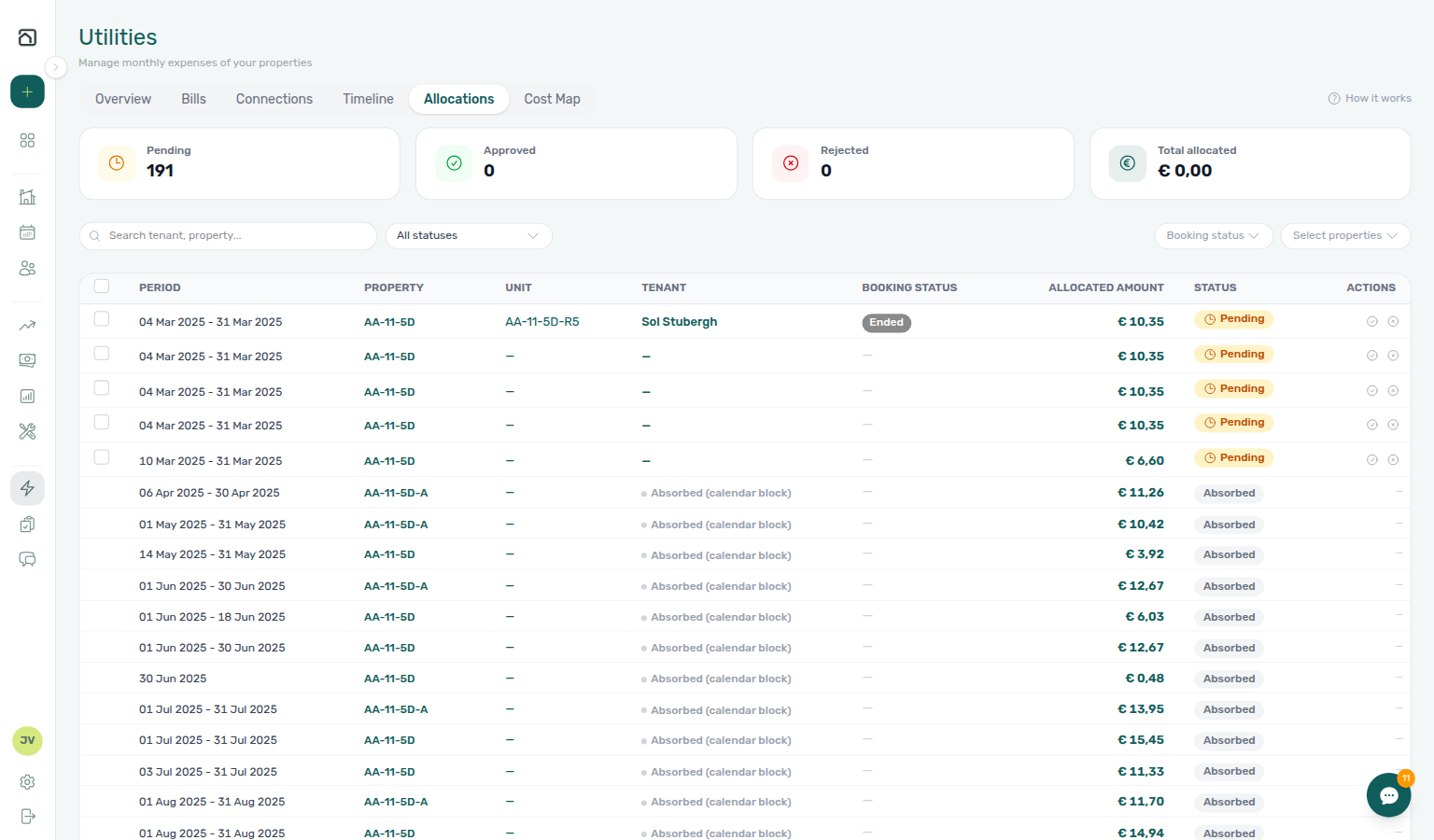
Six clickable scope cards replace the legacy Status dropdown. Each card shows a count and currency total; click a card to filter the table to that lane (the active card gets a highlighted border). Hover the status pill on a card for a short tooltip.
| Card | Meaning |
|---|---|
| Pending | Awaiting review — approvable or rejectable |
| Approved | Charged through the product (server state charged) |
| Rejected | Operator or Vivin rejected the proposed charge |
| Covered | Calculated period that costs the tenant nothing — within the rent-included budget, or All bills included on the unit. Teal badge. Not work: no Approve or Reject. The € on this card is consumption covered, not an amount to charge. See Covered periods. |
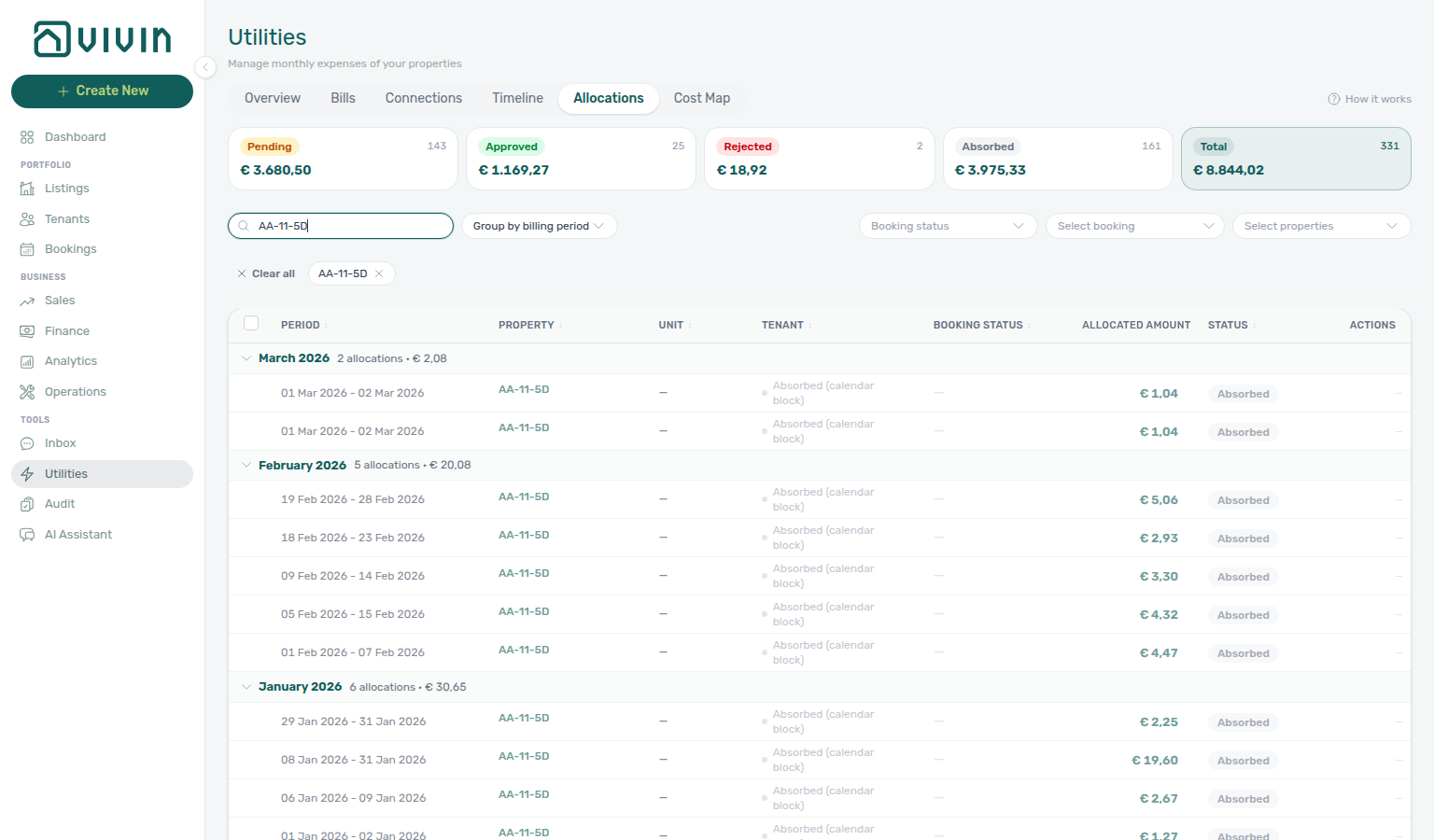
| Absorbed | Landlord-borne cost on a calendar block with no booking — read-only, never approvable or rejectable (grey badge) |
| Total allocated | Every allocation in the property-scoped summary, including Covered. The € on this card is the chargeable lanes (pending + approved + rejected), not Covered consumption. |
Card counts and euro totals come from a property-scoped server summary: they respect Select properties but do not change when you switch the active scope card, Booking status, Select booking, Search, or Group by. That keeps card labels stable while you drill into the table — row counts and footer totals always match the active filter set. Absorbed and Covered rows are excluded from the Pending, Approved, and Rejected lane counts so bulk approve/reject cannot sweep them in by mistake — Covered is its own status, so it never sits in Pending.
If this list needs a refresh
If this list needs a refresh — Use Retry on Allocations, or reload the page. See Tab refresh and Glossary — Directory list refresh.
Loading more
The allocation table loads in batches of 30 rows. Scroll near the bottom of the list to fetch the next batch (a loading indicator appears while the request runs). Changing the active scope card, Booking status, Deposit status, Select booking, Search, Group by, or Select properties reloads from the first batch.
Filters, grouping, and search
- Search — matches booking / property text in the allocation list (same debounced pattern as other modules), including the tenant’s concatenated full name when you paste first and last name together (for example
Maria Silva). - Scope cards — click Pending, Approved, Rejected, Covered, Absorbed, or Total allocated to filter the table (replaces the old Status dropdown). The tab opens on Total allocated.
- Group by — defaults to Billing period (monthly sections, newest first). Also Property, Tenant, or None (flat list with column sort). Grouped sections collapse/expand; Group by and column sort are mutually exclusive — picking a group mode clears the active column sort arrow, and clicking a column header drops grouping back to None.
- Booking status — narrow by Ongoing, Upcoming, Ended, or Cancelled stays (multi-select chips). There is no Refunded chip here — refunds are a separate booking flag, not a booking-status filter value. The menu stays open after each tick — see Booking status stays open.
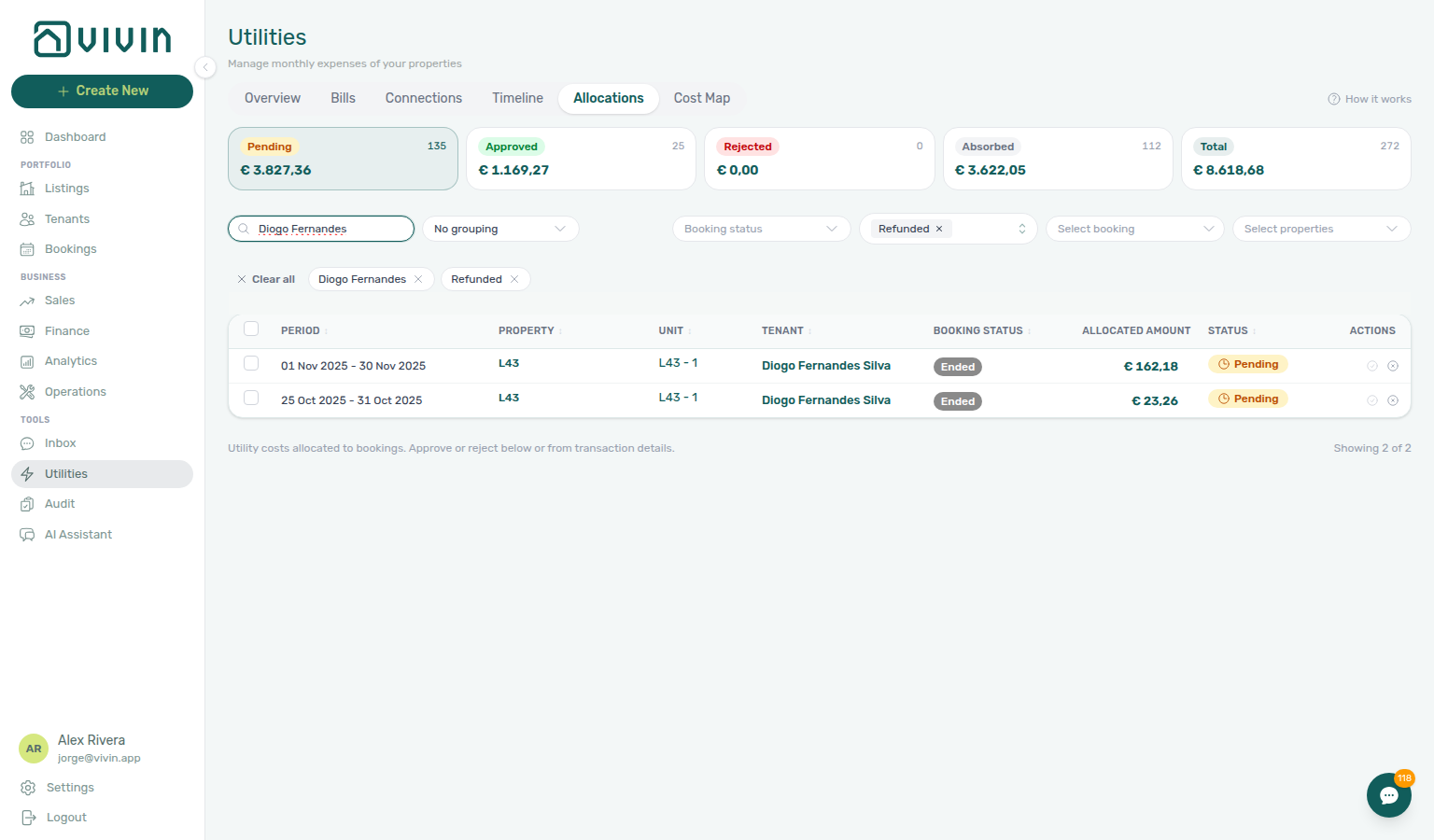
- Deposit status — the same lifecycle multi-select used on Bookings and Finance: Not paid, Partial paid, Fully paid, Disputed, Ready to refund, and Refunded. Use Refunded to list pending rows whose security deposit was already returned — those rows cannot be approved (see Deposit already refunded). Empty = all deposit statuses.
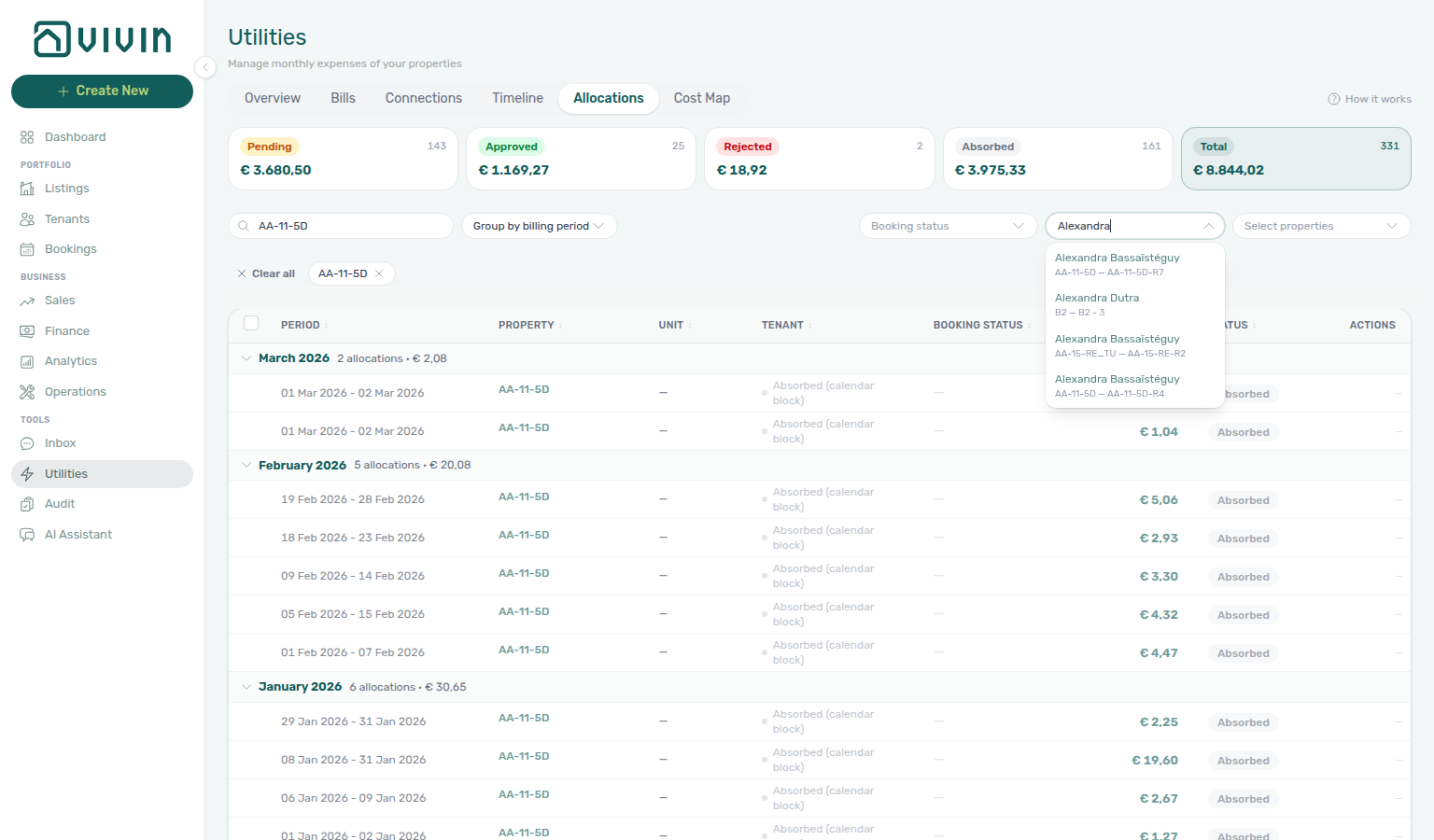
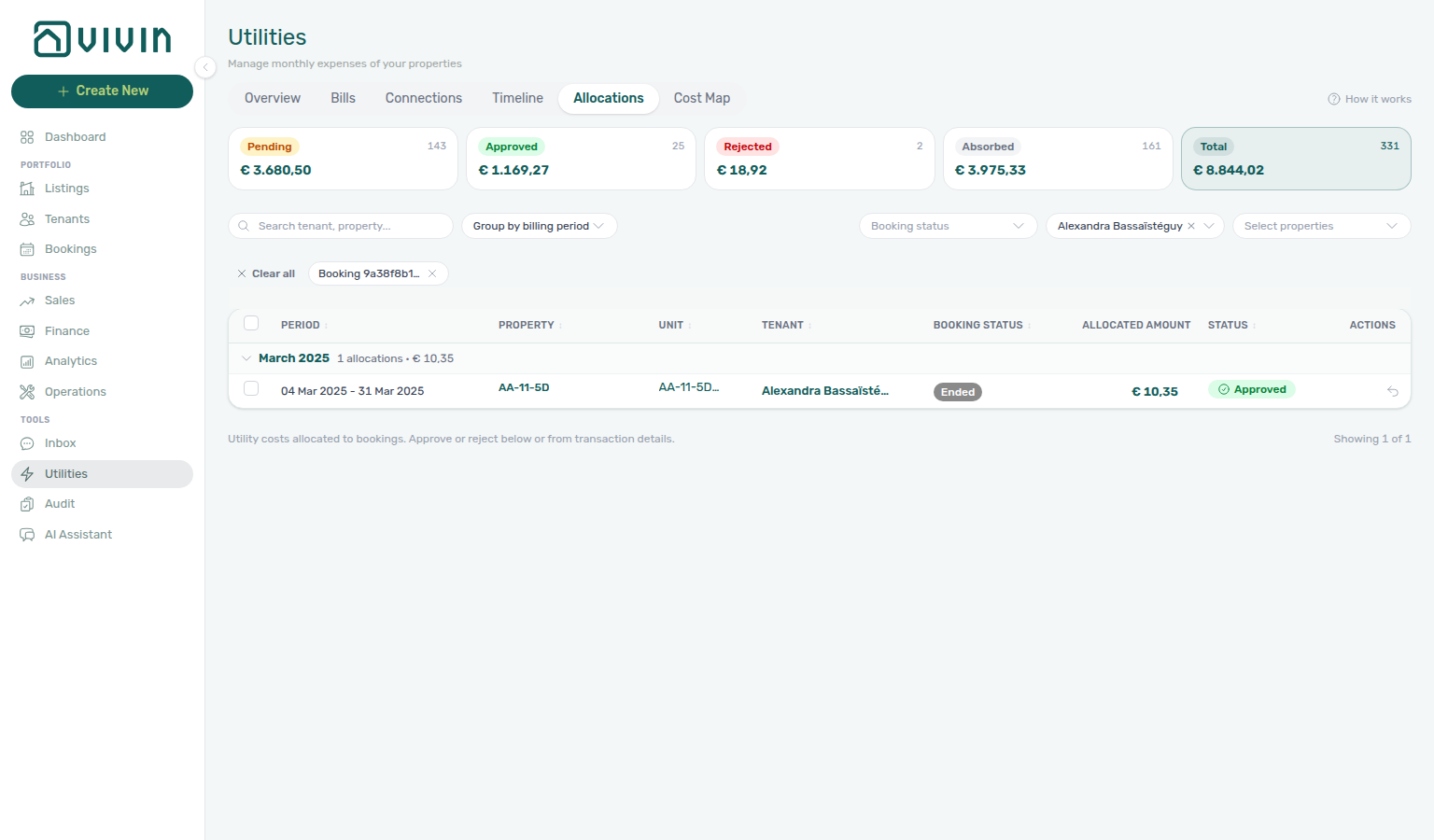
- Select booking — optional single-booking picker that scopes the table to one reservation. Open the control, search by tenant name, then pick a row (tenant + property — unit + contract dates). The trigger shows the tenant name; an active Booking chip shows a short booking-id prefix. Summary card counts stay property-scoped — only the table (and footer “Showing X of Y”) narrows to that stay.
- Select properties — portfolio scoping when the control is shown.
- Clear all — resets Search, Select booking, booking-status chips, deposit-status chips, and property selection. It does not change the active scope card or Group by mode.
Booking status stays open while you pick
Open Booking status, then tick a stay state. A chip appears under the toolbar; the menu stays open so you can tick a second state. You do not need to open Booking status again.
Search a tenant first when you want a known stay in view, then tick Ongoing, then Upcoming. Both stay checked in the open list. Dismiss the menu when the chips look right — same stay-open habit as Bills — Select type and Listings — Select types.
Open Select booking, search a tenant, and choose one stay — the dropdown lists matching bookings with unit and dates:
After you pick a booking, the table shows only that reservation’s allocations (here one Approved row for AA-11-5D-R4) with the Booking chip and tenant on the trigger:
Deposit already refunded
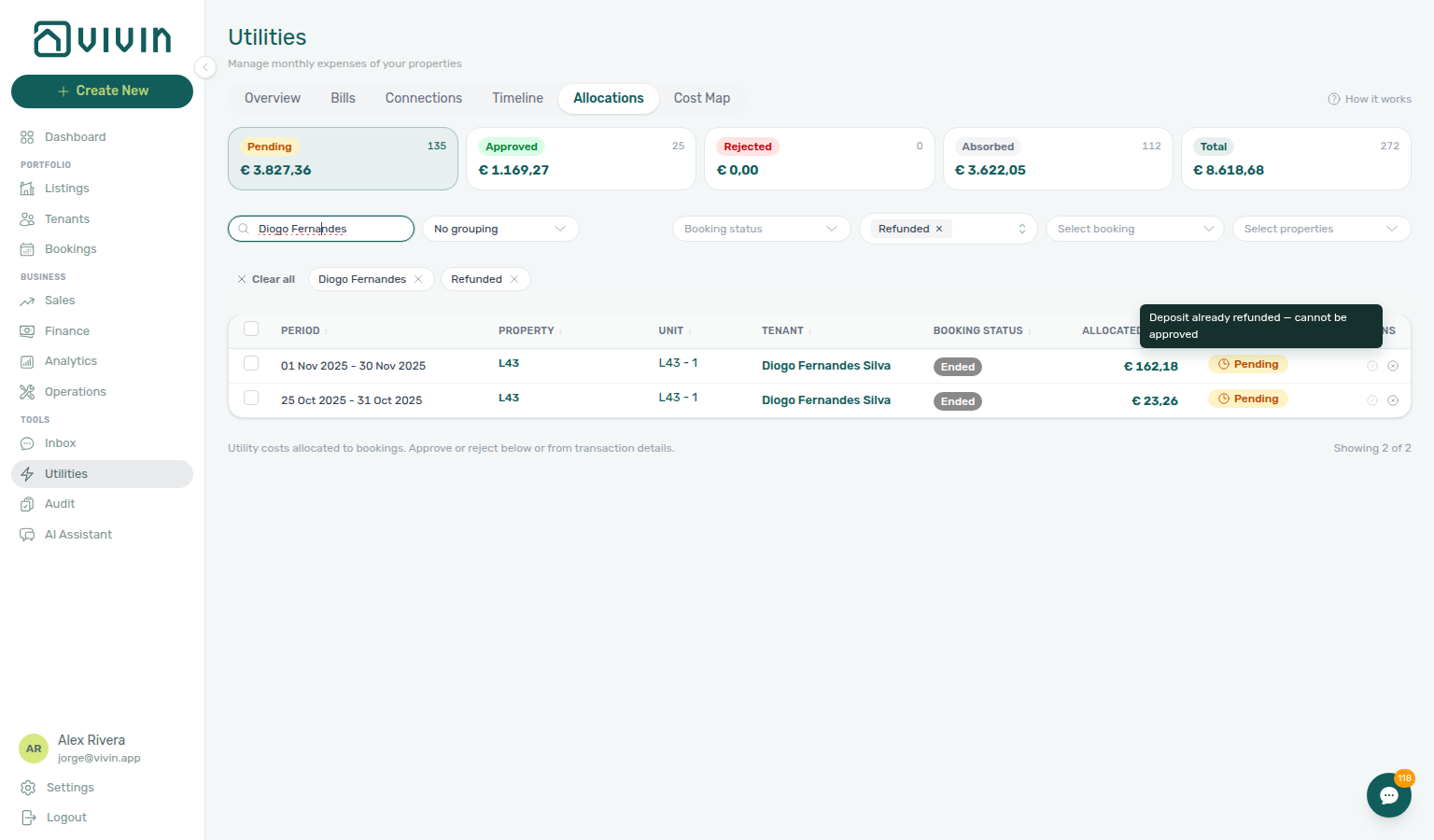
When a booking’s security deposit has already been refunded (or the refund was transferred), Vivin does not let you approve remaining pending allocation rows on that stay. Approving would add a utility charge after the deposit was already settled. Reject stays available so you can clear the proposed row without charging the tenant.
The row Approve control stays visible but disabled. Hover it to read Deposit already refunded — cannot be approved. This is not the same as a missing Approve payments permission — teammates with that permission still cannot approve these rows.
Find them on Pending with Deposit status → Refunded (same labels as Bookings / Finance). That filter is not Booking status — there is still no Refunded booking-status chip.
If the tenant still owes utility money after the deposit return, record a manual payment on the booking instead of approving the allocation. See Finance — Adding payments and Bookings — Deposit tab.
Sortable columns
When Group by is None, click column headers to sort server-side: Billing period, Property, Unit, Tenant, Booking status, Allocated cost, Extra to charge, and Status. Sort direction toggles on repeat clicks.
The table has two money columns so you can tell consumption apart from what the tenant would pay:
| Column | What it shows |
|---|---|
| Allocated cost | Consumption assigned to this booking (or calendar block) for the period — context, not what the tenant owes. |
| Extra to charge | What the tenant would pay after the period allowance. € 0,00 on a Covered row is a real zero (covered, not missing). — on an Absorbed row: no tenant, so nobody to charge; the cost already sits under Allocated cost. |
Row details and drill-ins
Expand a row to see a per-utility breakdown (electricity, water, gas, internet), Total bill value, Allowance for the period (the Bills Included cap Vivin actually subtracted for these days — not the full monthly ceiling on a partial month), days calculated, and Amount per booking. Bills included in the period lists the supplier invoices that fed the row (bill number, dates, amount) so you can check the figures against Received. On Covered rows the allowance cell shows All bills included when the unit has No cap, and a teal banner states that nothing is missing.
In-page drill-ins — click the tenant name to open the booking sidebar; click unit or property cells to open the listing or property sidebar without leaving Utilities.
Covered periods (nothing to charge)
A Covered row means the period was calculated and the tenant owes nothing — pair with All bills included when the unit has No cap, and with Entering Monthly Utility Bills — Step 4 when you are checking that bills landed.
When a bill is processed and the tenant’s share stays inside what rent already includes, Vivin still creates a row. Covered is that outcome: the period was calculated, the bills are on file, and Extra to charge is € 0,00. An empty table used to look the same as a month nobody uploaded — the Covered badge is how you tell them apart.
Covered is not work. There is no checkbox, no Approve, and no Reject. The row never appears in Pending, never inflates the pending count, and never posts a payment-plan line. Hover the teal Covered badge for which kind:
| Kind | Badge tooltip | When you see it |
|---|---|---|
| Within budget | Consumption stayed within the budget included in the rent — nothing to charge. | Bills Included (or the prorated Allowance for the period) covered the share. |
| All bills included | This unit includes all bills in the rent — nothing is ever charged on top. | The unit has All bills included (No cap). |
Expand the row. The teal banner reads that the bills below were included and no bill is missing. Then check Bills included in the period and Allowance for the period.
A later bill for the same period can push consumption over the allowance. Vivin then replaces the Covered row with a Pending overage — you will not see Covered and Pending together for that stay and month. Recalculate Allocations also rebuilds Covered rows (Approved rows stay).
A calendar block on the same unit (owner stay, maintenance hold, or other Absorbed row) does not take the tenant’s Covered line with it. See Calendar blocks do not replace Covered.
Click the Covered scope card to list only these periods. Prefer a stay whose Extra to charge is already € 0,00 when you are teaching the tab — do not Approve, Reject, or Recalculate to create the example.
Calendar blocks do not replace Covered
A calendar block is an Absorbed row (no tenant). Covered is a stay that was calculated and owes nothing. Recalculate Allocations rebuilds Covered from current bills — it does not let a block overwrite that stay.
When the same unit has a stay whose utilities are Covered and a calendar block in the same month, Vivin keeps both rows:
| Row | Who it belongs to | Extra to charge | What you do |
|---|---|---|---|
| Covered | The booking (tenant) | € 0,00 | Nothing — not work |
| Absorbed | The calendar block (no booking) | — | Nothing — landlord-borne, read-only |
Click Covered and Absorbed as separate scope cards. You will not see a Covered stay vanish because a block exists on that unit. Overnight rebuilds and Recalculate Allocations follow the same rule.
That is different from a later bill for the same stay and month that pushes consumption over the allowance — that still replaces Covered with a Pending overage. It is also different from All bills included (No cap), which is always Covered and never a block.
Do not Recalculate Allocations, Approve, or Reject to create the example. Prefer a unit that already shows a teal Covered stay and a grey Absorbed block in the same billing period.
Bulk actions
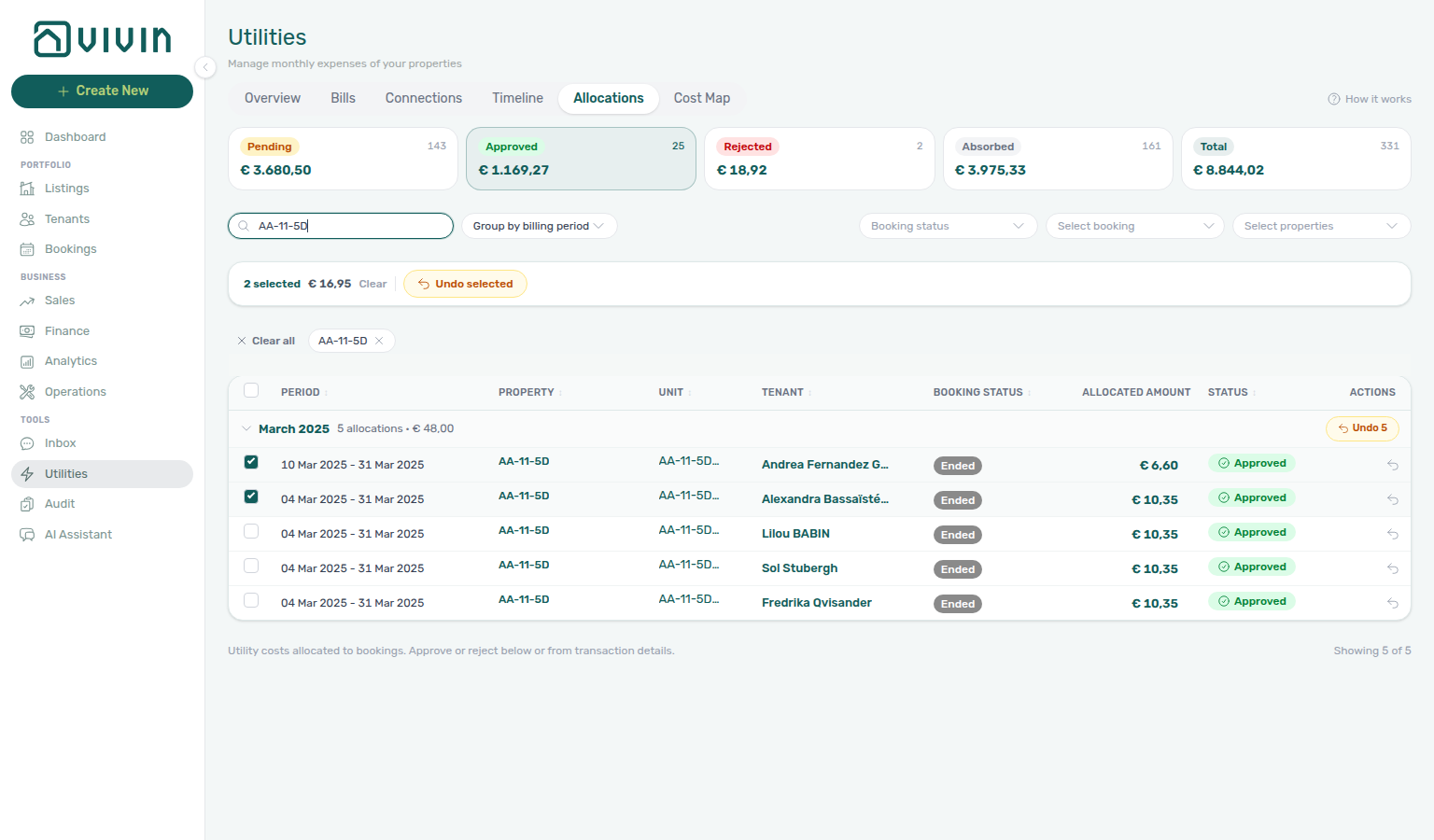
When one or more pending rows are selected, Approve selected and Reject selected appear on a floating bar with the selection count and total €. Large selections are sent in chunks of 500 ids per request so very wide approve/reject passes do not fail on the server cap. When one or more approved (charged) rows are selected, Undo selected appears instead — you cannot mix pending and approved rows in one selection.
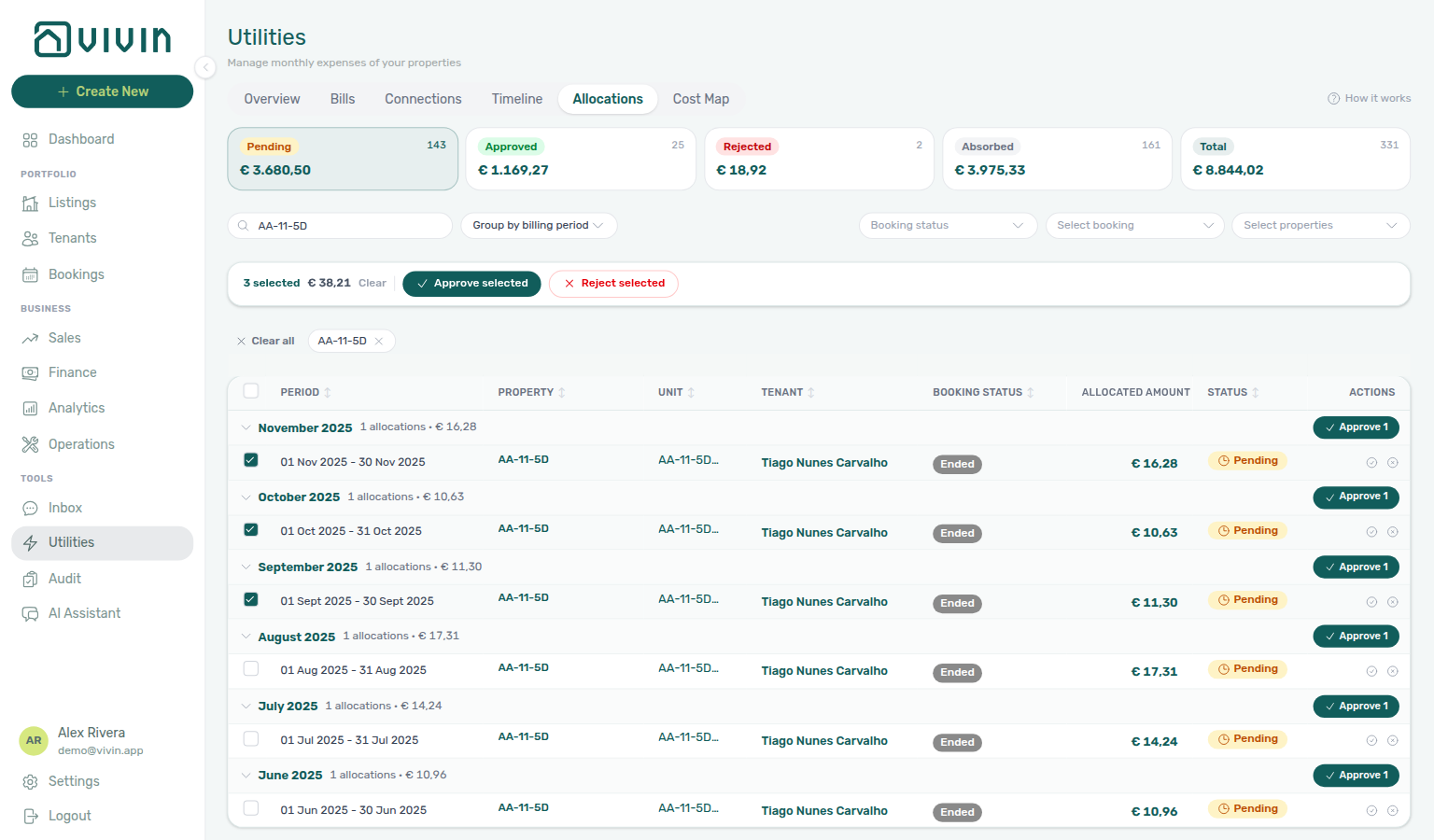
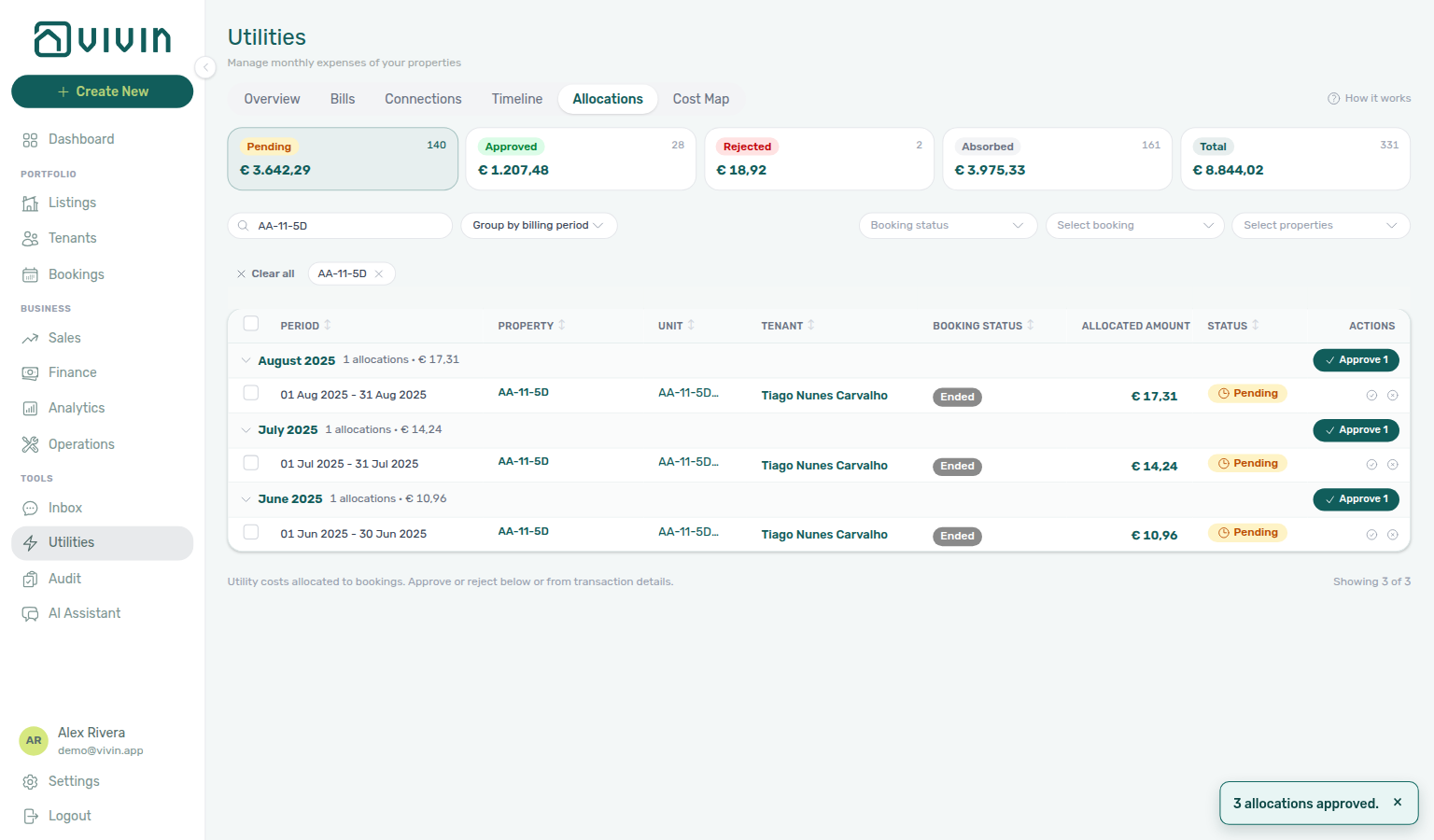
Bulk Approve selected / Reject selected report what actually landed — not only how many ids you sent. A fully successful batch shows a short confirmation (for example 3 allocations approved.) and clears the selection. Mixed results use toast counts for succeeded, skipped (already approved/rejected, invoiced, or no longer available — for example a teammate charged the same row while your batch was running), and failed. When every skipped approve is because the deposit was already refunded, the toast names that reason and asks you to use a manual payment for amounts still owed. Rows that failed stay selected so you can run the action again. When every skipped reject is already invoiced, the toast calls that out and asks you to credit those invoices before unwinding them. Undo selected uses the same succeeded / skipped / failed pattern (see below).
Undo approval returns mistaken approvals to pending without changing charges that are already invoiced:
| Control | When it appears | What it does |
|---|---|---|
| Undo approval (row menu) | Approved scope card or table row in charged status | Opens a confirmation dialog, then moves that allocation back to pending. |
| Undo selected (bulk bar) | Multiple charged rows selected | Same as row undo; processes ids in chunks of 500 per request. |
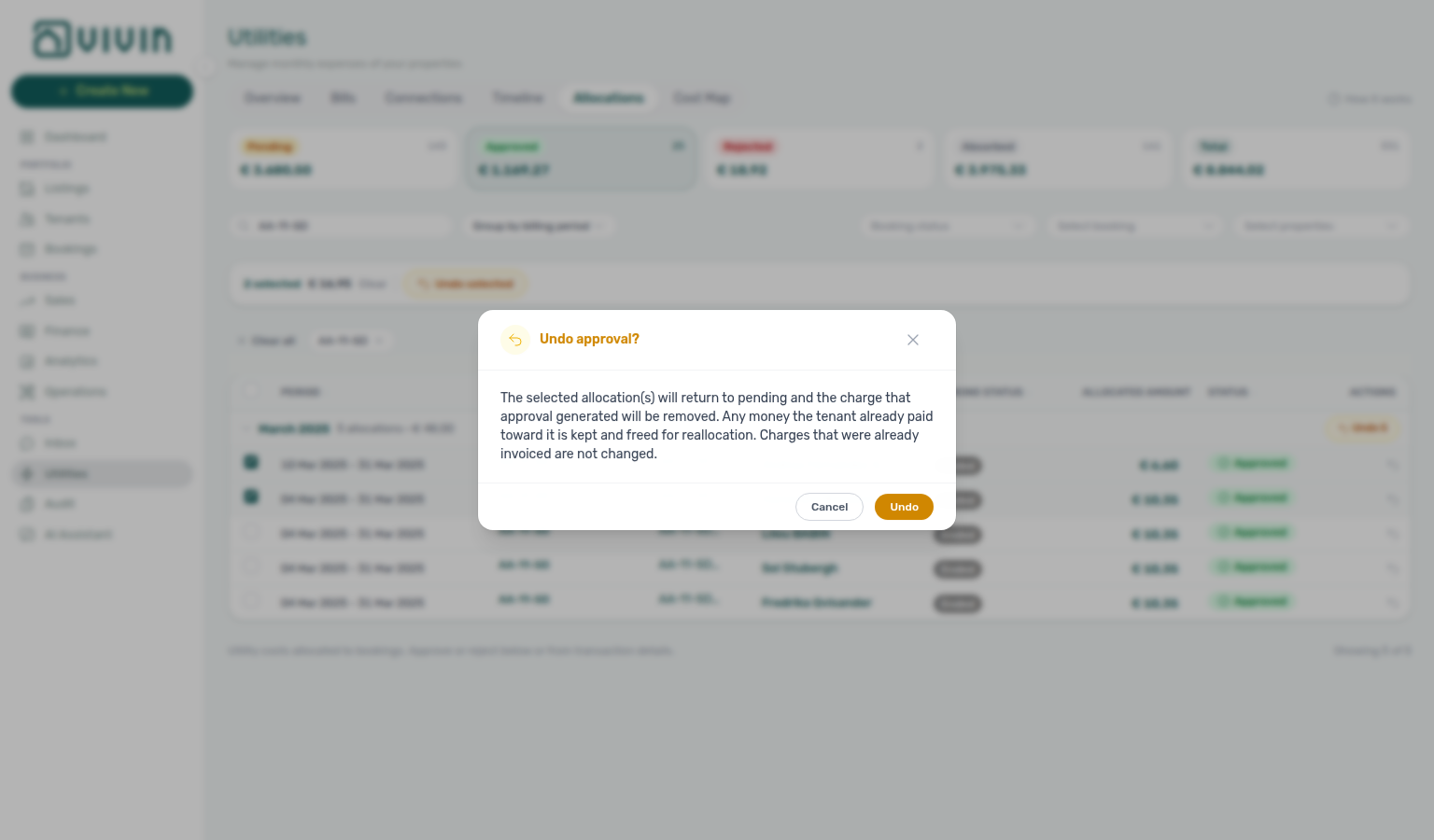
The confirmation copy shows how many allocations and the total € value will return to pending. Invoiced charges are untouched — if the tenant receipt was already invoiced, undo is blocked with "Cannot undo: the charge has already been invoiced." Bulk undo may partially succeed: the UI reports how many rows were undone, skipped (already invoiced/paid or no longer approved), or failed. Use Finance → Transactions → Reject or Revert when money already posted and you need a credit note instead of undoing the allocation row.
Undo approval and Undo selected follow the same finance.approve_payments permission gate as Approve / Reject — buttons stay visible but disabled for roles without that permission.
Open the Approved scope card to review charged rows. Each row shows an Undo approval control (curved arrow) in Actions:
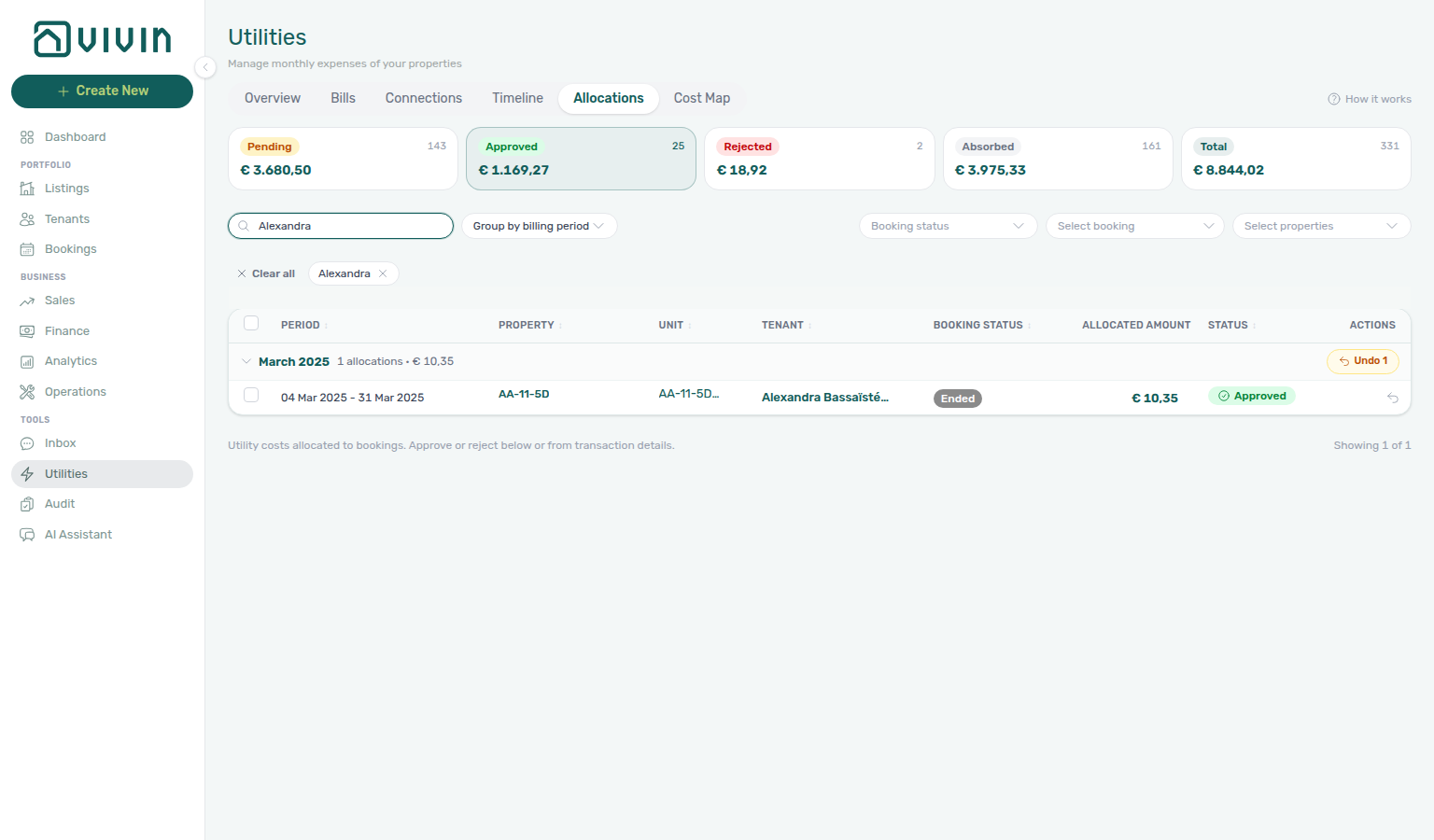
Select one or more Approved rows to reveal the bulk bar with Undo selected:
Undo selected (or the row control) opens a confirmation modal — Cancel leaves the rows as they are; Undo returns the rows to Pending and removes the generated charge:
Absorbed and Covered rows have no checkboxes or row actions. If an overage charge was already invoiced and you must remove a mistaken tenant receipt, Reject selected on Finance → Transactions (or Reject payment on the booking) shows the same credit note warning as other ledger actions — see Entering Monthly Utility Bills — Step 4b.
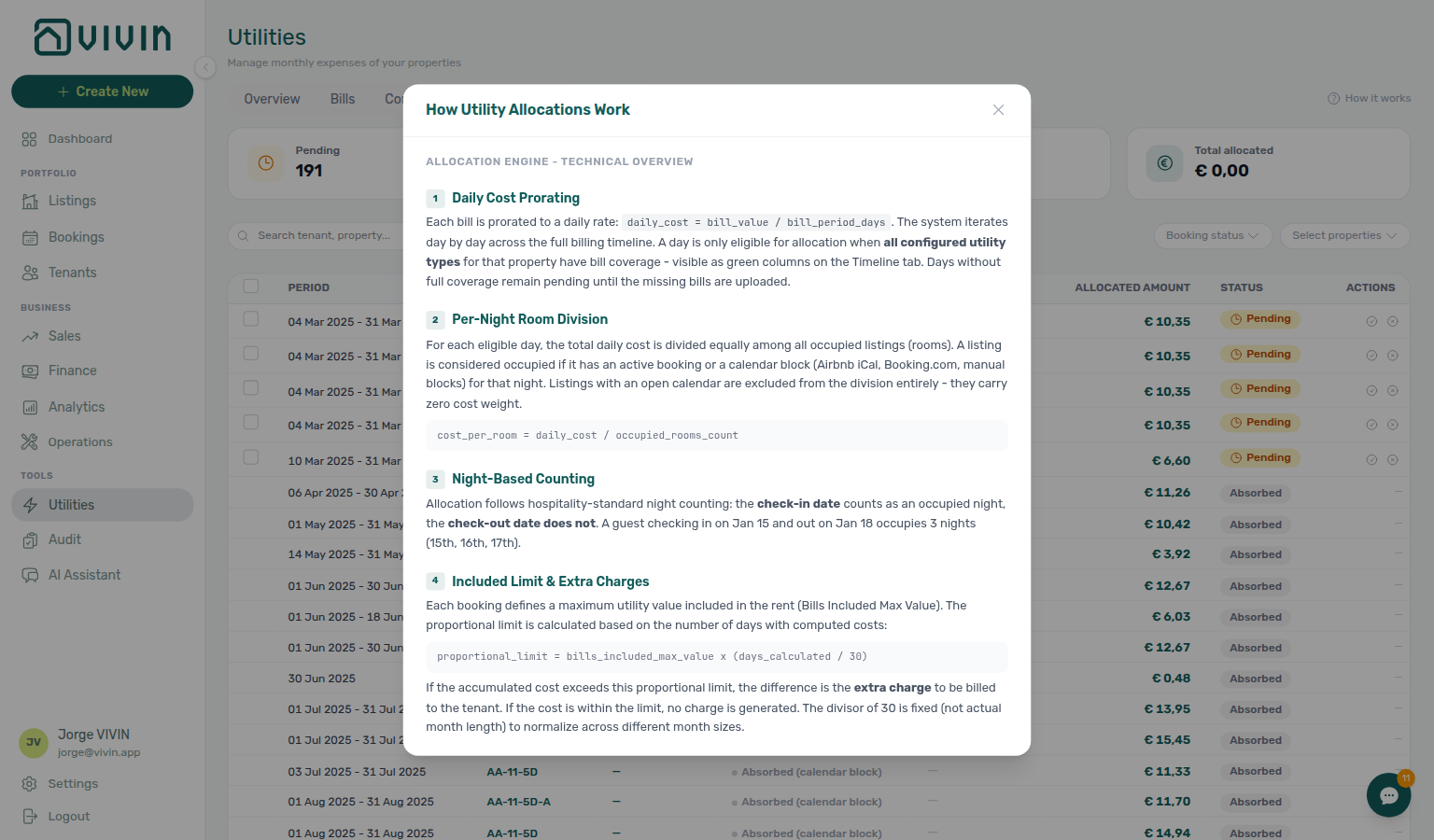
Approve, Reject, and the matching bulk controls require the finance.approve_payments permission (the UI keeps the buttons visible but disabled without it). Roles without that grant can review allocations, filters, and breakdowns, but turning a pending row into an approved charge or a rejection needs a teammate who has the permission. Use How it works in the tab header for the in-product explanation modal.
Help
Click How it works (question-mark control) to open the allocations explainer without leaving the page.
Pending scope card narrows the table to rows awaiting review (the table and footer totals update for that slice; summary card counts stay property-scoped):
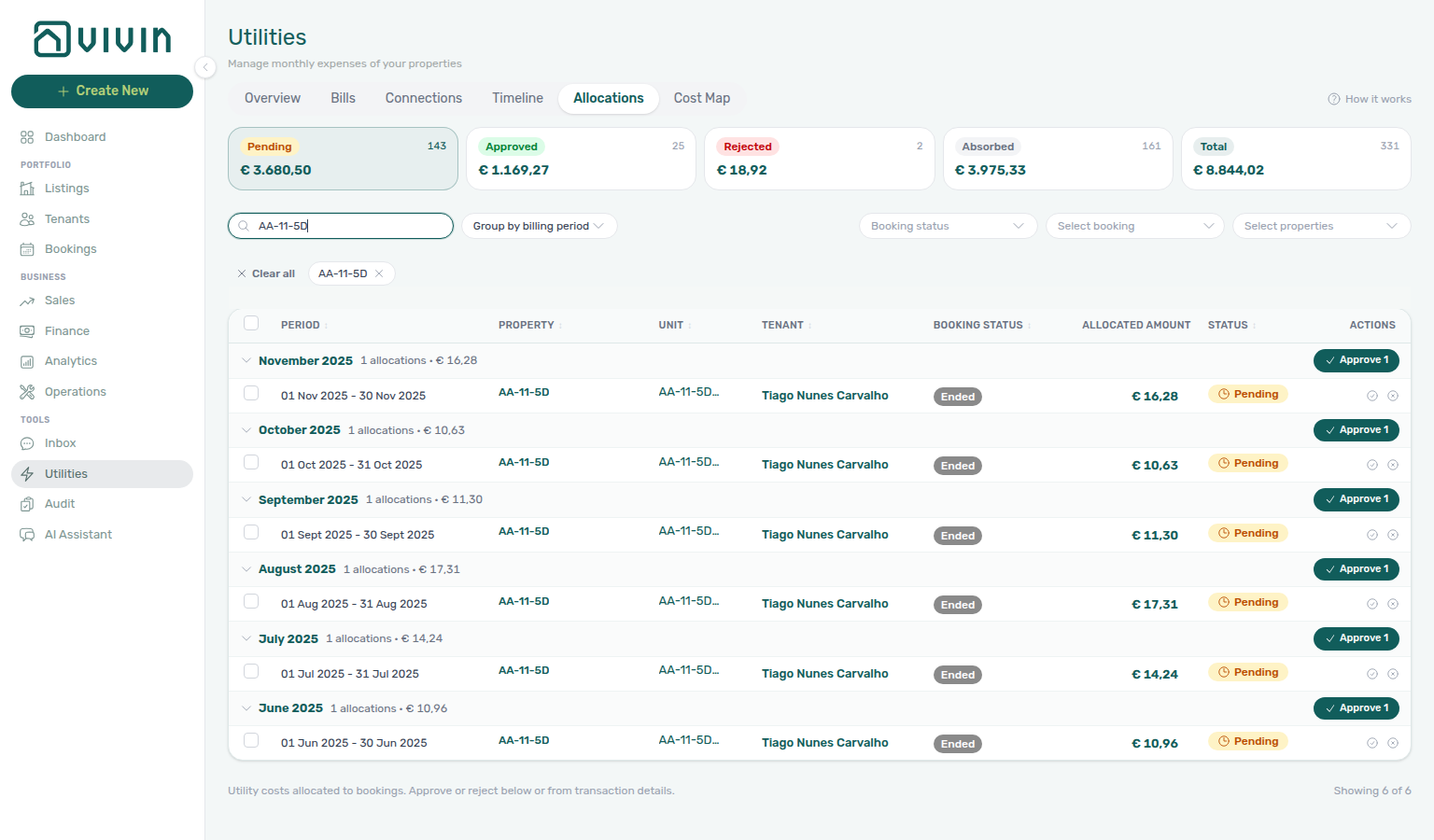
Expand a row to inspect the per-utility breakdown (Allocated cost, Extra to charge, Allowance for the period, days calculated, and the booking share) before approving or rejecting — on Covered rows the extra is € 0,00 and the banner states no bill is missing:
How it works opens an in-page explainer modal (status lifecycle, who can approve, and how charges reach tenant schedules):
Smart Cost Distribution
Vivin supports flexible methods for distributing utility costs to tenants:
- By room — split costs equally across all occupied units in a property.
- By usage — allocate based on individual consumption data when sub-metering is available.
- By days of stay — prorate costs based on how many days each tenant occupied the unit during the billing period.
When Account Settings → Utilities → Charge Time is End of Booking, Vivin defers creating an allocation row for a stay until its check-out date has passed — but while that stay is still occupying a unit, it still counts toward how many rooms share each day’s overage. Example: two coliving rooms share one electricity bill; tenant A checks out in June while tenant B stays through August. March overage is split 50/50 across both rooms for every day both were occupied; tenant A’s charge posts only after A’s checkout, and tenant B’s share posts after B’s checkout — A is not charged for B’s remaining weeks. With Every Month, active bookings receive their share during the billing month instead. See Glossary — End-of-Booking cost split.
Distribution methods are configurable per unit, property, or building to match your management style. Once calculated:
- Charges can be added to tenant invoices as part of their regular payment schedule.
- Alternatively, charges can be deducted from the security deposit at check-out.
- Tenants are notified automatically with a full, transparent cost breakdown showing how their share was calculated.
How Tenant Overage Charges Are Created
Overage flow pairs with Finance — Contract Values tab and Tenant Portal — Utilities — segment clusters with Finance — Tenant category filter.
When a bill is entered and exceeds the Bills Included ceiling, Vivin automatically generates an overage charge for the affected tenants. Here is the full flow:
- Bill entered for Property A, Electricity, March, €80
- Ceiling checked — Property A has Bills Included of €50 for electricity
- Overage calculated — €80 − €50 = €30 overage
- Tenants identified — all active bookings in Property A during March are identified
- Allocation row created — pending rows appear on Utilities → Allocations for operator review when the share exceeds the period allowance (and Account Settings → Utilities has Tenant Notification set to Charge or Notify & Charge). When the share stays inside the allowance, Vivin still creates a Covered row with Extra to charge € 0,00 — that is calculated, not a missing bill. Units with All bills included (No cap) also get a Covered row (never a pending overage) — they still count toward how many occupied rooms share the bill, so other rooms keep the same split.
- Approved and charged — Vivin internal users approve the allocation. Both Charge and Notify & Charge add a line to the tenant payment plan on approval; Notify & Charge also notifies the tenant about the overage. Covered rows cannot be approved.
- Tenant notified — when your communication rules cover utility charges, the tenant may receive email or portal messaging about the new amount
If multiple units exist within a property and each has a different Bills Included ceiling (configured at the unit level), the overage is calculated independently for each unit. All bills included on a unit is stronger than a ceiling: that room is fully included, with a Covered row and no overage to approve.
Key Business Rules for Utilities
-
Bills Included is a per-property ceiling. Set it during property creation (Step 3) or edit it afterward in the property's payment settings. It represents the maximum utility cost absorbed into the rent — anything above this becomes a tenant charge. To include all utilities on one unit with no euro cap, tick All bills included (No cap) on that unit’s Rent pricing instead.
-
Missing bill data = missing overage charges. If you forget to enter a utility bill for a month, no overage will be calculated for that period. Use the "Days Missing Data" chart in the Overview tab to identify and fill gaps. A Covered row with Extra to charge € 0,00 means the bills were processed — that is not a missing month.
-
Billing periods must be accurate. A bill must be assigned to the period it covers, not the period it was received. Entering a January bill in February is fine — just ensure the billing period is set to January.
-
Account IDs must be unique per utility per property. Each utility connection requires a unique account ID. If two properties share the same electricity meter (unusual but possible), they will share the same connection entry.
-
Overages are calculated at the property level by default. If your property has multiple units, the overage is split across all active bookings. Configure Bills Included at the unit level if different units should have different ceilings. A unit with All bills included gets a Covered row (nothing to charge) and does not change the split among the other occupied rooms.
Utilities guide subsection index
This index pairs Utilities tab sections with Related subsections — use it when overage lines on Bookings — Payment Plan disagree with Allocations or Finance ledgers.
Utilities section cross-reference
Use the sections above for this module. Related pages are linked from Related below when present, or from Modules.
Related
Related below links this module to settings, concepts, workflows, and escalation paths.
Documentation map & escalation
- Modules hub — Hub pairing matrix across operator workspaces
- Management Frontend Deep Links — Bookmark
/utilitiestabs (Overview, Bills, Cost map) - Glossary — Term definitions used across utility billing and overage workflows
- Utilities section cross-reference — Tab-to-module pairing table on this page
Upstream & downstream workflows
- Entering Monthly Utility Bills — Step-by-step monthly billing workflow paired with this module
- Portfolio KPI review — Reconcile Days Missing Data and Missing bill gaps during month-end review
- Handling a Late Payment — Step 1 — Triage unpaid overage lines on tenant payment plans after payment overdue row-click
- Notifications — Payment overdue alerts — Operator Payments category rows when approved utility overage lines pass due date without pay-in
- Notification triage — Clear utility-charge or payment alerts after posting bills
- Managing a Check-out & Deposit Refund — Final utility overages to settle before deposit release (Step 5)
- Onboarding a New Property — Wire utility IDs during property wizard Step 6 before first bill upload
Deeper workflow reads
See Upstream & downstream workflows above for the same guides.
Settings that shape Utilities
- Settings > Utilities — Chargeable utility types, Tenant Notification (None / Charge / Notify & Charge), and Charge Time (Every Month / End of Booking)
- Settings > Categories — Charge-type tags on utility overage line items in the payment plan
- Settings > Tenant categories — Segment definitions when utility overage collections cluster on one cohort — pair with Finance — Tenant category filter and Entering Monthly Utility Bills — Step 4
- Settings > Preferences — In-app notifications — Account-wide utility or payment alerts after overage lines post
- Settings > Emails — Utility overage reminder Communication Rules after bills post to Payment plan
Deeper concept reads
- Automation & AI — AI invoice reader and property-matching pipeline behind Upload bills
- Landlord MCP — Account-scoped
create-bill,list-bills,get-bill, andget-bookingfor bill entry, ledger review, and overage spot-checks — see Entering Monthly Utility Bills; prefer UI Upload PDF for AI extraction - Tenant MCP — Booking-scoped
get-payment-infoandnotify-landlordwhen external assistants surface utility overage context — parity with Tenant Portal — Utilities - Create New menu — Upload Utility Bills — Batch PDF upload without opening Utilities first
- Tenant Portal — Where tenants view utility consumption and charges when portal utilities access is enabled
- FAQ — Tenant contract signing blocked — No PDF yet, mandatory Your Details gates, category locks, or Lease purpose; portal signing vs paper upload on Contract Info
- Payment Allocation — Correcting mistaken receipts — Reject and revert on Finance → Transactions
- Integrations & Distribution — Utility billing is independent of marketplace distribution; configure types under Payments settings first
- Booking Lifecycle — Computed Upcoming → Ongoing → Ended / Canceled status model, list filters, and Timeline
Operator modules (pairing surfaces)
- Audit — Discounts tab — Portfolio-wide discounted contract values when reconciling utility overage goodwill or rent relief
- Finance > Contract values — Portfolio export when reconciling utility overages across bookings
- Finance — Tenant category filter — In Debt triage by tenant segment when overages cluster (Step 4 of Entering Monthly Utility Bills)
- Bookings — Tenant categories stays open — Mirror segment filter when Finance Overview still shows the old segment
- Tenants — Tenant category filter — Profile-count cross-check before changing utility notification rules account-wide
- Analytics — Maintenance tab — Utility spend spikes alongside Operations linked cash flows
- Dashboard module — Occupancy and Days Missing Data KPIs that pair with Utilities Missing tabs
- Sales — Overview tab — Occupancy heatmap when utility overages correlate with vacancy signals
- Listings > Creating a New Property — Configure utility IDs and Bills Included ceilings
- Listings — Step 3 Extra payments — Bills Included ceiling source for overage calculations documented on this page
- Bookings > Payment Plan Tab — Where tenant overage charges appear
- Bookings — Contract Info — Per-booking Bills Included ceiling overrides the property default
Operator habit hubs
Day-to-day operator habits (lockout catch-up, pending receipts, payment triage, handoffs, and related playbooks) live on the Common Workflows habit hub.
Deep-link anchors for habit hubs
Lockout catch-up after password recovery
Pending manual receipt approval
Reject/revert mistaken receipts
Check-out ledger cleanup before refund
Utility overage collections
Cancellation collections before void
Check-out collections before refund
Handling a Late Payment collections
Check-out vs cancellation
Deposit missing on Finance Deposits
Notification row-click navigation
Payment alert to receivables triage
Finance debt receivables triage
Finance Income status drill-down
Cash flow forecast drill-down
Confirmation alert triage
New inventory to first booking handoff
Property setup to first arrival handoff
Confirmation to check-in handoff
Check-in to check-out handoff
Check-out final utilities handoff
Same-day turnover coordination
WhatsApp per-booking messaging
Bot reasoning (audit)
ChatBot settings
Rent reduction after invoicing
Occupancy KPI to block hygiene handoff
Partly collected security deposit
Month-end invoicing (fixed date)
Bulk Hostkit invoicing
Portfolio segmentation by tenant category
Directory list refresh
When a list needs a refresh instead of showing rows, use Retry or reload the page. Zero rows after a successful load means your filters matched nothing — widen filters or clear search.
See FAQ — Directory list refresh and Glossary — Directory list refresh.
Key glossary terms
- Glossary — End-of-Booking cost split — Charge Time → End of Booking splits daily overage across every occupied unit; still-staying roommates stay in the denominator
- Glossary — Change history — Operator-initiated edits on Listings setup and Bookings Changelog; create-time defaults excluded
- Glossary — Archived booking ledger visibility — Delete Booking hides manual/provider_platform rows on Finance → Transactions; vIBAN and credit card stay visible
- Glossary — Finance tenant category cache refresh — Recategorizing a tenant updates
booking.tenantCategoryIdimmediately; ledger tabs reflect it on reload, while Overview can lag up to ~10 minutes - Glossary — SIMAR water contract ID — SIMAR (Loures e Odivelas) water bills use Cód. Local in Connections — not Nº de Contador; leading zeros stripped
- Glossary — Per-booking maintenance ticket opt-out — Add booking checkboxes skip automatic CI/CO tickets for one reservation only; property rule unchanged
- Glossary — Full term list
API & companion guides
- API Reference — Listings & Availability — Partial
ListingDtobillsIncludedMaxValueceiling partners read; operator overages reconcile here when actual bills exceed it - API Reference — Booking Engine API — White-label
PUT /listingwrites that pushbillsIncludedMaxValueback into Vivin
Module documentation hubs
- Utilities module — Hub for Bills Included ceilings, Connections, AI bill upload, and tenant overage charges (this page)
- Operations module — Maintenance tickets, cash flows, check-in/out coordination, Draft ticket queues, and linked cash flows (hub)
- Dashboard module — Post-login Today, Total debt, Vacant Units, and forecast KPI snapshot with bell notification triage (hub)
- Analytics module — Month-range portfolio KPI charts (Overview, Revenue, Occupancy, ADR, RevPAR, Maintenance) with rankings and heatmaps (hub)
- Listings module — Property wizard, Channels tab, Archived inventory, and unit management (hub)
- Properties workspace — Legacy
/propertiesURL redirects into Listings (hub) - Booking engine details — Rich marketplace payload editor via the Full integration pill (hub)
- Finance module — Portfolio ledgers (Overview, Income, Contract Values, Transactions, Payouts, Deposits) with payment approval and deposit settlement (hub)
- Tenants module — Tenant directory, profile sidebars, With Debt segmentation, and table expand for linked bookings (hub)
- Sales module — Portfolio availability, monthly rent editing, and channel manager connections (hub)
- Inbox module — Portfolio-wide WhatsApp workspace with Dashboard bell Inbox sub-tab deep links (hub)
- Notifications module — Full
/notificationshistory with search, filters, and row-click navigation (hub) - AI Chat module — AI Assistant using Landlord MCP tools for portfolio Q&A (hub)
- Audit module — Portfolio-wide Manual Blocks and Discounts contract-value review (hub)
- Account Settings — Workspace-wide financial policies, templates, integrations, and operational defaults (hub)
- API Reference hub — Partner HTTP contracts, Swagger onboarding, and partial vs full feeds (hub)