Tenants
Open Tenants as setup step 15 after Bookings (step 14) and Listings (step 13) — complete Getting Started — Recommended Setup Sequence steps 1–12 first. Requires Tenants module permission (tenants.module). After go-live, pair With Debt triage with Finance and Handling a Late Payment.
Open Access Path and Interface overview for toolbar filters, then use Core Workflows — especially With Debt triage paired with Finance. Segment with tenant category filter like Bookings and Finance. Guide subsection map: Tenants guide subsection index (directory, profile, and segment sections + Related subsections). Habit-specific shortcuts live under Related below.
The Tenants module gives your team a tenant-first workspace for day-to-day follow-up. Instead of starting from a booking, you can search and segment your full tenant base, open a tenant profile, and review bookings, payment plans, and transaction history from one place.
Jump to reservations in Bookings; triage With Debt in Finance Contract Values. During month-end With Debt triage alongside Portfolio KPI review — Step 7, poll AI usage API (landlord_chat) when teams leaned on AI Chat for debtor lookups — there is no in-app ledger screen yet
Access Path
- Sidebar path: Portfolio > Tenants
- Route:
/tenants - Direct link: platform.vivin.app/tenants
In the current product navigation, the Tenants sidebar entry is grouped with Listings and Bookings in the Portfolio section. See Deep Links for all management frontend routes.
Not sure which Portfolio item holds people search and per-person debt? Ask AI Chat “Where do I open Tenants to find a person, see their bookings, and review debt across stays?” — then open Portfolio → Tenants (ai-chat-product-context-tenants-reply.png, ai-chat-product-context-tenants-flow.mp4). The assistant may say left menu without naming Portfolio. Portfolio-wide debt stays on Finance; reservation-first work stays on Bookings.
Need the person-first directory — search, segment, and per-person debt across stays (not a single reservation in Bookings, and not portfolio-wide ledgers on Finance)? Ask AI Chat “Where do I open Tenants to find a person, see their bookings, and review debt across stays?” — then open Portfolio → Tenants (ai-chat-product-context-tenants-reply.png, ai-chat-product-context-tenants-flow.mp4). The assistant typically says Tenants in the left menu (may omit the Portfolio group name). Canonical route: /tenants.
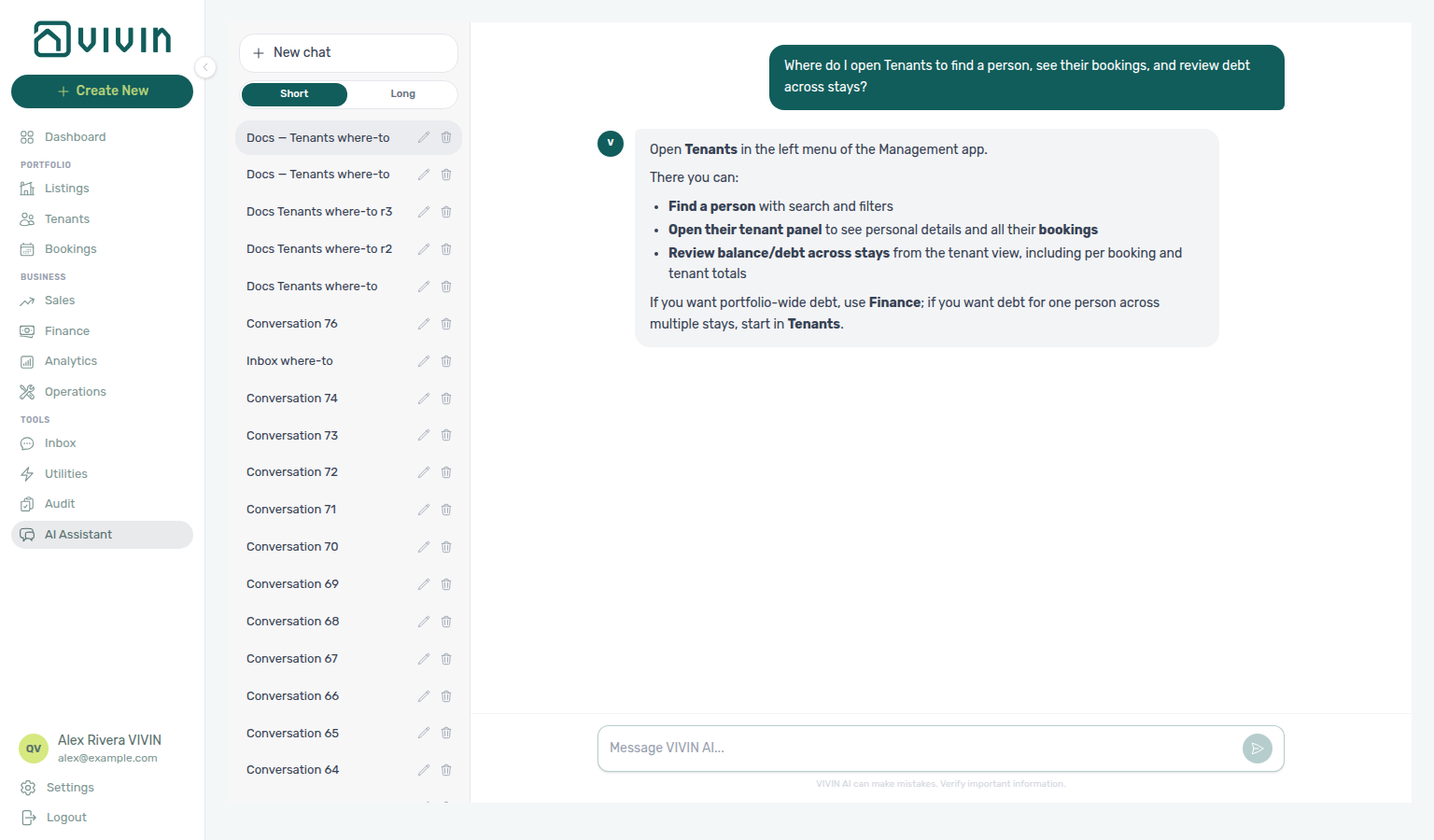
Opening a tenant by URL
Append the tenant UUID to open the profile sidebar directly, for example /tenants/<tenantId>. If the id does not exist or is outside your account scope, the app shows Tenant not found., clears the bad segment, and returns you to /tenants — see Deep Links — Broken entity deep links.
What You Can Do in the Tenants Module
The module opens on a list/grid of tenant records with fast filtering and search:
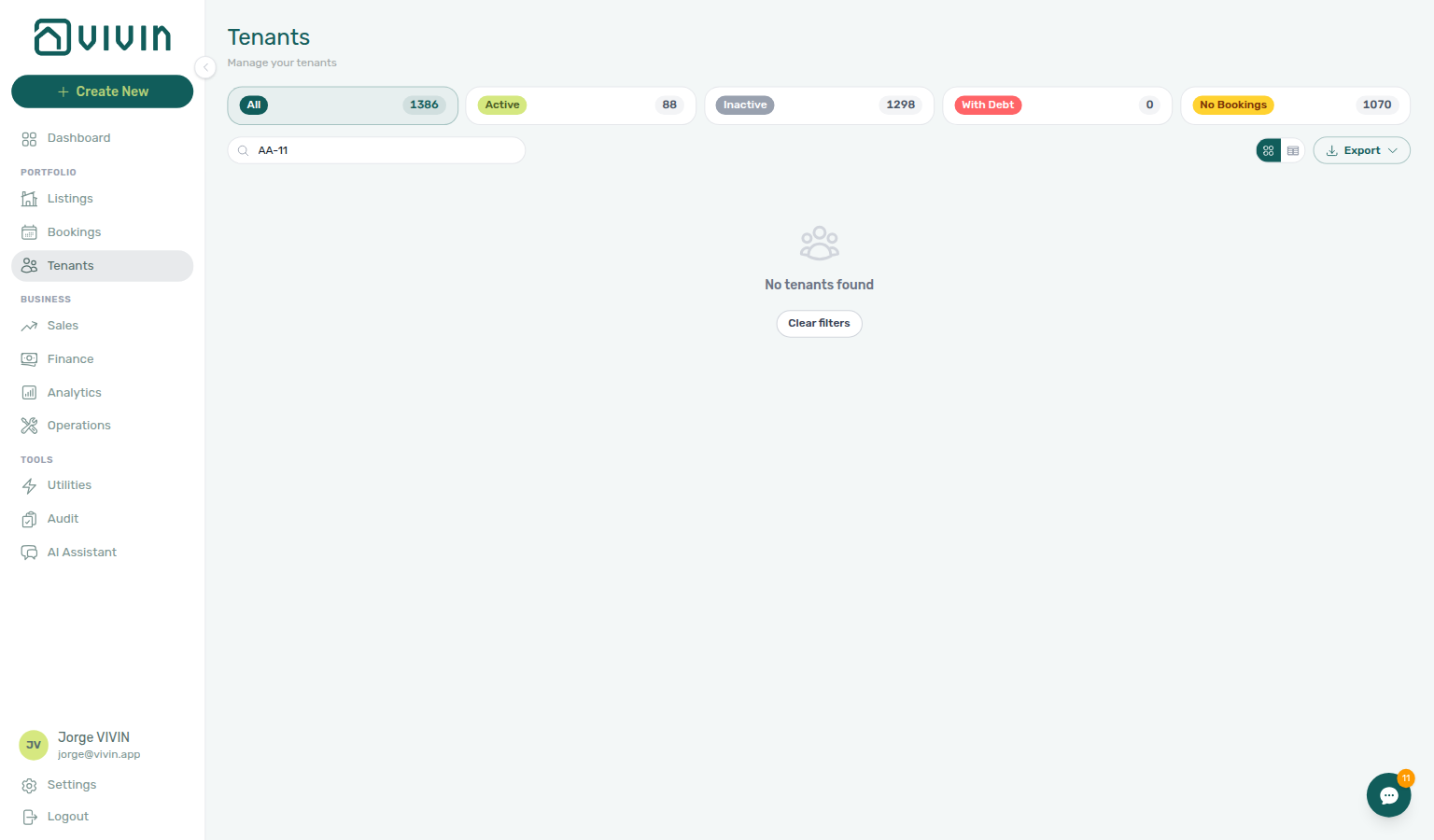
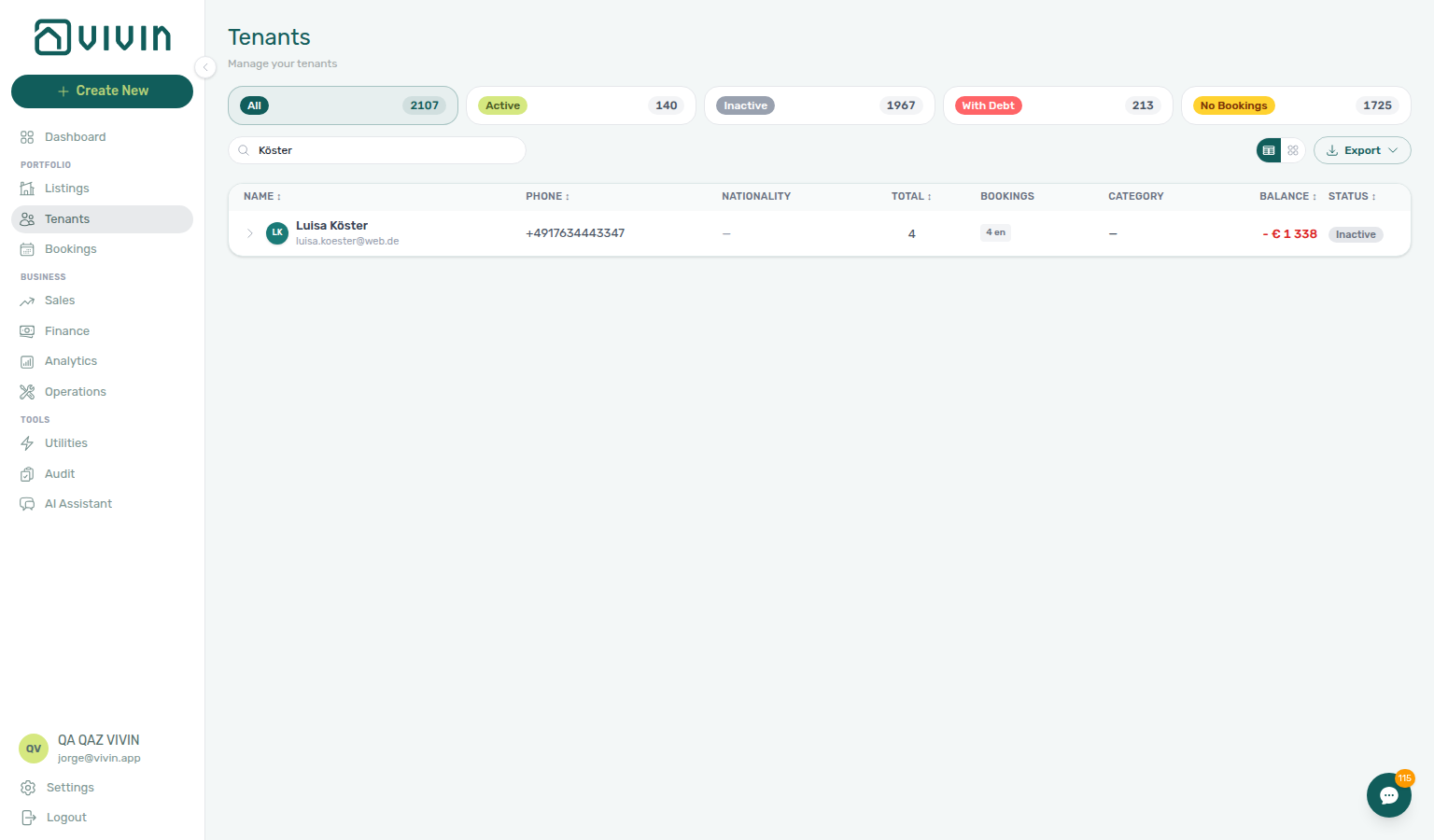
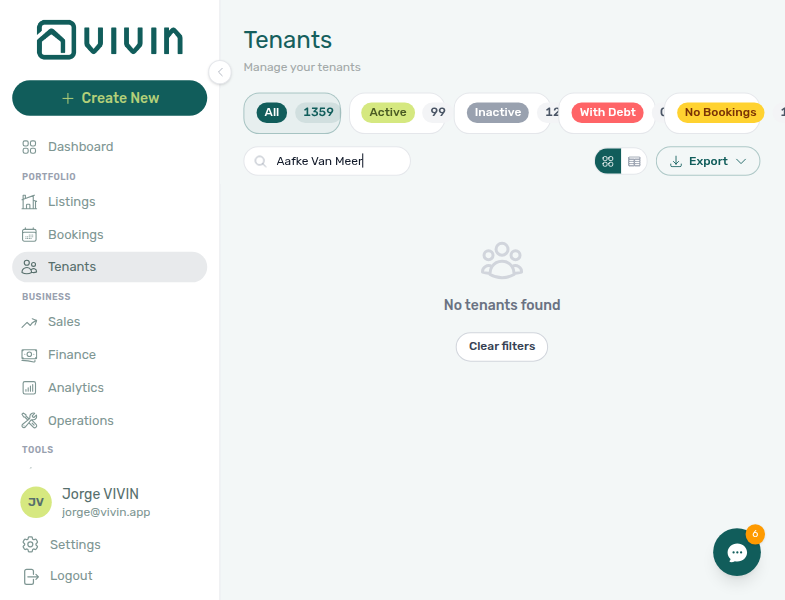
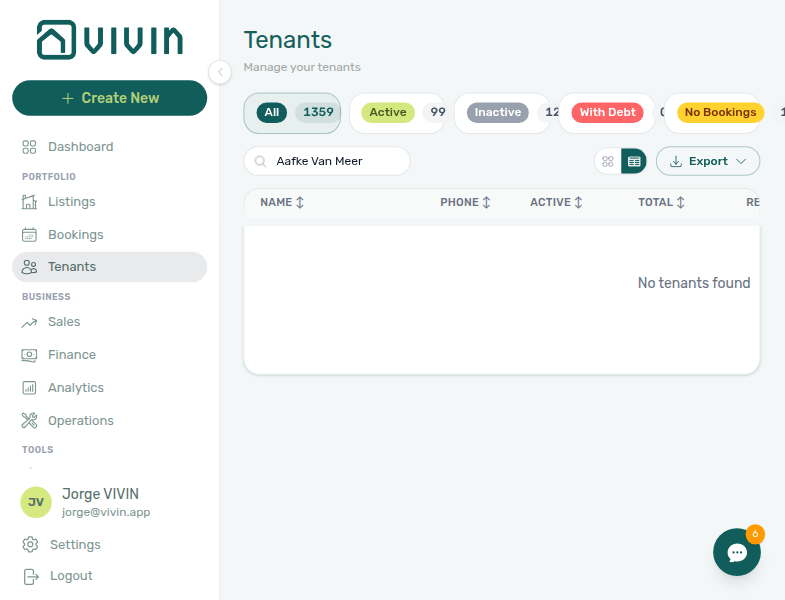
- Search by tenant name, email, phone, fiscal ID (NIF / VAT), or identification ID — the directory haystack matches any of these fields server-side (accent-insensitive substring match). A query that spans first and last name (for example
Tim Trompa) matches the concatenated full name, not only each column separately. - Segment by status: All, Active, Inactive, With Debt, No Bookings
- Sort in table view via column headers (Name, Phone, Total, Balance, Status)
- Export the current directory slice as Tenants CSV or Bookings CSV (same filters, search, sort, and status segment as the on-screen list)
Directory loading (infinite scroll)
The tenant directory is server-paged in both grid and table views. The first request loads a batch of rows; as you scroll near the bottom of the page, the app loads the next batch automatically (skeleton placeholders appear while fetching). When every tenant matching your current search, status segment, and sort is loaded, an End of list line appears. Changing any of those controls resets the list and starts from the first batch again — exports always reflect the full filtered result set, not only the rows currently on screen.
If this list needs a refresh — Use Retry on the directory when the list is empty and you expect tenants. Zero rows after a successful load means your filters matched nothing. See Glossary — Directory list refresh.
While the next batch loads, compact skeleton cards (grid) or table skeleton rows (table view) appear at the bottom of the directory:
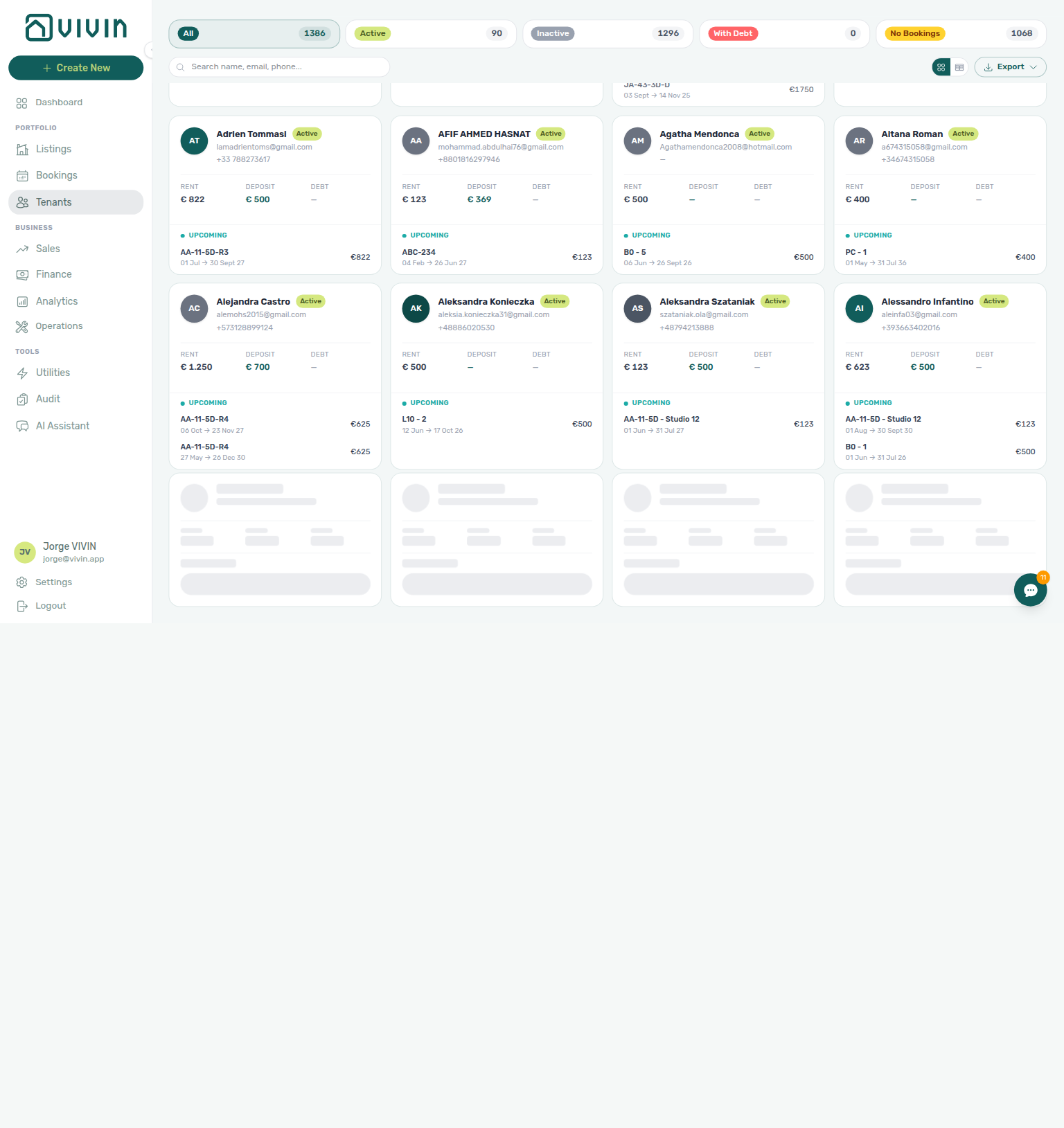
Selecting a tenant opens a detail sidebar with dedicated tabs:
- Tenant Info — personal details, billing details, bank details, and Category (when tenant categories exist)
- Bookings — all bookings linked to that tenant
- Payments — payment plan context from the tenant's bookings
- Transactions — received payments and allocation history
Core Workflows
With Debt triage pairs with Finance module and Handling a Late Payment — create profiles via Create New menu — Tenant.
1) Prioritize Collections and Follow-up
Use the With Debt filter to quickly identify tenants whose net balance is negative (they still owe money across linked bookings). Open each tenant to validate booking context, then coordinate with the Finance module for payment reconciliation.
2) Review Tenant Activity Across Multiple Bookings
Use a single tenant profile to review active and historical bookings without opening each reservation from the bookings table.
3) Maintain Tenant Master Data
Open Tenant Info to update personal/contact details, assign a tenant category (portal and field rules), and maintain billing information used by downstream finance workflows. Saving a new Category back-syncs booking.tenantCategoryId on linked reservations immediately. Ledger tabs (Contract Values, Deposits, Income, …) reflect the segment on reload; Overview can lag up to ~10 minutes — see Glossary — Finance tenant category cache refresh.
Use + Create New → Tenant when you need a tenant record before a booking exists (for example a direct enquiry). The modal collects required identity fields and an optional tenant category:
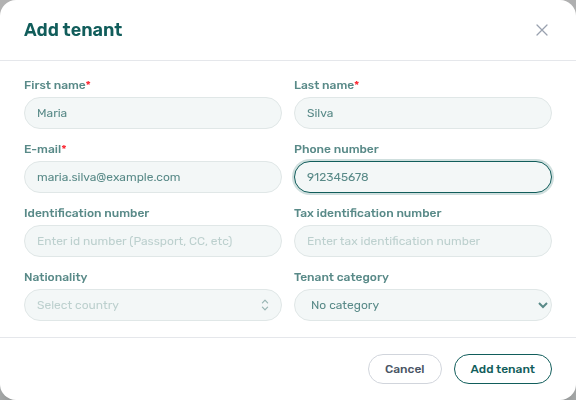
On Tenant Info, click the pencil icon on Personal Information to enter edit mode — category, contact fields, and email-change rules appear inline:
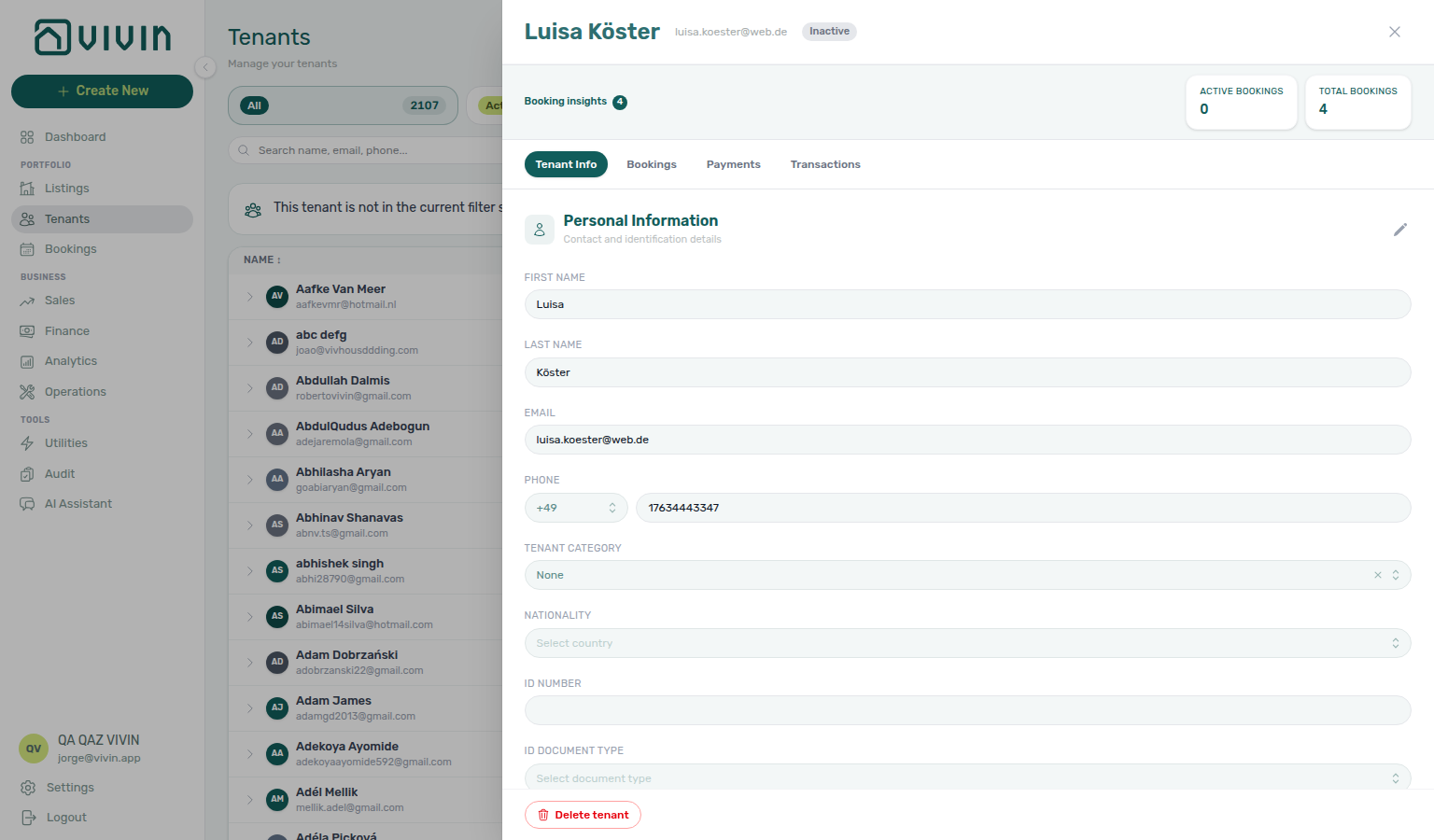
See also Create New menu — People.
4) Investigate Payment Status with Context
Use Payments and Transactions tabs to understand what is scheduled versus what has been paid, then jump into Bookings for contract-level actions when needed.
Permissions and Access
Tenant visibility and editability depend on role permissions:
- Accessing the Tenants module (sidebar entry +
/tenantsroute) requires Tenants module permission (tenants.module). - Creating or updating tenant records requires
tenants.createpermission (in addition totenants.module). - The Bookings tab depends on Bookings module permission (
bookings.module). - The Payments tab depends on Bookings module permission (
bookings.module). - The Transactions tab depends on Finance module permission (
finance.module).
Review and adjust role access in Settings > Users.
Interface overview
Tenant category filter pairs with Bookings — Tenant categories stays open and Finance — Tenant category filter — bookmark searches with Deep Links — Tenants ?q=.
The Tenants screen combines a toolbar (search, tenant category filter, status filters, sort, view toggle between grid and table, export) with a tenant directory. Status pills (All, Active, Inactive, With Debt, No Bookings) show live counts from the server; pick a segment before you sort or export so the file matches the slice you reviewed.
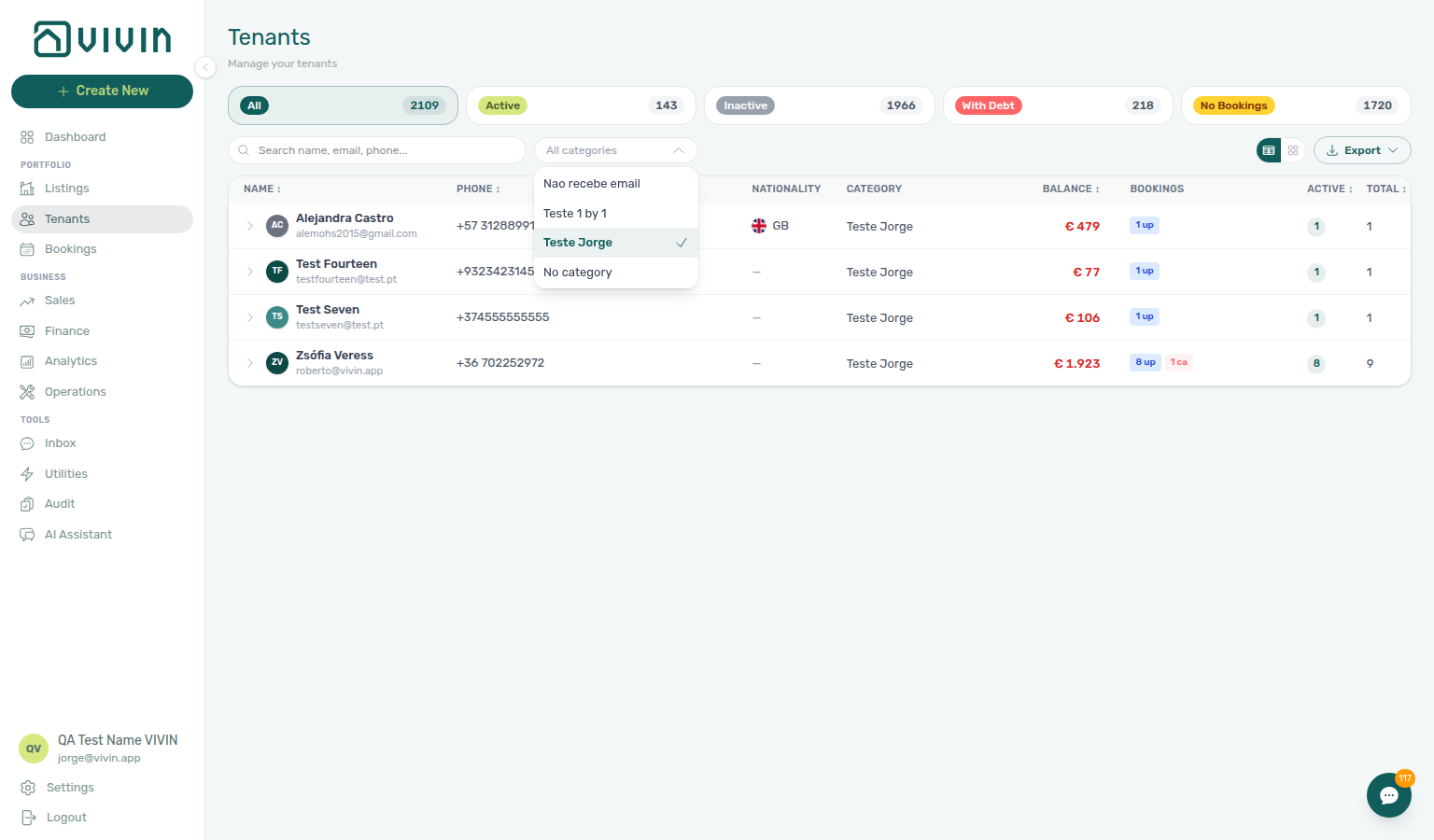
Tenant category filter
When your account has at least one tenant category configured, the toolbar includes an All categories dropdown (desktop). Pick one or more segments to narrow the directory to tenants assigned that category on Tenant Info, or choose No category for profiles with no segment. The menu stays open after each tick — see All categories stays open. Search, status pills, sort, grid vs table, and Export all respect the filter server-side — downloads reflect the full filtered population, not only rows already loaded by infinite scroll.
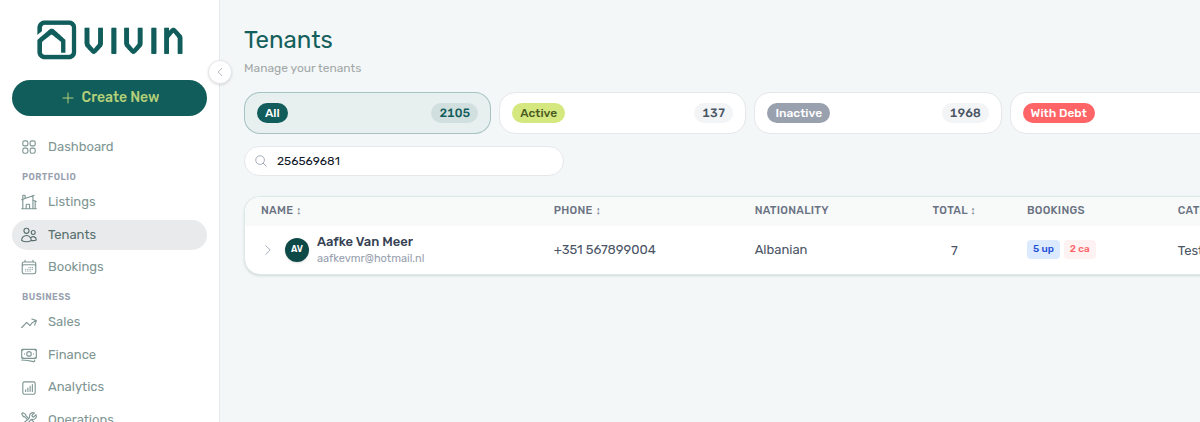
Use Search when you want a tight view of one tenant or a small set of matches — especially helpful in busy directories where the default sort can surface mixed or internal test labels at the top of the list. Paste a fiscal ID or ID number when collections or onboarding paperwork references the tax id instead of the tenant’s display name.
All categories stays open while you pick
Open All categories, then tick a named segment. A chip appears under the toolbar; the menu stays open so you can tick a second segment. You do not need to open All categories again.
Tick a named segment from Settings > Tenant categories (for example Corporate), then No category. Both stay checked in the open list. The directory shows tenants that match any of those choices — the named segment or profiles with no category — not only tenants that have both. Dismiss the menu when the chips look right — same stay-open habit as Bookings — Booking categories. Select all is on Bookings → Tenant categories and Finance → Other filters, not on this All categories menu — tick rows one by one here.
Bookings → Tenant categories is a different control on the reservation list. Its English placeholder is Tenant categories and the empty-case row is No tenant category. That menu also stays open while you add a second segment.
Emails → Communication Rules → Tenant categories is a different audience picker: named segments only, English placeholder Select tenant categories…, and Include only / Exclude modes — it does not list No tenant category.
Finance → Other filters → Tenant → Tenant category is a drawer control (empty-case label No tenant category). Tick boxes there stay visible because the drawer stays open — not the same toolbar dropdown.
Bookmarkable search (?q=)
The toolbar Search field syncs to the URL query parameter q. Share or bookmark a filtered directory view, for example platform.vivin.app/tenants?q=smith.
- On load, back, or forward navigation, the input hydrates from
?q=so bookmarked or shared links land on the same filtered list. - As you type, the URL updates after a short debounce (~250ms) with
replaceso history does not stack one entry per keystroke. - Clearing the search removes
qfrom the URL. - Status pills, sort, and grid vs table stay in component state only — they are not encoded in the URL today.
- The directory API request debounces separately (~1s) so typing stays responsive while the server catches up.
Grid card anatomy (dense directory view)
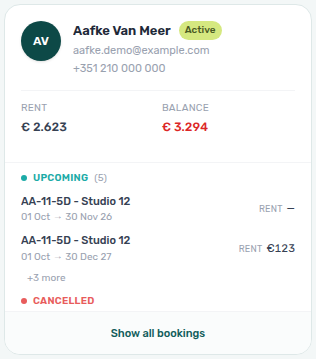
In grid view, each tenant card is a self-contained summary — useful for collections and multi-booking follow-up without opening the full profile first.
| Region | What it shows |
|---|---|
| Header (clickable) | Avatar, name, Active / Inactive pill, email, phone, nationality flag — opens the tenant detail sidebar (/tenants/<id>). |
| Balance strip | Roll-up Balance (net financial position across linked bookings). Shown only when balance ≠ 0 — red when the tenant owes money, teal when credit remains. |
| Booking groups | Reservations grouped by status — Ongoing, Upcoming, Ended, Cancelled, Refunded — with up to two rows per group before collapse. Within each list Vivin keeps the same deterministic booking order. |
| Per-booking rent / balance | Each preview row shows rent on the right; when a booking has negative financial balance, a red amount appears under rent (same rules as Bookings). |
| Show all bookings / Show less | Expands the card when a tenant has more bookings than the preview limit. |
| Booking row click | Opens the booking sidebar in place (contract-level context) without navigating away from the directory. |
When a tenant has more bookings in a status group than the preview limit (two rows per group), the card stays collapsed until you click Show all bookings. Show all bookings reveals every row in that card; Show less returns to the preview limit so dense directories stay scannable.
Click any booking row (not the tenant header) to open the booking sidebar while staying on /tenants — useful when you are triaging debt on the card and need contract or payment context without losing your filter.
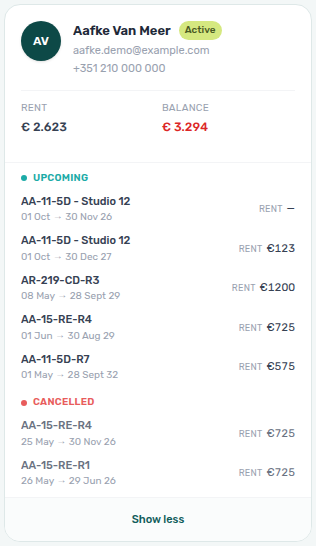
Use table view when you need column sort and dense scanning; use grid when debt and booking mix matter at a glance. Cross-module triage: Handling a Late Payment (With Debt + expand), Glossary — Tenants table expand, Deep Links — Tenants.
Table view (expandable booking rows)
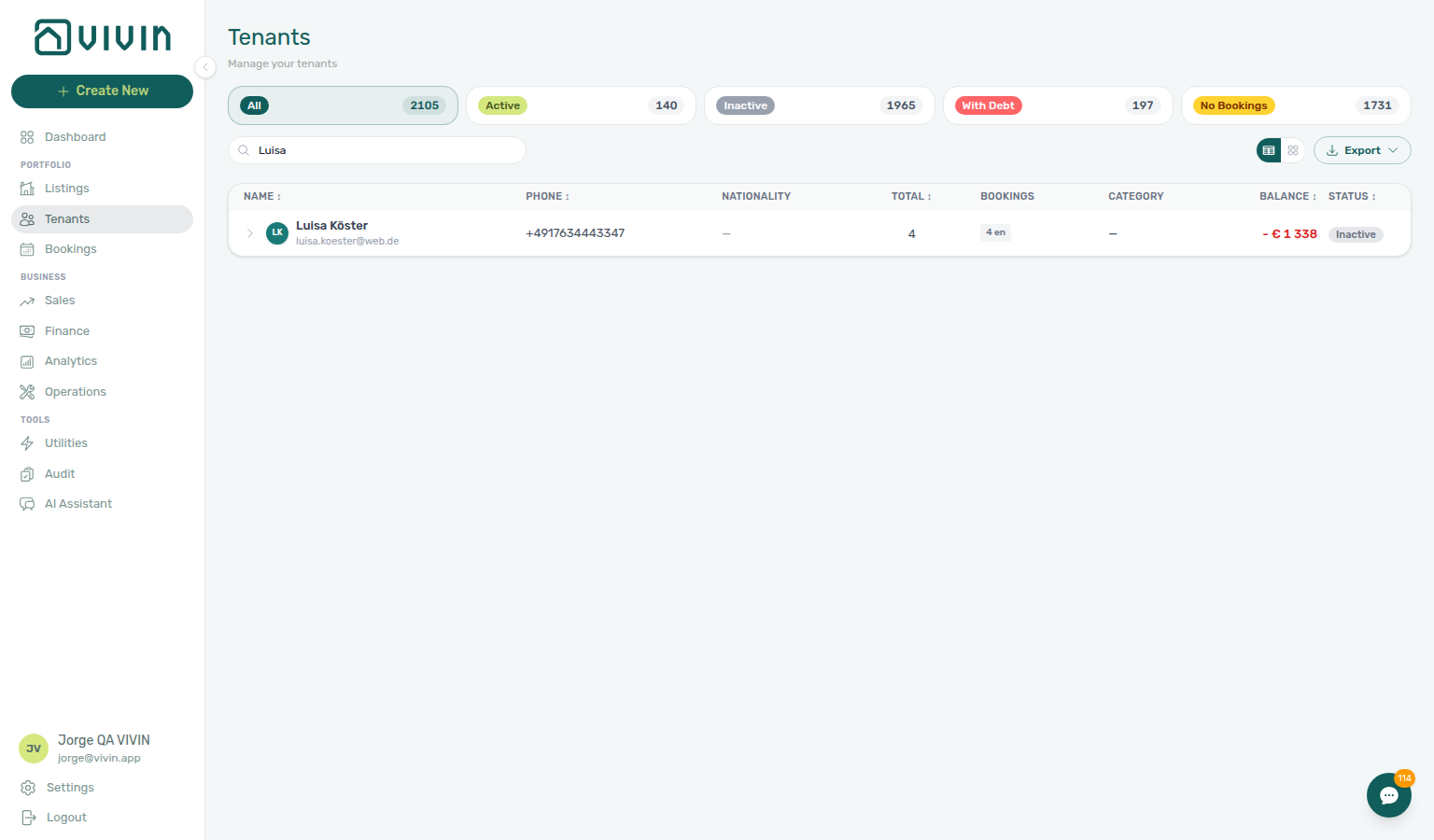
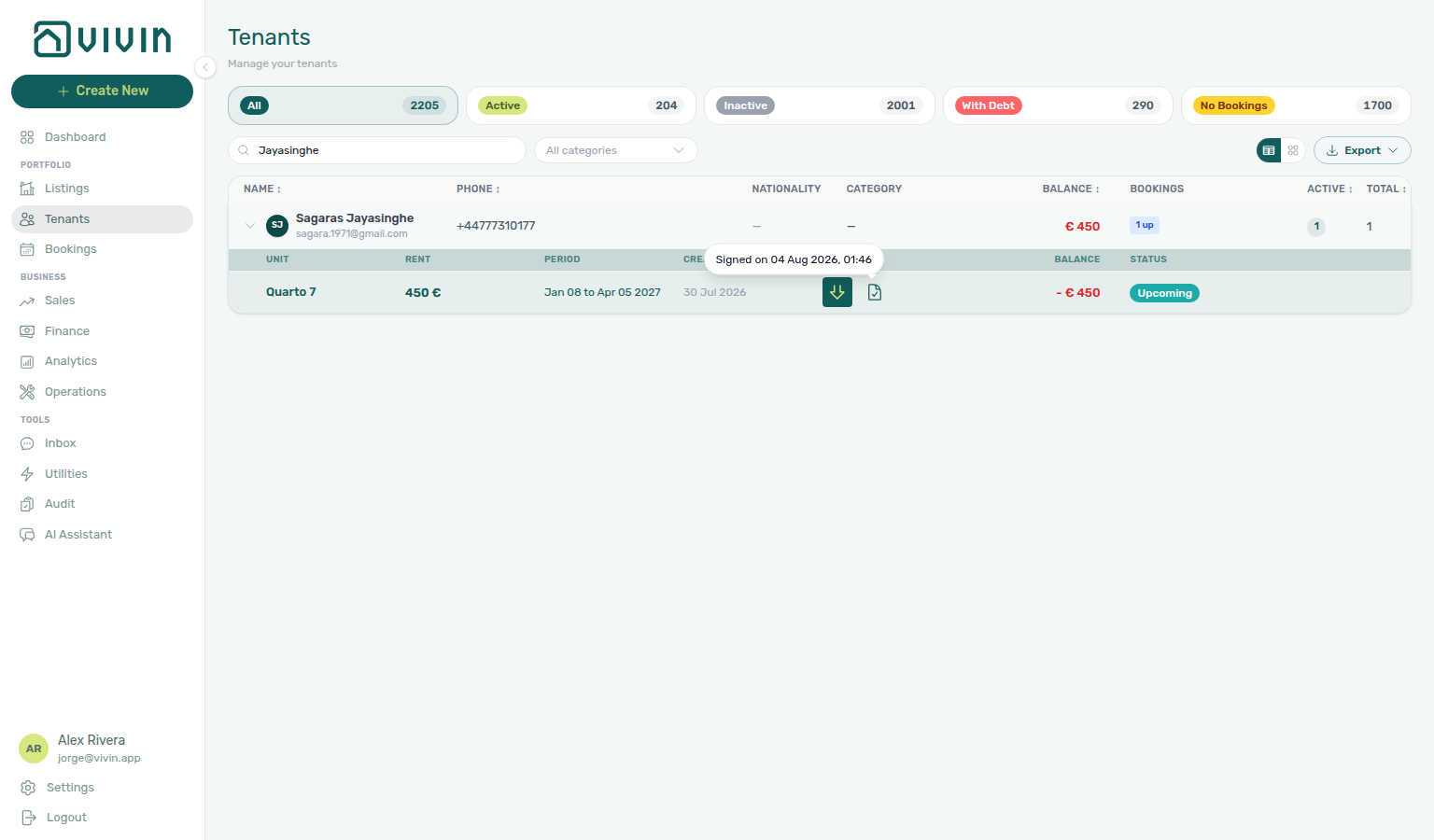
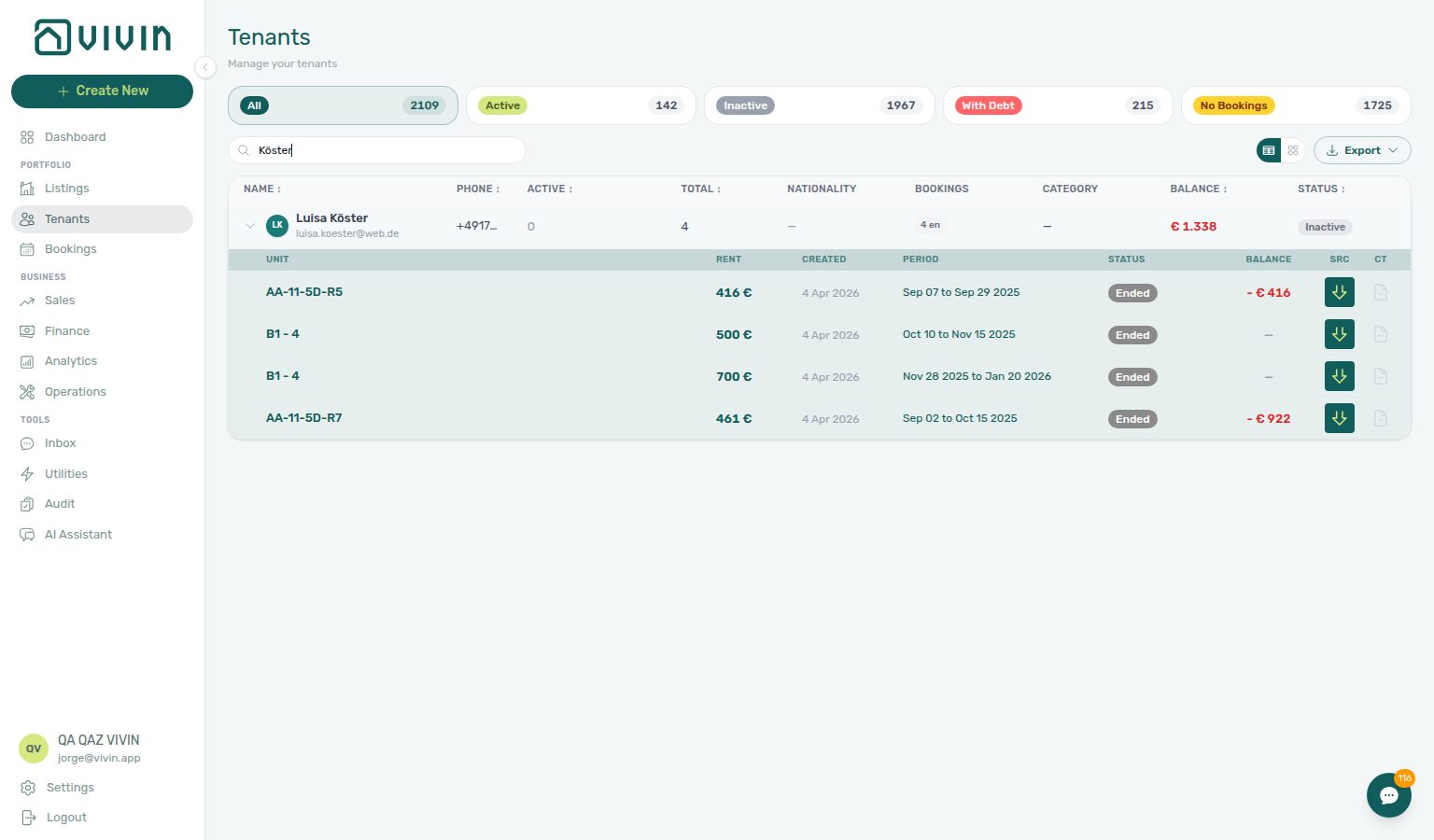
In table view, each tenant occupies one summary row. Sort by Name, Phone, Total, Balance (net roll-up), or Status using the column headers. Wider breakpoints also show Nationality, a compact Bookings breakdown (coloured chips such as on / up / en / ca for ongoing, upcoming, ended, and cancelled counts), and Category.
| Action | Result |
|---|---|
| Click the row (chevron area) | Expand or collapse an inline sub-table of that tenant’s linked bookings. |
| Click the tenant name | Open the tenant detail sidebar (/tenants/<id>) without leaving the directory. |
| Click a booking sub-row | Open the booking sidebar in place (same pattern as grid cards). |
When expanded, a header row labels the sub-table columns:
| Column (English UI) | What it shows |
|---|---|
| Unit | Listing internal name for the reservation. |
| Rent | Contract rent for that booking. |
| Created | Booking creation date (when the viewport is wide enough). |
| Status | Booking status badge (Ongoing, Upcoming, etc.). |
| Period | Contract / move-in window for the stay. |
| Balance | Current booking balance from the same rules as Bookings — red when the tenant owes money, teal when credit remains, em dash when settled. |
| Src | Sales platform icon (channel source). |
| CT | Contract indicator: teal check when signed, grey document when not, grey dash when there is nothing to sign (the tenant's category has Tenant Portal Access or the Contract portal module turned off). Hover Signed on for the timestamp, Contract not signed, or Not applicable. After you upload a signed PDF (or the tenant signs in the portal), this icon updates on the expanded row you already have open — the Tenants directory does not jump to the first page. See Bookings — Contract mark stays on the list (tenants-table-ct-signed-check.png). |
Tenants with no linked bookings show an italic No bookings line when you expand the row.
How linked bookings are ordered
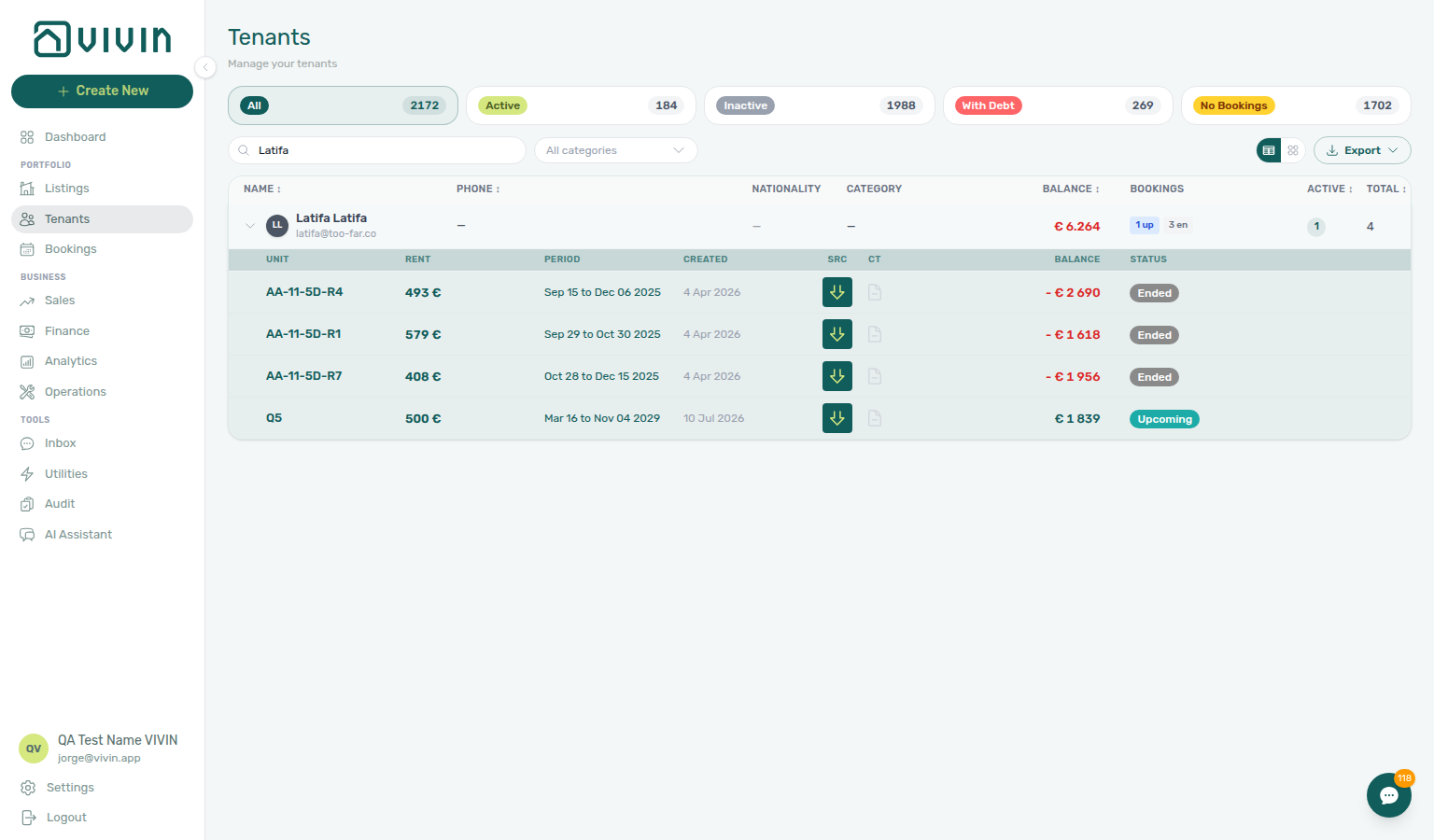
Every “bookings for this tenant” list uses the same server-side order — table expand sub-rows, grid card previews (Show all bookings), the sidebar Bookings tab, and the Bookings CSV export sheet:
- Check-in date (earliest first)
- Check-out date (when check-in matches)
- Unit internal name with natural numeric compare (same family as Listings — Unit order — for example Room 2 before Room 10)
- Booking id as a stable tiebreak
Corporate or group tenants that share one period across many units therefore see units in a stable, scannable sequence instead of Postgres heap order (which used to reshuffle when balances were rewritten). Sorting is server-side because grid cards only preview a slice of each status group — the client cannot reorder rows the preview already dropped.
Export (Tenants CSV / Bookings CSV)
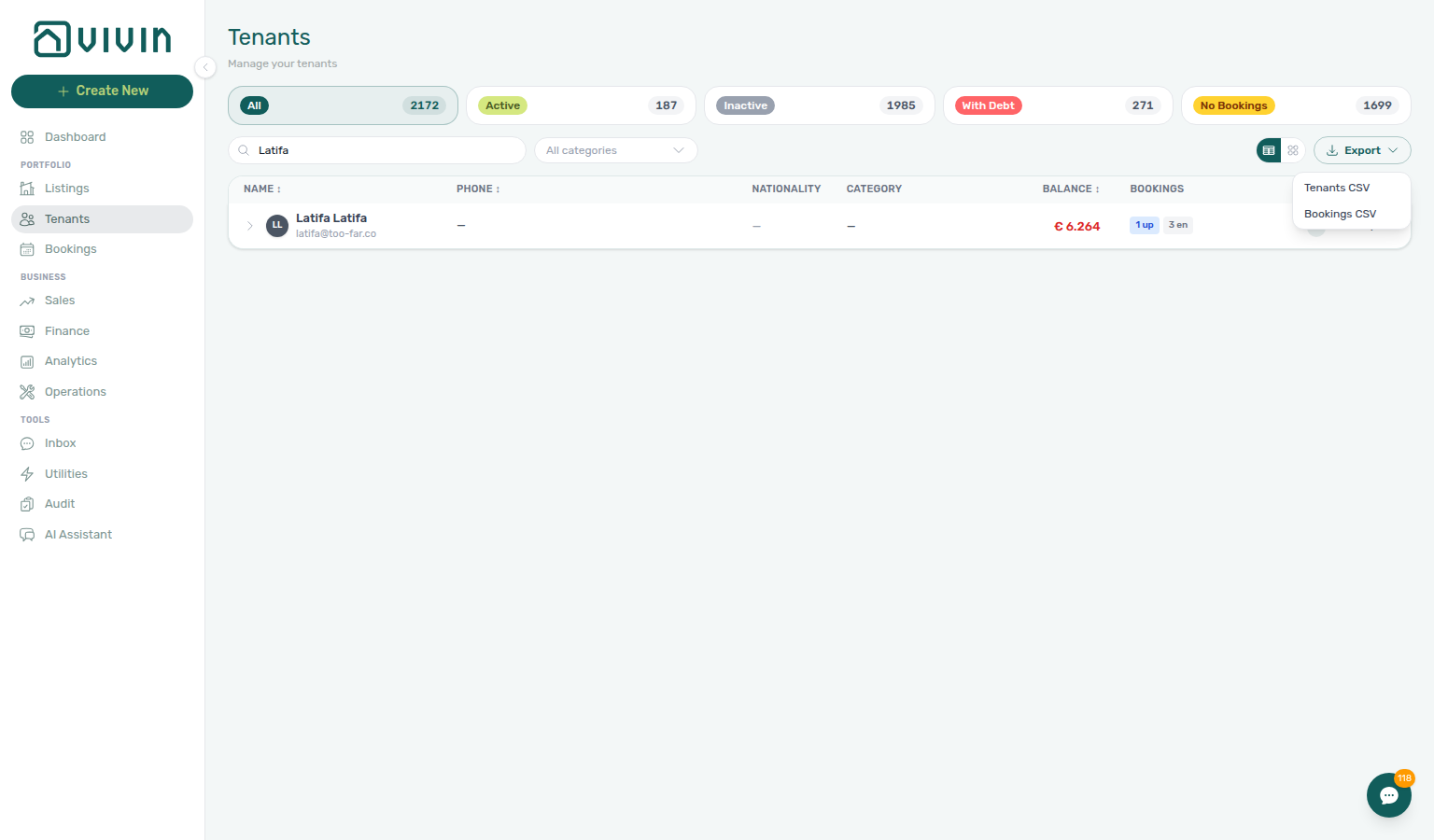
Use Export on the toolbar when you need a spreadsheet of the same slice you are reviewing (status pills, Search, sort, and grid vs table view all apply server-side).
Open Export, then choose:
| Option | File |
|---|---|
| Tenants CSV | One row per tenant in the current result set (directory fields). |
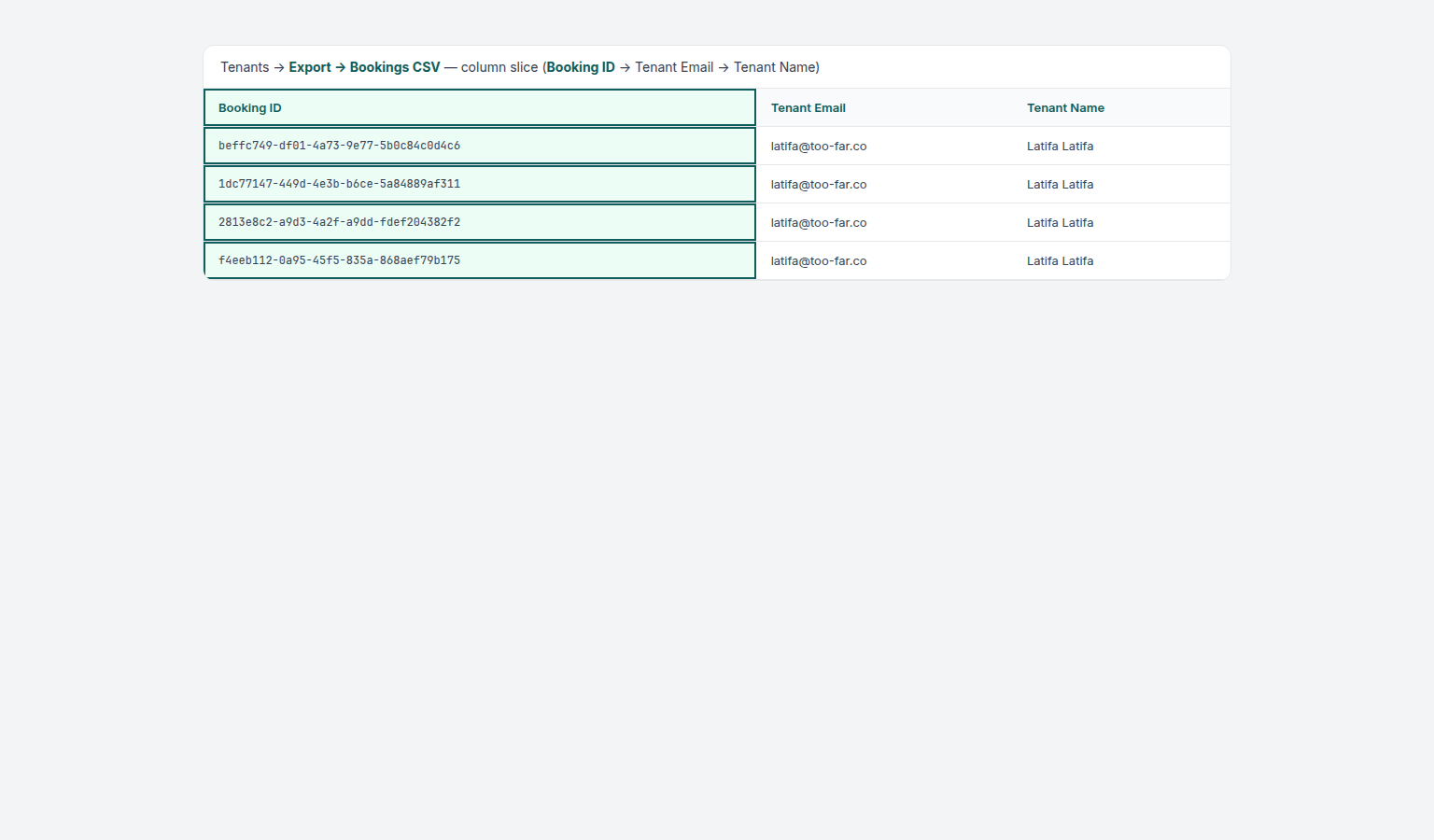
| Bookings CSV | Booking rows linked to tenants in that same filtered directory view — each tenant’s bookings follow the same deterministic order as the table expand and sidebar. The file starts with Booking ID (Vivin booking UUID) so each stay can be reconciled without matching on tenant name and dates alone. |
Downloads use dated filenames from the API. If the filtered list is empty, the export action does not produce a file.
When the export API returns an error (for example HTTP 400/500), Vivin shows a toast (Export failed.) instead of leaving the menu closed with no file — narrow filters or retry after connectivity improves. See Glossary — Export and download issues. The Bookings list uses an inline alert under the toolbar for the same class of failure.
Tenant detail sidebar
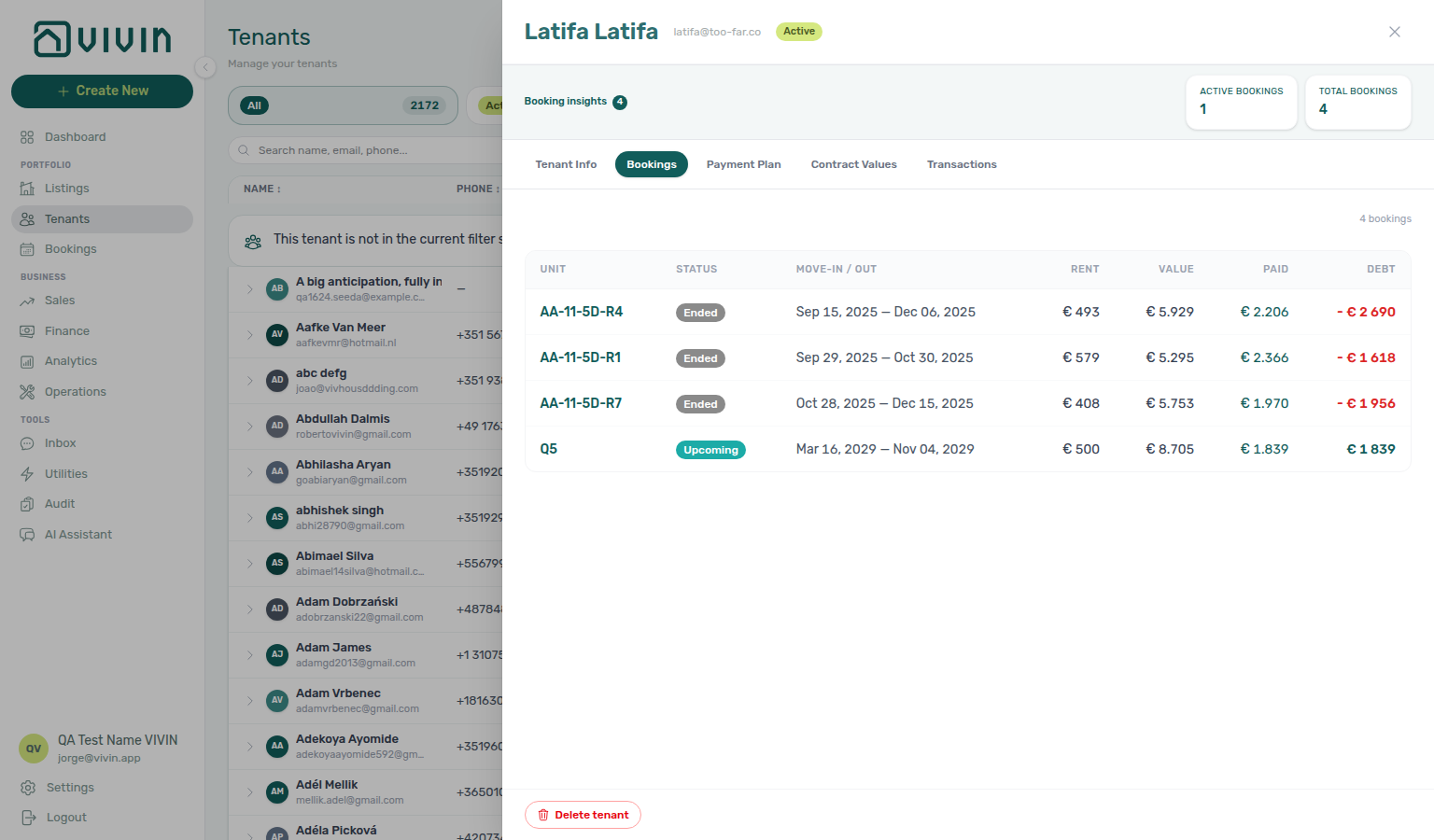
Click a tenant card header, a table row name, or use Edit flows from the directory to open the detail sidebar on the right. (In table view, clicking the row body expands bookings inline — use the name link for the profile sidebar.) The URL updates to /tenants/<tenant-id> so you can bookmark or share a profile (subject to the same Tenants module permission). The sidebar header shows the tenant name and status; close it with the X control or by navigating back to /tenants.
Portal language
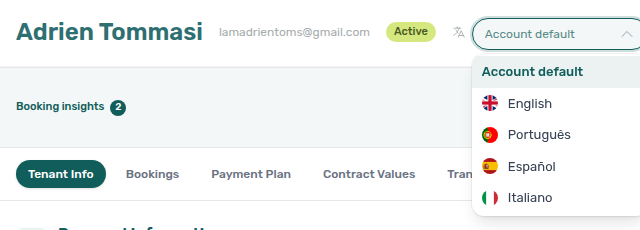
Portal language pairs with Tenant Portal — Language switcher (what the tenant taps), Portal settings — Default language (account fallback), and Interface language (your workspace locale). Distinct from Tenant Info pencils (this control saves on change).
In the tenant sidebar header, Portal language is a compact select (not behind a Tenant Info pencil). Options: Account default (follow Portal settings — Default language), English, Português, Español, and Italiano. Picking a language saves immediately (Portal language updated). Account default writes “no personal override” — that is not the same as picking English. A tenant who then uses the portal language switcher keeps their own pick on every stay.

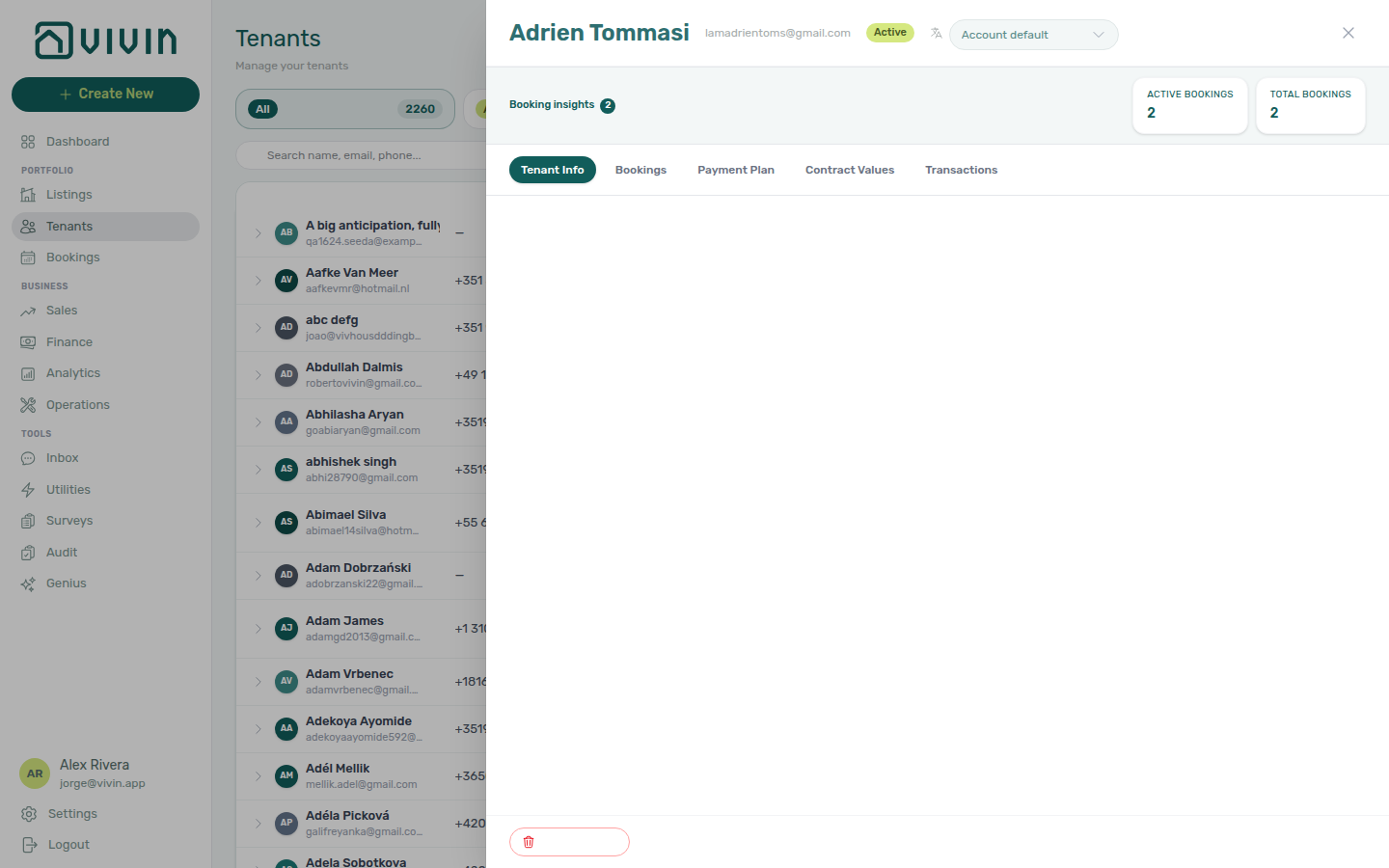
| Tab | What you see |
|---|---|
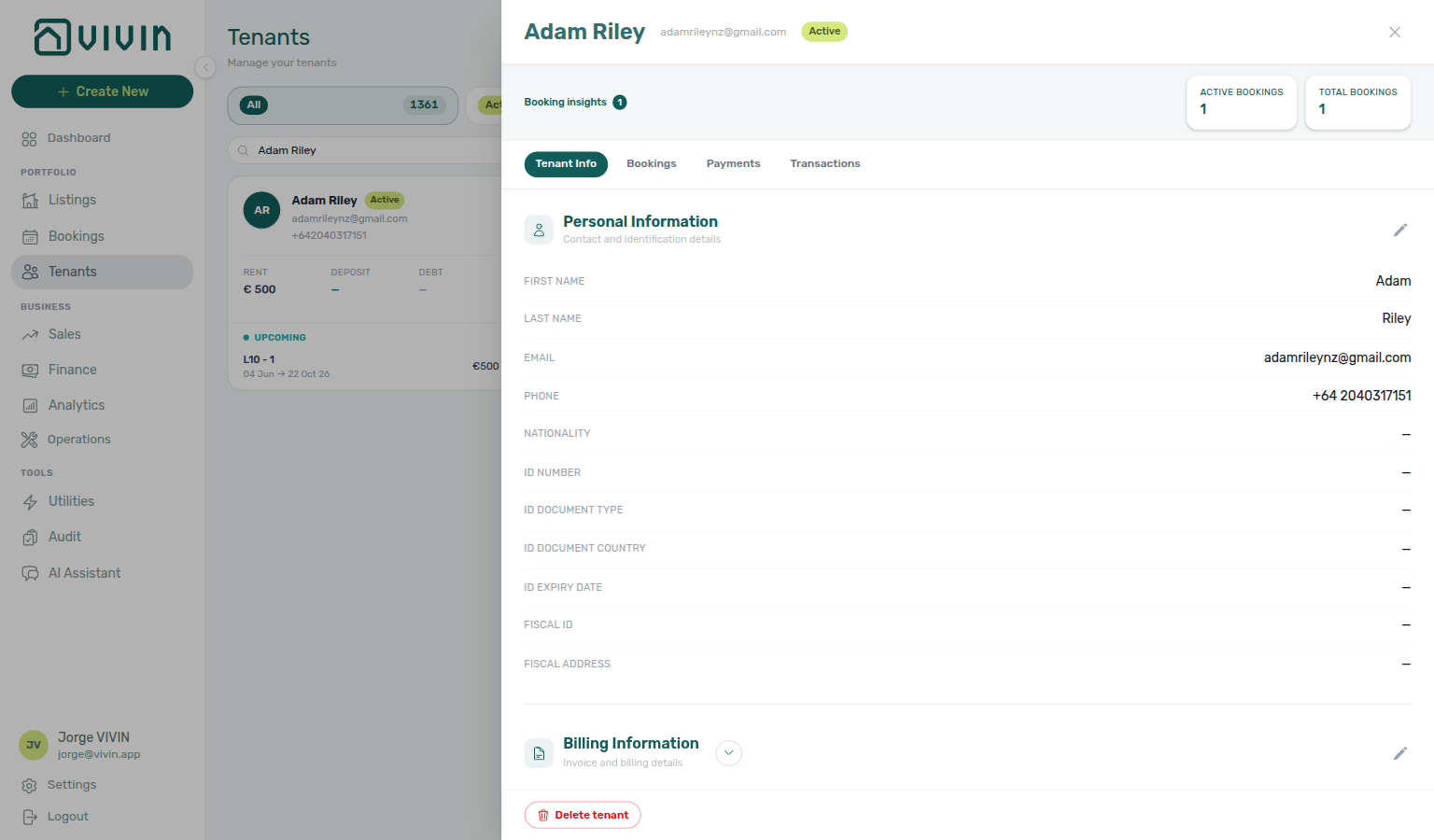
| Tenant Info | Personal Information, Billing Information, and Bank Details in one scrollable view (grid layout aligned with the booking sidebar). Each section has its own pencil edit control when your role includes tenants.create. Personal Information includes First Name and Last Name — Tenant Portal — First name and last name — Phone — Tenant Portal — Phone — Nationality — Tenant Portal — Nationality — ID Number, ID Document Type, ID Document Country, and ID Expiry Date — Tenant Portal — ID document details — plus Fiscal ID and Home address — Tenant Portal — Fiscal number and home address. Lease Purpose is not on Tenant Info — operators set it on the booking Contract Info; tenants pick it on portal Your Details — Tenant Portal — Lease Purpose. Billing Information includes Billing address, Postal Code, City, and Country — Tenant Portal — Billing address — plus Use company details for billing (Yes/No in view; toggle in edit) — Tenant Portal — Use company billing. Bank Details lists IBAN, SWIFT/BIC, bank name, branch, interbank code, and bank address — there is no European bank account toggle here; that switch lives only on the Tenant Portal. When portal bank or billing editing is locked, operators still change these values here — tenants see amber notices instead of editable cards. Tenants confirm their own portal edits with Save changes success (Details updated successfully!); that notice does not appear on this sidebar. |
| Bookings | All reservations linked to this tenant (requires Bookings module), in the same deterministic order as table expand and grid previews. |
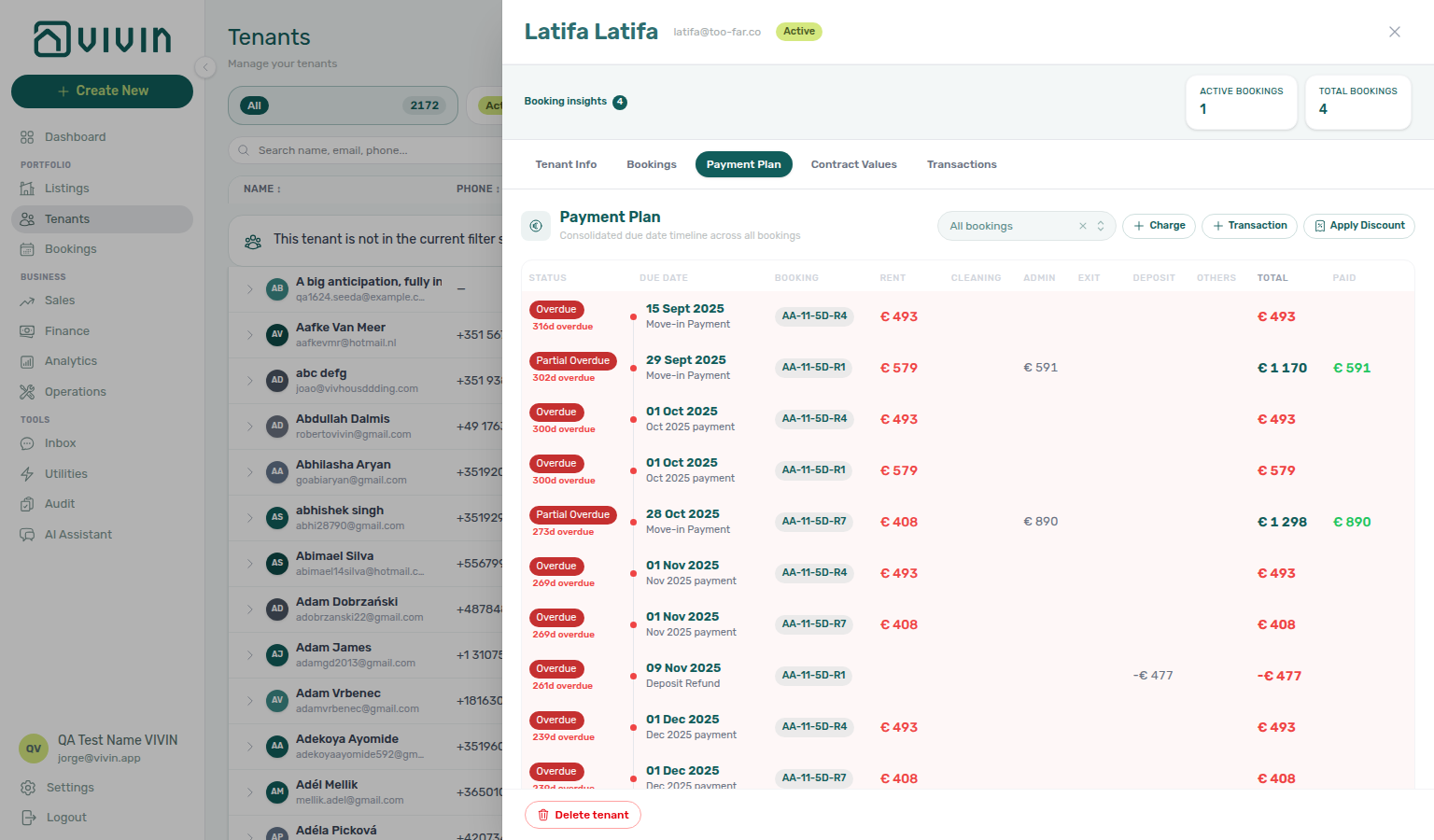
| Payment Plan | Consolidated chronological payment-plan timeline across every linked booking, with a Booking attribution column. Requires Bookings module. |
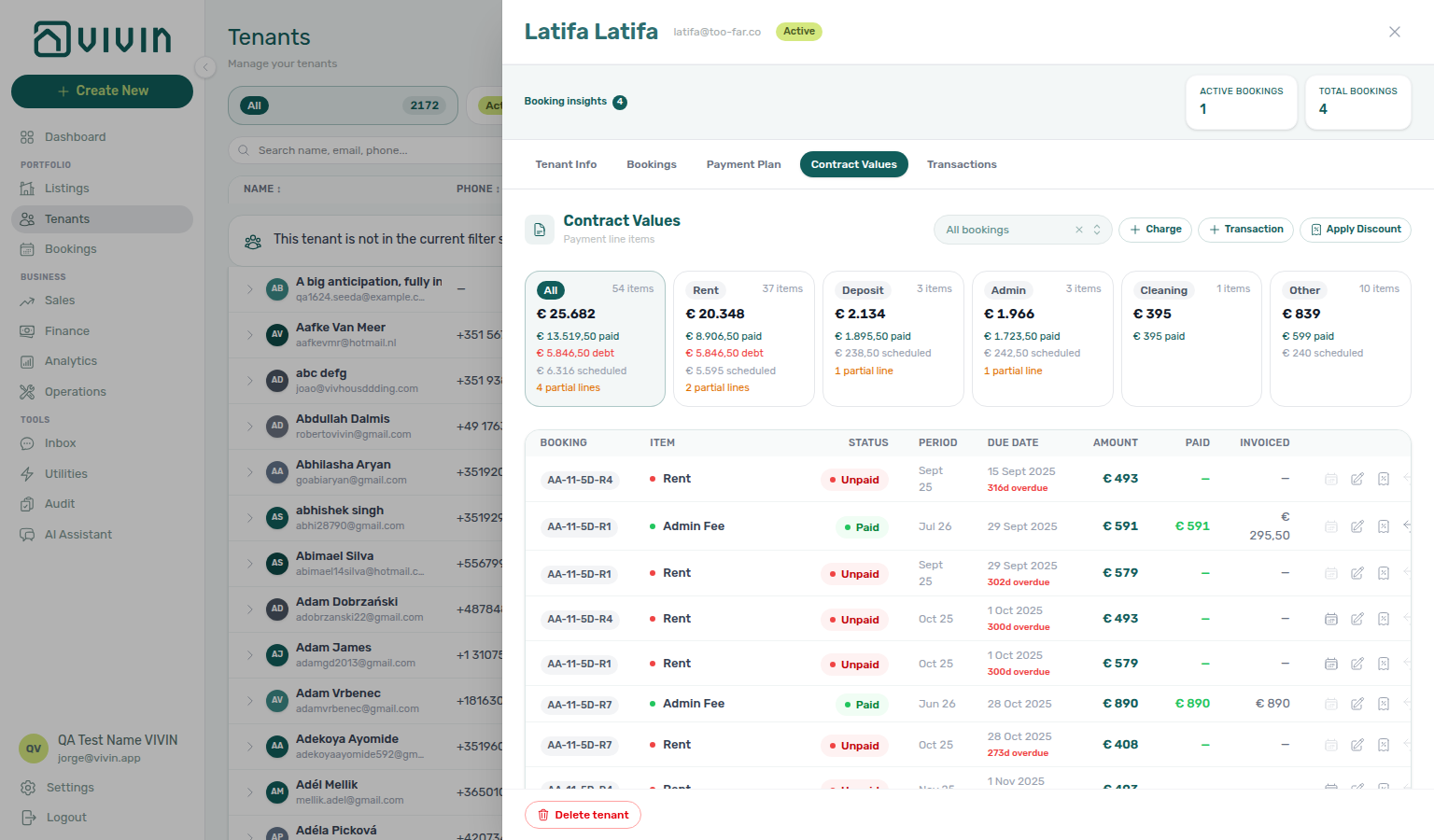
| Contract Values | Consolidated contract-value / receivables table across those bookings, also with a Booking column. Requires Finance / Bookings as applicable. |
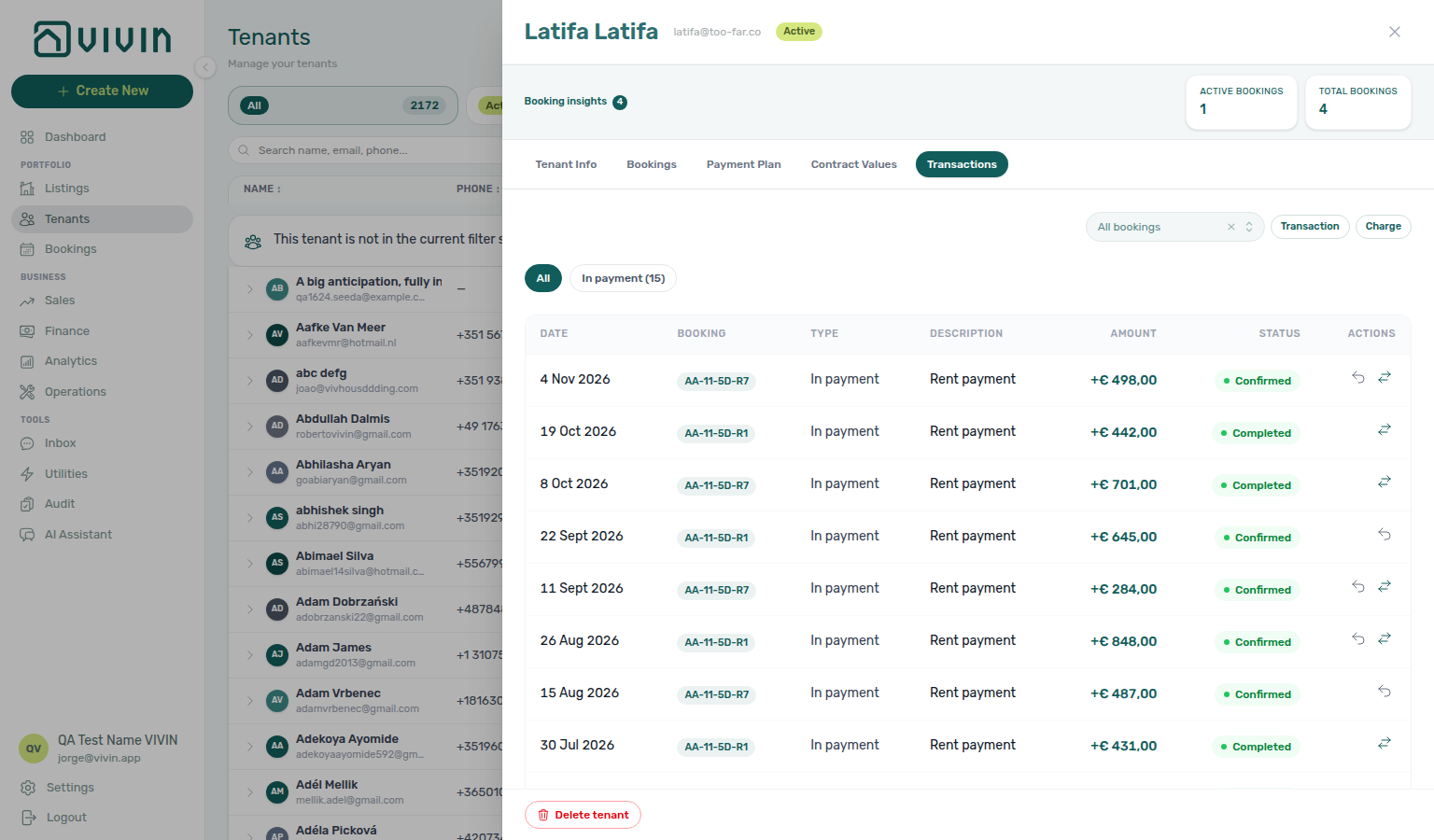
| Transactions | Received payments and allocation history merged across bookings, with Booking attribution. Requires Finance module. |
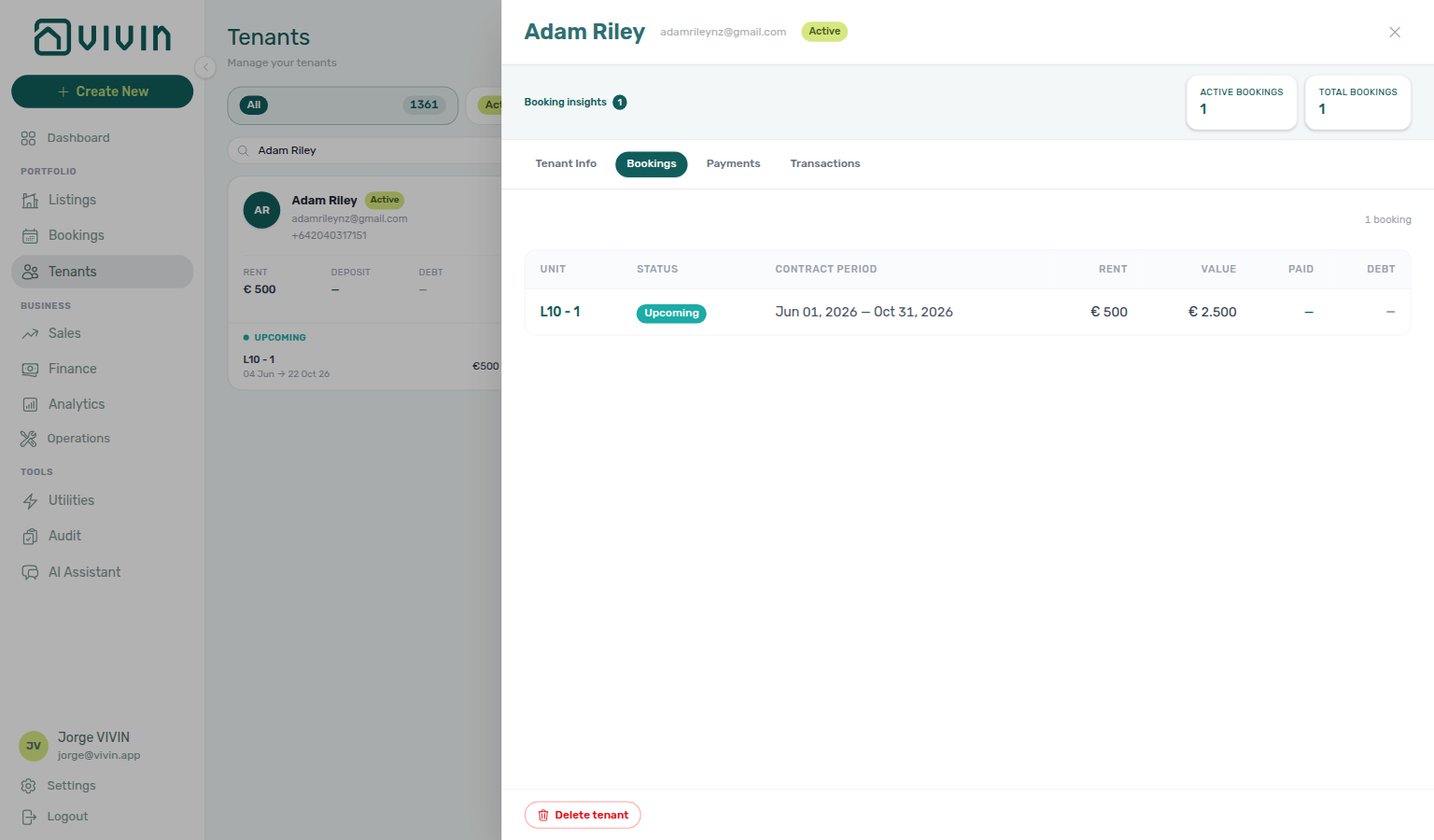
Consolidated finance tabs (Payment Plan, Contract Values, Transactions)
When a tenant has more than one booking, the three finance tabs mirror the booking sidebar surfaces but merge every stay into one view. Each row keeps a Booking label that operators already recognise elsewhere in the product:
- Unit internal name alone when it is unique among this tenant's stays (for example
AA-11-5D-R4) - Unit + stay dates when the same unit appears more than once (same pattern as the booking sidebar title)
- Unit + short id only when unit and dates collide — a last-resort fallback, never the default
A header All bookings filter narrows the consolidated tables to one stay (options use the same labels); pick a specific booking before + Charge, + Transaction, or Apply Discount (those actions always target one reservation).
Payment Plan shows the shared due-date timeline (status pills, rent/fee columns, totals) with the Booking column on every group:
Contract Values reuses the booking Contract Values table (status cards, line filters, allocations) with the same Booking attribution. Pending utility allocations from every linked stay appear on All and Other here too — the All bookings filter narrows both the charge lines and those Pending rows. Approve or reject them on this tab (you need Approve payments); bulk work still lives on Utilities → Allocations.
Transactions lists received payments and allocation history pulled from those bookings (filters for in/out payment types when transactions exist), again with a Booking column. Manual receipts may still show as pending until someone with Approve payments confirms them on Finance → Transactions or the booking Transactions tab — the tenant-level roll-up can look settled while Pending rows still exist on the ledger (the Overview Manual Payments KPI includes approved manual receipts too). While a row is still pending, the pencil Edit amount corrects a typed-wrong € (Bookings — Edit payment amount). Reject payment, bulk Reject selected, and Revert payment modals warn about credit notes when Finance may already have invoiced the charge — see Payment Allocation — Correcting mistaken receipts. See Finance — Pending manual payments.
From Bookings or Transactions, use in-sidebar links to jump into the Bookings module when you need contract-level actions (including per-row Approve payment when a receipt is still pending).
Tenants guide subsection index
Tenants section cross-reference
Use the sections above for this module. Related pages are linked from Related below when present, or from Modules.
Related
Related below links this module to settings, concepts, workflows, and escalation paths.
Documentation map & escalation
- Modules hub — Hub pairing matrix across operator workspaces
- Management Frontend Deep Links — Bookmark
/tenants/:tenantIdprofile sidebars - Getting Started — Interface and navigation overview
- Glossary — Term definitions used across tenant and booking workflows
Upstream & downstream workflows
- Processing a New Booking — Booking creation and tenant onboarding flow
- Handling a Late Payment — Collections workflow (With Debt segment); upstream path from Notifications — Payment overdue alerts
- Managing a Check-in — Fiscal-ID lookup when a walk-in arrives without a prior profile
- Managing a Check-out & Deposit Refund — Tenant IBAN and balance context before Mark refunded on departure week
- Cancelling a Booking — Void reservations and reconcile tenant debt segments
- Notification triage (workflow) — Jump from
/notificationsinto tenant or booking profiles; payment overdue rows usually open the booking sidebar first
Deeper workflow reads
See Upstream & downstream workflows above for the same guides.
Settings that shape Tenants
- Settings > Tenant categories — Portal rules and Category on Tenant Info
- Settings > Users — Role and permission matrix
- Settings > Preferences — In-app notifications — Account-wide payment alert masters before collections from With Debt segments
- Settings > Emails — Segment Communications / Email toggles on Tenant categories before profile outreach
Deeper concept reads
- Tenant Portal — What tenants can edit in the portal vs operator-only profile fields
- Tenant Portal — Language switcher — Globe + EN / PT / ES / IT; operator override is Portal language
- FAQ — Tenant contract signing blocked — No PDF yet, mandatory Your Details gates, category locks, or Lease purpose; portal signing vs paper upload on Contract Info
- Payment Allocation — Correcting mistaken receipts — Approve, reject, and revert reference
- Services Marketplace — Ancillary tenant revenue visible on tenant Payments tabs
- Integrations & Distribution — Tenants created automatically when marketplace bookings import through connected channels
- Tenant MCP — External automation that reads the same tenant profile fields operators edit here
- Landlord MCP — Account-scoped tools (
list-tenants, profile updates) from external clients on the same JWT session - Booking Lifecycle — Computed Upcoming → Ongoing → Ended / Canceled status model, list filters, and Timeline
Operator modules (pairing surfaces)
- Bookings — Reservation lifecycle and tenant-linked booking actions
- Finance — Payment operations and reconciliation
- Finance — Pending manual payments — Approve manual receipts before With Debt / Transactions look current
- Audit — Discounts tab — Portfolio-wide discounted contract values when a tenant spans multiple bookings
- Inbox module — Portfolio-wide WhatsApp triage when collections need message context
- Analytics (KPI workspace) — Portfolio trends when tenant debt segments need month-range context
Navigation & bookmarks
Bookmark routes pair with Management Frontend Deep Links and Create New menu.
- Create New — Tenant — Sidebar quick-create without navigating to Tenants first
Operator habit hubs
Day-to-day operator habits (lockout catch-up, pending receipts, payment triage, handoffs, and related playbooks) live on the Common Workflows habit hub.
Deep-link anchors for habit hubs
Lockout catch-up after password recovery
Pending manual receipt approval
Reject/revert mistaken receipts
Check-out ledger cleanup before refund
Utility overage collections
Cancellation collections before void
Check-out collections before refund
Handling a Late Payment collections
Check-out vs cancellation
Deposit missing on Finance Deposits
Cancel Booking vs Delete Booking
Wrong tenant on a booking
Notification row-click navigation
Payment alert to receivables triage
Finance debt receivables triage
Finance Income status drill-down
Cash flow forecast drill-down
Confirmation alert triage
New inventory to first booking handoff
Property setup to first arrival handoff
Confirmation to check-in handoff
Check-in to check-out handoff
Check-out final utilities handoff
Same-day turnover coordination
WhatsApp per-booking messaging
Bot reasoning (audit)
ChatBot settings
Rent reduction after invoicing
Month-end invoicing (fixed date)
Bulk Hostkit invoicing
Occupancy KPI to block hygiene handoff
Partly collected security deposit
Portfolio segmentation by tenant category
Directory list refresh
When a list needs a refresh instead of showing rows, use Retry or reload the page. Zero rows after a successful load means your filters matched nothing — widen filters or clear search.
See FAQ — Directory list refresh and Glossary — Directory list refresh.
Key glossary terms
- Deposit dispute — Contested deposit retention when a tenant has multiple bookings or an active dispute flag
- Glossary — End-of-Booking cost split — Charge Time → End of Booking splits daily overage across every occupied unit; still-staying roommates stay in the denominator
- Glossary — Change history — Operator-initiated edits on Listings setup and Bookings Changelog; create-time defaults excluded
- Glossary — Archived booking ledger visibility — Delete Booking hides manual/provider_platform rows on Finance → Transactions; vIBAN and credit card stay visible
- Glossary — Finance tenant category cache refresh — Recategorizing a tenant updates
booking.tenantCategoryIdimmediately; ledger tabs reflect it on reload, while Overview can lag up to ~10 minutes - Glossary — SIMAR water contract ID — SIMAR (Loures e Odivelas) water bills use Cód. Local in Connections — not Nº de Contador; leading zeros stripped
- Glossary — Full term list
API & companion guides
- API Reference — Creating Bookings — Partner imports that create thin tenant profiles before you enrich Tenant Info here
- API Reference — Management session — Operator JWT routes when scripts enrich imported tenant profiles before Tenant Info saves
- AI usage API — Internal LLM token ledger (
GET /ai-usage/summary;landlord_chat) when month-end With Debt triage pairs with Portfolio KPI review — Step 7
Module documentation hubs
- Tenants module — Tenant directory, profile sidebars, With Debt segmentation, and table expand for linked bookings (this page)
- Utilities module — Bills Included ceiling model, Connections, AI bill upload, and tenant overage charges on payment plans (hub)
- Operations module — Maintenance tickets, cash flows, check-in/out coordination, Draft ticket queues, and linked cash flows (hub)
- Dashboard module — Post-login Today, Total debt, Vacant Units, and forecast KPI snapshot with bell notification triage (hub)
- Analytics module — Month-range portfolio KPI charts (Overview, Revenue, Occupancy, ADR, RevPAR, Maintenance) with rankings and heatmaps (hub)
- Listings module — Property wizard, Channels tab, Archived inventory, and unit management (hub)
- Properties workspace — Legacy
/propertiesURL redirects into Listings (hub) - Booking engine details — Rich marketplace payload editor via the Full integration pill (hub)
- Finance module — Portfolio ledgers (Overview, Income, Contract Values, Transactions, Payouts, Deposits) with payment approval and deposit settlement (hub)
- Sales module — Portfolio availability, monthly rent editing, and channel manager connections (hub)
- Inbox module — Portfolio-wide WhatsApp workspace with Dashboard bell Inbox sub-tab deep links (hub)
- Notifications module — Full
/notificationshistory with search, filters, and row-click navigation (hub) - AI Chat module — AI Assistant using Landlord MCP tools for portfolio Q&A (hub)
- Audit module — Portfolio-wide Manual Blocks and Discounts contract-value review (hub)
- Account Settings — Workspace-wide financial policies, templates, integrations, and operational defaults (hub)
- API Reference hub — Partner HTTP contracts, Swagger onboarding, and partial vs full feeds (hub)