Portal settings
Portal settings is the Tenant Portal sidebar tab for account-wide defaults: what tenants may edit, which portal modules they see, and which Your Details fields they must fill before they can sign the contract.
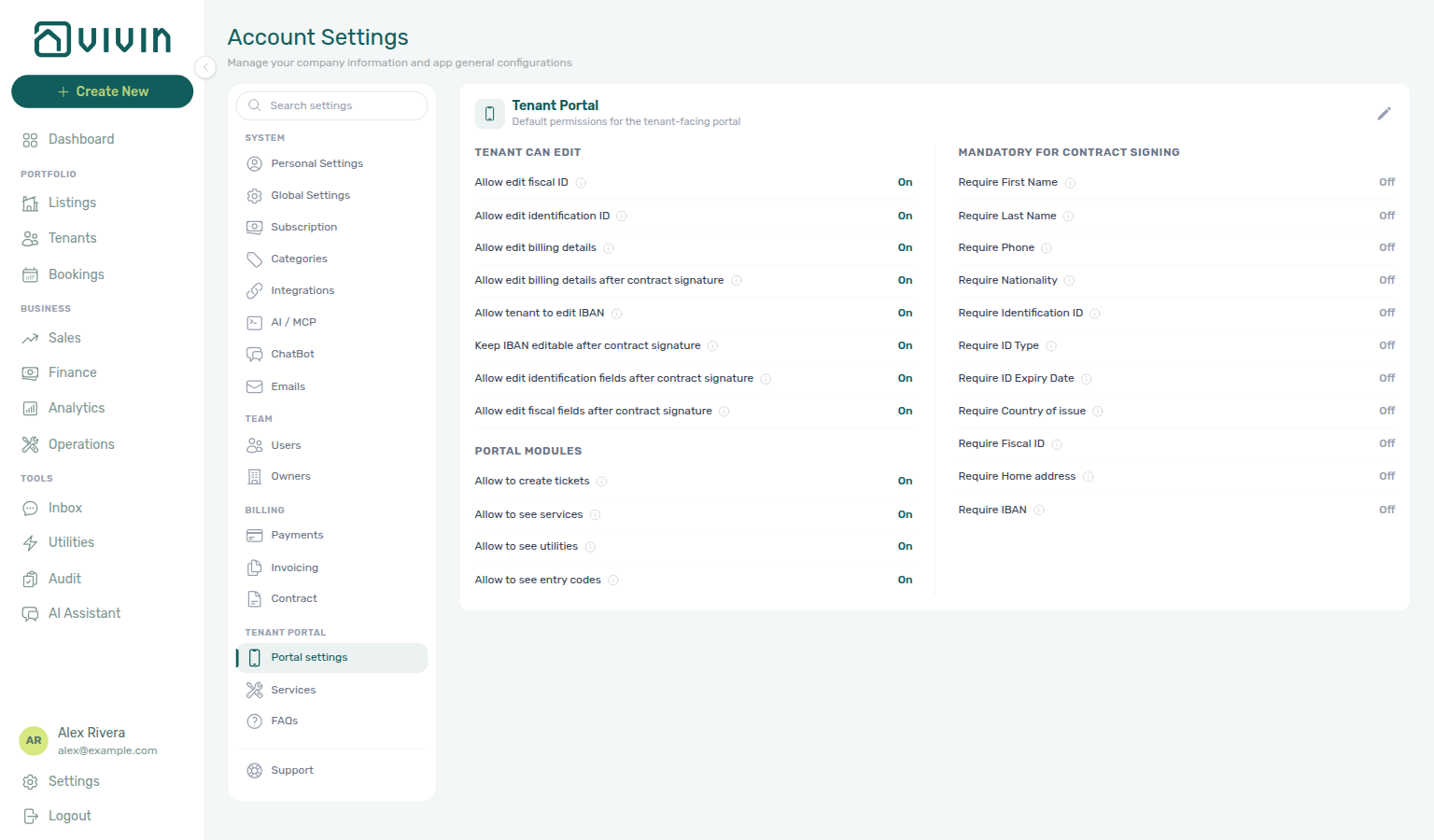
Open Account Settings → Tenant Portal → Portal settings (/settings/tenantPortal). The English tab label is Portal settings. These controls used to sit on Global Settings; they are not on that tab anymore.
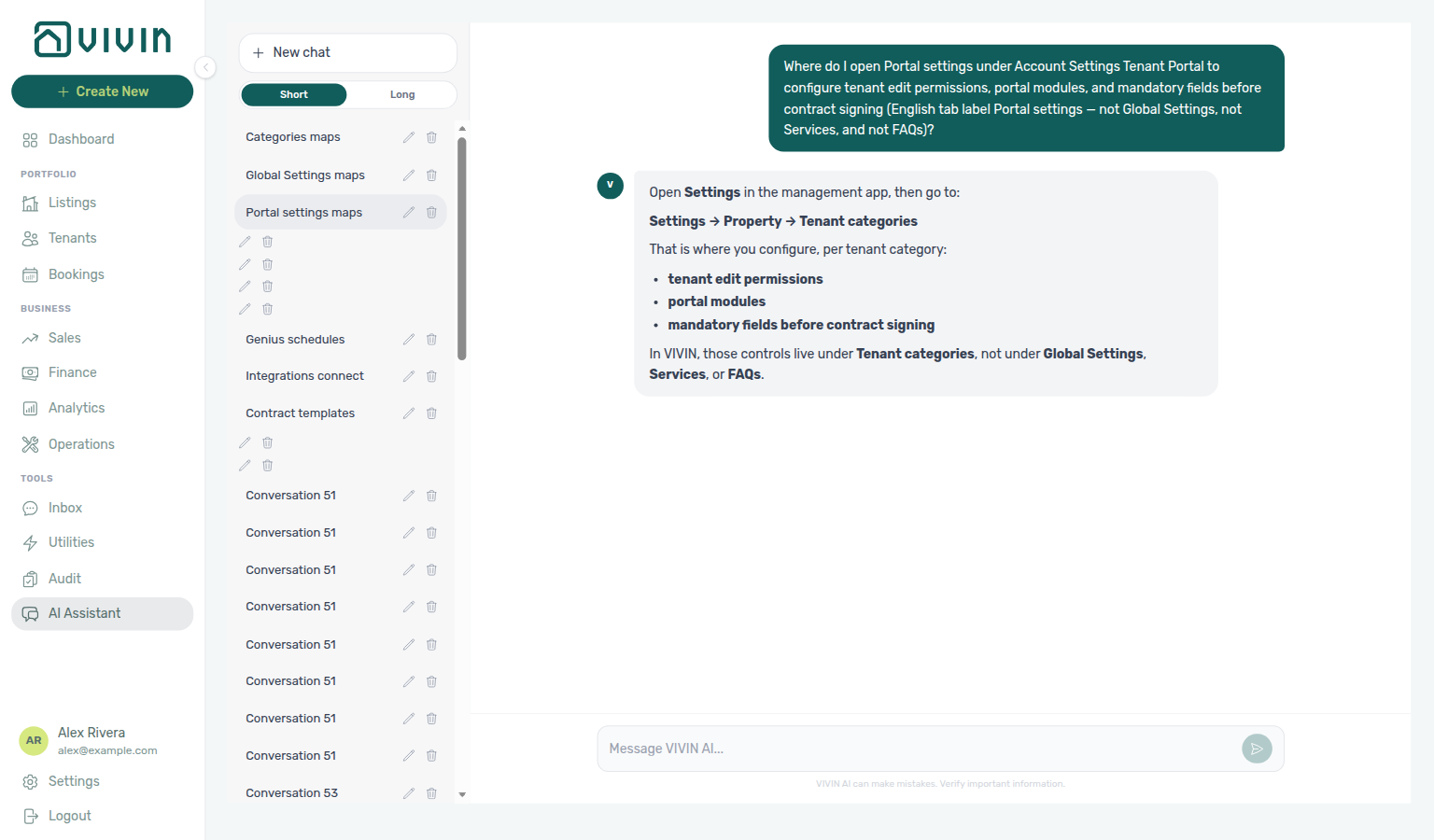
Ask AI Chat “Where do I open Portal settings under Account Settings Tenant Portal to configure tenant edit permissions, portal modules, and mandatory fields before contract signing (English tab label Portal settings — not Global Settings, not Services, and not FAQs)?” — then open this tab (ai-chat-product-context-portal-settings-reply.png, ai-chat-product-context-portal-settings-flow.mp4). Live replies often say Settings → Property → Tenant categories. Follow Settings → Tenant Portal → Portal settings instead. Tenant categories are per-segment overrides on the Categories → Tenants card — not this account-wide tab. Same grounding external MCP clients get from get-vivin-context-platform. Distinct from Services (the add-on catalogue) and FAQs (the FAQ Generator) in the same sidebar group.
Set these account defaults after Tenant categories (setup step 10) and before tenants sign in the portal. Pair with Services when Allow to see services should be on, and with Contract so a PDF exists before Sign contract appears. Full tab map: Recommended setup order.
Skim Default language, Tenant can edit and Portal modules, then Mandatory for contract signing. How to save: Edit and save. Per-segment overrides: Tenant categories.
Bookmark platform.vivin.app/settings/tenantPortal. Neighbouring tabs: Services and FAQs. Route table: Deep Links — Account Settings.
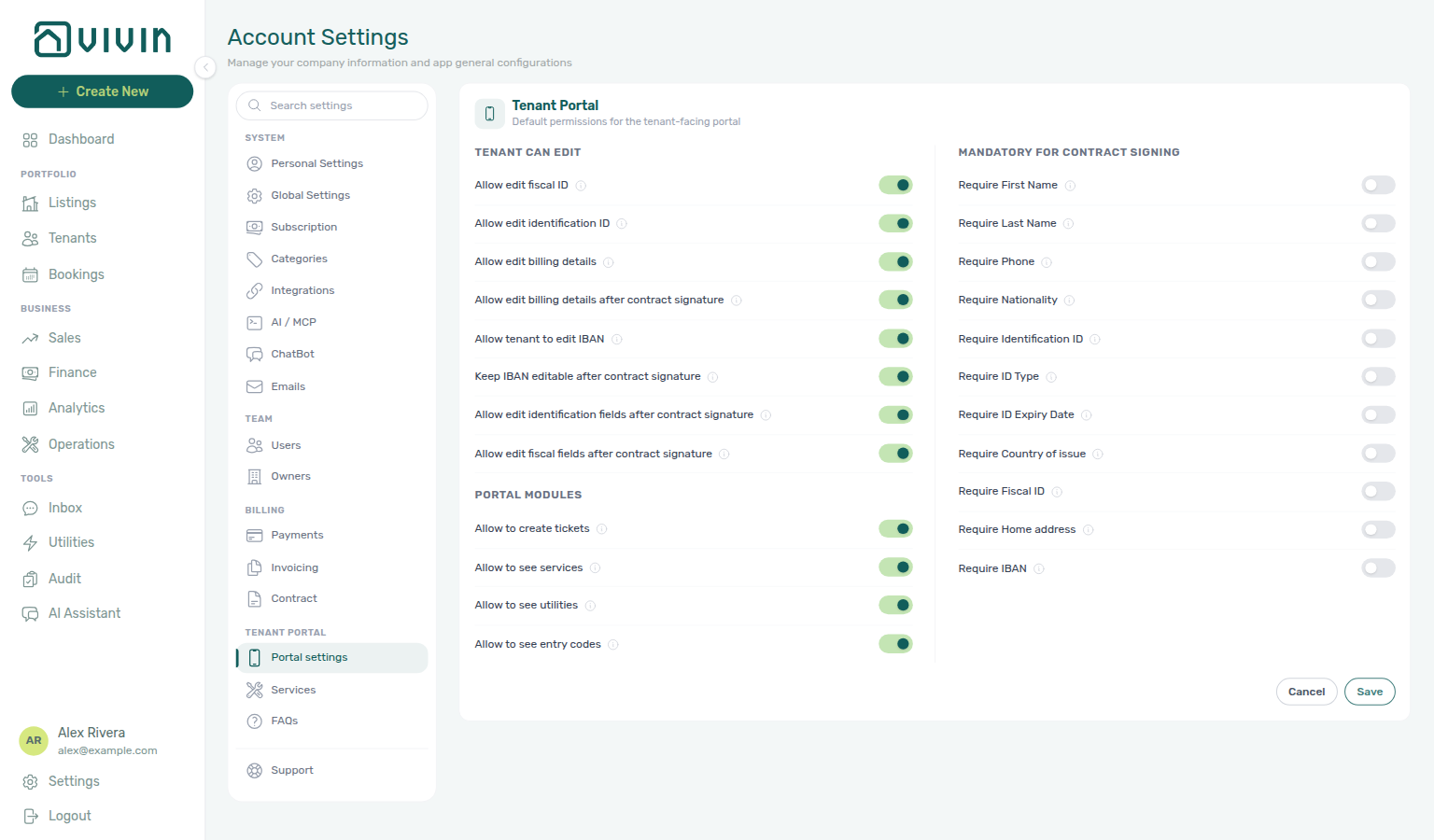
The card title in the main panel is Tenant Portal (subtitle: Default permissions for the tenant-facing portal). One pencil edits the whole card. Save persists account-wide; Cancel discards the draft. Only this card is in edit mode at a time.
Default language
Default language pairs with Tenant Portal — Language switcher (what tenants tap), Tenants — Portal language (one-tenant override), and Interface language (your workspace locale — not the portal). Distinct from Tenant can edit and Portal modules (permissions, not locale).
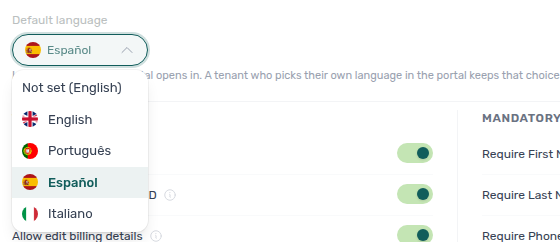
At the top of the Tenant Portal card (above the two columns), Default language is the language the portal opens in for tenants who have not picked one themselves. Options: Not set (English) (empty — English, the historic default), English, Português, Español, and Italiano. A tenant who picks EN / PT / ES / IT in the portal language switcher keeps that choice on every stay. Account default on Tenants — Portal language hands a tenant back to this setting.
The language switcher itself is not a Portal settings hide toggle — tenants always see it after a valid access link.


Tenant can edit
These toggles control what tenants may change on the Tenant Portal Your Details / billing screens (subject to booking state and contract signing where a toggle says so):
| Toggle (English UI) | Tenant capability when On |
|---|---|
| Allow edit fiscal ID | Update Fiscal number, Home address, and Country of issue. See Tenant Portal — Fiscal number and home address and Tenant Portal — ID document details. |
| Allow edit identification ID | Update ID document number, ID Type, and ID Expiry Date. See Tenant Portal — ID document details. |
| Allow edit billing details | Update billing details before contract signature, including Billing address (City, Postal code, Country) and the Use company details toggle. When Off, the portal shows the locked billing banner. See Tenant Portal — Billing address and Tenant Portal — Use company billing. |
| Allow edit billing details after contract signature | Update billing details after signing (same billing address fields and company-billing toggle). When billing editing is Off (or Off after signature), the portal shows the locked billing banner and disables billing fields. |
| Allow tenant to edit IBAN | Editing IBAN in the portal (also the European bank account toggle and extra bank fields); when On, you can also keep IBAN editable after signature. When Off, the portal shows the locked bank banner. See Tenant Portal — IBAN and Tenant Portal — European bank account. |
| Keep IBAN editable after contract signature | Shown when IBAN editing is On — tenants can still change IBAN after signing. When IBAN editing is Off (or Off after signature), the portal shows the locked bank banner and disables bank fields. |
| Allow edit identification fields after contract signature | ID number, type, and expiry after signing. |
| Allow edit fiscal fields after contract signature | Fiscal number, Home address, and Country of issue after signing. See Tenant Portal — Fiscal number and home address. |
Portal modules
| Toggle (English UI) | Tenant capability when On |
|---|---|
| Allow to create tickets | Submit New Request (Report an Issue or General Inquiry — creates tickets in Operations). Also shows the Open requests card on portal Home (Create request, View all), and the FAQ accordion on Requests. |
| Allow to see services | View the services catalogue, Order History, and pending Awaiting approval rows (Services). Also lists Services on portal More. |
| Allow to see utilities | View Utilities (Daily Breakdown and Your Property Bills). Also lists Utilities on portal More. Hidden when the booking is refunded. |
| Allow to see entry codes | View building, property, and unit entry codes on portal Home after the check-in email is sent and before checkout. Does not suppress codes in the check-in email itself. |
Turn Allow to see services On here before tenants can browse the Services catalogue. Per-segment hiding still happens on Tenant categories.
WiFi on portal Home is not a Portal settings toggle. Tenants see Tenant Portal — WiFi after the check-in email is sent, when the property has a network name or password on Listings — WiFi.
Lease information and Contact us on portal Home are also not Portal settings toggles. Tenants always see Tenant Portal — Lease information and Contact us after sign-in — those cards do not wait for the check-in email.
The Home greeting and listing pin (Hello, First name! plus the listing street) is not a Portal settings toggle either. Tenants always see it after sign-in.
The Contract card on Home is always visible (no hide toggle). Open requests follows Allow to create tickets above. The FAQ accordion and What do you need? on Requests use the same tickets gate — there is no separate FAQ or Issue/Inquiry toggle.
Download contract and Read to the end to sign on the Contract tab are also not Portal settings toggles. Tenants save contract.pdf as soon as the PDF is on screen; they scroll the viewer to unlock Sign. Hide the Contract tab (and both controls with it) with tenant-category Contract.
Sign out and the phone More page are not Portal settings toggles. Tenants always see Tenant Portal — Sign out after sign-in; Allow to see utilities / Allow to see services only hide those cards on More.
The portal language switcher is also not a hide toggle. Set the account fallback under Default language; tenants still pick EN / PT / ES / IT themselves.
Documents on the portal is also not a Portal settings toggle. Tenants open Tenant Portal — Documents from the desktop sidebar or phone More. Hide the desktop sidebar item with tenant-category Documents / invoices.
Mandatory fields before contract signing
The Mandatory for contract signing block sets hard gates in the Tenant Portal before a tenant can complete contract signature. Each toggle maps to a field on the portal Your Details step of the Digital contract signing wizard. When a toggle is On, the tenant must fill that field (or already have it on file) before the signature control unlocks. Enforcement runs in the portal UI and server-side on sign.
A contract PDF must still exist on Contract Info before Sign contract appears — configure templates in Contract templates and generate from Processing a New Booking — Step 4. When tenants report a blocked Sign contract button, start with FAQ — Tenant contract signing blocked.
| Toggle (English UI) | Portal field gated before signature |
|---|---|
| Require First Name | First name |
| Require Last Name | Last name |
| Require Phone | Phone — optional + and 7–15 digits |
| Require Nationality | Nationality — searchable nationality words with flags |
| Require Identification ID | Identification ID |
| Require ID Type | ID document type |
| Require ID Expiry Date | ID expiry date |
| Require Country of issue | Country of issue (ID document) |
| Require Fiscal ID | Fiscal number (tax ID) |
| Require Home address | Home address |
| Require IBAN | IBAN |
All of these default to Off, so existing accounts keep prior behaviour until you enable additional gates. They are independent of the Allow edit … toggles: you can let tenants update a field while still requiring it at signing time.
Tenants experience these gates in the portal Sign contract wizard — see Tenant Portal — Digital contract signing, Tenant Portal — First name and last name, Tenant Portal — Phone, Tenant Portal — Nationality, Tenant Portal — ID document details, Tenant Portal — Fiscal number and home address, and Tenant Portal — IBAN (Your Details → Billing → Review → Sign, plus Guarantor when a guarantor is on file). Account → Save changes still requires both names when those fields are editable, even if Require First Name / Require Last Name stay Off. Lease Purpose is not on this tab — enable and require it under Categories → Lease Purpose; tenants pick on Your Details, not from these toggles. See Tenant Portal — Lease Purpose.
Whether tenants can pay online depends on your account having the tenant payment module enabled (Vivin provisioning — contact support if card or bank pay-in flows are unavailable) and on each property’s Property Payments Active toggle in Listings > Payments. Those requirements are documented in the Tenant Portal page, not as switches on this tab. When the payment module is off, portal Home also hides the balance card, and Payments (including Payment details, Same-month installment titles, TODAY far-due date, TODAY compact tick at the end, Overdue days past due, Paid installment, Pending installment, Pending installment, Discounted installment, Scheduled Due in N days, Upcoming, Transaction History sort, Platform payment label, Export CSV, the Receipt column, and the Virtual IBAN processing notice) is hidden. There is no Portal settings toggle for Payment details, Same-month installment titles, TODAY far-due date, TODAY compact tick at the end, Overdue days past due, Paid installment, Pending installment, Discounted installment, Scheduled Due in N days, Upcoming, Transaction History sort, Platform payment label, Export CSV, the Receipt column, the Virtual IBAN processing notice, Payment Due Soon, or Make payment Back.
Edit and save
- Open Account Settings → Tenant Portal → Portal settings.
- Click the pencil on the Tenant Portal card.
- Change the toggles you need, then Save — or Cancel to leave account defaults unchanged.
How this relates to tenant categories
This tab is the account default. Tenant categories (the Tenants card on Categories) can tighten portal access, profile fields, and modules per segment. Turn on Enable tenant categories under Global Settings before that card appears.
If AI Chat points you at Property → Tenant categories for these account-wide toggles, open Tenant Portal → Portal settings first, then refine segments on Categories → Tenants.
Related
- Account Settings hub — Tenant Portal — Sidebar group with this tab, Services, and FAQs
- Tenant categories — Per-segment portal modules and field rules
- Services — Catalogue gated by Allow to see services
- FAQs — Tenant FAQ catalogue in the same sidebar group
- Global Settings — Booking defaults, notifications, fees, and Owner Reports (not these portal toggles)
- Tenant Portal — What tenants see after these toggles are saved
- Tenant Portal — Save changes success — Green Details updated successfully! after tenants click Save changes
- Tenant Portal — WiFi — Home WiFi card (not a Portal settings toggle)
- Tenant Portal — Open requests — Home Open requests card (gated by Allow to create tickets)
- Tenant Portal — Received status — Home and History Received (not a Portal settings toggle)
- Tenant Portal — FAQ accordion — Published Q&A on Requests (same tickets gate)
- Tenant Portal — What do you need? — Report an Issue vs General Inquiry on New Request (same tickets gate)
- Tenant Portal — Contract card — Home Contract card (not a Portal settings toggle)
- Tenant Portal — Lease information — Home Lease information card (not a Portal settings toggle)
- Tenant Portal — Contact us — Home Contact us card (not a Portal settings toggle)
- Tenant Portal — Logo website — Sidebar / header Logo opens Website URL (not a Portal settings toggle)
- Tenant Portal — Powered by VIVIN — Computer sidebar and access-link Powered by VIVIN (not a Portal settings toggle)
- Tenant Portal — Sign out — Desktop top bar and More Sign out (not a Portal settings toggle)
- Tenant Portal — Language switcher — Globe + EN / PT / ES / IT (not a hide toggle; account fallback is Default language)
- Tenant Portal — More — Phone overflow (Documents, Utilities, Services, Surveys, Account, Sign out)
- Tenant Portal — Documents — Booking files and Hostkit invoices (not a Portal settings toggle)
- Tenant Portal — Payment details — Timeline sidebar on Payments (not a Portal settings toggle)
- Tenant Portal — Same-month installment titles — Payment Timeline — due D when two regular cards share a month (not a Portal settings toggle)
- Tenant Portal — TODAY far-due date — Payment Timeline TODAY calendar due date when the next installment is 60+ days away (not a Portal settings toggle)
- Tenant Portal — TODAY compact tick at the end — Payment Timeline compact TODAY after the last card when nothing is still ahead (not a Portal settings toggle)
- Tenant Portal — Overdue days past due — Payment Timeline Overdue chip N days past due on a late installment (not a Portal settings toggle)
- Tenant Portal — Pending installment — Payment Timeline Pending card with amber Remaining (not a Portal settings toggle)
- Tenant Portal — Paid installment — Payment Timeline Paid card with green Total and no Remaining (not a Portal settings toggle)
- Tenant Portal — Discounted installment — Payment Timeline Paid card whose Total is below the original scheduled amount (original struck through; not a Portal settings toggle)
- Tenant Portal — Scheduled Due in N days — Payment Timeline Scheduled chip Due in N days on a future installment (not a Portal settings toggle)
- Tenant Portal — Upcoming — Payment Timeline Scheduled chip Upcoming when that due date is today or already past (not a Portal settings toggle)
- Tenant Portal — Platform payment label — Transaction History channel name and logo (not a Portal settings toggle)
- Tenant Portal — Payment Due Soon — Make payment Bank Transfer dialog (not a Portal settings toggle)
- Tenant Portal — Make payment Back — Make payment left chevron (not a Portal settings toggle)
- Tenant Portal — Order History — Portal Services confirmed add-ons (gated by Allow to see services)
- FAQ — Tenant contract signing blocked — No PDF yet, mandatory Your Details gates, or category locks
- Get Help & Support — Escalate when portal modules or signing gates do not match expectations