Subscription
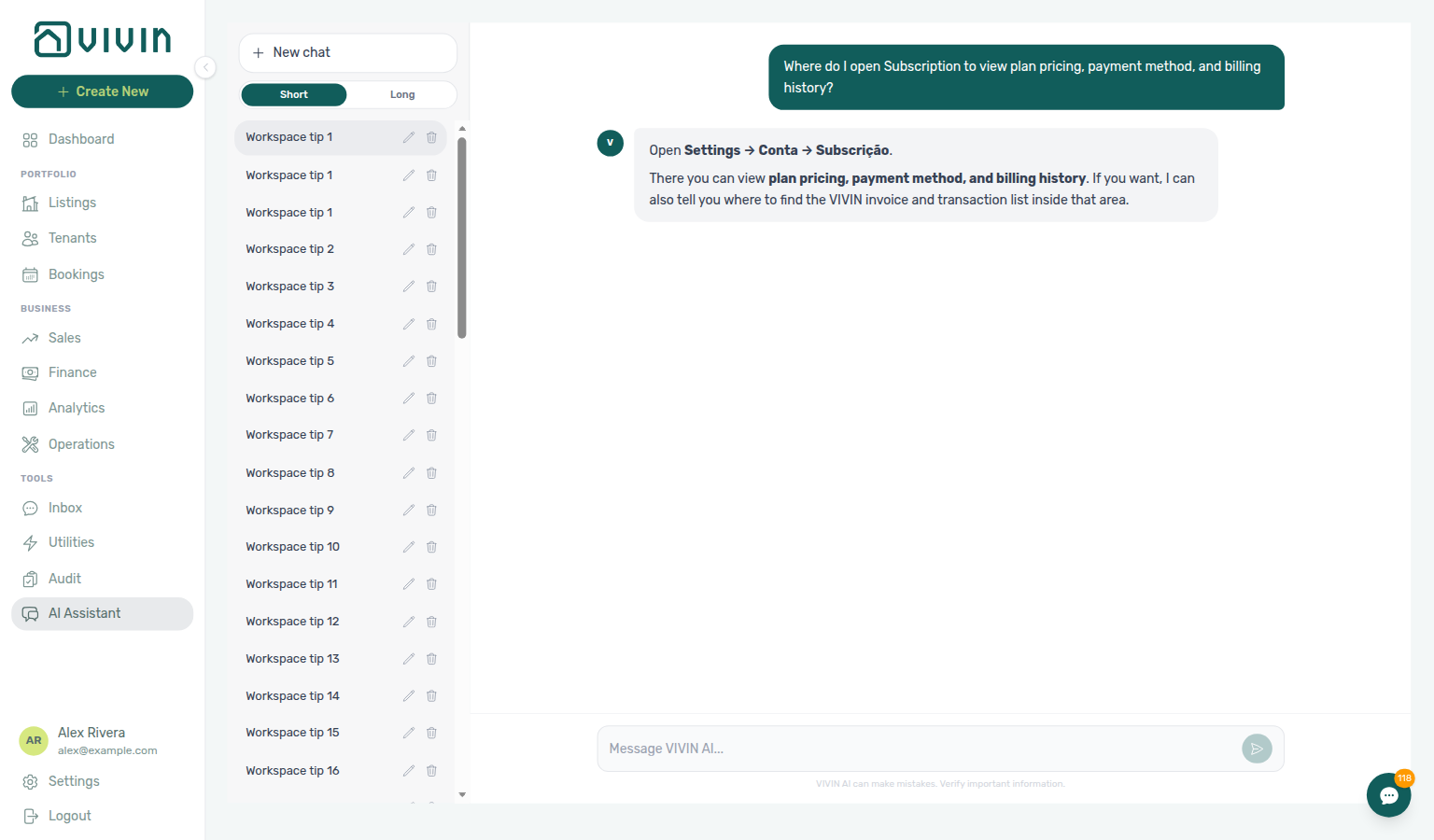
Ask AI Chat “Where do I open Subscription to view plan pricing, payment method, and billing history?” — then open this Subscription tab (ai-chat-product-context-subscription-reply.png, ai-chat-product-context-subscription-flow.mp4). The assistant may still say Settings → Conta → Subscrição or Settings → Account → Subscription; follow Settings → System → Subscription instead. The English tab label is Subscription. Same grounding external MCP clients get from get-vivin-context-platform. Distinct from General Information (company identity / branding on Global Settings) and from the other Preferences cards (booking defaults, portal gates — English tab Global Settings).
Review Subscription during or after Getting Started — Recommended Setup Sequence step 1 General Information (optional Vivin platform billing — distinct from tenant payment rules on steps 5–7) before high-volume Integrations in step 12. Full tab map: Recommended setup order. Finish steps 13–15 and Onboarding a New Property — Step 7. Workflow pairing after go-live: Account Settings — Setup sequence after go-live.
Review Plan & Pricing and Payment Method first (including Company details before card capture when Add card asks for company fields), then Billing History (past period rows when subscribed; Upcoming estimate under Action Required). If checkout cannot be dismissed after sign-in: When a card is required. Card or checkout issues: Troubleshooting. Habit-specific shortcuts live under Related below.
The Subscription tab shows your Vivin platform subscription details, including plan pricing, payment method, and billing history.
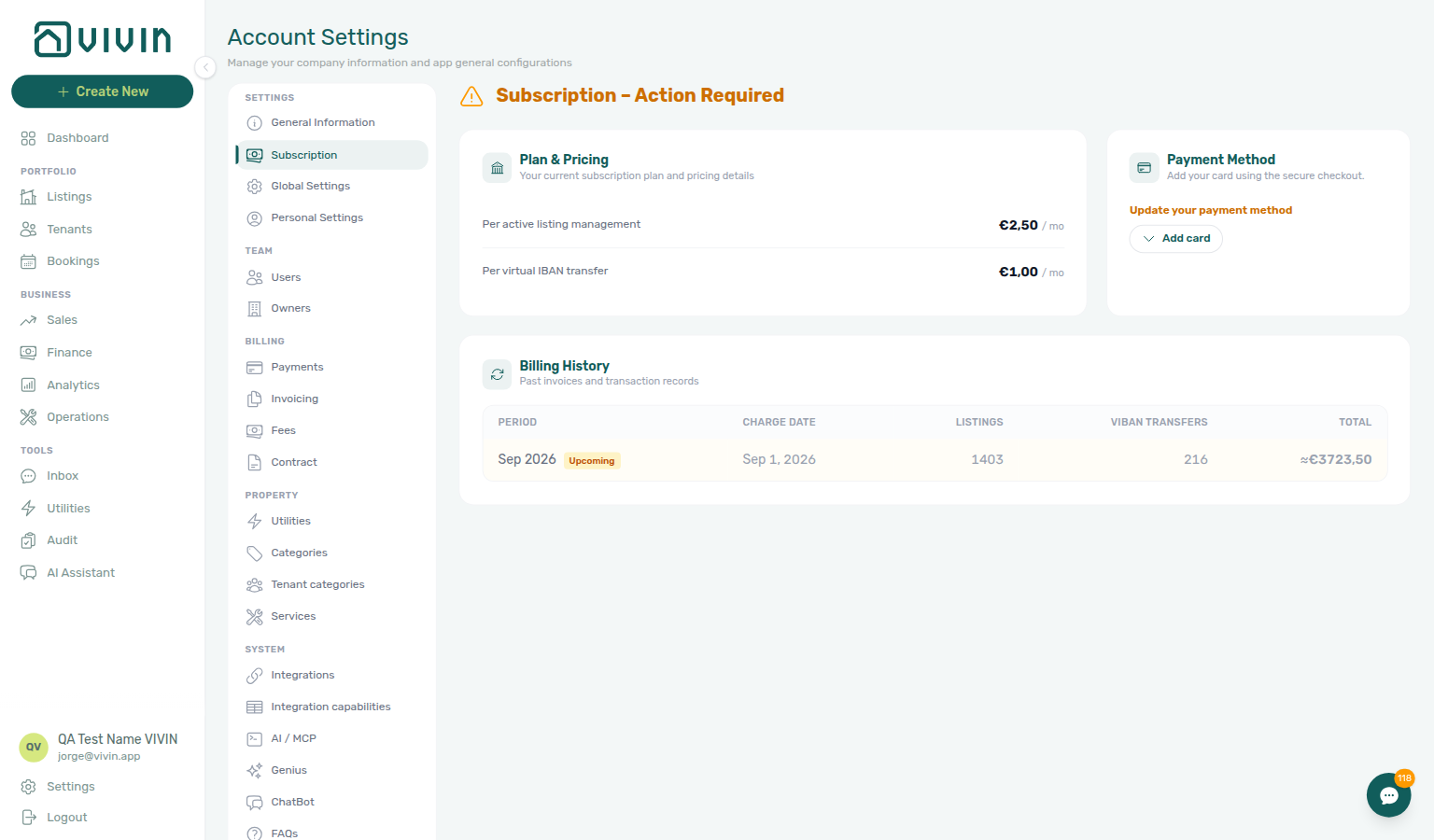
Open Account Settings → System → Subscription at platform.vivin.app/settings/subscription. To land with hosted checkout already expanded, use platform.vivin.app/settings/subscription?expandCheckout=1 (same entry point as Global Settings → Subscription shortcut). See Deep Links for other settings routes.
Pair General Information (operator company identity on invoices and contracts) with this tab before high-volume channel imports — Listings counts and VIBAN Transfers rows in billing history track connected Integrations. Vivin platform subscription charges here are distinct from internal LLM spend on AI usage API. Incomplete company details also block Add card until you save them — see Company details before card capture.
Who can use it
The account_settings.invoicing_&_payments gate matches Invoicing & Payments — confirm Users and roles — Role Permissions before delegating card-on-file updates.
The Subscription tab appears under Account Settings → System when your role includes account_settings.invoicing_&_payments (same permission gate as Payments and Invoicing under Billing). Without it, the tab is hidden and direct URLs show the standard settings permission state. Billing changes to plan tier or contract terms still go through Vivin support — this screen is for self-serve card capture and usage history on subscribed workspaces.
What you see on screen
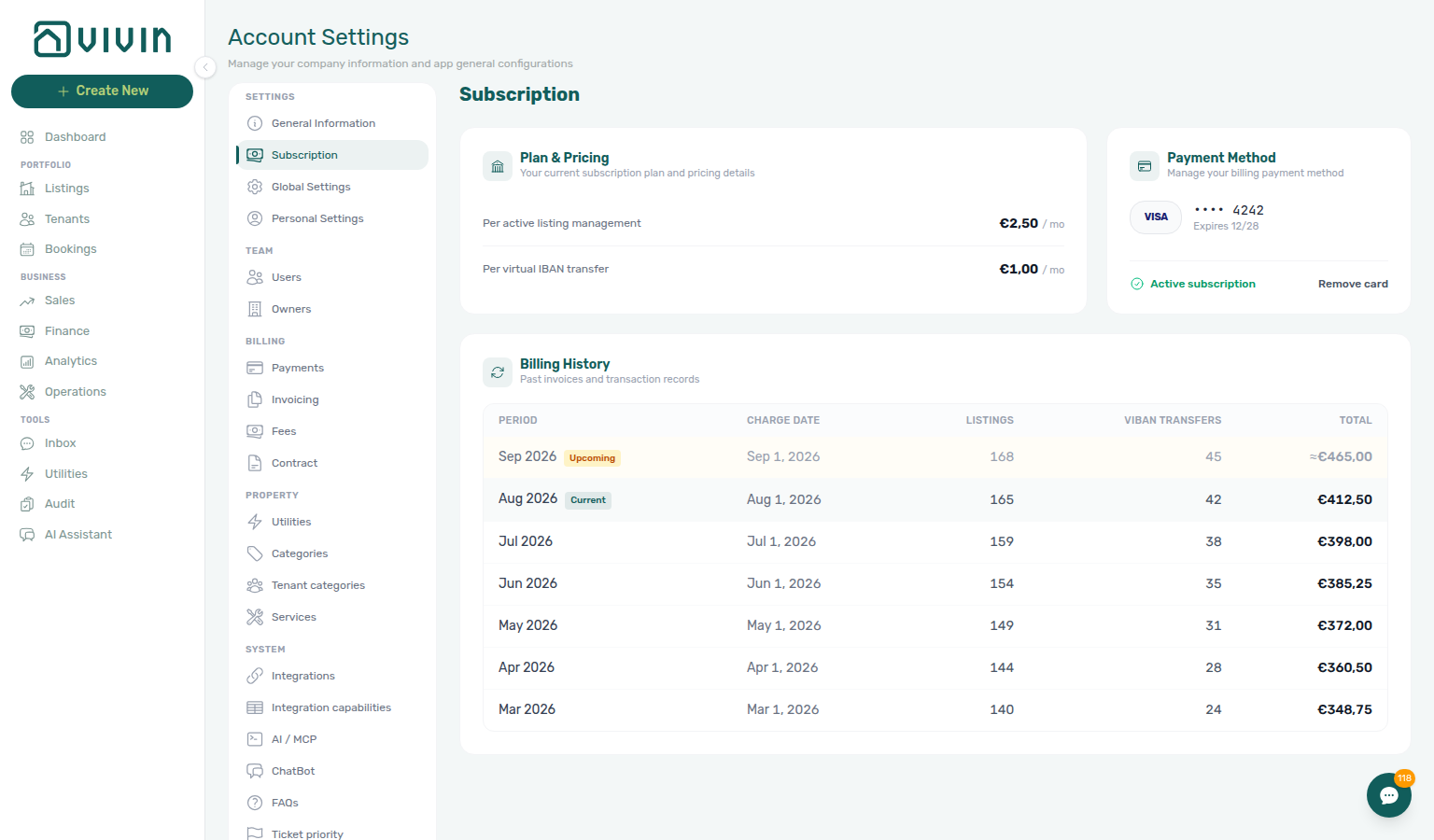
The page is grouped into Plan & pricing, Payment method, and Billing history. The main heading reflects subscription state:
| Heading (English UI) | When it appears |
|---|---|
| Subscription | The account is subscribed (isSubscribedToVIVIN is active in product data). |
| Subscription – Action Required | Checkout or card capture is still required — an amber warning icon appears beside the title. |
The three sections below use the same layout in both states.
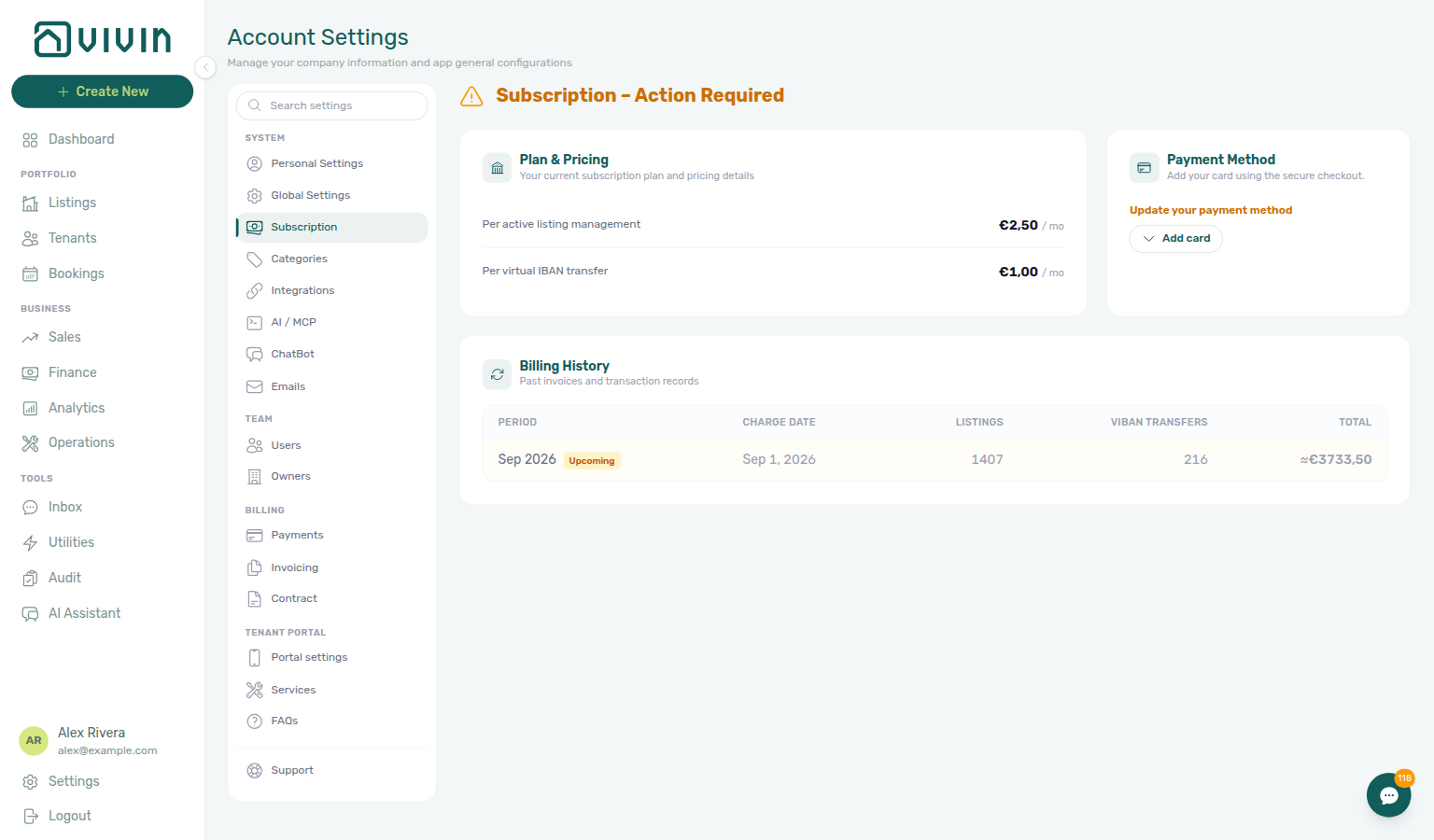
Plan & Pricing
Per active listing management rows track live Listings inventory — pair with Integrations before month-end when channel volume drives listing counts.
This section displays your current subscription plan and how charges are calculated:
- Per active listing management — Price per managed listing
- Per virtual IBAN transfer — Price per virtual IBAN transaction (booking and platform transfers)
- Per active listing booking engine — Price for listings using the Vivin booking engine (if applicable)
Pricing is based on your usage and may vary by plan tier.
Payment Method
Company identity on General Information should match the cardholder name on file — and must include Company Name, Email, Phone, and Fiscal ID before Add card can open the payment form (Company details before card capture). Use Resetting a Management User Password when Action Required blocks the user who owns billing access.
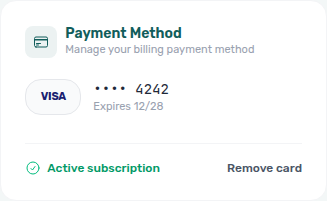
When the account is subscribed, this card shows the card on file:
- Card brand (Visa, Mastercard, Amex)
- Last four digits
- Expiration date
- Subscription status (Active subscription or an in-progress checkout status while Vivin confirms the card)
- Remove card — self-serve control to clear the saved card so you can attach a different one (see Remove or replace the card on file)
Hosted checkout when action is required
When the account is not yet subscribed (or the saved card was removed), the page title shows Subscription – Action Required and the Payment method card switches to Update your payment method copy with an Add card control (expand/collapse with Hide).
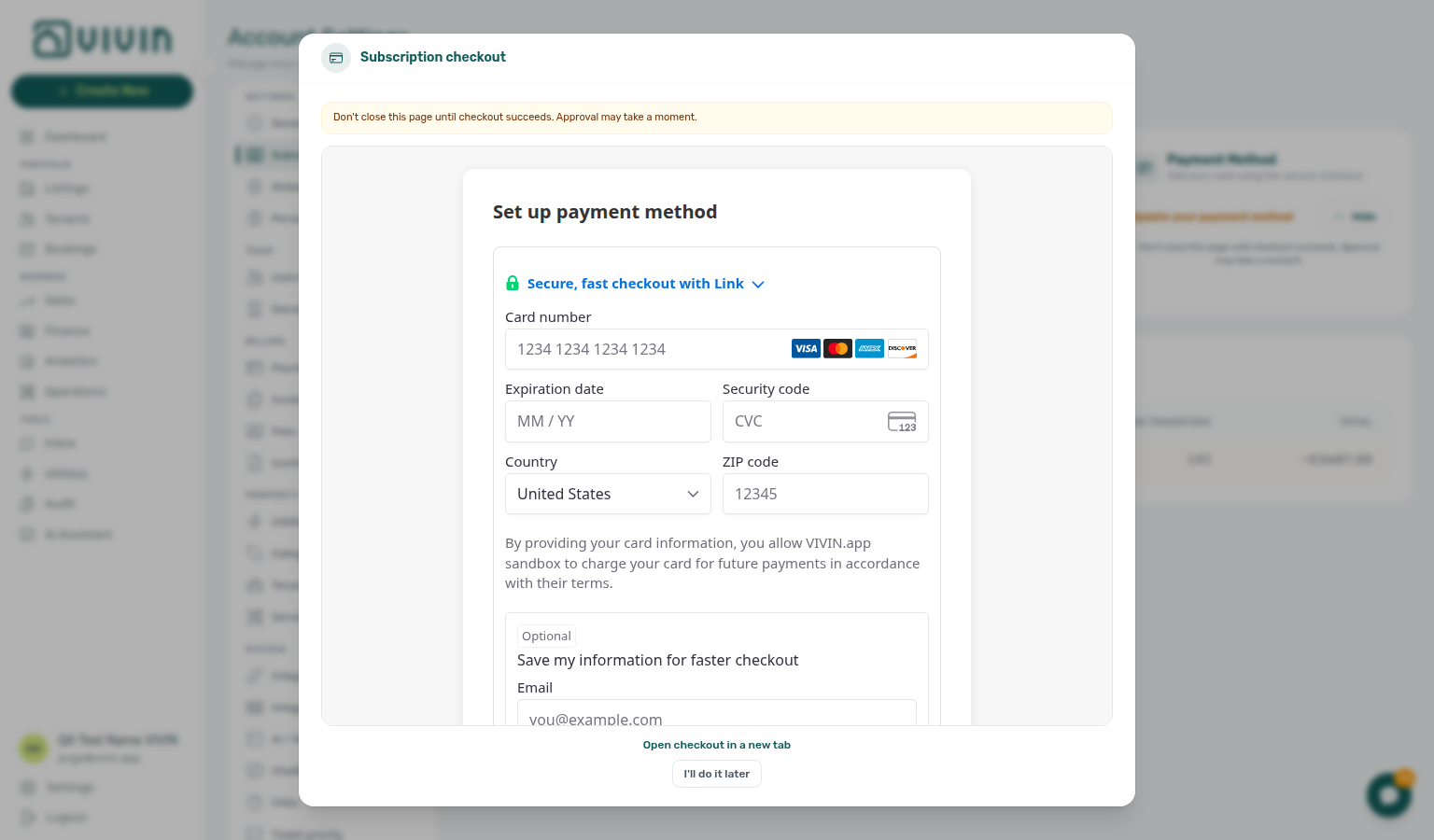
Add card opens the Subscription checkout modal. Before the payment form appears, Vivin may ask you to complete company details (same fields as General Information) — see Company details before card capture. When those required fields are already on file, the modal embeds Vivin’s hosted subscription checkout iframe on desktop. A short warning reminds you not to close the page until checkout succeeds — approval can take a moment after you submit the form.
| Surface | Behaviour |
|---|---|
| Desktop — Subscription tab | Add card expands the checkout modal (company-details step first when required, then the payment iframe). While no card is saved yet, the modal may block closing the backdrop (same rule as the startup prompt below). After the API reports saved digits or subscribed status, use Close. |
| Desktop — narrow / mobile | The payment iframe is not embedded on small screens. Use Open checkout in a new tab once company details are complete. If details are still missing, finish them in the modal first (opening the payment tab early cannot build checkout). |
| Either | I'll do it later dismisses the expanded checkout without saving a card (when the backdrop is not locked). On card-required accounts that control is hidden — Sign out remains. |
Company details before card capture
Hosted checkout needs your workspace company identity before it can open the payment form. If any of these are blank on the account, Add card (and the desktop startup checkout modal) show a company-details step instead of the iframe:
| Required field | Same label on General Information |
|---|---|
| Company Name | Company Name |
| Phone | Phone |
| Fiscal ID | Fiscal ID |
Fiscal Address appears on the same form (optional for this gate) so you can fill it in one pass. Missing required fields use the standard red outline until you type a value.
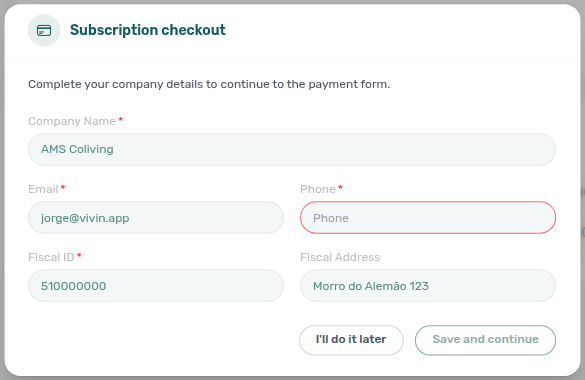
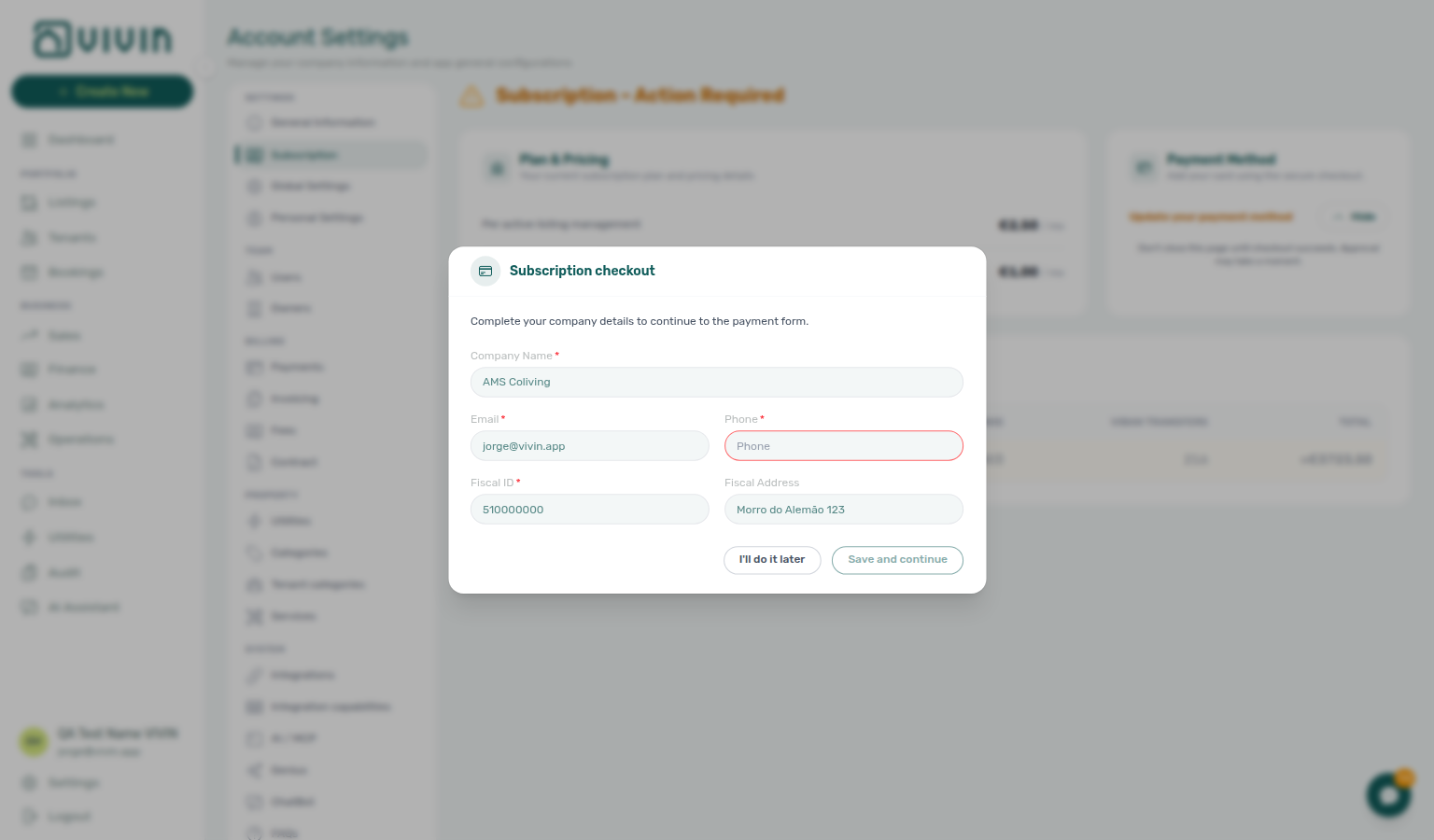
- Open Account Settings → Subscription (or wait for the desktop startup checkout prompt).
- Choose Add card (or land via General Information → Subscription with checkout already expanded).
- Review the fields — they match General Information and save through the same account update.
- Choose Save and continue. Vivin writes the company details, refreshes the workspace, then opens the hosted payment form in the same modal.
- Or choose I'll do it later to dismiss without saving — Action Required stays until details and card capture both succeed. On card-required accounts that button is hidden; Save and continue or Sign out.
Saving from this step needs the same permission as editing General Information. Teammates without that permission see a short message to ask an administrator to complete company details there — the payment form stays blocked until those fields are filled.
Keep General Information up to date so Add card can skip straight to the payment iframe on the next visit.
On desktop, a startup checkout modal can open about five seconds after the management app finishes its initial load when:
- the account is not yet subscribed and has no saved card,
- Vivin has provisioned a checkout page for the workspace,
- the signed-in user is not internal Vivin staff,
- the prompt is enabled for the account (on by default; Vivin support can switch the reminder off per account), and
- you are not on a mobile layout (the reminder is desktop-only).
That reminder uses the same Subscription – Action Required title and hosted checkout as Add card. While no card is saved yet, the modal may wait a few seconds for checkout to confirm, and it may block click-outside dismiss until a card is on file. Use I'll do it later or Close only when those controls are shown. Prefer Account Settings → Subscription when you want to complete billing on your schedule.
Some workspaces instead treat a saved card as a condition of use — that prompt is a block, not a reminder. See When a card is required.
When a card is required
Some workspaces are set so a saved card is required before anyone can use the management app. On those accounts the same Subscription – Action Required prompt is a block:
- it opens immediately after load (no five-second wait), on every screen size — including phones,
- it cannot be dismissed — no close control, no Escape, no click outside, and no I'll do it later,
- the rest of the management app stays unavailable behind it until a card is saved,
- the amber notice reads A payment method is required to keep using VIVIN. Add your card to continue.,
- on narrow screens, where the payment form cannot be embedded, Open checkout in a new tab is the main action,
- Sign out stays available so you can leave the session,
- Finance, Sales, and Operations logins see the block too — not only teammates who can open Subscription,
- if company details are still missing, complete Save and continue (or ask an administrator to fill General Information) — there is no way to skip that step from the block.
The block clears on its own within a few seconds of the card being saved — including when a colleague saves it from another device — so you do not need to reload. Tenants, the Tenant Portal, and connected listing feeds keep working while the management app is blocked.
Ask your Vivin contact if you believe an account should not be in this mode.
See FAQ — Why can’t I dismiss Subscription checkout? and Glossary — Subscription card required.
When a card is required
Some workspaces are set up so a saved card is a condition of use. On those accounts the same prompt appears as a block instead of a reminder:
- it opens immediately after load rather than after five seconds, and on every screen size,
- it cannot be dismissed — no close control, no Escape, no click outside, and no I'll do it later,
- the rest of the management app stays unavailable behind it until a card is saved,
- on narrow screens, where the payment form cannot be embedded, it offers Open checkout in a new tab instead, and
- Sign out remains available, so you can always leave the session.
The block clears on its own within a few seconds of the card being saved — including when a colleague saves it from another device — so there is no need to reload.
Ask your Vivin contact if you believe an account should not be in this mode.
From Account Settings → General Information, the Subscription shortcut can open the tab with checkout already expanded (/settings/subscription?expandCheckout=1) so you land directly on the Payment method iframe without hunting for Add card.
| Entry point | Best for |
|---|---|
| Subscription tab | Reviewing plan pricing, billing history, and updating a card on your schedule |
| Startup modal | Reminder on desktop; on card-required accounts, a block on every screen size |
| General Information → Subscription | Jumping straight into hosted checkout via expandCheckout=1 |
Deep link from General Information
When checkout is still required, General Information shows a top-right Subscription shortcut that opens this tab with the hosted card section already expanded: the URL includes ?expandCheckout=1 (for example /settings/subscription?expandCheckout=1). The product removes that query parameter after it applies so bookmarks stay on /settings/subscription. Use the same pattern when you hand operators a link that should land directly on Add card instead of the collapsed Payment method card.
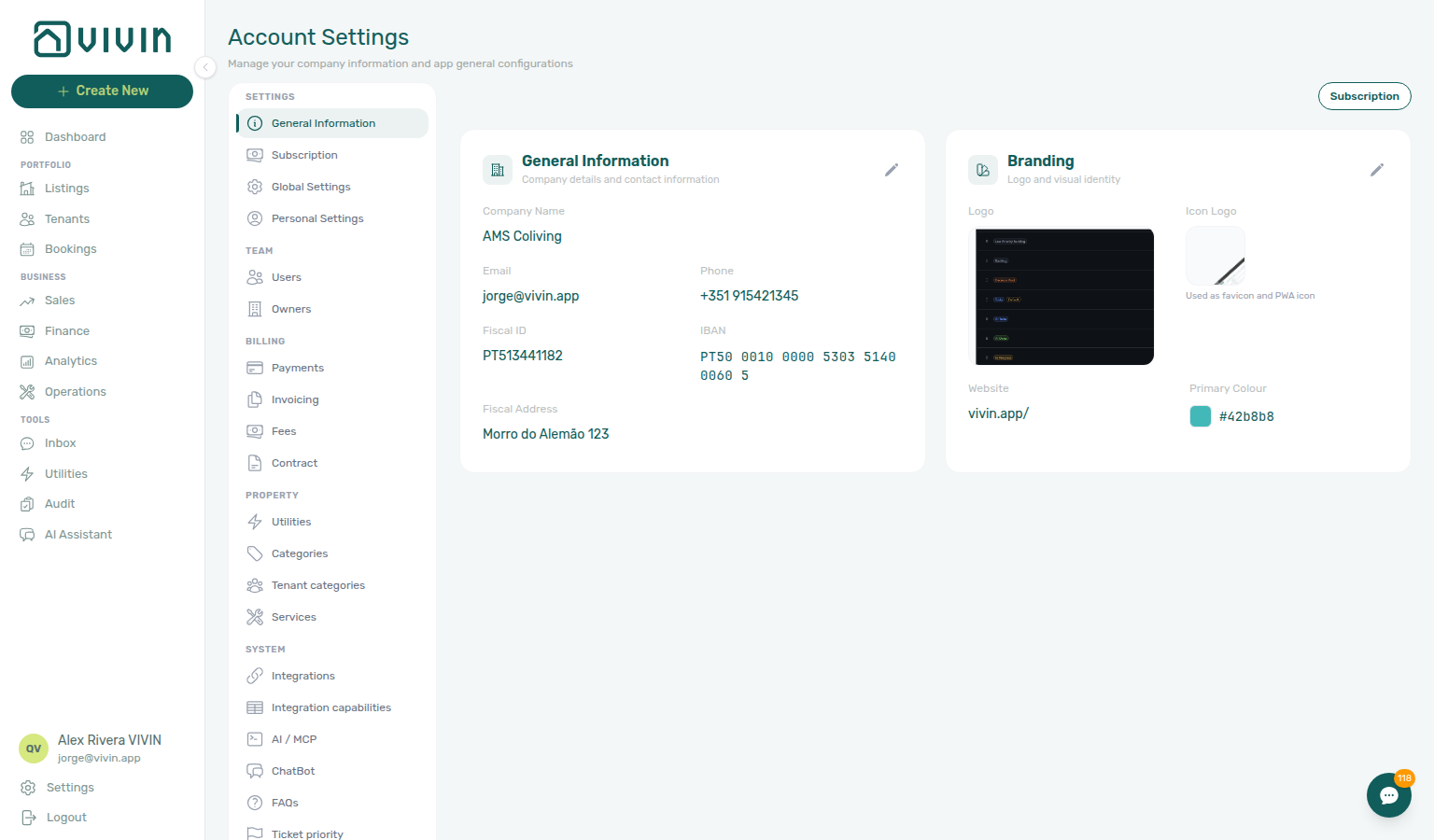
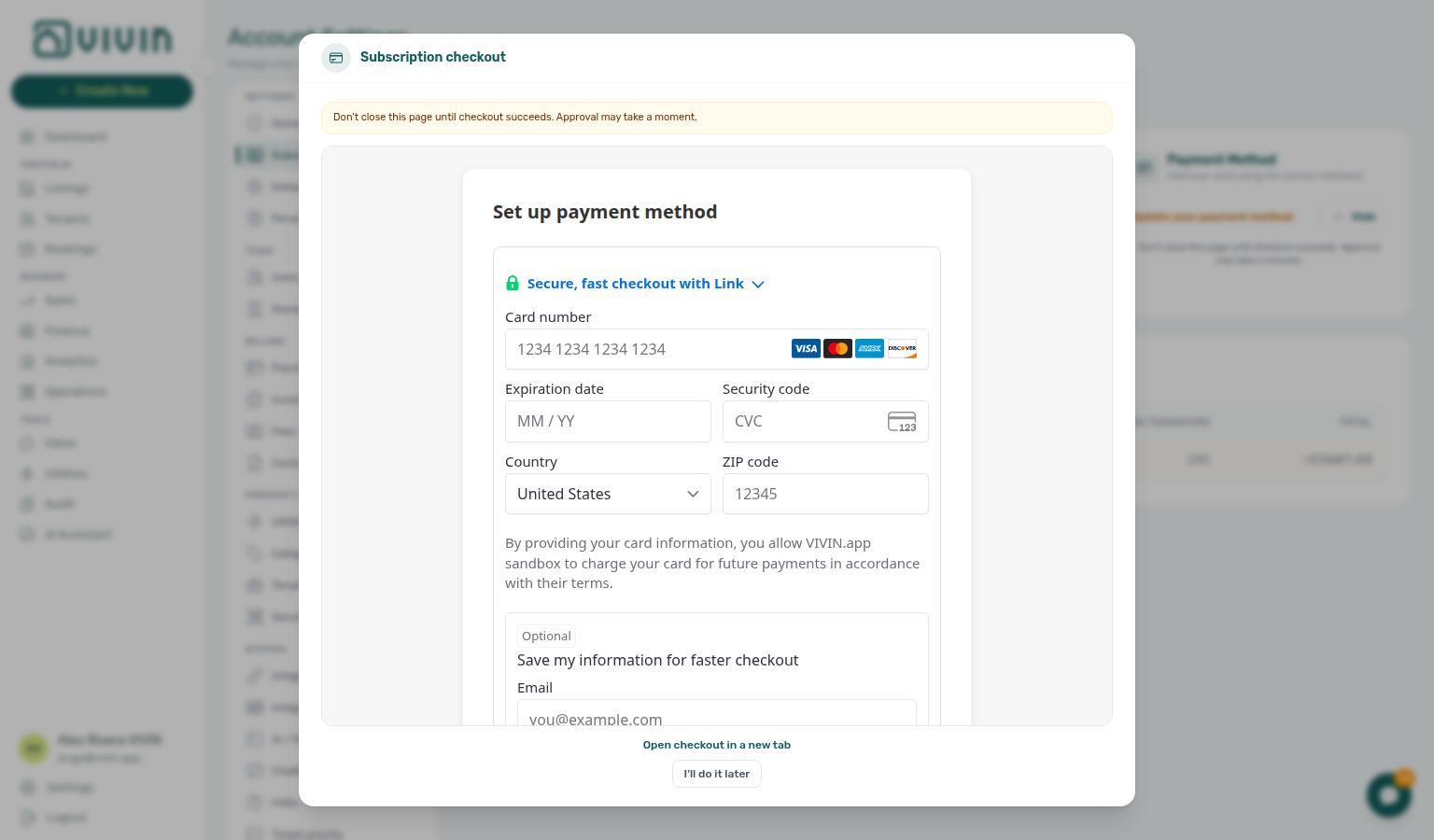
While the checkout iframe is open on desktop and no card digits are saved yet, the tab polls checkout status every few seconds so the UI can flip to Active subscription as soon as the gateway confirms the card — you do not need to refresh the whole settings page after submitting the hosted form.
For plan tier changes, contract questions, or billing disputes, contact Vivin support — see Get Help & Support.
Remove or replace the card on file
When the workspace already has a saved card (Active subscription), the Payment method card shows Remove card beside the status line. Use it when you need to swap to a different card or clear the on-file method without contacting Vivin support.
- Open Account Settings → Subscription.
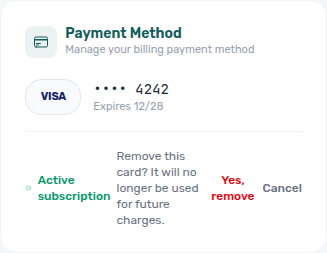
- On Payment method, choose Remove card. A confirmation dialog opens.
- Confirm with Yes, remove, or choose Cancel to keep the card.
- After a successful remove, Vivin clears the subscribed checkout for the account, flips the workspace out of the subscribed flag, and the same tab returns to Update your payment method / Add card so you can run hosted checkout again.
Remove card stops future platform charges from using that saved method. It does not detach the payment method at the card processor, and charges already in to_approve on the internal payment-transactions list can still capture against the method that was on file when they were created. Until you add a new card, day-1 subscription tracking inserts no new platform charge for the account.
Vivin internal: payment transactions
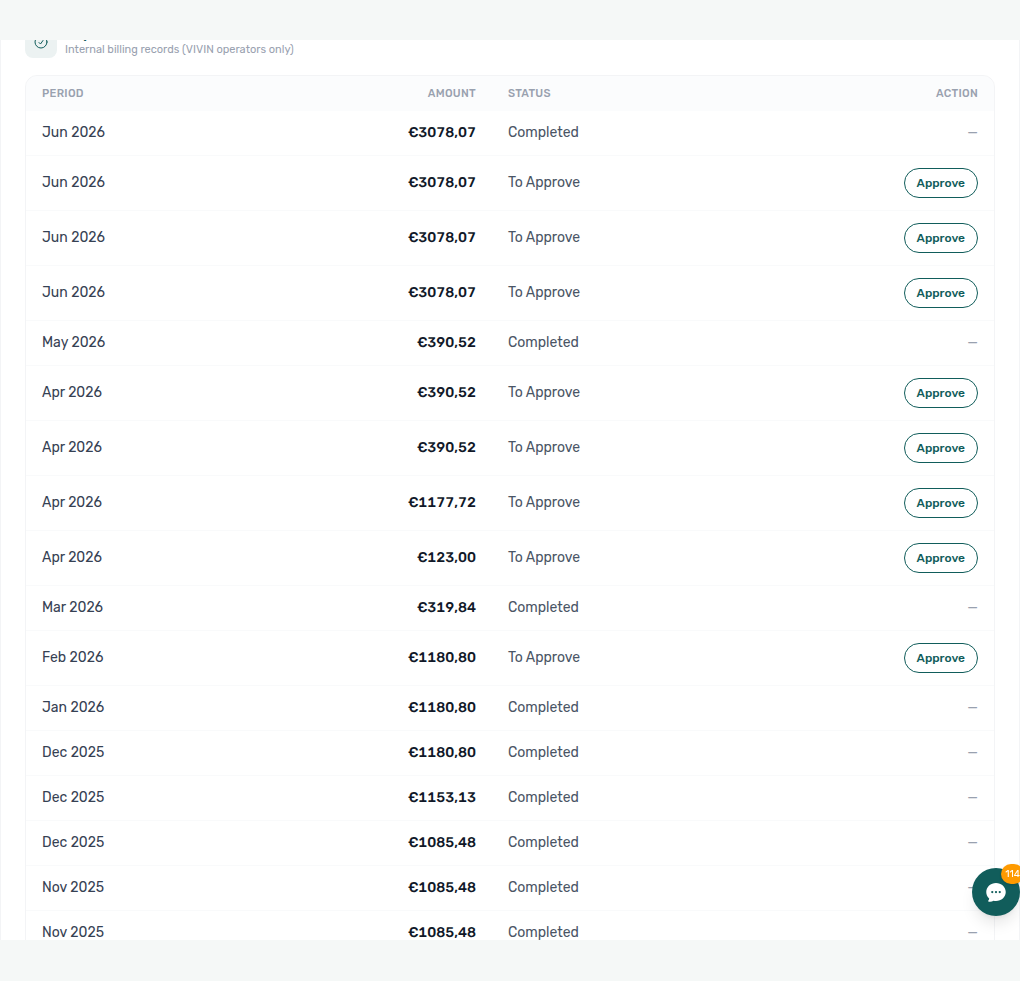
When you are signed in with a Vivin internal operator account and the workspace is already subscribed, an extra card appears below Billing history:
| UI element | English label (default) |
|---|---|
| Title | Payment transactions |
| Subtitle | Internal billing records (VIVIN operators only) |
| Table | Period, Amount, Status, Action (right-aligned) |
It lists platform subscription charge rows for Vivin’s internal billing workflow — separate from the customer-facing Billing history table above it.
| Status (examples) | Action |
|---|---|
to_approve | Approve — confirms the charge; a success toast reads Transaction approved. |
approved | Read-only — no action button |
pending | Read-only while the gateway or back-office flow is in progress |
failed | Read-only — retry or support follow-up happens outside this screen |
When no rows exist yet, the table shows No subscription transactions. Customer property managers never see this block; it is for Vivin staff operating on subscribed accounts only.
Troubleshooting
Escalate persistent checkout failures through Using in-app support — tenant rent collections on Finance are a separate billing layer from Vivin platform fees here.
| Symptom | What to try |
|---|---|
| Subscription – Action Required persists after adding a card | Wait for Vivin to confirm the card (status can lag). Refresh the tab or sign out and back in. If digits never appear, contact support with your account name. |
| Add card asks for company details instead of the payment form | Expected when Company Name, Email, Phone, or Fiscal ID is blank — complete Save and continue, or fill the same fields on General Information first. See Company details before card capture. |
| Checkout iframe blank on desktop | Confirm the company-details step is finished (payment iframe only mounts afterward). Then disable strict ad blockers for platform.vivin.app, allow third-party cookies for the checkout host, and retry Add card. |
| Mobile shows Open checkout in a new tab only | Expected once company details are complete — finish card capture in the browser tab, then return to Vivin and refresh Subscription. If the company-details form is still open, save those fields first. |
| Startup modal blocks the app | If I'll do it later is visible, use it or open Account Settings → Subscription. If the amber notice says A payment method is required to keep using VIVIN, this is a card-required block — complete checkout or Sign out. Tenants and listing feeds keep working. Ask Vivin support if the account should not be in this mode. |
| Need to swap the card on file | Use Remove card → Yes, remove, then Add card again — see Remove or replace the card on file. |
| Could not remove the card after Yes, remove | The dialog stays open carrying the reason — choose Yes, remove again to retry, or Cancel to leave the card in place. If another tab already removed it, the card area should already show Add card. Contact support if Active subscription persists. |
| Billing history missing Upcoming | Row appears when the API returns a forecast for the next period; new or paused accounts may show Current only until usage is calculated. |
| Billing history shows only Upcoming under Action Required | Expected while checkout is still required — past period rows load after the workspace is subscribed again (card on file). Complete Add card, then refresh the tab. See Billing History. |
Billing History
Listings and VIBAN Transfers columns reflect Sales channel volume — include Upcoming rows in Portfolio KPI review before forecasting platform fees (distinct from Handling a Late Payment — Step 1 tenant collections).
Billing history always appears below Plan & pricing / Payment method. What you see in the table depends on subscription state:
| Workspace state | What Billing history shows |
|---|---|
| Subscribed (card on file) | Past and Current period rows from platform billing transactions, plus an Upcoming estimate when usage tracking has a forecast. |
| Subscription – Action Required (no active card / not subscribed) | The section stays visible, but past period rows are not loaded in the landlord UI. When a usage tracker exists, you typically see a single Upcoming estimate only. |
The card subtitle may still read Past invoices and transaction records even under Action Required — treat that label as the subscribed-state promise; while checkout is required, use the Upcoming row for the next-period forecast and complete Add card before expecting historical months to appear.
| Column | Description |
|---|---|
| Period | The month being billed (Current, Upcoming, or a past month) |
| Charge Date | When the charge is or was processed |
| Listings | Number of active listings in that period |
| VIBAN Transfers | Number of virtual IBAN transactions (booking + platform) |
| Total | Amount charged for the period (≈ prefix on Upcoming estimates) |
On a subscribed workspace, the Current period is highlighted (badge on the billing month in progress). Upcoming shows the estimated charge for the next month based on your current listing count and transfer usage — it appears before the charge date so you can forecast platform fees.
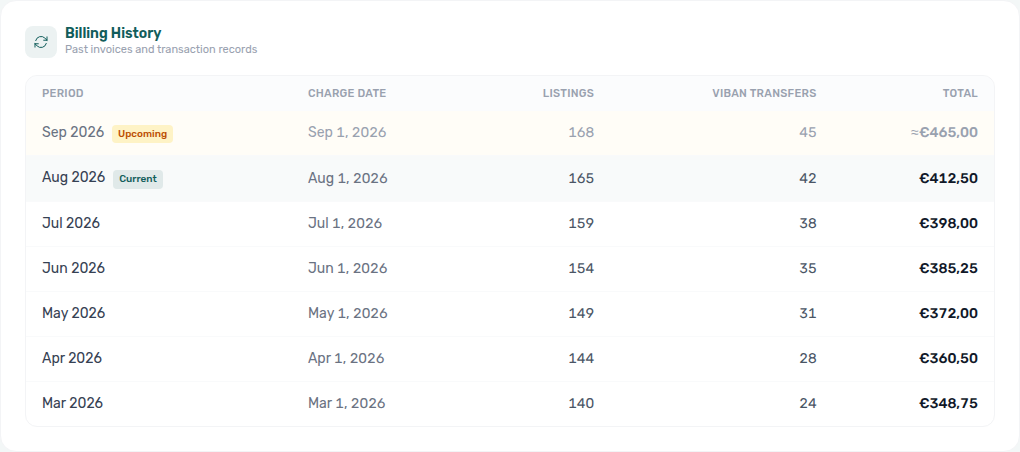
Under Action Required, scroll to Billing history to confirm the Upcoming-only teaching state (no Current / past month badges until the workspace is subscribed again):

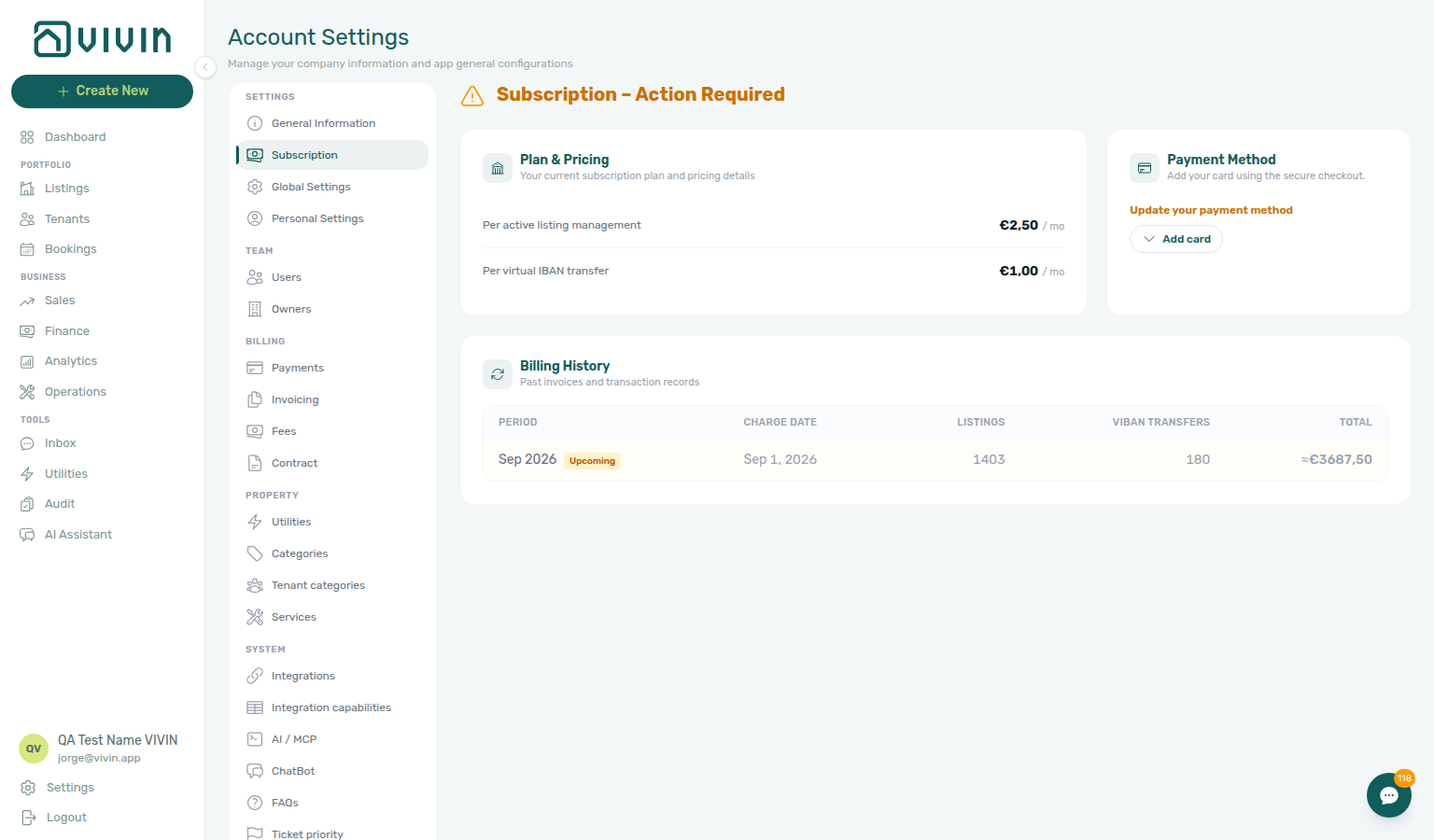
Each row is one billing period for your Vivin platform subscription (not tenant rent). Listings and VIBAN Transfers columns reflect usage counted for that month; Total is the platform fee charged or estimated for that period. Under Action Required, expect Upcoming only until a card is on file again.
Subscription section cross-reference
Use the sections above for this settings area. Related setup pages are linked from Related below when present, or from Account Settings.
Related
Related below links this Account Settings tab to modules, workflows, concepts, and escalation paths.
Documentation map & escalation
- Account Settings hub — Tab pairing matrix across workspace configuration
- Introduction — Platform overview distinct from per-account Vivin platform subscription fees
- Get Help & Support — Email escalation when you cannot sign in to update a card
- Using in-app support — Structured Vivin tickets for billing, plan, or card-on-file questions
- FAQ — Why can’t I dismiss Subscription checkout? — Card-required block vs the dismissible reminder
Upstream & downstream workflows
- Resetting a Management User Password — Recover access when Action Required blocks sign-in to update a card
- Onboarding a New Property — New inventory that increases Listings counts in billing history
- Portfolio KPI review — Month-end pass that should include platform fee forecasting from Upcoming rows here
- Notification triage — Action Required subscription alerts when card-on-file renewal fails
- Managing a Check-out & Deposit Refund — Vivin platform billing (distinct from tenant deposit refunds on Finance → Deposits)
- Handling a Late Payment — Step 1 — Identify overdue tenant charges (distinct from Vivin platform subscription fees) when a payment overdue alert row-click brought you here
Deeper workflow reads
See Upstream & downstream workflows above for the same guides.
Related Account Settings tabs
- General Information — Subscription shortcut with
expandCheckout=1when card capture is still required - Invoicing & Payments — Tenant deposit, payout, and invoice rules (not Vivin platform billing on this page)
- Integrations — Marketplace and channel connections counted toward VIBAN Transfers in billing history
- Integration field capabilities — Partner field matrix before marketplace billing rows accumulate
- Users and roles — Who can open Account Settings and Subscription when billing roles are restricted
- Preferences — Notifications & Emails — Tenant payment notifications (distinct from Vivin platform subscription fees)
- Emails — Tenant lifecycle templates (distinct from Vivin platform subscription billing)
- My Profile — Read-only email on
/profilewhen billing contacts differ from login identity
Operator modules & usage drivers
- Listings module — Active listing count drives the Listings column in billing history
- Sales module — Channel volume that drives VIBAN Transfers rows in billing history
- Finance module — Track tenant income and payouts (distinct from platform fees here)
- Analytics module — Portfolio growth context when Listings billing rows spike month over month
- Audit — Discounts tab — Tenant discount export on Finance reconciliation (distinct from platform fees)
- Notifications — Payment overdue alerts (in-app) — Operator Payments category rows when scheduled charges are overdue (distinct from Vivin platform subscription fees)
Deeper concept reads
- Integrations & Distribution — Vivin platform subscription fees for connected marketplace channels
- Tenant Portal — Tenant online payments (distinct from Vivin platform subscription fees)
- FAQ — Tenant contract signing blocked — No PDF yet, mandatory Your Details gates, category locks, or Lease purpose; portal signing vs paper upload on Contract Info
- Deep Links — Account Settings — Bookmarkable
/settings/subscriptionand checkout query flag - Payment Allocation — Two-layer receipts and credit note reject/revert warnings
- Booking Lifecycle — Computed status model for stays
Companion API guides
- API Reference — Creating Bookings — Integration volume that drives Listings counts in billing history
- AI usage API — Internal LLM token ledger (not Vivin platform subscription rows on this tab)
Module documentation hubs
- Dashboard — Post-login KPI snapshot
- Bookings — Operator UI for reservations
- Operations — Maintenance tickets and check-in/out coordination
- Utilities — Bills Included ceiling model
- Tenants — Tenant directory
- Inbox — Portfolio-wide WhatsApp workspace
- Notifications — Full
/notificationshistory - AI Chat — AI Assistant
- Booking engine details — Marketplace payload editor
- Properties workspace — Legacy
/propertiesredirects
Operator habit hubs
Day-to-day operator habits (lockout catch-up, pending receipts, payment triage, handoffs, and related playbooks) live on the Common Workflows habit hub.
Deep-link anchors for habit hubs
Lockout catch-up after password recovery
Pending manual receipt approval
Reject/revert mistaken receipts
Portfolio segmentation by tenant category
Notification row-click navigation
Payment alert to receivables triage
Confirmation alert triage
Finance debt receivables triage
Handling a Late Payment collections
Finance Income status drill-down
Cash flow forecast drill-down
Key glossary terms
- Credit note (payment reject/revert) — Distinct from Vivin platform subscription charges (tenant accounting on Finance → Transactions); concept walkthrough: Payment Allocation — Correcting mistaken receipts; workflow hub: Common Workflows — Reject/revert mistaken receipts
- Glossary — End-of-Booking cost split — Charge Time → End of Booking splits daily overage across every occupied unit; still-staying roommates stay in the denominator
- Glossary — Change history — Operator-initiated edits on Listings setup and Bookings Changelog; create-time defaults excluded
- Glossary — Archived booking ledger visibility — Delete Booking hides manual/provider_platform rows on Finance → Transactions; vIBAN and credit card stay visible
- Glossary — Finance tenant category cache refresh — Recategorizing a tenant updates
booking.tenantCategoryIdimmediately; ledger tabs reflect it on reload, while Overview can lag up to ~10 minutes - Glossary — SIMAR water contract ID — SIMAR (Loures e Odivelas) water bills use Cód. Local in Connections — not Nº de Contador; leading zeros stripped
- Glossary — Full term list