Tenant categories
Tenant categories let operators define segments of tenants with shared rules for the Tenant Portal, profile fields, communications, and booking behaviour. These segments live on the Tenants card on Categories — they are not the same as listing tags, booking tags, ticket types, and similar chip catalogs on that page.
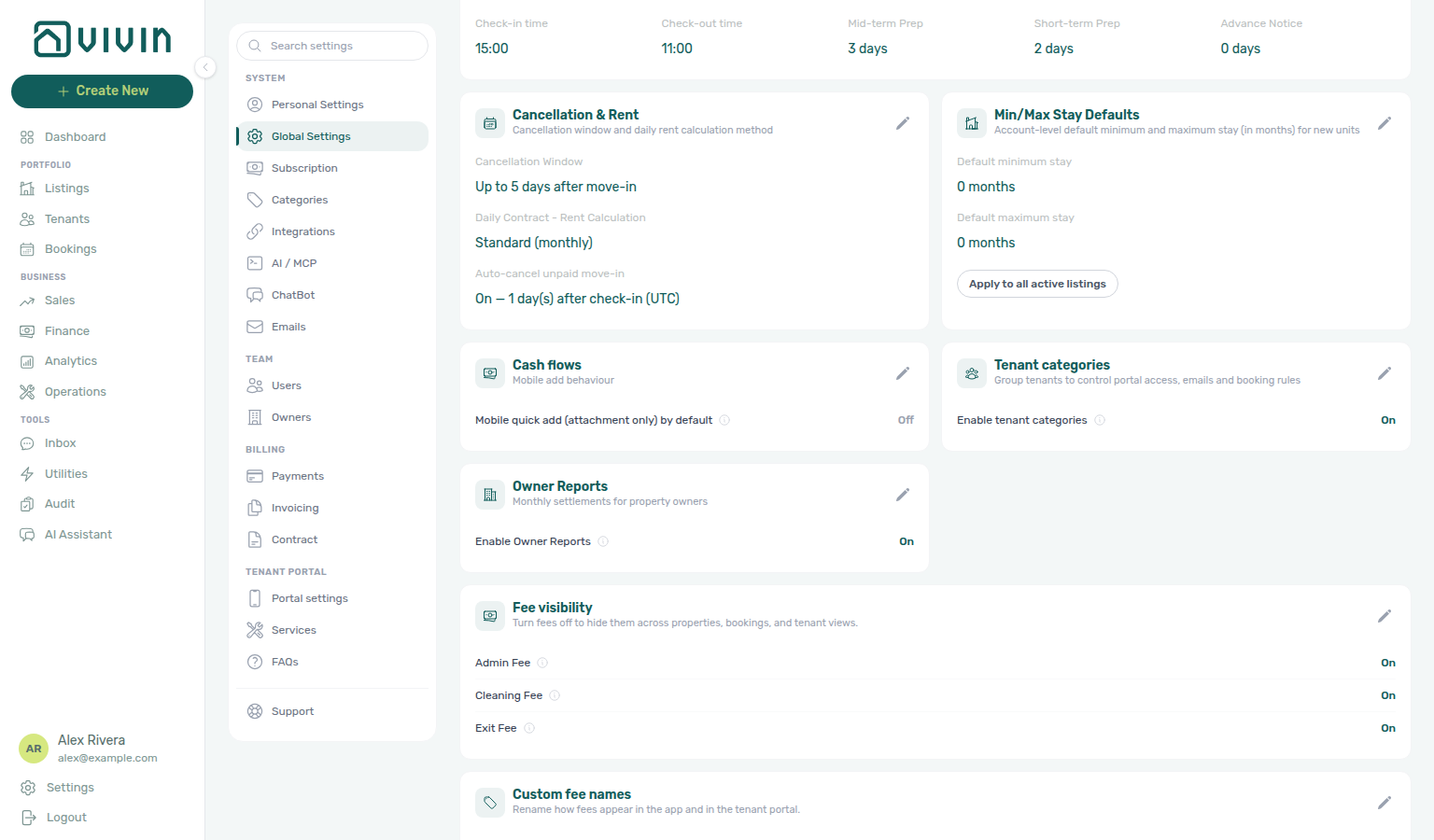
The feature is opt-in. Turn on Enable tenant categories under Preferences → Tenant categories (on Global Settings) before the Tenants card appears under System → Categories. Workspaces that already had segments keep the switch on automatically.
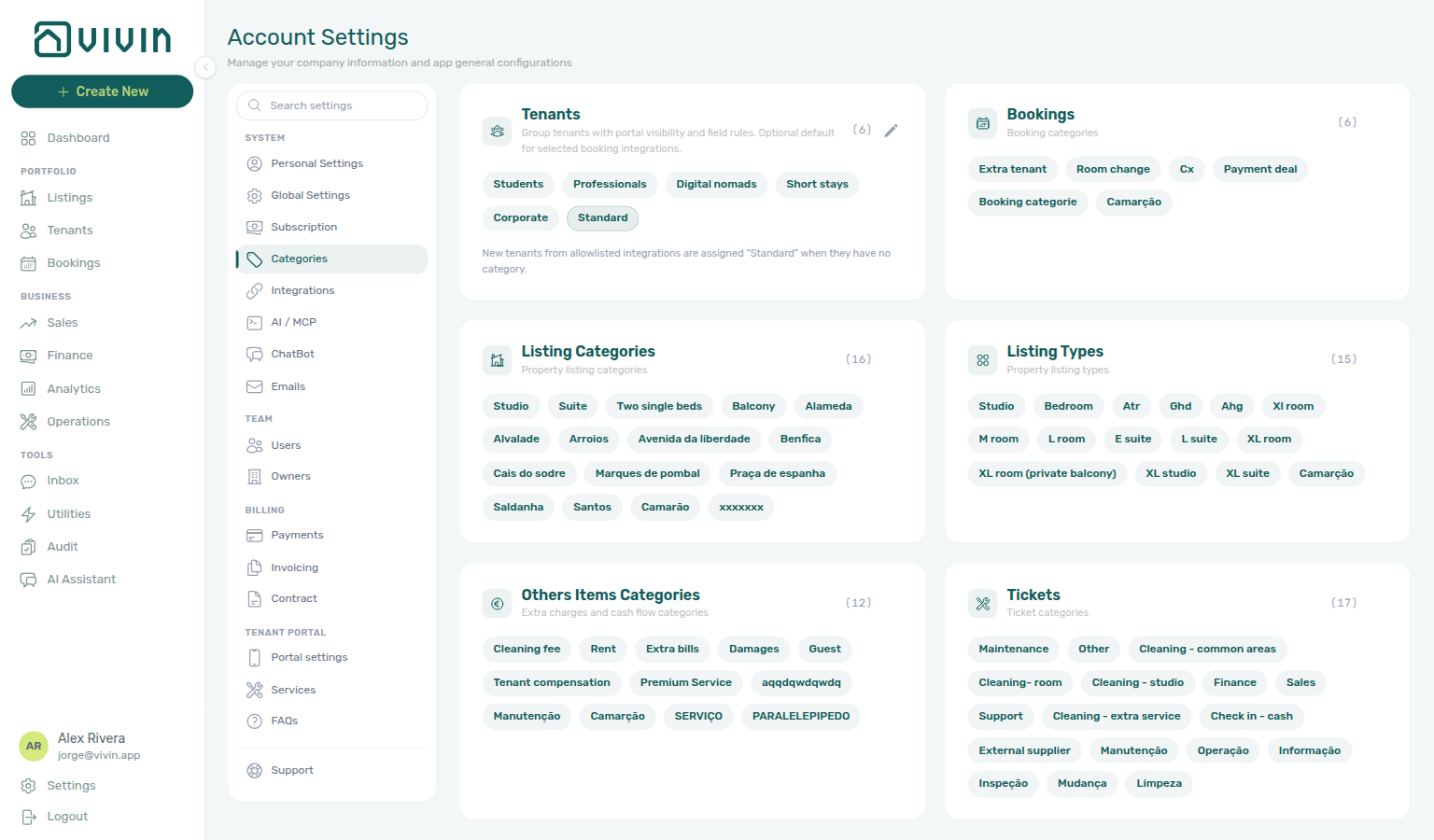
Open Account Settings → System → Categories and use the Tenants card (/settings/categories) when the Preferences switch is On. Legacy /settings/tenantCategories bookmarks redirect to Categories. The card uses the same Categories permission as the other chip catalogs (account_settings.categories).
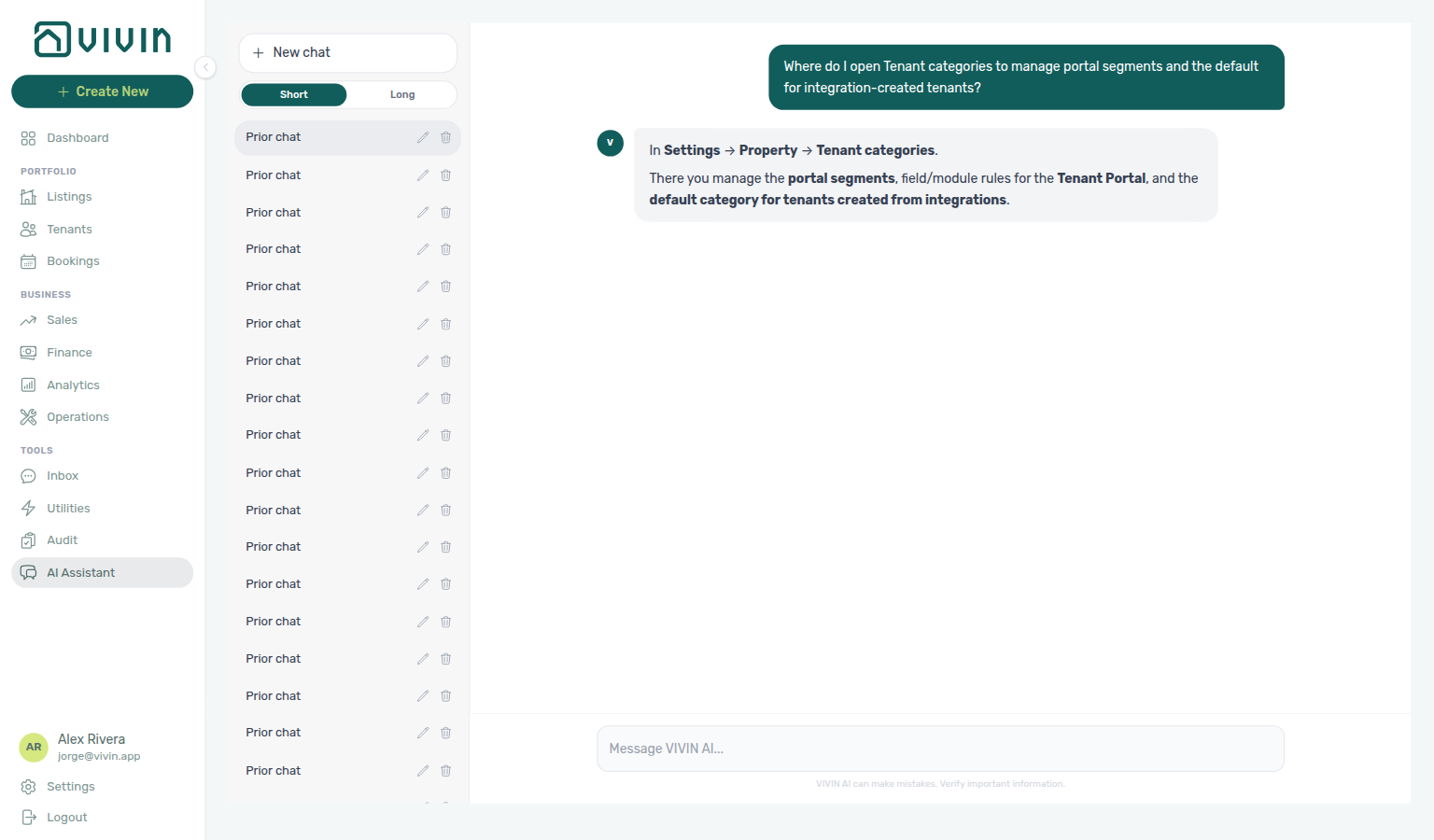
Ask AI Chat “Where do I open Tenant categories to manage portal segments and the default for integration-created tenants?” — then open Categories → Tenants (ai-chat-product-context-tenant-categories-reply.png, ai-chat-product-context-tenant-categories-flow.mp4). The assistant may still say Settings → Property → Tenant categories (or Portuguese Categorias de inquilino); follow Settings → System → Categories (Tenants card). Same grounding external MCP clients get from get-vivin-context-platform. Distinct from listing/booking chip catalogs on the same Categories page.
Complete Getting Started — Recommended Setup Sequence step 10 (this tab — portal segments and default for integrations) after step 9 Categories and before step 11 Emails — full tab map: Recommended setup order. Set default for integrations before high-volume Integrations imports in step 12. Finish steps 13–15 in Listings, Bookings, and Tenants, then Onboarding a New Property — Step 7. Guided steps 4–12: Onboarding a New Property. Lockout catch-up: Getting Started. Workflow pairing after go-live: Account Settings — Setup sequence after go-live.
Confirm the feature is enabled in Preferences, then skim What tenant categories control and Key workflow: edit a category. Set default for integrations before bulk imports — see How categories are used in the product. Habit-specific shortcuts live under Related below.
Direct bookings do not auto-assign a segment — operators assign Category on Tenants → Tenant Info per FAQ — Assign tenant category for direct booking. Align segment portal modules with Portal settings account-wide defaults, and set default for integrations before bulk Integrations imports. Distinct from listing/booking chip catalogs on Categories. AI usage is account-scoped, not segment-scoped — when chat or utility AI activity clusters on one cohort, pair segment filters on Bookings — Tenant categories with AI usage API during Portfolio KPI review. Hub: Recommended setup order.
Enable tenant categories
The Preferences master switch only controls whether segment tooling is offered. It does not clear assignments or stop rules that already apply to a tenant — see the table below before you turn the feature off.
- Open Account Settings → System → Global Settings (
/settings). - On the Tenant categories card, turn Enable tenant categories On and Save.
- Open System → Categories and edit the Tenants card (this guide) to manage segments.
| Switch | What changes | What stays the same |
|---|---|---|
| On | The Tenants card appears on System → Categories; category filters and pickers show on Bookings, Tenants, Finance, Add tenant, and Communication Rules. | — |
| Off | The Tenants card, filters, and pickers hide. Bookmarked /settings/tenantCategories still opens Categories, without the Tenants card. Segment catalog edits are blocked. | Categories already on a tenant keep portal, email, and concurrent-booking rules. Saves do not clear the assigned category. |
What tenant categories control
Top toggles and portal modules here override account Portal settings defaults per segment — define segments before Integrations bulk imports assign default for integrations.
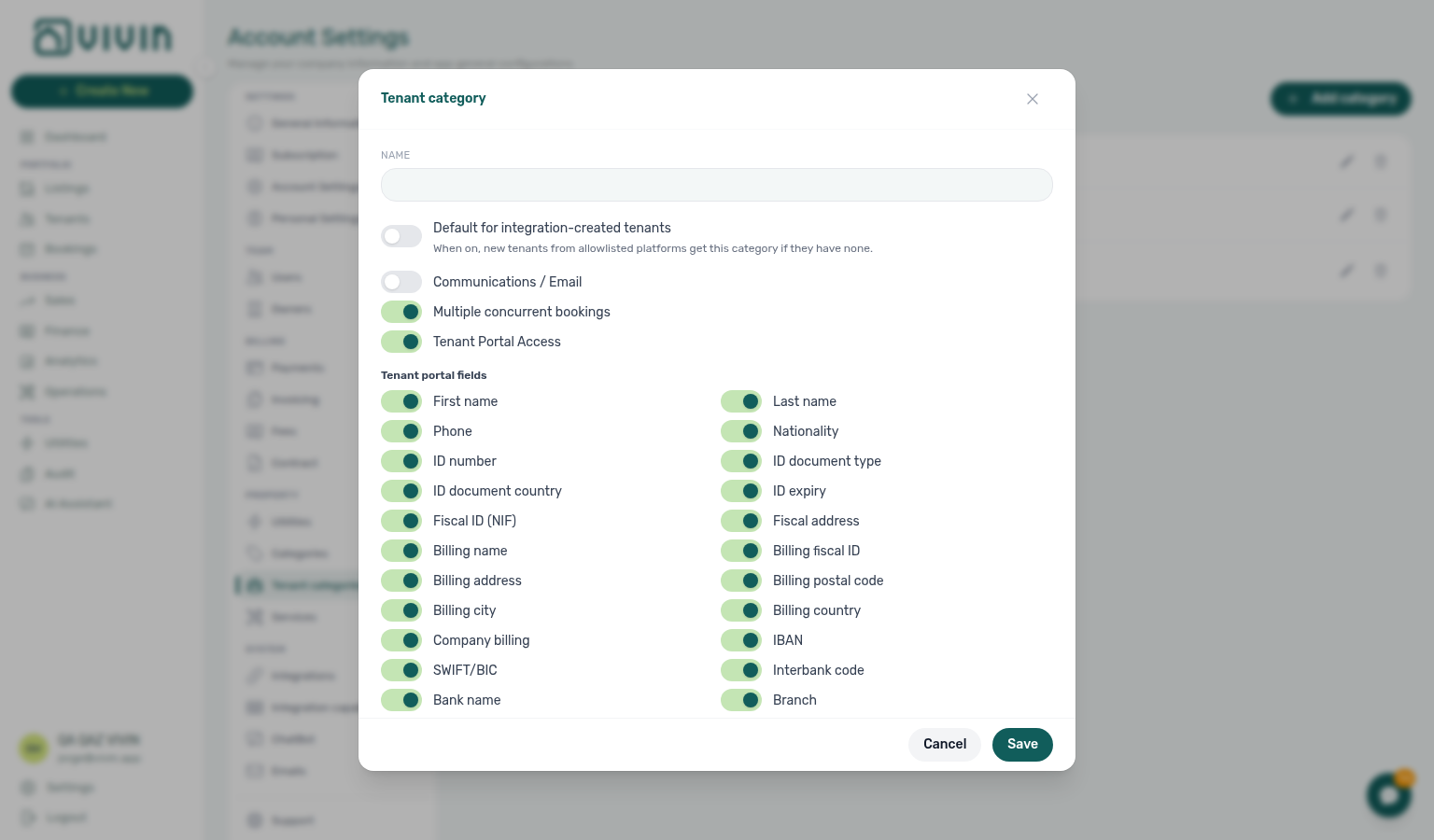
Each category has a name and optional rules in three areas:
| Area | Purpose |
|---|---|
| Top toggles | Communications / Email (tenant lifecycle emails for this segment), Multiple concurrent bookings (unlocks Book several units at once on Add booking), and Tenant Portal Access (master switch for portal login and modules). |
| Tenant portal fields | Which profile fields tenants may view or edit in the portal (First name, Last name, Phone, Nationality, ID documents including ID number, ID document type, ID expiry, and ID document country, Fiscal ID (NIF) and Home address, billing including Billing address, Billing city, Billing postal code, Billing country, and Company billing, bank details including IBAN and European bank account, and related fields). Lease Purpose is not in this list — it follows Categories → Lease Purpose. Only applies when Tenant Portal Access is on. See Tenant Portal — First name and last name, Tenant Portal — Phone, Tenant Portal — Nationality, Tenant Portal — ID document details, Tenant Portal — Fiscal number and home address, Tenant Portal — Billing address, Tenant Portal — Lease Purpose, Tenant Portal — IBAN, Tenant Portal — Use company billing and Tenant Portal — European bank account. |
| Tenant portal modules | Which portal areas are available: Documents / invoices (Tenant Portal — Documents), support/chat, payment plan, VIVIN payments (card / vIBAN), contract, subscriptions/extras, and utilities. Hidden when portal access is off. Disabling Contract (or turning off Tenant Portal Access, which forces every module off) also prevents Vivin from attaching the contract PDF to the onboarding email, even when Preferences → Contract in onboarding email is on. |
When Tenant Portal Access is turned off for a category, the product clears portal field and module toggles on save so stored rules stay consistent (the editor shows a hint that fields below are not applicable).
Default for integration-created tenants
One category can be marked Default for integration-created tenants. Marketplace POST /bookings does not send a category — Creating Bookings — Tenant category. New tenants created by allowlisted booking integrations (Uniplaces, Inlife, RoomLess / Spacest, Housing Anywhere, Spotahome, Vivin Booking Engine, Edu Portugal, Erasmus Life Lisboa, Kiwi, Capital Rooms, Porta85, Lisbeyond) receive that category when they arrive without an existing assignment. Returning guests keep their stored segment. + Create New → Booking, Channex (Airbnb / Booking.com), Idealista, and Coliving do not auto-assign. If no default is set, the UI shows a warning that integration-created tenants will not be auto-assigned.
Assign categories manually on Tenants (Tenant Info tab) or when creating a tenant from + Create New — see Processing a New Booking — Step 2 for direct reservations. The Add booking wizard does not set category; assign on the profile before contract or onboarding mail.
Communication Rules audience — When categories exist, Settings → Emails → Communication Rules can scope automated tenant messages by Tenant categories using the same No filter / Include only / Exclude pattern as smart-lock and booking-tag filters. Select tenant categories… stays open while you add a second named segment. See Emails — Audience filters.
Interface overview
If the Tenants card does not appear, confirm Enable tenant categories is On on Global Settings, then reopen Account Settings → System → Categories. See Glossary — Settings and profile recovery before assuming no segments exist.
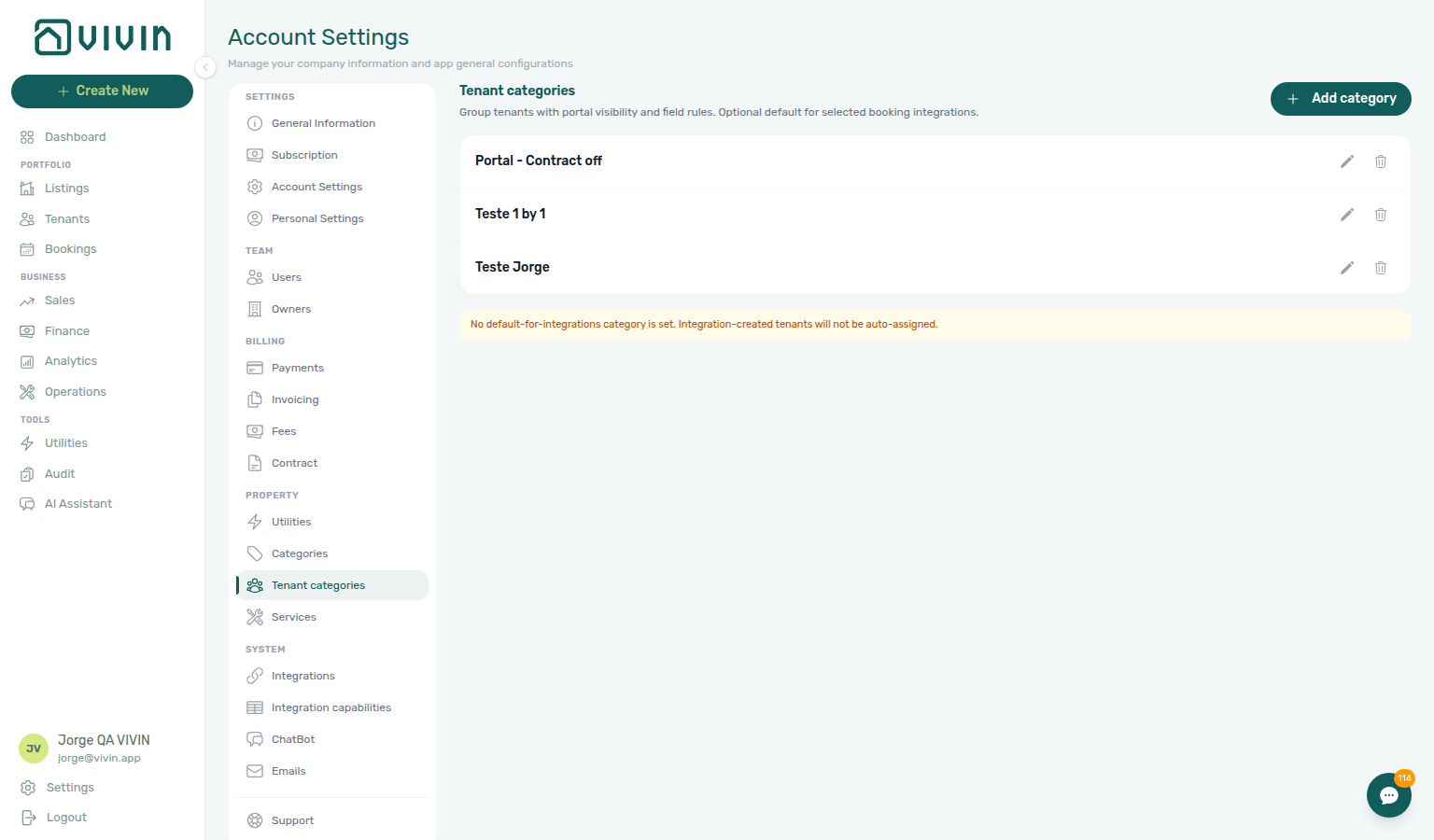
The Tenants card lists existing categories (chips plus a pencil). Open the editor to see Default for integrations when applicable. Use Add category to create a row, or Edit / Delete on an existing category.
If the card does not appear, confirm the Preferences switch is On, then reopen System → Categories. See Glossary — Settings and profile recovery.
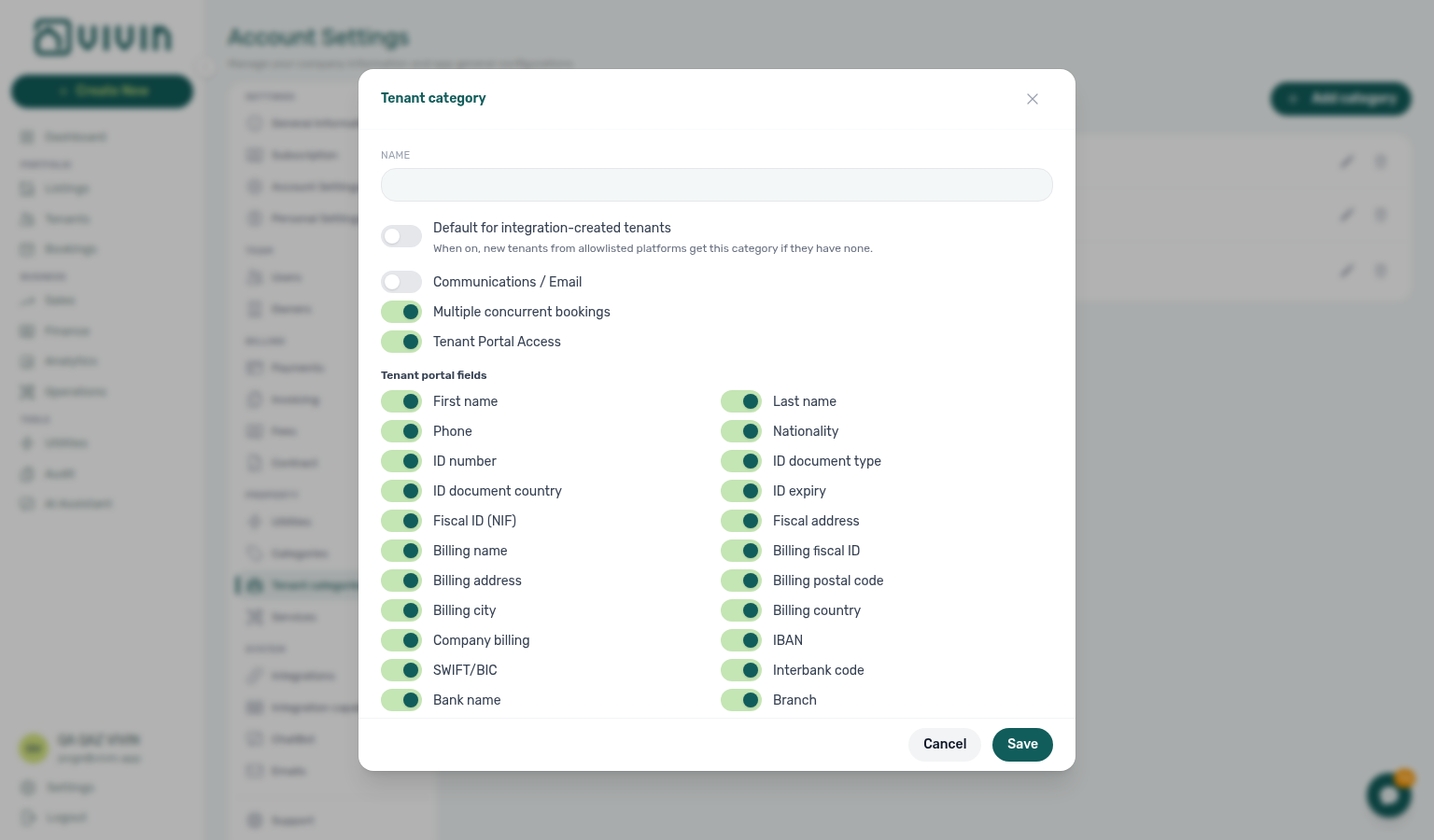
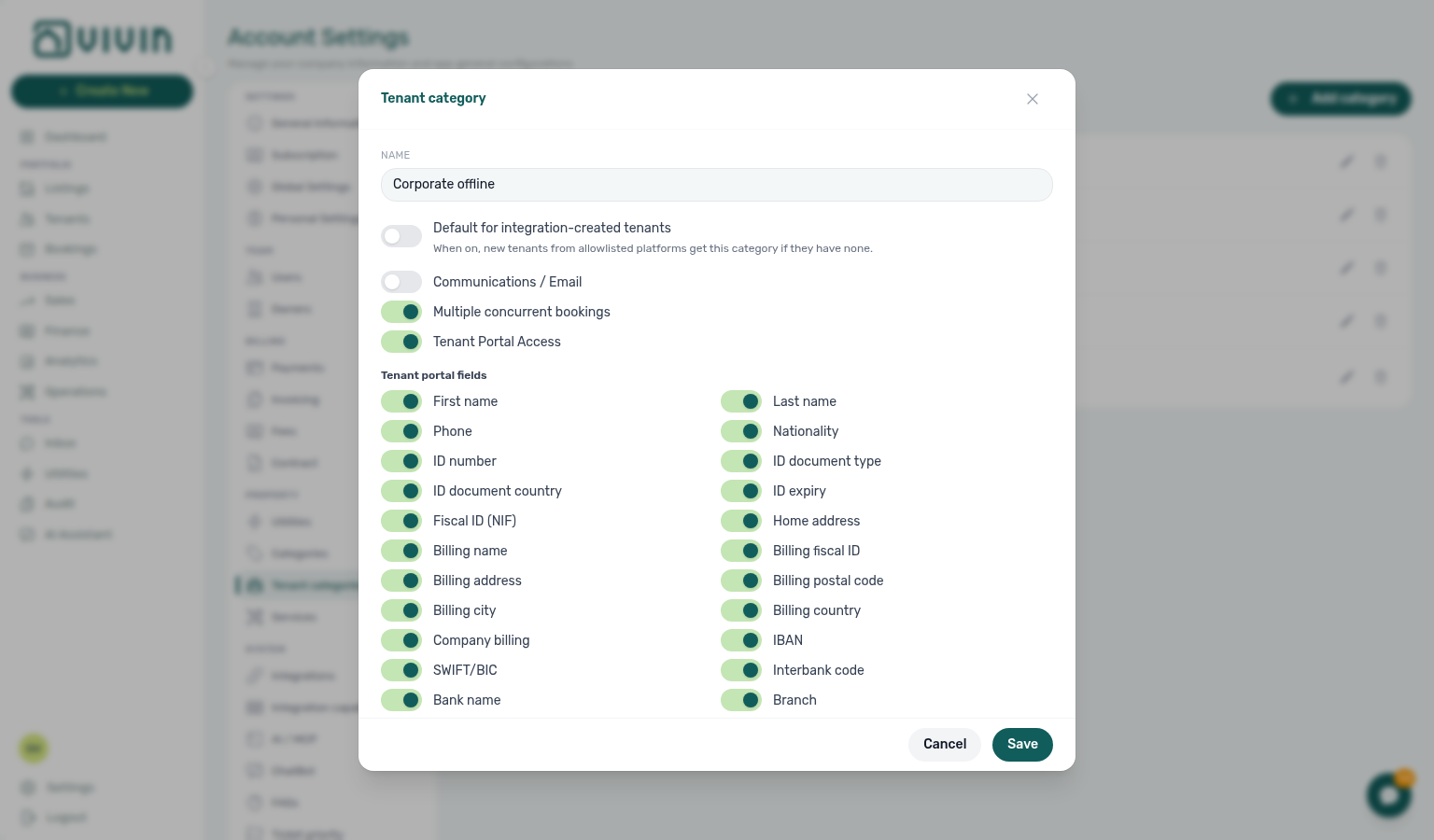
The editor modal groups name, the default for integrations toggle, top module toggles, then Tenant portal fields and Tenant portal modules sections.
Warnings and editor states
The no default for integrations banner should be cleared before Onboarding a New Property channel steps — unassigned integration tenants break Emails audience filters.
Operators hit a few states that are easy to miss in a quick tour of the list:
| State | What you see | What to do |
|---|---|---|
| No default for integrations | Amber banner under the category list when no row holds Default for integration-created tenants | Pick one segment and turn on the default toggle before high-volume channel onboarding — otherwise integration-created tenants stay unassigned. |
| Tenant Portal Access off | In the editor, the Tenant portal fields and Tenant portal modules sections disappear and an amber hint explains they are not applicable | Expected when a segment should not log into the portal at all; portal rules are cleared on Save. |
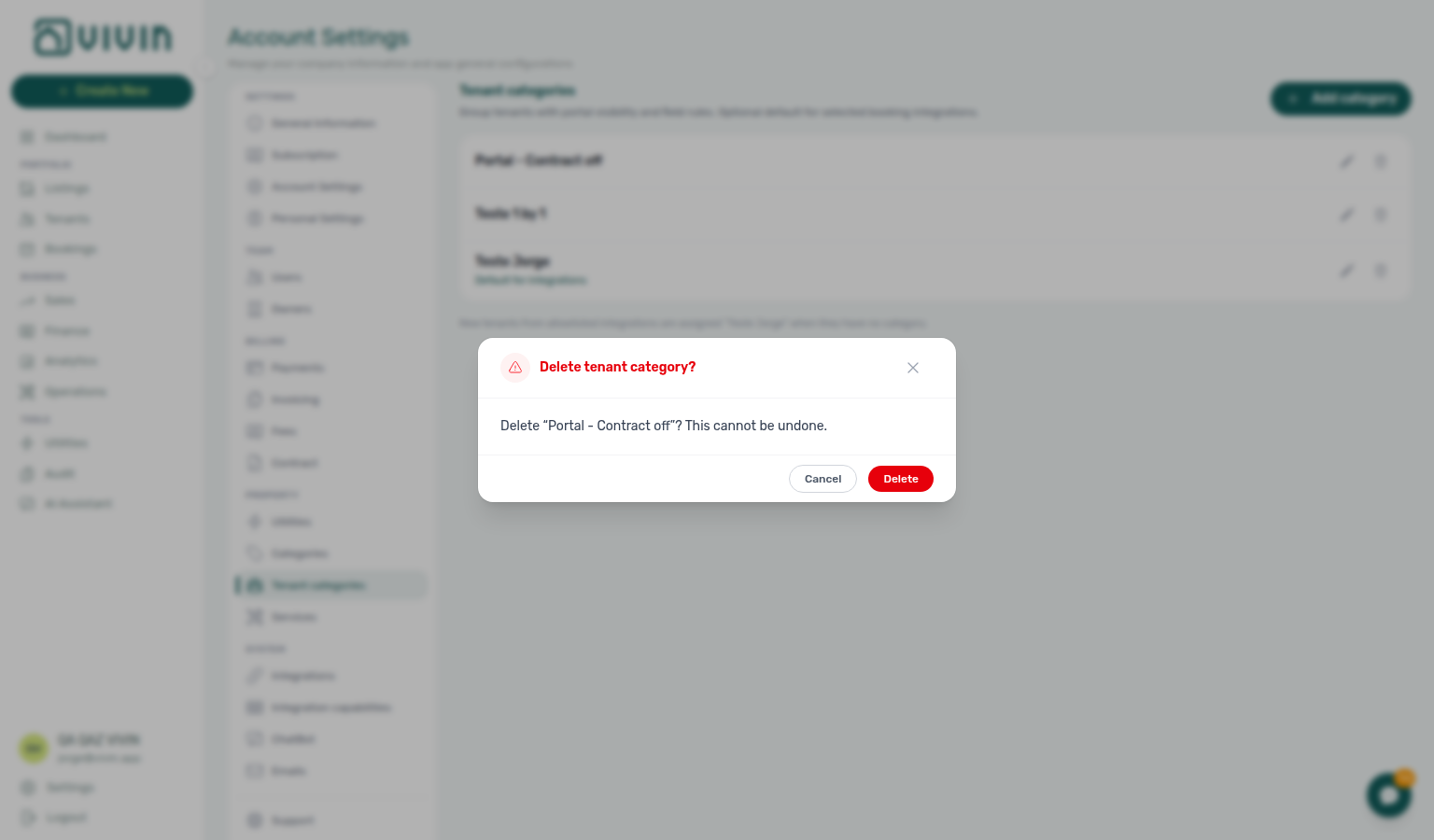
| Delete category | Danger Confirm modal naming the segment | Only delete unused segments — tenants already assigned keep their category until you change them on Tenants. |
When no category is marked default for integrations, the list shows an amber banner under the rows (integration-created tenants will not auto-assign):
Turn Tenant Portal Access off in the editor to preview how field and module toggles hide (rules clear on save):
Delete on a row opens a confirmation step — cancel if you opened it by mistake:
Key workflow: edit a category
After Save, verify portal behaviour on a pilot tenant in Tenants before rolling segment rules to production imports — Managing a Check-in assumes portal modules match the segment.
- Open Account Settings → System → Categories and open the Tenants card.
- Click Add category for a new segment, or Edit (pencil) on an existing row.
- Set the name and, when needed, mark Default for integration-created tenants (only one category can hold that flag).
- Use the top toggles for Communications / Email, Multiple concurrent bookings, and Tenant Portal Access. Turning Tenant Portal Access off hides Tenant portal fields and Tenant portal modules in the editor and clears those rules on save.
- When portal access is on, enable the profile fields and portal modules that match the segment (for example hide VIVIN payments for corporate tenants who pay offline — that also hides the portal Home balance card, Payments → Payment details, Payments → Same-month installment titles, Payments → TODAY far-due date, Payments → TODAY compact tick at the end, Payments → Overdue days past due, Payments → Paid installment, Payments → Pending installment, Payments → Discounted installment, Payments → Scheduled Due in N days, Payments → Upcoming, Payments → Transaction History sort, Payments → Platform payment label, Payments → Export CSV, the Receipt column, the Virtual IBAN processing notice, and Make payment → Payment Due Soon / Make payment Back).
- Click Save to persist, or Cancel to close without changes.
Communications / Email and schedule rebuild
When you turn Communications / Email back on, Vivin rebuilds Communication Rules schedules for that segment in the background — pair with Emails — Communication schedule and FAQ — Enabling Communications / Email.
Communications / Email is the per-segment gate for tenant email lifecycle and Communication Rules traffic (phone / WhatsApp rules are not gated by this toggle).
| State | What happens |
|---|---|
| Off | New bookings in the segment are skipped at schedule time — Vivin does not create a Communication schedule row. Existing Scheduled rows for the segment are cancelled and show as Cancelled with a truncated Tenant categor… reason on Communication schedule. |
| Off → On (Save) | Vivin starts a background rebuild for that category’s bookings across active email Communication Rules. Eligible rows appear on Communication schedule within seconds to a few minutes — you do not need to wait for the daily ~00:06 UTC recalculation, and you should not re-save an unchanged rule just to force catch-up. |
| Already On | Booking creation and rule edits schedule as usual; category audience filters on the rule still apply. |
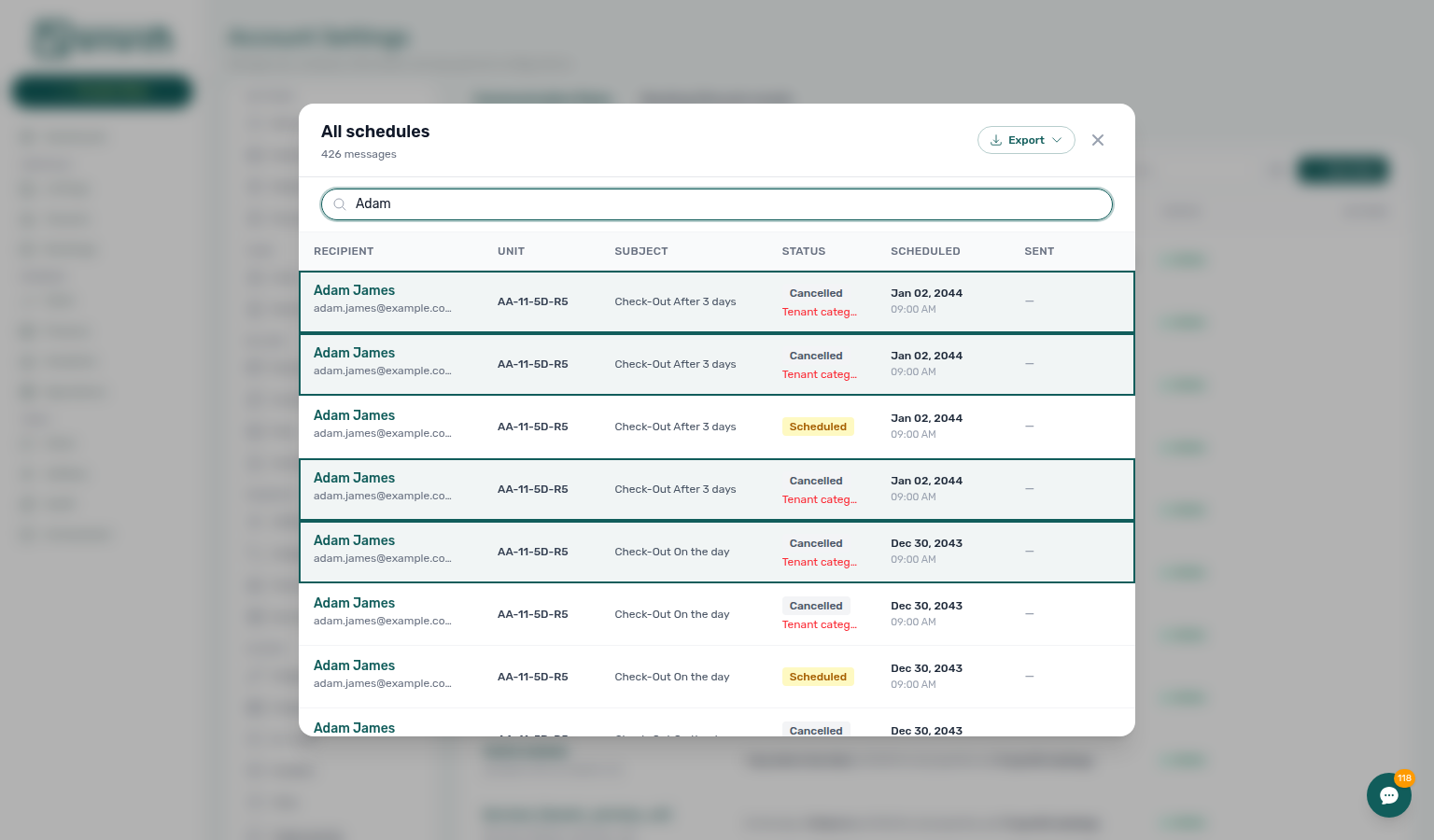
The rebuild only creates rows whose computed send time is still valid. Check-in / check-out triggers whose send window is already in the past stay absent (same as the daily cron). Enable Communications / Email before the first arrivals you care about, or use Send now / manual lifecycle actions when a window has closed.
Changing Category on Tenant Info to a segment that already has Communications / Email on does not yet trigger the same immediate rebuild — catch-up still relies on the daily recalculation (or saving a Communication Rule). The rebuild fires on the category toggle off → on path only.
How categories are used in the product
Bookings, Finance, and Tenants share the same Tenant category filter semantics — scope one segment in Finance — Tenant category filter during month-end before account-wide portal changes.
- Tenants — Tenant Info includes a Category control when categories exist; operators pick the segment for that person. The directory toolbar All categories filter narrows
/tenantsby assigned segment and stays open while you add a second segment or No category (see Tenants — All categories stays open). - Bookings — toolbar Tenant categories limits the portfolio to reservations whose tenant profile carries the selected segment(s), with No tenant category for unassigned tenants (same OR-combined server filter as booking tags). The menu stays open while you add a second segment. Use Select all when you want every visible segment in one click. Assign category on direct bookings in Processing a New Booking — Step 2 before contract mail. Multiple concurrent bookings on the category unlocks Book several units at once in Add booking. During month-end review, pair with Portfolio KPI review — Step 6 when Analytics ranking suggests one segment underperforms.
- Finance — Other filters → Tenant → Tenant category applies the same segment filter server-side on Overview, Income, Contract Values, Transactions, Deposits, and Payouts — use it when reconciling Debt Aging, Contract Values In Debt, or deposit queues for one tenant segment without exporting the whole portfolio. Deposit pill states (Ready to Refund, Disputed) are defined in Glossary — Deposit lifecycle status. See Finance — Tenant category filter. Changing Category on Tenant Info updates
booking.tenantCategoryIdimmediately; ledger tabs reflect it on reload while Overview can lag up to ~10 minutes — Glossary — Finance tenant category cache refresh. - Tenant Portal — Portal modules and field visibility follow the tenant’s category rules (for example hiding VIVIN payments or Contract for a segment — hiding VIVIN payments also hides the Home balance card, Payments → Payment details, Payments → Same-month installment titles, Payments → TODAY far-due date, Payments → TODAY compact tick at the end, Payments → Overdue days past due, Payments → Paid installment, Payments → Pending installment, Payments → Discounted installment, Payments → Scheduled Due in N days, Payments → Upcoming, Payments → Transaction History sort, Payments → Platform payment label, Payments → Export CSV, the Receipt column, the Virtual IBAN processing notice, and Make payment → Payment Due Soon / Make payment Back; hiding Contract also hides Download contract and Read to the end to sign).
- Emails — Category module rules (for example portal or payments visibility) still shape what tenants see and what system templates include, but operator-authored Email body text does not support Handlebars/
{{#if …}}conditionals such asshow_tenant_portal_section— use the Variables catalogue and category toggles instead. Communication Rules can also scope automated messages by tenant category — Select tenant categories… stays open while you add a second named segment. Before enabling a scoped rule, cross-check audience size on Bookings, Finance, or Tenants. - Integrations — Inbound bookings from configured channels can auto-assign the default for integrations category to new tenants.
Best practices
- Create a small set of clear segment names (for example
Standard resident,Corporate,Short-stay) before rolling portal restrictions to production tenants. - Turn off Communications / Email only when you intentionally want lifecycle emails suppressed for that segment (new categories default this toggle off; existing rows follow stored values). When you turn it back on, expect schedule rows for that segment to reappear after the background rebuild — see Communications / Email and schedule rebuild.
- Set the default for integrations category before high-volume channel onboarding so new tenants inherit the right portal and field rules on day one.
Tenant categories section cross-reference
Use the sections above for this settings area. Related setup pages are linked from Related below when present, or from Account Settings.
Related
Related below links this Account Settings tab to modules, workflows, concepts, and escalation paths.
Documentation map & escalation
- Modules hub — Bookings and Tenants portfolio filters after segment setup
- Account Settings hub — Tab pairing matrix across workspace configuration
- Categories — Listing, booking, ticket, and cashflow chip catalogs (distinct from tenant segments on the Tenants card)
- Glossary — Term definitions used across settings and module docs
- FAQ & Troubleshooting — Quick answers when portal modules or integration defaults do not match expectations
- Get Help & Support — Escalation when segment rules block portal access or integration imports
Upstream & downstream workflows
- Onboarding a New Property — Define segments and default for integrations during property go-live (Step 4) before the first reservation
- Processing a New Booking — Assign category and verify portal modules before the first confirmation receipt
- Managing a Check-in — Verify portal modules per segment before arrival day
- Managing a Check-out & Deposit Refund — Portal payment modules tenants use during departure-week balance review; Bookings / Finance / Tenants tenant category filters when departure balances cluster (Step 6)
- Entering Monthly Utility Bills — Portfolio segmentation when utility overages cluster on one tenant segment (Step 4)
- Cancelling a Booking — Bookings / Finance / Tenants tenant category filters when settlement balances cluster before Cancel booking (Step 2)
- Handling a Late Payment — Step 1 — Identify overdue charges on segment-filtered bookings when a payment overdue alert row-click brought you here
- Handling a Late Payment — Step 6 — Segment portal modules and portfolio filters when arrears repeat across one profile type
- Notification triage — Payment-received and payment overdue alerts after category rules change for live tenants (Step 4)
- Portfolio KPI review — Step 6 — Isolate one segment when Analytics ranking underperforms before changing portal rules account-wide
Deeper workflow reads
See Upstream & downstream workflows above for the same guides.
Related Account Settings tabs
- Portal settings — Account-wide portal defaults that categories can override per segment
- Portal settings — Mandatory for contract signing — Profile-field gates before digital signature (category Tenant portal fields)
- Preferences — In-app notifications — Account-wide portal or payment alerts after segment rules change
- Integrations — Channel onboarding path; set default for integrations before bulk imports
- Emails — Lifecycle and communication rules (segment Communications / Email toggle); Select tenant categories… stays open while you add a second named audience segment
- Services — Catalogue items tenants see when segment portal modules allow
- Users and roles — Who can edit Account Settings catalogs
Operator modules
- Tenants module — Assign a category on the tenant profile
- Bookings module — toolbar Tenant categories stays open while you add a second segment or No tenant category; Category on Contract Info and portal access copy on live reservations
- Finance module — Online settlement when segment VIVIN payments modules gate tenant pay-in
- Inbox module — WhatsApp payment replies when segment portal modules hide online checkout
- Utilities module — Portal utility visibility per segment during overage billing
- Audit — Discounts tab — Cross-portfolio discount review when segment portal modules gate repricing on live bookings
- Notifications — Payment overdue alerts (in-app) — Operator Payments category rows when scheduled charges are overdue on segment-filtered bookings
Deeper concept reads
- Tenant Portal — What tenants see after segment Tenant Portal Access and module toggles are saved
- FAQ — Tenant contract signing blocked — No PDF yet, mandatory Your Details gates, category locks, or Lease purpose; portal signing vs paper upload on Contract Info
- Services Marketplace — Revenue context when segment portal modules gate ancillary services
- Payment Allocation — Two-layer receipts, invoiced-floor rent edits, and credit note reject/revert warnings
- Booking Lifecycle — Computed status model for stays shaped by segment portal rules
- Integrations & Distribution — Channel onboarding path before default for integrations auto-assigns new tenants
- Tenant MCP — External AI clients that respect segment portal and field rules
Companion API guides
- API Reference — Booking engine integration — Default segment on white-label reservations before they appear in Bookings
- AI usage API — Account-wide ledger; segment operational follow-up via module Other filters
Module documentation hubs
- Dashboard — Post-login KPI snapshot with bell notification triage
- Listings — Property wizard, Channels tab, and unit management
- Sales — Portfolio availability and channel manager connections
- Operations — Maintenance tickets, cash flows, and check-in/out coordination
- Analytics — Month-range portfolio KPI charts with rankings and heatmaps
- Notifications — Full
/notificationshistory with search and filters - AI Chat — AI Assistant (distinct from tenant portal modules)
- Booking engine details — Rich marketplace payload editor via the Full integration pill
- Properties workspace — Legacy
/propertiesURL redirects into Listings - API Reference hub — Partner HTTP contracts and partial vs full feeds
Operator habit hubs
Day-to-day operator habits (lockout catch-up, pending receipts, payment triage, handoffs, and related playbooks) live on the Common Workflows habit hub.
Deep-link anchors for habit hubs
Portfolio segmentation by tenant category
Lockout catch-up after password recovery
Pending manual receipt approval
Reject/revert mistaken receipts
Notification row-click navigation
Payment alert to receivables triage
Confirmation alert triage
Finance debt receivables triage
Handling a Late Payment collections
Finance Income status drill-down
Cash flow forecast drill-down
Key glossary terms
- Deposit dispute — Portal deposit context when segment rules hide or show payment modules during check-out
- Glossary — End-of-Booking cost split — Charge Time → End of Booking splits daily overage across every occupied unit; still-staying roommates stay in the denominator
- Glossary — Change history — Operator-initiated edits on Listings setup and Bookings Changelog; create-time defaults excluded
- Glossary — Archived booking ledger visibility — Delete Booking hides manual/provider_platform rows on Finance → Transactions; vIBAN and credit card stay visible
- Glossary — Finance tenant category cache refresh — Recategorizing a tenant updates
booking.tenantCategoryIdimmediately; ledger tabs reflect it on reload, while Overview can lag up to ~10 minutes - Glossary — SIMAR water contract ID — SIMAR (Loures e Odivelas) water bills use Cód. Local in Connections — not Nº de Contador; leading zeros stripped
- Glossary — Full term list