Integrations
Complete Getting Started — Recommended Setup Sequence step 12 (this tab — marketplace credentials and calendar feeds) after step 11 Emails, with Integration field capability and Tenant categories default for integrations aligned before bulk imports — full tab map: Recommended setup order. Finish steps 13–15 in Listings (Channels tab per unit), Bookings, and Tenants, then Onboarding a New Property — Step 7. Partner HTTP contracts: API Reference. Lockout catch-up: Getting Started. Workflow pairing after go-live: Account Settings — Setup sequence after go-live.
Skim What you see on this page and Page refresh and partial data, then connect Booking Platforms and Other Providers. Invoicing turns on when you add a provider here — Billing from the invoicing connection (no separate billing switch). Calendar rules: Calendar Block (days) on each platform card, and Short-term (Airbnb / Booking.com) Configuration for iCal horizon. Booking.com pool: Hotel ID list opens as a dialog. Sync issues: Troubleshooting. Habit-specific shortcuts live under Related below.
Connect Vivin to external platforms and services. Once connected, data flows automatically between Vivin and these services.
Open Account Settings → System → Integrations at platform.vivin.app/settings/integrations. Per-unit channel links and external listing IDs are configured from Listings > Channels. See Deep Links.
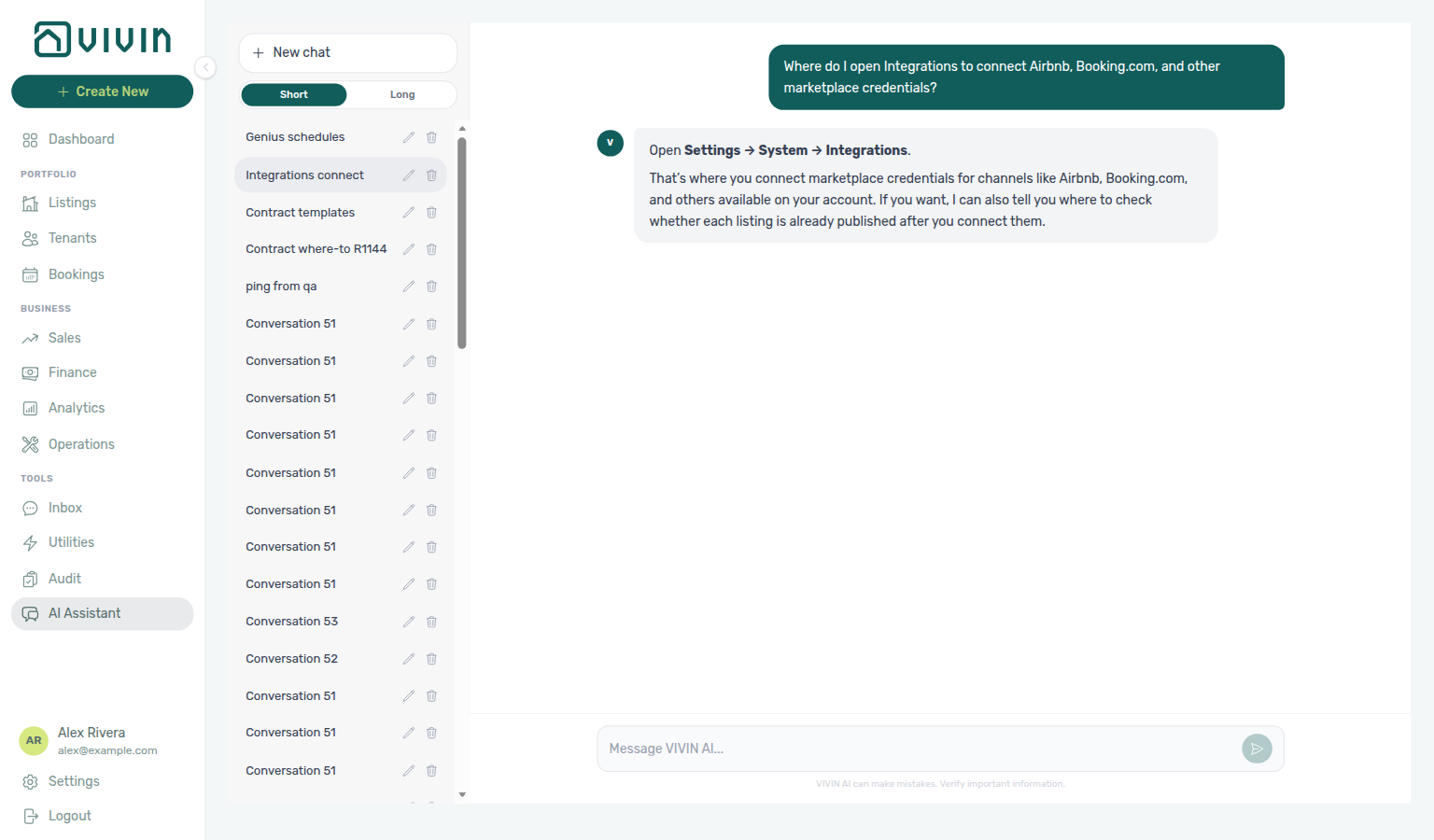
Ask AI Chat “Where do I open Integrations to connect Airbnb, Booking.com, and other marketplace credentials?” — then open this Integrations tab (ai-chat-product-context-integrations-reply.png, ai-chat-product-context-integrations-flow.mp4). The assistant typically says Settings → System → Integrations (marketplace credentials for Airbnb, Booking.com, and other channels on your account). Partner field coverage and VIVIN Invoicing settings live on the connection cards here (old /settings/integrationFieldCapability bookmarks open this same tab — see Integration capabilities). Same grounding external MCP clients get from get-vivin-context-platform.
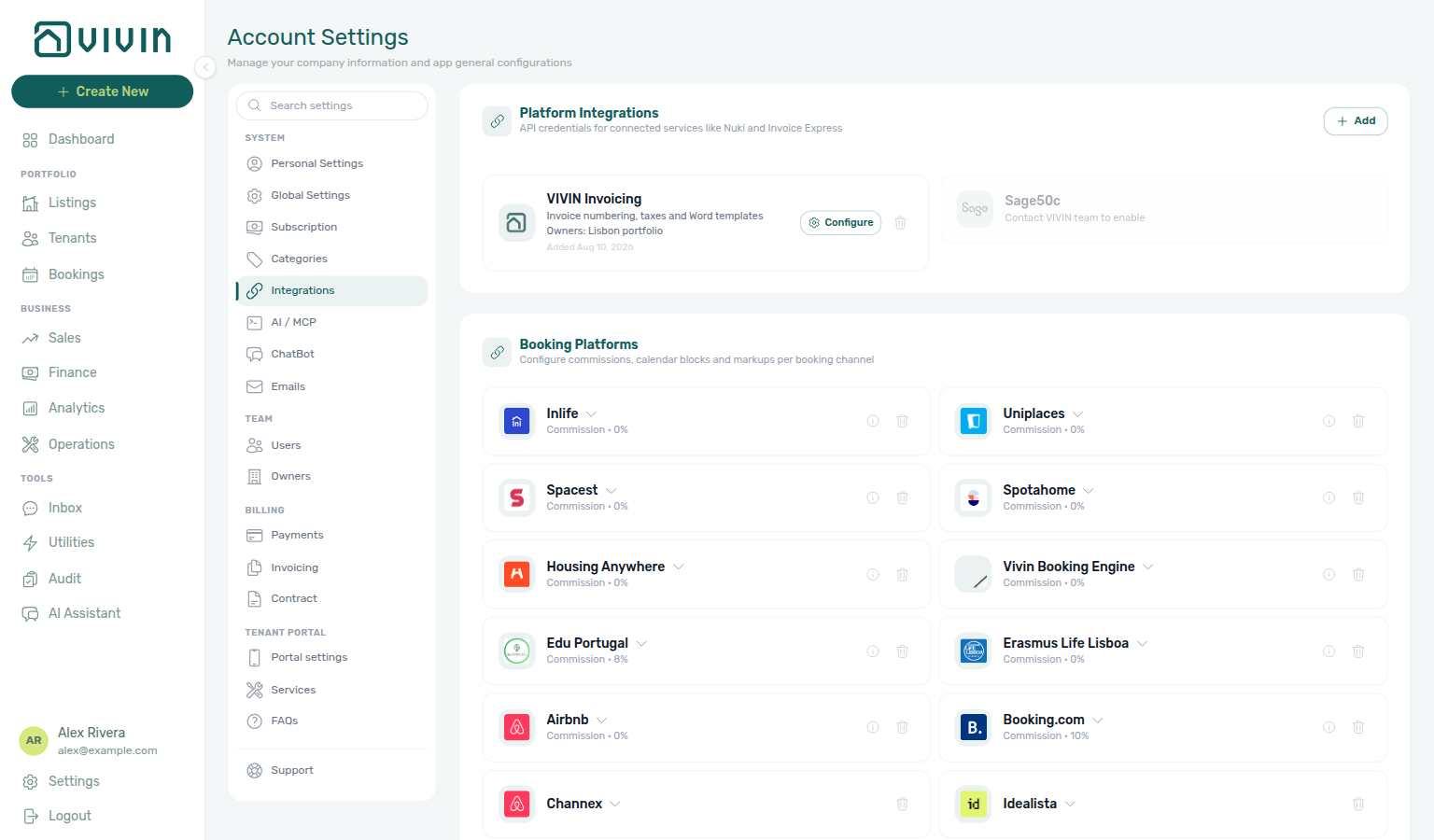
After platform cards are connected, use Integration field capabilities to see required partner payload fields, then link each unit on Listings → Channels. Pair invoicing providers with Payments, Invoicing & Utilities and set Tenant categories default for integrations before high-volume imports. Partner Bearer keys here are distinct from management JWTs — operator-only routes such as AI usage API require Management session sign-in. Hub: Recommended setup order.
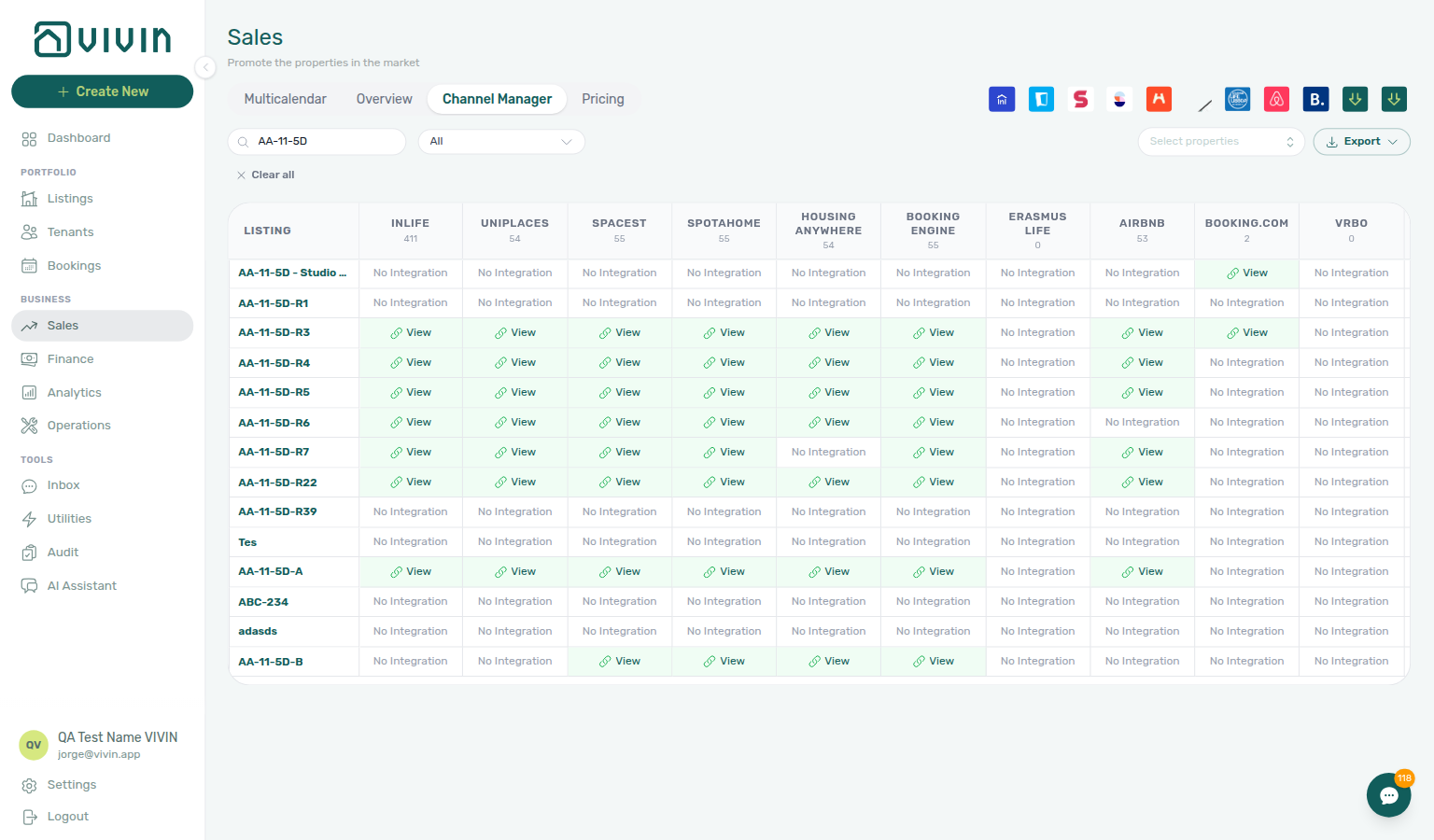
For how connected channels appear when you manage availability and rates per unit, see the Sales module, especially Channel Manager and related views there.
What you see on this page
Without scrolling past the fold on a typical desktop width, expect roughly this vertical order:
- Channel Manager — account-wide controls such as Short-term iCal Max Date and actions to push that date to many units at once (see below).
- Booking platform cards — one block per connected marketplace (Airbnb, Booking.com, Vivin Booking Engine, etc.) with enable toggles, credentials or integration email fields, and optional Pricing Markup.
- Other providers — Nuki, Hostkit, Invoice-xpress, NetSuite, and similar services you add with Add Integration.
Use Sales > Channel Manager when you need a consolidated operational view of channels; this Integrations page is where credentials and account-wide sync rules live.
Page refresh and partial data
The Integrations tab loads in layers — account-wide platform cards from cached workspace settings, then a separate fetch for Other providers (Nuki, Hostkit, Invoice-xpress, NetSuite, and similar account connections).
| Phase | What you see | What to do if it looks incomplete |
|---|---|---|
| First paint | Settings form skeleton placeholders across the tab | Wait for the shared Account Settings bootstrap to finish, or reload /settings/integrations |
| Booking platform cards + Channel Manager | Cards and toggles from account settings | Usually still render from the last successful settings payload; Save outcomes show as toasts with the server message |
| Other providers list | Connected provider cards, or skeleton rows while connections load | If the list looks empty while platform cards above still render, reload /settings/integrations before re-adding a provider. Add Integration and Delete outcomes also surface as toasts |
Unlike directory modules such as Bookings or Sales that show an inline Retry card, Other providers uses toasts — reload the tab when the list looks incomplete. See Glossary — Settings and profile recovery.
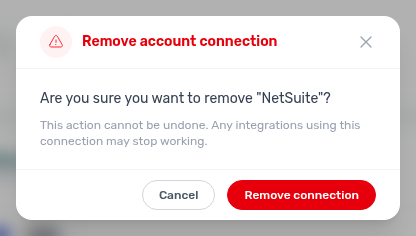
When Remove connection does not finish, the confirmation modal stays open and a toast appears so you can Retry or Cancel without losing context:
Screenshots
Sales module (operational view) — Channel Manager lists each listing with per-channel connection status, sync controls, and availability context. Use it day to day alongside Account Settings > Integrations, where API keys, integration emails, pricing markups, and Short-term iCal Max Date are configured.
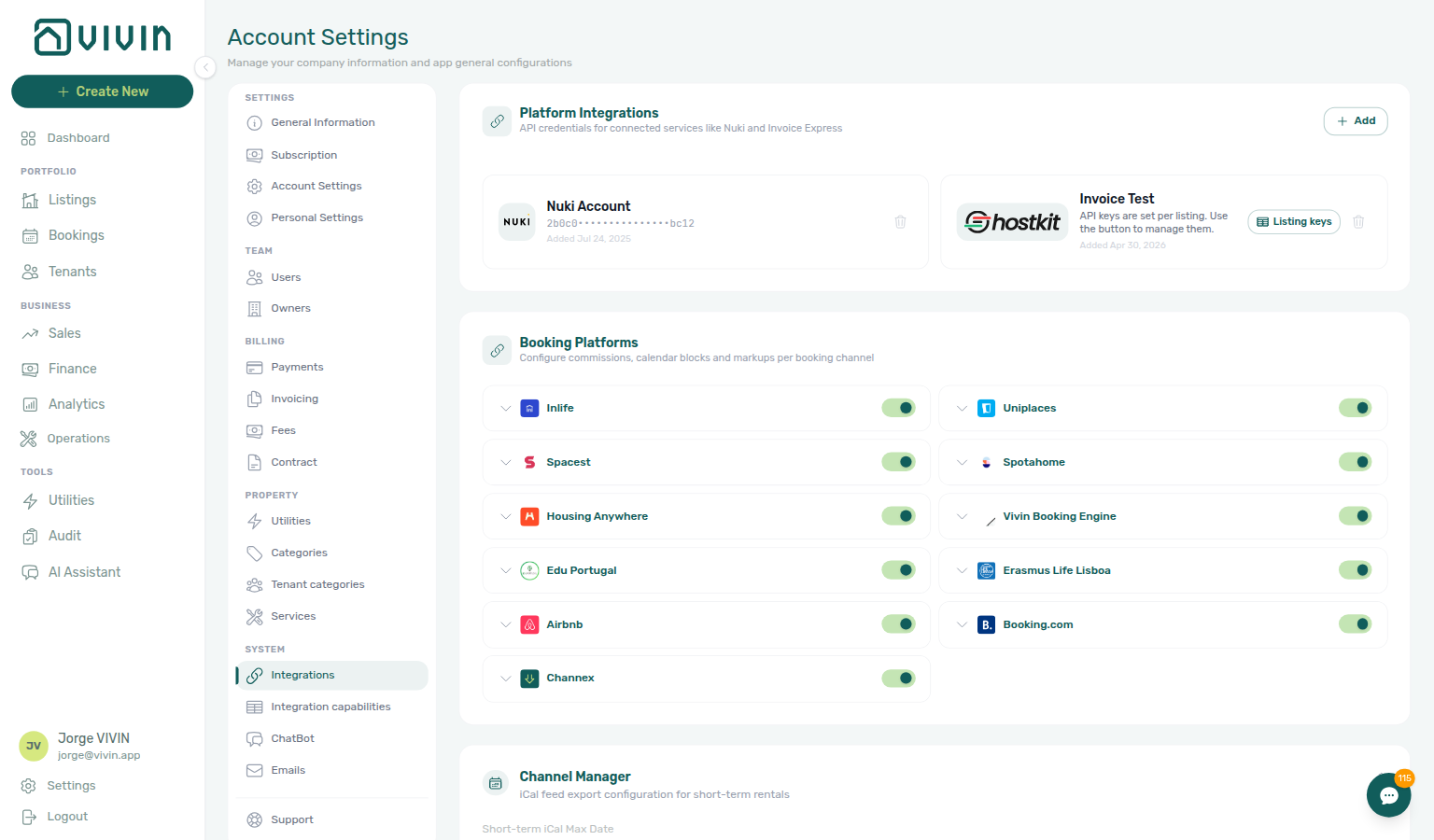
Account Settings > Integrations — platform connection cards, API credentials, and account-wide sync options (including Short-term iCal Max Date) in the settings shell:
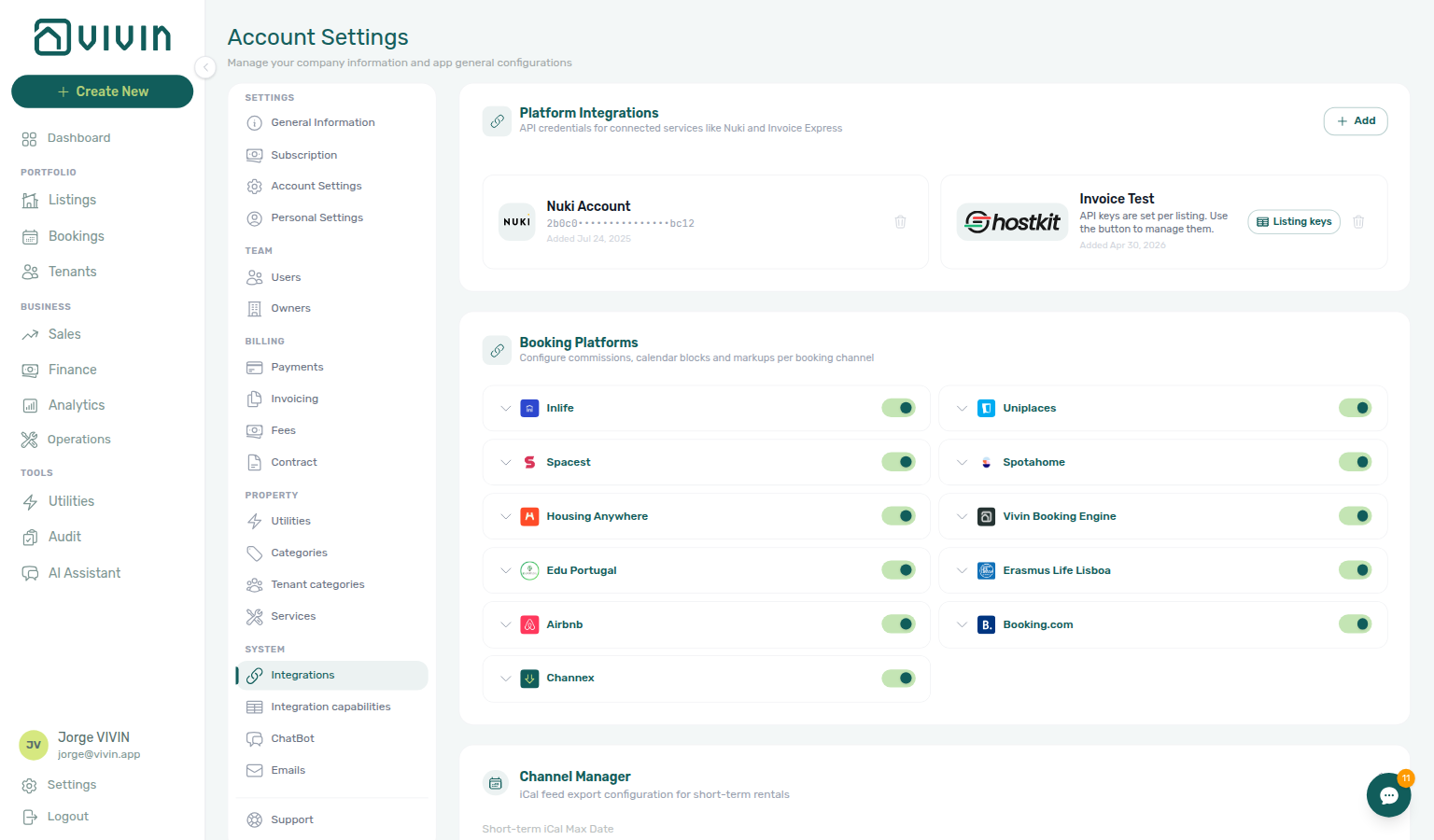
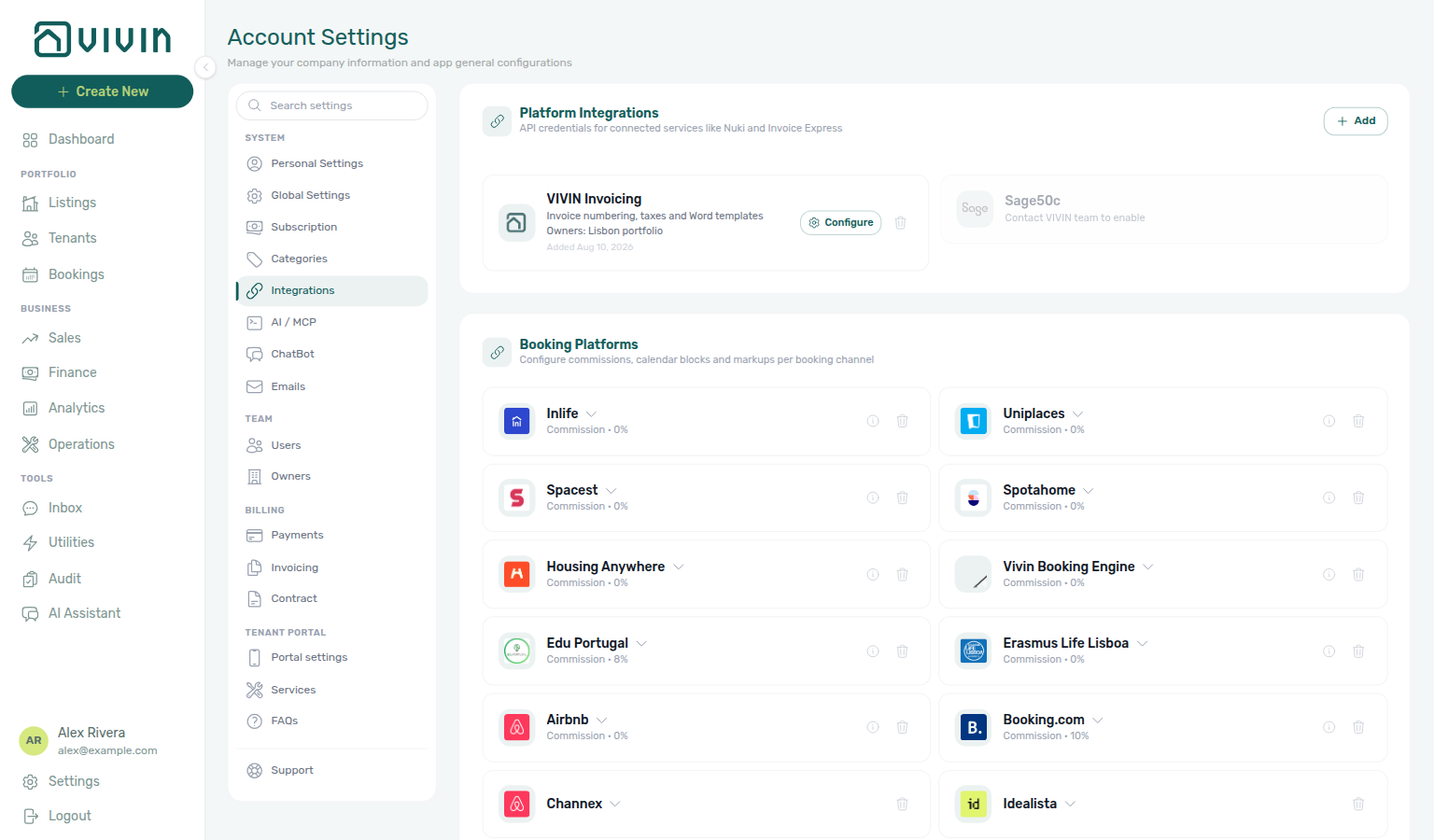
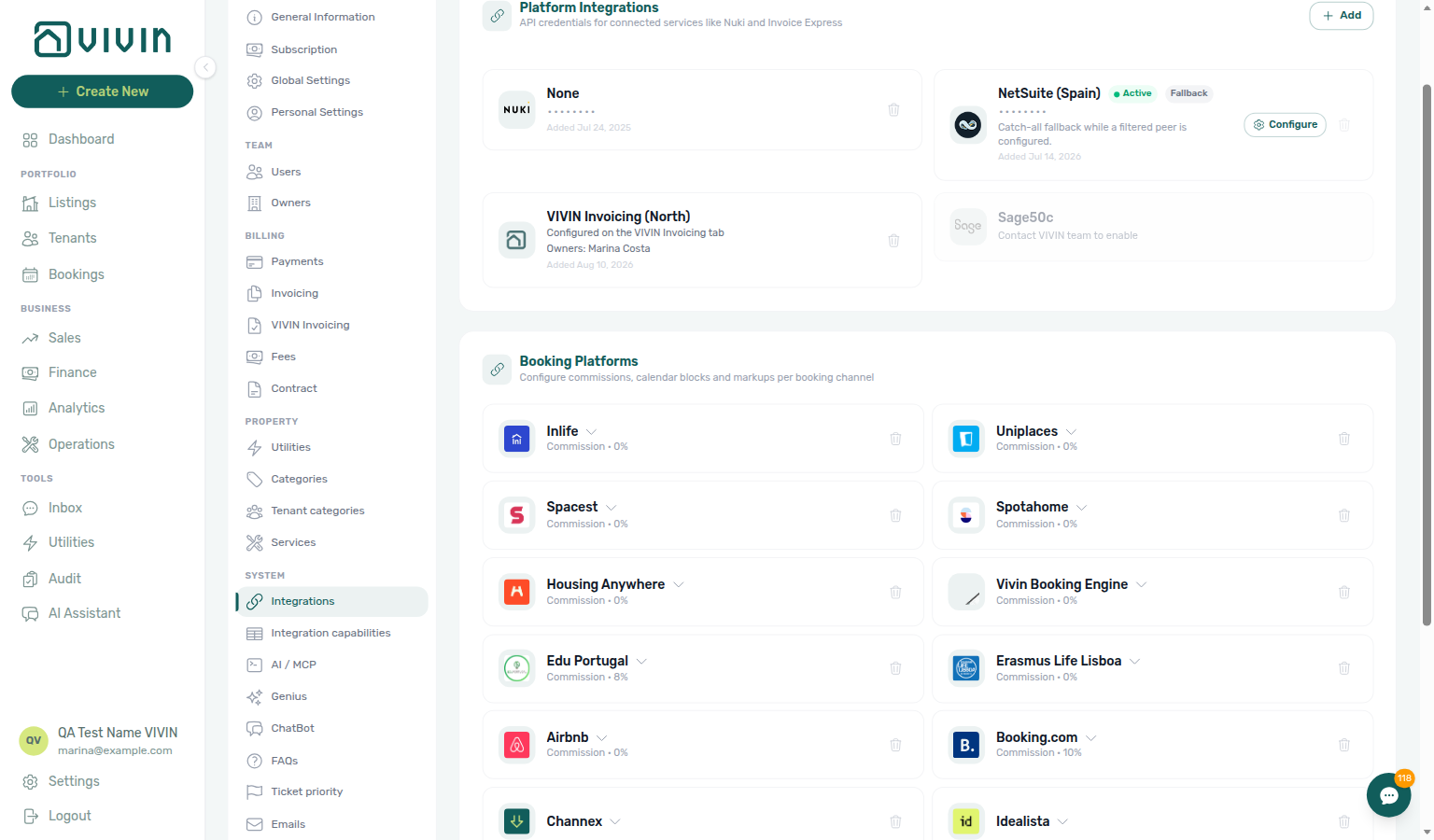
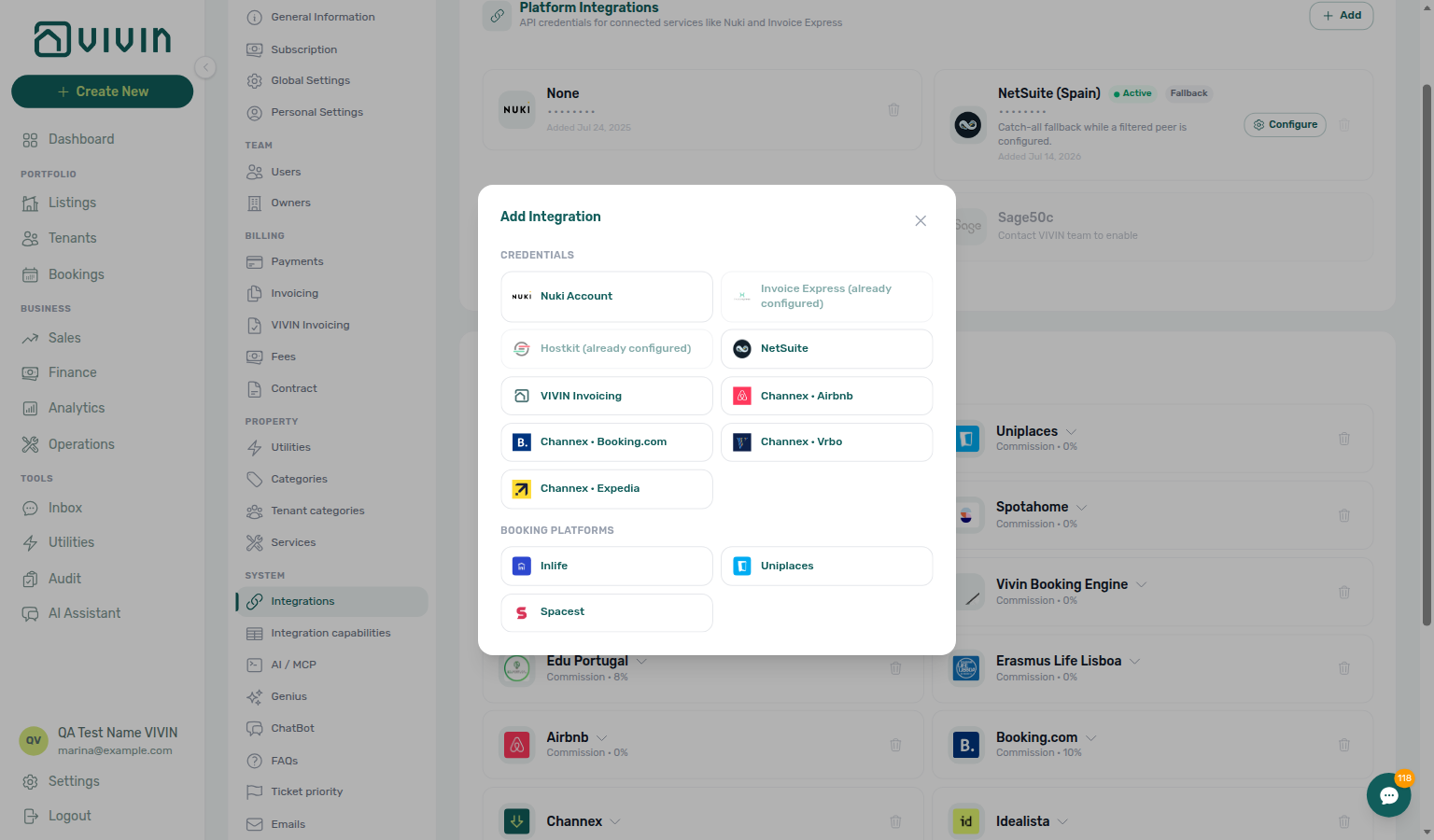
Platform integrations and booking channels — + Add for Nuki, Hostkit, Invoice-xpress, NetSuite, and similar providers; Channex OTA connection cards (Airbnb / Booking.com / Expedia / Vrbo) when Vivin provisions channel-manager credentials; booking platform cards with commissions and per-channel options below:
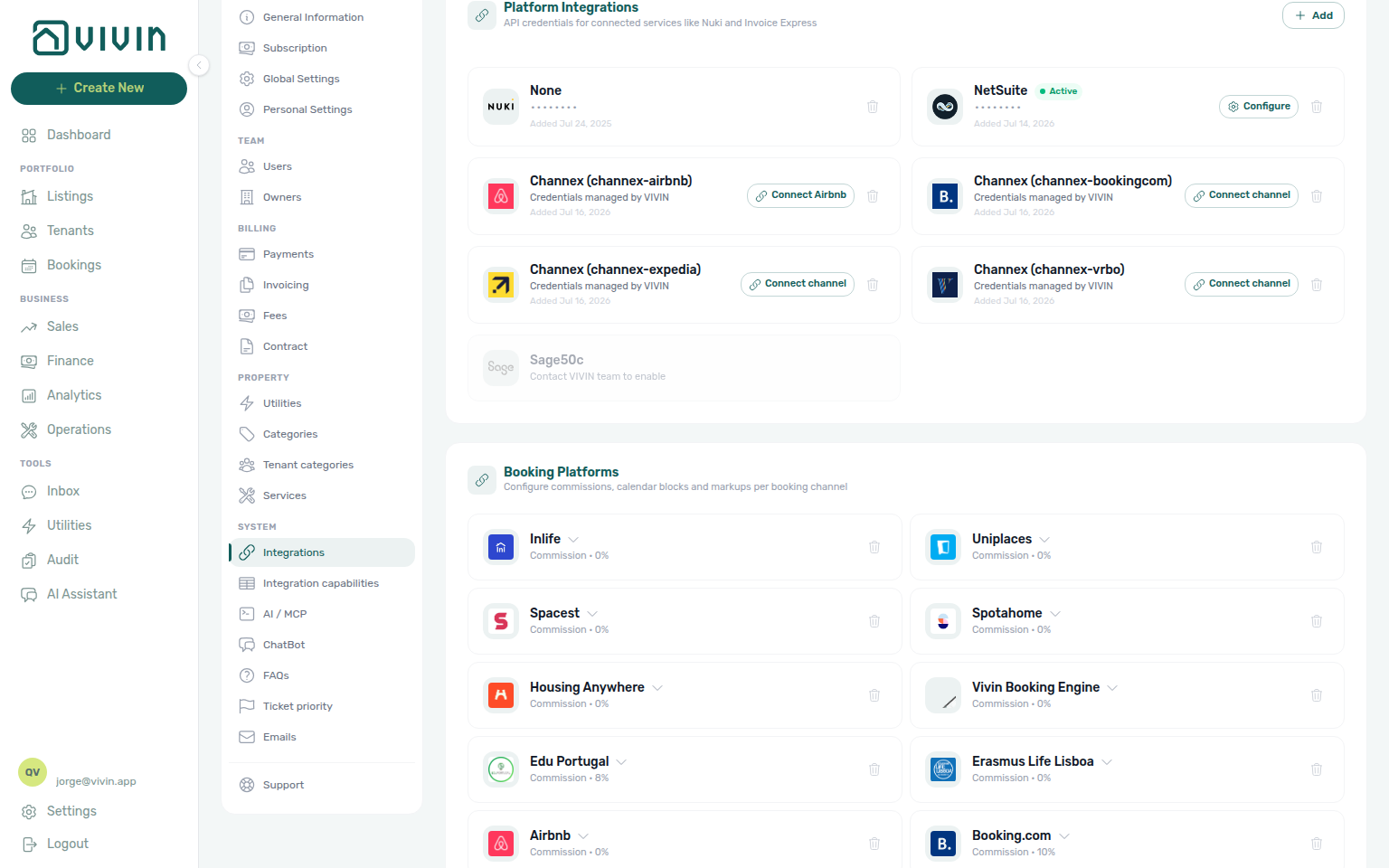
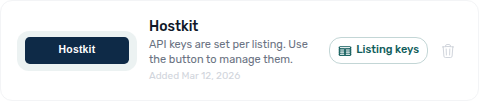
When Hostkit is connected, the Platform Integrations list shows a Listing keys control on the Hostkit card (per-unit keys are managed in a modal — see Hostkit (invoicing) below). When NetSuite is connected, the card shows an Active badge and a Configure control for fiscal defaults and property class mappings — see NetSuite (invoicing). Sage50c appears disabled with Contact VIVIN team to enable until provisioned.
Idealista and Coliving — mid-term marketplace cards with enable toggles, integration email, and optional pricing markup (same pattern as HousingAnywhere or Uniplaces):
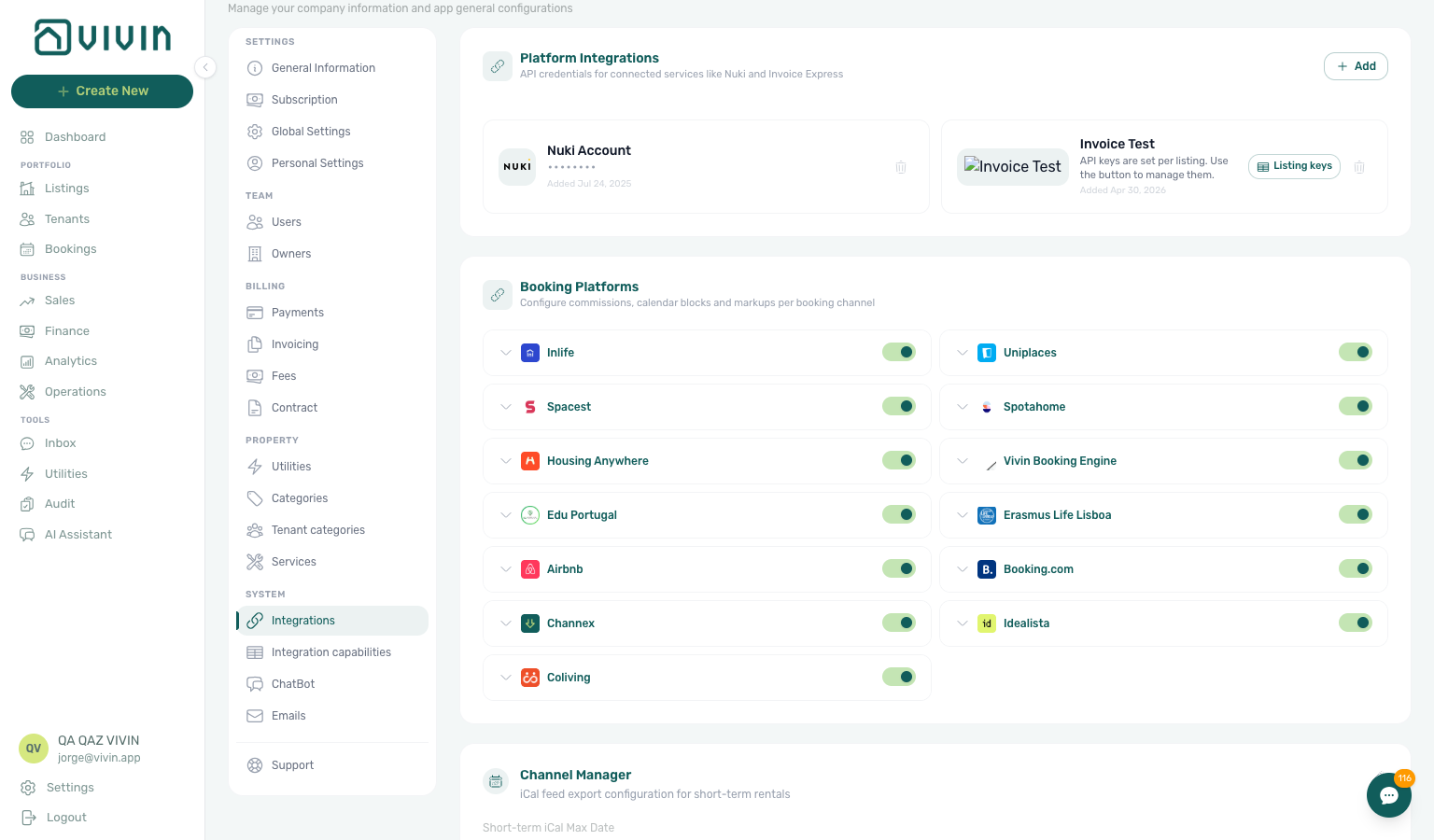
Booking Platforms
Enabling a platform card does not list units — link each unit on Listings → Channels and verify payloads against Integration field capabilities.
These integrations connect your units to external rental listing sites. When enabled, Vivin synchronizes availability calendars and (where supported) pricing.
| Platform | What It Does |
|---|---|
| Airbnb | Two-way calendar sync. Bookings made on Airbnb are imported into Vivin; bookings in Vivin block Airbnb dates. |
| Booking.com | iCal calendar sync. Two-way sync — bookings made on Booking.com are imported into Vivin; bookings in Vivin block Booking.com dates. Add each unit's iCal URL from your Booking.com extranet (Availability > Export calendar) in the Channels tab. |
| Uniplaces | Calendar sync and booking import for the student rental platform. |
| Spotahome | Calendar sync for medium-term furnished rentals. |
| HousingAnywhere | Calendar sync for international student and expat housing. When a unit has a booking window, the outbound Housing Anywhere listing JSON also blocks nights outside that envelope — Housing Anywhere booking windows. Set the envelope on Listings → Booking window. Partial listing costs[] is whole euros; the Housing Anywhere full catalogue publishes the same money in cents — Euros vs cents. |
| Inlife | Integration for the Inlife student accommodation platform. After enablement, bulk migration uses + Create New → Listings → Inlife Import (structure only) or Inlife Full Import (Vivin internal — details + photos for full listing feeds). Outbound Inlife catalogue rows need a recognised City on Full integration → Location & geography. The catalogue listing key is stored propertyId_roomId, split into listing id and room.id — Inlife id and room.id. See Listings — Importing from Inlife and Create New Menu — Inlife Import. |
| Spacest | Calendar sync for the Spacest platform (RoomLess listing feed). When the next move-in is still in the future, the outbound JSON includes a calendar block through the night before that date — RoomLess nights before move-in. |
| ErasmusLife Lisboa | Calendar sync and booking import for the ErasmusLife Lisboa student accommodation platform. |
| Idealista | Calendar sync and booking import for the Idealista marketplace. Configure integration email and optional Pricing Markup like other mid-term platforms. |
| Coliving | Calendar sync and booking import for the Coliving distribution channel. Configure integration email and optional Pricing Markup; bookings imported from Coliving appear with the Coliving platform badge in Vivin. |
| Channex | Channel-manager distribution: push availability and rate/restriction updates to Channex when your workspace has a Channex API connection and each unit is mapped to Channex property, room type, and rate plan UUIDs. Enable the platform card here and set optional Pricing Markup (no integration email on the card). Confirmed bookings can import from Channex when mappings match. Channex API credentials and per-unit UUID mapping are configured with your Vivin account team — not from the standard Add Integration dialog. |
| Edu Portugal | Calendar sync for the Edu Portugal student accommodation platform. Commission and calendar block can be configured; no integration email or markup. |
| Vivin Booking Engine | Enables the Vivin-hosted direct booking page where tenants can book directly without a third-party platform. |
| iCal | Export a standard iCal feed URL for each unit. Any platform that accepts iCal feeds (Airbnb, VRBO, Tripadvisor, etc.) can subscribe to this to receive availability updates. Per-unit URL: {Core API host}/ical-integration/listings/{listingId}/iCal.ics (copy via Copy iCal on a Sales > Channels row, from the unit integration wizard, or bulk-export VIVIN iCal column). |
For each platform integration, you typically configure:
- Integration Email or API Key — the credential that identifies your account on that platform. For platforms that show Integration Email, listing JSON
landlordEmail(and Uniplaces / Inlifelandlord_email) is this card, not the signed-in user’s login — Listings & Availability — Landlord email - Pricing Markup — optional None, Percentage (%), or Fixed (€) on that platform card. Listing JSON applies it only to rent (and the month grid), not Extra Charge, cleaning, or deposit — Listings & Availability — Platform markup
- Calendar Block (days) — optional. When set, listing JSON for that platform can stay closed for about two years after a stay that is still far in the future — see Calendar Block (days)
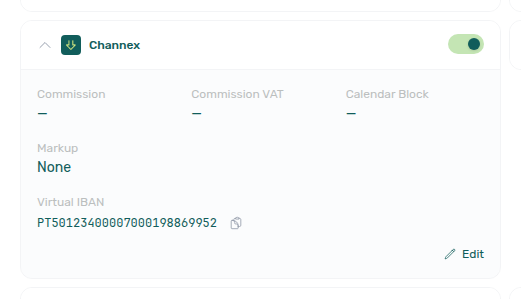
- Virtual IBAN (when provisioned) — some connected booking platforms show a platform-level virtual IBAN on the card with a copy control. Tenants paying through that channel can use it for bank transfers; Vivin matches inbound platform transfers separately from each booking’s tenant virtual IBAN on Contract Info (see Bookings — Virtual IBAN). The row appears only when Vivin has issued a non-empty VIBAN for that platform slug on your account.
Calendar Block (days)
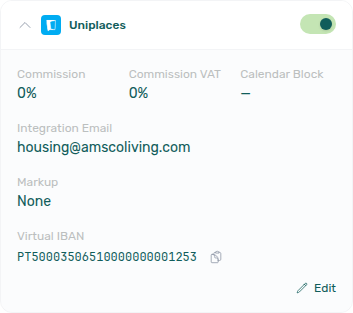
Each Booking Platforms card shows Calendar Block next to Commission and Commission VAT. Expand the card to read it; Edit opens Calendar Block (days). A dash or 0 means the field is unused.
When you save a positive number N, Vivin watches the latest occupancy that already has an end on that unit. If that last occupied night is still more than N days from today, the listing JSON for this platform adds a closed span from that night through about two years later. Marketplaces that paint only unavailabilities then stop offering nights after that stay. If the latest occupancy ends within N days, Vivin does not add the span — the calendar reopens after that stay.
This extra span is outbound JSON only. It does not appear as a hold on the unit Calendar. It does not change Short-term iCal Max Date (Airbnb / Booking.com iCal). Preparation nights still lengthen the booking’s own block — that is a different setting under Preferences.
Leave the field empty (or 0) unless you intend to close that channel after far-future occupancy. Each card is independent — a Uniplaces value does not apply to Housing Anywhere. The Uniplaces card below shows Calendar Block on the first row (a dash means unused).
Partners: Listings & Availability — Calendar Block (days). Operators: FAQ — Marketplace blocked for years after the last stay.
Enabling a platform integration here does not automatically list your units on that platform. You still need to create the listing on the external platform and link each unit in Vivin to its corresponding external listing ID.
Channex (channel manager)
Channex is a channel-manager connection, not a single marketplace with one integration email. Operators typically:
- Enable the Channex card under Booking Platforms and configure Pricing Markup if you mark up rent sent to connected OTAs (Extra Charge is not marked up — Listings & Availability — Platform markup).
- Rely on Vivin to push availability and restrictions (ARI) to Channex for units that have a valid Channex mapping — Channex property, room type, and rate plan UUIDs from the Channex API.
- Receive booking imports when Vivin processes a matching revision from Channex’s booking revisions feed — confirmed stays appear with the Airbnb or Booking.com platform badge (the OTA the guest booked on), not a channel-manager chip. See Bookings — Platform badge and filters follow the real OTA.
Account-level Channex API keys and per-listing channexMapping UUID rows are maintained outside the self-serve Add Integration flow (your Vivin onboarding contact or internal admin tools). Unlike Airbnb or Idealista, you do not paste Channex UUIDs on the unit Channels tab yourself — ask Vivin support to verify mapping for affected units.
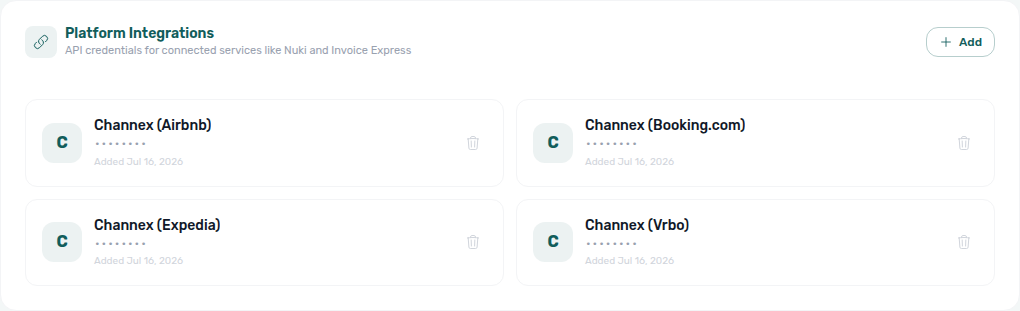
When Vivin has provisioned channel-manager credentials for your workspace, Platform Integrations (Other providers) shows Channex connection cards — one per linked OTA rail (for example Airbnb, Booking.com, Expedia, Vrbo). Those cards are not self-serve API-key entries: credentials stay managed by Vivin, and operators use Connect … only when Vivin’s onboarding flow asks you to finish an OTA link.
Booking.com hotel IDs (one ID per room)
Many Booking.com accounts list each room as its own property (one hotel ID = one room = one Vivin unit). The Booking.com connection card therefore holds a pool of hotel IDs, not a single hotel for the whole account. The registered list and the paste box open in a dialog, so the Integrations grid stays one compact row per connection — see Hotel ID list opens as a dialog.
- In the Booking.com extranet, connect Channex (Vivin’s connectivity provider) on each property you will map.
- On this Integrations page, find the Booking.com card. After at least one ID is registered, the header shows Connected plus N hotel IDs · M allocated. The card itself stays compact — it does not expand with the list.
- Click Add hotel ID. While the pool is empty, the same control reads Connect channel. Either opens the Booking.com hotel IDs dialog.
- In the dialog, paste IDs in Hotel IDs one per line or separated by commas, then Add. Vivin checks each ID with Booking.com and lists the room title (for example 6519420 — Single Room). Use Cancel or the X if you opened the dialog by mistake — you do not need to save an empty paste. When every pasted ID is added, the dialog closes and the card summary updates.
- On Sales → Channel Manager, open the unit’s Booking.com cell and pick that hotel ID. IDs already allocated to another unit stay disabled there.
- To drop an ID, unlink it on Channel Manager first, then open the dialog again. While a unit holds it, the remove control stays blocked and the row reads Allocated to ….
Hotel ID list opens as a dialog
The registered IDs and the Hotel IDs paste box live in the Booking.com hotel IDs dialog — not as an expanding block on the connection card. The card stays one compact row with Connected · N hotel IDs · M allocated and Add hotel ID, so a long pool does not stretch the Integrations grid.
Typical path:
- On Settings → Integrations, find the Booking.com connection card.
- Click Add hotel ID (or Connect channel while the pool is empty).
- Read the registered list (for example 6519420 — Single Room, with Not allocated yet or Allocated to …) and the Hotel IDs paste box.
- Click Cancel unless you intend to add IDs.
Airbnb, Expedia, and Vrbo rails still use Connect channel (or Airbnb authorization) and a listing picker on Channel Manager — they do not use this hotel-ID pool. Pair with FAQ — Booking.com hotel IDs, FAQ — Where did the hotel ID list on the Booking.com card go?, and Sales — Channex allocate mode.
Under Booking Platforms, expand the Channex card to toggle the channel on, review commission / calendar-block fields, set optional Markup, and copy a provisioned Virtual IBAN when Vivin has issued one for the channex platform slug:
| Direction | Mechanism | Operator action |
|---|---|---|
| Outbound (Vivin → Channex) | Scheduled ARI sync posts availability + rates/restrictions for mapped / allocated units | Enable the platform card; keep Short term nightly pricing accurate; allocate OTA listings on Sales → Channels when rails are connected |
| Inbound (Channex → Vivin) | Vivin polls Channex’s booking revisions feed (not an HTTP webhook you configure on this page) | Enable the card; confirm mapping with support when imports are missing |
Channex has no standalone column on Sales > Channels. After an OTA rail on the Channex connection cards is connected, that OTA column (Airbnb, Booking.com, Vrbo, Expedia) switches to channel-account allocate mode — operators pick the OTA listing (Airbnb / Vrbo / Expedia) or a registered hotel ID (Booking.com pool) per unit instead of pasting iCal URLs (sales-channels-channex-allocate-picker.png, sales-channels-channex-allocated-cell.png, sales-channels-channex-allocate-flow.mp4, settings-integrations-bookingcom-hotel-id-pool.png). After allocate, the unit Listings > Channels tab shows a read-only Airbnb (or OTA) room URL (listings-unit-channels-channex-row.png, listings-unit-channels-channex-row-flow.mp4) — not a classic iCal row you edit with pencil / trash. Nightly rates for those channels are edited on the unit Short term card. UUID channexMapping rows themselves are still provisioned by Vivin, not typed into mid-term-style external listing ID fields on Listings > Channels. Bookings imported through the channel manager show Airbnb or Booking.com in Bookings and in Finance > Transactions → Select platforms. There is no separate channel-manager source chip. See Bookings — Platform badge and filters follow the real OTA.
Revisions with status modified are acknowledged on the Channex side and applied to the Vivin booking when the date or payout change is safe (stay dates, Provider platform payment, payment plan, and received payout). Changelog records the automatic apply; when Vivin cannot apply the change, it leaves a review warning — clear blockers and correct the stay on Airbnb (dates stay locked in Vivin). See Bookings — When Airbnb changes dates or the payout and Edit lockdown on Airbnb bookings.
Some deployed builds still label the Booking Platforms card Channel Manager while the i18n key is channex. Current develop / docs captures use Channex. The separate Channel Manager section lower on the page is only for Short-term iCal Max Date (Airbnb / Booking.com) — not the Channex booking-platform card.
Short-term (Airbnb / Booking.com) Configuration
Short-term iCal Max Date pushes calendar horizons to many units at once — pair day-to-day sync status with Sales — Channel Manager before high-season turnover.
Airbnb and Booking.com use iCal feeds to sync availability. Vivin provides controls to limit how far ahead availability is exported to these platforms.
Short-term iCal Max Date
The Short-term iCal Max Date (in the Channel Manager section) limits how far ahead the iCal feed exports availability. Dates after this cutoff are blocked on the feed as a security lock, so external platforms will not show your unit as available beyond that date.
| Control | Location | Description |
|---|---|---|
| Short-term iCal Max Date | Channel Manager section | Account-wide default. Sets the last date availability is exported. Save after changing. |
| Apply to all listings | Airbnb / Booking.com platform cards | Copies the Short-term iCal Max Date to every unit's per-listing override. Use when you want all units to share the same cutoff. |
| Apply to selected listings | Airbnb platform card | Copies the date to only the selected units. Use when some units need a different cutoff. |
On the Airbnb (and Booking.com) platform cards, Apply to all listings and Apply to selected listings copy the account-wide cutoff to per-unit overrides after you set Short-term iCal Max Date:
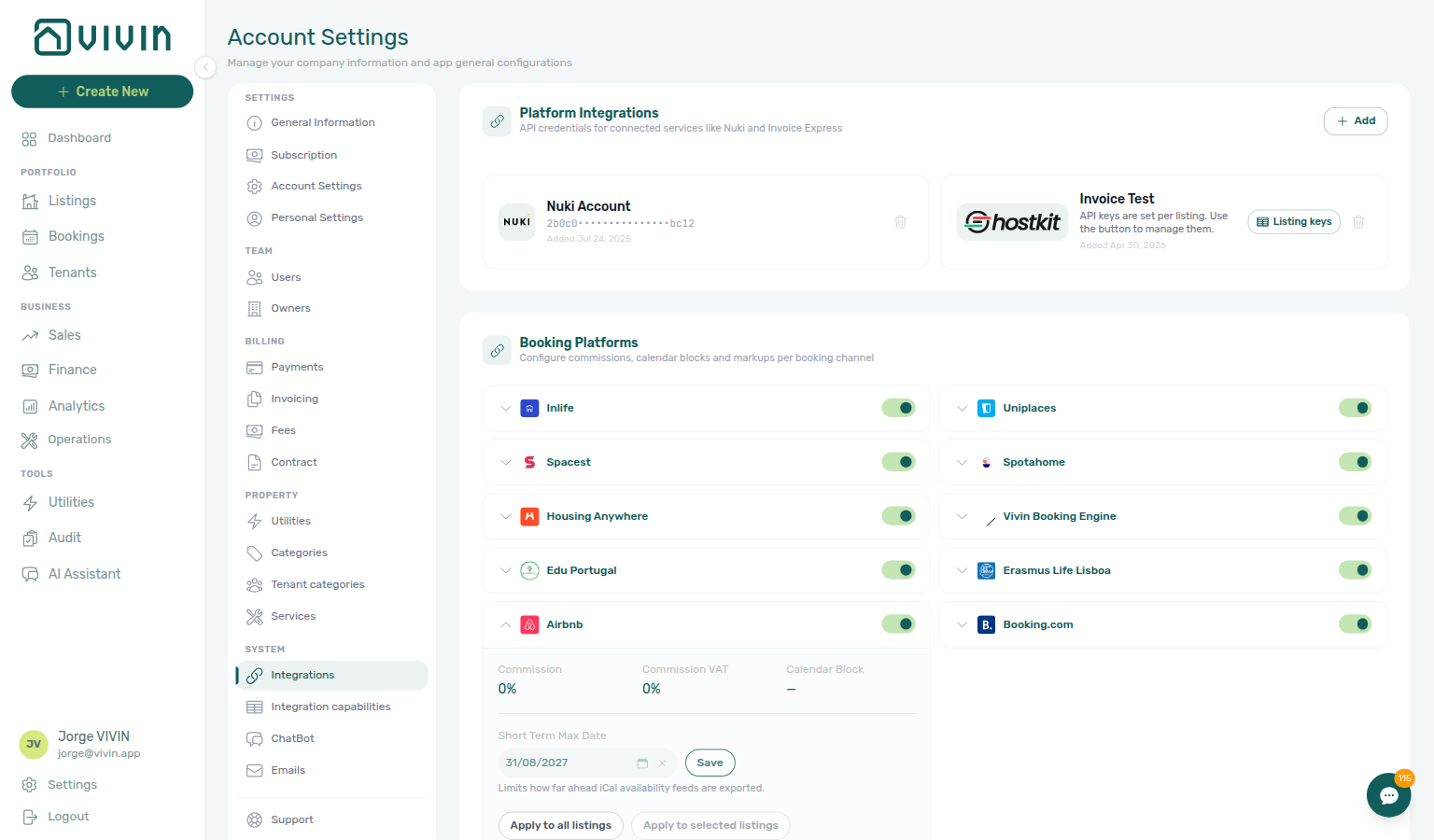
If a unit has no per-listing override, it uses the property-level override (if set), otherwise the account-level Short-term iCal Max Date. You can also set a per-unit date in the unit's edit view (Listings module) if you need different cutoffs per unit.
When to Use These Controls
- Limit booking horizon — Prevent short-term platforms from accepting bookings too far in advance (e.g., only 6 months ahead).
- Avoid double-bookings — Reduce risk when syncing with multiple channels by capping how far ahead availability is shared.
- Per-unit control — Use "Apply to selected listings" or edit units individually when some units need a different cutoff than others.
Other Providers
Nuki, VIVIN Invoicing, Hostkit, Invoice-xpress, and NetSuite pair with Payments, Invoicing & Utilities / VIVIN Invoicing settings and Emails check-in codes. VIVIN Invoicing and NetSuite can run together with catch-all + filtered routing — see VIVIN + NetSuite dual stack. Hostkit, Invoice-xpress, and Sage50c stay single-provider.
| Provider | What It Does |
|---|---|
| Nuki | Connects Vivin to Nuki smart locks. Once connected, Vivin can generate temporary access codes for tenants and automatically include them in check-in emails. Requires your Nuki API key. On Emails → Communication Rules, Select smart locks… stays open while you add a second device to an Include only or Exclude audience. |
| VIVIN Invoicing | Vivin’s built-in invoicing provider — no external API credentials. After you add it, click Configure on the card to set issuer details, numbering, tax rates, and Word templates (VIVIN Invoicing). The card subtitle reads Invoice numbering, taxes and Word templates. See VIVIN Invoicing. |
| Hostkit | Connects Vivin to Hostkit for Portuguese Fatura-Recibo invoicing. API keys are per listing (not a single account key on the add-integration dialog). After you add Hostkit, use Listing keys on the card to paste each unit’s key from Hostkit Properties → API key. See Hostkit (invoicing). |
| Invoice-xpress | Connects to the Invoice-xpress invoicing service for legally compliant invoice generation. Requires your Invoice-xpress API key and client ID. Once connected, Vivin generates and submits invoices automatically when payments are recorded. Configure optional Proforma / Invoice Receipt remarks on Invoicing (settings-invoicing-invoicexpress-remarks-view.png, settings-invoicexpress-remarks-flow.mp4) — those fields appear only while Invoice-xpress is the active invoicing provider. After issue, Finance → Transactions shows the Invoice-xpress document id with see invoice (finance-transaction-detail-invoicexpress-see-invoice.png, invoicexpress-see-invoice-flow.mp4) — same control as Hostkit, Invoice-xpress permalink destination (no Hostkit-style Files tiles). |
| NetSuite | Connects Vivin to Oracle NetSuite for ERP invoice issuance. Requires NetSuite Account ID, OAuth client ID, Certificate ID, and private key (PEM) on Add Integration, then Configure for fiscal defaults and property class mappings. See NetSuite (invoicing). |
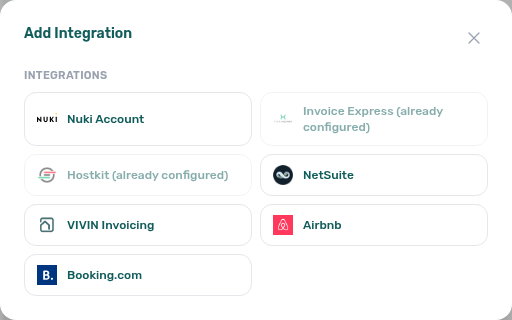
| Sage50c | Coming soon — Sage Accounting (Sage50c) as an additional invoicing connector. It appears in the Add Integration list as disabled with a Contact the VIVIN team to enable tooltip until your account is provisioned. When live, it follows the same single exclusive rule as Hostkit and Invoice-xpress (cannot run beside another invoicing connector). |
To add a provider, click + Add in the Platform Integrations section (opens Add Integration), select the provider from the list, enter the required credentials, and save. VIVIN Invoicing needs no credentials. Sage50c appears as a coming-soon card (or disabled in the list) until Vivin enables it for your account.
Billing from the invoicing connection
Issuing documents pairs with Invoicing (VAT rates) and Finance — Invoice automation. Symptom: FAQ — How do I turn invoicing on?. Term: Glossary — Billing from the invoicing connection.
Connecting an invoicing provider here is what turns invoicing on for the account. There is no separate billing switch on Account Settings.
| Provider | What connecting it does |
|---|---|
| VIVIN Invoicing | Built-in documents — VIVIN Invoicing |
| Hostkit | Portuguese Fatura-Recibo — Hostkit (invoicing) |
| Invoice-xpress | Invoice-xpress documents from this card |
| NetSuite | ERP invoices — NetSuite (invoicing) |
| Sage50c | Sage documents when Vivin has provisioned the account |
After the first invoicing connection exists (the catch-all):
- Finance → Transactions can Issue allocation / Invoice selected through that provider.
- Settings → Billing → Invoicing can load Tax VAT options from that provider’s catalogue.
- AI Chat and WhatsApp Genius may list billing among active account modules. That means an invoicing connection is set up — not a hidden toggle. Payments (Tenant Portal card / vIBAN) and Operations stay separate account capabilities.
Settings → Billing still holds Payments deadlines and Invoicing Tax Codes. Those tabs do not replace Add Integration. Nuki is not an invoicing connection.
Do not add a second exclusive provider (Hostkit, Invoice-xpress, or Sage50c) while another invoicing connection is live — see VIVIN + NetSuite dual stack.
See FAQ — How do I turn invoicing on? and Glossary — Billing from the invoicing connection.
VIVIN Invoicing and NetSuite can coexist (and you can add more than one of each) using a catch-all connection plus filtered peers — see VIVIN + NetSuite dual stack. Hostkit, Invoice-xpress, and (when enabled) Sage50c remain exclusive: only one of those can be active, and they cannot run beside VIVIN / NetSuite. Nuki smart-lock connections are exempt and can coexist with any invoicing setup.
VIVIN + NetSuite dual stack
Use this when some owners or payment types should issue through VIVIN Invoicing and others through NetSuite (or through a second filtered peer of the same provider).
| Rule | What operators do |
|---|---|
| First connection is the catch-all | Add VIVIN Invoicing or NetSuite with no payment-type or owner filters. That row covers every charge that does not match a filtered peer. |
| Extra VIVIN / NetSuite peers need filters | Each additional VIVIN Invoicing or NetSuite connection must select at least one Payment type and/or Owner. Everything else falls back to the catch-all. |
| Fallback badge | While a filtered peer exists, the catch-all card shows a Fallback badge and the hint Catch-all fallback while a filtered peer is configured. |
| Delete order | Remove filtered peers before the catch-all — the trash control on the catch-all stays disabled while siblings exist (Delete the filtered connection before removing the fallback). |
| Exclusive providers stay blocked | With any VIVIN / NetSuite connection present, Hostkit, Invoice-xpress, and Sage50c stay unavailable in Add Integration until you remove the dual-stack connections. |
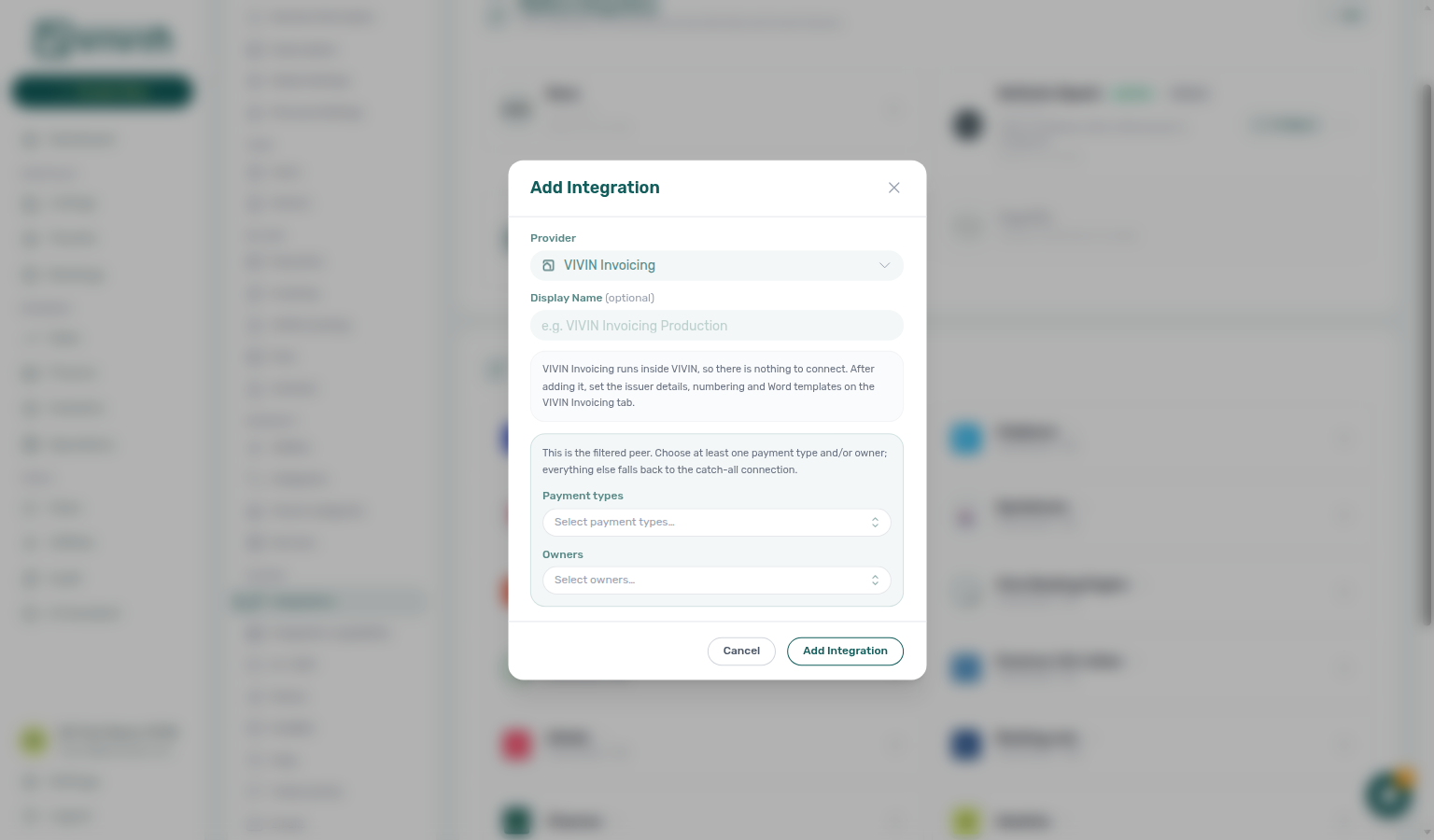
How issuance picks a connection
- Vivin matches the booking’s owner and the charge’s payment type against filtered peers (prefer a peer that matches both dimensions over one dimension).
- If no filtered peer matches, the catch-all issues the document.
- Issuer details, numbering, and Word templates on VIVIN Invoicing are per VIVIN connection. NetSuite Configure fiscal defaults are per NetSuite connection. Shared Tax Codes stay account-wide.
- Add the catch-all (VIVIN Invoicing or NetSuite) with no filters and finish Configure on that card. When you add a second VIVIN Invoicing peer, open Configure and use VIVIN connection to edit that peer’s issuer, numbering, and templates.
- Click + Add again, choose the second provider (or another peer of the same type), and set Payment types and/or Owners.
- Confirm the catch-all shows Fallback, then issue a test allocation on Finance → Transactions for both a filtered owner and an unfiltered one.
VIVIN Invoicing
VIVIN Invoicing issues invoices, proformas, and credit notes from inside Vivin — no Hostkit, Invoice-xpress, or NetSuite account is required.
1. Add the connection
- Open Account Settings → Integrations.
- Click + Add / Add Integration and choose VIVIN Invoicing.
- Save — there is nothing to paste. The dialog may still say setup continues on a VIVIN Invoicing tab — use Configure on the card instead.
2. Connection card
The Platform Integrations list shows a VIVIN Invoicing card with subtitle Invoice numbering, taxes and Word templates and a Configure button. When the connection is a filtered peer, the card also summarises Payment types and/or Owners. When it is the catch-all beside a filtered sibling, it shows the Fallback badge — see VIVIN + NetSuite dual stack. Use the trash control only when you intend to remove the connection.
3. Finish setup with Configure
Click Configure to set issuer details, document numbering, tax rates, and Word templates — then map line types on Invoicing → Tax Codes using the same tax names. Full walkthrough: VIVIN Invoicing. Issuer details, numbering, and templates are stored per VIVIN connection; tax rate names stay account-wide.
Removing a provider connection
Use this when you need to switch invoicing providers, rotate compromised API credentials, or disconnect smart-lock access.
- Open Account Settings → Settings → Integrations.
- In Platform Integrations (Other providers cards), locate the connection card (Nuki, VIVIN Invoicing, Hostkit, Invoice-xpress, NetSuite, or Sage50c when connected).
- Click the trash control on the card (or the remove action in the card menu, depending on layout).
- Confirm in Remove account connection — the dialog names the connection (for example NetSuite) and warns that the action cannot be undone and integrations using it may stop working.
- Click Remove connection to delete the account connection via the API, or Cancel to keep it.
If removal does not complete, the Remove account connection dialog stays open so you can Retry or Cancel without losing context.
| Provider removed | Practical impact |
|---|---|
| Nuki | New check-in codes stop generating; existing codes may expire per Nuki rules. Resend flows on bookings fail until you reconnect. |
| Hostkit / Invoice-xpress / Sage50c | Automatic invoice creation stops; Finance see invoice links for past Hostkit documents may break for new payments until a provider is connected again. Per-listing Hostkit keys stay tied to that connection and are removed with it. |
| VIVIN Invoicing / NetSuite (dual stack) | Removing a filtered peer returns those owners / payment types to the catch-all. Removing the catch-all is blocked while filtered siblings exist — delete peers first. Connections that still have issued documents or numbering counters cannot be deleted until those fiscal records are cleared with Vivin support. NetSuite Configure mappings stay tied to that NetSuite connection. |
| Any | Add Integration re-evaluates which exclusive providers (Hostkit, Invoice-xpress, Sage50c) can be added once competing invoicing connectors are gone. |
To switch from Hostkit / Invoice-xpress to VIVIN or NetSuite (or the reverse), remove the exclusive connection first, then add the new provider. Dual-stack VIVIN + NetSuite does not require removing one to add the other — add a filtered peer instead. After any provider change, open Invoicing & Payments and confirm Tax VAT / series settings match the issuing connection before recording chargeable payments.
Hostkit (invoicing)
Hostkit is aimed at operators who issue Fatura-Recibo (FR) documents from Hostkit when Vivin records chargeable payments.
1. Add Hostkit (account level)
- Open Account Settings → Settings → Integrations.
- In Other providers, click Add Integration and choose Hostkit.
- The add dialog explains that keys are created in Hostkit under each property — it does not ask for an API key at this step. Save to create the connection card.
Official Hostkit key creation steps: Hostkit knowledge base — article 89.
2. Listing keys (per unit)
After Hostkit is saved, the Other providers section shows a Hostkit connection card (not a single account-wide API key field). The card subtitle explains that credentials are per listing; the primary action is Listing keys (wording may vary slightly by interface language).
- On the Hostkit connection card, click Listing keys (tooltip: Manage Hostkit API keys per listing).
- In the Hostkit API keys by listing modal, use Search by listing or property… when you manage keys across a large portfolio — Vivin searches server-side (debounced) over listing and property internal names instead of loading every unit up front.
- Each row shows Property, Listing, Saved key (for example Configured (···1234) or Not set), and a New key field. Paste the full API key from the matching Hostkit property, then Save on that row. Keys are stored per listing — re-paste the full key when rotating credentials. After Save, the row updates in place so your scroll position is preserved (no full-table refresh).
- The modal loads listings in chunks (about 20 rows per request). Scroll inside the table panel to fetch more — a Loading more… line appears while the next batch loads. The footer shows the server total (for example 142 listings). Changing search starts again from the first chunk for the new query.
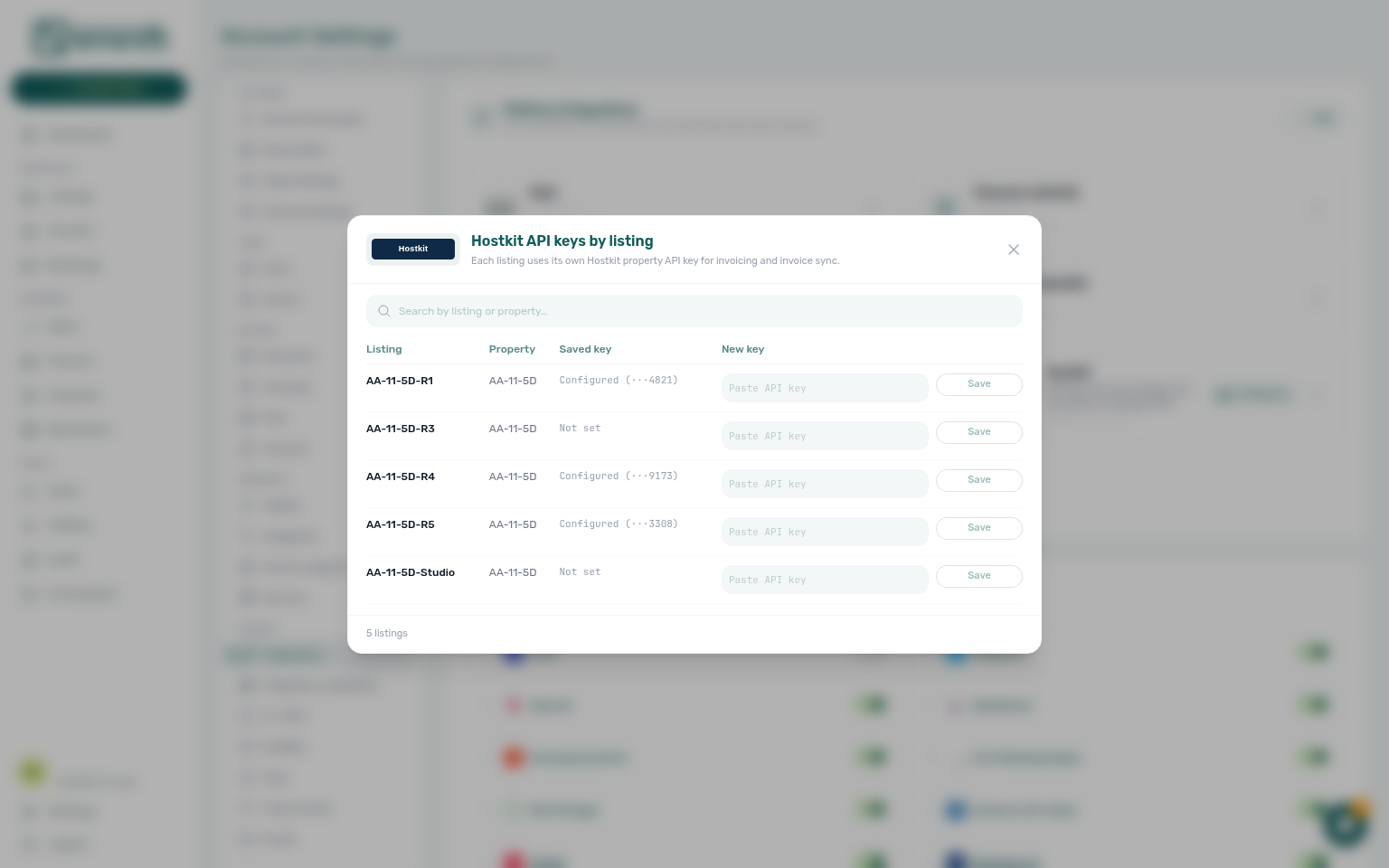
| Modal column (English UI) | Meaning |
|---|---|
| Listing / Property | Which unit the Hostkit property key belongs to |
| Saved key / New key | Current state vs the field where you paste a replacement |
| Configured (···suffix) | A key is on file; Vivin shows trailing digits only for security |
| Not set | No key saved yet — invoicing for that unit will fail until you paste one |
| Loading listings… | First chunk is still fetching (empty table) |
| No listings match… | Search returned zero rows — clear or broaden the search term |
| List needs a refresh | Close and reopen the modal, or refresh Integrations |
3. Invoice series on the Invoicing tab
After Hostkit is connected, open Payments, Invoicing & Utilities → Invoicing and set Hostkit invoice series to the exact series code from Hostkit Faturação → Séries (Vivin always requests document type FR on create). Vivin refuses to issue while the field is blank — save a non-empty series before your first Issue allocation. Use the same field when invoice creation fails with an invalid series error from Hostkit after a typo.

4. Finance and booking files
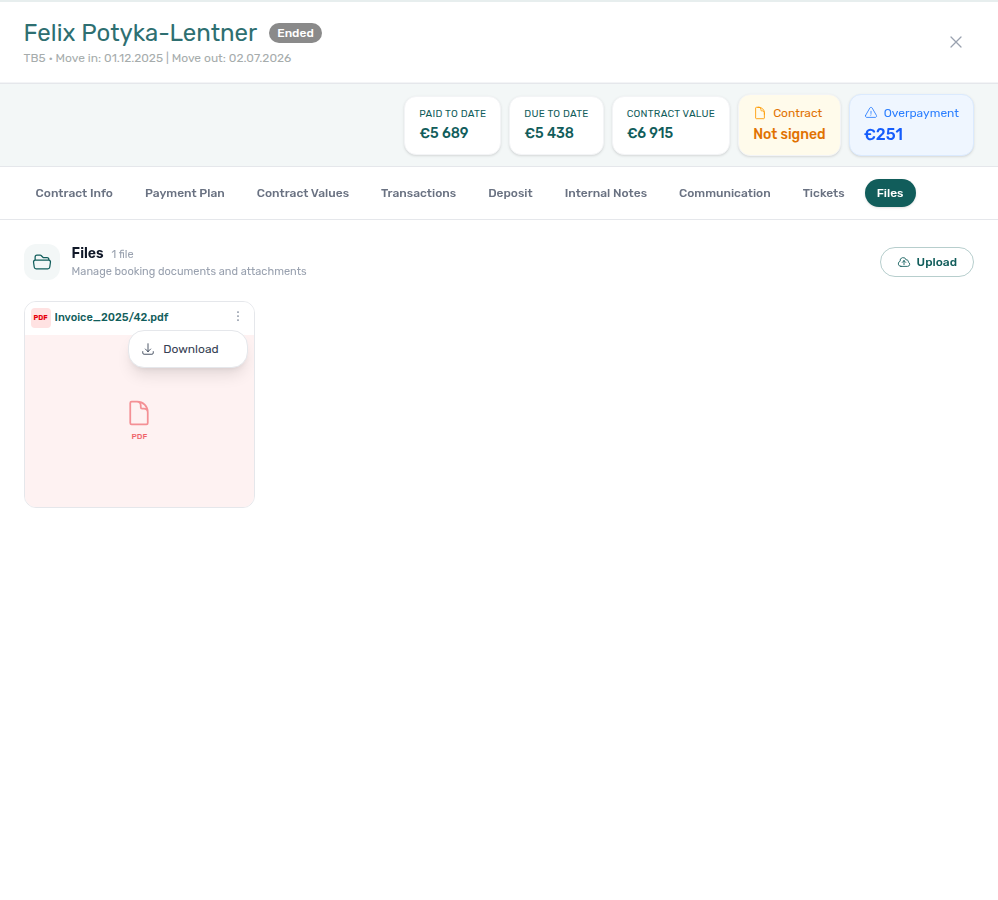
When invoicing runs through Hostkit, issued allocations can expose a Hostkit invoice link on Finance Transactions (transaction detail) and in booking file flows where the API returns a document URL. If a PDF is still generating in Hostkit, retry after a short wait or open the link in a desktop browser — server-side PDF fetch can lag Hostkit’s UI. See Finance — Hostkit invoice links for operator-facing detail.
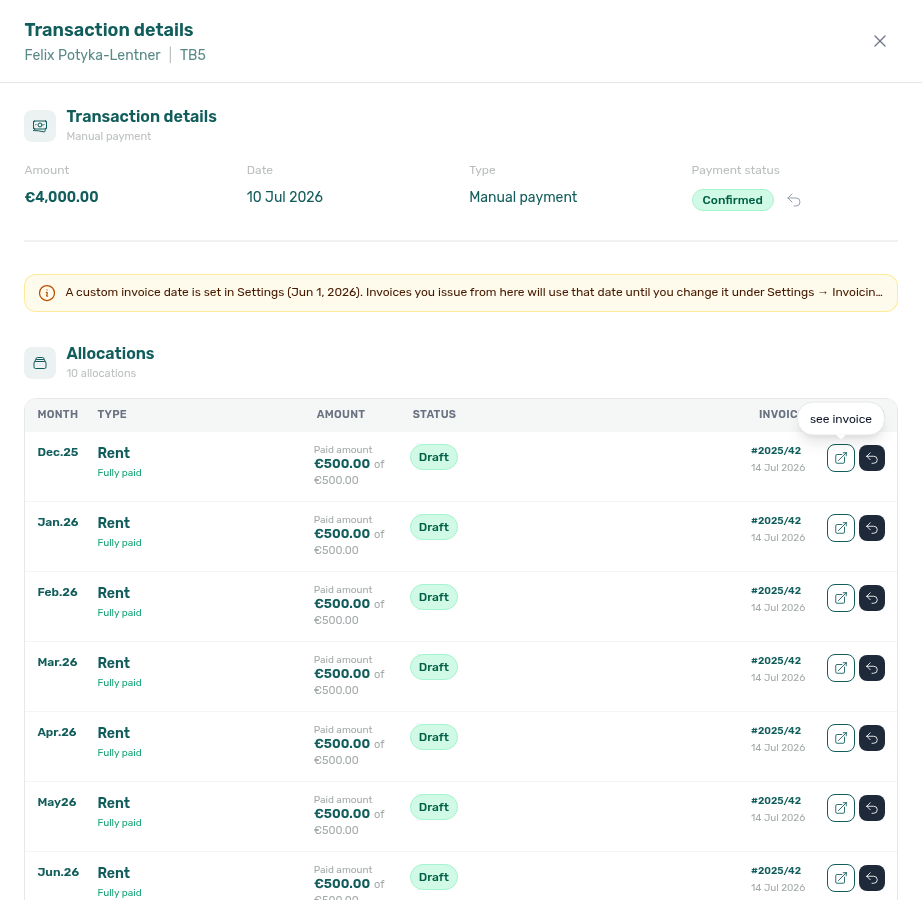
5. Hostkit API pacing (bulk invoicing)
Hostkit enforces per-API-key rate limits. Vivin paces outbound Hostkit calls (per listing key and at account level) so large Issue allocation / Invoice selected batches stay under the provider limit. When Hostkit still rate-limits a call, Vivin retries with backoff (honouring Retry-After when present) instead of stopping the allocation immediately — safe because Hostkit rejected the request before processing it.
| What you see | What it means |
|---|---|
| Bulk invoicing takes longer than usual on a big ledger selection | Normal — Vivin is spacing Hostkit requests to stay under the provider limit |
| Some rows stay Pending for a few minutes, then flip to Invoiced | Retries may still be in progress — refresh Transactions before re-running Issue allocation on the same row |
| Rows still incomplete after several minutes with a Hostkit toast | Check Listing keys, Hostkit invoice series, and Hostkit account health — see FAQ — Why is bulk Hostkit invoicing slow? |
See also Finance — Invoice automation and Invoicing (VAT rates & Hostkit series).
NetSuite (invoicing)
NetSuite can run beside VIVIN Invoicing under VIVIN + NetSuite dual stack. It remains mutually exclusive with Hostkit and Invoice-xpress. Pair fiscal defaults here with Payments, Invoicing & Utilities VAT settings before your first Issue allocation.
NetSuite is aimed at operators who issue invoices through Oracle NetSuite (ERP / SuiteScript render) when Vivin records chargeable payments.
1. Add NetSuite (account level)
- Open Account Settings → Settings → Integrations.
- In Other providers, click Add Integration and choose NetSuite.
- Enter all four credentials (the dialog blocks Save until every field is filled):
| Field (English UI) | What to paste |
|---|---|
| Account ID | NetSuite account id (for example a sandbox id ending in _SB1) |
| OAuth client ID | OAuth 2.0 client id from your NetSuite integration record |
| Certificate ID | Certificate id paired with the private key |
| Private key (PEM) | Full PEM block beginning with -----BEGIN PRIVATE KEY----- |
- Save to create the connection card. If this is the first invoicing connection, leave payment-type / owner filters empty (catch-all). If a catch-all already exists, the dialog asks for at least one Payment type and/or Owner. Exclusive providers (Hostkit, Invoice-xpress, Sage50c) stay disabled in Add Integration while any VIVIN / NetSuite connection is present.
2. Connection card
After NetSuite is saved, Other providers shows a NetSuite card with an Active badge, a masked credential suffix, Configure, and remove. When it is the catch-all beside a filtered peer, the card also shows Fallback.

3. Configure fiscal defaults and mappings
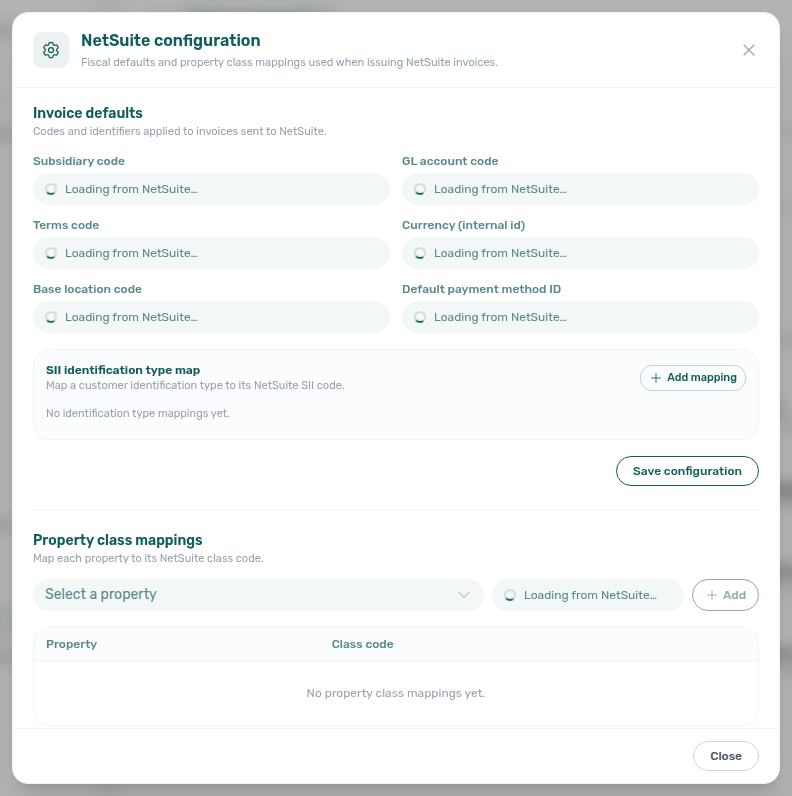
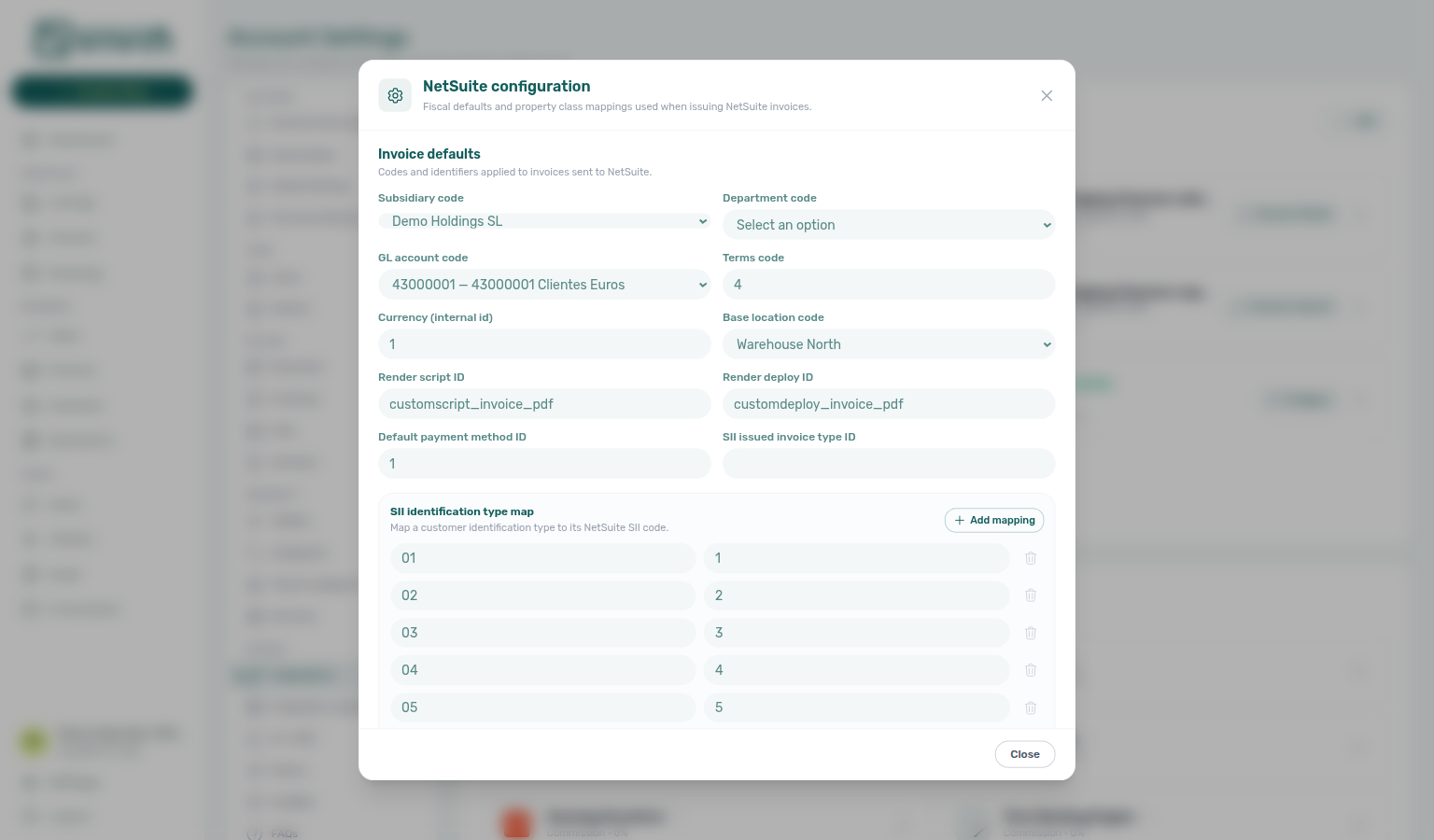
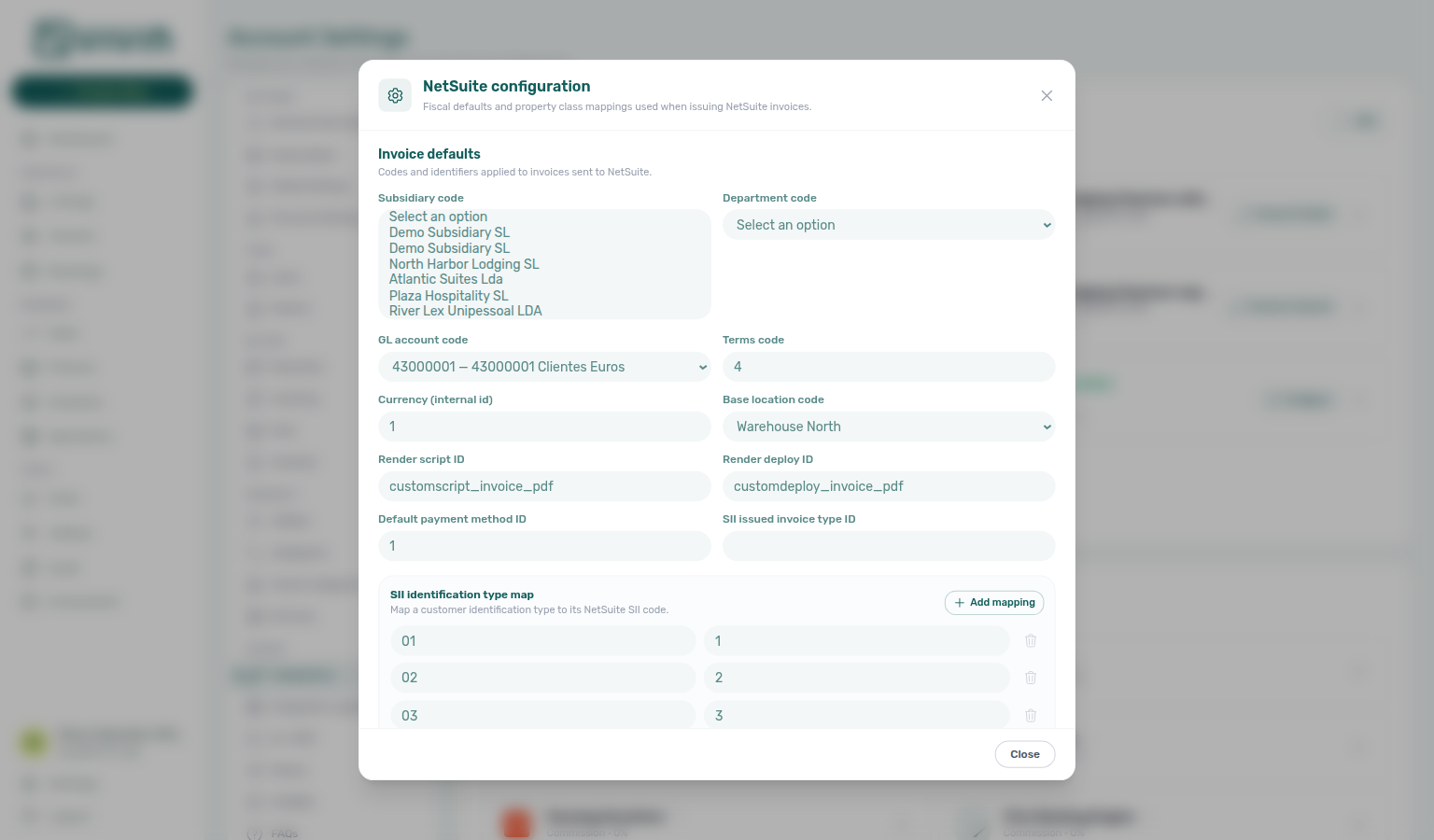
Click Configure (gear) to open NetSuite configuration. The modal has two operator surfaces:
| Section | Purpose |
|---|---|
| Invoice defaults | Subsidiary, department, GL account, terms, currency, base location, SuiteScript render script / deploy ids, default payment method, and optional SII issued invoice type |
| SII identification type map | Key → SII code rows (for example 01 → 1) used when Spanish SII identification types must map to NetSuite codes — + Add mapping / trash per row |
| Property class mappings | Map each Vivin property to a NetSuite class code via the property picker — add, inline edit, or remove rows independently of Save configuration. The picker uses Search properties… plus infinite scroll inside the dropdown (no Load more button) so large portfolios stay reachable without paging clicks. |
Invoice defaults — pick from your NetSuite account
When Vivin can list values from the connected NetSuite account, the matching Invoice defaults fields become dropdowns instead of free-text codes. That keeps typos from only surfacing later at invoice time.
While those lists load, listable fields show Loading from NetSuite… (spinner) instead of an empty text box — so a slow NetSuite response never looks like “this account has no subsidiaries.” Free-text-only fields (SuiteScript render script / deploy ids and optional SII issued invoice type) stay editable the whole time. Property class class code uses the same loading placeholder until the class list arrives.
| Field behaviour | Typical fields |
|---|---|
| Loading (while options fetch) | Listable Invoice defaults and property class code show Loading from NetSuite… until the catalogue returns |
| Dropdown (live list from NetSuite) | Subsidiary, department, GL account, base location, and often class on property mappings |
| Free text (always typed) | SuiteScript render script / deploy ids and optional SII issued invoice type id — no listable NetSuite source |
| Free text while list unavailable | Terms, currency, or payment method when that NetSuite table cannot be queried for your account |
A value you already saved that is no longer in the live list stays selectable so saving an unrelated field cannot blank it. Prefer a listed option whenever the dropdown is populated.
Property class mappings — pick a property
- Scroll to Property class mappings in the same Configure modal.
- Open Select a property — type in Search properties… to narrow the list, or scroll the menu to load more buildings automatically (infinite scroll inside the dropdown).
- Choose a NetSuite class code (dropdown when Vivin can list classes from the account; otherwise type the code).
- Click + Add. Existing rows support inline edit (pencil) and remove (trash) without waiting on Save configuration.
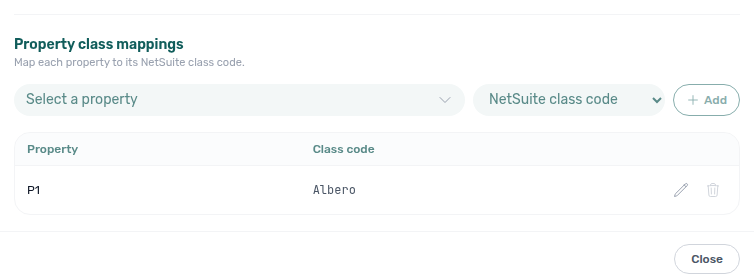
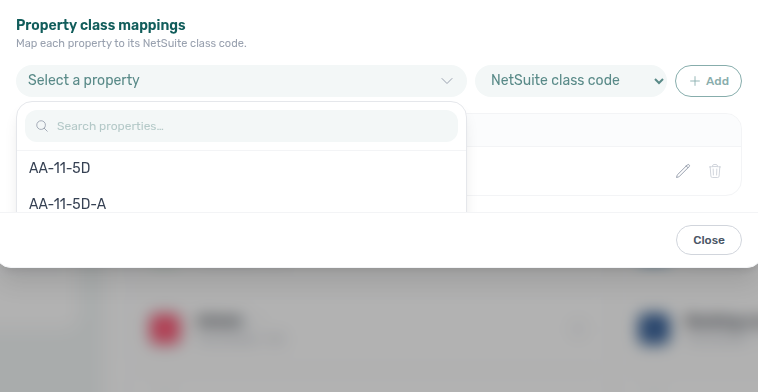
Use Save configuration to persist invoice defaults and the SII map. Class mappings save immediately when you Add / Save / Remove a row. Close or the X dismisses without discarding already-saved class rows.
4. Finance
With NetSuite connected, month-end Issue allocation / Invoice selected on Finance → Transactions routes through the matching NetSuite connection (or the catch-all when no filtered peer matches) instead of Hostkit or Invoice-xpress. Confirm Invoice defaults on Configure for each NetSuite connection before the first bulk export. Re-map Tax Codes from the NetSuite catalogue when NetSuite is the catch-all (Spanish codes such as 21 ES (21%)) — Portuguese InvoiceXpress names will not resolve after you leave Hostkit / Invoice-xpress.
How Calendar Synchronization Works
Imported channel bookings appear in Bookings and block Sales availability — use Manual block hygiene when sync lag leaves suspicious gaps.
When a booking is created in Vivin (whether manually or imported from a platform), the system automatically blocks those dates on all connected external platforms. This prevents double-bookings across channels.
Similarly, when a booking is created directly on Airbnb or another platform, it is imported into Vivin and the dates are blocked across all other connected channels.
Calendar sync runs periodically. Newly created bookings may take a short time to propagate to all connected platforms. For immediate blocking, you can also add manual unavailability in the Listings module.
Troubleshooting
Sync symptoms often trace to Listings → Channels external IDs or Short-term iCal Max Date cutoffs — confirm unit mapping before filing support for duplicate imports.
| Issue | Solution |
|---|---|
| Platform not appearing in Bookings filters | Ensure the platform is enabled in this Integrations page. Only connected platforms appear as filter options in the Bookings module. |
| Bookings not importing from a platform | Verify your API key or integration email is correct. Check that each unit is linked to its corresponding external listing ID in the unit's Channels tab. |
| Calendar dates not syncing | Confirm the iCal feed URL is correctly subscribed on the external platform. Check that the unit has no conflicting manual unavailability. |
| External calendar “stops” or looks fully blocked past a month | Often the Short-term iCal Max Date (Channel Manager section on this page): dates after the cutoff are sent to Airbnb / Booking.com iCal feeds as blocked on purpose. Move the date forward if you want a longer booking horizon on those platforms, then save and use Apply to all listings or per-listing overrides as needed. See Short-term (Airbnb / Booking.com) Configuration. |
| Marketplace calendar stays blocked for years after the last stay | Often Calendar Block (days) on that platform’s Booking Platforms card: when the latest occupancy is still more than N days away, listing JSON can stay closed for about two years after that stay. Clear the field (or set 0) if you want the channel to reopen after the last occupancy. This does not apply to Airbnb / Booking.com iCal. See Calendar Block (days). |
| Booking.com iCal shows one multi-year “Unavailable” block | Some Hostify-hosted Booking.com iCal feeds export a single closed period spanning many months or years. Vivin ignores Hostify blocks longer than three months during import so they do not lock the unit calendar. Stale local rows from an earlier import are removed on the next sync. If availability still looks wrong, confirm the OTA calendar itself is open, re-save the unit Channels import URL, and check for genuine manual blocks in Listings. |
| Duplicate bookings appearing | This can happen if a booking was both imported automatically and created manually. Search by tenant name in Bookings to identify duplicates. |
| Channex enabled but no sync or imports | Confirm your account has a Channex API key and each unit has channexMapping UUIDs (property, room type, rate plan) provisioned by Vivin support — not self-serve external IDs on Listings > Channels. Enable the Channex platform card here; finish OTA Connect on the Channex connection cards so Sales > Channels can allocate listings. For Booking.com, register hotel IDs in the Booking.com hotel IDs dialog first (Booking.com hotel IDs). Keep nightly rates on Listings → Short term. See Channex (channel manager) and Webhooks & notifications — Channex booking revisions. |
| Cannot remove a Booking.com hotel ID | That ID is still allocated to a unit. Open Sales → Channel Manager, unlink it on the unit’s Booking.com cell, then open Add hotel ID and remove it in the Booking.com hotel IDs dialog. While a unit holds it, the row reads Allocated to … and remove stays blocked. See Booking.com hotel IDs and Hotel ID list opens as a dialog. |
| Other providers list looks empty while platform cards still show | Reload /settings/integrations before re-adding a provider you already connected — platform cards above can still render while Other providers is catching up. See Page refresh and partial data. |
| Bulk Hostkit invoicing is slow or some rows stay Pending | Vivin paces Hostkit API calls and retries rate-limit responses with backoff during Issue allocation / Invoice selected — large batches can take several minutes. Refresh Finance → Transactions before re-issuing the same allocation. If rows stay incomplete: verify Listing keys and Hostkit invoice series. See Hostkit API pacing (bulk invoicing) and FAQ — Why is bulk Hostkit invoicing slow?. |
| NetSuite Configure missing or Add Integration disables Hostkit | Hostkit / Invoice-xpress stay disabled while any VIVIN Invoicing or NetSuite connection is active — remove the dual-stack connections (filtered peers first) if you need Hostkit again. Open Configure on each NetSuite card for that connection’s fiscal defaults. Listable Invoice defaults show Loading from NetSuite… while Vivin fetches the catalogue — wait for dropdowns before typing codes. See VIVIN + NetSuite dual stack and NetSuite (invoicing). |
| Cannot delete the Fallback NetSuite / VIVIN card | The catch-all cannot be removed while a filtered peer still exists — delete the filtered connection first (tooltip: Delete the filtered connection before removing the fallback). See VIVIN + NetSuite dual stack. |
Integrations section cross-reference
Use the sections above for this settings area. Related setup pages are linked from Related below when present, or from Account Settings.
Related
Related below links this Account Settings tab to modules, workflows, concepts, and escalation paths.
Documentation map & escalation
- Account Settings hub — Tab pairing matrix across workspace configuration
- Integrations & Distribution (concept) — Channel manager strategy, iCal exports, and how partial vs full feeds fit together
- Glossary — Term definitions used across settings and module docs
- Glossary — Calendar Block (days) — Per-platform listing-JSON close after far-future occupancy
- FAQ & Troubleshooting — Integrations & Distribution — Common channel-sync symptoms operators see after connection
- Get Help & Support — Escalate when credentials or Channex UUID provisioning block go-live
Upstream & downstream workflows
- Onboarding a New Property — Step 5 channel connections after owners and contract templates are in place
- Processing a New Booking — Verify channel imports before creating duplicate manual bookings
- Notification triage — Clear duplicate-import or booking alerts after verifying Channels linkage
- Manual block hygiene — Audit pass when channel availability looks fully blocked after linking
- Managing a Check-in — Pseudo check-in/out from short-term iCal imports on Operations
- Managing a Check-out & Deposit Refund — Marketplace calendar sync when departures release unit availability
- Handling a Late Payment — Step 1 — Identify overdue charges on channel-imported bookings when payment-plan mismatches after sync or a payment overdue alert row-click brought you here
Deeper workflow reads
See Upstream & downstream workflows above for the same guides.
Related Account Settings tabs
- Integration field capabilities — Read-only matrix of which booking-engine detail fields each marketplace supports and which are partner-required
- Invoicing & Payments — Virtual IBAN and payout configuration alongside platform cards
- Billing from the invoicing connection — Connecting Hostkit, Invoice-xpress, VIVIN Invoicing, NetSuite, or Sage50c turns invoicing on (no separate billing switch)
- Emails — Customize emails sent via integrated platforms
- Preferences — In-app notifications — Account-wide import or payment alerts after marketplace sync
- Subscription — Platform VIBAN Transfers billing rows tied to connected marketplace channels
- Tenant categories — Default for integrations before high-volume channel imports
Operator modules & payload editing
- Sales — Channel Manager — View and manage all connected platforms; allocate Booking.com hotel IDs after you register them in the Booking.com hotel IDs dialog on this page (Hotel ID list opens as a dialog)
- Listings — Channels tab — Link units to external platform listings
- Booking engine details — Marketplace and booking-engine payload fields edited from Listings (Full integration pill)
- Audit — Manual Blocks — Portfolio blocks that still appear on every connected channel calendar until cleared
- Audit — Discounts tab — Cross-portfolio discount rows on channel-imported bookings after duplicate-import triage
- Notifications — Payment overdue alerts (in-app) — Operator Payments category rows when scheduled charges are overdue on channel-imported bookings
Deeper concept reads
- Integrations & Distribution — Marketplace calendar sync, booking imports, and white-label direct bookings after platform cards are connected
- Tenant Portal — Direct and imported bookings share portal links, virtual IBAN, and payment-module provisioning
- FAQ — Tenant contract signing blocked — No PDF yet, mandatory Your Details gates, category locks, or Lease purpose; portal signing vs paper upload on Contract Info
- Payment Allocation — Two-layer receipts and invoiced-floor rent edits after channel imports land in Finance
- Booking Lifecycle — Computed status model for imported and direct reservations
- Landlord MCP — External automation that references channel credentials and listing feeds
- Automation & AI — Partner webhooks and Communication Rules complement marketplace cards
Companion API guides
- API Reference hub — Hub pairing matrix across integration guides
- Authentication — Bearer keys partners use once Channels linkage is live
- Property & unit mapping —
externalIdkeys partners must configure beforeGET /listingsorPOST /bookingssucceed - Listings & Availability — Partial
GET /listingsreads after Channels linkage - Full listing feeds — Partner-shaped publish payloads after Channels linkage is complete
- Booking Engine integration — White-label engine write routes beyond partial
GET …/listings - Webhooks & notifications — Inbound booking revisions (Channex) and partner callback payloads
- Webhooks — Channex booking revisions feed — Inbound booking revisions polling (not a self-serve webhook URL)
- iCal feeds — Subscriber URL pattern after channel cards are connected
- AI usage API — Operator JWT cost ledger (not integration Bearer keys) when auditing automation spend after bulk imports
Module documentation hubs
- Listings — Property wizard, Channels tab, Archived inventory, and unit management
- Sales — Portfolio availability, monthly rent editing, and channel manager connections
- Bookings — Operator UI for reservations created via channel imports
- Finance — Portfolio ledgers once channel-sourced stays accumulate Contract Values
- Utilities — Bills Included ceiling model and tenant overage charges
- Operations — Maintenance tickets, cash flows, and check-in/out coordination
- Dashboard — Post-login KPI snapshot with bell notification triage
- Analytics — Month-range portfolio KPI charts with rankings and heatmaps
- Tenants — Tenant directory and With Debt segmentation
- Inbox — Portfolio-wide WhatsApp workspace
- Notifications — Full
/notificationshistory with search and filters - AI Chat — AI Assistant for portfolio Q&A
- Audit — Portfolio-wide Manual Blocks and Discounts review
- Properties workspace — Legacy
/propertiesURL redirects into Listings
Operator habit hubs
Day-to-day operator habits (lockout catch-up, pending receipts, payment triage, handoffs, and related playbooks) live on the Common Workflows habit hub.
Deep-link anchors for habit hubs
Lockout catch-up after password recovery
Pending manual receipt approval
Reject/revert mistaken receipts
Portfolio segmentation by tenant category
Notification row-click navigation
Payment alert to receivables triage
Confirmation alert triage
Finance debt receivables triage
Handling a Late Payment collections
Finance Income status drill-down
Cash flow forecast drill-down
Key glossary terms
- Short-term iCal Max Date — Horizon configured on platform cards before copying calendar URLs
- Glossary — End-of-Booking cost split — Charge Time → End of Booking splits daily overage across every occupied unit; still-staying roommates stay in the denominator
- Glossary — Change history — Operator-initiated edits on Listings setup and Bookings Changelog; create-time defaults excluded
- Glossary — Archived booking ledger visibility — Delete Booking hides manual/provider_platform rows on Finance → Transactions; vIBAN and credit card stay visible
- Glossary — Finance tenant category cache refresh — Recategorizing a tenant updates
booking.tenantCategoryIdimmediately; ledger tabs reflect it on reload, while Overview can lag up to ~10 minutes - Glossary — SIMAR water contract ID — SIMAR (Loures e Odivelas) water bills use Cód. Local in Connections — not Nº de Contador; leading zeros stripped
- Glossary — Full term list