Interface Language
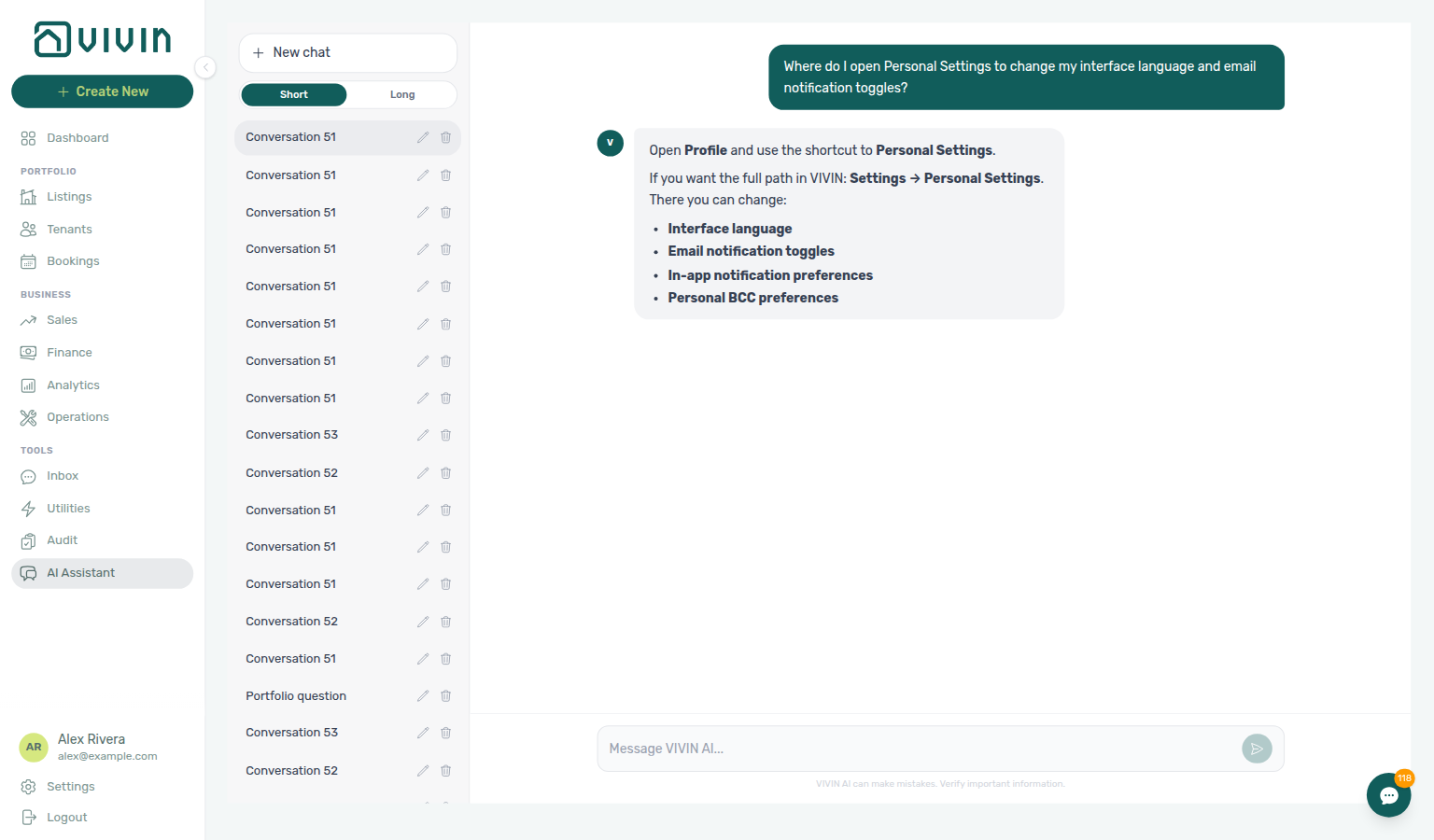
Ask AI Chat “Where do I open Personal Settings to change my interface language and email notification toggles?” — then open this Personal Settings tab (ai-chat-product-context-personal-settings-reply.png, ai-chat-product-context-personal-settings-flow.mp4). The assistant typically says Profile → Personal Settings (open My Profile, then use the shortcut) or Settings → Personal Settings. Canonical route: /settings/personal. Same grounding external MCP clients get from get-vivin-context-platform. Distinct from workspace defaults on Preferences (English tab Global Settings) and from display-name edits on My Profile (/profile).
The management frontend supports multiple interface languages. In the current layout, language is not changed from Account Settings → Global Settings (that tab covers booking defaults, notifications, and related workspace defaults). Tenant edit / module toggles live on Portal settings. This Personal Settings locale is your workspace — it does not change the Tenant Portal language switcher tenants use (EN / PT / ES / IT).
Open Personal Settings (/settings/personal) any time after step 3 Users grants account_settings.personal — per-user locale and email opt-outs are optional during Getting Started — Recommended Setup Sequence steps 1–12. Full tab map: Recommended setup order. Workflow pairing after go-live: Account Settings — Setup sequence after go-live.
Open Where to find language controls first; per-user email opt-outs live under Your email preferences on the same tab. Lower on the tab: Module tab order and Operations ticket columns. Supported locales: Supported language options. Habit-specific shortcuts live under Related below.
Stable routes: /profile for My Profile, and the rest of Account Settings (including Preferences) under /settings/… as listed in Deep Links.
Personal Settings (/settings/personal) complements Users team access — grant account_settings.personal before operators can change locale here. Account-wide notification masters live on Preferences; per-user opt-outs are on this tab. After Resetting a Management User Password, refresh the management JWT before polling AI usage API — interface language here does not change ledger rows. Hub: Recommended setup order.
Where to find language controls
Grant account_settings.personal on Users and roles — Role Permissions before teammates can open /settings/personal — desktop language chips and the mobile drawer control share the same saved preference.
Personal Settings (recommended — all screen sizes)
This is the primary place to choose your interface language. The Personal Settings tab requires the account_settings.personal permission (see Users and roles — Role Permissions); without it, the tab is hidden and /settings/personal shows the standard settings permission state.
- Log in to platform.vivin.app.
- Click Account in the left sidebar (gear icon) to open Account Settings.
- In the settings sidebar, under Account, open Personal Settings — platform.vivin.app/settings/personal.
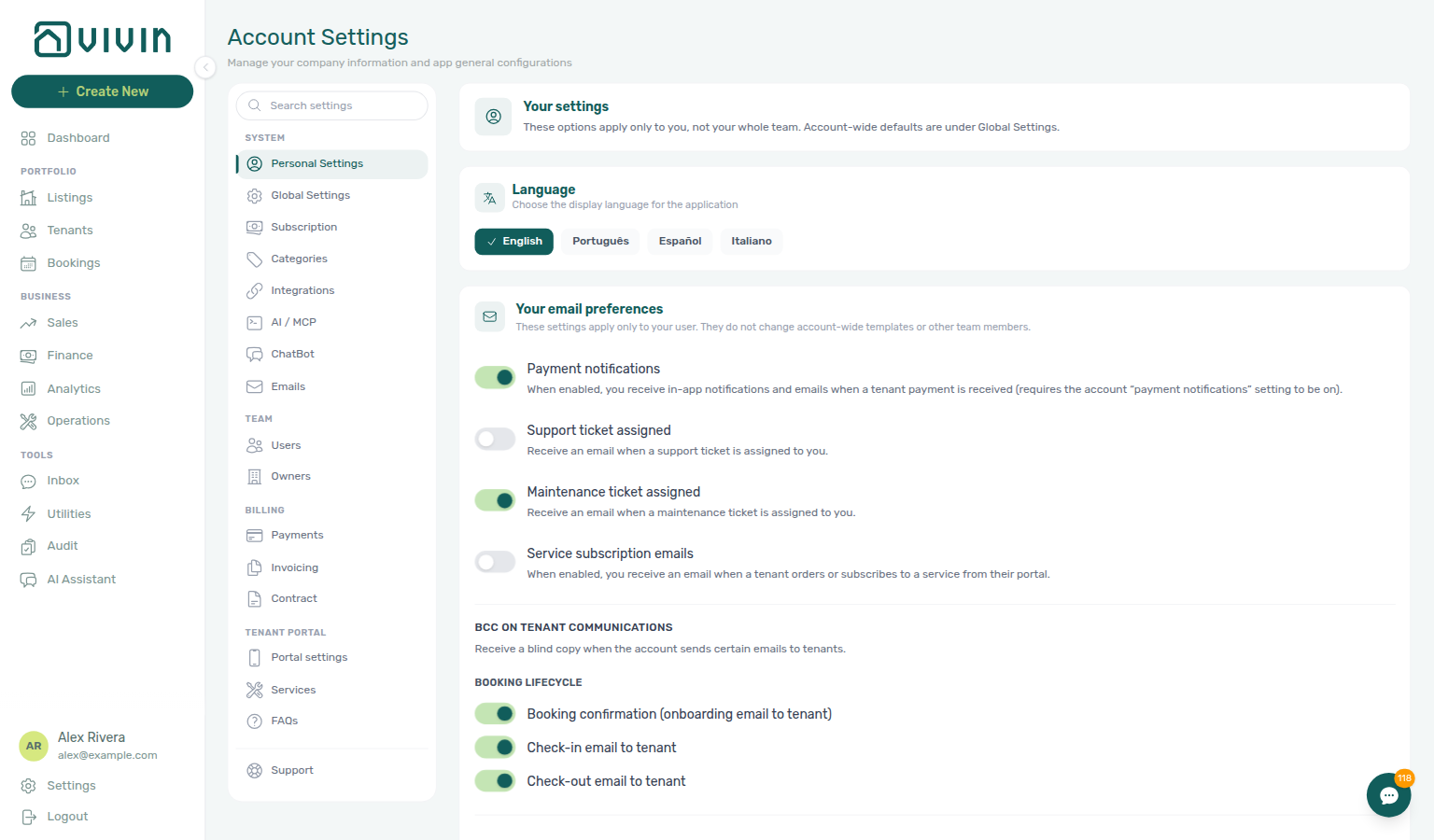
- In the Interface language card, pick English, Português, Español, or Italiano. The active language shows a checkmark on its chip.
Access: Any signed-in user who can open Account Settings can use this tab (same visibility as other Account-section tabs you are permitted to see).
Your email preferences (same tab)
Per-user toggles here layer on account masters from Preferences — Notifications & Emails — tenant-facing copy still comes from Emails Communication Rules.
Lower on Personal Settings, Your email preferences controls per-user email behaviour — it does not change account-wide templates or other team members.
Payment notification emails controls your operator alerts when a tenant payment lands — mailbox email and in-app rows on /notifications and the Dashboard bell (summary Payment received from tenant …). Other notification types (bookings, tickets, system) are account-wide. Configure the account switch under Preferences → Notifications & Emails and your personal toggle here; see Glossary — Payment notification (operator) and Notifications — Payment received alerts.
- Payment notification emails — When enabled, you receive email and in-app payment-received alerts when a tenant payment is received only if the account has Receive payment notifications turned on under Preferences → Notifications & Emails. Both layers must be enabled for you to see those messages.
- Support ticket assigned — When enabled (default on), you receive an email when a Vivin support ticket is assigned to you (subject line
[Support ticket #…] Assigned to you). The body includes the ticket title plus metadata — Account, Priority, Module, Status, and Tags — so you can triage from the mailbox without opening the thread. See ticket opens the support inbox in the management app (/?support=<ticketId>) for workspace operators; Vivin-internal assignees receive the admin UI link instead. Turn it off to stop those mailbox messages while still triaging tickets in the Help & Support drawer or Support inbox. This preference applies to Vivin support assignment emails only — not the email sent when someone replies on the ticket (Using in-app support — Your reply emails the assigned teammate), and not Operations maintenance tickets (use Maintenance ticket assigned below). - Maintenance ticket assigned — When enabled (default on), you receive an email when an Operations ticket is assigned to you. See ticket opens
/operations/tickets?ticket=…. Distinct from Support ticket assigned. See Operations — Assignment email See ticket. - Service subscription emails — Pick which Services catalogue offerings email you when a tenant orders, subscribes, or submits an approval request from the Tenant Portal. This is a per-service chip picker, not a single switch — see Service subscription emails.
- BCC on tenant communications — Optional blind copies when the account sends certain tenant-facing emails, split into Booking lifecycle and Communications toggles (labels match the product). Communications includes Scheduled tenant communication: auto-cancellation when you use that Communication Rule, and Scheduled tenant communication: send immediately for a Send now blast.
For the account-level payment switch and other notification defaults, see Preferences.
Service subscription emails
Each teammate chooses which extra services send them a mailbox alert. Cleaning mail can go to the cleaning coordinator; laundry stays with the laundry team. Changes save as soon as you click a chip — there is no separate Save on this card.
- Open Account → Personal Settings (
/settings/personal). - On Your email preferences, find Service subscription emails.
- Click a service name to opt in (filled chip with a check) or click again to opt out.
When you get mail. You receive an email when a tenant orders or subscribes from the portal, or when they submit a request that needs approval. The message names the tenant, service, price, listing, and status (Ordered, Subscribed, or Awaiting approval), with a button into Settings → Services (View services or Review request). Approving a request does not send another manager email. When a tenant cancels a pending request, teammates see an in-app Service requests row — not a second email.
Who receives it. Only active teammates who selected that service. Distinct from Your in-app notifications → Service requests, which still covers portal order and cancellation pings for everyone who kept that category on.
If every chip starts selected. You currently receive mail for every catalogue service. Click a chip to stop mail for that offering; the rest stay selected.
Inactive and empty catalogues. Turned-off catalogue rows appear last, labelled (inactive). Selecting one still emails you if a request hits that service. When the account has no services yet, the card shows No services are configured on this account yet. — add offerings under Services first.
Your in-app notifications (same tab)
Category opt-outs cannot re-enable masters disabled under Preferences — In-app notifications — triage Notifications — Payment overdue alerts on Handling a Late Payment — Step 1 when payment rows still appear.
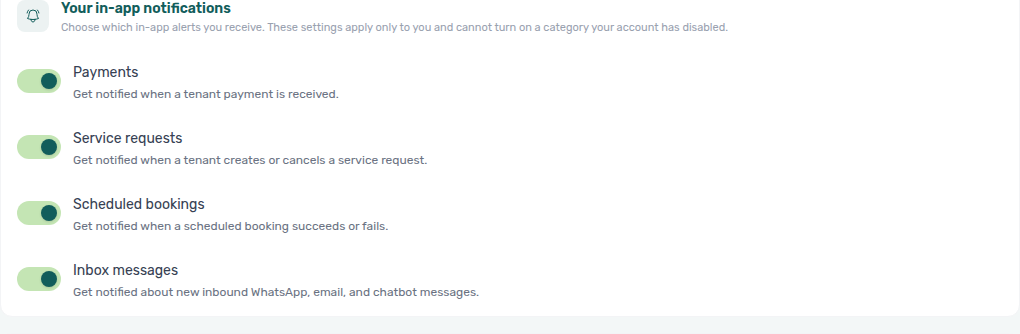
Lower on Personal Settings, Your in-app notifications controls which in-app alert categories you still see on the Dashboard bell and /notifications. These are per-user opt-out toggles — each defaults On (you receive the category unless you turn it off). They apply only to your user and cannot re-enable a category the account disabled under Preferences → In-app notifications.
| Toggle (English UI) | When On (default) | Account master that must also be On |
|---|---|---|
| Payments | You see payment-received in-app rows when you are in the payment alert audience | Preferences → In-app notifications → Payments and Receive payment notifications |
| Service requests | You see portal service order and cancellation pings | Preferences → In-app notifications → Service requests |
| Scheduled bookings | You see scheduled booking success and failure alerts | Preferences → In-app notifications → Scheduled bookings |
| Inbox messages | You see inbound WhatsApp, email, and chatbot message notifications | Preferences → In-app notifications → Inbox messages |
Toggles save immediately when you flip them (no separate Save button on this card). To stop mailbox payment emails while keeping in-app payment rows, use Payment notification emails above — email and in-app audience for payments are configured separately from these category opt-outs.
Module tab order (same tab)
Saved tab order is per user — identity fields on My Profile (/profile) and bookmarkable routes in Deep Links — Account Settings still open the tab named in the URL path.
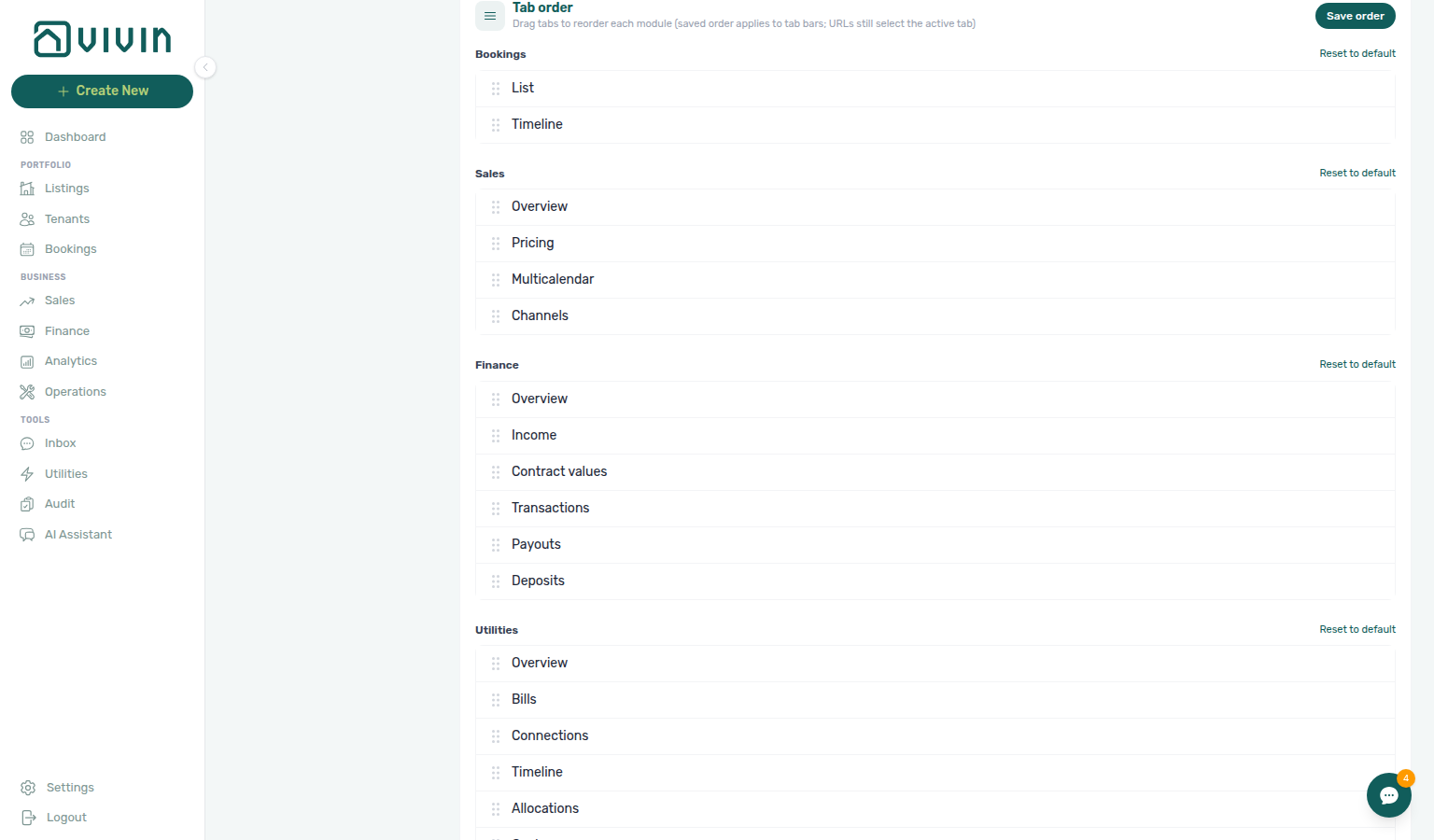
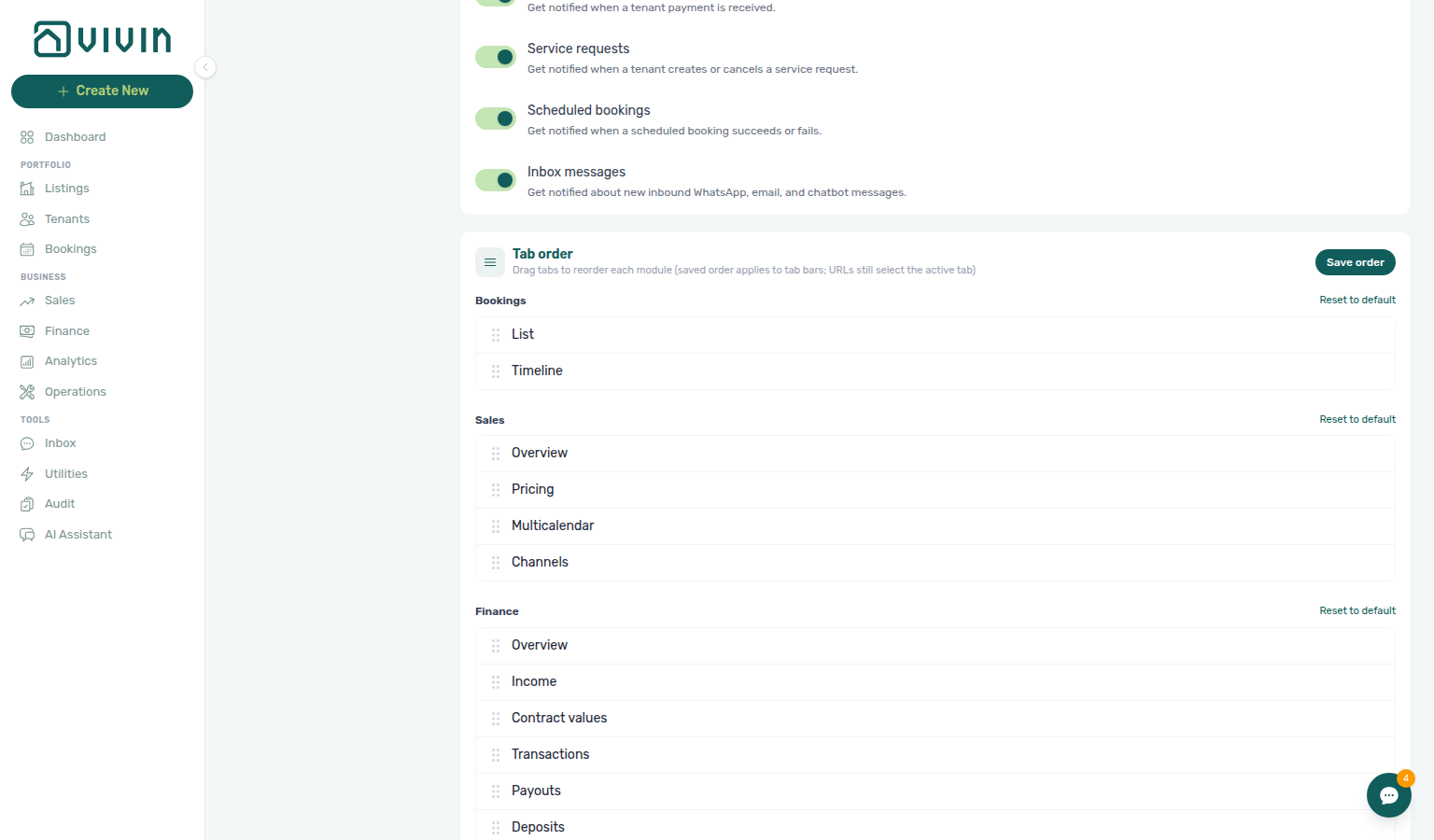
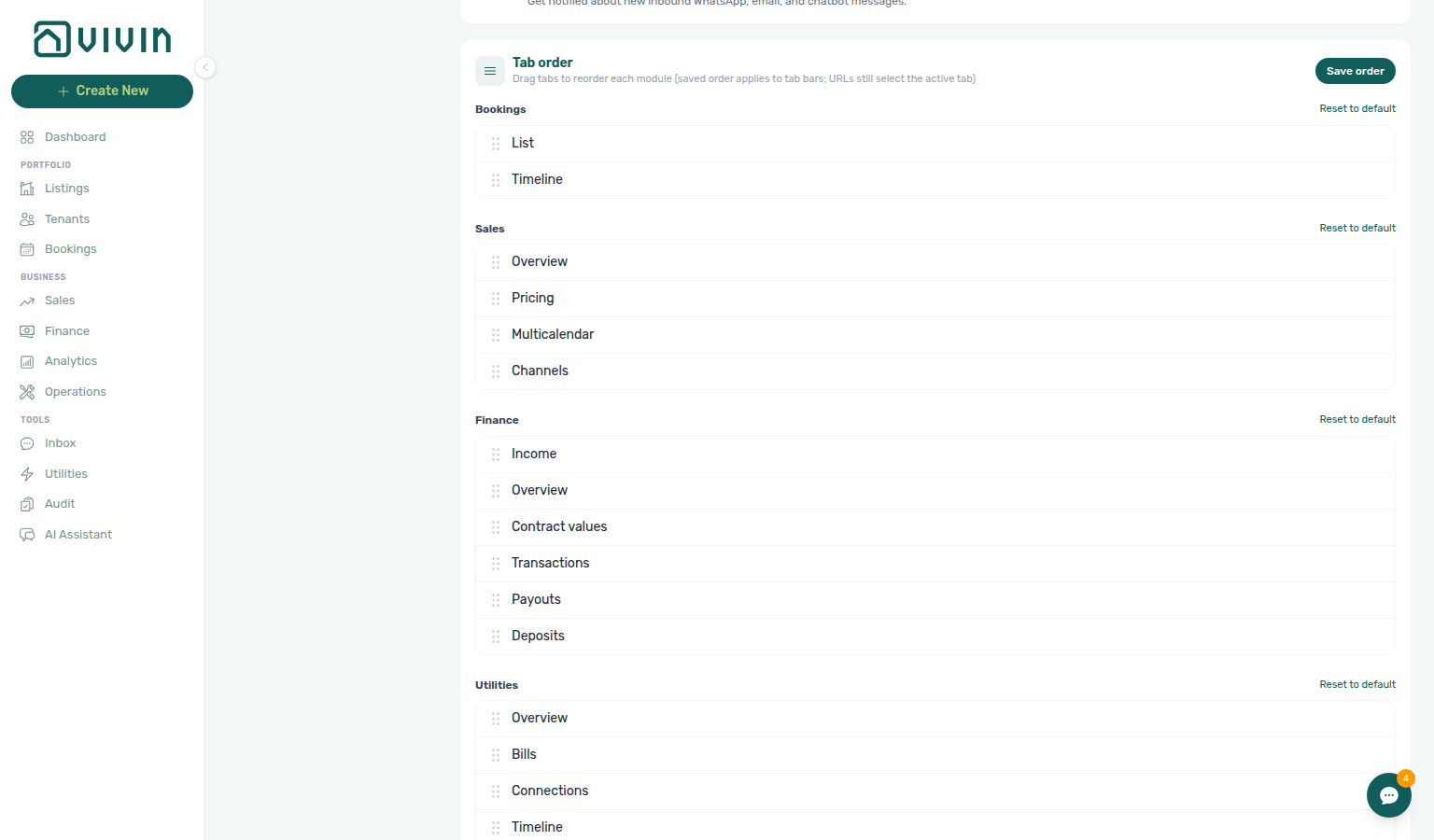
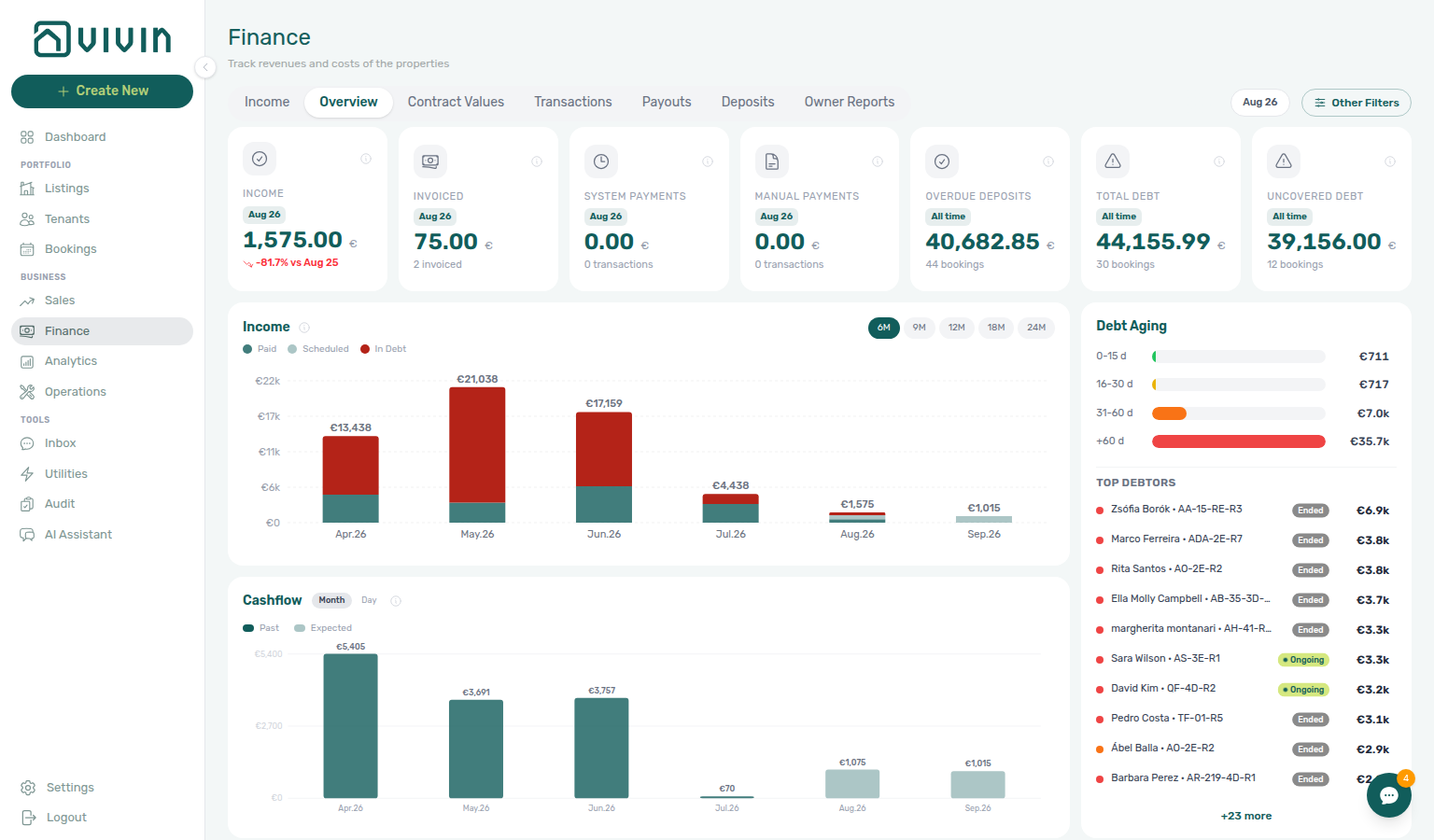
Lower on Personal Settings, the Tab order card lets each signed-in user drag tabs into a preferred order for modules where the product exposes a tab strip. The order is saved per user (not account-wide) and applies to the tab bar in that module; URLs still open the tab named in the path (for example /sales/channels always lands on Channels, and /finance still opens Overview even when you dragged Income first in the card).
| Module | Tabs you can reorder (English labels) |
|---|---|
| Bookings | List, Timeline |
| Sales | Overview, Pricing, Multicalendar, Channels |
| Finance | Overview, Income, Contract values, and (when your role includes payment approval) Transactions, Payouts, Deposits |
| Utilities | Overview, Bills, Connections, Timeline, Allocations, Cost map |
| Operations | Overview, Schedule (Vivin internal operators), Tickets, Check-in / Check-out (when permitted), Cash flows |
Each module list has its own Save order (shown only while that list has an unsaved drag) next to Reset to default. Saving one list writes only that module’s order — an unsaved drag on another list stays pending until you save it. Reset to default on a module heading restores only that module’s tab sequence. Modules you cannot access (missing module permission) do not appear in the card.
Some module tabs appear on the bar from other settings and are not listed in this card — for example Owner Reports on Finance when the account Preferences → Owner Reports master switch is on, or Planning on Operations when Planning (schedule board) is granted (use the Operations tab strip or /operations/planning until Tab order shows a clear Planning label). Reorder only affects the tabs shown in the lists below.
Ticket columns for Operations → Tickets are a separate card below Tab order — see Operations ticket columns.
Operations ticket columns
This card changes only what you see on Operations → Tickets. It does not change ticket data, filters, or other operators’ tables. Tab order (above) reorders module tabs, not table columns.
Lower on Personal Settings, Operations ticket columns lists every Tickets-table column with a switch and a drag handle.
| Column | Default | Locked |
|---|---|---|
| ID | On | Yes — Always visible |
| Ticket | On | No |
| Property / Unit | On | No |
| Assignee | On | No |
| Category | On | No |
| Status | On | Yes — Always visible |
| Created | On | No |
| Schedule | On | No |
| Due | On | No |
| Internal note | Off | No |
Turn a switch off to hide that column. Drag the grip to reorder. Hidden columns move to the bottom of the list. Click Save when the arrangement looks right (toast: Column preferences saved). Reset to default writes the shipped layout immediately — Internal note goes back to hidden, and optional columns return to the default order. You do not need Save after reset.
ID and Status switches stay disabled so the queue always keeps an identifier and a workflow state. A source icon on the Tickets table is not in this list.
This preference is per signed-in user. Teammates keep their own columns. If you saved a custom list and a later product update adds a column you do not see, turn it on here or Reset to default.
See Operations — Customize your ticket columns and FAQ — How do I choose which columns I see on Operations Tickets?.
Mobile sidebar (compact switch)
On narrow viewports (below the desktop breakpoint), open the main menu (top-left) to show the left drawer. At the bottom, next to Logout, a compact control shows the current language code (for example EN) and opens a short list of supported languages. It updates the same preference as Personal Settings.
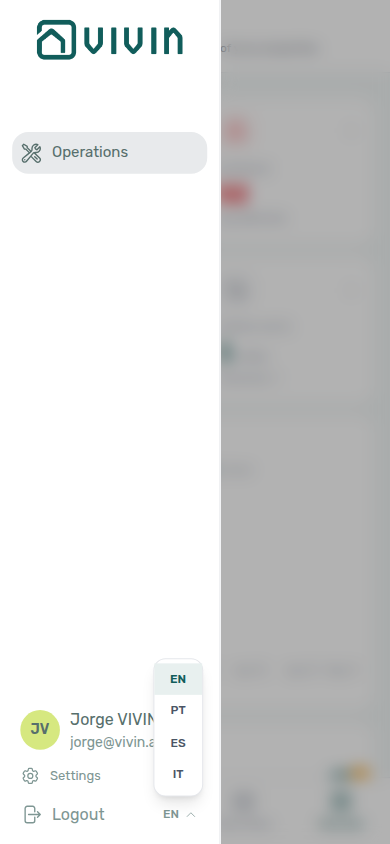
On desktop widths, the sidebar footer shows Account and Logout only — there is no compact language code beside Logout. Use Personal Settings (above) to change language on a laptop or wide monitor. The mobile drawer control is the quick switch when you are on a phone or narrow layout.
Older guides referred to a top-right header user menu for language. That control is not part of the current shell; use Personal Settings on desktop or the mobile drawer language code on narrow viewports. My Profile (/profile) is only for your name (and read-only email), not interface language.
Supported language options
Missing translation keys fall back to English — see FAQ & Troubleshooting and Getting Started when operators report mixed-language screens after a locale switch.
The current implementation exposes these options:
| Menu label | Language |
|---|---|
| English | English |
| Português | Portuguese |
| Español | Spanish |
| Italiano | Italian |
What changes when you switch language
When you change the interface language, Vivin updates text that uses the platform translation system, including:
- Top-level navigation labels and module labels
- Module UI labels, buttons, tabs, and status text (where translations are provided)
- Locale-aware date and currency formatting in screens that use Vivin locale formatters
The language preference is applied immediately in your session.
What may remain unchanged
Some content is not translated by the selected interface language and may remain as-is:
- Data entered by users (property names, notes, tenant names, free-text fields)
- External source data and channel names
- Any text in areas that do not yet have translation keys
- Some screens that still use fixed formatting rules for dates or currency
If a translation is missing for a specific key, Vivin falls back to the default language behavior.
Preference scope and persistence
- The setting is saved per signed-in user (server-side preference when available, with browser storage as a fallback during migration — see product behaviour for your account).
- Different users can keep different language preferences on the same workspace.
- If no saved preference exists for a user, the interface defaults to English.
Personal Settings section cross-reference
Use the sections above for this settings area. Related setup pages are linked from Related below when present, or from Account Settings.
Related
Related below links this Account Settings tab to modules, workflows, concepts, and escalation paths.
Documentation map & escalation
- Account Settings hub — Workspace-wide configuration vs personal locale preference
- Getting Started — Shell overview (sidebar, Account, notifications)
- FAQ & Troubleshooting — Operator answers that reference UI copy which may stay in English for some keys
- FAQ — Why didn't I get a service subscription email? — Per-service chips vs a missing mailbox copy
- My Profile — Name, email, and tab order on
/profile(not where interface language lives)
Upstream & downstream workflows
- Notification triage — Clear payment and arrival alerts after you change personal or account notification preferences
- Notification triage — Payment-received and payment overdue in-app alerts when personal opt-outs change triage (Step 4)
- Handling a Late Payment — Step 1 — Identify overdue charges when translated payment overdue alerts need follow-up on Finance → Transactions or a payment overdue alert row-click brought you here
- Resetting a Management User Password — Sign-in and reset screens respect interface language where translated
- Using in-app support — Ticket UI follows interface language where translated
Deeper workflow reads
See Upstream & downstream workflows above for the same guides.
Related Account Settings tabs
- Preferences — Account Settings tab for booking defaults and notification masters (not interface language)
- Preferences — In-app notifications — Account-wide master switches that gate categories before personal opt-out on this tab
- Emails — Communication Rules whose operator copy may differ from UI locale
- Services — Catalogue that Service subscription emails chips are chosen from
- Users and roles — Grant
account_settings.personalbefore teammates can open this tab
Operator modules
- Notifications module — How muted categories disappear from
/notificationsand the Dashboard bell - Notifications — Payment overdue alerts (in-app) — Operator Payments category rows when scheduled charges are overdue
- Dashboard — KPI card labels follow interface language
- Bookings module — List filters, timeline labels, and sidebar copy
- Finance module — Ledger, Deposits, and Contract Values tab copy
- Operations module — Mobile Operations shell language control beside Logout
- Operations — Customize your ticket columns — Tickets table layout from the Operations ticket columns card on this tab
- Analytics module — KPI tab labels follow interface language where translated
Deeper concept reads
- Deep Links — Account Settings — Bookmarkable
/settings/personalpersonal settings route - Integrations & Distribution — Operator UI locale is independent of marketplace platform languages
- Payment Allocation — Two-layer receipts and credit note reject/revert warnings
- Booking Lifecycle — Computed status model
Module documentation hubs
- Listings — Portfolio table column headers follow interface language
- Tenants — List and profile column headers
- Sales — Channel Manager and Multicalendar labels
- Utilities — Bills Included ceiling model
- Inbox — Portfolio-wide WhatsApp workspace
- AI Chat — AI Assistant
- Audit — Portfolio-wide Manual Blocks and Discounts review
- Booking engine details — Marketplace payload editor
Operator habit hubs
Day-to-day operator habits (lockout catch-up, pending receipts, payment triage, handoffs, and related playbooks) live on the Common Workflows habit hub.
Deep-link anchors for habit hubs
Lockout catch-up after password recovery
Pending manual receipt approval
Reject/revert mistaken receipts
Portfolio segmentation by tenant category
Notification row-click navigation
Payment alert to receivables triage
Confirmation alert triage
Finance debt receivables triage
Handling a Late Payment collections
Finance Income status drill-down
Cash flow forecast drill-down
Key glossary terms
- Notification row navigation — In-app alerts stay in English UI copy regardless of interface language
- Glossary — End-of-Booking cost split — Charge Time → End of Booking splits daily overage across every occupied unit; still-staying roommates stay in the denominator
- Glossary — Change history — Operator-initiated edits on Listings setup and Bookings Changelog; create-time defaults excluded
- Glossary — Archived booking ledger visibility — Delete Booking hides manual/provider_platform rows on Finance → Transactions; vIBAN and credit card stay visible
- Glossary — Finance tenant category cache refresh — Recategorizing a tenant updates
booking.tenantCategoryIdimmediately; ledger tabs reflect it on reload, while Overview can lag up to ~10 minutes - Glossary — SIMAR water contract ID — SIMAR (Loures e Odivelas) water bills use Cód. Local in Connections — not Nº de Contador; leading zeros stripped
- Glossary — Full term list
Companion API guides
- API Reference hub — Partner HTTP contracts (hub)
- AI usage API — Refresh management JWT after Resetting a Management User Password — Step 3 before polling
GET /ai-usage