AI / MCP
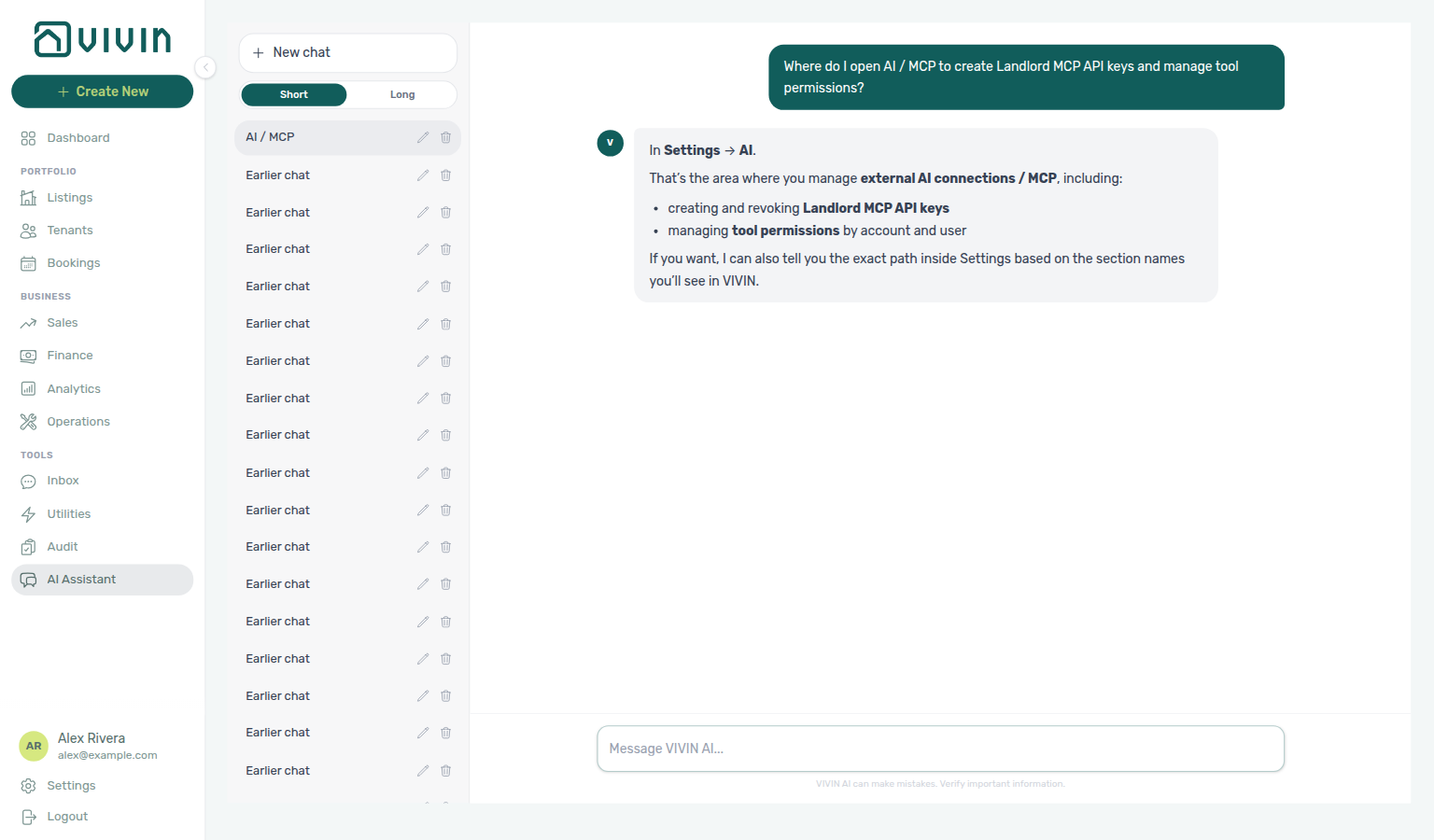
Ask AI Chat “Where do I open AI / MCP to create Landlord MCP API keys and manage tool permissions?” — then open this AI / MCP tab (ai-chat-product-context-ai-mcp-reply.png, ai-chat-product-context-ai-mcp-flow.mp4). The assistant typically says Settings → AI (it may omit the System group). Follow Settings → System → AI / MCP. The English tab label is AI / MCP. Same grounding external MCP clients get from get-vivin-context-platform (or get-vivin-context-ai). Distinct from tenant-facing ChatBot. Operator Genius digests (Scheduled reports) and the Genius WhatsApp connection also live on this tab (legacy /settings/genius redirects here).
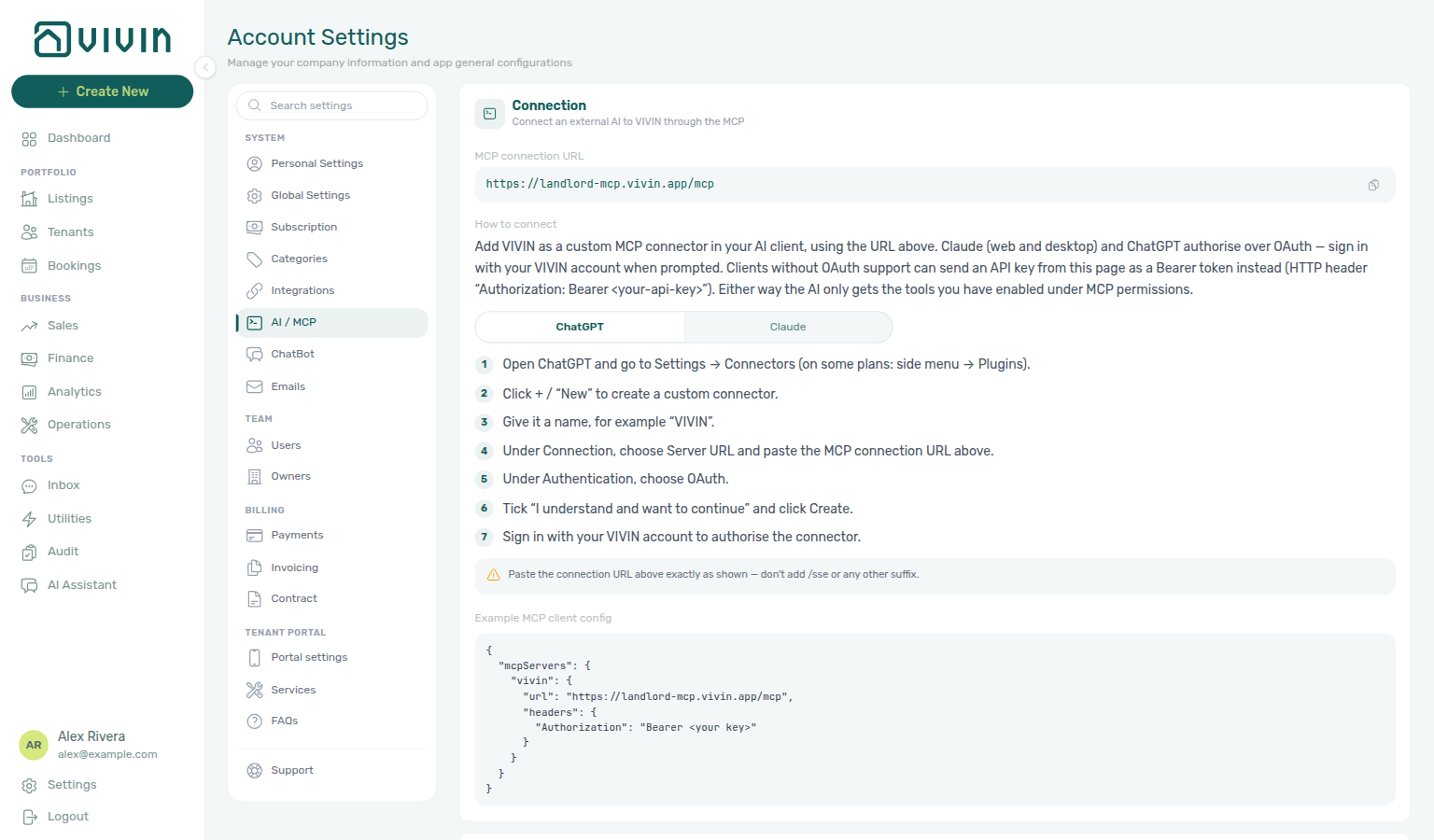
The AI / MCP tab under Account Settings → System is where workspace administrators configure Landlord MCP access: connection URL, API keys for external AI clients, account-wide tool permissions, per-user overrides, and audit trails. It governs both the operator AI Assistant (/ai-chat) and third-party MCP clients — distinct from tenant-facing ChatBot settings.
Optional after core Getting Started — Recommended Setup Sequence steps 1–15. Pair API keys and domain policies with Landlord MCP client setup and poll AI usage API during month-end review. Hub tab map: Recommended setup order.
Skim Who can open this tab, then Connection and Connect from ChatGPT / Claude for where to paste the URL in each client. Use API keys for IDE / local mcpServers configs. Operators tune scope in Tool permissions and Per-user permissions. Review changes in Permission audit trail and Genius activity.
Open AI / MCP at platform.vivin.app/settings/mcp. Route reference: Deep Links — Account Settings.
Connection and API keys pair with Landlord MCP HTTP setup; Tool permissions mirror what the in-app AI Assistant can call for account data. Tenant-facing automation stays on ChatBot and Emails. Internal LLM spend: AI usage API (landlord_chat). Hub: Recommended setup order.
Who can open this tab
Access follows one switch: the AI / MCP row under Account Settings in Users and roles — Role permissions (account_settings.mcp). It is on by default for Super Admin and Admin and off for every other role; an administrator switches it on per role. The same row lets the role use Tools → AI Assistant and connect an external AI client — the API hands the assistant no tools without it.
| Audience | What they see |
|---|---|
| Admin / Super Admin (row on by default) | Full manager view: Connection, API keys, account tool permissions, per-user overrides, audit trail, and Genius activity. |
| Any other role granted the AI / MCP row | Read-only view: the My permissions card (effective per-area access and data window) and a Connect your AI client card with the Claude and ChatGPT guides. No API keys, nothing to edit — the API also refuses the management calls to these roles. If an admin switched the user's AI access off under Per-user permissions, the tab says so instead of listing rules. |
| Roles granted the row but not the Account Settings module | The tab still opens — next to Personal Settings, the one other tab that does not need the module — so the user can see their rules and connect. |
| Roles without the row | The tab is not offered; /settings/mcp returns to the first available tab, and Tools → AI Assistant shows the standard permission message. |
Editing account-wide policy, per-user overrides and API keys requires the Admin or Super Admin role on top of the AI / MCP row; the row alone grants use, not management.
Layout
The manager view stacks these cards top to bottom:
| Section | Purpose |
|---|---|
| Connection | MCP server URL, localized How to connect intro, per-client step guides (ChatGPT / Claude), and copyable client config snippet. |
| Connect from ChatGPT / Claude | Same click paths as the in-card guides, plus Claude Desktop API-key Option B for IDE-style configs. |
| API keys | Generate, list, and revoke keys external clients use as Bearer tokens. |
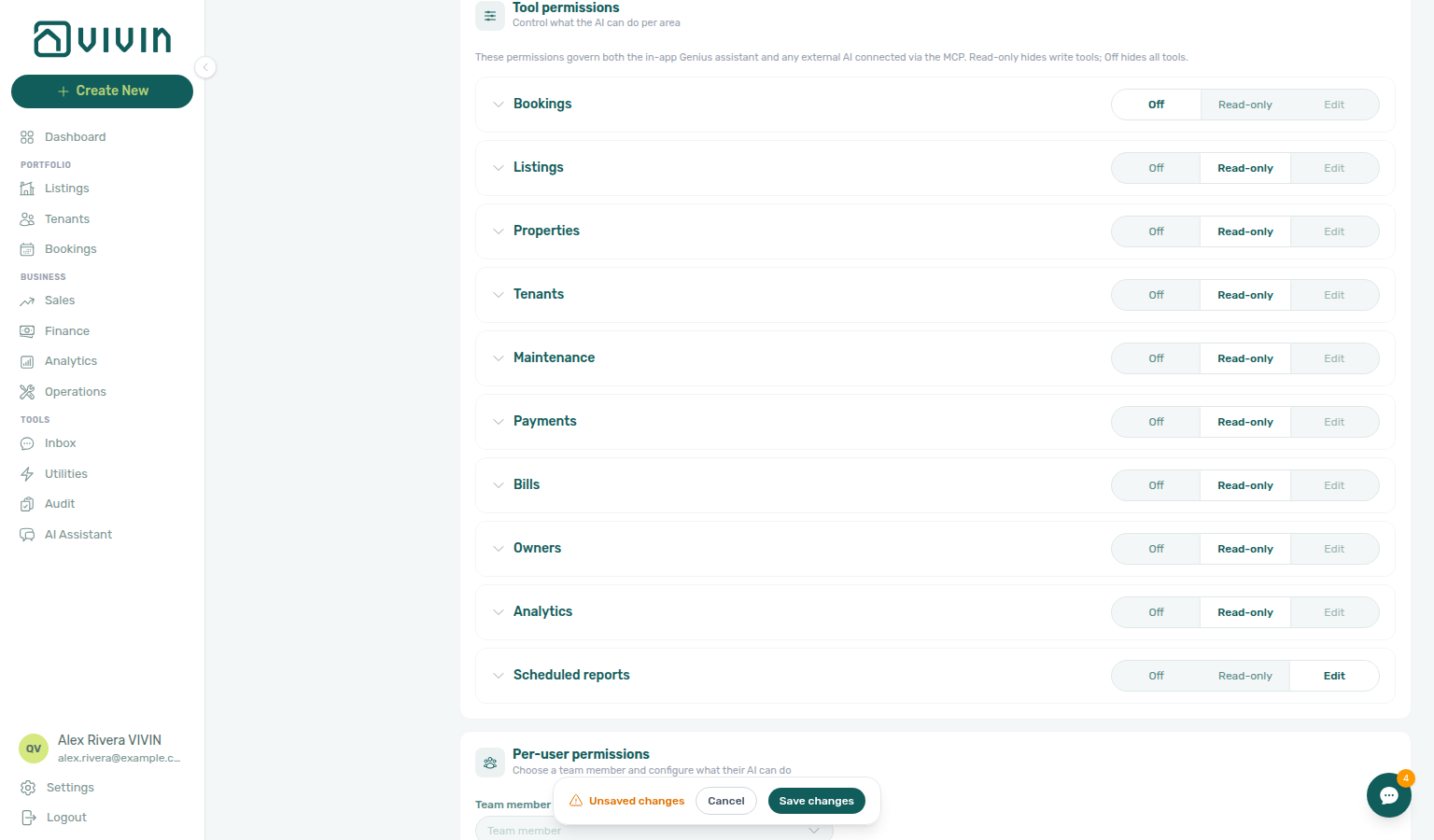
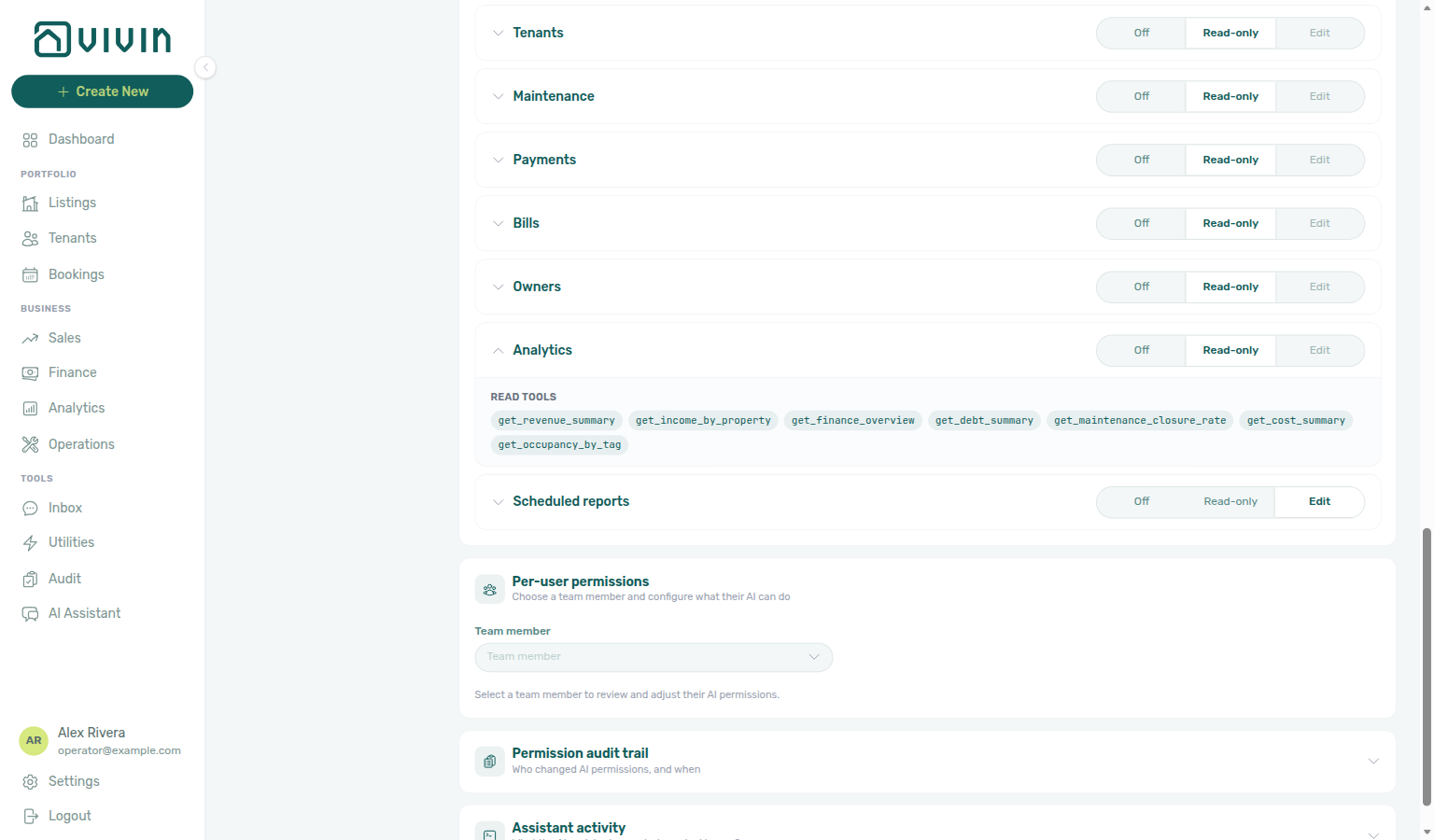
| Tool permissions | Account-wide Off / Read-only / Edit mode per domain (area). |
| Per-user permissions | Pick a teammate — master AI access switch, per-domain overrides, and optional history window. |
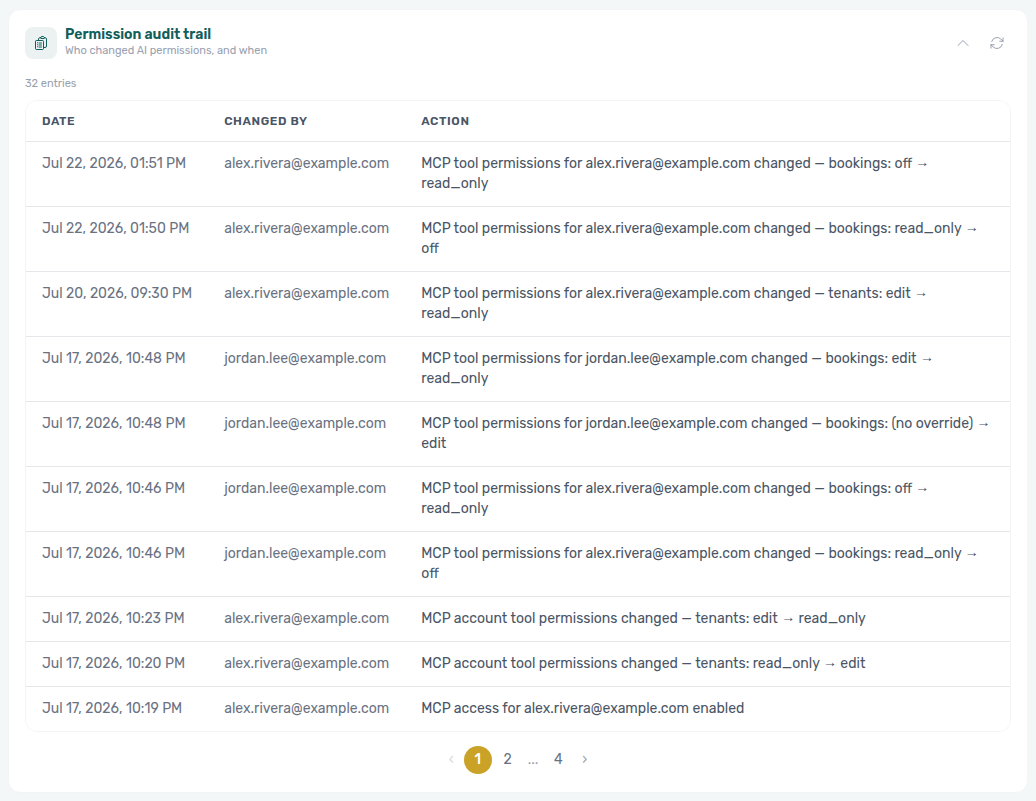
| Permission audit trail | Paginated log of permission changes (lazy-loaded). |
| Genius activity | Paginated log of Genius tool calls (app and WhatsApp) and held write confirmations; loads when you open Activity. Connector calls (Claude, ChatGPT) are not listed. |
| Genius WhatsApp connection | Status of the landlord Genius WhatsApp session (often managed by VIVIN — no QR). |
| Scheduled reports | Your Genius secretary digests — create, pause, edit, cancel; see the Genius guide. |
Unsaved changes
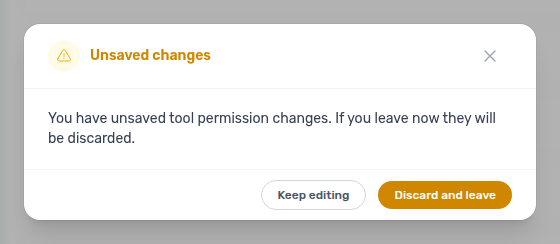
When you change Tool permissions or Per-user permissions without saving, a floating bar appears at the bottom of the viewport with Save changes and Cancel. Switching to another Account Settings tab, navigating away from /settings, or closing the shell while the form is dirty opens Unsaved changes — choose Discard and leave to discard or Keep editing to stay on AI / MCP. API keys (generate/revoke) and read-only cards (Connection, audit trail, Genius activity) do not participate in this guard.
Connection
The Connection card shows how an external MCP client reaches your workspace:
- MCP connection URL — copyable HTTPS endpoint for streamable MCP traffic (same host the Landlord MCP server exposes at
/mcp). Copy this exact URL into ChatGPT, Claude, or other MCP clients — do not invent an/ssesuffix; the product URL already ends in/mcp. - How to connect — short localized intro (OAuth for ChatGPT / Claude; Bearer API key for clients without OAuth), then per-client step guides on the same card.
- Client guides — segmented control ChatGPT / Claude with numbered click paths. The Claude guide covers both claude.ai and the desktop app: the Connectors flow is the same in each. Each guide ends with a reminder callout and a Copy control for the same MCP URL (so you do not need to scroll back mid-setup).
- Other MCP clients — config file — JSON snippet with
Authorization: Bearer <your key>for IDE assistants, Claude Desktop API-key mode, or similar localmcpServersconfigs.
When the URL is not provisioned for the account, the card shows Connection not available yet with guidance to contact Vivin support.
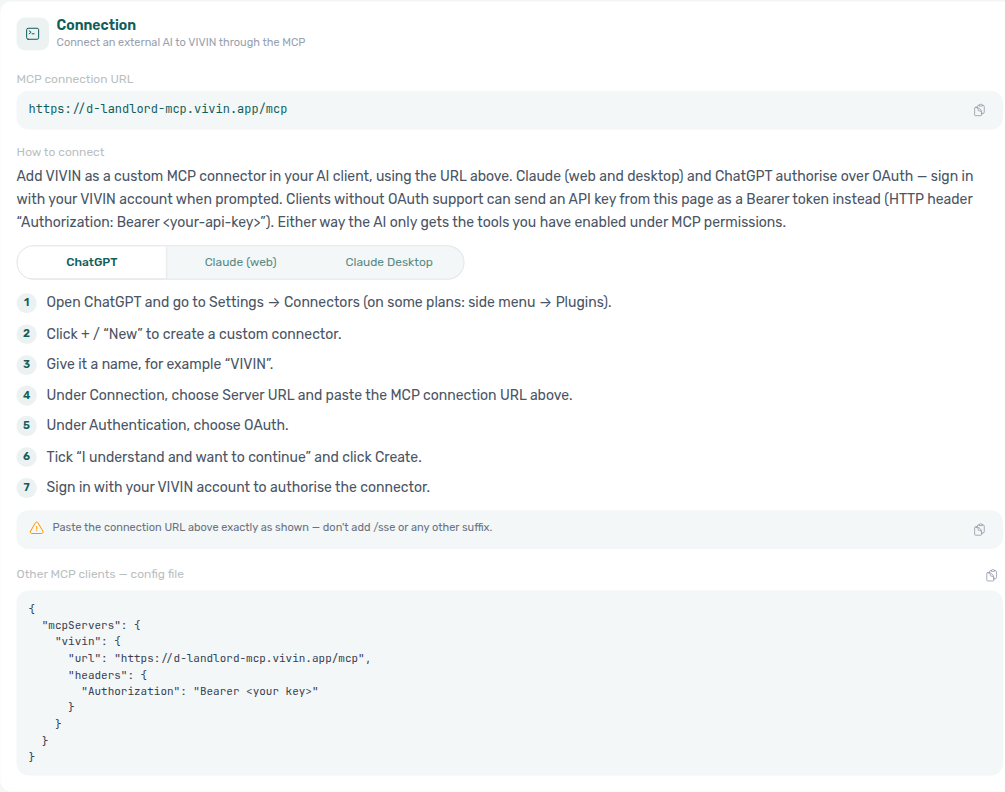
Prefer the in-card guides while you set up a connector — they stay next to the URL you need to paste. The section below mirrors those steps for offline reading and adds Claude Desktop Option B (API key).
Connect from ChatGPT / Claude
Use this section when you have the MCP connection URL from Connection and need the click path in each client. On the Connection card, pick the matching segment (ChatGPT or Claude) to see the same steps in-product — one Claude guide serves both claude.ai and the desktop app. Enable at least one domain under Tool permissions before you authorize — OAuth is blocked when every domain is Off.
| Client | Auth | Where you paste the Vivin URL |
|---|---|---|
| ChatGPT (web) | OAuth | New connector → Server URL |
| Claude (web) | OAuth | Settings → Connectors → Add custom connector |
| Claude Desktop | OAuth (Connectors) or API key (mcpServers JSON) | Settings → Connectors, or paste Other MCP clients — config file from this tab |
| IDE assistants | API key Bearer | Paste Other MCP clients — config file (or equivalent) from Connection |
ChatGPT (web)
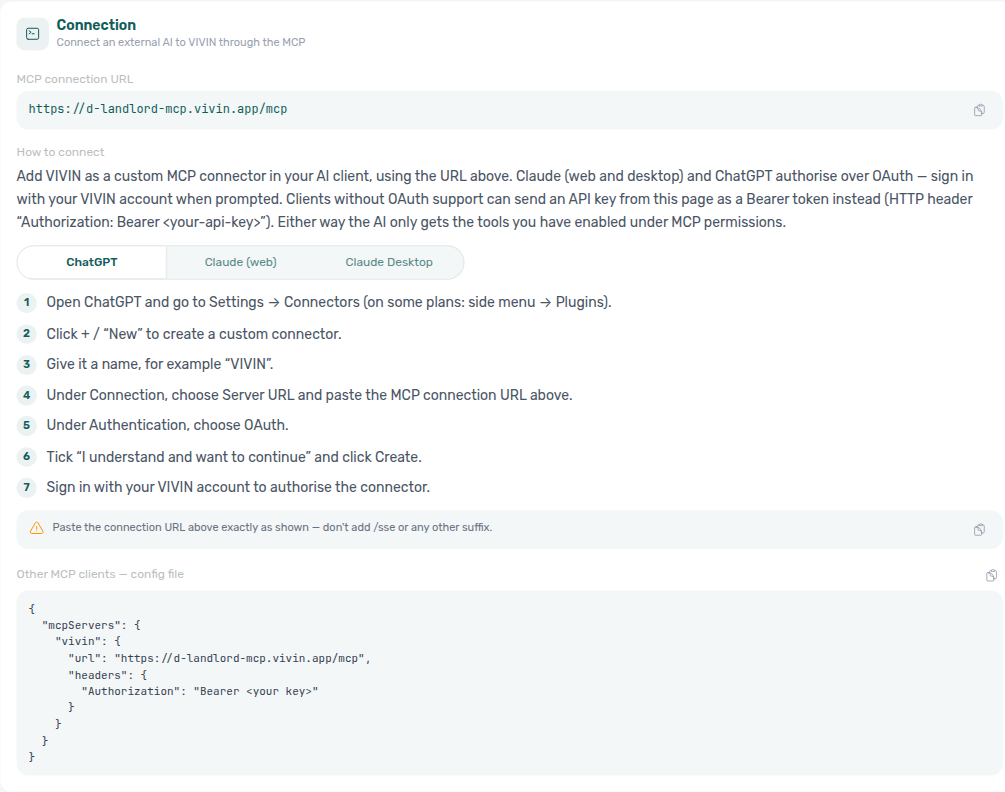
- Open ChatGPT and go to Settings → Connectors (on some plans: side menu → Plugins).
- Click + / New to create a custom connector.
- Give it a name, for example VIVIN.
- Under Connection, choose Server URL and paste the MCP connection URL above.
- Under Authentication, choose OAuth.
- Tick I understand and want to continue and click Create.
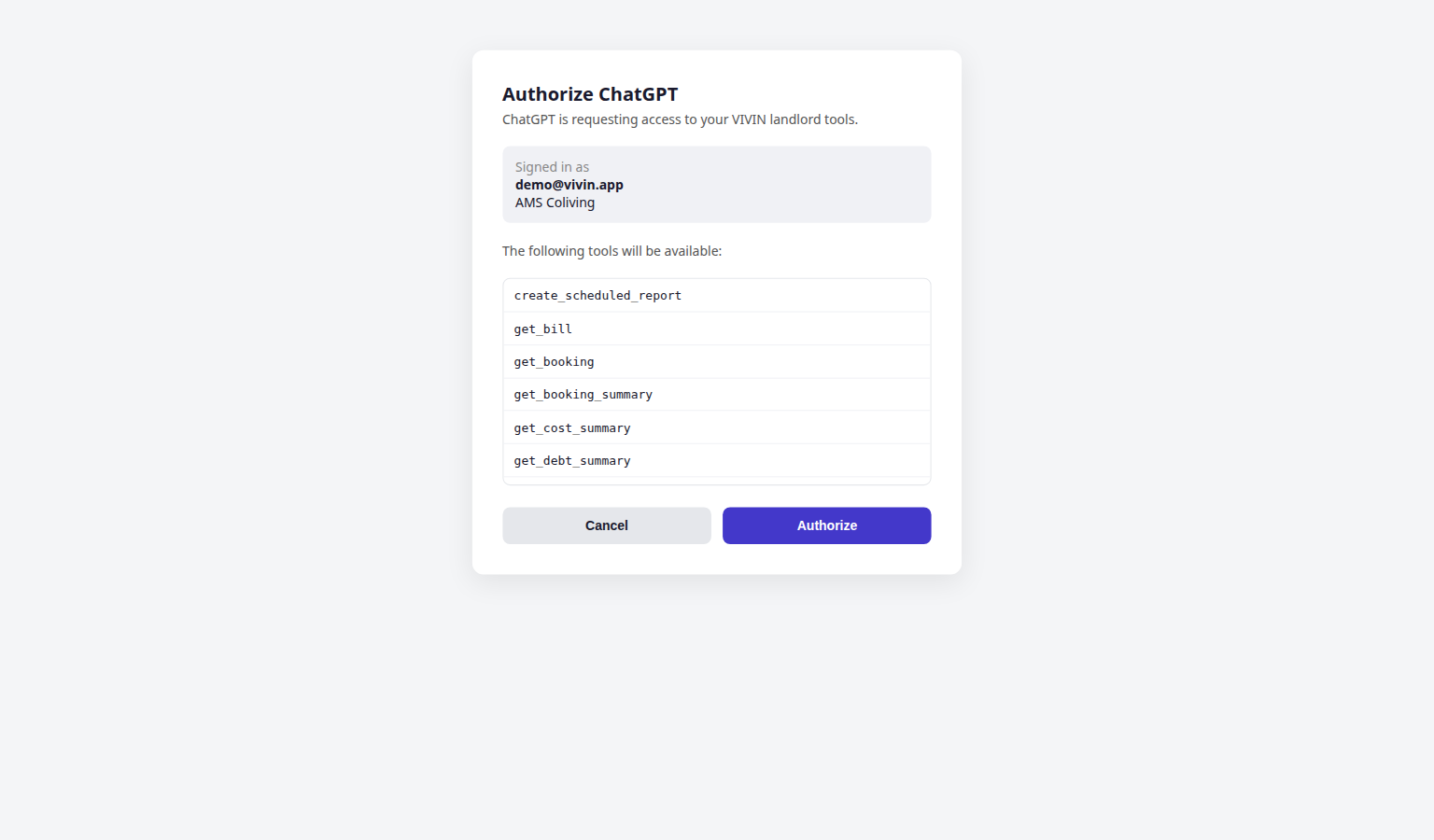
- Complete Vivin Authorize ChatGPT — sign in if asked, review the tool list, then Authorize.
Claude (web)
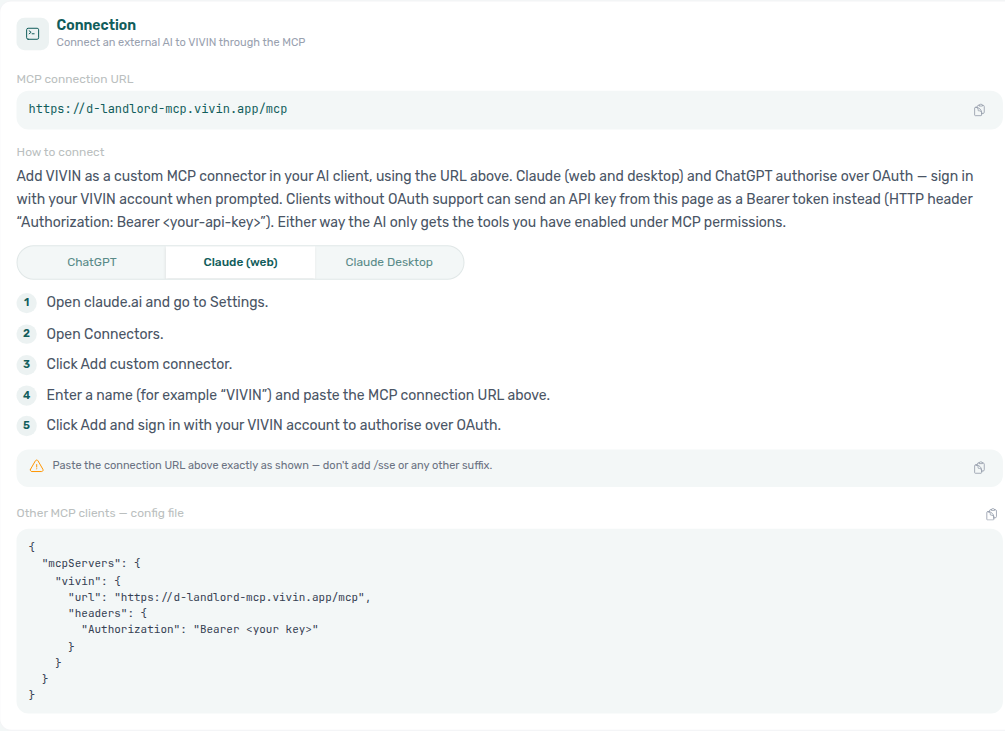
- Open claude.ai and go to Settings.
- Open Connectors.
- Click Add custom connector.
- Enter a name (for example VIVIN) and paste the MCP connection URL above.
- Click Add, then complete Vivin Authorize Claude — sign in if asked, review the tool list, then Authorize.
- Back in Connectors, open the VIVIN connector's tool permissions and keep the write tools (Create scheduled report, Update scheduled report) on Needs approval, so Claude asks you before it creates, changes or cancels a report.
Claude Desktop
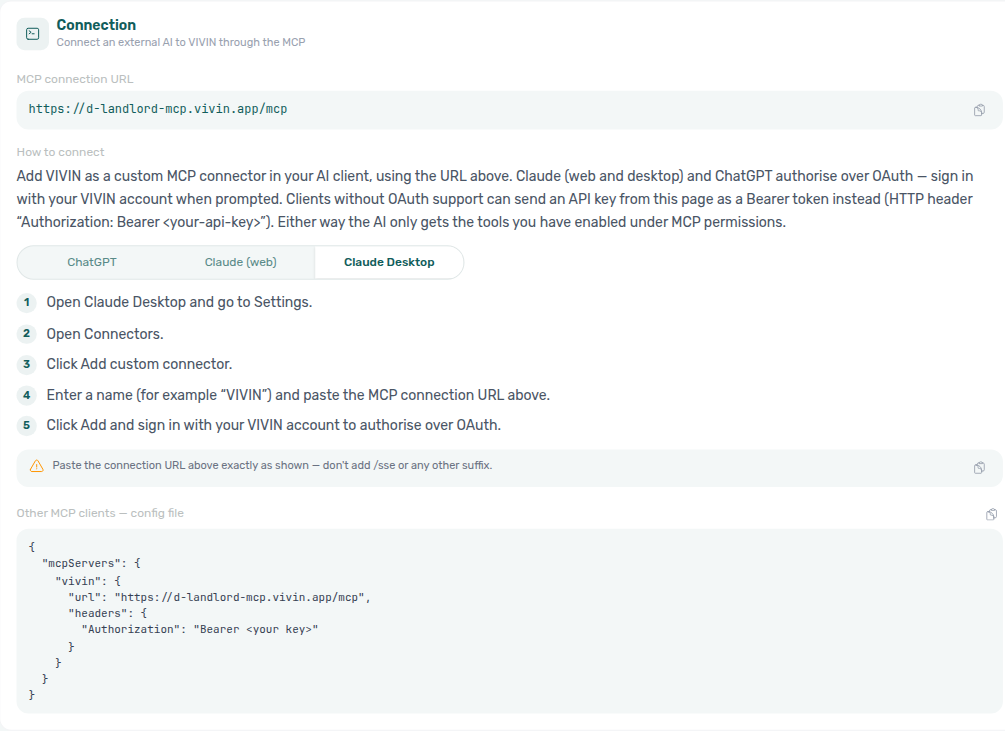
Option A — Connectors (OAuth) — the path shown in the Connection card guide when your Desktop build exposes Settings → Connectors:
- Open Claude Desktop and go to Settings.
- Open Connectors.
- Click Add custom connector.
- Enter a name (for example VIVIN) and paste the MCP connection URL above.
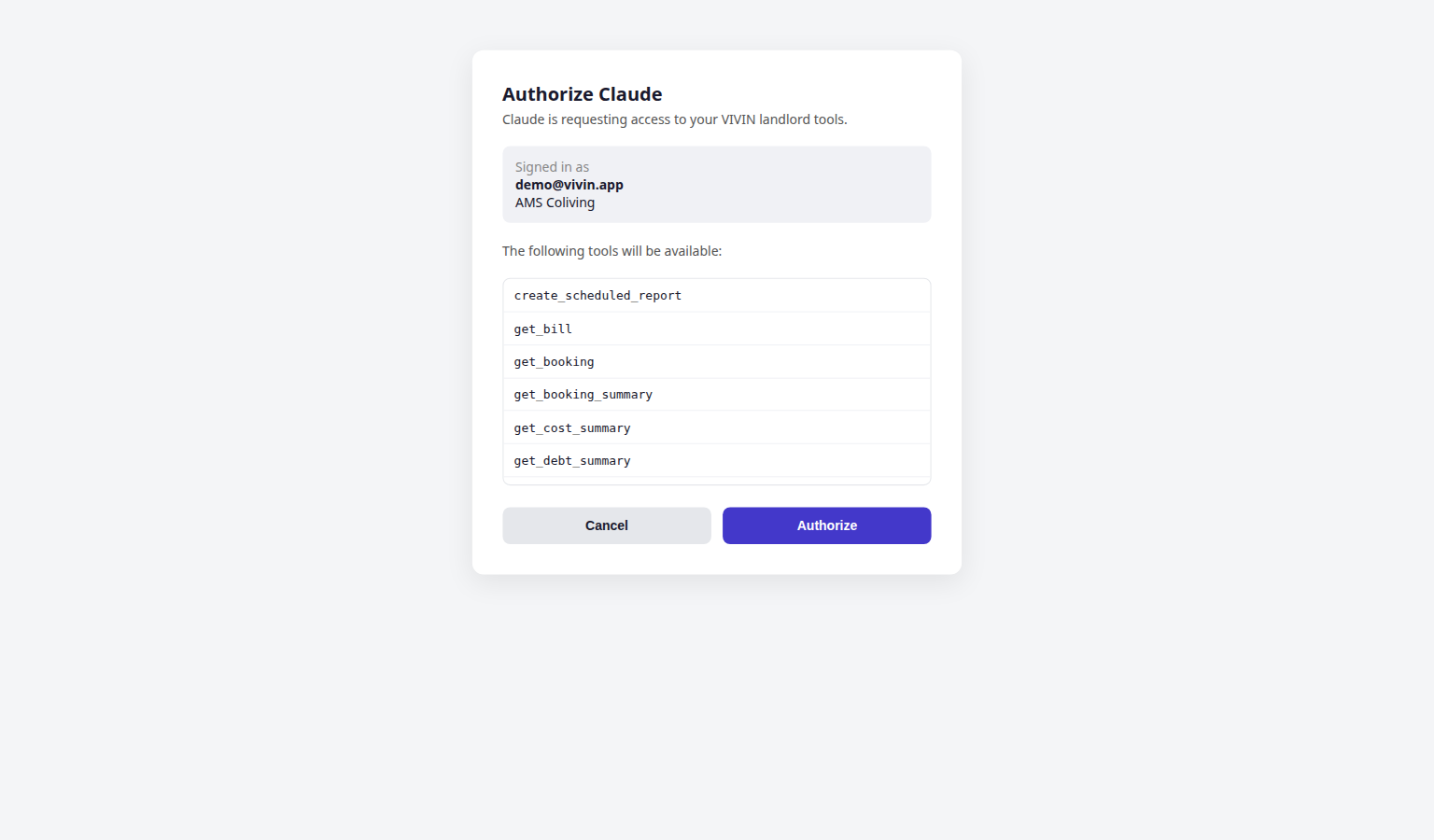
- Click Add, then complete the same Vivin Authorize Claude consent page as on the web (tool list + Authorize / Cancel).
- Back in Connectors, open the VIVIN connector's tool permissions and keep the write tools (Create scheduled report, Update scheduled report) on Needs approval, so Claude asks you before it creates, changes or cancels a report.
Option B — Local mcpServers config (API key) — when you prefer a pasted Bearer token (not shown in the in-card guide):
- On this tab, Generate an API key and copy it once from the amber banner.
- Copy Other MCP clients — config file from Connection.
- Replace
<your key>with the generated secret and merge into Claude Desktop’s MCP config (or your IDE’s MCP servers file). - Restart the client so it reloads the server list.
Connector OAuth (Claude, ChatGPT)
Hosted MCP connectors (Claude.ai, ChatGPT, and Claude Desktop Connectors) can authorize through Vivin's OAuth 2.1 flow on the Core API host instead of pasting an API key. After you start the connector in ChatGPT or Claude, Vivin shows a consent page that lists the tools the connector will receive — derived from this tab's Tool permissions and the signing-in user's role. Authorization is blocked until at least one domain is enabled for the account.
| Consent state | What you see |
|---|---|
| Sign in | Email and password when you do not already have a Vivin session for that API host |
| Signed in | Your mailbox and company, the snake_case tool list, and Authorize / Cancel |
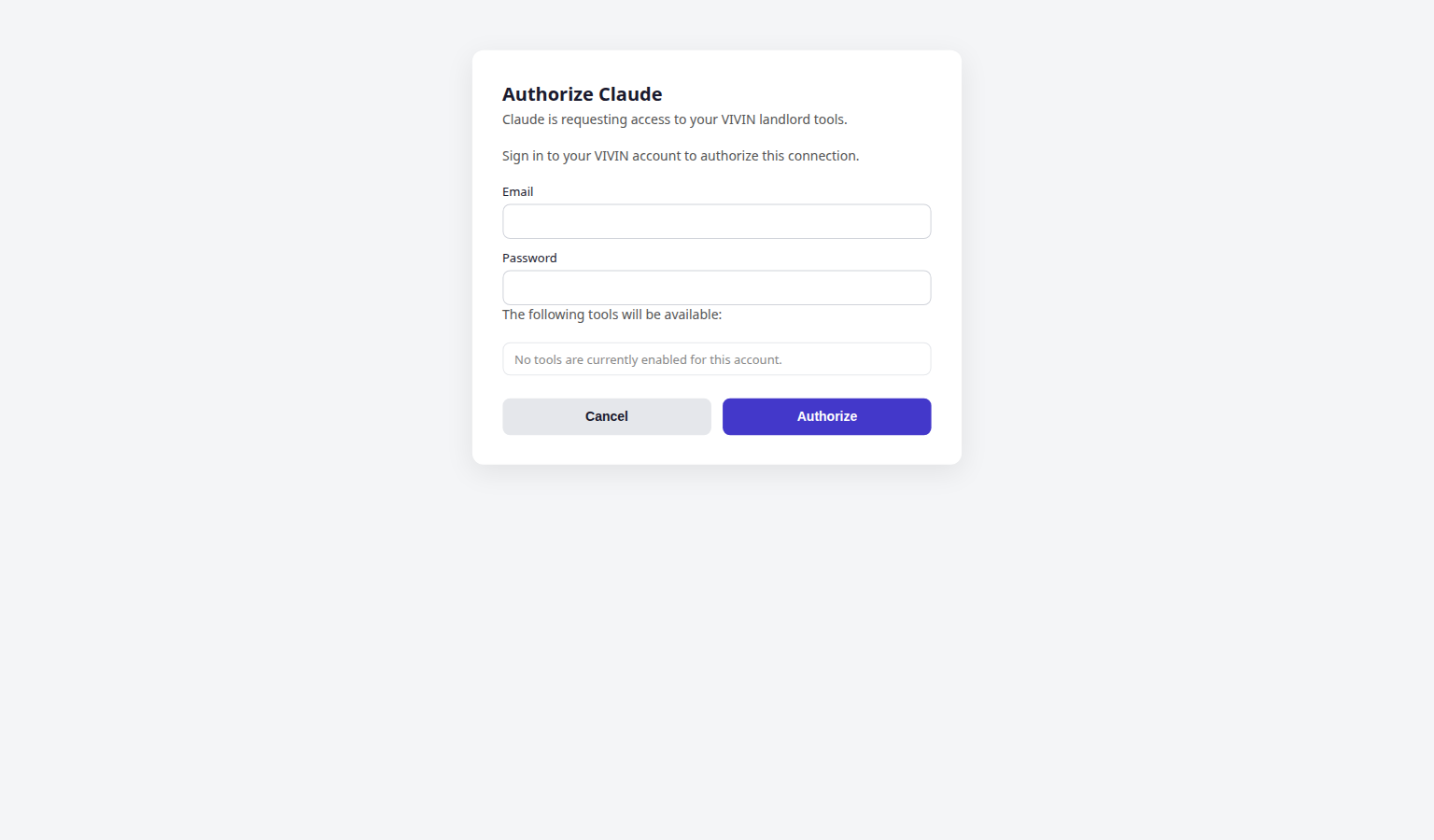
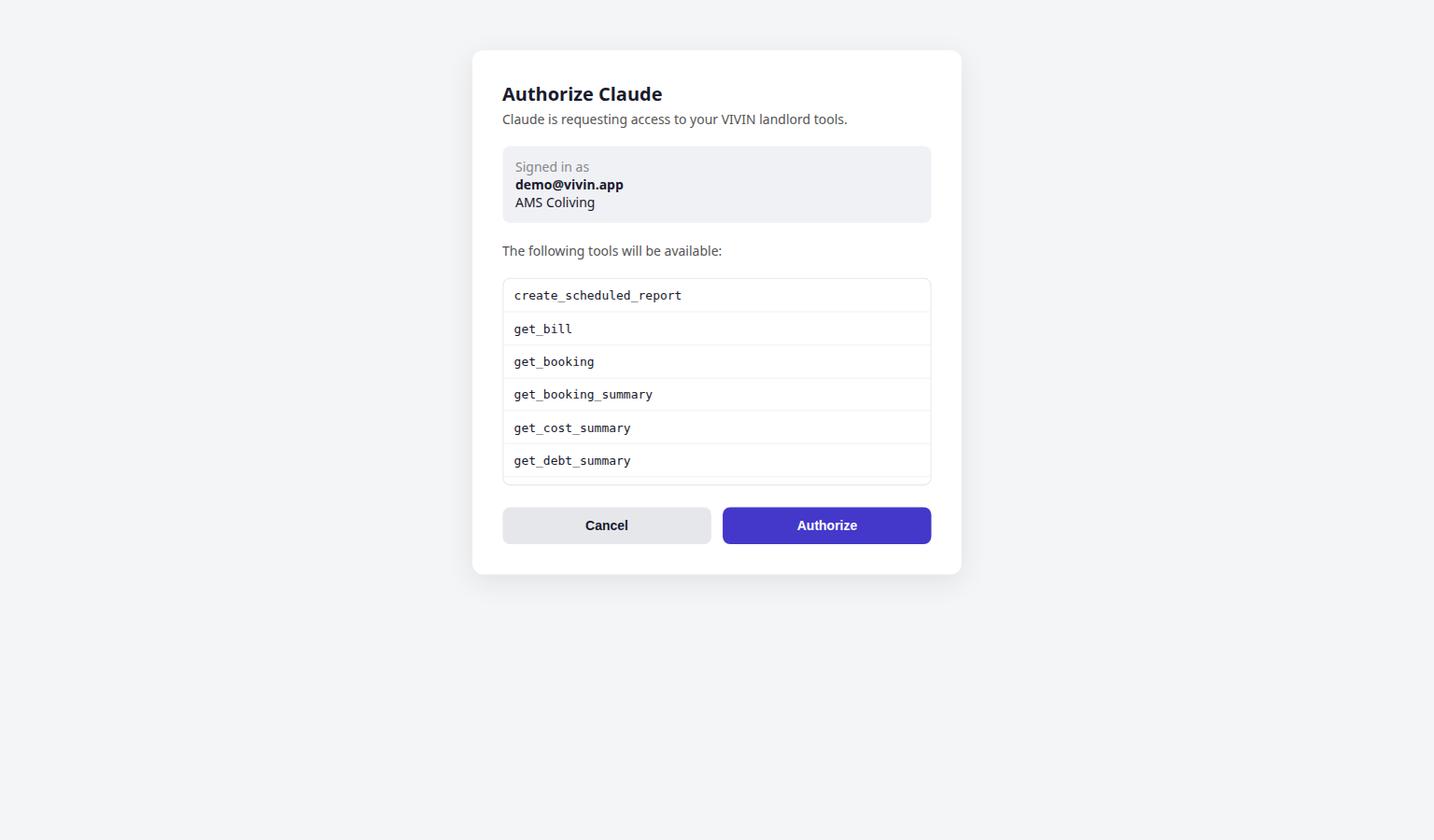
Operators connecting a connector do not use the API keys card — they complete OAuth in the connector UI (see Connect from ChatGPT / Claude). Revoke access by disabling AI access on Per-user permissions or turning domains Off; the next token refresh fails and the connector prompts for sign-in again.
Full protocol details: Landlord MCP — Connector OAuth. HTTP endpoint reference: MCP OAuth.
API keys
API keys authenticate external AI clients (IDE assistants, custom scripts, and Claude Desktop Option B) before they exchange for a management JWT on the MCP server. Use keys when the client config expects a pasted Bearer token — not for ChatGPT / Claude.ai connector OAuth.
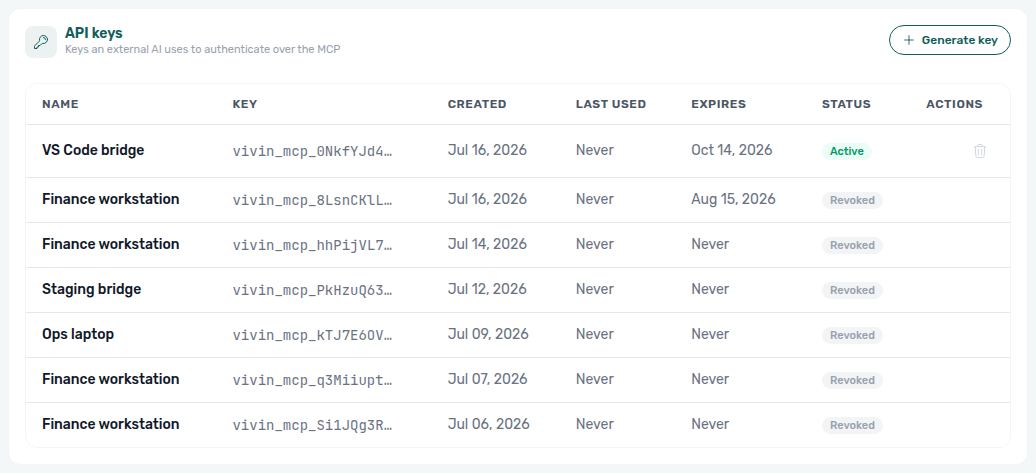
- Click Generate key.
- Enter a name (for example
Claude Desktop) and choose expiration — 30, 90, 180 days, or Never expires. - After creation, copy the full key from the amber Key created banner — Vivin shows the secret once; later visits list only the key prefix.
- Use Revoke (trash icon) on active keys to invalidate them immediately.
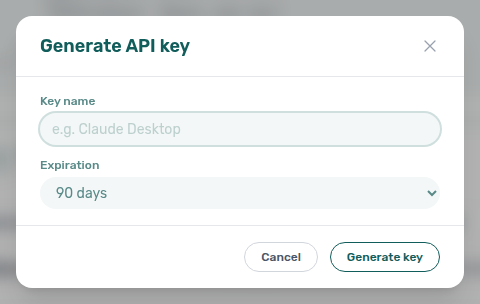
| Column | Meaning |
|---|---|
| Name | Operator label for the integration. |
| Key | Masked prefix after the reveal step. |
| Created / Last used / Expires | Lifecycle timestamps. |
| Status | Active, Revoked, or Expired. |
Rotate keys after teammate offboarding or client compromise. Refresh Landlord MCP client sessions after revocation.
Tool permissions
Tool permissions set the account default for each data domain. The same policy applies to the in-app AI Assistant and external MCP clients for portfolio tools.
External MCP clients always receive the seven get-vivin-context-* topic tools (static product-reference slices, no account data), even when every domain below is Off. Those tools do not appear in the chips below — you cannot turn them off from this tab. In-app AI Chat / WhatsApp Genius use the same reference as a system-prompt prefix instead of calling the tools.
| Mode | Behaviour |
|---|---|
| Off | No tools in this domain — assistants cannot read or write. |
| Read-only | Read tools only (listings, bookings, summaries, and similar). |
| Edit | Read and write tools — selectable in the UI only when the domain already stores Edit; new selections are capped at Read-only while write access rolls out (the segmented control shows a disabled Edit option with helper copy when the account has not been granted write for that domain yet). Existing Edit rows can stay at Edit until you change them. |
Expand a domain row to see the read and write tool names. The UI lists snake_case identifiers (same shape Claude uses in-app); Landlord MCP wire names are the kebab-case equivalents (for example get_finance_overview ↔ get-finance-overview).
Domains
| Domain | Typical tools (examples) |
|---|---|
| Bookings | Summaries (including bookings received for a creation window), calendar overlap checks, create/update when permitted — see Landlord MCP — Bookings received. |
| Listings | Listing search, pricing tables, availability. |
| Properties | Property portfolio reads and edits, plus list_smart_locks / list-smart-locks (battery health: critical / ok / unknown — unknown is not healthy). Expand the row to see the snake_case chips. |
| Tenants | Tenant directory and profile reads. |
| Maintenance | Ticket lists, status totals and priority totals (get_ticket_status_counts / get-ticket-status-counts — whole-account All / Unassigned / Draft / In progress / Completed / Cancelled, plus Critical / High / Medium / Low / None on the All card, the Unassigned card, the Draft card, the In progress card, the Closed card, or the Cancelled card, not a page of titles), per-property / per-unit / per-month ticket counts (get_ticket_aggregates / get-ticket-aggregates — the server-computed ranking behind “which property has the most tickets”), and create when Operations allows. See Landlord MCP — Ticket status counts. |
| Payments | Payment lists, manual payment-in when Finance allows. |
| Bills | Utility bill reads and extraction helpers, plus get_cost_map / get-cost-map (Utilities Cost map per-property totals — total cost, absorbed cost, cost per occupied room-day — not Operations Cash Flows; see Landlord MCP — Utilities cost map (June 2026)). |
| Owners | Owner registry for payout context. |
| Analytics | Portfolio metrics for AI/MCP: get_finance_overview / get-finance-overview, get_revenue_summary / get-revenue-summary (Finance-page income expected + cash collected — not Analytics ADR/RevPAR), get_income_by_property / get-income-by-property (Finance Income by property rankings + server incomePerUnit), get_debt_summary / get-debt-summary (total debt plus canceled vs live missing-payment split), list_owner_reports / list-owner-reports and get_owner_report_preview / get-owner-report-preview (Finance Owner Reports generated settlements and live monthly preview — see Landlord MCP — Owner settlement preview), get_cost_summary / get-cost-summary (Cash Flows outflow, average cost per unit, category split, and remaining totals after excluding an exact category name for a named window — see Landlord MCP — Operational cost summary, June 2026, April 2026, by category, June by category, and excluding a category, and excluding Maintenance, and excluding Manutenção in June, and excluding uncategorized in June, and excluding maintenance in April, and excluding maintenance and uncategorized in April, and 1–15 April 2026, and 16–30 April 2026, and February 2026, and 1–14 February 2026, and 15–28 February 2026, and January 2026, and March 2026, and May 2026), get_maintenance_closure_rate / get-maintenance-closure-rate (closed vs received in a named trailing window — see Landlord MCP — Maintenance closure rate, 45-day window, 50-day window, and 90-day window), and get_occupancy_by_tag / get-occupancy-by-tag (occupancy by unit tag and listing type). Expand the row to see the snake_case chips. |
| Scheduled reports | Genius “secretary” schedules: create_scheduled_report / create-scheduled-report, list_scheduled_reports / list-scheduled-reports, update_scheduled_report / update-scheduled-report. Defaults toward Edit so operators can manage their own recurring vacancy / debt / check-in / Finance overview digests without enabling global MCP writes. See Automation & AI — Scheduled reports and Genius — Finance overview digest. |
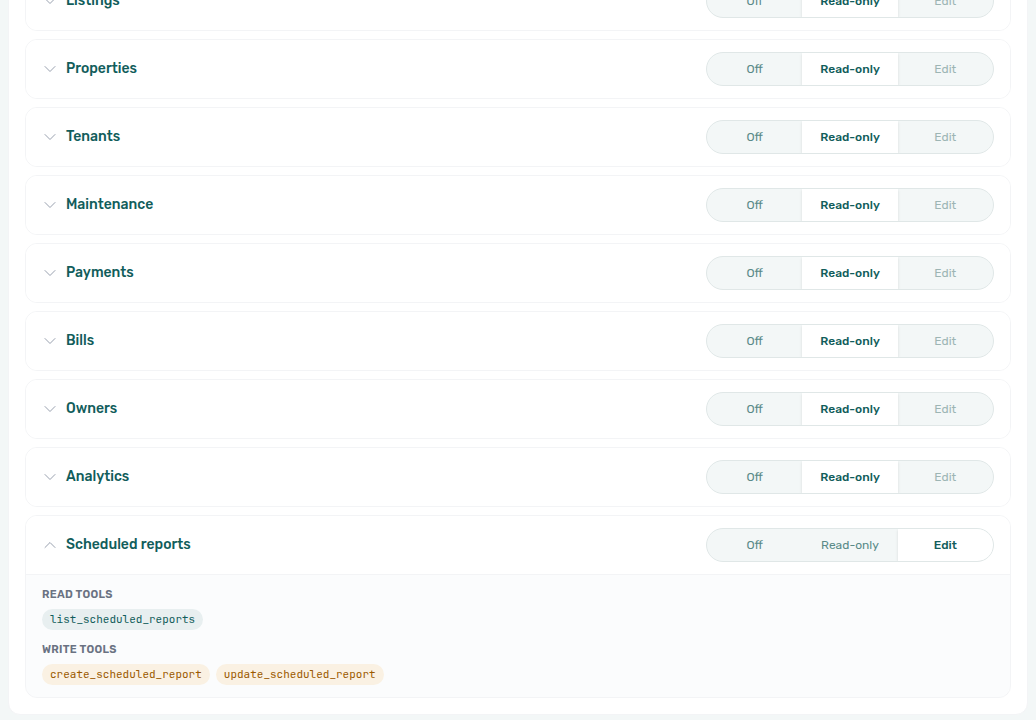
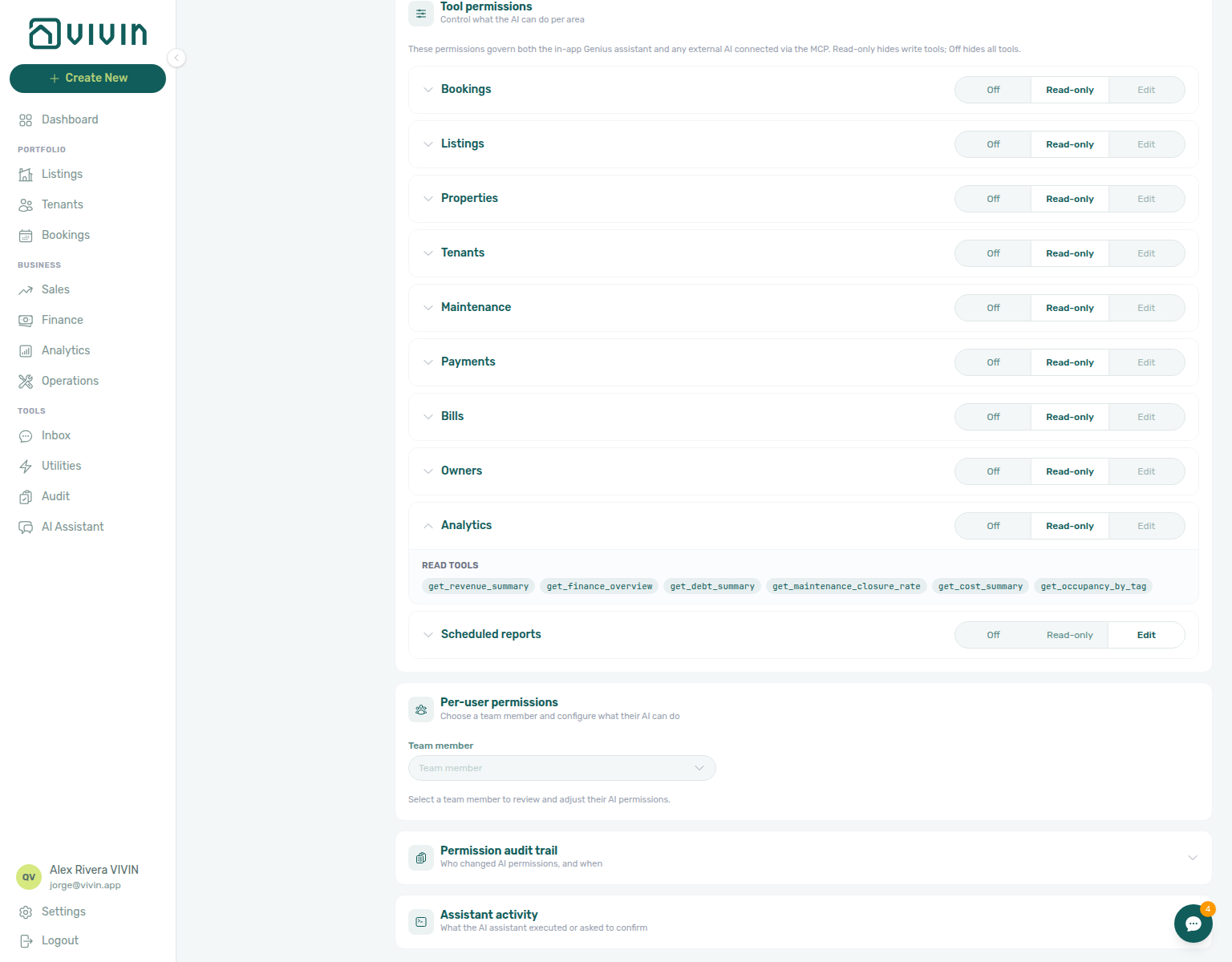
get_finance_overview, get_revenue_summary, get_income_by_property, and related).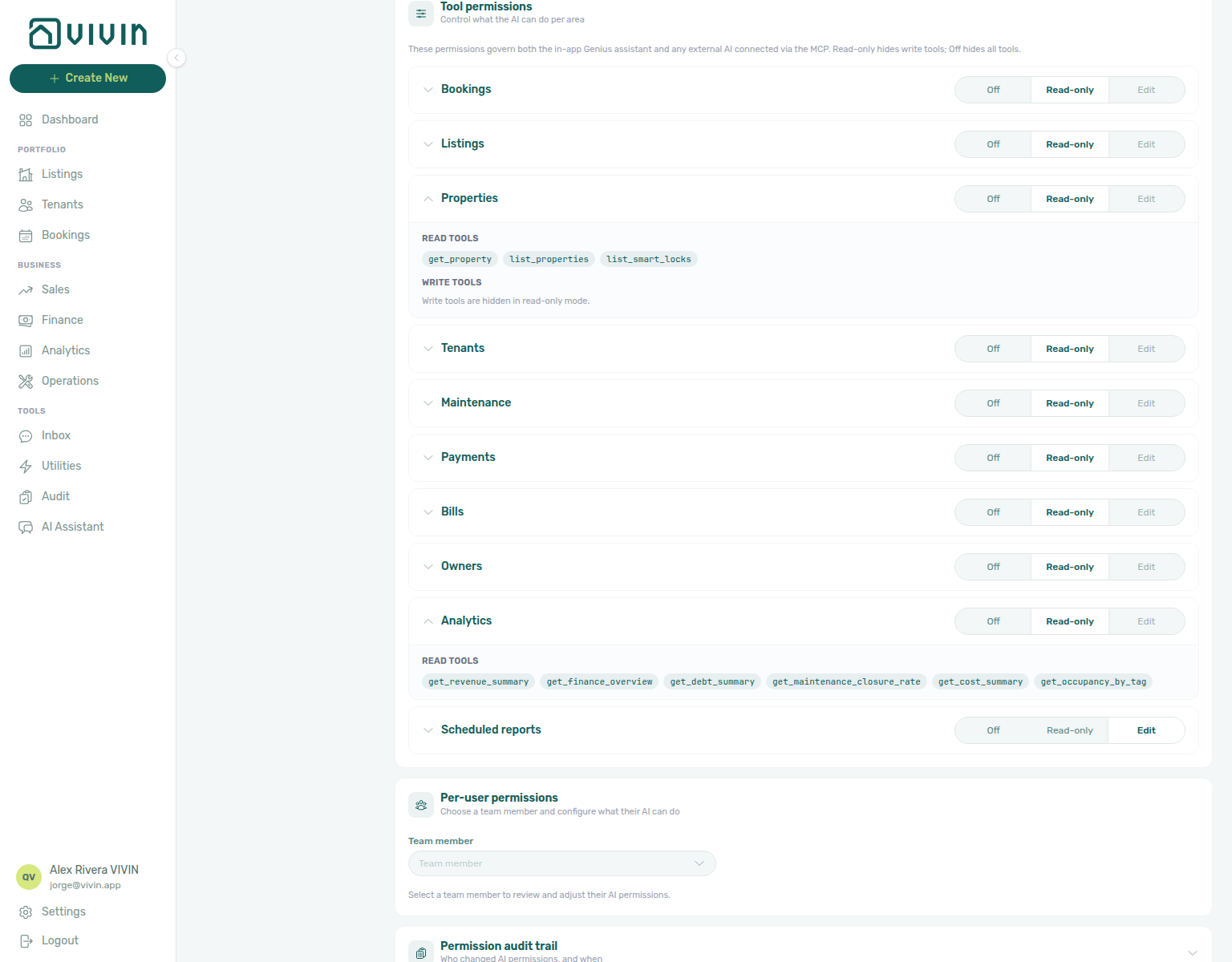
Segment occupancy (get_occupancy_by_tag), including a July 2026 listing-type occupancy split and a June 2026 listing-type occupancy split and a July 2026 unit-tag occupancy split and a June 2026 unit-tag occupancy split for named settled months, vacancy/block splits (get_vacancy_next_month / get-vacant-units-next-month), and lock batteries (list_smart_locks) are documented together under Landlord MCP — Occupancy, vacancy, and smart locks and AI Chat — Asking about your portfolio.
Effective access is still capped by each user's role permissions in Users and roles — a domain set to Read-only cannot bypass missing Finance or Bookings module rights on the Core API.
Per-user permissions
Managers pick a team member to layer user overrides on top of account policy:
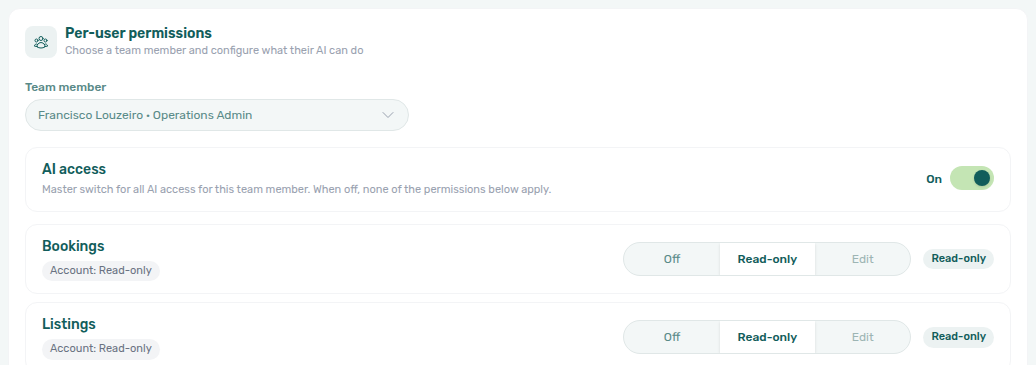
- AI access — master toggle. When Off, domain rows are disabled and the backend blocks AI tools for that user regardless of account defaults.
- Per-domain segmented control — Off, Read-only, or Edit (subject to the same write cap as account policy). Each row shows the Account policy badge, optional Capped by role hint, and an Effective permission pill.
- History window (days) — optional limit on how far back the AI may read that user's data. Leave empty for unlimited.
Click Save changes on the floating bar to persist overrides. Clearing the history field sends null (unlimited).
Permission audit trail
Collapsible Permission audit trail loads on first expand — 10 entries per page with Refresh and pagination. Columns: Date, Changed by, Action (human-readable log line).
Genius activity
Genius activity lists recent Genius tool executions for the account, from the app and from WhatsApp — Time (with the source, App or WhatsApp, underneath), Action (executed tools plus items held for confirmation on destructive writes), and Status (ok, failed, or pending states). It opens and loads by itself the first time you open Activity; use Refresh after triaging a support ticket about unexpected assistant behaviour.
Calls made through an external connector (Claude, ChatGPT) are not listed here.
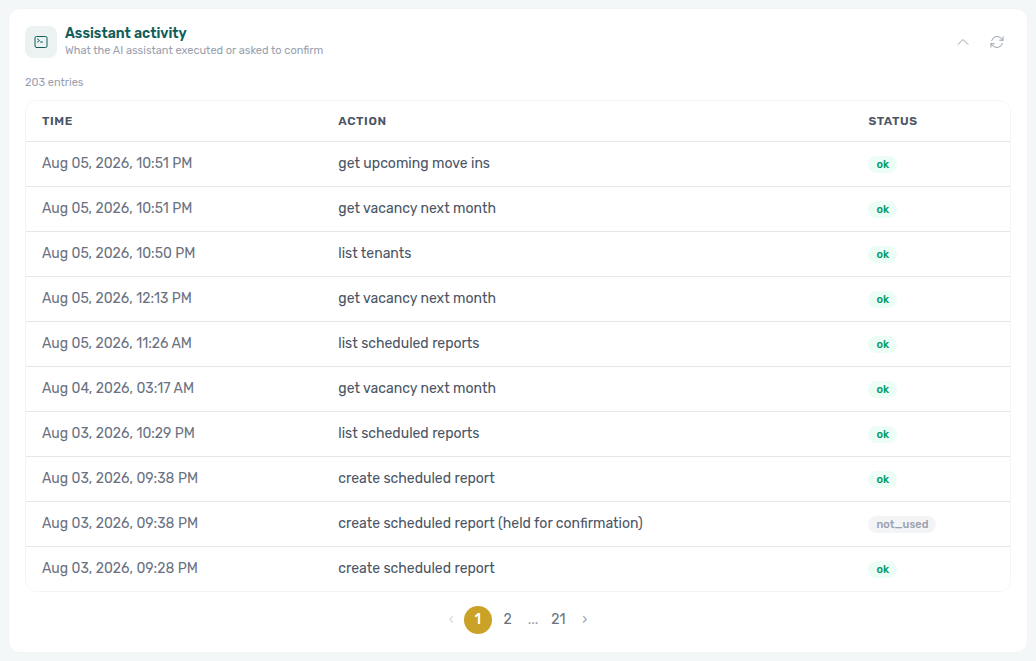
Pair with AI Chat and poll landlord_chat on AI usage API for token spend.
When a connector needs a refresh
If AI / MCP settings, per-user config, the audit trail, or Genius activity do not appear, use Retry on that card. Empty API-key or empty audit states after a successful load are normal — they are not the same as a card that still needs a refresh.
See Glossary — Settings and profile recovery.
AI / MCP section cross-reference
Use the sections above for this settings area. Related setup pages are linked from Related below when present, or from Account Settings.