Contract
Complete Getting Started — Recommended Setup Sequence step 8 (this tab — contract templates) after steps 5–7 Payments, Invoicing & Utilities and before step 9 Categories — full tab map: Recommended setup order. Finish steps 13–15 in Listings, Bookings, and Tenants, then Onboarding a New Property — Step 7. Guided steps 4–12: Onboarding a New Property. Lockout catch-up: Getting Started. Workflow pairing after go-live: Account Settings — Setup sequence after go-live.
Upload the account default in Uploading a template, author variables in Using dynamic variables (including Contract sign date vs generation date for renewal signature lines), choose Empty variables if missing values should print N/A, then add Property and unit overrides when templates differ by asset. Habit-specific shortcuts live under Related below.
Use the Contract tab under Account Settings to upload and manage the account default Word template, optional property or unit overrides, the Empty variables setting, and the in-app variable reference operators use when authoring .docx files.
Open Account Settings > Billing > Contract at platform.vivin.app/settings/contract. See Deep Links for neighbouring settings routes.
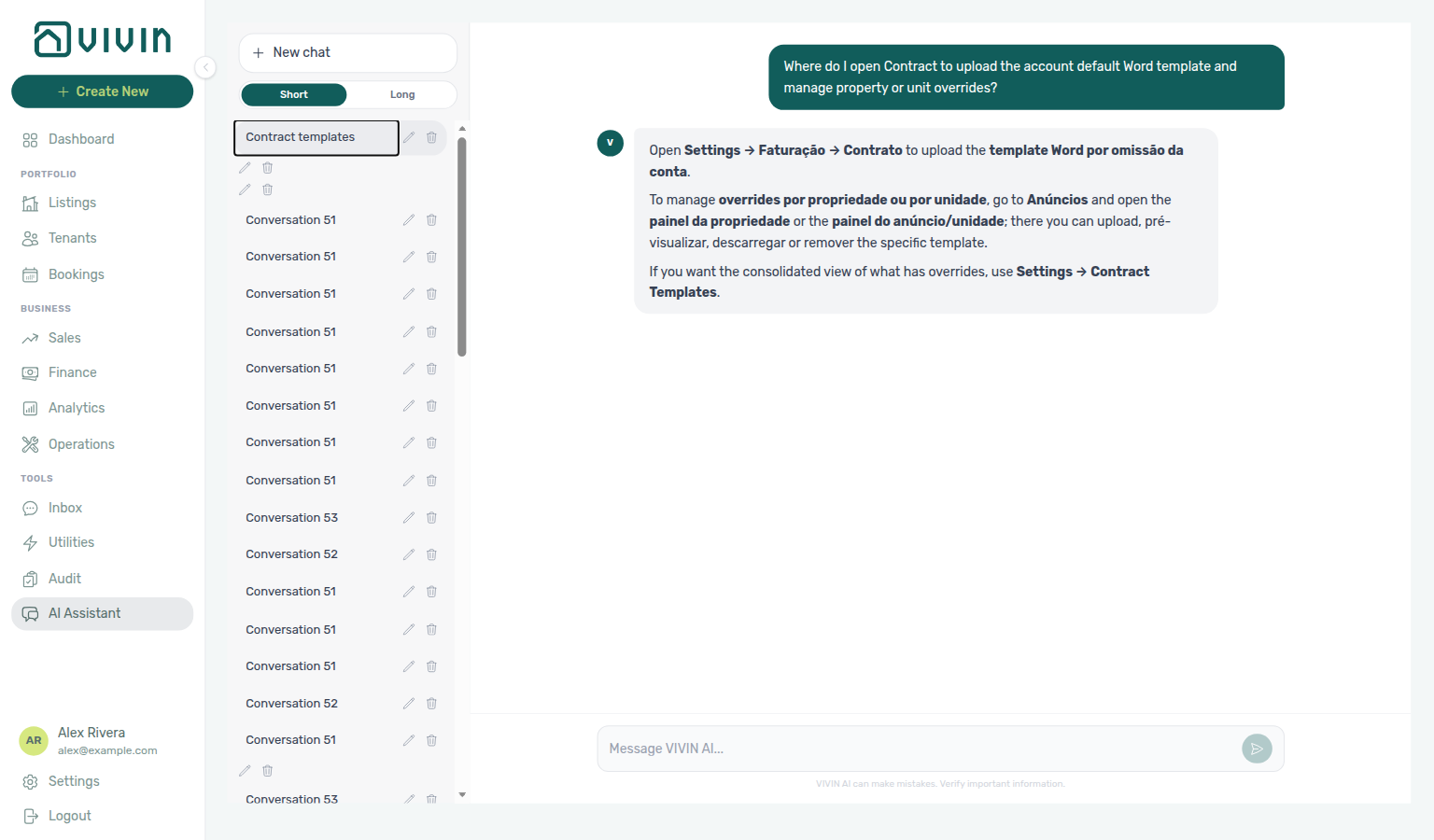
Ask AI Chat “Where do I open Contract to upload the account default Word template and manage property or unit overrides?” — then open this Contract tab (ai-chat-product-context-contract-reply.png, ai-chat-product-context-contract-flow.mp4). The assistant may still say Settings → Faturação → Contrato (account default) and Anúncios for property/unit overrides, and may name Settings → Contract Templates for the consolidated override list; follow Settings → Billing → Contract instead. The English tab label is Contract under the Billing group. Same grounding external MCP clients get from get-vivin-context-bookings-tenants. Property and unit overrides can also be uploaded from Listings.
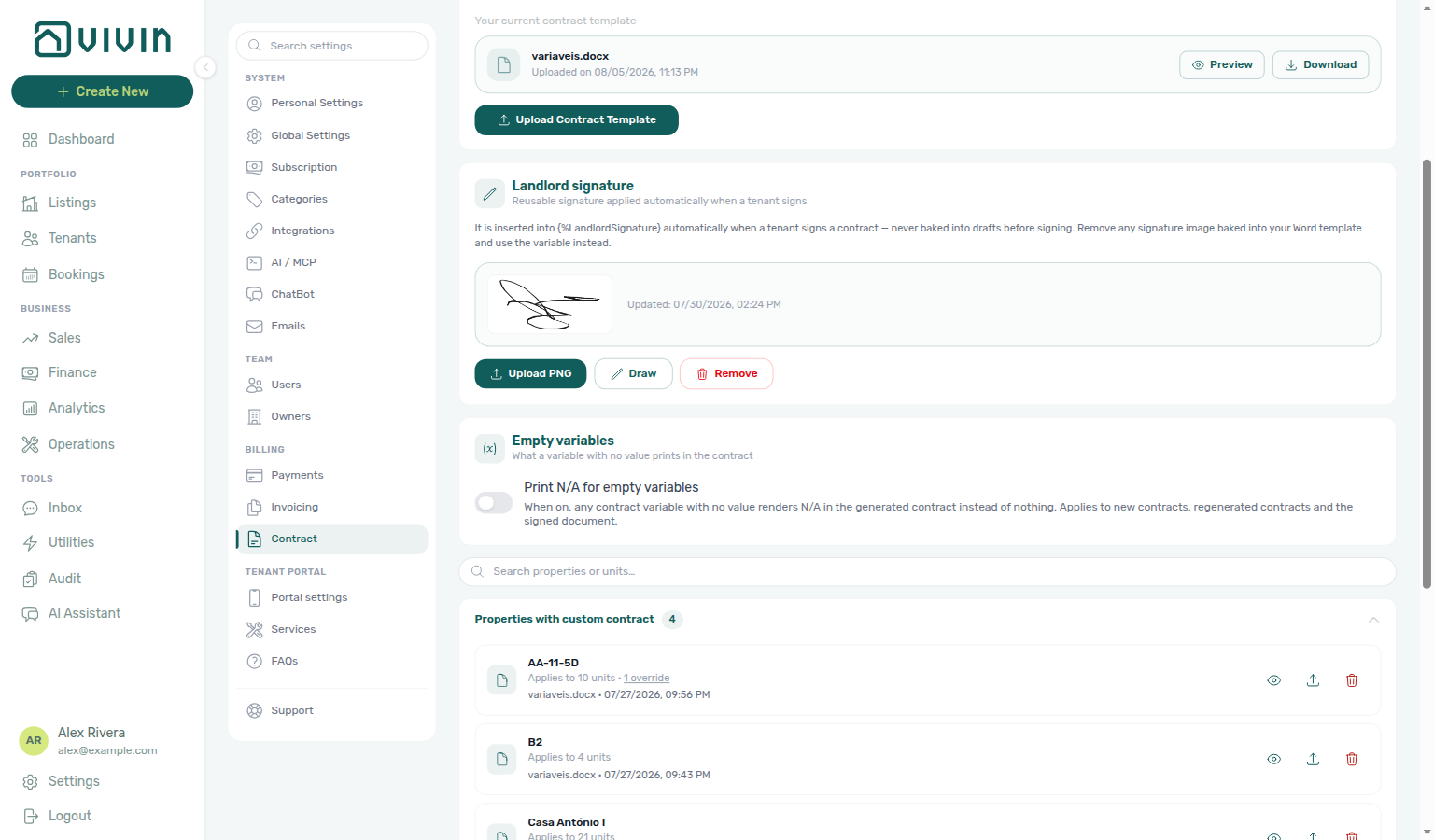
Upload templates after General Information branding (logo on PDF headers) and seed Categories Lease Purpose options if contracts reference lease-type variables. Contract-generation volume does not appear on this tab — poll AI usage API only for landlord_chat / utility_bill_extraction during month-end review, not template uploads. Hub: Recommended setup order.
How to open the Contract tab
Navigation here pairs with Deep Links — Account Settings (/settings/contract) and General Information branding before you upload the account default.
- Sign in to the management frontend and open Account Settings (gear / company entry in the user area, or go to
/settings). - In the settings left sidebar, under Billing, choose Contract.
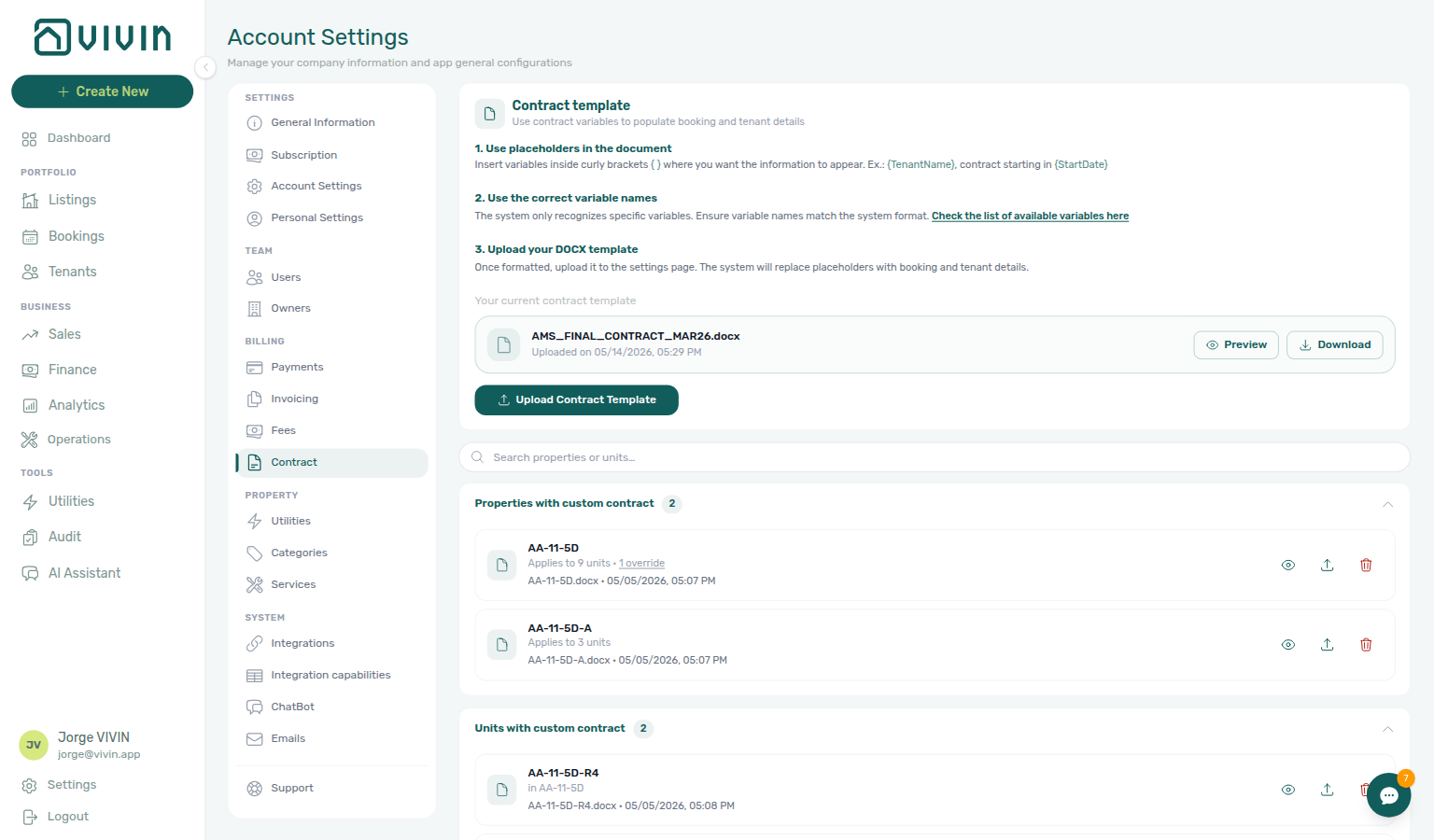
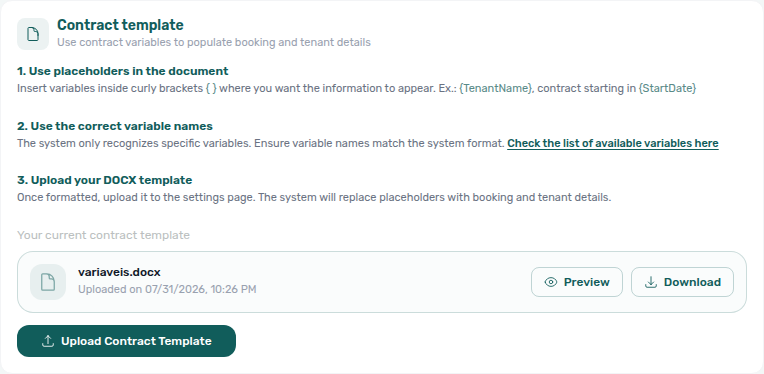
- Follow the three numbered steps on the page (prepare variables → check the full list → upload), then use Upload Contract Template for the account default or manage overrides in the Properties / Units sections below.
The capture below shows the full Contract workspace: step-by-step guidance, the current account template card (preview / download), and collapsible property and unit override groups.
Uploading a template
Upload the account default before first Processing a New Booking — property/unit overrides inherit the fallback chain documented in Listings — Contract tab.
Vivin uses a Word document (.docx) as the contract template. When a contract is generated for a booking, Vivin replaces placeholders in the document with booking data and produces a ready-to-sign PDF.
To upload or replace the account default:
- Prepare your contract in Microsoft Word or Google Docs (exported as
.docx). - Insert variable placeholders (see Using dynamic variables) where booking-specific information should appear.
- On the Contract tab, click Upload Contract Template, choose Account scope (unless you are replacing a property- or unit-specific file), and select your
.docx.
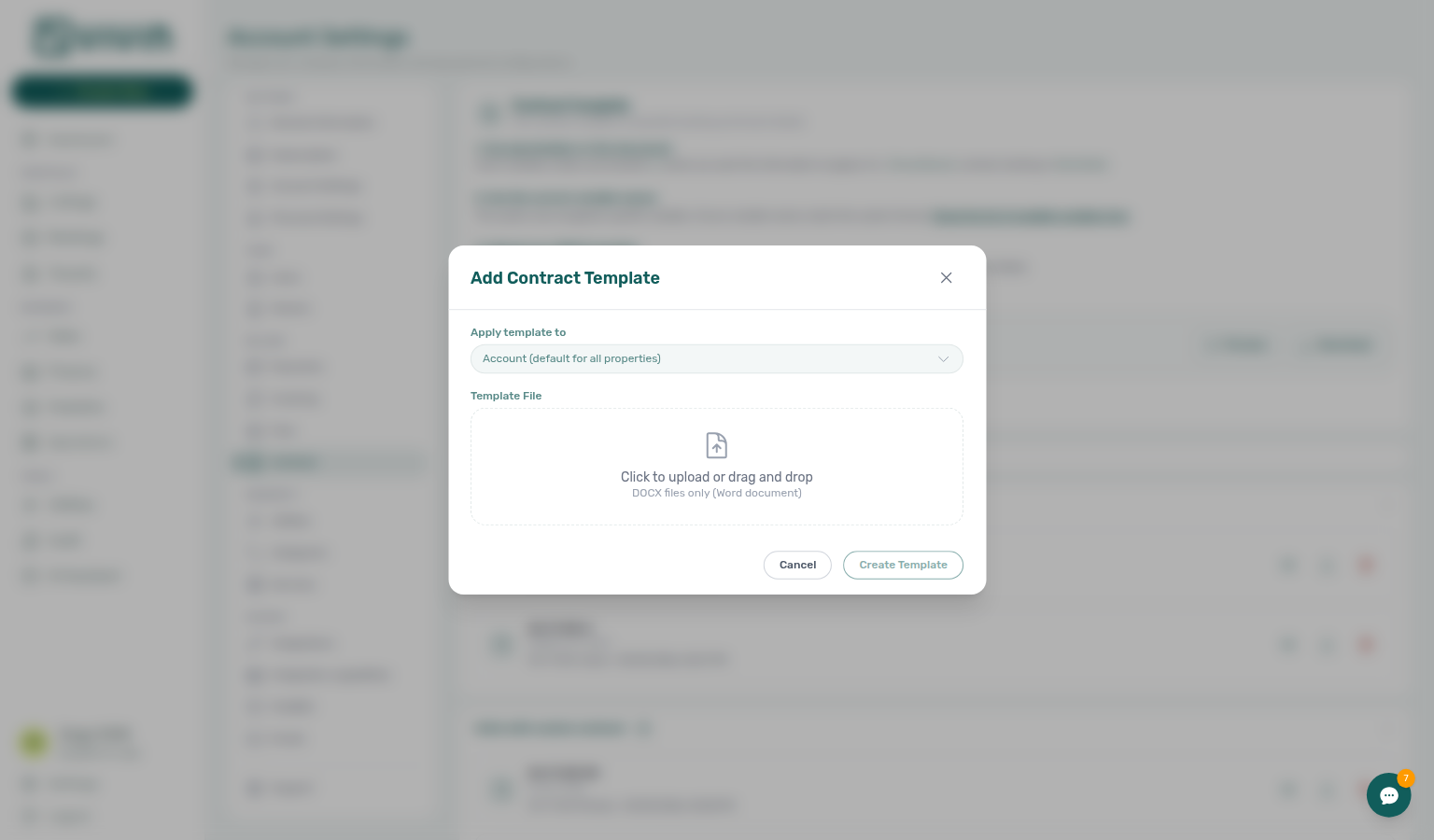
The modal also supports Property and Unit scopes when you need an override instead of changing the account default. Use Replace on an existing override card to open the same dialog with scope locked to that entity.
Fonts and PDF fidelity
Vivin converts your .docx to PDF with LibreOffice on the server. Layout depends on font metrics: if the conversion environment does not have a metric-compatible face for a font used in the template, LibreOffice substitutes a wider fallback. That silently re-flows the document — mid-word wraps, truncated headings, shifted page breaks, and tables that overflow — even though the same file looks perfect in Word on your laptop.
Prefer these faces (metric-compatible substitutes are installed in production):
| Author in Word (or clone) | Notes |
|---|---|
| Arial / Helvetica | Classic sans |
| Times New Roman | Classic serif |
| Courier New | Monospace |
| Calibri / Carlito | Word’s modern default body face |
| Cambria / Caladea | Word’s modern default heading/serif face |
| Calibri Light | Treated as layout-safe with Calibri metrics |
Avoid brand or Office-only faces that have no free metric clone — notably Aptos (Office 2024 default) and many decorative / display fonts. Those still substitute and re-flow.
After upload, open Preview on the Contract tab (or the eye control on Listings → Contract) and compare pagination and table edges to your Word file. A mismatch on preview is almost always a font substitution — rewrite body/heading styles to Calibri, Arial, Cambria, or Times New Roman, then re-upload. Upload itself is never blocked for unsupported fonts (same non-blocking rule as the baked-signature image warning).
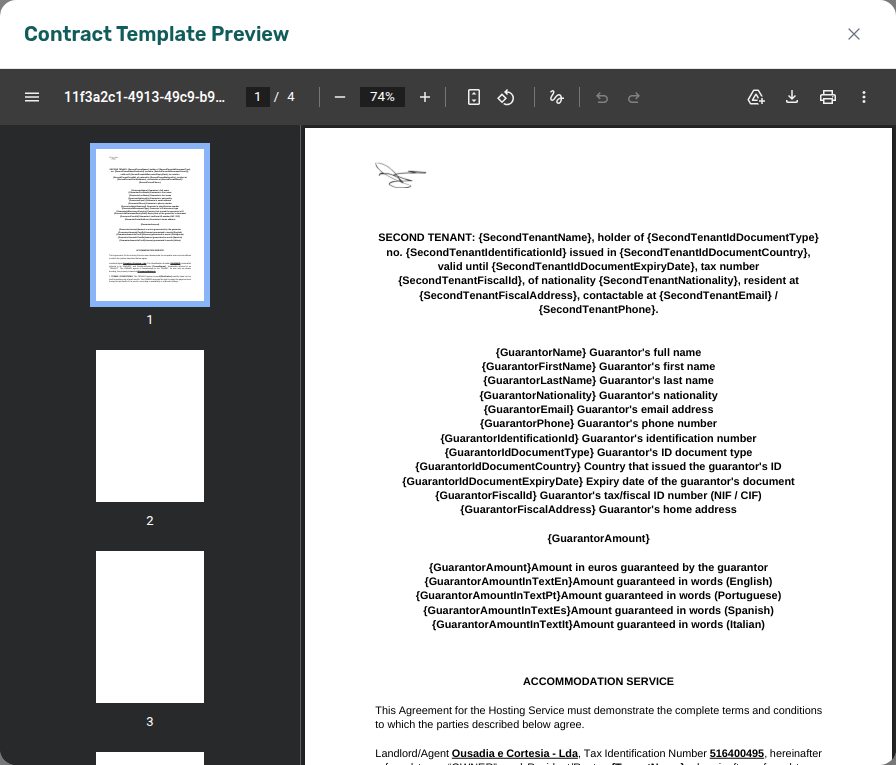
FAQ: Why does my contract PDF look different from Word?. Glossary: Contract PDF fonts.
Using dynamic variables
Financial tokens reference Invoicing & Payments — Dual pricing and Categories — Lease Purpose — overlap with Emails — Dynamic variables for tenant-facing copy.
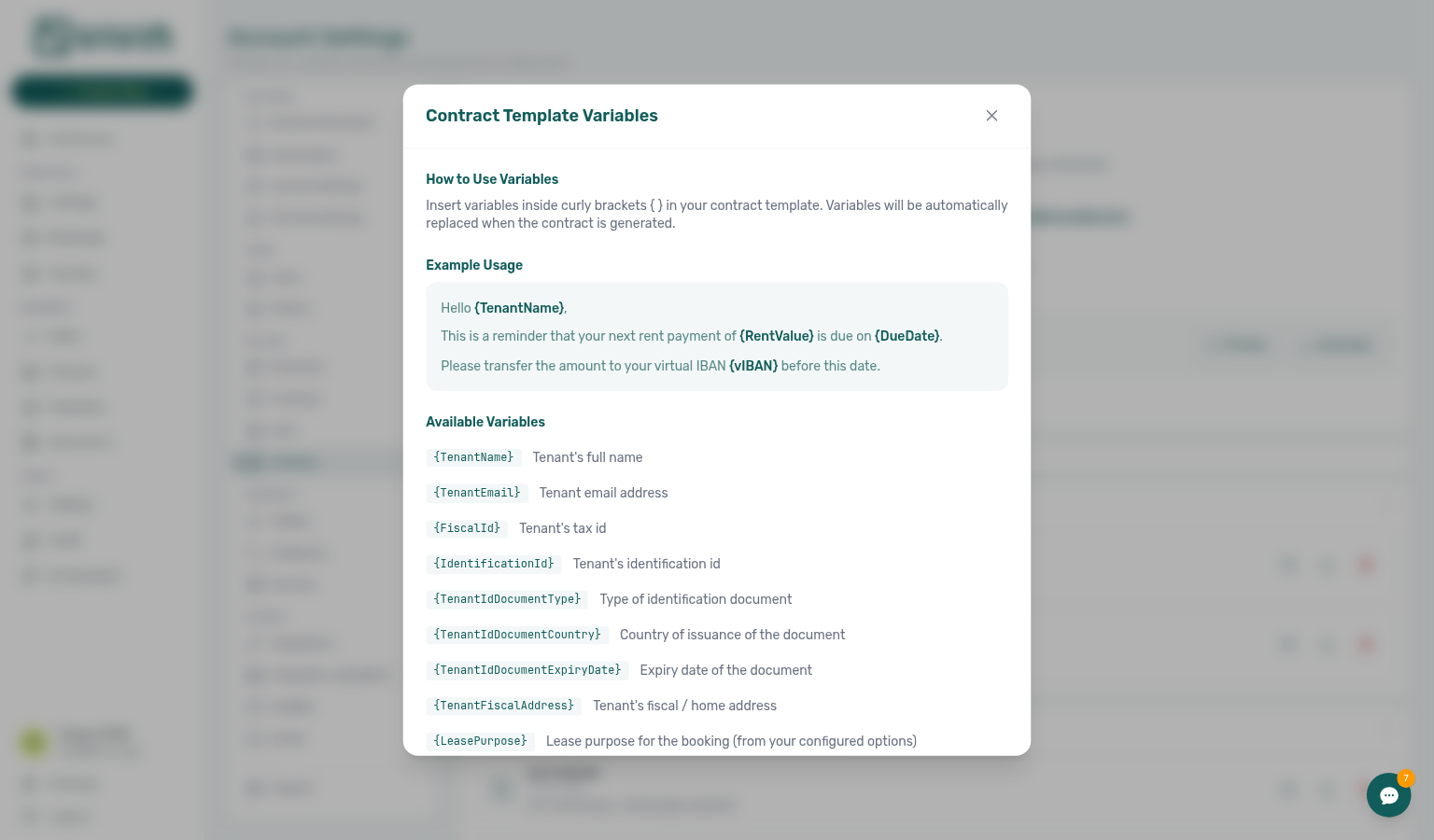
Insert placeholders in your .docx using single braces around the token name, for example {TenantName} and {StartDate}. Vivin replaces them when generating the contract. Use the exact names shown below (PascalCase inside the braces). When a known variable has no value, that spot stays blank unless you turn on Empty variables (Print N/A for empty variables).
On the Contract tab, open Check the list of available variables here to see the same catalogue in a scrollable modal (useful when authoring offline).
Tenant variables
| Variable | Output |
|---|---|
{TenantName} | Tenant's full name |
{TenantEmail} | Tenant's email address |
{TenantPhone} | Tenant's phone number |
{Nationality} | Tenant's nationality |
{FiscalId} | Tenant's tax/fiscal ID number |
{IdentificationId} | Tenant's passport or ID number |
{TenantIdDocumentType} | Tenant's ID document type (e.g. Passport, ID Card) |
{TenantIdDocumentCountry} | Country of the tenant's ID document |
{TenantIdDocumentExpiryDate} | Tenant's ID document expiry date (DD/MM/YYYY) |
{TenantFiscalAddress} | Tenant's home address (billing address if empty) |
{%TenantSignature} | Tenant's signature image — filled when the tenant signs |
{%LandlordSignature} | Landlord's signature image — filled automatically when the tenant signs (see Landlord signature) |
{%GuarantorSignature} | Guarantor's signature image — drawn in the tenant portal when a guarantor signs; blank on drafts and when no guarantor signed (see Guarantor variables) |
Second tenant variables
When a booking has a second tenant, these render that person's details. They are available only when Second tenant is switched on in Settings → Preferences → Booking Defaults and the booking’s Tenants number is at least 2; on a booking with no second tenant they all stay blank (or print N/A if Empty variables is on), so a template that uses them stays safe on single-tenant bookings.
A second tenant records identity details only. Billing details, bank details (including the IBAN) and tenant category are intentionally not available — invoicing, payouts and category rules always follow the main tenant.
Switching Second tenant back off hides the section but keeps any details already saved, and contracts generated afterwards still fill these variables. Clear the fields on the booking first if you need them to stop appearing.
| Variable | Output |
|---|---|
{SecondTenantName} | Second tenant's full name (first + last) |
{SecondTenantFirstName} | Second tenant's first name |
{SecondTenantLastName} | Second tenant's last name |
{SecondTenantEmail} | Second tenant's email address |
{SecondTenantPhone} | Second tenant's phone number |
{SecondTenantNationality} | Second tenant's nationality |
{SecondTenantIdentificationId} | Second tenant's identification number |
{SecondTenantIdDocumentType} | Second tenant's ID document type |
{SecondTenantIdDocumentCountry} | Country that issued the second tenant's ID |
{SecondTenantIdDocumentExpiryDate} | Second tenant's ID expiry date (DD/MM/YYYY) |
{SecondTenantFiscalId} | Second tenant's tax/fiscal ID number (NIF / CIF) |
{SecondTenantFiscalAddress} | Second tenant's home address |
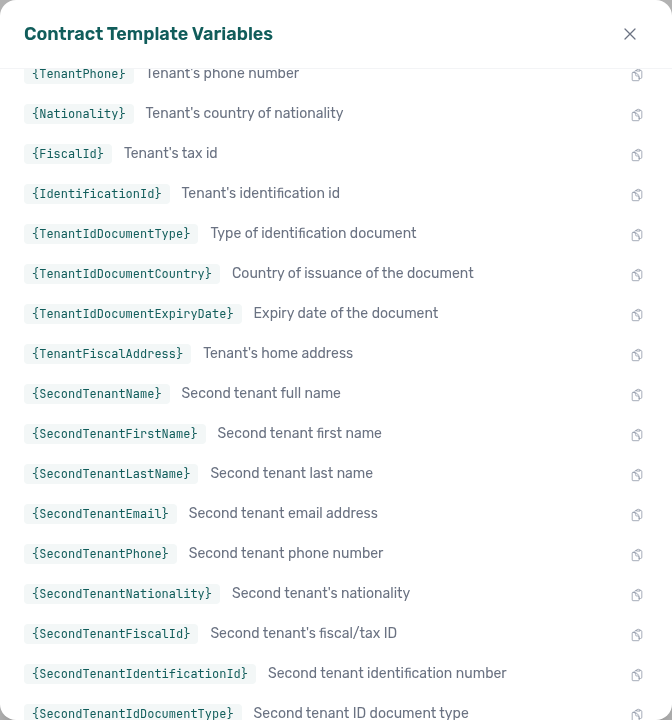
Add these tokens to your .docx only after Second tenant is available in your workspace. A placeholder Vivin does not recognise yet is left blank — or prints N/A if Empty variables is on. After the feature is live, regenerate the contract so names and IDs fill in.
Guarantor variables
When a booking has a guarantor, these render that person's details. They are available only when Guarantor is switched on in Settings → Preferences → Booking Defaults — a separate switch from Second tenant, so you can use either without the other. On a booking with no guarantor they all stay blank (or print N/A if Empty variables is on).
A guarantor records identity details plus the amount guaranteed; billing, bank details and tenant category are not available. Unlike the second tenant, the guarantor does not depend on the booking's tenant count — a single-tenant booking can still have one. UI walkthrough: Bookings — Guarantor (bookings-detail-contract-info-guarantor-accordion.png, bookings-guarantor-flow.mp4). Catalogue shot below: settings-contract-variables-guarantor.png.
| Variable | Output |
|---|---|
{GuarantorName} | Guarantor's full name (first + last) |
{GuarantorFirstName} | Guarantor's first name |
{GuarantorLastName} | Guarantor's last name |
{GuarantorNationality} | Guarantor's nationality |
{GuarantorEmail} | Guarantor's email address |
{GuarantorPhone} | Guarantor's phone number |
{GuarantorIdentificationId} | Guarantor's identification number |
{GuarantorIdDocumentType} | Guarantor's ID document type |
{GuarantorIdDocumentCountry} | Country that issued the guarantor's ID |
{GuarantorIdDocumentExpiryDate} | Guarantor's ID expiry date (DD/MM/YYYY) |
{GuarantorFiscalId} | Guarantor's tax/fiscal ID number (NIF / CIF) |
{GuarantorFiscalAddress} | Guarantor's home address |
{GuarantorAmount} | Amount guaranteed, in euros |
{GuarantorAmountInTextEn|Pt|Es|It} | The same amount spelled out in the named language (see Amount-in-text variables) |
{%GuarantorSignature} | Guarantor's signature image — drawn in the tenant portal at signature time; blank on drafts and when no guarantor signed (use the % prefix, same as tenant / landlord signatures) |
{GuarantorAmount} is the figure the guarantor commits to cover, entered in the Guarantor amount (€) field on the booking’s Guarantor accordion. It renders the number only, so write the currency into the template yourself — for example Guarantee: {GuarantorAmount} €. Leave the field empty and the variable stays blank (or prints N/A if Empty variables is on) rather than 0, so a contract never states a guarantee that was not agreed. To print the same figure in words — três mil e quinhentos euros — use the matching {GuarantorAmountInText…} variable for the language your clause is written in.
Place {%GuarantorSignature} in the signature block when your contract needs a guarantor / avalista signature line. Like {%TenantSignature} and {%LandlordSignature}, drafts stay blank until the guarantor actually signs in the Tenant Portal — on bookings with a guarantor name, the portal wizard adds a fifth Guarantor step after the tenant signs (tenant-portal-signature-modal-guarantor-step.png). A booking with no guarantor (or a guarantor who never signed) leaves the placeholder empty rather than inventing a mark.
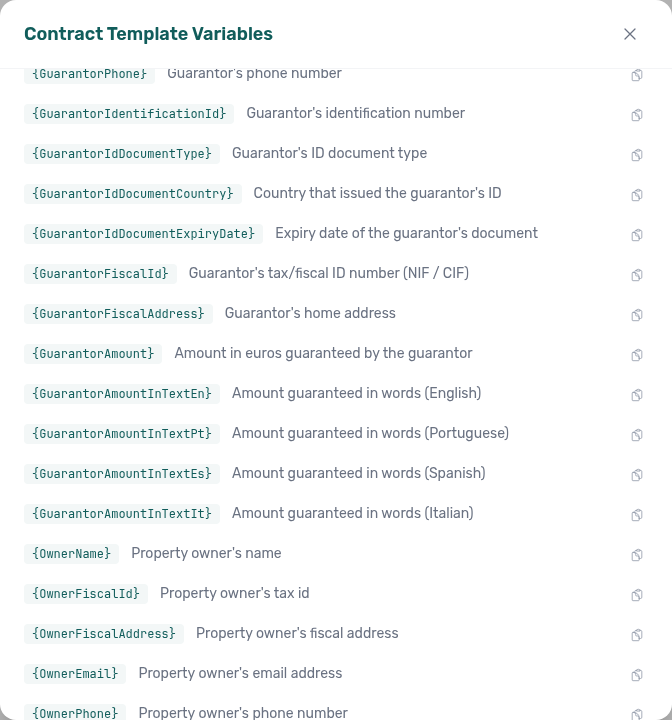
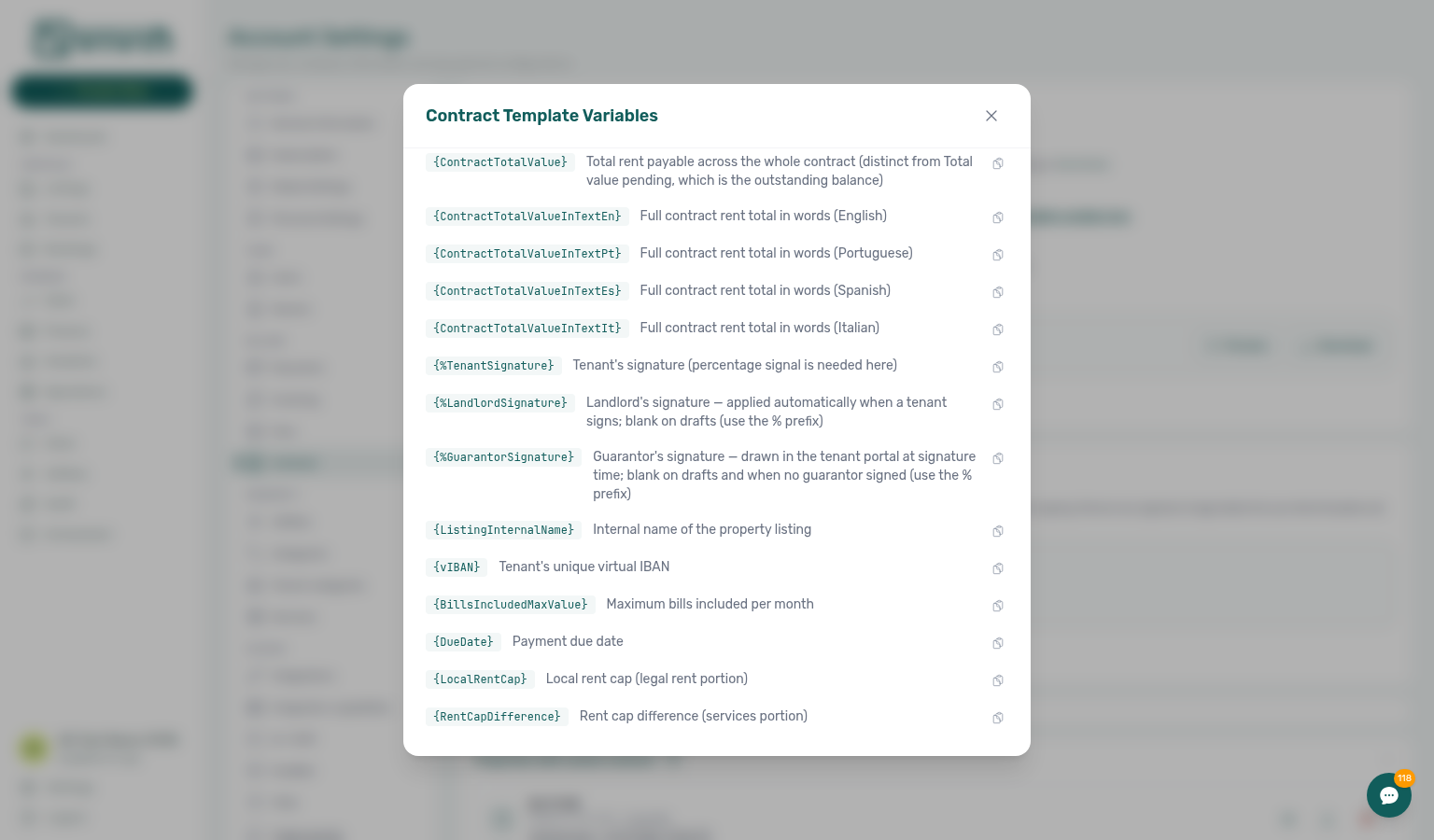
Switching Guarantor back off hides the section but keeps any details already saved, and contracts generated afterwards still fill these variables. Clear the fields on the booking first if you need them to stop appearing.
Owner variables
These come from the property's owner record in Settings → Owners. A property that has no owner assigned leaves them blank (or prints N/A if Empty variables is on).
| Variable | Output |
|---|---|
{OwnerName} | Owner's name |
{OwnerFiscalId} | Owner's tax/fiscal ID number (NIF / CIF) |
{OwnerFiscalAddress} | Owner's fiscal address |
{OwnerEmail} | Owner's email address |
{OwnerPhone} | Owner's phone number |
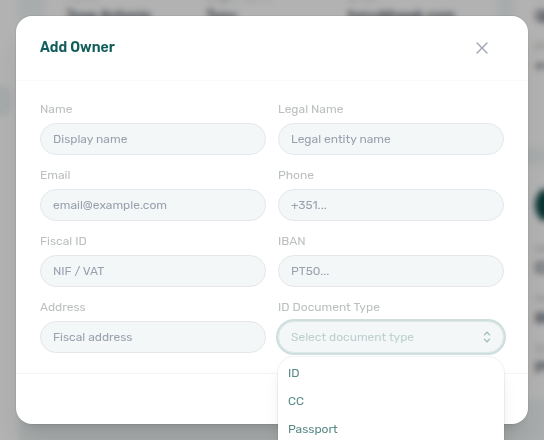
{OwnerIdDocumentType} | Owner's ID document type (e.g. Passport, ID, CC) — set it on the Owners record |
Use these single-brace names exactly — there is no {OwnerFullName} or {OwnerAddress} alias. FAQ: Which owner fields appear on generated contracts?.
Set ID Document Type on the owner before you generate contracts that use {OwnerIdDocumentType}:
Property and unit variables
| Variable | Output |
|---|---|
{PropertyAddress} | Full property address |
{ListingInternalName} | Unit/listing internal name |
{Floor} | Floor number |
{RoomNumber} | Room number |
{PropertyTotalRooms} | Number of units in the property (see Property rooms) |
{ListingArea} | Unit surface area in m² (see Surface area variables) |
{PropertyArea} | Building surface area in m² (see Surface area variables) |
{PropertyRoomRange} | The property's unit names as a range or list (see Property rooms) |
Booking and financial variables
| Variable | Output |
|---|---|
{StartDate} | Contract start date (DD/MM/YYYY) |
{StartDateInTextEn|Pt|Es|It} | The same start date written out, e.g. 1 de septiembre de 2026 (see Dates in long form) |
{EndDate} | Contract end date (DD/MM/YYYY) |
{EndDateInTextEn|Pt|Es|It} | The same end date written out (see Dates in long form) |
{ContractDurationMonths} | Contract duration in whole months, as a number (see Contract duration) |
{ContractDurationInTextEn|Pt|Es|It} | The same duration spelled out, e.g. seis [6] meses (see Contract duration) |
{ContractDurationDays} | Days left over after the whole months, as a number (see Contract duration) |
{ContractDurationFullInTextEn|Pt|Es|It} | Months and leftover days spelled out, e.g. tres [3] meses y trece [13] días (see Contract duration) |
{CheckInDate} | Tenant's physical move-in date (DD/MM/YYYY) |
{CheckInDateInTextEn|Pt|Es|It} | The same check-in date written out (see Dates in long form) |
{CheckOutDate} | Tenant's physical move-out date (DD/MM/YYYY) |
{CheckOutDateInTextEn|Pt|Es|It} | The same check-out date written out (see Dates in long form) |
{CheckInTime} | Check-in time |
{CheckOutTime} | Check-out time |
{RentValue} | Monthly rent amount |
{SecurityDeposit} | Security deposit amount |
{AdministrativeFee} | Administrative fee amount |
{CleaningFee} | Cleaning fee amount |
{RentJan}–{RentDec} | Monthly rent for each month (Jan–Dec) |
{ContractSignDate} | Contract signing date (DD/MM/YYYY). Prints today only while the stay has not started yet; from the start date onwards it prints the booking start date (see Contract sign date vs generation date) |
{ContractGenerationDate} | Date the contract PDF is produced (DD/MM/YYYY) — always today at generation time. Prefer this on signature lines when you regenerate after the stay has started (renewals) |
{TotalValuePending} | Total value pending |
{ContractTotalValue} | Total rent payable across the whole contract (distinct from Total value pending) |
{Debt} | Outstanding debt amount |
{BillsIncludedMaxValue} | Maximum bills-included value |
{vIBAN} | Tenant's virtual IBAN (bank transfer reference for this booking — not the tenant's personal IBAN) |
{DueDate} | Payment due date where applicable |
{LocalRentCap} / {RentCapDifference} | Populated when the booking uses dual pricing / local rent cap: LocalRentCap is the frozen cap in euros; RentCapDifference is rent − cap (the services slice). Empty when dual pricing does not apply. |
The in-app modal may list additional tokens (for example {LeasePurpose}). Treat the modal as the authoritative catalogue for your workspace.
Contract sign date vs generation date
Two booking-date tokens look similar in available variables, but they answer different questions on a printed lease:
| Token | What it prints | When to use it |
|---|---|---|
{ContractSignDate} | Today only while the booking start date is still in the future; from the start date onwards, the start date | Classic first-issue leases where the signature line should match the stay’s start once the contract has begun |
{ContractGenerationDate} | Always today’s date whenever Vivin builds or regenerates the PDF | Renewals and any regenerate-after-start flow where the signature line must show the day the document was actually produced — not the original start date |
{ContractSignDate} behaviour is unchanged for existing templates. When you renew a stay and regenerate the contract, swap the signature-line token to {ContractGenerationDate} (or author renewals with that token from the start) so the PDF does not reprint the first start date as if it were the signing day.
Both values are filled at render time — there is no separate “signature date” field to edit on the booking. The same map applies on first generation, regenerate, and the signed portal PDF.
Open Check the list of available variables here on Settings → Contract and scroll to the booking block — {ContractSignDate} and {ContractGenerationDate} sit together just after the monthly rent tokens:
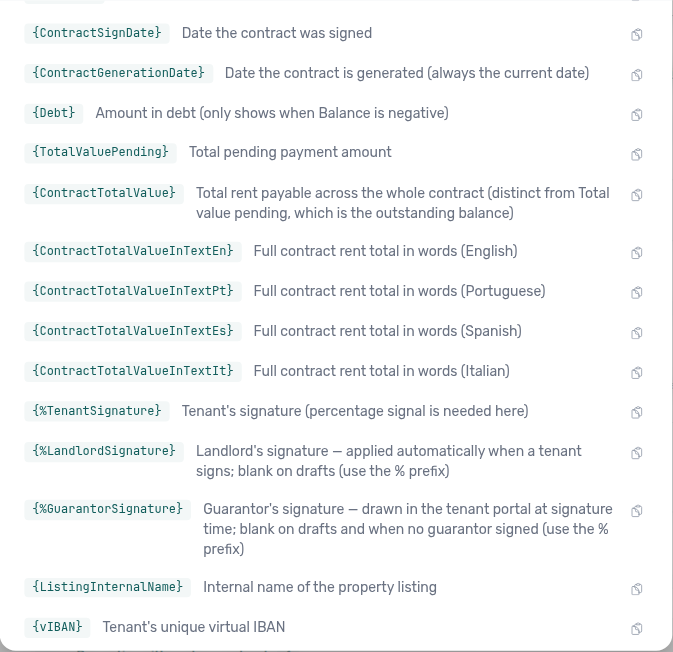
If operators regenerate contracts mid-stay or for renewals, put {ContractGenerationDate} on the signature line. Leave {ContractSignDate} only when you intentionally want the start-date collapse after move-in.
The same two tokens appear in Emails → Variables for lifecycle and Communication Rule body copy.
Landlord signature
The {%LandlordSignature} placeholder lets Vivin apply your signature to a contract as an image — the same way {%TenantSignature} works for the tenant and {%GuarantorSignature} works for a guarantor. This replaces the old practice of baking a signature picture into the Word template, which made every generated draft look pre-signed before anyone had actually signed.
How it works
- On a draft, the placeholder is empty. A generated contract (manual or from an OTA booking) never shows your signature until the tenant signs — so a draft is never a pre-signed document.
- When the tenant e-signs in the tenant portal, your signature is applied automatically in the same document, so the signed PDF is the finished, both-party contract. There is no extra step for you — the operator flow is exactly as before.
- If you have no signature on file, or the template does not contain
{%LandlordSignature}, the tenant can still sign normally — the contract is simply signed by the tenant only. Applying your signature never blocks or delays the tenant's signature. - Guarantor signature is separate: add
{%GuarantorSignature}when the template needs an avalista / guarantor mark. It fills only when a guarantor signs in the portal — see Guarantor variables.
Set up your signature
- Open Settings ▸ Contract.
- In the Landlord signature card, either upload a PNG (transparent background recommended) or draw it with your mouse/finger.
- Vivin trims and resizes the image automatically, and clamps it to a sensible size when rendering, so it always fits the signature block — you don't need to worry about the source image's dimensions.
- Add the
{%LandlordSignature}placeholder to your template wherever the landlord signature should appear (typically the signature block at the end), and remove any signature image that was previously baked into the document. - Use Preview to check the placement — the preview renders your real signature so you can confirm exactly where it lands.
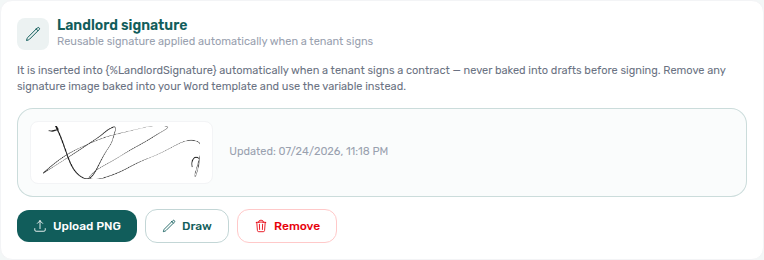
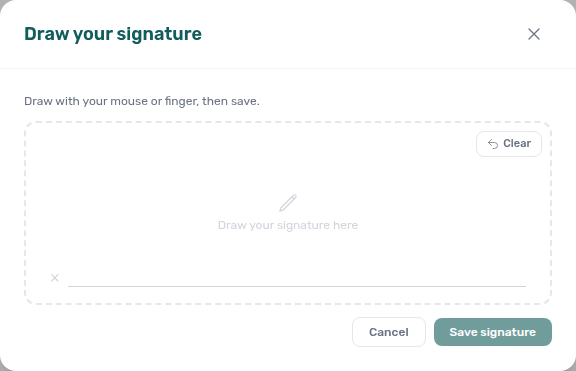
If your current template has a signature baked in as a picture, replace that picture with the {%LandlordSignature} placeholder and re-upload the template. Until you do, generated drafts will keep showing the baked-in signature. Vivin warns you on upload when a template still contains an embedded image that might be a baked signature.
Empty variables
The Empty variables card on Settings → Billing → Contract controls what a placeholder with no value prints in the generated PDF.
Print N/A for empty variables starts off (blank). Turn it on when you want missing text values to print N/A instead of a gap. The setting applies to new contracts, regenerated contracts, and the signed document. It does not rewrite PDFs that are already stored until you regenerate.
Signature image tokens ({%TenantSignature}, {%LandlordSignature}, {%GuarantorSignature}) stay blank either way — N/A is not drawn as an image.
The capture below shows the card with the switch on. Leave the default off if blank placeholders match your legal wording. Open Settings → Billing → Contract and scroll past Landlord signature to reach the card.

Amount-in-text variables
Amount-in-text tokens build on the euro figures in Using dynamic variables and pair with Invoicing & Payments — Dual pricing when rent changes month to month.
Some legal templates must spell an amount out in words next to the figure (for example 1.500 € (mil e quinhentos euros)). Vivin provides amount-in-text tokens that render an amount as euro words, including the currency. Like every other placeholder, they use single braces and are case-sensitive — write them exactly as shown.
Each token names its own language with a suffix — …En (English), …Pt (Portuguese), …Es (Spanish), …It (Italian). Because the language lives in the token, you can mix languages in a single .docx: put a Portuguese clause and an English clause side by side and choose the language per token occurrence. This is what makes bilingual templates possible.
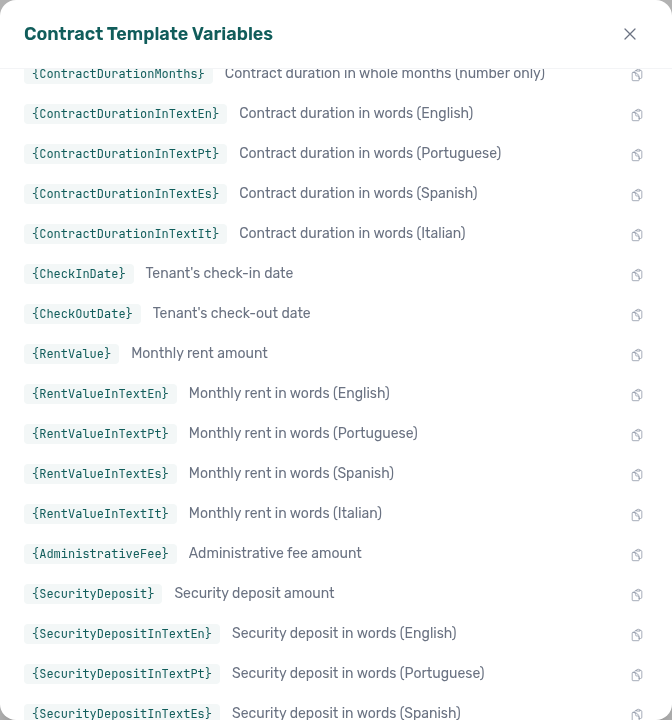
Open available variables on the Contract tab and scroll past {RentValue} — the catalogue lists every language-suffixed rent, deposit, cleaning-fee, contract-total, and guarantor-amount token with a one-line description and a copy control:
Available tokens
Monthly rent in words
| Variable | Renders in |
|---|---|
{RentValueInTextEn} | English (always) |
{RentValueInTextPt} | Portuguese (always) |
{RentValueInTextEs} | Spanish (always) |
{RentValueInTextIt} | Italian (always) |
Security deposit in words
| Variable | Renders in |
|---|---|
{SecurityDepositInTextEn} | English (always) |
{SecurityDepositInTextPt} | Portuguese (always) |
{SecurityDepositInTextEs} | Spanish (always) |
{SecurityDepositInTextIt} | Italian (always) |
Cleaning fee in words
| Variable | Renders in |
|---|---|
{CleaningFeeInTextEn} | English (always) |
{CleaningFeeInTextPt} | Portuguese (always) |
{CleaningFeeInTextEs} | Spanish (always) |
{CleaningFeeInTextIt} | Italian (always) |
These read the same cleaning fee as {CleaningFee}, so the figure and the words always agree. A booking with no cleaning fee spells zero euros (localised), matching the 0 that {CleaningFee} prints — unlike the guarantee amount below, which stays blank.
Full contract total
| Variable | Output |
|---|---|
{ContractTotalValue} | Full-contract total as a number |
{ContractTotalValueInTextEn} | Full-contract total in words — English (always) |
{ContractTotalValueInTextPt} | Full-contract total in words — Portuguese (always) |
{ContractTotalValueInTextEs} | Full-contract total in words — Spanish (always) |
{ContractTotalValueInTextIt} | Full-contract total in words — Italian (always) |
Guarantee amount
| Variable | Output |
|---|---|
{GuarantorAmount} | Amount guaranteed as a number |
{GuarantorAmountInTextEn} | Amount guaranteed in words — English (always) |
{GuarantorAmountInTextPt} | Amount guaranteed in words — Portuguese (always) |
{GuarantorAmountInTextEs} | Amount guaranteed in words — Spanish (always) |
{GuarantorAmountInTextIt} | Amount guaranteed in words — Italian (always) |
These read the Amount (€) on the booking's guarantor. A booking with no guarantee amount renders all five blank — never 0 and never zero euros.
What the contract total means
{ContractTotalValue} (and its in-text variants) is the total rent payable across the whole contract duration — the contractual obligation. Vivin sums it from the booking's payment plan: the rent for every month of the stay, including proration, first/last-month splits, and dual-pricing rent.
{ContractTotalValue} is the total the tenant is contracted to pay and does not change as payments come in. {TotalValuePending} is the outstanding balance (debt) and shrinks as the tenant pays. Use {ContractTotalValue} for the contractual sum, and reach for {TotalValuePending} only when you specifically mean the amount still owed.
{ContractTotalValue} is total rent only. It is not the same figure as the Contract Value shown in the booking-details header, which also includes cleaning, admin and exit fees (everything except the deposit) — so the two normally differ. This token deliberately renders the total rent payable; the rent-plus-fees figure is not currently exposed as a contract variable.
The same rent-only total lands on the Bookings list export as contractTotalValue, next to bookingTotalValue (every payment line). Use the export column when you need spreadsheet rent totals that match this token.
How amounts are rendered
Amounts render as euro words including the currency:
{RentValueInTextEs}→ochocientos cincuenta euros{RentValueInTextPt}→mil e quinhentos euros{RentValueInTextEn}→eight hundred and fifty euros
Cents are spelled out after the euros:
- Spanish →
… euros con cincuenta céntimos - Portuguese →
… euros e cinquenta cêntimos - English →
… euros and fifty cents - Italian →
… euro e cinquanta centesimi
Whole amounts omit the cents clause, and a zero amount renders as zero euros (localised).
When rent varies month to month, the token renders a localised range between the lowest and highest monthly rent:
{RentValueInTextEs}→novecientos a mil cien euros{RentValueInTextPt}→novecentos a mil e cem euros{RentValueInTextEn}→nine hundred to one thousand one hundred euros
Bilingual template examples
Because language-suffixed tokens always render in their named language, you can write one clause per language in the same .docx.
Portuguese + English
A renda mensal é de {RentValue} € ({RentValueInTextPt}).
The monthly rent is €{RentValue} ({RentValueInTextEn}).
Spanish + English
La renta mensual es de {RentValue} € ({RentValueInTextEs}).
The monthly rent is €{RentValue} ({RentValueInTextEn}).
Rent range — when the monthly rent changes across the stay:
Renda mensal: {RentValueInTextPt}.
→ Renda mensal: novecentos a mil e cem euros.
Cents — when an amount includes céntimos/cents:
Caução: {SecurityDepositInTextEn}.
→ Caução: eight hundred and fifty euros and fifty cents.
Always use the language-suffixed token (…En, …Pt, …Es, …It) that matches the language of the surrounding clause. A single-language template uses one suffix throughout; a bilingual template uses two suffixes in their respective clauses.
Dates in long form
{StartDate}, {EndDate}, {CheckInDate} and {CheckOutDate} print a date in figures (01/09/2026). Each of the four also has a long form, one token per language, for clauses that have to read as prose:
El contrato comienza el {StartDateInTextEs}
→ El contrato comienza el 1 de septiembre de 2026
| Token | Output for 01/09/2026 |
|---|---|
{StartDate} | 01/09/2026 |
{StartDateInTextEn} | September 1, 2026 |
{StartDateInTextPt} | 1 de setembro de 2026 |
{StartDateInTextEs} | 1 de septiembre de 2026 |
{StartDateInTextIt} | 1 settembre 2026 |
{EndDateInText…}, {CheckInDateInText…} and {CheckOutDateInText…} follow the same pattern. The language suffixes work exactly like the amount-in-text variables — pick the one that matches the surrounding clause.
- Only the month becomes a word. The day and the year stay as figures, which is the form a lease clause normally uses.
- The day is not zero-padded:
1 de septiembre, never01 de septiembre. Use{StartDate}when you want the padded numeric form. - Each long form prints the same day as its numeric token.
{StartDateInText…}and{EndDateInText…}follow the contract dates — so if the booking is set to use the check-in/check-out dates on the contract, they move with it, exactly like{StartDate}/{EndDate}and the duration. - If a date is missing or invalid, the long form renders empty, together with its numeric token — never today's date.
- The existing
{StartDate}/{EndDate}/{CheckInDate}/{CheckOutDate}tokens are unchanged, so templates already in use keep printing exactly what they print today.
{StartDate} {StartDateInTextEs} prints 01/09/2026 1 de septiembre de 2026 — the same date twice. Use one token per clause.
Contract duration
{ContractDurationMonths} prints the length of the lease in whole months, as a plain number — no "months" word, so you can phrase the clause however you like. {ContractDurationInTextEn} / …Pt / …Es / …It print the same value spelled out, in the mixed words-and-figures format contracts usually require:
Duración: {ContractDurationInTextEs}
→ Duración: seis [6] meses
| Token | Output for a 6-month lease |
|---|---|
{ContractDurationMonths} | 6 |
{ContractDurationInTextEn} | six [6] months |
{ContractDurationInTextPt} | seis [6] meses |
{ContractDurationInTextEs} | seis [6] meses |
{ContractDurationInTextIt} | sei [6] mesi |
The language suffixes work exactly like the amount-in-text variables — pick the one that matches the surrounding clause.
Leases that are not a whole number of months
Because partial months are dropped, a lease of 3 months and 13 days prints 3 / tres [3] meses — the 13 days are not in those tokens. Use the full-duration family when the clause has to state the exact period:
| Token | Output for 18/08/2026 → 30/11/2026 |
|---|---|
{ContractDurationMonths} | 3 |
{ContractDurationDays} | 13 |
{ContractDurationFullInTextEn} | three [3] months and thirteen [13] days |
{ContractDurationFullInTextPt} | três [3] meses e treze [13] dias |
{ContractDurationFullInTextEs} | tres [3] meses y trece [13] días |
{ContractDurationFullInTextIt} | tre [3] mesi e tredici [13] giorni |
{ContractDurationDays}is the remainder, not a total day count — it is what is left after{ContractDurationMonths}. The two are designed to be read together:{ContractDurationMonths} meses y {ContractDurationDays} días.- On an exact-month lease the remainder is
0, and{ContractDurationFullInText…}prints justseis [6] meses— neverseis [6] meses y cero [0] días. - The existing
{ContractDurationMonths}and{ContractDurationInText…}tokens are unchanged, so templates already in use keep printing exactly what they print today.
{ContractDurationInTextEs} {ContractDurationMonths} prints tres [3] meses 3 — the spelled token already contains the figure in brackets, so the second token repeats it. Use one token per clause, or the Full one when you need the days.
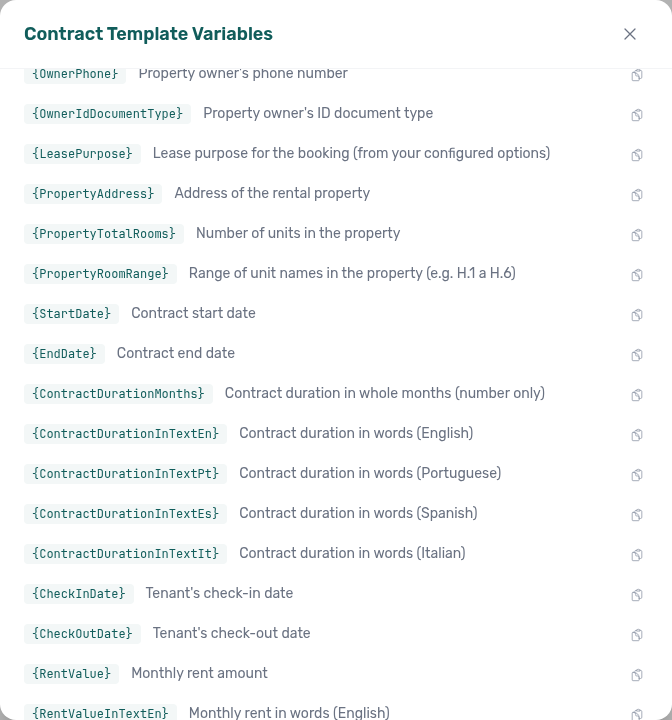
Open available variables on the Contract tab and scroll past {StartDate} / {EndDate} — the catalogue lists the numeric duration token and every language-suffixed words form with a one-line description and a copy control:
How the duration is counted
- It is measured between the same two dates the contract prints as
{StartDate}and{EndDate}. If the booking is set to use the check-in/check-out dates on the contract, the duration follows those instead — the three tokens can never disagree with each other. - The end date is inclusive (it is the last day of the lease), so
01/01/2026 → 30/06/2026is 6 months, not 5. - Partial months are dropped, never rounded up:
01/01/2026 → 15/07/2026is 6 months. The leftover days are available separately — see Leases that are not a whole number of months. This matches how the minimum/maximum stay period is checked when a booking is created. - A stay shorter than a month prints
0(cero [0] meses), which is a real answer — not a missing one. Its days still show in{ContractDurationDays}. - If a date is missing, or the end date falls before the start date, every duration token renders empty rather than printing a wrong or negative number.
Property rooms
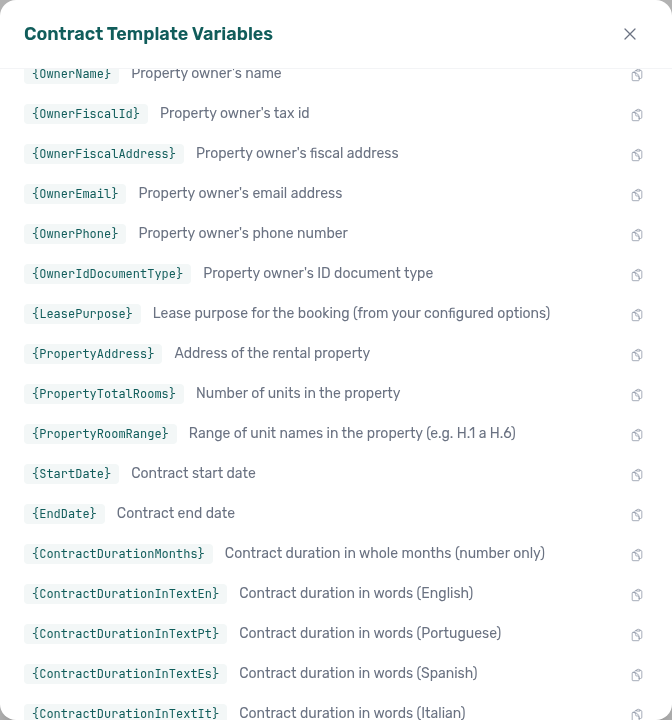
{PropertyTotalRooms} prints how many units the property has — the same "rooms" figure the app shows everywhere else (every non-deleted unit, whatever its type; a whole-apartment property counts as 1). A property with no units prints 0; the token is only blank when the count is genuinely unavailable.
{PropertyRoomRange} prints the property's unit names. It only collapses them into a range when the names prove that is safe:
| The property's units | {PropertyRoomRange} |
|---|---|
H.1 … H.6 (all present) | H.1 a H.6 |
H.1, H.3, H.6 | H.1, H.3, H.6 |
H.1 only | H.1 |
H.1, A.2 | A.2, H.1 |
Suite Azul, Ático | Ático, Suite Azul |
H.1, H.1, H.2 | H.1, H.1, H.2 |
A contract is a legal document, so H.1 a H.6 must never be printed for a property that does not actually have H.2, H.4 and H.5. Whenever the unit names have gaps, mix prefixes, or are not numbered, Vivin lists them instead — sorted naturally, so H.2 comes before H.10.
Two units may share a name (unit names are not forced to be unique). Both are listed, because both are real, separately-bookable units — a repeated name switches the token to the list form rather than being hidden inside a range.
Unit names come from each unit's internal name. Keep them consistently numbered (H.1, H.2, H.3, …) if you want the compact range form.
Open available variables and scroll to the property block — {PropertyTotalRooms} and {PropertyRoomRange} sit just after {PropertyAddress}:
Surface area variables
{ListingArea} prints the unit's surface area in square metres and {PropertyArea} prints the building's. Both come from the areas you set on the Full integration pill — see Booking engine details — Surface area. A property or unit with no area set prints nothing.
| Variable | Output |
|---|---|
{ListingArea} | Unit surface area, e.g. 24.5 |
{PropertyArea} | Building surface area, e.g. 180 |
Each also has a written-out form, one token per language, so a clause can state the figure and the words together:
| Language | Unit | Property |
|---|---|---|
| English | {ListingAreaInTextEn} | {PropertyAreaInTextEn} |
| Portuguese | {ListingAreaInTextPt} | {PropertyAreaInTextPt} |
| Spanish | {ListingAreaInTextEs} | {PropertyAreaInTextEs} |
| Italian | {ListingAreaInTextIt} | {PropertyAreaInTextIt} |
The written form repeats the figure in brackets, the way a lease normally states a measurement:
| Area | {ListingAreaInTextPt} | {ListingAreaInTextEs} |
|---|---|---|
62 | sessenta e dois [62] metros quadrados | sesenta y dos [62] metros cuadrados |
24.5 | vinte e quatro vírgula cinquenta [24,50] metros quadrados | veinticuatro coma cincuenta [24,50] metros cuadrados |
1 | um [1] metro quadrado | un [1] metro cuadrado |
A typical clause pairs the two:
O quarto tem {ListingArea} m2 ({ListingAreaInTextPt}).
As with the amount and duration tokens, there is no plain {ListingAreaInText} — the language is part of the token name. That is what lets a bilingual template print the same area in two languages in different clauses.
Both the figure and the words are rounded the same way, so they always state the same measurement. An area entered as 24.567 prints 24.57 and reads as twenty-four point fifty-seven — never two different numbers in one sentence.
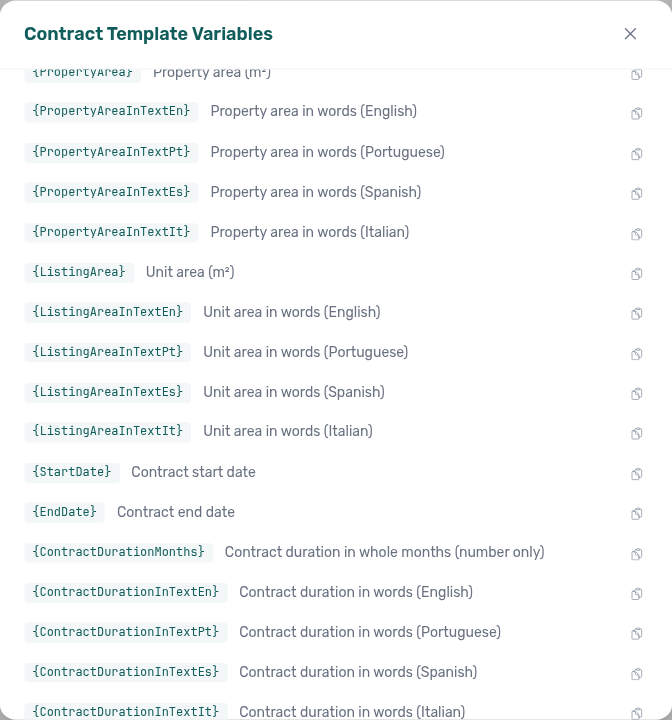
A property or unit with no surface area set prints nothing for both the figure and all four word tokens — Vivin does not invent 0 square metres. A stored 0 still prints as zero (and the matching words). Fill areas under Booking engine details — Surface area before you rely on these tokens in a lease.
Property and unit overrides
Resolution order is unit → property → account — per-building files pair with Listings — Contract tab and mixed-inventory onboarding in Onboarding a New Property.
Below the account default card, the Contract tab lists:
- Properties with custom contract — a
.docxthat applies to all units on that property unless a unit override exists. - Units with custom contract — a template for a single listing only.
Use Search to filter by property or unit name. On a property row, follow overrides links to scope the unit list to that building. Each card offers Preview, Replace, and Remove (remove restores the next fallback: unit → property → account default).
Unit-specific contract templates
Unit overrides pair with Processing a New Booking — Step 4 (generate PDF per unit), Listings — Contract tab (resolution chain), Portal settings — Mandatory for contract signing (portal gates after PDF exists), and Tenant Portal — Digital contract signing (portal signing after generation). When tenants report a missing Sign contract button, confirm a PDF was generated — FAQ — Tenant contract signing blocked.
When only some units need a different legal agreement (for example accommodation services vs long-term lease), assign a unit override:
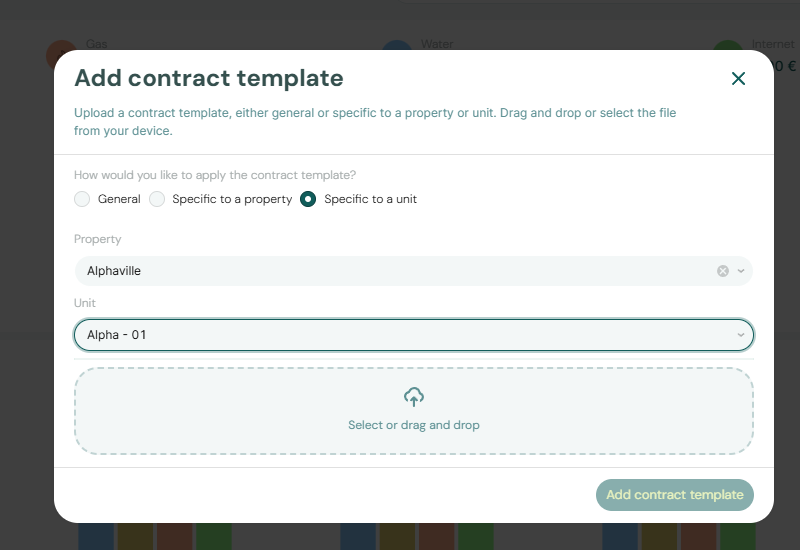
- Click Upload Contract Template (or Replace on a unit card).
- Choose scope Unit, pick the property and unit, and upload the alternative
.docx. - When a contract is generated for that unit, the unit template wins over the property and account defaults.
You can also set a property-level template so every unit on that building shares one file without uploading per unit.
Contract section cross-reference
Use the sections above for this settings area. Related setup pages are linked from Related below when present, or from Account Settings.
Related
Related below links this Account Settings tab to modules, workflows, concepts, and escalation paths.
Documentation map & escalation
- Account Settings hub — Tab pairing matrix across workspace configuration
- Deep Links — Account Settings — Bookmarkable
/settings/contract - Glossary — Term definitions used across settings and module docs
- FAQ — Empty contract variables — Blank vs N/A when a placeholder has no value
- FAQ — Lower rent below invoiced — Contract-value edits after months are exported to accounting
- Get Help & Support — Escalation when template generation or PDF attachment fails
Upstream & downstream workflows
- Onboarding a New Property — Property setup before first booking contract
- Processing a New Booking — Generate and send the first contract after a reservation is created
- Managing a Check-out & Deposit Refund — Contract end dates that drive Refund Due Date on Finance → Deposits
- Cancelling a Booking — Contract and schedule handling when a stay ends early
- Handling a Late Payment — Step 1 — Identify overdue confirmation charges when unsigned contracts delay portal gates or a payment overdue alert row-click brought you here
Deeper workflow reads
See Upstream & downstream workflows above for the same guides.
Related Account Settings tabs
- General Information — Company logo on PDF headers
- Categories — Charge-type tags and Lease Purpose values contract variables may reference
- Owners — Landlord variables referenced in generated
.docxtemplates - Tenant categories — Segment Contract portal module and field gates before generated PDFs reach tenants
- Portal settings — Mandatory fields before contract signing — Portal gates before digital signature
- Preferences — In-app notifications — Account-wide booking alerts when contract signing gates delay confirmations
- Emails — Communication variables (some overlap with contract tokens)
- Users and roles — Who can edit Contract templates and upload booking PDFs
- Interface Language — Locale for operator-facing contract variable labels
Operator modules
- Bookings — Upload contract — Attaching or regenerating a contract on an existing booking
- Listings — Contract tab — Template resolution chain (unit → property → account) before PDF generation
- Finance — Contract Values — Scheduled charges that contract variables reference after generation
- Audit — Discounts tab — Cross-portfolio discount export when contract-linked payment schedules include mid-stay repricing
- Notifications — Payment overdue alerts (in-app) — Operator Payments category rows when scheduled charges are overdue before contract signing gates clear
Deeper concept reads
- Tenant Portal — Contract signing after a generated PDF is attached to the booking
- FAQ — Tenant contract signing blocked — No PDF yet, mandatory Your Details gates, category locks, or Lease purpose; portal signing vs paper upload on Contract Info
- FAQ — Which date token on a signature line? —
{ContractSignDate}vs{ContractGenerationDate}for renewals - Automation & AI — Workflow automation that attaches generated contracts after booking confirmation
- Booking Lifecycle — Computed stay status while contracts and PDFs are generated or re-uploaded
- Payment Allocation — Two-layer receipts and credit note reject/revert warnings
- Integrations & Distribution — Imported marketplace bookings use the same contract template workflow as direct reservations
- Services Marketplace — Distinct from contract PDFs; portal add-ons use the Services catalogue
Companion API guides
- API Reference — Creating Bookings — Partner imports that still need operator-side contract generation after enqueue
- AI usage API — Operator JWT ledger (distinct from contract PDF generation on this tab)
Module documentation hubs
- Bookings — Operator UI for contract generation and portal signing gates
- Listings — Property wizard and per-property contract overrides
- Finance — Portfolio ledgers and deposit refund workflow tied to contract end dates
- Booking engine details — Marketing copy separate from contract
.docxtemplates - Tenants — Tenant profile fields referenced by contract variables
- Operations — Check-in/out coordination when unsigned contracts block access
- API Reference hub — Partner HTTP contracts and partial vs full feeds
Operator habit hubs
Day-to-day operator habits (lockout catch-up, pending receipts, payment triage, handoffs, and related playbooks) live on the Common Workflows habit hub.
Deep-link anchors for habit hubs
Lockout catch-up after password recovery
Pending manual receipt approval
Reject/revert mistaken receipts
Portfolio segmentation by tenant category
Notification row-click navigation
Payment alert to receivables triage
Confirmation alert triage
Finance debt receivables triage
Handling a Late Payment collections
Finance Income status drill-down
Cash flow forecast drill-down
Key glossary terms
- Invoiced floor (rent) — Rent and contract-value edits after months are exported to accounting
- FAQ — Lower rent below invoiced — Change monthly rent clamps and Contract Values → Edit amount blocks net below exported invoice totals; use credit notes in accounting when you truly need a reduction
- Glossary — Fixed invoice date — Account-wide Invoice date before bulk Issue allocation / Invoice selected; amber banner on Finance → Transactions until you turn Use today as invoice date back on
- Glossary — End-of-Booking cost split — Charge Time → End of Booking splits daily overage across every occupied unit; still-staying roommates stay in the denominator
- Glossary — Change history — Operator-initiated edits on Listings setup and Bookings Changelog; create-time defaults excluded
- Glossary — Archived booking ledger visibility — Delete Booking hides manual/provider_platform rows on Finance → Transactions; vIBAN and credit card stay visible
- Glossary — Full term list