My Profile
The My Profile page lets you view and manage your own account information — your name and email as displayed across the platform. This is separate from Users, which manages team members and their permissions.
Update My Profile (/profile) any time after step 3 Users — display names feed @mention threads and Audit filters; optional during Getting Started — Recommended Setup Sequence steps 1–12. Per-user locale and notification opt-outs live on Personal Settings (/settings/personal). Full tab map: Recommended setup order. Workflow pairing after go-live: Account Settings — Setup sequence after go-live.
Edit display fields in Profile Fields and save from Updating Your Profile. Access issues: Permissions. Locale and email toggles are on Personal Settings — not /profile. Habit-specific shortcuts live under Related below.
This page is outside the Account Settings tab list: open platform.vivin.app/profile directly, from the header user menu → My Profile, or from in-product links that point to /profile. It is not the same URL as Personal Settings under Account Settings (/settings/personal), where per-user preferences live (interface language, tab order, Operations ticket columns, and your email delivery toggles) in the Account section of the settings shell.
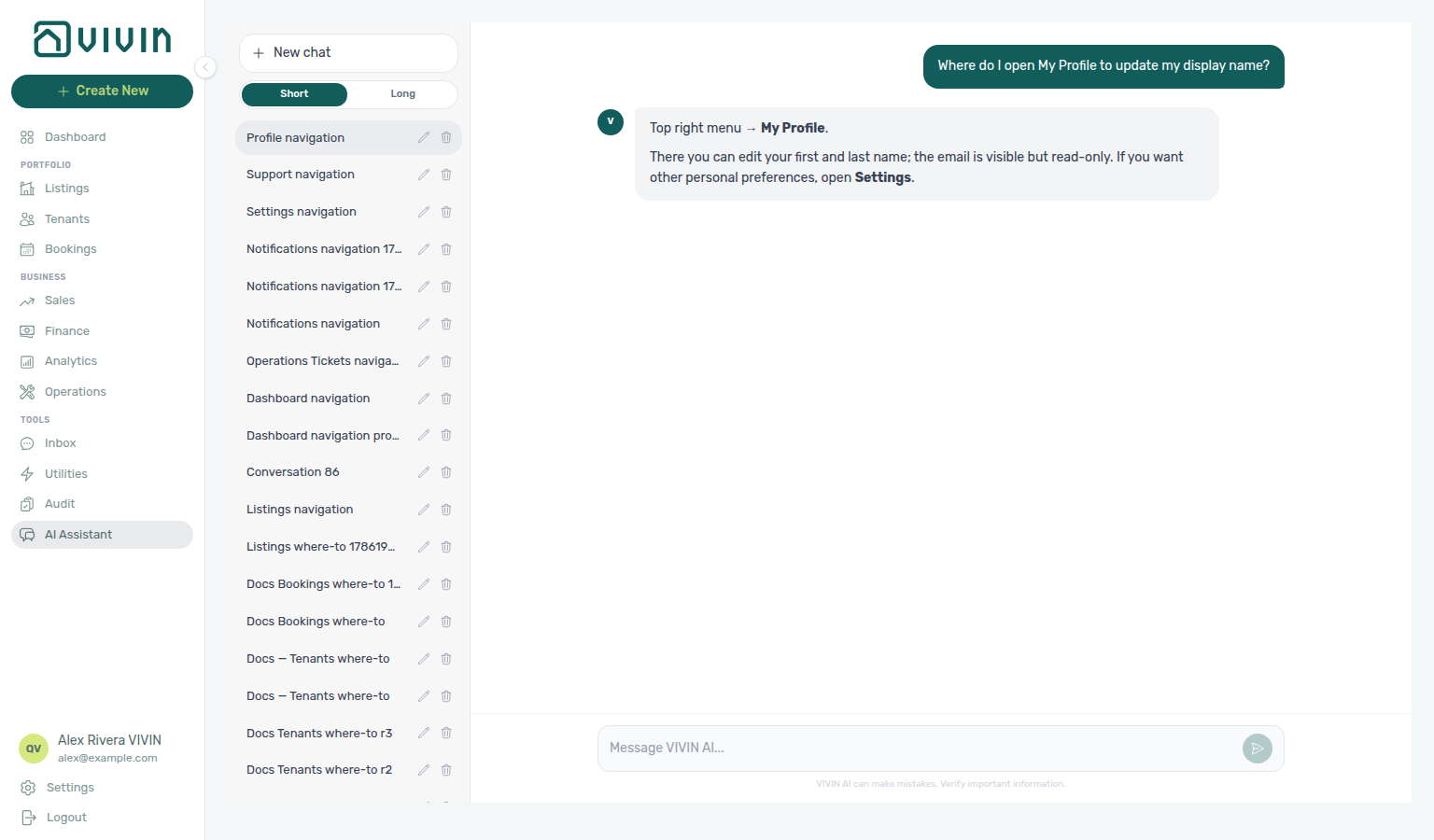
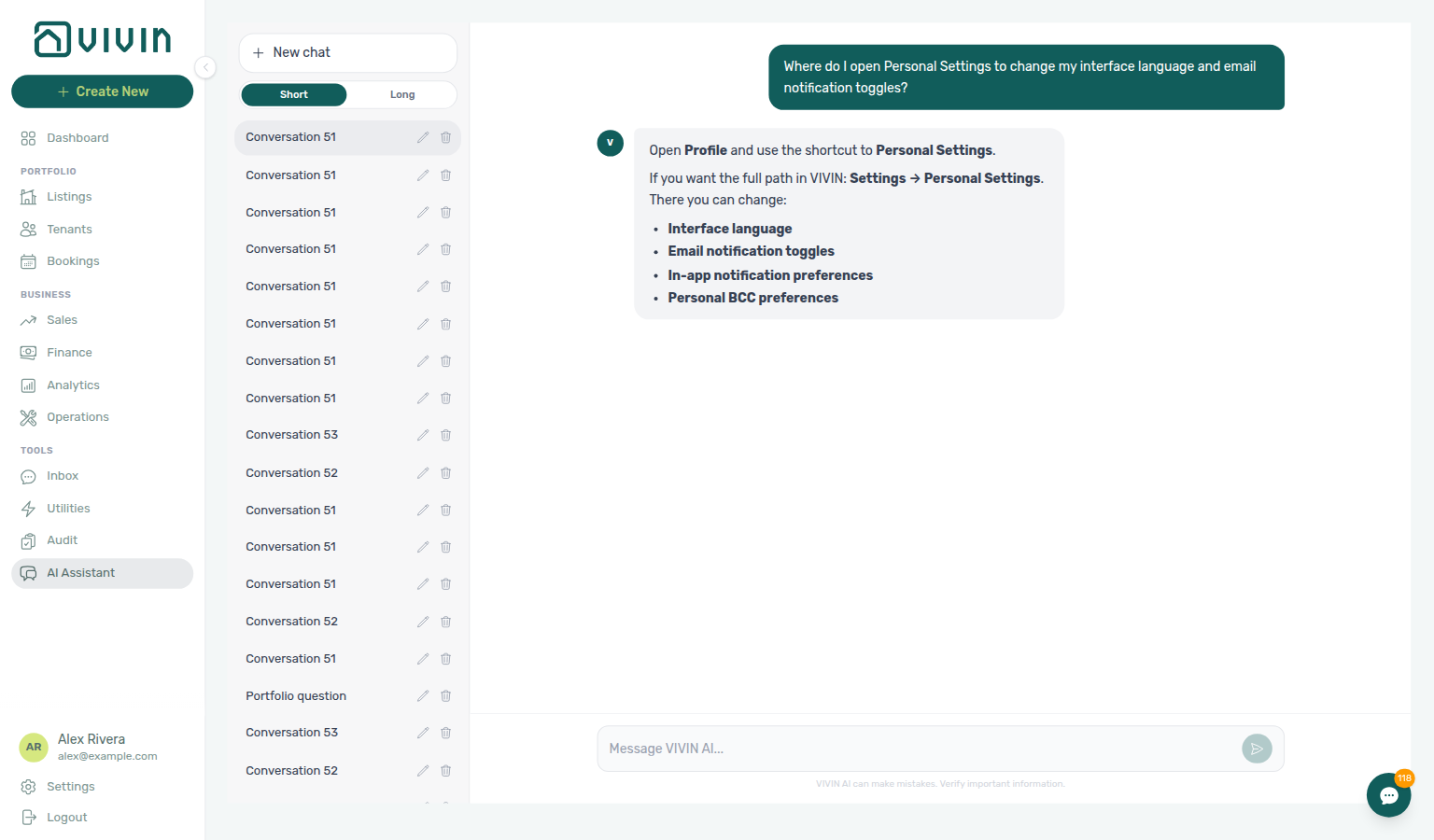
Not sure how to reach My Profile? Ask AI Chat “Where do I open My Profile to update my display name?” — then open the header user menu → My Profile (ai-chat-product-context-profile-reply.png, ai-chat-product-context-profile-flow.mp4). The assistant typically says Top right menu → My Profile and keeps locale / email toggles on Personal Settings. For language and notification toggles specifically, ask “Where do I open Personal Settings to change my interface language and email notification toggles?” (ai-chat-product-context-personal-settings-reply.png, ai-chat-product-context-personal-settings-flow.mp4) — the assistant typically says Profile → Personal Settings or Settings → Personal Settings.
Display name here feeds @mention threads and Audit Created by filters — keep it aligned after staff changes. On Manual Blocks, Created by stays open while you add a second teammate. Interface language, tab order, Operations ticket columns, and per-user email toggles live on Personal Settings (/settings/personal), not on /profile. Admins manage teammates on Users. Hub: Recommended setup order.
Who can use it
Saving name changes requires an accepted API update for your user — when Save profile returns 403, admins adjust roles on Users and roles or use Resetting a Management User Password for sign-in recovery.
Any signed-in management user can open /profile. Saving name changes requires the API to accept an update for your user (most roles can edit their own profile; a 403 means your role blocks profile edits — see Permissions below). This page is separate from Account Settings tabs, which are gated by granular keys such as account_settings.general_information — see Users and roles.
Accessing My Profile
/profile is outside the Account Settings tab list — bookmark routes from Deep Links — Profile routes and send operators to Personal Settings (/settings/personal) for locale and notification opt-outs.
- Open the header user menu (top right) and choose My Profile, or use the direct URL while logged in: platform.vivin.app/profile.
- In the current layout, the left sidebar User section shows Settings and Logout — My Profile is on the header menu, not that sidebar list.
- Use this page to update your first and last name only. Interface language is configured under Account Settings → Personal Settings (
/settings/personal), not on My Profile.
Profile Fields
Email stays read-only here — per-user Payment notification emails and Service subscription emails live under Personal Settings — Your email preferences behind the account Preferences — Notifications master.
| Field | Editable | Description |
|---|---|---|
| First name | Yes | Your given name. Used in the header, notifications, and across the platform. |
| Last name | Yes | Your surname. Displayed alongside your first name. |
| No | Your login email. Email changes are not supported in this flow. |
Email updates are not currently supported from the My Profile page. If you need to change your email address, contact your administrator or a Super Admin.
Payment notification emails, Support ticket assigned, Maintenance ticket assigned, and Service subscription emails are not configured on this page. Use Account → Personal Settings (/settings/personal) for your own opt-in/opt-out, and Preferences for the account-wide Receive payment notifications switch — both account and personal payment toggles must be on for you to receive payment messages.
Interface overview
If the name form does not appear, refresh the browser tab or sign in again, and see Glossary — Settings and profile recovery before assuming permission loss.
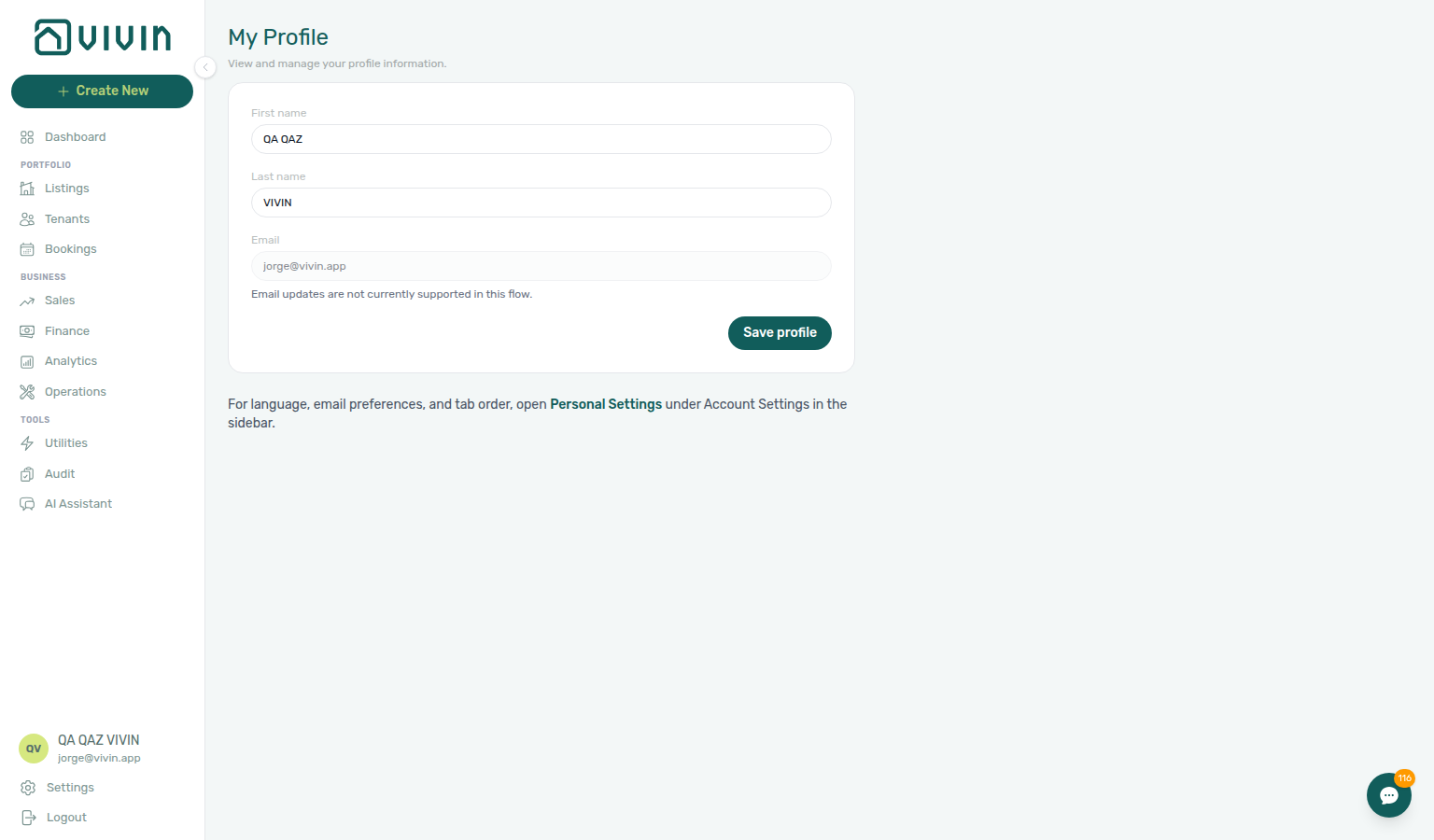
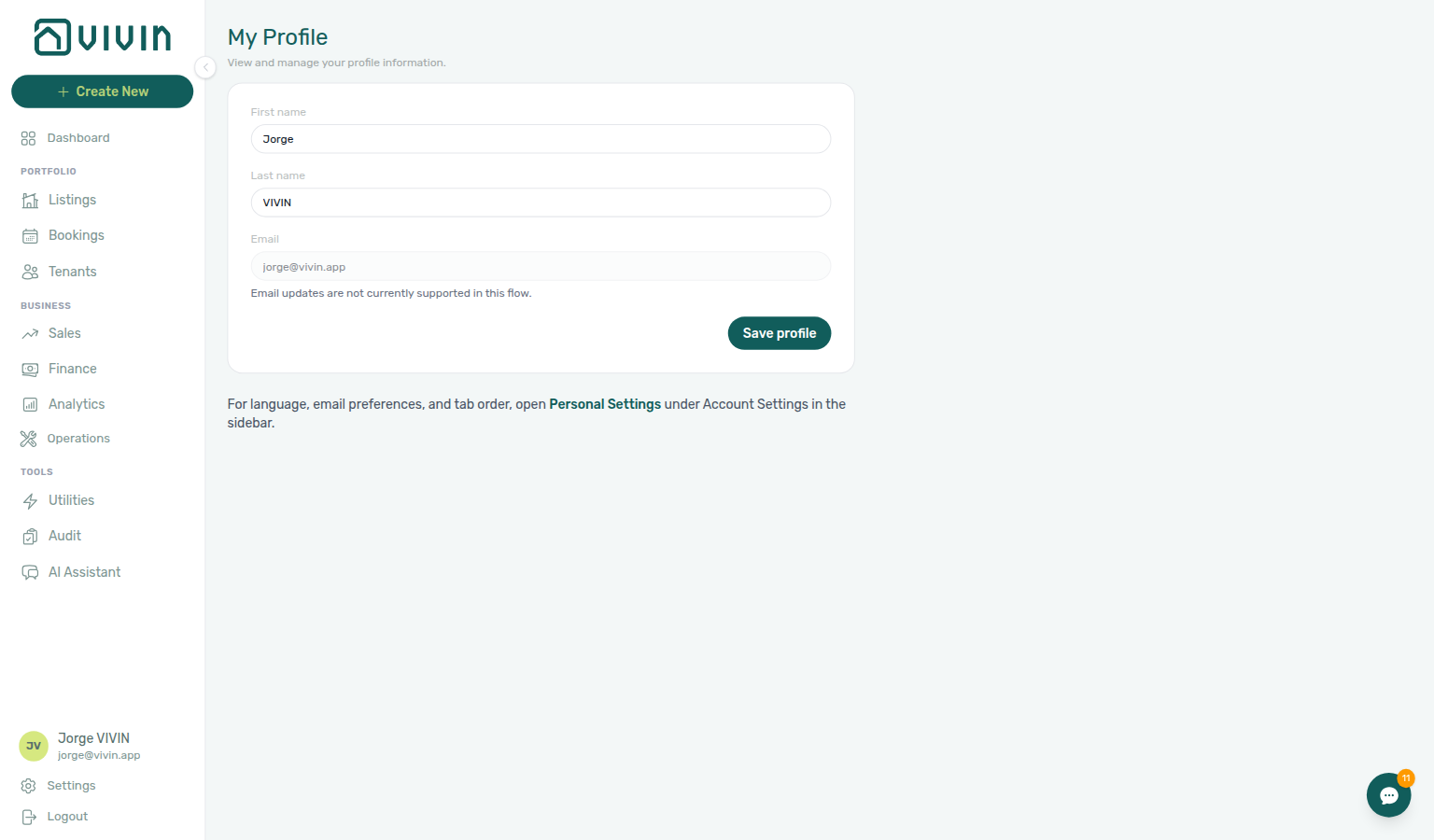
The page is a simple form in the main workspace: first name, last name, and read-only email. A primary Save profile action persists name changes. Below the form, a short note links to Personal Settings (/settings/personal) for interface language, your email delivery toggles, module tab order, and Operations ticket columns — those preferences are not edited on /profile.
The surrounding app shell matches other management pages (sidebar and main content). When your role cannot edit profile fields, the form stays read-only and the app shows a short notice instead of Save profile — see the Permissions caution below.
If your profile details do not appear, refresh the browser tab or sign in again. This is separate from the permission message when Save profile is blocked. See Glossary — Settings and profile recovery.
Updating Your Profile
Saved display names feed @mention on Bookings — Comments tab and Created by on Audit → Manual Blocks (stays open while you add a second teammate) — refresh after staff turnover before month-end reviews.
- Open platform.vivin.app/profile while logged in.
- Edit First name and Last name as needed.
- Click Save profile.
Validation: both name fields are required (trimmed). Empty first or last name shows an inline error and does not call the API. On success, a green Profile updated successfully message appears; on failure, a red alert explains the problem (permission denied vs generic save error).
Your changes take effect immediately in the signed-in session. The updated name is used anywhere the product shows the operator who performed an action, including:
- Sidebar user section and booking attribution (Created by, Change history on Listings)
- Audit → Manual Blocks Created by filter and column when you create availability holds
- @mention autocomplete on booking Internal Notes (see Bookings > Internal Notes tab); you can edit your own notes in place (teammates cannot rewrite your words)
- Operations tickets and internal timelines that record the acting user
Email and password are not changed here. For sign-in password resets, use Resetting a Management User Password (self-service from the login screen when your account allows it).
Permissions
When Save profile is blocked, file Using in-app support or ask a Super Admin on Users and roles to adjust the role matrix.
If you see You do not have permission to update profile details, your role blocks profile edits. Contact a Super Admin or administrator to change your name in Users or to adjust your role. The form fields may still appear, but Save profile will not persist.
My Profile section cross-reference
Use the sections above for this settings area. Related setup pages are linked from Related below when present, or from Account Settings.
Related
Related below links this Account Settings tab to modules, workflows, concepts, and escalation paths.
Documentation map & escalation
- Account Settings hub — Tab pairing matrix across workspace configuration
- Deep Links — Profile routes — Bookmarkable
/profileafter access is restored - Getting Started — Accessing the Platform — First sign-in before opening
/profile - Glossary — Settings and profile recovery — Recovery notes in Interface overview
- Using in-app support — File a Vivin ticket when profile edits are blocked by permissions
Upstream & downstream workflows
- Resetting a Management User Password — Self-service recovery when you cannot open
/profile - Notification triage — Clear payment alerts after you restore access and update notification preferences (Step 4 when a payment overdue row brought you here)
- Notifications — Payment overdue alerts (in-app) — Operator Payments category rows when scheduled charges are overdue after you restore profile access
- Portfolio KPI review — Month-end reconciliation when a renamed display name should match Audit Created by filters
- Handling a Late Payment — Step 1 — Identify overdue charges when payment alerts arrive after you restore profile access and a payment overdue row-click brought you here
- Managing a Check-out & Deposit Refund — Operator profile distinct from tenant IBAN collection during deposit refund
Deeper workflow reads
See Upstream & downstream workflows above for the same guides.
Related Account Settings tabs
- Users — Manage team members and their roles (admin only)
- General Information — Company identity and branding settings
- Interface Language — Personal locale on
/settings/personal(distinct from/profileidentity fields) - Interface Language — Your in-app notifications — Per-user category opt-outs after you restore access
- Preferences — Notifications — Account-level payment notification switches that complement per-user email toggles
- Emails — Communication Rules — Account communication rules paired with per-user email toggles on Interface Language
- Subscription — Billing contact when your profile email must stay read-only but card-on-file needs updating
Operator modules
- Bookings — Comments tab —
@mentionautocomplete uses your display name on internal threads - Audit → Manual Blocks — Created by filter and column after staff turnover (Created by stays open; Manual block hygiene)
- Audit — Discounts tab — Created by on manual blocks and discount reasons after staff turnover
- Operations module — Ticket assignee and timeline attribution when your display name changes
- Inbox module — WhatsApp thread headers and assignee labels after a display-name change
Deeper concept reads
- Integrations & Distribution — Personal profile settings do not configure marketplace credentials — use Account Settings → Integrations
- Tenant Portal — Display name on
/profilemay appear on outbound WhatsApp messages and internal@mentionthreads - FAQ — Tenant contract signing blocked — No PDF yet, mandatory Your Details gates, category locks, or Lease purpose; portal signing vs paper upload on Contract Info
- Payment Allocation — Two-layer receipts, invoiced-floor rent edits, and credit note reject/revert warnings
- Booking Lifecycle — Computed Upcoming → Ongoing → Ended / Canceled status model, list filters, and Timeline
Operator habit hubs
Day-to-day operator habits (lockout catch-up, pending receipts, payment triage, handoffs, and related playbooks) live on the Common Workflows habit hub.
Deep-link anchors for habit hubs
Lockout catch-up after password recovery
Pending manual receipt approval
Reject/revert mistaken receipts
Portfolio segmentation by tenant category
Notification row-click navigation
Payment alert to receivables triage
Confirmation alert triage
Finance debt receivables triage
Handling a Late Payment collections
Finance Income status drill-down
Cash flow forecast drill-down
Key glossary terms
- Manual unavailability (manual block) — Blocks you create on unit calendars appear under your name in Audit
- Glossary — End-of-Booking cost split — Charge Time → End of Booking splits daily overage across every occupied unit; still-staying roommates stay in the denominator
- Glossary — Change history — Operator-initiated edits on Listings setup and Bookings Changelog; create-time defaults excluded
- Glossary — Archived booking ledger visibility — Delete Booking hides manual/provider_platform rows on Finance → Transactions; vIBAN and credit card stay visible
- Glossary — Finance tenant category cache refresh — Recategorizing a tenant updates
booking.tenantCategoryIdimmediately; ledger tabs reflect it on reload, while Overview can lag up to ~10 minutes - Glossary — SIMAR water contract ID — SIMAR (Loures e Odivelas) water bills use Cód. Local in Connections — not Nº de Contador; leading zeros stripped
- Glossary — Full term list
Module documentation hubs
- My Profile — Operator identity at
/profile(this page) - Utilities module — Bills Included ceiling model, Connections, AI bill upload, and tenant overage charges on payment plans (hub)
- Operations module — Maintenance tickets, cash flows, check-in/out coordination, Draft ticket queues, and linked cash flows (hub)
- Dashboard module — Post-login Today, Total debt, Vacant Units, and forecast KPI snapshot with bell notification triage (hub)
- Analytics module — Month-range portfolio KPI charts (Overview, Revenue, Occupancy, ADR, RevPAR, Maintenance) with rankings and heatmaps (hub)
- Listings module — Property wizard, Channels tab, Archived inventory, and unit management (hub)
- Properties workspace — Legacy
/propertiesURL redirects into Listings (hub) - Booking engine details — Rich marketplace payload editor via the Full integration pill (hub)
- Finance module — Portfolio ledgers (Overview, Income, Contract Values, Transactions, Payouts, Deposits) with payment approval and deposit settlement (hub)
- Tenants module — Tenant directory, profile sidebars, With Debt segmentation, and table expand for linked bookings (hub)
- Sales module — Portfolio availability, monthly rent editing, and channel manager connections (hub)
- Inbox module — Portfolio-wide WhatsApp workspace with Dashboard bell Inbox sub-tab deep links (hub)
- Notifications module — Full
/notificationshistory with search, filters, and row-click navigation (hub) - AI Chat module — AI Assistant using Landlord MCP tools for portfolio Q&A (hub)
- Audit module — Portfolio-wide Manual Blocks and Discounts contract-value review (hub)
- Account Settings — Workspace-wide financial policies, templates, integrations, and operational defaults (hub)
- API Reference hub — Partner HTTP contracts, Swagger onboarding, and partial vs full feeds (hub)
- AI usage API — Refresh management JWT after Resetting a Management User Password — Step 3 before polling
GET /ai-usage