Manual block hygiene
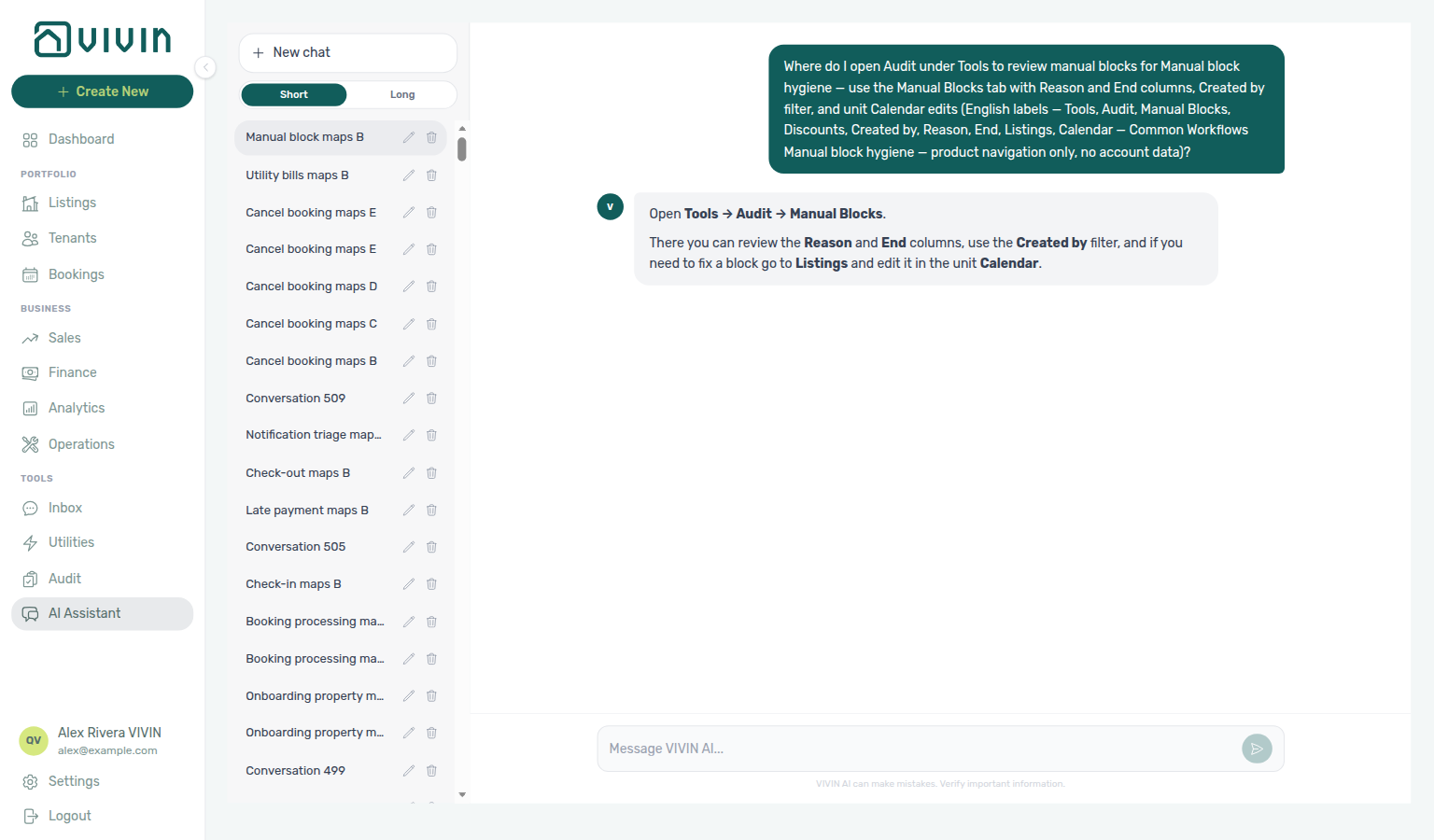
Ask AI Chat “Where do I open Audit under Tools to review manual blocks for Manual block hygiene — use the Manual Blocks tab with Reason and End columns, Created by filter, and unit Calendar edits (English labels — Tools, Audit, Manual Blocks, Discounts, Created by, Reason, End, Listings, Calendar — Common Workflows Manual block hygiene — product navigation only, no account data)?” — then open Tools → Audit → Manual Blocks (ai-chat-product-context-manual-block-hygiene-reply.png, ai-chat-product-context-manual-block-hygiene-flow.mp4). The assistant typically says Tools → Audit → Manual Blocks, then points at Reason / End, Created by, and unit Calendar edits in Listings. Same grounding external MCP clients get from get-vivin-context-properties-listings (or get-vivin-context-overview). Distinct from the broader Audit module map (“where do I open Audit to review manual blocks and discounts…?”) and from the Common Workflows hub product maps.
Run when occupancy looks suppressed after Listings calendars are live (setup step 13) — manual blocks live on unit Calendar in Listings. Complete Getting Started — Recommended Setup Sequence steps 1–15 and Onboarding a New Property — Step 7 before hygiene on newly onboarded inventory. Lockout catch-up: Getting Started — Lockout catch-up after password recovery.
Read When to run this pass first. Audit triage: Step 1 — Open Audit → Step 3 — Scan Reason and End columns. Clear holds: Step 4 — Edit or remove the hold; reconcile Step 5 — Reconcile Sales and Dashboard. Blocked edits: Step 6 — Escalate when calendar edits are blocked. Habit-specific shortcuts live under Related below.
Use this workflow when availability looks worse than demand and you suspect forgotten manual blocks (operator-added unavailabilities) are suppressing occupancy, Vacant Units, or channel calendars. Before you clear holds, confirm Preferences → Vacant Unit Preference — Include manual blocks deliberately keeps manually blocked units on Dashboard / Sales vacancy surfaces; Default excludes them. Manual blocks produce no income; vague reasons and date ranges that should have ended are common after maintenance, owner stays, or staff turnover.
Reconcile occupancy with Common Workflows — Occupancy KPI to block hygiene handoff (upstream Portfolio KPI review — Step 3 dip signal; analytics-kpi-occupancy-tab.png) and Portfolio KPI review after clearing holds; on newly onboarded inventory, pair with Onboarding a New Property. When Step 5 — Reconcile Sales and Dashboard uses Landlord MCP or AI Chat for vacancy reads, poll AI usage API (landlord_chat) during Portfolio KPI review — Step 7 — internal USD cost only, not tenant billing.
- Listings module permission (same guard as Tools → Audit)
- Familiarity with unit Calendar in Listings — blocks are created with Add unavailability and removed from the manual row on that calendar
When to run this pass
| Signal | Where you notice it | What to check in Audit |
|---|---|---|
| Free-room count lower than expected | Dashboard Vacant Units or Today KPI (manual blocks segment in subtitle) | Blocks whose End is still in the future but the hold reason is obsolete |
| Occupancy / RevPAR dip without a rate change | Analytics Occupancy or RevPAR ranking | Concentrated blocks on one property or unit in the season you are reporting; when the dip tracks one tenant segment rather than forgotten holds, continue Portfolio KPI review — Step 6 before you edit rates account-wide |
| Sales shows blocked days you do not recognize | Sales → Multicalendar or unit calendar | Cross-check the same unit in Audit before editing channel pricing |
| After staff changes | Departed operator still listed as Created by | Filter Created by to their account and clear unclear holds |
Pair this habit with Common Workflows — Occupancy KPI to block hygiene handoff when Portfolio KPI review — Step 3 Occupancy Ranking looks hold-suppressed, and with Portfolio KPI review — Step 7 when month-end KPIs disagree with live vacancy.
Step 1 — Open Audit and read the checklist
Audit entry pairs with Audit module, Deep Links — Audit, and get-vacant-units-next-month on Landlord MCP as a portfolio signal before you open the table. Downstream: Step 2 (filters) and Step 3 (row scan).
Account-scoped Landlord MCP get-vacant-units-next-month and get-booking-summary can surface occupancy dips that suggest forgotten holds — use them as a signal to open Audit, not as a substitute for the Manual Blocks table. Booking-scoped Tenant MCP get-listing-calendar answers tenant WhatsApp threads about blocked dates; route those escalations here with notify-landlord when the hold is unclear (Step 3).
- Go to Tools → Audit (or
/audit//audit/manual-blocks). - Expand Why audit manual blocks? when onboarding operators or running a seasonal pass — it lists what to look for (vague Reason text, End dates that should have passed, missing context after maintenance).
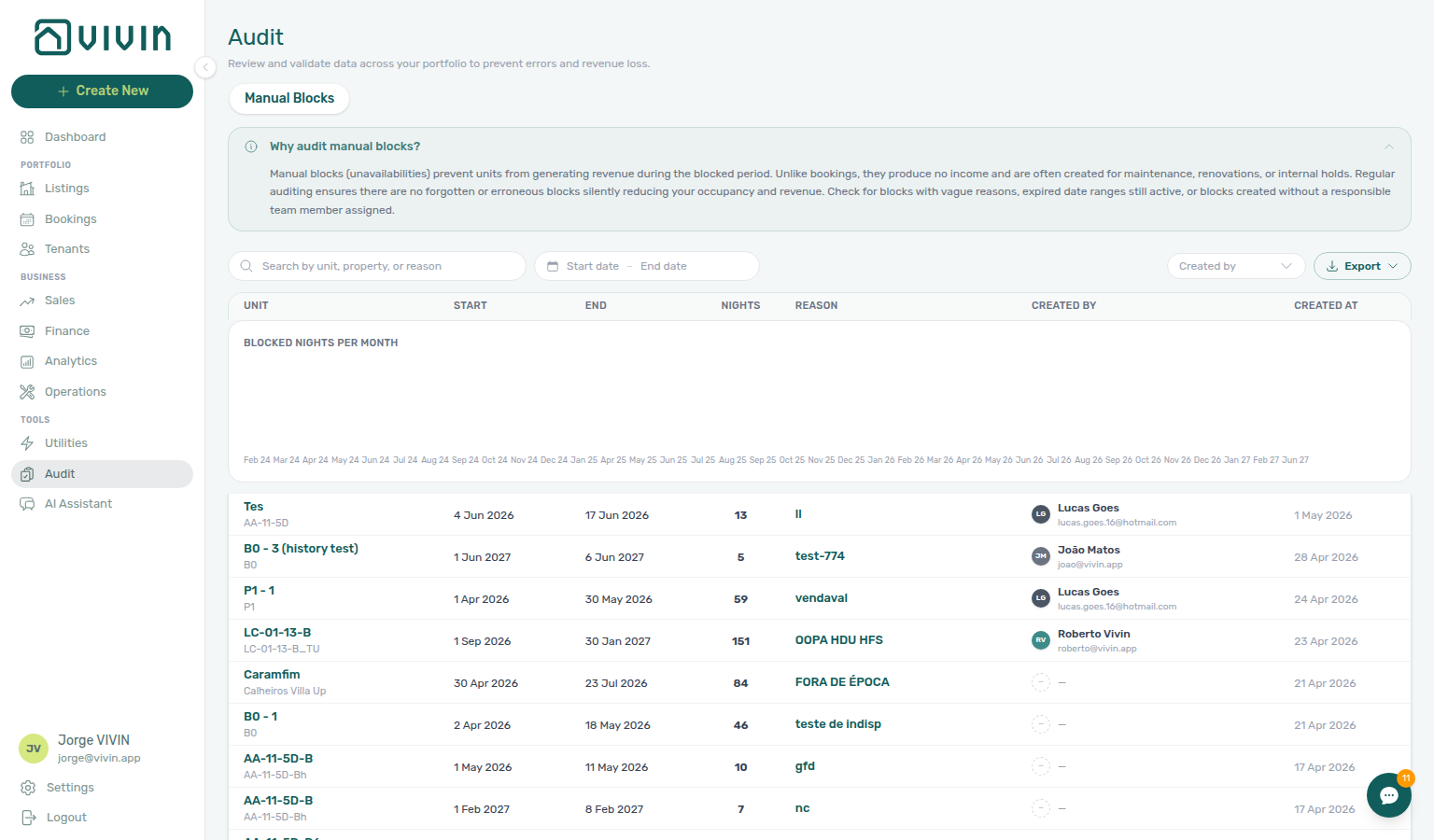
The Manual Blocks table is server-paged (20 rows at a time). The Blocked nights per month chart beside the table reflects all rows matching your filters, not only the loaded page — use it to spot months with unusually high hold volume before you scroll the full list.

Step 2 — Narrow the portfolio
Portfolio narrowing pairs with Audit — Toolbar and filters, Created by multi-select after staff turnover (Created by stays open), and Glossary — Audit Manual Blocks (Created by). Upstream: Step 1. Downstream: Step 3.
Apply filters so the table and chart focus on the period or team you care about:
| Control | Typical use in this workflow |
|---|---|
| Search | Property name, unit name, or a keyword from old Reason text (for example maintenance, owner) |
| Date range | Overlap window for the upcoming season or the month where Analytics occupancy dipped |
| Created by | After staff turnover — one or more departed operators (multi-select). The menu stays open while you add a second teammate. See Audit — Toolbar and filters and the quick-ref row Audit Manual Blocks (Created by) in Glossary |
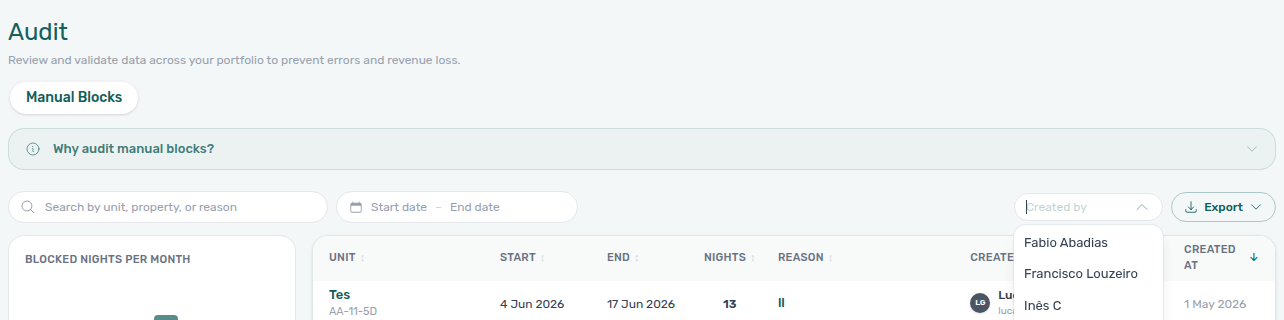
Use Clear all when you switch from one investigation to another so totals, chart, and Export stay aligned.
Step 3 — Scan Reason and End columns
Row scan pairs with Audit — Column sort, unit sidebar row-click into Listings, and get-listing-calendar on Tenant MCP when tenants ask about blocked dates. Upstream: Step 2. Downstream: Step 4.
The table sorts by Created descending by default; click Unit, End, Nights, or Reason column headers when you want a different server-side order across the full filtered set (not only loaded rows). Unit ascending groups holds by room — useful before you open sidebars in bulk. See Audit — Column sort.
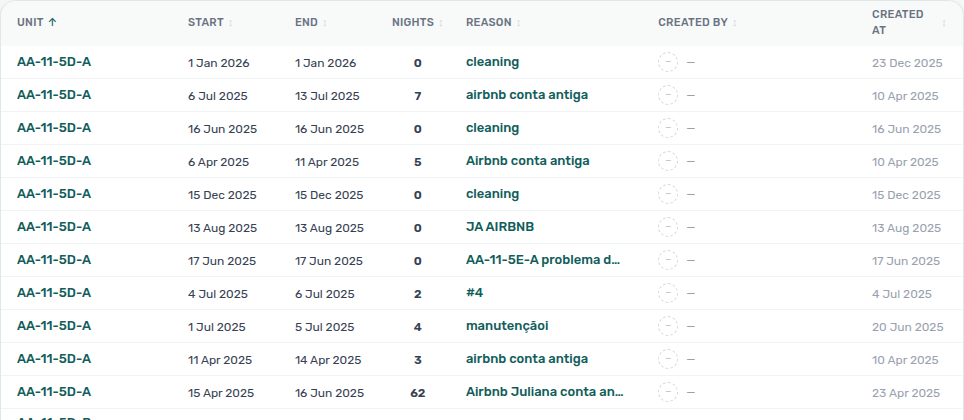
For each suspicious row, check:
- Reason — empty,
blocked,test, or maintenance notes without a ticket reference - End — still in the future though the work finished weeks ago. End is the last blocked night, not the Multicalendar / Timeline free-again tip — the tip can be one day later on checkout-style holds. See Audit — End vs free-again day (
audit-manual-blocks-end-last-blocked-night.png,audit-manual-blocks-end-vs-free-again-flow.mp4). - Nights — unusually long holds on high-demand units

Click a row to open the unit listing sidebar (same drawer as Listings) without leaving Audit.
Booking-scoped Tenant MCP get-listing-calendar returns the same blocked dates tenants see on the portal — pair with list-bookings-by-email when a WhatsApp thread only shows a guest email (resolve bookingId before follow-up get-payment-info or notify-landlord). request-booking-data aggregates booking context when the guest has one active stay. Account-scoped Landlord MCP get-listing-calendar needs tenant identifiers per tool schema — prefer tenant-scoped tools for guest-facing assistants; use Landlord reads for portfolio vacancy reconciliation in Step 5.
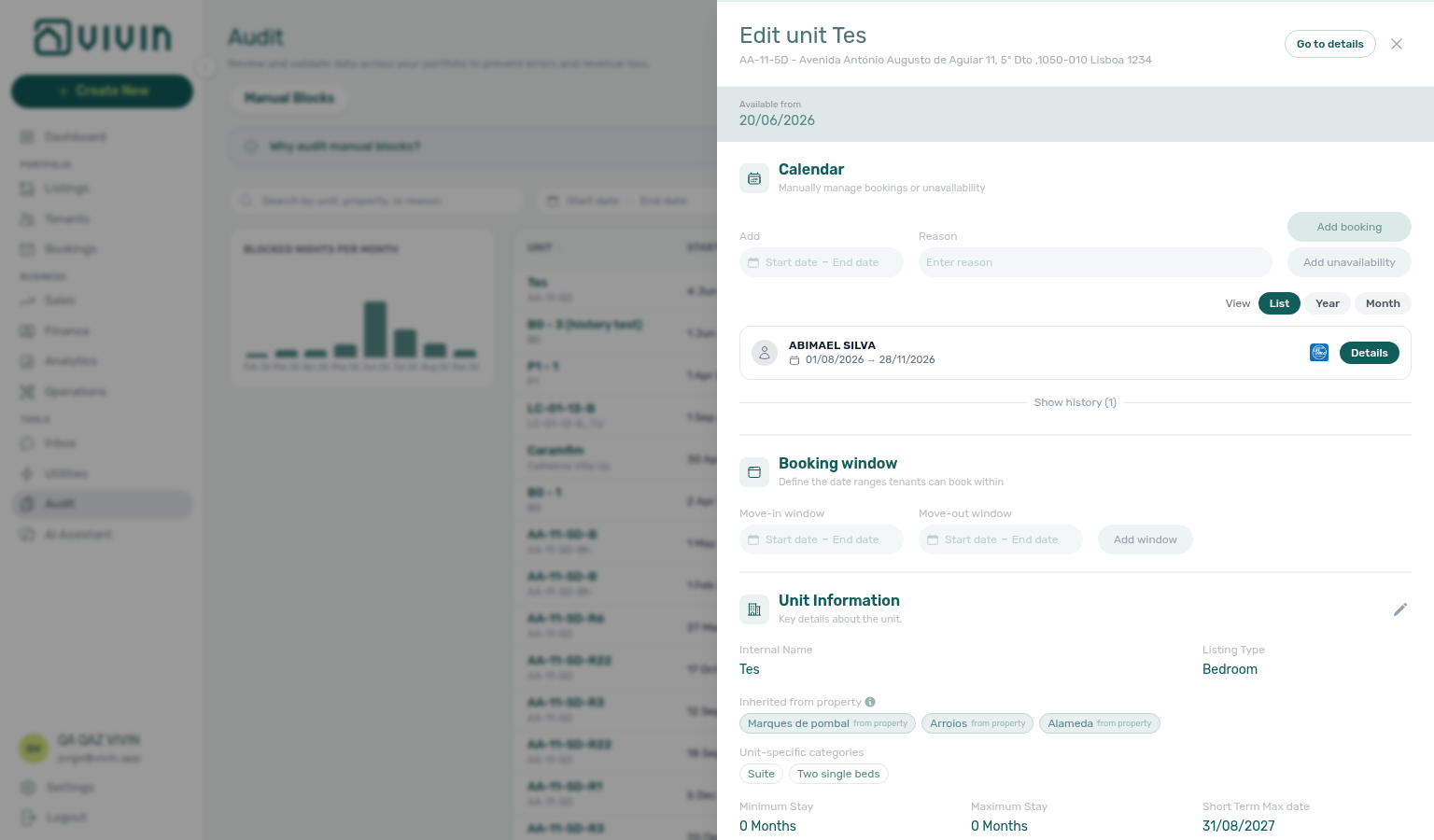
When several properties need offline review, apply filters and use Export → CSV or Excel — downloads include the full filtered set without scrolling every page. See Audit — Export.
Step 4 — Edit or remove the hold on the unit Calendar
Calendar edits pair with Listings — Manual unavailability, Integrations & Distribution (channel sync), and get-listing (unavailabilities) on Landlord MCP to verify a hold was removed. Upstream: Step 3. Downstream: Step 5.
From the sidebar opened in Step 3 (or from Listings → Portfolio if you already know the unit):
Option A — Audit table delete — When you have Listings edit permission and only need to remove stale holds (not edit the block in calendar context):
- Tick one or more manual-block rows on Audit → Manual Blocks (or use the row trash icon for a single hold).
- Click Delete selected and confirm — Vivin unblocks those dates irreversibly. Large batches show progress; partial failures leave failed rows selected for retry.
- Skip to Step 5 when the Audit row is gone.
Option B — Unit calendar edit — When you need to move dates, or remove a hold while viewing the unit:
- Open the unit from the Audit row (or Listings → Portfolio).
- Scroll to the Calendar section.
- Confirm the manual block dates match the Audit row.
- Click Edit block (pencil) on the manual row to open Edit block, change Dates and/or Reason, and Save changes — or remove the manual row (only operator-created manual blocks are editable/deletable here — booking and channel blocks follow their source).
Option C — Audit table Edit block — Same Edit block modal from the Manual Blocks row pencil without opening the unit sidebar first — see Audit — Editing a manual block (audit-manual-blocks-edit-dates-action.png, listings-edit-unavailability-modal.png, listings-edit-unavailability-flow.mp4).
To create a new multi-unit hold without opening each sidebar, use + Create New → Unavailability instead of repeating Add unavailability per unit.
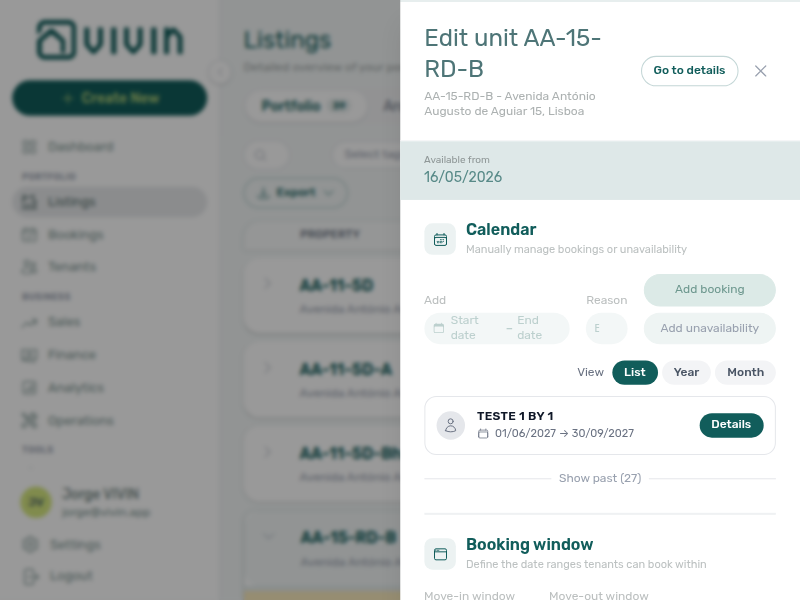
On units linked to external platforms, manual blocks you save keep those dates unavailable in Vivin and on connected calendars — clearing a stale block restores availability everywhere the unit syncs. See Listings — Manual unavailability.
Account-scoped Landlord MCP get-listing returns the same unit record with unavailabilities you edit on the sidebar Calendar — use it to verify a hold was removed before you reconcile Sales in Step 5. External clients cannot create or delete manual blocks from MCP; operators finish shorten/remove on the unit calendar here. get-vacant-units-next-month gives a portfolio snapshot after you save; booking-scoped Tenant MCP get-listing-calendar remains the right read when tenants ask why dates still look blocked on the portal. Surface-choice contrast: Automation & AI — Workflow pairing for surface choice.
Step 5 — Reconcile Sales and Dashboard
Reconciliation pairs with Sales → Multicalendar, Dashboard — Vacant Units, and Portfolio KPI review — Step 7 when counts still look low. Upstream: Step 4. Downstream: Portfolio KPI review — Step 6 when segment dips persist after holds are cleared.
After you clear or shorten blocks, confirm the operational surfaces match:
| Check | Where |
|---|---|
| Unit shows free on upcoming dates | Sales → Multicalendar or the unit calendar |
| Portfolio free-room count updated | Dashboard Vacant Units and Today KPI |
| Month-range occupancy no longer suppressed by holds | Analytics Occupancy tab (after the workspace refetches) |
If Vacant Units still looks low after a hygiene pass, continue Portfolio KPI review — Step 7 for channel blocks, utility gaps, and Finance reconciliation. When Analytics ranking or occupancy suggests one tenant category underperforms while blocks are already cleared, run Portfolio KPI review — Step 6 — scope Bookings → Tenant categories, Finance → Tenant category filter, and Tenants — Tenant category filter before you change portal rules or communication audiences account-wide (Settings > Tenant categories).
Manual blocks are for temporary holds (maintenance, owner stays, repricing pauses). When a whole building leaves the portfolio for good, clear remaining holds on each unit calendar, confirm no active Upcoming bookings remain, then Archive the property from the Portfolio edit sidebar — archived inventory moves to Listings — Archived and drops from default pickers without deleting history. Legacy /properties/archived bookmarks redirect to the same tab (Legacy /properties URLs — Archived portfolio). Archive property is building-level — not Delete Booking on individual reservations. See FAQ — Archive a property (Edit property sidebar → Archive / Unarchive), Portfolio retirement decisions, and Glossary — Archived property.
Booking-scoped Tenant MCP clients can surface the same unit Calendar blocks you clear in Step 4 — get-listing-calendar returns availability the tenant sees — and notify-landlord can alert your team when an external assistant cannot explain a stale hold. For portfolio-wide vacancy reconciliation in Step 5 (compare Vacant Units after a hygiene pass), pair with Landlord MCP get-vacant-units-next-month, get-booking-summary, list-listings, and get-listing-calendar instead of tenant-scoped tools — get-booking-summary gives a quick occupancy snapshot before you open Sales → Multicalendar, and list-listings helps confirm which units still carry unavailabilities after Step 4 calendar saves. When Vacant Units still looks low but tenants report blocked dates on the portal, re-check get-listing-calendar after you save calendar edits — channel sync can lag briefly; notify-landlord does not clear operator manual rows — finish edits in Step 4.
Optional — Filter and open a row (video)
Optional — Calendar edit and reconcile (video)
Step 6 — Escalate when calendar edits are blocked (when needed)
Calendar escalation pairs with Using in-app support, Cancelling a Booking — Step 5, and Managing a Check-out — Step 7 when ended booking bars still block Multicalendar. Finish Steps 1–5 self-serve first.
When Listings calendar saves, Audit row-click sidebar opens, or Sales → Multicalendar still shows blocked days after you followed Steps 1–5, document what you tried in the unit Internal Notes or an Operations ticket comment before you escalate.
Self-serve first:
- Vacant Units still low but manual holds are cleared → continue Portfolio KPI review — Step 7 for channel blocks and Finance reconciliation.
- Portal tenants still see blocked dates → re-check calendar sync lag (brief) after Step 4 saves — see Step 5.
- Segment-specific occupancy dips after holds are cleared → Portfolio KPI review — Step 6 before you edit Settings > Tenant categories account-wide.
- Vacant Units still low but debt KPIs stay high after holds are cleared → Handling a Late Payment — Step 6 when occupancy dips were masking receivables, not calendar holds.
- Canceled or Ended booking bars still block Sales → Multicalendar after you cleared manual holds → Managing a Check-out — Step 7 (verify Ended status) and Cancelling a Booking — Step 6.
- Same-day turnover with an incoming Upcoming import still blocked on Bookings → Timeline after manual holds are cleared → Processing a New Booking — Step 1 (visual overlap check) before you file support; arrival-week access-code defects on the shared unit → Managing a Check-in — Step 6.
- Stale booking or availability alerts on
/notificationsafter you cleared holds → Notification triage — Step 5; when row-click or read-state APIs fail, continue Notification triage — Step 6. - Newly onboarded units still show unexpected holds or channel blocks → Onboarding a New Property — Step 7 before you escalate calendar defects.
- Dashboard — Days Missing Data or utility reconciliation gaps suppressing vacancy reads → Entering Monthly Utility Bills — Step 5 when occupancy dips trace to missing supplier bills, not calendar holds; when AI extraction or overage posting is blocked account-wide, continue Entering Monthly Utility Bills — Step 6.
- Incoming Upcoming tenant reports blocked portal availability after holds are cleared → Processing a New Booking — Step 6 (Impersonate Tenant, Category on Tenant Info) before you file calendar defects.
- Month-end Pending receipts when a hygiene pass unmasks receivables, not calendar blocks → Portfolio KPI review — Step 7 and the lingering-receipt habits in Handling a Late Payment — Step 6b, Processing a New Booking — Step 6b, Managing a Check-in — Step 6b, Managing a Check-out — Step 6b, and Cancelling a Booking — Step 6b.
- Canceled stays with lingering booking-status or settlement alerts after holds are cleared → Cancelling a Booking — Step 6b before you file calendar defects.
File Using in-app support when product behaviour blocks hygiene despite correct operator steps:
- Add unavailability or manual row delete missing for your role on the unit Calendar — attach unit internal name and your user email (Listings module).
- Audit → Manual Blocks row-click does not open the unit sidebar — attach a screenshot of the row (Audit module).
- Canceled or ended booking bars still block Sales → Multicalendar after you cleared manual holds — attach unit internal name and booking id (Sales or Bookings module); pair with Cancelling a Booking — Step 6.
- Landlord MCP or Tenant MCP external clients return persistent 403 / auth errors after you refreshed the management JWT — see Using in-app support — When to use in-app support, Landlord MCP — Permissions and safety, and Resetting a Management User Password — Troubleshooting.
Use the Help & Support drawer from Audit or Listings when screenshots should include the Calendar or Manual Blocks table — Deep Links — Support. If a management lockout delayed this hygiene pass, recover access with Resetting a Management User Password (Step 3) before you rerun Steps 1–5 — refresh Landlord MCP Bearer JWT after Step 3 there.
Account-scoped Landlord MCP get-listing (unavailabilities), list-listings, and get-listing-calendar attach hold context before you file support — external clients cannot create or delete manual blocks from MCP. Booking-scoped Tenant MCP get-listing-calendar and notify-landlord remain the right reads when tenants report stale portal availability — contrast with operator calendar edits in Step 4. Surface-choice contrast: Automation & AI — Workflow pairing for surface choice.
Manual block hygiene section cross-reference
Use the steps above for the main path. For related guides, open Related below, or return to Common Workflows.
Related
Related below links this workflow to modules, concepts, settings, and escalation paths.
Documentation map & escalation
- Common Workflows — Hub pairing matrix across all operator guides
- Getting Started — Management shell before you run this workflow
- Glossary — Term definitions referenced in the steps above
- FAQ & Troubleshooting — Quick answers when availability still looks blocked after Audit
- Get Help & Support — Escalate when Listings permission blocks calendar edits
- Using in-app support — Vivin product tickets when Audit row-click, Calendar edits, or Multicalendar blocks persist (Step 6)
Upstream & downstream workflows
- Portfolio KPI review — Month-end KPI workflow that points here in Step 7
- Onboarding a New Property — Step 7 audit when new units still show unexpected holds
- Cancelling a Booking — Release availability on Sales after cancellation; Audit when heatmaps still show blocks
- Notification triage — Clear booking- or availability-related alerts after you lift stale holds; Step 6 when row-click or read-state APIs block cleanup
- Handling a Late Payment — Step 1 — When occupancy dips were masking overdue receivables, not calendar holds (Step 5)
- Handling a Late Payment — Step 6 — Segment-wide arrears when debt KPIs stay high after Step 5 (Step 6)
- Managing a Check-out — Step 7 — Ended booking bars still block Multicalendar after manual holds are cleared (Step 6)
- Processing a New Booking — Step 1 — Timeline overlap when same-day turnover imports still show blocked dates (Step 6)
- Managing a Check-in — Step 6 — Arrival-week access when turnover calendar blocks persist after hygiene (Step 6)
- Processing a New Booking — Step 6 — Portal availability complaints after holds are cleared (Step 6)
- Entering Monthly Utility Bills — Step 5 — Missing utility bill gaps when occupancy dips trace to supplier data, not holds (Step 6)
- Entering Monthly Utility Bills — Step 6 — AI extraction or overage posting blocked when Days Missing Data persists (Step 6)
- Handling a Late Payment — Step 6b — Collections Pending mesh when hygiene unmasks receivables (Step 6)
- Cancelling a Booking — Step 6b — Canceled-stay settlement alerts after holds are cleared (Step 6)
- Resetting a Management User Password — Recover access when a lockout delayed the hygiene pass (Step 6)
- Notifications — Payment overdue alerts — Operator Payments category rows after blocks are cleared but debt KPIs stay high
Navigation & bookmarks
Bookmark routes pair with Management Frontend Deep Links and Create New menu.
- Deep Links — Audit — Bookmarkable
/audit/manual-blocks - Audit module — Full module reference (filters, export, pagination)
Concepts & settings that shape this workflow
- Settings > Tenant categories — Segment portal rules and portfolio filters when Step 5 occupancy dips track one tenant category, not stale holds
- Booking Lifecycle — Computed stay status when manual blocks hide real occupancy
- Integrations & Distribution — Manual holds propagate to connected marketplace and iCal calendars
- Tenant MCP — Booking-scoped
get-listing-calendar,list-bookings-by-email, andrequest-booking-datawhen tenants ask about blocked dates during the Audit scan (Step 3);get-listing-calendarandnotify-landlordwhen external assistants surface stale holds (Steps 4–5) - Landlord MCP —
get-listing(unavailabilities) to verify holds removed after Step 4 calendar edits; portfolio-wideget-vacant-units-next-month,get-booking-summary,list-listings, andget-listing-calendarwhen Step 1 signals or Step 5 reconciles vacancy after a hygiene pass;get-listing,list-listings, andget-listing-calendarattach hold context before Vivin support tickets (Step 6) - Automation & AI — Landlord vs Tenant MCP surface choice during calendar edits (Steps 4–5) and calendar escalation (Step 6)
- Tenant Portal — Stale blocks can hide units tenants should see as available
- FAQ — Tenant contract signing blocked — No PDF yet, mandatory Your Details gates, category locks, or Lease purpose; portal signing vs paper upload on Contract Info
- Settings > Preferences — Automatic preparation-day buffers distinct from manual holds
Audit, listings & sales surfaces
- Listings — Reviewing manual blocks across the portfolio — Audit entry from Listings context
- Sales — Multicalendar — Per-unit availability after you clear a hold (Step 5)
- Bookings — Timeline — Gantt with Only bookings off shows calendar blocks on unit rows
- Dashboard — Vacant Units — KPI signal when manual blocks suppress vacancy counts
Deeper workflow reads
See Upstream & downstream workflows above for the same guides.
Deeper API reads
- Listings & Availability — Partial availability reads when reconciling Audit → Manual Blocks with channel inventory
- iCal feeds — Inbound calendar blocks that must not be confused with operator manual holds
- Booking Lifecycle & Validations — Overlap validation when holds block new reservations on the same unit
- Property & Unit Mapping — External listing IDs when channel blocks appear on the wrong unit row
Operator habit hubs
Day-to-day operator habits (lockout catch-up, pending receipts, payment triage, handoffs, and related playbooks) live on the Common Workflows habit hub.
Deep-link anchors for habit hubs
Check-out vs cancellation
Lockout catch-up after password recovery
Pending manual receipt approval
Utility overage collections
Check-out final utilities handoff
Check-in to check-out handoff
Check-out collections before refund
Check-out ledger cleanup before refund
Cancellation collections before void
Notification row-click navigation
WhatsApp per-booking messaging
Bot reasoning (audit)
ChatBot settings
Rent reduction after invoicing
Payment notification (operator)
Payment alert to receivables triage
Finance debt receivables triage
Handling a Late Payment collections
Finance Income status drill-down
Cash flow forecast drill-down
Reject/revert mistaken receipts
Month-end invoicing (fixed date)
Bulk Hostkit invoicing
Same-day turnover coordination
Occupancy KPI to block hygiene handoff
Deposit missing on Finance Deposits
Deposit lifecycle status
Partly collected security deposit
Wrong tenant on a booking
Cancel Booking vs Delete Booking
Portfolio retirement decisions
Provider platform Delete Booking guard
Archived booking ledger visibility
Archive property (building-level)
Confirmation to check-in handoff
Confirmation alert triage
Portfolio segmentation by tenant category
Dashboard Total Debt subtitle
After clearing stale holds on Step 5 — Reconcile Sales and Dashboard, re-read Total Debt headline vs Vacant Units — phantom occupancy can mask real receivables.
- FAQ — Dashboard Total Debt subtitle — Headline vs >15 days subtitle (
dashboard-kpi-total-debt-tooltip.png) - Step 5 — Reconcile Sales and Dashboard — Debt Aging after holds cleared
- Occupancy KPI to block hygiene handoff — Occupancy / Vacant Units vs blocks
- Finance debt receivables triage — Top debtors when headline still high
- Portfolio KPI review — Dashboard Total Debt subtitle — Month-end sign-off mesh
Uncovered Debt KPI
After Step 5 — Reconcile Sales and Dashboard, a high Total Debt with matching Uncovered Debt on Finance → Overview means thin deposit coverage — not phantom blocks.
- FAQ — Uncovered Debt KPI — Deposit coverage vs Total Debt (
finance-overview-kpi-cards.png) - Glossary — Uncovered Debt — Distinguish receivables from occupancy suppression
- Finance debt receivables triage — Top debtors when strip figures align
- Occupancy KPI to block hygiene handoff — Blocks vs real arrears
- Dashboard Total Debt subtitle — Ongoing-only
/vs Finance strip
Directory list refresh
When a directory such as Bookings, Notifications, or Listings needs a refresh during this workflow, use Retry on the alert, or reload the page. Zero rows after a successful load means your filters matched nothing — widen filters or clear search.
See FAQ — Directory list refresh and Common Workflows — Directory list refresh.
Booking sidebar tab refresh
Inside an open booking, Communication and Tickets load independently — use header Refresh (Communication) or banner Retry (Tickets). Other sidebar tabs stay usable. Whole-module list refresh is Directory list refresh.
See FAQ — Communication or Tickets won't open and Common Workflows — Booking sidebar tab refresh.
Key glossary terms
- Glossary — End-of-Booking cost split — Charge Time → End of Booking splits daily overage across every occupied unit; still-staying roommates stay in the denominator
- Glossary — Change history — Operator-initiated edits on Listings setup and Bookings Changelog; create-time defaults excluded
- Glossary — Archived booking ledger visibility — Delete Booking hides manual/provider_platform rows on Finance → Transactions; vIBAN and credit card stay visible
- Glossary — Finance tenant category cache refresh — Recategorizing a tenant updates
booking.tenantCategoryIdimmediately; ledger tabs reflect it on reload, while Overview can lag up to ~10 minutes - Glossary — SIMAR water contract ID — SIMAR (Loures e Odivelas) water bills use Cód. Local in Connections — not Nº de Contador; leading zeros stripped
- Glossary — Per-booking maintenance ticket opt-out — Add booking checkboxes skip automatic CI/CO tickets for one reservation only; property rule unchanged
- Glossary — Full term list
Module documentation hubs
- Analytics module — Occupancy and RevPAR follow-up when blocks suppressed KPIs
- Audit — Discounts tab — Cross-portfolio discount review during the same month-end pass
- Finance module — Portfolio ledgers during KPI reconciliation
- Operations module — Maintenance tickets that sometimes leave forgotten holds
- Bookings module — Timeline overlap checks vs manual blocks
- Notifications module — Full
/notificationshistory - Inbox module — Portfolio-wide WhatsApp workspace
- AI Chat module — AI Assistant
- Payment Allocation — Two-layer receipts and reject/revert warnings (hub)
- Account Settings — Workspace-wide operational defaults
- API Reference hub — Listings & Availability
unavailabilitiesin partner pulls