Using in-app support
During initial workspace setup, confirm the matching Getting Started — Recommended Setup Sequence step and Account Settings — Recommended setup order row before filing tickets — escalation map: Support — Setup sequence escalation. Pair with Onboarding a New Property when a setup step is blocked. Lockout catch-up: Getting Started — Lockout catch-up after password recovery. Workflow pairing: Common Workflows — Setup sequence after go-live.
Choose channel first: When to use email support vs When to use in-app support. Entry points: Where to open Support — Help & Support drawer or Support inbox (full page). Filing: New Support Ticket modal. Mobile: Mobile behaviour. Non-linear operator habits (Lockout catch-up, Payment alert to receivables triage, Pending manual receipt approval, Reject/revert mistaken receipts, Month-end invoicing (fixed date), Bulk Hostkit invoicing, Utility overage collections, Check-out final utilities handoff, Check-in to check-out handoff, Check-out collections before refund, Check-out ledger cleanup before refund, Finance debt receivables triage, Handling a Late Payment collections, Cancellation collections before void, Same-day turnover coordination, Occupancy KPI to block hygiene handoff, Deposit missing on Finance Deposits, Partly collected security deposit, Wrong tenant on a booking, Cancel Booking vs Delete Booking, Portfolio retirement decisions, Directory list load failures, Booking sidebar tab load failures, Confirmation alert triage, Portfolio segmentation by tenant category) have matching Related subsections below. Full pairing matrix: Using in-app support section cross-reference · Common Workflows section cross-reference.
Vivin offers two complementary ways to get help: email support for general or account-wide questions, and in-app support for structured tickets inside the management frontend when your organisation has access.
Open a ticket when Onboarding a New Property steps are blocked by permissions or account state — confirm the matching Getting Started — Recommended Setup Sequence step and Account Settings — Recommended setup order row first; choose module Settings or Listings on the ticket (step-to-module pairing: Support — Setup sequence escalation). When users cannot sign in at all, start with Resetting a Management User Password. For AI Chat or Landlord MCP defects, self-serve with AI usage API (landlord_chat on GET /ai-usage/summary) during month-end review before filing — there is no management-frontend ledger screen yet. Escalation hub: Get Help & Support. Section-to-module pairing: Using in-app support section cross-reference. Full pairing matrix: Common Workflows — Workflow cross-reference.
When to use email support
Email and status-page escalation pairs with When to use in-app support when your role has the Support permission. Full escalation map: Get Help & Support — Section cross-reference.
Use Get Help & Support (email and status page) when you need:
- A response that does not depend on a specific screen in Vivin
- Billing or subscription changes handled by the Vivin team
- Incident confirmation during outages (together with the public status page)
Full pairing matrix: Using in-app support section cross-reference.
When to use in-app support
After you confirm email is not required, continue to Where to open Support (FAB, drawer, /settings/support). Drawer vs full inbox: Help & Support drawer and Support inbox (full page). Full escalation map: Get Help & Support — Section cross-reference.
Use in-app support when your role includes the Support permission and you want to:
- Open or continue a conversation with Vivin tied to your signed-in workspace
- Share context (screens, steps) from inside the product
- Track ticket history from Support in Account Settings
If you do not see Support in the app, your administrator may not have granted the Support permission (support.module) to your role.
Booking-scoped Tenant MCP create-maintenance-ticket and notify-landlord open internal operations work or alert your team — they do not replace a Vivin support ticket when you need credential changes, integration debugging, or product defects. File Vivin support with the workflow below; see Tenant MCP — Maintenance and escalation.
Account-scoped Landlord MCP portfolio tools (list-bookings, create-manual-payment-in, cancel-booking, and similar) run against your workspace JWT — they do not open Vivin product support threads. File a Vivin support ticket here when external client sessions fail authentication, return unexpected 403 scope errors, or need new tool coverage Vivin must ship. Self-serve collections and escalation remain operator workflows — see Handling a Late Payment — Step 6 and Landlord MCP — Permissions and safety.
In Users and roles, the Support capability is only assignable to Administrator and Super administrator roles. Other roles cannot receive Support access from the permission matrix, even if a teammate wants to delegate it broadly.
Support without other Account Settings tabs
Support-only roles pair with Users & Roles (grant Support without other settings tabs) and Account Settings — Support-only browse layout (disabled tab shell). Downstream: Where to open Support (FAB, drawer, /settings/support). Full escalation map: Get Help & Support — Section cross-reference.
A role can include Support while every Account Settings tab permission is off (no General Information, Users, Preferences, and so on). That is valid: those users are not blocked from the settings area entirely.
When they open /settings, Vivin shows a browse-only layout (see Account Settings — Support-only browse layout):
- Standard settings tabs are visible but disabled; bookmarked tab URLs redirect to
/settings. - Support in the sidebar (lifebuoy) and the main hint explain how to reach the Vivin team.
- The floating Help & Support button and full inbox at
/settings/supportwork the same as for administrators who also edit other settings.
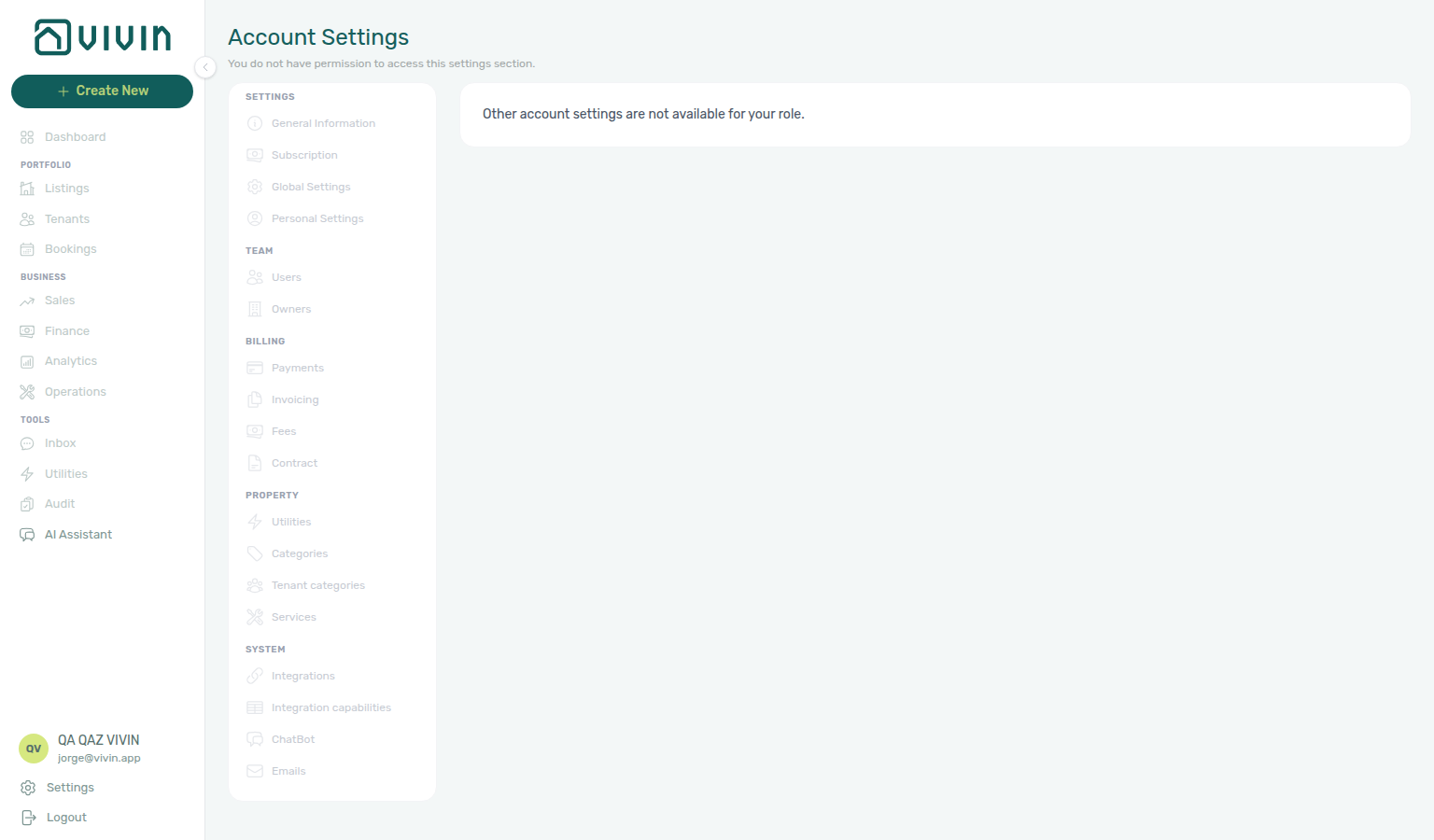
Grant Support in the Role Permissions matrix under the Support group when someone should file or follow Vivin tickets but must not change account configuration.
The + Create New menu includes New Ticket under Operations — that shortcut opens an internal operations ticket (maintenance, cleaning, inspections, and similar work on your portfolio). It is not the same as a Vivin support ticket to our team. For Vivin support, use Help & Support, Account Settings > Support, or the direct /settings/support URL below. See Create New Menu and Operations.
Full pairing matrix: Using in-app support section cross-reference.
Where to open Support
Entry points pair with Help & Support drawer (desktop FAB and mobile header icon), Support inbox (full page) (/settings/support), and Deep Links — Support (?support=<ticketId> bookmarks from Finance, Bookings, or Operations). Upstream: confirm When to use in-app support (Support permission). Downstream: New Support Ticket modal. Full escalation map: Get Help & Support — Section cross-reference.
-
Sign in to platform.vivin.app.
-
Choose any of these entry points:
- Floating Help & Support button — When you have Support access, a round Help & Support button (chat icon) stays fixed at the bottom-right of the screen on desktop. The control exposes
aria-label="Help & Support"(and matchingtitle) for screen readers — parity with the mobile header chat icon. Click it to open the support drawer for quick access from whatever module you are in. When one or more tickets are in Pending response (Vivin still owes a reply — statusawaiting_replyin product data), an amber badge on the button shows the count of those tickets. The badge uses the same dedicated status-count API as the drawer tab pills (not a count of only the first inbox page), so large ticket volumes are not undercounted. The count loads when you sign in and refreshes after you act on tickets (for example sending a reply or closing a ticket) because those actions invalidate the status-count cache — it is not polled on a timer while you stay on other modules. Open the drawer or full Support inbox when you need the latest pill counts without taking an action. - Account Settings — Open Account (or Settings) from the user section of the sidebar, then choose Support (lifebuoy icon) in the Account Settings shell.
- Direct URL — Go to platform.vivin.app/settings/support.
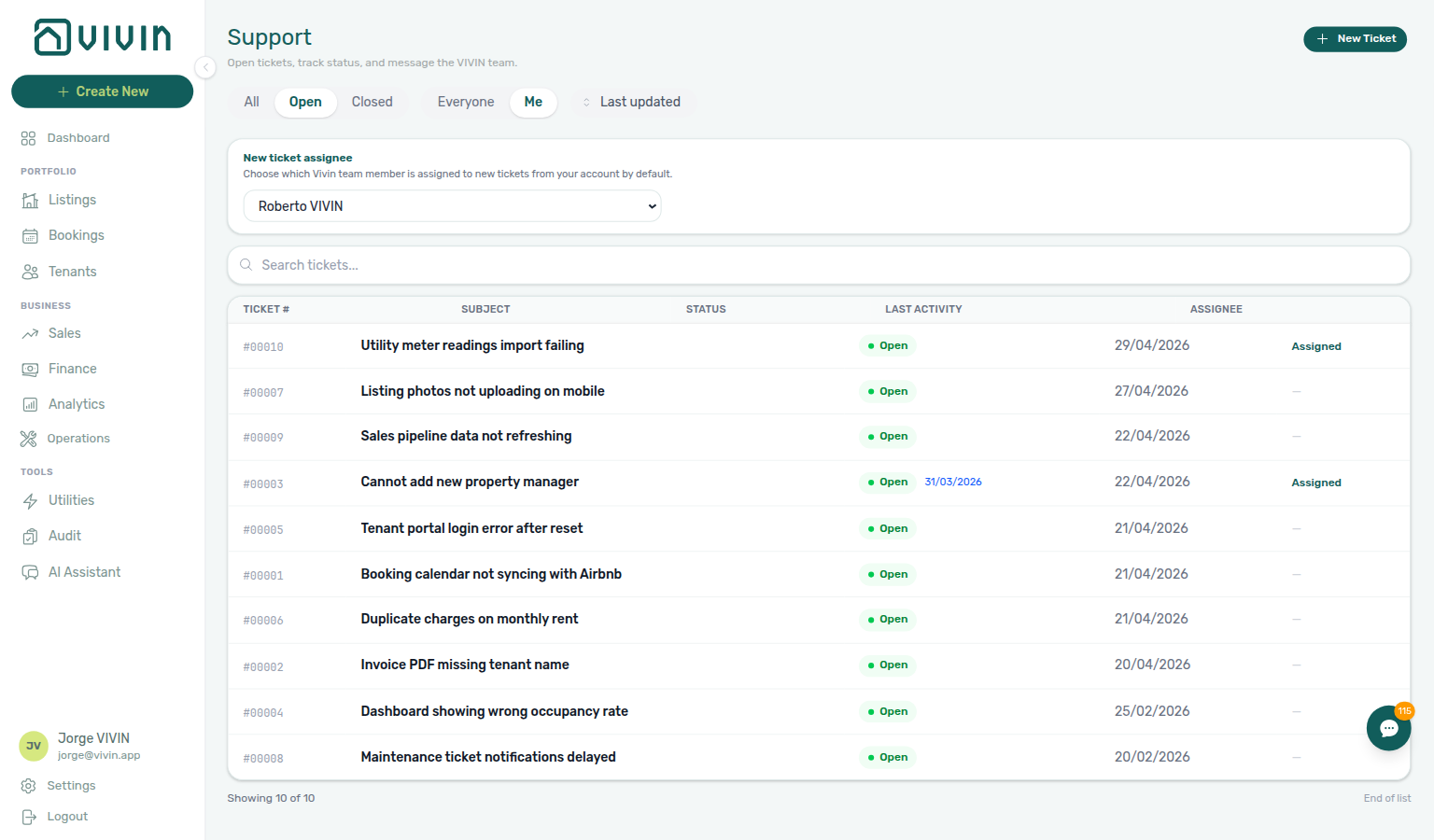
On desktop, the floating Help & Support control sits above the main content while you work in any module. With no Pending response tickets, the button has no badge:
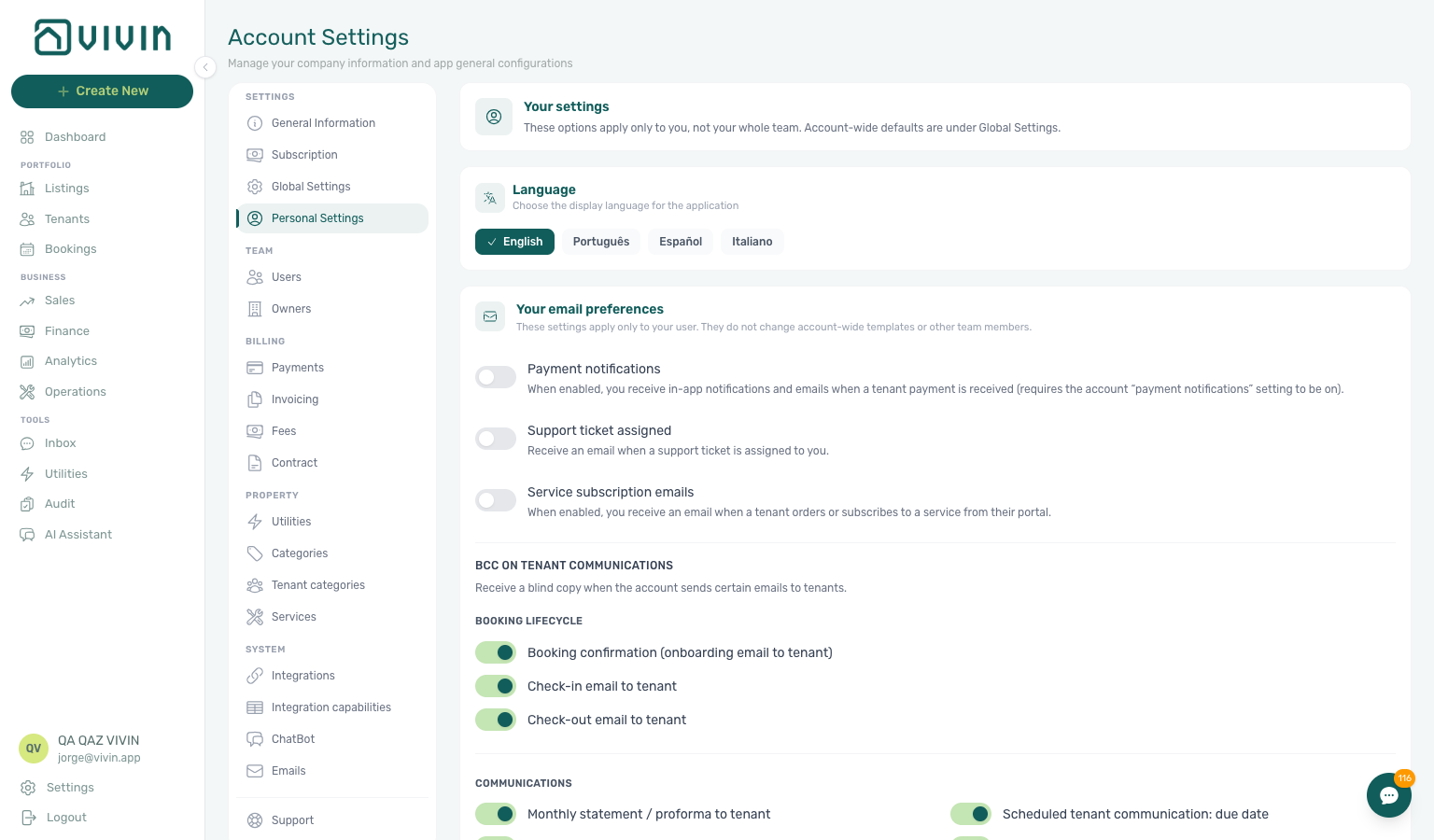
When at least one ticket is Pending response, the same control shows an amber numeric badge (example below):
- Floating Help & Support button — When you have Support access, a round Help & Support button (chat icon) stays fixed at the bottom-right of the screen on desktop. The control exposes
-
To open a specific ticket from a link or bookmark, use any of these patterns (replace
:ticketIdor<ticketId>with the ticket identifier):/settings/support/:ticketId— full Support inbox with the ticket thread open./<module>?support=<ticketId>— opens the Help & Support drawer on the module you are already on (for example/bookings?support=<ticketId>from a notification email). The drawer loads the same thread as the full inbox; the query parameter remains in the URL until you dismiss the drawer.- Older bookmarks under
/supportor/support/:ticketIdredirect to the settings routes.
See Deep links > Support.
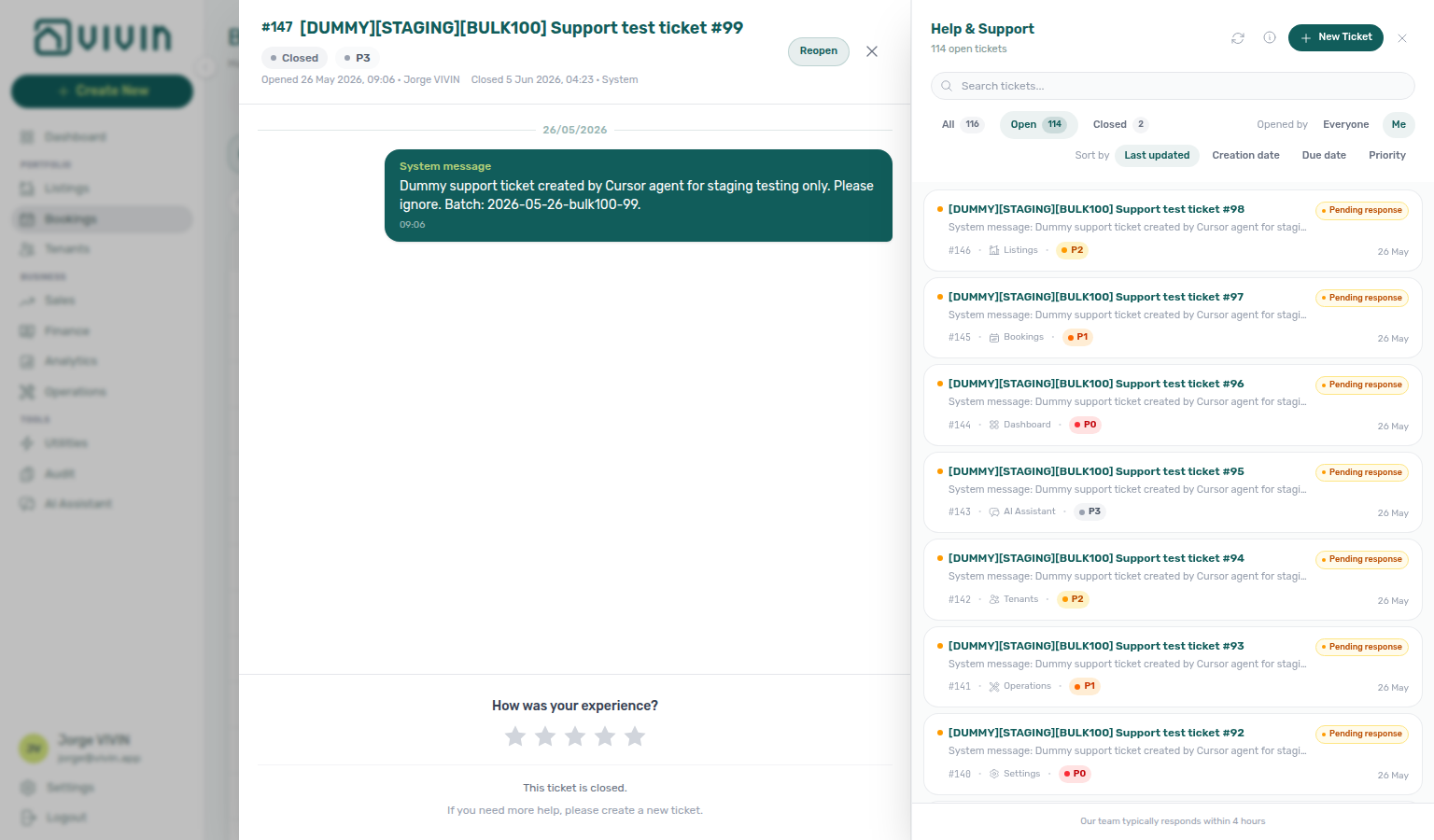
- Query-parameter deep link — From any signed-in module route, append
?support=<ticketId>to open the Help & Support drawer on that page with the ticket thread focused (for examplehttps://platform.vivin.app/bookings?support=<ticketId>). Requires the Support permission. Closing the drawer removes the query parameter from the address bar. Use this when you want the operator to land on Dashboard, Bookings, or another module but immediately see Vivin support context — without navigating to/settings/supportfirst.
Bookmark ?support=<ticketId> from Finance or Bookings during Handling a Late Payment — Step 6 segment escalation, from Operations during Cancelling a Booking — Step 6 post-cancel cleanup, from Listings during Onboarding a New Property — Step 7 wizard verification, or from Operations / Bookings during Managing a Check-in — Step 6 arrival-week access escalation — see Deep Links — Support.
Full pairing matrix: Using in-app support section cross-reference.
Help & Support drawer (quick inbox)
Quick triage from any module pairs with Support inbox (full page) (table layout, default assignee card). On phones, see Mobile behaviour (header icon instead of FAB). Full escalation map: Get Help & Support — Section cross-reference. During collections escalation, open the drawer from Finance or Bookings per Handling a Late Payment — Step 6; during post-cancel cleanup from Operations per Cancelling a Booking — Step 6; during first-booking verification from Listings per Onboarding a New Property — Step 7; during arrival-week access escalation from Operations or Bookings per Managing a Check-in — Step 6; during departure settlement from Finance per Managing a Check-out — Step 6.
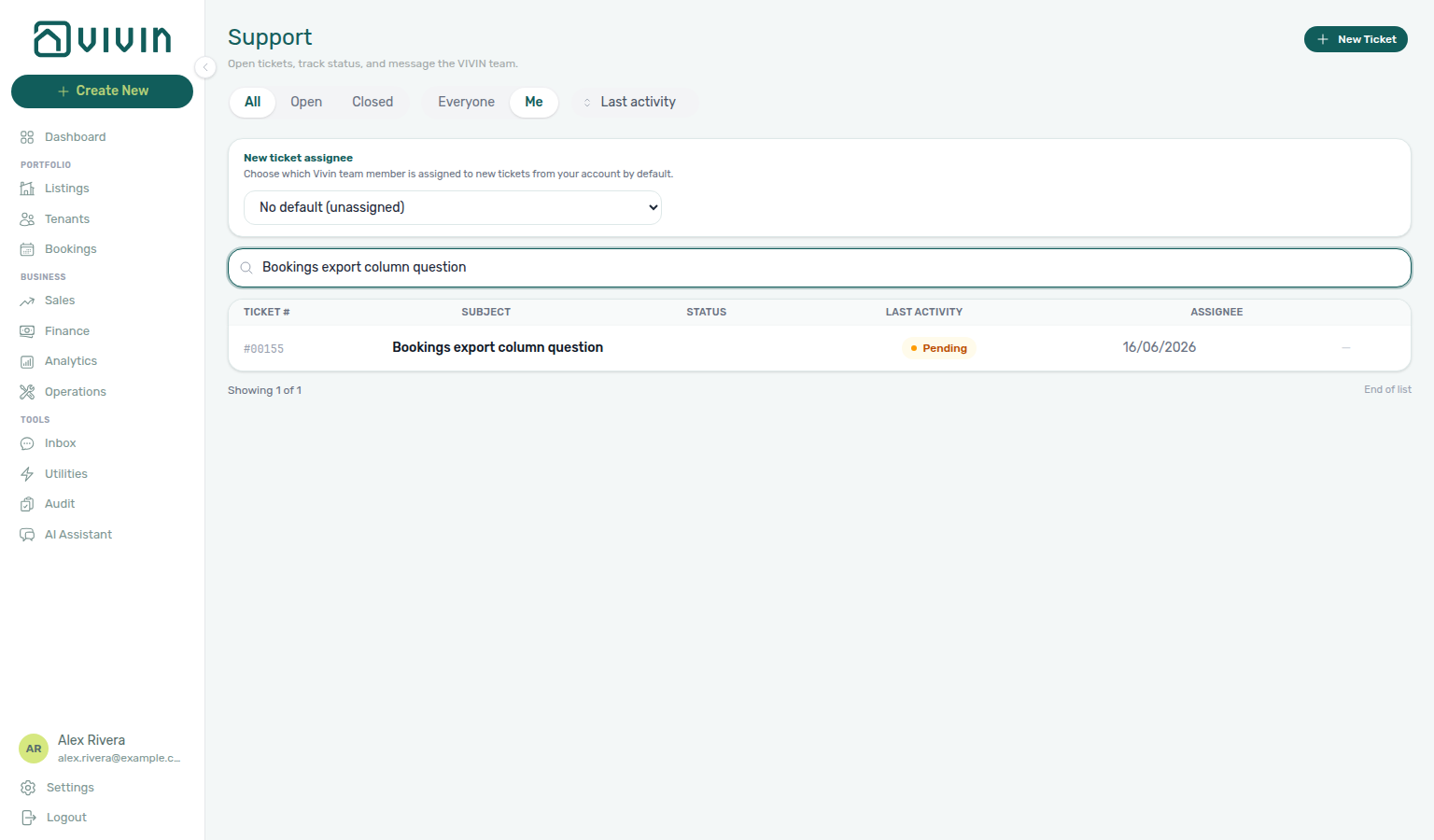
On desktop, the floating button and the mobile header chat icon open the same Help & Support drawer: a right-hand panel over your current module so you can triage tickets without leaving your workflow. The full Support page at /settings/support adds the new ticket assignee default card and a wider table layout — use either surface; messages, filters, and statuses stay in sync.
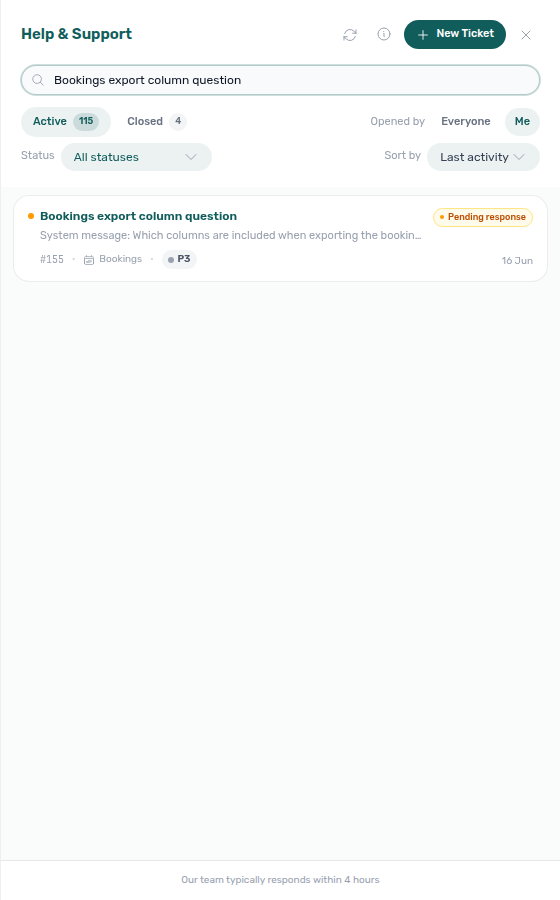
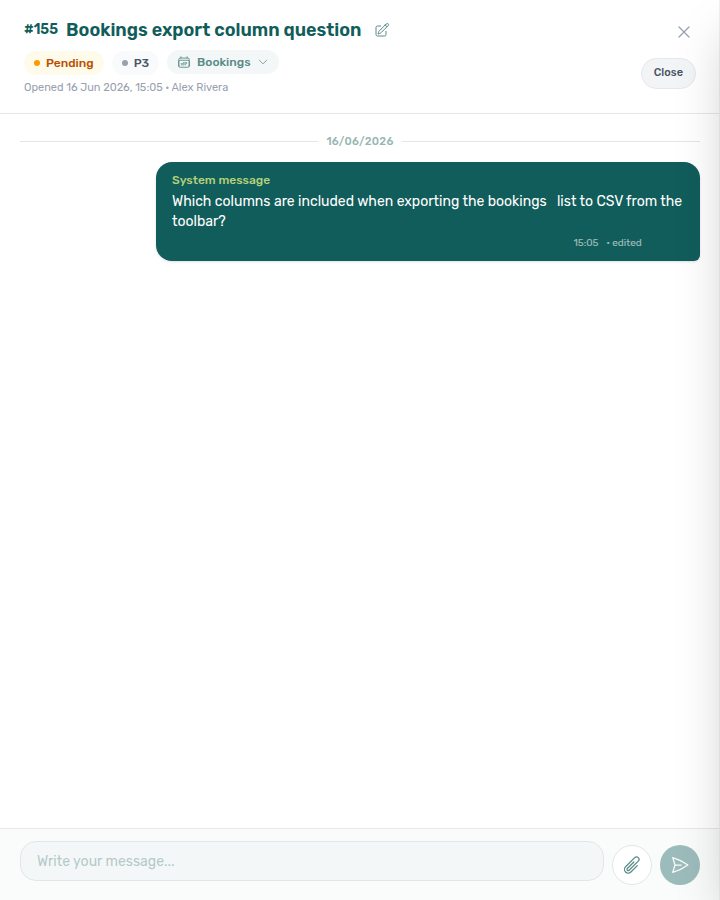
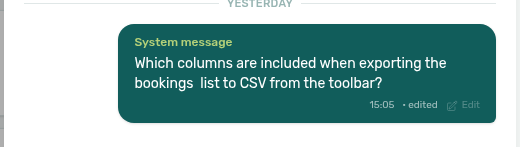
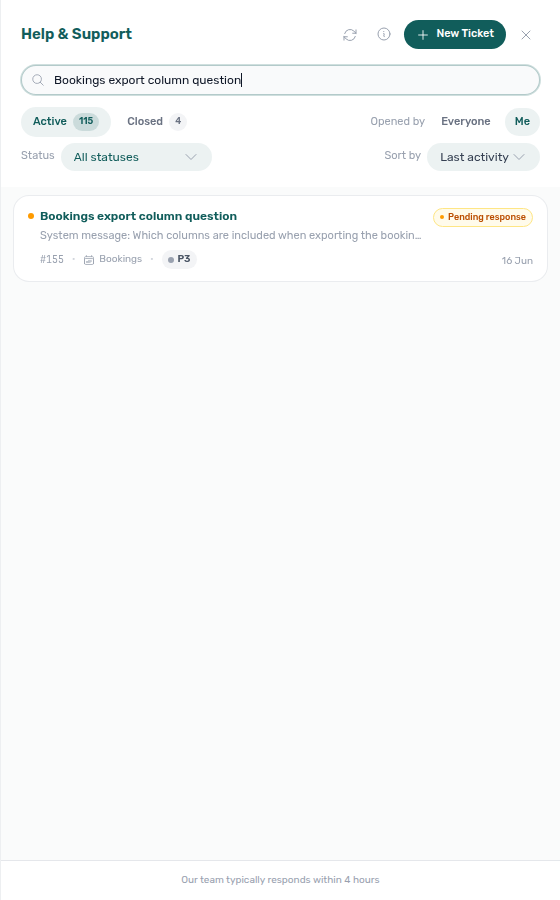
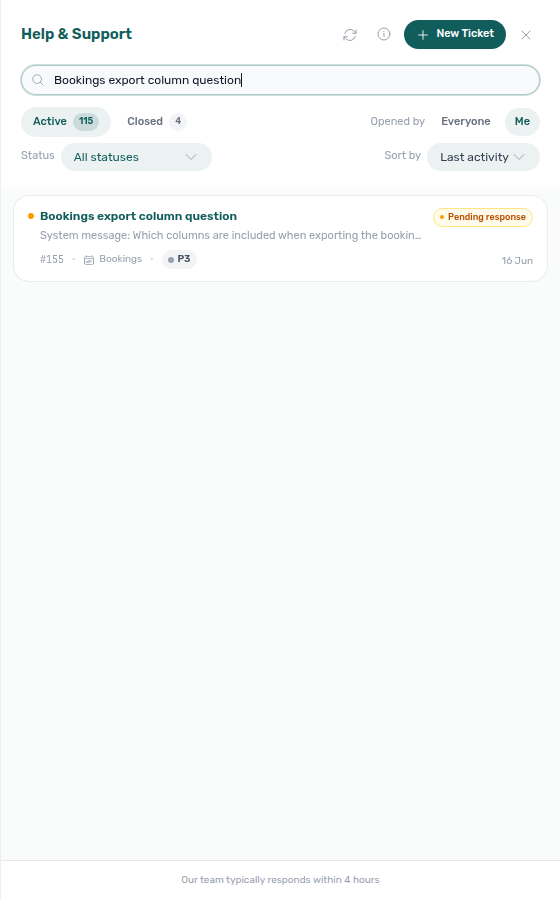
Support drawer #1861 PNGs refreshed 2026-06-18 16:25 UTC (VIVIN_DOCS_BASE_URL=http://localhost:5173 VIVIN_DOCS_RECORD_API=$VITE_API_BASE_URL npx tsx tools/capture-settings-support-drawer-1861-screenshots.ts; search term Bookings export column question).
- Search — Filters as you type by subject, ticket number, and message text in the conversation thread. Matching is accent- and case-insensitive and ignores most punctuation. Both the drawer and the full inbox run the same rules on the server (short debounce). Changing search or filters reloads the list from the first batch.
- Sort — Sort by pill row below the status controls (#1861): Last updated (default), Creation date, Due date, or Priority (P0 highest first). Sort runs on the server with the current chip, Status multi-select, and Opened by scope; changing sort reloads from the first batch. Last updated orders by the ticket’s
updatedAttimestamp (most recent activity first), not by workflow status group. - View chips — Active (default) and Closed. Active is the main inbox view — it spans non-closed workflow states and can still include Closed rows when you combine it with a detailed Status pick (see below). Closed is the resolved archive (
statusGroup=closed). Count badges use a dedicated status-count request for the current Opened by scope. - Status (detailed) — A Status multi-select under the chip row (#1861, #2085): open the control to tick any combination of Open, Pending, Awaiting your reply, Ongoing analysis, and Backlog (Closed is only on the chip row). With no boxes ticked, the trigger reads All statuses (no detailed filter). With one status picked, the trigger shows that label; with several, it shows N selected. Chip and Status compose together — for example Active + Status → [Open, Pending] narrows to those workflow states while Closed tickets can still appear in the list until you switch to the Closed chip. The detailed Status multi-select is on the drawer today; the full
/settings/supportpage still uses All / Open / Closed chips only (no detailed Status row yet).

Detailed Status multi-select capture re-verified 2026-07-08 02:15 UTC (VIVIN_DOCS_BASE_URL=http://localhost:5174 VIVIN_DOCS_RECORD_API=$VITE_API_BASE_URL npx tsx tools/capture-settings-support-drawer-detailed-status-screenshot.ts on develop-line frontend #2085; prior PNG bytes unchanged).
- Loading more — The drawer loads tickets in batches of 20. Scroll near the bottom of the ticket list to load more; a small spinner appears while the next batch fetches. When every row for the current filters is loaded, you reach the end of the list.
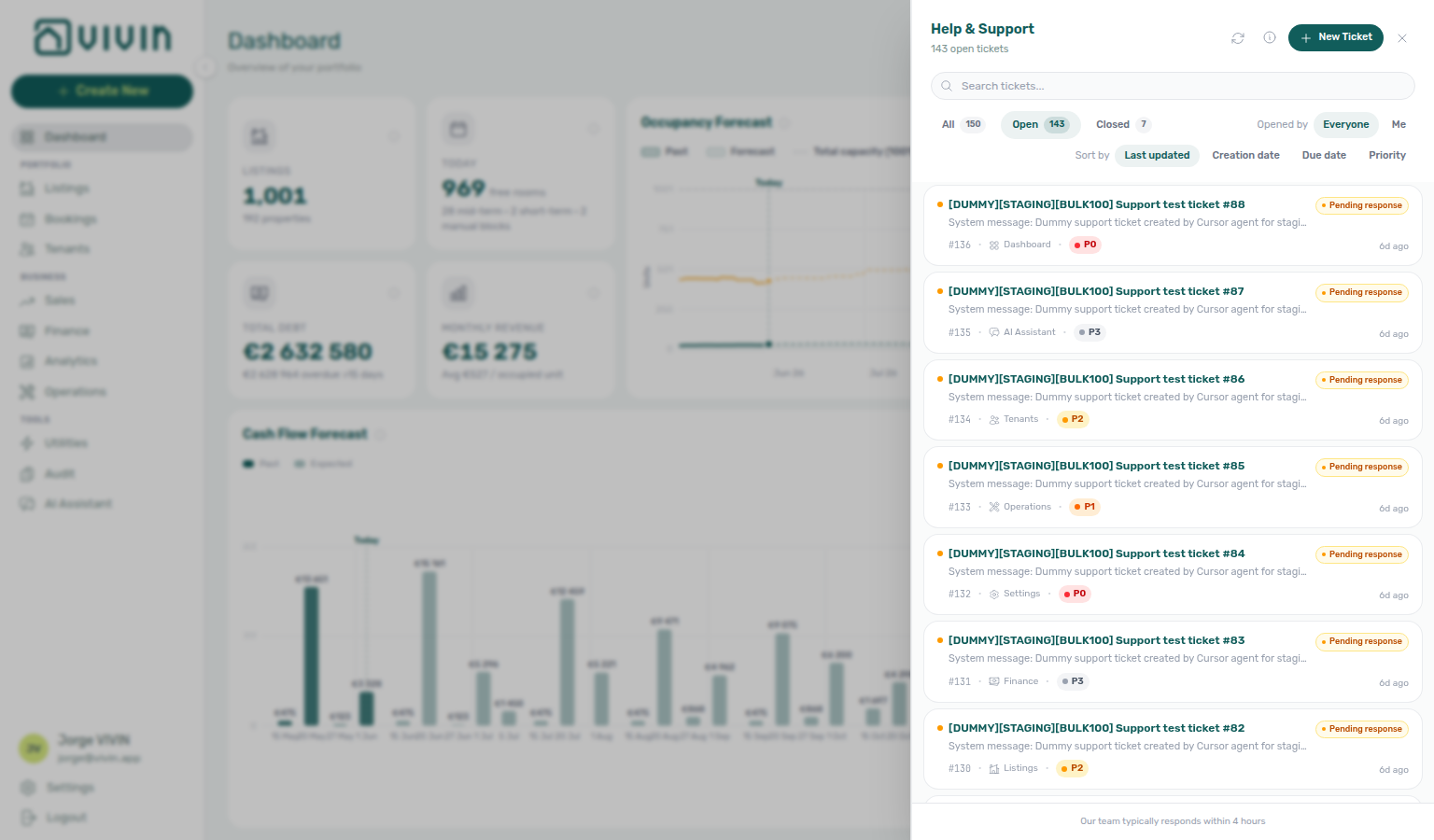
- Opened by — Everyone (workspace) or My tickets (tickets you opened). The drawer shows an Opened by label beside these scope controls.
- Ticket rows — Subject, status dot, optional priority (P0–P3), module tag, last-activity preview, and relative time. Tickets that need your input sort toward the top.
- New Ticket — Opens the same New Support Ticket modal as on the full page (below).
- Open a ticket — Click a row to open the conversation sidebar (reply, attach files, Close when resolved).
- Footer note — Reminds you of typical Vivin response times.
From the drawer header you can refresh the list, open priority level help (same definitions as the modal ? control), or close the panel and return to your module.
The Help & Support drawer (#1861, #2085) pairs Active and Closed view chips with a detailed Status multi-select and Sort by pills. Active (default) is the main inbox. Tick one or more statuses — for example Pending and Backlog — when you want every active row except Open; leave all boxes unticked for All statuses. The chip stays on Active while the multi-select narrows the list (closed tickets can still appear until you switch to the Closed chip).
The full /settings/support page keeps All, Open, and Closed chips only. On the current release, Open on the full page still filters to tickets whose badge is literally Open (not every non-closed status). Use All on the full page for every non-closed ticket, or triage from the drawer when you want composed Active + Status filtering without leaving your module.

Full pairing matrix: Using in-app support section cross-reference.
Support inbox (full page)
Full-page inbox pairs with Help & Support drawer for day-to-day triage without leaving your module. Filing a ticket: New Support Ticket modal. Load failures: Inbox load failures. Full escalation map: Get Help & Support — Section cross-reference.
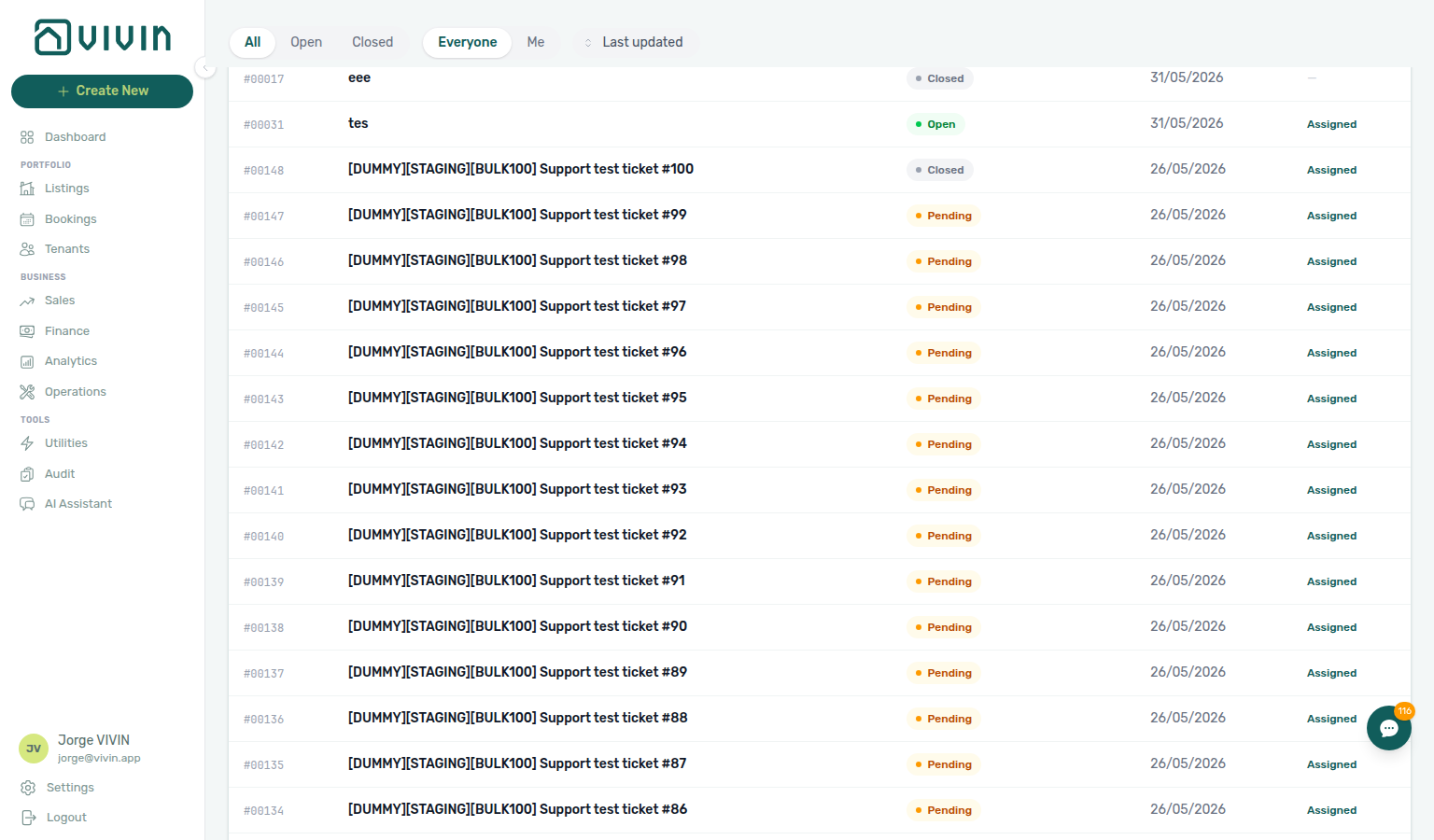
The full Support page is your ticket inbox: subject lines, status, last activity, assignee, search, sort, and scroll-to-load history through your organisation’s Vivin support tickets.
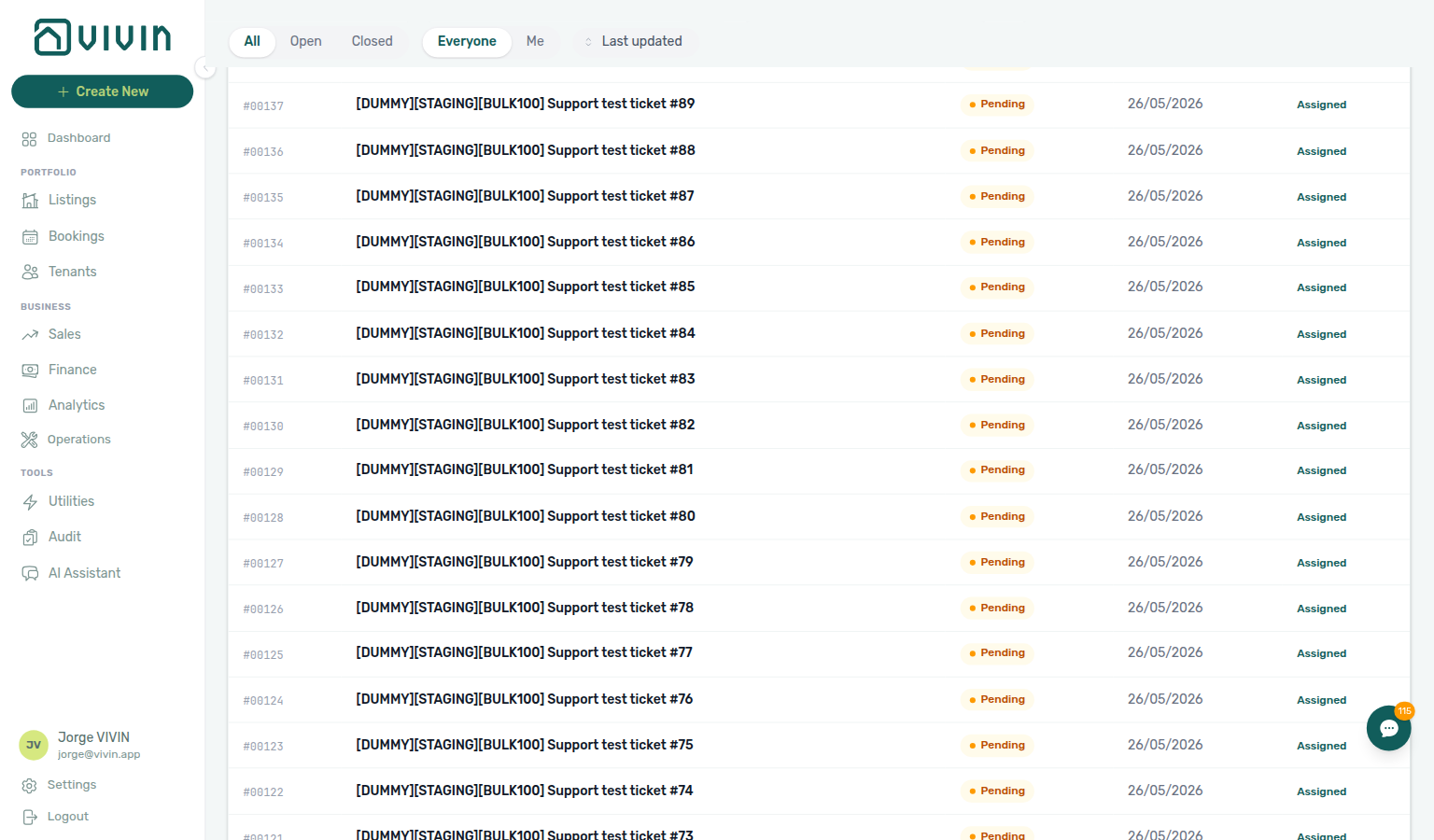
- New Ticket — Opens the New Support Ticket modal (see below). Submit Ticket sends the form to the Vivin team; Cancel discards unsaved input. When Vivin replies with an Operations maintenance ticket ID (for example
S259), paste the full code on Operations → Tickets — not in the support inbox search — see FAQ — Find a ticket by its ID. - Status filters — All lists every ticket (within the Everyone / My tickets scope). Open limits the list to tickets in the Open workflow state. Closed shows closed tickets only. Use All when you want to see tickets that are still active under other statuses (for example Pending, Awaiting your reply, or Ongoing analysis).
- Scope filters — Everyone shows tickets for the whole workspace; My tickets limits the list to tickets you opened.
- Sort — Dropdown beside the filter pills: Last updated (default, most recently updated first by
updatedAt), Creation date, Due date, or Priority (P0 highest first). Sort runs on the server; changing sort refetches from the first batch. - Search — Search tickets… field below the new ticket assignee card. Vivin queries the server (short debounce) across subject, ticket number, and message text with the same accent- and case-insensitive rules as the drawer. Active status, scope, and sort still apply; changing the search reloads from the first batch.
- Loading more — The table loads 20 tickets initially, then fetches the next 20 when you scroll near the bottom of the main workspace (same pattern as Notifications). A spinner appears under the table while the next batch loads. The footer shows Showing X of Y for the current filter set; End of list appears when every matching ticket is loaded.
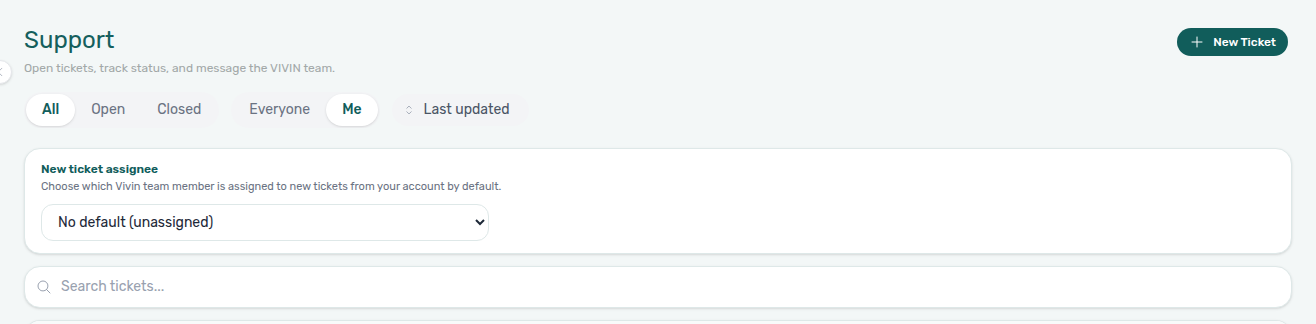
- New ticket assignee — Card above Search tickets… (administrators with Support access). Pick which Vivin team member is assigned to new tickets from your workspace by default, or leave None so new tickets start unassigned. Applies only to tickets created after you save the selection — existing threads keep their assignee. Per-ticket assignee in the table and ticket sidebar can still be changed independently. If the save request fails (network or server error), Vivin shows a toast — for example Could not update the default assignee. — and the dropdown reverts to the last value the server stored; pick the assignee again after connectivity improves.
Assignment email notifications
When Vivin assigns or reassigns a support ticket to a team member whose mailbox is on file, that person receives a Support ticket assigned email (unless they turned it off under Personal Settings → Your email preferences). The message includes the ticket number, subject line, and ticket metadata for context without opening the thread — Account (workspace company name), Priority, Module (area), Status, and Tags (empty fields show —; message text is not quoted). A See ticket button deep-links into the product surface for that assignee: Vivin internal assignees land in the admin support inbox (#2080); workspace operators assigned on customer accounts still open the management app (for example /?support=<ticketId> — see Help & Support drawer). Per-user opt-out does not change assignee on the ticket — it only suppresses mailbox copies; the assignee can still open the thread from the drawer or Support inbox.
Ticket status labels
Statuses appear as coloured badges in the list and in the ticket sidebar. Typical meanings:
| Label in the app | What it usually means |
|---|---|
| Open | The ticket is active; work or discussion continues. |
| Pending | Vivin is expected to reply or act next. In ticket rows and badges the same state may read Pending response; the drawer Status multi-select lists it as Pending. |
| Awaiting your reply | Vivin is waiting on information or confirmation from your side. |
| Ongoing analysis | The team is investigating or coordinating internally before the next visible update. |
| Backlog | Vivin acknowledged the request but deferred it — the ticket may be picked up in a future cycle rather than in the active queue today. |
| Closed | The ticket is resolved or intentionally ended. |
Use the row or ticket detail sidebar to read the thread, send messages, attach files, and Close a ticket when the issue is resolved.
Attachments and inline video (#1918)
Attachment types pair with New Support Ticket modal (composer staging) and Editing open tickets (message edits are text only — files stay as sent). When filing Bookings or Finance module tickets, attach booking or payment context per Glossary — Notification row navigation. Workflow screenshots: Processing a New Booking — Step 6, Managing a Check-in — Step 6, Managing a Check-out — Step 6. Full pairing matrix: Using in-app support section cross-reference.
New Ticket and reply composers accept the same attachment types:
| Type | Examples | Notes |
|---|---|---|
| Images | PNG, JPEG, GIF, WebP | Thumbnail previews before send; images in the thread open in a new tab when clicked. Paste images from the clipboard into the Description or reply box to attach them. |
| Videos | MP4, MOV, WebM, and other browser-readable formats | Up to 100 MB per file (screen recordings and short clips). The New Ticket modal shows a video thumbnail before submit; sent videos render as an inline player with controls in the thread (no download required to preview). |
| Documents | PDF, Word (.doc, .docx) | Filename chips in the composer; in the thread they appear as downloadable links. |
Add files with Click to add screenshots, videos, logs, or documents on the modal, the paperclip beside the reply box, or by dragging files onto the reply textarea. Remove staged files with the × on each chip or thumbnail before you send.
Support video attachment PNGs refreshed 2026-06-19 16:00 UTC (VIVIN_DOCS_BASE_URL=http://localhost:5173 VIVIN_DOCS_RECORD_API=$VITE_API_BASE_URL npx tsx tools/capture-settings-support-video-attachment-screenshots.ts).
Editing open tickets (title, module, and your messages)
Sidebar edits pair with Attachments and inline video (message edit is text-only) and Closed-ticket satisfaction rating (controls hide after Close). While status is Awaiting your reply, reply in-thread before idle auto-close per Auto-close when Vivin is waiting on you. Upstream: New Support Ticket modal (initial subject and module). Full pairing matrix: Using in-app support section cross-reference.
While a ticket is not Closed, anyone on your workspace with Support access can correct metadata and recent replies from the ticket sidebar (drawer or full inbox):
| What you can change | How | Notes |
|---|---|---|
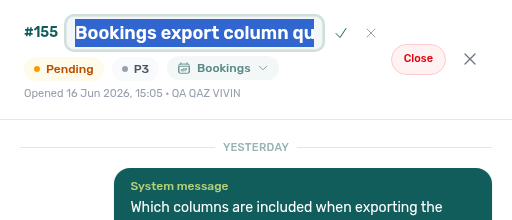
| Subject (title) | Click the pencil beside the title in the sidebar header, edit inline (up to 75 characters), then Save or press Enter. Escape or Cancel discards unsaved text. | Applies to the whole workspace — any Support user on the account may fix a typo in the subject. |
| Module (area) | Use the module chip under the status badges — same two-column grid as New Support Ticket (General, Bookings, Finance, and the other areas). | Saves immediately when you pick a tile. Priority is not editable here; Vivin sets and updates priority on the Vivin side. |
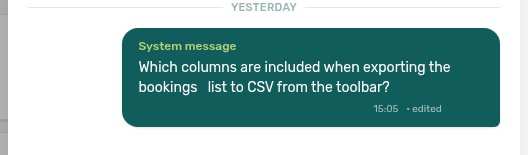
| Your own message text | On your outbound bubbles (teal, right-aligned), hover the message and click Edit. Change the text, then Save or Cancel. | Text only — attachments on that message stay as sent. After Save, a small edited label appears beside the timestamp. |
Message edit limits (product rules):
- Only your landlord-authored messages — not Vivin replies, system lines, or another teammate’s messages.
- Only while the ticket is open (not Closed).
- Only until Vivin support replies after that message in the thread. Once the team posts a later reply, earlier landlord messages lock — use a new reply instead of editing history.
Closed tickets show the module as a read-only chip and hide title-edit and message-edit controls. To continue the conversation, use Reopen (when available) or open a New Ticket.


Support ticket edit PNGs refreshed 2026-06-17 03:10 UTC (VIVIN_DOCS_BASE_URL=http://localhost:5173 VIVIN_DOCS_RECORD_API=$VITE_API_BASE_URL npx tsx tools/capture-settings-support-ticket-edit-screenshots.ts).
When a ticket is Closed, the sidebar header shows Opened metadata (date and the workspace member who created the ticket when available) and a second line Closed with the close timestamp. When Vivin recorded who closed the ticket, their display name appears after the closed date (for example Closed 5 Jun 2026, 04:23 · System after an auto-close, or a teammate’s name when they clicked Close).
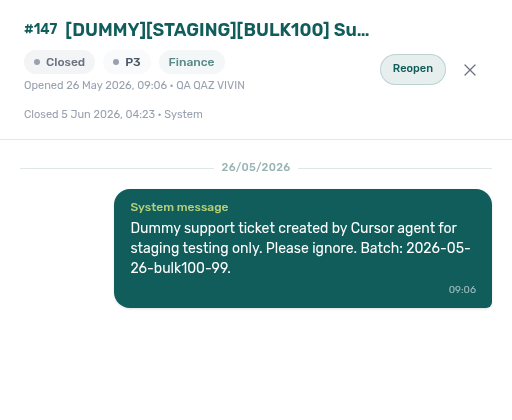
Closed-ticket sidebar capture re-verified 2026-06-22 01:20 UTC (tools/capture-docs-enrichment-3005.ts).
Closed-ticket satisfaction rating
Ratings pair with Auto-close when Vivin is waiting on you (premature closes) and New Support Ticket modal (follow-up when the issue persists). Upstream: Editing open tickets (title/module fixes before Close). Full pairing matrix: Using in-app support section cross-reference.
A rating footer appears on closed tickets: How was your experience? with five clickable stars. Picking a star saves immediately (no separate Submit); short acknowledgement copy appears under the stars (for example Excellent! at five stars). Ratings are optional — you can close the sidebar without scoring. Vivin uses ratings for support quality; they do not reopen the ticket.
Inbox load failures
Load failures pair with Glossary — Directory list load failures and the Help & Support drawer (same data layer). When Retry persists, use Get Help & Support email or return after sign-in per When to use in-app support. Full pairing matrix: Using in-app support section cross-reference.
When the first ticket list request fails on /settings/support, the page shows an alert card — Failed to load support tickets — with optional detail and a Retry button instead of an empty table. The Help & Support drawer uses the same data layer; if the inbox cannot load, use Retry on the full page or refresh after connectivity improves. See Glossary — Directory list load failures.
Auto-close when Vivin is waiting on you
Auto-close pairs with Closed-ticket satisfaction rating (quality signal after close) and New Support Ticket modal (follow-up when auto-close was premature). While Awaiting your reply, use Editing open tickets or a new reply before the idle window. Full pairing matrix: Using in-app support section cross-reference.
When status is Awaiting your reply, Vivin tracks how long the ticket has been in that state. If no one in your workspace replies for an extended idle period, the ticket may be closed automatically so the inbox stays manageable. In production, that idle window is 30 calendar days; non-production environments use a shorter window for testing. You still receive status notifications when a ticket is closed (including auto-close). Reply or open a New Ticket if the issue is not actually resolved.
New Support Ticket modal
Filing pairs with Attachments and inline video, Module picker layout (area grid), and Interface Language (translated labels). Choose Settings or Listings when setup is blocked per Onboarding a New Property — Step 7. Downstream: Support inbox (full page) lists the new row. Full pairing matrix: Using in-app support section cross-reference.
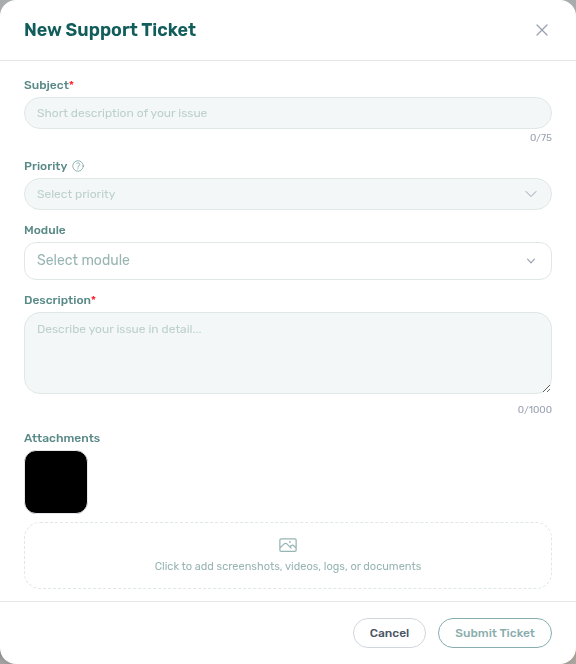
From New Ticket on the Support page, a centered dialog titled New Support Ticket opens (English labels below; other interface languages translate the same fields). The backdrop dims the rest of the app; Cancel or the X in the header closes the dialog unless a submit is already in progress.
| Field | Required | Notes |
|---|---|---|
| Subject | Yes | Short summary of the issue (up to 75 characters; a counter appears under the field). In English the empty field shows the placeholder Short description of your issue. |
| Priority | No | Optional Select priority list: P3 (general inquiry) through P0 (production outage). Use the ? next to the Priority label to open a second dialog, Priority Levels, with definitions and examples. If you leave priority unset, Vivin still receives the ticket. |
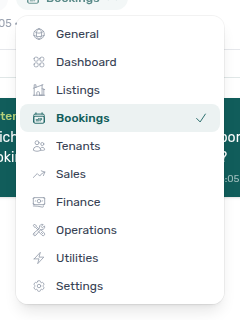
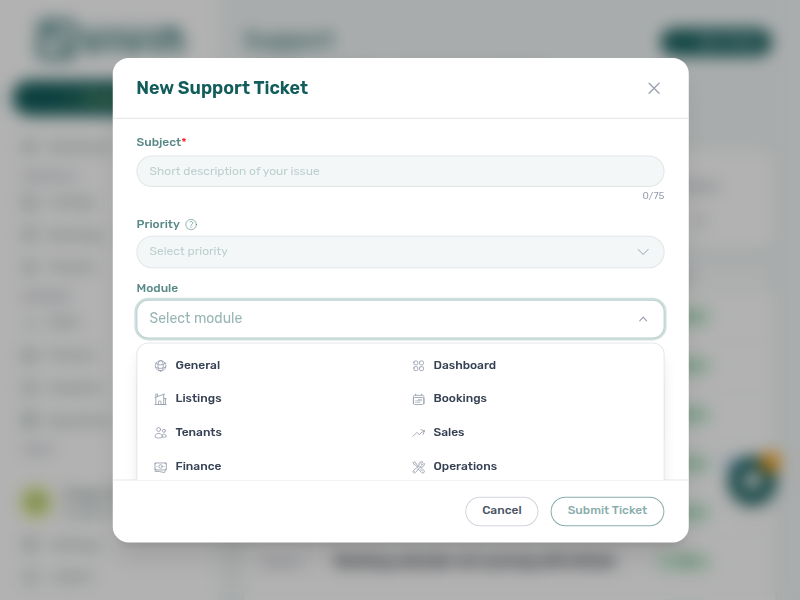
| Module | Yes | Open the Module control (placeholder Select module until chosen). The menu shows a two-column grid of icon-labelled areas: General, Dashboard, Listings, Bookings, Tenants, Sales, Finance, Operations, Utilities, Settings, AI Assistant, Booking Engine, Invoicing, and Other. Submit Ticket stays disabled until one module is selected. |
| Description | Yes | Detailed context (up to 1000 characters; counter under the field). In English the placeholder reads Describe your issue in detail.... Pasting images from the clipboard can attach them as files in addition to anything you add under Attachments (video paste is not supported — use Attachments or the reply paperclip for videos). |
| Attachments | No | Click to add screenshots, videos, logs, or documents — images, videos (up to 100 MB each), PDF, and Word (.doc, .docx). Multiple files are allowed; image and video thumbnails preview before submit. See Attachments and inline video. |
Footer actions: Cancel closes the modal (when not submitting). The primary action is labelled Submit Ticket in English (other interface languages may shorten the label, for example to Submit); while the request runs it shows Submitting..., then the modal closes on success and the new ticket appears in your inbox.
Module picker layout
Module tiles pair with New Support Ticket modal (required field before Submit Ticket) and Editing open tickets (same grid when you change area on an open ticket). Map wizard blockers: Listings for Onboarding a New Property — Step 7, Finance for Handling a Late Payment — Step 6, Settings for Resetting a Management User Password — Troubleshooting. Full pairing matrix: Using in-app support section cross-reference.
When Module shows Select module, open the control to see a dimmed backdrop (click outside the panel to dismiss without choosing) and a two-column grid of tiles. Each tile pairs a small icon with a label — the same areas listed in the table above (General through Other). Choosing a tile sets your module, closes the grid, and enables Submit Ticket together with non-empty Subject and Description. Leave Priority unset if you are unsure; Vivin still triages the ticket.
The capture below shows the modal with the module menu open so you can match labels to your issue area; the inbox behind the dialog is blurred.
Full pairing matrix: Using in-app support section cross-reference.
Mobile behaviour
Mobile entry points pair with Help & Support drawer (same panel from the header icon). Phone-only Operations shell rules: Getting Started — Mobile phones. Full escalation map: Get Help & Support — Section cross-reference.
On narrow viewports (phones and small tablets), the layout changes in two ways that matter for support:
- No floating FAB — The round Help & Support button fixed at the bottom-right is desktop only (
mdbreakpoint and wider). It is hidden on narrow screens so it does not cover operational content. - Header chat icon — When you have the Support permission, the top bar on every module shows a chat bubble control on the right (same drawer as the desktop FAB). When one or more tickets are Pending response (Vivin owes a reply), an amber dot appears on the icon (no number on mobile — use the drawer Active chip or full inbox for counts). The dot uses the same awaiting_reply count as the desktop FAB badge.

Tapping the header icon opens the same Help & Support drawer as on desktop (Active / Closed chips, detailed Status multi-select, Sort by pills, search, New Ticket, and the ticket list). The floating bottom-right button stays hidden on narrow viewports so it does not cover operational content.
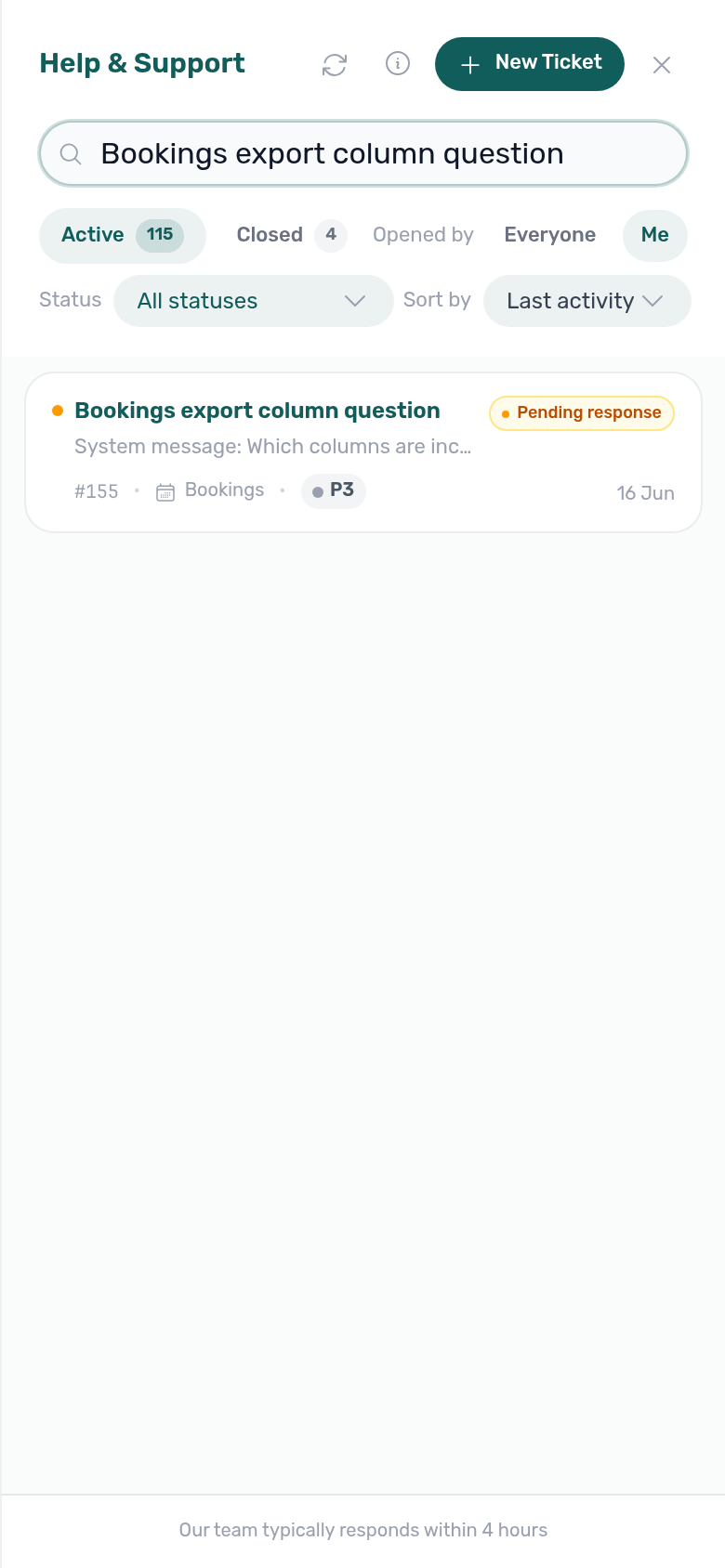
Mobile drawer capture refreshed 2026-06-18 16:25 UTC (same capture-settings-support-drawer-1861-screenshots.ts run; capture script clicks the visible header FAB — desktop and mobile each render a hidden duplicate aria-label="Help & Support" control).
You can still open the full inbox at /settings/support from a bookmark or sidebar navigation when your role includes Support. Legacy /support URLs redirect there.
On narrow screens, users who have the Operations module may be guided to stay in Operations for day-to-day field work. If that applies to your account, you can still open Support when you have the Support permission: Operations and Support routes remain reachable so you can file or follow tickets without losing access to operations views.
Full pairing matrix: Using in-app support section cross-reference.
Using in-app support section cross-reference
Use this table when one section in this workflow naturally leads into another module, concept page, or downstream workflow — each row links to the docs you should read before or after that section.
| Workflow section | Pair with these docs |
| --------------------------------------------------------------------------------------- | ----------------------------------------------------------------------------------------------------------------------------------------------------------------------------------------------------------------------------------------------------------------------------------------------------------------------------------------------------------------------------------------------------------------------------------------------------------------------------------------------------------------------------------------------------------------------------------------------------------------------------------------------------------------------------------------------------------------------------------------------------------------------------------------------------------------------------------------------------------------------------------------------------------------------------------------------------------------------------------------------------------------------------------------------------------------------------------------------------------------------------------------------------------------------------------------------------------------------------------------------------------------------------------------------------------------------------------------------------------------------------------------------------------------------------------------------------------------------------------------------------------------------------------------------------------------------------------------------------------------------------------------------------------------------------------------------------------------------------------------------------------------------------------------------------------------------------------------------------------------------------------------------------------------------------------------------------------------------------------------------------------------------------------------------------------------------------------------------------------------------------------------------------------------------------------------------------------------------------------------------------------------------------------------------------------------------------------------------------------------------------------------------------------------------------------------------------------------------------------------------------------------------------------------------------------------------------------------------------------------------------------------------------------------------------------------------------------------------------------------------------------------------------------------------------------------------------------------------------------------------------------------------- | --------------------------------------------------------------------------------------------------------------------------------------------------------------------------------------------------------------------------------------------------------------------------------------------------------------------------------------------------------------------------------------------------------------------------------------------------------------------------------------------------------------- |
| When to use email support | Get Help & Support, Settings > Subscription, FAQ — Help & Vivin support |
| When to use in-app support | Users & Roles, Account Settings — Support-only browse layout, Create New menu (Operations New Ticket contrast), Onboarding a New Property — Step 7 (wizard submit or Utilities → Connections blocked), Portfolio KPI review — Step 6 / Step 7 (Analytics permission or Total Debt reconciliation blocked), Processing a New Booking — Step 6 (portal Copy / Impersonate Tenant or tenant-category portal modules blocked), Handling a Late Payment — Step 1 (contrast self-serve collections from payment overdue alerts), Handling a Late Payment — Step 6 / Step 6b (collections permissions and MCP auth vs self-serve), Notification triage — Step 6 (row-click and read-state defects), Entering Monthly Utility Bills — Step 6 (AI extraction and overage posting), Cancelling a Booking — Step 6 / Step 6b (post-cancel cleanup), Managing a Check-out — Step 6 / Step 7 (deposit dispute or Ended status blocked), Manual block hygiene — Step 6 (calendar edits blocked after hygiene pass), Resetting a Management User Password — Troubleshooting (refresh JWT before MCP auth tickets), Tenant MCP — Maintenance and escalation (internal create-maintenance-ticket / notify-landlord vs Vivin product tickets), Landlord MCP — Permissions and safety (account-scoped JWT failures vs operator UI escalation) |
| Where to open Support | Deep Links — Support, Management session (JWT when filing integration tickets), Handling a Late Payment — Step 6 (?support=<ticketId> from Finance / Bookings during collections escalation), Cancelling a Booking — Step 6 (?support=<ticketId> from Operations during post-cancel cleanup), Onboarding a New Property — Step 7 (drawer from Listings during wizard verification) |
| Help & Support drawer | Support inbox (full page), New Support Ticket modal, Glossary — Directory list load failures, Inbox load failures, Handling a Late Payment — Step 6 / Step 6b (drawer from Finance during collections escalation), Cancelling a Booking — Step 6 / Step 6b (drawer from Operations / Bookings during post-cancel cleanup), Onboarding a New Property — Step 7 (drawer from Listings), Managing a Check-in — Step 6 / Step 6b (drawer from Operations / Bookings during arrival week), Managing a Check-out — Step 6 / Step 6b (drawer from Finance during departure settlement), Processing a New Booking — Step 6 / Step 6b (drawer from Bookings during portal verification) |
| Support inbox (full page) | Notifications module (same scroll pattern), Attachments and inline video, Editing open tickets, Inbox load failures, Closed-ticket satisfaction rating |
| Attachments and inline video | New Support Ticket modal, Editing open tickets, Glossary — Notification row navigation (attach booking context for Bookings / Finance module tickets), Processing a New Booking — Step 6 (portal screenshots), Managing a Check-in — Step 6 (access-code screen recordings), Managing a Check-out — Step 6 (deposit settlement screenshots) |
| Editing open tickets | New Support Ticket modal, Attachments and inline video, Closed-ticket satisfaction rating, Auto-close when Vivin is waiting on you |
| Inbox load failures | Glossary — Directory list load failures, Help & Support drawer (same data layer), Using in-app support — When to use in-app support (file support when Retry persists) |
| Closed-ticket satisfaction rating | Editing open tickets, Auto-close when Vivin is waiting on you |
| Auto-close when Vivin is waiting on you | Editing open tickets, Closed-ticket satisfaction rating, New Support Ticket modal (open a follow-up ticket when auto-close was premature) |
| New Support Ticket modal | Interface Language, Glossary — Notification row navigation (attach context for Bookings / Finance module tickets), Glossary — Tenant category (attach segment context for Finance / Analytics KPI tickets), Settings > Tenant categories, Tenant MCP (automation escalations that still need Vivin credential or scope changes — contrast notify-landlord / create-maintenance-ticket), Landlord MCP (integration and JWT scope failures when filing Settings or API module tickets) |
| Mobile behaviour | Getting Started — Mobile phones, Operations module (narrow-screen shell rules) |
| Lockout catch-up after password recovery | Access tickets after password recovery | Common Workflows — Lockout catch-up, Resetting a Management User Password, Getting Started — Lockout catch-up |
| Pending manual receipt approval | Payment approval permission or persistence defects | Common Workflows — Pending manual receipt approval, Finance — Pending manual payments, When to use in-app support |
| Reject/revert mistaken receipts | Credit-note or reject/revert disputes on tickets | Common Workflows — Reject/revert mistaken receipts, Payment Allocation — Correcting mistaken receipts, Glossary — Credit note |
| Partly collected security deposit | Partially paid badge or Finance partial filter defects | Common Workflows — Partly collected security deposit, Finance — Deposits status summary cards, Glossary — Deposit lifecycle status, FAQ — Partly collected security deposit, When to use in-app support (file Finance module tickets) |
| Wrong tenant on a booking | Change tenant greyed out or guard defect | Common Workflows — Wrong tenant on a booking, New Support Ticket modal, FAQ — Wrong tenant on a booking (bookings-detail-change-tenant-control.png, bookings-detail-change-tenant-flow.mp4) |
| Cancel Booking vs Delete Booking | Delete Booking guard or ledger defect — file Bookings ticket | Common Workflows — Cancel Booking vs Delete Booking, New Support Ticket modal, FAQ — Cancel Booking vs Delete Booking (bookings-cancel-booking-modal-refund-types.png, bookings-list-canceled-tab.png, workflows-cancel-booking-refund-modal-flow.mp4) |
| Portfolio retirement decisions | Archive / Unarchive or Delete Booking guard defects | Common Workflows — Portfolio retirement decisions, New Support Ticket modal, FAQ — Portfolio retirement decisions (listings-archived-populated-table.png, finance-transactions-type-summary-cards.png) |
| Directory list load failures | /settings/support inbox fails before filing tickets | Common Workflows — Directory list load failures, Support inbox (full page), FAQ — Directory list load failures (notifications-module-load-failure.png, utilities-bills-load-failure.png) |
| Booking sidebar tab load failures | Tab Refresh never recovers — file defect ticket | Common Workflows — Booking sidebar tab load failures, New Support Ticket modal, FAQ — Communication or Tickets load failure (bookings-detail-communication-tab-whatsapp-thread.png, bookings-detail-tickets-tab.png) |
| Confirmation alert triage | Row-click or Approve blocked on confirmation alert | Common Workflows — Confirmation alert triage, New Support Ticket modal, FAQ — Processing a New Booking hub (notifications-row-navigate-to-booking-detail.png, bookings-detail-transactions-approve-payment-modal.png) |
| Portfolio segmentation by tenant category | Tenant-category portal or filter defects | Common Workflows — Portfolio segmentation, Settings > Tenant categories, Tenant Portal — Portal access by tenant category |
| Check-out final utilities handoff | Support ticket cites final overage blocking Ready To Refund | Common Workflows — Check-out final utilities handoff, New Support Ticket modal, Managing a Check-out — Step 6 (utilities-allocations-review-flow.mp4, bookings-detail-payment-plan-tab-schedule.png) |
| Check-in to check-out handoff | Support ticket asks when to switch from check-in to check-out workflow | Common Workflows — Check-in to check-out handoff, New Support Ticket modal, FAQ — Managing a Check-out hub (operations-check-in-out-check-outs-next-7-days.png, bookings-timeline-view.png) |
| Check-out collections before refund | Support ticket cites Ready To Refund blocked by rent arrears | Common Workflows — Check-out collections before refund, New Support Ticket modal, Managing a Check-out — Step 6 (workflows-check-out-coordination-flow.mp4, bookings-detail-payment-plan-tab-schedule.png, finance-contract-values-in-debt-filter.png) |
| Check-out ledger cleanup before refund | Support ticket — tenant paid but Ready To Refund blocked (duplicate) | Common Workflows — Check-out ledger cleanup before refund, New Support Ticket modal, Managing a Check-out — Step 6 (bookings-detail-transactions-revert-modal-info-banner.png, finance-transactions-bulk-reject-selected-bar.png) |
| Payment alert to receivables triage | Support ticket filed before self-serve payment overdue triage | Common Workflows — Payment alert to receivables triage, New Support Ticket modal, Notification triage — Payment alert to receivables triage (notifications-row-navigate-to-booking-detail.png, notifications-row-navigation-flow.mp4) |
| Finance debt receivables triage | Support ticket: Total Debt still high after self-serve triage | Common Workflows — Finance debt receivables triage, New Support Ticket modal, Pending manual receipt approval (finance-overview-income-chart-debt-aging.png, finance-overview-debt-aging-walkthrough-flow.mp4, finance-transactions-pending-pill.png) |
| Handling a Late Payment collections | Support ticket: cite self-serve collections Steps 1–5 before New Support Ticket modal |
| Finance Income status drill-down | Support ticket: self-serve Income → In debt vs Debt Aging before filing | Common Workflows — Finance Income status drill-down, New Support Ticket modal, Finance debt receivables triage (finance-overview-income-status-in-debt-modal.png, finance-overview-income-drill-down-flow.mp4) |
| Cash flow forecast drill-down | Support ticket: Cash flow forecast All payments vs Income segments before filing | Common Workflows — Cash flow forecast drill-down, New Support Ticket modal, Finance Income status drill-down (finance-overview-cash-flow-all-payments-modal.png, finance-overview-cash-flow-drill-down-flow.mp4) |
| Cancellation collections before void | Support ticket cites In Debt blocking Cancel booking | Common Workflows — Cancellation collections before void, New Support Ticket modal, Cancelling a Booking — Step 2 (finance-contract-values-in-debt-filter.png, bookings-detail-transactions-approve-payment-modal.png, bookings-cancel-booking-modal-refund-types.png, workflows-cancel-booking-refund-modal-flow.mp4) |
| Rent reduction after invoicing | Support ticket cites blocked rent cut below exported month | Common Workflows — Rent reduction after invoicing, When to use in-app support, New Support Ticket modal, Glossary — Invoiced floor (rent) (bookings-detail-change-monthly-rent-modal.png, bookings-detail-contract-values-invoiced-floor-edit-amount.png) |
| Month-end invoicing (fixed date) | Support ticket cites wrong document date on issued invoices | Common Workflows — Month-end invoicing (fixed date), When to use in-app support, FAQ — Month-end invoicing (fixed date) hub (settings-invoicing-invoice-date-toggle.png, finance-transactions-bulk-toolbar-fixed-invoice-date-banner.png) |
| Bulk Hostkit invoicing | Support ticket cites slow Hostkit batch | Common Workflows — Bulk Hostkit invoicing, When to use in-app support, FAQ — Bulk Hostkit invoicing slow (finance-transactions-bulk-selection-bar.png, settings-invoicing-hostkit-series.png) |
| Same-day turnover coordination | Turnover coordination blocked — escalate via support | Common Workflows — Same-day turnover coordination, New Support Ticket modal, FAQ — Same-day turnovers (operations-add-ticket-modal.png, bookings-timeline-day-week-month-and-sidebar.mp4) |
| Occupancy KPI to block hygiene handoff | Calendar edit blocked after block hygiene — escalate via support | Common Workflows — Occupancy KPI to block hygiene handoff, New Support Ticket modal, FAQ — Analytics (KPI workspace) (analytics-kpi-occupancy-tab.png, audit-manual-blocks-filter-scroll.mp4) |
| Deposit missing on Finance Deposits | Support ticket — deposit row missing on Finance | Common Workflows — Deposit missing on Finance Deposits, When to use in-app support, FAQ — Deposit missing on Finance Deposits (finance-deposits-date-range-toolbar-default.png, finance-deposits-date-range-clear-flow.mp4) |
Related
Related below links this workflow to modules, concepts, settings, and escalation paths. Pair Documentation map & escalation with Common Workflows hub — Documentation map & escalation; pair Upstream & downstream workflows with Common Workflows — Workflow cross-reference. Topic-to-section pairing in sections above: Using in-app support section cross-reference. Full hub matrix: Common Workflows section cross-reference.
Documentation map & escalation
Documentation-map bullets pair with Introduction — Section cross-reference and FAQ — Section cross-reference. Hub parity: Common Workflows hub — Documentation map & escalation. Full pairing matrix: Using in-app support section cross-reference · Common Workflows section cross-reference.
- Common Workflows — Hub pairing matrix across all operator guides
- Get Help & Support — Email escalation, urgency, and the public status page
- FAQ — Help & Vivin support — Email vs in-app tickets, permissions, and drawer vs full inbox
- Glossary — Term definitions referenced in support threads
- Resetting a Management User Password — Self-service recovery when you cannot sign in to open Support; refresh Landlord MCP Bearer JWT after Step 3 — Troubleshooting when external sessions still fail
Upstream & downstream workflows
Workflow bullets pair with Common Workflows — Workflow cross-reference for inter-guide step pairing. Full pairing matrix: Using in-app support section cross-reference · Common Workflows section cross-reference.
- Onboarding a New Property (section cross-reference; Deeper workflow reads; hub) — Open a ticket when setup steps are blocked by permissions or account state; Step 6 (section cross-reference; Deeper workflow reads; hub) when Utilities → Connections rows stay Missing; Step 7 (section cross-reference; Deeper workflow reads; hub) when wizard submit or Multicalendar verification fails
- Portfolio KPI review — Step 6 (section cross-reference; Deeper workflow reads; hub) — Analytics module permission or tenant-segment filter defects before segment KPI review
- Portfolio KPI review — Step 7 (section cross-reference; Deeper workflow reads; hub) — Total Debt / Analytics load failures or MCP auth during month-end reconciliation; lockout catch-up via Resetting a Management User Password — Step 3 (section cross-reference; Deeper workflow reads; hub) — pair Notification triage — Step 5 (section cross-reference; Deeper workflow reads; hub) and Entering Monthly Utility Bills — Step 4b (section cross-reference; Deeper workflow reads; hub) when bill entry or alerts lagged during lockout
- Processing a New Booking — Step 6 (section cross-reference; Deeper workflow reads; hub) — Portal Copy / Impersonate Tenant or tenant-category portal modules blocked after confirmation
- Processing a New Booking — Step 6b (section cross-reference; Deeper workflow reads; hub) — Month-end Pending confirmation receipts when Approve payments is missing or rows persist after approval
- Notification triage (section cross-reference; Deeper workflow reads; hub) — In-app product alerts (distinct from Vivin support tickets); payment overdue → Handling a Late Payment — Step 1 (section cross-reference; Deeper workflow reads; hub) before filing a support ticket; Step 6 (section cross-reference; Deeper workflow reads; hub) when row-click navigation or read-state APIs fail
- Entering Monthly Utility Bills — Step 6 (section cross-reference; Deeper workflow reads; hub) — AI extraction or overage posting defects after self-serve Steps 1–5; try Step 4b (section cross-reference; Deeper workflow reads; hub) and Portfolio KPI review — Step 7 (section cross-reference; Deeper workflow reads; hub) for month-end Pending overage receipts first; lockout catch-up via Resetting a Management User Password — Step 3 (section cross-reference; Deeper workflow reads; hub) — pair Notification triage — Step 5 (section cross-reference; Deeper workflow reads; hub) when utility alerts piled up during lockout
- Cancelling a Booking — Step 6 (section cross-reference; Deeper workflow reads; hub) — Operations closure or availability restore blocked after cancel; lockout catch-up via Resetting a Management User Password — Step 3 (section cross-reference; Deeper workflow reads; hub)
- Cancelling a Booking — Step 6b (section cross-reference; Deeper workflow reads; hub) — Lingering Pending settlement receipts or stale cancellation alerts at month-end; lockout catch-up via Resetting a Management User Password — Step 3 (section cross-reference; Deeper workflow reads; hub)
- Manual block hygiene — Step 6 (section cross-reference; Deeper workflow reads; hub) — Audit row-click, Calendar edits, or Multicalendar still blocked after hygiene pass
- Handling a Late Payment — Step 1 (section cross-reference; Deeper workflow reads; hub) — Self-serve collections when a payment overdue alert row-click brought you here
- Handling a Late Payment — Step 6 (section cross-reference; Deeper workflow reads; hub) — Vivin product tickets when permissions, Finance filter parity, or MCP auth block segment-wide collections after self-serve Steps 1–5; lockout catch-up via Resetting a Management User Password — Step 3 (section cross-reference; Deeper workflow reads; hub)
- Handling a Late Payment — Step 6b (section cross-reference; Deeper workflow reads; hub) — Approve payments missing or Pending collections receipts persist after month-end KPI review; lockout catch-up via Resetting a Management User Password — Step 3 (section cross-reference; Deeper workflow reads; hub)
- Managing a Check-out — Step 6 (section cross-reference; Deeper workflow reads; hub) — Ready To Refund or Resolve dispute blocked when arrears or contested retentions remain (Glossary — Deposit lifecycle status)
- Portfolio KPI review (section cross-reference; Deeper workflow reads; hub) — Self-serve reconciliation before opening payment-data support tickets (Step 6 (section cross-reference; Deeper workflow reads; hub) tenant-segment checks; Step 7 (section cross-reference; Deeper workflow reads; hub) month-end Total Debt / Analytics load / MCP auth escalation)
- Managing a Check-in — Step 6 (section cross-reference; Deeper workflow reads; hub) — Urgent access-code or Nuki tickets before arrival day; Step 6b (section cross-reference; Deeper workflow reads; hub) when month-end Pending rows lag arrival-week receipts
- Managing a Check-out — Step 6 (section cross-reference; Deeper workflow reads; hub) — Ready To Refund or Resolve dispute blocked when arrears or contested retentions remain; Step 6b (section cross-reference; Deeper workflow reads; hub) when month-end Pending departure receipts lag settlement
- Managing a Check-out & Deposit Refund (section cross-reference; Deeper workflow reads; hub) — Escalate contested deposit retentions when Resolve dispute is blocked; Step 7 (section cross-reference; Deeper workflow reads; hub) when Ended status or dispute toggles fail after settlement
- Onboarding a New Property — Step 7 (section cross-reference; Deeper workflow reads; hub) — Wizard Submit, Utilities → Connections, or channel verification blocked on new inventory
- Notification triage — Step 6 (section cross-reference; Deeper workflow reads; hub) — Vivin support when product alert row-click or read-state APIs fail (distinct from filing a support ticket here for the same defect); lockout catch-up via Resetting a Management User Password — Step 3 (section cross-reference; Deeper workflow reads; hub) — pair Portfolio KPI review — Step 7 (section cross-reference; Deeper workflow reads; hub) and Entering Monthly Utility Bills — Step 4b (section cross-reference; Deeper workflow reads; hub) when month-end Pending mesh lagged during lockout
- Manual block hygiene — Step 6 (section cross-reference; Deeper workflow reads; hub) — Multicalendar or Calendar edits still blocked after hygiene pass
Navigation & bookmarks
Bookmark routes pair with Management Frontend Deep Links and Create New menu. Full pairing matrix: Using in-app support section cross-reference · Common Workflows section cross-reference.
- Deep Links — Bookmarkable
/settings/supportroutes and?support=<ticketId>drawer links - Account Settings — Where Support sits relative to other settings (including support-only browse layout)
- Users & Roles — Grant Support (
support.module) and admin Resend password for locked-out teammates
Concepts & settings that shape this workflow
Concept and settings bullets pair with Concepts hub subsection index and Concept cross-reference and Account Settings — Tab cross-reference. Full pairing matrix: Using in-app support section cross-reference · Common Workflows section cross-reference.
- Chatbot settings — WhatsApp tenant channel when tickets involve bot handoff or pairing
- Subscription — Billing and card-on-file context for account-access tickets
- Settings > Integrations — Channel sync context when tickets involve platform credentials or iCal linkage
- Settings > Emails — Communication Rules and lifecycle template bugs distinct from Vivin product support tickets
- Settings > Tenant categories — Segment portal and filter context when support tickets involve one tenant category
- Settings > Preferences — In-app notifications — Product bell alerts (distinct from Vivin support tickets filed in this workflow)
- Integrations & Distribution — Channel sync and marketplace linking context before opening Vivin support tickets (section cross-reference; Deeper workflow reads; hub)
- Tenant Portal — Tenant-facing access, payments, and contract signing context when support tickets involve portal behaviour (section cross-reference; Deeper workflow reads; hub)
- FAQ — Tenant contract signing blocked — No PDF yet, mandatory Your Details gates, category locks, or Lease purpose; portal signing vs paper upload on Contract Info
- Payment Allocation — Two-layer receipts, invoiced-floor rent edits, and credit note reject/revert warnings (section cross-reference; Deeper workflow reads; hub)
- Booking Lifecycle — Computed Upcoming → Ongoing → Ended / Canceled status model, list filters, and Timeline (section cross-reference; Deeper workflow reads; hub)
- Tenant MCP — Booking-scoped
create-maintenance-ticketandnotify-landlordfor internal operations escalations; file Vivin support here when automation needs credential, scope, or product fixes (section cross-reference; Deeper workflow reads; hub) - Landlord MCP — Account-scoped portfolio tools; file Vivin support when JWT sessions fail or external clients need new tool coverage — contrast with operator self-serve workflows like Handling a Late Payment — Step 6 (section cross-reference; Deeper workflow reads; hub)
Deeper workflow reads
Concept workflow reads pair with Concepts hub subsection index and Concept cross-reference. Each concept sub-guide reciprocates with [Deeper workflow reads](../workflows/using-in-app-support.md#deeper-workflow-reads) anchors on Using in-app support bullets — hub parity: Common Workflows hub — Deeper workflow reads. Full pairing matrix: Using in-app support section cross-reference · Common Workflows section cross-reference.
- Automation & AI — Channel map, chatbot, in-app assistant, and MCP clients (section cross-reference; Deeper workflow reads; hub)
Deeper API reads
API reads pair with API Reference hub subsection index and API guide cross-reference. Hub parity: Common Workflows — Deeper API reads. Full pairing matrix: Using in-app support section cross-reference · Common Workflows section cross-reference.
- Management session authentication — Operator JWT failures that block workflow steps — refresh after Resetting a Management User Password (section cross-reference; Deeper workflow reads; hub)
- Error Handling — Persistent
403permission responses worth citing on Vivin product tickets (section cross-reference; Deeper workflow reads; hub) - Webhooks & Notifications — Partner callback defects distinct from operator in-app alert triage (section cross-reference; Deeper workflow reads; hub)
- AI usage API — Internal LLM token ledger (
GET /ai-usage/summary;landlord_chat) when triaging AI Chat or MCP support tickets — cite month-range filters on Vivin product tickets (section cross-reference; Deeper workflow reads; hub)
Lockout catch-up after password recovery
Access tickets after password recovery should cite Resetting a Management User Password and lockout catch-up steps — complete Notification triage — Steps 4–5 and Pending manual receipt approval before filing product tickets for stale Total Debt or alert backlog. Hub parity: Common Workflows — Lockout catch-up after password recovery. Full pairing matrix: using-in-app-support-section-cross-reference · Common Workflows section cross-reference.
- Common Workflows — Lockout catch-up after password recovery — Hub matrix when sign-in was restored mid-workflow
- Resetting a Management User Password — Self-serve before filing access tickets
- Getting Started — Lockout catch-up after password recovery — Cite completed catch-up steps on tickets
- Notification triage — Step 4 — Alert backlog before support tickets (
notifications-row-navigate-to-booking-detail.png) - Common Workflows — Directory list load failures — Retry when
/notificationsfails to load - Common Workflows — Finance debt receivables triage — Total Debt still high after catch-up
- Troubleshooting — MCP 403 after JWT refresh
Pending manual receipt approval
Payment approval permission defects on tickets pair with Finance — Pending manual payments. Hub parity: Common Workflows — Pending manual receipt approval. Full pairing matrix: using-in-app-support-section-cross-reference · Common Workflows section cross-reference.
- Common Workflows — Pending manual receipt approval — Hub matrix when recorded transfers still await Approve payments
- Glossary — Pending manual in-payment (Finance) — Definition and three-surface triage
- Glossary — Pending manual receipt approval hub — Surface table + per-guide/module mesh reciprocal hub
- FAQ — Pending manual receipt approval hub — Symptom table + per-guide/module mesh
- When to use in-app support — Approve payment missing for role
- Finance — Pending manual payments — Pending persists after approval
- FAQ — Manual receipt still pending — Self-serve before filing
- Notification triage — Pending manual receipt approval — Alert-driven approval before filing (
notifications-row-navigation-flow.mp4) - Resetting a Management User Password — Pending manual receipt approval — Lockout-delayed Pending backlog
- Users and roles — Approve payments — Role permission check before ticket (
finance-transactions-pending-pill.png)
Utility overage collections
Support tickets citing utility overage on Payment Plan pair with self-serve Entering Monthly Utility Bills — Step 4 before New Support Ticket modal — hub: Common Workflows — Utility overage collections. Full pairing matrix: using-in-app-support-section-cross-reference · Common Workflows section cross-reference.
- Common Workflows — Utility overage collections — Hub matrix (
utilities-allocations-row-breakdown-expanded.png,utilities-allocations-review-flow.mp4) - When to use in-app support — Self-serve overage triage before Utilities module tickets
- Entering Monthly Utility Bills — Step 4 — Allocation review before filing
- Handling a Late Payment — Step 1 — Collections path when tenant disputes amount
- FAQ — Entering Monthly Utility Bills hub — Symptom table before escalation
- Utilities module — Allocations tab reference
Check-out final utilities handoff
Support tickets citing final utility overage blocking Ready To Refund pair with self-serve Entering Monthly Utility Bills — Step 4 and Managing a Check-out — Step 6 before New Support Ticket modal — hub: Common Workflows — Check-out final utilities handoff. Full pairing matrix: using-in-app-support-section-cross-reference · Common Workflows section cross-reference.
- Common Workflows — Check-out final utilities handoff — Hub matrix (
utilities-allocations-review-flow.mp4,bookings-detail-payment-plan-tab-schedule.png,bookings-detail-deposit-tab-ready-to-refund-toggle.png) - When to use in-app support — Self-serve final overage triage before Finance / Utilities module tickets
- Entering Monthly Utility Bills — Step 4 — Allocation review before filing
- Managing a Check-out — Step 6 — Settlement verification path
- FAQ — Managing a Check-out hub — Symptom table before escalation
- Utilities module — Allocations / Bills tab reference
Check-in to check-out handoff
Support tickets asking when to leave Managing a Check-in for Managing a Check-out should cite self-serve hub Common Workflows — Check-in to check-out handoff before New Support Ticket modal. Full pairing matrix: using-in-app-support-section-cross-reference · Common Workflows section cross-reference.
- Common Workflows — Check-in to check-out handoff — Hub matrix (
operations-check-in-out-check-outs-next-7-days.png,bookings-timeline-view.png) - Glossary — Check-in to check-out handoff hub — Surface table + per-guide/module mesh
- New Support Ticket modal — Escalation after self-serve hub review
- Managing a Check-in — Step 4 — Upstream Ongoing prerequisite
- Managing a Check-out — Step 1 — Departure-week entry point
- FAQ — Managing a Check-in hub — Arrival-week symptom table
- FAQ — Managing a Check-out hub — Departure-week symptom table
Check-out collections before refund
Support tickets citing Ready To Refund blocked by rent arrears pair with self-serve Managing a Check-out — Step 6 before New Support Ticket modal — hub: Common Workflows — Check-out collections before refund. Distinct from Check-out ledger cleanup before refund (tenant paid, duplicate on ledger). Full pairing matrix: using-in-app-support-section-cross-reference · Common Workflows section cross-reference.
- Common Workflows — Check-out collections before refund — Hub matrix (
workflows-check-out-coordination-flow.mp4,bookings-detail-payment-plan-tab-schedule.png,bookings-detail-deposit-tab-ready-to-refund-toggle.png) - When to use in-app support — Self-serve collections triage before Finance module tickets
- Handling a Late Payment — Step 1 — Collections path when tenant disputes amount
- Managing a Check-out — Step 6 — Payment Plan settlement before refund
- FAQ — Managing a Check-out hub — Symptom table before escalation
- FAQ — Handling a Late Payment hub — Collections symptom table
Check-out ledger cleanup before refund
Support tickets citing Ready To Refund blocked when the tenant paid once but the ledger shows a duplicate pair with self-serve Reject / Revert on booking Transactions before New Support Ticket modal — hub: Common Workflows — Check-out ledger cleanup before refund. Distinct from rent Check-out collections before refund. Full pairing matrix: using-in-app-support-section-cross-reference · Common Workflows section cross-reference.
-
Common Workflows — Check-out ledger cleanup before refund — Hub matrix (
bookings-detail-transactions-revert-modal-info-banner.png,bookings-detail-deposit-tab-ready-to-refund-toggle.png) -
When to use in-app support — Self-serve ledger cleanup before Finance module tickets
-
Reject/revert mistaken receipts — Reject / Revert path when tenant insists they paid
-
Managing a Check-out — Step 6 — Settlement verification before refund
-
FAQ — Reject/revert mistaken receipts hub — Symptom table before escalation
-
FAQ — Managing a Check-out hub — Departure-week duplicate vs arrears table
-
FAQ — Check-out ledger cleanup before refund hub — Symptom table for phantom In Debt / Ready To Refund blocked when tenant paid once
Cancellation collections before void
Support tickets citing In Debt blocking Cancel booking pair with self-serve Cancelling a Booking — Step 2 before New Support Ticket modal — hub: Common Workflows — Cancellation collections before void. Distinct from Check-out ledger cleanup before refund (tenant paid, duplicate on ledger). Full pairing matrix: using-in-app-support-section-cross-reference · Common Workflows section cross-reference.
- Common Workflows — Cancellation collections before void — Hub matrix (
finance-contract-values-in-debt-filter.png,bookings-cancel-booking-modal-refund-types.png,workflows-cancel-booking-refund-modal-flow.mp4) - When to use in-app support — Self-serve pre-cancel triage before Finance module tickets
- Cancelling a Booking — Step 2 — Settlement before Step 4
- Handling a Late Payment — Step 1 — Collections path when tenant disputes amount
- FAQ — Cancelling a Booking hub — Symptom table before escalation
- FAQ — Handling a Late Payment hub — Collections symptom table
Notification row-click navigation
Support tickets filed after payment overdue row-click pair with self-serve Notification triage — Step 4 before filing — hub: Common Workflows — Notification row-click navigation. Full pairing matrix: using-in-app-support-section-cross-reference · Common Workflows section cross-reference.
- Common Workflows — Notification row-click navigation — Hub matrix (
notifications-row-navigate-to-booking-detail.png,notifications-row-navigation-flow.mp4) - Glossary — Notification row navigation — Target-field order and bell General contrast
- Glossary — Notification row navigation hub — Surface table + per-guide/module mesh
- FAQ — Notification row-click navigation hub — Self-serve alert triage before filing symptom table
- When to use in-app support — Self-serve alert triage before filing
- Notification triage — Notification row-click navigation — Canonical Step 4 mesh (
notifications-row-navigation-flow.mp4) - Pending manual receipt approval — Pending before Debt Aging (
finance-transactions-pending-pill.png) - Finance debt receivables triage — Total Debt still high after alert triage
- FAQ — Bookings that owe money — Surface-choice symptom table
Rent reduction after invoicing
Support tickets citing blocked Change monthly rent or Contract Values → Edit amount pair with self-serve invoiced-floor modals before New Support Ticket modal — hub: Common Workflows — Rent reduction after invoicing. Full pairing matrix: using-in-app-support-section-cross-reference · Common Workflows section cross-reference.
- Common Workflows — Rent reduction after invoicing — Hub matrix (
bookings-detail-change-monthly-rent-modal.png,bookings-detail-contract-values-invoiced-floor-edit-amount.png,bookings-rent-reduction-invoiced-floor-flow.mp4) - FAQ — Rent reduction after invoicing hub — Self-serve Change monthly rent before filing symptom table
- FAQ — Lower rent below invoiced — Symptom table before filing
- When to use in-app support — Self-serve repricing before Bookings module tickets
- Common Workflows — Bulk Hostkit invoicing — Issue credit notes after external rent relief
- Glossary — Invoiced floor (rent) — Definition and accounting alignment rule
- Bookings — Changing contract dates and rent — Repricing entry on booking sidebar
Month-end invoicing (fixed date)
Support tickets citing wrong document dates on issued invoices pair with self-serve fixed Invoice date setup in Settings → Invoicing before New Support Ticket modal — hub: Common Workflows — Month-end invoicing (fixed date). Full pairing matrix: using-in-app-support-section-cross-reference · Common Workflows section cross-reference.
- Common Workflows — Month-end invoicing (fixed date) — Hub matrix (
settings-invoicing-invoice-date-toggle.png,finance-transactions-fixed-invoice-date-banner.png,finance-transactions-bulk-toolbar-fixed-invoice-date-banner.png) - FAQ — Month-end invoicing (fixed date) hub — Symptom table + toggle reset after batch
- When to use in-app support — Self-serve document-date setup before Finance module tickets
- Invoicing — Default invoice date — Toggle Use today as invoice date off + Save
- Common Workflows — Bulk Hostkit invoicing — Same bulk toolbar + Hostkit pacing
- Portfolio KPI review — Month-end invoicing (fixed date) — Step 7 sign-off contrast
- Notification triage — Month-end invoicing (fixed date) — Alert cleanup before bulk Issue allocation (Step 5)
Bulk Hostkit invoicing
Support tickets citing slow Issue allocation / Invoice selected batches pair with self-serve FAQ — Bulk Hostkit invoicing slow before New Support Ticket modal — hub: Common Workflows — Bulk Hostkit invoicing. Full pairing matrix: using-in-app-support-section-cross-reference · Common Workflows section cross-reference.
- Common Workflows — Bulk Hostkit invoicing — Hub matrix (
finance-transactions-bulk-selection-bar.png,settings-invoicing-hostkit-series.png) - FAQ — Bulk Hostkit invoicing hub — Symptom table + per-guide mesh
- FAQ — Bulk Hostkit invoicing slow — Symptom table before filing
- When to use in-app support — Self-serve Hostkit pacing before Finance module tickets
- Common Workflows — Month-end invoicing (fixed date) — Fixed Invoice date before bulk export
- Common Workflows — Rent reduction after invoicing — Issue credit notes after external rent relief
- Finance — Invoice automation — Bulk Issue allocation / Invoice selected toolbar
Same-day turnover coordination
When Managing a Check-in — Step 6 turnover coordination stays blocked after self-serve checks, file New Support Ticket modal — not tenant notify-landlord. Hub parity: Common Workflows — Same-day turnover coordination. Full pairing matrix: using-in-app-support-section-cross-reference · Common Workflows section cross-reference.
- Common Workflows — Same-day turnover coordination — Hub matrix (
operations-add-ticket-modal.png,bookings-timeline-day-week-month-and-sidebar.mp4) - Glossary — Same-day turnover coordination hub — Surface table + per-guide/module mesh
- Managing a Check-in — Step 6 — Self-serve path before support ticket
- New Support Ticket modal — Escalation when turnover access stays blocked
- Manual block hygiene — Step 6 — Calendar edit blocked after hold cleanup
- Operations — Check-in & Check-out — Attach week-list context on tickets
- Glossary — Same-day turnover — Shared-unit vocabulary on tickets
Occupancy KPI to block hygiene handoff
When Manual block hygiene — Step 6 calendar edits stay blocked after a hold cleanup pass, file New Support Ticket modal — not tenant notify-landlord. Hub parity: Common Workflows — Occupancy KPI to block hygiene handoff. Full pairing matrix: using-in-app-support-section-cross-reference · Common Workflows section cross-reference.
- Common Workflows — Occupancy KPI to block hygiene handoff — Hub matrix (
audit-manual-blocks-workspace.png,audit-manual-blocks-filter-scroll.mp4) - Glossary — Occupancy KPI to block hygiene handoff hub — Surface table + per-guide/module mesh reciprocal hub
- FAQ — Occupancy KPI to block hygiene handoff hub — Calendar edit blocked after hold cleanup symptom table
- Manual block hygiene — Step 6 — Self-serve path before support ticket
- New Support Ticket modal — Escalation when calendar edit permissions block hygiene
- Portfolio KPI review — Occupancy KPI to block hygiene handoff — Upstream dip signal context
- Glossary — Manual unavailability (manual block) — Attach hold vocabulary on tickets
Deposit missing on Finance Deposits
Support tickets citing a missing Finance → Deposits row pair with self-serve FAQ — Deposit missing on Finance Deposits before New Support Ticket modal — hub: Common Workflows — Deposit missing on Finance Deposits. Full pairing matrix: using-in-app-support-section-cross-reference · Common Workflows section cross-reference.
- Common Workflows — Deposit missing on Finance Deposits — Hub matrix (
finance-deposits-date-range-toolbar-default.png,finance-deposits-date-range-clear-flow.mp4) - FAQ — Deposit missing on Finance Deposits — Symptom table before filing
- When to use in-app support — Self-serve toolbar Clear date range selection before Finance module tickets
- Glossary — Finance Deposits date range — Intersection rule to attach on tickets
- Managing a Check-out — Deposit missing on Finance Deposits — Operator refund mesh contrast
- Bookings — Deposit tab — Per-booking Initial Deposit vs Finance portfolio row
WhatsApp per-booking messaging
Support tickets citing tenant WhatsApp threads pair with self-serve Tools → Inbox or Bookings → Communication before New Support Ticket modal — hub: Common Workflows — WhatsApp per-booking messaging. Full pairing matrix: using-in-app-support-section-cross-reference · Common Workflows section cross-reference.
- Common Workflows — WhatsApp per-booking messaging — Hub matrix (
inbox-module-overview.png,bookings-detail-communication-tab-whatsapp-thread.png) - Glossary — WhatsApp per-booking messaging hub — Surface table + per-guide/module mesh reciprocal hub
- FAQ — WhatsApp per-booking messaging hub — Self-serve Inbox / Communication before filing symptom table
- When to use in-app support — Self-serve messaging triage before filing
- Inbox module — Portfolio-wide thread context for ticket screenshots
- FAQ — WhatsApp and email per booking — Surface comparison before filing
- Notification triage — WhatsApp per-booking messaging — Bell Inbox entry (
inbox-module-triage-flow.mp4) - Help & Support drawer — File from Finance / Bookings with thread context
Bot reasoning (audit)
Self-serve bot audit before New Support Ticket modal — expand Reasoning under mint Bot bubbles on Bookings → Communication → WhatsApp to audit automated replies before editing ChatBot persona or IF/THEN rules. Hub parity: Glossary — Bot reasoning (audit) hub · Common Workflows — Bot reasoning (audit). Full pairing matrix: using-in-app-support-section-cross-reference · Common Workflows section cross-reference.
- Common Workflows — Bot reasoning (audit) — Hub matrix (
bookings-detail-communication-tab-bot-reasoning-expanded.png) - Glossary — Bot reasoning (audit) hub — Surface table + per-guide/module mesh reciprocal hub
- FAQ — Bot reasoning (audit) hub — Symptom table for Reasoning vs ChatBot settings
- ChatBot settings — Bot reasoning audit — Read-only thread audit vs editable persona / IF/THEN
- Bookings — Communication tab — Reasoning control on Bot bubbles
- Glossary — ChatBot settings hub — Edit persona / IF/THEN after thread audit
- New Support Ticket modal — Workflow step where bot replies surface
ChatBot settings
Pair Account Settings → ChatBot (Persona, IF/THEN, Status Bot) with thread review on Communication when self-serve bot audit before new support ticket modal. Hub parity: Glossary — ChatBot settings hub · Common Workflows — ChatBot settings. Full pairing matrix: using-in-app-support-section-cross-reference · Common Workflows section cross-reference.
- Common Workflows — ChatBot settings — Hub matrix (
settings-chatbot-tab-overview.png,settings-chatbot-status-bot-connected.png,settings-chatbot-save-rule-flow.mp4) - Glossary — ChatBot settings hub — Surface table + per-guide/module mesh reciprocal hub
- FAQ — ChatBot settings hub — Symptom table for pairing, persona, and IF/THEN tuning
- ChatBot settings — Persona, IF/THEN rules, Status Bot WhatsApp pairing
- Glossary — Bot reasoning (audit) hub — Thread Reasoning audit after rule changes
- Onboarding a New Property — Step 4 — Setup-step pairing for tenant chatbot rules
Payment notification (operator)
Before filing Notifications module tickets about missing payment received email or in-app rows, self-serve account Receive payment notifications and personal Payment notification emails on /settings/personal — hub: Common Workflows — Payment notification (operator). Hub parity: Common Workflows — Payment notification (operator). Full pairing matrix: using-in-app-support-section-cross-reference · Common Workflows section cross-reference.
- Common Workflows — Payment notification (operator) — Hub matrix (
notifications-row-navigate-to-booking-detail.png,notifications-row-navigation-flow.mp4) - Glossary — Payment notification (operator) — Three row types + opt-in layers
- FAQ — Payment notification (operator) hub — Symptom table + per-guide/module mesh
- Settings — Preferences — Notifications & emails — Account Receive payment notifications master
- Settings — Interface language — Your email preferences — Per-user Payment notification emails
- Common Workflows — Payment notification (operator) — Hub matrix before New Support Ticket modal
- FAQ — Payment notifications enabled but no email — Account vs personal toggle triage
- FAQ — Payment emails but no in-app row — In-app master + opt-out
- Notification triage — Payment notification (operator) — Self-serve row-type triage
Payment alert to receivables triage
Support tickets filed after payment overdue row-click pair with self-serve Notification triage — Step 4 before filing — hub: Common Workflows — Payment alert to receivables triage. Full pairing matrix: using-in-app-support-section-cross-reference · Common Workflows section cross-reference.
- Common Workflows — Payment alert to receivables triage — Hub matrix (
notifications-row-navigate-to-booking-detail.png,notifications-row-navigation-flow.mp4) - Glossary — Payment alert to receivables triage — Ongoing/Ended payment overdue before Debt Aging
- Glossary — Payment alert to receivables triage hub — Surface table + per-guide/module mesh
- FAQ — Payment alert to receivables triage hub — Self-serve alert triage before filing symptom table
- When to use in-app support — Self-serve alert triage before filing
- Notification triage — Payment alert to receivables triage — Canonical Step 4 mesh (
notifications-row-navigation-flow.mp4) - Pending manual receipt approval — Pending before Debt Aging (
finance-transactions-pending-pill.png) - Finance debt receivables triage — Total Debt still high after alert triage
- FAQ — Bookings that owe money — Surface-choice symptom table
Finance debt receivables triage
Total Debt support tickets pair with self-serve triage on Common Workflows — Finance debt receivables triage — clear Pending manual receipt approval and Lockout catch-up after password recovery before filing. Hub parity: Common Workflows — Finance debt receivables triage. Full pairing matrix: using-in-app-support-section-cross-reference · Common Workflows section cross-reference.
- Common Workflows — Finance debt receivables triage — Hub matrix (
finance-overview-income-chart-debt-aging.png,dashboard-kpi-total-debt-tooltip.png) - When to use in-app support — Self-serve receivables triage before filing
- Lockout catch-up after password recovery — Total Debt still high after recovery
- Pending manual receipt approval — Amber Pending before Debt Aging (
finance-transactions-pending-pill.png) - Notification triage — Finance debt receivables triage — Alert-driven triage before tickets (
notifications-row-navigation-flow.mp4) - FAQ — Bookings that owe money — Surface-choice symptom table
- Glossary — Finance debt receivables triage hub — Surface table + per-guide/module mesh reciprocal hub
- FAQ — Finance debt receivables triage hub — Self-serve Total Debt triage before filing
Handling a Late Payment collections
File Vivin product tickets on Total Debt only after self-serve Finance debt receivables triage and Handling a Late Payment — Steps 1–5 — hub: Step 6 when permissions block segment-wide collections. Hub parity: Common Workflows — Handling a Late Payment collections hub. Full pairing matrix: using-in-app-support-section-cross-reference · Common Workflows section cross-reference.
- Common Workflows — Handling a Late Payment collections hub — Hub matrix (
finance-overview-income-chart-debt-aging.png,notifications-row-navigate-to-booking-detail.png) - Finance debt receivables triage — Self-serve Total Debt triage before filing
- Handling a Late Payment — Step 6 — Vivin product tickets when permissions block collections
- Pending manual receipt approval — Clear Pending before support ticket on high Total Debt
- New Support Ticket modal — Cite self-serve triage in ticket body
- Glossary — Handling a Late Payment collections hub — Surface table + per-guide/module mesh reciprocal hub
- FAQ — Handling a Late Payment collections hub — Support escalation symptom table
Dashboard Total Debt subtitle
Support tickets citing high Total Debt should cite self-serve Finance debt receivables triage and Pending manual receipt approval before New Support Ticket modal. Hub parity: Common Workflows — Finance debt receivables triage. Full pairing matrix: using-in-app-support-section-cross-reference · Common Workflows section cross-reference.
- FAQ — Dashboard Total Debt subtitle — Headline vs >15 days subtitle (
dashboard-kpi-total-debt-tooltip.png) - Finance debt receivables triage — Self-serve triage before filing (
finance-overview-income-chart-debt-aging.png) - Pending manual receipt approval — Pending lag on tickets
- Lockout catch-up after password recovery — Stale headline after sign-in restore
- Portfolio KPI review — Step 7 — Month-end reconciliation context
Uncovered Debt KPI
Support tickets citing high receivables should cite Uncovered Debt on Finance → Overview — when it matches Total Debt, deposit cushions are thin. Hub parity: Common Workflows — Finance debt receivables triage. Full pairing matrix: using-in-app-support-section-cross-reference · Common Workflows section cross-reference.
- FAQ — Uncovered Debt KPI — Deposit coverage vs Total Debt (
finance-overview-kpi-cards.png) - Glossary — Uncovered Debt — Self-serve strip compare before filing
- Finance debt receivables triage — Debt Aging triage (
finance-overview-income-chart-debt-aging.png) - Pending manual receipt approval — Pending lag on KPI reads
- Dashboard Total Debt subtitle — Ongoing-only
/vs Finance strip
Finance Income status drill-down
Before New Support Ticket modal on Total Debt tickets — self-serve Income → In debt vs Debt Aging per Finance debt receivables triage. Hub parity: Common Workflows — Finance Income status drill-down. Full pairing matrix: using-in-app-support-section-cross-reference · Common Workflows section cross-reference.
- FAQ — Finance Income status drill-down — Income chart (Paid / Scheduled / In debt); month-scoped payment-line modal (
finance-overview-income-status-in-debt-modal.png) - Glossary — Finance income status — In debt segment vs Debt Aging booking rows
- Finance debt receivables triage — Top debtors when you need ranked debtors, not payment lines (
finance-overview-debt-aging-expanded-bucket.png) - FAQ — Bookings that owe money — Booking-level receivables on Debt Aging
- Finance debt receivables triage — Self-serve triage before filing
- Glossary — Finance Income status drill-down hub — Surface table + per-guide/module mesh reciprocal hub
- FAQ — Finance Income status drill-down hub — Self-serve segment triage symptom table
Cash flow forecast drill-down
Before New Support Ticket modal on collections mismatch tickets — self-serve Cash flow forecast All payments modal vs Income status segments. Hub parity: Common Workflows — Cash flow forecast drill-down. Full pairing matrix: using-in-app-support-section-cross-reference · Common Workflows section cross-reference.
- FAQ — Cash flow forecast drill-down — Cash flow forecast chart (Month / Day); All payments modal (
finance-overview-cash-flow-all-payments-modal.png) - Glossary — Cash flow forecast (Finance Overview) — Collections history vs Dashboard rent-due chart vs Income status
- Finance Income status drill-down — Paid / Scheduled / In debt when scheduled vs collected mismatch
- Dashboard — Cash Flow Forecast — Rent due timing (
dashboard-cash-flow-forecast-chart.png) — not Finance collections - Finance debt receivables triage — Self-serve triage before filing
- Glossary — Cash flow forecast drill-down hub — Surface table + per-guide/module mesh reciprocal hub
- FAQ — Cash flow forecast drill-down hub — Self-serve collections triage symptom table
Reject/revert mistaken receipts
Credit-note disputes on support tickets pair with Payment Allocation — Correcting mistaken receipts. Hub parity: Common Workflows — Reject/revert mistaken receipts. Full pairing matrix: using-in-app-support-section-cross-reference · Common Workflows section cross-reference.
-
Common Workflows — Reject/revert mistaken receipts — Hub matrix when duplicate receipts need Reject / Revert
-
Glossary — Credit note warning (reject/revert) — Modal banners and Not issued credit note queue
-
Glossary — Reject/revert mistaken receipts hub — Surface table + per-guide/module mesh reciprocal hub
-
Glossary — Credit note warning (reject/revert) hub — Modal-banner surface table + per-guide/module mesh
-
FAQ — Credit note warning (reject/revert) hub — Symptom table + per-guide/module mesh
-
Payment Allocation — Correcting mistaken receipts — Credit-note disputes on tickets
-
Glossary — Credit note (payment reject/revert) — Accounting follow-up context
-
Support — Setup sequence escalation — When to file vs self-serve
-
Finance — Row actions on in-payment rows — Self-serve Reject selected before filing (
finance-transactions-bulk-reject-selected-bar.png) -
Notification triage — Reject/revert mistaken receipts — Duplicate alert triage on Step 4
-
Resetting a Management User Password — Reject/revert mistaken receipts — Lockout-delayed ledger cleanup
-
FAQ — Reject or revert an incoming payment — Operator FAQ before filing
-
FAQ — Reject/revert mistaken receipts hub — Symptom table before escalation
Deposit lifecycle status
Before filing Finance module tickets about deposit lifecycle pills, lifecycle cards, or partial filters, self-serve with Common Workflows — Deposit lifecycle status. Hub parity: Common Workflows — Deposit lifecycle status. Full pairing matrix: Using In App Support section cross-reference · Common Workflows section cross-reference.
- Common Workflows — Deposit lifecycle status — Hub matrix before New Support Ticket modal
- Glossary — Deposit lifecycle status —
depositStatuspill vocabulary - Finance — Deposit lifecycle status cards — Partial paid card self-serve triage
- Partly collected security deposit — Partially paid badge defects
Partly collected security deposit
When self-serve triage on Finance → Deposits shows the wrong Partial paid count or the booking Deposit tab badge does not match the lifecycle card, file New Support Ticket modal with module Finance — not tenant notify-landlord. Hub parity: Common Workflows — Partly collected security deposit. Full pairing matrix: using-in-app-support-section-cross-reference · Common Workflows section cross-reference.
- Common Workflows — Partly collected security deposit — Hub matrix (
finance-deposits-lifecycle-partial-paid-card.png,bookings-detail-deposit-tab-partial-badge.png) - When to use in-app support — File Finance module tickets when Partially paid badge or partial filter behaviour is wrong
- New Support Ticket modal — Escalation when deposit lifecycle UI does not match booking Deposit tab
- Finance — Deposit lifecycle status cards — Self-serve Partial paid card before filing
- Deposit missing on Finance Deposits — Clear toolbar range when portfolio row is hidden
- FAQ — Partly collected security deposit — Decision table before bulk Mark all as read
- Glossary — Deposit lifecycle status —
depositStatuspill vocabulary
Wrong tenant on a booking
When Change tenant is greyed out, Reassign booking is rejected on confirm, or eligibility guards behave unexpectedly, file a Bookings module ticket from the New Support Ticket modal with the booking URL — distinct from duplicate-row Delete Booking cleanup. Hub parity: Common Workflows — Wrong tenant on a booking. Full pairing matrix: using-in-app-support-section-cross-reference · Common Workflows section cross-reference.
- Common Workflows — Wrong tenant on a booking — Hub matrix (
bookings-detail-change-tenant-modal.png) - New Support Ticket modal — Bookings module + booking URL attachment
- Bookings — Change tenant — Expected guards before filing
- Glossary — Wrong tenant on a booking hub — Surface table + per-guide/module mesh reciprocal hub
- FAQ — Wrong tenant on a booking — Paid + invoiced rejection symptom
- Notification triage — Wrong tenant on a booking — Alert row-click path into booking detail
- Common Workflows — Cancel Booking vs Delete Booking — Wrong profile vs duplicate row
- Glossary — Cancel Booking vs Delete Booking hub — Contrast duplicate import → Delete, not Change tenant
Cancel Booking vs Delete Booking
When Delete Booking is blocked by a provider platform in-payment guard (#2076), Manual Transactions vanish unexpectedly after soft-archive (#1897), or refund-type dialogs behave wrong, file a Bookings module ticket from the New Support Ticket modal with the booking URL — distinct from duplicate-row cleanup or Change tenant reassignment. Hub parity: Common Workflows — Cancel Booking vs Delete Booking. Full pairing matrix: using-in-app-support-section-cross-reference · Common Workflows section cross-reference.
- Common Workflows — Cancel Booking vs Delete Booking — Hub matrix (
bookings-cancel-booking-modal-refund-types.png,workflows-cancel-booking-refund-modal-flow.mp4) - Glossary — Cancel Booking vs Delete Booking hub — Surface table + per-guide/module mesh reciprocal hub
- New Support Ticket modal — Bookings module + booking URL attachment
- FAQ — Delete Booking on integration reservation — provider platform toast (#2076)
- FAQ — Manual payments after Delete Booking — Expected vs defect (#1897)
- Wrong tenant on a booking — Wrong profile vs duplicate row — not the same ticket type
- Cancelling a Booking — Cancel booking refund dialog reference for contrast
Portfolio retirement decisions
When Archive / Unarchive on Listings → Portfolio or Delete Booking guards fail despite correct operator steps, file New Support Ticket modal with module Listings or Bookings — not tenant notify-landlord. Hub parity: Common Workflows — Portfolio retirement decisions. Full pairing matrix: using-in-app-support-section-cross-reference · Common Workflows section cross-reference.
- Common Workflows — Portfolio retirement decisions — Hub matrix (
listings-archived-unarchive-sidebar.png,bookings-cancel-booking-modal-refund-types.png) - Glossary — Portfolio retirement decisions hub — Surface table + per-guide/module mesh reciprocal hub
- New Support Ticket modal — Module Listings for Archive / Unarchive defects; Bookings for Delete Booking / Cancel booking guards
- FAQ — Archive a property — Self-serve Archive / Unarchive before filing
- FAQ — Delete Booking on integration reservation — Clear provider platform in-payment first (#2076)
- Bookings — Delete Booking (soft archive) — Soft-archive mistaken rows
- Listings — Archived properties — Archived tab after building Archive
Provider platform Delete Booking guard
When Delete Booking stays blocked after Reject or assign on provider platform in-payment, file New Support Ticket modal with module Bookings — attach booking URL and toast screenshot (#2076). Hub parity: Common Workflows — Provider platform Delete Booking guard. Full pairing matrix: using-in-app-support-section-cross-reference · Common Workflows section cross-reference.
- Common Workflows — Provider platform Delete Booking guard — Hub matrix (
bookings-detail-delete-booking-provider-platform-error-toast.png,bookings-provider-platform-reject-delete-flow.mp4) - Glossary — Provider platform Delete Booking guard hub — Surface table + per-guide/module mesh reciprocal hub
- New Support Ticket modal — Module Bookings when guard persists after correct steps
- Cancel Booking vs Delete Booking — Bookings ticket when Delete blocked or ledger rows vanish
- FAQ — Delete Booking on integration reservation — Self-serve Reject / assign before filing
- Bookings — Provider platform payment — In-payment field and guard
- Glossary — Provider platform Delete Booking guard — Hub vocabulary (#2076)
Archived booking ledger visibility
When Manual Transactions vanished after Delete Booking but vIBAN / credit card rows remain, file New Support Ticket modal with module Bookings only if behaviour differs from expected #1897 — attach booking URL and Finance → Transactions screenshot. Hub parity: Common Workflows — Archived booking ledger visibility. Full pairing matrix: using-in-app-support-section-cross-reference · Common Workflows section cross-reference.
- Common Workflows — Archived booking ledger visibility — Hub matrix (
finance-transactions-type-summary-cards.png) - Glossary — Archived booking ledger visibility hub — Surface table + per-guide/module mesh reciprocal hub
- New Support Ticket modal — Module Bookings when ledger behaviour differs from #1897
- Common Workflows — Cancel Booking vs Delete Booking — Cancel when manual history must stay
- Portfolio retirement decisions — Three-way scope before filing
- Provider platform Delete Booking guard — Delete blocked by in-payment (#2076)
- FAQ — Manual payments after Delete Booking — Expected visibility rules (#1897)
- Finance — Archived bookings on the ledger — System vs Manual Transactions
Archive property (building-level)
When Archive / Unarchive on Listings → Portfolio fails despite correct operator steps, file New Support Ticket modal with module Listings — distinct from Bookings tickets for Delete Booking guard defects. Hub parity: Common Workflows — Archive property (building-level). Full pairing matrix: using-in-app-support-section-cross-reference · Common Workflows section cross-reference.
- Common Workflows — Archive property (building-level) — Hub matrix (
listings-archived-unarchive-sidebar.png) - Glossary — Archive property (building-level) hub — Surface table + per-guide/module mesh reciprocal hub
- New Support Ticket modal — Module Listings for Archive / Unarchive guard defects
- Portfolio retirement decisions — Self-serve scope before filing
- Cancel Booking vs Delete Booking — Bookings module — reservation scope
- Listings — Archived properties — Archived tab verification
- Manual block hygiene — Archive property (building-level) — Pre-Archive hold cleanup
- FAQ — Archive a property — Expected operator steps
Directory list load failures
When /settings/support or the Help & Support drawer shows Failed to load support tickets + Retry, that is the same first-fetch directory pattern as Bookings or /notifications — not an empty inbox with zero open tickets. Pair Inbox load failures for drawer vs full-page recovery. Hub parity: Common Workflows — Directory list load failures · Glossary — Directory list load failures hub. Full pairing matrix: using-in-app-support-section-cross-reference · Common Workflows section cross-reference.
- Common Workflows — Directory list load failures — Hub matrix (
notifications-module-load-failure.png) - FAQ — Directory list load failures hub — Support inbox Retry before filing tickets
- Support inbox (full page) — /settings/support Retry before filing tickets
- Inbox load failures — Drawer uses the same data layer
- New Support Ticket modal — File after list loads — attach booking context when module is Bookings / Finance
- Notification triage — Step 2 — /notifications Try again when alerts and support backlog both need triage
- FAQ — Directory list load failures — Whole-module vs unread-empty state
Booking sidebar tab load failures
When Communication or Tickets inside a booking never recovers after Refresh / Retry and connectivity is stable, file a Bookings module ticket from New Support Ticket modal with the booking URL and a screenshot of the red banner — distinct from whole-module Directory list load failures on /settings/support. Self-serve triage first: Bookings — Sidebar tab load failures. Hub parity: Glossary — Booking sidebar tab load failures hub · Common Workflows — Booking sidebar tab load failures. Full pairing matrix: using-in-app-support-section-cross-reference · Common Workflows section cross-reference.
- Common Workflows — Booking sidebar tab load failures — Hub matrix (
bookings-detail-communication-tab-whatsapp-thread.png,bookings-detail-tickets-tab.png) - Glossary — Booking sidebar tab load failures hub — Surface table + per-guide/module mesh reciprocal hub
- FAQ — Booking sidebar tab load failures hub — Bookings module defect tickets
- New Support Ticket modal — Bookings module when tab recovery fails persistently
- Bookings — Sidebar tab load failures — Self-serve tab recovery steps
- Notification triage — Booking sidebar tab load failures — Alert row-click then tab fails
- WhatsApp per-booking messaging — Self-serve Communication before filing
- FAQ — Communication or Tickets load failure — Symptom table per tab
Confirmation to check-in handoff
When Tenant Portal Copy / Impersonate Tenant stay blocked after Processing a New Booking — Step 6 checks, file a Bookings module ticket from New Support Ticket modal with booking URL — distinct from arrival-week blockers on Managing a Check-in — Step 6. Hub parity: Common Workflows — Confirmation to check-in handoff. Full pairing matrix: using-in-app-support-section-cross-reference · Common Workflows section cross-reference.
- Common Workflows — Confirmation to check-in handoff — Hub matrix (
bookings-detail-contract-method-of-payments.png,booking-lifecycle-status-tabs-flow.mp4) - Glossary — Confirmation to check-in handoff — Upcoming portal gates → arrival week ~7 days before move-in
- Glossary — Confirmation to check-in handoff hub — Surface table + per-guide/module mesh
- New Support Ticket modal — Bookings module when portal gates defect
- Processing a New Booking — Step 6 — Expected portal gate checklist before escalation
- Managing a Check-in — Step 6 — Arrival-week blockers after handoff
- FAQ — Tenant contract signing blocked — Portal signing gates
- Confirmation alert triage — Alert-driven entry before portal checks
- FAQ — Confirmation to check-in handoff — Portal-blocked handoff symptom table
Confirmation alert triage
When Notification triage — Step 4 row-click or Transactions Approve fails on confirmation-week alerts, file a Notifications module ticket from New Support Ticket modal with the /notifications row text and booking URL — contrast product defects with operator habits on Common Workflows — Confirmation alert triage. Hub parity: Common Workflows — Confirmation alert triage. Full pairing matrix: using-in-app-support-section-cross-reference · Common Workflows section cross-reference.
- Common Workflows — Confirmation alert triage — Hub matrix (
notifications-row-navigate-to-booking-detail.png) - Glossary — Confirmation alert triage — Upcoming Booking created / Payment received before mark-read
- Glossary — Confirmation alert triage hub — Surface table + per-guide/module mesh
- New Support Ticket modal — Notifications module when row-click or Approve blocked
- Notification triage — Confirmation alert triage — Canonical Steps 4 / 5 self-serve path
- Notification triage — Step 6 — Escalation gate before support ticket
- Processing a New Booking — Step 5b — Expected Approve outcome
- FAQ — Processing a New Booking hub — Symptom table before filing defects
- FAQ — Confirmation alert triage hub — Self-serve confirmation triage symptom table
Portfolio segmentation by tenant category
Tenant-category portal tickets pair with Settings > Tenant categories. Hub parity: Common Workflows — Portfolio segmentation by tenant category. Full pairing matrix: using-in-app-support-section-cross-reference · Common Workflows section cross-reference.
- Common Workflows — Portfolio segmentation by tenant category — Hub matrix when workflows must align across reservations, receivables, and profiles
- Glossary — Portfolio segmentation by tenant category hub — Surface table + per-guide/module mesh reciprocal hub
- FAQ — Portfolio segmentation by tenant category hub — Segment filter symptom table
- Settings > Tenant categories — Portal module gating tickets
- Tenant Portal — Portal access by tenant category — Segment-specific defects
- FAQ — Finance tenant category filter parity — Filter parity defects
Key glossary terms
Glossary rows pair with Glossary cluster cross-reference. Full pairing matrix: Using in-app support section cross-reference · Common Workflows section cross-reference.
-
Glossary — End-of-Booking cost split — Charge Time → End of Booking splits daily overage across every occupied unit; still-staying roommates stay in the denominator (#2111)
-
Operations — Property-level ticket search — Property-name matches share the top relevance tier with unit hits; building-scoped rows float first under an active Property filter (#2089)
-
Glossary — Change history — Operator-initiated edits on Listings setup and Bookings Changelog; create-time defaults excluded (#2093)
-
FAQ — Booking Changelog scope — Operator-initiated edits only; create-time defaults excluded (#2093)
-
Glossary — Archived booking ledger visibility — Delete Booking hides manual/provider_platform rows on Finance → Transactions; vIBAN and credit card stay visible (#1897)
-
Bookings — Provider platform payment — Non-rejected provider platform in-payment blocks Delete Booking until Reject or assign (#2076)
-
FAQ — Delete Booking on integration reservation — Clear pending provider platform in-payment with Reject or assign before soft-archive (#2076)
-
Listings — Property edit sidebar pills — Setup / Full integration / Photos pills on property and unit edit sidebars; replaced the old Go to details shortcut (#2082)
-
Glossary — Finance tenant category cache refresh — Recategorizing a tenant on Tenants → Tenant Info force-refreshes Finance caches so Contract Values, Overview, and Deposits filters match within seconds (#2088)
-
FAQ — Assign tenant category for direct booking — Add booking has no category field; assign on Tenants → Tenant Info or + Create New → Tenant before contract mail
-
Glossary — SIMAR water contract ID — SIMAR (Loures e Odivelas) water bills use Cód. Local in Connections — not Nº de Contador; leading zeros stripped (#2110)
-
FAQ — SIMAR water bill property match — Cód. Local in Connections — not Nº de Contador; strip leading zeros (#2110)
-
Glossary — Per-booking maintenance ticket opt-out — Add booking checkboxes skip automatic CI/CO tickets for one reservation only; property rule unchanged (#1140)
-
FAQ — Cancel Booking vs Delete Booking — Cancel for real stays with settlement; Delete soft-archives mistaken/test rows (#1897 / #2076)
-
Glossary — Archived property — Archive retires a building to Listings → Archived without deleting bookings; distinct from Delete Booking (reservation soft-archive) — Listings — Archived properties
-
FAQ — Archive a property — Edit property sidebar Archive / Unarchive on Listings; building-level — not Delete Booking or Cancel booking
-
FAQ — Portfolio retirement decisions — Archive property (building) vs Cancel booking vs Delete Booking (reservation soft-archive) — three-way decision table
-
Glossary — Tenant category — Segment context to attach when filing Finance or Analytics module tickets
-
Glossary — Notification row navigation — Product alert deep links to attach when filing a Bookings or Finance module ticket
-
FAQ — Notification row-click navigation — On
/notifications, row click marks unread then openslink,bookingId,tenantId,listingId, orpropertyId(first match); Dashboard bell General rows stay in-panel unlesslinkis set -
FAQ — Phone shows Operations only — Mobile phone user agent locks operators with Operations access to
/operations; iPads and narrow desktop browsers keep the full module list -
Glossary — Credit note (payment reject/revert) — Accounting follow-up when support tickets involve duplicate invoiced receipts
-
Glossary — Deposit lifecycle status —
depositStatuspill vocabulary when filing Finance module deposit-triage tickets -
Glossary — Invoiced floor (rent) — Rent relief blocked below exported invoice totals
-
FAQ — Bulk Hostkit invoicing slow — Vivin paces Hostkit API calls and retries HTTP 429 during bulk Issue allocation / Invoice selected; refresh Transactions before re-issuing
-
Glossary — Draft ticket (display status) — Maintenance escalations distinct from Vivin support tickets
-
Glossary — Ticket — linked cash flows — Contractor spend context for Operations module tickets
-
FAQ — AI token usage — Poll GET /ai-usage / GET /ai-usage/summary with management JWT;
landlord_chat+utility_bill_extraction; no management UI screen yet -
FAQ — Automatic check-in email — Trigger matrix, 15-day cutoff, paper upload vs portal signing, Nuki-only toggle, Send / Resend on Contract Info
-
FAQ — WhatsApp and email per booking — Bookings → Communication tab when tenant chatbot is enabled; Inbox for portfolio-wide triage
-
FAQ — Deposit missing on Finance Deposits — Default ~3 months date range; clear or widen before triaging older move-outs or dispute row actions
-
FAQ — Pending manual in-payment on /notifications — Alert persists until Approve payments clears Finance or booking Transactions
-
FAQ — Uncovered Debt KPI — Finance Total Debt minus deposit offsets; pair with Debt Aging and In debt drill-down
-
FAQ — Dashboard Total Debt subtitle — Post-login Total Debt card headline vs >15 days subtitle; ongoing bookings only
-
FAQ — Analytics (KPI workspace) — Portfolio KPIs vs Sales/Listings/Dashboard; load-failure Try again
-
FAQ — Lower rent below invoiced — Change monthly rent clamps and Contract Values → Edit amount blocks net below exported invoice totals; use credit notes in accounting when you truly need a reduction
-
FAQ — Reject or revert an incoming payment — Reject pending rows or Revert confirmed ones; Finance → Transactions uses Reject selected bulk-only; modals warn about credit notes when Finance already invoiced
-
FAQ — Finance Income status drill-down — Overview Income chart (Paid / Scheduled / In debt); click a segment for month-scoped payment-line modal; Debt Aging for booking-level receivables
-
FAQ — Permission denied toast — Red You do not have permission to perform this action. toast when RBAC blocks a save; fix in Users → Role Permissions
-
FAQ — Bookings that owe money — Top debtors and overdue buckets on Finance → Overview; Total Debt KPI is not a table
-
FAQ — Fixed rent on variable unit — Variable listing + equal rent every contract month → booking stores fixed headline Monthly rent; payment plan unchanged
Module documentation hubs
Module hub bullets pair with Modules — Module cross-reference. Full pairing matrix: Using in-app support section cross-reference · Common Workflows section cross-reference.
- Bookings module — Attach booking IDs and sidebar context for reservation escalations (section cross-reference; Deeper workflow reads; hub)
- Finance module — Attach payment or deposit dispute context when escalating ledger questions (section cross-reference; Deeper workflow reads; hub)
- Listings module — Property and channel context when tickets involve inventory or iCal sync (section cross-reference; Deeper workflow reads; hub)
- Operations module — Maintenance tickets, cash flows, check-in/out coordination (section cross-reference; Deeper workflow reads; hub)
- Inbox module — WhatsApp thread screenshots when tenant messaging is part of the ticket (section cross-reference; Deeper workflow reads; hub)
- Notifications module — Full
/notificationshistory with search, filters, and row-click navigation (section cross-reference; Deeper workflow reads; hub); Payment overdue alerts when scheduled charges are overdue - AI Chat module — Self-serve portfolio Q&A before opening Vivin support tickets for data questions (section cross-reference; Deeper workflow reads; hub)
- Audit module — Portfolio-wide Manual Blocks and Discounts contract-value review (section cross-reference; Deeper workflow reads; hub)
- Utilities module — Bills Included ceiling model, Connections, AI bill upload, and tenant overage charges on payment plans (section cross-reference; Deeper workflow reads; hub)
- Dashboard module — Post-login Today, Total debt, Vacant Units, and forecast KPI snapshot with bell notification triage (section cross-reference; Deeper workflow reads; hub)
- Analytics module — Month-range portfolio KPI charts (Overview, Revenue, Occupancy, ADR, RevPAR, Maintenance) with rankings and heatmaps (section cross-reference; Deeper workflow reads; hub)
- Tenants module — Tenant directory, profile sidebars, With Debt segmentation, and table expand for linked bookings (section cross-reference; Deeper workflow reads; hub)
- Sales module — Portfolio availability, monthly rent editing, and channel manager connections (section cross-reference; Deeper workflow reads; hub)
- Booking engine details — Rich marketplace payload editor via the Full integration pill (section cross-reference; Deeper workflow reads; hub)
- Properties workspace — Legacy
/propertiesURL redirects into Listings (section cross-reference; Deeper workflow reads; hub) - Account Settings — Workspace-wide financial policies, templates, integrations, and operational defaults (hub subsection index; Deeper workflow reads; hub)
- API Reference hub — Partner HTTP contracts, Swagger onboarding, and management session for JWT errors when filing integration tickets (hub subsection index; hub)