Notification triage
Use after go-live when alerts accumulate — there is no setup sequence step dedicated to /notifications; bookmark the full inbox once Getting Started — Recommended Setup Sequence steps 1–15 are complete. First-booking alerts on new inventory: finish Onboarding a New Property — Step 7 before bulk-clearing go-live pings. Lockout catch-up: Getting Started — Lockout catch-up after password recovery. Workflow pairing: Common Workflows — Setup sequence after go-live.
Desktop quick pass: Step 1 — Quick scan on Dashboard. Full inbox: Step 2 — Open the full inbox → filters in Step 3 → row-click in Step 4. Clear unread: Step 5; defects: Step 6 — Escalate when triage is blocked. Surface choice: When to use which surface. Non-linear operator habits (Lockout catch-up, Payment alert to receivables triage, Pending manual receipt approval, Reject/revert mistaken receipts, Month-end invoicing (fixed date), Bulk Hostkit invoicing, Same-day turnover coordination, Occupancy KPI to block hygiene handoff, Deposit missing on Finance Deposits, Partly collected security deposit, Rent reduction after invoicing, Utility overage collections, Check-out final utilities handoff, Check-in to check-out handoff, Check-out collections before refund, Check-out ledger cleanup before refund, Finance debt receivables triage, Handling a Late Payment collections, Cancellation collections before void, Wrong tenant on a booking, Cancel Booking vs Delete Booking, Portfolio retirement decisions, Directory list load failures, Booking sidebar tab load failures, Confirmation alert triage, Portfolio segmentation by tenant category) have matching Related subsections below. Full pairing matrix: Notification triage section cross-reference · Common Workflows section cross-reference.
Use this workflow after busy booking or payment days when you need to clear unread in-app alerts and jump to the related booking, tenant, or listing without hunting through modules manually. It centers on the Notifications module at /notifications, with the desktop Dashboard bell for a quick first pass.
Payment alerts often continue in Handling a Late Payment — Step 1 — start from Notifications — Payment overdue alerts when a Payments category row row-clicks into a booking; after navigation, confirm balances on Finance → Overview using Glossary — Finance income status (In debt drill-down) and Glossary — Finance Debt Aging (Top debtors / overdue buckets — FAQ — Bookings that owe money), or compare Dashboard Total Debt with Finance > KPI strip (Uncovered Debt). During month-end, pair Step 4 row-click triage with Portfolio KPI review — Dashboard Total Debt subtitle before you change rates in Sales — and poll AI usage API during Portfolio KPI review — Step 7 when assistant or utility-bill extraction volume should explain operational cost alongside debt reconciliation. Pending manual in-payment alerts need Glossary — Pending manual in-payment (Finance) on Transactions, not the Overview Manual Payments KPI alone. Arrival and departure alerts pair with Managing a Check-in and Managing a Check-out. Step-to-module pairing: Notification triage section cross-reference. Full pairing matrix: Common Workflows — Workflow cross-reference.
- An active Vivin account with access to the management frontend
- Bookmark
/notificationsif you triage the full inbox regularly — there is no Notifications item in the left sidebar
Step 1 — Quick scan on Dashboard (desktop)
Bell quick scan pairs with Dashboard bell slide-over, Inbox module (General / Inbox sub-tabs), Common Workflows — WhatsApp per-booking messaging (New WhatsApp message from … → bell Inbox), and get-upcoming-move-ins on Landlord MCP. Downstream: Step 2 when you need search or row-click navigation — pair Common Workflows — Notification row-click navigation on /notifications. Full pairing matrix: Notification triage section cross-reference.
On desktop, open the Dashboard (/). The bell in the page header shows an unread badge when applicable.
- Click the bell to open the Notifications slide-over from the right.
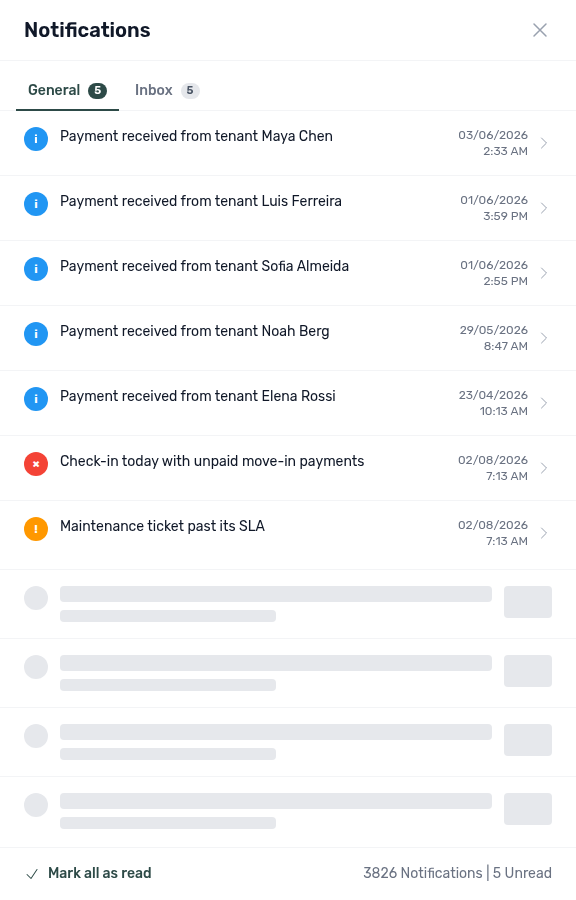
- Check the General sub-tab first for payment, ticket, and booking alerts (when your build includes Inbox sub-tabs — see Inbox module). Switch to Inbox for inbound WhatsApp / email message pings; summaries read
New WhatsApp message from …orNew email from …(tenant name when Vivin can resolve the contact, otherwise a clean+{digits}phone — never a raw WhatsApp JID). Clicking a row with a deeplinkopens the conversation directly — from the thread, click the tenant name in the header to open the Tenant sidebar without leaving Inbox (screenshot). If Inbox is greyed out, the account tenant chatbot is not enabled yet — triage General only and contact Vivin or use Bookings → Communication after enablement (Inbox — Chatbot gating; FAQ — WhatsApp and email per booking).
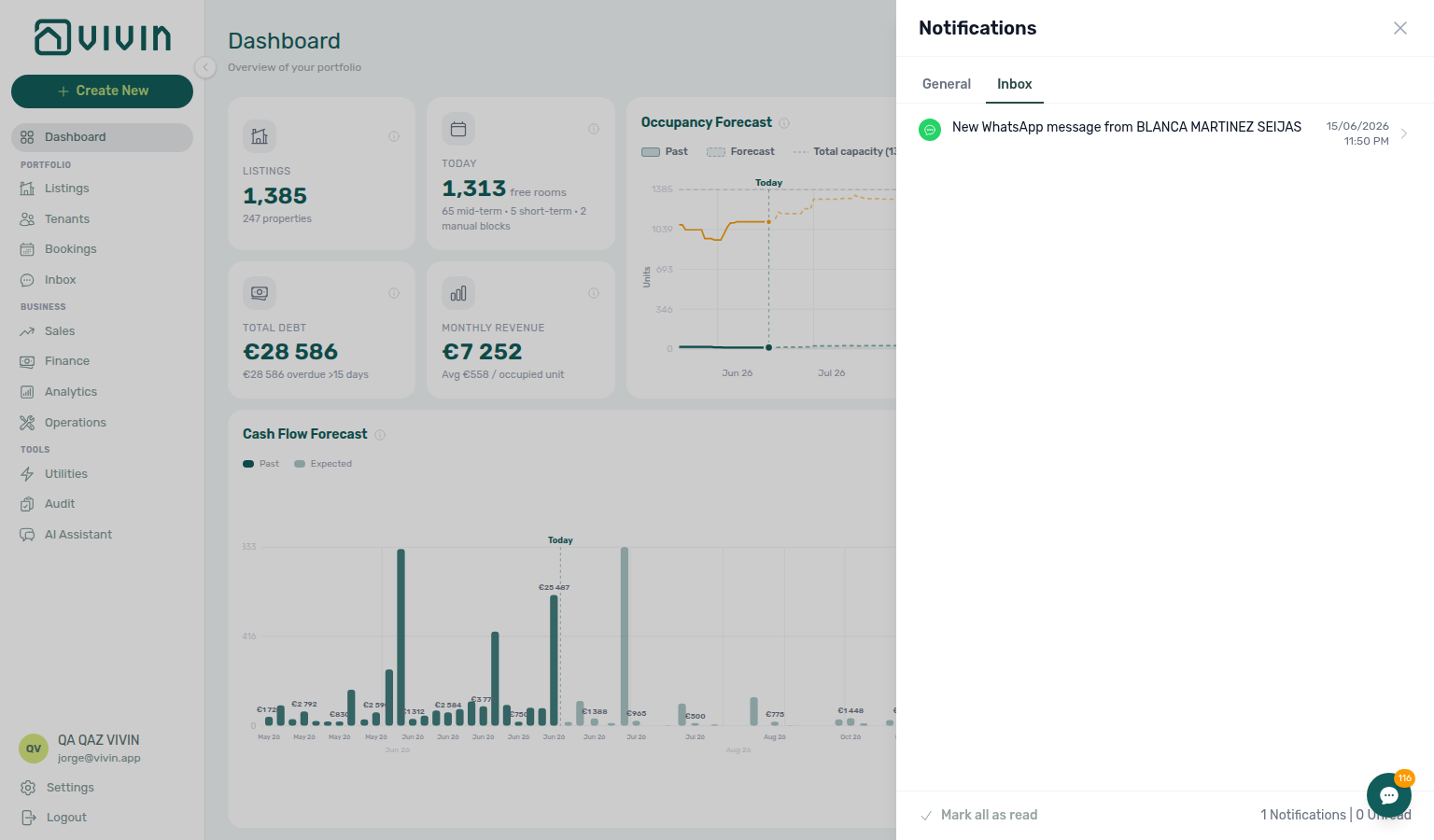
- Scroll the list — the panel loads more rows as you approach the bottom (skeleton rows appear while the next batch fetches).
- Click a General row without a
linkto read Notification detail inside the panel (summary, body, created time). Unread rows are marked read when you open them (no success toast on row click alone). The header title switches to Notification Detail, the General / Inbox sub-tabs hide until you use the back arrow (←) beside the title to return to the list for the same sub-tab. - Use Mark all as read when you have scanned the active sub-tab and want to clear its unread state without opening every row. Success and failure both surface as toasts on the full page and in the bell slide-over — if unread badges remain after clicking, retry (see Glossary — Notification read actions).
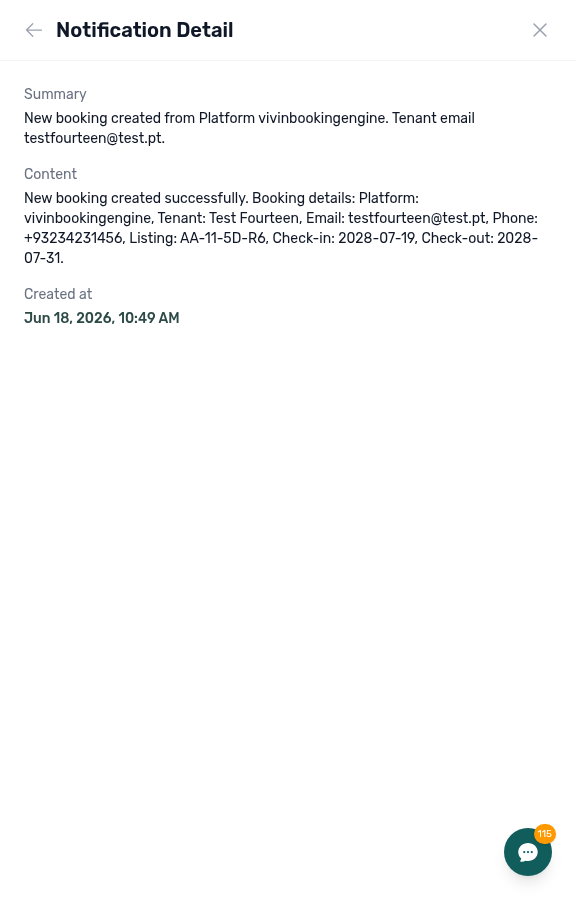
Step 1 Notification detail capture refreshed 2026-06-18 17:00 UTC (notifications-dashboard-bell-detail.png via tools/capture-notifications-bell-detail.ts with panel-scoped clone check).
The Dashboard slide-over has no search and no All / Unread / Read pills. General rows without a backend link open in-panel detail only — they do not navigate to Bookings, Tenants, or Listings from the bell. Inbox rows with a link do jump to the conversation. Use the full /notifications page when you need filters, search, or one-click entity navigation from payment and ticket alerts.
The bell is not shown on narrow (mobile) viewports and is not added to other modules’ page headers — open /notifications directly on mobile or when you are already deep in another module.
Account-scoped Landlord MCP get-upcoming-move-ins surfaces the same arrival-week rows many General alerts reference — pair with list-tickets when ticket-category pings dominate the bell list before you row-click in Step 4. External clients cannot read in-app notification rows or Mark all as read from MCP; operators finish triage on the bell or /notifications.
Full pairing matrix: Notification triage section cross-reference.
Step 2 — Open the full inbox
Full inbox pairs with /notifications search and All / Unread / Read pills, and get-booking-summary on Landlord MCP for portfolio context. Upstream: Step 1 (bell scan). Downstream: Step 3 (filter slice). Full pairing matrix: Notification triage section cross-reference.
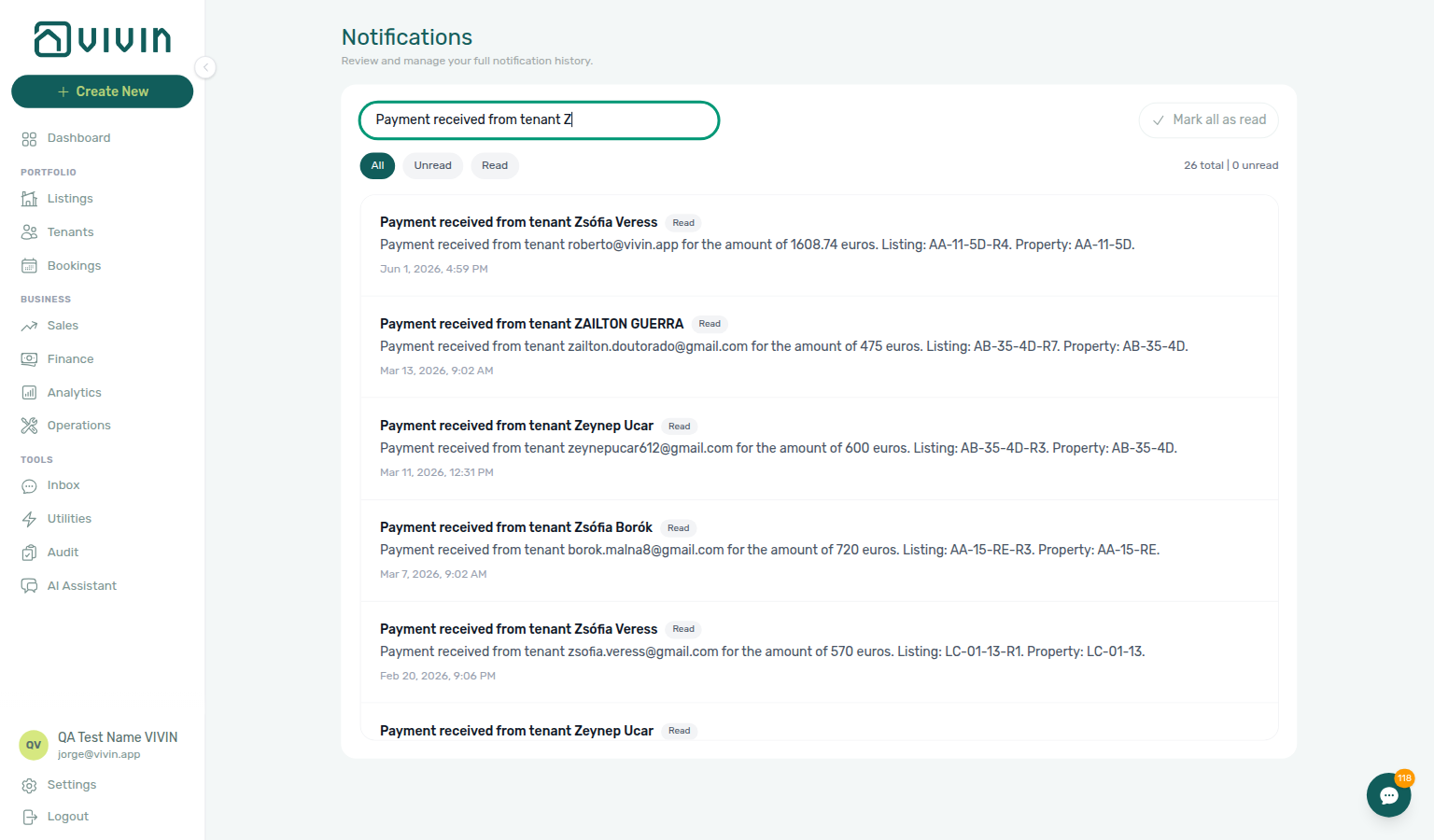
Go to platform.vivin.app/notifications (or your bookmarked /notifications URL).
The full page adds:
- Search — matches summary and body text (debounced; pause briefly after typing)
- All / Unread / Read filter pills
- Mark all as read for the current filter + search slice
- A totals line (matching count and unread count)
- Infinite scroll with an explicit End of list marker when every matching row is loaded
Account-scoped Landlord MCP get-booking-summary returns active and upcoming booking counts when external assistants need portfolio context before an operator opens the full inbox — MCP has no /notifications list tool; unread read-state changes remain operator UI only (Step 5).
Full pairing matrix: Notification triage section cross-reference.
Step 3 — Narrow to what still needs attention
Inbox narrowing pairs with /notifications Unread pill and search, and list-bookings / list-tenants on Landlord MCP when external clients match names before row-click. Upstream: Step 2. Downstream: Step 4 (entity navigation). Full pairing matrix: Notification triage section cross-reference.
- Click Unread to show only items you have not reviewed yet.
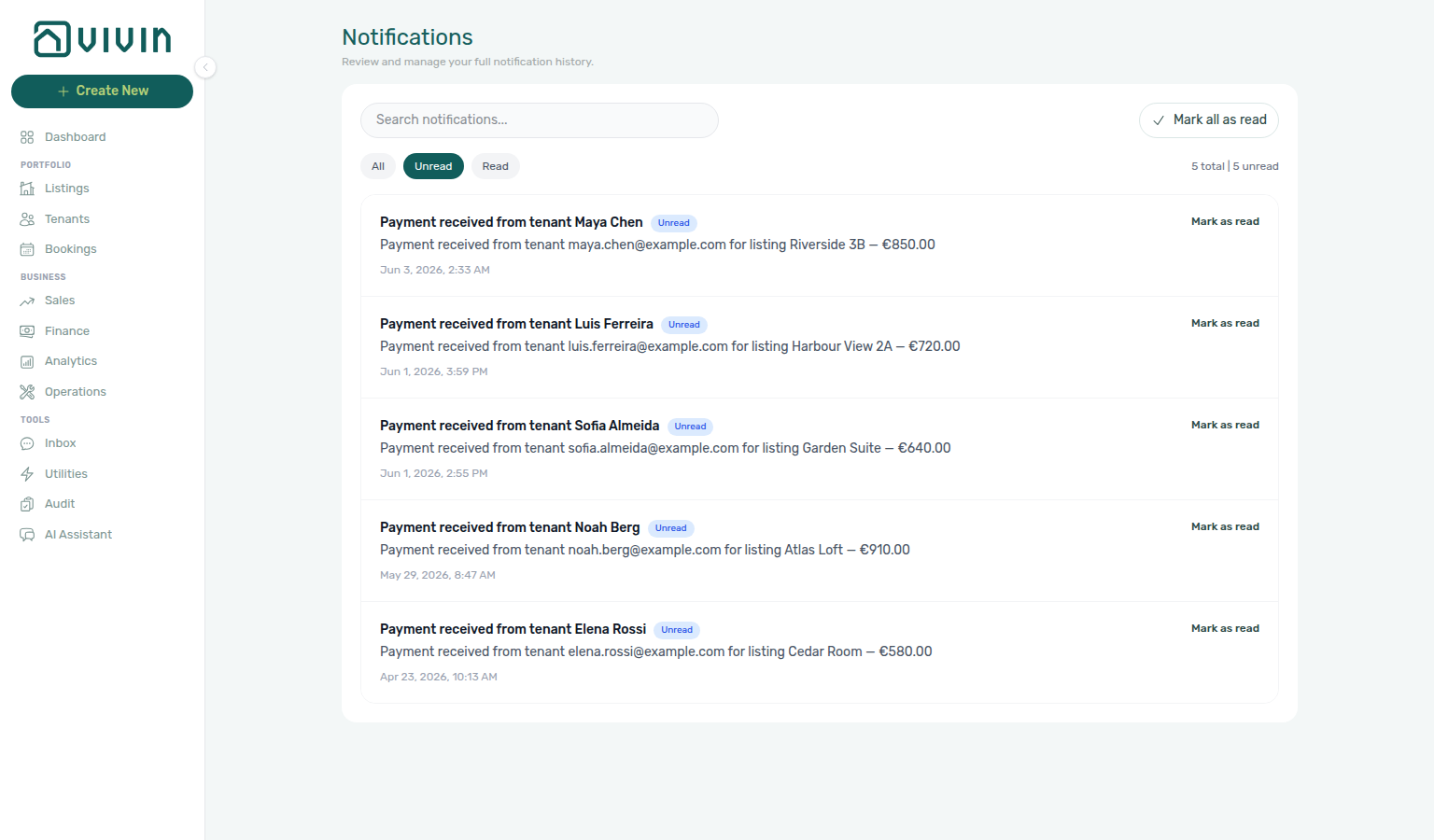
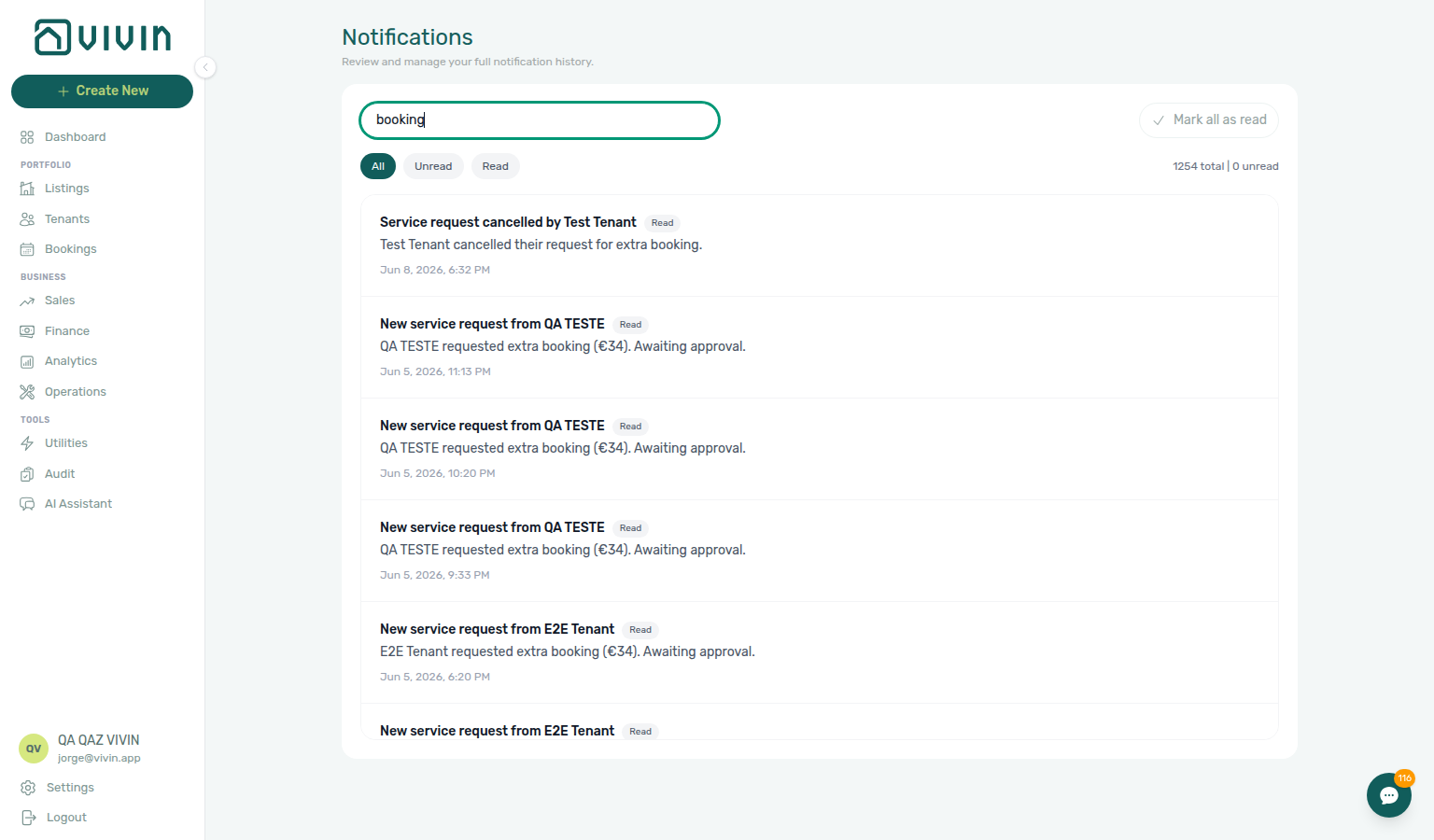
- Optionally type in search to find a tenant name, booking reference, or keyword from the message body.
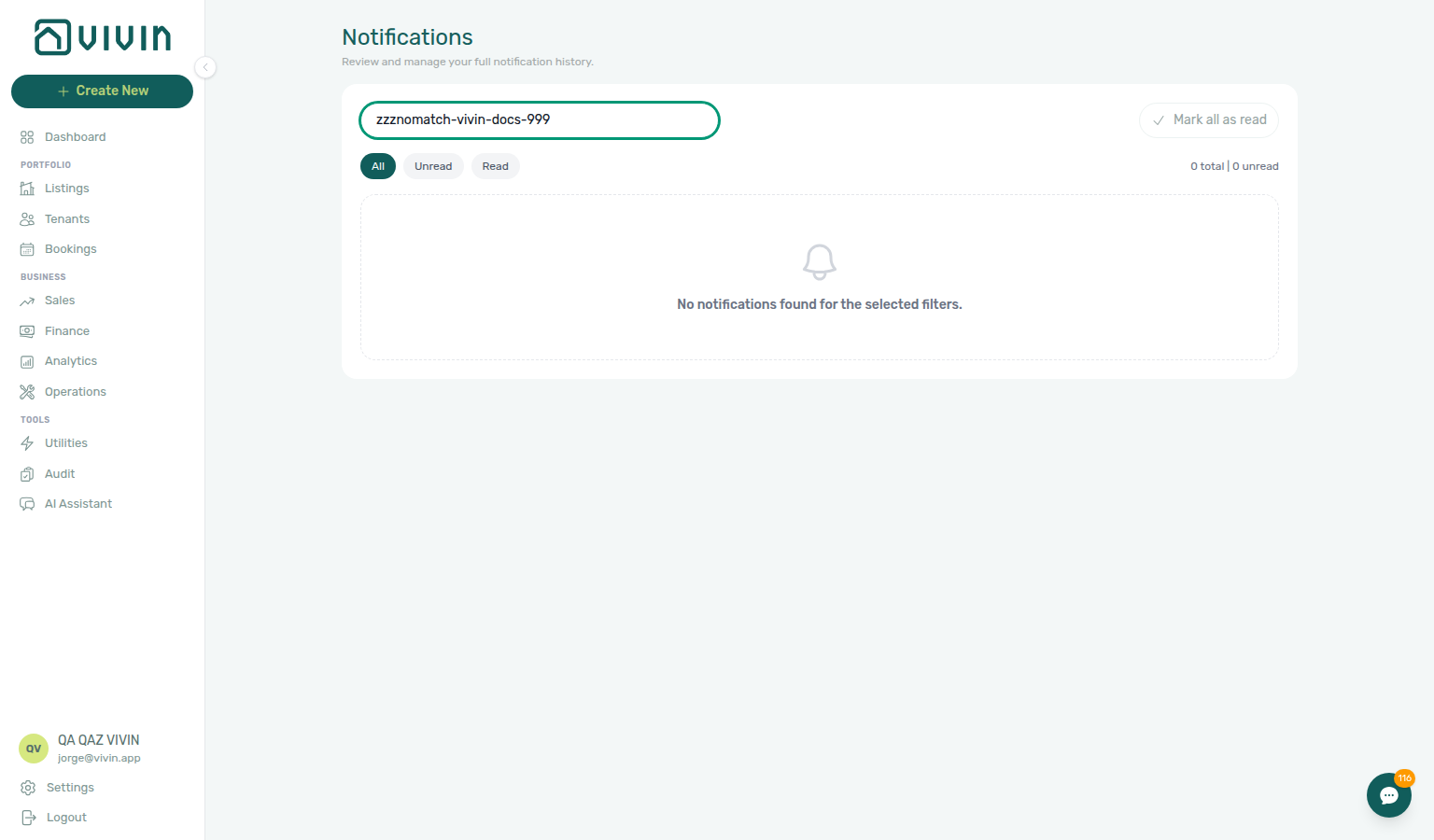
- When nothing matches, the list shows No notifications found for the selected filters. — switch pills or clear search before assuming data is missing.
- After you have handled unread items, switch to Read to confirm history or audit what you already cleared.
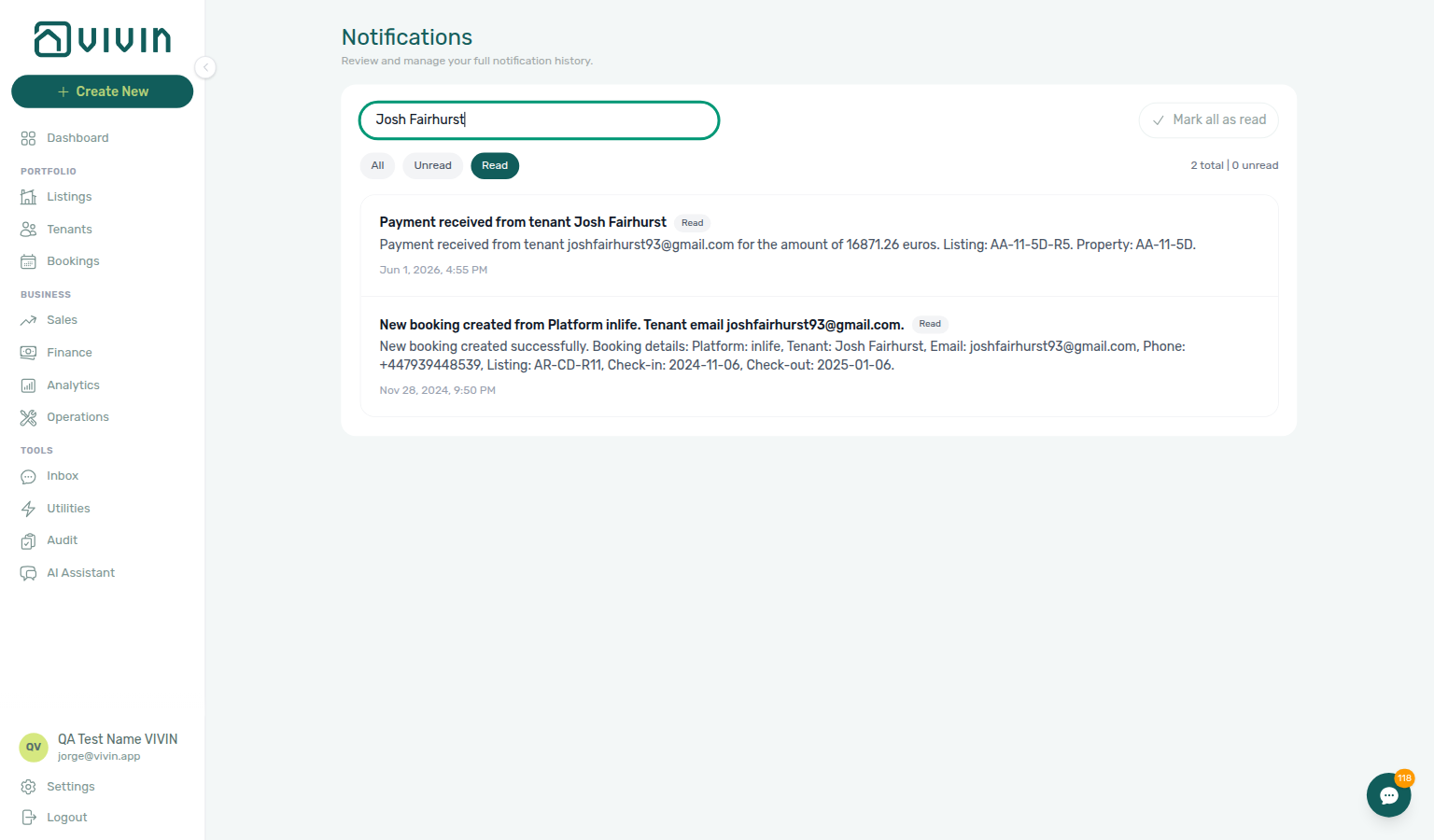
Account-scoped Landlord MCP list-bookings helps external clients match tenant names or unit codes you type in search — pair results with get-booking before row-click navigation in Step 4. When search text looks like a person name rather than a room code, list-tenants / get-tenant resolve tenantId targets the same way /notifications row-click uses bookingId — then get-tenant-bookings narrows to the active stay. For Payments-category keywords (amounts, “overdue”, “received”), list-payments surfaces ledger rows you can cross-check with get-payment before you open the booking in Step 4 — external clients cannot change Unread / Read pills from MCP; operators finish read-state cleanup on /notifications or the Dashboard bell.
Full pairing matrix: Notification triage section cross-reference.
Step 4 — Open the related booking, tenant, or listing
Row-click navigation pairs with Common Workflows — Payment alert to receivables triage (Step 4 → Finance debt receivables triage / Handling a Late Payment — Steps 1–3 → Step 5; notifications-row-navigate-to-booking-detail.png, notifications-row-navigation-flow.mp4, finance-overview-income-chart-debt-aging.png, finance-overview-debt-aging-walkthrough-flow.mp4) and Common Workflows — Confirmation alert triage on Upcoming stays (Step 4 → Processing a New Booking — Step 5b / Step 6 → Confirmation to check-in handoff; bookings-detail-transactions-approve-payment-modal.png, booking-lifecycle-status-tabs-flow.mp4), Common Workflows — Handling a Late Payment collections hub (alert row-click → confirm balance → Handling a Late Payment — Step 1 / Step 3), Glossary — Notification row navigation, FAQ — Handling a Late Payment hub, Handling a Late Payment — Step 1 (Payments alerts), and get-booking / list-payments on Landlord MCP. Upstream: Step 3. Downstream: Step 5 after you act on each row. Full pairing matrix: Notification triage section cross-reference.
On the full Notifications page, clicking a row does more than update read status when the platform attached a navigation target:
- If the row is still Unread, it is marked read in the background.
- The app navigates using the first match: backend
link, thenbookingId,tenantId,listingId, orpropertyId.
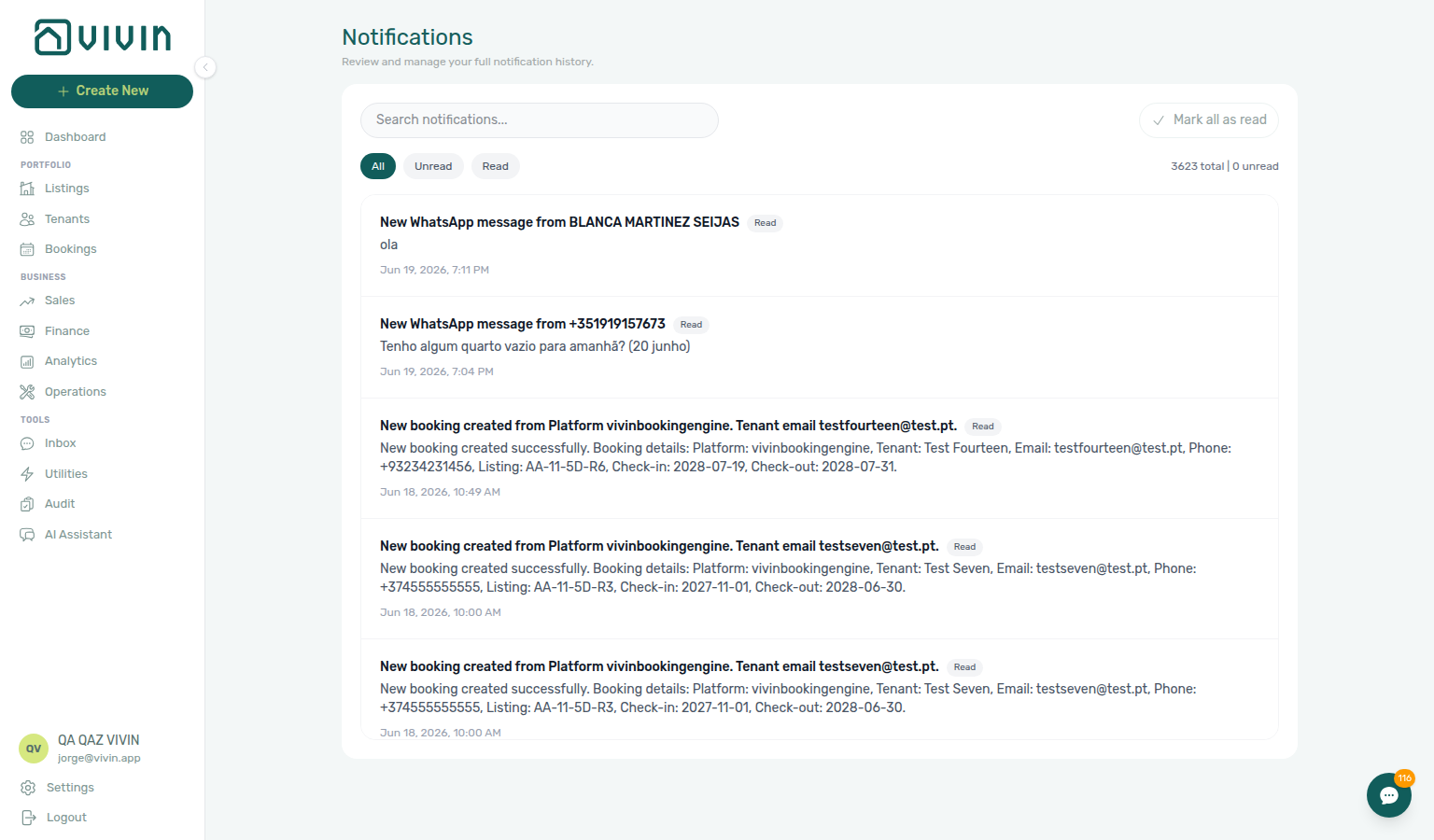
Example outcome after a payment-related notification:
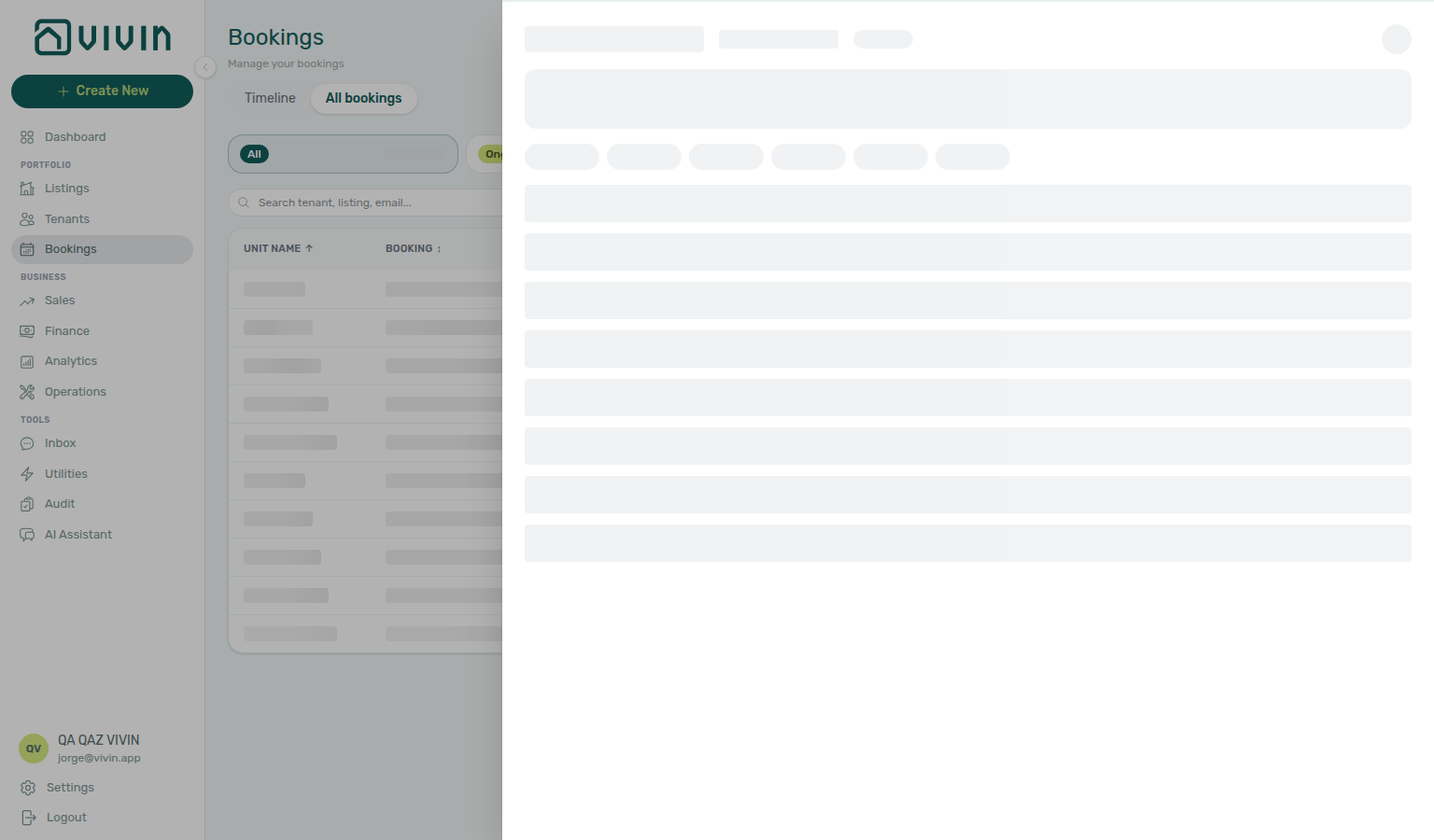
From the opened booking, review Payment Plan or Contract Values for the charge behind the alert. When the shortfall is a security deposit (not rent schedule lines), also open the Deposit tab — an amber Partially paid badge means the deposit is short (Partial Paid on depositStatus — see Glossary — Deposit lifecycle status); portfolio triage uses Finance → Deposits — Partial paid lifecycle card — see FAQ — Partly collected security deposit and Handling a Late Payment — Step 1 (deposit vs rent Partial Paid distinction).
Account-scoped Landlord MCP clients can triage the same Payments category rows you open from /notifications — get-booking and list-payments / get-payment for ledger context after row-click navigation, create-manual-payment-in when an external assistant records a bank transfer that still needs Approve payments, and list-bookings when several alerts reference the same tenant. Booking-scoped Tenant MCP get-payment-info returns the tenant-facing schedule for one reservation — use it when the alert followed a WhatsApp or email thread (Inbox module) rather than a portfolio-wide collections pass. list-bookings-by-email resolves bookingId when the tenant name in search matches multiple stays; get-tenant-info confirms profile fields before you mirror segment filters on Finance → Contract Values; notify-landlord escalates when the tenant disputes a balance external automation cannot clear — operators still finish approval and read-state cleanup in Step 5.
If Communication or Tickets inside the booking sidebar shows Could not load messages or Could not load tickets, the reservation opened correctly but one tab’s API slice failed — use Refresh (Communication) or Retry on the banner (Tickets) without leaving the inbox workflow. Other tabs stay available. If the whole Bookings or /notifications list shows Failed to load … instead, that is a Directory list load failures whole-module Retry — not tab-scoped recovery. See Common Workflows — Booking sidebar tab load failures, FAQ — Communication or Tickets load failure, and Glossary — Booking detail sidebar tab load failures.
- Payment received from tenant … — inbound money was recorded; confirm Transactions and updated balances. If the receipt still shows pending, continue on Finance → Transactions with the amber Pending chip (same month-end habit as Processing a New Booking — Step 5b, Handling a Late Payment — Step 4b, Managing a Check-in — Step 3b, Entering Monthly Utility Bills — Step 4b, and Cancelling a Booking — Step 2a; concept reference: Payment Allocation — Pending manual approval) before you clear the alert in Step 5. If you never see these rows, enable Payment notification emails on
/settings/personal(and the account Receive payment notifications switch) — see Glossary — Payment notification (operator). - Payment overdue or balance alerts — when the balance is still unpaid after row-click navigation, continue with Handling a Late Payment — Steps 1–3 — hub matrix: Common Workflows — Payment alert to receivables triage (
notifications-row-navigate-to-booking-detail.png,finance-overview-debt-aging-expanded-bucket.png); triage from Finance > Overview (Debt Aging / In debt on the Income chart — Glossary — Finance income status, Glossary — Finance Debt Aging), Finance > Contract Values (In Debt; add Other filters → Tenant → Tenant category when arrears cluster on one segment — Finance — Tenant category filter), or paste the unit internal name / tenant fiscal ID in Bookings / Tenants search as in that workflow’s Step 1. Scan Uncovered Debt beside Total Debt when deposit coverage is thin — FAQ — Uncovered Debt. On Tenants, table view + row expand shows per-booking Balance before you open a sidebar — see Glossary — Tenants table expand. Clear the unread row in Step 5 only after balances reconcile. - Pending manual in-payment — operator-recorded receipts stay pending until Approve payments acts. Triage on Finance → Transactions — click the amber Pending chip on the All type-summary card (
finance-transactions-pending-pill.png) — or the booking Transactions tab. The Overview Manual Payments KPI totals all manual receipts in the month (not just pending); clicking it opens the month drill-down, not the pending-only queue. On the ledger, Reject is bulk-only: tick the rows and use Reject selected in the floating bar. Reject and Revert modals warn about credit notes when Finance may already have invoiced the charge — see FAQ — Pending manual in-payment on/notifications, Notifications — Pending manual in-payments, Finance — Pending manual payments, Finance > Row actions, Bookings > Transactions, FAQ — Manual receipt still pending, FAQ — Dashboard Total Debt subtitle, and Payment Allocation — Correcting mistaken receipts.
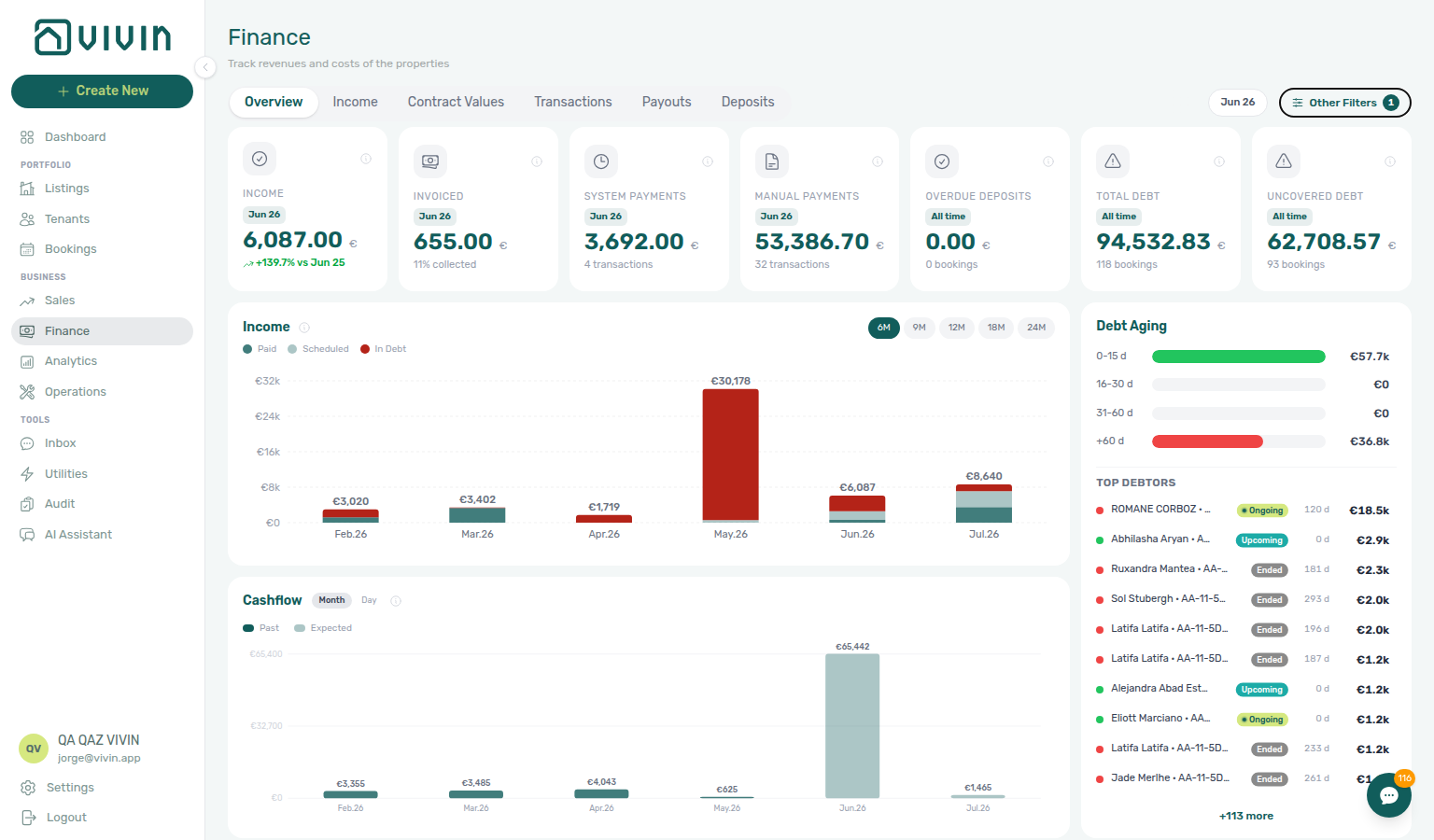

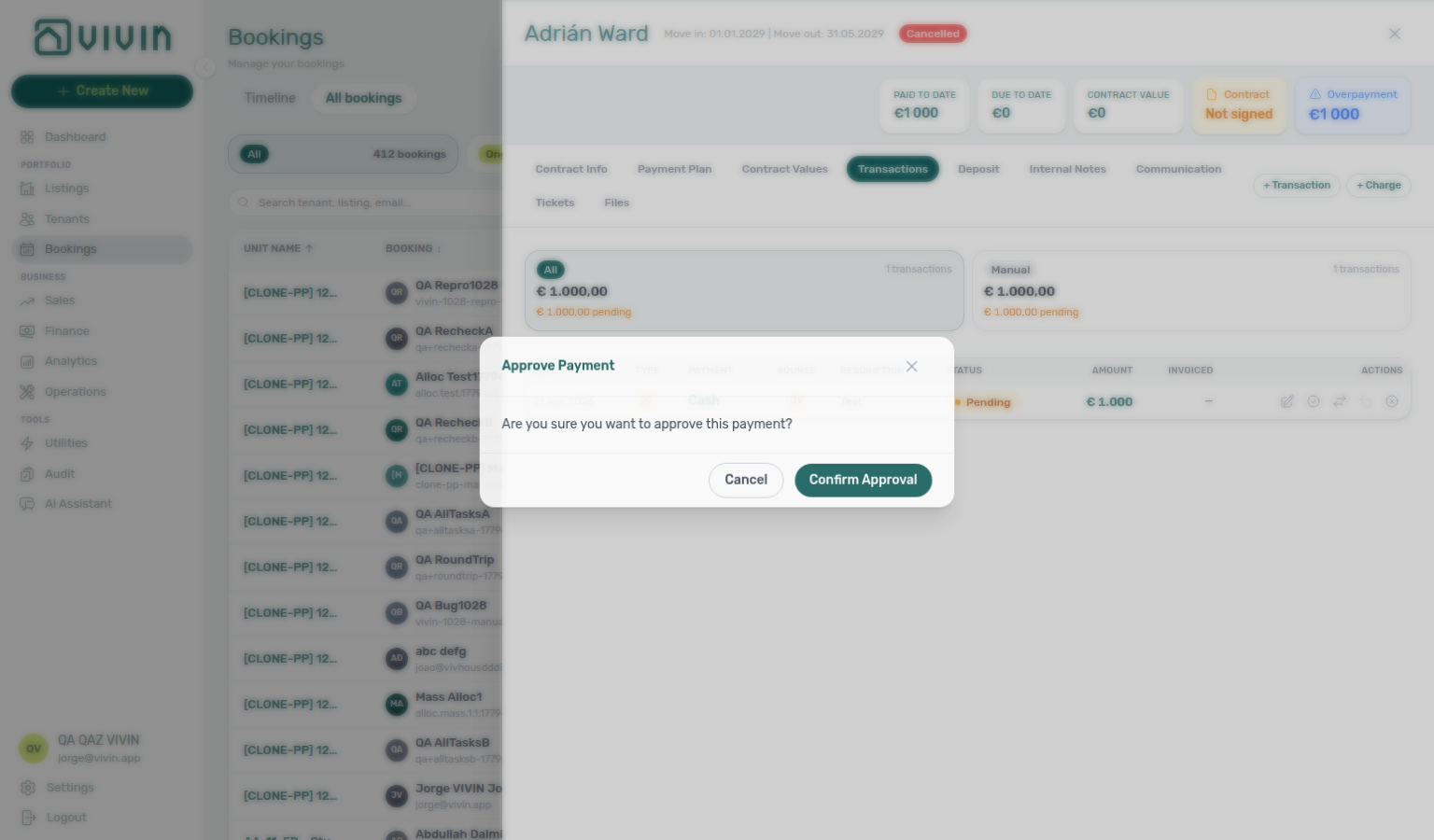
When several payment alerts arrive during a Portfolio KPI review month-end pass, treat Step 4 as the alert-driven entry and Step 7 as the portfolio snapshot: after row-click opens the booking, compare its balance with Dashboard Total Debt (headline vs >15 days subtitle — dashboard-kpi-total-debt-tooltip.png) and Finance → Overview Debt Aging (finance-overview-debt-aging-expanded-bucket.png) — hub matrix: Common Workflows — Payment alert to receivables triage; Portfolio KPI review — Dashboard Total Debt subtitle, FAQ — Dashboard Total Debt subtitle before you clear the last unread rows in Step 5.
Row-click triage captures refreshed 2026-06-20 15:08 UTC (VIVIN_DOCS_BASE_URL=http://localhost:5173 VIVIN_DOCS_RECORD_API=$VITE_API_BASE_URL npx tsx tools/capture-notifications-row-navigation.ts — targets first publication-clean notification with bookingId, not the default Inbox row). Row-navigation walkthrough MP4 added 2026-06-20 15:08 UTC (tools/record-notifications-row-navigation-mp4.ts). Manual Payments KPI and approve/bulk-bar captures cross-linked 2026-06-16 08:07 UTC (shared finance-overview-kpi-cards.png from tools/capture-finance-debt-detail-screenshots.ts). Pending-pill PNG + pending-approve MP4 cross-linked 2026-06-27 15:08 UTC (round 132 — finance-transactions-pending-pill.png, tools/record-finance-transactions-pending-approve-flow-mp4.ts). Prose aligned to #1739 Manual Payments label 2026-06-20 04:06 UTC.
If none of those target fields are set, the row is marked read when applicable but you stay on the inbox — use Mark as read when you only want to clear unread without leaving the page.
When the opened booking is still Upcoming, finish Processing a New Booking — Step 5b / Step 6 before you bulk-clear confirmation-week alerts — hub matrix: Common Workflows — Confirmation alert triage (notifications-row-navigate-to-booking-detail.png, bookings-detail-transactions-approve-payment-modal.png, notifications-row-navigation-flow.mp4); when alerts are quiet and move-in is ~7 days out, hand off via Common Workflows — Confirmation to check-in handoff → Managing a Check-in — Step 1 (workflows-operations-check-in-out-planning-view.png).
Full pairing matrix: Notification triage section cross-reference.
Step 5 — Clear remaining unread
Unread cleanup pairs with /notifications Mark all as read, Common Workflows — Payment alert to receivables triage (confirm balance on each payment overdue row before Mark all as read — notifications-row-navigation-flow.mp4), Common Workflows — Confirmation alert triage (finish Step 5b / Step 6 on each Upcoming Booking created / Payment received row — bookings-detail-transactions-approve-payment-modal.png), downstream workflows (Managing a Check-in, Managing a Check-out, Handling a Late Payment) before bulk-clear, and Glossary — Notification read actions. Upstream: Step 4 (acted on each alert). Downstream: Step 6 when read-state or row-click fails. Full pairing matrix: Notification triage section cross-reference.
- Per row — Mark as read on unread items you have reviewed but do not need to open in another module.
- Bulk — Mark all as read clears unread for every notification matching the current filter + search (not a hidden second query).
Account-scoped Landlord MCP get-booking-summary gives portfolio-level active/upcoming counts when several Payments category rows still need row-click follow-up in Step 4 before you Mark all as read. list-bookings and get-booking surface every reservation on a property when unread alerts cluster on one unit — external clients cannot clear in-app read state from MCP; operators finish on /notifications or the Dashboard bell. get-upcoming-move-ins mirrors arrival-week General alerts before you bulk-clear rows that still need Managing a Check-in follow-up. list-tickets, get-ticket, update-ticket, close-ticket, and add-ticket-comment help when Operations-category alerts still reference open turnover or damage tickets — pair close-ticket only after operator Cost allocation is reconciled when contractor spend is involved (Glossary — Ticket — linked cash flows).
Booking-scoped Tenant MCP get-payment-info confirms tenant-facing balances on the last Payments alert you opened before you bulk-clear unread — pair with list-bookings-by-email when Inbox message pings (Step 1) preceded the row and identity was ambiguous. get-booking-status and get-dates-and-schedule are the right reads for arrival-week General alerts before you Mark all as read on rows that still need Managing a Check-in follow-up. get-maintenance-tickets / create-maintenance-ticket mirror Operations ticket alerts — do not clear unread on maintenance escalations until the ticket row is Completed or assigned. notify-landlord is for tenant-channel escalations that should stay open until a human replies; do not Mark all as read on those rows until the thread is handled on Bookings → Communication or /inbox. Surface-choice contrast: Automation & AI — Workflow pairing for surface choice.
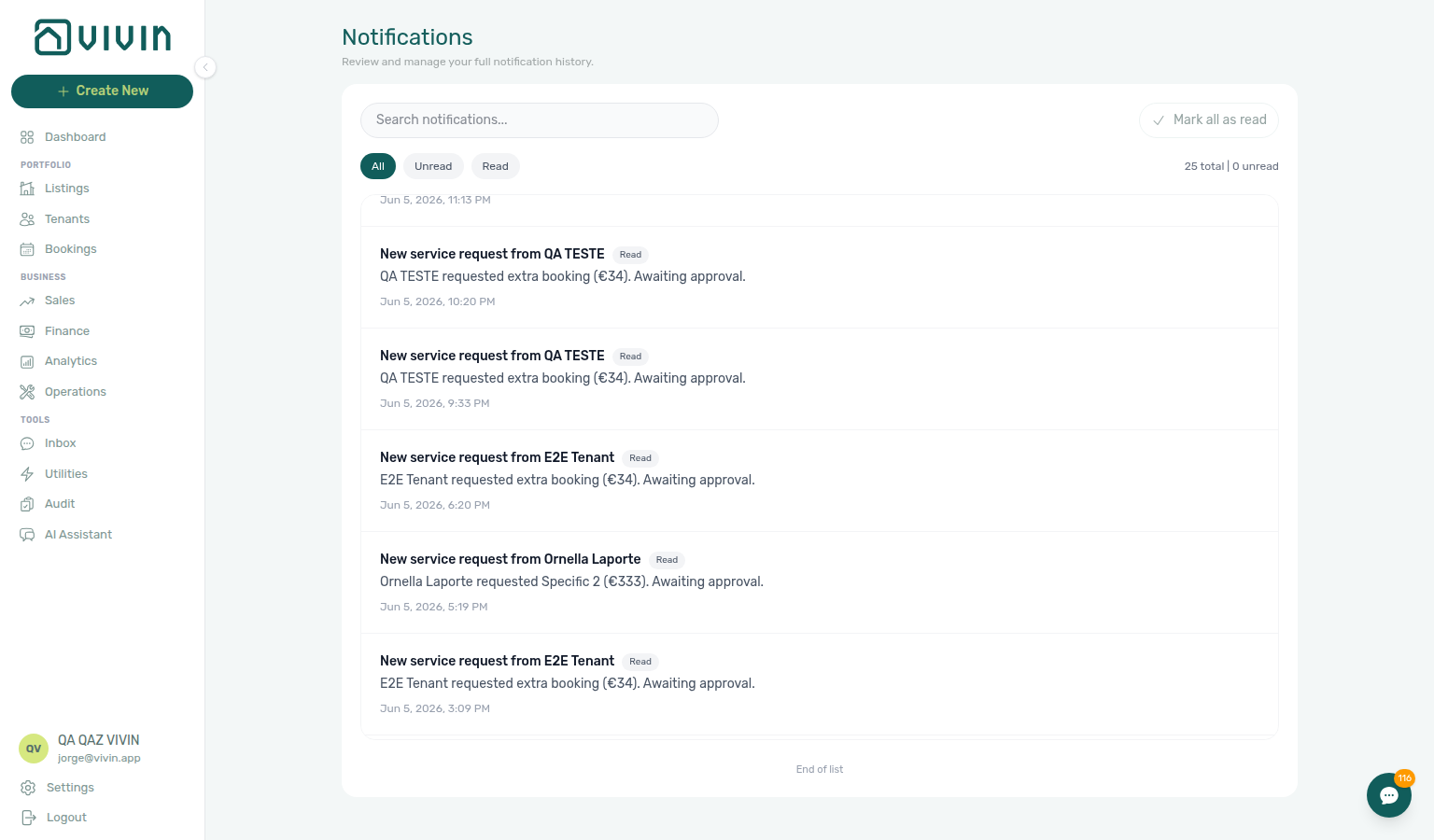
When you have scrolled through the full history for the active filter, an End of list line appears below the list:
Full pairing matrix: Notification triage section cross-reference.
Step 6 — Escalate when triage is blocked (when needed)
Triage escalation pairs with Using in-app support, Resetting a Management User Password (lockout catch-up), and Portfolio KPI review — Step 7 (month-end Pending mesh). Upstream: Steps 1–5 self-serve paths. Full pairing matrix: Notification triage section cross-reference.
When /notifications row-click navigation, Mark all as read, or the Dashboard bell Inbox sub-tab behaves unexpectedly after you followed Steps 1–5, document what you tried in Internal Notes or the booking Communication thread before you escalate.
Self-serve first:
- Payments alerts with unpaid balances → Handling a Late Payment — Step 1 and Step 4b when receipts stay pending; at month-end when several Payments rows still show stale balances after approval, continue Portfolio KPI review — Step 7 and the lingering-receipt habits in Processing a New Booking — Step 6b, Managing a Check-in — Step 6b, Managing a Check-out — Step 6b, Cancelling a Booking — Step 6b, and Entering Monthly Utility Bills — Step 4b.
- Booking created or confirmation alerts after a channel import → Processing a New Booking — Step 6 (Impersonate Tenant, Category on Tenant Info) before you bulk-clear unread rows in Step 5.
- Arrival or access-code alerts during move-in week → Managing a Check-in — Step 6; pair Manual block hygiene — Step 4 when same-day turnover calendar blocks persist.
- Departure, deposit, or Ended status alerts → finish Managing a Check-out — Step 6–6b, then Managing a Check-out — Step 7 before you bulk-clear unread rows.
- Availability or calendar alerts after you cleared manual holds → Manual block hygiene — Step 6; when Ended or canceled bars still block Multicalendar, pair Managing a Check-out — Step 7 or Cancelling a Booking — Step 6.
- Canceled stays with lingering booking-status or refund alerts → Cancelling a Booking — Step 6b before you bulk-clear unread rows in Step 5.
- Utility overage Payment received or balance alerts after monthly bill entry → Entering Monthly Utility Bills — Step 4b; file Vivin support via Entering Monthly Utility Bills — Step 6 when AI extraction or overage posting fails account-wide.
- Service requests category alerts that need portal order approval → Services Marketplace and Settings > Services before you bulk-clear unread rows.
- Inbox greyed out on the bell but tenants message on WhatsApp → confirm Account Settings → ChatBot is enabled and Status Bot shows Connected — see ChatBot settings — Status Bot.
- Unread badges that return after Mark all as read → retry once, then refresh the page — see Glossary — Notification read actions.
- Segment-wide arrears that outlive individual row-click triage → Handling a Late Payment — Step 6 after you exhausted Steps 1–5 on
/notifications. - Collections Pending at month-end when Payments alerts persist after Step 4b → Handling a Late Payment — Step 6b before you bulk-clear unread rows.
- First-booking or go-live alerts on newly onboarded inventory → Onboarding a New Property — Step 7 (duplicate import cancel, Access Lockers, Multicalendar) before you file support.
- Management lockout left unread alerts stale after you regained access → Resetting a Management User Password — Step 3, then catch up with Notification triage — Step 5 and month-end habits in Portfolio KPI review — Step 6 / Step 7 before you bulk-clear payment rows — pair Entering Monthly Utility Bills — Step 4b / Step 6 when utility overage alerts piled up during lockout, and Handling a Late Payment — Step 6b when collections Pending receipts lagged month-end approval.
File Using in-app support when product behaviour blocks triage despite correct operator steps:
- Row-click on
/notificationsdoes not open Bookings / Tenants / Listings when the row clearly carriesbookingId,tenantId, orlistingId— attach a screenshot and the notification summary text on the New Support Ticket modal (Bookings or Notifications module). - Approve payments missing for your role when Pending manual in-payment alerts need ledger approval — attach your user email and a sample booking id (Finance module).
- Landlord MCP or Tenant MCP external clients return persistent 403 / auth errors after you refreshed the management JWT — see Using in-app support — When to use in-app support, Landlord MCP — Permissions and safety, and Resetting a Management User Password — Troubleshooting.
Use the Help & Support drawer from Bookings or Dashboard when you need context; deep-link /bookings?support=<ticketId> when email notifications include ticket ids — Deep Links — Support. If a management lockout delayed triage, recover access with Resetting a Management User Password (Step 3) before you file support — refresh Landlord MCP Bearer JWT after Step 3 there; rerun Step 4 row-click on stale Payments alerts, clear unread in Step 5, then finish month-end Pending mesh via Portfolio KPI review — Step 7 and Entering Monthly Utility Bills — Step 4b when utility overage receipts piled up during lockout.
Account-scoped Landlord MCP get-booking-summary and list-bookings help external clients confirm portfolio context when /notifications search or row-click targets look wrong — pair get-booking, list-payments, and get-payment with the booking id from the alert summary before you file a support ticket. list-tenants, get-tenant, and get-tenant-bookings resolve person-name alerts that never attached a bookingId. list-tickets, get-ticket, and add-ticket-comment document Operations-category escalations on the ticket thread. External clients cannot read in-app notification rows, change read-state pills, or Mark all as read from MCP — operators finish triage on /notifications or the Dashboard bell.
Booking-scoped Tenant MCP notify-landlord alerts your team when tenants dispute balances or access through a chatbot — it does not replace operator triage in Steps 1–5 or a Vivin support ticket when row-click navigation or read-state APIs fail. get-payment-info and list-bookings-by-email remain the right tenant-scoped reads when Inbox threads preceded the alert. Surface-choice contrast: Automation & AI — Workflow pairing for surface choice.
Full pairing matrix: Notification triage section cross-reference.
When to use which surface
| Need | Use |
|---|---|
| Quick scan of recent alerts on desktop | Dashboard bell slide-over |
| Search, read-status filters, full history | /notifications |
| Jump from a notification into Bookings / Tenants / Listings | /notifications row click |
| Operator alert when a tenant payment is received | Email + in-app when opted in — see Glossary — Payment notification (operator) and Preferences; in-app rows are visible only to users who enabled Payment notification emails on /settings/personal |
Notification triage section cross-reference
Use this table when one step in this workflow naturally leads into another module, concept page, or downstream workflow — each row links to the docs you should read before or after that step.
| Workflow step / section | Pair with these docs |
| ------------------------------------------------------------------------------------------------ | ---------------------------------------------------------------------------------------------------------------------------------------------------------------------------------------------------------------------------------------------------------------------------------------------------------------------------------------------------------------------------------------------------------------------------------------------------------------------------------------------------------------------------------------------------------------------------------------------------------------------------------------------------------------------------------------------------------------------------------------------------------------------------------------------------------------------------------------------------------------------------------------------------------------------------------------------------------------------------------------------------------------------------------------------------------------------------------------------------------------------------------------------------------------------------------------------------------------------------------------------------------------------------------------------------------------------------------------------------------------------------------------------------------------------------------------------------------------------------------------------------------------------------------------------------------------------------------------------------------------------------------------------------------------------------------------------------------------------------------------------------------------------------------------------------------------------------------------------------------------------------------------------------------------------------------------------------------------------------------------------------------------------------------------------------------------------------------------------------------------------------------------------------------------------------------------------------------------------------------------------------------------------------------------------------------------------------------------------------------------------------------------------------------------------------------------------------------------------------------------------------------------------------------------------------------------------------------------------------------------------------------------------------------------------------------------------------------------------------------------------------------------------------------------------------------------------------------------------------------------------------------------------------------------------------------------------------------------------------------------------------------------------------------------------------------------------------------------------------------------------------------------------------------------------------------------------------------------------------------------------------------------------------------------------------------------------------------------------------------------------------------------------------------------------------------------------------------------------------------------------------------------------------------------------------------------------------------------------------------------------------------------------------------------------------------------------------------------------------------------------------------------------------------------------------------------------------------------------------------------------------------------------------------------------------------------------------------------------------------------------------------------------------------------------------------------------------------------------------------------------------------------------------------------------------------------------------------------------------------------------------------------------------------------------------------------------------------------------------------------------------------------------------------------------------------------------------------------------------------------------------------------------------------------------------------------------------------------------- | ------------------------------------------------------------------------------------------------------------------------------------------------------------------------------------------------------------------------------------------------------------------------------------------------------------------------------------------------------------------------------------------------------------------------------------------------------------------------------------------------------------------------------------------------ |
| Step 1 — Quick scan on Dashboard (desktop) | Dashboard module, Inbox module — Dashboard bell, Glossary — Notification read actions, Landlord MCP — Read-only and intelligence (get-upcoming-move-ins for arrival-week alerts), Landlord MCP — Extended account tools (list-tickets when ticket-category pings dominate the bell list; read-state changes remain operator UI only) |
| Step 2 — Open the full inbox | Notifications module, Deep Links — Notifications, Landlord MCP — Read-only and intelligence (get-booking-summary for portfolio context before opening /notifications; no MCP list tool for in-app notification rows) |
| Step 3 — Narrow to what still needs attention | Notifications — History loading, Getting Started — Infinite scroll, Tenants module (profile sidebar when search matches a person name), Finance — Pending manual payments (payment-keyword triage before Step 4), Landlord MCP — Extended account tools (list-bookings, get-booking when search narrows to unit codes; list-tenants, get-tenant, get-tenant-bookings when search narrows to person names; list-payments, get-payment when Payments keywords dominate; Unread / Read pills remain operator UI only) |
| Step 4 — Open the related booking, tenant, or listing | Notifications — Payment overdue alerts, Glossary — Notification row navigation, Glossary — Finance income status, Glossary — Finance Debt Aging, Glossary — Dashboard KPI cards, Glossary — Pending manual in-payment (Finance), Glossary — Credit note (payment reject/revert), Glossary — Deposit lifecycle status, Portfolio KPI review — Dashboard Total Debt subtitle, Portfolio KPI review — Step 7, AI usage API (landlord_chat when alert triage used AI Chat), Processing a New Booking — Step 5b, Handling a Late Payment — Step 1, Finance — Tenant category filter, Bookings — Other filters, Tenants — Tenant category filter, Glossary — Tenant category, FAQ — Finance tenant category filter parity, Handling a Late Payment — Step 4b, Managing a Check-in — Step 3b, Entering Monthly Utility Bills — Step 4b, Cancelling a Booking — Step 2a, Payment Allocation — Pending manual approval, Payment Allocation — Correcting mistaken receipts, Finance — Pending manual payments, Finance > Transactions — Row actions, Bookings > Transactions — Row actions, Finance — KPI strip, FAQ — Uncovered Debt, FAQ — Dashboard Total Debt subtitle, FAQ — Manual receipt still pending, Landlord MCP — Tool overview — extended account tools (get-booking, list-payments, get-payment, create-manual-payment-in), Inbox module — Dashboard bell, Tenant MCP — Property, payments, and portal tools (get-payment-info, get-tenant-info, list-bookings-by-email; notify-landlord when tenant-channel escalation preceded the alert) |
| Step 5 — Clear remaining unread | Glossary — Notification read actions, Portfolio KPI review (month-end alert cleanup), Managing a Check-in (arrival-week alerts before bulk clear), Inbox module, Automation & AI — Workflow pairing for surface choice, Landlord MCP — Read-only and intelligence (get-booking-summary, get-upcoming-move-ins for arrival-week alerts), Landlord MCP — Extended account tools (list-bookings, get-booking when unread alerts cluster on one property; list-tickets, get-ticket, update-ticket, close-ticket, add-ticket-comment for Operations-category rows — Cost allocation remains operator UI; read-state changes remain operator UI only), Tenant MCP — Property, payments, and portal tools (get-payment-info before bulk Mark all as read; list-bookings-by-email when Inbox pings preceded payment rows), Tenant MCP — Booking and contract data (get-booking-status, get-dates-and-schedule for arrival-week alerts), Tenant MCP — Maintenance and escalation (get-maintenance-tickets, create-maintenance-ticket for ticket alerts; notify-landlord — do not clear unread until tenant-channel escalation is handled) |
| Step 6 — Escalate when triage is blocked | Using in-app support, Using in-app support — Help & Support drawer, Using in-app support — New Support Ticket modal, Handling a Late Payment — Step 1, Handling a Late Payment — Step 4b, Handling a Late Payment — Step 6, Handling a Late Payment — Step 6b (collections Pending mesh at month-end), Portfolio KPI review — Step 6 (segment-wide arrears after alert triage), Portfolio KPI review — Step 7, Onboarding a New Property — Step 7 (first-booking / go-live alerts), Processing a New Booking — Step 6 (booking-created / confirmation alerts), Managing a Check-in — Step 6 (arrival-week access alerts), Managing a Check-out — Step 6 (departure-week balances after payment alerts), Managing a Check-out — Step 7 (Ended status alerts after settlement), Manual block hygiene — Step 4 (same-day turnover manual holds), Manual block hygiene — Step 6 (availability alerts persist after holds cleared), Cancelling a Booking — Step 6 (availability after cancel), Processing a New Booking — Step 6b, Managing a Check-in — Step 6b, Managing a Check-out — Step 6b, Cancelling a Booking — Step 6b, Entering Monthly Utility Bills — Step 4b, Entering Monthly Utility Bills — Step 6, Services Marketplace, Settings > Services, ChatBot settings — Status Bot, Glossary — Notification read actions, Glossary — Notification row navigation, Glossary — Same-day turnover, Deep Links — Support, Resetting a Management User Password — Step 3 (lockout-delayed alert backlog catch-up), Resetting a Management User Password — Troubleshooting, Landlord MCP — Permissions and safety, Landlord MCP — Extended account tools (get-booking-summary, list-bookings, get-booking, list-payments, get-payment, list-tenants, get-tenant, get-tenant-bookings, list-tickets, get-ticket, add-ticket-comment; read-state changes remain operator UI only), Tenant MCP — Maintenance and escalation (notify-landlord — contrast with Vivin support tickets), Automation & AI — Workflow pairing for surface choice |
| Lockout catch-up after password recovery | Unread alerts accumulated during lockout | Common Workflows — Lockout catch-up, Getting Started — Lockout catch-up, Step 5 |
| Pending manual receipt approval | Payment alerts for pending receipts | Common Workflows — Pending manual receipt approval, Finance — Pending manual payments, Step 4 |
| Reject/revert mistaken receipts | Duplicate payment alerts | Common Workflows — Reject/revert mistaken receipts, Payment Allocation — Correcting mistaken receipts |
| Month-end invoicing (fixed date) | Alert cleanup before month-end bulk export | Common Workflows — Month-end invoicing (fixed date), Step 5, Portfolio KPI review — Month-end invoicing (fixed date) |
| Same-day turnover coordination | Arrival/access alerts on turnover week (Step 4 row-click) | Common Workflows — Same-day turnover coordination, Step 4 — Open the related booking, tenant, or listing, FAQ — Same-day turnovers (operations-add-ticket-modal.png, bookings-timeline-day-week-month-and-sidebar.mp4) |
| Occupancy KPI to block hygiene handoff | Vacant Units vs Analytics occupancy on Step 1 bell scan | Common Workflows — Occupancy KPI to block hygiene handoff, Step 1 — Quick scan on Dashboard, FAQ — Analytics (KPI workspace) (analytics-kpi-occupancy-tab.png, audit-manual-blocks-filter-scroll.mp4) |
| Deposit missing on Finance Deposits | Deposit payment alert row-click but Finance row hidden | Common Workflows — Deposit missing on Finance Deposits, Step 4 — Open the related booking, FAQ — Deposit missing on Finance Deposits (finance-deposits-date-range-toolbar-default.png, finance-deposits-date-range-clear-flow.mp4) |
| Partly collected security deposit | Payment alerts for deposit shortfalls | Common Workflows — Partly collected security deposit, Step 4, Finance — Deposits status summary cards, Glossary — Deposit lifecycle status, FAQ — Partly collected security deposit |
| Wrong tenant on a booking | Wrong Tenant card after alert row-click | Common Workflows — Wrong tenant on a booking, Step 4 — Open the related booking, tenant, or listing, FAQ — Wrong tenant on a booking (bookings-detail-change-tenant-control.png, bookings-detail-change-tenant-flow.mp4) |
| Cancel Booking vs Delete Booking | Row-click scope before Cancel vs Delete vs Archive | Common Workflows — Cancel Booking vs Delete Booking, Step 4 — Open the related booking, tenant, or listing, FAQ — Cancel Booking vs Delete Booking (bookings-cancel-booking-modal-refund-types.png, bookings-list-canceled-tab.png, workflows-cancel-booking-refund-modal-flow.mp4) |
| Portfolio retirement decisions | Alert row-click before Cancel vs Delete vs Archive | Common Workflows — Portfolio retirement decisions, Step 4 — Open the related booking, tenant, or listing, FAQ — Portfolio retirement decisions (listings-archived-populated-table.png, finance-transactions-type-summary-cards.png) |
| Directory list load failures | /notifications list fails before row-click triage | Common Workflows — Directory list load failures, Step 2 — Open the full inbox, FAQ — Directory list load failures (notifications-module-load-failure.png, utilities-bills-load-failure.png) |
| Booking sidebar tab load failures | Alert row-click opened booking but one tab red | Common Workflows — Booking sidebar tab load failures, Step 4 — Open the related booking, tenant, or listing, FAQ — Communication or Tickets load failure (bookings-detail-communication-tab-whatsapp-thread.png, bookings-detail-tickets-tab.png) |
| Confirmation alert triage | Upcoming confirmation alert row-click before bulk mark-read | Common Workflows — Confirmation alert triage, Step 4 — Open the related booking, tenant, or listing, FAQ — Processing a New Booking hub (notifications-row-navigate-to-booking-detail.png, bookings-detail-transactions-approve-payment-modal.png) |
| Portfolio segmentation by tenant category | Alert clusters on one tenant segment | Common Workflows — Portfolio segmentation, Bookings — Other filters |
| Utility overage collections | Utility payment overdue after monthly bill cycle | Common Workflows — Utility overage collections, Step 4 — Open the related booking, tenant, or listing, Entering Monthly Utility Bills — Step 4 (utilities-allocations-row-breakdown-expanded.png, utilities-allocations-review-flow.mp4) |
| Check-out final utilities handoff | Departure-week utility payment overdue during turnover week | Common Workflows — Check-out final utilities handoff, Step 4 — Open the related booking, tenant, or listing, Managing a Check-out — Step 6 (utilities-allocations-review-flow.mp4, bookings-detail-payment-plan-tab-schedule.png) |
| Check-in to check-out handoff | payment overdue on Ongoing stay during bell scan | Common Workflows — Check-in to check-out handoff, Step 4 — Open the related booking, tenant, or listing, Managing a Check-out — Step 1 (operations-check-in-out-check-outs-next-7-days.png, bookings-timeline-view.png) |
| Check-out collections before refund | Departure-week payment overdue blocks Ready To Refund | Common Workflows — Check-out collections before refund, Step 4 — Open the related booking, tenant, or listing, Managing a Check-out — Step 6 (workflows-check-out-coordination-flow.mp4, bookings-detail-payment-plan-tab-schedule.png, finance-contract-values-in-debt-filter.png) |
| Check-out ledger cleanup before refund | Duplicate Pending manual in-payment alert during departure week | Common Workflows — Check-out ledger cleanup before refund, Step 4 — Open the related booking, tenant, or listing, Managing a Check-out — Step 6 (bookings-detail-transactions-revert-modal-info-banner.png, finance-transactions-bulk-reject-selected-bar.png) |
| Payment alert to receivables triage | Canonical Ongoing payment overdue row-click before mark-read | Common Workflows — Payment alert to receivables triage, Step 4 — Open the related booking, tenant, or listing, Handling a Late Payment — Step 1 (notifications-row-navigate-to-booking-detail.png, notifications-row-navigation-flow.mp4) |
| Finance debt receivables triage | Payment overdue alert row-click before portfolio Top debtors | Common Workflows — Finance debt receivables triage, Step 4 — Open the related booking, tenant, or listing, Common Workflows — Payment alert to receivables triage (finance-overview-income-chart-debt-aging.png, finance-overview-debt-aging-walkthrough-flow.mp4, finance-transactions-pending-pill.png) |
| Handling a Late Payment collections | Alert row-click → collections Steps 1–6 before Step 5 |
| Finance Income status drill-down | payment overdue alert row-click — Income → In debt vs Debt Aging after Step 4 | Common Workflows — Finance Income status drill-down, Step 4 — Open the related booking, tenant, or listing, Finance debt receivables triage (finance-overview-income-status-in-debt-modal.png, finance-overview-income-drill-down-flow.mp4) |
| Cash flow forecast drill-down | Payment received alert — Cash flow forecast confirms portfolio collections after Step 4 | Common Workflows — Cash flow forecast drill-down, Step 4 — Open the related booking, tenant, or listing, Finance Income status drill-down (finance-overview-cash-flow-all-payments-modal.png, finance-overview-cash-flow-drill-down-flow.mp4) |
| Cancellation collections before void | Pre-cancel payment overdue alert blocks void | Common Workflows — Cancellation collections before void, Step 4 — Open the related booking, tenant, or listing, Cancelling a Booking — Step 2 (finance-contract-values-in-debt-filter.png, bookings-detail-transactions-approve-payment-modal.png, bookings-cancel-booking-modal-refund-types.png, workflows-cancel-booking-refund-modal-flow.mp4) |
| Rent reduction after invoicing | Row-click lands on invoiced booking before month-end repricing | Common Workflows — Rent reduction after invoicing, Step 4 — Open the related booking, tenant, or listing, Glossary — Invoiced floor (rent) (bookings-detail-change-monthly-rent-modal.png) |
| Bulk Hostkit invoicing | Alert cleanup before month-end bulk export | Common Workflows — Bulk Hostkit invoicing, Step 5 — Clear remaining unread, FAQ — Bulk Hostkit invoicing slow (finance-transactions-bulk-selection-bar.png, settings-invoicing-hostkit-series.png) |
Related
Related below links this workflow to modules, concepts, settings, and escalation paths. Pair Documentation map & escalation with Common Workflows hub — Documentation map & escalation; pair Upstream & downstream workflows with Common Workflows — Workflow cross-reference. Topic-to-section pairing in sections above: Notification triage section cross-reference. Full hub matrix: Common Workflows section cross-reference.
Documentation map & escalation
Documentation-map bullets pair with Introduction — Section cross-reference and FAQ — Section cross-reference. Hub parity: Common Workflows hub — Documentation map & escalation. Full pairing matrix: Notification triage section cross-reference · Common Workflows section cross-reference.
- Common Workflows — Hub pairing matrix across all operator guides
- Getting Started — Management shell and mobile notification entry points
- Glossary — Term definitions referenced in the steps above
- FAQ — Notifications — Common questions about the bell vs full inbox
- Get Help & Support — Escalate when row-click navigation or approve/reject is blocked
- Using in-app support — Vivin product tickets when triage is blocked
- AI usage API — Internal token ledger (
landlord_chat,utility_bill_extraction) when month-end triage leaned on AI Chat or Utilities — AI Invoice Reader (section cross-reference; hub)
Upstream & downstream workflows
Workflow bullets pair with Common Workflows — Workflow cross-reference for inter-guide step pairing. Full pairing matrix: Notification triage section cross-reference · Common Workflows section cross-reference.
- Handling a Late Payment — Step 1 (section cross-reference; Deeper workflow reads; hub) — Downstream collections when Notifications — Payment overdue alerts row-click from
/notifications(Step 4) - Managing a Check-in (section cross-reference; Deeper workflow reads; hub) — Arrival-week notifications before key handover; Step 6 (section cross-reference; Deeper workflow reads; hub) when access-code alerts persist (Step 6)
- Managing a Check-out & Deposit Refund (section cross-reference; Deeper workflow reads; hub) — Deposit dispute when move-out alerts precede contested refunds; Step 7 (section cross-reference; Deeper workflow reads; hub) when Ended status alerts linger after settlement (Step 6)
- Processing a New Booking — Step 6 (section cross-reference; Deeper workflow reads; hub) — Booking-created and confirmation alerts after import (Step 6)
- Manual block hygiene — Step 6 (section cross-reference; Deeper workflow reads; hub) — Availability alerts after manual holds are cleared (Step 6)
- Processing a New Booking (section cross-reference; Deeper workflow reads; hub) — Booking-created notifications often start here
- Cancelling a Booking — Step 6b (section cross-reference; Deeper workflow reads; hub) — Clear cancellation alerts and lingering settlement receipts (Step 6)
- Entering Monthly Utility Bills — Step 4b (section cross-reference; Deeper workflow reads; hub) — Approve utility overage receipts after row-click navigation (Step 4); Step 6 (section cross-reference; Deeper workflow reads; hub) when AI extraction or overage posting fails (Step 6)
- Portfolio KPI review — Step 6 (section cross-reference; Deeper workflow reads; hub) — Tenant-segment review when payment alerts cluster on one category (Step 6)
- Portfolio KPI review — Step 7 (section cross-reference; Deeper workflow reads; hub) — Month-end KPI pass; pair lingering Pending receipt habits before you clear payment alerts in Step 5; lockout catch-up via Resetting a Management User Password — Step 3 (section cross-reference; Deeper workflow reads; hub)
- Processing a New Booking — Step 6b (section cross-reference; Deeper workflow reads; hub) — Month-end confirmation receipts still pending when Payment received alerts persist (Step 6)
- Onboarding a New Property — Step 7 (section cross-reference; Deeper workflow reads; hub) — First-booking and go-live alerts on newly onboarded inventory (Step 6)
- Handling a Late Payment — Step 6b (section cross-reference; Deeper workflow reads; hub) — Collections Pending mesh when payment alerts persist at month-end (Step 6)
- Resetting a Management User Password (section cross-reference; Deeper workflow reads; hub) — Recover access when a lockout delayed alert triage (Step 3 (section cross-reference; Deeper workflow reads; hub) catch-up with Step 5) (Step 6)
Navigation & bookmarks
Bookmark routes pair with Management Frontend Deep Links and Create New menu. Full pairing matrix: Notification triage section cross-reference · Common Workflows section cross-reference.
- Deep Links — Notifications — Bookmarkable
/notificationsURL and bell behaviour - Notifications module — Full reference (types, infinite scroll, bell vs full page); Payment overdue alerts when Payments category rows need row-click triage (Step 4)
Concepts & settings that shape this workflow
Concept and settings bullets pair with Concepts hub subsection index and Concept cross-reference and Account Settings — Tab cross-reference. Full pairing matrix: Notification triage section cross-reference · Common Workflows section cross-reference.
- Booking Lifecycle — Status context when alerts reference new, active, or ended stays (section cross-reference; Deeper workflow reads; hub)
- Automation & AI — Communication Rules and chatbot channels that generate alerts (section cross-reference; Deeper workflow reads; hub)
- Integrations & Distribution — Payment and import alerts after marketplace bookings land (section cross-reference; Deeper workflow reads; hub)
- Services Marketplace — Service requests category when portal orders need approval (Step 6) (section cross-reference; Deeper workflow reads; hub)
- Settings > Preferences — In-app notifications — Account-wide alert categories before triage
- Settings > Emails — Communication Rules — Tenant-facing payment reminders (separate from operator inbox)
Finance, bookings & collections surfaces
Finance, bookings & collections surfaces bullets pair with the matching topic rows in Notification triage section cross-reference. Full pairing matrix: Notification triage section cross-reference · Common Workflows section cross-reference.
- Finance — Pending manual payments — Triage Pending on Transactions (Step 4)
- Finance — Tenant category filter — Other filters → Tenant → Tenant category when alert-driven arrears cluster on one segment (Step 4)
- Finance > Transactions — Row actions — Approve, bulk Reject selected, revert, and delete
- Bookings > Transactions — Row actions — Per-row approve / reject / revert on a single booking
- Payment Allocation — Pending manual approval (month-end habit) — Cross-workflow pairing matrix for alert-driven triage (Step 4)
- Payment Allocation — Correcting mistaken receipts — Approve, reject, and revert reference (Step 4)
- Common Workflows — Reject/revert mistaken receipts — Hub matrix when Reject selected clears duplicate invoiced receipts (Step 4)
- FAQ — Reject or revert an incoming payment — In-product vs external accounting steps (Step 4)
- Entering Monthly Utility Bills — Step 4b — Approve utility overage receipts after row-click navigation (Step 4)
- Cancelling a Booking — Step 2a — Approve settlement receipts after cancellation alerts (Step 4)
- Finance > Deposits — Portfolio refund queue when payment alerts surface during departure week
Inbox, tenants & operations surfaces
Inbox, tenants & operations surfaces bullets pair with the matching topic rows in Notification triage section cross-reference. Full pairing matrix: Notification triage section cross-reference · Common Workflows section cross-reference.
- Inbox module — WhatsApp threads when alerts reference tenant messages
- Tenants module — Profile sidebar when alerts carry
tenantIdinstead ofbookingId - Listings module — Property or unit context when alerts carry
listingIdorpropertyId - Operations — Linking cash flows to a ticket — Maintenance ticket alerts needing contractor ledger reconciliation
Deeper workflow reads
Concept workflow reads pair with Concepts hub subsection index and Concept cross-reference. Each concept sub-guide reciprocates with [Deeper workflow reads](../workflows/notification-triage.md#deeper-workflow-reads) anchors on Notification triage bullets — hub parity: Common Workflows hub — Deeper workflow reads. Full pairing matrix: Notification triage section cross-reference · Common Workflows section cross-reference.
- Booking Lifecycle — Computed status model, list filters, and Timeline (section cross-reference; Deeper workflow reads; hub)
- Payment Allocation — Two-layer receipts, invoiced-floor rent, and reject/revert corrections (section cross-reference; Deeper workflow reads; hub)
- Tenant Portal — Booking-scoped tenant self-service, contract signing, and payments (section cross-reference; Deeper workflow reads; hub)
- FAQ — Tenant contract signing blocked — No PDF yet, mandatory Your Details gates, category locks, or Lease purpose; portal signing vs paper upload on Contract Info
- Tenant MCP — Booking-scoped external AI clients and portal-link tools (section cross-reference; Deeper workflow reads; hub)
- Landlord MCP — Account-scoped portfolio automation from external clients (section cross-reference; Deeper workflow reads; hub)
- Automation & AI — Channel map, chatbot, in-app assistant, and MCP clients (section cross-reference; Deeper workflow reads; hub)
- Integrations & Distribution — Marketplace calendar sync, booking imports, and white-label engine (section cross-reference; Deeper workflow reads; hub)
- Services Marketplace — Portal add-on catalogue and fulfilment on Payment plan (section cross-reference; Deeper workflow reads; hub)
- Create New Menu — Global + slide-out shortcuts into module create flows (section cross-reference; Deeper workflow reads; hub)
- Management Frontend Deep Links — Bookmarkable management routes and notification deep links (section cross-reference; Deeper workflow reads; hub)
Deeper API reads
API reads pair with API Reference hub subsection index and API guide cross-reference. Hub parity: Common Workflows — Deeper API reads. Full pairing matrix: Notification triage section cross-reference · Common Workflows section cross-reference.
- Webhooks & Notifications — Outbound
booking.*,listing.*, and payment events that create in-app rows (section cross-reference; Deeper workflow reads; hub) - Management session authentication — Operator JWT behind Landlord MCP
get-booking/list-paymentson payment alerts (Step 4) (section cross-reference; Deeper workflow reads; hub) - Error Handling — Retry when row-click navigation fails because the related entity was deleted (section cross-reference; Deeper workflow reads; hub)
Lockout catch-up after password recovery
Unread payment and booking alerts accumulated during lockout pair with Getting Started — Lockout catch-up after password recovery. Route payment overdue rows via Common Workflows — Payment alert to receivables triage and Upcoming Booking created / Payment received rows via Common Workflows — Confirmation alert triage before Step 5 — notifications-row-navigation-flow.mp4, bookings-detail-transactions-approve-payment-modal.png. Hub parity: Common Workflows — Lockout catch-up after password recovery. Full pairing matrix: notification-triage-section-cross-reference · Common Workflows section cross-reference.
- Common Workflows — Lockout catch-up after password recovery — Hub matrix when sign-in was restored mid-workflow
- Getting Started — Lockout catch-up after password recovery — Priority mesh after password recovery
- Resetting a Management User Password — Step 3 — Upstream sign-in recovery (
workflows-login-reset-password-link.png) - Step 4 — Open the related booking — Row-click from accumulated alerts (
notifications-row-navigate-to-booking-detail.png) - Common Workflows — Payment alert to receivables triage — Ongoing receivables path
- Common Workflows — Confirmation alert triage — Upcoming confirmation path
- Step 5 — Clear remaining unread — Bulk clear after catch-up
- Common Workflows — Directory list load failures — Retry when
/notificationsfails to load
Pending manual receipt approval
Pending manual in-payment alerts require Finance — Pending manual payments approval — not just mark-read. When two identical transfers sit in the amber Pending queue, route duplicates to Common Workflows — Reject/revert mistaken receipts (Reject selected, not Approve). Hub parity: Common Workflows — Pending manual receipt approval. Full pairing matrix: notification-triage-section-cross-reference · Common Workflows section cross-reference.
- Common Workflows — Pending manual receipt approval — Hub matrix when recorded transfers still await Approve payments (
finance-transactions-pending-pill.png,bookings-detail-transactions-approve-payment-modal.png) - Glossary — Pending manual in-payment (Finance) — Definition and three-surface triage
- Glossary — Pending manual receipt approval hub — Surface table + per-guide/module mesh reciprocal hub
- FAQ — Pending manual receipt approval hub — Symptom table + per-guide/module mesh
- Step 4 — Payment-received alerts before approval (
notifications-row-navigate-to-booking-detail.png) - Common Workflows — Reject/revert mistaken receipts — Reject duplicate while still pending (
finance-transactions-bulk-reject-selected-bar.png) - Finance — Pending manual payments — Approve before marking resolved
- Processing a New Booking — Pending manual receipt approval — Confirmation mesh on Step 5b / Step 6b
- Handling a Late Payment — Pending manual receipt approval — Collections mesh on Step 4b / Step 6b
- Managing a Check-out — Pending manual receipt approval — Departure mesh on Step 6b (
finance-transactions-pending-approve-flow.mp4) - Resetting a Management User Password — Pending manual receipt approval — Lockout-delayed Pending catch-up after Step 3
WhatsApp per-booking messaging
New WhatsApp message from … alerts pair with bell Inbox on Step 1 and full /notifications on Step 2 — contrast cross-booking Inbox with Bookings → Communication when Step 4 lands on a booking without a thread. Hub parity: Glossary — WhatsApp per-booking messaging hub · Common Workflows — WhatsApp per-booking messaging. Full pairing matrix: notification-triage-section-cross-reference · Common Workflows section cross-reference.
- Common Workflows — WhatsApp per-booking messaging — Hub matrix (
notifications-dashboard-bell-inbox-tab.png,inbox-module-overview.png,inbox-module-triage-flow.mp4) - Glossary — WhatsApp per-booking messaging hub — Surface table + per-guide/module mesh reciprocal hub
- FAQ — WhatsApp per-booking messaging hub —
New WhatsApp message from …on bell Inbox //notificationssymptom table - Step 1 — Quick scan on Dashboard — Bell Inbox sub-tab for message pings
- Step 2 — Open the full inbox — Mixed message + payment rows on
/notifications - Step 4 — Open the related booking, tenant, or listing — Row with
linkvsbookingIdonly - Common Workflows — Notification row-click navigation — Payment alerts on same inbox surface
- Inbox module — Relationship to Bookings Communication — Same UAZAPI state as Communication
Bot reasoning (audit)
Message pings on bell Inbox / **/notifications — expand Reasoning under mint Bot bubbles on Bookings → Communication → WhatsApp to audit automated replies before editing **ChatBot** persona or IF/THEN rules. Hub parity: Glossary — Bot reasoning (audit) hub · Common Workflows — Bot reasoning (audit). Full pairing matrix: notification-triage-section-cross-reference · Common Workflows section cross-reference.
- Common Workflows — Bot reasoning (audit) — Hub matrix (
bookings-detail-communication-tab-bot-reasoning-expanded.png) - Glossary — Bot reasoning (audit) hub — Surface table + per-guide/module mesh reciprocal hub
- FAQ — Bot reasoning (audit) hub — Symptom table for Reasoning vs ChatBot settings
- ChatBot settings — Bot reasoning audit — Read-only thread audit vs editable persona / IF/THEN
- Bookings — Communication tab — Reasoning control on Bot bubbles
- Glossary — ChatBot settings hub — Edit persona / IF/THEN after thread audit
- Step 2 — Open the full inbox — Workflow step where bot replies surface
ChatBot settings
Pair Account Settings → ChatBot (Persona, IF/THEN, Status Bot) with thread review on Communication when message pings on bell inbox / /notifications. Hub parity: Glossary — ChatBot settings hub · Common Workflows — ChatBot settings. Full pairing matrix: notification-triage-section-cross-reference · Common Workflows section cross-reference.
- Common Workflows — ChatBot settings — Hub matrix (
settings-chatbot-tab-overview.png,settings-chatbot-status-bot-connected.png,settings-chatbot-save-rule-flow.mp4) - Glossary — ChatBot settings hub — Surface table + per-guide/module mesh reciprocal hub
- FAQ — ChatBot settings hub — Symptom table for pairing, persona, and IF/THEN tuning
- ChatBot settings — Persona, IF/THEN rules, Status Bot WhatsApp pairing
- Glossary — Bot reasoning (audit) hub — Thread Reasoning audit after rule changes
- Onboarding a New Property — Step 4 — Setup-step pairing for tenant chatbot rules
Utility overage collections
Utility payment overdue alerts after a monthly bill cycle pair with Step 4 — Open the related booking, tenant, or listing before Entering Monthly Utility Bills — Step 4 — hub: Common Workflows — Utility overage collections. Hub parity: Common Workflows — Notification row-click navigation. Full pairing matrix: notification-triage-section-cross-reference · Common Workflows section cross-reference.
- Common Workflows — Utility overage collections — Hub matrix (
utilities-allocations-row-breakdown-expanded.png,bookings-detail-transactions-approve-payment-modal.png,finance-contract-values-in-debt-filter.png,utilities-allocations-review-flow.mp4) - Step 4 — Open the related booking, tenant, or listing — Row-click after utility payment overdue (
notifications-row-navigate-to-booking-detail.png) - Entering Monthly Utility Bills — Step 4 — Confirm overage line posted before collections
- Handling a Late Payment — Step 1 — Collections follow-through when overage stays Overdue
- Payment alert to receivables triage — Contract Values → In Debt after alert row-click
- Entering Monthly Utility Bills — Step 4 — Canonical bill-cycle posting mesh (Step 4 / Step 4b)
Check-out final utilities handoff
Departure-week utility payment overdue alerts pair with Step 4 — Open the related booking, tenant, or listing before Entering Monthly Utility Bills — Step 4 and Managing a Check-out — Step 6 — hub: Common Workflows — Check-out final utilities handoff. Distinct from mid-stay Utility overage collections. Full pairing matrix: notification-triage-section-cross-reference · Common Workflows section cross-reference.
- Common Workflows — Check-out final utilities handoff — Hub matrix (
utilities-allocations-review-flow.mp4,bookings-detail-payment-plan-tab-schedule.png,utilities-allocations-row-breakdown-expanded.png) - Step 4 — Open the related booking, tenant, or listing — Row-click on departure-week utility payment overdue (
notifications-row-navigate-to-booking-detail.png) - Entering Monthly Utility Bills — Step 4 — Confirm final overage posted before refund queue
- Managing a Check-out — Step 6 — Settlement verification before Step 5
- Common Workflows — Check-out collections before refund — Rent/fee arrears contrast on same booking
- Glossary — End-of-Booking cost split — Deferred posting until Managing a Check-out — Step 7
Check-in to check-out handoff
payment overdue alerts on Ongoing stays ~7 days from departure pair with Step 4 — Open the related booking, tenant, or listing before Managing a Check-out — Step 1 — hub: Common Workflows — Check-in to check-out handoff. Distinct from same-day Same-day turnover coordination. Full pairing matrix: notification-triage-section-cross-reference · Common Workflows section cross-reference.
- Common Workflows — Check-in to check-out handoff — Hub matrix (
operations-check-in-out-check-outs-next-7-days.png,bookings-timeline-view.png) - Glossary — Check-in to check-out handoff hub — Surface table + per-guide/module mesh
- Step 4 — Open the related booking, tenant, or listing — Row-click payment overdue on Ongoing stay (
notifications-row-navigate-to-booking-detail.png) - Managing a Check-in — Step 4 — Upstream keys handed over before departure week
- Managing a Check-out — Step 1 — Downstream departure planning
- Common Workflows — Payment alert to receivables triage — Collections when arrears block refund queue
- FAQ — Managing a Check-out hub — Departure-week symptom table
Check-out collections before refund
Departure-week payment overdue alerts pair with Step 4 — Open the related booking, tenant, or listing before Managing a Check-out — Step 6 — hub: Common Workflows — Check-out collections before refund. Distinct from utility Check-out final utilities handoff and duplicate Reject/revert mistaken receipts. Full pairing matrix: notification-triage-section-cross-reference · Common Workflows section cross-reference.
- Common Workflows — Check-out collections before refund — Hub matrix (
workflows-check-out-coordination-flow.mp4,bookings-detail-payment-plan-tab-schedule.png,finance-contract-values-in-debt-filter.png,bookings-detail-deposit-tab-ready-to-refund-toggle.png) - Step 4 — Open the related booking, tenant, or listing — Row-click payment overdue during departure week (
notifications-row-navigate-to-booking-detail.png) - Handling a Late Payment — Step 1 — Collections when rent/fee arrears block refund
- Managing a Check-out — Step 6 — Downstream settlement before Step 5
- Payment alert to receivables triage — Contract Values → In Debt after alert row-click
- FAQ — Managing a Check-out hub — Departure-week symptom table
Check-out ledger cleanup before refund
Duplicate Pending manual in-payment alerts during departure week pair with Step 4 — Open the related booking, tenant, or listing → Reject selected on booking Transactions — hub: Common Workflows — Check-out ledger cleanup before refund. Distinct from rent Check-out collections before refund and utility Check-out final utilities handoff. Full pairing matrix: notification-triage-section-cross-reference · Common Workflows section cross-reference.
-
Common Workflows — Check-out ledger cleanup before refund — Hub matrix (
bookings-detail-transactions-revert-modal-info-banner.png,finance-transactions-bulk-reject-selected-bar.png) -
Step 4 — Open the related booking, tenant, or listing — Row-click duplicate Pending alert (
notifications-row-navigate-to-booking-detail.png) -
Reject/revert mistaken receipts — Reject while pending; Revert after Approve
-
Managing a Check-out — Step 6 — Settlement before Step 5
-
Check-out collections before refund — Rent/fee arrears contrast (tenant did not pay)
-
FAQ — Reject/revert mistaken receipts hub — Modal and credit-note follow-up
-
FAQ — Check-out ledger cleanup before refund hub — Symptom table for phantom In Debt / Ready To Refund blocked when tenant paid once
Cancellation collections before void
Pre-cancel payment overdue alerts pair with Step 4 — Open the related booking, tenant, or listing before Cancelling a Booking — Step 2 — hub: Common Workflows — Cancellation collections before void. Distinct from departure-week Check-out collections before refund and duplicate Reject/revert mistaken receipts. Full pairing matrix: notification-triage-section-cross-reference · Common Workflows section cross-reference.
- Common Workflows — Cancellation collections before void — Hub matrix (
finance-contract-values-in-debt-filter.png,bookings-detail-transactions-approve-payment-modal.png,bookings-cancel-booking-modal-refund-types.png,workflows-cancel-booking-refund-modal-flow.mp4) - Step 4 — Open the related booking, tenant, or listing — Row-click payment overdue before policy void (
notifications-row-navigate-to-booking-detail.png) - Cancelling a Booking — Step 2 — Settlement before Step 4
- Handling a Late Payment — Step 1 — Collections when rent/fee arrears block void
- Check-out collections before refund — Departure-week mesh contrast (completed stay)
- FAQ — Cancelling a Booking hub — Pre-cancel symptom table
Rent reduction after invoicing
Payment alert row-click on Step 4 — Open the related booking, tenant, or listing may land on a booking whose confirmation month is already invoiced — pair Contract Info → Change monthly rent before month-end Issue credit notes. Hub parity: Common Workflows — Rent reduction after invoicing. Full pairing matrix: notification-triage-section-cross-reference · Common Workflows section cross-reference.
- Common Workflows — Rent reduction after invoicing — Hub matrix (
bookings-detail-change-monthly-rent-modal.png,bookings-detail-contract-values-invoiced-floor-edit-amount.png,bookings-rent-reduction-invoiced-floor-flow.mp4) - FAQ — Rent reduction after invoicing hub — Alert row-click to invoiced booking before repricing symptom table
- Step 4 — Open the related booking, tenant, or listing — Row-click entry before repricing (
notifications-row-navigate-to-booking-detail.png) - Common Workflows — Bulk Hostkit invoicing — Issue credit notes after external rent relief
- Glossary — Invoiced floor (rent) — Change monthly rent clamp vs Edit amount Save block
- FAQ — Lower rent below invoiced — External credit note path when in-product net cannot drop
- Portfolio KPI review — Rent reduction after invoicing — Month-end repricing sign-off on Step 7
Notification row-click navigation
Payments category row-click on Step 4 is the canonical alert-driven entry — contrast bell General in-panel detail with /notifications row-click before Step 5 — Clear remaining unread. Hub parity: Common Workflows — Notification row-click navigation. Full pairing matrix: notification-triage-section-cross-reference · Common Workflows section cross-reference.
- Common Workflows — Notification row-click navigation — Hub matrix (
notifications-module-row-click-target.png,notifications-row-navigation-flow.mp4) - Glossary — Notification row navigation — Target-field order and bell General contrast
- Glossary — Notification row navigation hub — Surface table + per-guide/module mesh
- FAQ — Notification row-click navigation hub — Payments row-click on Step 4 symptom table
- Step 4 — Open the related booking, tenant, or listing — Ongoing payment overdue row-click anchor (
notifications-row-navigate-to-booking-detail.png) - Step 5 — Clear remaining unread — Only after balance / Approve confirms
- Common Workflows — WhatsApp per-booking messaging —
New WhatsApp message from …→ bell Inbox / Communication - Pending manual receipt approval — Pending manual in-payment row-click → Approve (
finance-transactions-pending-pill.png) - Handling a Late Payment — Notification row-click navigation — Collections follow-through on Step 1
Payment notification (operator)
Step 4 — Open the related booking, tenant, or listing is the canonical Payments category entry — distinguish Payment received, Pending manual in-payment, and payment overdue before Step 5 — Clear remaining unread. Hub parity: Common Workflows — Payment notification (operator). Full pairing matrix: notification-triage-section-cross-reference · Common Workflows section cross-reference.
- Common Workflows — Payment notification (operator) — Hub matrix (
notifications-row-navigate-to-booking-detail.png,notifications-row-navigation-flow.mp4) - Glossary — Payment notification (operator) — Three row types + opt-in layers
- FAQ — Payment notification (operator) hub — Symptom table + per-guide/module mesh
- Settings — Preferences — Notifications & emails — Account Receive payment notifications master
- Settings — Interface language — Your email preferences — Per-user Payment notification emails
- Step 4 — Open the related booking, tenant, or listing — Row-click on Payments category alerts
- Step 5 — Clear remaining unread — Only after balance / Approve confirms
- Common Workflows — Confirmation alert triage — Upcoming vs Ongoing row types
- Pending manual receipt approval — Pending manual in-payment row-click → Approve
- Payment alert to receivables triage — Payment overdue mesh
Payment alert to receivables triage
Payments category row-click on Step 4 is the canonical alert-driven entry — route payment overdue to booking Payment Plan before portfolio Debt Aging or Handling a Late Payment — Step 1. Hub parity: Common Workflows — Payment alert to receivables triage. Full pairing matrix: notification-triage-section-cross-reference · Common Workflows section cross-reference.
- Common Workflows — Payment alert to receivables triage — Hub matrix (
notifications-row-navigate-to-booking-detail.png,notifications-row-navigation-flow.mp4) - Glossary — Payment alert to receivables triage — Ongoing/Ended payment overdue before Debt Aging
- Glossary — Payment alert to receivables triage hub — Surface table + per-guide/module mesh
- FAQ — Payment alert to receivables triage hub — Payments row-click on Step 4 symptom table
- Step 4 — Open the related booking, tenant, or listing — Ongoing payment overdue row-click anchor
- Step 5 — Clear remaining unread — Only after balance / Approve confirms
- Common Workflows — Confirmation alert triage — Contrast Upcoming vs Ongoing alert paths
- Pending manual receipt approval — Pending manual in-payment row-click → Approve (
finance-transactions-pending-pill.png) - Finance debt receivables triage — Portfolio Top debtors when alert batch needs rank
Finance debt receivables triage
Payment overdue row-click on Step 4 pairs with portfolio Debt Aging when balance needs ranking — hub: Common Workflows — Payment alert to receivables triage. Hub parity: Common Workflows — Finance debt receivables triage. Full pairing matrix: notification-triage-section-cross-reference · Common Workflows section cross-reference.
- Common Workflows — Finance debt receivables triage — Hub matrix (
finance-overview-income-chart-debt-aging.png,finance-overview-debt-aging-walkthrough-flow.mp4) - Common Workflows — Payment alert to receivables triage — Ongoing receivables path (
notifications-row-navigate-to-booking-detail.png,notifications-row-navigation-flow.mp4) - Step 4 — Open the related booking, tenant, or listing — Alert-driven entry before Debt Aging
- Handling a Late Payment — Steps 1–3 — Collections when balance stays unpaid (
finance-overview-debt-aging-expanded-bucket.png) - Pending manual receipt approval — Clear Pending before Top debtors (
finance-transactions-pending-pill.png) - Portfolio KPI review — Step 7 — Month-end portfolio snapshot (
dashboard-kpi-total-debt-tooltip.png) - Glossary — Finance debt receivables triage hub — Surface table + per-guide/module mesh reciprocal hub
- FAQ — Finance debt receivables triage hub — Alert-driven triage symptom table
Handling a Late Payment collections
payment overdue row-click on Step 4 opens a booking — receivables triage surfaces answer “who owes?” before Handling a Late Payment — Steps 1–6 answer “what do I do next?”. Hub parity: Common Workflows — Handling a Late Payment collections hub. Full pairing matrix: notification-triage-section-cross-reference · Common Workflows section cross-reference.
- Common Workflows — Handling a Late Payment collections hub — Hub matrix (
finance-overview-income-chart-debt-aging.png,notifications-row-navigate-to-booking-detail.png,finance-overview-debt-aging-walkthrough-flow.mp4) - Step 4 — Open the related booking, tenant, or listing — Alert-driven entry before collections (
notifications-row-navigation-flow.mp4) - Payment alert to receivables triage — Ongoing receivables path before Steps 1–3
- Handling a Late Payment — Steps 1–3 — Collections follow-through after row-click
- Pending manual receipt approval — Approve before Step 5
- Glossary — Handling a Late Payment collections hub — Surface table + per-guide/module mesh reciprocal hub
- FAQ — Handling a Late Payment collections hub — Alert-driven triage → collections symptom table
Dashboard Total Debt subtitle
After Step 4 row-click, compare the opened booking balance with post-login Total Debt headline vs >15 days subtitle before Step 5. Hub parity: Common Workflows — Payment alert to receivables triage. Full pairing matrix: notification-triage-section-cross-reference · Common Workflows section cross-reference.
- FAQ — Dashboard Total Debt subtitle — Headline vs >15 days subtitle (
dashboard-kpi-total-debt-tooltip.png) - Portfolio KPI review — Dashboard Total Debt subtitle — Month-end compare habit
- Step 4 — Open the related booking — Alert-driven entry (
notifications-row-navigate-to-booking-detail.png) - Payment alert to receivables triage — Ongoing receivables path (
notifications-row-navigation-flow.mp4) - Pending manual receipt approval — Pending before trusting headline (
finance-transactions-pending-pill.png)
Uncovered Debt KPI
After Step 4, open Finance → Overview and compare Total Debt with Uncovered Debt — when they align, rank Top debtors before Step 5. Hub parity: Common Workflows — Finance debt receivables triage. Full pairing matrix: notification-triage-section-cross-reference · Common Workflows section cross-reference.
- FAQ — Uncovered Debt KPI — Deposit coverage vs Total Debt (
finance-overview-kpi-cards.png) - Glossary — Uncovered Debt — Thin offsets on alert-opened bookings
- Payment alert to receivables triage — Alert-driven strip compare
- Finance debt receivables triage — Debt Aging after KPI read
- Dashboard Total Debt subtitle — Ongoing-only
/vs Finance strip
Finance Income status drill-down
After Step 4 on payment overdue alerts — portfolio-wide rank needs Debt Aging, not Income → In debt payment-line modal alone. Hub parity: Common Workflows — Finance Income status drill-down. Full pairing matrix: notification-triage-section-cross-reference · Common Workflows section cross-reference.
- FAQ — Finance Income status drill-down — Income chart (Paid / Scheduled / In debt); month-scoped payment-line modal (
finance-overview-income-status-in-debt-modal.png) - Glossary — Finance income status — In debt segment vs Debt Aging booking rows
- Finance debt receivables triage — Top debtors when you need ranked debtors, not payment lines (
finance-overview-debt-aging-expanded-bucket.png) - FAQ — Bookings that owe money — Booking-level receivables on Debt Aging
- Payment alert to receivables triage — Alert-driven entry before Income vs Debt Aging pick
- Glossary — Finance Income status drill-down hub — Surface table + per-guide/module mesh reciprocal hub
- FAQ — Finance Income status drill-down hub — Alert-driven segment vs Debt Aging symptom table
Cash flow forecast drill-down
After Step 4 on Payment received alerts — Cash flow forecast confirms portfolio collections when the opened booking balance looks paid. Hub parity: Common Workflows — Cash flow forecast drill-down. Full pairing matrix: notification-triage-section-cross-reference · Common Workflows section cross-reference.
- FAQ — Cash flow forecast drill-down — Cash flow forecast chart (Month / Day); All payments modal (
finance-overview-cash-flow-all-payments-modal.png) - Glossary — Cash flow forecast (Finance Overview) — Collections history vs Dashboard rent-due chart vs Income status
- Finance Income status drill-down — Paid / Scheduled / In debt when scheduled vs collected mismatch
- Dashboard — Cash Flow Forecast — Rent due timing (
dashboard-cash-flow-forecast-chart.png) — not Finance collections - Payment alert to receivables triage — Payment received vs payment overdue alert paths
- Glossary — Cash flow forecast drill-down hub — Surface table + per-guide/module mesh reciprocal hub
- FAQ — Cash flow forecast drill-down hub — Alert-driven collections symptom table
Reject/revert mistaken receipts
Payment alerts for duplicate receipts pair with Payment Allocation — Correcting mistaken receipts and Common Workflows — Pending manual receipt approval (approve legitimate pending rows before you Revert an approved duplicate). Hub parity: Common Workflows — Reject/revert mistaken receipts. Full pairing matrix: notification-triage-section-cross-reference · Common Workflows section cross-reference.
-
Common Workflows — Reject/revert mistaken receipts — Hub matrix when duplicate receipts need Reject / Revert (
bookings-payment-row-actions-flow.mp4,bookings-detail-transactions-reject-modal-credit-note-banner.png) -
Glossary — Credit note warning (reject/revert) — Modal banners and Not issued credit note queue
-
Glossary — Reject/revert mistaken receipts hub — Surface table + per-guide/module mesh reciprocal hub
-
Glossary — Credit note warning (reject/revert) hub — Modal-banner surface table + per-guide/module mesh
-
FAQ — Credit note warning (reject/revert) hub — Symptom table + per-guide/module mesh
-
Common Workflows — Pending manual receipt approval — Amber Pending chip before Reject selected (
finance-transactions-pending-pill.png) -
Payment Allocation — Correcting mistaken receipts — Reject after duplicate alert triage
-
Glossary — Credit note (payment reject/revert) — Invoiced duplicate follow-up
-
FAQ — Pending manual in-payment on /notifications — Why alerts persist until Approve or Reject
-
Step 4 — Open the related booking, tenant, or listing — Reject duplicate after row-click (
notifications-row-navigation-flow.mp4) -
Step 5 — Clear remaining unread — Finish Reject / Revert before Mark all as read
-
Processing a New Booking — Reject/revert mistaken receipts — Confirmation duplicate mesh on Step 5b
-
Handling a Late Payment — Reject/revert mistaken receipts — Collections duplicate mesh on Step 4b
-
FAQ — Reject/revert mistaken receipts hub — Modal and credit-note follow-up
Month-end invoicing (fixed date)
Month-end alert cleanup in Step 5 should finish Pending approval and balance checks before bulk Issue allocation — save a fixed Invoice date in Settings → Invoicing first. Hub parity: Common Workflows — Month-end invoicing (fixed date). Full pairing matrix: notification-triage-section-cross-reference · Common Workflows section cross-reference.
- Common Workflows — Month-end invoicing (fixed date) — Hub matrix (
settings-invoicing-invoice-date-toggle.png,finance-transactions-fixed-invoice-date-banner.png,finance-transactions-bulk-toolbar-fixed-invoice-date-banner.png) - Invoicing — Default invoice date — Toggle Use today as invoice date off + Save
- Finance — Month-end invoicing with a fixed date — Six-step operator habit on Transactions
- Common Workflows — Bulk Hostkit invoicing — Issue allocation after fixed date is saved
- FAQ — Month-end invoicing (fixed date) hub — Symptom table + toggle reset after batch
- Glossary — Fixed invoice date — Account-wide until you change it
- Step 4 — Open the related booking — Payment alerts before month-end bulk export
- Step 5 — Clear remaining unread — Finish triage before Issue allocation
- Portfolio KPI review — Month-end invoicing (fixed date) — Step 7 sign-off contrast
- Managing a Check-in — Month-end invoicing (fixed date) — Arrival-week Pending mesh (Step 6b)
Bulk Hostkit invoicing
Month-end alert cleanup in Step 5 should finish Pending approval before bulk Issue allocation / Invoice selected — pair Month-end invoicing (fixed date) (save fixed Invoice date first — finance-transactions-bulk-toolbar-fixed-invoice-date-banner.png). Hub parity: Common Workflows — Bulk Hostkit invoicing. Full pairing matrix: notification-triage-section-cross-reference · Common Workflows section cross-reference.
- Common Workflows — Bulk Hostkit invoicing — Hub matrix (
finance-transactions-bulk-selection-bar.png,settings-invoicing-hostkit-series.png) - FAQ — Bulk Hostkit invoicing hub — Symptom table + per-guide mesh
- Common Workflows — Month-end invoicing (fixed date) — Fixed Invoice date before bulk export
- Step 5 — Clear remaining unread — Finish triage before Issue allocation
- FAQ — Bulk Hostkit invoicing slow — HTTP 429 pacing — leave batch running; refresh Transactions before re-issue
- Common Workflows — Reject/revert mistaken receipts — Issue credit notes (N) after invoiced Reject / Revert
- Portfolio KPI review — Bulk Hostkit invoicing — Step 7 month-end export mesh
Same-day turnover coordination
Step 4 — Open the related booking, tenant, or listing when Arrival or access-code alerts fire during turnover week on a shared unit — pair hub Common Workflows — Same-day turnover coordination before you bulk Mark all as read. Full pairing matrix: notification-triage-section-cross-reference · Common Workflows section cross-reference.
- Common Workflows — Same-day turnover coordination — Hub matrix (
operations-check-in-out-check-outs-next-7-days.png,bookings-timeline-day-week-month-and-sidebar.mp4) - Glossary — Same-day turnover coordination hub — Surface table + per-guide/module mesh
- Step 4 — Open the related booking, tenant, or listing — Row-click arrival alerts on turnover units
- Managing a Check-in — Step 6 — Downstream escalation when access stays blocked
- Manual block hygiene — Step 4 — Calendar holds after outgoing Ended
- Operations — Check-in & Check-out — Next 7 days week lists
- FAQ — Same-day turnovers — Four-step operator habit
Occupancy KPI to block hygiene handoff
Step 1 — Quick scan on Dashboard when Vacant Units looks lower than Analytics → Occupancy for the same range — continue hub Common Workflows — Occupancy KPI to block hygiene handoff before you bulk Mark all as read on payment alerts. Full pairing matrix: notification-triage-section-cross-reference · Common Workflows section cross-reference.
- Common Workflows — Occupancy KPI to block hygiene handoff — Hub matrix (
dashboard-kpi-cards-top-left.png,analytics-kpi-occupancy-tab.png) - Glossary — Occupancy KPI to block hygiene handoff hub — Surface table + per-guide/module mesh reciprocal hub
- FAQ — Occupancy KPI to block hygiene handoff hub — Vacant Units vs Analytics mismatch symptom table
- Step 1 — Quick scan on Dashboard — Bell scan vs occupancy dip signal
- Portfolio KPI review — Step 7 — Month-end KPI reconciliation after triage
- Manual block hygiene — Step 1 — Downstream Audit entry
- Dashboard — Vacant Units — Widget contrast with Analytics
Deposit missing on Finance Deposits
Step 4 — Open the related booking on deposit payment alerts should confirm the Deposit tab, then clear Finance → Deposits toolbar date range when the portfolio row is still missing. Hub parity: Common Workflows — Deposit missing on Finance Deposits. Full pairing matrix: notification-triage-section-cross-reference · Common Workflows section cross-reference.
- Common Workflows — Deposit missing on Finance Deposits — Hub matrix (
finance-deposits-date-range-toolbar-default.png,finance-deposits-date-range-clear-flow.mp4) - Step 4 — Open the related booking — Row-click before Step 5 bulk mark-read
- Partly collected security deposit — Deposit tab Partially paid badge from payment alerts
- Glossary — Finance Deposits date range — Default ~3 months window
- Handling a Late Payment — Deposit missing on Finance Deposits — Downstream collections when alerts persist
Deposit lifecycle status
Step 4 — Open the related booking, tenant, or listing — when the alert is a deposit shortfall, open booking Deposit and read the depositStatus lifecycle pill (Partial Paid vs rent Payment Plan lines). Hub parity: Common Workflows — Deposit lifecycle status. Full pairing matrix: Notification Triage section cross-reference · Common Workflows section cross-reference.
- Step 4 — Open the related booking, tenant, or listing — Deposit alert row-click opens Deposit tab
- Common Workflows — Deposit lifecycle status — Hub matrix
- Glossary — Deposit lifecycle status —
depositStatuspill vocabulary - Partly collected security deposit — Deposit shortfall vs rent Partial Paid
Partly collected security deposit
Step 4 — Open the related booking on deposit payment alerts should open the Deposit tab — not only Payment Plan rent lines. Hub parity: Common Workflows — Partly collected security deposit. Full pairing matrix: notification-triage-section-cross-reference · Common Workflows section cross-reference.
- Common Workflows — Partly collected security deposit — Hub matrix (
finance-deposits-lifecycle-partial-paid-card.png,bookings-detail-deposit-tab-partial-badge.png) - Step 4 — Open the related booking — Deposit tab Partially paid badge from payment alerts
- Handling a Late Payment — Partly collected security deposit — Deposit vs rent Partial Paid distinction at collections Step 1
- Deposit missing on Finance Deposits — Clear toolbar range when portfolio row is hidden after row-click
- FAQ — Partly collected security deposit — Decision table before bulk Mark all as read
- Glossary — Deposit lifecycle status —
depositStatuspill vocabulary
Wrong tenant on a booking
After Step 4 — Open the related booking, tenant, or listing row-click, verify the Tenant card on Contract Info — payment or confirmation alerts on Upcoming stays may need Change tenant instead of editing the linked tenant profile in place. Hub parity: Common Workflows — Wrong tenant on a booking. Full pairing matrix: notification-triage-section-cross-reference · Common Workflows section cross-reference.
- Common Workflows — Wrong tenant on a booking — Hub matrix (
bookings-detail-change-tenant-control.png,notifications-row-navigate-to-booking-detail.png) - Step 4 — Open the related booking, tenant, or listing — Profile check after alert row-click
- Processing a New Booking — Step 6 — Post-import Change tenant before alerts clear
- Bookings — Change tenant — Reassign booking modal
- Common Workflows — Cancel Booking vs Delete Booking — Not a substitute for wrong-profile cleanup
- Glossary — Cancel Booking vs Delete Booking hub — Contrast duplicate import → Delete, not Change tenant
- Glossary — Wrong tenant on a booking hub — Surface table + per-guide/module mesh reciprocal hub
- FAQ — Wrong tenant on a booking — Eligibility guards
Cancel Booking vs Delete Booking
After Step 4 — Open the related booking, tenant, or listing row-click, confirm scope before Cancel booking, Delete Booking, or building Archive — three different outcomes with different ledger visibility (#1897 / #2076). Wrong profile on valid stay → Change tenant, not this hub. Hub parity: Common Workflows — Cancel Booking vs Delete Booking. Full pairing matrix: notification-triage-section-cross-reference · Common Workflows section cross-reference.
- Common Workflows — Cancel Booking vs Delete Booking — Hub matrix (
notifications-row-navigate-to-booking-detail.png,bookings-cancel-booking-modal-refund-types.png,workflows-cancel-booking-refund-modal-flow.mp4) - Glossary — Cancel Booking vs Delete Booking hub — Surface table + per-guide/module mesh reciprocal hub
- Step 4 — Open the related booking, tenant, or listing — Reservation scope before void vs soft-archive
- Wrong tenant on a booking — Change tenant — not a substitute for wrong-profile cleanup
- Cancelling a Booking — Cancel Booking vs Delete Booking — Cancel booking for real voids
- Processing a New Booking — Cancel Booking vs Delete Booking — Delete Booking on duplicate imports
- Portfolio retirement decisions — Building Archive — third scope
Portfolio retirement decisions
Row-click navigation on Step 4 — Open the related booking, tenant, or listing should confirm scope before you Cancel booking, Delete Booking, or ignore building Archive — three different outcomes. Hub parity: Common Workflows — Portfolio retirement decisions. Full pairing matrix: notification-triage-section-cross-reference · Common Workflows section cross-reference.
- Common Workflows — Portfolio retirement decisions — Hub matrix (
notifications-row-navigate-to-booking-detail.png,listings-archived-populated-table.png) - Glossary — Portfolio retirement decisions hub — Surface table + per-guide/module mesh reciprocal hub
- Step 4 — Open the related booking, tenant, or listing — Confirm balance before Cancel vs Delete vs building Archive
- Common Workflows — Cancel Booking vs Delete Booking — Refund dialog vs soft-archive from alert triage
- Cancelling a Booking — Portfolio retirement decisions — Cancel booking for real voids — not Delete Booking
- Processing a New Booking — Portfolio retirement decisions — Delete Booking on duplicate imports — not building Archive
- FAQ — Portfolio retirement decisions — Three-way scope comparison
Provider platform Delete Booking guard
Before Delete Booking on integration imports opened from Step 4 — Open the related booking, tenant, or listing, confirm scope and clear provider platform in-payment — soft-archive is blocked until Reject or assign (#2076). Hub parity: Common Workflows — Provider platform Delete Booking guard. Full pairing matrix: notification-triage-section-cross-reference · Common Workflows section cross-reference.
- Common Workflows — Provider platform Delete Booking guard — Hub matrix (
bookings-detail-delete-booking-provider-platform-error-toast.png,bookings-provider-platform-reject-delete-flow.mp4) - Glossary — Provider platform Delete Booking guard hub — Surface table + per-guide/module mesh reciprocal hub
- Step 4 — Open the related booking, tenant, or listing — Confirm Cancel vs Delete vs building Archive
- Cancel Booking vs Delete Booking — Refund dialog vs soft-archive from alert triage
- Processing a New Booking — Provider platform Delete Booking guard — Duplicate imports on Step 1
- Bookings — Provider platform payment — Reject on booking Transactions
- FAQ — Delete Booking on integration reservation — Integration guard (#2076)
Archived booking ledger visibility
Before Delete Booking on integration imports opened from Step 4 — Open the related booking, tenant, or listing, confirm scope — soft-archive hides Manual Transactions on Finance → Transactions (#1897). Policy voids use Cancel booking. Hub parity: Common Workflows — Archived booking ledger visibility. Full pairing matrix: notification-triage-section-cross-reference · Common Workflows section cross-reference.
- Common Workflows — Archived booking ledger visibility — Hub matrix (
finance-transactions-type-summary-cards.png) - Glossary — Archived booking ledger visibility hub — Surface table + per-guide/module mesh reciprocal hub
- Step 4 — Open the related booking, tenant, or listing — Cancel vs Delete vs building Archive
- Cancel Booking vs Delete Booking — Confirm reservation scope before Delete
- Portfolio retirement decisions — Building Archive — third scope
- Provider platform Delete Booking guard — Reject in-payment before Delete (#2076)
- Processing a New Booking — Archived booking ledger visibility — Duplicate import ledger outcome
- FAQ — Manual payments after Delete Booking — Symptom table (#1897)
Archive property (building-level)
Alert row-click on Step 4 — Open the related booking, tenant, or listing may surface scope confusion — building sunsetting uses Archive property, not Delete Booking on every reservation. Hub parity: Common Workflows — Archive property (building-level). Full pairing matrix: notification-triage-section-cross-reference · Common Workflows section cross-reference.
- Common Workflows — Archive property (building-level) — Hub matrix (
listings-archived-populated-table.png) - Glossary — Archive property (building-level) hub — Surface table + per-guide/module mesh reciprocal hub
- Step 4 — Open the related booking, tenant, or listing — Archive vs Cancel vs Delete scope
- Portfolio retirement decisions — Three-way decision table
- Cancel Booking vs Delete Booking — Reservation cleanup vs building Archive
- Processing a New Booking — Archive property (building-level) — Duplicate import path
- Manual block hygiene — Archive property (building-level) — Hold cleanup before Archive
- FAQ — Portfolio retirement decisions — Symptom table
Directory list load failures
Full inbox triage on Step 2 — Open the full inbox needs a loaded /notifications list — Failed to load notifications. + Try again before Step 4 — Open the related booking, tenant, or listing row-click. Tab-scoped Communication Refresh inside an already-open booking is Booking sidebar tab load failures — not whole-module Retry. Hub parity: Common Workflows — Directory list load failures · Glossary — Directory list load failures hub. Full pairing matrix: notification-triage-section-cross-reference · Common Workflows section cross-reference.
- Common Workflows — Directory list load failures — Hub matrix (
notifications-module-load-failure.png) - FAQ — Directory list load failures hub — /notifications Try again before alert row-click (Step 2)
- Step 2 — Open the full inbox — /notifications Try again before filters and row-click
- Notifications — List load and read actions — First-fetch failure pattern
- Step 4 — Open the related booking, tenant, or listing — Row-click after directory loads
- Common Workflows — Booking sidebar tab load failures — Tab-scoped recovery after row-click opens booking
- Getting Started — Lockout catch-up after password recovery — /notifications Retry after lockout before alert triage
Booking sidebar tab load failures
After Step 4 — Open the related booking, tenant, or listing row-click, a red Communication or Tickets banner is tab-scoped — use Refresh or Retry without leaving triage. Whole /notifications Failed to load notifications. on Step 2 is Directory list load failures — not tab recovery. Hub parity: Glossary — Booking sidebar tab load failures hub · Common Workflows — Booking sidebar tab load failures. Full pairing matrix: notification-triage-section-cross-reference · Common Workflows section cross-reference.
- Common Workflows — Booking sidebar tab load failures — Hub matrix (
notifications-row-navigate-to-booking-detail.png,bookings-detail-communication-tab-whatsapp-thread.png) - Glossary — Booking sidebar tab load failures hub — Surface table + per-guide/module mesh reciprocal hub
- FAQ — Booking sidebar tab load failures hub — Row-click then tab fails (Step 4)
- Step 4 — Open the related booking, tenant, or listing — Tab recovery after alert row-click
- Directory list load failures — /notifications Try again before row-click
- Notification row-click navigation — Row-click succeeds; tab slice may still fail
- Processing a New Booking — Booking sidebar tab load failures — Contract thread on Step 4
- FAQ — Communication or Tickets load failure — Tab-scoped recovery controls
Confirmation to check-in handoff
When Upcoming confirmation alerts are quiet and move-in is ~7 days out, hand off from Step 5 — Clear remaining unread to Managing a Check-in — Step 1 — finish Processing a New Booking — Step 6 / Step 5b on Step 4 row-clicks first. Hub parity: Common Workflows — Confirmation to check-in handoff. Full pairing matrix: notification-triage-section-cross-reference · Common Workflows section cross-reference.
- Common Workflows — Confirmation to check-in handoff — Hub matrix (
notifications-row-navigation-flow.mp4,workflows-operations-check-in-out-planning-view.png) - Glossary — Confirmation to check-in handoff — Upcoming portal gates → arrival week ~7 days before move-in
- Glossary — Confirmation to check-in handoff hub — Surface table + per-guide/module mesh
- Step 4 — Open the related booking, tenant, or listing — Alert-driven entry before handoff
- Step 5 — Clear remaining unread — Bulk-clear only after portal gates pass
- Processing a New Booking — Step 6 — Portal sanity after row-click
- Confirmation alert triage — Upstream Booking created / Payment received mesh
- Managing a Check-in — Step 1 — Downstream arrival-week entry
- FAQ — Confirmation to check-in handoff — Alert-quiet handoff symptom table
Confirmation alert triage
Upcoming Booking created / Payment received / Pending manual in-payment alerts are the canonical confirmation-week path — Step 4 — Open the related booking, tenant, or listing row-click → Processing a New Booking — Step 5b / Step 6 → Step 5. Contrast Ongoing payment overdue on Payment alert to receivables triage. Hub parity: Common Workflows — Confirmation alert triage. Full pairing matrix: notification-triage-section-cross-reference · Common Workflows section cross-reference.
- Common Workflows — Confirmation alert triage — Hub matrix (
notifications-row-navigate-to-booking-detail.png,notifications-row-navigation-flow.mp4,bookings-detail-transactions-approve-payment-modal.png) - Glossary — Confirmation alert triage — Upcoming Booking created / Payment received before mark-read
- Glossary — Confirmation alert triage hub — Surface table + per-guide/module mesh
- Step 4 — Open the related booking, tenant, or listing — Row-click entry for confirmation alerts
- Step 5 — Clear remaining unread — Bulk-clear only after Steps 5b / 6 per row
- Processing a New Booking — Confirmation alert triage — Downstream Steps 5b / 6 mesh
- Payment alert to receivables triage — Ongoing payment overdue contrast
- Confirmation to check-in handoff — Downstream when alerts quiet ~7 days out
- FAQ — Confirmation alert triage hub — Canonical row-click symptom table
Portfolio segmentation by tenant category
Payment alerts clustered on one tenant segment pair with Bookings — Other filters. Hub parity: Common Workflows — Portfolio segmentation by tenant category. Full pairing matrix: notification-triage-section-cross-reference · Common Workflows section cross-reference.
- Common Workflows — Portfolio segmentation by tenant category — Hub matrix when workflows must align across reservations, receivables, and profiles
- Glossary — Portfolio segmentation by tenant category hub — Surface table + per-guide/module mesh reciprocal hub
- FAQ — Portfolio segmentation by tenant category hub — Segment filter symptom table
- Bookings — Other filters — Scope alert follow-up by segment
- Tenants — Tenant category filter — Profile context from alerts
- Portfolio KPI review — Step 6 — Segment alert patterns
Key glossary terms
Glossary rows pair with Glossary cluster cross-reference. Full pairing matrix: Notification triage section cross-reference · Common Workflows section cross-reference.
-
Glossary — End-of-Booking cost split — Charge Time → End of Booking splits daily overage across every occupied unit; still-staying roommates stay in the denominator (#2111)
-
Operations — Property-level ticket search — Property-name matches share the top relevance tier with unit hits; building-scoped rows float first under an active Property filter (#2089)
-
Glossary — Change history — Operator-initiated edits on Listings setup and Bookings Changelog; create-time defaults excluded (#2093)
-
FAQ — Booking Changelog scope — Operator-initiated edits only; create-time defaults excluded (#2093)
-
Glossary — Archived booking ledger visibility — Delete Booking hides manual/provider_platform rows on Finance → Transactions; vIBAN and credit card stay visible (#1897)
-
Bookings — Provider platform payment — Non-rejected provider platform in-payment blocks Delete Booking until Reject or assign (#2076)
-
FAQ — Delete Booking on integration reservation — Clear pending provider platform in-payment with Reject or assign before soft-archive (#2076)
-
Listings — Property edit sidebar pills — Setup / Full integration / Photos pills on property and unit edit sidebars; replaced the old Go to details shortcut (#2082)
-
Glossary — Finance tenant category cache refresh — Recategorizing a tenant on Tenants → Tenant Info force-refreshes Finance caches so Contract Values, Overview, and Deposits filters match within seconds (#2088)
-
FAQ — Assign tenant category for direct booking — Add booking has no category field; assign on Tenants → Tenant Info or + Create New → Tenant before contract mail
-
Glossary — SIMAR water contract ID — SIMAR (Loures e Odivelas) water bills use Cód. Local in Connections — not Nº de Contador; leading zeros stripped (#2110)
-
FAQ — SIMAR water bill property match — Cód. Local in Connections — not Nº de Contador; strip leading zeros (#2110)
-
Glossary — Per-booking maintenance ticket opt-out — Add booking checkboxes skip automatic CI/CO tickets for one reservation only; property rule unchanged (#1140)
-
FAQ — Cancel Booking vs Delete Booking — Cancel for real stays with settlement; Delete soft-archives mistaken/test rows (#1897 / #2076)
-
Glossary — Archived property — Archive retires a building to Listings → Archived without deleting bookings; distinct from Delete Booking (reservation soft-archive) — Listings — Archived properties
-
FAQ — Archive a property — Edit property sidebar Archive / Unarchive on Listings; building-level — not Delete Booking or Cancel booking
-
FAQ — Portfolio retirement decisions — Archive property (building) vs Cancel booking vs Delete Booking (reservation soft-archive) — three-way decision table
-
Notifications — Payment overdue alerts — Operator Payments category rows that row-click into Bookings (Step 4)
-
Glossary — Notification row navigation —
/notificationsrow-click targets (Step 4) -
FAQ — Notification row-click navigation — On
/notifications, row click marks unread then openslink,bookingId,tenantId,listingId, orpropertyId(first match); Dashboard bell General rows stay in-panel unlesslinkis set -
FAQ — Phone shows Operations only — Mobile phone user agent locks operators with Operations access to
/operations; iPads and narrow desktop browsers keep the full module list -
Glossary — Finance income status — In debt drill-down on Finance Overview after payment alerts (Step 4)
-
FAQ — Finance Income status drill-down — Overview Income chart (Paid / Scheduled / In debt); click a segment for month-scoped payment-line modal; Debt Aging for booking-level receivables
-
Glossary — Finance Debt Aging — Top debtors and overdue buckets when balances remain unpaid (Step 4)
-
FAQ — Bookings that owe money — Top debtors and overdue buckets on Finance → Overview; Total Debt KPI is not a table
-
Glossary — Dashboard KPI cards — Total Debt on
/vs Finance seven-card strip after payment alerts (Step 4) -
Portfolio KPI review — Dashboard Total Debt subtitle — Month-end habit: compare alert-driven booking balances with Dashboard Total Debt headline vs >15 days subtitle (Step 4)
-
Glossary — Pending manual in-payment (Finance) — Approve Pending on Transactions when alerts follow manual receipt entry (Step 4)
-
Glossary — Uncovered Debt — Deposit coverage vs receivables when triaging payment alerts (Step 4)
-
Glossary — Notification read actions — Mark all as read toasts and badge recovery (Steps 1, 5)
-
Glossary — Payment notification (operator) — Email + in-app when a tenant payment is received
-
Glossary — Credit note (payment reject/revert) — Rejecting mistaken receipts from payment alerts (Step 4)
-
Glossary — Booking detail sidebar tab load failures — Communication / Tickets recovery after row-click navigation
-
Glossary — Tenants table expand — Per-booking Balance before opening a sidebar (Step 4)
-
FAQ — AI token usage — Poll GET /ai-usage / GET /ai-usage/summary with management JWT;
landlord_chat+utility_bill_extraction; no management UI screen yet -
FAQ — Automatic check-in email — Trigger matrix, 15-day cutoff, paper upload vs portal signing, Nuki-only toggle, Send / Resend on Contract Info
-
FAQ — WhatsApp and email per booking — Bookings → Communication tab when tenant chatbot is enabled; Inbox for portfolio-wide triage
-
FAQ — Deposit missing on Finance Deposits — Default ~3 months date range; clear or widen before triaging older move-outs or dispute row actions
-
FAQ — Analytics (KPI workspace) — Portfolio KPIs vs Sales/Listings/Dashboard; load-failure Try again
-
FAQ — Bulk Hostkit invoicing slow — Vivin paces Hostkit API calls and retries HTTP 429 during bulk Issue allocation / Invoice selected; refresh Transactions before re-issuing
-
FAQ — Lower rent below invoiced — Change monthly rent clamps and Contract Values → Edit amount blocks net below exported invoice totals; use credit notes in accounting when you truly need a reduction
-
FAQ — Permission denied toast — Red You do not have permission to perform this action. toast when RBAC blocks a save; fix in Users → Role Permissions
-
FAQ — Fixed rent on variable unit — Variable listing + equal rent every contract month → booking stores fixed headline Monthly rent; payment plan unchanged
Module documentation hubs
Module hub bullets pair with Modules — Module cross-reference. Full pairing matrix: Notification triage section cross-reference · Common Workflows section cross-reference.
- Notifications module — Full
/notificationshistory with search, filters, and row-click navigation (section cross-reference; Deeper workflow reads; hub); Payment overdue alerts when Payments category rows need triage (Step 4) - Dashboard module — Bell slide-over and post-login KPI context (section cross-reference; Deeper workflow reads; hub)
- Bookings module — Reservation sidebars opened from row-click navigation (section cross-reference; Deeper workflow reads; hub)
- Finance module — Portfolio ledgers and payment approval (section cross-reference; Deeper workflow reads; hub)
- Utilities module — Utility overage alerts after monthly bill entry (section cross-reference; Deeper workflow reads; hub)
- Analytics module — Month-range portfolio KPI charts (section cross-reference; Deeper workflow reads; hub)
- Audit module — Discounts export when payment alerts follow goodwill reductions (section cross-reference; Deeper workflow reads; hub)
- AI Chat module — Vivin-internal AI Assistant (section cross-reference; Deeper workflow reads; hub)
- Landlord MCP — Account-scoped
get-upcoming-move-insandlist-ticketsduring Dashboard bell quick scan (Step 1);get-booking-summarybefore opening the full inbox (Step 2);list-bookings,get-booking,list-tenants,get-tenant,get-tenant-bookings,list-payments, andget-paymentwhen search narrows the slice (Step 3; read-state pills remain operator UI);get-booking,list-payments,get-payment, andcreate-manual-payment-inwhen external clients triage Payments category alerts (Step 4; hub);get-booking-summary,list-bookings, andlist-ticketswhen several unread rows still need row-click follow-up before Mark all as read (Step 5) - Tenant MCP — Booking-scoped
get-payment-info,get-tenant-info, andlist-bookings-by-emailwhen Step 4 alerts followed Inbox threads;get-booking-statusandget-dates-and-schedulefor arrival-week alerts before Step 5 bulk clear;get-maintenance-tickets/create-maintenance-ticketfor Operations ticket alerts;notify-landlordfor tenant-channel escalations before Step 5 Mark all as read (hub) - Automation & AI — Landlord vs Tenant MCP surface choice during unread cleanup (Step 5) and when triage APIs block self-serve (Step 6)
- Using in-app support — Vivin product tickets when row-click navigation, Mark all as read, or MCP auth block triage (Step 6)
- Tenant Portal — Tenant payment and service-request context (hub)
- Account Settings — Workspace-wide notification masters (hub subsection index; Deeper workflow reads; hub)
- API Reference hub — Webhooks & Notifications (distinct from in-app rows) (hub subsection index; hub)