Portfolio KPI review
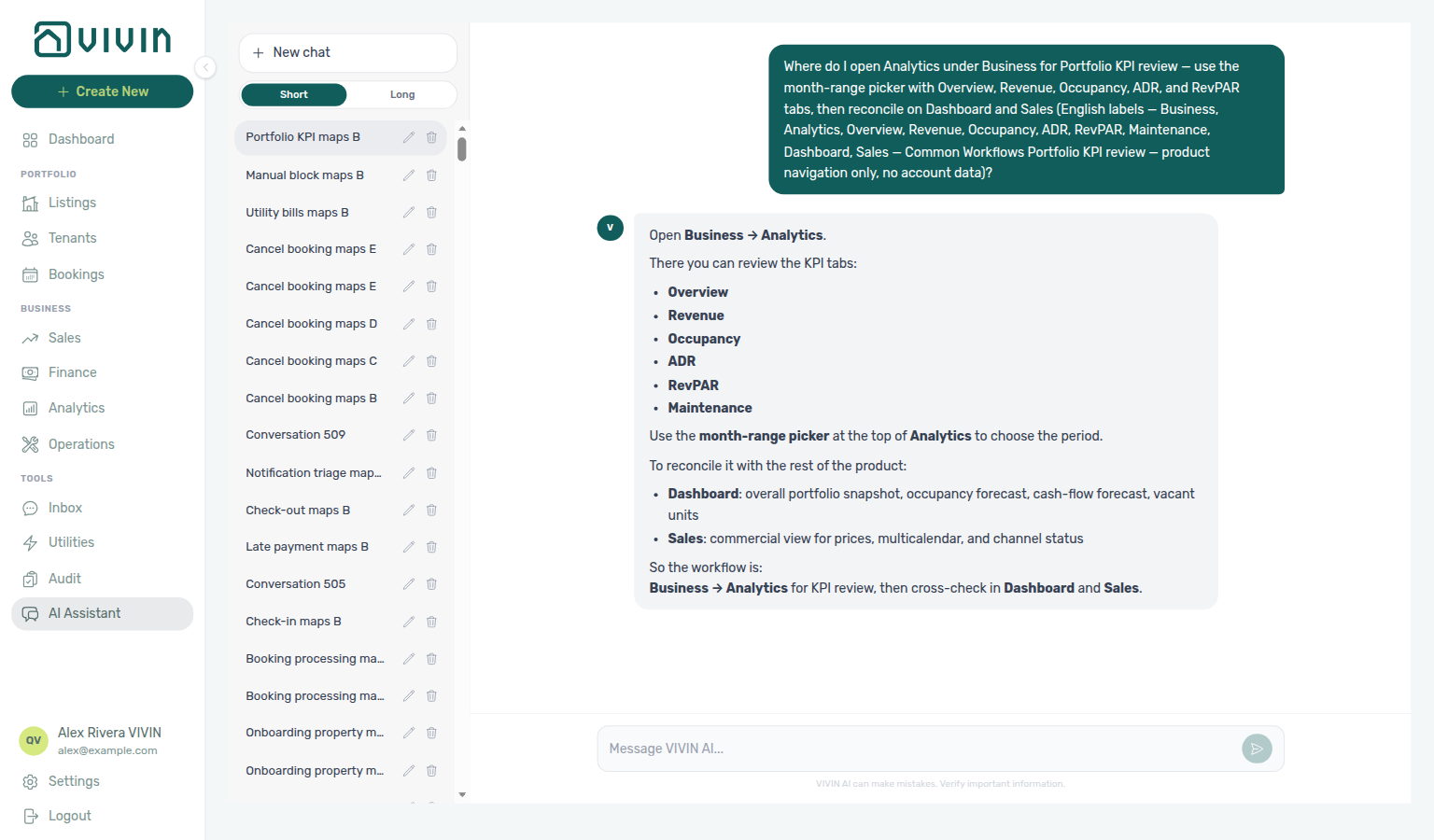
Ask AI Chat “Where do I open Analytics under Business for Portfolio KPI review — use the month-range picker with Overview, Revenue, Occupancy, ADR, and RevPAR tabs, then reconcile on Dashboard and Sales (English labels — Business, Analytics, Overview, Revenue, Occupancy, ADR, RevPAR, Maintenance, Dashboard, Sales — Common Workflows Portfolio KPI review — product navigation only, no account data)?” — then open Business → Analytics (ai-chat-product-context-portfolio-kpi-review-reply.png, ai-chat-product-context-portfolio-kpi-review-flow.mp4). The assistant typically says Business → Analytics, then points at the month-range picker, the KPI tabs (Overview, Revenue, Occupancy, ADR, RevPAR, Maintenance), and cross-checks on Dashboard and Sales. Same grounding external MCP clients get from get-vivin-context-finance. Distinct from the broader Analytics module map (“where do I open Analytics for portfolio KPI charts like ADR and RevPAR…?”) and from the Common Workflows hub product maps.
Run after go-live when bookings and ledger rows exist — your role needs the Analytics module permission from Settings → Users (setup step 3). Complete Getting Started — Recommended Setup Sequence steps 1–15, Onboarding a New Property — Step 7, the first Upcoming stay per Common Workflows — New inventory to first booking handoff, and first arrivals per Common Workflows — Property setup to first arrival handoff before the first month-end sign-off on new inventory. Lockout catch-up: Getting Started — Lockout catch-up after password recovery.
Open Step 1 — Open Analytics and set the range; scan Step 2 — Scan Overview then revenue depth in Step 3 / pricing in Step 4 — ADR and RevPAR. Segment outliers: Step 6 — Segment weak metrics; month-end sign-off: Step 7 — Reconcile with Sales and Dashboard. Habit-specific shortcuts live under Related below.
Use this workflow when you need a portfolio-wide performance read (month-end reporting, investor updates, or a health check before changing rates or availability). It centers on the Analytics (KPI workspace) module. For per-listing calendars, channel status, and rent grids, continue in Sales; for a same-day snapshot when Analytics is slow or unavailable, use the Dashboard.
When occupancy or RevPAR look suppressed, pair with Common Workflows — Occupancy KPI to block hygiene handoff (Step 3 → Manual block hygiene — Step 1; analytics-kpi-occupancy-tab.png, audit-manual-blocks-filter-scroll.mp4) and Manual block hygiene; for alert-driven follow-ups after the review, use Notification triage — payment alerts usually enter through Step 4 row-click navigation before you read Dashboard Total Debt in Step 7 below.
- Your role includes the Analytics module permission (
analytics.module) — see Users and roles - You know which month range you are reporting on (for example last closed month, trailing six months, or year-to-date)
Step 1 — Open Analytics and set the range
Month-range setup pairs with Analytics (KPI workspace), Settings → Users and roles, and get-booking-summary on Landlord MCP before you commit to a wide range. Downstream: Step 2 (Overview bars).
- Go to Business → Analytics (or
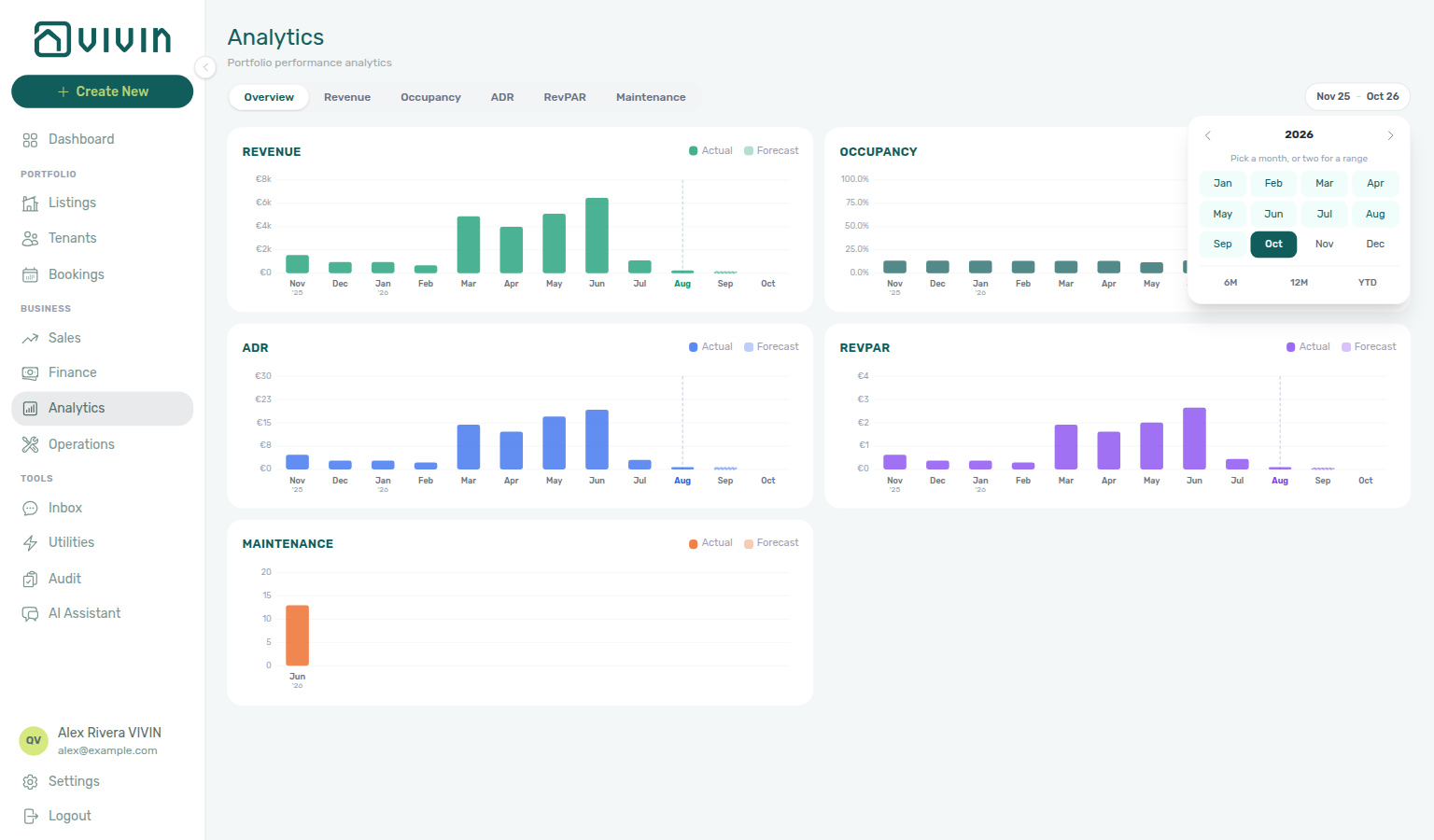
/analytics). - Click the month-range control in the toolbar and choose from and to months, or use a quick preset (6M, 12M, YTD) inside the picker.
- Wait for charts to finish loading after a large range change (Monthly Trend can take roughly 15–20 seconds on a cold load). On metric tabs, Ranking and Heatmap may still show skeleton bars for a beat after Monthly Trend paints — that is normal; see Analytics — Ranking and heatmap loading.
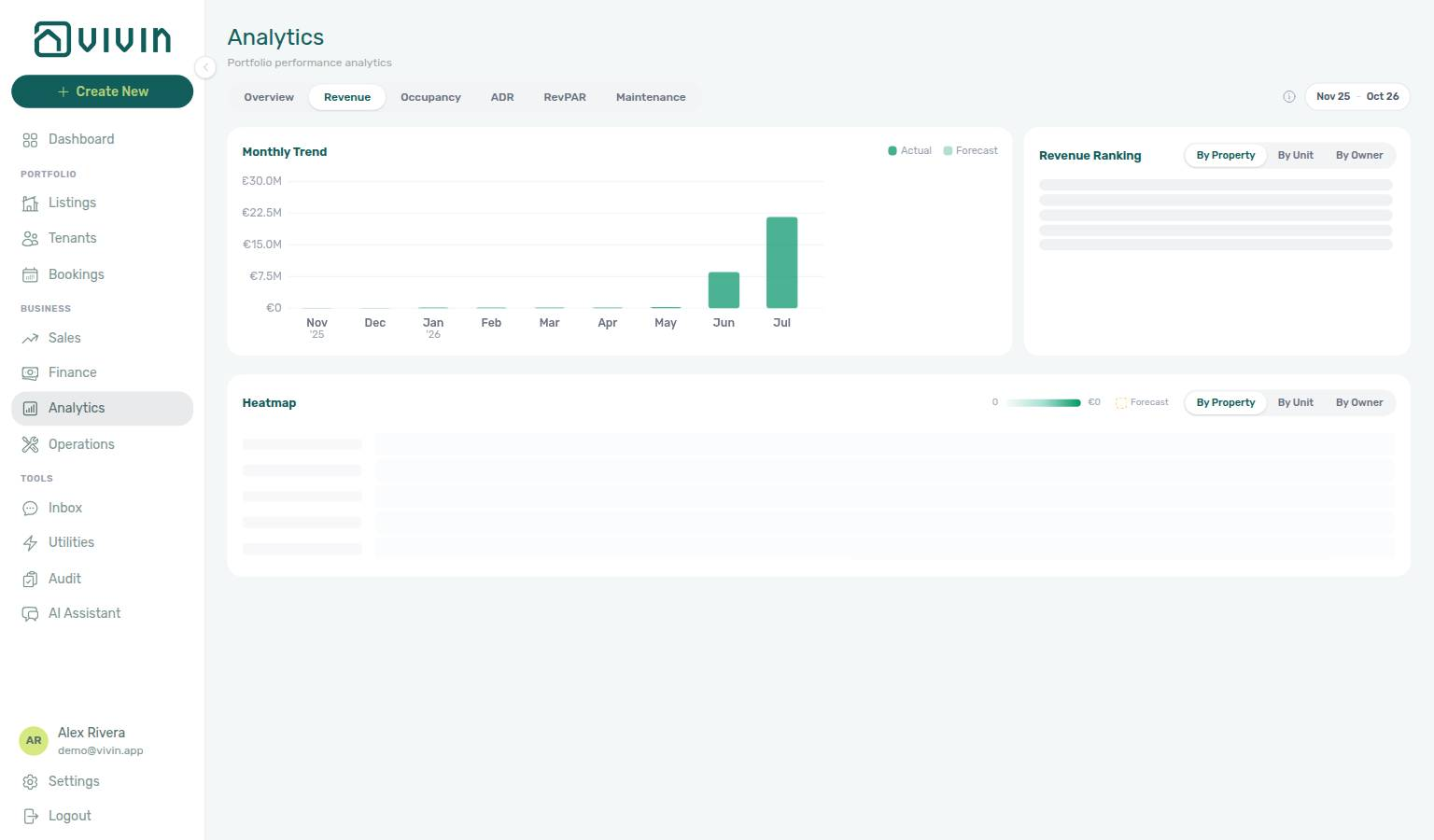
If Monthly Trend stays empty after the spinner finishes, use Retry — or open the Dashboard for a live snapshot — before treating figures as zero. Grey skeleton bars in Ranking alone are still loading, not a zero ranking. See FAQ — Analytics (KPI workspace).
Account-scoped Landlord MCP get-booking-summary returns active and upcoming booking counts for the authenticated account — sanity-check portfolio scale before you commit to a wide month range that slows Ranking and heatmap loads. There is no Analytics MCP export; month-range KPI charts and aggregation toggles remain operator UI only. Contrast booking-scoped Tenant MCP tools — they cannot replace Overview bar trends.
Step 2 — Scan Overview
Overview scan pairs with Analytics — Overview tab, Dashboard module as a live fallback, and FAQ — Analytics (KPI workspace) when charts need a refresh. Upstream: Step 1. Downstream: Steps 3–4 for tab-specific depth.
Start on Overview (/analytics/overview). The grid shows monthly bar charts for revenue, occupancy %, ADR, RevPAR, and maintenance (tickets created) side by side for the same range — useful for spotting one weak metric without switching tabs yet.
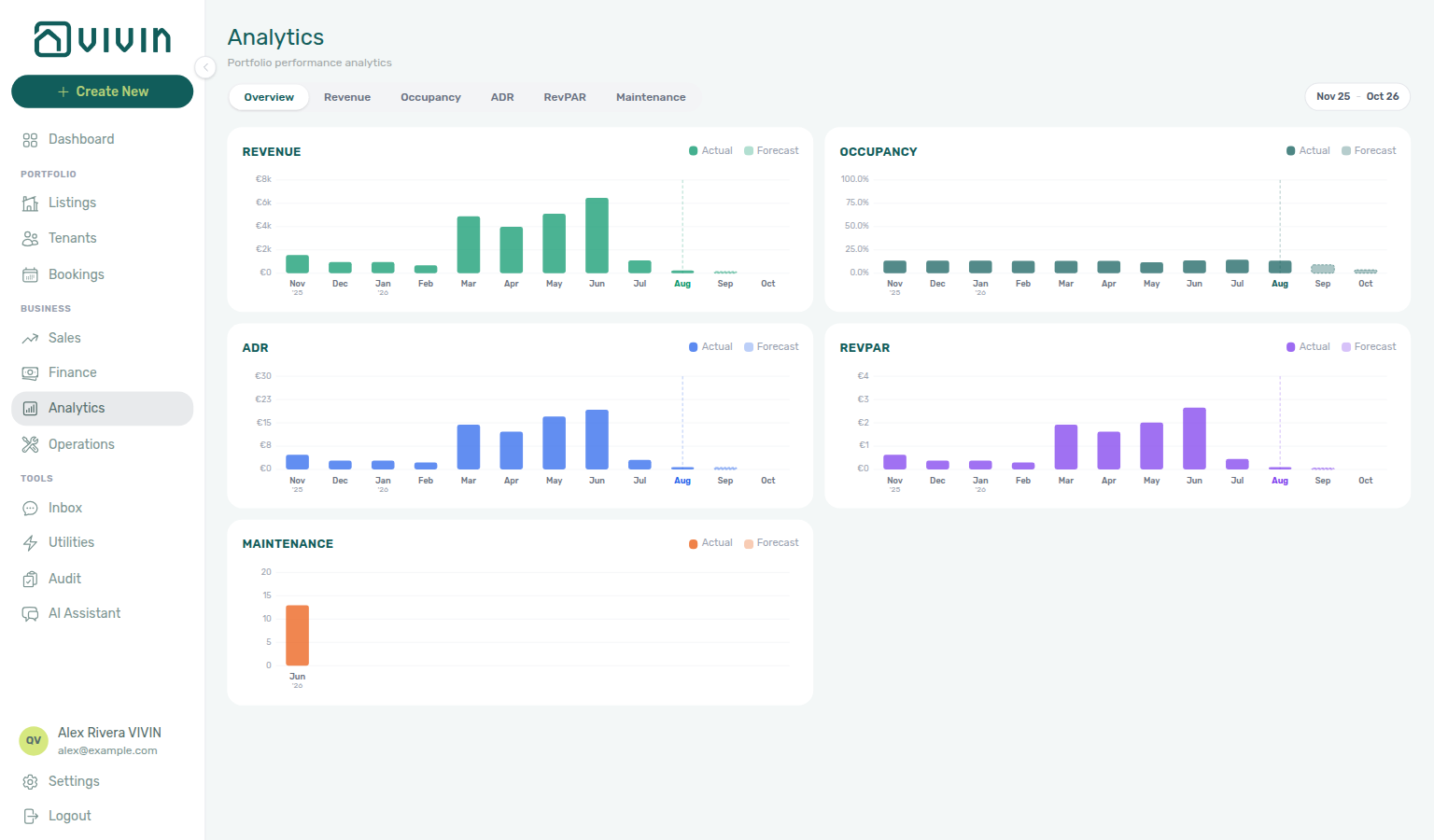
Note any month where bars diverge (for example strong revenue but falling occupancy) and carry those months into the tab-specific steps below.
Account-scoped Landlord MCP get-booking-summary returns active and upcoming booking counts for the authenticated account — use it to sanity-check Overview bar trends before you drill into Revenue or Occupancy tabs. Booking-scoped Tenant MCP tools are the wrong surface for portfolio-wide charts; reserve get-payment-info for per-reservation outliers in Step 7.
Step 3 — Revenue and occupancy depth
Revenue and occupancy depth pairs with Analytics — Revenue and Occupancy tabs, Sales → Multicalendar, and Manual block hygiene when Ranking looks suppressed by holds. Upstream: Step 2. Downstream: Step 4 and Step 6.
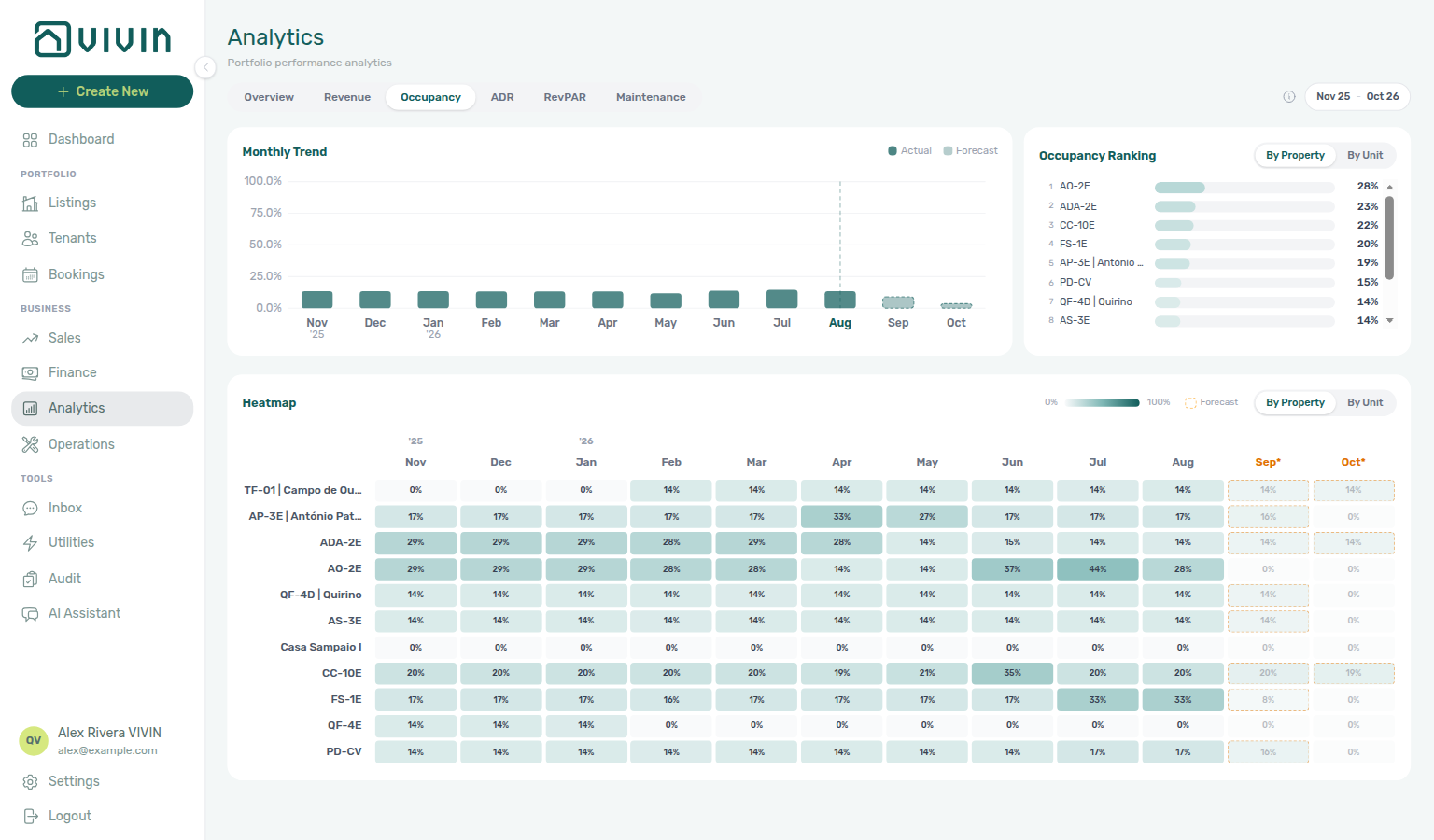
Switch to Revenue and Occupancy (URLs /analytics/revenue and /analytics/occupancy). Each tab shares the same layout:
- Monthly trend (full portfolio totals in scope — not limited to Ranking rows)
- Ranking (top 20 of the portfolio-wide ranked list for the roll-up you pick)
- Seasonality heatmap (ranked page; ends with and N more when the portfolio is larger)
Use the aggregation control (By Property, By Unit, and By Owner when your portfolio has multiple owners) to see whether a problem is concentrated in one asset or spread across the book. Vivin re-ranks the whole scope when you change roll-up — see Analytics — Ranking and heatmap paging. Expect brief skeleton bars in Ranking/Heatmap while that ranked page loads (Monthly Trend usually stays put) — Ranking and heatmap loading.
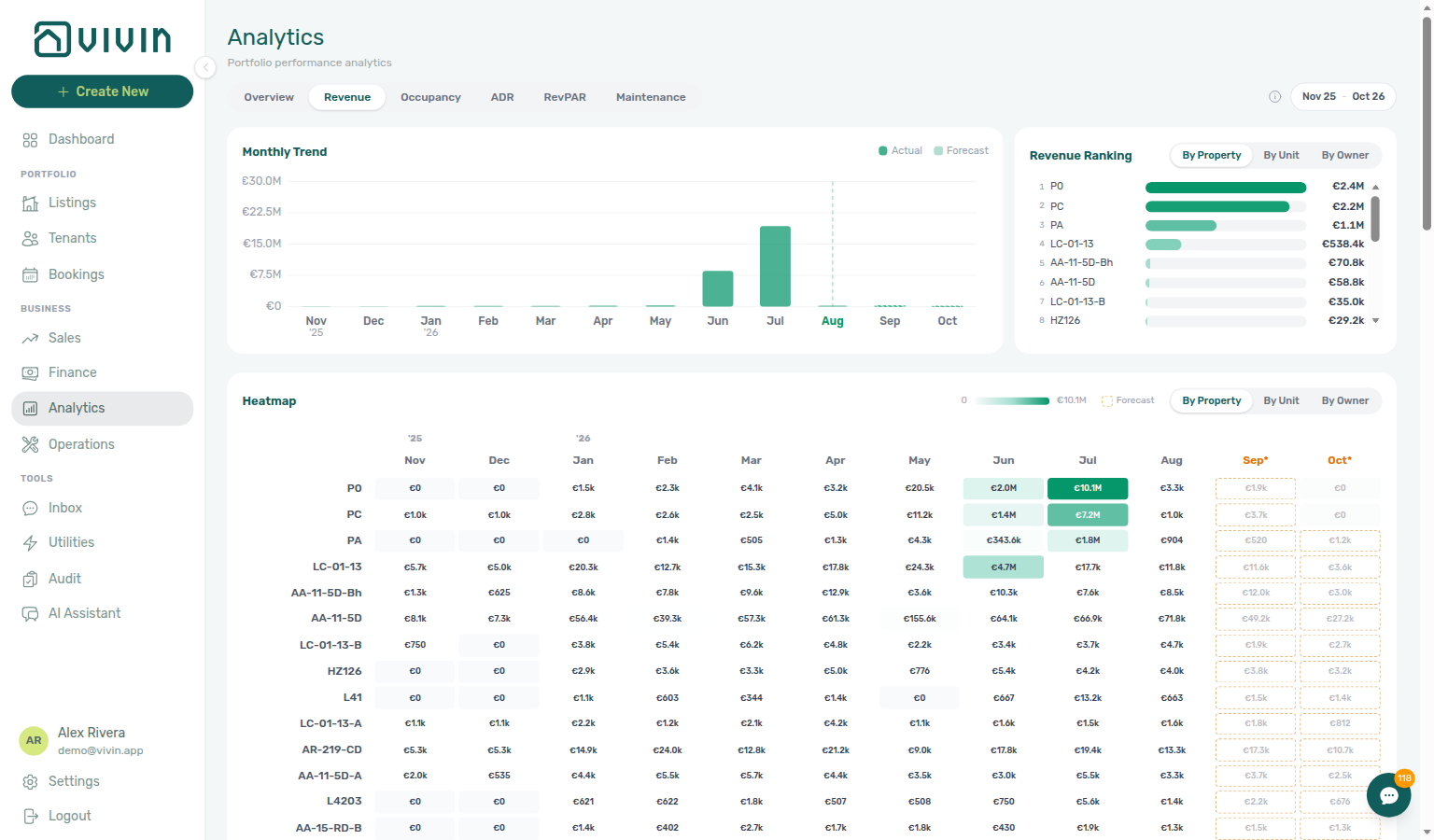
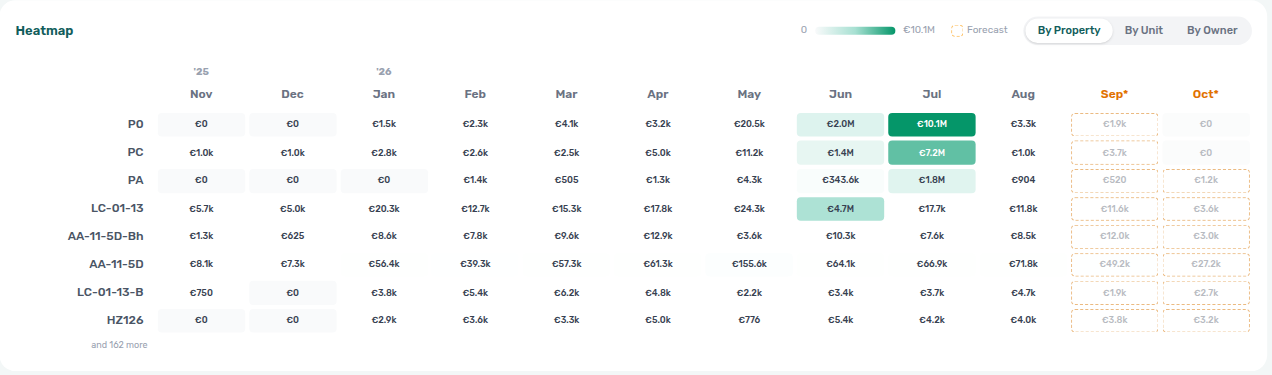
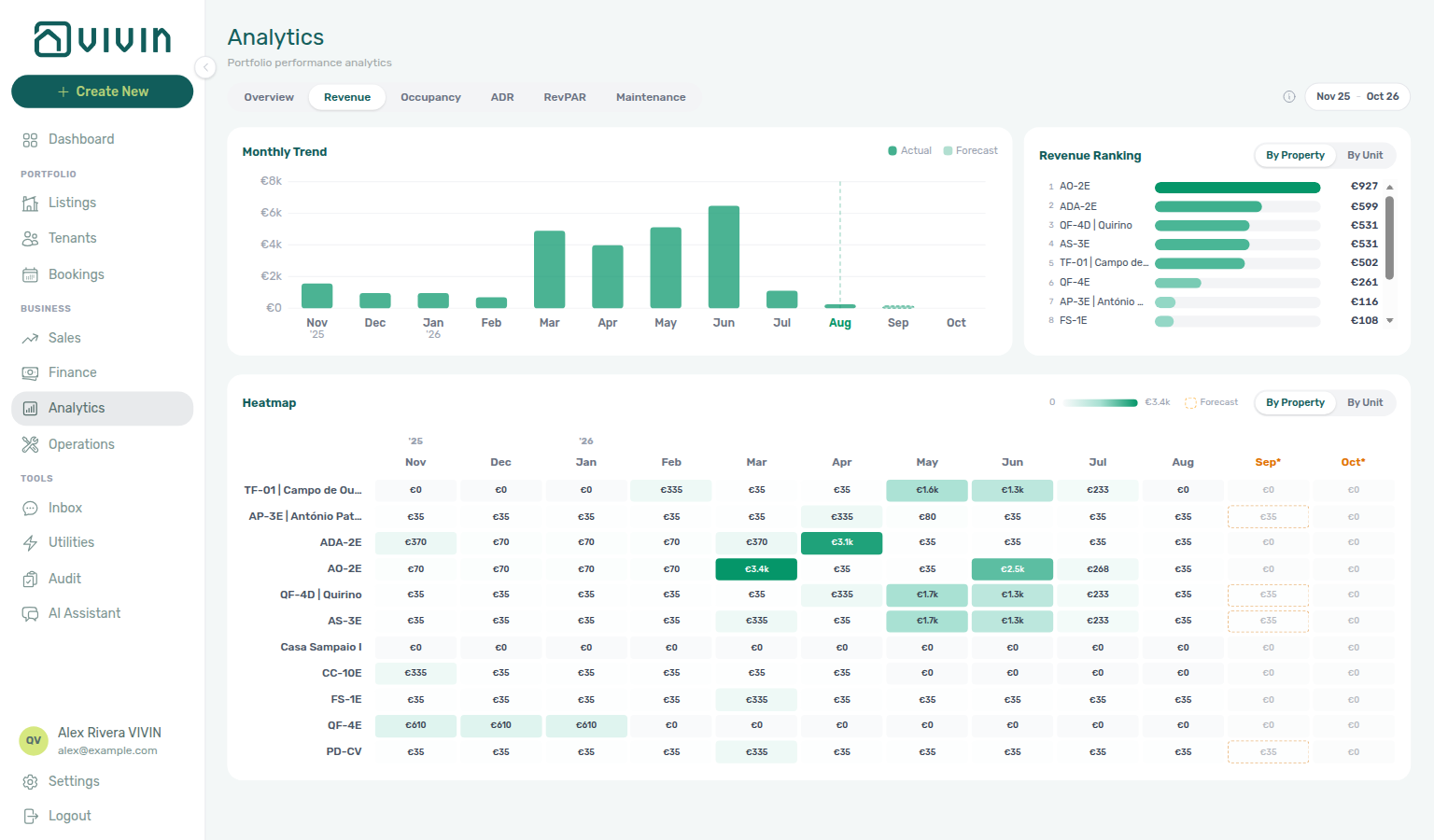
Open the information icon beside the month-range picker on Revenue if you need the in-product definitions for totals, ranking rules, or heatmap cells.
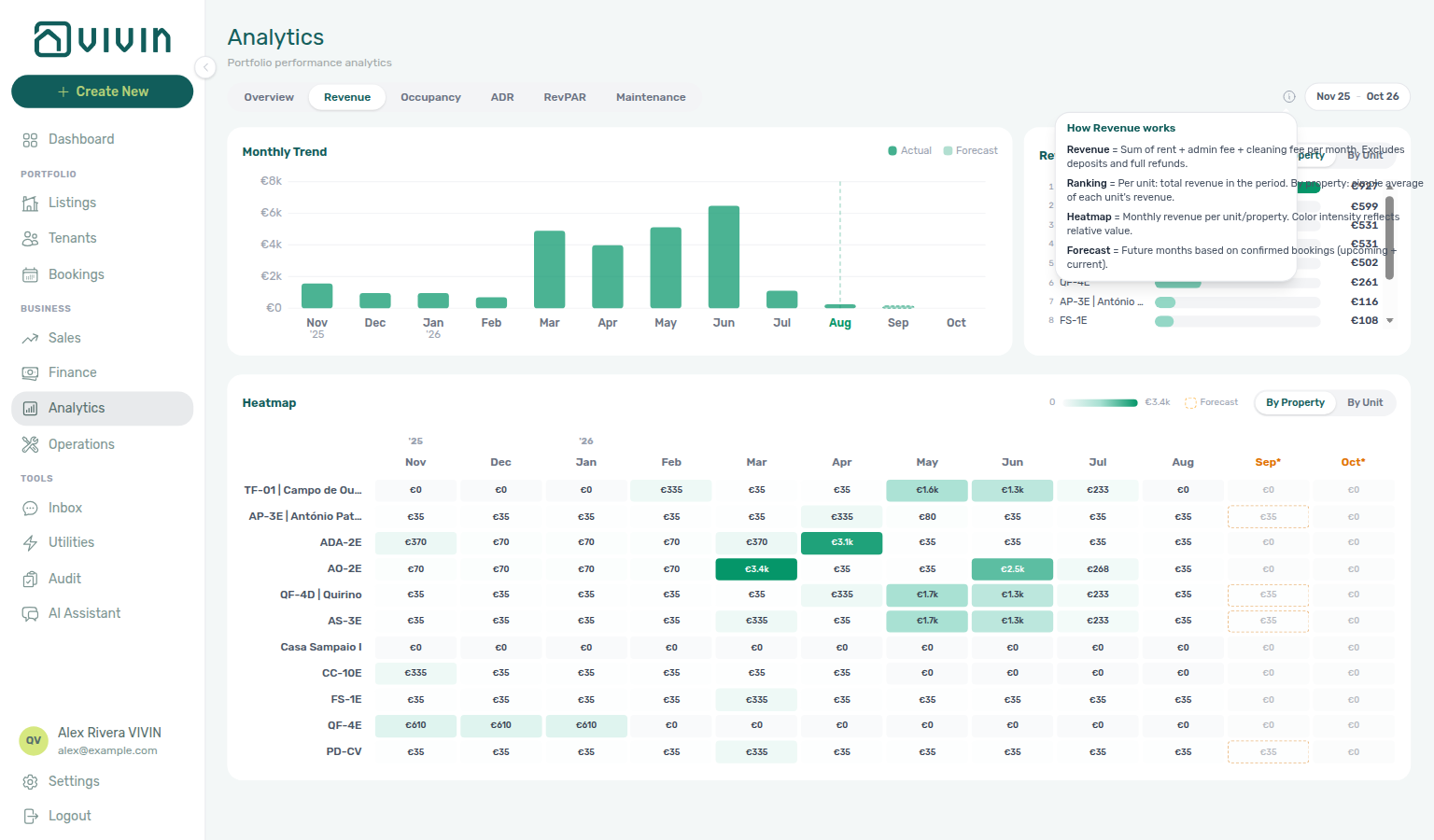
When Ranking or heatmap cells point at one property or unit, account-scoped Landlord MCP list-bookings and get-booking help external clients list reservations on that asset before you open Sales → Multicalendar or Bookings → Other filters. get-property and list-listings (thin account-wide unit projection) narrow the asset when aggregation is By Property or By Unit — get-listing includes unavailabilities so you can rule out forgotten manual blocks before you edit rates in Sales → Pricing; pair with Manual block hygiene when occupancy bars look suppressed. get-listing-pricing-table returns the monthly rent grid when Revenue Ranking isolates an underpriced unit — contrast set-listing-pricing-month write tools, which need listings permissions and operator confirmation in the UI. get-vacant-units-next-month gives a forward vacancy snapshot across the book. Booking-scoped Tenant MCP tools are the wrong surface for portfolio Ranking; reserve them for per-reservation outliers in Step 6–7. Surface-choice contrast: Automation & AI — Workflow pairing for surface choice.
Step 4 — ADR and RevPAR (pricing efficiency)
Pricing-efficiency review pairs with Analytics — ADR and RevPAR tabs, Sales → Pricing, and get-listing-pricing-table on Landlord MCP before you edit rates. Upstream: Step 3. Downstream: Step 6 and Step 7.
Review ADR (average daily rate: revenue ÷ occupied nights) and RevPAR (revenue ÷ available nights) on /analytics/adr and /analytics/revpar. Compare ranking and heatmap patterns with Occupancy:
- Falling occupancy with stable ADR often points to availability or demand, not rate.
- Falling RevPAR with flat occupancy can mean more empty nights at the same booked rate mix.
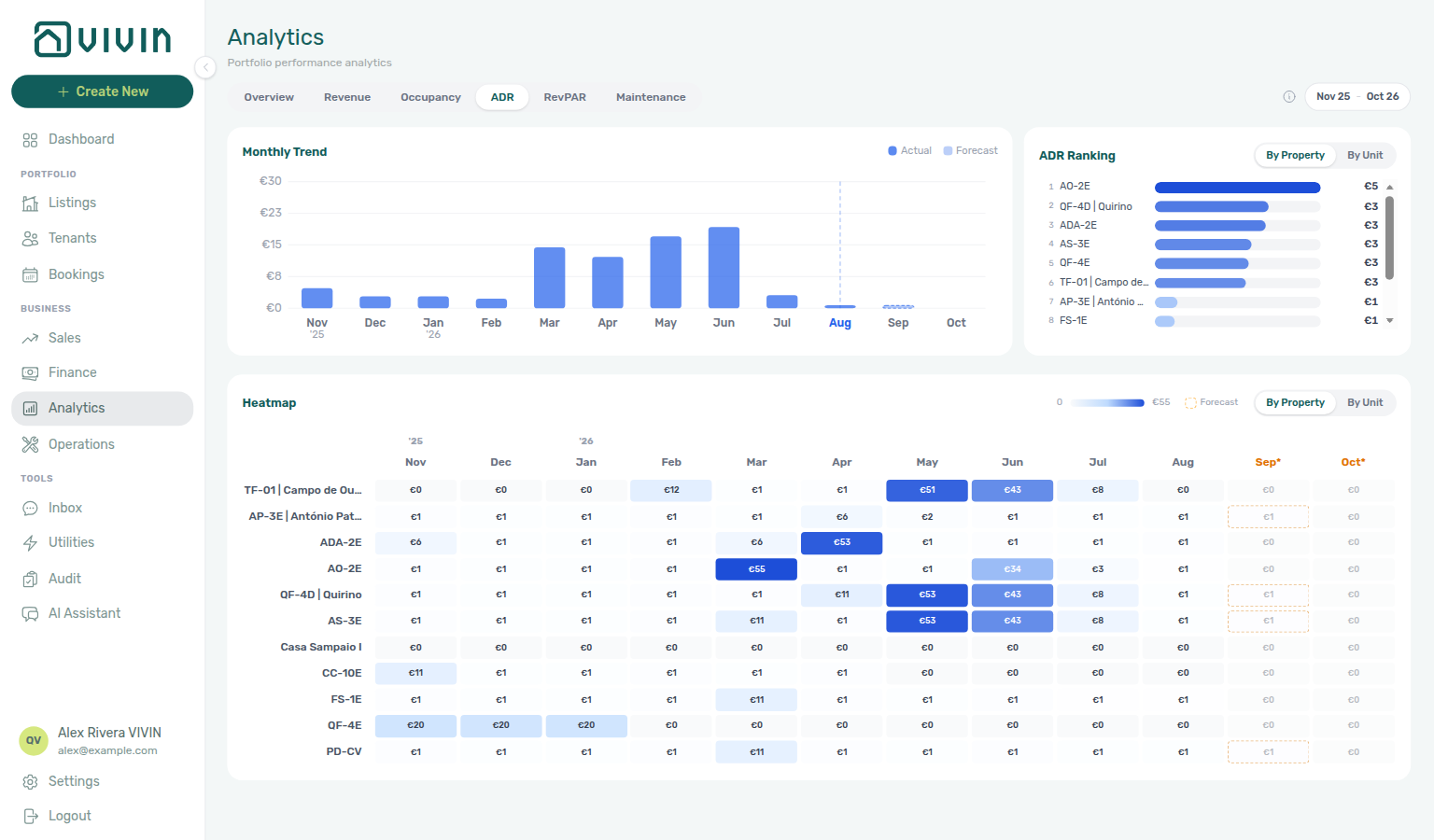
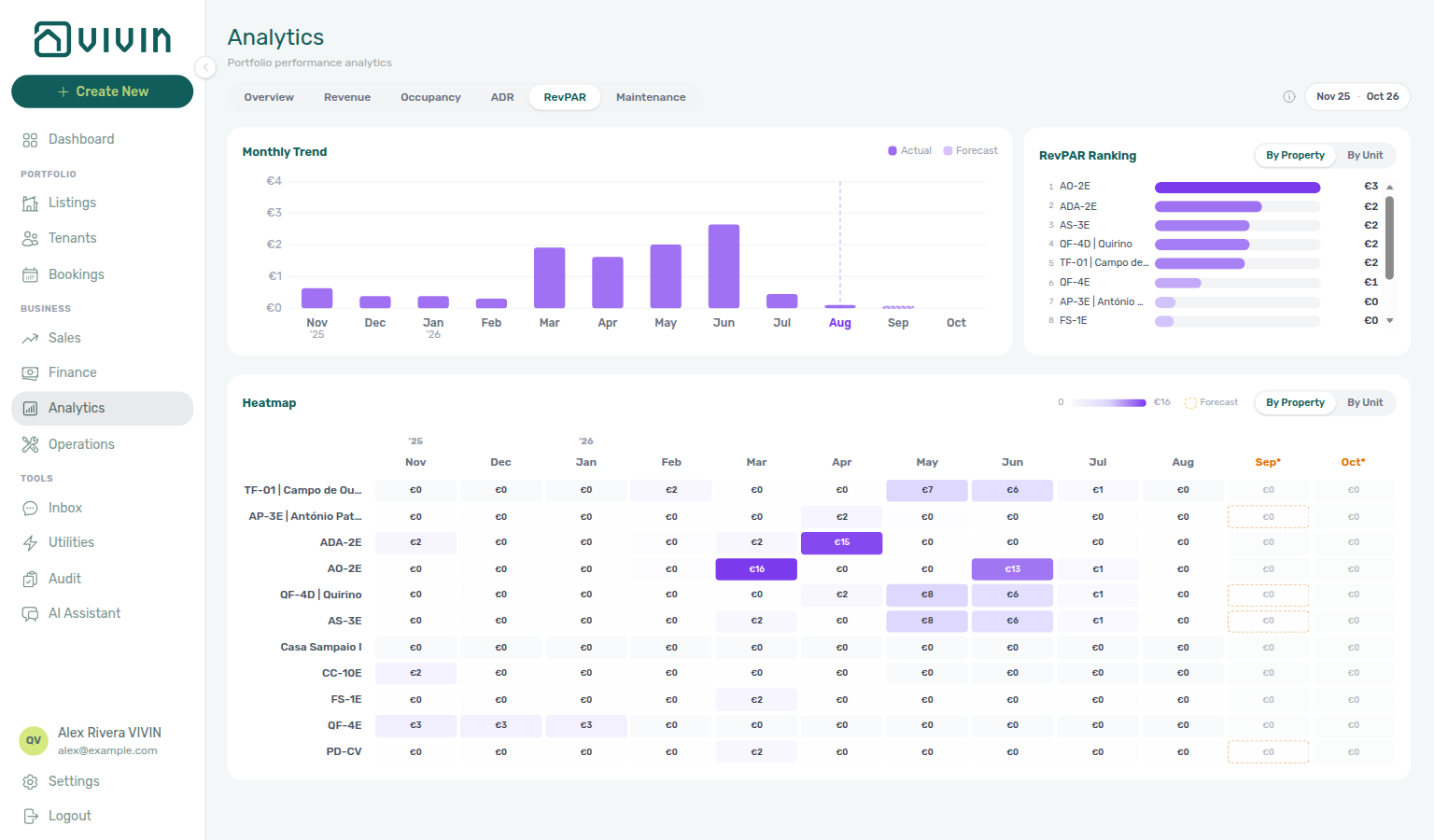
When ADR or RevPAR Ranking isolates one unit before you edit rates in Sales → Pricing, account-scoped Landlord MCP get-listing-pricing-table returns the monthly rent grid for that listing; set-listing-pricing-month applies a change when the signed-in JWT has listings write permission — operators still confirm the edit in Sales when automation should not write blindly. External clients cannot read Analytics heatmaps from MCP; reconcile assistant answers against the in-product tabs above.
Step 5 — Maintenance workload
Maintenance workload pairs with Analytics — Maintenance tab, Operations → Tickets, and get-ticket-status-counts / get-ticket-aggregates / list-tickets / create-ticket on Landlord MCP when spikes need follow-up jobs. Upstream: Steps 2–4. Downstream: Step 7 (Cost allocation on damage tickets).
Open Maintenance (/analytics/maintenance) to see tickets created per month in range, property/unit ranking, and a ticket-count heatmap. Pair spikes here with Operations ticket queues and property Maintenances settings — Analytics counts creation volume, not open backlog. On Operations → Overview, the Overdue card is the late SLA backlog (priority + hours), not every ticket whose schedule date is in the past. On Operations → Tickets, use the Draft KPI card for far-future Schedule date jobs (Glossary — Draft ticket (display status)) and open ticket Cost allocation when repair spend should tie to Cash Flows ledger rows.
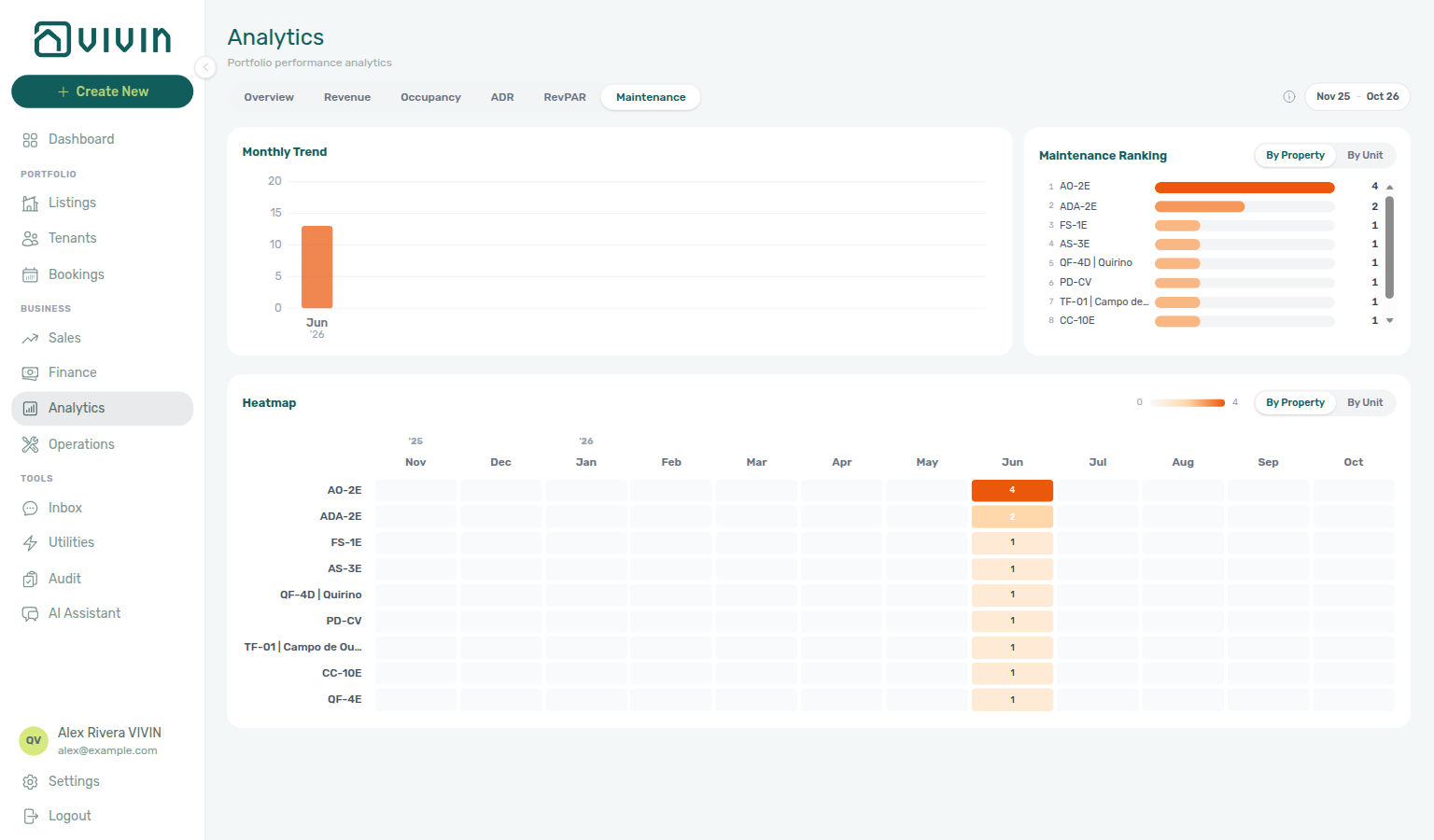
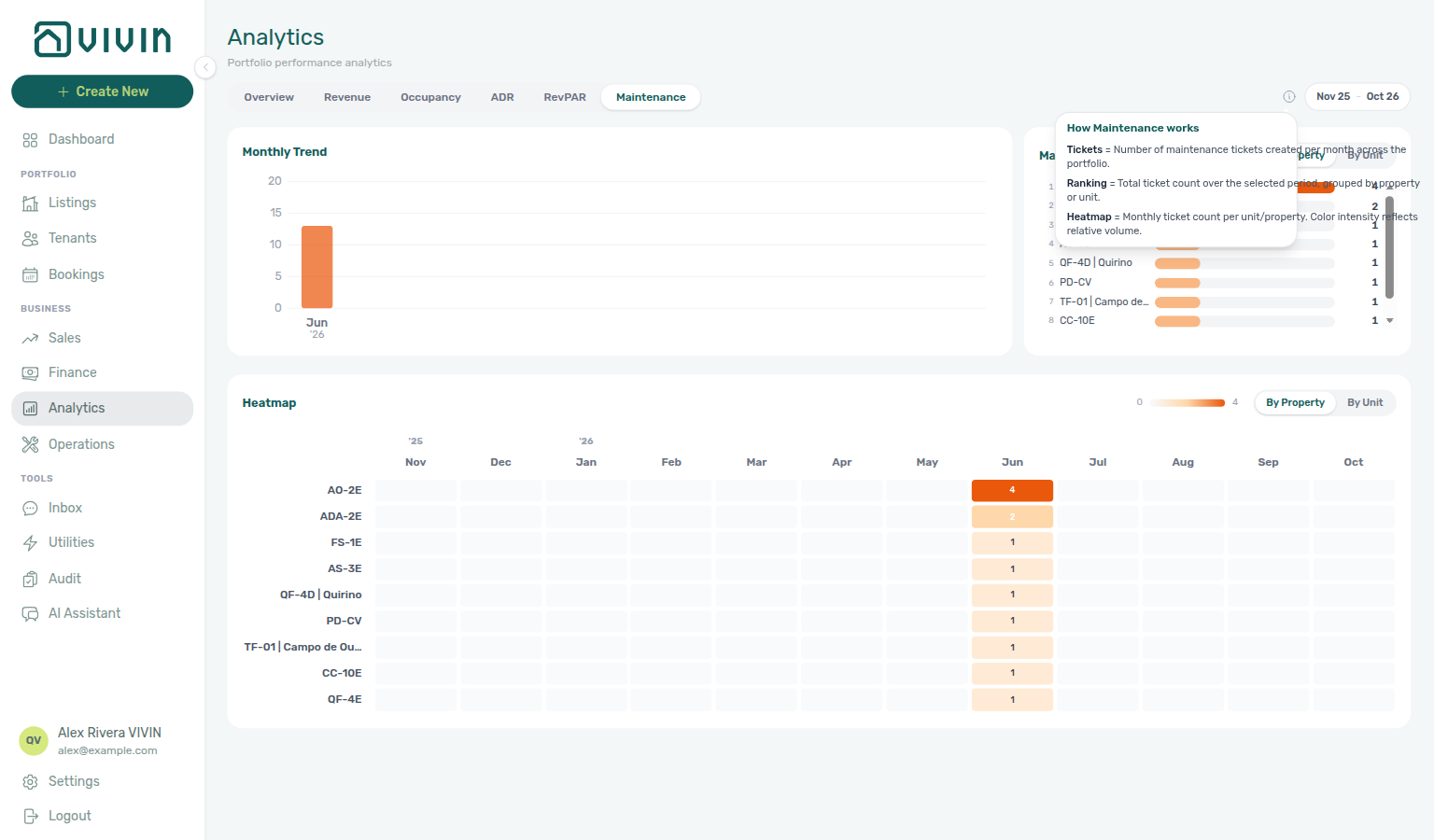
Account-scoped Landlord MCP get-ticket-status-counts, get-ticket-aggregates, get-maintenance-closure-rate, get-cost-summary, list-tickets, get-ticket, create-ticket, update-ticket, and add-ticket-comment surface the same Operations → Tickets queue you pair with Maintenance spikes — use get-ticket-aggregates for the property/unit ranking and monthly trend this Analytics tab renders (server-computed over every ticket — the “which property has the most tickets” answer); use get-ticket-status-counts for whole-account status totals, All-card priority chips, Unassigned-card priority chips, Draft-card priority chips, In-progress-card priority chips, Closed-card priority chips, and Cancelled-card priority chips (not a page of titles); use get-maintenance-closure-rate for closed vs received in a named trailing window (not the Closed-card mix) — including a 45-day mid-length window, a 50-day window between 45 and 60, and the 90-day maximum; use get-cost-summary for Cash Flows outflow, average cost per unit, category outflows, and remaining totals after excluding a category in a named month (not Finance income) — including a June 2026 named month alongside the July example, a June category split (including uncategorized when it has outflow), and remaining totals after excluding Maintenance as a different exact name, and after excluding Manutenção in June when that month’s Cash Flows name is Portuguese, and after excluding uncategorized in June when you want remaining totals after dropping that other exact Cash Flows name, and after excluding maintenance in April when you want remaining totals after dropping that month’s exact Cash Flows name, and after excluding maintenance and uncategorized in April when you want remaining totals after dropping both exact names, and for 1–15 April 2026 when you want a custom half-month window, and for 16–30 April 2026 when you want the other custom half-month window, and for February 2026 when you want a fourth named settled month, and for 1–14 February 2026 when you want a custom February half-month window, and for 15–28 February 2026 when you want the other custom February half-month window, and for January 2026 when you want a fifth named settled month, and for March 2026 when you want a sixth named settled month, and for May 2026 when you want a seventh named settled month; use create-ticket when Analytics ranking points at one property and no follow-up job exists yet; update-ticket when assignees or due dates change before month-end sign-off. External clients cannot close tickets or link Cost allocation cash flows from MCP; operators finish on Operations when contractor spend should tie to ledger rows (Glossary — Ticket — linked cash flows).
Step 6 — Segment weak metrics (optional)
Segment review pairs with Bookings → Tenant categories, Finance — Tenant category filter, and Settings → Tenant categories before you change portal rules account-wide. When Finance omits a segment Bookings already lists, see FAQ — Finance tenant category filter parity and Glossary — Finance tenant category cache refresh. Upstream: Steps 3–5. Downstream: Step 7 and Handling a Late Payment — Step 6 when segment debt clusters.
When a dip looks concentrated in one building type, tenant segment, or tag (for example student rooms vs studios, corporate vs short-stay, or unassigned tenants), narrow the operational view before you change rates account-wide:
| Signal on Analytics | Where to segment next |
|---|---|
| One property type underperforms in Ranking | Sales → Multicalendar or Pricing — Select tags / Select listing types on the toolbar (same vocabulary as Settings > Categories). When the dip lines up with a future move-in window (for example September student intake), add Date range on the same toolbar so only listings free on every day in that window stay visible — see Sales — Multicalendar date range and the applied-range screenshot below. |
| Occupancy or revenue dip tied to one tenant segment | Bookings → Tenant categories — to list only reservations whose tenant profile carries the selected segment(s), with No tenant category for unassigned profiles (OR-combined server filter). Scope Select properties to one building when Ranking already points at a single asset. For receivables on the same segment, repeat the filter on Finance → Other filters tenant category (Contract Values, Transactions, Deposits). Cross-check profile counts on Tenants — All categories (the menu stays open while you add a named segment, then No category) before you change portal modules or communication rules account-wide — see Settings > Tenant categories and Glossary — Tenant category. |
| Debt or contract-value outliers beside revenue | Finance → Contract Values — Other filters → Property & Listing → Select categories (listing tags on units) plus Booking → Select categories when the slice is reservation-type specific; add Tenant → Tenant category when the outlier tracks a tenant segment — Finance — Tenant category filter. On Bookings, Booking categories stays open while you add a second tag (for example Student, then No booking category) — see Bookings — Booking categories stays open. When outliers include utility overage lines, spot-check Entering Monthly Utility Bills — Step 4 before you change rates account-wide. When Canceled stays inflate segment debt, pair with Cancelling a Booking — Step 6b. |
| Revenue shortfall from discounted stays | Finance → Other filters or Bookings → Other filters — Discounts → With to list reservations with line-level or booking-scoped reductions; reconcile net due on Contract Values |
| Revenue dip not explained by segment or discounts | Services Marketplace — ancillary portal Income on Payment plan and Finance → Transactions that Analytics rent charts may not isolate; cross-check Contract Values before you lower base rent in Sales → Pricing or change Communication Rules audience account-wide — same habit as Step 7 Services Marketplace row |
| Occupancy dip but segment filters look healthy | Hub: Occupancy KPI to block hygiene handoff → Manual block hygiene or Audit (Manual Blocks tab) — forgotten holds before you edit Settings > Tenant categories portal rules account-wide (audit-manual-blocks-workspace.png) |
| Portfolio table noise hides one asset | Listings → Portfolio — Select tags stays open while you add a second neighbourhood (for example Alameda, then Saldanha) — see Listings — Select tags stays open. Combine with Select types and Search (Listings keeps A–Z order; it does not re-rank by unit name). |
Hub matrix: Common Workflows — Portfolio segmentation by tenant category. Finance drawer parity: FAQ — Finance tenant category filter parity.
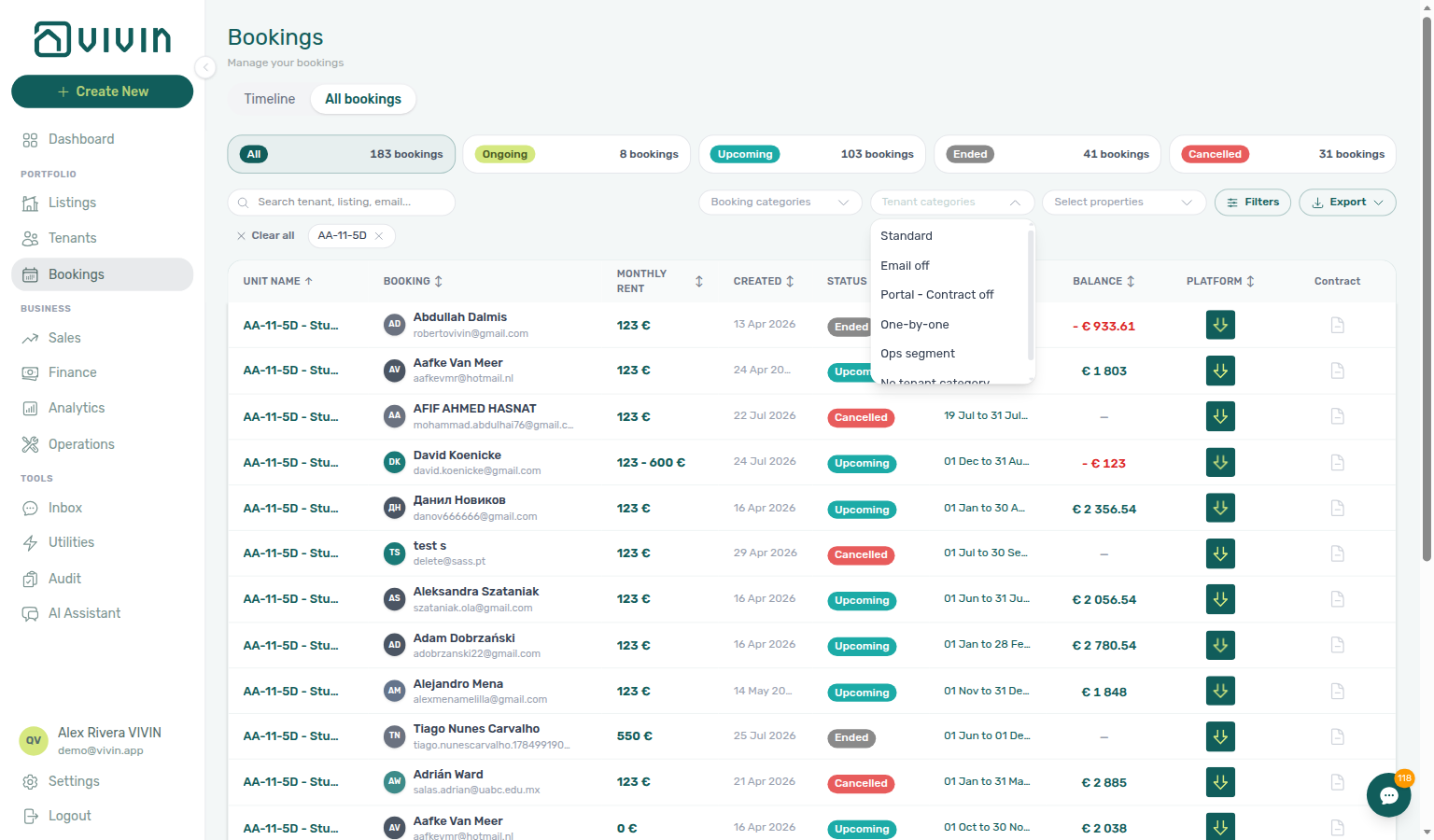
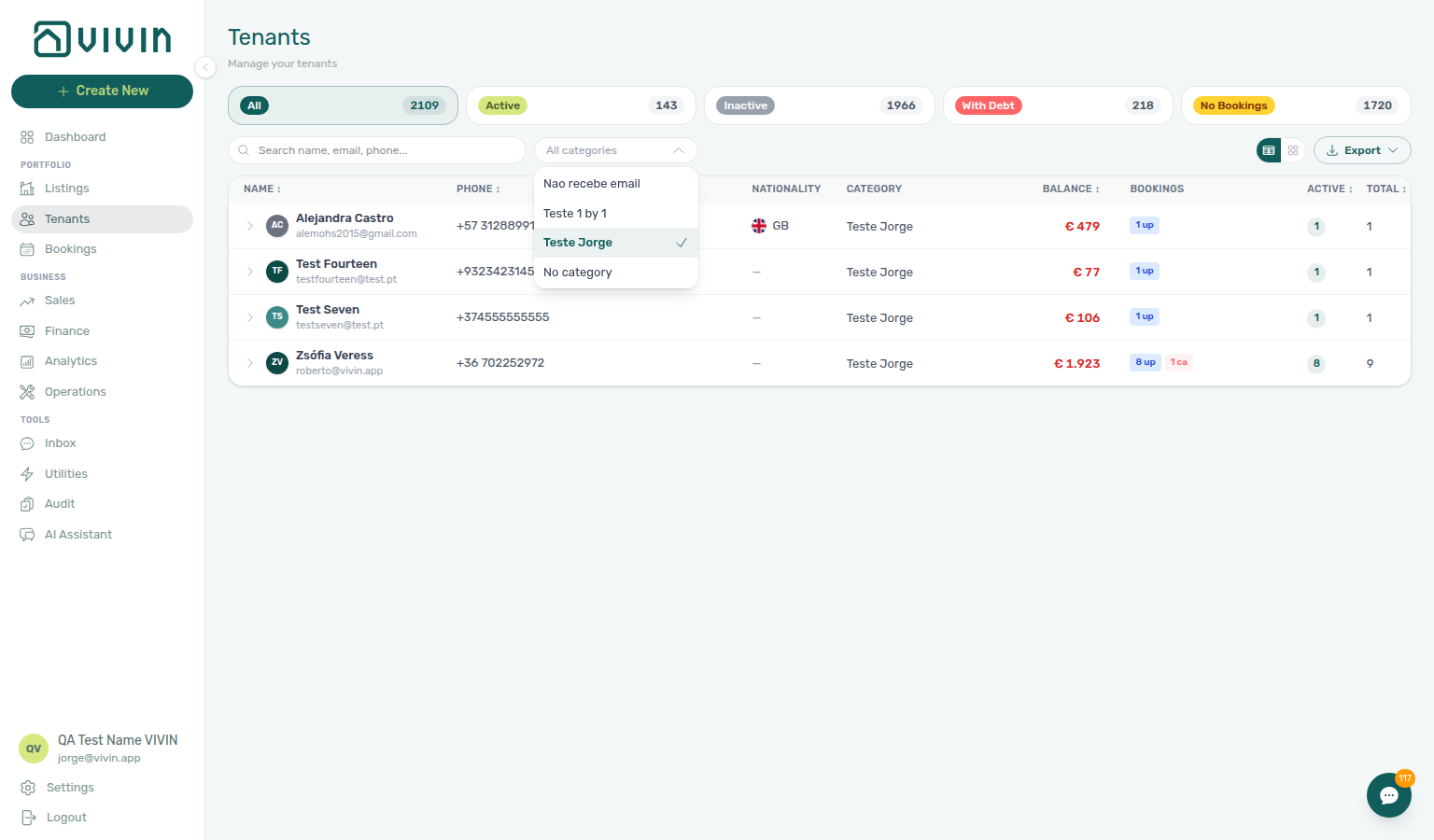
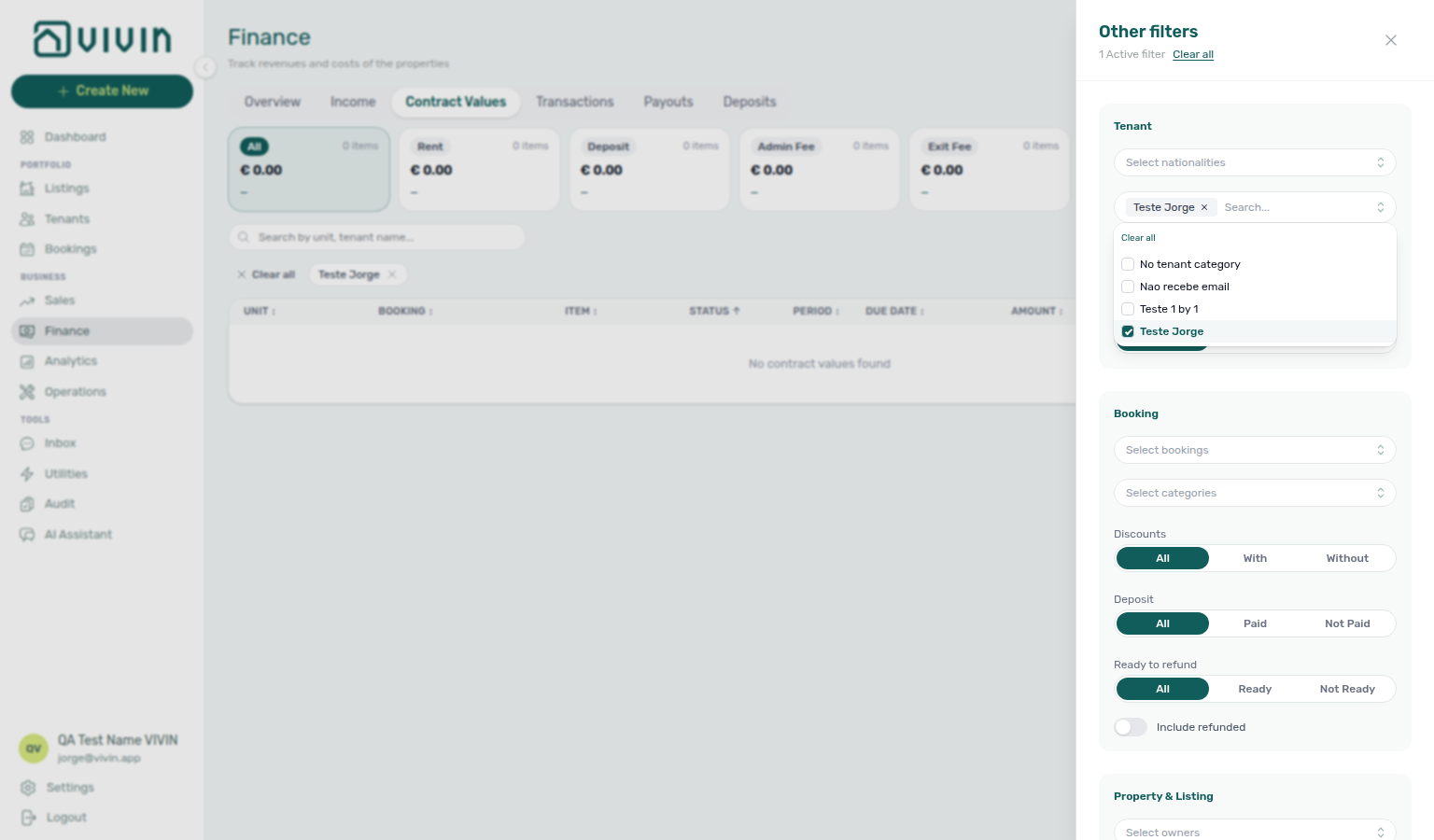
Cross-reference Settings > Categories — Filter surfaces for the full map of tag/type pickers. For segment setup and portal rules, start on Settings > Tenant categories. When Ranking revenue dips but tenant-category, tag, and discount filters do not explain the gap, cross-check Services Marketplace ancillary charges before you change communication audiences or base rent account-wide — pair with Managing a Check-out — Step 6 when departure-week In Debt rows cluster on one segment. When utility overage lines cluster on one tenant category, continue Entering Monthly Utility Bills — Step 4 and file Step 6 when bill math is blocked — not only Handling a Late Payment — Step 6. When payment alerts on /notifications started the segment review, you likely already row-clicked from Notification triage — Step 4 — mirror the same Tenant → Tenant category filters on Finance and Bookings before you change portal rules account-wide. When a management lockout delayed this segment pass, recover access with Resetting a Management User Password — Step 3 before you change Communication Rules audience account-wide.
When a tenant segment dip in Step 6 might change Settings > Tenant categories portal rules account-wide, booking-scoped Tenant MCP get-tenant-info confirms profile category assignment on sample reservations — get-payment-info checks receivables outliers on one booking before you mirror the filter on Finance → Contract Values. list-bookings-by-email helps when the segment review started from a tenant message, not Analytics Ranking.
Account-scoped Landlord MCP get-booking-summary gives active/upcoming counts before you commit to segment filters on Bookings → Tenant categories or Finance → Other filters — pair list-bookings when several reservations in the same tenant category underperform Ranking together. When segment paperwork lists a fiscal ID or tenant display name instead of booking ids, list-tenants, get-tenant, and get-tenant-bookings resolve the profile and linked reservations before you change Communication Rules audience account-wide — same habit as Handling a Late Payment — Step 6 and Managing a Check-in — Step 6. get-listing-pricing-table returns the monthly rent grid when a segment dip isolates one underpriced unit before you edit Sales → Pricing. External clients cannot read Analytics heatmaps or change Tenant categories portal rules from MCP; operators finish segment setup in the management UI. Surface-choice contrast: Automation & AI — Workflow pairing for surface choice.
Step 7 — Reconcile with Sales and Dashboard
Month-end reconciliation pairs with Dashboard — Total Debt, Finance → Overview, Manual block hygiene, and Entering Monthly Utility Bills — Step 5. Upstream: Steps 1–6. Downstream: Notification triage — Step 5 and Using in-app support when product behaviour blocks sign-off.
Before you change pricing or blocks:
| Question | Where to confirm |
| -------------------------------------------------------------- | ---------------------------------------------------------------------------------------------------------------------------------------------------------------------------------------------------------------------------------------------------------------------------------------------------------------------------------------------------------------------------------------------------------------------------------------------------------------------------------------------------------------------------------------------------------------------------------------------------------------------------------------------------------------------------------------------------------------------------------------------------------------------------------------------------------------------------------------------------------------------------------------------------------------------------------------------------------------------------------------------------------------------------------------------------------------------------------------------------------------------------------------------------------------------------------------------------------------------------------------------------------------------------------------------------------------------------------------------------------------------------------------------------------------------------------------------------------------------------------------------------------------------------------------------------------------------------------------------------------------------------------------------------------------------------------------------------------------------------------------------------------------------------------------------------------------------------------------------------------------------------------------------------------------------------------------------------------------------------------------------------------------------------------------------------------------------------------------------------------------------------------------------------------------------------------- | ----------------------------------------------------------------------------------------------------- |
| Is a listing actually free or blocked tomorrow? | Sales Overview availability popover or channel manager / unit calendar, or Listings unit calendar — click a Timeline day or a Daily / Fortnightly / Monthly bar; the free-unit list stays on that period while you scroll. For a multi-day vacant window (not just today), use Sales → Multicalendar or Pricing Date range — set Start date and End date so the grid refetches to listings free across the whole span. Multicalendar (timeline): 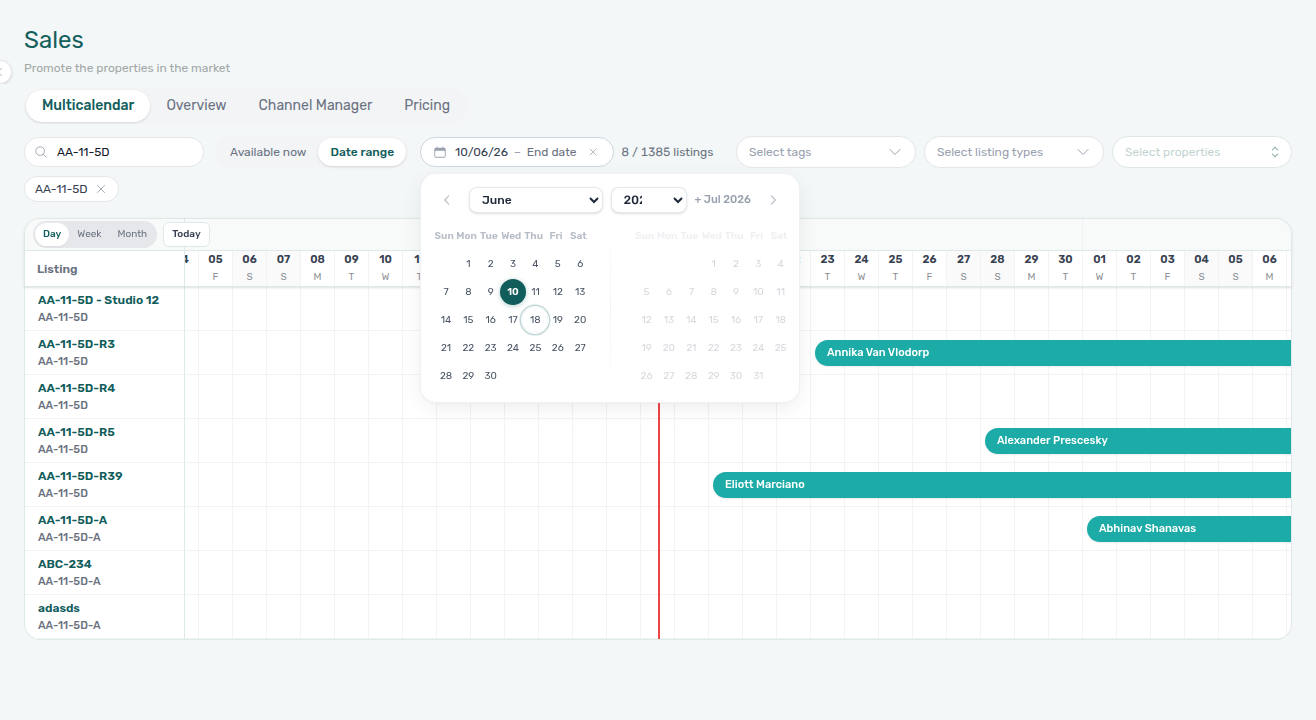 . Pricing (monthly rent grid):
 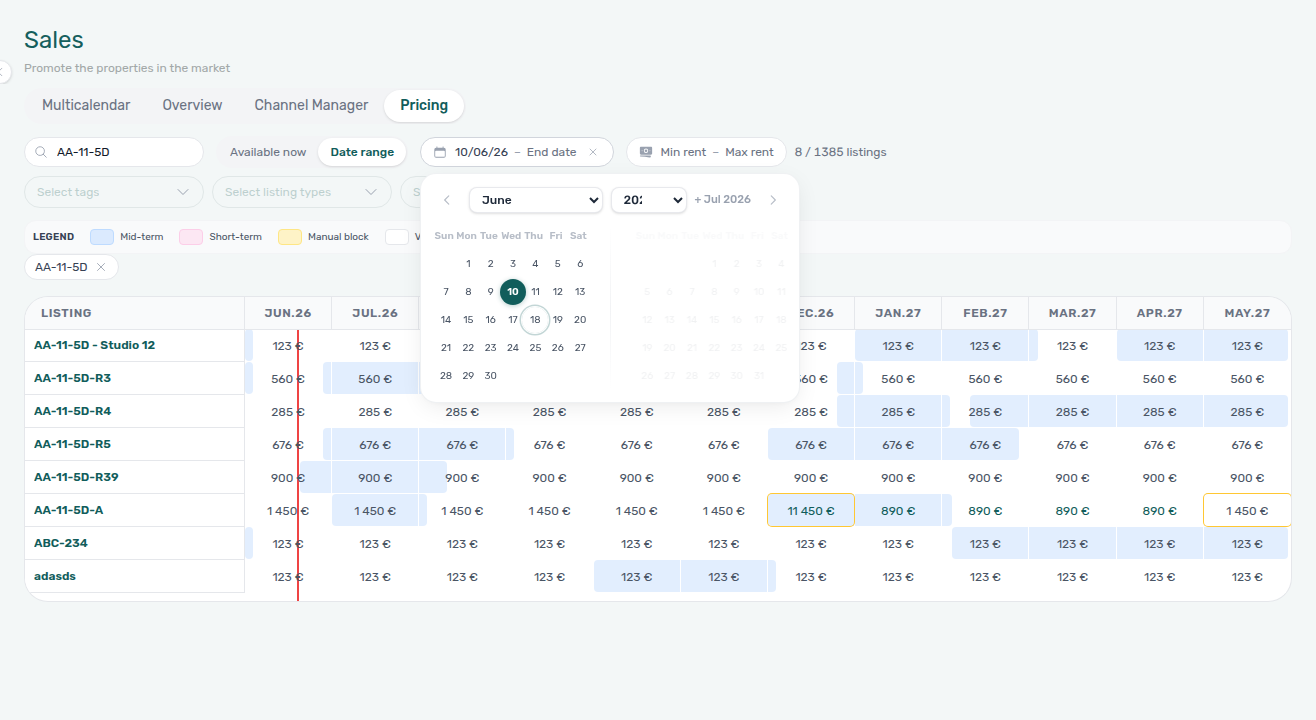 |
| Are forgotten manual blocks suppressing occupancy? | Manual block hygiene or Audit (Tools → Audit, Manual Blocks tab) — portfolio-wide holds before you change rates in Sales |
| Are utility bills missing for last month? | Utilities — Overview Days Missing Data chart or Bills Missing toggle; see Entering Monthly Utility Bills. When AI extraction or overage posting is blocked despite correct operator steps, continue Entering Monthly Utility Bills — Step 6 before you sign off month-end KPIs. |
| Are deposit refunds blocked or contested? | Finance → Deposits — clear the default date range for older move-outs; deposit disputes when retention is contested before month-end KPI sign-off; lifecycle pill states in Glossary — Deposit lifecycle status; portfolio filters via Other filters → Deposit status (Ready to refund, Disputed, Refunded) — Finance — Deposit status filter |
| Are security deposits only partly collected? | Finance → Deposits — Partial paid lifecycle card narrows rows where Paid is above zero but below Amount; or Other filters → Deposit status → Partial paid on Bookings / Finance; open a row to see Partially paid on the booking Deposit tab — distinct from Partial Paid rent on Payment Plan (Partial Paid on
|
| Are forgotten manual blocks suppressing occupancy? | Manual block hygiene or Audit (Tools → Audit, Manual Blocks tab) — portfolio-wide holds before you change rates in Sales |
| Are utility bills missing for last month? | Utilities — Overview Days Missing Data chart or Bills Missing toggle; see Entering Monthly Utility Bills. When AI extraction or overage posting is blocked despite correct operator steps, continue Entering Monthly Utility Bills — Step 6 before you sign off month-end KPIs. |
| Are deposit refunds blocked or contested? | Finance → Deposits — clear the default date range for older move-outs; deposit disputes when retention is contested before month-end KPI sign-off; lifecycle pill states in Glossary — Deposit lifecycle status; portfolio filters via Other filters → Deposit status (Ready to refund, Disputed, Refunded) — Finance — Deposit status filter |
| Are security deposits only partly collected? | Finance → Deposits — Partial paid lifecycle card narrows rows where Paid is above zero but below Amount; or Other filters → Deposit status → Partial paid on Bookings / Finance; open a row to see Partially paid on the booking Deposit tab — distinct from Partial Paid rent on Payment Plan (Partial Paid on depositStatus). See FAQ — Partly collected security deposit, Managing a Check-in — Step 3, Glossary — Deposit lifecycle status, and Glossary — Deposit lifecycle status |
| Used Delete when Change tenant was needed? | Wrong profile on valid stay — reservation should stay live | Common Workflows — Wrong tenant on a booking — not Delete |
| Did Delete Booking hide ledger rows during reconciliation? | FAQ — Manual payments after Delete Booking — soft-archived stays drop Manual Transactions rows (transfer, cash, provider platform) on Finance → Transactions; System Transactions (vIBAN, credit card) stay. Canceled (not archived) bookings keep every type. Illustrated System vs Manual buckets: finance-transactions-type-summary-cards.png. Pair Common Workflows — Cancel Booking vs Delete Booking and Portfolio retirement decisions (use Cancel when ledger history matters; Archive property for building sunsetting). See Finance — Archived bookings on the ledger and FAQ — Cancel Booking vs Delete Booking. |
| Are manual receipts still pending or duplicated? | Finance → Transactions — click the amber Pending chip on the All type-summary card (finance-transactions-pending-pill.png), or triage on booking Transactions — Approve / bulk Reject selected; same approval habit as Processing a New Booking — Step 5b, Processing a New Booking — Step 6b (confirmation-week transfers still pending at month-end), Handling a Late Payment — Step 4b, Handling a Late Payment — Step 6b (collections-week transfers still pending at month-end), Managing a Check-in — Step 3b, Managing a Check-in — Step 6b (arrival-week transfers still pending at month-end), Entering Monthly Utility Bills — Step 4b, Cancelling a Booking — Step 2a, Cancelling a Booking — Step 6b (settlement transfers still pending at month-end), and Managing a Check-out — Step 6b (departure-week transfers still pending at month-end); credit note follow-up when rejecting or reverting already-invoiced charges — see Payment Allocation — Correcting mistaken receipts |
| Does ancillary portal Income explain a revenue gap? | Services Marketplace — tenant add-on charges on Payment plan and Finance → Transactions that Analytics rent charts may not isolate; cross-check Contract Values and booking Transactions before you lower base rent in Sales → Pricing |
| Did maintenance spend spike without ledger ties? | Operations → Tickets — Cost allocation and linked cash flows on damage or turnover tickets surfaced in Analytics Maintenance |
| What is live debt and today’s free-room count? | Dashboard KPI cards (Listings, Today, Total Debt, Monthly Revenue) — the Total Debt headline sums underpayment on ongoing bookings only; the subtitle is the slice of that debt on stays older than 15 days (not a repeat of the headline). Hover the card info icon for the in-app rules before you compare with Finance — Glossary — Dashboard KPI cards; closeup below under Dashboard Total Debt subtitle. When payment alerts brought you here first, you likely already row-clicked from /notifications — Notification triage — Step 4. Pair Today with Vacant Units when blocks suppress the free-room headline. |
| Which units are free longest for leasing today? | Dashboard Vacant Units — scrollable list sorted by consecutive free days, relative vacancy bars, row click → listing sidebar — Glossary — Vacant Units (Dashboard); pair with Manual block hygiene when counts look suppressed |
| Where is forward occupancy heading? | Dashboard Occupancy Forecast — Past + Forecast timeline, Total capacity, ADR (€) legend, 1M–12M horizons — Glossary — Occupancy Forecast (Dashboard); pair with Sales > Overview heatmap and Audit when blocks suppress counts |
| When is rent due (not yet collected)? | Dashboard Cash Flow Forecast — rent due dates and Forecast total — Glossary — Cash Flow Forecast (Dashboard); distinct from Finance Overview cash flow (actual collections) and Operations — Cash Flows (non-booking expenses) |
| Do Finance totals match Analytics revenue? | Finance > Overview — remember Analytics revenue is chart-oriented; Finance uses receivables logic. Use the seven-card KPI strip (Total Debt, Uncovered Debt, Manual Payments, and related figures), the stacked Income chart (Paid / Scheduled / In debt with month-scoped drill-down — Glossary — Finance income status), Cash flow forecast chart (Month / Day toggle and All payments modal — Glossary — Cash flow forecast (Finance Overview)), and the Debt Aging panel (overdue buckets → booking sidebar). Short walkthrough clips are embedded below. |
| Did AI assistant or utility-bill extraction spike? | AI usage API — poll GET /ai-usage/summary for the review month (landlord_chat from AI Chat, utility_bill_extraction from Utilities — AI Invoice Reader); there is no management-frontend screen for this ledger yet. Pair adoption spikes with Entering Monthly Utility Bills — Step 5 (bill volume) and Automation & AI. Internal USD cost only — not tenant billing. See FAQ — How do I see AI token usage for my account?. |
If figures disagree, see FAQ — Analytics (KPI workspace), FAQ — Dashboard Total Debt subtitle, FAQ — Uncovered Debt KPI, the Dashboard note on Total Debt vs Finance Overview under KPI cards, and Glossary — Uncovered Debt.
Portfolio-wide KPIs in Analytics and Finance should agree with what booking-scoped Tenant MCP tools return for individual reservations — get-payment-info when you spot a receivables outlier during Debt Aging or segment filters in Step 6. For account-wide reads, pair with Landlord MCP instead: get-finance-overview / get-revenue-summary when assistant money answers must match Finance → Overview (income expected vs cash collected; see Finance-sourced portfolio metrics); get-vacant-units-next-month and get-listing-calendar when Vacant Units or Occupancy Forecast look suppressed; get-upcoming-move-ins for forward occupancy; list-payments / get-payment when Total Debt or Debt Aging outliers need ledger detail; get-listing-pricing-table when ADR / RevPAR ranking points at one unit before you edit rates in Sales → Pricing. Do not expect MCP revenue tools to reproduce Analytics ADR/RevPAR heatmaps — those stay operator UI only.
Dashboard Total Debt subtitle
During Step 7, treat the Dashboard card as a live-portfolio signal — not the full receivables ledger. When you arrived from payment alerts, you likely already opened a booking via Notification triage — Step 4 — hub matrix: Common Workflows — Payment alert to receivables triage (notifications-row-navigate-to-booking-detail.png, notifications-row-navigation-flow.mp4, dashboard-kpi-total-debt-tooltip.png, finance-overview-debt-aging-expanded-bucket.png, finance-overview-debt-aging-walkthrough-flow.mp4); use this subsection to compare that reservation’s balance with portfolio-wide Total Debt and Debt Aging Top debtors before you finish unread cleanup in Notification triage — Step 5.
- Open
/and read Total Debt on the top-left KPI grid (Listings, Today, Total Debt, Monthly Revenue). - Compare the headline (all ongoing-booking underpayment) with the subtitle (debt on ongoing stays older than 15 days). A large headline with a small subtitle often means most balances are on newer stays — still triage, but Debt Aging on Finance may show fewer +15 d buckets.
- Hover the info icon on the card when you need the in-product definition of ongoing bookings and how overdue debt is counted.
When the headline looks high but you need ended-booking receivables, Uncovered Debt, or Manual Payments context, continue on Finance > Overview — see Handling a Late Payment — Step 1. If you just recorded a manual receipt, Total Debt may stay unchanged until Approve payments clears the row — Glossary — Pending manual in-payment (Finance); triage with the amber Pending chip using the same habit as Processing a New Booking — Step 5b, Handling a Late Payment — Step 4b, Handling a Late Payment — Step 6b (collections-week transfers still pending at month-end), Managing a Check-in — Step 3b, Entering Monthly Utility Bills — Step 4b, and Cancelling a Booking — Step 2a before you sign off month-end KPIs.
Uncovered Debt KPI
During Step 7, after the Dashboard Total Debt read above, open Finance → Overview and compare Total Debt with Uncovered Debt on the seven-card strip (finance-overview-kpi-cards.png). When the two figures are close, deposit cushions are thin — rank Debt Aging Top debtors before you change rates in Sales or clear the last notification rows.
Month-end sign-off pairs Dashboard Total Debt subtitle with Uncovered Debt on the Finance strip — not on /.
- FAQ — Uncovered Debt KPI — Deposit coverage vs all-booking Total Debt
- Glossary — Uncovered Debt — Thin offsets when prioritizing Top debtors
- Dashboard Total Debt subtitle — Ongoing-only
/vs Finance all-booking KPIs - Finance debt receivables triage — Debt Aging after strip compare
- Handling a Late Payment — Step 1 — Collections when figures align
Finance Income status drill-down
- Common Workflows — Finance Income status drill-down — Operator habit hub
Cash flow forecast drill-down
- Common Workflows — Cash flow forecast drill-down — Operator habit hub
Finance Overview drill-downs (reconcile with Analytics)
When Analytics Revenue or Occupancy looks off, confirm receivables on Finance → Overview before you change rates in Sales:
Full module reference: Finance > Overview. For collections triage on live debt, see also Handling a Late Payment. When segment-wide arrears remain high after Step 7, continue in Handling a Late Payment — Step 6 before you sign off month-end KPIs.
; Missing utility bills closed on Entering Monthly Utility Bills — Step 5 (escalate extraction defects via Step 6); final utility overages settled per Common Workflows — Check-out final utilities handoff (Entering Monthly Utility Bills — Steps 2–4 → Managing a Check-out — Step 6; utilities-allocations-review-flow.mp4) when departure-week In Debt includes utility lines; utility overage arrears cleared per Common Workflows — Utility overage collections (Entering Monthly Utility Bills — Step 4 / Step 4b → Handling a Late Payment — Steps 1–4; utilities-allocations-row-breakdown-expanded.png, finance-contract-values-in-debt-filter.png, utilities-allocations-review-flow.mp4), confirmation-week Pending receipts cleared per Common Workflows — Confirmation alert triage (Processing a New Booking — Step 5b / Step 6b after Notification triage — Step 4 / Step 5; finance-transactions-pending-pill.png, bookings-detail-transactions-approve-payment-modal.png); Upcoming imports ready for arrival week per Common Workflows — Confirmation to check-in handoff (booking-lifecycle-status-tabs-flow.mp4, workflows-operations-check-in-out-planning-view.png), pre-cancel and departure-week rent/fee arrears cleared per Common Workflows — Cancellation collections before void (Cancelling a Booking — Step 2 → Handling a Late Payment — Step 4b; finance-contract-values-in-debt-filter.png, bookings-detail-transactions-approve-payment-modal.png) and Common Workflows — Check-out collections before refund (Managing a Check-out — Step 6 → Handling a Late Payment — Step 4b; workflows-check-out-coordination-flow.mp4, bookings-detail-payment-plan-tab-schedule.png) before Canceled / Ready to Refund queues look inflated; departure-week duplicate transfers Reverted per Common Workflows — Check-out ledger cleanup before refund when Est. Refund or In Debt lag after tenant paid; Canceled-stay segment debt cleared per Common Workflows — Check-out vs cancellation (Cancelling a Booking — Step 6b — not Managing a Check-out — Step 7; workflows-cancel-booking-refund-modal-flow.mp4, bookings-list-canceled-tab.png) before Ended vs Canceled filters are compared; same-day turnover tickets scheduled per Common Workflows — Same-day turnover coordination when Operations → Check-in & Check-out shows departure + arrival on one unit same day; mid-stay → departure handoff per Common Workflows — Check-in to check-out handoff when Finance → Deposits lifecycle cards or departure-week In Debt look off; departure-week In Debt and Ended status on Managing a Check-out — Step 6 / Step 7 when occupancy or deposit queues look off; unread payment or booking alerts cleared in Notification triage — Step 5 after Dashboard Total Debt and Finance drill-downs agree (file Notification triage — Step 6 when row-click or read-state APIs fail). If a management lockout delayed this review, rerun Step 7 after Resetting a Management User Password — Step 3 and refresh Landlord MCP JWT.
Finish Step 7 self-serve checks (Pending receipts, manual blocks, Finance drill-downs, Services Marketplace add-ons) before you open a Vivin support ticket — incomplete Analytics charts after Retry, Dashboard vs Finance mismatches after approval, and segment filters are usually operator workflows, not product defects. File Using in-app support when Vivin behaviour blocks reconciliation despite correct operator steps:
- Analytics still incomplete after Retry and a browser refresh — attach the month range and your user email on the New Support Ticket modal (Analytics module).
- Approve payments permission missing for your role while Finance → Transactions shows Pending rows that block Total Debt sign-off — attach a sample booking id and ledger screenshot.
- Landlord MCP or Tenant MCP external clients return persistent 403 / auth errors after you refreshed the management JWT — see Resetting a Management User Password — Troubleshooting first, then Using in-app support — When to use in-app support.
Use the Help & Support drawer from Finance or Analytics so screenshots stay in context. If a management lockout delayed this review, recover access with Resetting a Management User Password before you rerun Step 7 — refresh Landlord MCP Bearer JWT after Step 3 there; catch up unread payment or utility alerts in Notification triage — Step 5 (file Step 6 when row-click fails), finish Entering Monthly Utility Bills — Step 5 / Step 4b when bill entry lagged during lockout, then rerun Dashboard Total Debt reads below. When Sales → Multicalendar still shows blocked days after you cleared manual holds, continue Manual block hygiene — Step 6 before you file support. When /notifications row-click or read-state APIs fail during month-end cleanup, continue Notification triage — Step 6.
Optional — Tab switching walkthrough
Portfolio KPI review section cross-reference
Use the steps above for the main path. For related guides, open Related below, or return to Common Workflows.
Related
Related below links this workflow to modules, concepts, settings, and escalation paths.
Documentation map & escalation
- Common Workflows — Hub pairing matrix across all operator guides
- Getting Started — Management shell before you run this workflow
- Glossary — Term definitions referenced in the steps above (including Uncovered Debt)
- FAQ — Analytics (KPI workspace) — When KPI figures disagree with Finance or Dashboard
- FAQ — Dashboard Total Debt subtitle — Headline vs >15 days subtitle on post-login
/(Step 7) - Get Help & Support — Escalate when Analytics stays incomplete after Retry, or permissions block access
Upstream & downstream workflows
- Manual block hygiene — Audit pass for stale manual holds when occupancy dips (Step 7)
- Entering Monthly Utility Bills — Close Missing utility bill gaps surfaced during Step 7
- Entering Monthly Utility Bills — Step 5 — Missing toggle and Days Missing Data before escalation (Step 7 sign-off)
- Entering Monthly Utility Bills — Step 6 — AI extraction or overage posting defects during Step 7 utility bill review; lockout catch-up via Resetting a Management User Password — Step 3
- Handling a Late Payment — Step 6b — Collections Pending receipts before month-end Total Debt sign-off (Step 7)
- Notification triage — Step 4 — Alert-driven entry when payment rows deep-link into bookings before Step 7 Dashboard reads
- Notification triage — Step 5 — Clear payment or booking alerts after debt or occupancy review
- Notification triage — Step 6 — Row-click or read-state defects during month-end alert cleanup (Step 7)
- Managing a Check-out — Step 6 — Departure-week In Debt on one tenant segment during Step 6
- Entering Monthly Utility Bills — Step 4 — Utility overage lines when segment In Debt does not match rent alone (Step 6)
- Cancelling a Booking — Step 6b — Canceled stays inflating segment debt during Step 6
- Managing a Check-out — Step 7 — Ended status and deposit queues when occupancy looks off during Step 7 sign-off
- Manual block hygiene — Step 6 — Calendar or Multicalendar blocks persist after Step 7 manual-hold pass
- Common Workflows — Handling a Late Payment collections hub — Triage surfaces → collections Steps 1–6 when Step 7 Debt Aging outliers need operator follow-through
- Handling a Late Payment — Collections follow-up when Debt Aging points to live balances
- Handling a Late Payment — Step 6 — Segment-wide arrears escalation after Step 7 reconciliation still shows high Total Debt
- Resetting a Management User Password — Recover access when a lockout delayed month-end Step 7; refresh Landlord MCP JWT after Step 3
- Using in-app support — Vivin product tickets when Analytics load, approval permissions, or MCP auth block Step 7 sign-off
- Processing a New Booking — Step 5b — Approve confirmation receipts before month-end Total Debt reads (Step 7)
- Handling a Late Payment — Step 4b — Same Pending pill habit for collections receipts during Step 7
- Managing a Check-in — Step 3b — Move-in receipt approval when arrival-week rows still show pending (Step 7)
- Managing a Check-in — Step 6b — Month-end Pending pill triage for lingering arrival-week receipts (Step 7)
- Processing a New Booking — Step 6b — Month-end Pending confirmation receipts still on the ledger (Step 7)
- Cancelling a Booking — Step 6b — Lingering settlement receipts and stale cancellation alerts (Step 7)
- Managing a Check-out — Step 6b — Departure-week Pending receipts before Ready To Refund (Step 7)
- Managing a Check-out & Deposit Refund — Finance → Deposits when KPI review surfaces overdue refunds
Navigation & bookmarks
Bookmark routes pair with Management Frontend Deep Links and Create New menu.
- Deep Links — Analytics — Bookmarkable
/analytics/*tab routes - Analytics (KPI workspace) — Full module reference
Concepts & settings that shape this workflow
- Booking Lifecycle — Status context when reconciling occupancy with live bookings
- Integrations & Distribution — Multichannel occupancy vs Analytics charts
- Services Marketplace — Ancillary portal Income during Step 7 Finance review
- Tenant Portal — Portal adoption and online-payment KPIs during Finance reconciliation
- FAQ — Tenant contract signing blocked — No PDF yet, mandatory Your Details gates, category locks, or Lease purpose; portal signing vs paper upload on Contract Info
- Automation & AI — In-product AI and MCP clients to cross-check KPI answers
- Landlord MCP — Account-scoped
get-booking-summary(Step 2),get-ticket-status-counts,list-tickets,get-ticket,create-ticket,update-ticket, andadd-ticket-comment(Step 5; Cost allocation remains operator UI),get-property,get-listing(unavailabilities),list-listings, andget-listing-pricing-table(Step 3 Ranking drill-down);get-booking-summary,list-bookings,list-tenants,get-tenant, andget-tenant-bookings(Step 6 segment filters before account-wide portal or Communication Rule changes);get-vacant-units-next-month,get-upcoming-move-ins,get-listing-calendar,list-payments, andget-payment(Step 7); hub - Tenant MCP — Booking-scoped
get-tenant-infoto confirm category assignment on sample reservations during Step 6 segment review;get-payment-infofor per-booking receivables outliers before mirroring filters on Finance;list-bookings-by-emailwhen the segment review started from a tenant message;get-payment-infowhen Step 7 Debt Aging outliers need per-reservation validation against tenant-facing schedules - Notification triage — Step 4 — Tenant MCP
get-payment-info,list-bookings-by-email, andnotify-landlordwhen payment alerts followed Inbox threads; Landlord MCP for portfolio ledger reads - Notification triage — Step 5 — Confirm tenant-facing balances with
get-payment-infobefore Mark all as read - Settings > Categories — Tag/type vocabulary on Sales and Finance filters (Step 6)
- Settings > Tenant categories — Segment portal rules and portfolio filters when Step 6 isolates one tenant category
- Settings > Invoicing & Payments — Payment deadlines behind Debt Aging (Step 7)
Analytics & sales surfaces
- Analytics — Overview tab — Multi-metric bar grid (Step 2)
- Sales — Overview tab — Listing-centric occupancy heatmaps (Step 7)
- Sales — Multicalendar — Vacant-window filters when reconciling occupancy dips
- Bookings — Timeline view — Gantt cross-check when Analytics occupancy disagrees with live reservations
Finance, utilities & operations surfaces
- Finance — Overview tab — Reconcile Analytics revenue with receivables logic (Step 7)
- Handling a Late Payment — Step 1 — Collections follow-up when Total Debt or Debt Aging still look high after KPI review (Step 7)
- Notifications — Payment overdue alerts — Operator Payments category rows; row-click entry before Step 7 Dashboard Total Debt reads
- Payment Allocation — Correcting mistaken receipts — Approve, reject, and revert when Pending rows block month-end KPIs (Step 7)
- Tenant MCP — Property, payments, and portal tools — Per-booking
get-tenant-infoandget-payment-infowhen Step 6 segment review might change portal rules account-wide;list-bookings-by-emailwhen the review started from a tenant message (Step 6);get-payment-infowhen Debt Aging outliers need tenant-facing schedule validation (Step 7) - Finance — Other filters — Property, listing-tag, booking-tag, and Discounts scoping (Step 6)
- Finance — Tenant category filter — Receivables and deposit queues for one tenant segment (Step 6)
- Finance — Deposits tab — Refund queue and deposit disputes (Step 7)
- Utilities module — Days Missing Data and Missing bills during Step 7
- Operations — Linking cash flows to a ticket — Reconcile Maintenance spikes with contractor spend (Step 5)
- Audit — Discounts tab — Cross-portfolio discount KPIs during Step 7 revenue reconciliation
Deeper workflow reads
See Upstream & downstream workflows above for the same guides.
Deeper API reads
- Management session authentication — Operator JWT portfolio reads behind Landlord MCP month-range reconciliation
- Listings & Availability — Partial listing pulls when reconciling occupancy with Sales and Analytics (Step 7)
- Webhooks & Notifications — Inbound channel events that explain KPI drift vs operator filters
Operator habit hubs
Day-to-day operator habits (lockout catch-up, pending receipts, payment triage, handoffs, and related playbooks) live on the Common Workflows habit hub.
Deep-link anchors for habit hubs
Check-out vs cancellation
Lockout catch-up after password recovery
Pending manual receipt approval
Notification row-click navigation
WhatsApp per-booking messaging
Bot reasoning (audit)
ChatBot settings
Payment notification (operator)
Payment alert to receivables triage
Finance debt receivables triage
Handling a Late Payment collections
Reject/revert mistaken receipts
Month-end invoicing (fixed date)
Bulk Hostkit invoicing
Utility overage collections
Check-out final utilities handoff
Check-in to check-out handoff
Check-out collections before refund
Check-out ledger cleanup before refund
Cancellation collections before void
Rent reduction after invoicing
Same-day turnover coordination
Occupancy KPI to block hygiene handoff
Deposit missing on Finance Deposits
Deposit lifecycle status
Partly collected security deposit
Confirmation to check-in handoff
Confirmation alert triage
Portfolio segmentation by tenant category
Wrong tenant on a booking
Portfolio retirement decisions
Provider platform Delete Booking guard
Archived booking ledger visibility
Archive property (building-level)
Cancel Booking vs Delete Booking
Directory list refresh
When a directory such as Bookings, Notifications, or Listings needs a refresh during this workflow, use Retry on the alert, or reload the page. Zero rows after a successful load means your filters matched nothing — widen filters or clear search.
See FAQ — Directory list refresh and Common Workflows — Directory list refresh.
Booking sidebar tab refresh
Inside an open booking, Communication and Tickets load independently — use header Refresh (Communication) or banner Retry (Tickets). Other sidebar tabs stay usable. Whole-module list refresh is Directory list refresh.
See FAQ — Communication or Tickets won't open and Common Workflows — Booking sidebar tab refresh.
Key glossary terms
- Glossary — End-of-Booking cost split — Charge Time → End of Booking splits daily overage across every occupied unit; still-staying roommates stay in the denominator
- Glossary — Change history — Operator-initiated edits on Listings setup and Bookings Changelog; create-time defaults excluded
- Glossary — Archived booking ledger visibility — Delete Booking hides manual/provider_platform rows on Finance → Transactions; vIBAN and credit card stay visible
- Glossary — Finance tenant category cache refresh — Recategorizing a tenant updates
booking.tenantCategoryIdimmediately; ledger tabs reflect it on reload, while Overview can lag up to ~10 minutes - Common Workflows — Rent reduction after invoicing — Invoiced floor when repricing after export; external credit notes then Issue credit notes (
bookings-rent-reduction-invoiced-floor-flow.mp4) - FAQ — Lower rent below invoiced — Before goodwill rent cuts on exported months, plan credit notes instead of expecting Change monthly rent to save lower nets
- Glossary — Full term list
Module documentation hubs
- Dashboard module — Same-day KPI snapshot before month-range Analytics
- Analytics module — Month-range portfolio KPI charts for Steps 1–6
- Utilities module — Days Missing Data and Missing bills during Step 7
- AI Chat module — Internal assistant summaries to reconcile against Finance drill-downs
- Finance module — Portfolio ledgers and payment approval
- Listings module — Portfolio table filters for weak-metric segmentation
- Bookings module — Reservation lifecycle context
- Notifications module — Full
/notificationshistory - Inbox module — Portfolio-wide WhatsApp workspace
- Audit module — Manual Blocks and Discounts review
- Account Settings — Workspace-wide financial policies
- API Reference hub — Listings & Availability partial pulls