iCal feeds
iCal export URLs go live after Getting Started — Recommended Setup Sequence steps 11–13 — provision calendar connections on Settings > Integrations (including Short-term iCal Max Date), link each unit on Listings → Channels, and note each listing UUID for feed URLs (Property & Unit Mapping). Complete steps 14–15 and Onboarding a New Property — Step 7 before subscribers treat exported blocks as authoritative. Guide pairing after go-live: Setup sequence after go-live (hub: API Reference — Setup sequence after go-live).
Start with Operator surfaces (management app) and Feed URL for outbound calendar links, then DTEND exclusive end before you map blocked nights, then Retrofeed (Airbnb / Booking.com) when channels need inbound sync. ical-integration does not expose JSON GET /listings — contrast with Listings & Availability. Feed URLs use each listing’s Vivin UUID from Property & Unit Mapping. Habit-specific shortcuts live under Related below.
The ical-integration module exposes read-only calendar files for each Vivin listing. Short-term platforms (Airbnb, Booking.com), personal calendars, and other subscribers poll these URLs to block dates when Vivin records a booking or manual unavailability.
Unlike marketplace JSON integrations, ical-integration does not expose GET /listings. Partners subscribe to one URL per listing and receive an text/calendar (.ics) document.
Landlords copy outbound feed links from Sales → Channels — Copy iCal on a grid row for one unit, the Airbnb / Booking.com wizard for a linked short-stay unit, or bulk Export when many URLs are needed. The URL pattern matches the API path documented below. See Sales — Channel Manager export and Settings → Integrations — iCal.
Operator surfaces (management app)
Copy outbound URLs from Sales → Channel Manager — per-row Copy iCal or bulk Export. Horizon cap: Settings → Integrations.
Partners rarely paste feed URLs by hand — operators copy them from Vivin. These committed captures show where the same {listingId} UUID and /ical-integration/listings/…/iCal.ics pattern appears in the product:
| Surface | What you copy or configure |
|---|---|
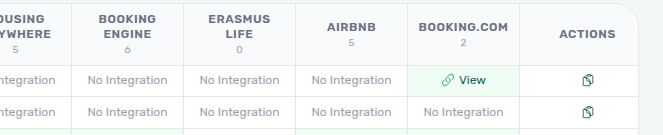
| Sales → Channels → actions → Copy iCal | One outbound feed URL per grid row (clipboard toast) |
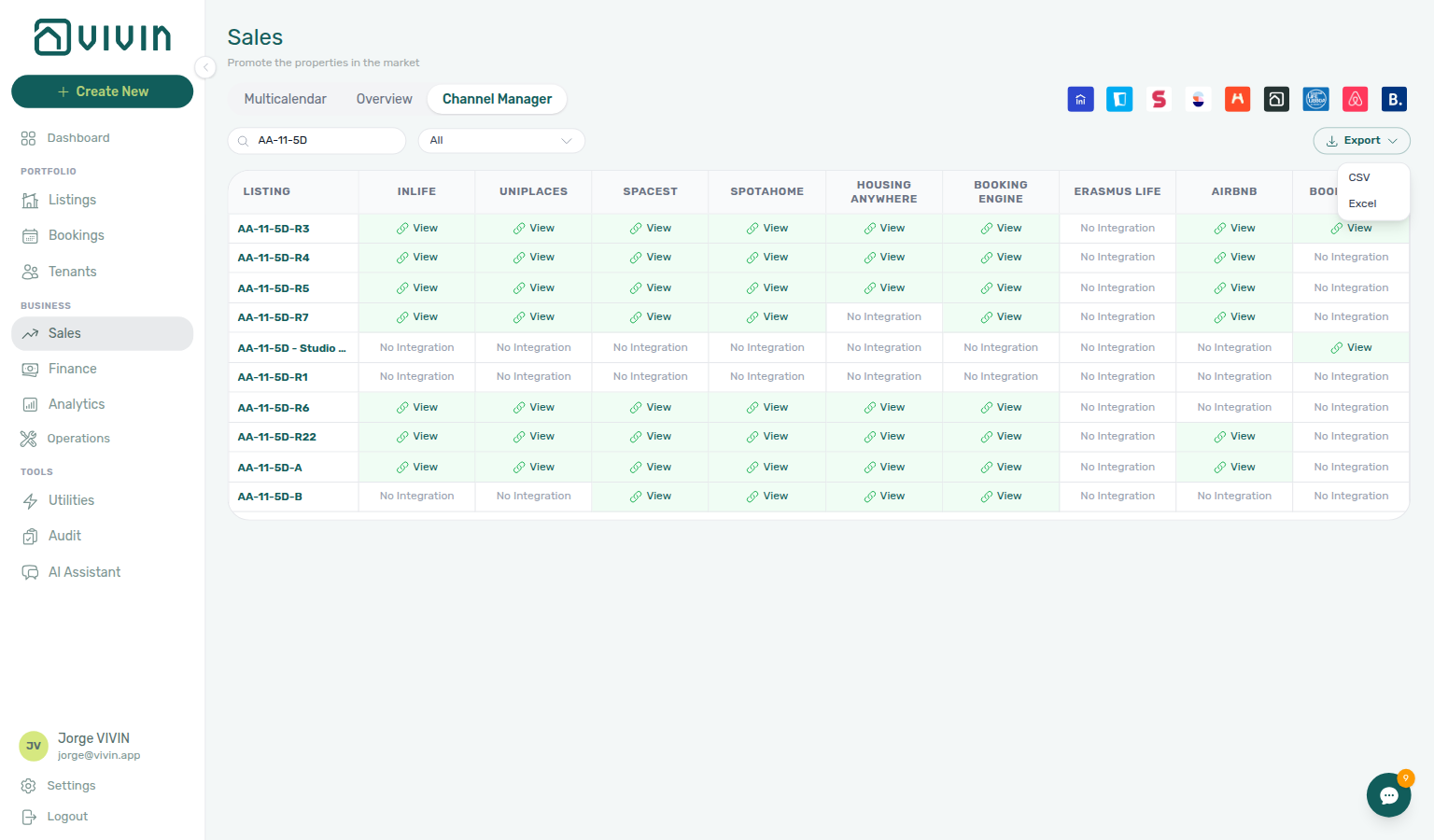
| Sales → Channels → Export | Spreadsheet column VIVIN iCal for many filtered units |
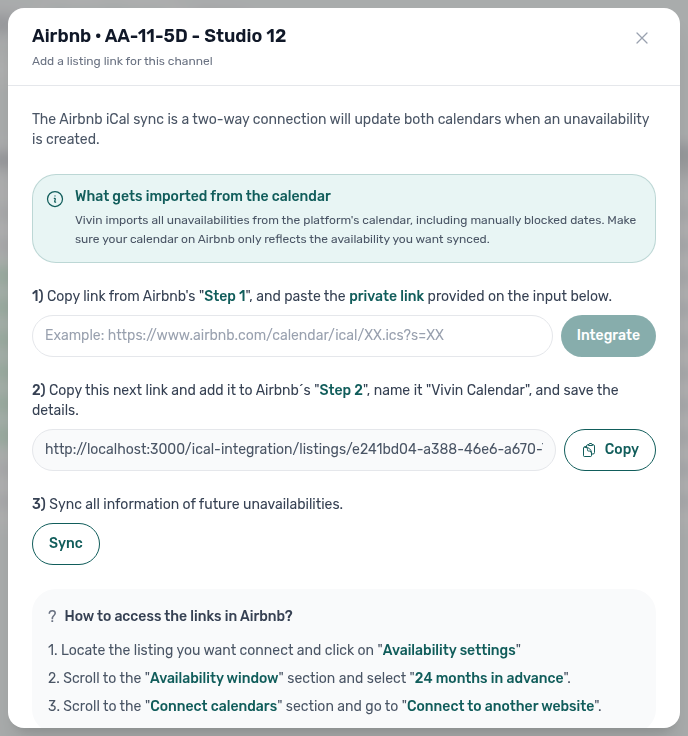
| Sales → Channels → Airbnb / Booking.com cell | Per-unit wizard: inbound platform URL + outbound Vivin link |
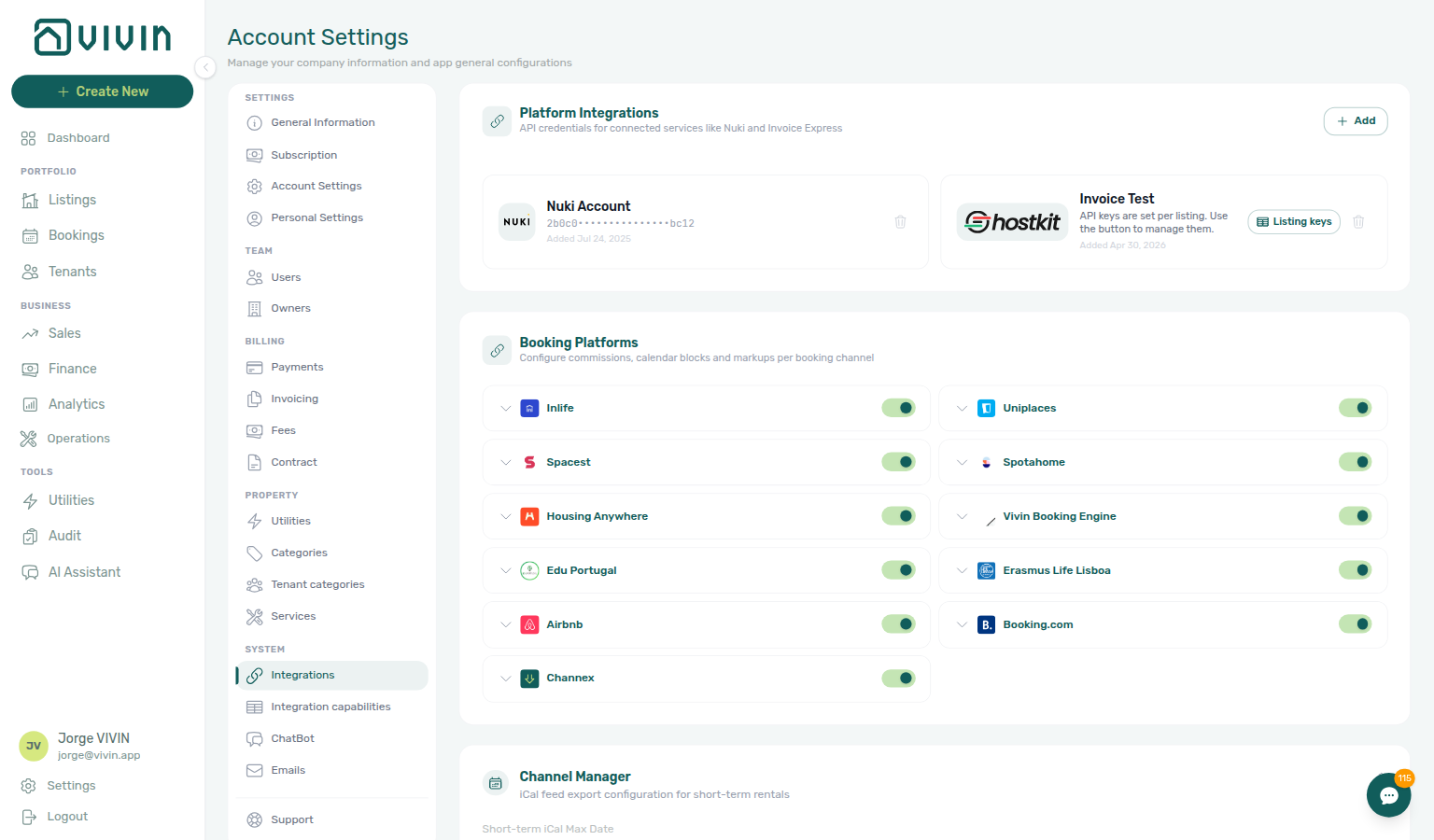
| Settings → Integrations → Channel Manager | Short-term iCal Max Date — caps how far ahead blocks export |
Per-row Copy iCal on the Channels grid:
Bulk export (note the VIVIN iCal column in the Channels grid export):
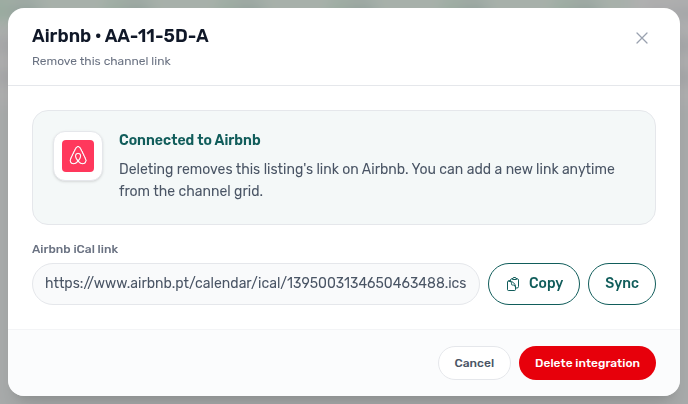
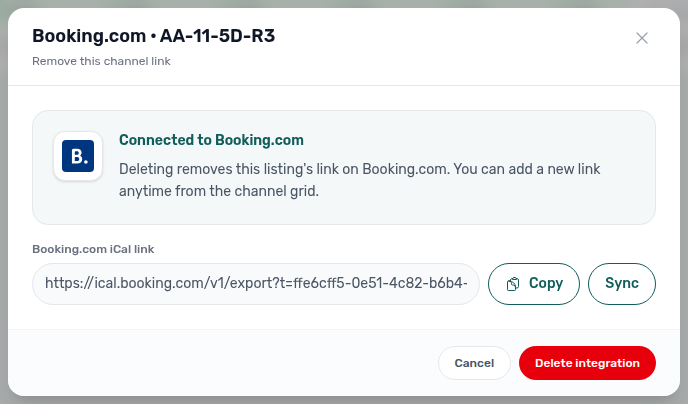
Airbnb / Booking.com two-way setup (step 2 is the outbound Vivin feed operators paste on the OTA; step 3 Sync imports platform blocks). After the link exists, reopen the green cell for manage — the same Sync control appears beside Copy on the stored platform iCal URL (see Sales — Airbnb and Booking.com; Airbnb: sales-channel-airbnb-ical-manage-modal.png / sales-channel-airbnb-ical-manage-flow.mp4; Booking.com: sales-channel-bookingcom-ical-manage-modal.png / sales-channel-bookingcom-ical-manage-flow.mp4).
Account-wide horizon (dates after this cutoff are blocked on short-term iCal feeds):
Feed URL
listingId is the Vivin unit UUID — not marketplace externalId from Property & Unit Mapping. 404 recovery: Error Handling.
Both path variants return the same calendar body:
| Path | Notes |
|---|---|
GET /ical-integration/listings/{listingId}/iCal | Primary route |
GET /ical-integration/listings/{listingId}/iCal.ics | Same response; .ics suffix for clients that require it |
listingId— Vivin listing UUID (the unit’s internal id), not your marketplaceexternalId. Use the value from Channels export or Listings.- Authentication — Public read; no Bearer header. Treat URLs as capability secrets — anyone with the link can see blocked dates.
GET /ical-integration/listings/550e8400-e29b-41d4-a716-446655440000/iCal.ics HTTP/1.1
Host: api.vivin.app
Response headers
On success:
| Header | Value |
|---|---|
Content-Type | text/calendar |
Content-Disposition | attachment; filename="calendar.ics" |
The body is a standard iCalendar document with VEVENT entries for booked and blocked periods derived from Vivin availability rules. Each event’s DTEND is exclusive — see DTEND is the exclusive free-again day.
Errors
| Status | Meaning |
|---|---|
| 404 | Listing not found or not eligible for export |
| 5xx | Transient server error — retry with backoff |
JSON error bodies are only returned when the handler fails before calendar headers are set.
DTEND is the exclusive free-again day
Partial GET /listings uses an inclusive last blocked night on unavailabilities.to. Catalogue full feeds use that same last night under partner field names (Full listing feeds — Last blocked night). iCal uses the opposite end convention so calendar apps paint the same nights. Full JSON table: Listings & Availability — Last blocked night.
Outbound VEVENTs use an exclusive end. Vivin stores the last blocked night (the same to as listing JSON and Audit → Manual Blocks → End), then sets DTEND to the next calendar day. Calendar apps treat that named day as the first morning the unit is free, so the last occupied night stays blocked.
Using the same sample as the listing feed (first blocked night 1 May, last blocked night 31 August):
| Meaning | Date |
|---|---|
First blocked night (DTSTART) | 1 May 2026 |
Last blocked night (listing JSON to, Audit End) | 31 August 2026 |
Exclusive DTEND / first free morning | 1 September 2026 |
That 1 September date is also booking check-out when preparation days are 0, and it matches the free-again hover tip on Sales → Multicalendar and Bookings → Timeline. Preparation nights are already inside the stored last blocked night — DTEND is still that night plus one calendar day.
DTEND as the last occupied nightIf you copy DTEND into listing JSON to (or paint DTEND as an inclusive last night), you block the free-again morning. Honour nights from DTSTART through the day before DTEND. To paint nights from JSON instead, use from through to inclusive, then open the calendar on to + 1 day — Listings & Availability — Last blocked night.
When Vivin imports Airbnb or Booking.com calendars, it reads the same exclusive end, so Audit End and listing JSON to stay the last blocked night. Operators comparing a subscribed calendar to the hub: FAQ — iCal block ends one day after Audit End.
Retrofeed (Airbnb / Booking.com)
Generic subscribers receive the full block set — double-booking triage in Troubleshooting. Inbound platform URLs: Inbound platform calendars.
When a subscriber fetches the feed, Vivin can omit blocks that originated on that same platform so short-term sites do not “re-block” their own reservations (retrofeed). Detection uses optional request headers:
| Header | Role |
|---|---|
Origin | Preferred — host matched against known Airbnb / Booking.com domains |
Referer | Used when Origin is absent |
User-Agent | Fallback when neither Origin nor Referer identify the consumer |
| Detected consumer | Feed contents |
|---|---|
| Airbnb | Blocks from other channels + Vivin manual blocks; Airbnb-originated blocks omitted |
| Booking.com | Same pattern for Booking.com-originated blocks |
| Unknown / generic | All blocks included — safe default for opaque subscribers |
Generic calendar apps and most PMS tools receive the full block set. Only recognised short-term hosts get the filtered retrofeed.
Horizon and operator settings
Short-term iCal Max Date caps forward export — Glossary — Short-term iCal Max Date. Mid-term pricing still requires Listings & Availability JSON pulls.
How far ahead dates are exported is controlled in the management app:
- Settings → Integrations → Short-term (Airbnb / Booking.com) Configuration — Short-term iCal Max Date caps the forward window.
- Apply to all listings / Apply to selected listings on each platform card propagates the cap.
If a subscriber sees availability “cut off” at a future month, verify the operator’s Short-term iCal Max Date before opening an API defect. See Settings → Integrations.
Relationship to partial JSON listings
iCal exports blocks only — rent and booking windows live on partial ListingDto rows in Listings & Availability. Full catalogue: Full listing feeds.
| Mechanism | Format | Typical consumer |
|---|---|---|
| iCal feed (this page) | text/calendar per listing UUID | Airbnb, Booking.com, Google Calendar, legacy PMS |
| Partial JSON | GET /{platform}-integration/listings | Mid-term marketplaces, channel managers |
iCal exports blocks only — not rent, fees, or booking windows. Mid-term partners should use Listings & Availability instead. Map nights with the two end conventions: listing JSON to = last blocked night (inclusive); iCal DTEND = first free morning (exclusive) — DTEND exclusive end.
Inbound platform calendars
Pseudo check-in/out rows on Operations → Check-in & Check-out — Glossary — Short-term iCal pseudo check-in/out. Mid-term handovers: Managing a Check-in.
Vivin is not only an outbound feed publisher. Operators paste inbound Airbnb and Booking.com iCal URLs on Sales → Channels (and on each unit’s Channels tab in Listings). When Vivin syncs those URLs:
| Effect in Vivin | What operators see |
|---|---|
| Availability | Short-stay blocks on the unit Calendar and Sales > Multicalendar (pink iCal blocks in Pricing/Multicalendar) |
| Operations | Pseudo arrival or departure rows on Operations > Check-in & Check-out — often labelled Booking.com Reservation or the platform name when no mid-term tenant booking exists |
Pseudo check-in/out rows help plan turnover but are not substitutes for mid-term bookings: they do not create payment plans, contracts, or tenant portal access. Use Filters → Stay type → Mid-term on the Check-in & Check-out tab for long-stay handover planning; use Short-term when reconciling channel blocks with Multicalendar or Listings calendars.
For operator workflows, see Glossary — Short-term iCal pseudo check-in/out, Managing a Check-in, and Processing a New Booking (when you need a manual mid-term record after a calendar-only import).
Troubleshooting
Stale blocks after cancel are usually subscriber cache — contrast with unavailability.* webhooks in Webhooks & Notifications. Manual block audit: Manual block hygiene.
| Symptom | Check |
|---|---|
| Subscriber shows double bookings | Subscriber may be using a generic client (full feed) while also importing the platform’s own calendar — confirm retrofeed headers or use platform-native sync |
| Block appears to end one day later than Audit End | Expected — DTEND is the exclusive free-again morning (DTEND exclusive end); Audit End is the last blocked night |
| Dates stop at a future month | Short-term iCal Max Date in Settings |
| 404 on a known unit | Listing archived, wrong UUID, or export disabled for that unit |
| Stale blocks after cancel | Subscriber poll interval — Vivin updates immediately; external sites cache feeds on their own schedule |
| Pseudo rows on Operations tab | Expected for inbound iCal blocks — not a defect; filter Stay type → Mid-term for long-stay handovers (Inbound platform calendars) |
iCal feeds section cross-reference
Use the endpoints and fields above. Related integrator pages are linked inline where useful.
Related
Related below links calendar export URLs to setup, companion API guides, operator workflows, and escalation paths.
Setup sequence after go-live
Complete Account Settings — Recommended setup order before partner traffic.
- Setup steps 1–10 — Complete operator workspace basics (Recommended setup order) before requesting partner Bearer keys; property managers automating outside the browser use Management session authentication after step 3 (Users)
- Setup steps 11–12 (Integrations, Integration field capability, Tenant categories default for integrations) — Channel credentials, calendar horizons, and payload field expectations before
[email protected]onboarding; operator context: Integrations & Distribution - Setup step 13 (Listings) — Property wizard,
externalIdmapping, and Channels tab before first partner listing reads or writes - Setup steps 14–15 (Bookings, Tenants) — Validate imported reservation shape and tenant segments after partner traffic
- After steps 13–15 — Onboarding a New Property — Step 7 go-live verification before escalating partner pull, webhook, or mapping defects
- After steps 11–12 — set short-term iCal horizons on Settings > Integrations (Glossary — Short-term iCal Max Date) before copying per-listing subscriber URLs from Sales → Channel Manager
- Partner credential requests — Email
[email protected](distinct from in-app Vivin support tickets in Get Help & Support)
Documentation map & escalation
- Getting Started — Recommended Setup Sequence before partner HTTP traffic;
- API Reference hub — Hub pairing matrix and partial-only integrations;
- Get Help & Support — Escalate iCal export defects or horizon configuration questions (hub: Setup sequence after go-live)
- FAQ — iCal URL — Operator shortcut to the feed pattern (hub: Setup sequence after go-live)
- FAQ — iCal block ends one day after Audit End — Exclusive
DTENDvs Audit End - Glossary — Term definitions used across API and operator docs (hub: Setup sequence after go-live)
Companion API guides
Companion guides share Bearer authorization or error shapes with this page — start from API Reference hub.
- Listings & Availability — JSON partial feeds for marketplaces (
to= last blocked night; contrastDTENDexclusive end) - Full listing feeds — Partner full JSON exports (distinct from iCal retrofeed)
- Property & Unit Mapping —
externalIdkeys on units that export iCal subscriber URLs - Creating Bookings — Partner write surface when calendar-only reservations need programmatic confirmation
- Webhooks & Notifications — Push
unavailability.*events when partners accept callbacks instead of polling iCal - Error Handling —
404on archived units and subscriber cache delays - Authentication — Partner Bearer keys contrast (iCal feeds are public capability URLs)
- AI usage — Operator JWT ledger when automating month-end reconciliation outside partner HTTP
Upstream & downstream workflows
- Onboarding a New Property — Enable integrations in Settings, then link unit iCal URLs (Step 5)
- Manual block hygiene — Audit pass when iCal or manual blocks suppress availability
- Portfolio KPI review — Reconcile channel occupancy with Analytics after iCal sync changes
- Notification triage — Clear import- or payment-related alerts after calendar-only reservations land; payment overdue → Handling a Late Payment — Step 1
- Handling a Late Payment — Step 1 — Collections when mid-term API imports after iCal blocks leave unpaid confirmation or move-in charges
- Managing a Check-in — Pseudo check-in/out rows from inbound iCal blocks on the handover board
- Managing a Check-out & Deposit Refund — iCal pseudo check-out rows on Operations → Check-in & Check-out during departure week
- Cancelling a Booking — Release calendar rows after cancellation when subscriber feeds stay stale
- Processing a New Booking — Manual mid-term record after a calendar-only import
Operator UI & settings
- Sales → Channel Manager — Copy VIVIN iCal links and bulk export
- Settings > Integrations — Short-term iCal horizon and channel manager cards
- Settings > Preferences — Booking defaults — Preparation-day buffers that extend
unavailabilitiesalongside iCal blocks - Settings > Preferences — In-app notifications — Booking import alerts when calendar retrofeed reservations land
- Settings > Emails — Lifecycle emails apply only when iCal or API imports create tenant-facing bookings
- Operations — Check-in & Check-out — Pseudo check-in/out rows from inbound iCal blocks
- Property & listing details (booking engine) — Marketing payload fields iCal retrofeed URLs do not export
- Deep Links — Sales — Bookmarkable
/sales/channelsroutes when copying subscriber feed URLs
Deeper concept reads
- Integrations & Distribution — Operator calendar strategy
- Payment Allocation — Two-layer receipts, invoiced-floor rent edits, and credit note reject/revert warnings
- Booking Lifecycle — Computed Upcoming → Ongoing → Ended / Canceled status model, list filters, and Timeline
- Tenant Portal — Short-stay iCal blocks do not create portal sessions; mid-term API imports do
- FAQ — Tenant contract signing blocked — No PDF yet, mandatory Your Details gates, category locks, or Lease purpose; portal signing vs paper upload on Contract Info
Deeper workflow reads
See Upstream & downstream workflows above for the same guides.
Operator habit hubs
Day-to-day operator habits (lockout catch-up, pending receipts, payment triage, handoffs, and related playbooks) live on the Common Workflows habit hub.
Deep-link anchors for habit hubs
Lockout catch-up after password recovery
Pending manual receipt approval
Reject/revert mistaken receipts
Portfolio segmentation by tenant category
Notification row-click navigation
Payment alert to receivables triage
Confirmation alert triage
Finance debt receivables triage
Handling a Late Payment collections
Finance Income status drill-down
Cash flow forecast drill-down
Key glossary terms
- Glossary — Short-term iCal pseudo check-in/out — Inbound iCal rows on Operations
- Glossary — Deposit lifecycle status — iCal-imported short stays may skip full deposit collection; operator
depositStatusstill applies when deposit is configured - Glossary — End-of-Booking cost split — Charge Time → End of Booking splits daily overage across every occupied unit; still-staying roommates stay in the denominator
- Glossary — Change history — Operator-initiated edits on Listings setup and Bookings Changelog; create-time defaults excluded
- Glossary — Archived booking ledger visibility — Delete Booking hides manual/provider_platform rows on Finance → Transactions; vIBAN and credit card stay visible
- Glossary — Finance tenant category cache refresh — Recategorizing a tenant updates
booking.tenantCategoryIdimmediately; ledger tabs reflect it on reload, while Overview can lag up to ~10 minutes - Glossary — Full term list
Module documentation hubs
for screen-by-screen operator follow-up.
- Bookings module — Full API bookings imported alongside iCal-only pseudo reservations (hub)
- Audit module — Cross-portfolio manual block review (hub)
- Analytics module — Occupancy reconciliation after iCal sync changes channel availability (hub)
- Listings module — Property wizard, Channels tab, and unit management (hub)
- Properties workspace — Legacy
/propertiesURL redirects into Listings (hub) - Booking engine details — Rich marketplace payload editor via the Full integration pill (hub)
- Finance module — Portfolio ledgers with payment approval and deposit settlement (hub)
- Tenants module — Tenant directory and profile sidebars (hub)
- Sales module — Portfolio availability and channel manager connections (hub)
- Utilities module — Bills Included ceiling model and tenant overage charges (hub)
- Operations module — Maintenance tickets, cash flows, and check-in/out coordination (hub)
- Dashboard module — Post-login KPI snapshot with bell notification triage (hub)
- Inbox module — Portfolio-wide WhatsApp workspace (hub)
- Notifications module — Full
/notificationshistory with search and filters (hub); Payment overdue alerts when API imports after iCal blocks leave unpaid schedules - AI Chat module — AI Assistant using Landlord MCP tools (hub)
- Account Settings — Workspace-wide financial policies, templates, integrations, and operational defaults (hub)