Create New Menu
Use + Create New shortcuts during Getting Started — Recommended Setup Sequence steps 13–15 once Listings, Bookings, and Tenants modules are live — permissions follow setup step 3 Users. Shell orientation: Getting Started — The + Create New Menu. Concept pairing: Concepts — Setup sequence after go-live.
Open Opening, layout, and closing first, then check Permissions for greyed-out rows. Action catalogue: Categories and Actions. Habit-specific shortcuts live under Related below.
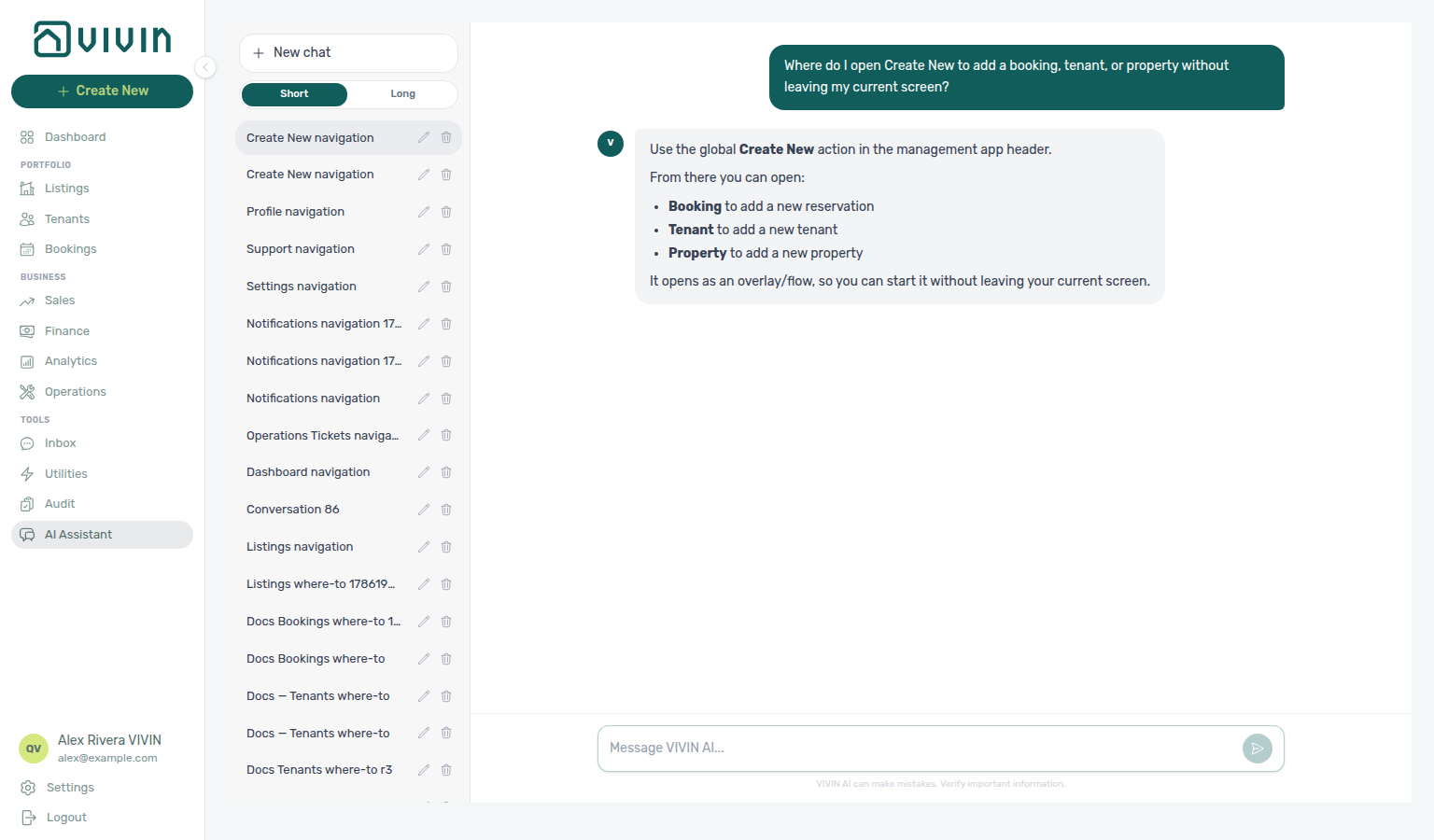
Not sure where the global + lives? Ask AI Chat “Where do I open Create New to add a booking, tenant, or property without leaving my current screen?” — then use + Create New in the left sidebar (ai-chat-product-context-create-new-reply.png, ai-chat-product-context-create-new-flow.mp4). The assistant may say top bar / header; the control is the green + under the VIVIN logo (icon + tooltip when the rail is collapsed). On narrow mobile layouts, use each module’s Add / Create instead.
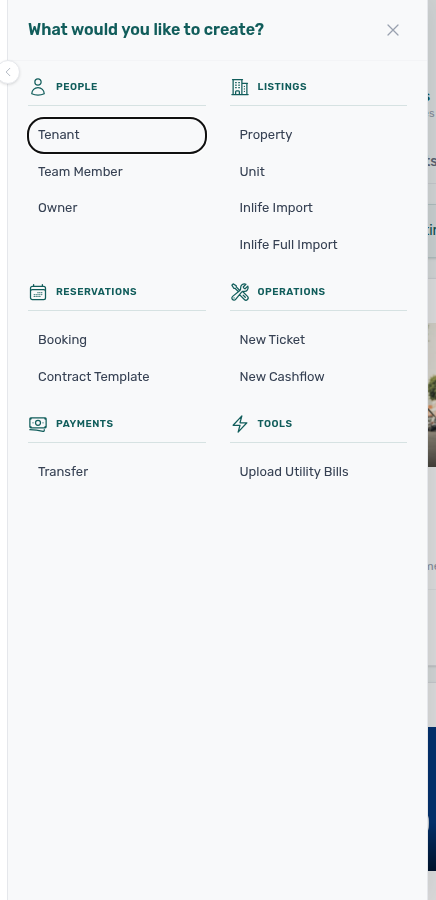
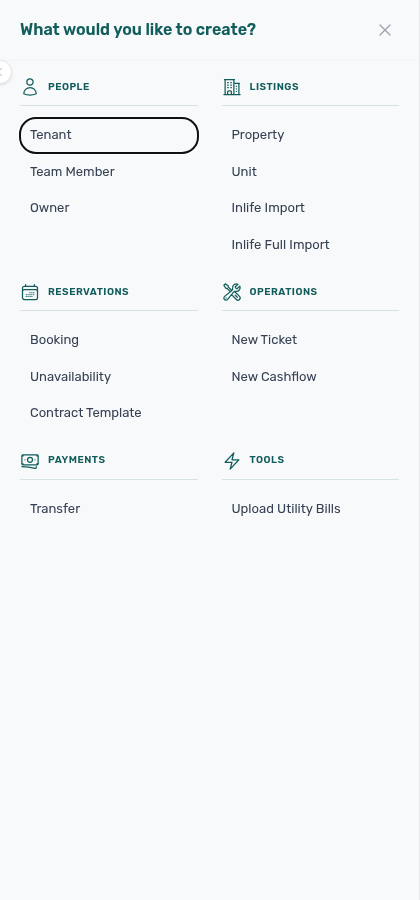
The + Create New button in the left sidebar opens a slide-out panel. In English the header reads What would you like to create? (other interface languages use the same layout with translated labels). The panel lists quick-create actions grouped by category. From medium-width layouts and up, you can open it from any screen without navigating to the relevant module first.
After create, bookmark module routes via Deep Links; new reservations follow Booking Lifecycle status rules; channel imports vs manual Booking pair with Integrations & Distribution. When Booking or Transfer shortcuts leave unpaid schedules, payment overdue rows row-click into the booking — continue with Handling a Late Payment — Step 1. Upload Utility Bills drives utility_bill_extraction on AI usage API; AI Chat drives landlord_chat.
Opening, layout, and closing
- Open — Click + Create New in the left sidebar. From the
mdbreakpoint upward (medium-width layouts and wider), the control appears as a green + button with the Create New label; when the sidebar is collapsed on desktop, the label hides and the + keeps a Create New tooltip. On narrow mobile layouts this sidebar control is not shown; use each module’s own Add / Create entry points instead (the same underlying flows). - Layout — Categories render in a responsive grid: one column on small panel widths, two columns when space allows. Each category has an icon, an uppercase heading, and a stack of action buttons.
- Close without creating — Click the X in the panel header, click the dimmed backdrop over the main content (the navigation column stays visible on desktop), or press Escape (when no inner modal from a chosen action is open).
- After you pick an action — The panel closes and the corresponding modal or sidebar flow opens (for example Booking opens the add-booking dialog, New Ticket opens the ticket sidebar).
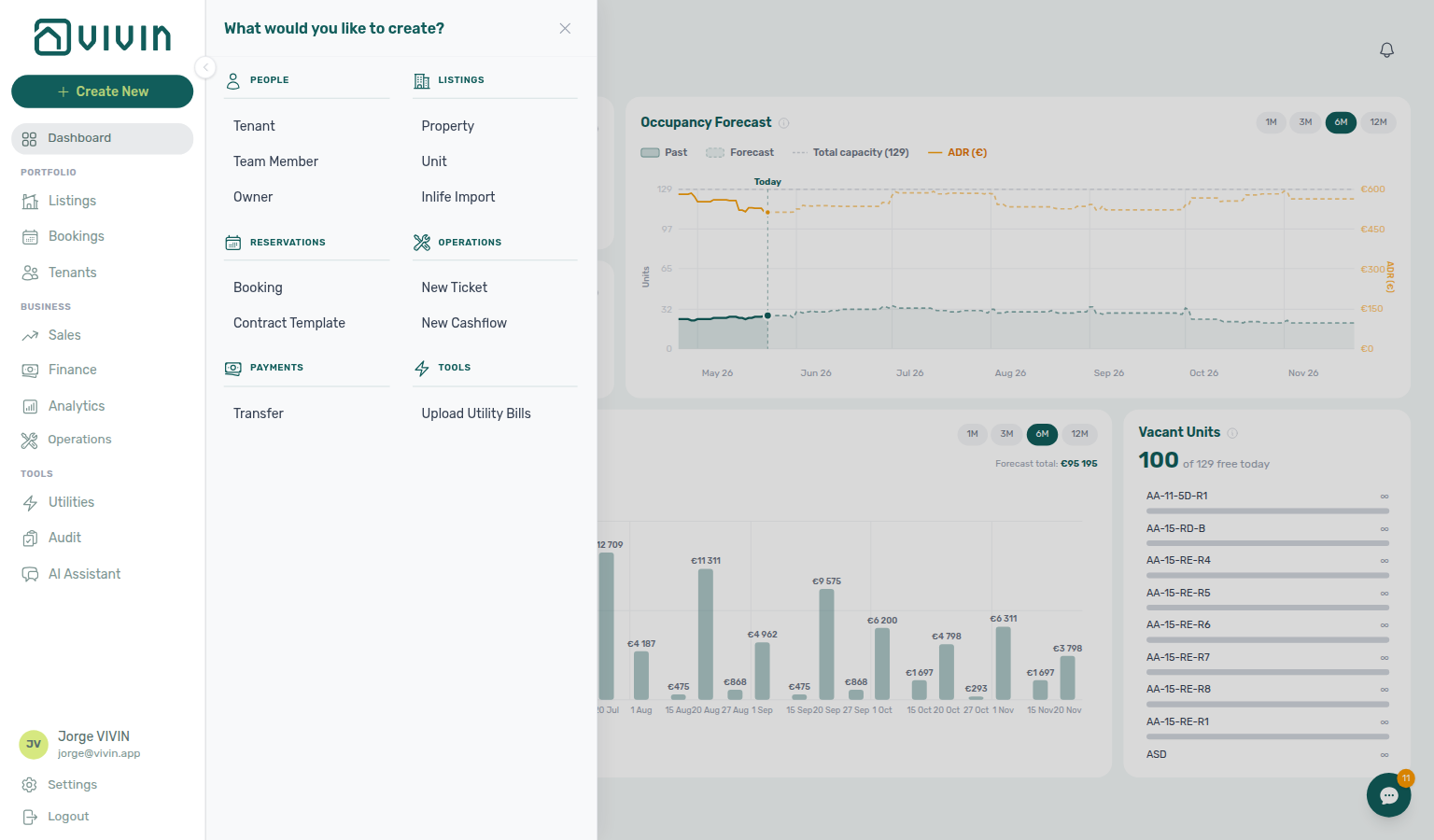
On desktop at a typical management width (~1536px), the open panel looks like this — Vivin internal accounts (@vivin.app) also see Inlife Full Import under Listings and the Tools category (for example Upload Utility Bills); other roles see the same layout without those internal-only rows.
Permissions
Each action checks your account’s role permissions. Actions you are not allowed to use appear disabled; hovering shows a no permission hint. If you click a control that stayed enabled but your role lacks the API key, you get the red You do not have permission to perform this action. toast instead — see FAQ — Permission denied toast and Glossary — Permission denied toast. Administrators adjust roles under Users and roles — Role Permissions.
Category pairing matrix: Create New Menu section cross-reference.
Categories and Actions
Most accounts see five categories (People, Listings, Reservations, Operations, Payments). Vivin internal accounts — signed-in users whose email ends with @vivin.app — also see a Tools category with additional shortcuts.
People
| Action | Description |
|---|---|
| Tenant | Add a new tenant to your account. Tenants can be linked to bookings and appear in the tenant portal. Pick an optional tenant category when portal modules or field rules differ by segment. See the Add tenant modal capture in the Tenants module. |
| Team Member | Invite a new team member to your account. Configure their role and permissions in Users. |
| Owner | Register a new property owner. Owners can be associated with properties and receive financial reports. See Owners. |
People category pairing: Create New Menu section cross-reference.
Listings
| Action | Description |
|---|---|
| Property | Add a new building or complex to your portfolio. Opens a multi-step wizard. See Listings. |
| Unit | Add a new rentable space to an existing property. Opens a two-step wizard. Step 2 includes All bills included (No cap) when rent already covers utilities — Listings — All bills included. See Listings. |
| Inlife Import | Import properties and units from an Inlife landlord account into Vivin. Requires the Inlife integration on the account. See Inlife Import below. |
| Inlife Full Import | Vivin internal only (@vivin.app). Same landlord email flow as Inlife Import, but also pulls property and unit details (amenities, location, rules) and photos so listings are closer to ready for full listing feeds on Housing Anywhere, Spotahome, and Uniplaces. See Inlife Full Import below. |
On Vivin internal accounts, the Listings category shows both import actions in the same stack:

Inlife Import
Use this when you are migrating portfolio data from Inlife and already have the Inlife platform connected under Account Settings → Integrations (Short-term rentals section).
- Click + Create New → Listings → Inlife Import.
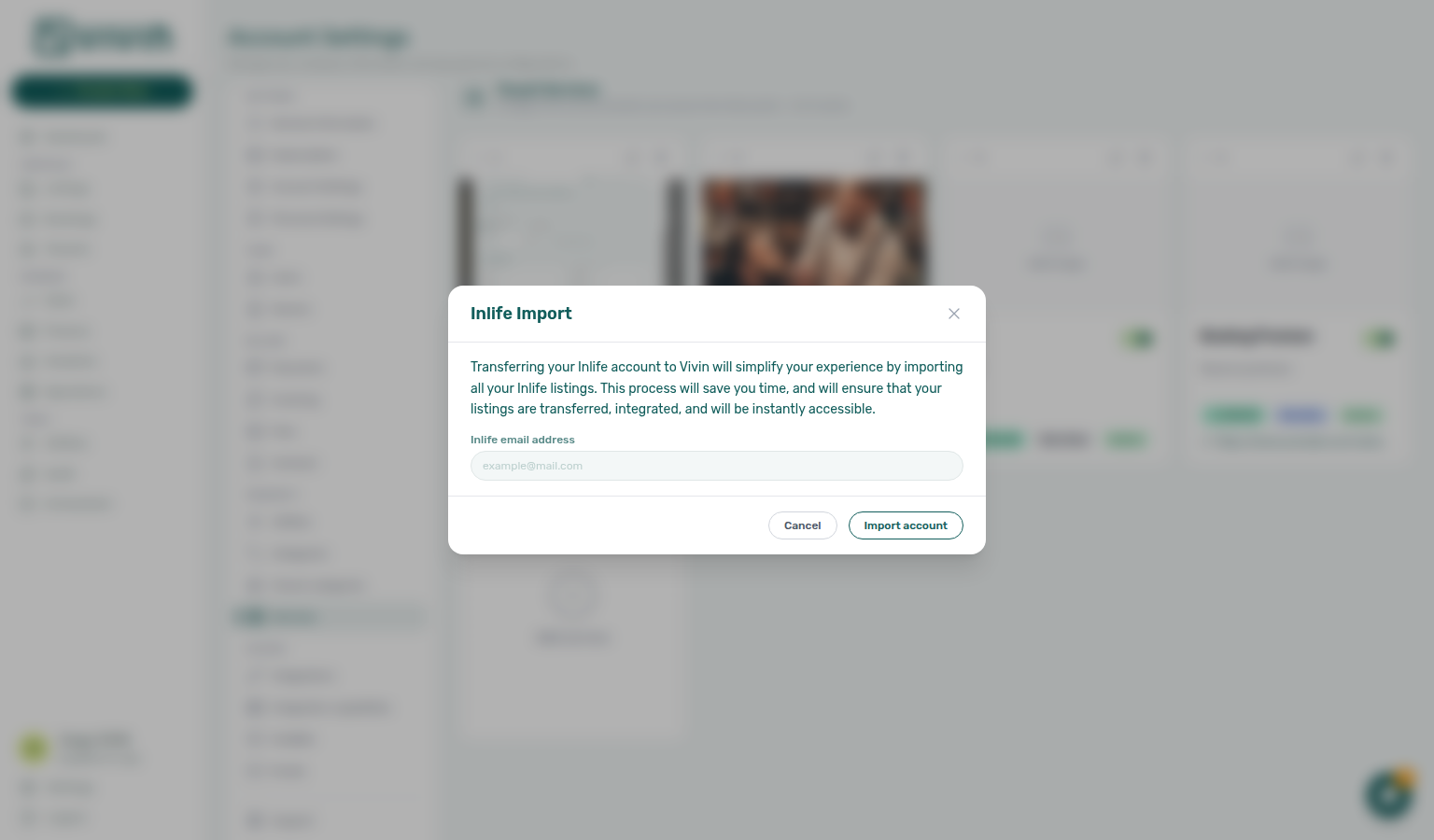
- In the Inlife Import dialog, read the overview copy, then enter the Inlife email address for the landlord account you want to pull from.
- Click Import account. While the API runs, the button shows Importing... and the dialog stays open.
- On success, the modal closes and Vivin queues the import of Inlife listings into your account. On failure, an error message appears under the email field (for example missing integration or invalid email) — fix the issue and retry.
Use Cancel or the header X to close without importing. The row is disabled when your role lacks the underlying permission, same as other Create New actions.
Inlife Full Import
Inlife Full Import appears in the Listings category only for Vivin internal operators (signed-in email ending with @vivin.app). Other accounts see Inlife Import only.
| Inlife Import | Inlife Full Import | |
|---|---|---|
| Who sees it | Any role with permission, when Inlife is enabled | Vivin internal (@vivin.app) only |
| What transfers | Properties, units, and core listing linkage | Everything in the standard import plus booking-engine-style details and photos |
| Typical use | Fast migration of inventory structure | Migration where listings should re-publish through HA / Spotahome / Uniplaces full feeds without re-entering rich content |
- Click + Create New → Listings → Inlife Full Import.
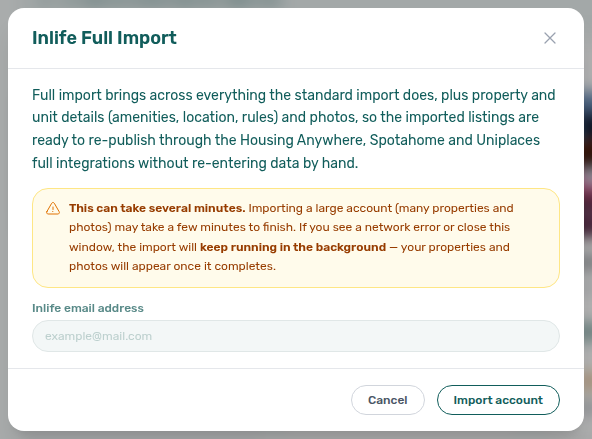
- Read the overview and the amber This can take several minutes notice — large accounts (many properties and photos) may run for a long time on the server.
- Enter the landlord Inlife email address and click Import account.
- On success, the modal closes and the import continues on the API. If the browser shows a network or timeout error while photos are still uploading, the job often keeps running in the background; close the dialog and check Listings after a few minutes rather than starting a duplicate import immediately.
After import, review units in Listings and enrich any remaining partner fields from Property & listing details (booking engine) before enabling full-feed channels. For outbound Inlife catalogue publish, confirm City on Full integration → Location & geography is a recognised Inlife city. Import stores Inlife’s propertyId_roomId as the channel key — the full feed splits it into listing id and room.id (Inlife id and room.id).
Listings category pairing: Create New Menu section cross-reference.
Reservations
| Action | Description |
|---|---|
| Booking | Create a new tenant reservation manually. Links a tenant to a unit for a specified period. When the tenant’s tenant category has Multiple concurrent bookings enabled, Book several units at once can create one booking per selected room in the same house (Bookings — Book several units at once). When the property has Bills included, the wizard can set a per-booking ceiling (see Bookings — Bills included ceiling). After save, record confirmation payments from Transactions — mistaken duplicates cleared via Reject may need credit notes when Finance already invoiced the charge (Processing a New Booking). Unpaid schedules can surface payment overdue alerts — row-click opens the booking for Handling a Late Payment — Step 1. See Bookings. |
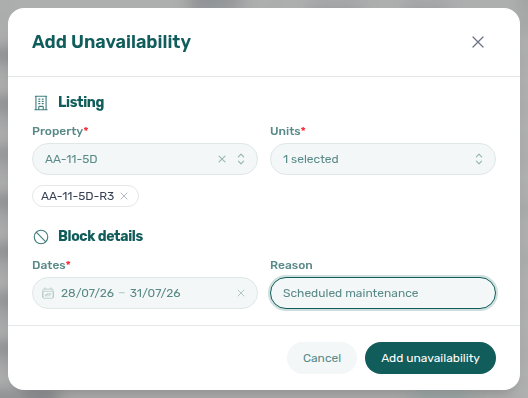
| Unavailability | Open Add Unavailability from any screen to block one or more units under the same property for a date range (optional reason) without opening each unit Calendar first. Requires the same Listings edit permission as Add unavailability on the unit sidebar. Same all-or-nothing batch rules as multi-unit holds from Listings — see Unavailability (batch hold) below and Listings — Adding Manual Unavailability. |
| Contract Template | Upload or create a new contract template. Templates use dynamic variables for auto-generating rental agreements. See Contract. |
Unavailability (batch hold)
Use + Create New → Reservations → Unavailability when you need a manual hold on several units of one building at once (renovation window, owner stay, maintenance) without stepping through each unit sidebar.
- Click + Create New → Unavailability.
- Choose a Property, then one or more Units (search or Select all).
- Set Dates (start–end) and an optional Reason.
- Click Add unavailability. Vivin creates the same operator manual blocks you would add from Listings → Calendar. If any selected unit conflicts, nothing is created — deselect the conflicted units (or change dates) and retry.
The row is greyed out when your role lacks Listings edit permission — same gate as editing unit calendars (Permissions).
Reservations category pairing: Create New Menu section cross-reference.
Operations
| Action | Description |
|---|---|
| New Ticket | Create a maintenance, cleaning, inspection, or tenant request operations ticket on your portfolio. Managed in the Operations module. Far-future Schedule date values may show a Draft (display status) badge until the due window nears — use the Draft KPI card to review long-lead jobs. On an existing ticket, Cost allocation can link cash flows from the operational ledger (Glossary — Ticket — linked cash flows). This is not the same as a Vivin support conversation to our team — for that, use Help & Support or Account Settings > Support when your role has the Support permission (Using in-app support). |
| New Cashflow | Record a new operational cash flow entry for day-to-day expenses and adjustments. Manage these records in Operations > Cash Flows. Link contractor spend to maintenance tickets from Cost allocation when you need repair totals to reconcile with invoices (Glossary — Ticket — linked cash flows). |
Operations category pairing: Create New Menu section cross-reference.
Payments
| Action | Description |
|---|---|
| Transfer | Record an incoming payment or transfer. Allocate payments to scheduled charges in the Finance module. Manual receipts may stay pending until Approve payments acts on Finance → Transactions or a booking Transactions tab. Reject and Revert modals warn about credit notes when charges were already invoiced — see Payment Allocation — Correcting mistaken receipts. When allocation still leaves overdue scheduled charges, confirm balances after a payment overdue row-click — Handling a Late Payment — Step 1. |
Payments category pairing: Create New Menu section cross-reference.
Tools (Vivin internal accounts only)
This category appears only when your signed-in email ends with @vivin.app. It is filtered out entirely for other users (not shown as an empty section).
| Action | Description |
|---|---|
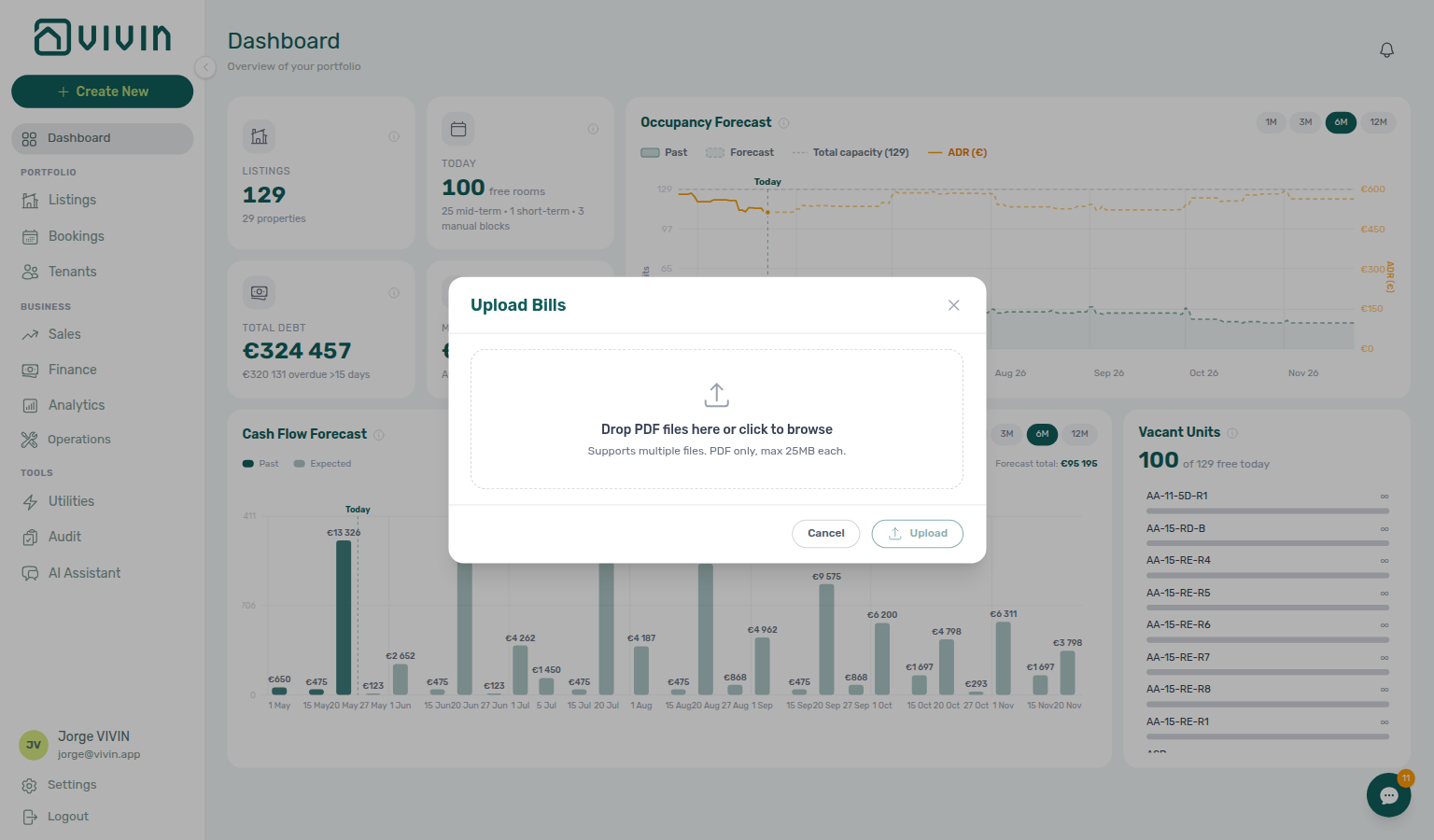
| Upload Utility Bills | Opens the Upload Bills dialog (PDF drag-and-drop for AI extraction). This is the same pipeline as Utilities → Bills → Add Bill → Upload PDF, but reachable from any screen. The result banner is the same: processed successfully, Already uploaded, or Unconfirmed — check the Bills list — Utilities — After you upload. Even for @vivin.app users, the row stays disabled when your role does not grant the underlying permission used for this shortcut. See the Utilities module. |
Tools category pairing: Create New Menu section cross-reference.
Create New Menu section cross-reference
Use the sections above for this concept. Related module and workflow pages are linked inline where they help the next step.
Related
Related below links this concept to modules, workflows, settings, and escalation paths.
Documentation map & escalation
- Introduction — Platform overview and how documentation sections connect
- Getting Started — Recommended setup sequence before you rely on + Create New shortcuts
- Concepts — Underlying models behind bookings, payments, and integrations opened from the panel
- Modules — Operator workspaces each category shortcut targets
- Common Workflows — Procedures that follow Property, Booking, and Transfer shortcuts
- Account Settings — Workspace-wide permissions, integrations, and templates gating Create New rows
- API Reference — Partner HTTP contracts for Inlife Full Import and full-feed publishing
- Glossary — Term definitions used across Create New docs
- FAQ & Troubleshooting — Quick answers when shortcuts are disabled or imports fail
- Get Help & Support — Escalation when Create New rows stay disabled after role changes
- Using in-app support — Vivin product tickets versus New Ticket (internal Operations)
Navigation & bookmarks
Bookmark routes pair with Management Frontend Deep Links and Concepts hub — Navigation & bookmarks.
- Management Frontend Deep Links — Bookmarkable module routes after Create New opens a modal instead of changing the URL
- Deep Links — Account Settings —
/settings/*tabs paired with Team Member, Contract Template, and integration shortcuts - Settings > Interface language — Operator UI locale before you walk staff through translated category labels
- Automation & AI — Upload Utility Bills and Landlord MCP alternatives to in-app shortcuts
People, listings, and inventory shortcuts
- Tenants module — Tenant shortcut and fiscal-ID lookup on Add booking (hub)
- Settings > Owners — Register landlords before Property assigns an owner in Step 2
- Settings > Tenant categories — Segment portal rules before Tenant or Booking shortcuts
- Listings module — Property, Unit, and post-import review (hub)
- Onboarding a New Property — Recommended order: Property wizard before Booking on a new building
- Booking engine details — Inlife Full Import partner payload destination (hub)
- Settings > Integration field capability — Which partner fields Inlife Full Import and channel payloads populate
- Integrations & Distribution — Booking wizard reservations block availability on every connected channel like marketplace imports
- Manual block hygiene — Property / Unit wizards when availability still looks blocked on Sales; create holds via + Create New → Unavailability
Reservations, payments, and turnover workflows
- Bookings module — Booking wizard, Bills Included ceiling, and lifecycle tabs (hub); after save, Timeline stay bars update without a reload when the unit is already on the chart, and the unit list updates in place when Only bookings is on
- Create New → Unavailability — Batch manual holds from Reservations without opening each unit Calendar
- Booking Lifecycle — Computed Upcoming → Ongoing → Ended / Canceled status after Booking save
- Processing a New Booking — Booking shortcut through confirmation payment (Step 5); unpaid schedules → Notifications — Payment overdue alerts
- Handling a Late Payment — Step 1 — Triage payment overdue rows after Booking or Transfer shortcuts
- Managing a Check-in — Booking path when a walk-in arrives without a prior reservation
- Managing a Check-out — Deposit refund and deposit dispute after stays created from Booking
- Payment Allocation — Two-layer payment model and credit note reject/revert warnings after Transfer
- Finance module — Transfer allocation, pending manual receipts, and Deposits (hub)
- Finance > Deposits — Portfolio refund queue after + Create New bookings reach move-out
- Notification triage — Clear alerts after imports or payments from Create New shortcuts; payment overdue → Handling a Late Payment — Step 1 after Booking or Transfer shortcuts
Operations, utilities, and tenant experience
- Operations module — New Ticket, New Cashflow, Draft ticket queues, and linked cash flows (hub)
- Utilities module — Upload Utility Bills shortcut and AI invoice reading (hub)
- Entering Monthly Utility Bills — Upload Utility Bills shortcut and overage verification
- Tenant Portal — Tenant and Booking shortcuts onboard tenants to portal access and payment self-service
- FAQ — Tenant contract signing blocked — No PDF yet, mandatory Your Details gates, category locks, or Lease purpose; portal signing vs paper upload on Contract Info
- Services Marketplace — Distinct from Create New shortcuts; tenants purchase add-ons through the portal Services catalogue
- Settings > Emails — Communication Rules audience filters share property pickers with service dialogs
- Settings > Preferences — In-app notifications — Account-wide payment alerts after Create New shortcuts add bookings or transfers
Automation, audit, and external clients
- Landlord MCP — Programmatic alternatives to Transfer and New Ticket shortcuts
- Dashboard module — KPI snapshot after Create New shortcuts add inventory or reservations (hub)
- Audit — Discounts tab — Cross-portfolio discount context after Booking or Transfer shortcuts
- Settings > Categories — Ticket and booking category lists before New Ticket or Booking shortcuts go live
Deeper workflow reads
Reservations, payments, and turnover workflows above. Each workflow sub-guide reciprocates with [Deeper workflow reads](../concepts/create-new-menu.md#deeper-workflow-reads) anchors on Create New Menu bullets —
- Processing a New Booking — Booking shortcut through confirmation payment
- Managing a Check-in — Booking path when a walk-in arrives without a prior reservation
- Managing a Check-out & Deposit Refund — Deposit refund after stays created from Booking shortcut
- Handling a Late Payment — Step 1 — Triage payment overdue rows after Booking or Transfer shortcuts
- Entering Monthly Utility Bills — Upload Utility Bills shortcut and overage verification
- Onboarding a New Property — Property and Booking shortcuts during the property wizard
- Notification triage — Clear alerts after imports or payments from Create New shortcuts
Deeper concept reads
- Management Frontend Deep Links — Bookmarkable module routes opened after + Create New shortcuts
- Booking Lifecycle — Computed Upcoming status for new reservations created from shortcuts
- Integrations & Distribution — Channel imports versus manual Booking shortcut when wiring marketplace inventory
- Landlord MCP — Programmatic alternatives to Transfer and New Ticket shortcuts
Deeper API reads
- Creating Bookings — Programmatic alternative to + Create New → Booking when partners enqueue imports
- Booking Lifecycle & Validations — Validation gates before manual or imported reservations appear in filters
- Listings & Availability — Verify
externalIdbefore channel-linked bookings from shortcuts - Property & Unit Mapping — Unit IDs required before Property or Booking shortcuts target live inventory
- AI usage API —
utility_bill_extractionafter Upload Utility Bills;landlord_chatwhen shortcuts pair with AI Chat
Operator habit hubs
Day-to-day operator habits (lockout catch-up, pending receipts, payment triage, handoffs, and related playbooks) live on the Common Workflows habit hub.
Deep-link anchors for habit hubs
Lockout catch-up after password recovery
Pending manual receipt approval
Reject/revert mistaken receipts
Portfolio segmentation by tenant category
Notification row-click navigation
Payment alert to receivables triage
Confirmation alert triage
Finance debt receivables triage
Finance Income status drill-down
Cash flow forecast drill-down
Key glossary terms
- Inlife Full Import — Bulk listing import modal from Create New
- Glossary — End-of-Booking cost split — Charge Time → End of Booking splits daily overage across every occupied unit; still-staying roommates stay in the denominator
- Glossary — Change history — Operator-initiated edits on Listings setup and Bookings Changelog; create-time defaults excluded
- Glossary — Archived booking ledger visibility — Delete Booking hides manual/provider_platform rows on Finance → Transactions; vIBAN and credit card stay visible
- Glossary — Finance tenant category cache refresh — Recategorizing a tenant updates
booking.tenantCategoryIdimmediately; ledger tabs reflect it on reload, while Overview can lag up to ~10 minutes - Glossary — SIMAR water contract ID — SIMAR (Loures e Odivelas) water bills use Cód. Local in Connections — not Nº de Contador; leading zeros stripped
- Glossary — Full term list
Module documentation hubs
- Analytics module — Month-range portfolio KPI charts after inventory or booking shortcuts (hub)
- Properties workspace — Legacy
/propertiesURL redirects into Listings (hub) - Sales module — Portfolio availability and channel manager after Property / Unit shortcuts (hub)
- Inbox module — Portfolio-wide WhatsApp workspace (hub)
- Notifications module — Full
/notificationshistory with row-click navigation (hub); Payment overdue alerts when Booking or Transfer shortcuts leave unpaid schedules - AI Chat module — AI Assistant using Landlord MCP tools (hub)
- Audit module — Portfolio-wide Manual Blocks and Discounts review (hub)
- API Reference hub — Partner HTTP contracts and partial vs full feeds (hub)