Booking Lifecycle
Ask AI Chat “Where do I open Bookings list status tabs to filter reservations by lifecycle — Upcoming, Ongoing, Ended, and Canceled (not Sales Multicalendar, and not Timeline-only)? Name the Portfolio Bookings list filters — product navigation only, no account data.” — then open Portfolio → Bookings list filters (ai-chat-product-context-booking-lifecycle-reply.png, ai-chat-product-context-booking-lifecycle-flow.mp4). The assistant typically says Bookings → List view with Upcoming, Ongoing (may say Current), Ended, and Canceled. Same grounding external MCP clients get from get-vivin-context-bookings-tenants. Distinct from Sales → Multicalendar and from Timeline-only charts.
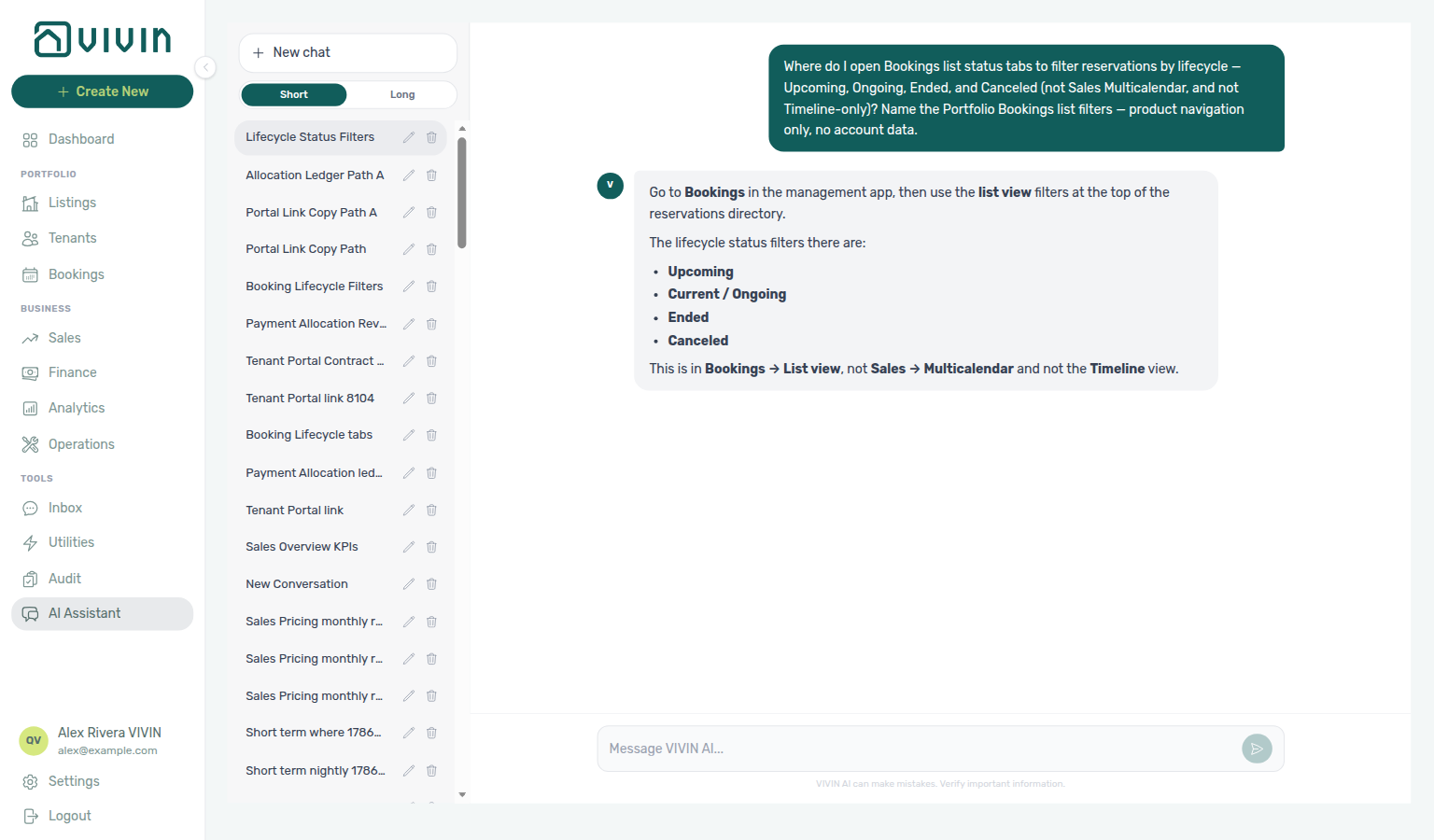
Read this concept after Getting Started — Recommended Setup Sequence step 14 Bookings before you rely on list status filters or Timeline for occupancy decisions. Payment vocabulary pairs with setup step 5 Invoicing & Payments. First reservation workflow: Processing a New Booking. Concept pairing: Concepts — Setup sequence after go-live.
Start with Status Overview and How Status Is Computed, then see Where you see lifecycle in the product. Operational rules: Key Rules. Habit-specific shortcuts live under Related below.
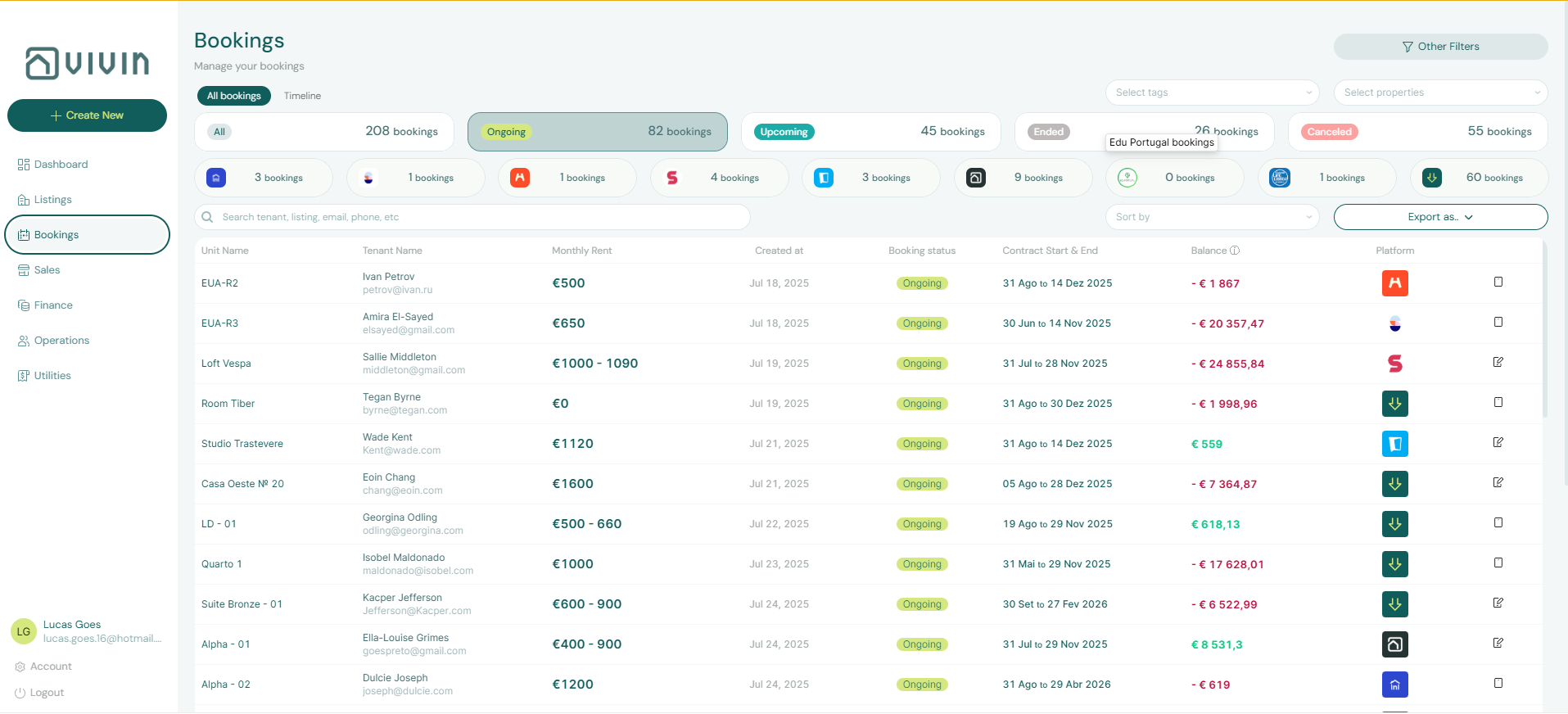
Every booking in Vivin has a computed lifecycle status. The platform does not use a pending booking status, and normal timeline status changes are driven by booking dates plus cancellation state.
Scheduled charges and receipt allocation follow Payment Allocation; tenant contract signing and check-in triggers pair with Tenant Portal (including Portal access by tenant category); channel-imported reservations pair with Integrations & Distribution; booking-scoped external AI clients pair with Tenant MCP. Portfolio operators poll AI usage API (landlord_chat) when AI Chat assists lifecycle triage during Portfolio KPI review.
Status Overview
Product Value (bookingStatus) | UI Label (where applicable) | Meaning |
|---|---|---|
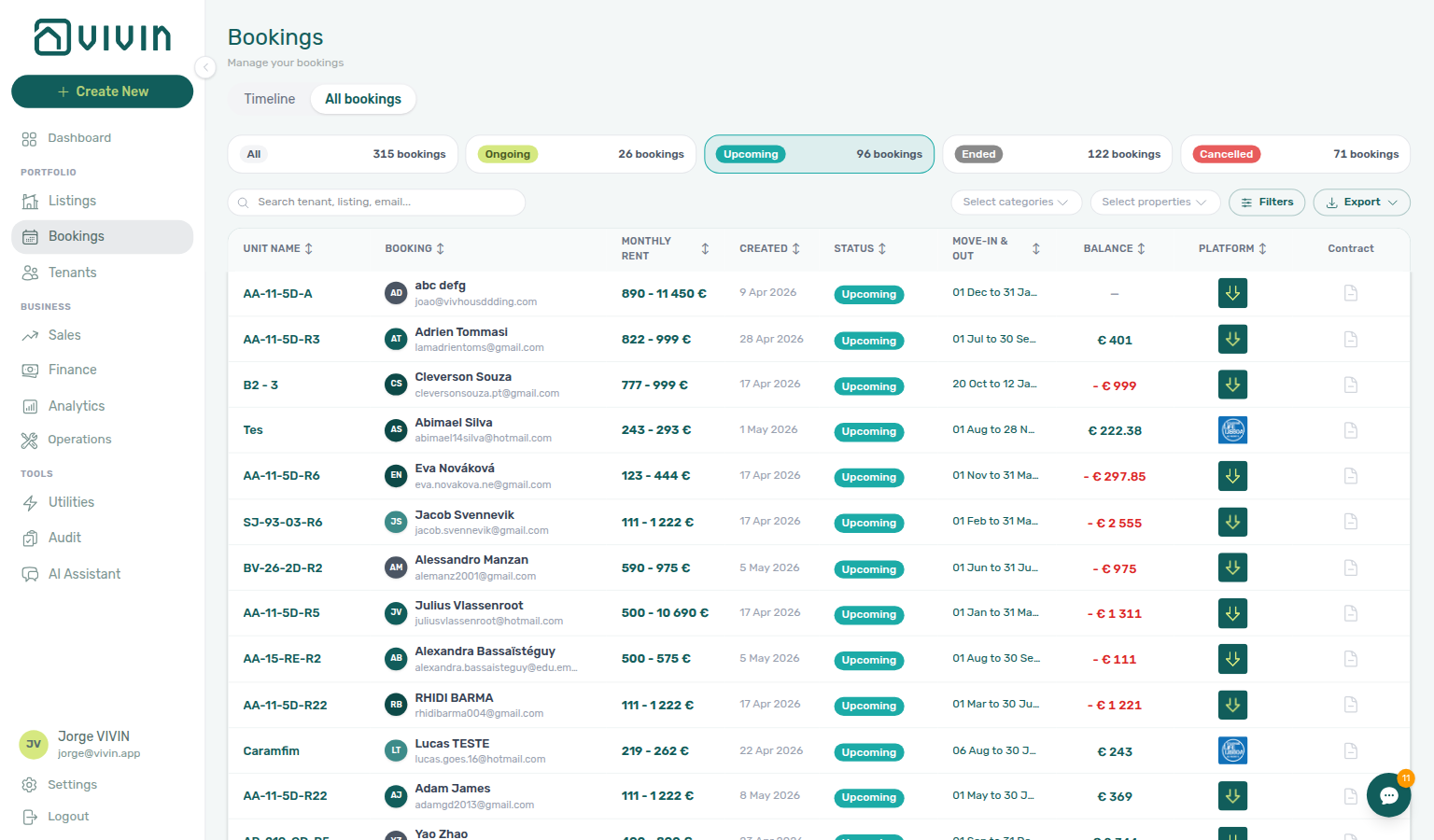
upcoming | Upcoming | Booking start/check-in date is in the future and the booking is not canceled |
current | Ongoing | Booking is active today (between start/check-in and end/check-out dates) |
ended | Ended | Booking end/check-out date has already passed |
canceled | Canceled | Booking was canceled (cancellation type set) |
How Status Is Computed
Status is computed in this order:
- If the booking has a cancellation type, status is
canceled. - Otherwise, if the configured end date is before today, status is
ended. - Otherwise, if the configured start date is after today, status is
upcoming. - Otherwise, status is
current.
Date basis is account-configurable (contract dates or move dates), so "start/end" may come from contract dates or check-in/check-out dates depending on your account settings.
Status Flow
upcoming -> current -> ended
 \ \ \
 \ \ \
 +-------> canceled
Cancellation can be applied from any non-canceled state. Once canceled, status remains canceled.
Where you see lifecycle in the product
The Bookings module uses list filters and tabs that line up with timeline status (for example All versus views that emphasize stays active on today’s date). Row labels and filters reflect upcoming, active stays (often labeled Ongoing in the UI), ended, and canceled, depending on your workspace configuration.
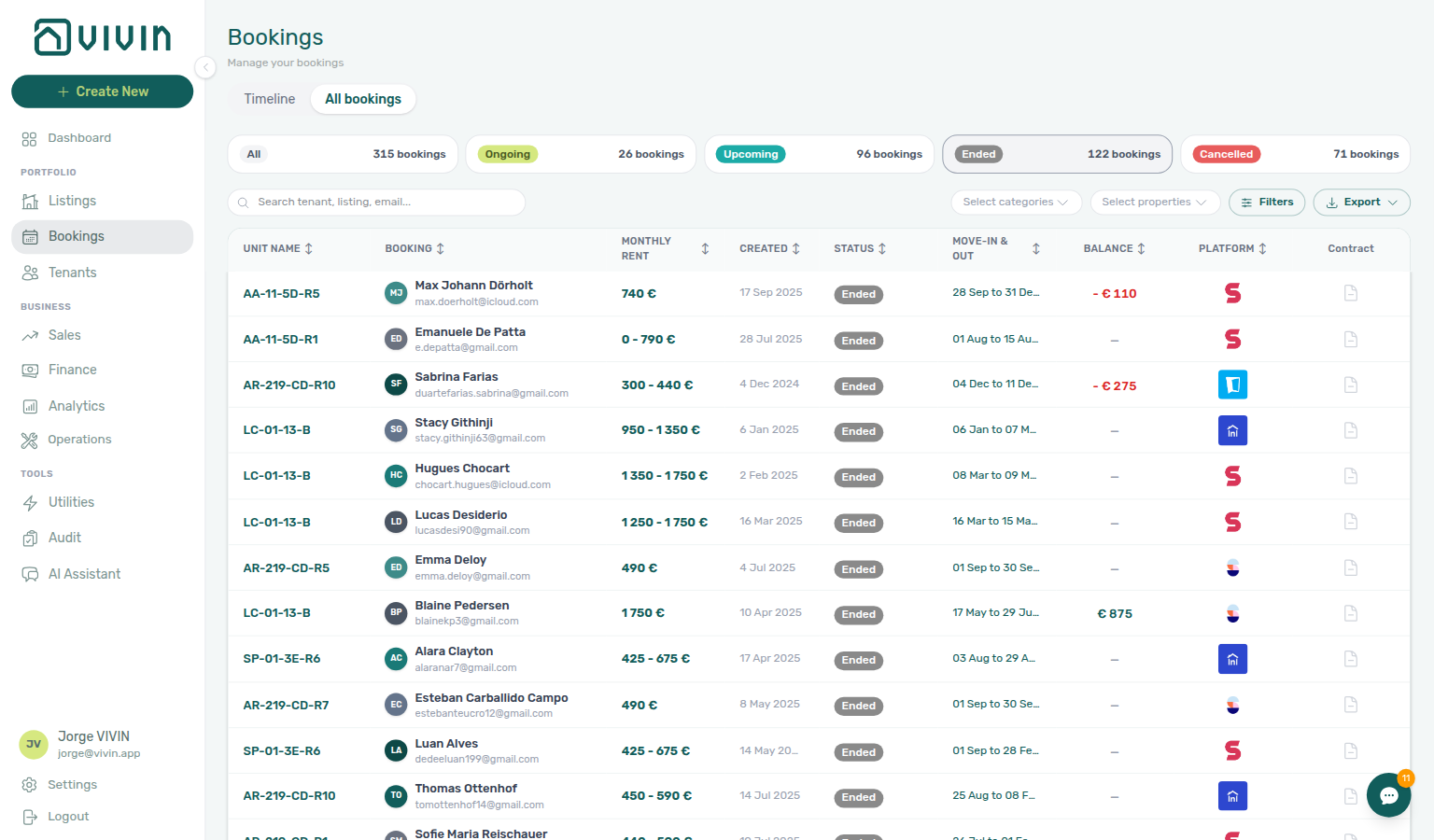
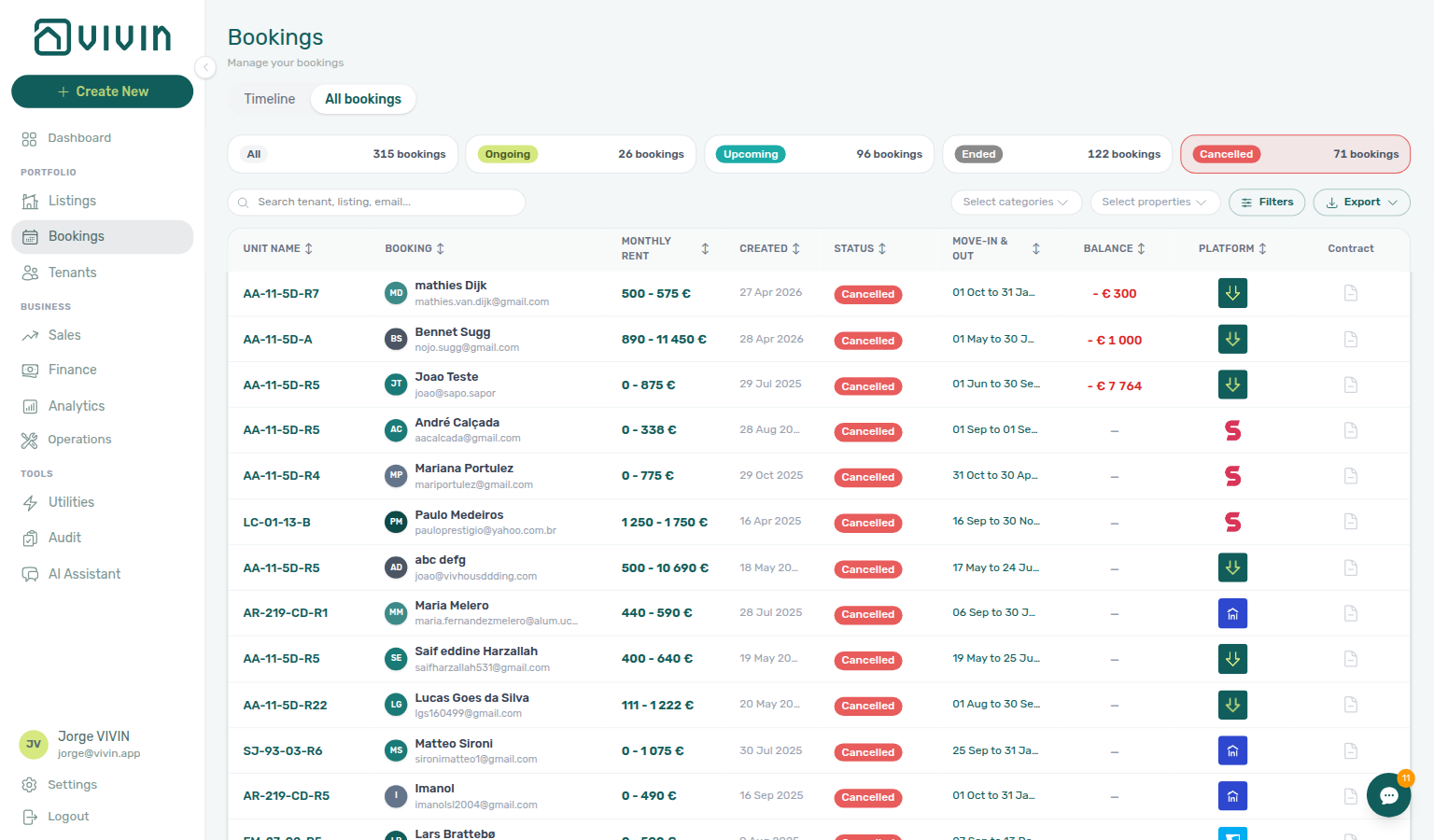
Timeline view
The Timeline layout at /bookings/timeline draws ongoing and upcoming stays as coloured bars per unit (green/teal styling). Ended and canceled reservations are not shown on the chart — use the list view or search when you need those records. Status filter cards still apply, but the Canceled card is disabled on Timeline because those rows are omitted from the Gantt. The chart paginates unit rows on scroll (about 50 listings per batch) and loads booking bars only for listings already visible — see Bookings > Loading unit rows.
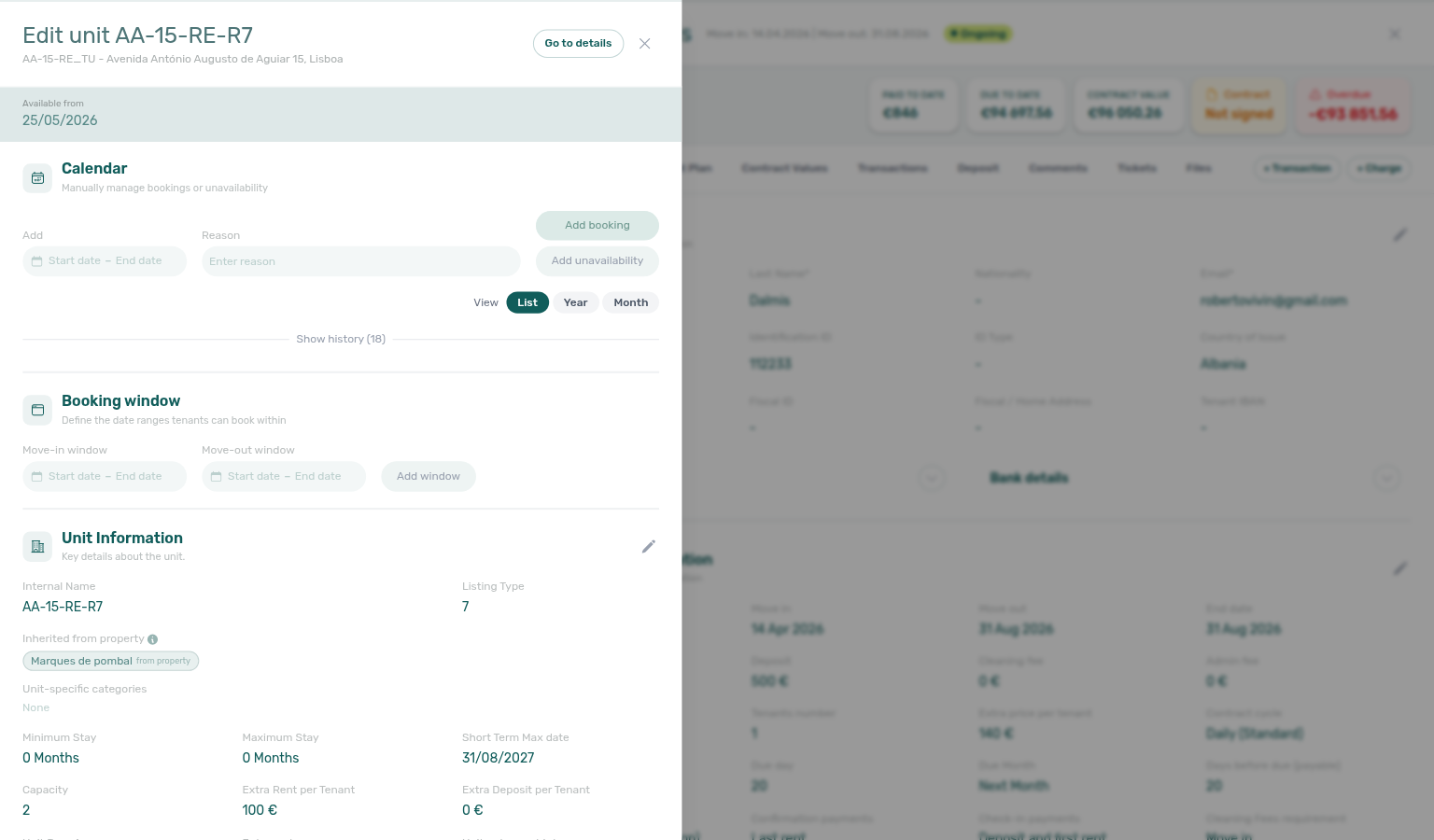
Click a bar to open the same booking detail sidebar as on the list; the URL becomes /bookings/timeline/<bookingId> for bookmarking. See Bookings > Timeline view for Week / Month scales, the Only bookings toggle (calendar blocks), and the walkthrough video. After Create Booking, Delete Booking, or Cancel booking, stay bars on units already on the chart update without a reload — see Stay bars update after create or delete. When Only bookings is on, the unit list updates in place as well — see Unit list updates after create or delete.
When a check-out and check-in share one unit on the same calendar day, paste the unit in toolbar Search and use Week or Month scale to see both bars on one row — or use Sales → Multicalendar for the same Gantt from Sales context. See Glossary — Same-day turnover.
For column and filter behaviour on the list, see the Bookings module. List and Timeline pairing matrix: Booking Lifecycle section cross-reference.
What Triggers Status Changes
upcoming -> current
Occurs automatically when the relevant start date is reached.
current -> ended
Occurs automatically when the relevant end date passes.
Any non-canceled status -> canceled
Occurs when a cancellation is processed (sets cancellation type and applies cancellation rules).
Key Rules
- Timeline statuses are computed, not manually advanced. You do not manually set
upcoming,current, orended. - Cancellation is an explicit action. A booking becomes
canceledonly when the cancellation workflow is executed. - No
pendingbooking status exists in the implemented model. - Payment schedules are created at booking creation. See Payment Allocation for details.
- Soft-archive is separate from cancel. Delete Booking removes mistaken stays from default lists without changing the computed timeline status to
canceled; Finance → Transactions then hides manual/provider_platform rows for that reservation while keeping vIBAN and credit card rails. Decision tables: FAQ — Portfolio retirement decisions (building Archive vs Cancel vs Delete) and FAQ — Cancel Booking vs Delete Booking. Ledger triage: FAQ — Manual payments after Delete Booking. See Glossary — Archived booking ledger visibility and Glossary — Archived property.
Booking Lifecycle section cross-reference
Use the sections above for this concept. Related module and workflow pages are linked inline where they help the next step.
Related
Related below links this concept to modules, workflows, settings, and escalation paths.
Documentation map & escalation
- Introduction — Platform overview and how documentation sections connect
- Getting Started — Recommended setup sequence before you rely on list filters and Timeline
- Concepts — Underlying models behind computed statuses and cancellation
- Modules — Operator workspaces for Bookings, Finance, and Operations turnover queues
- Common Workflows — Procedures that align with Upcoming, Ongoing, Ended, and Canceled slices
- Account Settings — Workspace-wide date defaults, emails, and notification categories
- API Reference — Partner imports that create bookings with the same computed statuses
- Glossary — Term definitions used across lifecycle docs
- FAQ & Troubleshooting — Quick answers when filters disagree with Dashboard or Analytics
- Get Help & Support — Escalation when lifecycle behaviour is blocked by permissions or account state
- Using in-app support — Vivin product tickets when status rules are unclear
Navigation & bookmarks
Bookmark routes pair with Management Frontend Deep Links and Concepts hub — Navigation & bookmarks.
- Management Frontend Deep Links — Bookings — Bookmark
/bookings/list,/bookings/timeline, and sidebar deep links - Deep Links — Notifications — Dashboard bell vs
/notificationswhen lifecycle alerts arrive - Settings > Preferences —
/settings/preferencesbooking defaults and in-app notification masters - Settings > Interface language — Operator UI locale before you walk staff through status filter labels
List views, Timeline, and portfolio context
- Bookings module — List status filters, Timeline Gantt, and sidebar tabs (hub)
- Bookings — Timeline view — Day / Week / Month, Only bookings toggle, listing-axis scroll loading
- Sales — Multicalendar — Sales-scoped unit × time Gantt without rent cells
- Dashboard module — Today and occupancy KPIs that reflect lifecycle mix at a glance (hub)
- Analytics — Overview tab — Month-range KPI bar grid complementing list filters
- Tenants module — Activity status filters that mirror computed lifecycle labels (hub)
- Manual block hygiene — Portfolio-wide manual holds (Audit) vs calendar blocks on Timeline
- Audit — Discounts tab — Cross-portfolio discounted contract values when lifecycle counts follow repricing
- Portfolio KPI review — Reconcile lifecycle counts with Dashboard Today and Analytics occupancy charts
Turnover, cancellation, and collections workflows
- Processing a New Booking — Reservation creation while status is Upcoming
- Managing a Check-in — Arrival week when status is Upcoming or early Ongoing
- Managing a Check-out — Departure, deposit refund, and transition to Ended
- Cancelling a Booking — Explicit cancellation to Canceled (distinct from a normal check-out)
- Handling a Late Payment — Step 1 — Collections during Ongoing stays; upstream path from Notifications — Payment overdue alerts
- Notification triage — Clear booking alerts and open the related reservation from
/notifications; payment overdue → Handling a Late Payment — Step 1 - Onboarding a New Property — Setup before the first Upcoming reservations appear in filters
Tenant experience, integrations, and API contracts
- Tenant Portal — Tenant-visible booking status and payment modules vs operator computed list filters; segment gates: Portal access by tenant category
- FAQ — Tenant contract signing blocked — No PDF yet, mandatory Your Details gates, category locks, or Lease purpose; portal signing vs paper upload on Contract Info
- Tenant MCP — Booking-scoped external AI clients that surface portal links, payment context, and chatbot rules for a reservation; topic table: Tenant MCP section cross-reference
- Payment Allocation — How Layer 1 schedules are created at booking creation and tracked through the lifecycle
- Services Marketplace — Portal add-on purchases during Ongoing stays
- Integrations & Distribution — Imported marketplace and booking-engine reservations follow the same computed status rules
- API Reference — Booking lifecycle validations — Integration pipeline vocabulary vs computed UI statuses
- Booking engine integration (API) — White-label reservations share the same computed lifecycle filters in Bookings
- Settings > Emails — Lifecycle check-in triggers that evaluate on portal signing vs paper contract upload
- Settings > Tenant categories — Segment portal modules that shape which lifecycle states tenants can act on online
Deeper workflow reads
- Processing a New Booking — Reservation creation while status is Upcoming
- Managing a Check-in — Arrival week when status is Upcoming or early Ongoing
- Managing a Check-out & Deposit Refund — Departure, deposit refund, and transition to Ended
- Cancelling a Booking — Explicit cancellation to Canceled (distinct from a normal check-out)
- Handling a Late Payment — Step 1 — Collections during Ongoing stays; upstream path from Notifications — Payment overdue alerts
- Notification triage — Clear booking alerts and open the related reservation from
/notifications - Onboarding a New Property — Setup before the first Upcoming reservations appear in filters
- Manual block hygiene — Portfolio-wide manual holds vs calendar blocks on Timeline
Deeper concept reads
- Payment Allocation — Two-layer scheduled charges and Layer 2 receipt allocation tracked through lifecycle transitions
- Tenant Portal — Contract signing and check-in triggers that interact with Upcoming and Ongoing statuses
- Integrations & Distribution — Imported channel reservations follow the same computed status model
- Services Marketplace — Portal add-on purchases during Ongoing stays
- Tenant MCP — Booking-scoped automation that surfaces lifecycle-aware portal and payment context
Deeper API reads
- Booking Lifecycle & Validations — Step-by-step enqueue validation vs computed UI
bookingStatus - Creating Bookings — Partner
POST /bookingscreates reservations that share the same lifecycle filters - Booking Engine API — White-label
POST /bookingson the same queue and validation pipeline - Webhooks & Notifications — Outbound
booking.*events when lifecycle transitions complete on the integration side - AI usage API —
landlord_chatwhen operators use AI Chat for lifecycle triage
Operator habit hubs
Day-to-day operator habits (lockout catch-up, pending receipts, payment triage, handoffs, and related playbooks) live on the Common Workflows habit hub.
Deep-link anchors for habit hubs
Lockout catch-up after password recovery
Pending manual receipt approval
Reject/revert mistaken receipts
Partly collected security deposit
Portfolio segmentation by tenant category
Notification row-click navigation
Payment alert to receivables triage
Confirmation alert triage
Finance debt receivables triage
Finance Income status drill-down
Cash flow forecast drill-down
Key glossary terms
- Glossary — End-of-Booking cost split — Charge Time → End of Booking splits daily overage across every occupied unit; still-staying roommates stay in the denominator
- Glossary — Change history — Operator-initiated edits on Listings setup and Bookings Changelog; create-time defaults excluded
- Glossary — Archived booking ledger visibility — Delete Booking hides manual/provider_platform rows on Finance → Transactions; vIBAN and credit card stay visible
- Glossary — Finance tenant category cache refresh — Recategorizing a tenant updates
booking.tenantCategoryIdimmediately; ledger tabs reflect it on reload, while Overview can lag up to ~10 minutes - Glossary — SIMAR water contract ID — SIMAR (Loures e Odivelas) water bills use Cód. Local in Connections — not Nº de Contador; leading zeros stripped
- Glossary — Per-booking maintenance ticket opt-out — Add booking checkboxes skip automatic CI/CO tickets for one reservation only; property rule unchanged
- Glossary — Full term list
Module documentation hubs
- Finance module — Portfolio ledgers and Deposits refund readiness during Ended paths (hub)
- Operations module — Check-in/out queues, tickets, and linked cash flows (hub)
- Utilities module — Bills Included overage lines on Payment plan during Ongoing stays (hub)
- Sales module — Portfolio availability and channel manager connections (hub)
- Listings module — Property wizard and Channels tab before imported bookings land in filters (hub)
- Properties workspace — Legacy
/propertiesURL redirects into Listings (hub) - Booking engine details — Rich marketplace payload editor via the Full integration pill (hub)
- Inbox module — WhatsApp triage when tenants message about arrival or departure dates (hub)
- Notifications module — Full
/notificationshistory with row-click navigation into Bookings (hub); Payment overdue alerts when scheduled charges are overdue on Ongoing stays - AI Chat module — AI Assistant when lifecycle counts disagree with Analytics or Dashboard filters (hub)
- Audit module — Portfolio-wide Manual Blocks and Discounts contract-value review (hub)
- Account Settings — Workspace-wide financial policies, templates, integrations, and operational defaults (hub)
- API Reference hub — Partner HTTP contracts, Swagger onboarding, and partial vs full feeds (hub)