Booking Lifecycle & Validations
Understand post-import behaviour after Getting Started — Recommended Setup Sequence step 14 (Bookings) — partner POST /bookings returns 201 enqueue, then validations run asynchronously (Creating Bookings). Steps 11–12 (Tenant categories default for integrations, Emails lifecycle rules) shape portal and outreach on imported stays; finish Onboarding a New Property — Step 7 before you debug lifecycle mismatches in production. Guide pairing after go-live: Setup sequence after go-live (hub: API Reference — Setup sequence after go-live).
Start with Submission Flow and Processing Pipeline after 201 from Creating Bookings. Pair async outcomes with booking.* events in Webhooks & Notifications and business-rule failures in Error Handling. Calendar propagation and pricing rules: Calendar Propagation and Pricing Calculation. Habit-specific shortcuts live under Related below.
This page describes what happens inside Vivin after you submit a booking via the API, what validations are enforced, and how the booking progresses through its lifecycle.
Use Integration Swagger on your API host to expand your platform’s bookings group, open POST …/bookings, and review queue status fields and validation error models. See Creating Bookings, API Reference index, and Authentication.
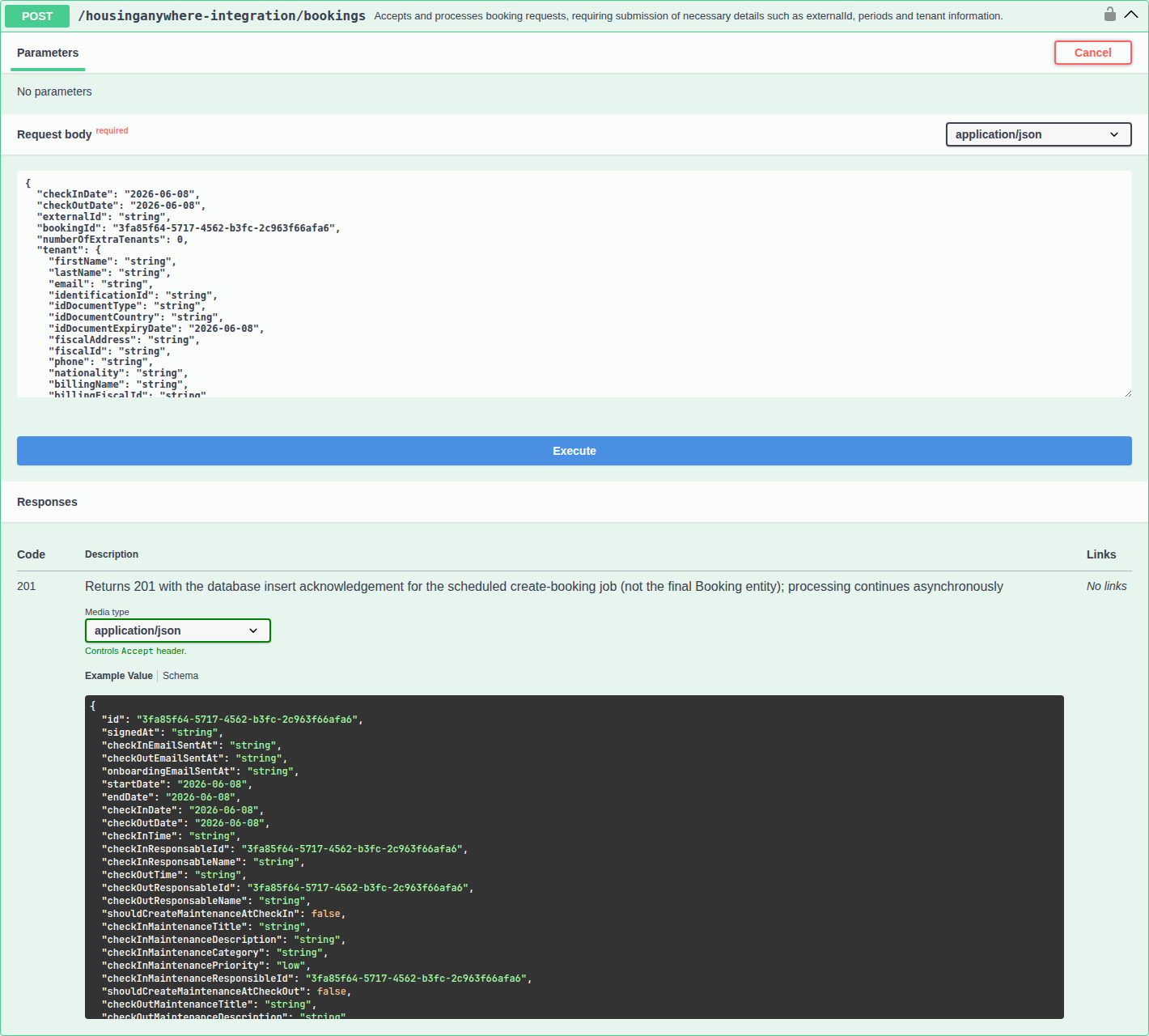
Read the 201 response description in Swagger: it documents the scheduled create-booking job acknowledgement, not the final Booking entity — matching the pipeline below.
Submission Flow
201 Created acknowledges enqueue only — request shape in Creating Bookings — Response. Prefer booking.* webhooks over polling — Webhooks & Notifications.
Your Platform Vivin
───────────── ─────
 │ │
 │ POST /bookings │
 │ ──────────────────────────────────► │
 │ │ 1. Validate authentication
 │ │ 2. Queue booking for processing
 │ 201 Created (booking reference) │
 │ ◄────────────────────────────────── │
 │ │ 3. Look up listing by externalId
 │ │ 4. Validate availability
 │ │ 5. Validate booking windows
 │ │ 6. Validate stay duration
 │ │ 7. Create booking record
 │ │ 8. Block dates on all channels
 │ │ 9. Generate payment schedule
 │ │ 10. Trigger contract generation
 │ │ 11. Send notifications
Processing Pipeline
externalId lookup failures trace to Property & Unit Mapping. Availability fields come from Listings & Availability partial pulls.
Step 1: Queuing
When your booking request is received, it is placed in an asynchronous processing queue (ScheduledCreateBooking). This ensures:
- Your API call returns quickly (you don't wait for all validations)
- Bookings are processed in order
- Failed bookings can be retried
Each queued booking has a status:
| Status | Meaning |
|---|---|
New | Queued, waiting to be processed |
Success | Booking was created successfully |
Failed | Booking failed validation or processing |
Step 2: Listing Resolution
Vivin looks up the listing using:
- Your
externalId+ your platform identifier - If no match is found, returns an error
For studio/single-unit properties, a fallback lookup by property ID is attempted if the full ID doesn't match.
Step 3: Availability Validation
The system checks that the requested dates (checkInDate to checkOutDate) do not overlap with any existing:
- Confirmed bookings on this listing
- Manual unavailability blocks set by the property manager
- Calendar blocks from other connected platforms (Airbnb, Booking.com, etc.)
If there is any overlap, the booking is rejected.
Step 4: Booking Window Validation
If the listing has booking windows configured, Vivin checks that:
- The
checkInDatefalls within the allowed start-date range (minStartDatetomaxStartDate) - The
checkOutDatefalls within the allowed end-date range (minEndDatetomaxEndDate)
On Housing Anywhere listing pulls, nights outside that envelope already appear in unavailabilities so a calendar can honour the window without parsing bookingWindows — Housing Anywhere booking windows. POST /bookings still runs this window check against the stored ranges, not only the extra calendar rows.
Step 5: Stay Duration Validation
On + Create New → Booking, Vivin checks stay length in whole months when the booking is created:
- Minimum — enforced only when
minStayPeriodis a positive number.0means no minimum. - Maximum — enforced only when
maxStayPeriodis a positive number.0means no maximum.12is twelve months, not unlimited.
Marketplace POST /{platform}-integration/bookings honours listing JSON for those stay months, listing Capacity, and availableFrom instead — Creating Bookings — Honour listing. Occupied nights (unavailabilities) still reject on both paths.
Changing check-in or check-out on an existing booking does not re-run this check. Details: Listings & Availability — Maximum stay.
Step 6: Booking Creation
If all validations pass, Vivin:
- Creates the booking record with status
confirmed - Creates or links the tenant - if a tenant with the same email already exists in the account, the existing record is linked; otherwise a new tenant is created. Marketplace
POST /bookingsdoes not send a tenant category — allowlisted channels assign Default for integration-created tenants when the person is new or still uncategorized — Creating Bookings — Tenant category. - Generates the payment schedule based on the listing's pricing configuration (fixed or variable monthly rents, admin fee, deposit, cleaning fee)
- Blocks the dates as an unavailability on the listing, which propagates to all other connected platforms on the next sync cycle
- Triggers contract generation if the property manager has configured auto-generation (via N8N webhook or similar)
- Sends notifications to the property manager (email, in-app)
Validation Summary
HTTP status mapping for failures: Error Handling (400, 404, 409, 422). Duplicate bookingId: Creating Bookings — Response.
| Validation | When it fails |
|---|---|
| Authentication | Invalid or missing Bearer token |
| Listing lookup | externalId does not match any mapped listing for your platform |
| Availability | Requested dates overlap with an existing booking or calendar block |
| Booking window | Check-in or check-out dates fall outside the configured booking window |
| Stay duration | On Add Booking, stay is shorter than a positive minStayPeriod, or longer than a positive maxStayPeriod (0 skips that bound). Marketplace POST /bookings honours listing JSON instead — Honour listing |
| Capacity / available from | On Add Booking, occupant count vs unit Capacity, and check-in vs listing available from. Marketplace POST /bookings honours listing JSON capacity and availableFrom. Occupied nights still reject. |
| Duplicate | A booking with the same bookingId already exists (no error - silently deduped) |
Booking Statuses in Vivin
After creation, a booking can move through the following statuses within Vivin:
| Status | Description |
|---|---|
confirmed | Booking is active and dates are blocked |
checked_in | Tenant has moved in |
checked_out | Tenant has moved out |
cancelled | Booking was cancelled - dates are released |
Calendar Propagation
iCal subscribers poll on their own schedule — iCal feeds. Partial availability refresh: Listings & Availability.
When a booking is created from your platform:
- Immediate: The dates are marked as unavailable on the Vivin listing
- Next sync cycle (minutes): All other connected platforms (HousingAnywhere, Spotahome, Airbnb, etc.) receive updated availability through their respective sync mechanisms
- iCal subscribers: Calendar export is updated and available on next poll
This ensures that a booking on your platform automatically blocks the dates everywhere else, preventing double-bookings across the entire distribution network.
Pricing Calculation
Pricing fields originate from partial ListingDto rows — Listings & Availability — Field Reference. Operator reconciliation: Finance — Contract Values.
Vivin calculates the booking's financial terms based on the listing configuration at the time of booking creation:
| Component | How it's calculated |
|---|---|
| Monthly rent | From listing rentsPerMonth (variable) or rent (fixed). Partner POST /bookings does not send rent — Creating Bookings — Rent. Partial months are pro-rated. Do not multiply the GET headline rent by stay length when isRentFixed is false — Listings & Availability — Variable rent headline. Listing GET has no localRentCap — dual pricing (capped Rent plus Others) is frozen from the unit at create — Local rent cap. |
| Extra tenant surcharge | extraPricePerTenant × numberOfExtraTenants × months. Listing GET publishes extraPricePerTenant as 0 when capacity is 1 — Extra price per tenant. Partner POST /bookings does not send Extra Charge euros — Creating Bookings — Extra Charge. |
| Second tenant identity | Empty until an operator fills Contract Info → Second tenant. Partner POST /bookings does not send a secondTenant object — occupant headcount is on that POST — Creating Bookings — Second tenant. |
| Guarantor identity / amount | Empty until an operator fills Contract Info → Guarantor. Partner POST /bookings does not send a guarantor object or guarantorAmount — occupant headcount does not fill that accordion — Creating Bookings — Guarantor. |
| Admin fee | When the listing’s adminFeeMode is "fixed", one-time adminFeeValue. When "tiered", one-time amount resolved from adminFeeTiers by stay length (UTC days between check-in and check-out, check-out day not counted) — see Listings & Availability — Admin fee. Partner POST /bookings does not send the amount or tiers — Creating Bookings — Admin fee. |
| Cleaning fee | Property cleaningFeeValue, billed on the payment plan by Cleaning fee frequency (Every Month / one-time at confirmation / one-time at move-in). Partner POST /bookings does not send the amount or frequency — Creating Bookings — Cleaning fee. Frequency is not on listing JSON — Listings & Availability — Cleaning fee. |
| Exit fee | Property exit amount when Exit fee is on for the account and the property. One-time, due on check-out (does not block check-in). Not on listing JSON and not on partner POST /bookings — Listings & Availability — Exit fee. |
| Deposit | Listing GET depositValue (computed property deposit — Computed deposit), plus Extra Deposit per Tenant × extra occupants at create. Partner POST /bookings does not send depositValue — Creating Bookings — Deposit. Extra Deposit euros are also not on that POST — Creating Bookings — Extra Charge. Held, not invoiced as income. |
| Bills included | Property billsIncludedMaxValue ceiling copied onto the booking at create. Partner POST /bookings does not send billsIncludedMaxValue — Creating Bookings — Bills included. Used by Utilities overage math, not as a payment-plan line. |
| Contract type / day type | Property Rental payment frequency (Daily / Fortnightly / Monthly) and Contract type (Traditional rental / Accommodation services / Others) copied onto the booking at create. Partner POST /bookings does not send contractType or contractDayType — Creating Bookings — Contract type. Listing GET also omits those keys. |
| Confirmation / check-in payments | Property Confirmation payments and Check-in payments copied onto the booking at create. Partner POST /bookings does not send bookingConfirmationRequirements or moveInRequirements — Creating Bookings — Confirmation payments. Listing GET also omits those keys. |
| Due date / Due Month | Property Due date and Due Month, or account Tenant Due Day / Tenant Due Month when the property has no override. Partner POST /bookings does not send dueDay or dueDayMonth — Creating Bookings — Due date. Listing GET also omits those keys. |
| Check-in / check-out times | Account Check-in time and Check-out time. Partner POST /bookings does not send checkInTime or checkOutTime — Creating Bookings — Check-in times. Listing GET also omits those keys. |
| Days before due | Account Days before due date (when a scheduled charge appears as payable). Partner POST /bookings does not send daysBeforeDueAsPayable — Creating Bookings — Days before due. Listing GET also omits that key. There is no property-level override. |
| Check-in / check-out responsible | Empty until an operator assigns a teammate. Partner POST /bookings does not send checkInResponsableId or checkOutResponsableId — Creating Bookings — Check-in responsible. Listing GET also omits those keys. There is no account-level or property-level default. |
| Lease purpose | Empty until an operator or tenant selects an allowed chip. Partner POST /bookings does not send leasePurpose — Creating Bookings — Lease purpose. Listing GET also omits that key. The Categories catalog is allowed values, not a default copied onto the stay. Make Lease Purpose mandatory does not reject channel create. |
| Deposit Refund Limit | Inherited from account Payments on every read until Contract Info overrides it (not snapshotted at create). Partner POST /bookings does not send depositReturnDueDay — Creating Bookings — Deposit Refund Limit. Listing GET also omits that key. There is no property-level override. |
| Booking tags | Empty until an operator picks chips. Partner POST /bookings does not send bookingTags — Creating Bookings — Booking tags. Listing GET also omits that key. The Categories catalog is allowed values, not a default copied onto the stay. |
| Check-in / check-out maintenance tickets | Copied from the property Maintenances tab. Partner POST /bookings does not send createCheckInMaintenanceTicket or createCheckOutMaintenanceTicket — Creating Bookings — Maintenance tickets. Listing GET also omits those keys. Add booking can skip tickets for one reservation; Contract Info cannot flip the snapshot after import. |
| Ignore unit preparation days | Occupied nights including Mid-term Prep / Short-term Prep still reject. Partner POST /bookings does not send ignoreListingPreparationDays — Creating Bookings — Ignore unit preparation days. Listing GET also omits that key. Add booking can skip the prep buffer for one reservation; Contract Info cannot flip it after import. |
| Allow check-in date in the past | Honour listing JSON availableFrom. Partner POST /bookings does not send ignoreAvailableFrom — Creating Bookings — Allow check-in date in the past. Listing GET also omits that skip key (it does publish availableFrom). Add booking can skip the available-from month for one reservation; Contract Info cannot flip it after import. |
| Exclude from penalty fees | Off until an operator ticks Exclude this booking from penalty fees on Contract Info. Partner POST /bookings does not send ignorePenaltyFees — Creating Bookings — Exclude from penalty fees. Listing GET also omits that key. Add booking has no create-time control. |
| Use check in date as contract start date | Off until an operator ticks Use check in date as contract start date / Use check out date as contract end date on Change contract start/end date. Partner POST /bookings does not send useCheckInDateInContract or useCheckOutDateInContract — Creating Bookings — Use check in date as contract start date. Listing GET also omits those keys. Add booking has no create-time control. Property Rental payment frequency still sets stored Start date / End date at create. |
| Send onboarding email & contract | On. Partner POST /bookings does not send sendOnBoarding — marketplace create always generates the contract (when a template exists) and queues the welcome email — Creating Bookings — Send onboarding. Listing GET also omits that key. Add booking can leave the box off. Account Onboarding No trigger still skips the welcome email. |
| Use unit contract rents and other contract details | On. Partner POST /bookings does not send useListingValues — marketplace create always copies unit and property contract values — Creating Bookings — Use unit contract rents. Listing GET also omits that key. Add booking can turn the box off. |
| Platform commission | Recorded from platformProviderPaymentValue for reconciliation. Does not change tenant rent except Vivin Booking Engine Daily stays shorter than one month — Creating Bookings — Platform commission. |
The generated payment schedule determines what the tenant owes and when, driving invoice generation and payment tracking within Vivin.
Management app vs integration API wording
The management frontend (Bookings module, Dashboard, and related docs) exposes a computed timeline status (bookingStatus: upcoming, current, ended, canceled) derived from dates and cancellation — see Booking Lifecycle. That model is what operators filter and sort on in the UI.
This page’s integration tables (confirmed, checked_in, checked_out, queue states) describe the partner booking pipeline and stored integration fields after POST …/bookings runs. The two vocabularies answer different questions: “what did the API accept and record?” versus “where is this stay on the calendar today in the hub?”. When you map events to your own systems, rely on Integration Swagger response schemas on your API host for the exact fields your platform receives.
Booking Lifecycle & Validations section cross-reference
Use the endpoints and fields above. Related integrator pages are linked inline where useful.
Related
Related below links enqueue validation rules to setup, companion API guides, operator workflows, and escalation paths.
Setup sequence after go-live
Complete Account Settings — Recommended setup order before partner traffic.
- Setup steps 1–10 — Complete operator workspace basics (Recommended setup order) before requesting partner Bearer keys; property managers automating outside the browser use Management session authentication after step 3 (Users)
- Setup steps 11–12 (Integrations, Integration field capability, Tenant categories default for integrations) — Channel credentials, calendar horizons, and payload field expectations before
[email protected]onboarding; operator context: Integrations & Distribution - Setup step 13 (Listings) — Property wizard,
externalIdmapping, and Channels tab before first partner listing reads or writes - Setup steps 14–15 (Bookings, Tenants) — Validate imported reservation shape and tenant segments after partner traffic
- After steps 13–15 — Onboarding a New Property — Step 7 go-live verification before escalating partner pull, webhook, or mapping defects
- After
POST /bookings— monitor the enqueue pipeline and optional Webhooks & Notificationsbooking.*events; operator follow-up in Processing a New Booking once background validation creates the payment schedule - Partner credential requests — Email
[email protected](distinct from in-app Vivin support tickets in Get Help & Support)
Documentation map & escalation
- Getting Started — Recommended Setup Sequence before partner HTTP traffic;
- API Reference hub — Hub pairing matrix across integration guides;
- Get Help & Support — Escalate async validation failures or queue stuck states via
[email protected](hub: Setup sequence after go-live) - FAQ & Troubleshooting — Operator vs integration lifecycle vocabulary questions (hub: Setup sequence after go-live)
- Glossary — Term definitions used across API and operator docs (hub: Setup sequence after go-live)
Companion API guides
Companion guides share Bearer authorization or error shapes with this page — start from API Reference hub.
- Creating Bookings — Request body, endpoint shape, and Swagger tips (honour listing JSON Capacity / stay /
availableFrom— Honour listing; POST does not setrent— Rent; POST does not set Extra Charge / Extra Deposit euros — Extra Charge; POST does not set Second tenant identity — Second tenant; POST does not set Guarantor identity or amount — Guarantor; POST does not setcleaningFeeValue— Cleaning fee; POST does not setdepositValue— Deposit; POST does not setadminFeeValue— Admin fee; POST does not setbillsIncludedMaxValue— Bills included; POST does not setcontractType/contractDayType— Contract type; POST does not set confirmation / check-in payments — Confirmation payments; POST does not set due day / due month — Due date; POST does not set check-in / check-out times — Check-in times; POST does not set days before due — Days before due) - Listings & Availability — Partial
GET /listingsavailability checks beforePOST …/bookingsaccepts a payload (maxStayPeriod0is no maximum — Maximum stay) - Webhooks & Notifications — Push
booking.*andunavailability.*events when Vivin configures a callback for your platform - Error Handling — HTTP status mapping for validation and conflict failures
- Property & Unit Mapping —
externalIdlookup failures before availability checks run - iCal feeds — Calendar subscriber delays that can make availability validation look stale immediately after enqueue
- Booking engine integration — White-label
POST /bookingsuses the same validation pipeline and queue states - Full listing feeds — Partner publish fields validated separately from booking enqueue rules
- Authentication — Bearer token required on every
POST …/bookingscall - AI usage — Operator JWT ledger when reconciling import volume with internal LLM spend (integration Bearer keys return
401)
Upstream & downstream workflows
- Processing a New Booking — Operator workflow after background validation creates the booking and payment schedule
- Managing a Check-in — Post-validation arrival workflow once background processing succeeds
- Managing a Check-out & Deposit Refund — Departure and deposit settlement after background validation creates the payment schedule
- Cancelling a Booking — Operator workflow when background validation creates a booking that must be voided
- Handling a Late Payment — Step 1 — Collections when validation succeeds but confirmation payment is still outstanding; upstream path from Notifications — Payment overdue alerts
- Portfolio KPI review — Month-end pass when imported bookings skew occupancy or debt KPIs
- Notification triage — Clear import alerts after
booking.createdwebhook or operator confirmation - Manual block hygiene — Audit pass when availability validation fails because stale manual holds remain on the unit
Operator UI & settings
- Bookings module — How lifecycle appears in lists, tabs, and the booking sidebar
- Finance — Contract Values — Operator reconciliation after background validation creates the payment schedule
- Sales — Multicalendar — Visual calendar when validation fails on overlapping blocks
- Settings > Preferences — Auto-cancel unpaid move-in — Account backstop after validation creates unpaid move-in requirements
- Settings > Invoicing & Payments — Fee labels and payment priorities on schedules background validation creates
- Settings > Preferences — In-app notifications — Integration import alerts after background validation creates bookings
- Settings > Emails — Lifecycle check-in triggers evaluate after validation queue imports succeed
- Property & listing details (booking engine) — Partner publish fields validated separately from booking enqueue rules
Deeper concept reads
- Booking Lifecycle — Operator-facing computed statuses and rules (no
pendingstate) - Payment Allocation — Two-layer receipts, invoiced-floor rent edits, and credit note reject/revert warnings
- Integrations (concept) — Operator channel setup context before availability validation runs on mapped units
- Tenant Portal — Tenant-facing payment schedule and portal access after validated imports create bookings
- FAQ — Tenant contract signing blocked — No PDF yet, mandatory Your Details gates, category locks, or Lease purpose; portal signing vs paper upload on Contract Info
- Services Marketplace — Ancillary charges on tenant payment plans after validated booking creation
Deeper workflow reads
See Upstream & downstream workflows above for the same guides.
Operator habit hubs
Day-to-day operator habits (lockout catch-up, pending receipts, payment triage, handoffs, and related playbooks) live on the Common Workflows habit hub.
Deep-link anchors for habit hubs
Lockout catch-up after password recovery
Pending manual receipt approval
Reject/revert mistaken receipts
Portfolio segmentation by tenant category
Notification row-click navigation
Payment alert to receivables triage
Confirmation alert triage
Finance debt receivables triage
Handling a Late Payment collections
Finance Income status drill-down
Cash flow forecast drill-down
Key glossary terms
- Glossary — Credit note (payment reject/revert) — Reject/revert follow-up when mistaken import receipts were already invoiced
- Glossary — Invoiced floor (rent) — Rent edits blocked below exported invoice totals after background validation completes
- Glossary — Deposit lifecycle status — Async enqueue creates deposit schedule lines;
depositStatuspill transitions are operator UI after booking exists - Glossary — End-of-Booking cost split — Charge Time → End of Booking splits daily overage across every occupied unit; still-staying roommates stay in the denominator
- Glossary — Change history — Operator-initiated edits on Listings setup and Bookings Changelog; create-time defaults excluded
- Glossary — Archived booking ledger visibility — Delete Booking hides manual/provider_platform rows on Finance → Transactions; vIBAN and credit card stay visible
- Glossary — Full term list
Module documentation hubs
for screen-by-screen operator follow-up.
- Audit module — Manual blocks that can cause availability validation failures across channels (hub)
- Tenants module — Operator enrichment when validation creates thin tenant profiles on high-volume imports (hub)
- Finance module — Portfolio ledgers and Deposits tab refund queue once validated imports reach Ended status (hub)
- Utilities module — Operator overage billing after validated stays exceed
billsIncludedMaxValueceilings from partial pulls (hub) - Operations module — Maintenance tickets, cash flows, and check-in/out coordination (hub)
- Dashboard module — Post-login KPI snapshot with bell notification triage (hub)
- Analytics module — Month-range portfolio KPI charts with rankings and heatmaps (hub)
- Listings module — Property wizard, Channels tab, and unit management (hub)
- Properties workspace — Legacy
/propertiesURL redirects into Listings (hub) - Booking engine details — Rich marketplace payload editor via the Full integration pill (hub)
- Sales module — Portfolio availability and channel manager connections (hub)
- Inbox module — Portfolio-wide WhatsApp workspace (hub)
- Notifications module — Full
/notificationshistory with search and filters (hub); Payment overdue alerts when validated imports leave unpaid schedules - AI Chat module — AI Assistant using Landlord MCP tools (hub)
- Account Settings — Workspace-wide financial policies, templates, integrations, and operational defaults (hub)