Listings & Availability
Poll GET /listings only after Getting Started — Recommended Setup Sequence steps 11–13 — connect channels on Settings > Integrations, align payload fields in Integration field capability, set Tenant categories default for integrations, then finish the Listings property wizard with externalId on each unit’s Channels tab (Property & Unit Mapping). Complete steps 14–15 and Onboarding a New Property — Step 7 before you treat partial pulls as production truth. Guide pairing after go-live: Setup sequence after go-live (hub: API Reference — Setup sequence after go-live).
Start with Get All Listings and Field Reference for partial payload shapes, then Last blocked night vs first bookable day before you map unavailabilities.to. A unit marked Excluded from feed on Integration listings is omitted from this pull even when Channels has an ID. Units without a usable positive rent are omitted from both pulls — Usable rent required. extraPricePerTenant is 0 when capacity is 1 — Extra price per tenant. Platform markup applies only to rent / rentsPerMonth — Platform markup. When isRentFixed is false, rent is the highest month — Variable rent headline. depositValue is the computed security deposit (fixed euro amount, or Half / 1 / 2 Rents × that headline) — Computed deposit. cleaningFeeValue is the property cleaning amount (frequency is not on the pull) — Cleaning fee. The exit fee is not a listing JSON field — Exit fee. Local Rent Cap is not a listing JSON field — Local rent cap. Photos, address, amenities, and marketing copy are not on this pull — Catalogue fields. When the unit has All bills included, billsIncluded is true and billsIncludedMaxValue is null — All bills included. landlordEmail is the platform Integration Email, not the property manager’s login — Landlord email. maxStayPeriod 0 means no maximum (12 is twelve months) — Maximum stay. Marketplace POST /bookings honours capacity, stay months, and availableFrom — Creating Bookings — Honour listing. That POST does not set rent — Creating Bookings — Rent. That POST does not set cleaningFeeValue — Creating Bookings — Cleaning fee. That POST does not set depositValue — Extra Deposit is added from occupant headcount — Creating Bookings — Deposit. That POST does not set adminFeeValue — Vivin resolves the property fixed amount or stay-duration tier — Creating Bookings — Admin fee. That POST does not set billsIncludedMaxValue — Vivin copies the property Bills Included ceiling — Creating Bookings — Bills included. RoomLess (Spacest) also paints nights before availableFrom — RoomLess — nights before move-in. Housing Anywhere also turns the first still-open booking window into extra unavailabilities rows — Housing Anywhere — booking windows as calendar blocks. When a platform card has Calendar Block (days) set, Vivin can also close the calendar for about two years after a far-future occupancy — Calendar Block (days). Housing Anywhere money is euros here and cents on the full catalogue — Full listing feeds — euros vs cents. Then Sync Strategy for polling cadence. Catalogue publishers also need Full listing feeds — that pull includes unlinked units; this page does not (Which listings appear). Calendar-only subscribers should read iCal feeds instead. Confirm externalId in Property & Unit Mapping before Creating Bookings. Habit-specific shortcuts live under Related below.
Use these endpoints to retrieve listings linked to your integration on Listings → Channels, including real-time pricing, availability windows, and calendar blocks. Units without that mapping do not appear here — they can still appear on the full catalogue so the marketplace can create the listing (Which listings appear). Poll periodically to keep your platform synchronised with Vivin.
This page documents the partial listing pull (GET /{platform}-integration/listings and GET /{platform}-integration/listings/:externalId) — the shared calendar/pricing/booking shape. For partner-shaped full publish feeds (GET /{platform}-integration/:landlordKey/listings/full), see Full listing feeds and API Reference — Partial vs full integration feeds.
Housing Anywhere partial rows extend ListingDto with a costs array in euros. The Housing Anywhere full catalogue uses cents and a costs object — Full listing feeds — euros vs cents. iCal calendar export is a separate module — iCal feeds.
Inlife partial rows are not filtered by city. The full Inlife catalogue omits listings whose City does not map to a recognised Inlife region — Full listing feeds — Recognised cities. Compare counts between the two pulls before treating a missing catalogue row as a mapping defect. Extra rows on the full pull are often units not yet on Channels — Which listings appear. A unit marked Excluded from feed on Integration listings is omitted from both pulls. Partial rows still carry the joined propertyId_roomId as externalId; the full feed splits that key — Inlife id and room.id.
Partial-only prefixes (Channex, RoomLess, Erasmus Life Lisboa, Kiwi, Capital Rooms, Porta85, Lisbeyond, iCal, Vivin Booking Engine) are listed in API Reference — Partial-only integrations. Kiwi, Capital Rooms, Porta85, and Lisbeyond are single-landlord feeds — see API Reference — Kiwi, Capital Rooms, Porta85 & Lisbeyond. RoomLess (Spacest) adds a calendar block through the night before availableFrom when that date is still in the future — RoomLess — nights before move-in. Housing Anywhere partial rows keep bookingWindows and add extra unavailabilities with reason Booking window restriction — Housing Anywhere — booking windows as calendar blocks. A Calendar Block (days) value on the platform card can add a further closed span after a far-future occupancy — Calendar Block (days). extraPricePerTenant is 0 when capacity is 1 — Extra price per tenant. Platform markup applies only to rent / rentsPerMonth — Platform markup. When isRentFixed is false, rent is the highest month in rentsPerMonth — Variable rent headline. depositValue is the computed security deposit — Computed deposit. cleaningFeeValue is the property cleaning amount — Cleaning fee. The exit fee is not a listing JSON field — Exit fee. Local Rent Cap is not a listing JSON field — Local rent cap. Photos, address, amenities, and marketing copy are not on this pull — Catalogue fields. When the unit has All bills included, billsIncluded is true and billsIncludedMaxValue is null — All bills included. landlordEmail is the platform Integration Email — Landlord email. maxStayPeriod 0 means no maximum (12 is twelve months) — Maximum stay. Marketplace POST /bookings honours capacity, stay months, and availableFrom — Creating Bookings — Honour listing. That POST does not set rent — Creating Bookings — Rent. That POST does not set cleaningFeeValue — Creating Bookings — Cleaning fee. That POST does not set depositValue — Extra Deposit is added from occupant headcount — Creating Bookings — Deposit. That POST does not set billsIncludedMaxValue — Vivin copies the property Bills Included ceiling — Creating Bookings — Bills included. Units without a usable positive rent are omitted from both pulls — Usable rent required. Partial Housing Anywhere costs[] amounts are whole euros; the full catalogue is cents — Full listing feeds — euros vs cents.
Use your integration’s OpenAPI page on the API host to run authenticated GET listing requests interactively — see API Reference — Try requests in Swagger.
Get All Listings
Authorize with Authentication before your first GET /listings call. Catalogue publishers contrast with Full listing feeds; calendar-only partners use iCal feeds instead.
Retrieve listings that have a Channels mapping for your integration platform and that are still Included in feed for that platform. Unlinked units are omitted here and appear on the full catalogue instead — Which listings appear. A unit the operator marked Excluded from feed is omitted from both pulls — Integration listings. A unit without a usable positive rent is omitted from both pulls — you never receive rent: 0 — Usable rent required.
GET /{platform}-integration/listings HTTP/1.1
Host: api.vivin.app
Authorization: Bearer YOUR_API_KEY
Response
[
  {
    "externalId": "abc-123",
    "availableFrom": "2026-05-01T00:00:00.000Z",
    "minStayPeriod": 1,
    "maxStayPeriod": 12,
    "isRentFixed": false,
    "rent": 1000.0,
    "capacity": 2,
    "extraPricePerTenant": 100.0,
    "cleaningFeeValue": 75.0,
    "billsIncluded": true,
    "billsIncludedMaxValue": 50.0,
    "adminFeeValue": 250.0,
    "adminFeeMode": "fixed",
    "adminFeeTiers": [],
    "depositValue": 850.0,
    "landlordEmail": "[email protected]",
    "rentsPerMonth": [
      { "month": 1, "rent": 750.0 },
      { "month": 2, "rent": 750.0 },
      { "month": 3, "rent": 800.0 },
      { "month": 4, "rent": 850.0 },
      { "month": 5, "rent": 900.0 },
      { "month": 6, "rent": 950.0 },
      { "month": 7, "rent": 1000.0 },
      { "month": 8, "rent": 1000.0 },
      { "month": 9, "rent": 950.0 },
      { "month": 10, "rent": 850.0 },
      { "month": 11, "rent": 800.0 },
      { "month": 12, "rent": 750.0 }
    ],
    "unavailabilities": [
      {
        "from": "2026-05-01T00:00:00.000Z",
        "to": "2026-08-31T00:00:00.000Z",
        "reason": "Unavailable"
      }
    ],
    "bookingWindows": [
      {
        "minStartDate": "2026-09-01T00:00:00.000Z",
        "maxStartDate": "2026-12-31T00:00:00.000Z",
        "minEndDate": "2026-10-01T00:00:00.000Z",
        "maxEndDate": "2027-08-31T00:00:00.000Z"
      }
    ],
    "createdAt": "2025-01-15T10:30:00.000Z",
    "updatedAt": "2026-04-19T14:22:00.000Z"
  }
]
Get Single Listing
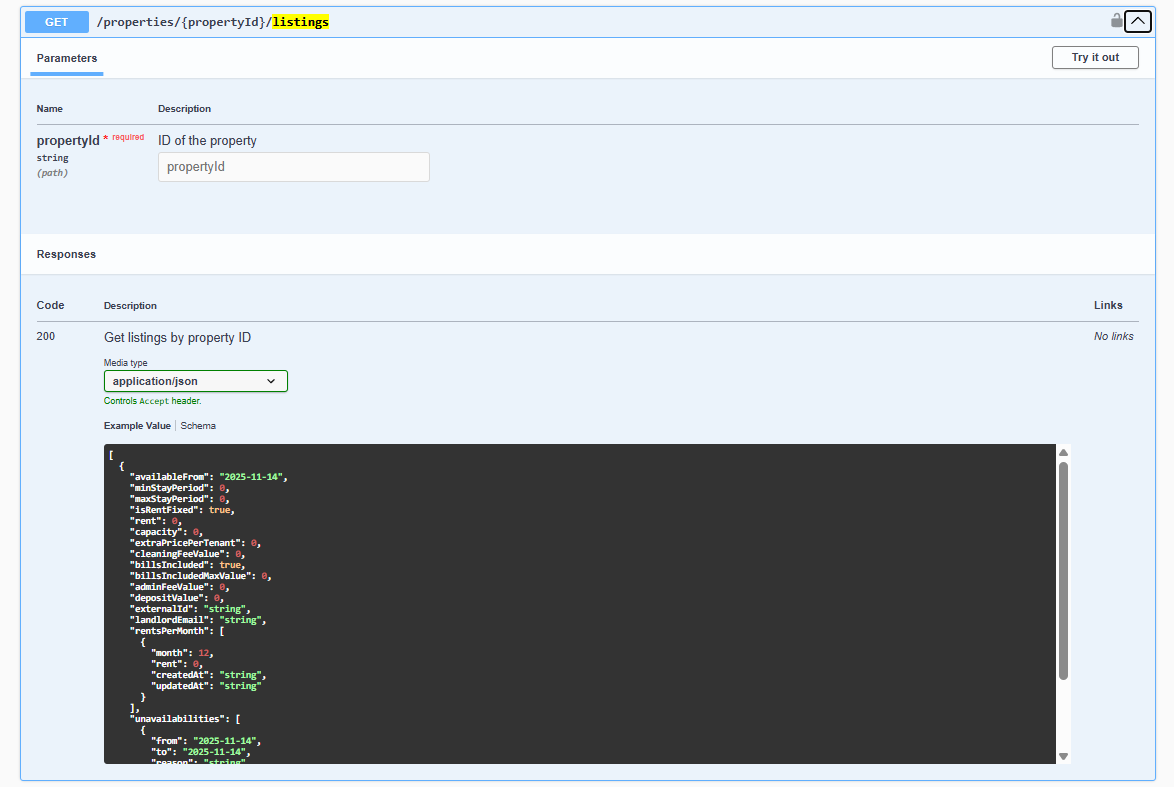
Use Integration Swagger to exercise the path-parameter variant — see the capture below and Try requests in Swagger. Confirm the returned externalId against Property & Unit Mapping before POST /bookings.
Retrieve a specific listing by its external ID.
GET /{platform}-integration/listings/{externalId} HTTP/1.1
Host: api.vivin.app
Authorization: Bearer YOUR_API_KEY
In Swagger, the single-listing operation is the one that takes your platform’s externalId as a path parameter — expand it, fill the path value, and execute after you have authorized with the same key you use in HTTP.
Response
Returns a single listing object (same schema as above). A unit marked Excluded from feed for your platform is omitted here the same way as an unmapped unit — Integration listings. A unit without a usable positive rent returns 404 with message Listing not available — Usable rent required.
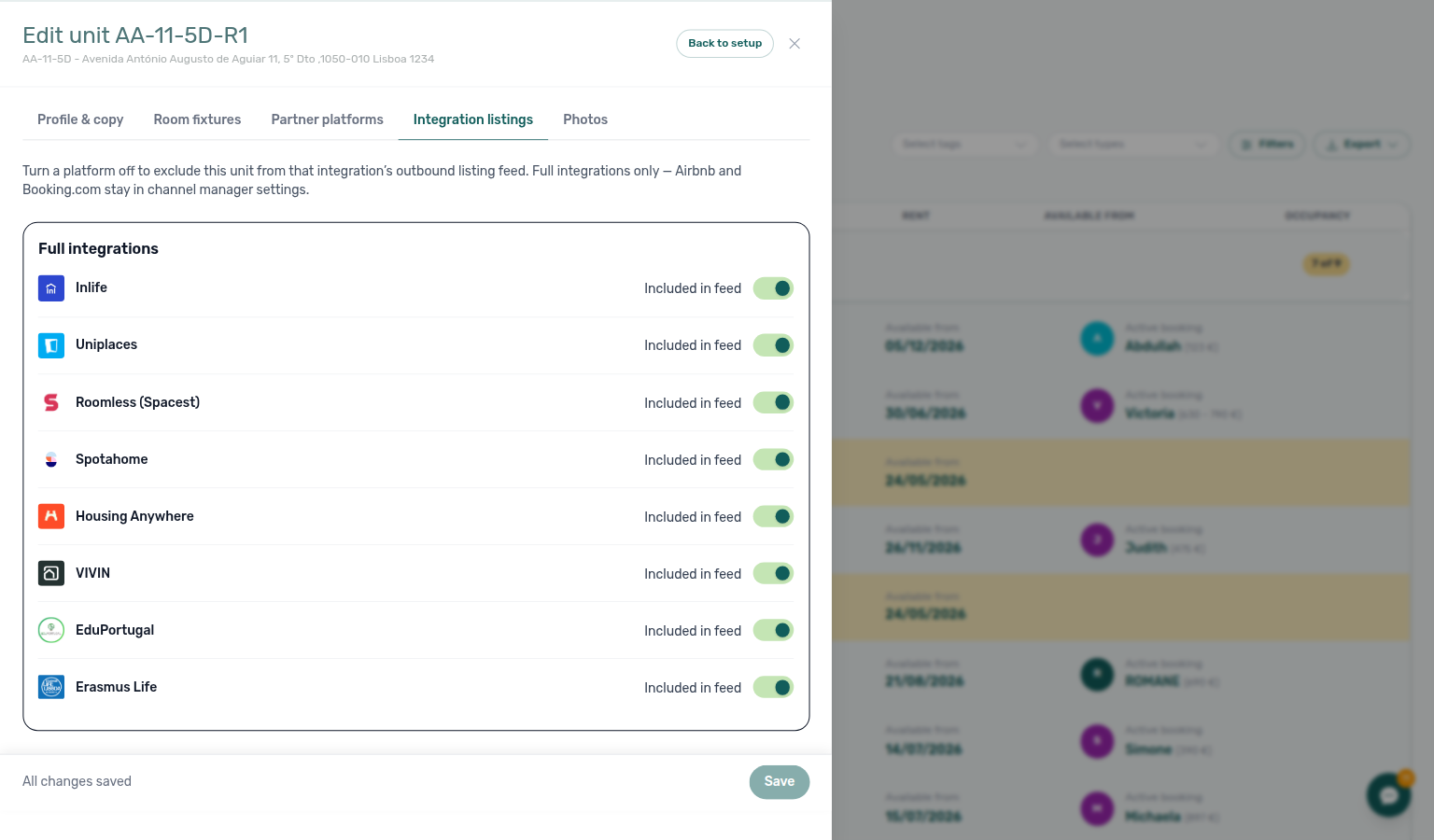
Integration listings — exclude from a platform feed
Operators set the switches on Full integration → Integration listings. Catalogue publishers: Which listings appear. Exercise GET /listings on your OpenAPI page — Try requests in Swagger.
Operators can hide one unit from your listing pull without unlinking Channels and without turning off the platform for the whole account.
Default is on (Included in feed). A missing or never-saved switch is included. When the switch is Excluded from feed for your platform, Vivin omits the unit from:
| Surface | What you see |
|---|---|
Partial GET /listings | The row is absent (even with a Channels ID) |
Partial GET /listings/{externalId} | The listing is not found |
Full GET …/listings/full | The row is absent (this is not full-feed-only) |
POST /bookings | The listing is not found |
That is a per-unit, per-platform opt-out. RoomLess (Spacest) is on the same card even though it has no full catalogue — excluding it hides the partial calendar pull. Airbnb and Booking.com are not on this card.
What this is not
- Not a missing Channels mapping (unlinked units still appear on the full catalogue — Which listings appear).
- Not Inlife’s city omit (full catalogue only) — Recognised cities.
- Not “no usable rent” (both pulls omit unpriced units) — Usable rent required.
Operators: FAQ — Listing missing from a marketplace pull.
Usable rent required
Operators set monthly amounts on Listings — Rent Value. Catalogue publishers: Full listing feeds — Usable rent. Exercise GET /listings on your OpenAPI page — Try requests in Swagger.
A listing JSON row is published only when rent is a usable positive amount. €0, a missing amount, or a variable grid with even one zero month omits the unit. Partners never receive rent: 0.
| Unit pricing | What counts as usable |
|---|---|
Fixed (isRentFixed: true) | Top-level rent is a finite number greater than 0 |
Variable (isRentFixed: false) | rentsPerMonth is non-empty and every month’s rent is greater than 0 |
A cleared monthly-rent field in the management app stores €0. That unit stays in Vivin; it drops off partner listing JSON until the operator enters a positive amount (and, on a variable grid, fills every month).
| Surface | What you see |
|---|---|
Partial GET /listings | The row is absent |
Partial GET /listings/{externalId} | 404 — message Listing not available |
Full GET …/listings/full | The row is absent |
Full GET …/listings/{externalId}/full | 404 — message Listing not available |
{
  "statusCode": 404,
  "message": "Listing not available",
  "error": "Not Found"
}
That 404 looks the same as an unmapped externalId. If Channels already has an ID, check Rent Value before treating it as a mapping defect.
This is not the same as Extra Charge on a one-person unit: that field stays on the row as extraPricePerTenant: 0 — Extra price per tenant. depositValue: 0 when Security Deposit is off also stays on the row — Computed deposit. cleaningFeeValue: 0 when Cleaning fee is off also stays on the row — Cleaning fee.


What this is not
- Not Extra Charge on a studio (
extraPricePerTenant: 0is published). - Not Security Deposit off (
depositValue: 0is published). - Not Cleaning fee off (
cleaningFeeValue: 0is published). - Not Exit fee omitted from the same row (
exitFeeValueis absent on published listings; the unit still appears) — Exit fee. - Not Excluded from feed (a separate per-platform opt-out).
- Not Inlife’s city omit (full catalogue only) — Recognised cities.
- Not an iCal
404for a missing calendar UUID — iCal feeds.
Operators: FAQ — Listing JSON omits a unit with €0 rent. Integrators: treat a missing row or Listing not available as “not in the pull”, then confirm rent.
Field Reference
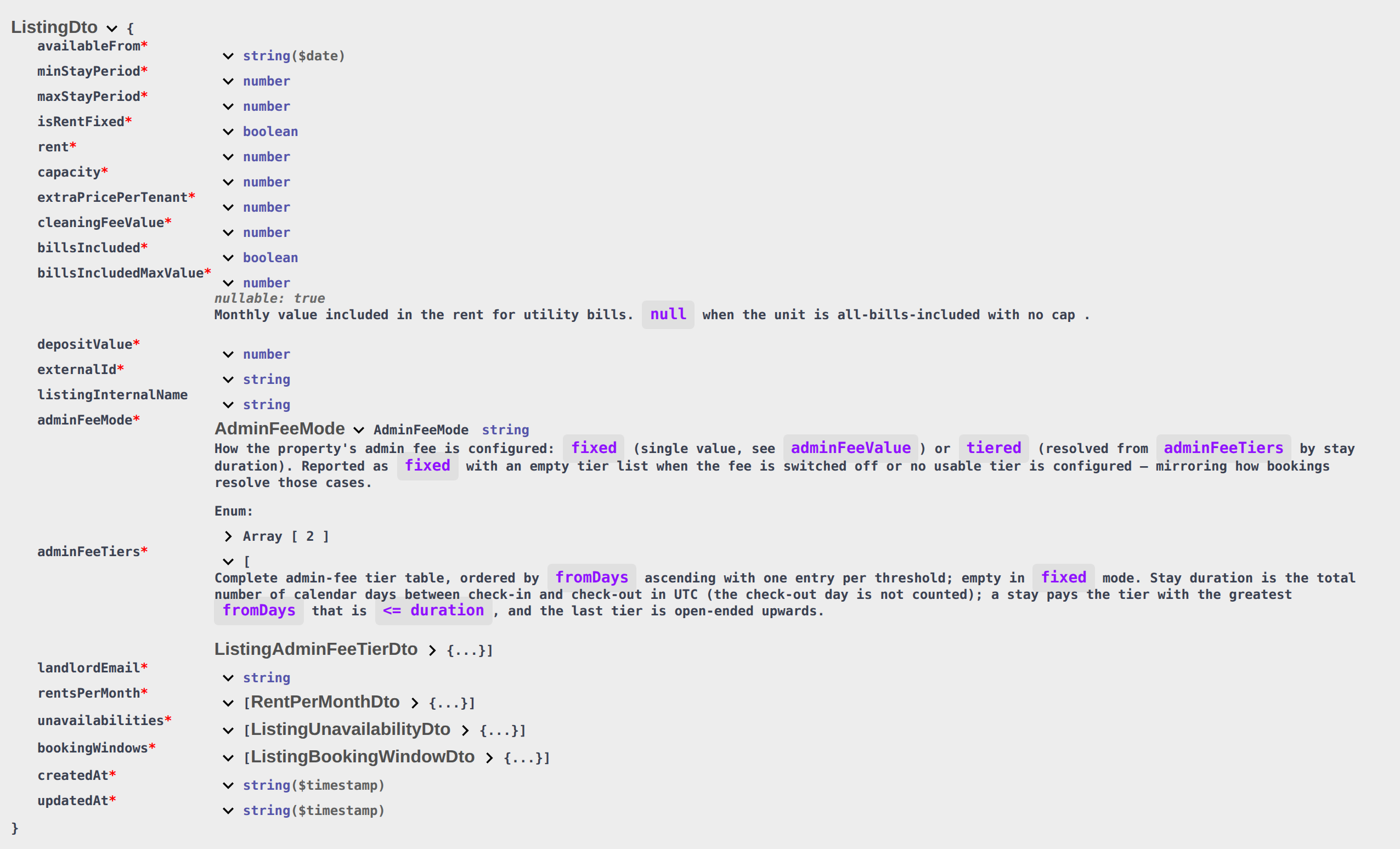
billsIncludedMaxValue is the property Bills Included ceiling unless the unit has All bills included (null cap). Operator overages: Listings — Step 3 Extra payments and monthly Utilities. adminFeeMode / adminFeeTiers mirror Listings — Admin fee. unavailabilities must align before Creating Bookings enqueue.
Listing Object
| Field | Type | Description |
|---|---|---|
externalId | string | The unique identifier for this listing on your platform. For most partners this is the ID you provided during mapping setup. On Kiwi, Capital Rooms, Porta85, and Lisbeyond, unlinked units use the Vivin listing UUID instead — see Kiwi, Capital Rooms, Porta85 & Lisbeyond. On Inlife, this is the joined propertyId_roomId (the full feed splits it into listing id + room.id) — Inlife id and room.id. |
listingInternalName | string (optional) | Unit internal name from Vivin. Populated only on Kiwi, Capital Rooms, Porta85, and Lisbeyond single-landlord feeds so partners can match units by name when externalId is a Vivin UUID. |
availableFrom | string (ISO 8601) | The earliest date this listing is available for move-in (check-out aligned, including preparation days). Prefer this field when you only need the next arrival date. Do not derive it by treating unavailabilities[].to as check-out — to is the last blocked night. Honour this date on marketplace POST /bookings — Honour listing. Partner POST cannot send Allow check-in date in the past — Allow check-in date in the past. On RoomLess, nights before this date are also listed in unavailabilities — RoomLess — nights before move-in. See Last blocked night vs first bookable day. |
minStayPeriod | integer | Minimum stay in months. 0 means no minimum. Honour this bound on marketplace POST /bookings — Honour listing. Housing Anywhere can rewrite this from a booking window — Housing Anywhere booking windows. |
maxStayPeriod | integer | Maximum stay in months. 0 means no maximum (you still receive 0, not a missing field). 12 is twelve months, not unlimited — Maximum stay. Honour this bound on marketplace POST /bookings. Housing Anywhere can rewrite this from a booking window. |
isRentFixed | boolean | If true, charge rent every month. If false, charge each stay month from rentsPerMonth. The top-level rent is then the highest of those months, not a leftover base — Variable rent headline. |
rent | number | Monthly rent in EUR, after platform markup, rounded up. Always greater than 0 on published rows — a €0 or missing amount omits the unit — Usable rent required. When isRentFixed is true, this is the fixed monthly amount. When false, this is the highest month in rentsPerMonth — not January, not a create-time leftover — Variable rent headline. Not a legal-rent slice — there is no localRentCap field — Local rent cap. Marketplace POST /bookings does not accept this field — the payment plan copies it from the listing — Creating Bookings — Rent. |
capacity | integer | Maximum number of tenants the listing can accommodate. Honour this count on marketplace POST /bookings (compare occupant headcount) — Honour listing. When this is 1, extraPricePerTenant is published as 0 — Extra price per tenant. |
extraPricePerTenant | number | Additional monthly charge (EUR) for each occupant beyond the first. 0 when capacity is 1 (or less), even if Extra Charge per Tenant was filled while capacity was higher. Not marked up — Extra price per tenant, Platform markup. Marketplace POST /bookings does not accept this field — Extra Charge copies from this GET amount using occupant headcount — Creating Bookings — Extra Charge. |
cleaningFeeValue | number | Property cleaning fee (EUR). 0 when Cleaning fee is off. Frequency (Every Month / one-time at confirmation / one-time at move-in) is not on this pull. Not marked up — Cleaning fee, Platform markup. Marketplace POST /bookings does not accept this field — Creating Bookings — Cleaning fee. |
billsIncluded | boolean | Whether utility bills are included in the rent. true when the unit has All bills included (No cap), even if the property Bills Included toggle is off — All bills included. Marketplace POST /bookings does not accept this field — Creating Bookings — Bills included. |
billsIncludedMaxValue | number or null | Monthly included-bills ceiling (EUR) when the unit flag is off — mirrors the property cap (null when the property has no cap stored). null when the unit has All bills included (no cap published, not the property euro ceiling) — All bills included. A stored 0 is a euro amount of zero, not “unlimited”. Marketplace POST /bookings does not accept this field — Vivin copies the property ceiling at create — Creating Bookings — Bills included. |
adminFeeValue | number | Flat administrative fee (EUR), rounded up. Authoritative only when adminFeeMode is "fixed". When the property admin fee is switched off, this is 0. When adminFeeMode is "tiered", treat this as a legacy flat value that may not match any tier — resolve the fee from adminFeeTiers instead. See Admin fee — fixed or by stay duration. Marketplace POST /bookings does not accept this field — Vivin resolves the property fee at create — Creating Bookings — Admin fee. |
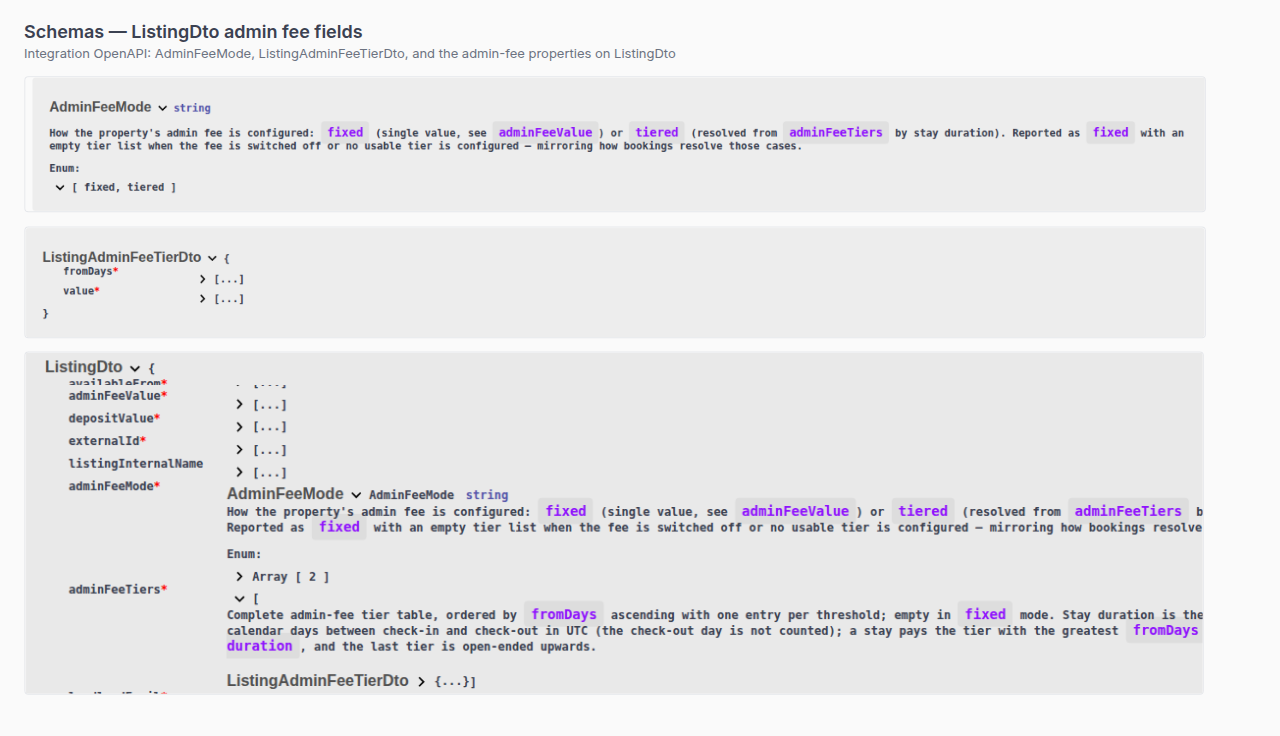
adminFeeMode | string | How the admin fee is configured: "fixed" (use adminFeeValue) or "tiered" (resolve from adminFeeTiers by stay length). Reported as "fixed" with an empty adminFeeTiers array when the fee is off or no usable tier is configured. Always present on partial feed rows. |
adminFeeTiers | AdminFeeTier[] | Complete admin-fee tier table, ordered by fromDays ascending. Empty when adminFeeMode is "fixed". Always present on partial feed rows (may be []). See AdminFeeTier Object. |
depositValue | number | Computed security deposit (EUR): the property Fixed amount, or Half / 1 / 2 Rents × unit rent (the highest month when isRentFixed is false). 0 when Security Deposit is off. Does not include Extra Deposit per Tenant. Not marked up — Computed deposit, Platform markup. Marketplace POST /bookings does not accept this field — Extra Deposit is added at create from occupant headcount — Creating Bookings — Deposit. |
landlordEmail | string | Integration Email from Settings → Integrations for this platform — not the property manager’s login. Copied onto every listing in the pull. |
rentsPerMonth | RentPerMonth[] | Month-by-month pricing (see below), after platform markup, rounded up. When isRentFixed is false, bill from this array — every month must be greater than 0 or the unit is omitted — Usable rent required. Do not treat rent as a default month. |
unavailabilities | Unavailability[] | Date ranges when the listing is not available. Each to is the last blocked night (inclusive) — see Last blocked night vs first bookable day. On RoomLess, the array can include an extra row covering tonight through the night before availableFrom — RoomLess — nights before move-in. When Calendar Block (days) is set, the array can include a further closed span after a far-future occupancy — Calendar Block (days). |
bookingWindows | BookingWindow[] | Allowed check-in/check-out date ranges (see below). |
createdAt | string (ISO 8601) | When the listing was first created in Vivin. |
updatedAt | string (ISO 8601) | When the listing was last modified. Use this for incremental sync. |
Housing Anywhere rows also include a costs array in whole euros (not listed in the shared table above). The Housing Anywhere full catalogue uses cents and a costs object — Full listing feeds — euros vs cents. Extra-occupant rent is extraPricePerTenant on this row, not a costs[] line — Extra price per tenant. The cleaning-fee cost line copies cleaningFeeValue and always uses payableAt: "monthly" — Cleaning fee. There is no exit-fee cost type — Exit fee. There is no local-rent-cap or dual-pricing cost type — Local rent cap. There is no contract-type or contract-day-type field — Creating Bookings — Contract type. There is no confirmation-payments or check-in-payments field — Creating Bookings — Confirmation payments. There is no due-day or due-month field — Creating Bookings — Due date. There is no check-in-time or check-out-time field — Creating Bookings — Check-in times. There is no days-before-due field — Creating Bookings — Days before due. There is no check-in-responsible or check-out-responsible field — Creating Bookings — Check-in responsible. There is no lease-purpose field — Creating Bookings — Lease purpose. When bills are included, utility-bills is payableBy: "included-in-rent"; an All-bills unit publishes that line with value: null — All bills included. The costs[] array is still money, not photos or amenities — Catalogue fields.
Catalogue fields are not on listing JSON
Operators edit the gallery on Listings — Photos and copy, location, and amenities on Full integration. Catalogue publishers: Full listing feeds — Catalogue fields. White-label writes: Booking Engine API. Exercise GET /listings on your OpenAPI page — Try requests in Swagger.
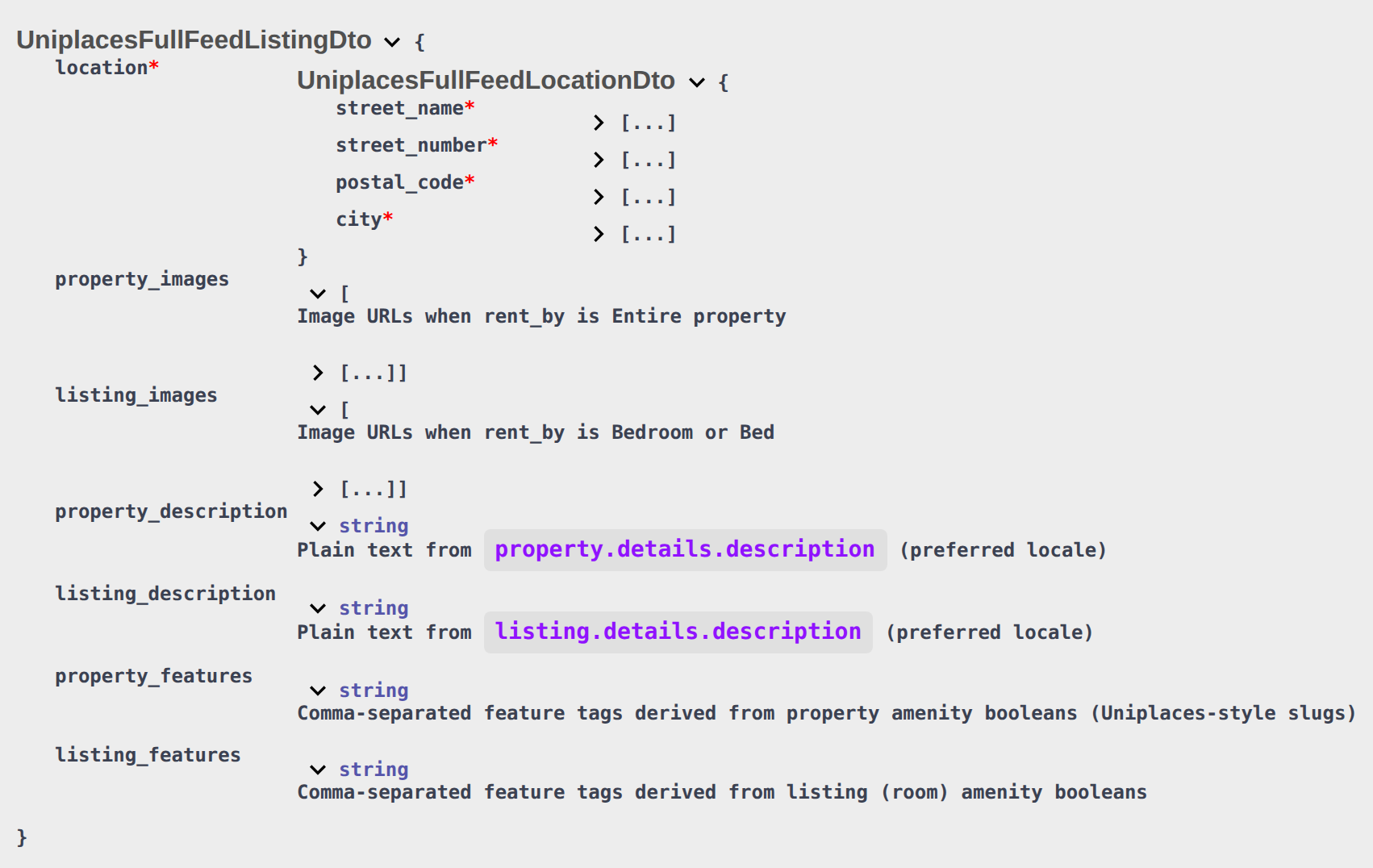
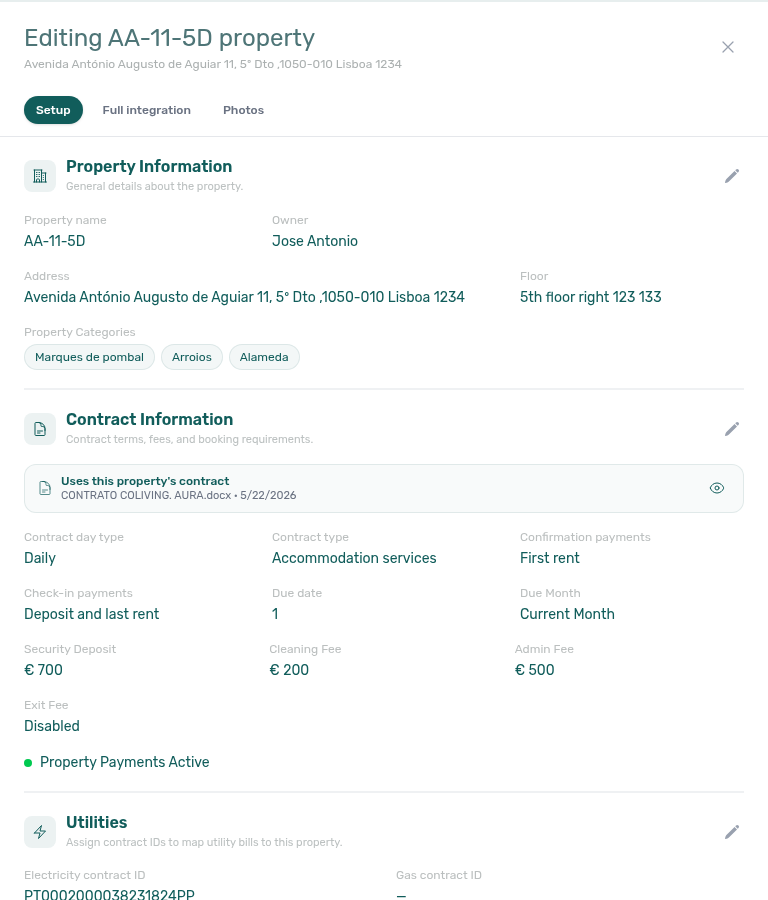
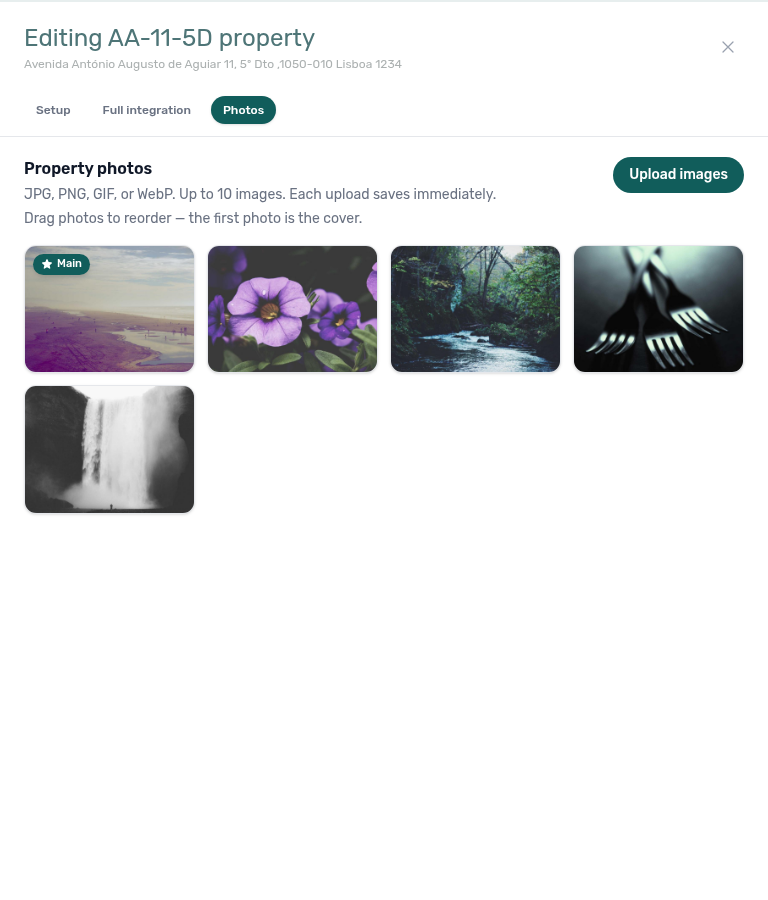
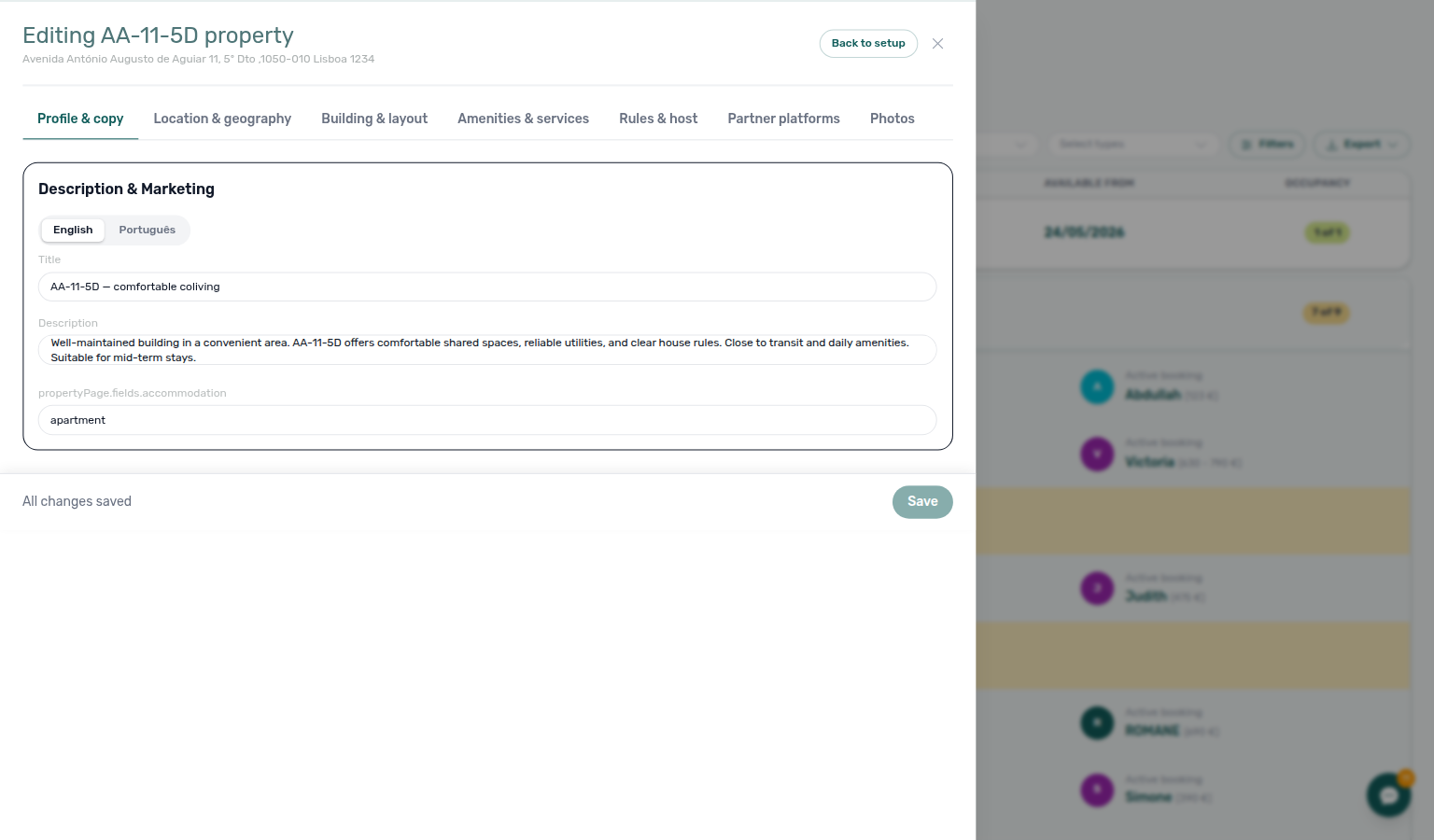
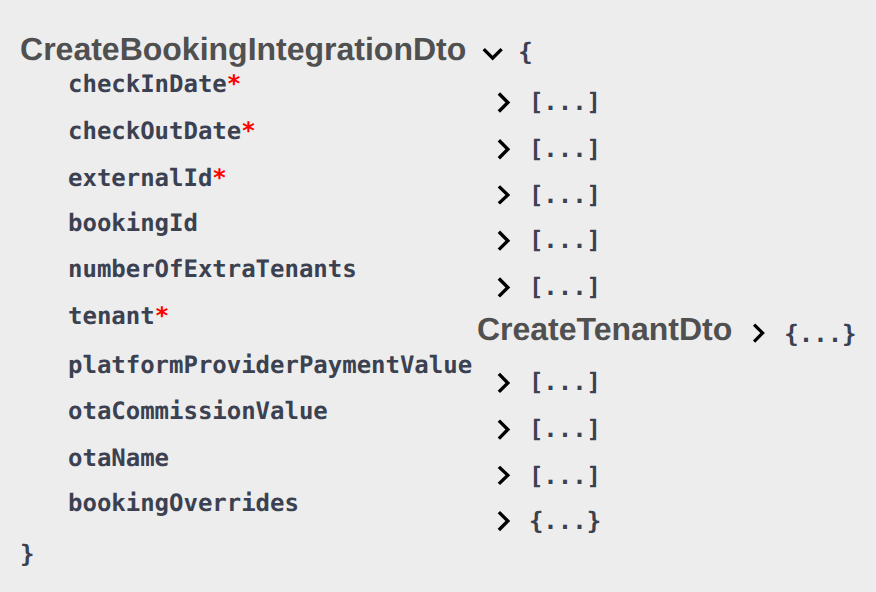
Partial GET /listings is calendar and pricing. The shared ListingDto has stay bounds, rent, fees, unavailabilities, bookingWindows, and landlordEmail. It does not include the catalogue content operators edit under Photos and Full integration.
| What operators edit | On GET /listings |
|---|---|
| Photos gallery and cover | Absent — no image URL array |
| Street, postal, city, map pin | Absent — no location / address |
| Amenities and house rules | Absent — no features / facilities object |
| Marketing title and description | Absent — no title / description fields |
| Wi-Fi network name and password | Absent — never published to partners |
{
  "externalId": "ext-123",
  "rent": 850.0,
  "unavailabilities": [],
  "bookingWindows": []
}
There is no "photos", "location", "description", or "amenities" key on that object. Housing Anywhere costs[] adds fee lines only — not gallery or copy.
Partners that publish a listing page should poll the full catalogue — Full listing feeds — Catalogue fields. A Wi-Fi amenity (boolean or feature slug) can appear there. The Wi-Fi password still does not.
White-label POST /property-listing can create inventory with copy and media. PUT /listing writes pricing and calendar. Neither changes this rule: GET /listings stays ListingDto.
This applies to every partial GET /listings and GET /listings/{externalId} (including Housing Anywhere, RoomLess, Kiwi, Capital Rooms, Porta85, Lisbeyond, and the Vivin Booking Engine).
What this is not
- Not a missing Channels mapping. A unit can appear on
GET /listingswith rent and blocks and still have no photos on that pull. - Not Placeholder image URLs (full-feed image filtering).
- Not Housing Anywhere
costs[](fees, not gallery). - Not the Wi-Fi password on the property form in Vivin — partners never receive it.
Operators: FAQ — Photos missing from listing JSON. Integrators: same FAQ.
Extra price per tenant when capacity is 1
Operators set Extra Charge per Tenant on the unit — Listings — Extra Charge per Tenant. Occupant count on POST /bookings is numberOfExtraTenants — Creating Bookings — Extra Charge. Exercise GET /listings on your OpenAPI page — Try requests in Swagger.
extraPricePerTenant is the monthly extra (EUR) for each occupant beyond the first. Operators enter it as Extra Charge per Tenant on the unit when Capacity is greater than 1.
When capacity is 1 (or less), the pull always publishes 0, even if Extra Charge was filled earlier while capacity was higher. Raise Capacity above 1 to advertise the stored amount. Do not treat a 0 on a studio as “the field is missing” — it is present and zero.
{
  "capacity": 1,
  "extraPricePerTenant": 0
}
{
  "capacity": 2,
  "extraPricePerTenant": 60.0
}
This applies to every partial GET /listings and GET /listings/{externalId} (including Housing Anywhere). Inlife full-feed rooms copy the same number as extraTenantsPrice (numPeople is capacity) — Full listing feeds — Extra tenants price. Uniplaces, Spotahome, and Housing Anywhere full catalogues do not have a separate extra-tenant price field; use this partial row.
Platform markup does not apply. Extra Charge stays the stored euro amount even when the platform card has Percentage (%) or Fixed (€) Markup — Platform markup.
Extra Deposit per Tenant is not on listing JSON. It applies when a booking is created, not on the pull.


What this is not
- Not Airbnb extra guest fee (nightly short-term).
- Not Extra Deposit per Tenant (booking-time only).
- Not
numberOfExtraTenantsonPOST /bookings(that field is occupant headcount). Custom Extra Charge / Extra Deposit euros are not on that POST — Creating Bookings — Extra Charge. Second tenant identity is also not on that POST — Creating Bookings — Second tenant. Guarantor identity and amount are also not on that POST — Creating Bookings — Guarantor. Platform commission is on that POST — Creating Bookings — Platform commission. - Not platform markup — Extra Charge stays the stored amount.
Operators: FAQ — Extra Charge missing on a studio. Integrators: FAQ — extraPricePerTenant is 0.
Platform markup applies only to rent
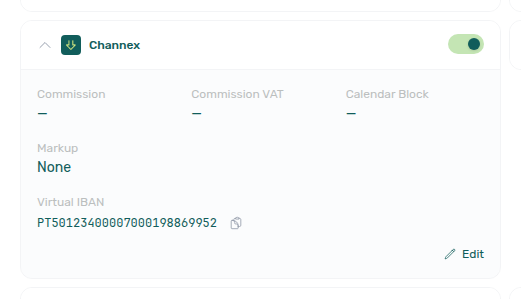
Operators set Markup on each Settings → Integrations Booking Platforms card (None, Percentage (%), or Fixed (€)). Extra Charge is on the unit — Listings — Extra Charge per Tenant. Catalogue publishers: Full listing feeds — Extra tenants price. Exercise GET /listings on your OpenAPI page — Try requests in Swagger.
Markup on a platform card raises rent only. Listing JSON applies it to rent and every rentsPerMonth[].rent, then rounds those amounts up to a whole euro (including when Markup is None). It does not change Extra Charge, cleaning fee, deposit, or admin-fee tiers.
| Field | Markup? |
|---|---|
rent / rentsPerMonth[].rent | Yes — then rounded up to a whole euro |
extraPricePerTenant | No — stored Extra Charge (or 0 when capacity is 1) |
cleaningFeeValue | No — stored property cleaning amount |
depositValue | No — computed security deposit |
adminFeeTiers[].value | No — published as configured |
adminFeeValue | No markup; rounded up on its own when the fee is fixed |
Example: Extra Charge is €60, monthly rent is €850, and the Uniplaces card is Percentage (%) 15. The pull is:
{
  "rent": 978,
  "extraPricePerTenant": 60.0,
  "cleaningFeeValue": 75.0,
  "depositValue": 850.0
}
ceil(850 + 850 × 0.15) is 978. Extra Charge, cleaning, and deposit stay 60 / 75 / 850. Do not add the percentage a second time on rent. Do not expect Extra Charge to move with Markup.
This applies to every partial GET /listings and GET /listings/{externalId}. Full catalogues copy the marked-up rent as their headline (Uniplaces pricing.rents, Inlife month map). Inlife extraTenantsPrice is the unmarked Extra Charge — Full listing feeds — Extra tenants price. Uniplaces, Spotahome, and Housing Anywhere full catalogues have no extra-tenant price field. Housing Anywhere costs[] has no extra-occupant line; cleaning-fee and security-deposit copy the unmarked amounts.

What this is not
- Not Extra Charge rising with Markup. Extra Charge is
extraPricePerTenant— Extra price per tenant. - Not Airbnb / Booking.com iCal nightly rates (Short-term).
- Not dual pricing / local rent cap (that split is booking-time only; the cap is not a listing JSON field).
- Not rounding Extra Charge or cleaning to whole euros.
Operators: FAQ — Extra Charge did not follow Markup. Integrators: display rent as published; add Extra Charge only for extra occupants.
Local rent cap is not on listing JSON
Operators set Local Rent Cap on the unit when Dual pricing is on — Listings — Local rent cap. Catalogue publishers: Full listing feeds — Local rent cap. Partner create: Creating Bookings. Exercise GET /listings on your OpenAPI page — Try requests in Swagger.
Listing JSON does not include a localRentCap field. Advertised rent and rentsPerMonth are the full monthly amount (after platform markup), not a legal-rent slice. Dual pricing lives on the booking after create — do not invent a cap split from this pull.
{
  "rent": 850.0,
  "extraPricePerTenant": 60.0,
  "cleaningFeeValue": 75.0,
  "depositValue": 850.0
}
There is no "localRentCap" key next to those amounts. Housing Anywhere costs[] has rent-adjacent fee lines (administration-fee, cleaning-fee, security-deposit) — not a local-rent-cap or dual-pricing cost type.
When a marketplace booking is created, Vivin can still freeze Local Rent Cap from the unit onto the payment plan (capped Rent plus Others for the remainder) if dual pricing is on, an Others category is saved, and the unit cap is greater than zero. You cannot send the cap on POST /bookings. Operators then see it on Contract Info.
This applies to every partial GET /listings and GET /listings/{externalId}. Full catalogues also omit a local-rent-cap field — Full listing feeds — Local rent cap.

What this is not
- Not a published
0. Cleaning fee off still sendscleaningFeeValue: 0; the local rent cap field is missing, not zero. - Not variable rent headline (highest month when
isRentFixedisfalse). - Not platform markup. Markup still applies to the full
rent. - Not Extra Charge per Tenant (
extraPricePerTenant). - Not contract tokens
{LocalRentCap}/{RentCapDifference}— those fill from the booking, not from listing JSON.
Operators: Listings — Local rent cap. Integrators: FAQ — Listing JSON has no local rent cap.
Cleaning fee value is the property amount
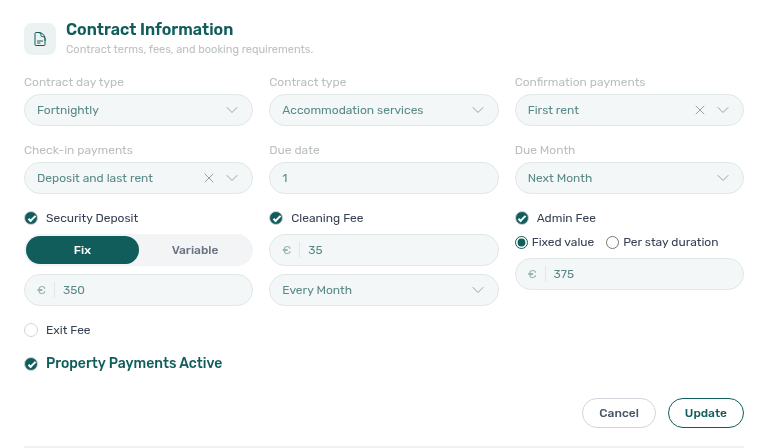
Operators set the euro amount and Frequency on Listings — Payments (Contract Information). Catalogue publishers: Full listing feeds — Cleaning fee. Marketplace create cannot send the amount — Creating Bookings — Cleaning fee. Exercise GET /listings on your OpenAPI page — Try requests in Swagger.
cleaningFeeValue is the property cleaning fee in EUR. It is the stored amount — not rounded up (unlike adminFeeValue). When Cleaning fee is off, you still receive the field as 0.
Frequency is not on listing JSON. Operators choose Every Month, One-Time Fee at Booking Confirmation, or One-Time Fee at Move-in on the property (and can override it on a booking). That choice drives the payment plan inside Vivin. Partners reading GET /listings only see the euro amount.
{
  "cleaningFeeValue": 75.0
}
{
  "cleaningFeeValue": 0
}
Housing Anywhere costs[] includes a cleaning-fee line with that same amount (euros here; cents on the full catalogue). That line always uses payableAt: "monthly", even when the property frequency is one-time. A €0 line is payableBy: "landlord" and is omitted from the full catalogue. See Full listing feeds — euros vs cents.
This applies to every partial GET /listings and GET /listings/{externalId}. Full catalogues map the amount under partner names — Full listing feeds — Cleaning fee.

What this is not
- Not Cleaning fee frequency (Every Month / one-time). That lives on the property and booking payment plan, not on this pull.
- Not Airbnb short-term dual cleaning fees (per stay / per short stay on the unit Short term card).
- Not contract tokens
{CleaningFee}/{CleaningFeeInTextEn}(those fill from the booking, not from listing JSON). - Not Extra Charge per Tenant (
extraPricePerTenant). - Not platform markup — cleaning stays the stored amount.
- Not the admin fee (
adminFeeValue/adminFeeTiers). - Not the exit / check-out fee (that field is absent from listing JSON) — Exit fee.
- Not a partner
POST /bookingsinput — Creating Bookings — Cleaning fee.
Operators: FAQ — Change cleaning fee timing. Integrators: FAQ — Listing cleaningFeeValue is not one-time. Marketplace POST /bookings does not set the amount — Creating Bookings — Cleaning fee.
Exit fee is not on listing JSON
Operators set Exit fee on the property when Fee visibility is on — Listings — Payments. Catalogue publishers: Full listing feeds — Exit fee. Partner create: Creating Bookings. Exercise GET /listings on your OpenAPI page — Try requests in Swagger.
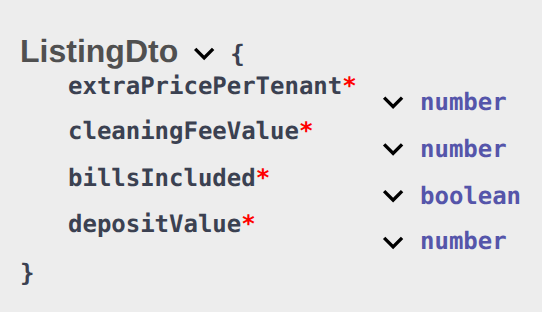
Listing JSON does not include an exitFeeValue field. Admin fee, cleaning fee, bills, and deposit appear on the pull; the exit / check-out fee does not — even when the operator has enabled it and stored an amount on the property.
{
  "extraPricePerTenant": 100.0,
  "cleaningFeeValue": 75.0,
  "billsIncluded": true,
  "depositValue": 850.0
}
There is no "exitFeeValue" key next to those fees. Housing Anywhere costs[] has administration-fee, cleaning-fee, security-deposit, and utility lines — not exit-fee.
When a marketplace booking is created, Vivin still copies the property exit fee onto the booking payment plan (one-time, due on check-out). You cannot send the amount on POST /bookings. Operators can later change it on Contract Info.
This applies to every partial GET /listings and GET /listings/{externalId}. Full catalogues also omit an exit-fee field — Full listing feeds — Exit fee.
What this is not
- Not a published
0. Cleaning fee off still sendscleaningFeeValue: 0; the exit fee field is missing, not zero. - Not Cleaning fee (
cleaningFeeValue) or admin fee (adminFeeValue/adminFeeTiers). - Not Extra Deposit per Tenant (booking-time only; listing JSON uses
depositValue). - Not contract token
{ExitFee}— that fills from the booking, not from listing JSON.
Operators: FAQ — Set an exit fee on a property. Integrators: FAQ — Listing JSON has no exit fee.
All bills included publishes a null cap
Operators tick No cap on the unit — Listings — All bills included. Catalogue publishers: Full listing feeds — All bills included. Exercise GET /listings on your OpenAPI page — Try requests in Swagger.
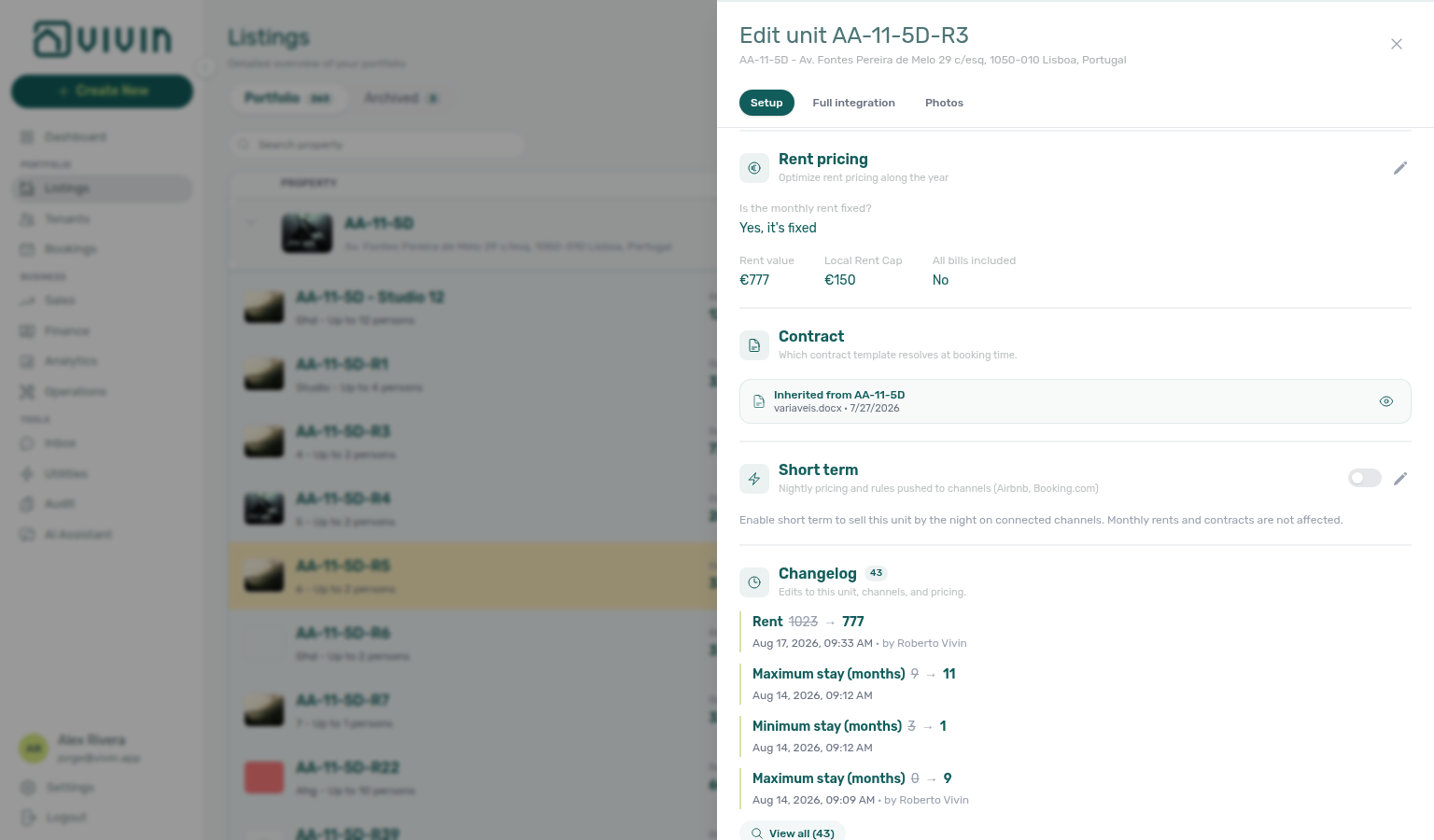
When the operator turns on All bills included (No cap) on the unit Rent pricing card, listing JSON advertises that unit as bills included with no monthly euro cap:
{
  "billsIncluded": true,
  "billsIncludedMaxValue": null
}
That override applies even when the property Bills Included toggle is off or the property still has a euro ceiling. Other rooms in the house keep the property ceiling.
When the unit flag is off, the pull mirrors the property:
{
  "billsIncluded": true,
  "billsIncludedMaxValue": 50.0
}
{
  "billsIncluded": false,
  "billsIncludedMaxValue": null
}
null means no cap is published — not a €0 ceiling. A stored 0 is a euro amount of zero (any overage is the tenant’s). Do not copy the property ceiling onto a unit that has All bills included.
This applies to every partial GET /listings and GET /listings/{externalId}. Housing Anywhere costs[] then marks utility-bills (and the named utility lines) as payableBy: "included-in-rent". With a null cap the utility-bills value is null. The Housing Anywhere full catalogue omits those included-in-rent lines, so you will not see other-additional-costs for an all-included unit — Full listing feeds — euros vs cents.
Full catalogues map the same contract under partner names — Full listing feeds — All bills included.


What this is not
- Not the property Bills Included euro ceiling copied onto an All-bills unit.
- Not a per-booking Bills included override on Contract Info. Marketplace
POST /bookingsalso cannot send that ceiling — Creating Bookings — Bills included. - Not a €0 ceiling.
billsIncludedMaxValue: 0is zero euros;nullwithbillsIncluded: trueis no cap. - Not Cleaning fee (
cleaningFeeValue) or admin fee. - Not the exit / check-out fee (absent from listing JSON) — Exit fee.
Operators: FAQ — Include all bills on a unit. Integrators: FAQ — Listing billsIncludedMaxValue is null.
Variable rent headline
Operators set monthly amounts on Listings — Rent Value. Catalogue publishers: Full listing feeds — Variable rent headline. Exercise GET /listings on your OpenAPI page — Try requests in Swagger.
When isRentFixed is false, the unit uses a twelve-month grid. rentsPerMonth is the grid you bill from. Top-level rent is the highest of those months (after platform markup, rounded up to a whole euro). It is not a leftover base from when the unit was created, and it is not January.
Charge each stay month from rentsPerMonth. Use rent only as a headline or fallback when you cannot store twelve months.
{
  "isRentFixed": false,
  "rent": 1000.0,
  "rentsPerMonth": [
    { "month": 1, "rent": 750.0 },
    { "month": 7, "rent": 1000.0 },
    { "month": 8, "rent": 1000.0 },
    { "month": 12, "rent": 750.0 }
  ]
}
In this example July and August are €1,000, so rent is 1000. A guest in January pays 750, not 1000.
When isRentFixed is true, rent is the fixed monthly amount and rentsPerMonth is unused for pricing.
Marketplace POST /bookings does not set these fields — advertised amounts become the payment plan — Creating Bookings — Rent.
This applies to every partial GET /listings and GET /listings/{externalId} (including Housing Anywhere and the Vivin Booking Engine read). Writes on the booking-engine PUT /listing still send the amounts you want stored — Booking Engine API.
Full catalogues also use the highest month as a headline where they have a single rent field — Full listing feeds — Variable rent headline. Housing Anywhere full instead publishes monthlyPrices in cents when the unit is variable.
What this is not
- Not a default or “base” month you can apply to every stay.
- Not dual pricing / local rent cap (that split is booking-time only; the cap is not a listing JSON field).
- Not Extra Charge per Tenant (
extraPricePerTenant).
Operators: FAQ — Listing rent higher than some months. Integrators: bill from rentsPerMonth when isRentFixed is false.
Computed security deposit
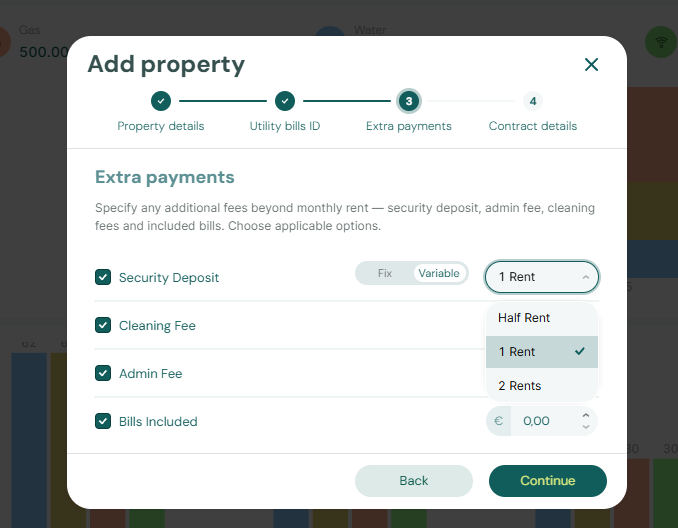
Operators set Security Deposit on Listings — Step 3 Extra payments. Catalogue publishers: Full listing feeds — Computed deposit. Marketplace create cannot send the amount — Creating Bookings — Deposit. Exercise GET /listings on your OpenAPI page — Try requests in Swagger.
depositValue is the computed security deposit for the unit (EUR). It is not Extra Deposit per Tenant, and it is not a leftover typed amount from another unit.
| Property setting | What listing JSON publishes |
|---|---|
| Fixed euro amount | That amount |
| Variable (Half Rent, 1 Rent, or 2 Rents) | That ratio × the unit’s rent. When isRentFixed is false, the rent used is the highest month — the same headline as rent — Variable rent headline |
| Security Deposit off | 0 |
{
  "isRentFixed": true,
  "rent": 850.0,
  "depositValue": 850.0
}
{
  "isRentFixed": false,
  "rent": 1000.0,
  "depositValue": 2000.0
}
In the second example the unit is variable, the highest month is €1,000, and the property deposit is 2 Rents, so depositValue is 2000. A guest in a cheaper month still pays that month from rentsPerMonth; the advertised deposit stays 2000.
Extra Deposit per Tenant is not on this pull. It is added when a booking is created for extra occupants — Creating Bookings — Deposit. Marketplace POST /bookings cannot send depositValue either — the worker copies this GET amount.
Platform markup applies to rent, not to depositValue.
This applies to every partial GET /listings and GET /listings/{externalId}. Housing Anywhere costs[] security-deposit uses the same amount (euros here; cents on the full catalogue) — Full listing feeds — euros vs cents. Full catalogues copy the same computed figure under partner names — Full listing feeds — Computed deposit.

What this is not
- Not Extra Deposit per Tenant (booking-time only).
- Not Extra Charge per Tenant (
extraPricePerTenant). - Not a marked-up copy of
rent(markup is on rent only). - Not a partner
POST /bookingsinput — Creating Bookings — Deposit.
Operators: FAQ — Listing depositValue vs Extra Deposit. Integrators: treat depositValue as the advertised hold for a solo occupant. Marketplace POST /bookings does not set the amount — Creating Bookings — Deposit.
Landlord email is the Integration Email
Operators set Integration Email on Settings → Integrations. Catalogue publishers: Full listing feeds — Landlord email. Exercise GET /listings on your OpenAPI page — Try requests in Swagger.
landlordEmail on every listing JSON object is the Integration Email from that platform’s Booking Platforms card — Uniplaces, Inlife, RoomLess (Spacest), Spotahome, Housing Anywhere, Vivin Booking Engine, Erasmus Life Lisboa, Idealista, and Coliving. Vivin copies that one card value onto every listing in the pull. It is not the signed-in user’s email, the company email on General Information, or a per-unit contact.
{
  "externalId": "unit-42",
  "landlordEmail": "[email protected]"
}
The same address can also be used as {landlordKey} on full listing URLs when you prefer email over the stored UUID. Those two uses are independent: the JSON field is always the card; the URL parameter can be either the UUID or the email.
| Surface | Field | Notes |
|---|---|---|
| Shared listing JSON (this page) | landlordEmail | Copied from the Integration Email. |
| Uniplaces full listing | landlord_email | Same value. Omitted from that listing when the card is blank. |
| Inlife full listing | landlord_email | Same Integration Email. |
Spotahome legacy /listings/feed | landlordEmail | Same copy as the shared JSON. |
| Housing Anywhere full catalogue | — | No landlord-email field on that payload. |
| Spotahome full catalogue | — | No landlord-email field on that payload. |
The Booking Engine update-listing body includes landlordEmail because it follows the same listing shape. Changing that field on the PUT does not update the Integration Email on the card. To change what partners receive, edit Integration Email on Settings → Integrations.
Channex, Airbnb, and Booking.com cards have no Integration Email field.


What this is not
- Not the signed-in property manager’s login email.
- Not the General Information company email.
- Not a per-listing or per-property contact.
- Not the
{landlordKey}path by itself — that parameter can be the stored UUID or this email.
Operators: FAQ — Listing landlordEmail vs login. Integrators: treat landlordEmail as the platform Integration Email.
Maximum stay 0 means no limit
Operators set Minimum Stay Period and Maximum Stay Period on the unit — Listings — Maximum stay 0. New units can inherit account defaults — Preferences — Min/Max Stay Defaults. Add Booking uses these bounds; marketplace POST honours listing JSON — Creating Bookings — Honour listing. Creating a booking: Booking Lifecycle — Stay duration. Catalogue names: Full listing feeds — Maximum stay. Exercise GET /listings on your OpenAPI page — Try requests in Swagger.
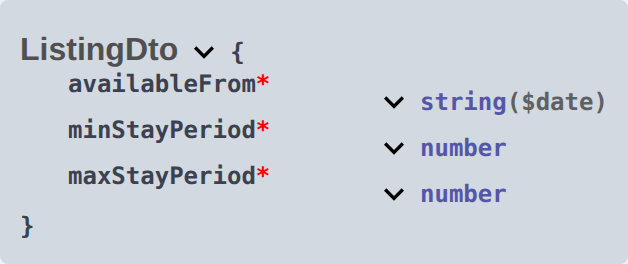
minStayPeriod and maxStayPeriod are stay bounds in whole months.
| Stored value | Meaning |
|---|---|
0 (or empty) | No bound on that side |
A positive integer (for example 12) | That many months. 12 is twelve months, not unlimited |
{
  "minStayPeriod": 1,
  "maxStayPeriod": 0
}
No maximum. A stay longer than a year is allowed if it also meets the 1-month minimum.
{
  "minStayPeriod": 1,
  "maxStayPeriod": 12
}
Stays longer than 12 months are not accepted when an operator creates the booking with Add Booking. Marketplace POST /bookings honours listing JSON instead — Honour listing.
0 is a real published number — you receive maxStayPeriod: 0, not a missing field.
Housing Anywhere partial rows (and Housing Anywhere full minimumStayMonths / maximumStayMonths) can replace these with window-derived months when a still-open booking window exists. A unit with Maximum Stay 0 can still show maxStayPeriod: 1 on Housing Anywhere if that window is short — Housing Anywhere booking windows.
Spotahome’s legacy /listings/feed omits stay.max_days when the maximum is 0. The shared ListingDto always includes the number.
Add Booking uses these bounds. Marketplace POST /bookings honours listing JSON. Changing check-in or check-out on an existing booking does not re-check them.

What this is not
- Not Short term nightly Min stay / Max stay.
- Not the Housing Anywhere booking-window rewrite (that can replace the unit sliders on Housing Anywhere payloads).
- Not “12 months means unlimited”.
Operators: FAQ — Does 12-month maximum stay mean unlimited?. Integrators: FAQ — maxStayPeriod is 0.
RentPerMonth Object
Seasonal or variable pricing. Each entry specifies the rent for a specific calendar month.
| Field | Type | Description |
|---|---|---|
month | integer (1-12) | Calendar month (1 = January, 12 = December). |
rent | number | Monthly rent (EUR) for that month. |
How to calculate a stay's total rent: For a booking spanning multiple months, sum the rent value for each calendar month covered. For partial months, pro-rate based on the number of days. Do not multiply top-level rent by the stay length when isRentFixed is false — that field is the highest month — Variable rent headline.
Admin fee — fixed or by stay duration
Operators configure the admin fee on each property in Listings → Edit property → Contract Information as either a fixed amount or Per stay duration tiers (operator reference). Partial listing pulls expose that configuration so your platform can display the same fee Vivin will charge. Marketplace POST /bookings cannot send adminFeeValue, adminFeeMode, or adminFeeTiers — after enqueue, Vivin resolves the property fee (fixed amount, or the matching stay-duration tier) — Creating Bookings — Admin fee.

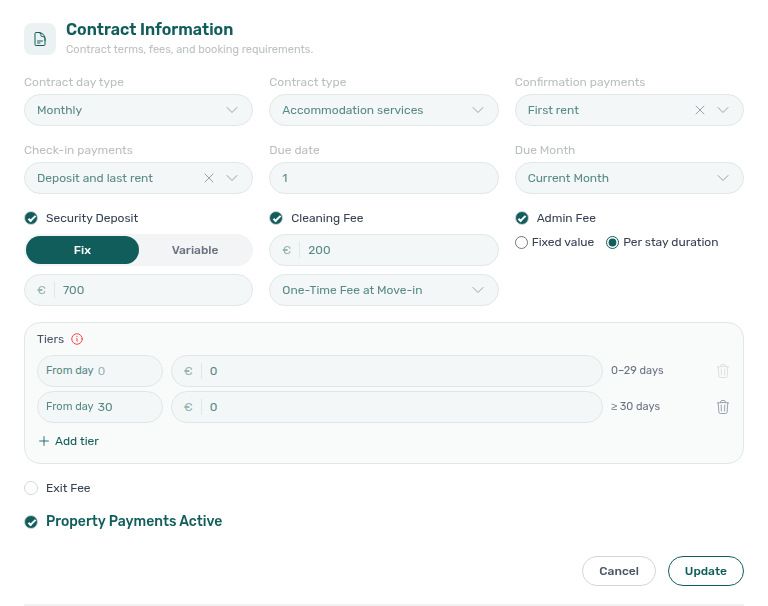
adminFeeMode | What to use for the fee amount |
|---|---|
"fixed" | Charge adminFeeValue (already rounded up). adminFeeTiers is []. |
"tiered" | Ignore adminFeeValue for pricing. Resolve the amount from adminFeeTiers using the stay length rules below. |
When the property’s admin fee is switched off in account fee settings, the feed publishes adminFeeMode: "fixed", adminFeeValue: 0, and adminFeeTiers: [] — even if stale tier rows remain on the property.
Tiered example
{
  "externalId": "abc-123",
  "adminFeeValue": 200.0,
  "adminFeeMode": "tiered",
  "adminFeeTiers": [
    { "fromDays": 0, "value": 250 },
    { "fromDays": 65, "value": 350 },
    { "fromDays": 95, "value": 400 },
    { "fromDays": 125, "value": 440 },
    { "fromDays": 155, "value": 500 }
  ]
}
In this example adminFeeValue is a leftover flat figure and must not be used for guest pricing — resolve from adminFeeTiers instead.
How to resolve a tiered fee
- Compute stay duration as the number of UTC calendar days between check-in and check-out (not counting the check-out day). Example: check-in
2026-09-01, check-out2026-09-04→ 3 days. - Pick the tier with the greatest
fromDaysthat is still<=that duration. - The last tier is open-ended upwards (any longer stay uses that tier’s
value). - Tier
valueamounts are published as configured (not rounded).adminFeeValuein fixed mode is rounded up.
| Stay duration (days) | Fee from the example above |
|---|---|
| 0–64 | 250 |
| 65–94 | 350 |
| 95–124 | 400 |
| 125–154 | 440 |
| 155+ | 500 |
On your integration’s OpenAPI page, expand the ListingDto schema and look for adminFeeMode, adminFeeTiers, and ListingAdminFeeTierDto. The same models appear under Schemas on every partial-feed integration (for example Uniplaces). See Try requests in Swagger.
AdminFeeTier Object
One row of a stay-duration admin fee table. Published only when adminFeeMode is "tiered" (otherwise the array is empty).
| Field | Type | Description |
|---|---|---|
fromDays | integer | First day of stay this tier applies from, inclusive. A correctly configured property starts at day 0. |
value | number | Admin fee charged for a stay falling in this tier, in the listing currency. Published exactly as configured so it matches what the booking is charged. |
Unavailability Object
Represents a date range when the listing cannot be booked.
| Field | Type | Description |
|---|---|---|
from | string (ISO 8601) | First blocked night (inclusive). |
to | string (ISO 8601) | Last blocked night (inclusive) — not a check-out / first-free day. See Last blocked night. |
reason | string | Why this span is closed. Most rows — including bookings, operator holds, RoomLess pre-move-in, and Calendar Block (days) extras — use "Unavailable". On Housing Anywhere partial rows, extra window blocks use "Booking window restriction". Honour every row regardless of reason. |
Last blocked night vs first bookable day
to is the last night the unit cannot be booked. The first check-in after that block is the next calendar day.
In the sample listing above:
| Meaning | Date |
|---|---|
First blocked night (from) | 1 May 2026 |
Last blocked night (to) | 31 August 2026 |
| First check-in after this block | 1 September 2026 |
That 1 September date is also how Vivin stores check-out on the booking when preparation days are 0: the tenant leaves on 1 September, and 31 August is the last occupied night. Listing availableFrom is already that next move-in — use it when you only need “when can someone arrive next,” and use unavailabilities when you paint blocked nights on a calendar.
to as check-outIf your site treats to as an exclusive end (or as the free-again day), it will offer the unit on a night that is still occupied. For the sample row, that mistake shows 31 August as the first free day. Honour every night from from through to inclusive, then open the calendar on to + 1 day.
Preparation nights lengthen to; they do not change what to means. With 3 mid-term preparation days after a 31 March last occupied night, to becomes 3 April and the earliest new check-in is 4 April — the same buffer operators see in Preferences — How preparation days affect availability.
White-label booking sites read this same shape: Booking Engine API — Unavailability to. Catalogue publishers on Uniplaces, Spotahome, and Inlife use the same inclusive last night under partner field names; Housing Anywhere’s full-feed blockedPeriods[].endDate is exclusive (the first free day) — Full listing feeds — Last blocked night. Calendar subscribers use the opposite end on iCal: DTEND is exclusive (first free morning = to + 1 day) — iCal feeds — DTEND exclusive end. Operators comparing hub screens to a live site or marketplace: FAQ — Booking site first available day and FAQ — Marketplace listing blocked through check-out night. The same last-night vs free-again split appears in the hub as Audit — End vs free-again day.
Always respect unavailabilities when showing availability on your platform. These reflect confirmed bookings and manual blocks across all connected channels. Ignoring them may result in double-bookings, which will cause the booking submission to fail.
RoomLess — nights before move-in
Honour to as the last blocked night first — Last blocked night. availableFrom is still the next move-in on every partial feed. Exercise GET /listings on the RoomLess OpenAPI page — Try requests in Swagger.
RoomLess (Spacest) is a partial-only calendar feed. When availableFrom is still in the future, Vivin adds one extra unavailabilities row so a calendar that paints only that array does not offer nights before move-in.
| Field | Value on the extra row |
|---|---|
from | Today (UTC calendar day) |
to | The night before availableFrom (last blocked night) |
reason | "Unavailable" |
Example: availableFrom is 10 January. The extra row runs through 9 January. The first night a new stay can start is 10 January — the same date as availableFrom.
The extra row is appended to the usual booking and manual-block rows. Honour every row. When availableFrom is today or already in the past, Vivin does not add it.
Other platforms do not add this row. They still publish availableFrom — use that field for the next arrival, and paint unavailabilities for occupied nights. RoomLess does both so a partner that only reads the calendar array stays aligned with move-in.
This applies to GET /roomless-integration/listings and GET /roomless-integration/listings/{externalId}.



Operators enable the Spacest card under Settings → Integrations and link each unit on Listings → Channels. FAQ: Why does RoomLess block nights before move-in?.
BookingWindow Object
Defines the allowed date ranges for new bookings. If present, only bookings with check-in/check-out dates within these windows will be accepted.
| Field | Type | Description |
|---|---|---|
minStartDate | string (ISO 8601) | Earliest allowed check-in date. |
maxStartDate | string (ISO 8601) | Latest allowed check-in date. |
minEndDate | string (ISO 8601) | Earliest allowed check-out date. |
maxEndDate | string (ISO 8601) | Latest allowed check-out date. |
Housing Anywhere — booking windows as calendar blocks
Honour to as the last blocked night first — Last blocked night. The window fields above still appear on the Housing Anywhere listing as bookingWindows. Exercise GET /listings on the Housing Anywhere OpenAPI page — Try requests in Swagger.
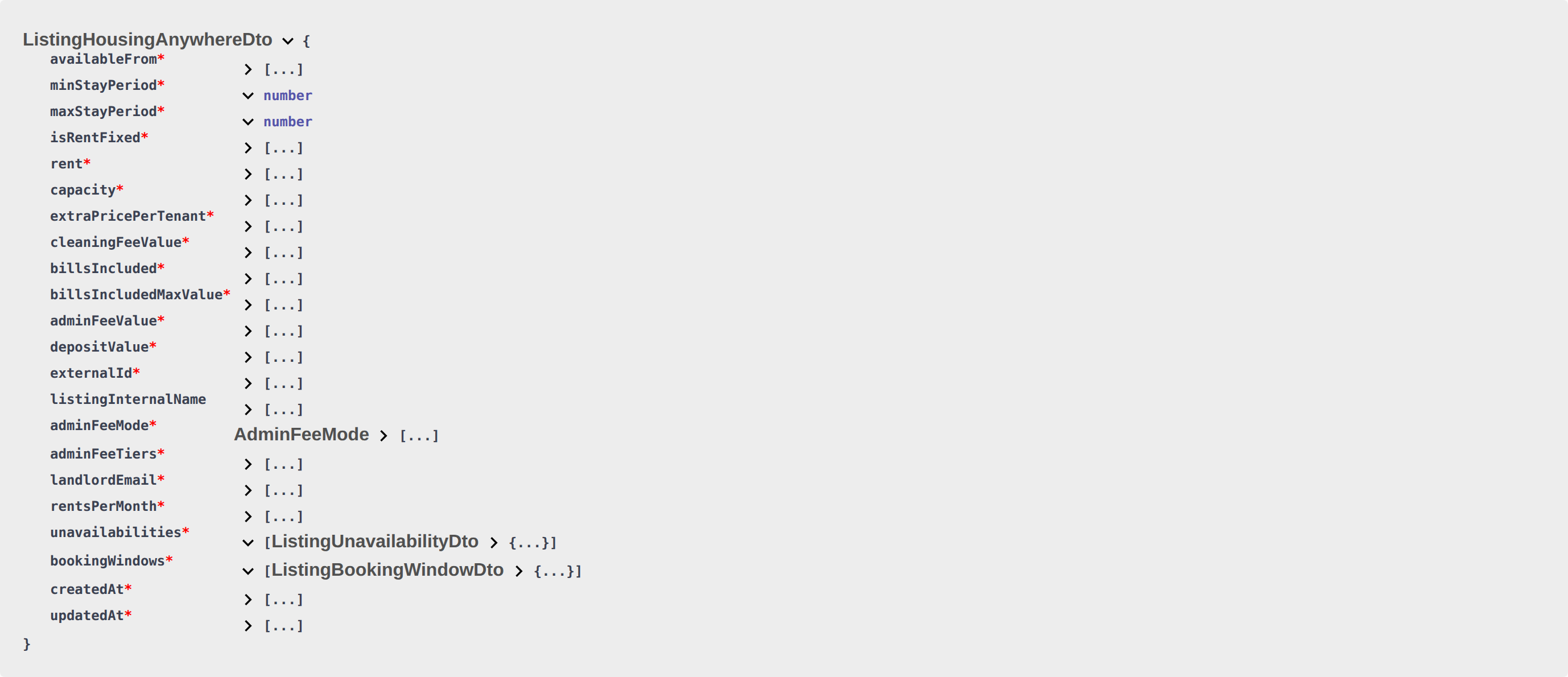
Housing Anywhere’s calendar connector does not apply bookingWindows on its own. On GET /housinganywhere-integration/listings and GET /housinganywhere-integration/listings/{externalId}, Vivin therefore also turns the first still-open window into extra unavailabilities rows so a calendar that paints only that array does not offer nights outside the envelope. The payload is ListingHousingAnywhereDto (shared listing fields plus costs) — bookingWindows stays on the object.

A window is a stay envelope: earliest and latest check-in (minStartDate / maxStartDate) plus earliest and latest check-out (minEndDate / maxEndDate). Operators set these on the unit in the management app (Setup → Booking window — Move-in window, Move-out window, Add window).
Which window Vivin uses
When more than one window exists, Vivin sorts by earliest check-in (then created time) and uses the first window that is still open for a stay starting today or later: maxStartDate is on or after today (UTC), and no existing unavailability already covers the entire check-in span (minStartDate through maxStartDate). Closed or fully blocked windows are skipped. If no window qualifies, Vivin does not add restriction rows (existing booking and operator unavailabilities stay as they are, and stay-length fields are left unchanged).
Extra unavailabilities rows
For that window, Vivin appends (it does not replace booking-driven or operator rows):
| Block | from | to | reason |
|---|---|---|---|
| Before the move-in window | Today (UTC calendar day), when the earliest check-in is still in the future | The night before minStartDate | Booking window restriction |
| After the move-out window | The day after maxEndDate | About ten years from today (far-future closed calendar) | Booking window restriction |
to is the last blocked night, same convention as other unavailability rows in this article. If minStartDate is today or already in the past, the before block is omitted. The after block is always added when a window qualifies. Extra rows exist on the JSON pull only — they are not saved as operator Calendar holds in the management app.


Stay length on the same payload
On the same Housing Anywhere listing object, Vivin rewrites minStayPeriod and maxStayPeriod from that window (not from a separate stay-length setting):
minStayPeriodis the number of months between the window’s earliest check-in (minStartDate) and latest check-out (maxEndDate), rounded down.maxStayPeriodis the same span rounded up.
A window shorter than one month can publish minStayPeriod 0 and maxStayPeriod 1. Treat those stay-period fields as window-derived. They are not the unit Maximum Stay Period slider — a unit with Maximum Stay 0 (no cap) can still show maxStayPeriod: 1 here — Maximum stay.
Housing Anywhere full feed
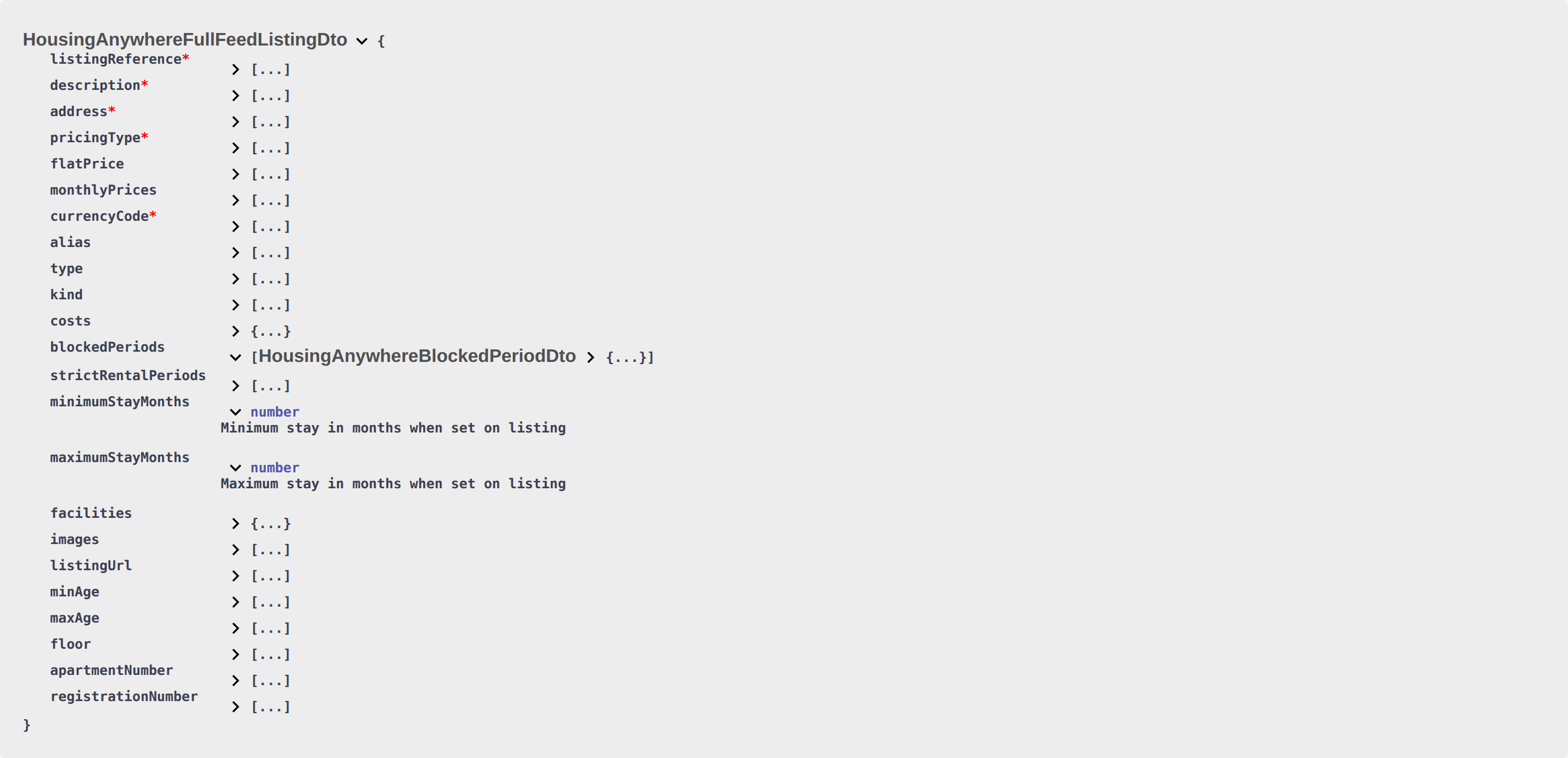
The Housing Anywhere full listing (GET …/listings/full) does not copy these extra Booking window restriction rows into blockedPeriods. Full occupancy still comes from saved listing unavailabilities (bookings and operator blocks). Full does use the same window math for minimumStayMonths and maximumStayMonths. Honour those stay-month fields on the full payload — do not assume full occupancy matches the partial listing’s extra unavailability rows. The full schema has strictRentalPeriods, not bookingWindows. See Housing Anywhere — booking windows vs blockedPeriods.
Uniplaces, Spotahome, and Inlife full feeds
When the same listing is exported on Uniplaces, Spotahome, or Inlife full feeds, occupancy arrays (blocked_periods, occupancies, unavailability) do include the window blocks (same from/to nights). Stay bounds on those feeds follow the adjusted listing. Details: Full listing feeds.
What this is not
- Not the shared
ListingDtoavailableFromnight-before-open block (RoomLess — nights before move-in). - Not a substitute for POST
/bookingswindow validation — creating a booking still has to fall inside a real window; these rows are for calendar display. - Not Calendar Block (days) (a closed span after a far-future occupancy when the platform card has a day threshold).
Uniplaces, Inlife, RoomLess, and other partial ListingDto feeds keep bookingWindows for the partner to honour; they do not receive these extra Booking window restriction unavailability rows.
Operators enable the HousingAnywhere card under Settings → Integrations and link each unit on Listings → Channels. Set the envelope on Listings → Booking window. FAQ: Why does Housing Anywhere block nights outside the booking window?.
Calendar Block (days)
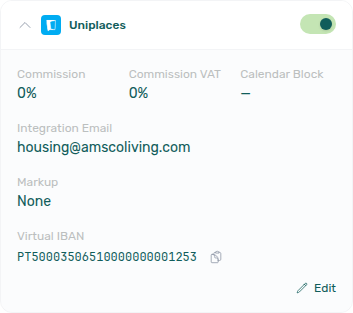
Honour to as the last blocked night first — Last blocked night. Operators set the threshold on the platform card — Integrations — Calendar Block (days). Exercise GET /listings on your OpenAPI page — Try requests in Swagger.
Calendar Block (days) is a per-platform threshold on Settings → Integrations (Calendar Block on the card, Calendar Block (days) in Edit). It is not a cleaning buffer and it is not Short-term iCal Max Date. Preparation nights still lengthen a booking’s own to — Last blocked night.
When the field is empty or 0, Vivin does not add a row.
When it is a positive number N, and the listing’s latest occupancy with an end date is still more than N days from today (UTC), Vivin appends one extra unavailabilities row:
| Field | Value on the extra row |
|---|---|
from | The last blocked night of that latest occupancy (to) |
to | About two years after that night (last blocked night) |
reason | "Unavailable" (same as booking and operator rows) |
Example: Calendar Block is 30, today is 1 June, and the latest occupancy’s to is 30 September. That last night is more than 30 days away, so the extra row runs 30 September → 30 September two years later. The first check-in after that extra span is the next calendar day. If the latest occupancy ends in 14 days and N is 30, Vivin does not add the row — the calendar reopens after that stay.
The extra row is appended to booking and operator rows. Honour every row. Open-ended occupancies (no to) are ignored when choosing the latest occupancy. If another occupancy already overlaps the extra start, Vivin skips the extra row.
The extra span exists on the JSON pull only — it does not appear as an operator Calendar hold. It applies to partial GET /listings for that platform (including the Vivin Booking Engine) and to full catalogue occupancy for Uniplaces, Spotahome, Housing Anywhere, and Inlife (full feeds typically merge it with the last stay into one range). iCal export does not use this field.
What this is not
- Not preparation days (those lengthen a booking’s own
to). - Not RoomLess nights before move-in.
- Not Housing Anywhere booking windows.
- Not Short-term iCal Max Date (Airbnb / Booking.com iCal horizon).
Operators: FAQ — Marketplace blocked for years after the last stay. Integrators: paint every unavailabilities row; do not drop a far-future "Unavailable" span.
Sync Strategy
Prefer listing.updated / unavailability.* push events from Webhooks & Notifications when configured instead of aggressive polling. When blocks look stale, operators run Manual block hygiene.
Recommended Polling Interval
- Full sync: Every 15-30 minutes
- Incremental sync: Compare
updatedAttimestamps to detect changes since your last poll
Platform Markup
rent and rentsPerMonth[].rent already include Markup from the platform card — those are the amounts to show guests. Extra Charge, cleaning, deposit, and admin-fee tiers do not receive Markup — Platform markup applies only to rent.
On a variable unit, both rentsPerMonth[].rent and the headline rent (the highest month) already include that markup — Variable rent headline.
Occupancy extras (RoomLess pre-move-in, Housing Anywhere booking windows, and Calendar Block (days)) are separate from markup — they add or rewrite unavailabilities rows, not prices.
Listings & Availability section cross-reference
Use the endpoints and fields above. Related integrator pages are linked inline where useful.
Related
Related below links partial GET /listings pulls to setup, companion API guides, operator workflows, and escalation paths.
Setup sequence after go-live
Complete Account Settings — Recommended setup order before partner traffic.
- Setup steps 1–10 — Complete operator workspace basics (Recommended setup order) before requesting partner Bearer keys; property managers automating outside the browser use Management session authentication after step 3 (Users)
- Setup steps 11–12 (Integrations, Integration field capability, Tenant categories default for integrations) — Channel credentials, calendar horizons, and payload field expectations before
[email protected]onboarding; operator context: Integrations & Distribution - Setup step 13 (Listings) — Property wizard,
externalIdmapping, and Channels tab before first partner listing reads or writes - Setup steps 14–15 (Bookings, Tenants) — Validate imported reservation shape and tenant segments after partner traffic
- After steps 13–15 — Onboarding a New Property — Step 7 go-live verification before escalating partner pull, webhook, or mapping defects
- After step 13 — poll
GET /listingsonly after ChannelsexternalIdmapping is saved; prefer Webhooks & Notifications (listing.updated,unavailability.*) when Vivin provisions outbound callbacks - Partner credential requests — Email
[email protected](distinct from in-app Vivin support tickets in Get Help & Support)
Documentation map & escalation
- Getting Started — Recommended Setup Sequence before partner HTTP traffic;
- API Reference hub — Hub pairing matrix across integration guides;
- Get Help & Support — Request credentials or onboarding via
[email protected](hub: Setup sequence after go-live) - FAQ & Troubleshooting — Management-app answers distinct from partner HTTP integration retries (hub: Setup sequence after go-live)
- Glossary — Term definitions used across API and operator docs (hub: Setup sequence after go-live)
Companion API guides
Companion guides share Bearer authorization or error shapes with this page — start from API Reference hub.
- Booking engine integration — White-label
PUT /listingwrites that change what partial pulls return - iCal feeds — Short-term calendar export when partners prefer
text/calendarover JSON pulls (DTEND= exclusive free-again day —DTENDexclusive end) - Property & Unit Mapping — How
externalIdvalues are configured before listings appear in pulls - Creating Bookings — Submit reservations that respect
unavailabilitiesand booking windows (honour listing JSONcapacity, stay months, andavailableFrom— Honour listing; POST does not setrent— Rent; POST does not set Extra Charge / Extra Deposit euros — Extra Charge; POST does not set Second tenant identity — Second tenant; POST does not set Guarantor identity or amount — Guarantor; POST does record platform commission — Platform commission; POST does not setcleaningFeeValue— Cleaning fee; POST does not setdepositValue— Deposit; POST does not setadminFeeValue— Admin fee; POST does not setbillsIncludedMaxValue— Bills included; POST does not setcontractType/contractDayType— Contract type; POST does not set confirmation / check-in payments — Confirmation payments; POST does not set due day / due month — Due date; POST does not set check-in / check-out times — Check-in times; POST does not set days before due — Days before due; POST does not set check-in / check-out responsible — Check-in responsible; POST does not setleasePurpose— Lease purpose; POST does not setdepositReturnDueDay— Deposit Refund Limit; POST does not setbookingTags— Booking tags; POST does not setcreateCheckInMaintenanceTicket/createCheckOutMaintenanceTicket— Maintenance tickets; POST does not setignoreListingPreparationDays— Ignore unit preparation days; POST does not setignoreAvailableFrom— Allow check-in date in the past; POST does not setignorePenaltyFees— Exclude from penalty fees; POST does not setuseCheckInDateInContract/useCheckOutDateInContract— Use check in date as contract start date; POST always sends onboarding — Send onboarding; POST always uses unit contract rents — Use unit contract rents; POST does not set tenant category — Tenant category; RoomLess calendars already include nights beforeavailableFrom— RoomLess — nights before move-in; Housing Anywhere calendars already include nights outside the booking window — Housing Anywhere — booking windows as calendar blocks; Calendar Block (days) can close a far-future span — Calendar Block (days)) - Full listing feeds — Rich catalogue publish when partial
ListingDtois not enough (same last blocked night; partner field names — Last blocked night; extra catalogue rows are unlinked units — Which listings appear; Housing Anywhere cents vs this page’s euros — Euros vs cents; variable-rent headline — Variable rent headline; computed deposit — Computed deposit; cleaning fee amount — Cleaning fee; exit fee is omitted — Exit fee; local rent cap is omitted — Local rent cap; photos, address, amenities, and copy — Catalogue fields; All bills included publishesbillsIncluded: trueand anullcap — All bills included; landlord email is the Integration Email — Landlord email; usable rent — Usable rent; maximum stay0is no cap — Maximum stay) - Webhooks & Notifications — Push updates when availability or booking status changes
- Booking Lifecycle & Validations — Post-pull validation rules before
POST /bookingsaccepts a payload - Error Handling —
404/409on partial pulls and booking submission (Listing not availablewhen rent is unusable — Usable rent required) - Authentication — Bearer authorization before first
GET /listings - AI usage — Operator JWT cost ledger (integration Bearer keys return
401)
Upstream & downstream workflows
- Manual block hygiene — Hygiene pass when calendar blocks suppress occupancy but partial pulls look “fully booked”
- Entering Monthly Utility Bills — Operator overage workflow after bills exceed
billsIncludedMaxValueceilings - Portfolio KPI review — Reconcile partial-pull occupancy with Analytics and Dashboard after bulk channel sync
- Notification triage — Clear booking-import alerts after verifying
externalIdmappings on Sales → Channels - Processing a New Booking — Operator checklist after partial-pull availability checks pass and a reservation is created
- Managing a Check-out & Deposit Refund — Availability released on connected channels after Ended status
Operator UI & settings
- Sales → Channels — Operator UI for iCal linking and channel status
- Listings — Extra Charge per Tenant — Capacity greater than 1 shows Extra Charge; listing JSON publishes
0when capacity is 1; Markup does not apply — Platform markup - Listings — Maximum stay 0 — 0 is no maximum; 12 is twelve months — Maximum stay
- Listings — Rent Value — Fixed vs variable monthly rent; listing JSON
rentis the highest month when the unit is variable; a €0 month omits the unit from partner pulls — Usable rent required - Listings — Step 3 Extra payments — Security Deposit (Fixed vs Variable) publishes as listing JSON
depositValue; marketplacePOST /bookingscopies that hold — Creating Bookings — Deposit. Bills Included ceilings publish asbillsIncluded/billsIncludedMaxValue; marketplace POST copies the property ceiling — Creating Bookings — Bills included - Listings — Payments tab — Cleaning fee Frequency drives the payment plan; listing JSON publishes the euro amount only — Cleaning fee. Marketplace
POST /bookingscopies that amount — Creating Bookings — Cleaning fee. Admin fee (fixed or Per stay duration) publishes asadminFeeValue/adminFeeMode/adminFeeTiers; marketplace POST resolves it at create — Creating Bookings — Admin fee. Due date / Due Month copy onto marketplace bookings (listing JSON omits both) — Creating Bookings — Due date. Check-in time / Check-out time copy from account Booking Defaults (listing JSON omits both) — Creating Bookings — Check-in times. Days before due date copies from account Payments (listing JSON omits it; there is no property-level override) — Creating Bookings — Days before due. Deposit Refund Limit inherits account Payments (listing JSON omitsdepositReturnDueDay; there is no property-level override) — Creating Bookings — Deposit Refund Limit. Check-in responsible / Check-out responsible stay empty on marketplace bookings (listing JSON omits both; there is no account-level or property-level default) — Creating Bookings — Check-in responsible. Lease purpose stays empty on marketplace bookings (listing JSON omits it; Categories is a catalog, not a default label) — Creating Bookings — Lease purpose. Booking categories stay empty on marketplace bookings (listing JSON omitsbookingTags; Categories is a catalog, not a default tag) — Creating Bookings — Booking tags. Automatic check-in/out tickets follow the property Maintenances tab (listing JSON omits the skip flags) — Creating Bookings — Maintenance tickets. Ignore unit preparation days is operator-only (listing JSON omitsignoreListingPreparationDays) — Creating Bookings — Ignore unit preparation days. Allow check-in date in the past is operator-only (listing JSON omitsignoreAvailableFrom) — Creating Bookings — Allow check-in date in the past. Exclude this booking from penalty fees is operator-only (listing JSON omitsignorePenaltyFees) — Creating Bookings — Exclude from penalty fees. Marketplace POST also cannot send Use check in date as contract start date — Creating Bookings — Use check in date as contract start date. Marketplace POST always sends the onboarding email and generates the contract — Creating Bookings — Send onboarding. Marketplace POST always uses Use unit contract rents and other contract details — Creating Bookings — Use unit contract rents. Exit fee is operator-only — Exit fee. Local Rent Cap is operator-only — Local rent cap - Listings — Step 4 Contract details — Rental payment frequency and Contract type copy onto marketplace bookings; listing JSON omits both — Creating Bookings — Contract type. Confirmation payments and Check-in payments also copy from the property; listing JSON omits both — Creating Bookings — Confirmation payments. Due date and Due Month copy from the property (or account Tenant Due Day / Tenant Due Month); listing JSON omits both — Creating Bookings — Due date. Check-in time / Check-out time copy from account Booking Defaults; listing JSON omits both — Creating Bookings — Check-in times. Days before due date copies from account Payments; listing JSON omits it — Creating Bookings — Days before due. Check-in responsible / Check-out responsible stay empty on marketplace bookings; listing JSON omits both — Creating Bookings — Check-in responsible. Lease purpose stays empty on marketplace bookings; listing JSON omits it — Creating Bookings — Lease purpose. Deposit Refund Limit inherits account Payments; listing JSON omits
depositReturnDueDay— Creating Bookings — Deposit Refund Limit. Booking categories stay empty on marketplace bookings; listing JSON omitsbookingTags— Creating Bookings — Booking tags. Automatic check-in/out tickets follow the property Maintenances tab; listing JSON omits the skip flags — Creating Bookings — Maintenance tickets. Ignore unit preparation days is operator-only; listing JSON omitsignoreListingPreparationDays— Creating Bookings — Ignore unit preparation days. Allow check-in date in the past is operator-only; listing JSON omitsignoreAvailableFrom— Creating Bookings — Allow check-in date in the past. Exclude this booking from penalty fees is operator-only; listing JSON omitsignorePenaltyFees— Creating Bookings — Exclude from penalty fees. Marketplace POST also cannot send Use check in date as contract start date — Creating Bookings — Use check in date as contract start date. Marketplace POST always sends the onboarding email and generates the contract — Creating Bookings — Send onboarding. Marketplace POST always uses Use unit contract rents and other contract details — Creating Bookings — Use unit contract rents - Listings — Local rent cap — Unit Rent pricing cap that listing JSON omits
- Settings → Invoicing — Fee visibility — Account Exit fee toggle; listing JSON still omits the amount
- Bookings — Booking-level fee amounts — Override admin, cleaning, and exit fees on a stay; partners cannot send those amounts on
POST /bookings - Listings — All bills included — Unit No cap publishes listing JSON
billsIncluded: trueandbillsIncludedMaxValue: null— All bills included. MarketplacePOST /bookingscannot send that null cap — Creating Bookings — Bills included - Listings — Booking window — Operator Setup controls that populate
bookingWindows(Housing Anywhere also paints nights outside the envelope — Housing Anywhere booking windows) - Settings → Integrations — Integration Email on Booking Platforms cards is listing JSON
landlordEmail— Landlord email. Markup (None / Percentage (%) / Fixed (€)) applies only to listing JSON rent — Platform markup - Settings > Preferences — Min/Max Stay Defaults — Defaults for new units; 0 or blank is no restriction — Maximum stay
- Settings → Integrations — Calendar Block (days) — Per-platform threshold that can close listing JSON after a far-future occupancy
- Settings > Preferences — Booking defaults — Automatic preparation buffers included in
unavailabilities - Settings > Preferences — In-app notifications — Account-wide channel alerts when availability changes trigger notifications
- Settings > Emails — Payment reminder Communication Rules after partner imports create live bookings
- Listings — Photos pill — Gallery and cover photo; listing JSON omits image URLs — Catalogue fields
- Property & listing details (booking engine) — Rich marketing and partner-platform fields partial
ListingDtopulls omit — Catalogue fields; Integration listings hides a unit from a platform pull
Deeper concept reads
- Integrations concept — Channel strategy behind partial vs iCal vs full partner feeds
- Booking Lifecycle — Computed Upcoming → Ongoing → Ended / Canceled status model, list filters, and Timeline
- Payment Allocation — Two-layer receipts, invoiced-floor rent edits, and credit note reject/revert warnings
- Tenant Portal — Partial listing
rentsand availability partners read align with tenant payment schedule visibility - FAQ — Tenant contract signing blocked — No PDF yet, mandatory Your Details gates, category locks, or Lease purpose; portal signing vs paper upload on Contract Info
Deeper workflow reads
See Upstream & downstream workflows above for the same guides.
Operator habit hubs
Day-to-day operator habits (lockout catch-up, pending receipts, payment triage, handoffs, and related playbooks) live on the Common Workflows habit hub.
Deep-link anchors for habit hubs
Lockout catch-up after password recovery
Pending manual receipt approval
Reject/revert mistaken receipts
Portfolio segmentation by tenant category
Notification row-click navigation
Payment alert to receivables triage
Confirmation alert triage
Finance debt receivables triage
Handling a Late Payment collections
Finance Income status drill-down
Cash flow forecast drill-down
Key glossary terms
- Glossary — landlordEmail — Listing JSON
landlordEmailis the platform Integration Email, not the property manager’s login - Glossary — exitFeeValue — Exit fee is absent from listing JSON (not published as
0) - Glossary — billsIncluded — Listing JSON
billsIncluded/billsIncludedMaxValue; All bills included publishesnullcap - Glossary — Integration listings — Per-unit Included in feed / Excluded from feed on partner listing pulls
- Glossary — Deposit dispute — Check-out deposit retention surfaced in operator follow-up from import alerts
- Glossary — Deposit lifecycle status — Listing
depositValueis the computed property deposit (Extra Deposit is added at booking create) - Glossary — Extra Charge per Tenant — Occupant surcharge; listing JSON
extraPricePerTenantis not marked up - Glossary — Pricing Markup — Platform-card Markup applies only to listing JSON rent
- Glossary — End-of-Booking cost split — Charge Time → End of Booking splits daily overage across every occupied unit; still-staying roommates stay in the denominator
- Glossary — Change history — Operator-initiated edits on Listings setup and Bookings Changelog; create-time defaults excluded
- Glossary — Archived booking ledger visibility — Delete Booking hides manual/provider_platform rows on Finance → Transactions; vIBAN and credit card stay visible
- Glossary — Finance tenant category cache refresh — Recategorizing a tenant updates
booking.tenantCategoryIdimmediately; ledger tabs reflect it on reload, while Overview can lag up to ~10 minutes - Glossary — Full term list
Module documentation hubs
for screen-by-screen operator follow-up.
- Audit module — Cross-portfolio manual blocks that appear in
unavailabilitiesalongside bookings (hub) - Bookings module — Imported stays that consume
unavailabilitieswindows from partial pulls (hub) - Dashboard — Vacant Units — KPI signal when blocks in partial pulls suppress vacancy counts (hub)
- Analytics — Overview tab — KPI reconciliation after partial-pull occupancy changes (hub)
- Utilities module — Operator bill entry and tenant overage when actual supplier costs exceed
billsIncludedMaxValuefrom partial pulls (hub) - Operations module — Maintenance tickets, cash flows, check-in/out coordination, Draft ticket queues, and linked cash flows (hub)
- Dashboard module — Post-login Today, Total debt, Vacant Units, and forecast KPI snapshot with bell notification triage (hub)
- Analytics module — Month-range portfolio KPI charts (Overview, Revenue, Occupancy, ADR, RevPAR, Maintenance) with rankings and heatmaps (hub)
- Listings module — Property wizard, Channels tab, Booking window, Archived inventory, and unit management (hub)
- Properties workspace — Legacy
/propertiesURL redirects into Listings (hub) - Booking engine details — Rich marketplace payload editor via the Full integration pill (hub)
- Finance module — Portfolio ledgers (Overview, Income, Contract Values, Transactions, Payouts, Deposits) with payment approval and deposit settlement (hub)
- Tenants module — Tenant directory, profile sidebars, With Debt segmentation, and table expand for linked bookings (hub)
- Sales module — Portfolio availability, monthly rent editing, and channel manager connections (hub)
- Inbox module — Portfolio-wide WhatsApp workspace with Dashboard bell Inbox sub-tab deep links (hub)
- Notifications module — Full
/notificationshistory with search, filters, and row-click navigation (hub); Payment overdue alerts when partner imports leave unpaid schedules - AI Chat module — AI Assistant using Landlord MCP tools for portfolio Q&A (hub)
- Account Settings — Workspace-wide financial policies, templates, integrations, and operational defaults (hub)