Tenant MCP (AI integrations)
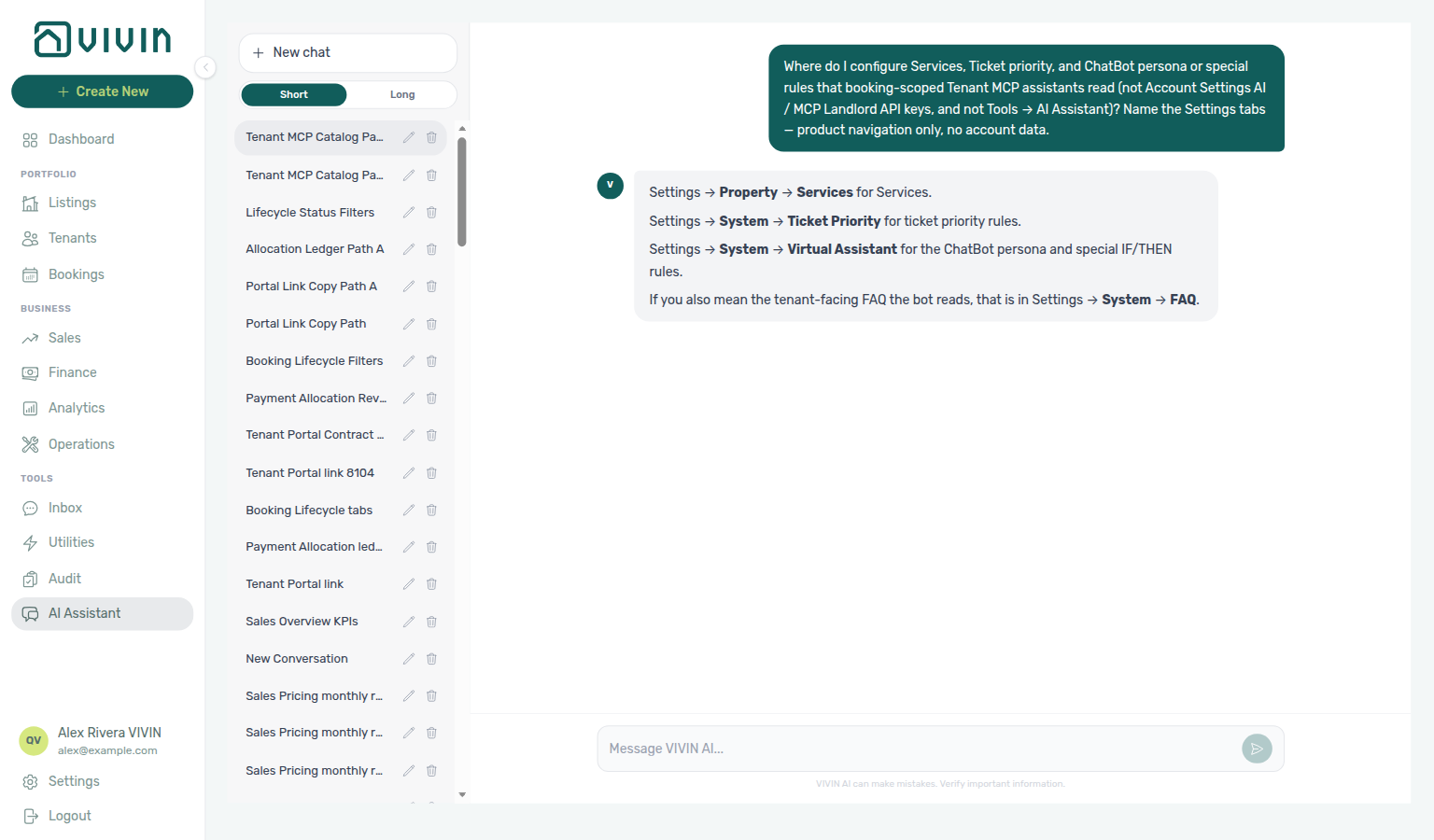
Ask AI Chat “Where do I configure Services, Ticket priority, and ChatBot persona or special rules that booking-scoped Tenant MCP assistants read (not Account Settings AI / MCP Landlord API keys, and not Tools → AI Assistant)? Name the Settings tabs — product navigation only, no account data.” — then open Settings → Tenant Portal → Services, Settings → System → Ticket priority, and Settings → System → ChatBot (ai-chat-product-context-tenant-mcp-reply.png, ai-chat-product-context-tenant-mcp-flow.mp4). The assistant may still say Settings → Property → Services, Settings → System → Ticket Priority, and Settings → Sistema → assistente virtual (or System → Virtual Assistant; English tab label ChatBot; it may also mention FAQ); use Tenant Portal → Services and System → ChatBot (Ticket priority subtab). Same grounding external MCP clients get from get-vivin-context-ai (or get-vivin-context-platform / get-vivin-context-operations). Distinct from AI / MCP Landlord connection URL / API keys and from in-app AI Assistant.
Optional after setup steps 10–11 (Tenant categories, Emails) and Tenant Portal — booking-scoped tools need a live reservation from step 14 Bookings. Chatbot rules: ChatBot. Concept pairing: Concepts — Setup sequence after go-live.
Skim What you can do with it and How it connects, then the Tool overview table and Settings catalogues these tools read. Safety boundaries: Permissions and safety. Habit-specific shortcuts live under Related below.
VIVIN ships a Tenant Model Context Protocol (MCP) server that lets compatible AI clients call typed tools against tenant booking context using the same Core API backing as the management platform. It is aimed at tenant-facing automation — chatbots, assistants, and integrations that answer questions or take actions for a specific booking (identified by tenant email, phone, and/or booking ID), not for whole-portfolio administration.
Contrast account-wide tools in Landlord MCP; portal links and booking context mirror Tenant Portal (including portal access by tenant category); channel routing and chatbot rules sit in Automation & AI. Landlord-side LLM cost for in-app AI Chat and utility extraction is on AI usage API — tenant MCP tool calls are not metered on that ledger.
This page is a high-level operator guide. Exact request and response shapes follow the Core API — see API Reference and ask your Vivin administrator when you need field-level OpenAPI detail on your API host.
For portfolio-wide tools (properties, listings, bookings, vacancy and calendar-style reads), use the Landlord MCP server. The tenant server is booking- and tenant-context scoped and targets automation that already knows which tenant or booking the conversation is about.
What you can do with it
Booking-scoped automation pairs with Tenant Portal, Inbox WhatsApp threads, and Automation & AI — AI Tenant Support Chatbot. Contrast account-wide reads in Landlord MCP.
Typical use cases:
- Power a tenant support assistant that reads booking dates, payment status, contract snippets, portal links, and maintenance history.
- Load landlord-configured chatbot rules and persona (IF/THEN guidance and tone from Management → Account settings → ChatBot) so external AI replies stay on-brand and policy-aligned.
- List bookings for an email or phone when a tenant may have more than one active reservation, then narrow follow-up tool calls to the chosen
bookingId. - Create maintenance tickets (with optional attachments from public URLs) or notify the landlord through the same flows the product uses — by booking ID when known, or by phone (and optional email) when the tenant is not yet matched to a reservation.
Every tool resolves to Core API routes: 403 or validation errors from the API surface in the MCP response like any other client.
How it connects
Session bootstrap pairs with Management session authentication, Resetting a Management User Password (refresh Bearer JWT + Mcp-Session-Id), and Automation & AI — External AI clients.
| Topic | Detail |
|---|---|
| Protocol | Model Context Protocol over HTTP (streamable transport). |
| Base URL | Configured per deployment (your Vivin administrator or integration guide provides the host). |
| MCP path | Streamable HTTP traffic is served at /mcp on that host (ask your administrator for the full /mcp URL). Point MCP clients at this URL path. |
| Core API | The Tenant MCP host must reach your VIVIN Core API (your administrator configures this). |
| Auth | Bearer token (JWT) for session creation; follow-up requests reuse the Mcp-Session-Id session header (same pattern as Landlord MCP). |
After the first authenticated request, keep sending Mcp-Session-Id on later tool calls so the session stays open.
Request path
flowchart LR
 subgraph clientSide[Your environment]
 C[MCP client\nchatbot or tenant bridge]
 end
 subgraph vivinSide[VIVIN services]
 T[Tenant MCP server\nHTTP streamable /mcp]
 A[Core API\nbooking- and tenant-scoped routes]
 end
 C -->|Bearer JWT + session headers| T
 T -->|API_BASE_URL\ntools resolve tenant/booking context| A
Identifiers such as email, phone, or bookingId in tool arguments tell the server which reservation the automation is acting on; portfolio-wide admin tasks stay on Landlord MCP.
From MCP tools to HTTP
Swagger and inbound webhooks pair with API Reference hub, Webhooks & Notifications, and Integrations & Distribution (channel POSTs are HTTP — not MCP tools).
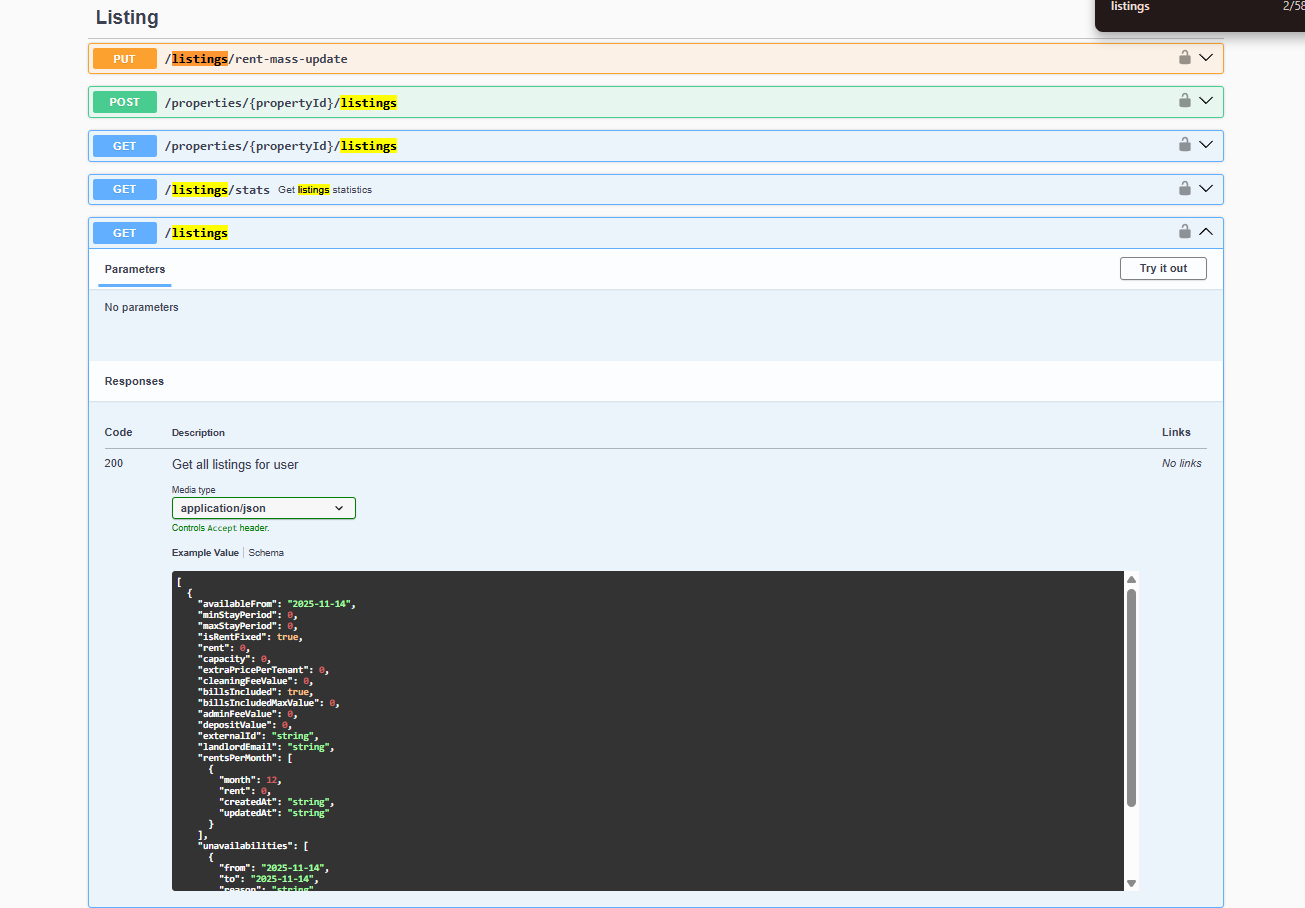
Tenant tools resolve to Core API routes behind booking and tenant context. For OpenAPI shapes and status codes, use Integration Swagger on your API host (see API Reference); enable Core Swagger when you need routes that are not exposed on the integration surface.
Inbound partner webhooks (channels → Vivin)
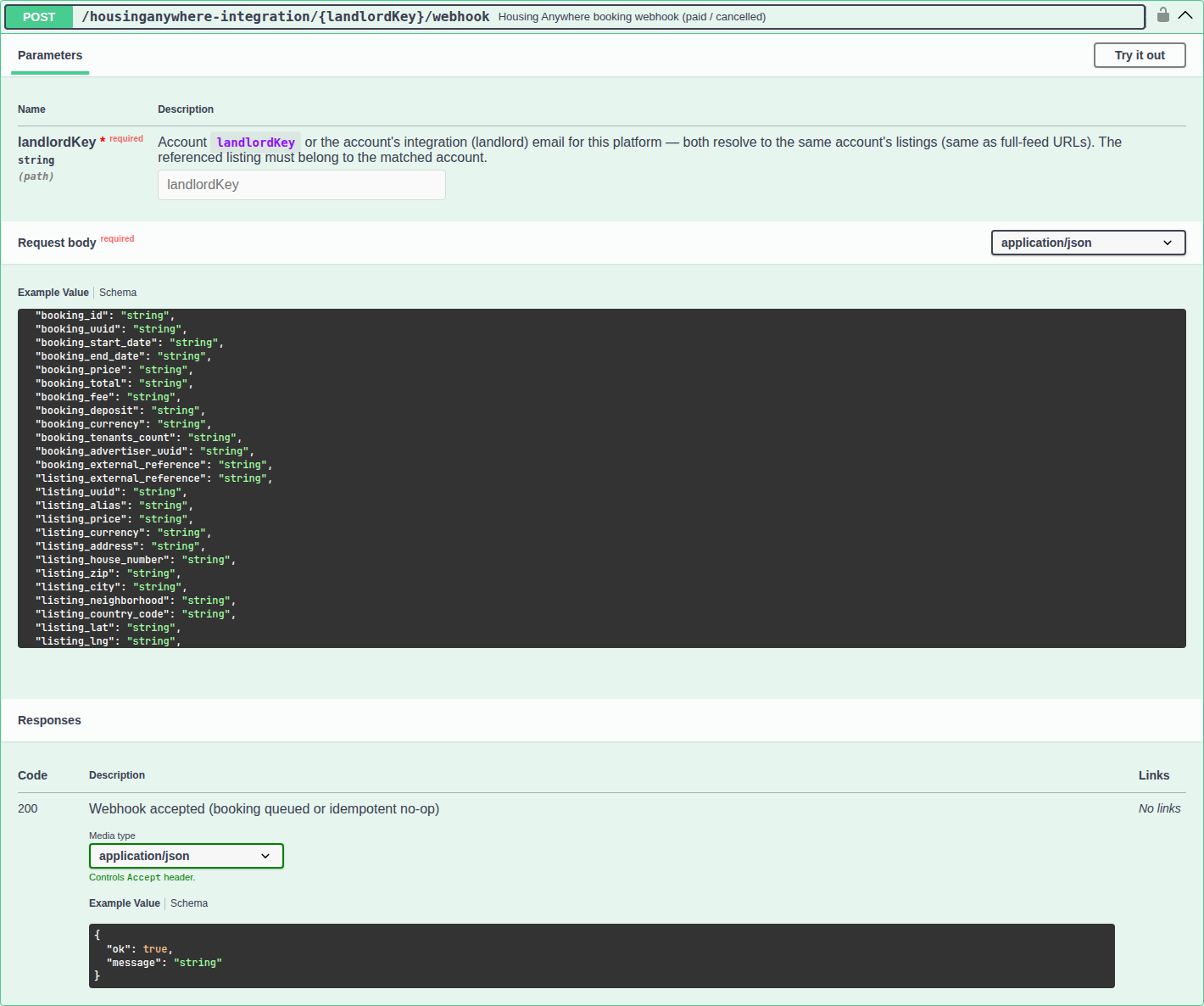
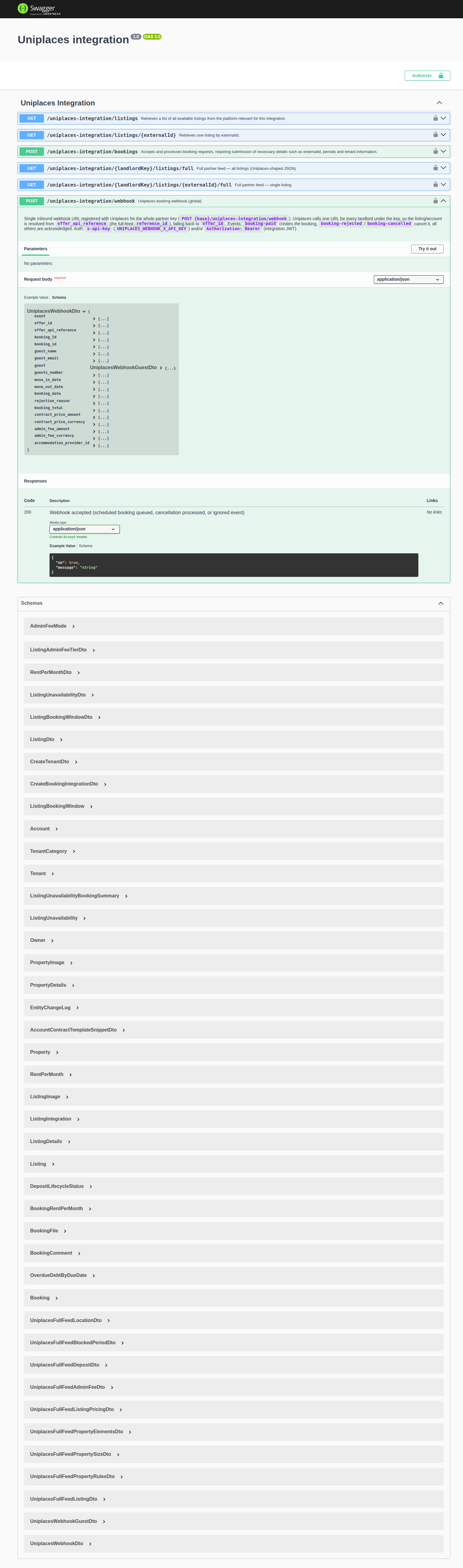
Tenant MCP answers booking-scoped questions for external assistants; marketplace partners still deliver paid/cancelled events through inbound Core API webhooks (for example Housing Anywhere and Uniplaces). Wire those callbacks using Integration Swagger on your API host — see Webhooks & Notifications.
Tool overview
Write tools mirror tenant-facing flows — pair create-maintenance-ticket with Operations > Tickets, get-payment-info with Handling a Late Payment — Step 3, and get-chatbot-rules with Settings > Chatbot.
Names below are the MCP tool identifiers (kebab-case). A typical deployment exposes about 20 tools; confirm the live catalogue with your Vivin administrator if your workspace gates tools.
Booking and contract data
| Tool | Purpose |
|---|---|
list-bookings-by-email | List active bookings for a tenant by email or phone (use first when multiple bookings are possible). |
request-booking-data | Aggregate booking payload for a tenant (email/phone/booking context per tool schema). |
request-contract-data | Contract-oriented data for a tenant. |
get-booking-status | Status and requirement-style information for the booking. |
get-dates-and-schedule | Check-in/out and schedule-related fields. |
get-listing-calendar | Calendar for the tenant’s unit (identifiers per tool schema). |
Property, payments, and portal
| Tool | Purpose |
|---|---|
get-property-and-location | Property and location details for the booking context. |
get-payment-info | Payment schedule and related information. |
get-security-deposit-info | Deposit terms and amounts where exposed. |
get-tenant-info | Tenant profile and billing-related fields. |
get-portal-links | Tenant portal URLs for the booking. |
Chatbot configuration (read-only)
| Tool | Purpose |
|---|---|
get-chatbot-rules | Landlord IF / THEN virtual assistant rules (same source as Management → Account settings → ChatBot). Returns plain text for use in prompts. |
get-chatbot-persona | Composed persona string from Persona Setup (tone, role, preferences — including Introduce as AI on start when that toggle is On); empty when unset. |
get-chatbot-faq | Landlord published FAQ entries (question + answer) from Settings → Tenant Portal → FAQs — the same list tenants see on the portal FAQ accordion. Returns plain text Q/A blocks in display order (one-line note when nothing is published) so the assistant answers recurring questions with the landlord's own wording. |
get-ticket-priority-rules | Active Ticket priority keyword → tier map and exception rules from Settings → Ticket priority (landlord-accepted rows only — inactive AI suggestions are omitted). Returns plain text with max-tier / life-safety / escalate-only guidance so the assistant can set priority on create-maintenance-ticket. Empty catalog → omit priority (server default medium). |
Call get-chatbot-rules / get-chatbot-persona / get-chatbot-faq early when the assistant must follow account-specific policies, voice, or published answers alongside booking facts — a published FAQ entry prevails over contract excerpts or model assumptions. Call get-ticket-priority-rules before opening a maintenance ticket so priority follows the landlord catalog rather than a guessed tier.
Services catalogue (read-only)
| Tool | Purpose |
|---|---|
list-available-services | Landlord optional paid add-on catalogue (same source as Settings → Services / Services marketplace): name, description, price, billing type, approval flag, image URL, and deep link. Identifiers are optional — without email/phone the tool still returns globally available services for an unidentified contact; with email/phone (and optional bookingId) it also includes property-restricted services for that tenant. Read-only — quote price and conditions; do not place orders. |
Settings catalogues these tools read
Keep these three Account Settings tabs current before you connect an external tenant assistant — tool answers mirror what operators publish here, not a separate MCP-only catalogue.
Several read-only Tenant MCP tools load the same catalogues you edit in management:
| Settings tab | Tools that read it |
|---|---|
| Services | list-available-services |
| Ticket priority | get-ticket-priority-rules (active / landlord-accepted keywords and exception rules only — inactive AI suggestions stay out of the map) |
| ChatBot | get-chatbot-persona (Persona Setup) and get-chatbot-rules (Special Rules IF/THEN rows — seed with AI Examples when useful) |
| FAQs | get-chatbot-faq (Published FAQ rows only — drafts stay internal) |
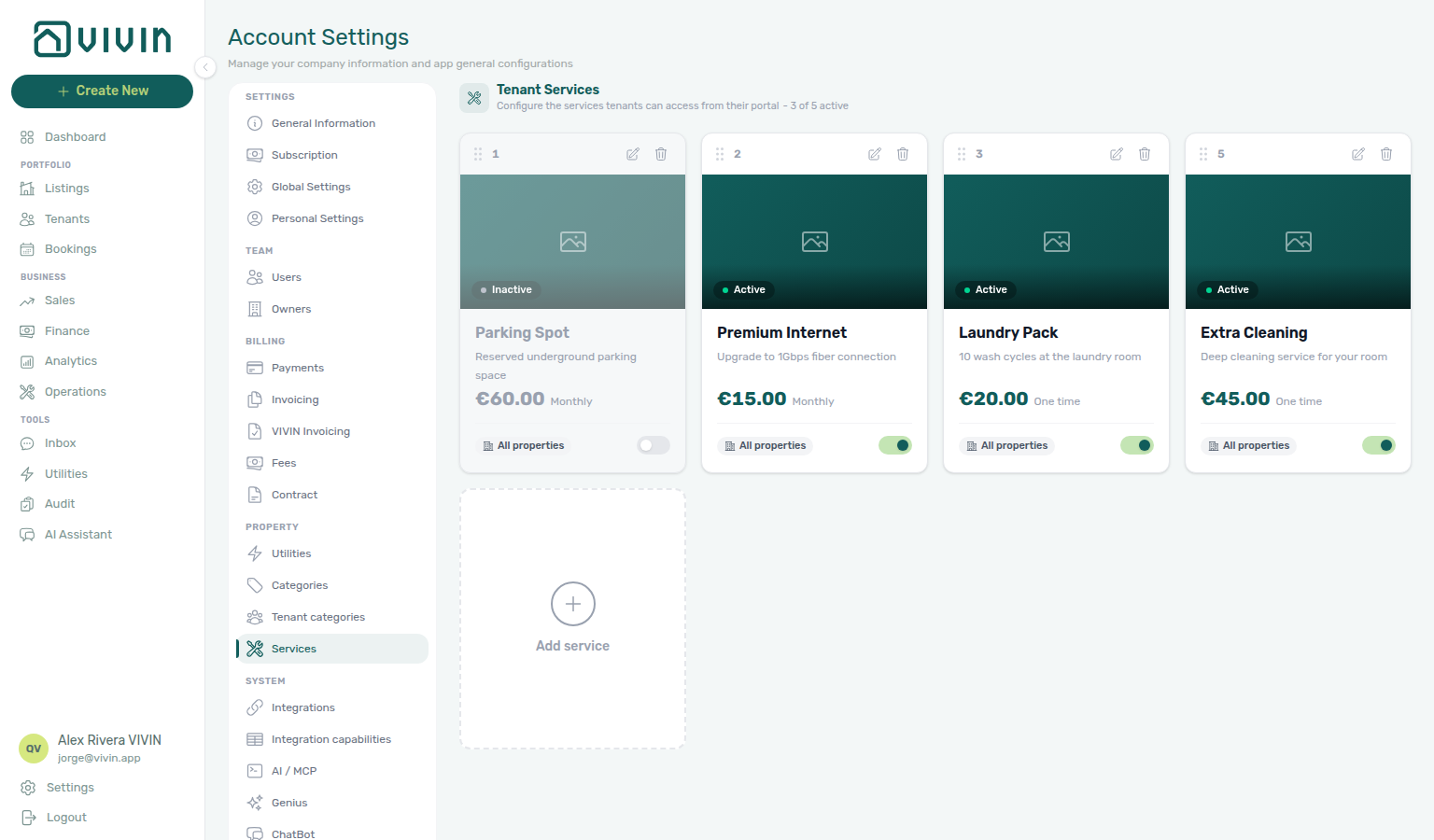
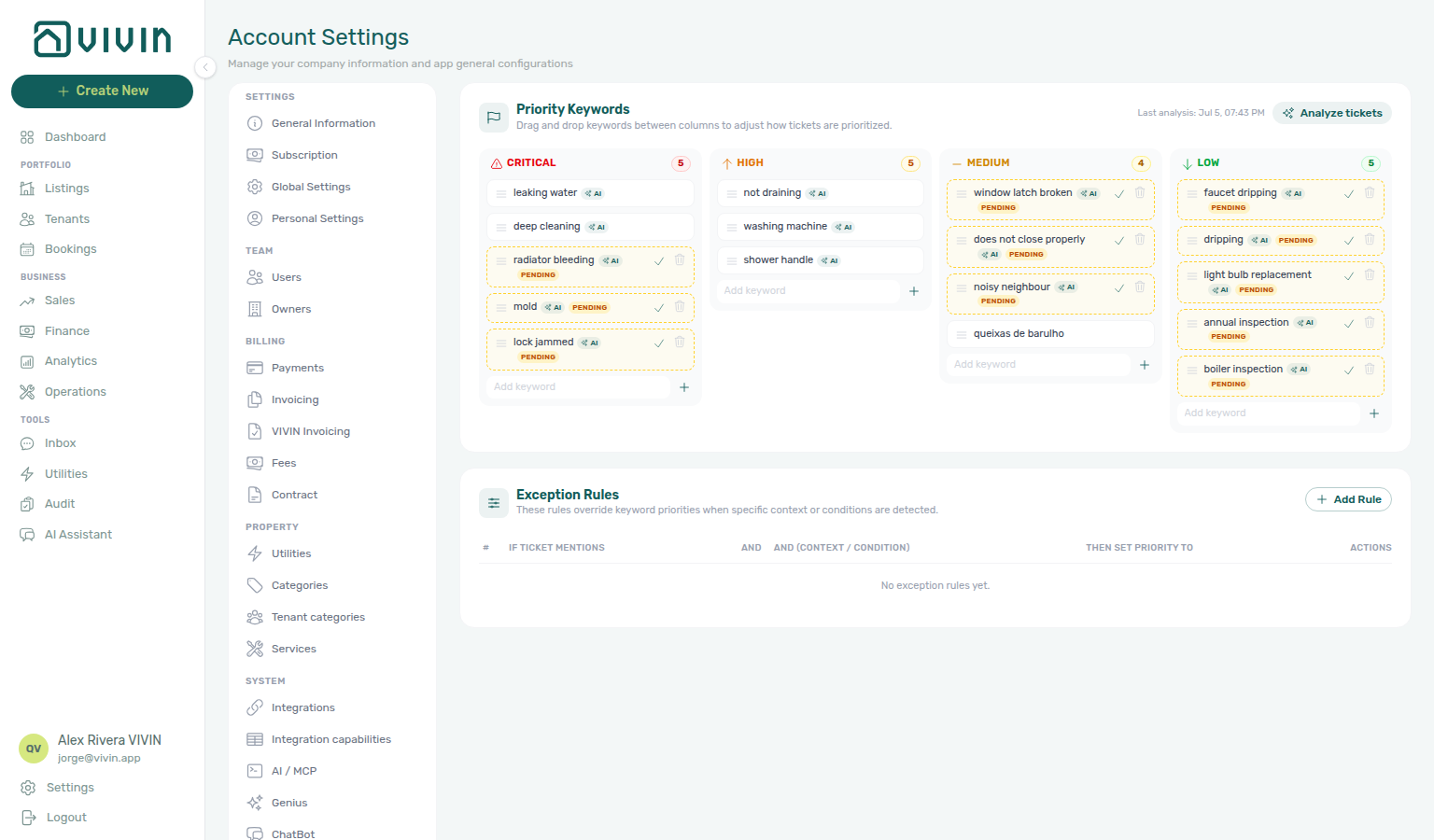
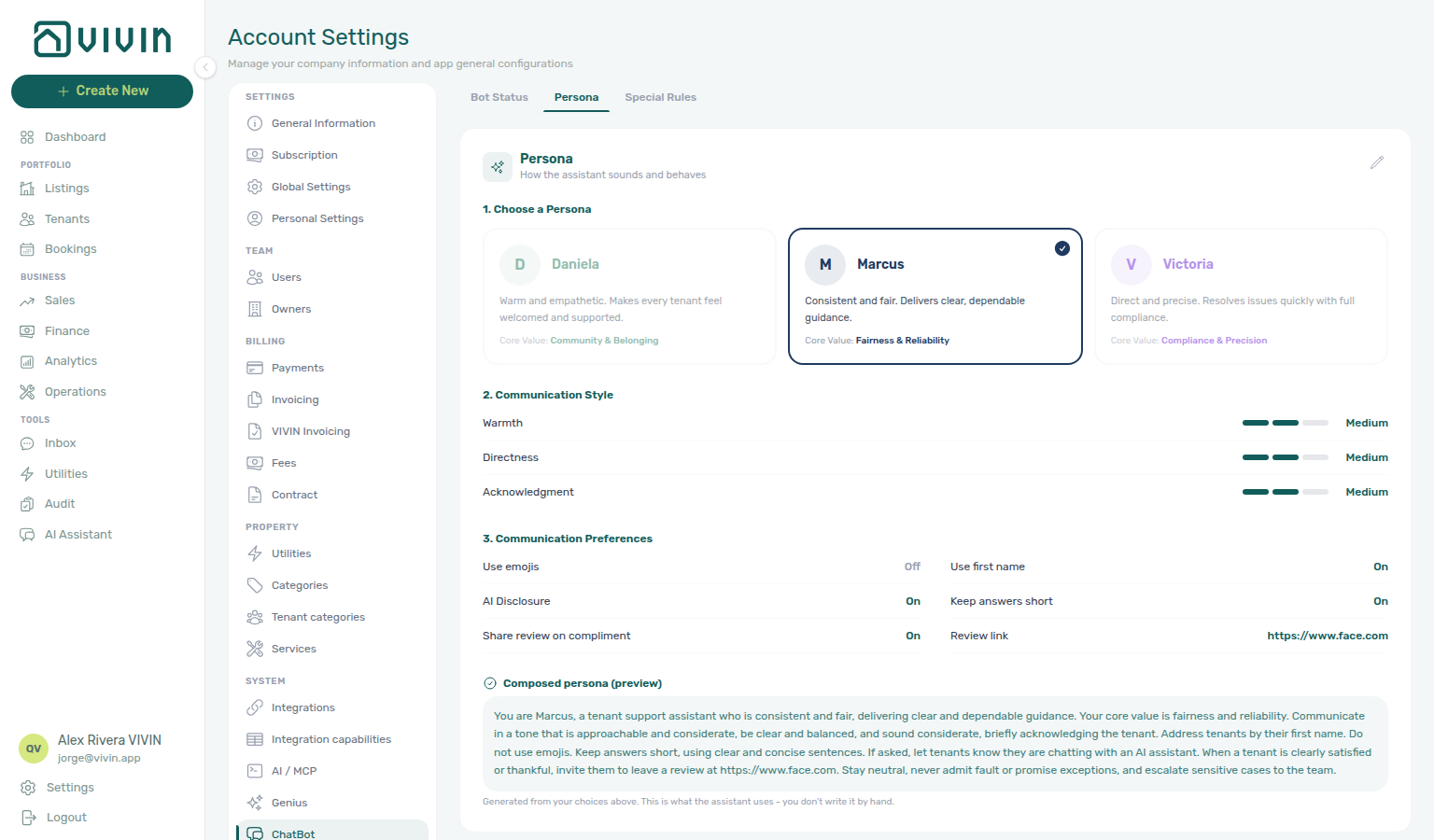
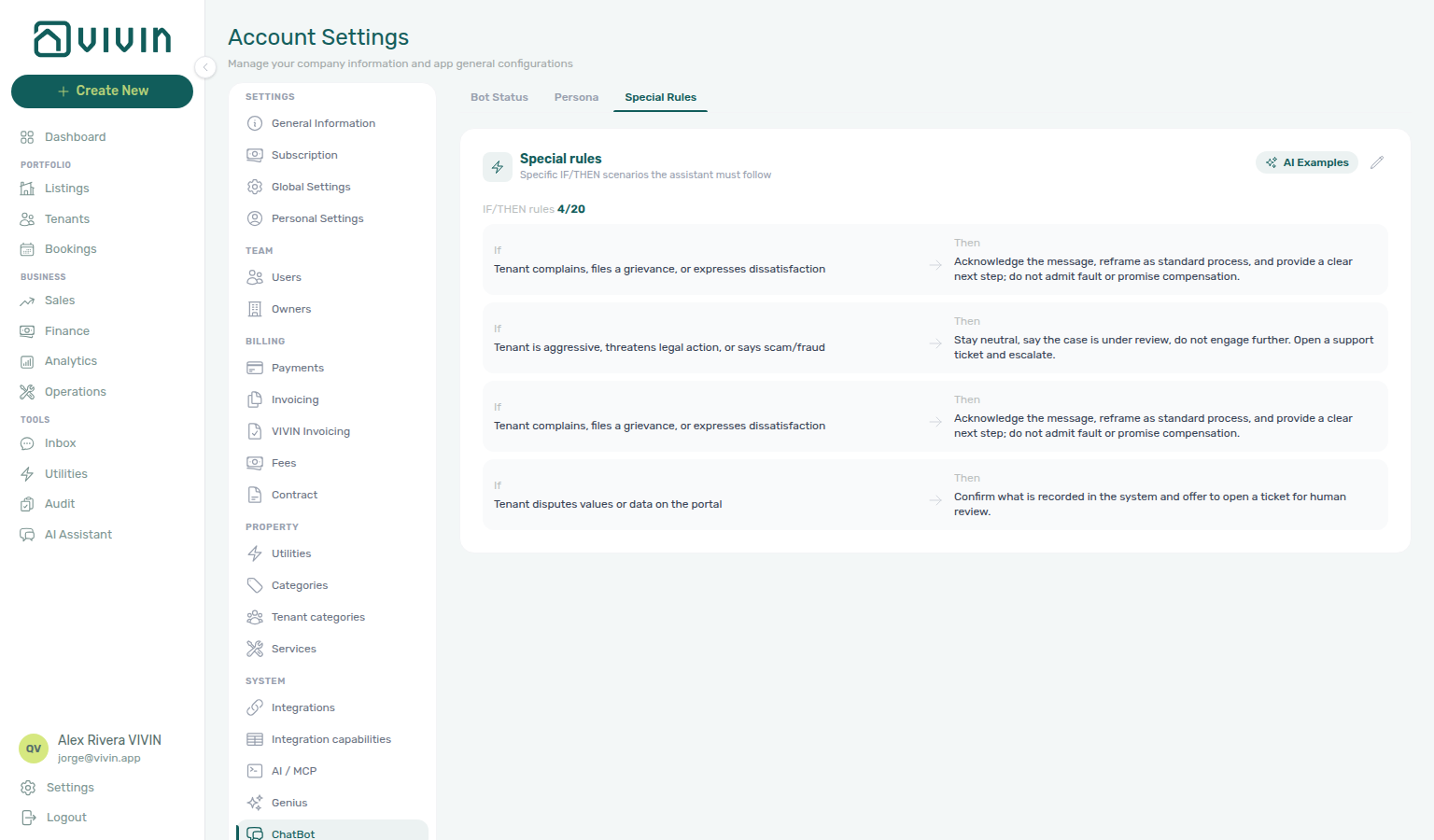
- Publish or activate the add-ons tenants should hear about under Settings → Services.
- Accept or drag keyword cards under Ticket priority so
create-maintenance-ticketcan pick a tier fromget-ticket-priority-rules. - Set Persona Setup and Special Rules on ChatBot so
get-chatbot-persona/get-chatbot-rulesmatch your brand voice. - Publish the entries you want the assistant to quote on FAQs so
get-chatbot-faqanswers recurring questions in your own wording.
Maintenance and escalation
| Tool | Purpose |
|---|---|
get-maintenance-tickets | Tickets associated with the tenant/booking. |
create-maintenance-ticket | Open a ticket (title required — non-empty; same as Operations → New ticket), description, category; optional priority (prefer get-ticket-priority-rules first), responsible property manager, attachment URLs downloaded server-side. |
list-property-managers | Discover assignable property manager IDs (for responsibleId on create). |
notify-landlord | Send a notification to the landlord for a known bookingId (write; treat as operator-visible). |
notifylandlord-number | Notify the landlord when the tenant is identified by phone (required) and optional email, but no booking ID is available yet — for example before list-bookings-by-email resolves a reservation. Prefer notify-landlord whenever you already have a valid booking ID. |
notify-landlord, notifylandlord-number, and create-maintenance-ticket change operational state or notify your team. Use least-privilege tokens, test on non-production workspaces first, and ensure only intended automations can invoke them.
Permissions and safety
JWT scope and portal gates pair with Users and roles, Settings > Tenant categories (portal module toggles get-portal-links may surface), and scope contrast in Landlord MCP.
- Access is bounded by the authenticated token and Core API rules — the same permission model that protects tenant-facing integrations.
- Prefer listing bookings first when identity is ambiguous (
list-bookings-by-email), so follow-up calls use the correctbookingId. - Attachment URLs on
create-maintenance-ticketmust be publicly downloadablehttp/httpslinks the server can fetch; limits apply (see tool description in code).
Tenant MCP section cross-reference
Use the sections above for this concept. Related module and workflow pages are linked inline where they help the next step.
Related
Related below links this concept to modules, workflows, settings, and escalation paths.
Documentation map & escalation
- Introduction — Platform overview and how documentation sections connect
- Getting Started — Recommended setup sequence before you wire tenant-scoped MCP clients
- Concepts — Underlying models behind portal self-service, payments, and maintenance escalations
- Modules — Operator workspaces tenant tools mirror in the management UI
- Common Workflows — Procedures that apply tenant MCP concepts during check-in, collections, and turnover
- Account Settings — Workspace-wide ChatBot persona, portal toggles, and service catalogue defaults
- API Reference — HTTP routes underlying tenant tools and management session bootstrap
- Glossary — Term definitions used across MCP and portal docs
- FAQ & Troubleshooting — Quick answers when tenant MCP responses disagree with live product behaviour
- Get Help & Support — Escalate when tenant automation needs Vivin credential or scope changes
- Using in-app support — Vivin product tickets when
create-maintenance-ticket/notify-landlordare not the right escalation path, or when booking-scoped JWT scope and credential changes need Vivin support — contrast Landlord MCP account-scoped tool failures
Ask your Vivin administrator for deployment hosts, package versions, and which tools your workspace enables. The tool tables on this page describe the usual booking, portal, chatbot, services, and maintenance catalogue — confirm any gated tools with Vivin before you wire a production assistant.
Navigation & bookmarks
Bookmark routes pair with Management Frontend Deep Links and Concepts hub — Navigation & bookmarks.
- Management Frontend Deep Links — Bookmarkable routes automation may open after tool calls return booking or inbox context (hub)
- Deep Links — Inbox —
/inbox?contact=when bell notifications route to WhatsApp threads - Deep Links — Account Settings —
/settings/services,/settings/ticketPriority,/settings/chatbot, and/settings/tenantCategoriespaired with catalogue and portal tools - Settings catalogues these tools read — Services, Ticket priority, Persona Setup, and Special Rules screenshots for the read-only MCP catalogues
- Settings > Interface language — Operator UI locale before you share portal links with multilingual tenants
Scope contrast & automation surfaces
- Landlord MCP — Account-scoped portfolio tools (separate server); topic table: Landlord MCP section cross-reference
- Resetting a Management User Password — Management email/password recovery contrast (tenant MCP Bearer JWT does not replace platform sign-in);
get-portal-linksandget-payment-inforemain tenant-scoped while operators reset management credentials;notify-landlorddoes not restore operator JWT scope after password rotation - Automation & AI — Channel map, in-app AI Assistant, and tenant chatbot versus HTTP
/mcpclients (hub) - AI Chat module — In-management assistant on the same booking context as tenant MCP (hub)
- Integrations & Distribution — Booking-scoped Tenant MCP tools complement but do not replace marketplace import APIs (hub)
Tenant portal, chatbot & messaging
- Tenant Portal — What tenants see in the web portal (MCP complements this; it does not replace portal UX) (hub)
- FAQ — Tenant contract signing blocked — No PDF yet, mandatory Your Details gates, category locks, or Lease purpose; portal signing vs paper upload on Contract Info
- Settings > Chatbot — IF/THEN rules and persona loaded by
get-chatbot-rules/get-chatbot-persona(hub) - Settings > FAQs — Published FAQ entries loaded by
get-chatbot-faq - Bookings — Communication tab — Same WhatsApp thread the MCP reads and writes
- Inbox module — Portfolio-wide WhatsApp triage on the same WhatsApp threads MCP reads and writes (hub)
- Settings > Emails — Chatbot IF/THEN rules and Communication Rules tenant MCP tools may reference during automation
- Settings > Tenant Portal — Portal settings — Portal toggles tenant MCP tools may reference during automation
- Settings > Tenant categories — Portal segment rules tenant tools may reference during automation
Bookings, payments & lifecycle workflows
- Bookings module — Reservation context tools need after channel enquiries convert to live bookings (hub)
- Booking Lifecycle — Computed Upcoming → Ongoing → Ended / Canceled status model (hub)
- Bookings — Payment Plan tab — Charge rows payment tools read during collections or portal queries
- Payment Allocation — Two-layer receipts, invoiced floor, and credit note reject/revert warnings (hub)
- Processing a New Booking —
list-bookings-by-emailduring import checks (Step 1);get-payment-infoduring payment-schedule review (Step 3) and while confirmation receipts stay pending (Step 5b);get-portal-links/get-booking-statusafter confirmation (Step 6) - Onboarding a New Property — Tenant categories, chatbot persona, and portal gates before external assistants inherit booking context;
list-bookings-by-emailafter first channel import (Step 5);get-portal-linksafter first reservation (Step 7) - Entering Monthly Utility Bills —
get-payment-info(parity with Tenant Portal — Utilities consumption and overage rows) andnotify-landlordwhen utility overage lines post (Step 4);get-payment-infowhile overage receipts stay pending (Step 4b) - Managing a Check-in —
get-dates-and-scheduleandlist-bookings-by-emailduring arrival planning (Step 1);get-maintenance-tickets/create-maintenance-ticketfor turnover prep (Step 2);get-payment-infoandnotify-landlordfor move-in balances (Step 3);get-payment-infowhile move-in receipts stay pending (Step 3b);get-portal-linksbefore key handover (Step 4);get-booking-statusafter move-in (Step 5) - Handling a Late Payment — Step 1 — Collections when payment tools surface unpaid schedules; upstream path from Notifications — Payment overdue alerts
- Handling a Late Payment — Step 6 —
notify-landlordwhen tenants escalate arrears through chatbot channels — contrast with operator segment filters and Landlord MCP portfolio reads; file Using in-app support for Vivin product defects - Managing a Check-out —
get-dates-and-scheduleandlist-bookings-by-emailduring departure planning (Step 1);get-security-deposit-infofor deposit-term questions (Step 1, Step 5);get-maintenance-tickets/create-maintenance-ticketfor turnover prep and inspection-day issues (Steps 2–3);get-payment-infoandnotify-landlordfor damage charges and departure-week balances (Steps 4, 6, 6b);get-booking-statusandget-property-and-locationafter move-out (Step 7) - Cancelling a Booking —
request-contract-data/get-dates-and-scheduleduring Step 1 policy review;get-payment-infobefore settlement (Step 2);get-security-deposit-infoandnotify-landlordduring deposit retention (Step 3);get-booking-statusafter cancel (Step 4);get-listing-calendarwhen tenants ask whether freed nights are bookable (Step 5);get-maintenance-ticketsfor open prep or damage jobs (Step 6) - Manual block hygiene —
get-listing-calendar,list-bookings-by-email, andrequest-booking-datawhen tenants ask about blocked dates during the Audit scan (Step 3);get-listing-calendarandnotify-landlordwhen external assistants surface stale holds (Steps 4–5)
Operations, services & notifications
- Operations module — Maintenance tools and escalations from tenant-context automation (hub)
- Operations > Tickets —
create-maintenance-ticketandget-maintenance-ticketsdestination - Services Marketplace — Portal catalogue context when maintenance or fulfilment tools escalate service requests (hub)
- Settings > Services — Portal catalogue items maintenance tools may list or reference during fulfilment
- Notification triage — In-app alerts tenant automation may reference when triaging payment or message notifications; payment overdue → Handling a Late Payment — Step 1;
get-payment-info,list-bookings-by-email, andnotify-landlordin Step 4 / Step 5 when Inbox threads preceded operator alerts - Notifications module — Full
/notificationshistory with row-click navigation (hub) - Notifications — Payment overdue alerts — Operator Payments category rows when tenant payment tools surface unpaid schedules
- Settings > Preferences — In-app notifications — Alert masters before tenant MCP triage references
/notifications
Deeper workflow reads
Bookings, payments & lifecycle workflows above. Each workflow sub-guide reciprocates with [Deeper workflow reads](../concepts/tenant-mcp.md#deeper-workflow-reads) anchors on Tenant MCP bullets —
- Processing a New Booking —
list-bookings-by-email,get-payment-info, andget-portal-linksduring import and confirmation - Onboarding a New Property — Tenant categories, chatbot persona, and portal gates before external assistants inherit booking context
- Managing a Check-in —
get-dates-and-schedule,get-portal-links, andcreate-maintenance-ticketduring arrival week - Managing a Check-out & Deposit Refund —
get-security-deposit-info,get-payment-info, andget-booking-statusduring departure - Handling a Late Payment —
get-payment-infoandnotify-landlordwhen tenants escalate arrears through chatbot channels - Cancelling a Booking —
get-payment-info,get-security-deposit-info, andget-listing-calendarduring void and availability restore - Entering Monthly Utility Bills —
get-payment-infoandnotify-landlordwhen utility overage lines post - Notification triage —
get-payment-infoandlist-bookings-by-emailwhen Inbox threads preceded operator alerts
Deeper concept reads
- Landlord MCP — Account-wide portfolio tools versus booking-scoped tenant tools
- Tenant Portal — Web portal self-service that tenant MCP complements but does not replace
- Automation & AI — Channel map, chatbot rules, and external MCP client surfaces
- Payment Allocation —
get-payment-infoand portal pay-in context for Layer 1 vs Layer 2
Deeper API reads
- Management session authentication — Bootstrap Bearer JWT and
Mcp-Session-Idfor tenant-scoped tools - Authentication — Bearer token and
landlordKeyscoping on integration HTTP behind MCP tools - Webhooks & Notifications — Inbound channel POSTs tenant assistants may triage alongside MCP reads
- Creating Bookings — Underlying
POST /bookingspipeline when automation must confirm a booking exists before tool calls
Operator habit hubs
Day-to-day operator habits (lockout catch-up, pending receipts, payment triage, handoffs, and related playbooks) live on the Common Workflows habit hub.
Deep-link anchors for habit hubs
Lockout catch-up after password recovery
Pending manual receipt approval
Reject/revert mistaken receipts
Portfolio segmentation by tenant category
Notification row-click navigation
Payment alert to receivables triage
Confirmation alert triage
Finance debt receivables triage
Finance Income status drill-down
Cash flow forecast drill-down
Key glossary terms
- Tenant category — Portal modules, Communications / Email per segment, and portfolio filters on Bookings, Finance, and Tenants when tenant MCP tools return booking context
- Deposit dispute — Deposit retention tools and booking Deposit tab state during check-out automation
- Glossary — End-of-Booking cost split — Charge Time → End of Booking splits daily overage across every occupied unit; still-staying roommates stay in the denominator
- Glossary — Change history — Operator-initiated edits on Listings setup and Bookings Changelog; create-time defaults excluded
- Glossary — Archived booking ledger visibility — Delete Booking hides manual/provider_platform rows on Finance → Transactions; vIBAN and credit card stay visible
- Glossary — Finance tenant category cache refresh — Recategorizing a tenant updates
booking.tenantCategoryIdimmediately; ledger tabs reflect it on reload, while Overview can lag up to ~10 minutes - Glossary — Full term list
Module documentation hubs
- Finance module — Ledger rows tenant payment tools may reference after portal receipts (hub)
- Audit — Discounts tab — Portfolio discount context tenant automation may surface during mid-stay relief queries
- Dashboard module — Post-login KPI snapshot with bell notification triage (hub)
- Analytics module — Month-range portfolio KPI charts (hub)
- Listings module — Property wizard, Channels tab, and unit management (hub)
- Tenants module — Tenant directory and profile sidebars (hub)
- Utilities module — Bills Included ceiling model and tenant overage charges (hub)
- Account Settings — Workspace-wide financial policies, templates, and operational defaults (hub)
- API Reference hub — Partner HTTP contracts and partial vs full feeds (hub)