Integrations & Distribution
Read this concept after setup step 12 Integrations credentials are saved and step 13 Listings inventory exists — link each unit on Listings → Channels before imports attach to the correct property. Partner HTTP contracts: API Reference. Concept pairing: Concepts — Setup sequence after go-live.
Start with Marketplace API Integrations and Airbnb & Booking.com Integration, then How Calendar Synchronisation Works. Go-live checklist: Setting Up Integrations. Habit-specific shortcuts live under Related below.
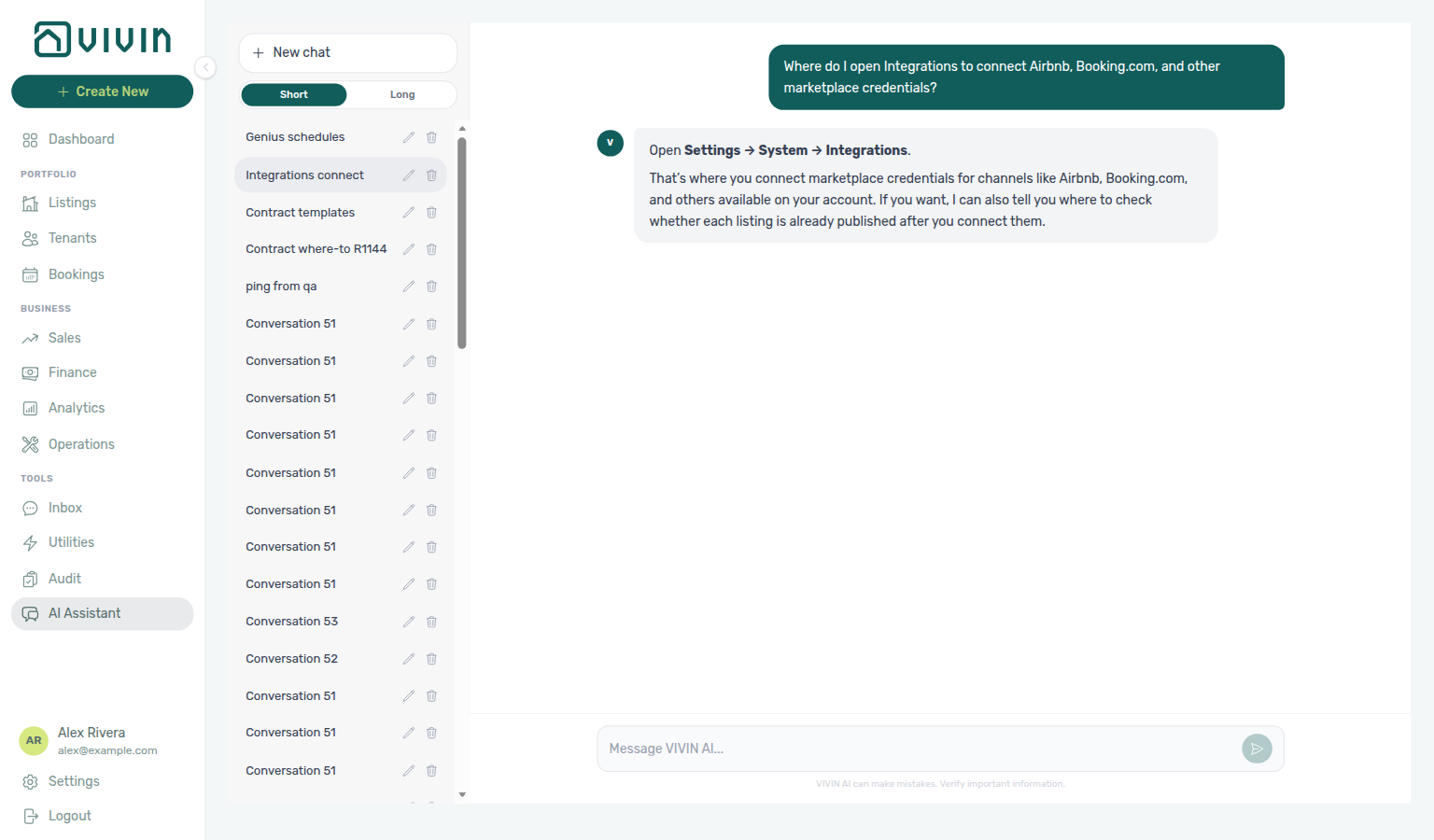
Not sure which settings tab holds marketplace credentials? Ask AI Chat “Where do I open Integrations to connect Airbnb, Booking.com, and other marketplace credentials?” — then open Settings → System → Integrations (ai-chat-product-context-integrations-reply.png, ai-chat-product-context-integrations-flow.mp4). The assistant typically says Settings → System → Integrations. External MCP clients: get-vivin-context-platform.
Vivin connects with every major rental channel in Europe, letting you manage all distribution from a single dashboard. Whether you work with mid-term marketplaces, short-term platforms, or direct bookings through your own website, Vivin keeps availability, pricing, and booking data synchronised across all channels in real time.
Partner HTTP contracts are documented in the API Reference; bookmarkable settings and channel routes pair with Deep Links; imported reservation status follows Booking Lifecycle. Operator LLM cost for in-app AI Chat and utility extraction is on AI usage API — partner integration Bearer keys return 401 on those routes.
Marketplace API Integrations
Vivin connects mid-term and student-focused marketplaces so availability, pricing, and bookings stay aligned with your Vivin calendar. Supported booking platforms include those listed under Settings > Integrations — for example:
- HousingAnywhere, Spotahome, Uniplaces, Inlife, Spacest
- Channex (channel-manager distribution — ARI push + booking revisions feed imports; UUID mapping provisioned by Vivin)
- Idealista, Coliving
- ErasmusLife Lisboa, Edu Portugal
- Vivin Booking Engine (direct / white-label bookings)
- Generic iCal export for any subscriber platform
Channel names, sync behaviour (calendar vs booking import), and setup steps can change as platforms evolve. Use Settings > Integrations as the single source of truth for which integrations your workspace can enable and how to configure them.
These integrations provide:
- Real-time sync of prices, availabilities, contract rules (admin fees, cleaning fees, minimum/maximum stay periods), and calendar blocks.
- Automatic booking import — confirmed bookings are imported with all key details: dates, pricing, tenant information, and contract terms.
- Centralised calendar management — block or open dates across all channels simultaneously from Vivin.
When a booking is confirmed on any connected marketplace, it flows into Vivin automatically — creating the booking record, generating the payment schedule, and blocking the relevant dates on all other channels. No manual data entry required. Post-import reconciliation pairs with Processing a New Booking and Booking Lifecycle; unpaid imported schedules can later surface payment overdue rows — continue with Handling a Late Payment — Step 1.
Partner feed depth (partial vs full)
Marketplace partners poll Vivin over HTTP using partial or full JSON feeds. Operators rarely call these routes directly, but the split explains why some channels need rich Full integration pill content while others only need calendar and price fields:
| Depth | Typical use | Platforms (examples) |
|---|---|---|
| Partial | Calendar, pricing, availability windows, booking import | Housing Anywhere, Uniplaces, Inlife, Spotahome (partial route), Channex, RoomLess, Erasmus Life Lisboa, Vivin Booking Engine, Kiwi, Capital Rooms, Porta85 |
| Full | Complete publish catalogue (photos, amenities, partner-specific blocks) | Uniplaces, Spotahome, Housing Anywhere, Inlife full routes |
Partial pulls are linked-only (a Channels mapping is required). Full catalogue pulls include units not yet on Channels, keyed by the Vivin listing id, so the marketplace can create the listing — Which listings appear.
Housing Anywhere listing JSON also turns a unit booking window into extra calendar blocks on the partial pull (and on Uniplaces, Spotahome, and Inlife full occupancy). Housing Anywhere full blockedPeriods stay on saved holds; stay-month fields still follow the window — Housing Anywhere booking windows. Partial Housing Anywhere prices are whole euros; the full catalogue is cents — Euros vs cents.
Inlife full-feed rows also need a recognised City on Full integration → Location & geography. Unknown cities stay in Vivin and on the Inlife partial pull, but they do not appear in the catalogue. The catalogue splits stored propertyId_roomId into listing id and room.id — Inlife id and room.id.
Kiwi, Capital Rooms, Porta85, and Lisbeyond are single-landlord partial feeds: Vivin provisions one account per prefix and returns all that account’s listings (including units without a channel link). Unlinked rows use the Vivin listing UUID as externalId and include listingInternalName. They are not general self-serve Settings → Integrations cards — see API Reference — Kiwi, Capital Rooms, Porta85 & Lisbeyond.
RoomLess (Spacest) is a multi-tenant partial feed. When availableFrom is still in the future, the pull adds a calendar block through the night before move-in — Listings & Availability — RoomLess nights before move-in.
A Calendar Block (days) value on a Booking Platforms card can close that channel’s listing JSON for about two years after a stay that is still far in the future — Integrations — Calendar Block (days). It does not apply to Airbnb / Booking.com iCal.
Listing JSON landlordEmail (Uniplaces / Inlife landlord_email) is the Integration Email on that platform card — not the signed-in user’s login — Listings & Availability — Landlord email.
iCal export is a separate text/calendar surface — not JSON GET /listings. See API Reference — Partial vs full feeds, Full listing feeds, and Integration field capability for field-level coverage per marketplace.
Channex (channel manager)
Channex distributes to multiple OTAs through a channel-manager connection — not a single marketplace with one integration email. Operators:
- Enable the Channex card under Settings → Integrations → Booking Platforms (optional Markup; copy Virtual IBAN when provisioned — see Integrations — Channex).
- Rely on Vivin to push availability and restrictions (ARI) for units with a valid
channexMapping— Channex property, room type, and rate plan UUIDs provisioned with your Vivin contact (not self-serve external IDs on Listings > Channels). - Receive booking imports when Vivin processes revisions from Channex’s booking revisions feed — confirmed stays show the Airbnb or Booking.com platform badge (the OTA the guest booked on), not a channel-manager chip. See Bookings — Platform badge and filters follow the real OTA.
Channel-manager API credentials appear as Platform Integrations Channex connection cards (credentials managed by Vivin) — not as self-serve Add Integration API keys.
| Direction | Mechanism | Operator action |
|---|---|---|
| Outbound (Vivin → Channex) | Scheduled ARI sync for mapped units | Keep rent and calendar accurate in Vivin |
| Inbound (Channex → Vivin) | Vivin polls the booking revisions feed (not a self-serve webhook URL) | Confirm UUID mapping with support when imports are missing |
Channex does not appear as a column on Sales > Channels. After an OTA rail is connected, that OTA column switches to allocate mode: Airbnb / Vrbo / Expedia pick a listing; Booking.com picks a hotel ID from the Integrations pool (one ID per room). Filter imported rows on Bookings or Finance → Transactions by Airbnb or Booking.com — there is no separate channel-manager source chip. Modified revisions are acknowledged on the Channex side and applied to the Vivin booking when the date or payout change is safe; review warnings appear in Changelog when a change cannot be applied automatically (stay dates stay locked in Vivin — correct them on Airbnb). See Bookings — When Airbnb changes dates or the payout, Edit lockdown on Airbnb bookings, and Webhooks & notifications — Channex booking revisions feed.
Airbnb & Booking.com Integration
For short-term rental coordination, Vivin integrates with Airbnb and Booking.com via:
- iCal calendar syncing — automatic availability blocking between Vivin and short-term platforms (outbound Vivin feeds plus inbound platform URLs on Sales > Channels). When the Channex Booking.com rail is connected, register hotel IDs in the Booking.com hotel IDs dialog on Integrations and allocate them on Channel Manager instead of the iCal wizard.
- Unified dashboard — view bookings across all short-term and mid-term channels in a single timeline.
- Short-term configuration controls — limit how far ahead availability is exported (Short-term iCal Max Date in the Channel Manager block), then Apply to all listings or Apply to selected listings on each platform card. See Settings > Integrations > Short-term (Airbnb / Booking.com) Configuration.
- Operational visibility — imported iCal blocks also appear on Operations > Check-in & Check-out as channel-labelled pseudo arrival/departure rows for short-stay turnover. These rows block calendars but do not create mid-term booking records with payment plans — distinct from API marketplace imports. See Glossary — Short-term iCal pseudo check-in/out.
This ensures that when a unit is booked on Airbnb, it is immediately blocked on HousingAnywhere, Spotahome, and every other connected channel — and vice versa. Short-stay pseudo rows pair with Operations > Check-in & Check-out and Managing a Check-in.
Short-term iCal setup (operator UI)
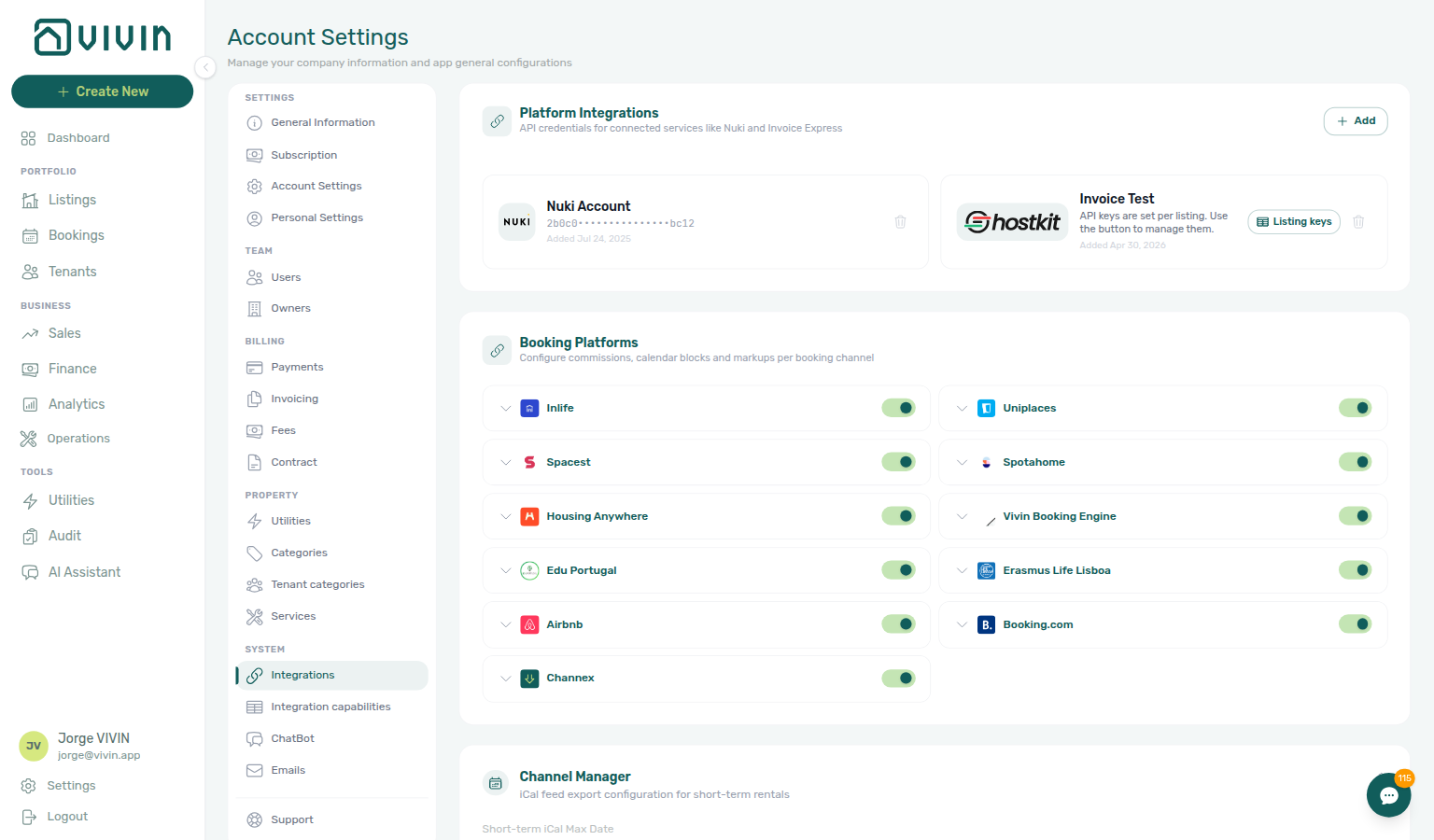
Account-wide horizon — set Short-term iCal Max Date on Settings > Integrations so outbound feeds do not expose availability too far ahead:
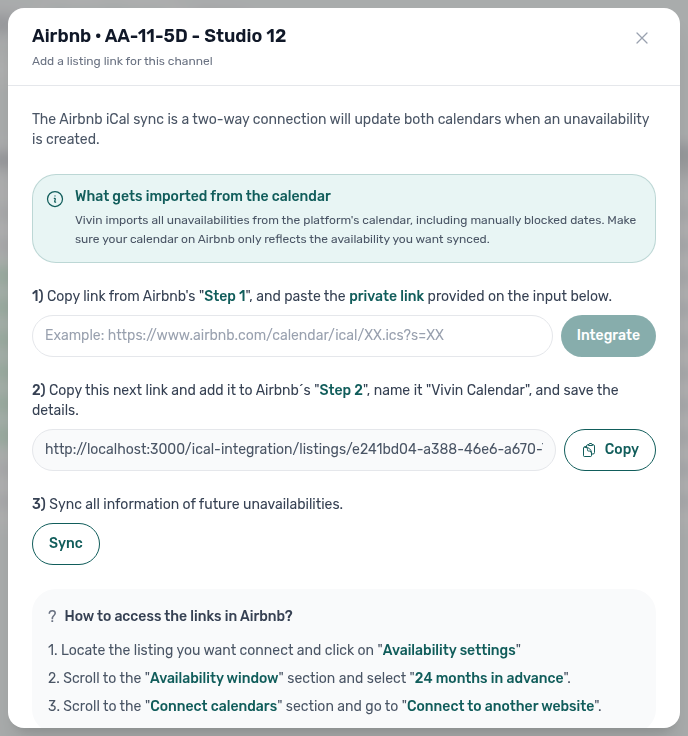
Per-unit linking — on Sales > Channels, open the Airbnb or Booking.com cell for a unit and walk through the setup wizard (paste the platform iCal URL, confirm Connected, then Sync when offered):
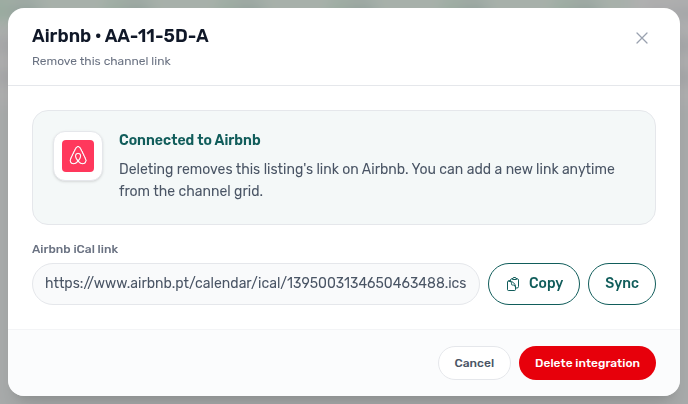
Manage an existing link — click the green Airbnb / Booking.com cell again (not the external View control) for Connected, platform iCal Copy / Sync, and Delete integration:
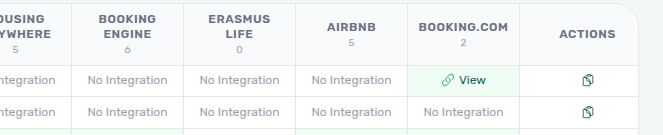
Outbound Vivin feed — copy each unit’s VIVIN iCal URL from the trailing Copy control (or bulk Export on the grid toolbar) and paste it into the OTA’s calendar import field:
White Label Booking Engine
Vivin includes a fully branded booking engine that you can embed on your own website, enabling commission-free direct bookings.
Key Features
- Instant availability display — real-time availability and rate updates pulled directly from your central Vivin calendar.
- Fully branded — customise the booking engine with your company colours, logo, and identity so it feels native to your website.
- Visits management — schedule in-person or virtual property tours with personalised calendars.
- Integrated video calls — conduct online property visits directly through your website without third-party tools.
- Conversion tracking — built-in analytics to measure and optimise your direct booking funnel.
Direct bookings through the white label engine follow the same workflow as marketplace bookings: they automatically create booking records, generate payment schedules, trigger contract generation, and block availability across all connected channels. Partner write routes: Booking Engine API. The listing feed your site reads uses to as the last blocked night, not check-out — Unavailability to. If the live site looks a day earlier than the booking check-out in Vivin, start with FAQ — Booking site first available day.
Direct bookings eliminate marketplace commissions and give you full control over the tenant relationship from the first interaction. The white label booking engine makes it easy to convert website visitors into tenants without manual processing.
How Calendar Synchronisation Works
Vivin maintains a single source of truth for availability. When any of these events occur, all connected channels are updated automatically:
| Event | What Happens |
|---|---|
| Booking created in Vivin | Dates blocked on all connected external platforms |
| Booking imported from marketplace | Dates blocked on all other channels; booking record created in Vivin |
| Short-stay block imported via Airbnb/Booking.com iCal | Dates blocked across channels; pseudo check-in/out row on Operations — not a full mid-term booking unless you add one manually |
| Booking imported from mid-term marketplace API | Dates blocked on all other channels; full booking record with payment schedule created in Vivin |
| Manual unavailability added | Dates blocked on all connected platforms |
| Booking cancelled | Dates released on all connected platforms |
This two-way synchronisation eliminates double-bookings and ensures your availability is always accurate across every channel. Manual holds that propagate everywhere: Manual block hygiene and Audit — Manual Blocks. Outbound iCal DTEND is the exclusive free-again morning (one day after Audit End); listing JSON to and marketplace full-feed occupancy (Uniplaces / Spotahome to, Housing Anywhere endDate, Inlife end) stay the last blocked night — iCal feeds — DTEND exclusive end and Full listing feeds — Last blocked night.
Invoicing providers (Hostkit & Invoice-xpress)
Beyond distribution marketplaces, Account Settings → Integrations supports invoicing connections. Connecting one of them is what turns invoicing on — there is no separate billing switch (Billing from the invoicing connection):
- Invoice-xpress — account-level API key and client ID; common for automated invoice lines when payments are recorded.
- Hostkit — Portuguese Fatura-Recibo workflow: add Hostkit once, then paste per-listing API keys from Hostkit and set Hostkit invoice series on Settings > Invoicing. During bulk Issue allocation / Invoice selected runs, Vivin paces Hostkit API calls and retries HTTP 429 with backoff — large batches can take several minutes (FAQ — Why is bulk Hostkit invoicing slow?; Hostkit API pacing).
Only one invoicing provider can be active at a time. Finance Transactions and booking file views can surface Hostkit document links when invoicing completes. Distinct from marketplace distribution — see Settings > Invoicing.
Setting Up Integrations
To connect a new mid-term marketplace or short-term iCal channel end to end:
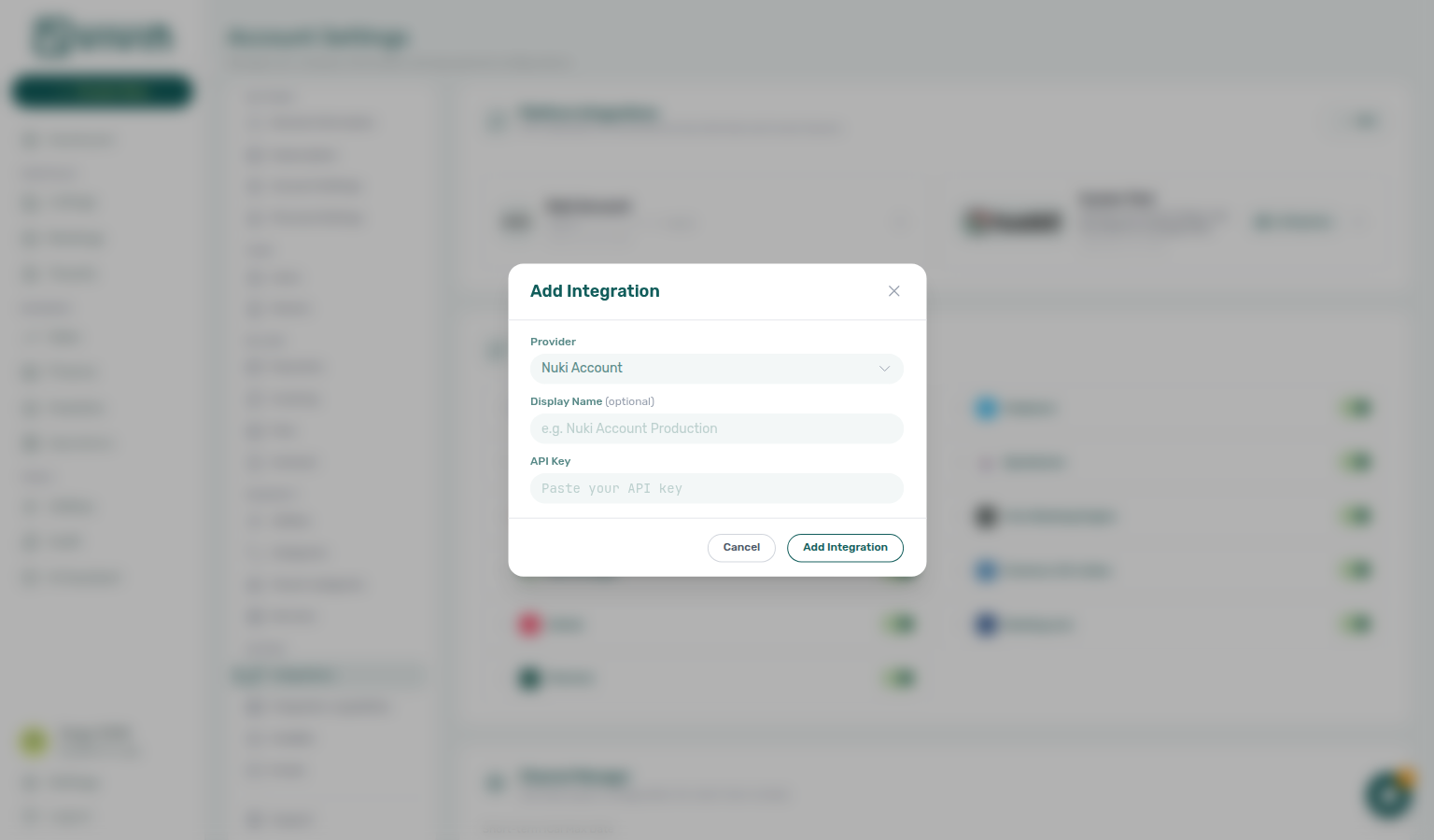
- Enable the platform — Account Settings → Integrations → open Add Integration (or edit an existing card) and enter the platform email, API key, or markup your agreement requires.
- Confirm account-wide short-term controls (Airbnb / Booking.com only) — set Short-term iCal Max Date and use Apply to all listings when you need a bulk horizon update (see Short-term iCal setup above).
- Link each unit — either:
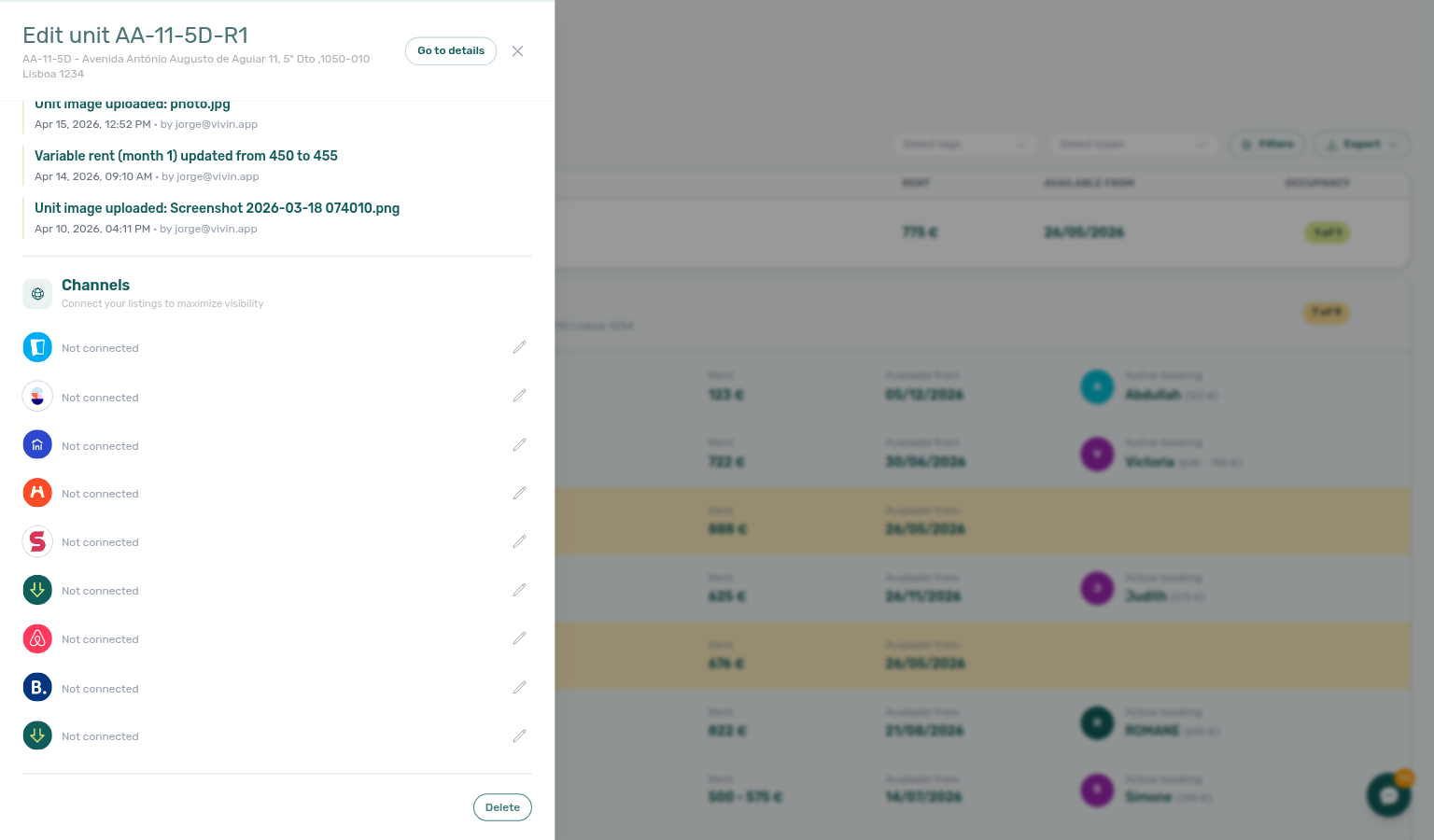
- Listings → unit sidebar → Channels → enter the external listing ID or URL per platform row, or
- Sales → Channels → click a Not connected cell → paste the external ID / iCal URL in the link modal.
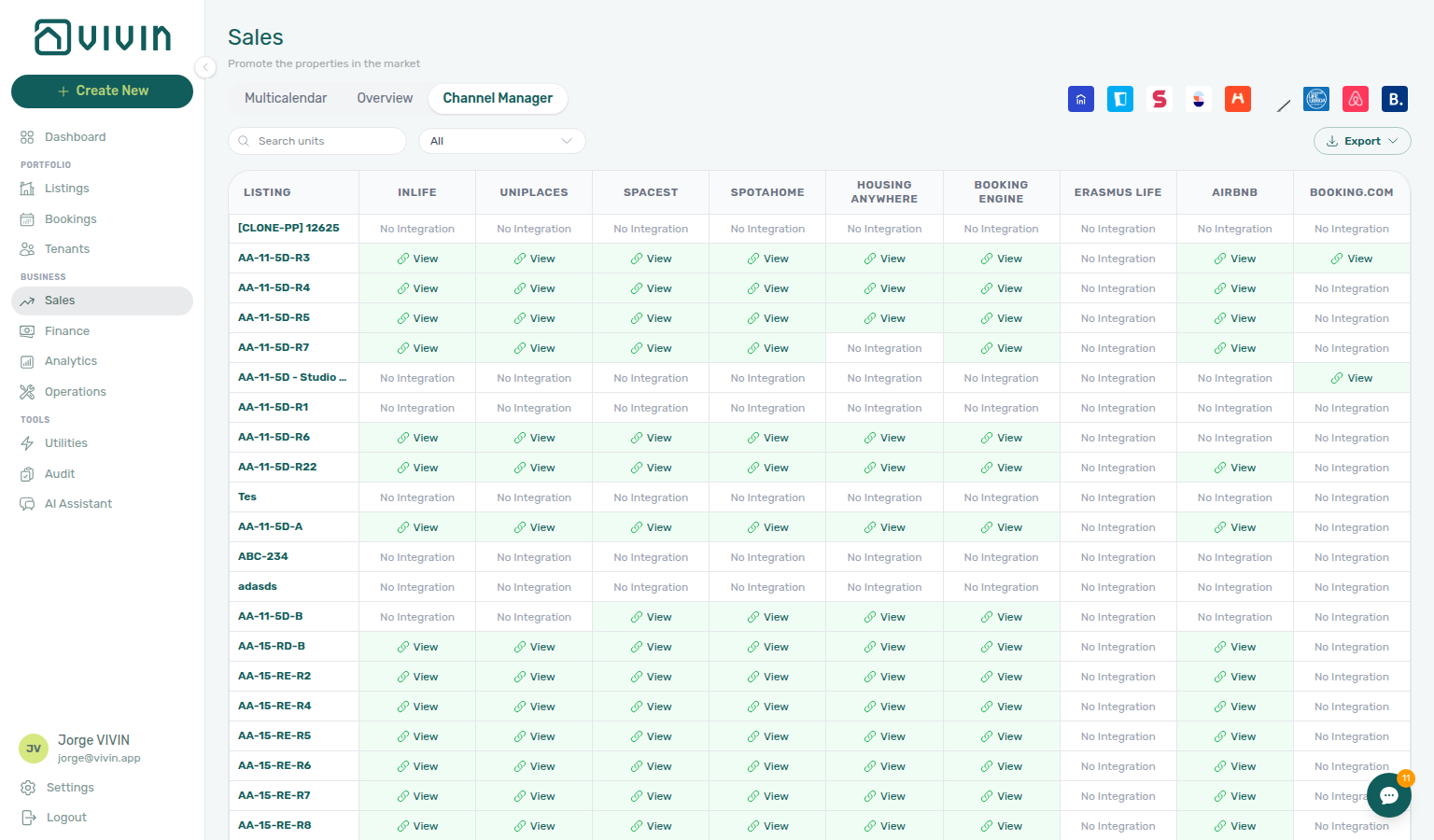
- Verify sync — green Connected cells on Sales > Channels; imported bookings appear on Bookings with the correct source platform badge; Finance → Transactions Select platforms filter includes the channel when reconciling bank inflows.
- Enrich partner payloads — for full-feed marketplaces, open the Full integration pill from Listings sidebars and complete the booking-engine editor before partners poll updates — see Booking engine details.
Per-unit marketplace links in Listings (after account credentials are enabled in Settings):
Account Settings > Integrations — platform cards, credentials, and account-wide short-term iCal controls (operational linking continues in Sales and Listings):
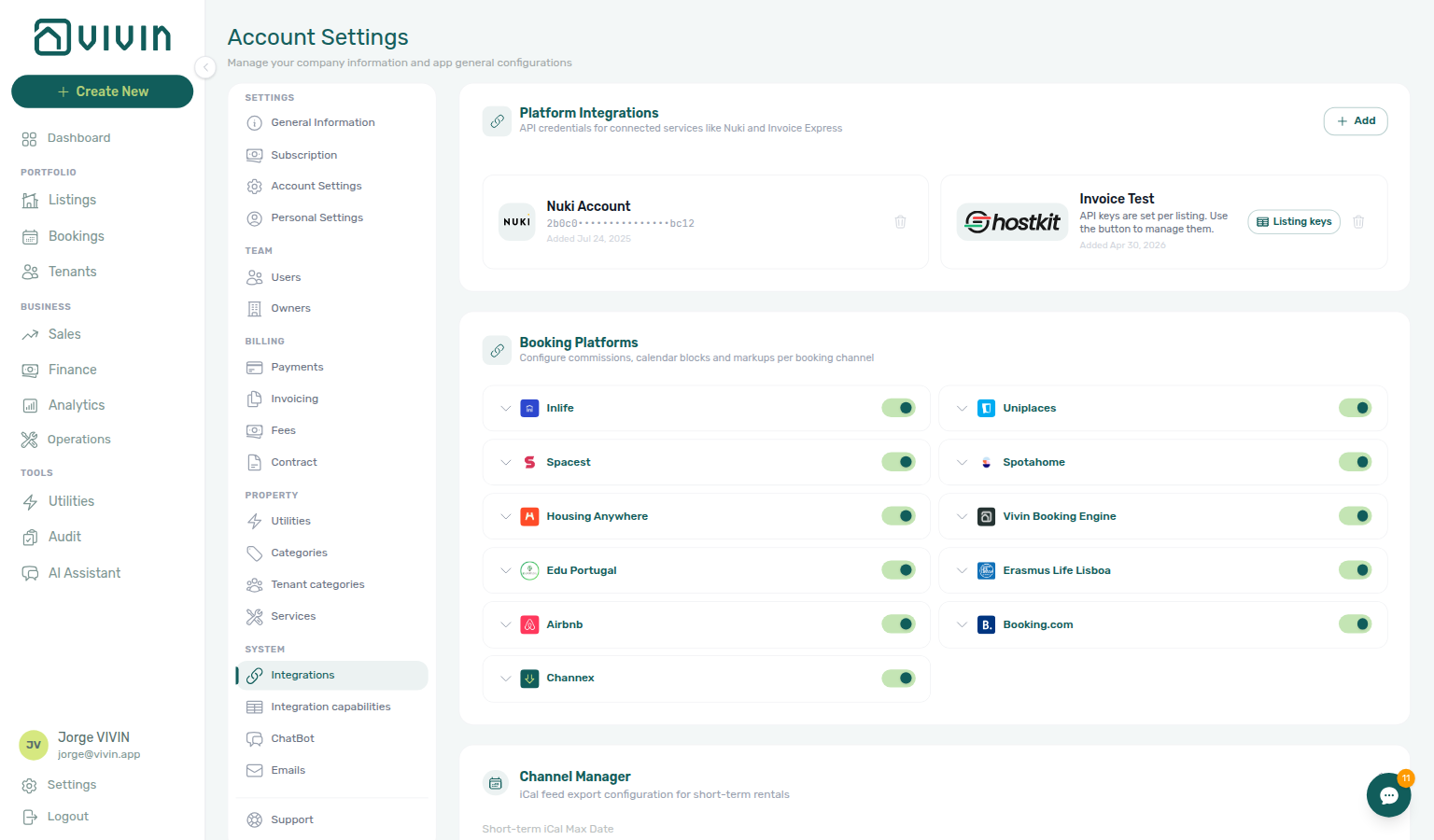
Platform integrations must be configured in Settings before they appear in the Channel Manager or as filter options in the Bookings module. Enabling a platform integration does not automatically list your units — you must also link each unit to its corresponding listing on the external platform.
See Settings > Integrations for platform-specific credential steps. Partner HTTP contracts are in the API Reference — especially Full listing feeds, iCal feeds, and Booking Engine API. End-to-end checklist: Onboarding a New Property.
Channel Manager overview
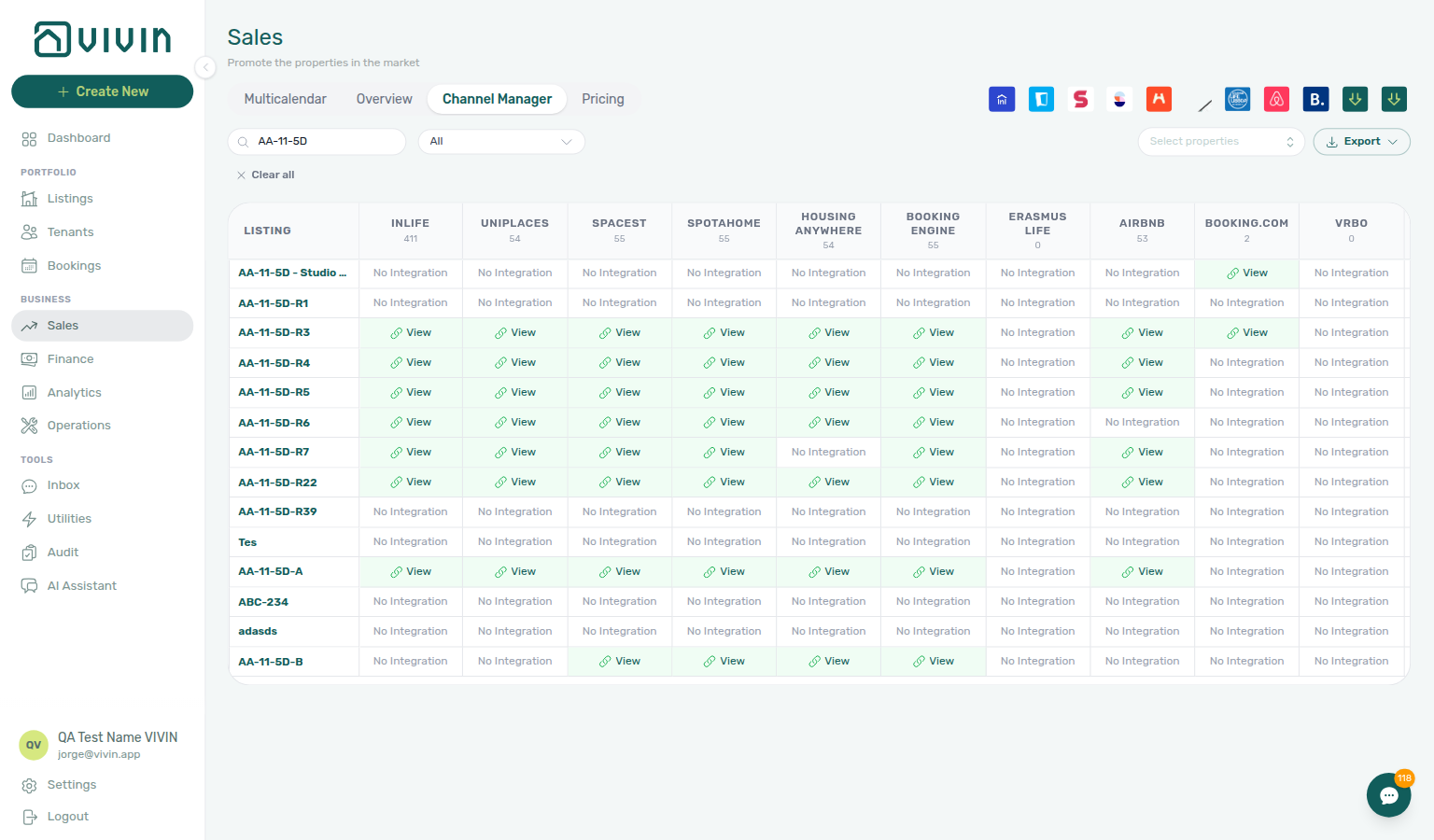
After platforms are enabled in Settings, you link each unit to its external listing and monitor sync status from Sales > Channel Manager. The grid shows listings and their connected channels in one place — use property filters, integration-ID search, and Export when you need bulk iCal URLs.
Integrations & Distribution section cross-reference
Use the sections above for this concept. Related module and workflow pages are linked inline where they help the next step.
Related
Related below links this concept to modules, workflows, settings, and escalation paths.
Documentation map & escalation
- Introduction — Platform overview and how documentation sections connect
- Getting Started — Recommended setup sequence before you enable marketplace credentials
- Concepts — Underlying models behind imported reservations, calendar sync, and partner feeds
- Modules — Operator workspaces for Sales, Listings, Bookings, and Finance reconciliation
- Common Workflows — Procedures after imports land and during turnover weeks
- Account Settings — Workspace-wide integration cards, invoicing providers, and short-term iCal controls
- API Reference — Partner HTTP contracts, Swagger onboarding, and partial vs full feeds
- Glossary — Term definitions used across distribution docs
- FAQ & Troubleshooting — Quick answers when channel sync disagrees with Bookings or Sales
- Get Help & Support — Escalation when imports are blocked by credentials or mapping
- Using in-app support — Vivin product tickets when Channex UUID mapping or imports fail
Navigation & bookmarks
Bookmark routes pair with Management Frontend Deep Links and Concepts hub — Navigation & bookmarks.
- Management Frontend Deep Links — Account Settings — Bookmark
/settings/integrationsand channel-manager routes - Management Frontend Deep Links — Sales — Bookmark
/sales/channelsfor the Channel Manager grid - Listings > Channels tab — Per-unit external IDs after account credentials are enabled
- Settings > Interface language — Operator UI locale before you walk staff through linking wizards
Platform credentials, linking, and payload depth
- Settings > Integrations — Platform cards, credentials, Channex, and short-term iCal horizon (hub)
- Settings > Integration field capability — Read-only matrix of partial vs full payload fields per marketplace
- Settings > Tenant categories — Default segment for integration-created tenants before high-volume channel onboarding
- Settings > Subscription — Vivin platform fees for connected marketplace channels
- Booking engine details — Rich marketplace payload editor via the Full integration pill
- API Reference — Full listing feeds — Complete publish catalogue routes for full-feed partners
- API Reference — iCal feeds — Short-term calendar export strategy alongside partial listing APIs
- API Reference — Creating Bookings — Partner
POST …/bookingsimports to reconcile before linking duplicate channel listings - API Reference — Webhooks & notifications — Inbound booking events (Uniplaces global
POST /webhook) and Channex revisions feed - Booking Engine API — Write routes for white-label engine partners on top of partial pulls
- Onboarding a New Property — Enable integrations in Settings, then link units on Channels
Post-import reconciliation, lifecycle, and collections
- Processing a New Booking — After import: confirm payment plan and channel-linked unit
- Booking Lifecycle — Computed Upcoming → Ongoing → Ended / Canceled status model (hub)
- Payment Allocation — Two-layer receipts, invoiced-floor rent edits, and credit note reject/revert warnings (hub)
- Tenant Portal — Imported and direct bookings share portal branding, payment schedule, and onboarding email links; segment gates: Portal access by tenant category
- FAQ — Tenant contract signing blocked — No PDF yet, mandatory Your Details gates, category locks, or Lease purpose; portal signing vs paper upload on Contract Info
- Services Marketplace — Tenant add-on catalogue and portal purchase flows after white-label or marketplace imports
- Settings > Emails — Lifecycle and payment Communication Rules for channel-imported reservations
- Managing a Check-in — Channel-only pseudo check-in/out rows on imported short-term stays
- Managing a Check-out — Channel calendar release and deposit settlement when imported stays end
- Cancelling a Booking — Release dates on every connected channel when a mid-term import is voided
- Handling a Late Payment — Step 1 — Collections on imported reservations with unpaid schedules; upstream path from Notifications — Payment overdue alerts
- Portfolio KPI review — Reconcile channel occupancy with Analytics and Dashboard after bulk linking
- Notification triage — Clear import- or payment-related alerts after marketplace bookings land; payment overdue → Handling a Late Payment — Step 1
- Notifications — Payment overdue alerts — Operator Payments category rows on channel-imported bookings with unpaid schedules
- Settings > Preferences — In-app notifications — Account-wide payment or import alerts after marketplace bookings arrive
Calendar hygiene, turnover, and manual holds
- Manual block hygiene — Manual holds that propagate to every connected channel calendar
- Audit — Manual Blocks — Portfolio-wide unavailabilities that affect availability on every connected channel
- Audit — Discounts tab — Cross-portfolio discount review after channel imports land in Bookings
- Operations > Check-in & Check-out — Pseudo arrival/departure rows from short-term iCal imports
- Sales — Multicalendar — Sales-scoped availability timeline after channel blocks land
Deeper workflow reads
Post-import reconciliation, lifecycle, and collections above. Each workflow sub-guide reciprocates with [Deeper workflow reads](../concepts/integrations.md#deeper-workflow-reads) anchors on Integrations & Distribution bullets —
- Onboarding a New Property — Enable integrations in Settings, then link units on Channels
- Processing a New Booking — After import: confirm payment plan and channel-linked unit
- Managing a Check-in — Channel-only pseudo check-in/out rows on imported short-term stays
- Managing a Check-out & Deposit Refund — Channel calendar release and deposit settlement when imported stays end
- Cancelling a Booking — Release dates on every connected channel when a mid-term import is voided
- Manual block hygiene — Manual holds that propagate to every connected channel calendar
- Portfolio KPI review — Reconcile channel occupancy with Analytics and Dashboard after bulk linking
- Notification triage — Clear import- or payment-related alerts after marketplace bookings land
Deeper concept reads
- Booking Lifecycle — Computed status model for imported and direct reservations
- Payment Allocation — Layer 1 schedules and invoicing follow-up after channel imports land in Finance
- Tenant Portal — Direct and imported bookings share portal links and payment-module provisioning
- Management Frontend Deep Links — Bookmarkable
/settings/integrationsand channel-manager routes - Landlord MCP — External automation that references channel credentials and listing feeds
Deeper API reads
- Full listing feeds — Complete publish catalogue for full-feed marketplaces
- Listings & Availability — Partial calendar-style
GET /listingspulls - iCal feeds — Short-term calendar export strategy alongside JSON partial APIs
- Creating Bookings — Partner
POST /bookingsimports reconciled in operator UI - Booking Engine API — White-label write routes on top of partial pulls
- Webhooks & Notifications — Inbound Channex revisions and outbound
booking.*events - Property & Unit Mapping —
externalIdandlandlordKeysetup before partner traffic - AI usage API — Management JWT ledger (integration Bearer keys cannot call
GET /ai-usage)
Operator habit hubs
Day-to-day operator habits (lockout catch-up, pending receipts, payment triage, handoffs, and related playbooks) live on the Common Workflows habit hub.
Deep-link anchors for habit hubs
Lockout catch-up after password recovery
Pending manual receipt approval
Reject/revert mistaken receipts
Portfolio segmentation by tenant category
Notification row-click navigation
Payment alert to receivables triage
Confirmation alert triage
Finance debt receivables triage
Finance Income status drill-down
Cash flow forecast drill-down
Key glossary terms
- Short-term iCal Max Date — Calendar horizon configured on Settings > Integrations alongside channel cards
- Glossary — End-of-Booking cost split — Charge Time → End of Booking splits daily overage across every occupied unit; still-staying roommates stay in the denominator
- Glossary — Change history — Operator-initiated edits on Listings setup and Bookings Changelog; create-time defaults excluded
- Glossary — Archived booking ledger visibility — Delete Booking hides manual/provider_platform rows on Finance → Transactions; vIBAN and credit card stay visible
- Glossary — Finance tenant category cache refresh — Recategorizing a tenant updates
booking.tenantCategoryIdimmediately; ledger tabs reflect it on reload, while Overview can lag up to ~10 minutes - Glossary — SIMAR water contract ID — SIMAR (Loures e Odivelas) water bills use Cód. Local in Connections — not Nº de Contador; leading zeros stripped
- Glossary — Full term list
Module documentation hubs
- Sales module — Portfolio availability, monthly rent editing, and channel manager connections (hub)
- Listings module — Property wizard, Channels tab, Archived inventory, and unit management (hub)
- Bookings module — Imported and direct reservations with platform badges and Timeline (hub)
- Finance module — Portfolio ledgers and Select platforms filter on Transactions (hub)
- Tenants module — Tenant directory and integration-created profile enrichment (hub)
- Operations module — Maintenance tickets, cash flows, check-in/out coordination, and linked cash flows (hub)
- Utilities module — Bills Included ceiling model distinct from marketplace distribution (hub)
- Dashboard module — Today, Total debt, and bell notification triage after imports (hub)
- Analytics module — Month-range portfolio KPI charts for occupancy reconciliation (hub)
- Properties workspace — Legacy
/propertiesURL redirects into Listings (hub) - Inbox module — WhatsApp triage when channel tenants message outside the portal (hub)
- Notifications module — Full
/notificationshistory with row-click navigation (hub) - AI Chat module — AI Assistant distinct from partner HTTP integrations (hub)
- Audit module — Portfolio-wide Manual Blocks and Discounts contract-value review (hub)
- Account Settings — Workspace-wide financial policies, templates, integrations, and operational defaults (hub)
- API Reference hub — Partner HTTP contracts, Swagger onboarding, and partial vs full feeds (hub)