Authentication
Complete Getting Started — Recommended Setup Sequence (steps 1–12 per Recommended setup order, then steps 13–15 in Listings, Bookings, and Tenants) and Onboarding a New Property — Step 7 before you request partner Bearer keys from [email protected]. Configure steps 11–12 (Integrations, Integration field capability, Tenant categories default for integrations) first — operators automating outside partner integrations use Management session after step 3 (Users). After credentials arrive, verify 200 on a Swagger GET /listings Try it out (this page) before production traffic. Guide pairing after go-live: Setup sequence after go-live (hub: API Reference — Setup sequence after go-live).
Start with Request Format and How It Works for Bearer headers, then Verifying your token in Swagger before your first live call. Next guides: Listings & Availability (first read) → Property & Unit Mapping → Creating Bookings; handle 401 / 403 with Error Handling. Operators automating outside partner integrations should read Management session instead. Non-linear operator habits (Lockout catch-up, Pending manual receipt approval, Reject/revert mistaken receipts, Portfolio segmentation by tenant category, Notification row-click navigation, Payment alert to receivables triage, Confirmation alert triage, Finance debt receivables triage, Handling a Late Payment collections, Finance Income status drill-down, Cash flow forecast drill-down) have matching Related subsections below. Full pairing matrix: Authentication section cross-reference · API Reference — API guide cross-reference.
All Vivin integration API endpoints are protected by Bearer token authentication. Every request must include a valid API key in the Authorization header.
Request Format
Use the same Authorization: Bearer header on every integration prefix — inspect live schemas in Try requests in Swagger. Full endpoint map: Authentication section cross-reference.
GET /your-integration/listings HTTP/1.1
Host: api.vivin.app
Authorization: Bearer YOUR_API_KEY
Content-Type: application/json
How It Works
Token scope is one integration platform — do not reuse keys across environments. Contrast operator Management session JWTs before wiring automation — operator-only routes such as AI usage return 401 with integration Bearer keys. Full endpoint map: Authentication section cross-reference.
- The Vivin team provisions a unique secret token for your integration during onboarding.
- Include this token in every API request as a Bearer token in the
Authorizationheader. - The API validates the token against the registered secret for your integration platform.
- If valid, the request proceeds and the authenticated integration context is set (your platform identity and associated account).
Verifying your token in Swagger
Confirm 200 on a GET /listings Try it out before production traffic — then continue to Listings & Availability. Full endpoint map: Authentication section cross-reference.
Your integration’s OpenAPI (Swagger) page on the API host uses the same Bearer scheme as programmatic calls. Open the URL Vivin gave you at onboarding, click Authorize, paste your API key (with or without the Bearer prefix, following the form hint), then expand an operation and use Try it out to confirm you get 200 responses instead of 401 before you wire a client.
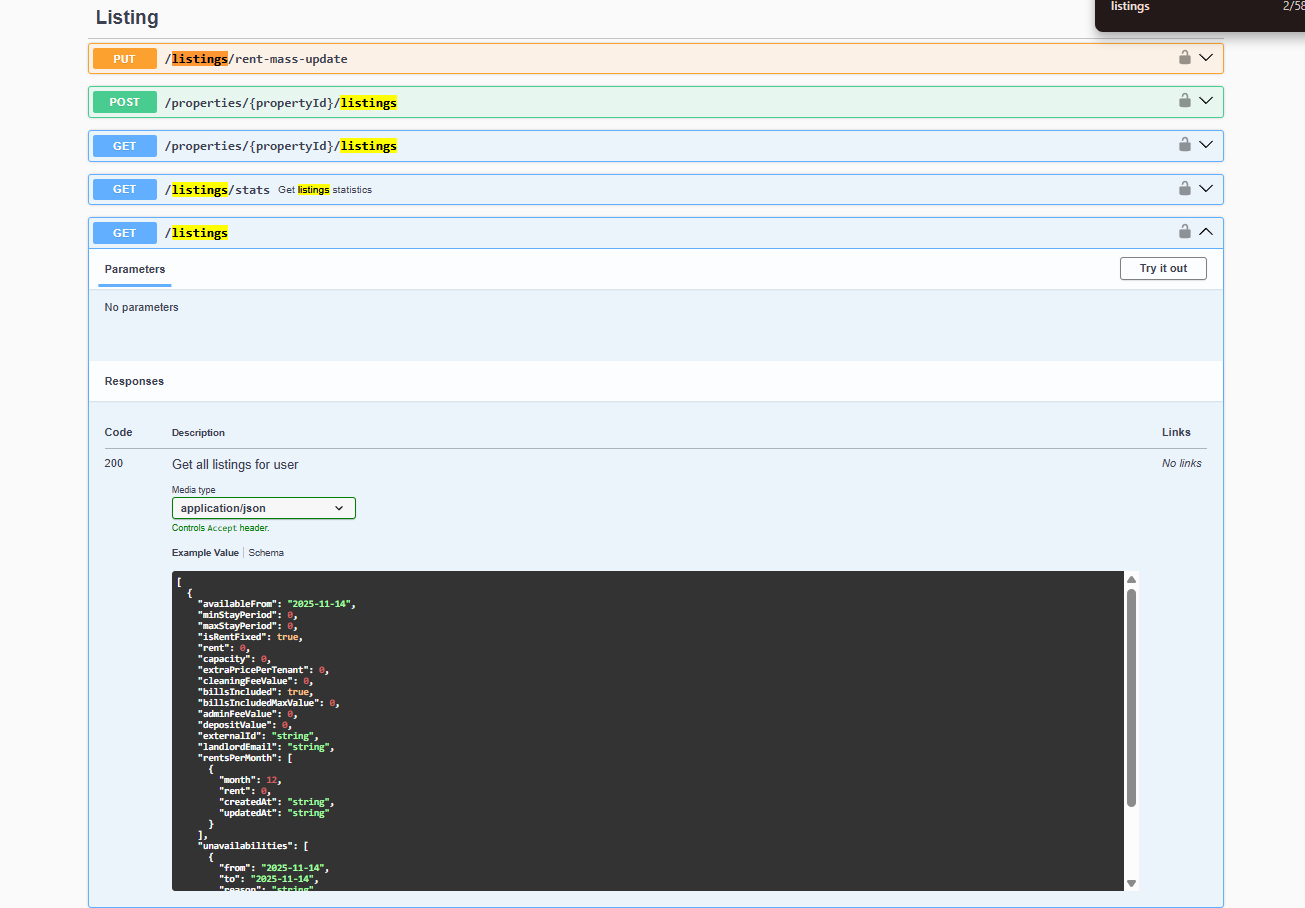
Step-by-step UI flow: Try requests in Swagger.
Token Properties
| Property | Details |
|---|---|
| Format | Opaque string (treat as a secret) |
| Lifetime | Does not expire unless rotated by Vivin |
| Scope | Tied to a single integration platform |
| Rate limits | Contact Vivin for details on rate-limiting policies |
Error Responses
Map 401 / 403 to Error Handling — Authentication Errors; inbound webhooks reuse the same secret per Webhooks & Notifications. Full endpoint map: Authentication section cross-reference.
| HTTP Status | Meaning | Action |
|---|---|---|
401 Unauthorized | Token is missing, malformed, or invalid | Check that you are sending the correct token in the Authorization: Bearer <token> header |
403 Forbidden | Token is valid but does not have access to the requested resource | Confirm with Vivin that your token is scoped correctly |
Example: 401 Response
{
"statusCode": 401,
"message": "Unauthorized"
}
Security Best Practices
Rotate compromised keys via [email protected] — see Get Help & Support. Never paste integration Bearer tokens into Core /api Swagger (operator JWT only). Full endpoint map: Authentication section cross-reference.
- Store your API key in environment variables or a secrets manager - never hardcode it in source code.
- Use HTTPS for all API calls. HTTP requests will be rejected.
- If you suspect your token has been compromised, contact Vivin immediately to rotate it.
- Do not share your token across different systems or environments.
Authentication section cross-reference
Use this table when one credential topic naturally leads into another API guide, operator UI, or downstream workflow — each row links to the docs you should read before or after wiring Bearer authorization.
| API topic / section | Pair with these docs |
|---|---|
| Request Format | Try requests in Swagger, Listings & Availability (first authorized read) |
| How It Works | Management session (operator JWT contrast), AI usage (management JWT only — not integration Bearer keys), Property & Unit Mapping (onboarding before first read) |
| Verifying your token in Swagger | Listings & Availability, Creating Bookings (authorized writes), Notifications — Payment overdue alerts → Handling a Late Payment — Step 1 (operator collections after partner traffic), Glossary — Credit note (payment reject/revert), Glossary — Invoiced floor (rent) |
| Error Responses | Error Handling — Authentication Errors, Webhooks & Notifications (inbound signing) |
| Security Best Practices | Get Help & Support, Management session — Core API Swagger (JWT-only /api) |
| Lockout catch-up after password recovery | Sign-in restored; operator backlog on partner imports | Common Workflows — Lockout catch-up, Management session, Resetting a Management User Password — Step 3 | | Pending manual receipt approval | Recorded bank transfers still pending until Approve payments | Common Workflows — Pending manual receipt approval, Creating Bookings, Finance — Pending manual payments | | Reject/revert mistaken receipts | Duplicate or wrong-booking receipts after Approve | Common Workflows — Reject/revert mistaken receipts, Payment Allocation — Correcting mistaken receipts, Glossary — Credit note (payment reject/revert) | | Portfolio segmentation by tenant category | Review one tenant segment on imported bookings | Common Workflows — Portfolio segmentation, Settings > Tenant categories, Creating Bookings | | Notification row-click navigation | Partner traffic creates in-app rows operators triage | API Reference — Notification row-click navigation, Common Workflows — Notification row-click navigation, Notifications module — Notification row-click navigation | | Payment alert to receivables triage | Bearer reads after payment overdue alerts | API Reference — Payment alert to receivables triage, Common Workflows — Payment alert to receivables triage, Handling a Late Payment — Step 1 | | Confirmation alert triage | First Booking created alerts after token verify | API Reference — Confirmation alert triage, Common Workflows — Confirmation alert triage, Processing a New Booking — Step 5b | | Finance debt receivables triage | Portfolio Debt Aging after partner import alerts | API Reference — Finance debt receivables triage, Common Workflows — Finance debt receivables triage, Finance module — Finance debt receivables triage | | Handling a Late Payment collections | Partner auth vs operator collections Steps 1–6 on imported bookings | | Finance Income status drill-down | Income segments after import settlement | API Reference — Finance Income status drill-down, Common Workflows — Finance Income status drill-down, FAQ — Finance Income status drill-down hub | | Cash flow forecast drill-down | Collections bars after partner payment schedules | API Reference — Cash flow forecast drill-down, Common Workflows — Cash flow forecast drill-down, FAQ — Cash flow forecast drill-down hub |
Related
Related below links partner Bearer authorization to setup, companion API guides, operator workflows, and escalation paths. Pair Setup sequence after go-live with Getting Started — Recommended Setup Sequence; pair Companion API guides with API Reference hub. Topic-to-guide pairing in sections above: Authentication section cross-reference. Full hub matrix: API guide cross-reference.
Setup sequence after go-live
Complete Account Settings — Recommended setup order before partner traffic. Hub parity: API Reference — Setup sequence after go-live. Full pairing matrix: Authentication section cross-reference · API guide cross-reference.
- Setup steps 1–10 — Complete operator workspace basics (Recommended setup order) before requesting partner Bearer keys; property managers automating outside the browser use Management session authentication after step 3 (Users)
- Setup steps 11–12 (Integrations, Integration field capability, Tenant categories default for integrations) — Channel credentials, calendar horizons, and payload field expectations before
[email protected]onboarding; operator context: Integrations & Distribution - Setup step 13 (Listings) — Property wizard,
externalIdmapping, and Channels tab before first partner listing reads or writes - Setup steps 14–15 (Bookings, Tenants) — Validate imported reservation shape and tenant segments after partner traffic
- After steps 13–15 — Onboarding a New Property — Step 7 go-live verification before escalating partner pull, webhook, or mapping defects
- After steps 11–12 — verify Bearer authorization in Try requests in Swagger with a
GET /listingsTry it out before production traffic; continue to Listings & Availability and Creating Bookings - Partner credential requests — Email
[email protected](distinct from in-app Vivin support tickets in Get Help & Support)
Documentation map & escalation
Documentation-map bullets pair with Introduction — Section cross-reference and FAQ — Section cross-reference. Full pairing matrix: Authentication section cross-reference.
- Getting Started — Recommended Setup Sequence before partner HTTP traffic; hub parity: API Reference — Setup sequence after go-live
- API Reference hub — Hub pairing matrix across integration guides; hub parity: Setup sequence after go-live
- Get Help & Support — Request credentials or token rotation via
[email protected](hub: Setup sequence after go-live) - FAQ & Troubleshooting — Credential and Swagger authorization questions (hub: Setup sequence after go-live)
- Glossary — Webhook — Callback signing model that reuses the same integration secret as Bearer reads
Companion API guides
Companion guides share Bearer authorization or error shapes with this page — start from API Reference hub. Full pairing matrix: Authentication section cross-reference.
- Listings & Availability — First read call after you authorize in Swagger
- Creating Bookings — Write operations that use the same Bearer token
- Error Handling —
401/403responses and when not to retry - Management session authentication — Operator Core API JWT (not integration Bearer keys)
- Webhooks & Notifications — Outbound event signing with the same integration secret
- Full listing feeds — Rich catalogue reads that use the same Bearer authorization
- iCal feeds — Calendar export module that shares the integration host but not JSON
GET /listings - Property & Unit Mapping — Configure
externalIdvalues before your first authenticated read call - Booking Lifecycle & Validations — Validation errors after authorized write calls
- Booking engine integration — Public booking-engine endpoints that use a different auth model
Upstream & downstream workflows
Workflow bullets pair with Common Workflows — Workflow cross-reference after partner traffic lands in the management app. Full pairing matrix: Authentication section cross-reference.
- Onboarding a New Property — Operator setup sequence before partner tokens can see live inventory
- Processing a New Booking — Operator confirmation workflow after partner imports use the same Bearer token
- Portfolio KPI review — Reconcile imported booking volume after your first authorized
POST /bookingstraffic - Notification triage — Clear payment alerts when authorized writes create booking events
- Managing a Check-out & Deposit Refund — Operator settlement after partner
POST /bookingsimports reach departure week
Operator UI & settings
Operator UI rows validate the same inventory and permissions behind integration HTTP — pair with Account Settings — Tab cross-reference. Full pairing matrix: Authentication section cross-reference.
- Settings > Integrations — Operator connection UI where platform credentials are provisioned alongside account setup
- Settings > Preferences — In-app notifications — Account-wide integration alerts when auth failures block channel sync troubleshooting
- Settings > Emails — Lifecycle templates and Communication Rules for partner-created bookings
- Property & listing details (booking engine) — Rich catalogue fields partners read after Bearer authorization on full feeds
- Create New — Inlife Import — Operator bulk migration before partner tokens see live mapped inventory
- Audit — Discounts tab — Cross-portfolio discount export after first authorized booking imports land in Bookings
Deeper concept reads
Concept reads pair with Concepts hub subsection index and Concept cross-reference. Full pairing matrix: Authentication section cross-reference · API guide cross-reference.
- Concepts > Integrations — Channel strategy before your first authorized listing pull (section cross-reference; Deeper API reads; hub)
- Payment Allocation — Two-layer receipts, invoiced-floor rent edits, and credit note reject/revert warnings (section cross-reference; Deeper API reads; hub)
- Booking Lifecycle — Computed Upcoming → Ongoing → Ended / Canceled status model, list filters, and Timeline (section cross-reference; Deeper API reads; hub)
- Services Marketplace — Ancillary charges on tenant payment plans after authorized booking creation (section cross-reference; Deeper API reads; hub)
- Tenant Portal — Booking-scoped tenant access after partner
POST /bookingscreates payment schedules (section cross-reference; Deeper API reads; hub) - FAQ — Tenant contract signing blocked — No PDF yet, mandatory Your Details gates, category locks, or Lease purpose; portal signing vs paper upload on Contract Info
Deeper workflow reads
Workflow reads pair with Common Workflows hub subsection index and Workflow cross-reference. Each workflow sub-guide also has its own Deeper API reads subsection with reciprocal companion API anchors — hub parity: API Reference — Deeper workflow reads. Full pairing matrix: Authentication section cross-reference · API guide cross-reference.
- Onboarding a New Property — Operator setup sequence before partner tokens can see live inventory (section cross-reference; Deeper API reads; hub)
- Processing a New Booking — Operator confirmation workflow after partner imports use the same Bearer token (section cross-reference; Deeper API reads; hub)
- Portfolio KPI review — Reconcile imported booking volume after your first authorized
POST /bookingstraffic (section cross-reference; Deeper API reads; hub) - Notification triage — Clear payment alerts when authorized writes create booking events (section cross-reference; Deeper API reads; hub)
- Managing a Check-out & Deposit Refund — Operator settlement after partner
POST /bookingsimports reach departure week (section cross-reference; Deeper API reads; hub) - Resetting a Management User Password — Management JWT vs integration Bearer keys — tenants use portal codes, not partner tokens (section cross-reference; Deeper API reads; hub)
Lockout catch-up after password recovery
Partner Bearer keys are unaffected by management lockout — operators reconciling imports after sign-in recovery pair with Management session authentication. Hub parity: Common Workflows — Lockout catch-up after password recovery. Full pairing matrix: authentication-section-cross-reference · API guide cross-reference.
- Common Workflows — Lockout catch-up after password recovery — Hub matrix when partner traffic continued but operator UI backlog accumulated during lockout
- Getting Started — Lockout catch-up after password recovery — Canonical operational backlog mesh
- Management session authentication — Refresh operator JWT before scripted catch-up; partner Bearer keys stay valid
- Resetting a Management User Password — Operator UI recovery distinct from integration token rotation
- Verifying your token in Swagger — Re-confirm
200onGET /listingsafter operators resume onboarding
Pending manual receipt approval
Partner POST /bookings creates Layer 1 schedules; operator pending receipts on imported stays pair with Payment Allocation. Hub parity: Common Workflows — Pending manual receipt approval. Full pairing matrix: authentication-section-cross-reference · API guide cross-reference.
- Common Workflows — Pending manual receipt approval — Hub matrix when channel-import confirmation receipts await Approve payments
- Creating Bookings — Partner enqueue creates schedules operators reconcile in Finance
- Finance — Pending manual payments — Amber Pending chip after OTA bank transfers
- FAQ — Manual receipt still pending — Why KPIs lag until approval clears
- Payment Allocation — Two-layer model behind pending KPI lag
Reject/revert mistaken receipts
Duplicate partner imports and mistaken OTA receipts pair with Payment Allocation — Correcting mistaken receipts. Hub parity: Common Workflows — Reject/revert mistaken receipts. Full pairing matrix: authentication-section-cross-reference · API guide cross-reference.
- Common Workflows — Reject/revert mistaken receipts — Hub matrix when duplicate OTA receipts need Reject / Revert
- Creating Bookings — Void duplicate enqueue rows before receipt triage
- Finance — Row actions on in-payment rows — Portfolio Reject selected after import triage
- Glossary — Credit note (payment reject/revert) — Accounting follow-up when Finance already invoiced the charge
- Error Handling — Retry policy distinct from operator receipt cleanup
Portfolio segmentation by tenant category
Integration default tenant category pairs with Settings > Tenant categories before high-volume partner traffic. Hub parity: Common Workflows — Portfolio segmentation by tenant category. Full pairing matrix: authentication-section-cross-reference · API guide cross-reference.
- Common Workflows — Portfolio segmentation by tenant category — Hub matrix when channel imports cluster on one segment
- Settings > Tenant categories — Default for integration-created tenants assignment
- Creating Bookings — Segment on imported tenant profiles after enqueue
- Bookings — Other filters — Scope OTA import triage by Tenant category
- Glossary — Tenant category — Definition and Finance filter parity
Notification row-click navigation
Partner Bearer authorization does not replace /notifications row-click — operators triage webhook-driven in-app rows in the management UI after GET /listings succeeds. Hub parity: API Reference — Notification row-click navigation. Full pairing matrix: Authentication section cross-reference · API guide cross-reference.
- API Reference — Notification row-click navigation — Hub matrix (
notifications-module-row-click-target.png,notifications-row-navigation-flow.mp4) - Common Workflows — Notification row-click navigation — Operator procedure hub
- Notifications module — Notification row-click navigation — Canonical
/notificationsinbox pairing - FAQ — Notification row-click navigation hub — Symptom table
Payment alert to receivables triage
Ongoing/Ended payment overdue rows after partner imports — confirm booking balance on operator Transactions before Finance → Overview → Debt Aging. Hub parity: API Reference — Payment alert to receivables triage. Full pairing matrix: Authentication section cross-reference · API guide cross-reference.
- API Reference — Payment alert to receivables triage — Hub matrix (
notifications-row-navigate-to-booking-detail.png,notifications-row-navigation-flow.mp4) - Common Workflows — Payment alert to receivables triage — Operator procedure hub
- Handling a Late Payment — Step 1 — Collections follow-through after row-click
- FAQ — Payment alert to receivables triage hub — Symptom table
Confirmation alert triage
Upcoming Booking created / Payment received alerts often follow first authorized POST /bookings — pair with operator Processing a New Booking — Step 6. Hub parity: API Reference — Confirmation alert triage. Full pairing matrix: Authentication section cross-reference · API guide cross-reference.
- API Reference — Confirmation alert triage — Hub matrix (
notifications-row-navigate-to-booking-detail.png,bookings-detail-transactions-approve-payment-modal.png) - Common Workflows — Confirmation alert triage — Operator procedure hub
- Processing a New Booking — Step 5b / Step 6 — Canonical confirmation gates
- FAQ — Confirmation alert triage hub — Symptom table
Finance debt receivables triage
Partner imports that enqueue payment overdue rows need portfolio Top debtors on Finance → Overview → Debt Aging after single-booking triage — clear amber Pending before KPI sign-off. Hub parity: API Reference — Finance debt receivables triage. Full pairing matrix: Authentication section cross-reference · API guide cross-reference.
- API Reference — Finance debt receivables triage — Hub matrix (
finance-overview-income-chart-debt-aging.png,finance-overview-debt-aging-walkthrough-flow.mp4) - Common Workflows — Finance debt receivables triage — Operator procedure hub
- Finance module — Finance debt receivables triage — Debt Aging canonical surface
- FAQ — Finance debt receivables triage hub — Symptom table
Handling a Late Payment collections
Partner Bearer auth on integration prefixes does not replace operator collections — imported bookings that enqueue payment overdue rows still need Handling a Late Payment — Steps 1–6 in the management UI. Hub parity: Common Workflows — Handling a Late Payment collections hub. Full pairing matrix: authentication-section-cross-reference · API guide cross-reference.
- API Reference — Handling a Late Payment collections — Hub matrix
- Creating Bookings —
POST /bookingsimports that surface receivables alerts - Payment alert to receivables triage — Alert before collections
- Finance debt receivables triage — Debt Aging after import
- Handling a Late Payment — Step 1 — Operator collections follow-through
- FAQ — Handling a Late Payment collections hub — Symptom table
Finance Income status drill-down
Partner POST /bookings imports may inflate Scheduled segments — reconcile Income chart segment-click with Debt Aging Top debtors before integration sign-off. Hub parity: API Reference — Finance Income status drill-down. Full pairing matrix: Authentication section cross-reference · API guide cross-reference.
- API Reference — Finance Income status drill-down — Hub matrix (
finance-overview-income-status-in-debt-modal.png,finance-overview-income-drill-down-flow.mp4) - Common Workflows — Finance Income status drill-down — Operator procedure hub
- Finance module — Income status drill-down — Canonical Finance → Overview surface
- FAQ — Finance Income status drill-down hub — Symptom table
Cash flow forecast drill-down
Partner-import collections may lag Cash flow forecast month bars until bookings settle — distinct from Income status segments and Dashboard rent due chart. Hub parity: API Reference — Cash flow forecast drill-down. Full pairing matrix: Authentication section cross-reference · API guide cross-reference.
- API Reference — Cash flow forecast drill-down — Hub matrix (
finance-overview-cash-flow-all-payments-modal.png,finance-overview-cash-flow-day-view.png,finance-overview-cash-flow-drill-down-flow.mp4) - Common Workflows — Cash flow forecast drill-down — Operator procedure hub
- Finance module — Cash flow forecast drill-down — Canonical Finance → Overview surface
- FAQ — Cash flow forecast drill-down hub — Symptom table
Key glossary terms
Glossary rows pair with Glossary cluster cross-reference and receipt-dispute workflows. Full pairing matrix: Authentication section cross-reference.
-
Glossary — Invoiced floor (rent) — Rent edits blocked below exported invoice totals on live imported bookings
-
FAQ — Bulk Hostkit invoicing slow — Vivin paces Hostkit API calls and retries HTTP 429 during bulk Issue allocation / Invoice selected; refresh Transactions before re-issuing
-
FAQ — Bulk Hostkit invoicing hub — Symptom table + per-guide mesh
-
Glossary — Deposit lifecycle status — Partner Bearer keys cannot mutate
depositStatus; deposit refund is operator UI after import -
Glossary — End-of-Booking cost split — Charge Time → End of Booking splits daily overage across every occupied unit; still-staying roommates stay in the denominator (#2111)
-
Glossary — Change history — Operator-initiated edits on Listings setup and Bookings Changelog; create-time defaults excluded (#2093)
-
FAQ — Booking Changelog scope — Operator-initiated edits only; create-time defaults excluded (#2093)
-
Glossary — Archived booking ledger visibility — Delete Booking hides manual/provider_platform rows on Finance → Transactions; vIBAN and credit card stay visible (#1897)
-
Bookings — Provider platform payment — Non-rejected provider platform in-payment blocks Delete Booking until Reject or assign (#2076)
-
FAQ — Delete Booking on integration reservation — Clear pending provider platform in-payment with Reject or assign before soft-archive (#2076)
-
Listings — Property edit sidebar pills — Setup / Full integration / Photos pills on property and unit edit sidebars; replaced the old Go to details shortcut (#2082)
-
Glossary — Finance tenant category cache refresh — Recategorizing a tenant on Tenants → Tenant Info force-refreshes Finance caches so Contract Values, Overview, and Deposits filters match within seconds (#2088)
-
FAQ — Finance tenant category filter parity — Finance Other filters drawer lists segments on cached bookings only; mirror Bookings / Tenants when a segment is missing
-
FAQ — Assign tenant category for direct booking — Add booking has no category field; assign on Tenants → Tenant Info or + Create New → Tenant before contract mail
-
Glossary — SIMAR water contract ID — SIMAR (Loures e Odivelas) water bills use Cód. Local in Connections — not Nº de Contador; leading zeros stripped (#2110)
-
FAQ — SIMAR water bill property match — Cód. Local in Connections — not Nº de Contador; strip leading zeros (#2110)
-
Glossary — Per-booking maintenance ticket opt-out — Add booking checkboxes skip automatic CI/CO tickets for one reservation only; property rule unchanged (#1140)
-
FAQ — Cancel Booking vs Delete Booking — Cancel for real stays with settlement; Delete soft-archives mistaken/test rows (#1897 / #2076)
-
Glossary — Archived property — Archive retires a building to Listings → Archived without deleting bookings; distinct from Delete Booking (reservation soft-archive) — Listings — Archived properties
-
FAQ — Archive a property — Edit property sidebar Archive / Unarchive on Listings; building-level — not Delete Booking or Cancel booking
-
FAQ — Portfolio retirement decisions — Archive property (building) vs Cancel booking vs Delete Booking (reservation soft-archive) — three-way decision table
-
Finance — Deposit lifecycle status cards — Deposit lifecycle status row on Finance → Deposits; click Partial paid for collection shortfalls (#2091)
-
FAQ — Partly collected security deposit — Paid above zero but below Amount on booking Deposit; Partial paid card on Finance → Deposits (#2090 / #2091)
-
Finance — Deposit status filter — Other filters → Deposit status multi-select on Bookings and Finance (#2090)
-
Operations — Tickets toolbar search — Paste the full sequential ticket ID (for example
S259,T27) in toolbar Search (#2074) -
FAQ — Find a ticket by its ID — Paste the full sequential ticket ID (for example
S259,T27) in Operations → Tickets toolbar Search (#2074) -
FAQ — Skip automatic check-in/out tickets for one booking — Turn off Use unit contract rents and other contract details on Add booking to reveal CI/CO ticket checkboxes (#1140)
-
FAQ — Same-day turnovers — Check-out + check-in on one unit same day: Operations → Check-in & Check-out, Timeline / Multicalendar, turnover tickets
-
FAQ — Manual payments after Delete Booking — Delete Booking hides manual/provider_platform rows on Finance → Transactions; vIBAN and credit card stay visible (#1897)
-
Glossary — Directory list load failures — First-fetch directory failures show Retry / Try again; distinct from filter-empty states and booking-sidebar tab errors
-
Glossary — Vacant Unit Preference — Include manual blocks counts operator holds as free on Dashboard / Sales vacancy surfaces (#1427)
-
FAQ — Communication or Tickets load failure — Tab-scoped Refresh (Communication) or Retry (Tickets); other booking sidebar tabs stay usable
-
Operations — Property-level ticket search — Property-name matches share the top relevance tier with unit hits; building-scoped rows float first under an active Property filter (#2089)
-
FAQ — AI token usage — Poll GET /ai-usage / GET /ai-usage/summary with management JWT;
landlord_chat+utility_bill_extraction; no management UI screen yet -
FAQ — Automatic check-in email — Trigger matrix, 15-day cutoff, paper upload vs portal signing, Nuki-only toggle, Send / Resend on Contract Info
-
FAQ — WhatsApp and email per booking — Bookings → Communication tab when tenant chatbot is enabled; Inbox for portfolio-wide triage
-
FAQ — Deposit missing on Finance Deposits — Default ~3 months date range; clear or widen before triaging older move-outs or dispute row actions
-
FAQ — Pending manual in-payment on /notifications — Alert persists until Approve payments clears Finance or booking Transactions
-
FAQ — Uncovered Debt KPI — Finance Total Debt minus deposit offsets; pair with Debt Aging and In debt drill-down
-
FAQ — Dashboard Total Debt subtitle — Post-login Total Debt card headline vs >15 days subtitle; ongoing bookings only
-
FAQ — Analytics (KPI workspace) — Portfolio KPIs vs Sales/Listings/Dashboard; load-failure Try again
-
FAQ — Lower rent below invoiced — Change monthly rent clamps and Contract Values → Edit amount blocks net below exported invoice totals; use credit notes in accounting when you truly need a reduction
-
Glossary — Fixed invoice date — Account-wide Invoice date before bulk Issue allocation / Invoice selected; amber banner on Finance → Transactions until you turn Use today as invoice date back on
-
FAQ — Month-end invoicing (fixed date) hub — Symptom table + toggle reset after batch
-
FAQ — Reject or revert an incoming payment — Reject pending rows or Revert confirmed ones; Finance → Transactions uses Reject selected bulk-only; modals warn about credit notes when Finance already invoiced
-
FAQ — Finance Income status drill-down hub — Symptom table for segment vs Debt Aging
-
FAQ — Finance Income status drill-down — Overview Income chart (Paid / Scheduled / In debt); click a segment for month-scoped payment-line modal; Debt Aging for booking-level receivables
-
FAQ — Cash flow forecast drill-down hub — Symptom table for collections vs Income / Dashboard
-
FAQ — Cash flow forecast drill-down — Month / Day bar-click habit
-
FAQ — Permission denied toast — Red You do not have permission to perform this action. toast when RBAC blocks a save; fix in Users → Role Permissions
-
FAQ — Phone shows Operations only — Mobile phone user agent locks operators with Operations access to
/operations; iPads and narrow desktop browsers keep the full module list -
FAQ — Notification row-click navigation — On
/notifications, row click marks unread then openslink,bookingId,tenantId,listingId, orpropertyId(first match); Dashboard bell General rows stay in-panel unlesslinkis set -
FAQ — Bookings that owe money — Top debtors and overdue buckets on Finance → Overview; Total Debt KPI is not a table
-
FAQ — Fixed rent on variable unit — Variable listing + equal rent every contract month → booking stores fixed headline Monthly rent; payment plan unchanged
Module documentation hubs
Module hubs pair with Modules — Module cross-reference for screen-by-screen operator follow-up. Full pairing matrix: Authentication section cross-reference.
- Audit module — Manual blocks on mapped units that cause authorized availability reads to disagree with Sales (hub)
- Bookings module — Operator UI for reservations created via
POST /bookings(hub) - Dashboard module — Post-login Today, Total debt, Vacant Units, and forecast KPI snapshot with bell notification triage (hub)
- Analytics module — Month-range portfolio KPI charts (Overview, Revenue, Occupancy, ADR, RevPAR, Maintenance) with rankings and heatmaps (hub)
- Listings module — Property wizard, Channels tab, Archived inventory, and unit management (hub)
- Properties workspace — Legacy
/propertiesURL redirects into Listings (hub) - Booking engine details — Rich marketplace payload editor via the Full integration pill (hub)
- Finance module — Portfolio ledgers (Overview, Income, Contract Values, Transactions, Payouts, Deposits) with payment approval and deposit settlement (hub)
- Tenants module — Tenant directory, profile sidebars, With Debt segmentation, and table expand for linked bookings (hub)
- Sales module — Portfolio availability, monthly rent editing, and channel manager connections (hub)
- Utilities module — Bills Included ceiling model, Connections, AI bill upload, and tenant overage charges on payment plans (hub)
- Operations module — Maintenance tickets, cash flows, check-in/out coordination, Draft ticket queues, and linked cash flows (hub)
- Inbox module — Portfolio-wide WhatsApp workspace with Dashboard bell Inbox sub-tab deep links (hub)
- Notifications module — Full
/notificationshistory with search, filters, and row-click navigation (hub); Payment overdue alerts when partner traffic creates overdue schedules - AI Chat module — Vivin-internal AI Assistant using Landlord MCP tools for portfolio Q&A (hub)
- Account Settings — Workspace-wide financial policies, templates, integrations, and operational defaults (hub)