Webhooks & Notifications
Provision outbound webhook URLs and inbound signing secrets with [email protected] after Getting Started — Recommended Setup Sequence steps 11–15 and Onboarding a New Property — Step 7 — callbacks assume live externalId mapping (Property & Unit Mapping) and stable partial listing shapes (Listings & Availability). Steps 11–12 (Integrations, Tenant categories default for integrations) should be set before high-volume booking.* traffic. Guide pairing after go-live: Setup sequence after go-live (hub: API Reference — Setup sequence after go-live).
Start with Inbound vs outbound and Webhook Events, then Webhook Configuration and Inbound partner webhooks (Vivin receives) for signing. Event timing follows the enqueue pipeline in Booking Lifecycle & Validations. listing.updated and unavailability.* payloads align with Listings & Availability; inbound partner posts reuse signing from Authentication. Housing Anywhere echoes full-feed listingReference as listing_external_reference — Housing Anywhere. Uniplaces inbound is a global POST /uniplaces-integration/webhook — Uniplaces. Habit-specific shortcuts live under Related below.
Vivin supports outbound integration webhooks for partner platforms that need real-time updates instead of polling listing and booking data.
Operators see booking, payment, and ticket alerts in the management Notifications module (/notifications) and the Dashboard bell slide-over — including payment overdue rows that row-click into Handling a Late Payment — Step 1. Those are in-app history rows, not HTTP callbacks to your servers. This page covers API integration webhooks only.
Inbound vs outbound
Outbound booking.* timing follows Booking Lifecycle & Validations. Inbound HA ({landlordKey} + listing_external_reference) and Uniplaces (global /webhook + offer_api_reference) routes share Bearer auth with Authentication.
| Direction | Who calls whom | Examples |
|---|---|---|
| Outbound (Vivin → you) | Vivin POSTs to the HTTPS endpoint you provide during onboarding | booking.created, listing.updated, unavailability.* in the Webhook Events table |
| Inbound (partner → Vivin) | A channel posts to Vivin’s integration routes | Housing Anywhere POST …/{landlordKey}/webhook (listing_external_reference); Uniplaces global POST …/webhook (no {landlordKey}) |
Configure outbound URLs and auth with the Vivin team. Inbound paths and secrets are documented per integration (for example the Uniplaces webhook x-api-key).
Delivery path
flowchart LR
 Vivin[Vivin Core]
 EP[Your HTTPS webhook endpoint]
 Vivin -->|"POST signed payload"| EP
Your endpoint should accept HTTPS POST requests on the URL agreed during onboarding, validate Vivin’s authentication (shared secret header, Basic auth, or the method you configured), and return a 2xx response quickly; process heavy work asynchronously so Vivin can retry safely on transient failures.
Webhook Events
unavailability.* payloads mirror partial ListingDto rows — Listings & Availability. Polling fallback when outbound is unavailable: Polling as an Alternative.
The following events can be pushed to your platform if a webhook endpoint is configured:
| Event | Description | When it fires |
|---|---|---|
booking.created | A new booking was created on a listing mapped to your platform | Booking created from any source (Vivin UI, another platform, booking engine) |
booking.cancelled | A booking was cancelled | Property manager or tenant cancels via Vivin |
listing.updated | Listing pricing or availability changed | Property manager updates rent, dates, or availability |
unavailability.created | New calendar block added | Manual block or booking from another channel |
unavailability.removed | Calendar block removed | Booking cancelled or manual block removed |
Webhook Configuration
Provision outbound URLs with Vivin during onboarding — see Get Help & Support. Inbound Channex uses revisions feed, not POST …/webhook — Channex booking revisions feed.
Webhook endpoints are configured during onboarding by the Vivin team. Provide:
- Endpoint URL - HTTPS endpoint on your platform that accepts POST requests
- Events - Which events you want to receive
- Authentication - How Vivin should authenticate to your endpoint (e.g. shared secret header, Basic auth)
Webhook Payload Format
{
  "event": "booking.created",
  "timestamp": "2026-04-20T10:30:00.000Z",
  "data": {
    "externalId": "abc-123",
    "bookingId": "vivin-booking-uuid",
    "checkInDate": "2026-09-01",
    "checkOutDate": "2027-01-31",
    "status": "confirmed"
  }
}
Inbound partner webhooks (Vivin receives)
Housing Anywhere inbound paths use the same landlordKey resolution as full-feed URLs (stored key or integration email) — Full listing feeds — landlordKey and listingReference. Uniplaces uses a global webhook with no path key — Uniplaces. Try payloads in Integration Swagger per Try requests in Swagger.
Channels that push booking lifecycle events into Vivin use integration-scoped routes on your Core API host (same host as GET /listings and POST /bookings). Each route is documented in its own integration Swagger UI:
| Integration | Swagger UI path | Inbound webhook route |
|---|---|---|
| Housing Anywhere | {API host}/housinganywhere-integration | POST /housinganywhere-integration/{landlordKey}/webhook |
| Uniplaces | {API host}/uniplaces-integration | POST /uniplaces-integration/webhook (no {landlordKey}) |
Replace {API host} with your environment base URL (for example the host your management app uses for API calls). On Housing Anywhere, {landlordKey} is the same path key as full-feed URLs: the account’s stored landlord key or its Housing Anywhere integration email. The listing in the body must belong to that account. Uniplaces does not put a landlord key in the webhook path — see Uniplaces.
Channex booking revisions feed
Channex inbound bookings use Channex’s booking revisions feed (PMS polling pattern), not an operator-configured POST …/webhook route on Vivin like Housing Anywhere or Uniplaces.
| Topic | Detail |
|---|---|
| Direction | Channex → Vivin (Vivin pulls unacknowledged revisions on a schedule) |
| Mapping | Each Vivin unit needs listing_integration.channexMapping with Channex propertyId, roomTypeId, and ratePlanId UUIDs — provisioned with Vivin support, not self-serve on Listings > Channels |
| Creates | New confirmed revisions queue a Channex booking import when customer.mail and stay dates are present |
| Cancels | Cancelled revisions cancel the matching active Vivin booking when found |
| Modified | Modified revisions update stay dates and host payout on the matching Vivin booking when safe (payment plan + received payout follow); Changelog records the apply, or a review warning when auto-apply cannot run — see Bookings — When Airbnb changes dates or the payout |
| Partner API | Channex partners can still GET /channex-integration/listings and POST /channex-integration/bookings per API Reference |
Operator setup: enable Channex under Settings > Integrations and confirm UUID mapping with your Vivin contact. See also Integrations (concepts).
Housing Anywhere
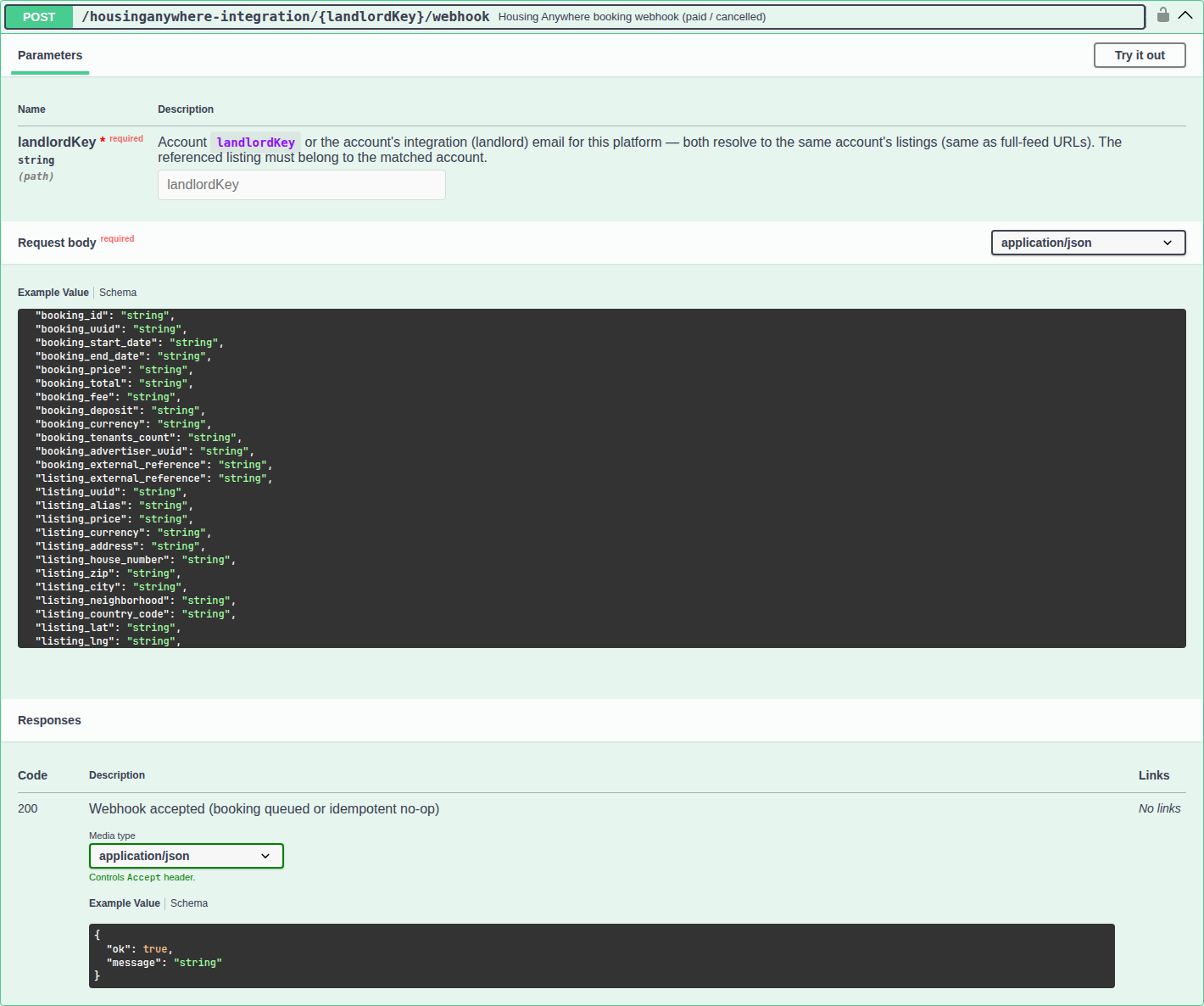
Housing Anywhere posts paid and cancelled booking notifications to a path that still includes {landlordKey}. Vivin resolves that segment the same way as full-feed URLs: the stored landlord key or the account’s Housing Anywhere integration email. The listing named in the body must belong to that account.
| Topic | Detail |
|---|---|
| Method & path | POST /housinganywhere-integration/{landlordKey}/webhook |
| Path key | Same as Full listing feeds — landlordKey: stored landlord key or the Housing Anywhere integration email. |
| Listing key | Echo full-feed listingReference as listing_external_reference. That value is your channel externalId when the unit is linked, or the Vivin listing id when it is not. See Housing Anywhere listingReference. |
| Auth | Authorization: Bearer with the same Housing Anywhere integration secret as other HA routes. Authenticate with that shared secret. |
| Required body | notification_type, listing_external_reference, and booking_uuid. |
| Amounts | Cent-strings. Use booking_price (first-month rent remitted to the landlord) as the platform payment — not booking_total, which includes Housing Anywhere’s fee. |
| Payload | Partner JSON — see HousingAnywhereWebhookDto in Swagger (notification_type, booking_uuid, dates, listing_external_reference, tenant contact fields). |
| Response | { "ok": true, "message": "…" } when accepted or treated as a no-op |
Actioned events — booking_paid queues a booking. booking_cancelled and booking_canceled cancel the matching active stay. Vivin only acts on those types.
Uniplaces
Uniplaces registers one webhook URL for the whole partner key. Vivin therefore exposes a global route with no {landlordKey} path segment. Each callback names the listing in the body; Vivin resolves the account from that listing.
| Topic | Detail |
|---|---|
| Method & path | POST /uniplaces-integration/webhook — no {landlordKey}. Contrast Housing Anywhere, which still uses {landlordKey} in the path. Full-feed poll URLs keep {landlordKey} — Full listing feeds — landlordKey. |
| Auth | Authorization: Bearer (same family as other Uniplaces routes) and/or x-api-key when your onboarding includes a Uniplaces webhook API key |
| Listing key | Prefer offer_api_reference. That value is the full-feed reference_id: the channel externalId when the unit is linked, or the Vivin listing id when it is not. Fall back to offer_id only on older payloads — that is Uniplaces’ own offer number and does not resolve on its own. offer_id and booking_id may arrive as JSON numbers; Vivin reads them as text. |
| Payload | Partner JSON — see UniplacesWebhookDto in Swagger (event, offer_api_reference, offer_id, booking_id / booking_Id, guest fields, move dates). Amounts such as contract_price_amount are in cents (preferred over legacy booking_total). Event names may use hyphens or underscores (booking-paid vs booking_paid). |
| Response | { "ok": true, "message": "…" } on success — see Actioned vs acknowledged below |
Actioned events — Vivin creates a booking on payment-style events (booking-paid, booking_paid, payment_confirmed, and normalized variants) and cancels on cancel/reject events (booking-cancelled, booking-canceled, booking-rejected, and normalized variants).
Acknowledged without action — Every other Uniplaces lifecycle event (booking-created, booking-accepted, booking-confirmed, booking-discarted, booking-payment-expired, booking-expired, and so on) returns HTTP 200 with { "ok": true, "message": "Ignored Uniplaces event: …" }. Vivin logs and acknowledges them so Uniplaces does not treat the delivery as failed and disable the webhook. Vivin only imports bookings on payment and removes them on cancel/reject — earlier lifecycle signals are intentionally no-ops.
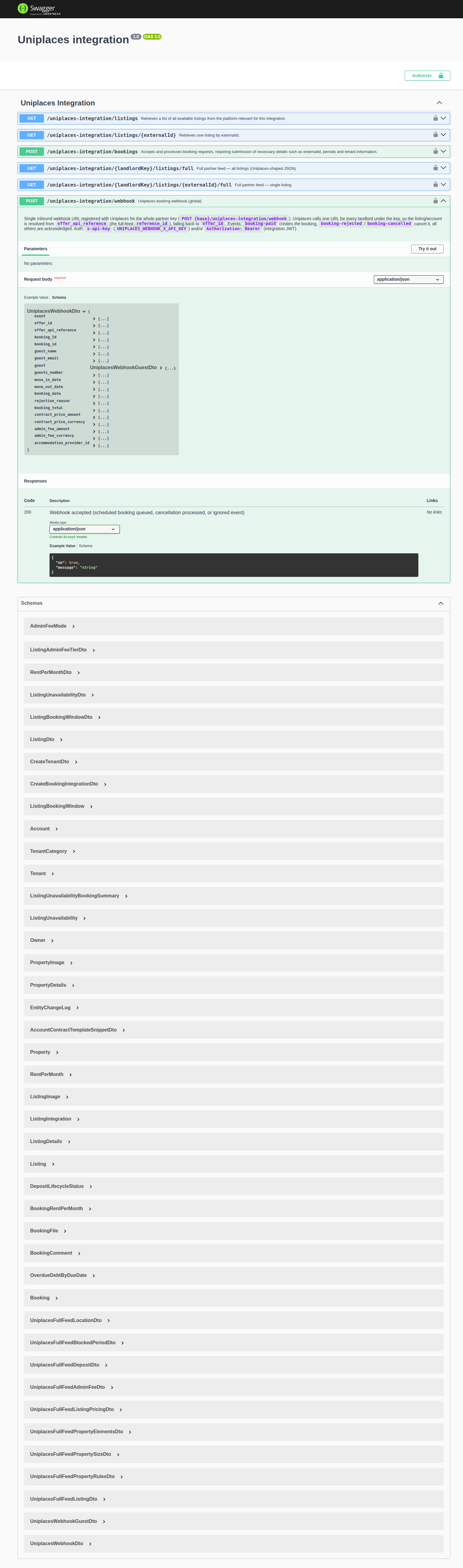
Open the integration Swagger URLs above, use Authorize with your integration Bearer token (see Authentication), expand the webhook POST operation, and use Try it out with a sandbox payload before wiring the partner’s production callback URL.
Platform-Specific Webhooks (summary)
| Platform | Direction | Format |
|---|---|---|
| Housing Anywhere | Inbound → Vivin | Partner notification_type payload at POST …/{landlordKey}/webhook — echo listingReference as listing_external_reference (see Housing Anywhere) |
| Uniplaces | Inbound → Vivin | Partner event payload at global POST /uniplaces-integration/webhook (see Uniplaces) |
| Channex | Inbound → Vivin | Vivin polls Channex booking revisions feed (see Channex booking revisions feed) — not a Vivin-hosted inbound webhook |
| Your platform (onboarding) | Outbound ← Vivin | Standard Vivin envelope in Webhook Payload Format (event, timestamp, data) |
Polling as an Alternative
Compare updatedAt on partial pulls — Listings & Availability — Sync Strategy. Retry policy when your endpoint returns 5xx: Error Handling.
If your platform does not support incoming webhooks, you can poll the GET /listings endpoint at regular intervals (recommended: every 15-30 minutes) to detect changes in pricing, availability, and calendar blocks. Compare the updatedAt timestamp to identify modified listings since your last sync.
Webhooks provide near-real-time updates (seconds) while polling introduces a delay equal to your polling interval. For availability-critical integrations, webhooks are strongly recommended to minimize double-booking risk.
Webhooks & Notifications section cross-reference
Use the endpoints and fields above. Related integrator pages are linked inline where useful.
Related
Related below links outbound events and inbound signing to setup, companion API guides, operator workflows, and escalation paths.
Setup sequence after go-live
Complete Account Settings — Recommended setup order before partner traffic.
- Setup steps 1–10 — Complete operator workspace basics (Recommended setup order) before requesting partner Bearer keys; property managers automating outside the browser use Management session authentication after step 3 (Users)
- Setup steps 11–12 (Integrations, Integration field capability, Tenant categories default for integrations) — Channel credentials, calendar horizons, and payload field expectations before
[email protected]onboarding; operator context: Integrations & Distribution - Setup step 13 (Listings) — Property wizard,
externalIdmapping, and Channels tab before first partner listing reads or writes - Setup steps 14–15 (Bookings, Tenants) — Validate imported reservation shape and tenant segments after partner traffic
- After steps 13–15 — Onboarding a New Property — Step 7 go-live verification before escalating partner pull, webhook, or mapping defects
- During onboarding — provision outbound webhook URLs and inbound signing secrets with
[email protected]; after go-live pairbooking.*events with Processing a New Booking and calendar events with Manual block hygiene - Partner credential requests — Email
[email protected](distinct from in-app Vivin support tickets in Get Help & Support)
Documentation map & escalation
- Getting Started — Recommended Setup Sequence before partner HTTP traffic;
- API Reference hub — Hub pairing matrix across integration guides;
- Get Help & Support — Provision outbound webhook URLs and inbound signing secrets (hub: Setup sequence after go-live)
- FAQ & Troubleshooting — Partner delivery and signature verification questions (hub: Setup sequence after go-live)
- Glossary — Webhook — One-line definition with a link back here
Companion API guides
Companion guides share Bearer authorization or error shapes with this page — start from API Reference hub.
- Booking Lifecycle & Validations — Validation steps before a booking record is created from the integration API
- Creating Bookings — How
POST …/bookingsis queued and what happens after a successful run - Listings & Availability — Polling
GET /listingswhen you cannot accept inbound webhooks; partial pulls whoseunavailabilitieschange triggerunavailability.*events - Full listing feeds — Partner-shaped publish payloads; Housing Anywhere
listingReferenceis what inbound webhooks echo aslisting_external_reference(Housing AnywherelistingReference); Uniplacesreference_id→offer_api_reference - iCal feeds — Outbound calendar URLs when partners poll instead of accepting
unavailability.*webhooks - Authentication — Bearer tokens and scopes for integration traffic
- Error Handling — When your webhook endpoint should return retryable
5xxvs permanent4xx - Property & Unit Mapping — External listing keys before enqueueing
POST …/bookings; Housing Anywhere webhooklisting_external_reference - Booking engine integration — White-label reservation webhooks when
POST /bookingssucceeds on engine traffic - Management session — Operator JWT patterns when testing webhook handlers against Core API
- AI usage — Operator-only LLM ledger (not partner integration Bearer keys)
Upstream & downstream workflows
- Processing a New Booking — Operator follow-up after
booking.createdwebhook imports - Handling a Late Payment — Step 1 — Collections when webhook-driven imports create unpaid schedules; upstream path from Notifications — Payment overdue alerts
- Notification triage — Clear booking-import alerts after verifying Channels linkage (operator UI, not partner HTTP)
- Manual block hygiene — Calendar holds that change
unavailability.*webhook payloads partners must reconcile - Managing a Check-out & Deposit Refund — Departure workflow when
booking.cancelledor calendar webhooks lag after Ended status - Entering Monthly Utility Bills — Operator overage workflow after
listing.updatedwebhooks changebillsIncludedMaxValueceilings
Operator UI & settings
- Settings > Integrations — Enable platforms and Channex before webhook traffic matches live inventory
- Settings > Tenant categories — Default segment applied to integration-created tenants
- Settings > Preferences — In-app notifications — Operator inbox alerts (distinct from partner HTTP webhook callbacks)
- Settings > Emails — Lifecycle and payment Communication Rules for webhook-created bookings
- Notifications (module) — In-app operator notification inbox (not HTTP webhooks)
- Property & listing details (booking engine) — Payload fields full-feed partners ingest after
GET …/listings/full
Deeper concept reads
- Booking Lifecycle — How operators see computed timeline status in the management app; distinct from webhook
eventnames - Integrations (concepts) — Channel manager and partial partner listing surfaces that complement webhooks
- Payment Allocation — Two-layer receipts, invoiced-floor rent edits, and credit note reject/revert warnings
- Tenant Portal — Webhook-driven booking events may trigger tenant portal access and payment schedule updates
- FAQ — Tenant contract signing blocked — No PDF yet, mandatory Your Details gates, category locks, or Lease purpose; portal signing vs paper upload on Contract Info
Deeper workflow reads
See Upstream & downstream workflows above for the same guides.
Operator habit hubs
Day-to-day operator habits (lockout catch-up, pending receipts, payment triage, handoffs, and related playbooks) live on the Common Workflows habit hub.
Deep-link anchors for habit hubs
Lockout catch-up after password recovery
Pending manual receipt approval
Reject/revert mistaken receipts
Portfolio segmentation by tenant category
Notification row-click navigation
Payment alert to receivables triage
Confirmation alert triage
Finance debt receivables triage
Handling a Late Payment collections
Finance Income status drill-down
Cash flow forecast drill-down
Key glossary terms
- Glossary — Credit note (payment reject/revert) — Operator reject/revert on imported booking payments already invoiced
- Glossary — Deposit lifecycle status —
booking.*webhooks fire on lifecycle changes; deposit refund states are not partner-writable via HTTP - Glossary — End-of-Booking cost split — Charge Time → End of Booking splits daily overage across every occupied unit; still-staying roommates stay in the denominator
- Glossary — Change history — Operator-initiated edits on Listings setup and Bookings Changelog; create-time defaults excluded
- Glossary — Archived booking ledger visibility — Delete Booking hides manual/provider_platform rows on Finance → Transactions; vIBAN and credit card stay visible
- Glossary — Finance tenant category cache refresh — Recategorizing a tenant updates
booking.tenantCategoryIdimmediately; ledger tabs reflect it on reload, while Overview can lag up to ~10 minutes - Glossary — Full term list
Module documentation hubs
for screen-by-screen operator follow-up.
- Inbox module — WhatsApp threads when webhook-driven imports generate tenant message notifications (hub)
- Listings module — Property wizard, Channels tab, and unit management (hub)
- Finance module — Portfolio ledgers with payment approval and deposit settlement (hub)
- Tenants module — Tenant directory and profile sidebars for imported stays (hub)
- Sales module — Portfolio availability and channel manager connections (hub)
- Audit module — Portfolio-wide Manual Blocks and Discounts contract-value review (hub)
- Dashboard module — Post-login KPI snapshot with bell notification triage (hub)
- Analytics module — Month-range portfolio KPI charts with rankings and heatmaps (hub)
- Properties workspace — Legacy
/propertiesURL redirects into Listings (hub) - Booking engine details — Rich marketplace payload editor via the Full integration pill (hub)
- Utilities module — Bills Included ceiling model and tenant overage charges (hub)
- Operations module — Maintenance tickets, cash flows, and check-in/out coordination (hub)
- Notifications module — Full
/notificationshistory with search and filters (hub); Payment overdue alerts when webhook-driven imports leave unpaid schedules - AI Chat module — AI Assistant using Landlord MCP tools (hub)
- Account Settings — Workspace-wide financial policies, templates, integrations, and operational defaults (hub)