Creating Bookings
Submit POST /bookings only after Getting Started — Recommended Setup Sequence steps 11–14 — steps 11–12 set Integrations, Integration field capability, and Tenant categories default for integrations; step 13 maps each unit’s externalId (Property & Unit Mapping); step 14 validates how imported reservations appear in Bookings. Finish step 15 (Tenants) and Onboarding a New Property — Step 7 before production import volume. Guide pairing after go-live: Setup sequence after go-live (hub: API Reference — Setup sequence after go-live).
Start with Endpoint and Request Body, then Field Reference before your first POST /bookings. Honour listing JSON capacity, stay months, and availableFrom on your marketplace — Honour listing capacity and stay bounds. Do not send rent — the payment plan uses listing JSON — Rent. Do not send extraPricePerTenant or extraDepositPerTenant — Extra Charge / Extra Deposit euros copy from the unit using occupant headcount — Extra Charge. Do not send a secondTenant object — co-occupant identity is operator-only — Second tenant. Do not send a guarantor object — guarantor identity and amount are operator-only — Guarantor. Send platformProviderPaymentValue when your platform collected a commission — Platform commission. Do not send cleaningFeeValue — the payment plan copies the property cleaning amount — Cleaning fee. Do not send depositValue — the payment plan copies listing JSON plus Extra Deposit from occupant headcount — Deposit. Do not send adminFeeValue — Vivin resolves the property admin fee (fixed amount, or the matching stay-duration tier) — Admin fee. Do not send billsIncludedMaxValue — Vivin copies the property Bills Included ceiling — Bills included. Do not send contractType or contractDayType — Vivin copies Rental payment frequency and Contract type from the property — Contract type. Do not send bookingConfirmationRequirements or moveInRequirements — Vivin copies Confirmation payments and Check-in payments from the property — Confirmation payments. Do not send dueDay or dueDayMonth — Vivin copies Due date and Due Month from the property, or Tenant Due Day / Tenant Due Month from Payments — Due date. Do not send checkInTime or checkOutTime — Vivin copies Check-in time and Check-out time from account Booking Defaults — Check-in times. Do not send daysBeforeDueAsPayable — Vivin copies Days before due date from account Payments — Days before due. Do not send checkInResponsableId or checkOutResponsableId — Check-in responsible and Check-out responsible stay empty until an operator assigns a teammate — Check-in responsible. Do not send leasePurpose — Lease purpose stays empty until an operator or tenant selects a chip — Lease purpose. Do not send depositReturnDueDay — Deposit Refund Limit inherits the account setting until an operator overrides it — Deposit Refund Limit. Do not send bookingTags — Booking categories stay empty until an operator picks chips — Booking tags. Do not send createCheckInMaintenanceTicket or createCheckOutMaintenanceTicket — automatic check-in/out tickets follow the property Maintenances tab — Maintenance tickets. Do not send ignoreListingPreparationDays — occupied nights including preparation nights still reject — Ignore unit preparation days. Do not send ignoreAvailableFrom — Allow check-in date in the past is operator-only — Allow check-in date in the past. Do not send ignorePenaltyFees — Exclude this booking from penalty fees stays off until an operator ticks it — Exclude from penalty fees. Do not send useCheckInDateInContract or useCheckOutDateInContract — Use check in date as contract start date / Use check out date as contract end date stay off until an operator ticks them — Use check in date as contract start date. Do not send sendOnBoarding — marketplace create always sends the onboarding email and generates the contract — Send onboarding. Do not send useListingValues — marketplace create always uses Use unit contract rents and other contract details — Use unit contract rents. Do not send a tenant category — allowlisted channels assign Default for integration-created tenants — Tenant category. Do not send localRentCap — dual pricing freezes from the unit — Local rent cap. Send the mapped externalId from Property & Unit Mapping; read Booking Lifecycle & Validations for the enqueue pipeline after 201. Handle validation 400s with Error Handling; prefer Webhooks & Notifications over polling when callbacks are provisioned. Habit-specific shortcuts live under Related below.
When a tenant confirms a booking on your platform, submit it to Vivin using the booking creation endpoint. The endpoint queues the request; once the job runs successfully, Vivin creates the booking, blocks dates on connected channels, generates the payment schedule, and (if configured) triggers contract generation.
Endpoint
Authorize with Authentication before your first POST …/bookings call; inspect schemas in Try requests in Swagger. After enqueue, continue to Response and Booking Lifecycle & Validations.
POST /{platform}-integration/bookings HTTP/1.1
Host: api.vivin.app
Authorization: Bearer YOUR_API_KEY
Content-Type: application/json
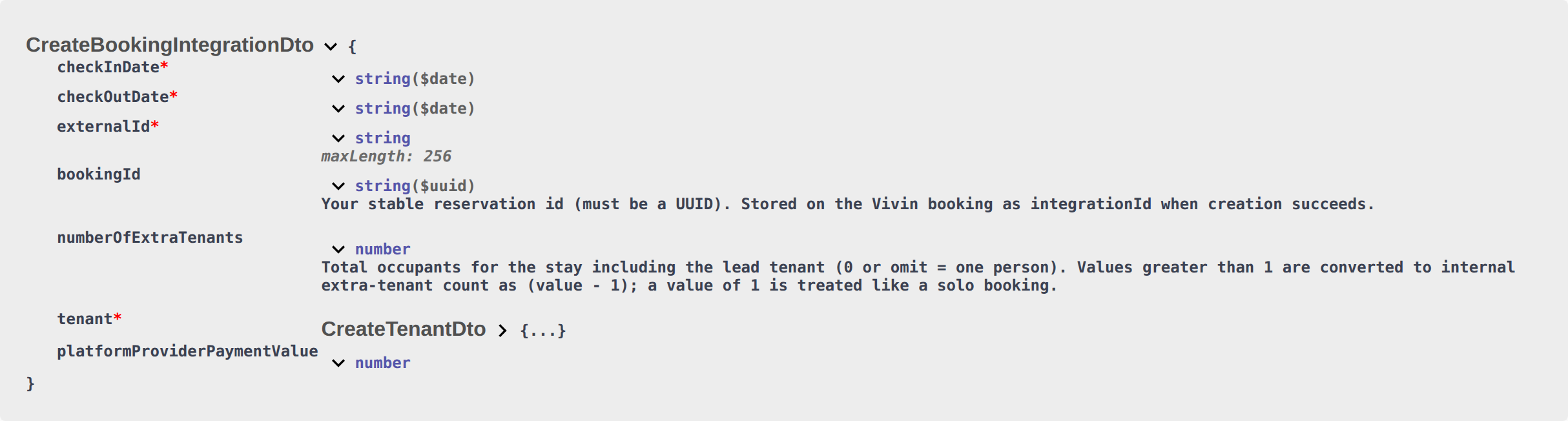
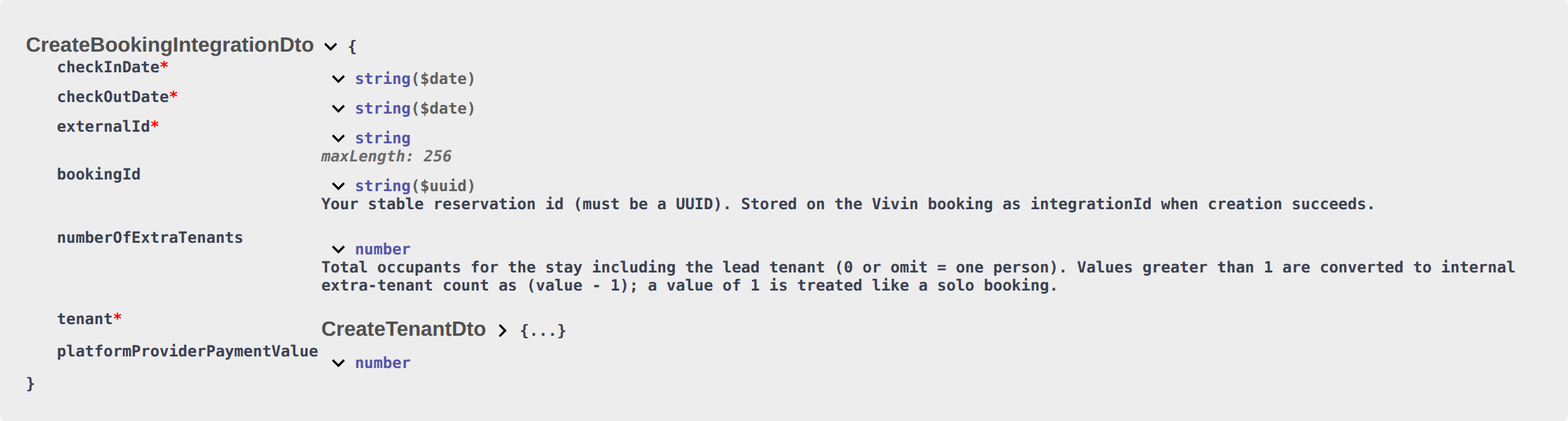
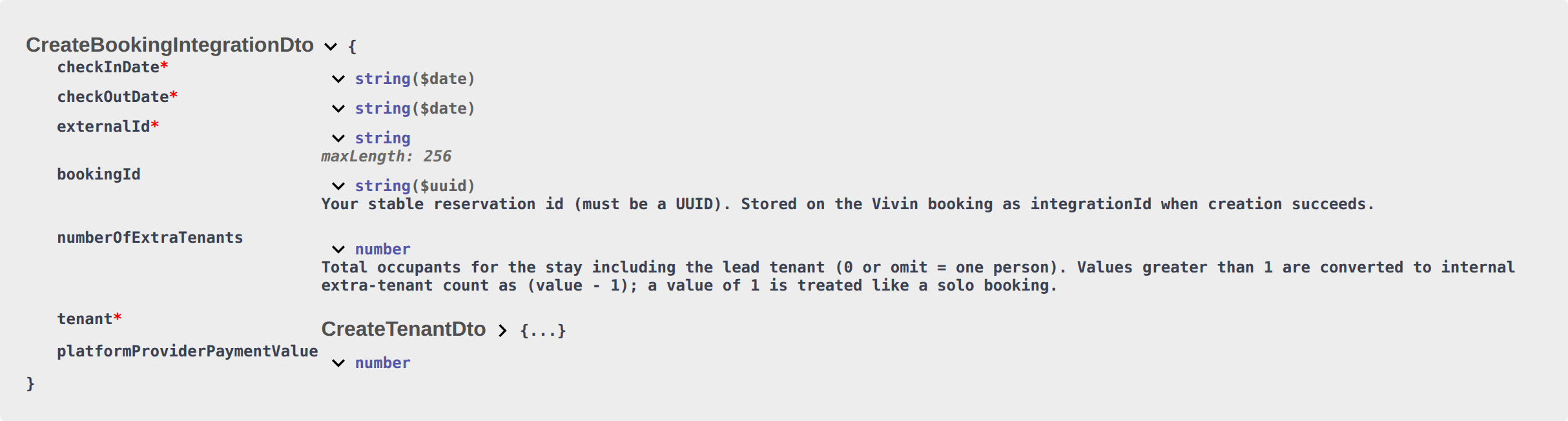
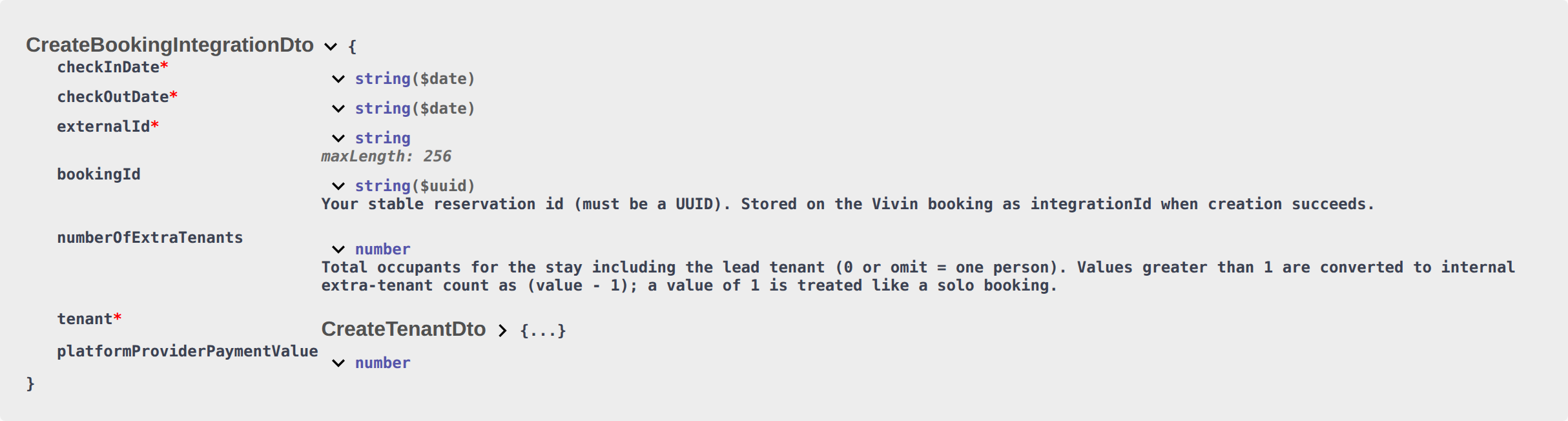
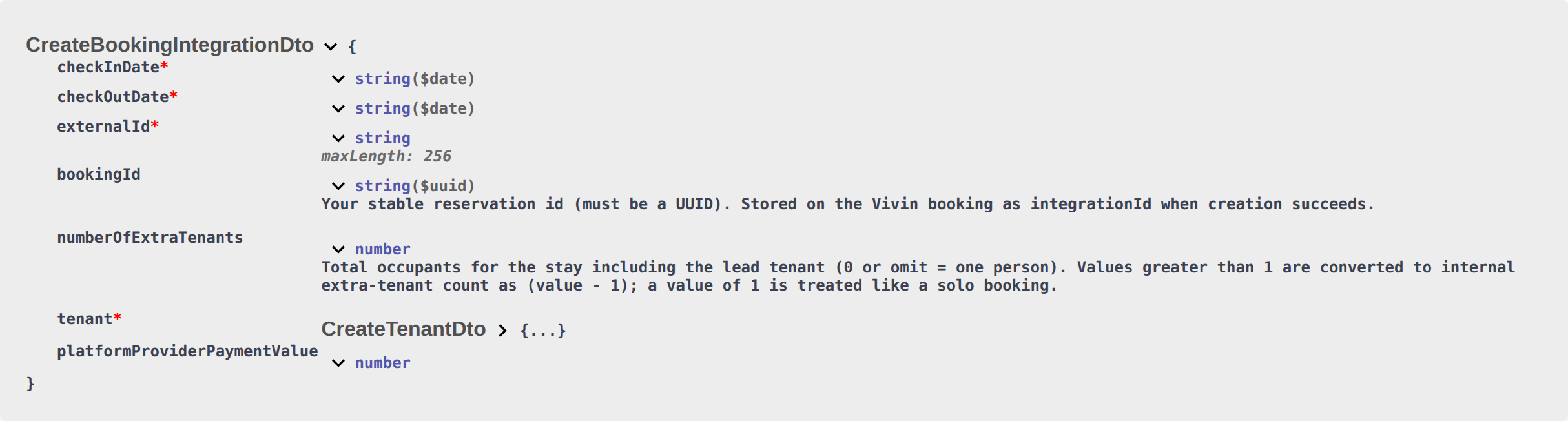
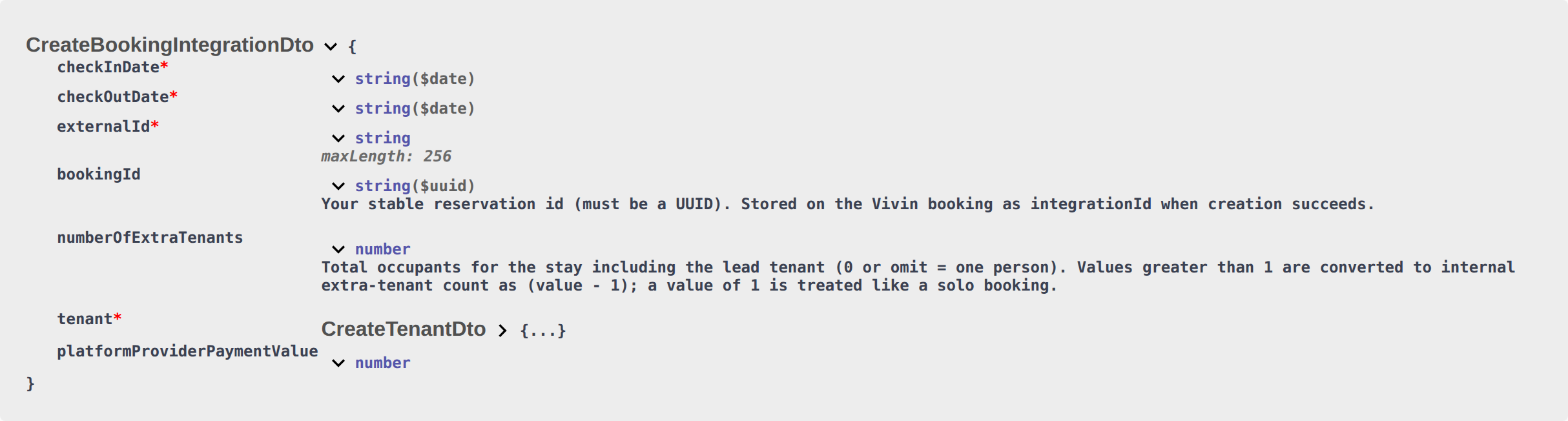
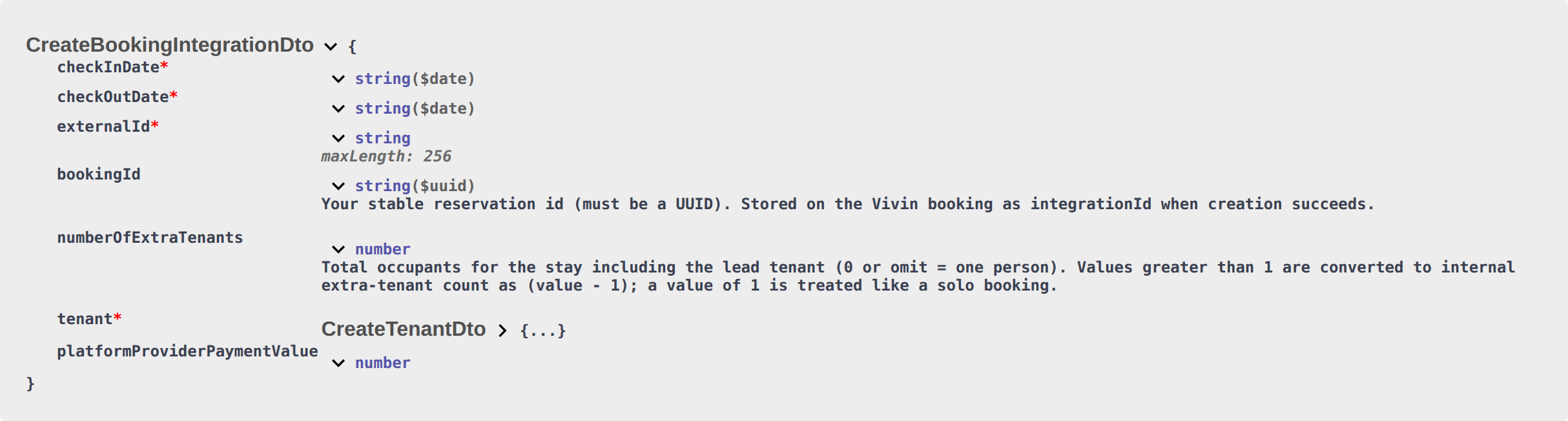
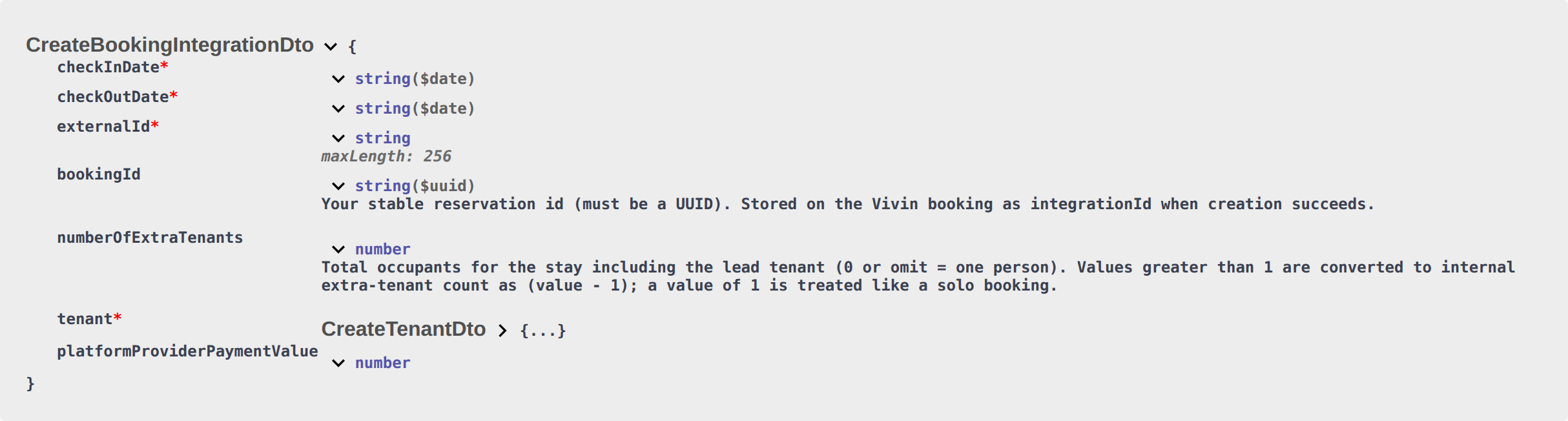
Use Integration Swagger on your API host to expand the bookings (or your platform’s integration) group, open POST …/bookings, and use Try it out with a Bearer token. You will see the exact path prefix, required fields, and response models for your deployment. See API Reference index and Authentication.
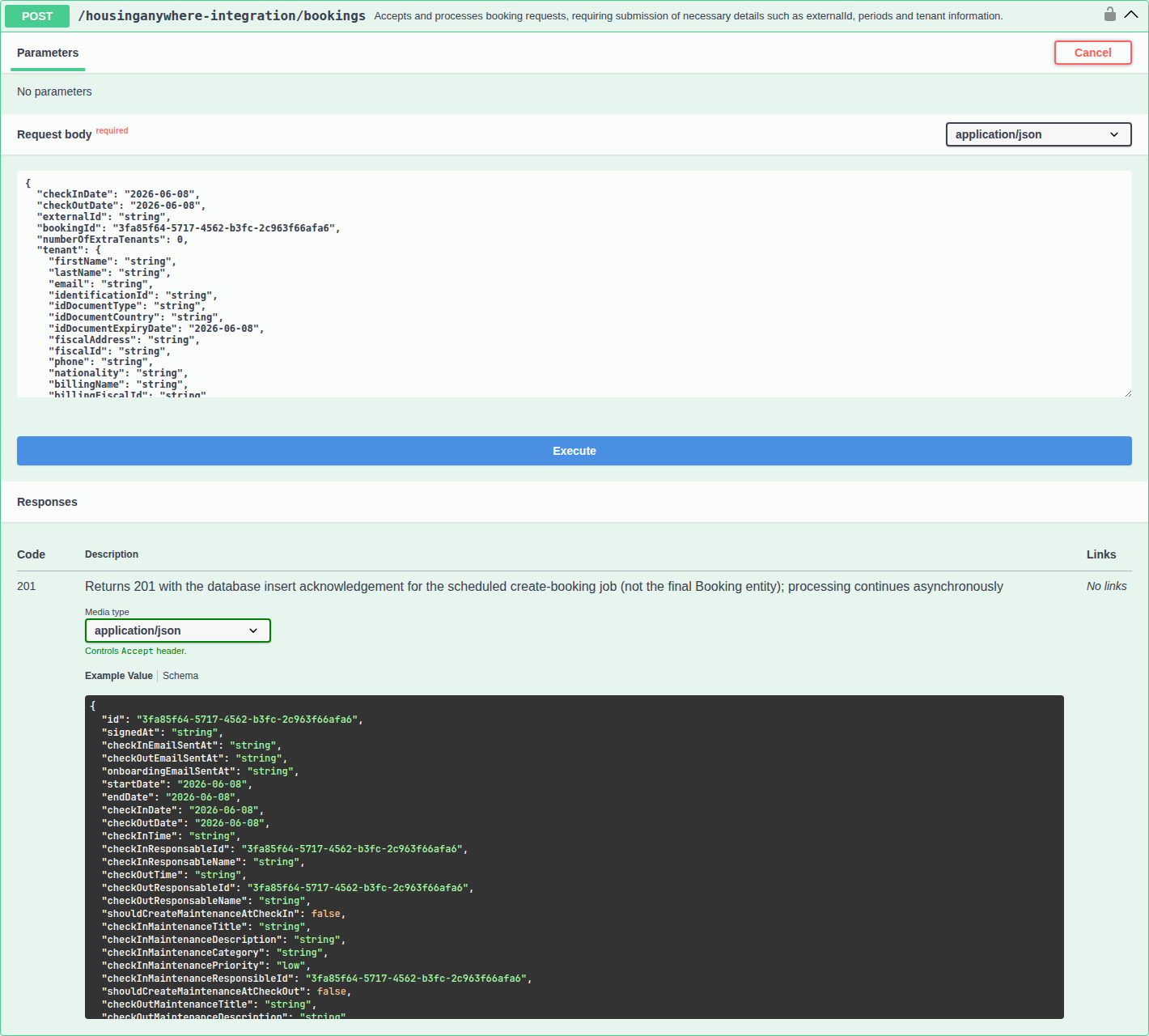
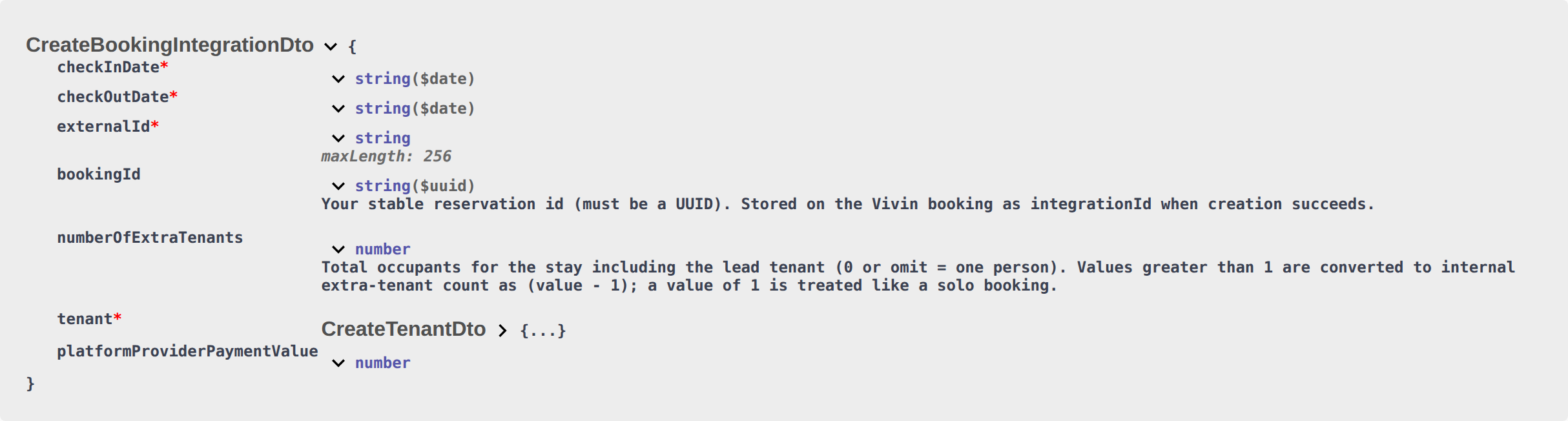
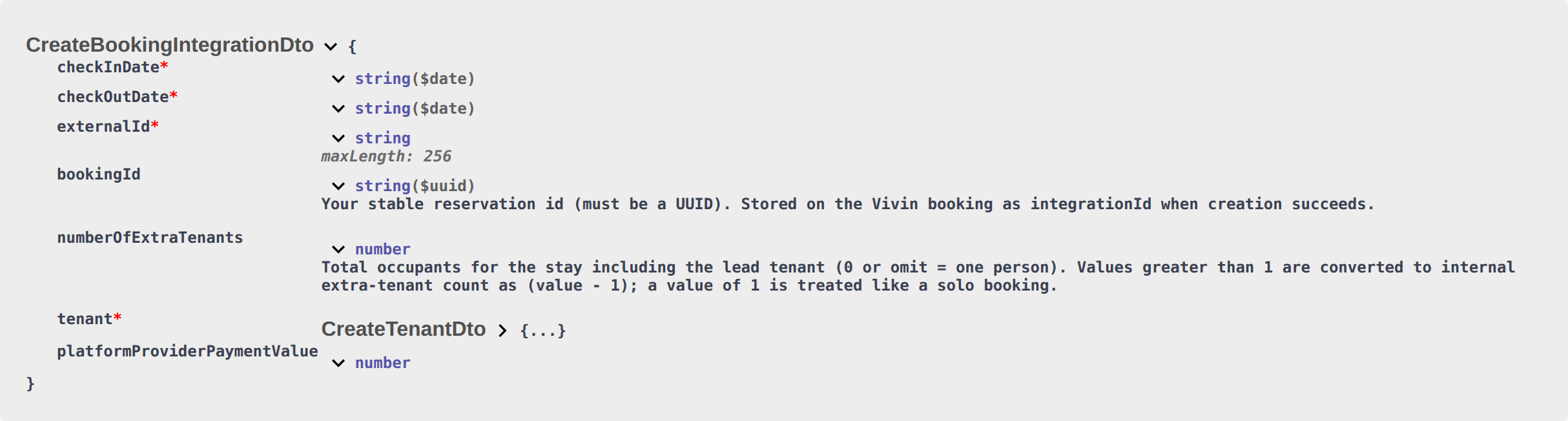
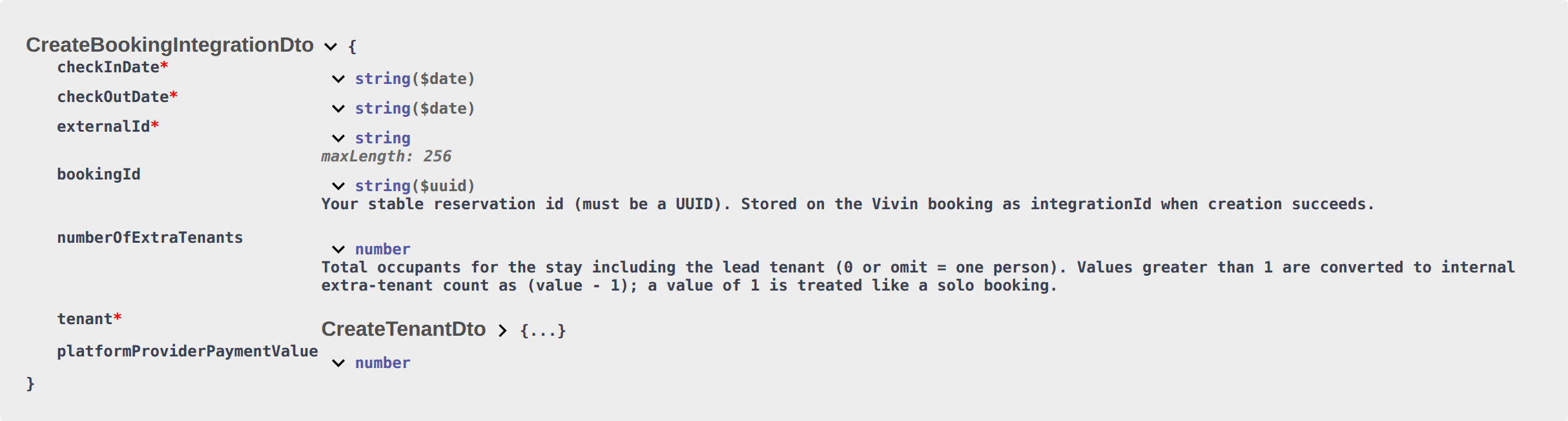
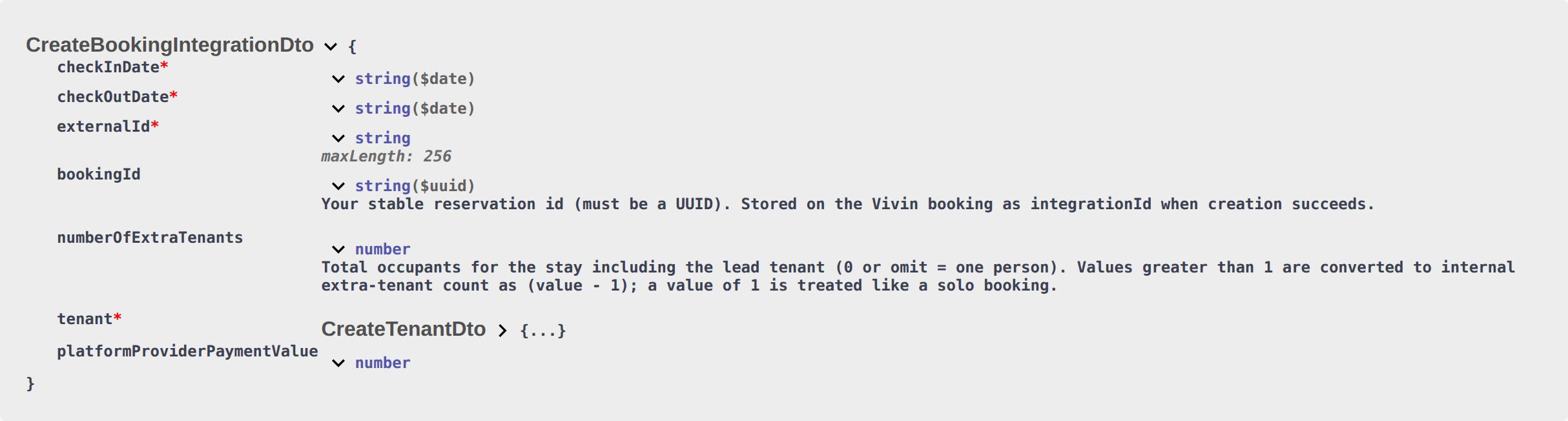
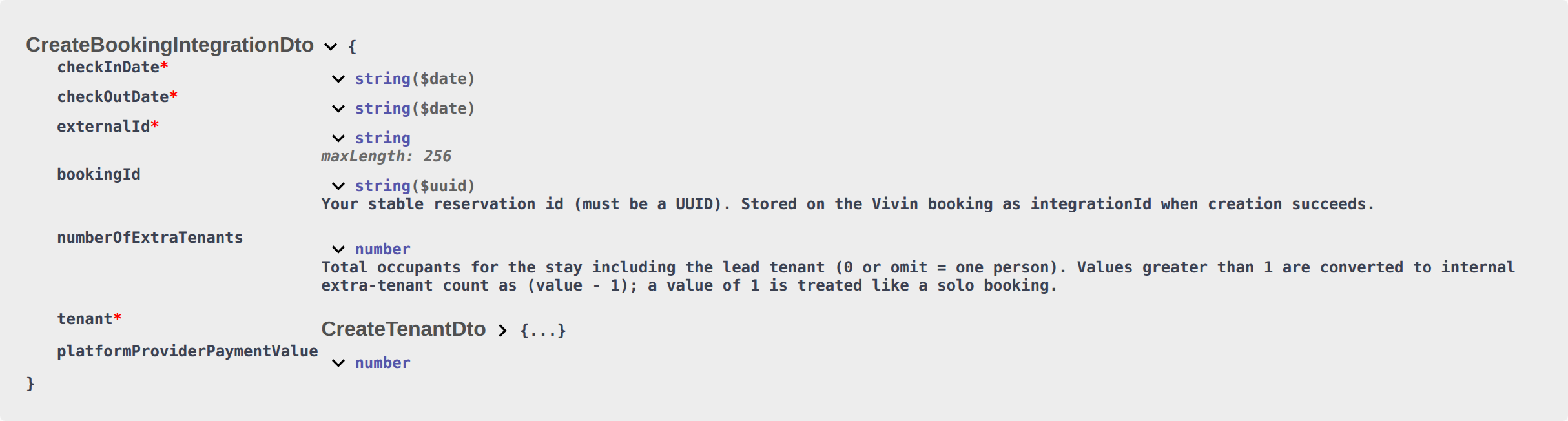
The capture shows a typical integration document (here Housing Anywhere): expand POST /{platform}-integration/bookings, use Try it out, and inspect required booking and tenant fields before you wire your client. Your provisioned prefix and path segment follow onboarding — see API Reference index.
Request Body
Confirm externalId in Listings & Availability and Property & Unit Mapping before you send tenant fields. Field-by-field rules: Field Reference.
{
  "checkInDate": "2026-09-01",
  "checkOutDate": "2027-01-31",
  "externalId": "abc-123",
  "bookingId": "550e8400-e29b-41d4-a716-446655440000",
  "numberOfExtraTenants": 2,
  "platformProviderPaymentValue": 150.0,
  "tenant": {
    "firstName": "Maria",
    "lastName": "Silva",
    "email": "[email protected]",
    "phone": "+351912345678",
    "nationality": "PT",
    "identificationId": "12345678",
    "idDocumentType": "passport",
    "idDocumentCountry": "PT",
    "idDocumentExpiryDate": "2030-06-15",
    "fiscalId": "123456789",
    "fiscalAddress": "Rua Exemplo 123, Lisboa",
    "billingName": "Maria Silva",
    "billingFiscalId": "123456789",
    "billingAddress": "Rua Exemplo 123",
    "billingCity": "Lisboa",
    "billingPostalCode": "1000-001",
    "billingCountry": "PT"
  }
}
Field Reference
externalId must match Property & Unit Mapping; numberOfExtraTenants is occupant headcount and feeds Extra Charge / Extra Deposit — Listings — Extra Charge per Tenant. Honour listing JSON capacity against that headcount — Honour listing. Listing GET publishes extraPricePerTenant as 0 when capacity is 1 — Extra price per tenant. Listing GET depositValue is the computed property deposit (Extra Deposit is added at create) — Computed deposit. There is no exitFeeValue on this body — the property exit fee still copies onto the booking — Exit fee. There is no rent either — the payment plan uses listing JSON — Rent. There is no extraPricePerTenant or extraDepositPerTenant — Extra Charge / Extra Deposit euros copy from the unit using occupant headcount — Extra Charge. There is no secondTenant object — co-occupant identity is operator-only — Second tenant. There is no guarantor object — guarantor identity and amount are operator-only — Guarantor. There is no cleaningFeeValue — the payment plan copies the property cleaning amount — Cleaning fee. There is no depositValue — the payment plan copies listing JSON plus Extra Deposit from occupant headcount — Deposit. There is no adminFeeValue — Vivin resolves the property admin fee (fixed amount, or the matching stay-duration tier) — Admin fee. There is no billsIncludedMaxValue — Vivin copies the property Bills Included ceiling — Bills included. There is no contractType or contractDayType — Vivin copies Rental payment frequency and Contract type from the property — Contract type. There is no bookingConfirmationRequirements or moveInRequirements — Vivin copies Confirmation payments and Check-in payments from the property — Confirmation payments. There is no dueDay or dueDayMonth — Vivin copies Due date and Due Month from the property, or Tenant Due Day / Tenant Due Month from Payments — Due date. There is no checkInTime or checkOutTime — Vivin copies Check-in time and Check-out time from account Booking Defaults — Check-in times. There is no daysBeforeDueAsPayable — Vivin copies Days before due date from account Payments — Days before due. There is no checkInResponsableId or checkOutResponsableId — Check-in responsible and Check-out responsible stay empty until an operator assigns a teammate — Check-in responsible. Do not send leasePurpose — Lease purpose stays empty until an operator or tenant selects a chip — Lease purpose. Do not send depositReturnDueDay — Deposit Refund Limit inherits the account setting until an operator overrides it — Deposit Refund Limit. Do not send bookingTags — Booking categories stay empty until an operator picks chips — Booking tags. Do not send createCheckInMaintenanceTicket or createCheckOutMaintenanceTicket — automatic check-in/out tickets follow the property Maintenances tab — Maintenance tickets. Do not send ignoreListingPreparationDays — occupied nights including preparation nights still reject — Ignore unit preparation days. Do not send ignoreAvailableFrom — Allow check-in date in the past is operator-only — Allow check-in date in the past. Do not send ignorePenaltyFees — Exclude this booking from penalty fees stays off until an operator ticks it — Exclude from penalty fees. Do not send useCheckInDateInContract or useCheckOutDateInContract — Use check in date as contract start date / Use check out date as contract end date stay off until an operator ticks them — Use check in date as contract start date. Do not send sendOnBoarding — marketplace create always sends the onboarding email and generates the contract — Send onboarding. Do not send useListingValues — marketplace create always uses Use unit contract rents and other contract details — Use unit contract rents. Do not send a tenant category — Tenant category. Post-enqueue validation: Booking Lifecycle & Validations.
Booking Fields
| Field | Type | Required | Description |
|---|---|---|---|
checkInDate | string (ISO 8601) | Yes | Move-in calendar date (format: YYYY-MM-DD) — not the clock time. Clock Check-in time copies from account Booking Defaults — Check-in times. Must not overlap listing unavailabilities. Preparation nights after checkout are part of that occupancy — Ignore unit preparation days. On RoomLess, nights before availableFrom already appear in that array — RoomLess nights before move-in. On Housing Anywhere, nights outside the first still-open booking window already appear there — Housing Anywhere booking windows. POST /bookings still also validates the real window. |
checkOutDate | string (ISO 8601) | Yes | Move-out calendar date (format: YYYY-MM-DD) — not the clock time. Clock Check-out time copies from account Booking Defaults — Check-in times. |
externalId | string | Yes | The external listing ID on your platform. Must match a listing mapped in Vivin (see Property & Unit Mapping). A unit that appears only on the full catalogue (keyed by the Vivin listing id) is not yet bookable here — save a Channels mapping first (Which listings appear). A unit marked Excluded from feed on Integration listings is omitted the same way as an unmapped unit. On Kiwi, Capital Rooms, Porta85, and Lisbeyond, you may also send the Vivin listing UUID returned as externalId for unlinked units — Vivin resolves channel externalId first, then falls back to a UUID-guarded account-scoped lookup (Kiwi, Capital Rooms, Porta85 & Lisbeyond). On Inlife, send the joined propertyId_roomId from partial GET /listings (not listing id alone). If a studio stored only the property id, Vivin also matches a propertyId_roomId value against that row — Inlife id and room.id. |
bookingId | string (UUID) | Recommended | Stable identifier for this reservation on your side. Must be a UUID when supplied (per request validation). On success it is stored on the Vivin booking as the external integration id (integrationId) for correlation. Retries after a successful 201 can still enqueue another job unless your client deduplicates; overlapping stays on the same listing are rejected when the worker creates the booking. |
numberOfExtraTenants | integer | No | Total number of occupants for the stay, including the lead tenant. Omit the field or send 0 for a single occupant. For n ≥ 2, Vivin stores n - 1 as internal “extra tenants”, which feeds Extra Charge / Extra Deposit on the created booking. Sending 1 is therefore treated the same as a solo booking (0 stored). The JSON name is historical; think of it as headcount, not “extras only”. Do not send Extra Charge or Extra Deposit euros on this body — Extra Charge. Headcount can open Second tenant after import; it does not fill co-occupant identity — Second tenant. Headcount does not fill Guarantor identity or amount — Guarantor. Honour listing JSON capacity against that headcount on your marketplace — Honour listing. Listing GET publishes extraPricePerTenant as 0 when capacity is 1 — Extra price per tenant. Listing GET depositValue is the computed property deposit only; Extra Deposit is added at create — Computed deposit. Marketplace POST /bookings cannot send depositValue — Deposit. |
platformProviderPaymentValue | number | No | Euro amount your platform collected (or will pay) for this stay. Stored as read-only Provider platform payment on Contract Info. It does not change the tenant payment schedule (except Vivin Booking Engine Daily stays shorter than one month). Inlife and Vivin Booking Engine fill a fallback when omitted; other prefixes require the number — Platform commission. |
Do not send exitFeeValue on this body — it is not on the partner create schema. Vivin copies the property exit fee onto the new booking (one-time, due on check-out) — Exit fee. Do not send localRentCap either — dual pricing is frozen from the unit at create — Local rent cap. Do not send rent, isRentFixed, or rentsPerMonth — advertised listing JSON amounts become the payment plan — Rent. Do not send extraPricePerTenant or extraDepositPerTenant — Extra Charge / Extra Deposit euros copy from the unit using occupant headcount — Extra Charge. Do not send a secondTenant object — co-occupant identity is operator-only — Second tenant. Do not send a guarantor object — guarantor identity and Guarantor amount (€) are operator-only — Guarantor. Do not send cleaningFeeValue — the property cleaning amount (and Frequency) copy onto the booking — Cleaning fee. Do not send depositValue or Extra Deposit — listing JSON depositValue copies onto the hold, and Extra Deposit is added from occupant headcount — Deposit. Do not send adminFeeValue, adminFeeMode, or adminFeeTiers — Vivin resolves the property admin fee after enqueue — Admin fee. Do not send billsIncluded or billsIncludedMaxValue — the property Bills Included ceiling copies onto the booking — Bills included. Do not send contractType or contractDayType — the property Rental payment frequency (Daily / Fortnightly / Monthly) and Contract type (Traditional rental / Accommodation services / Others) copy onto the booking — Contract type. Do not send bookingConfirmationRequirements or moveInRequirements — the property Confirmation payments and Check-in payments copy onto the booking — Confirmation payments. Do not send dueDay or dueDayMonth — the property Due date and Due Month copy onto the booking (or account Tenant Due Day / Tenant Due Month when the property has no override) — Due date. Do not send checkInTime or checkOutTime — account Check-in time and Check-out time copy onto the booking — Check-in times. Do not send daysBeforeDueAsPayable — account Days before due date copies onto the booking — Days before due. Do not send checkInResponsableId or checkOutResponsableId — Check-in responsible and Check-out responsible stay empty until an operator assigns a teammate — Check-in responsible. Do not send leasePurpose — Lease purpose stays empty until an operator or tenant selects a chip — Lease purpose. Deposit Refund Limit inherits account Payments until an operator overrides it — Deposit Refund Limit. Booking categories stay empty until an operator picks chips — Booking tags. Do not send depositReturnDueDay — Deposit Refund Limit inherits the account Payments setting until an operator overrides it — Deposit Refund Limit. Do not send bookingTags — Booking categories stay empty until an operator picks chips — Booking tags. Do not send createCheckInMaintenanceTicket or createCheckOutMaintenanceTicket — automatic check-in/out tickets follow the property Maintenances tab — Maintenance tickets. Do not send ignoreListingPreparationDays — occupied nights including preparation nights in listing unavailabilities still reject — Ignore unit preparation days. Do not send ignoreAvailableFrom — Allow check-in date in the past is operator-only — Allow check-in date in the past. Do not send ignorePenaltyFees — Exclude this booking from penalty fees stays off until an operator ticks it — Exclude from penalty fees. Do not send useCheckInDateInContract or useCheckOutDateInContract — Use check in date as contract start date / Use check out date as contract end date stay off until an operator ticks them — Use check in date as contract start date. Do not send sendOnBoarding — marketplace create always sends the onboarding email and generates the contract — Send onboarding. Do not send useListingValues — marketplace create always uses Use unit contract rents and other contract details — Use unit contract rents. Do not send a tenant category UUID — allowlisted channels assign Default for integration-created tenants when the person is new or has no category — Tenant category.
Tenant Fields
| Field | Type | Required | Description |
|---|---|---|---|
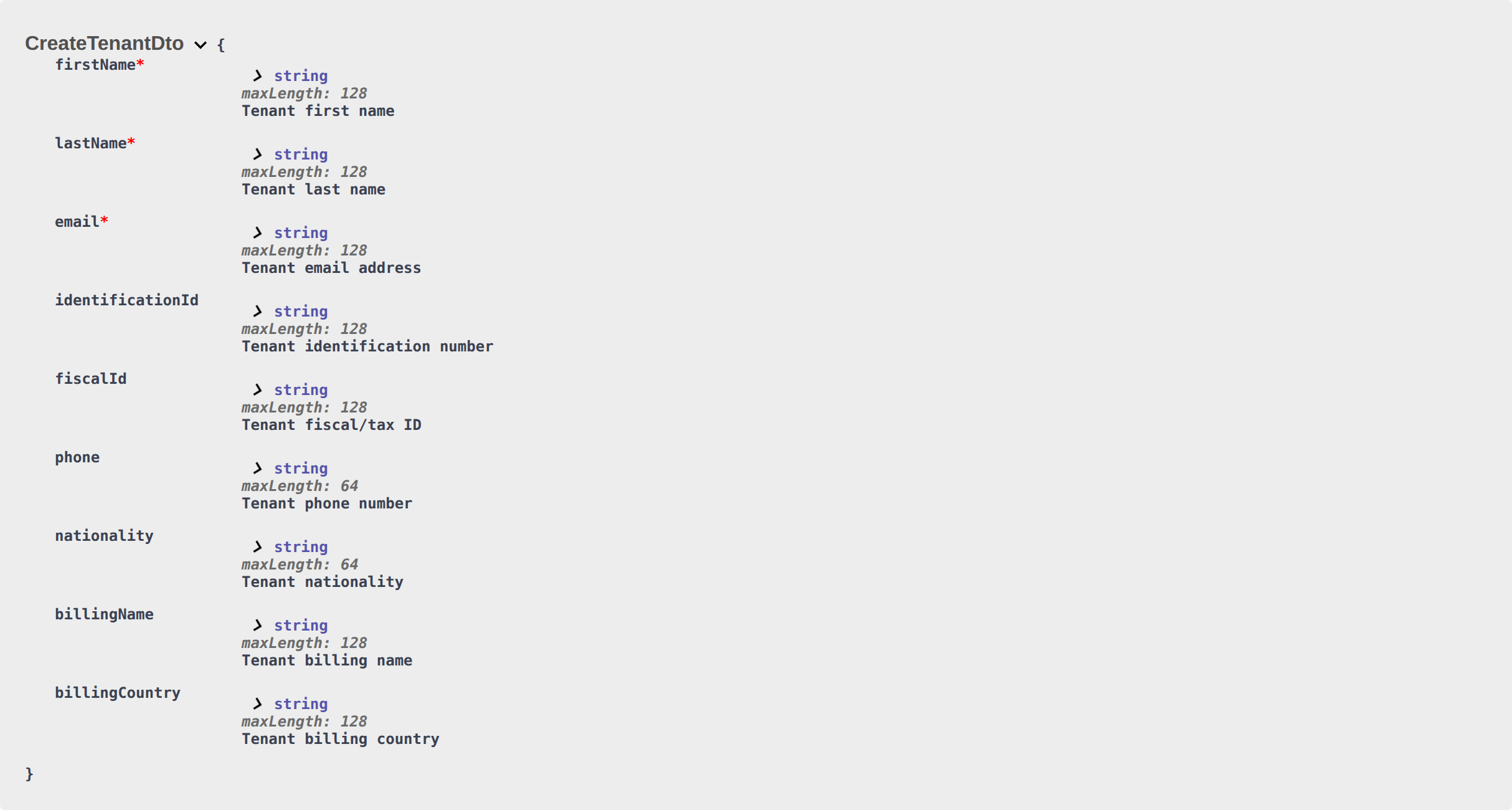
firstName | string | Yes | Tenant's first name (minimum 2 characters). The Tenant Portal First name field stores the same value. Account → Save changes requires both names when the fields are editable. |
lastName | string | Yes | Tenant's last name (minimum 2 characters). The Tenant Portal Last name field stores the same value. |
email | string | Yes | Tenant's email address. Used for communications and tenant portal access. Portal Account shows Email as read-only — tenants cannot change it there. |
phone | string | No | Contact number. Optional leading + and 7–15 digits (e.g. +351912345678). The Tenant Portal Phone field stores the same value — spaces, parentheses, and hyphens are removed on save. |
nationality | string | No | ISO 3166-1 alpha-2 country code (e.g. PT, BR, DE). The Tenant Portal Nationality list shows nationality words with flags (for example Portuguese) — not country names. |
identificationId | string | No | ID document number. |
idDocumentType | string | No | Type of ID document. Portal options: cc, passport, id, residence_permit. Other stored values (for example id_card) still display. |
idDocumentCountry | string | No | Country that issued the ID document (ISO 3166-1 alpha-2). |
idDocumentExpiryDate | string | No | Expiry date of the ID document (YYYY-MM-DD). |
fiscalId | string | No | Tax identification number (NIF in Portugal). The Tenant Portal Fiscal number field stores the same value — not Identification ID and not Company fiscal number. |
fiscalAddress | string | No | Home / fiscal address. The Tenant Portal Home address field stores the same value — not the billing street. |
Omit any tenant-category id on this object. OpenAPI may list tenantCategoryId on CreateTenantDto — that value is an operator segment UUID, not a marketplace listing id. Allowlisted channels assign Default for integration-created tenants when the person is new or has no category — Tenant category.
Send phone when your platform already collected a contact number. The Tenant Portal shows it as Phone (optional leading +, 7–15 digits).
Send nationality when your platform already collected a nationality. Use a two-letter country code (PT, ES). The Tenant Portal shows the matching nationality word (Portuguese, Spanish) — not the country name. This is not idDocumentCountry (Country of issue) and not billingCountry.
Send identificationId, idDocumentType, idDocumentCountry, and idDocumentExpiryDate when your platform already collected the identity document. The Tenant Portal shows those values as Identification ID, ID Type, ID Expiry Date, and Country of issue. Country of issue is the document country — not billing billingCountry.
Send fiscalId and fiscalAddress when your platform already collected a tax ID and home address. The Tenant Portal shows those values as Fiscal number and Home address. Filling fiscalId also requires Country of issue (idDocumentCountry) and billing Country (billingCountry) before the tenant can save in the portal. This is not identificationId and not billingFiscalId.
Omit any secondTenant object (and any secondTenant* fields). This body describes the lead tenant only. Occupant headcount (numberOfExtraTenants) can open the Second tenant accordion after import; identity stays empty until an operator fills Contract Info → Second tenant — Second tenant.
Omit any guarantor object (and any guarantor* fields, including guarantorAmount). Occupant headcount does not fill a guarantor. Identity and Guarantor amount (€) stay empty until an operator fills Contract Info → Guarantor — Guarantor.
Billing Fields (Optional)
If your platform collects billing information, include it to pre-populate invoicing in Vivin.
| Field | Type | Description |
|---|---|---|
billingName | string | Name for billing/invoicing. |
billingFiscalId | string | Tax ID for billing. |
billingAddress | string | Invoice street. The Tenant Portal Billing address field stores the same value — not Home address (fiscalAddress). |
billingCity | string | Invoice city. |
billingPostalCode | string | Invoice postal code. |
billingCountry | string | Invoice country (ISO 3166-1 alpha-2). Required in the portal when a fiscal/tax number is on file or company billing is On. |
useCompanyBilling | boolean | If true, billing is issued to a company rather than the individual. |
Set useCompanyBilling to true when invoices should go to a company. The Tenant Portal then shows Use company details On, with Company name and Company fiscal number. Omit it or send false for personal billing (the default). Send billingAddress, billingCity, billingPostalCode, and billingCountry for the invoice street — Tenant Portal — Billing address. Distinct from the European bank-account flag, which this POST cannot set — Bank Details.
Bank Details (Optional)
If the tenant provides bank details for deposit refund or direct debit purposes.
| Field | Type | Description |
|---|---|---|
tenantIBAN | string | Tenant's personal IBAN (deposit refunds). Distinct from the booking virtual IBAN. See Tenant Portal — IBAN. |
tenantSwiftBic | string | SWIFT/BIC code. |
tenantInterbankCode | string | Interbank code (where applicable). |
tenantBank | string | Bank name. |
tenantBranch | string | Bank branch. |
tenantBankAddress | string | Bank address. |
tenantBankCity | string | Bank city. |
tenantBankCountry | string | Bank country (ISO 3166-1 alpha-2). |
There is no European-account flag on this POST. New tenants default to a European bank account (IBAN / SEPA layout) in the portal until someone turns European bank account Off on Account (or Sign contract → Your Details) and saves. SWIFT and bank-address fields you send are stored; they stay hidden on the IBAN-only layout until that switch is Off. Operators can also edit Tenants → Tenant Info → Bank Details without the toggle. tenantIBAN is the tenant’s personal refund account — Tenant Portal — IBAN. See Tenant Portal — European bank account.
Response
Treat 201 Created as enqueue acknowledgement — not proof the booking exists yet. Async pipeline: Booking Lifecycle & Validations; prefer booking.* events in Webhooks & Notifications over blind retries.
Success (201 Created)
A successful call accepts the payload and inserts a scheduled create-booking job (status: "new"). The response body is not the final Booking resource. It is an enqueue acknowledgement from persistence, typically including:
identifiers— e.g.[{ "id": "<scheduled-row-uuid>" }], the id of the queued rowgeneratedMaps— driver-dependent map of generated column values (often mirrors inserted fields)raw— driver-specific payload
Exact shape can vary slightly by database driver; treat it as an acknowledgement that the request was persisted for background processing, not as the created booking’s id or lifecycle state.
Background processing
After the HTTP response:
- A worker picks up scheduled rows and runs listing/account resolution, availability, booking rules, and tenant creation.
- If validation succeeds, a real booking is created, dates are blocked, and the payment schedule is generated (and contract automation may run according to account settings).
- If validation fails, the job is marked failed internally; the HTTP client has already received
201for the enqueue step, so you should not assume success from201alone.
Request schema validation (required fields, formats) runs with the HTTP request. Business validation in the background still rejects occupied nights (unavailabilities). Marketplace create honours listing JSON for Capacity, stay months, and availableFrom — Honour listing.
bookingId and retriesTreat 201 Created as “accepted into the processing queue”, not as proof the booking already exists in Vivin. For transport retries, use the same bookingId (UUID) you would have used for that reservation so any successfully created booking lines up with your id; avoid blindly retrying after a timeout without checking Vivin or deduplicating on your side, because each accepted request inserts a new scheduled job.
Minimal Example
Use this payload only when you lack billing or bank fields — expand to the full Field Reference before production traffic. Operator follow-up after success: Processing a New Booking.
If you only have basic information about the booking, you can submit a minimal payload:
{
  "checkInDate": "2026-09-01",
  "checkOutDate": "2027-01-31",
  "externalId": "abc-123",
  "tenant": {
    "firstName": "Maria",
    "lastName": "Silva",
    "email": "[email protected]"
  }
}
The three required tenant fields are firstName, lastName, and email. The API also enforces a minimum length of 2 characters on firstName and lastName. Send both names — the Tenant Portal Account row shows them next to read-only Email, and Save changes still requires both names when those fields are editable. All other tenant fields are optional but recommended for a complete booking record.
Exit fee is not on partner POST
POST /{platform}-integration/bookings has no exitFeeValue field. Listing JSON also omits it — Listings & Availability — Exit fee. After the worker creates the booking, Vivin still copies the property Exit fee (when the account Fee visibility toggle is on) onto the payment plan as a one-time line due on check-out. Operators can change the euro amount on Bookings → Contract Info.
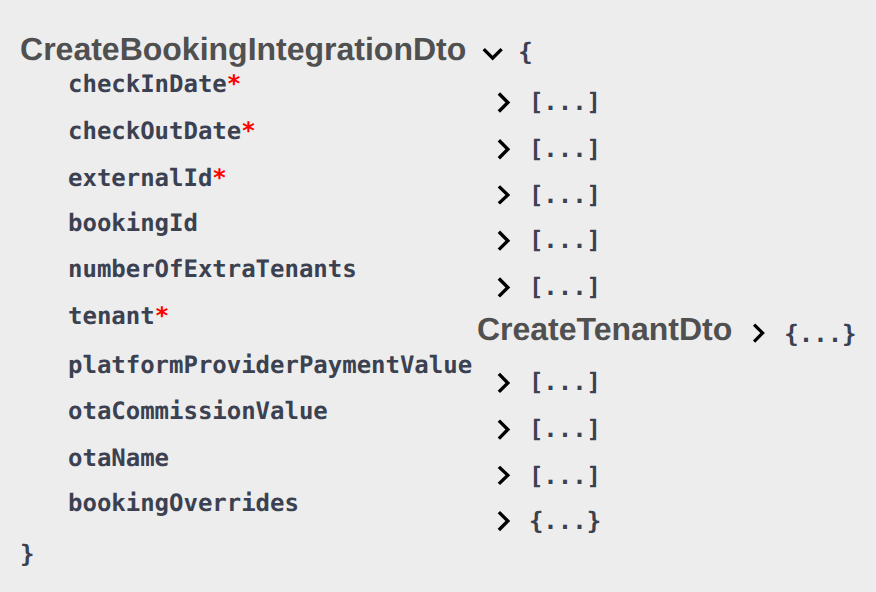
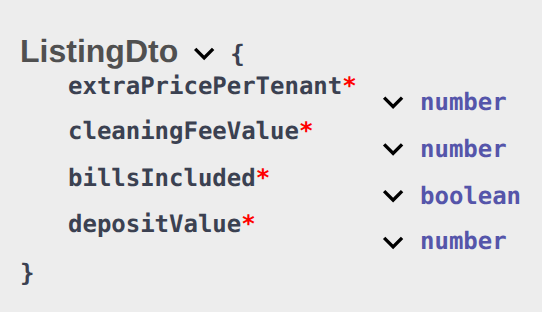
Local rent cap is not on partner POST
POST /{platform}-integration/bookings has no localRentCap field. Listing JSON also omits it — advertised rent is the full monthly amount — Listings & Availability — Local rent cap. After the worker creates the booking, Vivin can still freeze Local Rent Cap from the unit onto the payment plan when dual pricing is on, an Others category is saved, and the unit cap is greater than zero. Operators then see the split on Bookings → Contract Info.

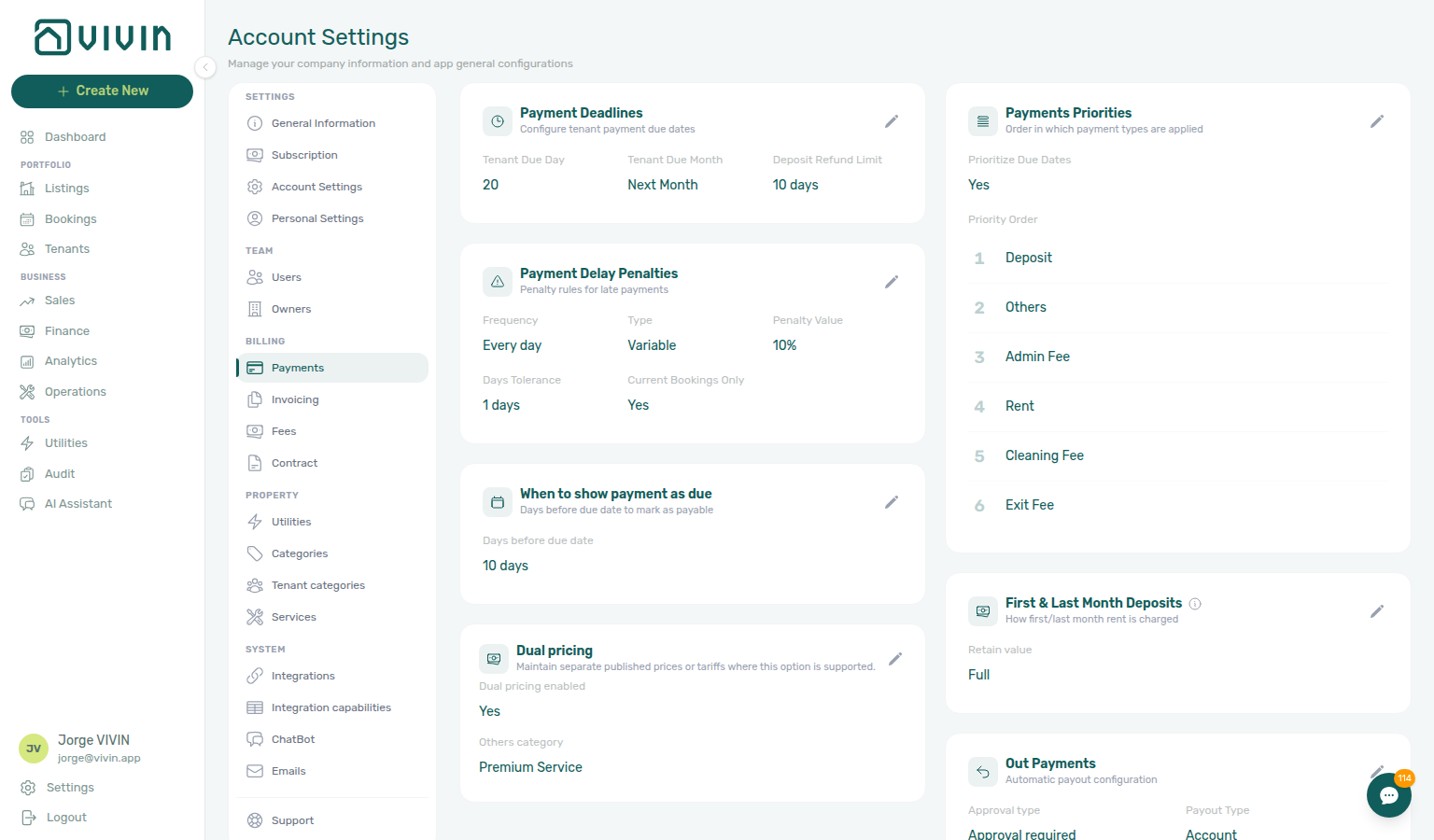
Partner POST does not set rent
Advertised amounts live on Listings & Availability (rent / rentsPerMonth, after platform markup). Variable units: Variable rent headline. Extra occupants: Extra price per tenant. After import, operators can change Monthly rent on Bookings → Contract Info. Exercise POST …/bookings on your OpenAPI page — Try requests in Swagger.
POST /{platform}-integration/bookings has no rent, isRentFixed, or rentsPerMonth field. Send dates, externalId, occupant headcount, optional platform commission, and tenant details. After the worker creates the booking, Vivin copies monthly rent from the listing — the same advertised rent / rentsPerMonth you already publish on GET /listings.
Extra Charge euros are also from the listing — send occupant headcount, not a custom Extra Charge amount — Extra Charge.
{
  "checkInDate": "2026-09-01",
  "checkOutDate": "2027-01-31",
  "externalId": "abc-123",
  "numberOfExtraTenants": 2,
  "tenant": {
    "firstName": "Maria",
    "lastName": "Silva",
    "email": "[email protected]"
  }
}
There is no "rent" key next to those fields. To advertise a different monthly amount, change the unit (and Markup on the platform card) before the channel creates the stay. A unit without a usable positive rent is omitted from listing JSON — you cannot import a €0 rent through this POST — Usable rent required.
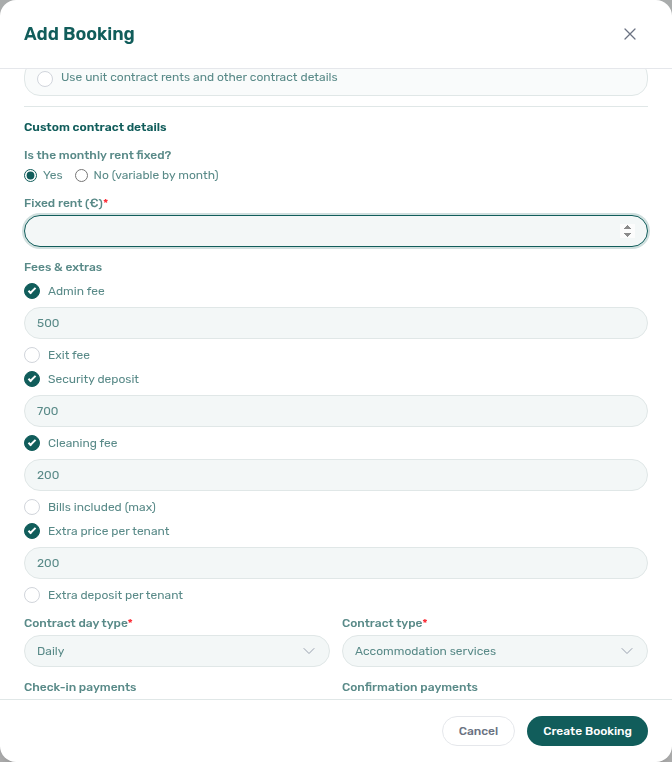
+ Create New → Booking can turn off Use unit contract rents and other contract details and type a custom monthly rent (including a rent-free €0 stay). That control is operator-only — marketplace POST always copies listing rent — Use unit contract rents.

What this is not
- Not Platform commission (that field is on this POST — channel commission for reconciliation — it does not change the tenant payment schedule).
- Not local rent cap (also absent from this body; dual pricing still freezes from the unit).
- Not Ignore unit preparation days (Add Booking only). Occupied nights, including preparation nights already in
unavailabilities, still reject.
Operators: FAQ — Marketplace booking rent. Integrators: Listings & Availability — Variable rent headline.
Partner POST does not set Extra Charge or Extra Deposit euros
Listing GET publishes Extra Charge as extraPricePerTenant — Listings & Availability — Extra price per tenant. Extra Deposit is not on that pull. Operators set both rates on Listings — Extra Charge per Tenant. Occupant headcount is numberOfExtraTenants. After import, operators can change Extra Charge on Bookings → Contract Info. Exercise POST …/bookings on your OpenAPI page — Try requests in Swagger.
POST /{platform}-integration/bookings has no extraPricePerTenant or extraDepositPerTenant field. Send dates, externalId, occupant headcount, optional platform commission, and tenant details. After the worker creates the booking, Vivin copies the unit Extra Charge and Extra Deposit rates and multiplies each by the extra occupants:
| Rate | Source | How the payment plan uses it |
|---|---|---|
| Extra Charge (Extra price per tenant) | Unit Extra Charge — the same euro figure listing JSON publishes as extraPricePerTenant | Added into monthly rent for each occupant beyond the first. Markup does not apply. When listing capacity is 1, listing JSON publishes 0. |
| Extra Deposit (Extra deposit per tenant) | Unit Extra Deposit — not on listing JSON | Added to listing depositValue for each occupant beyond the first. Can still add when depositValue is 0. |
numberOfExtraTenants is headcount, including the lead tenant. Omit the field or send 0 for a solo stay. Send 2 for two occupants — Vivin stores one extra occupant (2 − 1). Send 1 the same as a solo stay. Honour listing JSON capacity against that headcount — Honour listing.
{
  "checkInDate": "2026-09-01",
  "checkOutDate": "2027-01-31",
  "externalId": "abc-123",
  "numberOfExtraTenants": 2,
  "tenant": {
    "firstName": "Maria",
    "lastName": "Silva",
    "email": "[email protected]"
  }
}
There is no "extraPricePerTenant" or "extraDepositPerTenant" key next to those fields. Example: Extra Charge €60, Extra Deposit €100, and numberOfExtraTenants: 2 (two occupants). Monthly rent gains €60; the hold gains €100. To advertise a different Extra Charge, change the unit Extra Charge (and Capacity) before the channel creates the stay. Extra Deposit is never on listing GET — change the unit Extra Deposit the same way.
+ Create New → Booking can turn off Use unit contract rents and other contract details and tick Extra price per tenant / Extra deposit per tenant with a custom euro amount. That control is operator-only — marketplace POST always copies the unit rates — Use unit contract rents. After import, operators can still change Extra Charge on Contract Info for that reservation only.


What this is not
- Not rent (base monthly rent from listing JSON
rent/rentsPerMonth). - Not deposit (base hold from listing JSON
depositValue). - Not listing JSON
extraPricePerTenant(that GET field is the Extra Charge partners already receive — it is not a POST input). Extra Deposit is absent on listing GET. - Not Extra price per tenant when capacity is 1 (listing JSON publishes
0on a studio). - Not platform markup (Extra Charge stays the stored amount).
- Not Airbnb extra guest fee (nightly short-term).
- Not Adding Extra Charges (one-off Payment Plan lines after the stay exists).
- Not Use unit contract rents (the operator toggle that would skip copying these rates).
- Not Second tenant (co-occupant identity on Contract Info — occupant headcount is on this POST).
- Not Guarantor (rent-backer identity and amount on Contract Info — not tied to occupant headcount).
- Not Platform commission (that field is on this POST — channel commission for reconciliation — it does not replace Extra Charge).
Operators: FAQ — Marketplace booking Extra Charge. Integrators: Listings & Availability — Extra price per tenant.
Partner POST does not set Second tenant identity
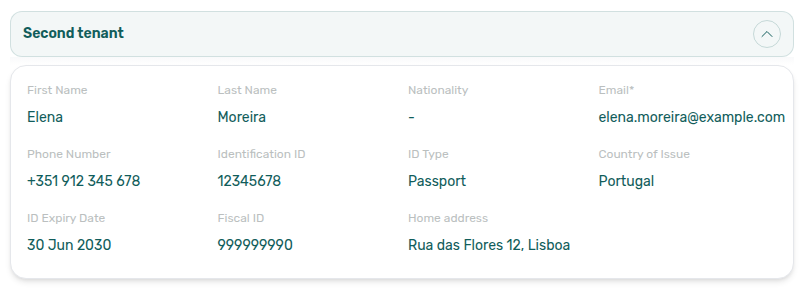
Occupant headcount is numberOfExtraTenants — Extra Charge. Operators turn Second tenant on under Preferences → Booking Defaults. After import, fill identity on Bookings → Contract Info → Second tenant. Exercise POST …/bookings on your OpenAPI page — Try requests in Swagger.
POST /{platform}-integration/bookings has no secondTenant object and no secondTenantFirstName (or other secondTenant*) fields. Send dates, externalId, occupant headcount, optional platform commission, and lead tenant details. After the worker creates the booking, Tenants number follows that headcount. When Second tenant is On and the stay has at least two occupants, Contract Info shows the accordion — the identity fields stay empty until an operator fills them.
{
  "checkInDate": "2026-09-01",
  "checkOutDate": "2027-01-31",
  "externalId": "abc-123",
  "numberOfExtraTenants": 2,
  "tenant": {
    "firstName": "Maria",
    "lastName": "Silva",
    "email": "[email protected]"
  }
}
There is no "secondTenant" key next to tenant. numberOfExtraTenants: 2 (two occupants) can open the accordion; it does not copy a second name, email, or ID. Fill those on Contract Info → Second tenant after import.
+ Create New → Booking also has no Second tenant fields at create. Create the stay first (with occupant count 2 or more), then open Contract Info. That path is operator-only.

What this is not
- Not Extra Charge (unit Extra Charge / Extra Deposit euros from occupant headcount).
- Not
numberOfExtraTenants(that field is on this POST — it is occupant headcount, including the lead). - Not the lead tenant object (name, email, billing, and bank details are on this body).
- Not Tenant category (segment on the lead tenant profile).
- Not Guarantor (a separate Contract Info accordion for someone who backs the rent; identity and amount are also absent from this POST).
- Not Platform commission (that field is on this POST — channel commission for reconciliation — it does not name a co-occupant).
Operators: FAQ — Marketplace booking Second tenant. Integrators: honour listing capacity against headcount — Honour listing.
Partner POST does not set Guarantor identity or amount
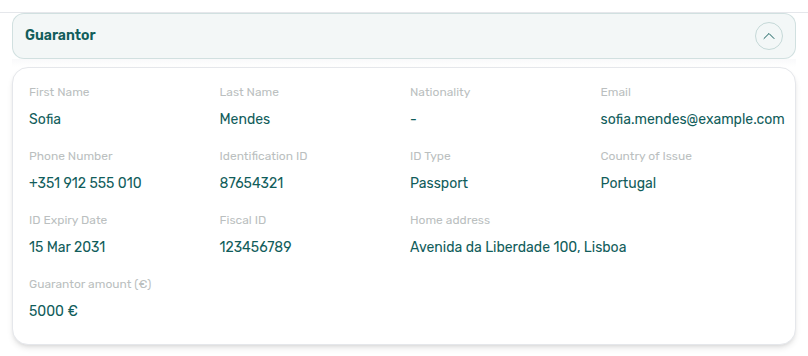
Operators turn Guarantor on under Preferences → Booking Defaults. After import, fill identity and Guarantor amount (€) on Bookings → Contract Info → Guarantor. Co-occupant identity is a different accordion — Second tenant. Exercise POST …/bookings on your OpenAPI page — Try requests in Swagger.
POST /{platform}-integration/bookings has no guarantor object and no guarantorFirstName (or other guarantor* fields, including guarantorAmount). Send dates, externalId, occupant headcount, optional platform commission, and lead tenant details. After the worker creates the booking, Contract Info → Guarantor stays empty until an operator fills it. Occupant headcount does not open or fill this accordion — unlike Second tenant, Guarantor appears on every booking when the preference is On, including a single-tenant stay.
{
  "checkInDate": "2026-09-01",
  "checkOutDate": "2027-01-31",
  "externalId": "abc-123",
  "tenant": {
    "firstName": "Maria",
    "lastName": "Silva",
    "email": "[email protected]"
  }
}
There is no "guarantor" key next to tenant, and no "guarantorAmount". Headcount on this body does not copy a guarantor name, ID, or euro amount. Fill those on Contract Info → Guarantor after import.
+ Create New → Booking also has no Guarantor fields at create. Create the stay first, then open Contract Info. That path is operator-only.

What this is not
- Not Second tenant (co-occupant identity on Contract Info — occupant headcount can open that accordion).
- Not
numberOfExtraTenants(that field is on this POST — it is occupant headcount; it does not name a guarantor). - Not the lead tenant object (name, email, billing, and bank details are on this body).
- Not Tenant category (segment on the lead tenant profile).
- Not Extra Charge (unit Extra Charge / Extra Deposit euros from occupant headcount).
- Not Platform commission (that field is on this POST — channel commission for reconciliation — it does not name a guarantor or set Guarantor amount (€)).
Operators: FAQ — Marketplace booking Guarantor. Integrators: honour listing capacity against headcount — Honour listing.
Partner POST does not set cleaning fee
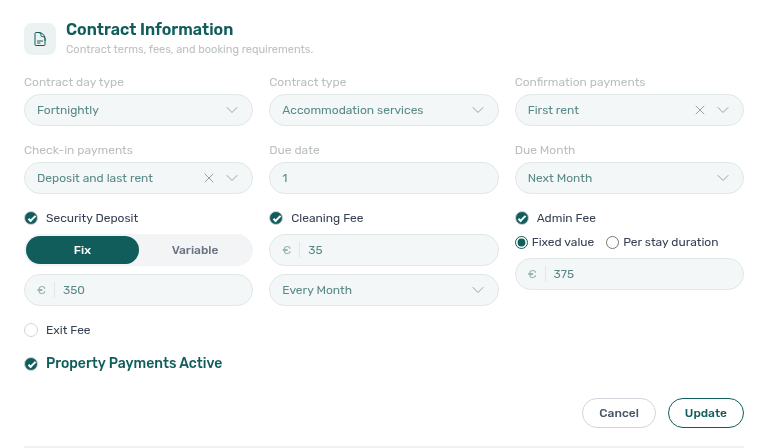
Listing GET publishes the euro amount as cleaningFeeValue — Listings & Availability — Cleaning fee. Operators set Frequency on Listings — Payments (Contract Information). After import, change the booking amount or mode on Bookings → Contract Info. Exercise POST …/bookings on your OpenAPI page — Try requests in Swagger.
POST /{platform}-integration/bookings has no cleaningFeeValue field. Send dates, externalId, occupant headcount, optional platform commission, and tenant details. After the worker creates the booking, Vivin copies the property cleaning amount — the same euro figure listing JSON already publishes as cleaningFeeValue. When Cleaning fee is off on the property, that copy is €0.
Frequency is not on this body either. Operators choose Every Month, One-Time Fee at Booking Confirmation, or One-Time Fee at Move-in on the property. That choice drives the payment plan inside Vivin. Listing GET also omits frequency — Listings & Availability — Cleaning fee.
{
  "checkInDate": "2026-09-01",
  "checkOutDate": "2027-01-31",
  "externalId": "abc-123",
  "tenant": {
    "firstName": "Maria",
    "lastName": "Silva",
    "email": "[email protected]"
  }
}
There is no "cleaningFeeValue" key next to those fields. To advertise a different cleaning amount, change the property before the channel creates the stay.
+ Create New → Booking can include or omit Cleaning fee (and type a custom euro amount) on that wizard. That control is operator-only — it is not on the partner create schema. After import, operators can still change the euro amount and Cleaning Fees requirement on Contract Info.

What this is not
- Not listing JSON
cleaningFeeValue(that GET field is the property amount partners already receive — it is not a POST input). - Not Platform commission (that field is on this POST — channel commission for reconciliation — it does not change the tenant payment schedule).
- Not Airbnb short-term dual cleaning fees (per stay / per short stay on the unit Short term card).
- Not admin fee or exit fee (also absent from this body; copies from the property).
Operators: FAQ — Marketplace booking cleaning fee. Integrators: Listings & Availability — Cleaning fee.
Partner POST does not set deposit
Listing GET publishes the computed hold as depositValue — Listings & Availability — Computed deposit. Extra Deposit is not on that pull. Operators set Security Deposit on Listings — Extra payments and Extra Deposit on Listings — Extra Charge per Tenant. After import, change the euro amount on Bookings → Contract Info. Exercise POST …/bookings on your OpenAPI page — Try requests in Swagger.
POST /{platform}-integration/bookings has no depositValue or extraDepositPerTenant field. Send dates, externalId, occupant headcount, optional platform commission, and tenant details. After the worker creates the booking, Vivin copies the computed property deposit — the same euro figure listing JSON already publishes as depositValue. When Security Deposit is off on the property, that copy is €0.
Extra Deposit euros are also from the unit — send occupant headcount, not a custom Extra Deposit amount — Extra Charge. Extra Deposit can still add for extra occupants when listing depositValue is 0, as long as Extra Deposit per Tenant is greater than zero.
{
  "checkInDate": "2026-09-01",
  "checkOutDate": "2027-01-31",
  "externalId": "abc-123",
  "numberOfExtraTenants": 2,
  "tenant": {
    "firstName": "Maria",
    "lastName": "Silva",
    "email": "[email protected]"
  }
}
There is no "depositValue" key next to those fields. To advertise a different hold, change the property Security Deposit (and unit Extra Deposit) before the channel creates the stay.
+ Create New → Booking can turn off Use unit contract rents and other contract details and include or omit Security deposit (and Extra Deposit) with a custom euro amount. That control is operator-only — it is not on the partner create schema. After import, operators can still change the deposit euro amount on Contract Info.

What this is not
- Not listing JSON
depositValue(that GET field is the computed property hold partners already receive — it is not a POST input). - Not Extra Deposit on listing JSON (booking-time only — Computed deposit).
- Not Platform commission (that field is on this POST — channel commission for reconciliation — it does not change the tenant hold).
- Not cleaning fee, admin fee, or exit fee (also absent from this body).
Operators: FAQ — Marketplace booking deposit. Integrators: Listings & Availability — Computed deposit.
Partner POST does not set admin fee
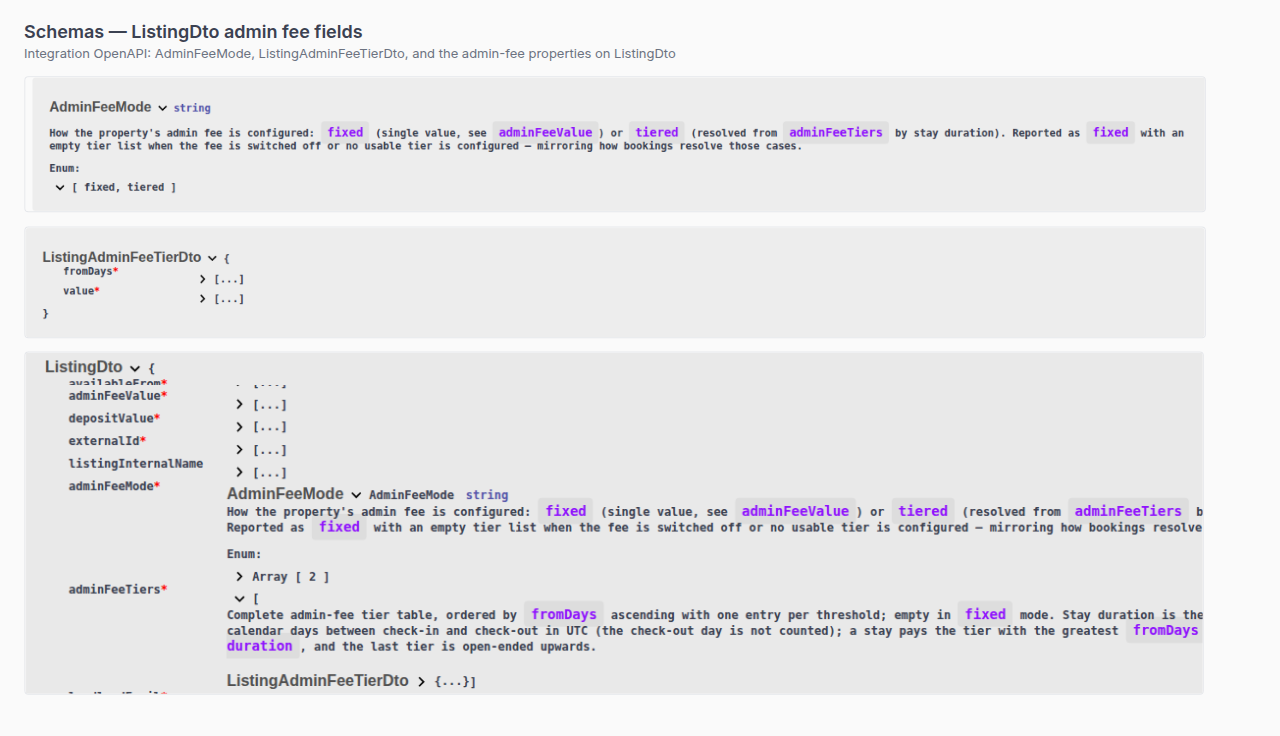
Listing GET publishes adminFeeValue, adminFeeMode, and adminFeeTiers — Listings & Availability — Admin fee. Operators set Fixed value or Per stay duration on Listings — Contract Information. After import, change the euro amount on Bookings → Contract Info. Exercise POST …/bookings on your OpenAPI page — Try requests in Swagger.
POST /{platform}-integration/bookings has no adminFeeValue, adminFeeMode, or adminFeeTiers field. Send dates, externalId, occupant headcount, optional platform commission, and tenant details. After the worker creates the booking, Vivin resolves the property admin fee from those dates:
| Property setting | What the payment plan stores |
|---|---|
| Admin fee off | €0 |
| Fixed value | The property euro amount (the same figure listing JSON publishes as adminFeeValue, rounded up) |
| Per stay duration | The matching adminFeeTiers row for the stay length (UTC calendar days between check-in and check-out, not counting the check-out day) |
When the property is tiered, listing GET adminFeeValue may be a leftover flat figure. Advertise from adminFeeTiers, not that leftover. Vivin still picks the correct tier at create from the dates you send.
{
  "checkInDate": "2026-09-01",
  "checkOutDate": "2027-01-31",
  "externalId": "abc-123",
  "tenant": {
    "firstName": "Maria",
    "lastName": "Silva",
    "email": "[email protected]"
  }
}
There is no "adminFeeValue" key next to those fields. To advertise a different admin fee, change the property before the channel creates the stay.
+ Create New → Booking can turn off Use unit contract rents and other contract details and include or omit Admin fee with a custom euro amount. That control is operator-only — it is not on the partner create schema. After import, operators can still change the admin-fee euro amount on Contract Info. On a Per stay duration property, the wizard amount may stay blank — Vivin resolves the tier from stay length when you create the reservation.

What this is not
- Not listing JSON
adminFeeValue/adminFeeMode/adminFeeTiers(those GET fields are what partners already receive — they are not POST inputs). - Not platform markup (Markup raises rent only — admin-fee tiers are not marked up).
- Not Platform commission (that field is on this POST — channel commission for reconciliation — it does not change the tenant admin fee).
- Not cleaning fee, deposit, or exit fee (also absent from this body).
Operators: FAQ — Marketplace booking admin fee. Integrators: Listings & Availability — Admin fee.
Partner POST does not set bills included
Listing GET publishes billsIncluded and billsIncludedMaxValue — Listings & Availability — All bills included. Operators set the euro ceiling on Listings — Extra payments. After import, change the ceiling on Bookings → Contract Info (inert for the payment plan). Exercise POST …/bookings on your OpenAPI page — Try requests in Swagger.
POST /{platform}-integration/bookings has no billsIncluded or billsIncludedMaxValue field. Send dates, externalId, occupant headcount, optional platform commission, and tenant details. After the worker creates the booking, Vivin copies the property Bills Included ceiling — the same euro figure listing JSON already publishes as billsIncludedMaxValue when the unit is not All bills included. When Bills Included is off and no cap is stored, that copy is €0 (Not set on Contract Info).
When the unit has All bills included (No cap), listing GET publishes billsIncluded: true and billsIncludedMaxValue: null. That null is not a POST input. The imported stay still stores the property ceiling. Covered allocations on that unit come from the unit No cap flag, not from this POST.
{
  "checkInDate": "2026-09-01",
  "checkOutDate": "2027-01-31",
  "externalId": "abc-123",
  "tenant": {
    "firstName": "Maria",
    "lastName": "Silva",
    "email": "[email protected]"
  }
}
There is no "billsIncludedMaxValue" key next to those fields. To advertise a different ceiling, change the property Bills Included (or the unit No cap flag) before the channel creates the stay.
+ Create New → Booking can turn off Use unit contract rents and other contract details and include or omit Bills included (max) with a custom euro amount. That control is operator-only — it is not on the partner create schema. After import, operators can still change the ceiling on Contract Info — that save is inert for the payment plan (future utility overages use the stored ceiling).

What this is not
- Not listing JSON
billsIncluded/billsIncludedMaxValue(those GET fields are what partners already receive — they are not POST inputs). - Not unit All bills included (No cap). That flag publishes a
nullcap on listing GET and drives Covered allocations — it is not a POST field. - Not platform markup (Markup raises rent only — the bills ceiling is not marked up).
- Not Platform commission (that field is on this POST — channel commission for reconciliation — it does not change the tenant utility ceiling).
- Not cleaning fee, admin fee, or deposit (also absent from this body).
- Not contract type (also absent from this body; copies from the property).
Operators: FAQ — Marketplace booking bills included. Integrators: Listings & Availability — All bills included.
Partner POST does not set contract type
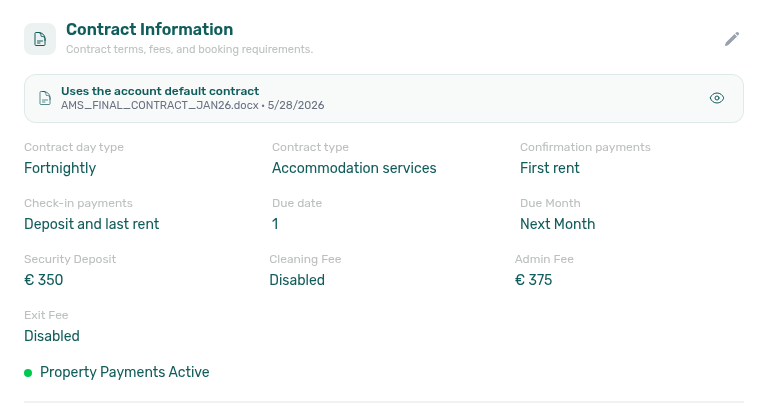
Operators set Rental payment frequency and Contract type on Listings — Step 4 (and later on Contract Information). After import, Bookings → Contract Info shows Contract cycle and Contract type. Exercise POST …/bookings on your OpenAPI page — Try requests in Swagger.
POST /{platform}-integration/bookings has no contractType or contractDayType field. Send dates, externalId, occupant headcount, optional platform commission, and tenant details. After the worker creates the booking, Vivin copies those two values from the property:
| Property field | Copied onto the stay | What it does |
|---|---|---|
| Rental payment frequency / Contract day type | Daily, Fortnightly, or Monthly | How rent (and monthly cleaning) is billed for partial months. Monthly charges full months. Fortnightly splits the month at mid-month. Daily prorates by occupied days. |
| Contract type | Traditional rental, Accommodation services, or Others | Legal / reporting classification on the generated contract. It does not change the euro amounts on the payment plan. |
Partial listing JSON (GET /listings) also omits these keys — partners cannot read or send them on the calendar pull. Change the property before the channel creates the stay. After import, Contract Info shows Contract cycle and Contract type as read-only for that reservation.
{
  "checkInDate": "2026-09-01",
  "checkOutDate": "2027-01-31",
  "externalId": "abc-123",
  "tenant": {
    "firstName": "Maria",
    "lastName": "Silva",
    "email": "[email protected]"
  }
}
There is no "contractType" or "contractDayType" key next to those fields.
+ Create New → Booking can turn off Use unit contract rents and other contract details and pick Contract day type and Contract type for that reservation. That control is operator-only — it is not on the partner create schema.
What this is not
- Not listing JSON
contractType/contractDayType(those keys are absent onGET /listings— they are not POST inputs either). - Not Inlife full-catalogue
contractType/incompleteRentType. That publish maps the same property fields for the Inlife listing page — it is not aPOST /bookingsinput. - Not Confirmation payments or Check-in payments (also absent from this body; copies from the property).
- Not Booking Engine short-stay quoted rent (Daily stays under one month with a positive Provider platform payment).
- Not Platform commission (that field is on this POST — channel commission for reconciliation — it does not change rent billing type).
- Not cleaning fee, admin fee, or bills included (also absent from this body).
Operators: FAQ — Marketplace booking contract type. Integrators: Listings — Step 4 Contract details.
Partner POST does not set confirmation or check-in payments
Operators set Confirmation payments and Check-in payments on Listings — Step 4 (and later on Contract Information). After import, Bookings → Contract Info shows both fields. Exercise POST …/bookings on your OpenAPI page — Try requests in Swagger.
POST /{platform}-integration/bookings has no bookingConfirmationRequirements or moveInRequirements field. Send dates, externalId, occupant headcount, optional platform commission, and tenant details. After the worker creates the booking, Vivin copies those two values from the property:
| Property field | Copied onto the stay | When those charges are due |
|---|---|---|
| Confirmation payments | Deposit, first rent, last rent, or a combination | On the earlier of booking created and check-in — so a late import does not post confirmation charges after move-in. |
| Check-in payments | Deposit, first rent, last rent, or a combination | On the booking’s check-in date. |
The two dropdowns cannot overlap. If Confirmation payments includes Deposit, Check-in payments cannot also require Deposit (same rule for First rent and Last rent).
Partial listing JSON (GET /listings) also omits these keys — partners cannot read or send them on the calendar pull. Change the property before the channel creates the stay.
After import, operators can still change Confirmation payments and Check-in payments on Contract Info for that reservation only — that does not change property defaults for future imports.
{
  "checkInDate": "2026-09-01",
  "checkOutDate": "2027-01-31",
  "externalId": "abc-123",
  "tenant": {
    "firstName": "Maria",
    "lastName": "Silva",
    "email": "[email protected]"
  }
}
There is no "bookingConfirmationRequirements" or "moveInRequirements" key next to those fields.
+ Create New → Booking can turn off Use unit contract rents and other contract details and pick Confirmation payments and Check-in payments for that reservation. That control is operator-only — it is not on the partner create schema.
What this is not
- Not listing JSON
bookingConfirmationRequirements/moveInRequirements(those keys are absent onGET /listings— they are not POST inputs either). - Not Inlife full-catalogue
paidAtMovinDate. That publish maps Check-in payments for the Inlife listing page (Security DepositorSecurity Deposit + Last Rent) — it is not aPOST /bookingsinput. - Not contract type (also absent from this body; copies from the property).
- Not Due date / Due Month (those copy from the property, or from account Tenant Due Day / Tenant Due Month; they are a separate operator setting).
- Not Platform commission (that field is on this POST — channel commission for reconciliation — it does not change which charges are due at confirmation vs move-in).
- Not deposit amount (that is the euro hold; this habit is when deposit / first rent / last rent are due).
Operators: FAQ — Marketplace booking confirmation payments. Integrators: Listings — Step 4 Contract details.
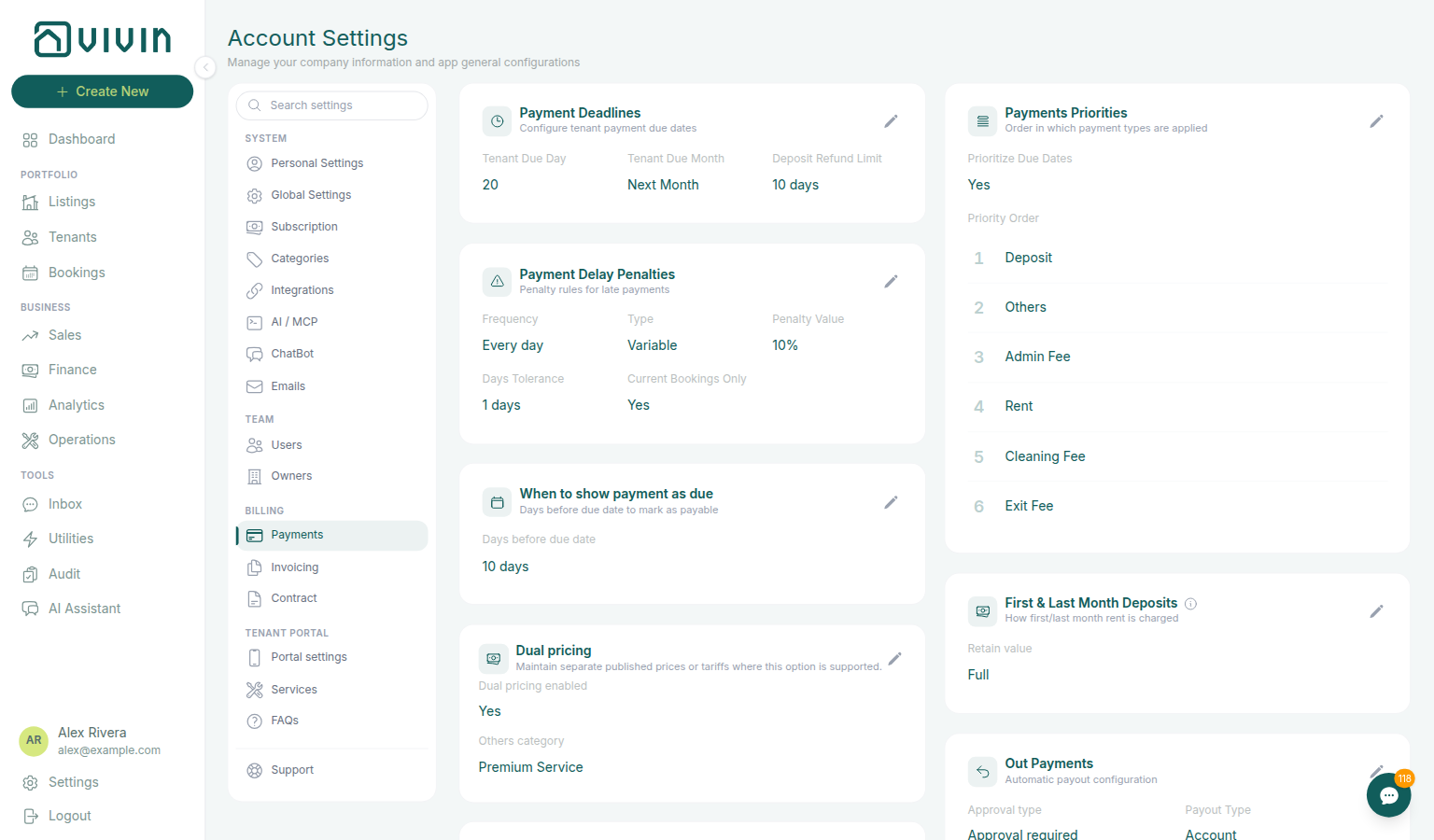
Partner POST does not set due date or due month
Operators set account defaults on Payments — Payment Deadlines (Tenant Due Day / Tenant Due Month). A property can override both on Listings — Contract Information. After import, Bookings → Contract Info shows Due day and Due Month. Exercise POST …/bookings on your OpenAPI page — Try requests in Swagger.
POST /{platform}-integration/bookings has no dueDay or dueDayMonth field. Send dates, externalId, occupant headcount, optional platform commission, and tenant details. After the worker creates the booking, Vivin copies those two values from the property, and falls back to the account Payments defaults when the property has no override:
| Operator field | Copied onto the stay | What it does |
|---|---|---|
| Property Due date, or account Tenant Due Day | Calendar day of the month (for example 1 or 20) | Recurring rent (and monthly cleaning) lines fall on that day in the charge period. |
| Property Due Month, or account Tenant Due Month | Previous Month, Current Month, or Next Month | Shifts that day into the month before, during, or after the charge period. |
+ Create New → Booking also has no Due day / Due Month controls. Direct reservations use the same property-then-account copy. After the stay exists, operators can still change Due day and Due Month on Contract Info → Booking information for that reservation only — that does not change property or account defaults for future bookings.
Partial listing JSON (GET /listings) also omits these keys — partners cannot read or send them on the calendar pull. Change the property (or account Payments defaults) before the channel creates the stay.
Confirmation, check-in, admin-fee, and exit-fee lines still use their own due dates (booking created / check-in / check-out). The calendar Due day applies to the remaining scheduled charges. If that calendar date lands on or before check-in, Vivin treats the line as a move-in charge due on check-in.
{
  "checkInDate": "2026-09-01",
  "checkOutDate": "2027-01-31",
  "externalId": "abc-123",
  "tenant": {
    "firstName": "Maria",
    "lastName": "Silva",
    "email": "[email protected]"
  }
}
There is no "dueDay" or "dueDayMonth" key next to those fields.
What this is not
- Not listing JSON
dueDay/dueDayMonth(those keys are absent onGET /listings— they are not POST inputs either). - Not Confirmation payments or Check-in payments (those decide which charges are due at booking vs move-in; this habit is the calendar day for the rest of the schedule).
- Not Edit due date on a single Contract Values line (that is a later operator override on one charge).
- Not Days before due (that copies from account Payments and only marks a line as payable early).
- Not default check-in / check-out times — Check-in times (those copy from account Booking Defaults).
- Not Platform commission (that field is on this POST — channel commission for reconciliation — it does not change the calendar due day).
Operators: FAQ — Marketplace booking due day. Integrators: Listings — Payments tab and Payments — Payment Deadlines.
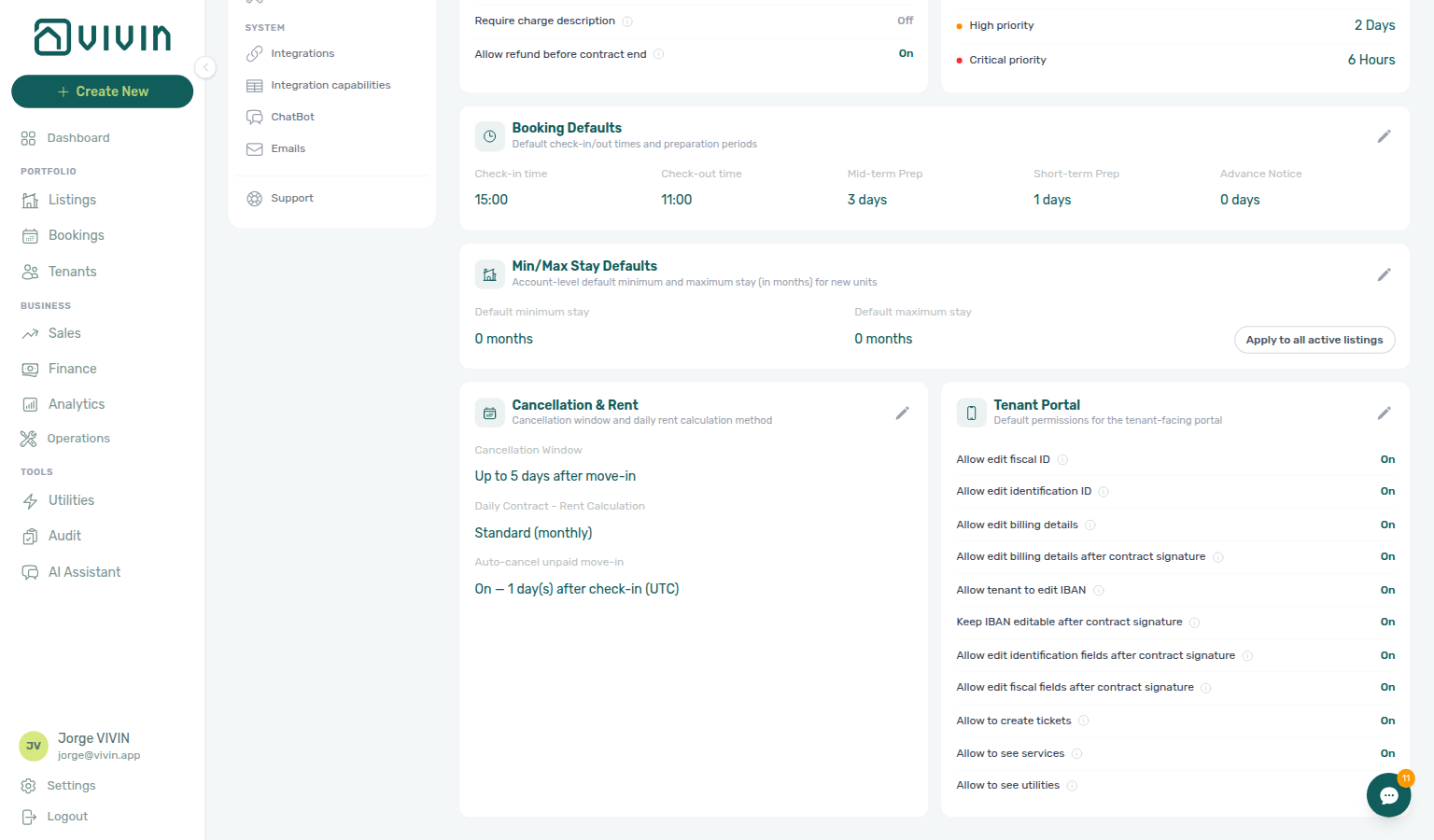
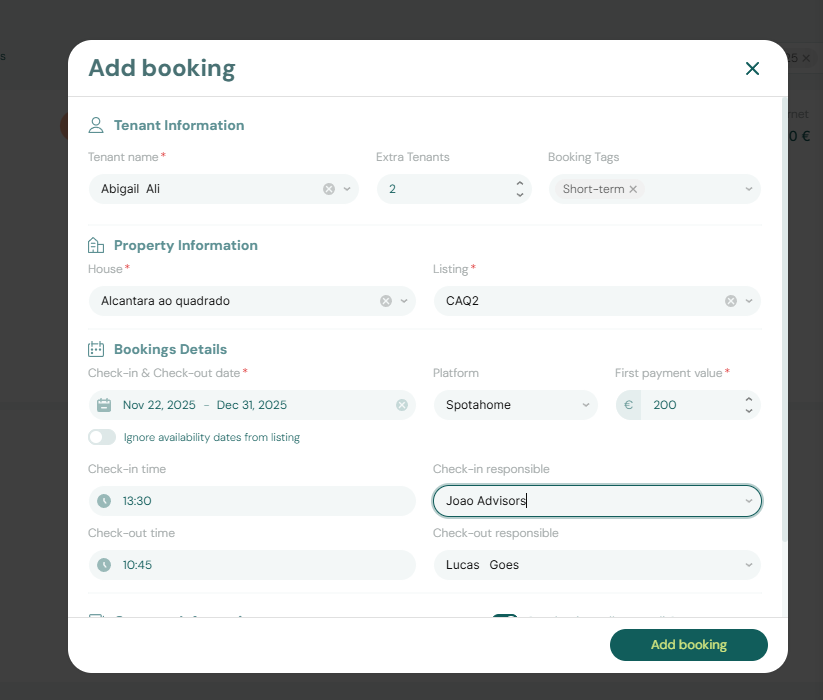
Partner POST does not set check-in or check-out times
Operators set account defaults on Preferences — Booking Defaults (Check-in time / Check-out time). After import, Bookings → Contract Info shows those times on the Check-in & Check-out card. Exercise POST …/bookings on your OpenAPI page — Try requests in Swagger.
POST /{platform}-integration/bookings has no checkInTime or checkOutTime field. Send calendar checkInDate and checkOutDate, externalId, occupant headcount, optional platform commission, and tenant details. After the worker creates the booking, Vivin copies the clock times from account Booking Defaults:
| Operator field | Copied onto the stay | What it does |
|---|---|---|
| Account Check-in time | Arrival clock time (for example 15:00) | Operations planning, tenant emails ({CheckInTime}), and access windows for this stay. |
| Account Check-out time | Departure clock time (for example 11:00) | Operations planning, tenant emails ({CheckOutTime}), and access windows for this stay. |
There is no property-level check-in or check-out time. Partial listing JSON (GET /listings) also omits these keys — partners cannot read or send them on the calendar pull. Change Preferences before the channel creates the stay.
+ Create New → Booking can pick Check-in time and Check-out time for that reservation (or leave them blank so Vivin uses the same account defaults). That control is operator-only — it is not on the partner create schema.
After import, operators can still change Check-in time and Check-out time on Contract Info → Check-in & Check-out for that reservation only — that does not change account defaults for future bookings.
{
  "checkInDate": "2026-09-01",
  "checkOutDate": "2027-01-31",
  "externalId": "abc-123",
  "tenant": {
    "firstName": "Maria",
    "lastName": "Silva",
    "email": "[email protected]"
  }
}
There is no "checkInTime" or "checkOutTime" key next to those fields. checkInDate / checkOutDate remain required calendar dates.

What this is not
- Not
checkInDate/checkOutDate(those are on this body — calendar days, not clock times). - Not listing JSON
checkInTime/checkOutTime(those keys are absent onGET /listings— they are not POST inputs either). - Not Confirmation payments or Check-in payments (those decide which charges are due at booking vs move-in).
- Not Due date / Due Month (calendar day for the rent schedule).
- Not Days before due (that copies from account Payments and only marks a line as payable early).
- Not Mid-term Prep / Short-term Prep (those close extra nights after checkout).
- Not Check-in / Check-out responsible (those stay empty until an operator assigns a teammate — they sit on the same Check-in & Check-out card).
- Not Platform commission (that field is on this POST — channel commission for reconciliation — it does not change arrival or departure clock times).
Operators: FAQ — Marketplace booking check-in time. Integrators: Preferences — Booking Defaults.
Partner POST does not set days before due
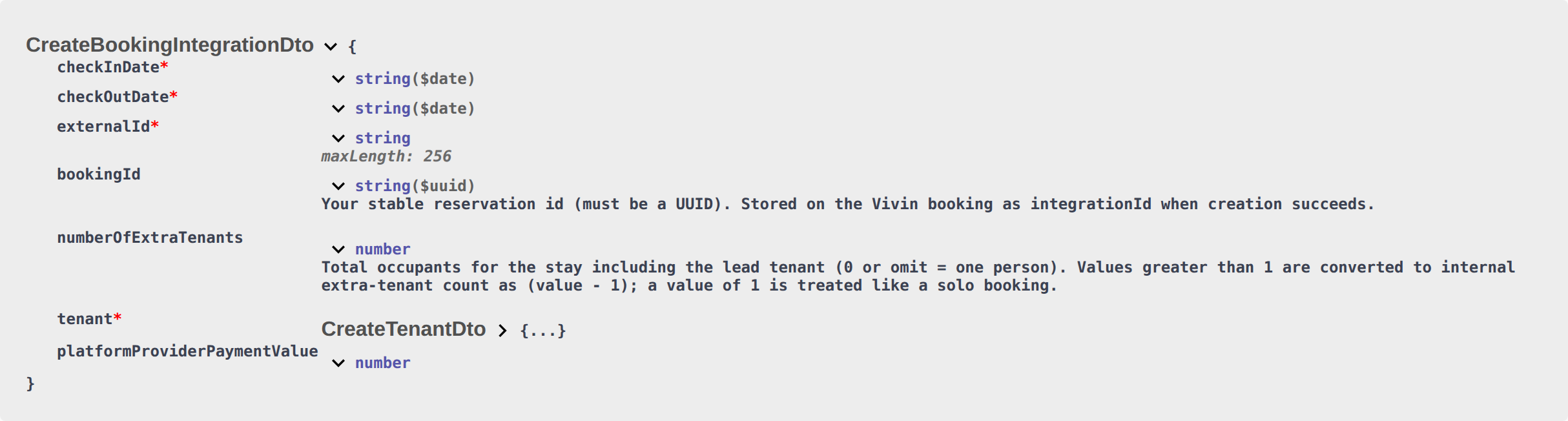
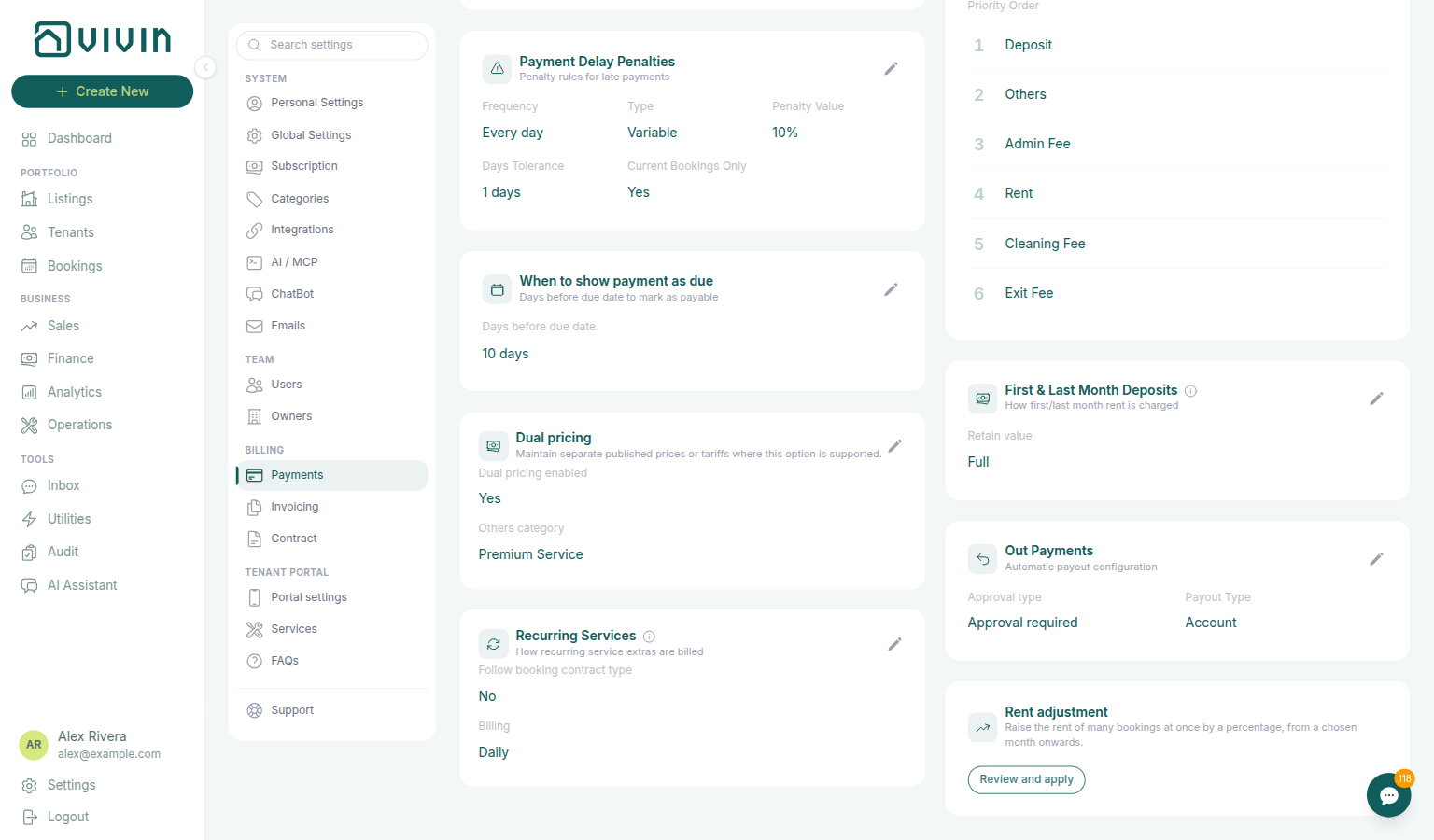
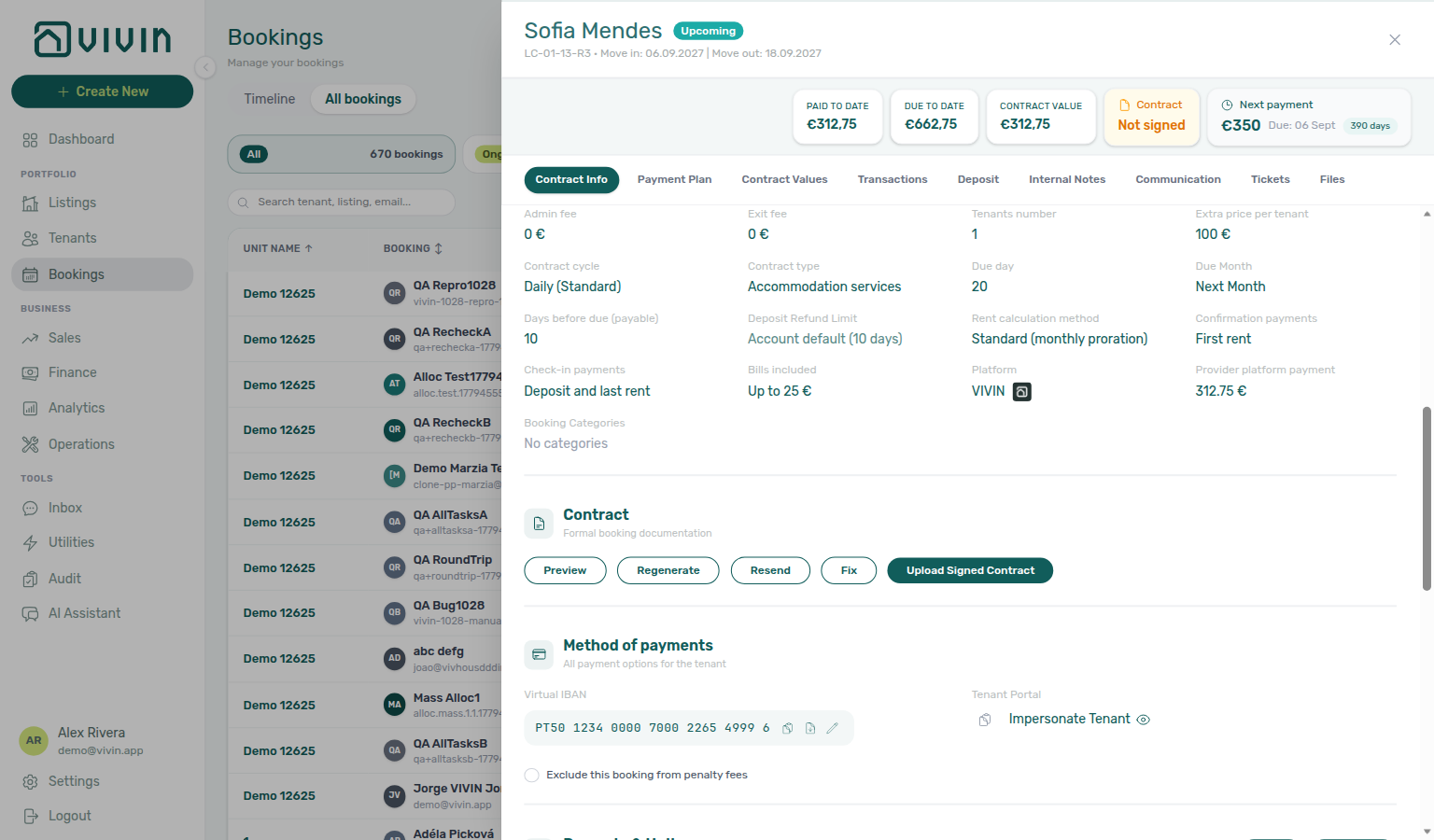
Operators set the account default on Payments — When to show payment as due (Days before due date). After import, Bookings → Contract Info shows Days before due (payable). Exercise POST …/bookings on your OpenAPI page — Try requests in Swagger.
POST /{platform}-integration/bookings has no daysBeforeDueAsPayable field. Send dates, externalId, occupant headcount, optional platform commission, and tenant details. After the worker creates the booking, Vivin copies Days before due date from account Payments:
| Operator field | Copied onto the stay | What it does |
|---|---|---|
| Account Days before due date | How early a scheduled charge appears as payable (for example 10 days) | Operators and tenants see the line as payable that many days before the due date. 0 means the line is not marked payable early. |
There is no property-level Days before due date. Partial listing JSON (GET /listings) also omits this key — partners cannot read or send it on the calendar pull. Change Payments before the channel creates the stay.
+ Create New → Booking also has no Days before due control. Direct reservations use the same account copy.
After import, operators can still change Days before due (payable) on Contract Info → Booking information for that reservation only — that does not change account defaults for future bookings, and it does not rebuild the payment plan. It only changes when existing lines appear as payable.
{
  "checkInDate": "2026-09-01",
  "checkOutDate": "2027-01-31",
  "externalId": "abc-123",
  "tenant": {
    "firstName": "Maria",
    "lastName": "Silva",
    "email": "[email protected]"
  }
}
There is no "daysBeforeDueAsPayable" key next to those fields.
What this is not
- Not listing JSON
daysBeforeDueAsPayable(that key is absent onGET /listings— it is not a POST input either). - Not Due date / Due Month (calendar day for the rent schedule — this habit only marks a line as payable early).
- Not Edit due date on a single Contract Values line (that is a later operator override on one charge).
- Not Deposit Refund Limit (days after checkout to return the hold — not when rent appears as payable; that term is inherited, not copied).
- Not Check-in times (those copy from account Booking Defaults).
- Not Platform commission (that field is on this POST — channel commission for reconciliation — it does not change when a charge appears as payable).
Operators: FAQ — Marketplace booking days before due. Integrators: Payments — When to show payment as due.
Partner POST does not set check-in or check-out responsible
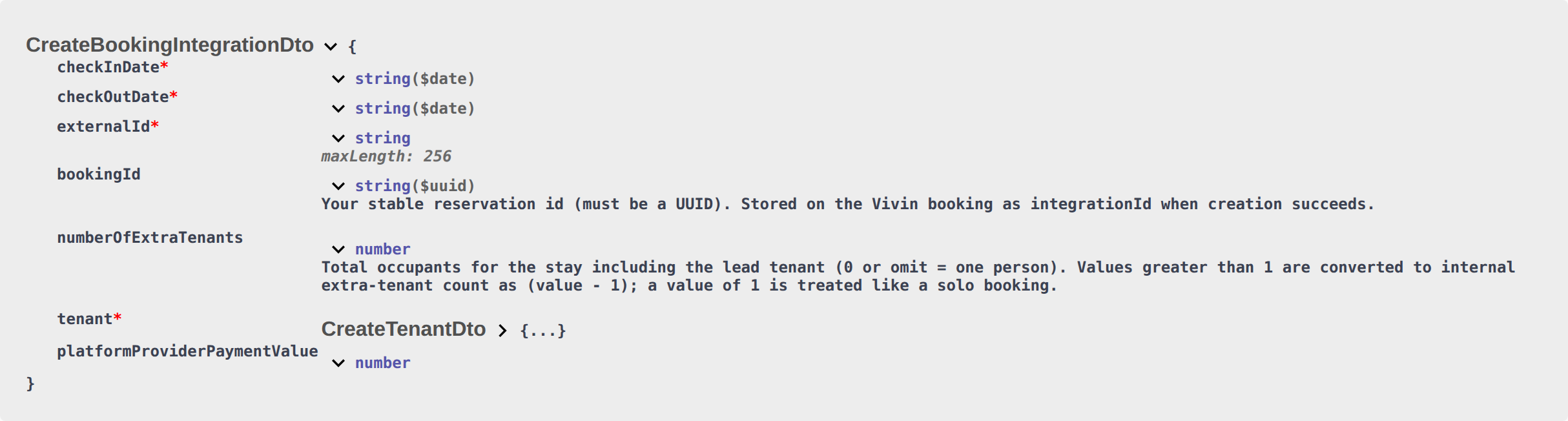
Operators assign teammates on Bookings → Contract Info (Check-in responsible / Check-out responsible). Unassigned marketplace stays appear under Operations → Assigned responsible → Without. Exercise POST …/bookings on your OpenAPI page — Try requests in Swagger.
POST /{platform}-integration/bookings has no checkInResponsableId or checkOutResponsableId field. Send calendar checkInDate and checkOutDate, externalId, occupant headcount, optional platform commission, and tenant details. After the worker creates the booking, Check-in responsible and Check-out responsible stay empty (the card shows –):
| Operator field | After marketplace import | What it does |
|---|---|---|
| Check-in responsible | Empty until an operator assigns a teammate | Names who owns arrival handover for this stay. |
| Check-out responsible | Empty until an operator assigns a teammate | Names who owns departure handover for this stay. |
There is no account-level or property-level default teammate — unlike clock Check-in time / Check-out time, which copy from Booking Defaults. Partial listing JSON (GET /listings) also omits these keys — partners cannot read or send them on the calendar pull.
+ Create New → Booking can pick Check-in responsible and Check-out responsible from your team for that reservation (or leave them blank). That control is operator-only — it is not on the partner create schema.
After import, operators can still assign both fields on Contract Info → Check-in & Check-out for that reservation only. Until then, Operations → Check-in & Check-out → Filters → Assigned responsible → Without lists those marketplace stays as unassigned. Toolbar Responsible only lists names already on a handover — it will not find an empty marketplace row.
{
  "checkInDate": "2026-09-01",
  "checkOutDate": "2027-01-31",
  "externalId": "abc-123",
  "tenant": {
    "firstName": "Maria",
    "lastName": "Silva",
    "email": "[email protected]"
  }
}
There is no "checkInResponsableId" or "checkOutResponsableId" key next to those fields. checkInDate / checkOutDate remain required calendar dates.
What this is not
- Not
checkInDate/checkOutDate(those are on this body — calendar days, not teammates). - Not Check-in times (clock times copy from account Booking Defaults; responsible names do not copy from anywhere).
- Not listing JSON
checkInResponsableId/checkOutResponsableId(those keys are absent onGET /listings— they are not POST inputs either). - Not Operations toolbar Responsible (that filter lists names already on a handover — it does not assign them).
- Not Tickets toolbar Assignee (maintenance work, not arrival/departure handover).
- Not Lease purpose (why the tenant is renting — stays empty until selected).
- Not Platform commission (that field is on this POST — channel commission for reconciliation — it does not name a teammate).
Operators: FAQ — Marketplace booking check-in responsible. Integrators: Bookings — Check-in responsible.
Partner POST does not set lease purpose
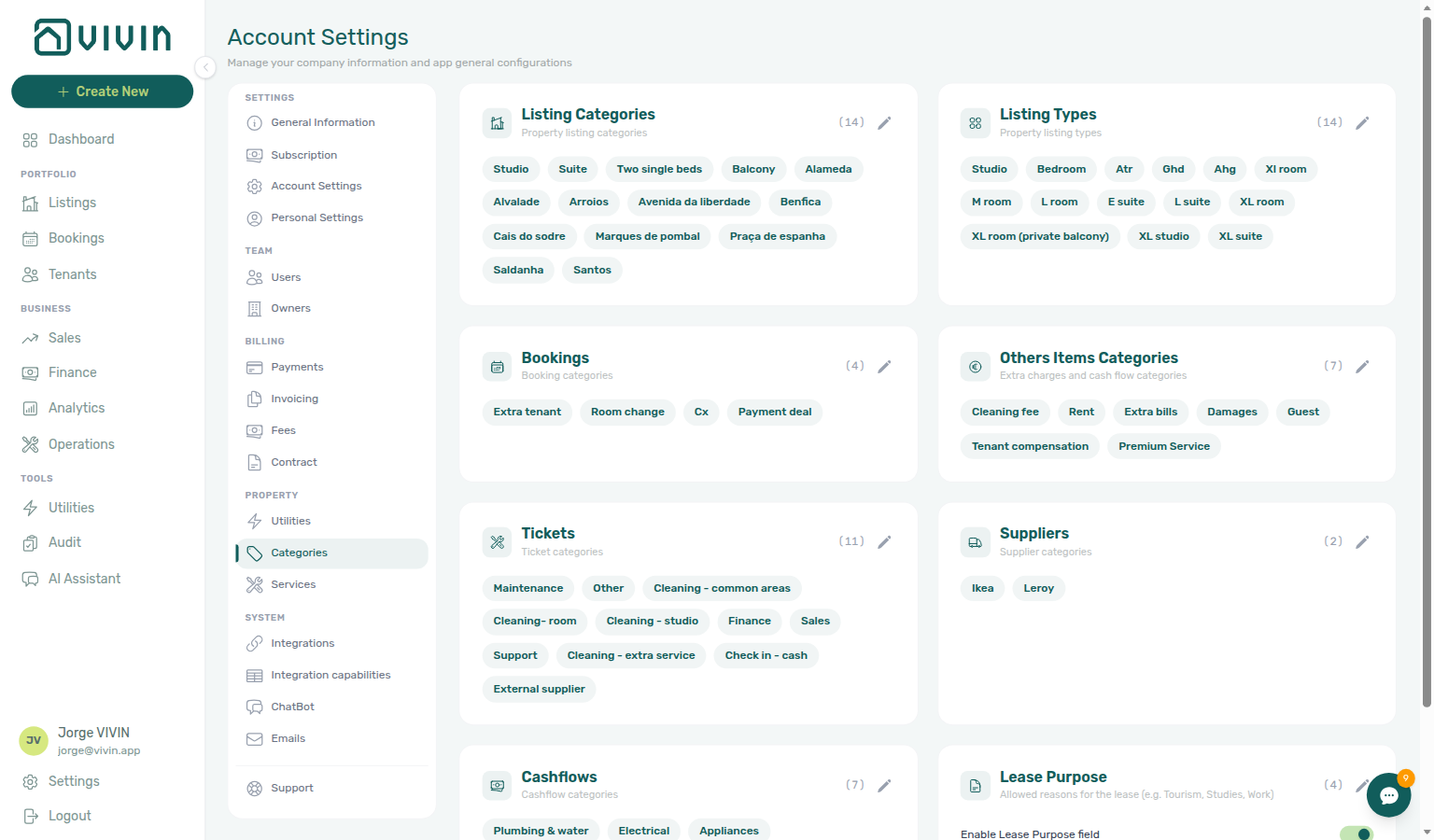
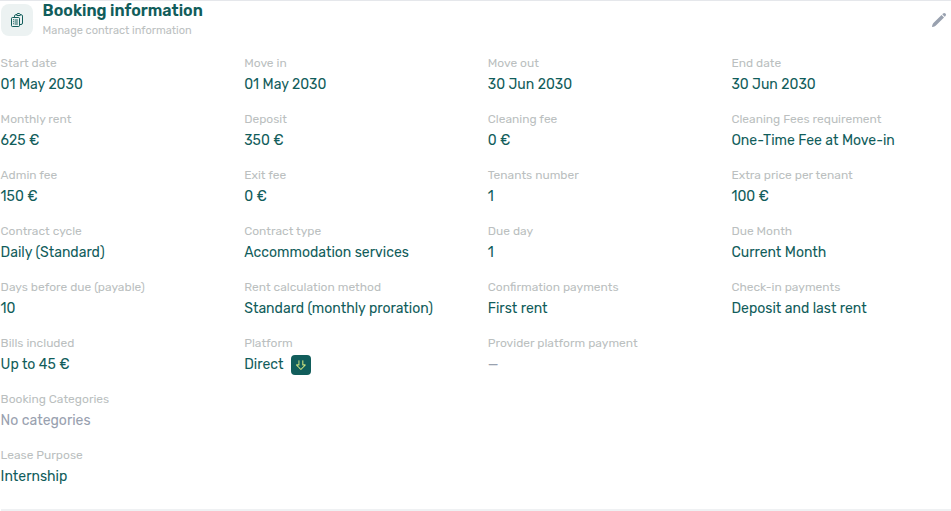
Operators enable the chip list on Settings → Categories → Lease purpose. After import, Bookings → Contract Info shows Lease purpose (or No lease purpose when empty). Tenants can still pick on the portal Your Details step — Tenant Portal — Lease Purpose. Exercise POST …/bookings on your OpenAPI page — Try requests in Swagger.
POST /{platform}-integration/bookings has no leasePurpose field. Send calendar checkInDate and checkOutDate, externalId, occupant headcount, optional platform commission, and tenant details. After the worker creates the booking, Lease purpose stays empty (No lease purpose on Contract Info):
| Operator field | After marketplace import | What it does |
|---|---|---|
| Account Lease purpose chip list | Allowed values only — not copied onto the stay | Operators and tenants pick from this catalog (for example Tourism, Studies, Work). |
| Lease purpose on the stay | Empty until an operator or tenant selects a chip | Classifies why this tenant is renting. |
There is no account-level default label and no property-level lease purpose. Settings → Categories → Lease purpose is a catalog of allowed chips, not a value that copies onto new stays. Partial listing JSON (GET /listings) also omits leasePurpose — partners cannot read or send it on the calendar pull.
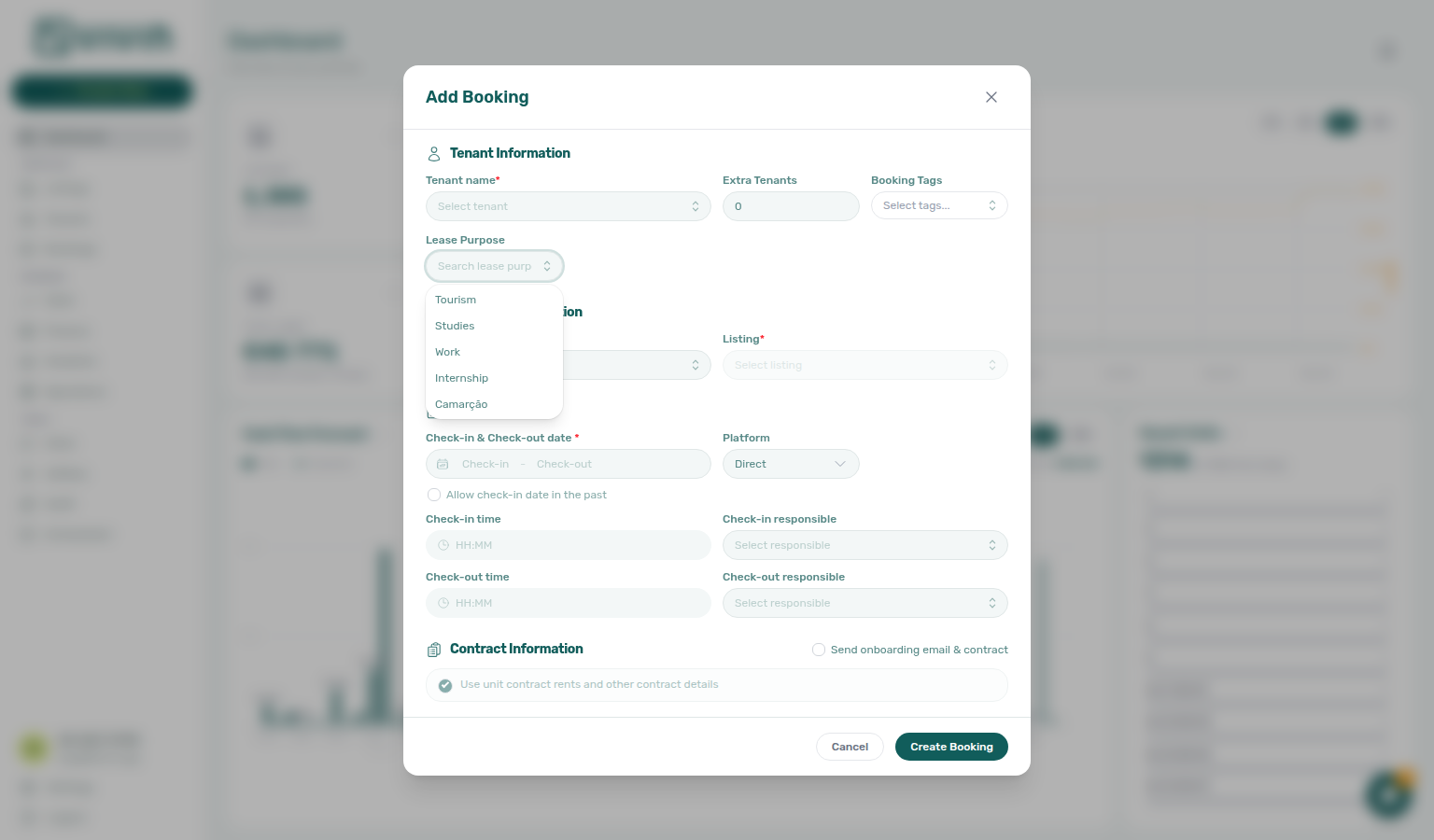
+ Create New → Booking can pick Lease purpose when the field is enabled (required asterisk when Make Lease Purpose mandatory is on). That control is operator-only — it is not on the partner create schema.
After import, operators can still set Lease purpose on Contract Info → Booking information for that reservation only. Make Lease Purpose mandatory does not reject channel create — marketplace import still succeeds with an empty value. When that toggle is on, the tenant must pick an allowed chip on the portal Your Details step before Next — Tenant Portal — Lease Purpose.
{
  "checkInDate": "2026-09-01",
  "checkOutDate": "2027-01-31",
  "externalId": "abc-123",
  "tenant": {
    "firstName": "Maria",
    "lastName": "Silva",
    "email": "[email protected]"
  }
}
There is no "leasePurpose" key next to those fields.
What this is not
- Not Check-in / Check-out responsible (teammates for arrival and departure handover).
- Not Tenant category (allowlisted channels assign Default for integration-created tenants — lease purpose never auto-fills from a default chip).
- Not Booking tags (reservation labels — also empty until an operator picks chips).
- Not listing JSON
leasePurpose(that key is absent onGET /listings— it is not a POST input either). - Not a default copied from Categories (that card is allowed values, not a label that lands on the stay).
- Not Make Lease Purpose mandatory blocking marketplace
POST /bookings(import still succeeds; the tenant picks on portal Your Details when the field is required). - Not Platform commission (that field is on this POST — channel commission for reconciliation — it does not classify why the tenant is renting).
Operators: FAQ — Marketplace booking lease purpose. Integrators: Bookings — Lease purpose.
Partner POST does not set Deposit Refund Limit
Operators set the account default on Payments — Payment deadlines (Deposit Refund Limit). After import, Bookings → Contract Info shows the inherited term (or a booking override). Exercise POST …/bookings on your OpenAPI page — Try requests in Swagger.
POST /{platform}-integration/bookings has no depositReturnDueDay field. Send dates, externalId, occupant headcount, optional platform commission, and tenant details. After the worker creates the booking, Deposit Refund Limit stays blank — Vivin inherits the account setting on every read, rather than copying a number onto the stay:
| Operator field | After marketplace import | What it does |
|---|---|---|
| Account Deposit Refund Limit | Inherited until Contract Info overrides it | How many days after the refund anchor your team should return the security deposit (for example 10 days). |
| Deposit Refund Limit Reference | Account-wide only | Whether that term counts from Contract end date or Check-out date. |
There is no property-level Deposit Refund Limit. Partial listing JSON (GET /listings) also omits depositReturnDueDay — partners cannot read or send it on the calendar pull.
This inherit rule is the opposite of Days before due: that window is copied onto the stay at create. Deposit Refund Limit is not snapshotted — changing Payments still moves every booking that has no override.
+ Create New → Booking also has no Deposit Refund Limit control. Direct reservations inherit the same way.
After import, operators can still set Deposit Refund Limit on Contract Info → Booking information for that reservation only. Blank keeps inheriting the account setting. 0 is a real override meaning the refund is due on the anchor date itself.
{
  "checkInDate": "2026-09-01",
  "checkOutDate": "2027-01-31",
  "externalId": "abc-123",
  "tenant": {
    "firstName": "Maria",
    "lastName": "Silva",
    "email": "[email protected]"
  }
}
There is no "depositReturnDueDay" key next to those fields.
What this is not
- Not Deposit (the euro hold copied from listing JSON
depositValue— this habit is only the days to return it). - Not listing JSON
depositReturnDueDay(that key is absent onGET /listings— it is not a POST input either). - Not Days before due (that window is copied at create and only marks a rent line as payable early).
- Not Due date / Due Month (calendar day for the rent schedule).
- Not Deposit Refund Limit Reference (which date the term counts from — account-wide, not a per-booking or POST field).
- Not Platform commission (that field is on this POST — channel commission for reconciliation — it does not change when the hold is due back).
Operators: FAQ — Marketplace booking Deposit Refund Limit. Integrators: Bookings — Deposit Refund Limit.
Partner POST does not set booking tags
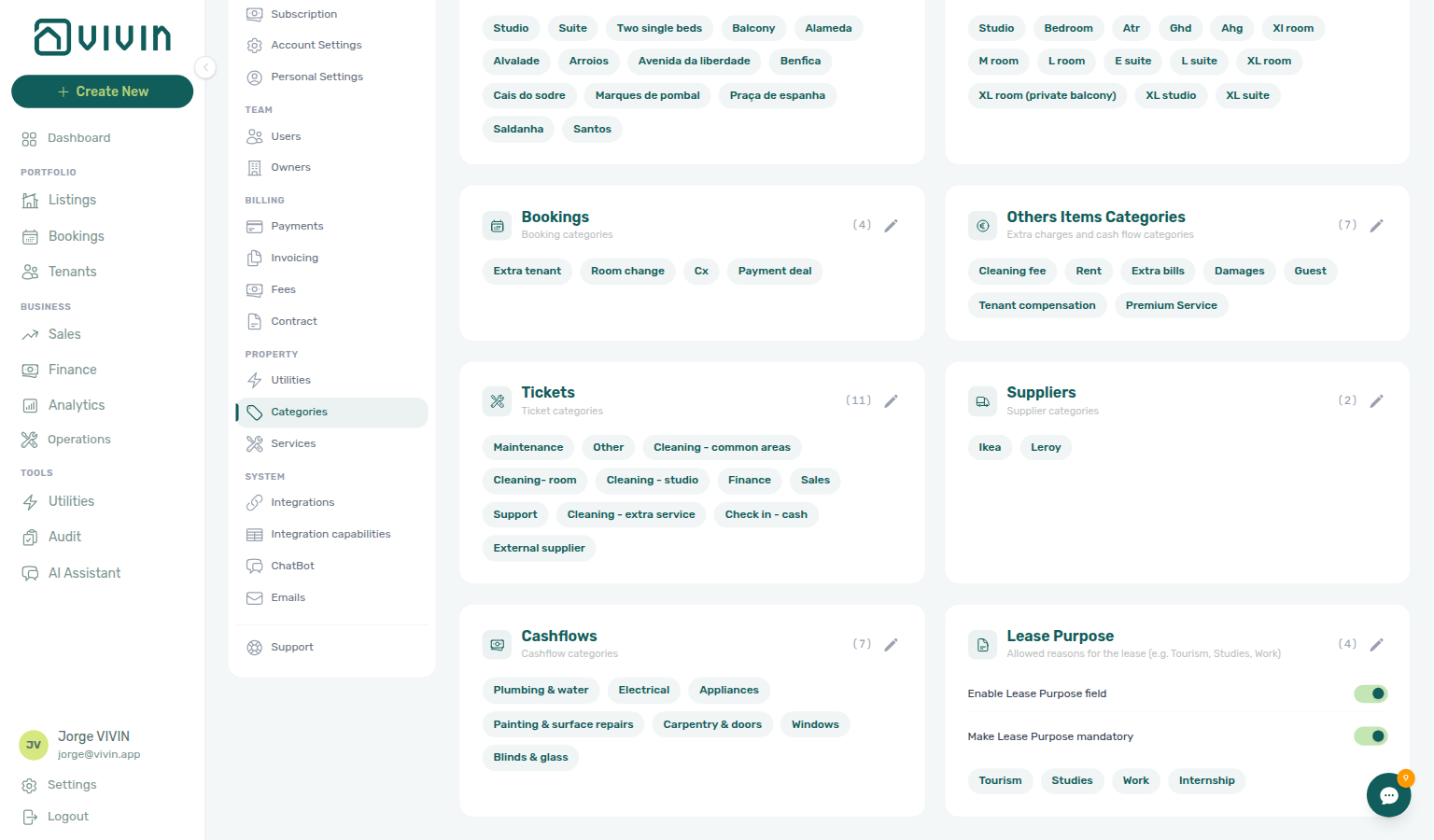
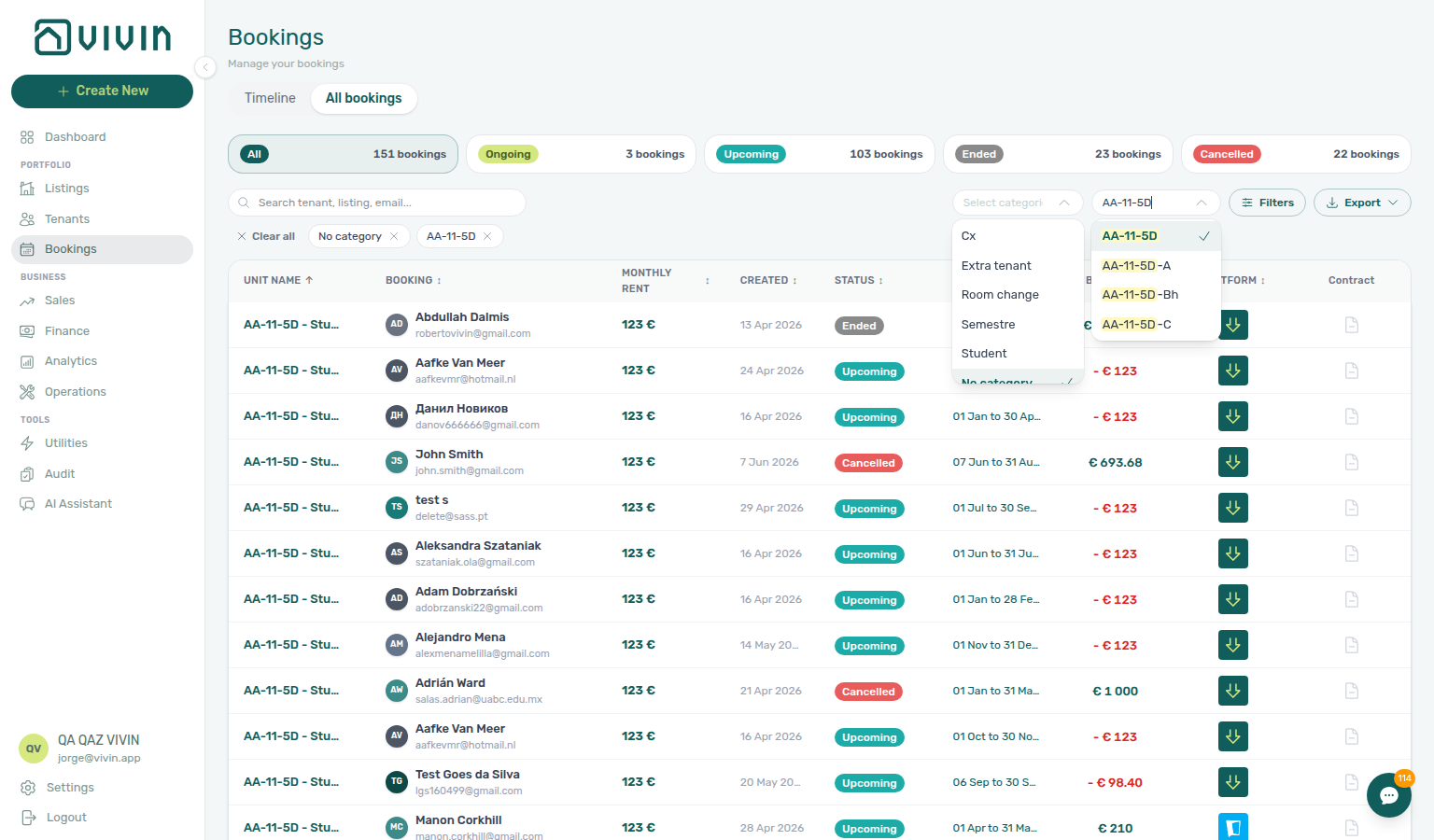
Operators maintain the chip list on Settings → Categories → Bookings. After import, Bookings → Contract Info shows Booking categories (or No categories when empty). Untagged stays match Bookings → Booking categories → No booking category. Exercise POST …/bookings on your OpenAPI page — Try requests in Swagger.
POST /{platform}-integration/bookings has no bookingTags field. Send calendar checkInDate and checkOutDate, externalId, occupant headcount, optional platform commission, and tenant details. After the worker creates the booking, Booking categories stay empty:
| Operator field | After marketplace import | What it does |
|---|---|---|
| Account Booking chip list | Allowed values only — not copied onto the stay | Operators pick from this catalog (for example Corporate, Renewal, Room Change). |
| Booking categories on the stay | Empty until an operator picks chips | Labels this reservation for filters, Communication Rules, and reporting. |
There is no account-level default tag and no property-level booking tag. Settings → Categories → Bookings is a catalog of allowed chips, not a value that copies onto new stays. Partial listing JSON (GET /listings) also omits bookingTags — partners cannot read or send reservation labels on the calendar pull. Listing Select tags on the unit is a different catalog.
+ Create New → Booking can pick Booking categories when the account has chips (or leave them blank). That control is operator-only — it is not on the partner create schema.
After import, operators can still set Booking categories on Contract Info → Booking information for that reservation only. Until then, Bookings → Booking categories → No booking category and Finance → Other filters → Booking → No category list those marketplace stays. Emails → Communication Rules → Booking tags → Include only will not match an untagged marketplace stay.
{
  "checkInDate": "2026-09-01",
  "checkOutDate": "2027-01-31",
  "externalId": "abc-123",
  "tenant": {
    "firstName": "Maria",
    "lastName": "Silva",
    "email": "[email protected]"
  }
}
There is no "bookingTags" key next to those fields.
What this is not
- Not Tenant category (allowlisted channels assign Default for integration-created tenants — booking tags never auto-fill from a default chip).
- Not Lease purpose (why the tenant is renting — a single chip, not reservation labels).
- Not listing Select tags (property and unit labels on Listings — a different catalog).
- Not listing JSON
bookingTags(that key is absent onGET /listings— it is not a POST input either). - Not a default copied from Categories → Bookings (that card is allowed values, not a label that lands on the stay).
- Not Others Items Categories (charge labels when you Add Charge).
- Not Platform commission (that field is on this POST — channel commission for reconciliation — it does not label the stay).
- Not Maintenance tickets (automatic check-in/out Operations tickets — they follow the property Maintenances tab).
Operators: FAQ — Marketplace booking tags. Integrators: Bookings — Booking tags.
Partner POST does not set check-in / check-out maintenance tickets
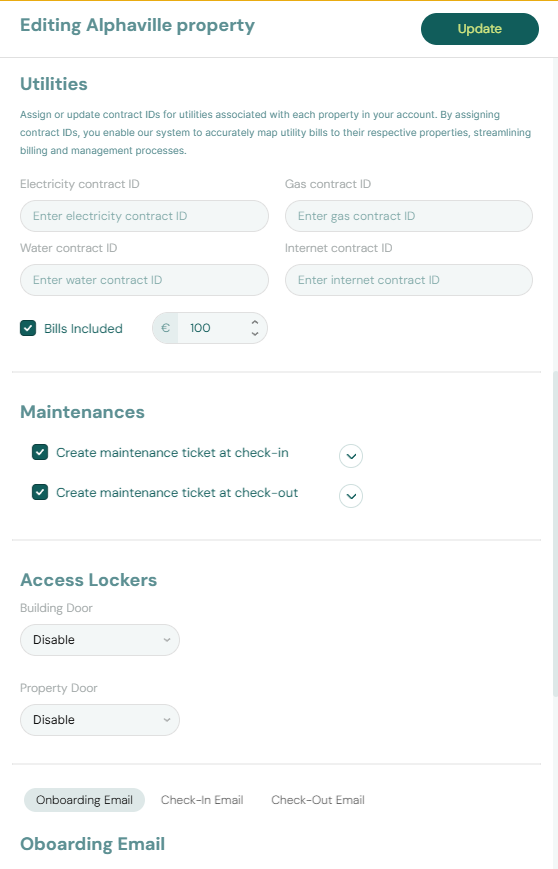
Operators set the property default on Listings — Maintenances tab. + Create New → Booking can skip tickets for one reservation. After import, cancel an unwanted row in Operations → Tickets. Exercise POST …/bookings on your OpenAPI page — Try requests in Swagger.
POST /{platform}-integration/bookings has no createCheckInMaintenanceTicket or createCheckOutMaintenanceTicket field. Send calendar checkInDate and checkOutDate, externalId, occupant headcount, optional platform commission, and tenant details. After the worker creates the booking, automatic check-in/out tickets follow the property Maintenances tab:
| Operator field | After marketplace import | What it does |
|---|---|---|
| Property Create maintenance ticket at check-in | Copied onto the stay | When on, Vivin opens an Operations → Tickets row for this check-in. |
| Property Create maintenance ticket at check-out | Copied onto the stay | When on, Vivin opens an Operations → Tickets row for this check-out. |
| Create check-in ticket / Create check-out ticket on Add booking | Not on partner POST | Operator-only skip for one reservation. |
There is no listing-level ticket default and no account-level ticket default. Partial listing JSON (GET /listings) also omits createCheckInMaintenanceTicket and createCheckOutMaintenanceTicket — partners cannot read or send a skip flag on the calendar pull.
+ Create New → Booking can uncheck Create check-in ticket / Create check-out ticket when you turn off Use unit contract rents and other contract details and the property has auto-create enabled. That control is operator-only — it is not on the partner create schema.
After import, Contract Info cannot flip this snapshot. The stay keeps the property rule from create time. Changing Maintenances later does not rewrite stays already imported. If an imported stay opened a ticket you do not need, cancel that row in Operations → Tickets.
A partner flag cannot turn tickets on when the property has auto-create off.
{
  "checkInDate": "2026-09-01",
  "checkOutDate": "2027-01-31",
  "externalId": "abc-123",
  "tenant": {
    "firstName": "Maria",
    "lastName": "Silva",
    "email": "[email protected]"
  }
}
There is no "createCheckInMaintenanceTicket" or "createCheckOutMaintenanceTicket" key next to those fields.

What this is not
- Not Per-booking maintenance ticket opt-out on Add booking (operator-only skip; marketplace POST always uses the property rule).
- Not Ignore unit preparation days (calendar buffer after checkout, not Operations tickets).
- Not Check-in / Check-out responsible (teammate names for arrival and departure handover).
- Not listing JSON
createCheckInMaintenanceTicket(that key is absent onGET /listings— it is not a POST input either). - Not turning tickets on when the property Maintenances toggles are off.
- Not Contract Info after import (the snapshot is set at create).
- Not Platform commission (that field is on this POST — channel commission for reconciliation — it does not skip tickets).
Operators: FAQ — Marketplace booking maintenance tickets. Integrators: Listings — Maintenances tab and Bookings — Creating a New Booking.
Partner POST does not set Ignore unit preparation days
Operators set Mid-term Prep / Short-term Prep on Preferences — Booking Defaults. + Create New → Booking can start one reservation in that buffer. Honour listing unavailabilities (including those extra nights) on your marketplace — Honour listing. Exercise POST …/bookings on your OpenAPI page — Try requests in Swagger.
POST /{platform}-integration/bookings has no ignoreListingPreparationDays field. Send calendar checkInDate and checkOutDate, externalId, occupant headcount, optional platform commission, and tenant details. After the worker creates the booking, occupancy and preparation nights already in listing unavailabilities still reject:
| Operator field | After marketplace import | What it does |
|---|---|---|
| Account Mid-term Prep / Short-term Prep | Closed nights in listing unavailabilities | Extra nights after checkout stay blocked for channel create. |
| Ignore unit preparation days on Add booking | Not on partner POST | Operator-only skip so a manual stay can start in that buffer. |
There is no listing-level skip and no account-level skip default. Partial listing JSON (GET /listings) also omits ignoreListingPreparationDays — partners cannot read or send a skip flag on the calendar pull.
+ Create New → Booking can tick Ignore unit preparation days so a manual reservation starts in the previous stay’s prep buffer. Occupied nights stay blocked. Manual, owner, maintenance, and channel holds stay blocked. That control is operator-only — it is not on the partner create schema.
After import, Contract Info cannot flip this. The checkbox is create-time only. Changing Mid-term Prep / Short-term Prep later does not rewrite stays already imported. Same-day turnover (your checkout = the next check-in) does not need this flag — FAQ — Same-day turnovers.
If a channel POSTs dates that overlap a previous stay’s prep tail, the worker does not create the booking. Honour unavailabilities on your marketplace instead.
A partner flag cannot open a previous stay’s prep buffer.
{
  "checkInDate": "2026-09-01",
  "checkOutDate": "2027-01-31",
  "externalId": "abc-123",
  "tenant": {
    "firstName": "Maria",
    "lastName": "Silva",
    "email": "[email protected]"
  }
}
There is no "ignoreListingPreparationDays" key next to those fields.
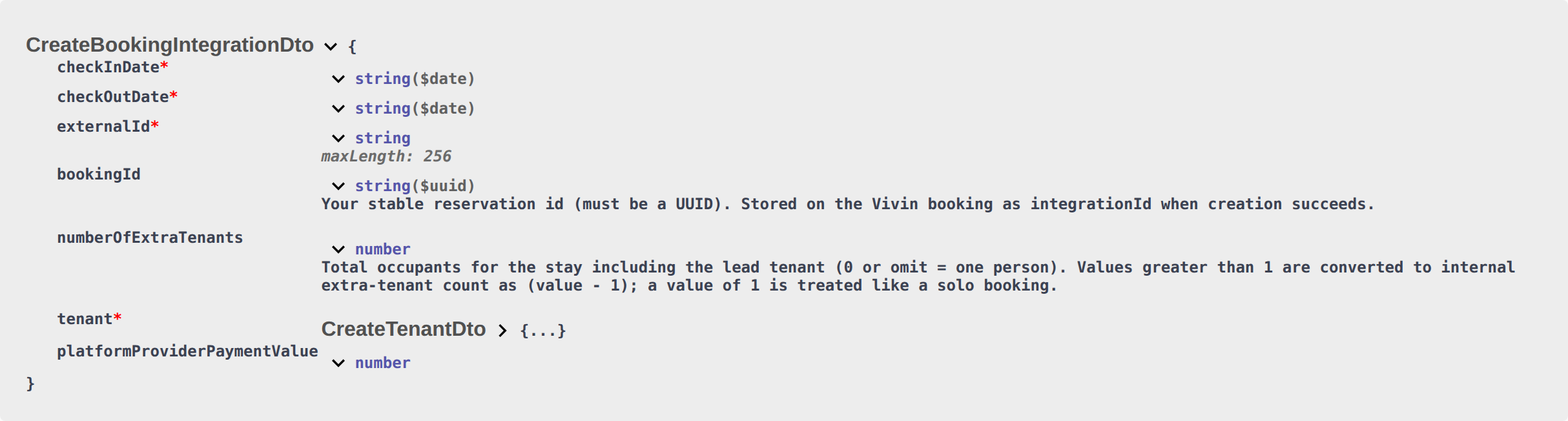
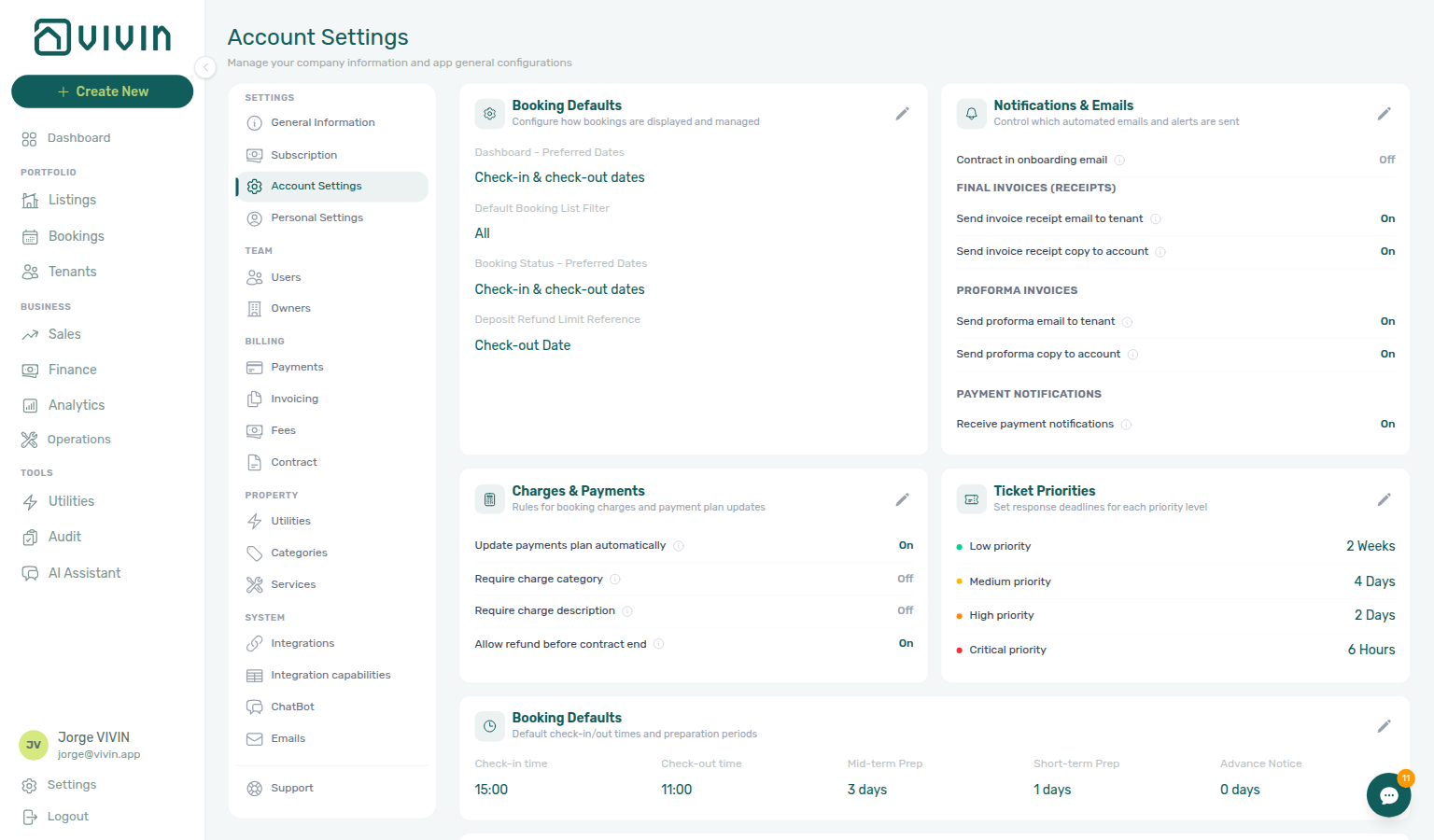
What this is not
- Not Ignore unit preparation days on Add booking (operator-only skip; marketplace POST always honours prep nights in
unavailabilities). - Not same-day turnover (checkout may equal the next check-in without this flag).
- Not Allow check-in date in the past (listing available-from month — a different Add Booking control).
- Not Use check in date as contract start date (Contract Info overlay after import; not a calendar skip).
- Not Honour listing capacity and stay bounds (capacity / stay months /
availableFrom— occupied nights including prep still reject on both). - Not Check-in times (clock times copied from Booking Defaults).
- Not Maintenance tickets (automatic Operations tickets).
- Not listing JSON
ignoreListingPreparationDays(that key is absent onGET /listings— it is not a POST input either). - Not Contract Info after import (the checkbox is create-time only).
- Not Exclude from penalty fees (Contract Info checkbox after import; not a calendar skip).
- Not Platform commission (that field is on this POST — channel commission for reconciliation — it does not skip prep nights).
Operators: FAQ — Marketplace booking Ignore unit preparation days. Integrators: Bookings — Ignore unit preparation days and Preferences — Booking Defaults.
Partner POST does not set Allow check-in date in the past
Honour listing JSON availableFrom on your marketplace — Honour listing. + Create New → Booking can start one reservation before that month. Exercise POST …/bookings on your OpenAPI page — Try requests in Swagger.
POST /{platform}-integration/bookings has no ignoreAvailableFrom field. Send calendar checkInDate and checkOutDate, externalId, occupant headcount, optional platform commission, and tenant details. After the worker creates the booking, honour listing JSON availableFrom on the channel:
| Operator field | After marketplace import | What it does |
|---|---|---|
| Listing Available from | Listing JSON availableFrom | Earliest advertised move-in. Honour it on your marketplace. |
| Allow check-in date in the past on Add booking | Not on partner POST | Operator-only skip so a manual stay can start before that month. |
There is no listing-level skip and no account-level skip default. Partial listing JSON (GET /listings) also omits ignoreAvailableFrom — partners cannot read or send a skip flag on the calendar pull. Listing JSON does publish availableFrom.
+ Create New → Booking can tick Allow check-in date in the past so a manual reservation starts before the listing’s available-from month. Occupied nights stay blocked. That control is operator-only — it is not on the partner create schema.
After import, Contract Info cannot flip this. The checkbox is create-time only. Changing Available from later does not rewrite stays already imported.
Occupied nights still reject on partner POST. On RoomLess, nights before availableFrom already appear in listing unavailabilities — those nights still reject. Honour availableFrom on your marketplace instead of sending a skip.
{
  "checkInDate": "2026-09-01",
  "checkOutDate": "2027-01-31",
  "externalId": "abc-123",
  "tenant": {
    "firstName": "Maria",
    "lastName": "Silva",
    "email": "[email protected]"
  }
}
There is no "ignoreAvailableFrom" key next to those fields.
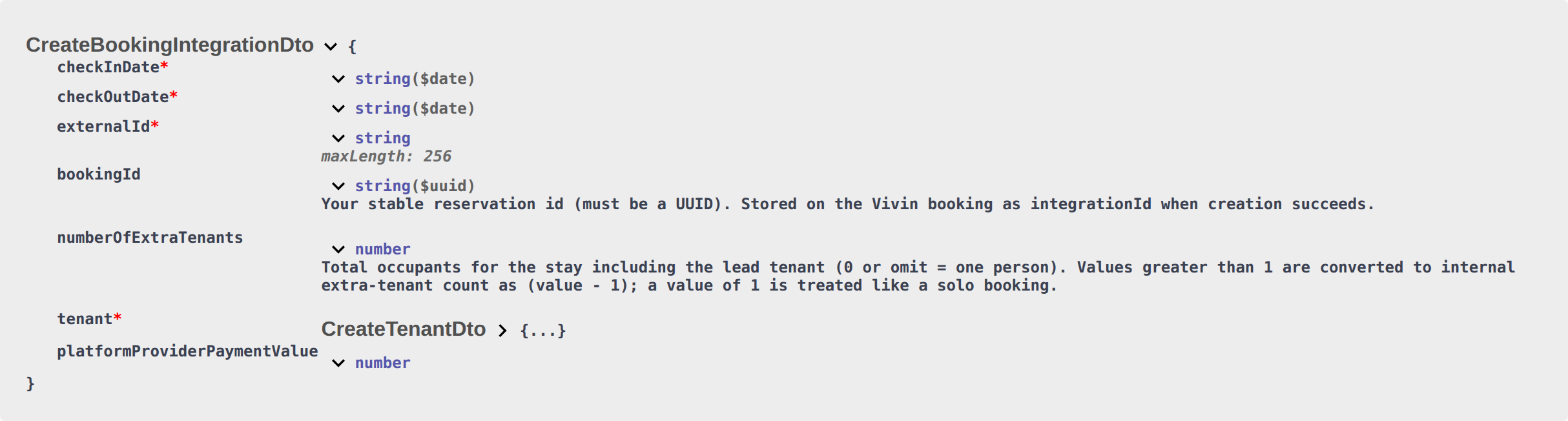

What this is not
- Not Allow check-in date in the past on Add booking (operator-only skip; marketplace POST honours listing
availableFrom). - Not Ignore unit preparation days (calendar buffer after checkout, not the listing available-from month).
- Not same-day turnover (checkout may equal the next check-in without this flag).
- Not Honour listing capacity and stay bounds (capacity / stay months /
availableFrom— occupied nights still reject on both). - Not Check-in times (clock times copied from Booking Defaults).
- Not Maintenance tickets (automatic Operations tickets).
- Not listing JSON
ignoreAvailableFrom(that key is absent onGET /listings— it is not a POST input either). Listing JSON does publishavailableFrom. - Not Contract Info after import (the checkbox is create-time only).
- Not Use check in date as contract start date (Contract Info checkbox after import; not a calendar skip).
- Not Send onboarding (welcome email at create; not a calendar skip).
- Not Exclude from penalty fees (Contract Info checkbox after import; not a calendar skip).
- Not Platform commission (that field is on this POST — channel commission for reconciliation — it does not skip available-from).
Operators: FAQ — Marketplace booking Allow check-in date in the past. Integrators: Bookings — Allow check-in date in the past and Listings & Availability — availableFrom.
Partner POST always sends onboarding email & contract
Operators skip the welcome send on + Create New → Booking by leaving Send onboarding email & contract off. After import, Bookings → Contract Info can still Send / Resend Onboarding email. Exercise POST …/bookings on your OpenAPI page — Try requests in Swagger.
POST /{platform}-integration/bookings has no sendOnBoarding field. Send calendar checkInDate and checkOutDate, externalId, occupant headcount, optional platform commission, and tenant details. After the worker creates the booking, Vivin always treats the stay as Send onboarding email & contract on:
| Operator field | After marketplace import | What it does |
|---|---|---|
| Send onboarding email & contract | On (not on partner POST — always on) | Generates the contract when a template exists, then queues the welcome email from Settings > Emails — Onboarding. |
| Account Onboarding trigger | Still applies | No trigger — disabled skips the welcome email for the whole account, including marketplace stays. The contract can still generate. |
| Contract in onboarding email | Still applies | Controls whether the PDF attaches. A tenant category that turns the Contract portal module off still blocks the attachment. |
There is no listing-level skip and no account-level “skip onboarding on import”. Partial listing JSON (GET /listings) also omits sendOnBoarding — partners cannot read or send it on the calendar pull.
+ Create New → Booking can skip: Send onboarding email & contract defaults off. Tick it only when this direct reservation should generate the contract and send the welcome email at create. Book several units at once keeps the box off and cannot turn it on.
After import, operators can still Send / Resend Onboarding email on Contract Info → Check-in & Check-out, or Resend on the Contract card to force the PDF. Booking Confirmation Communication Rules still match marketplace stays that generated a contract (they skip only stays created with onboarding left off).
{
  "checkInDate": "2026-09-01",
  "checkOutDate": "2027-01-31",
  "externalId": "abc-123",
  "tenant": {
    "firstName": "Maria",
    "lastName": "Silva",
    "email": "[email protected]"
  }
}
There is no "sendOnBoarding" key next to those fields.
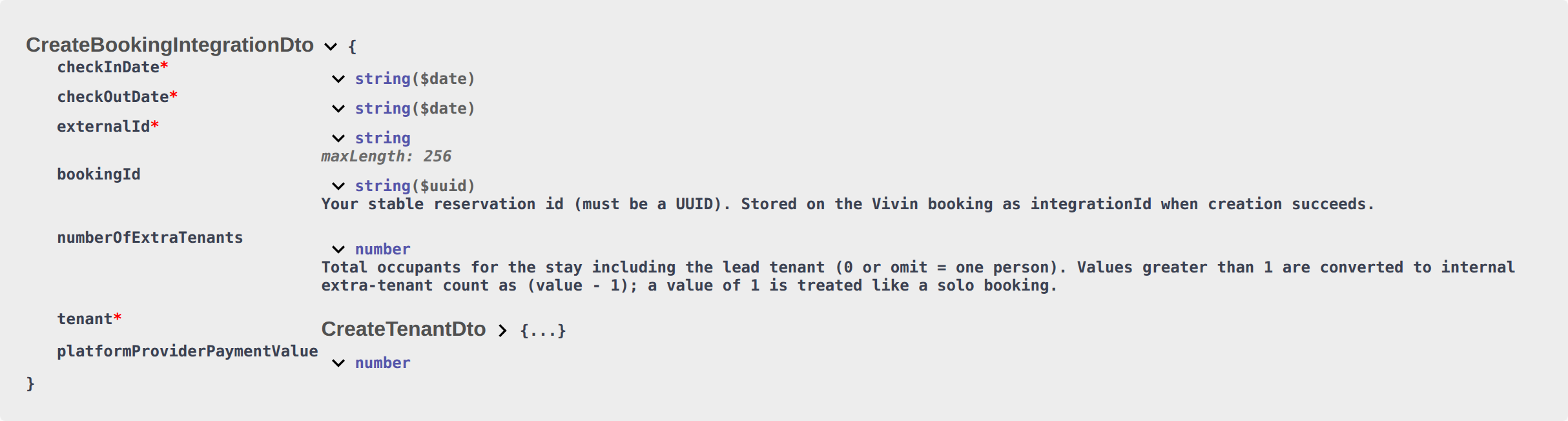

What this is not
- Not + Create New → Booking (operators can leave Send onboarding email & contract off; marketplace POST cannot).
- Not Settings > Emails — Onboarding No trigger — disabled (that account setting still skips the welcome email for every stay, including marketplace imports).
- Not Send portal access (portal login only — not the welcome template).
- Not Resend on the Contract card (forces the PDF onto the onboarding email after create).
- Not Send Check-in email (arrival instructions; a different lifecycle template).
- Not Contract in onboarding email / tenant-category Contract module (those control the PDF attachment, not whether create attempts the send).
- Not listing JSON
sendOnBoarding(that key is absent onGET /listings— it is not a POST input either). - Not Use unit contract rents (copied unit/property contract values; not the welcome email).
- Not Use check in date as contract start date (Contract Info overlay after import).
- Not Exclude from penalty fees (Contract Info Method of payments).
- Not Platform commission (that field is on this POST — channel commission for reconciliation — it does not skip or send onboarding).
Operators: FAQ — Marketplace booking onboarding email. Integrators: Bookings — Send onboarding email & contract and Emails — Onboarding.
Partner POST always uses unit contract rents
Operators turn this off on + Create New → Booking to type custom rent, fees, and contract details. After import, Bookings → Contract Info can still change amounts for that reservation. Exercise POST …/bookings on your OpenAPI page — Try requests in Swagger.
POST /{platform}-integration/bookings has no useListingValues field. Send calendar checkInDate and checkOutDate, externalId, occupant headcount, optional platform commission, and tenant details. After the worker creates the booking, Vivin always treats the stay as Use unit contract rents and other contract details on:
| Operator field | After marketplace import | What it does |
|---|---|---|
| Use unit contract rents and other contract details | On (not on partner POST — always on) | Copies monthly rent (after Markup), Security deposit plus Extra Deposit from occupant headcount, Extra Charge from listing extraPricePerTenant (Extra Charge), Confirmation payments, and Check-in payments from the unit and property. |
| Custom rent, fees, contract type | Not available on the channel | Those fields appear on Add Booking only after you turn the box off. Property cleaning, admin, bills, and Contract type still copy the same way — see the field pages below. |
There is no listing-level skip and no account-level “custom contract on import”. Partial listing JSON (GET /listings) also omits useListingValues — partners cannot read or send it on the calendar pull.
+ Create New → Booking can turn this off: Use unit contract rents and other contract details defaults on. Leave it on to copy the unit. Turn it off to type custom Fixed rent, fees, Contract day type / Contract type, Confirmation payments / Check-in payments, Extra Charge / Extra Deposit, and (when the property has auto-create) check-in/out ticket checkboxes.
After import, operators can still change euro amounts and payment requirements on Contract Info for that reservation only.
{
  "checkInDate": "2026-09-01",
  "checkOutDate": "2027-01-31",
  "externalId": "abc-123",
  "tenant": {
    "firstName": "Maria",
    "lastName": "Silva",
    "email": "[email protected]"
  }
}
There is no "useListingValues" key next to those fields.
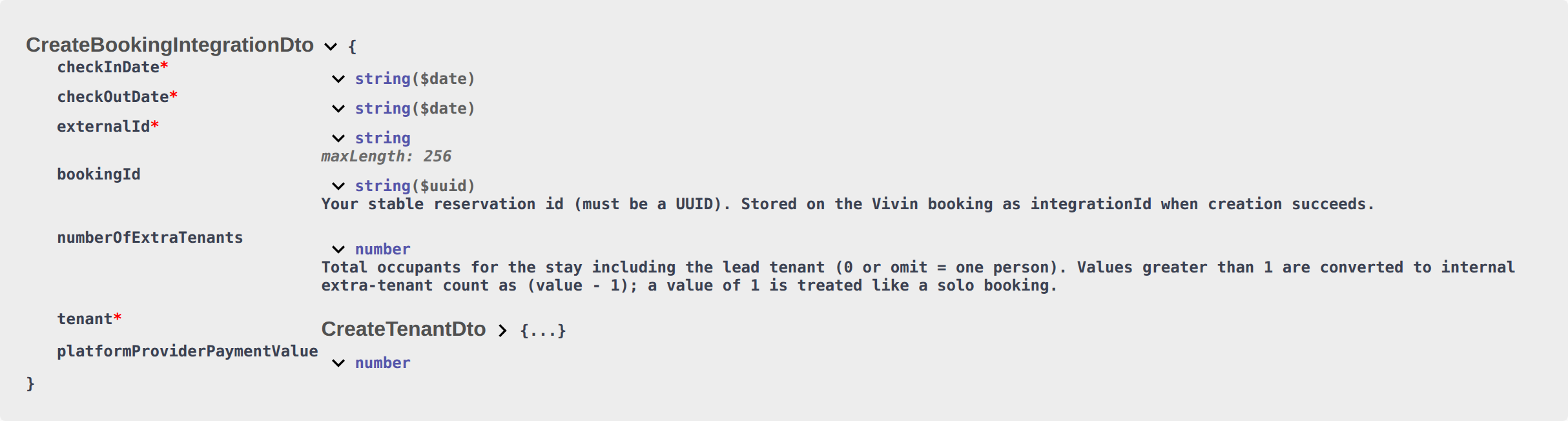
What this is not
- Not + Create New → Booking (operators can turn Use unit contract rents and other contract details off; marketplace POST cannot).
- Not Rent, Deposit, Admin fee, Bills included, Contract type, or Confirmation payments (those pages name each copied field; this toggle is the operator control that would skip that copy).
- Not Extra Charge / Extra Deposit euros (listing
extraPricePerTenantand unit Extra Deposit still apply when the box stays on — Extra Charge). - Not Send onboarding (welcome email at create — a different always-on flag).
- Not Ignore unit preparation days (calendar buffer after checkout).
- Not listing JSON
useListingValues(that key is absent onGET /listings— it is not a POST input either). - Not Platform commission (that field is on this POST — channel commission for reconciliation — it does not replace unit contract rents).
Operators: FAQ — Marketplace booking unit contract rents. Integrators: Bookings — Use unit contract rents.
Partner POST records platform commission
Operators see the stored amount as read-only Provider platform payment on Contract Info. + Create New → Booking can type First payment value (€) when Platform is a channel (not Direct). Exercise POST …/bookings on your OpenAPI page — Try requests in Swagger.
POST /{platform}-integration/bookings does include platformProviderPaymentValue. Send the euro amount your platform collected (or will pay) for this stay. After the worker creates the booking, operators see that amount as Provider platform payment on Contract Info → Booking information. The field is read-only there — it does not replace monthly rent, Extra Charge, or the tenant payment schedule.
| Operator field | After marketplace import | What it does |
|---|---|---|
| Provider platform payment | The number you sent | Reconciliation against the partner statement. Direct stays show —. Empty shows Not set. |
| Tenant Payment Plan | Unchanged | Listing JSON rent (after Markup) plus Extra Charge from occupant headcount. |
| [+ Create New → Booking] → First payment value (€) | Operator-only | Appears when Platform is a channel (not Direct). Maps to the same stored amount. |
Inlife and the Vivin Booking Engine fill a fallback from listing rent plus Extra Charge when you omit the field. Other marketplace prefixes require the number you collected.
On Vivin Booking Engine Daily stays shorter than one month, a positive amount you sent can also drive the rent schedule — Bookings — Booking Engine short stays.
{
  "checkInDate": "2026-09-01",
  "checkOutDate": "2027-01-31",
  "externalId": "abc-123",
  "platformProviderPaymentValue": 150.0,
  "tenant": {
    "firstName": "Maria",
    "lastName": "Silva",
    "email": "[email protected]"
  }
}
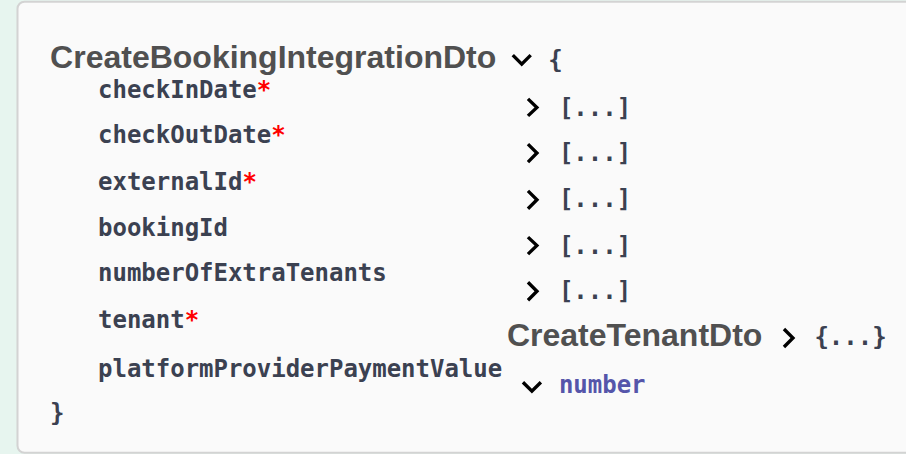

What this is not
- Not Rent (listing JSON monthly amounts become the tenant plan).
- Not Extra Charge (unit Extra Charge / Extra Deposit from occupant headcount).
- Not Guarantor amount (€) (operator-only on Contract Info).
- Not Use unit contract rents (copied unit/property contract values).
- Not Airbnb / channel-manager Provider platform payment as the payout-matched rent total — Bookings — Payment plan matches the Airbnb payout (that path is Channex, not this marketplace POST).
Operators: FAQ — Marketplace platform commission. Integrators: Bookings — Provider platform payment.
Partner POST does not set Use check in date as contract start date
After import, Bookings → Contract Info can tick Use check in date as contract start date or Use check out date as contract end date. Rental payment frequency still copies from the property — Contract type. Exercise POST …/bookings on your OpenAPI page — Try requests in Swagger.
POST /{platform}-integration/bookings has no useCheckInDateInContract or useCheckOutDateInContract field. Send calendar checkInDate and checkOutDate, externalId, occupant headcount, optional platform commission, and tenant details. After the worker creates the booking, both boxes stay off:
| Operator field | After marketplace import | What it does |
|---|---|---|
| Property Rental payment frequency | Copied onto Start date / End date | Monthly contracts start on the 1st and end on the last day of the month. Fortnightly and Daily follow the same property cycle. |
| Use check in date as contract start date | Off (not on partner POST) | Contract PDF, displayed Start date, and related finance dates follow operational check-in instead of the billing-period start. Without impact in the payments plan. |
| Use check out date as contract end date | Off (not on partner POST) | Contract PDF, displayed End date, refund eligibility, and related finance dates follow operational check-out instead of the billing-period end. Without impact in the payments plan. |
There is no listing-level default and no account-level default. Partial listing JSON (GET /listings) also omits both keys — partners cannot read or send them on the calendar pull.
+ Create New → Booking has no create-time control. Direct reservations also start with both boxes off.
After import, operators can tick Use check in date as contract start date on Change contract start date, or Use check out date as contract end date on Change contract end date, for that reservation only. The date field fills with check-in or check-out and the payment plan does not regenerate. Airbnb channel-manager stays keep Change contract start/end date locked.
{
  "checkInDate": "2026-09-01",
  "checkOutDate": "2027-01-31",
  "externalId": "abc-123",
  "tenant": {
    "firstName": "Maria",
    "lastName": "Silva",
    "email": "[email protected]"
  }
}
There is no "useCheckInDateInContract" or "useCheckOutDateInContract" key next to those fields.
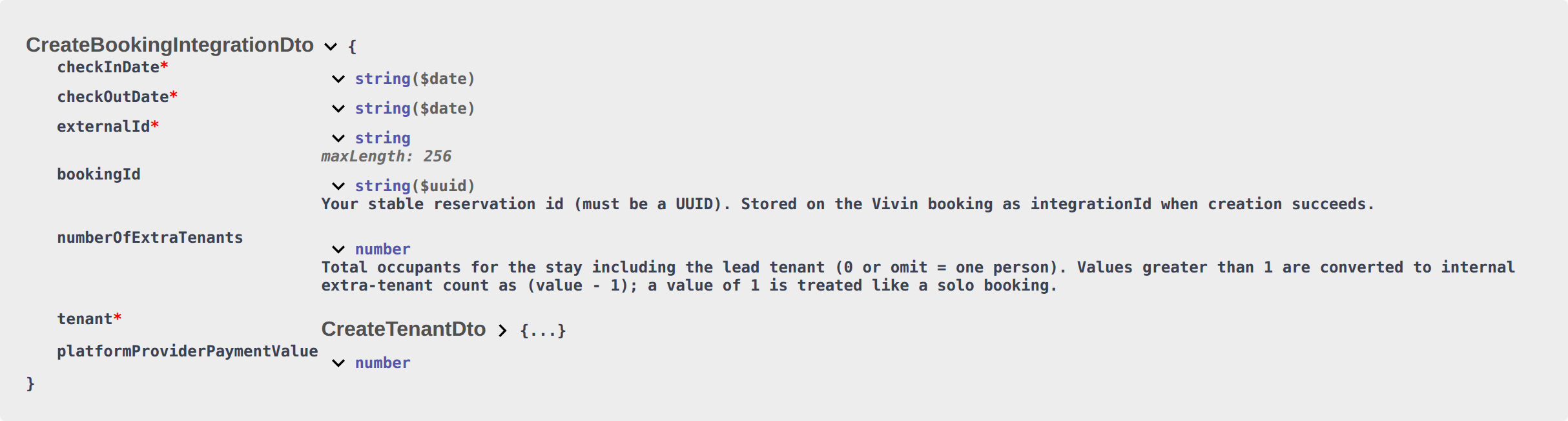
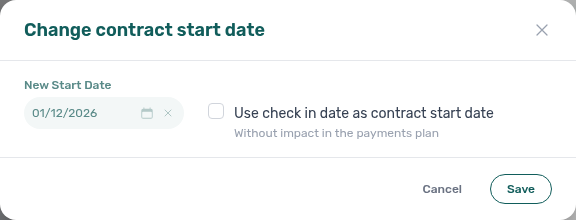
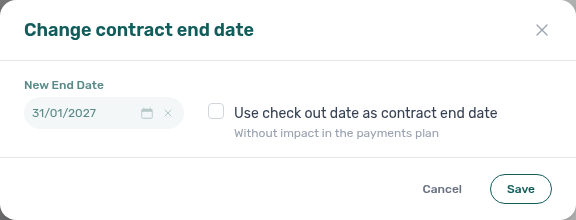
What this is not
- Not + Create New → Booking (the wizard has no create-time checkbox; marketplace POST and Add Booking both start off).
- Not Contract type (property Rental payment frequency still sets stored Start date / End date at create).
- Not Change move-in date / Change move-out date (those edit operational check-in / check-out).
- Not Allow check-in date in the past (listing available-from month).
- Not Ignore unit preparation days (calendar buffer after checkout).
- Not Exclude from penalty fees (Contract Info Method of payments).
- Not Send onboarding (welcome email at create).
- Not listing JSON
useCheckInDateInContract/useCheckOutDateInContract(those keys are absent onGET /listings— they are not POST inputs either). - Not Airbnb edit lockdown as a POST field (channel-manager stays lock Change contract start/end date; Uniplaces / Housing Anywhere imports can still tick the boxes after import).
- Not Platform commission (that field is on this POST — channel commission for reconciliation — it does not set contract dates from check-in).
Operators: FAQ — Marketplace booking Use check in date as contract start date. Integrators: Bookings — Use check in date as contract start date and Creating Bookings — Contract type.
Partner POST does not set Exclude this booking from penalty fees
Operators set Payment Delay Penalties on Payments. After import, Bookings → Contract Info → Method of payments can tick Exclude this booking from penalty fees. Exercise POST …/bookings on your OpenAPI page — Try requests in Swagger.
POST /{platform}-integration/bookings has no ignorePenaltyFees field. Send calendar checkInDate and checkOutDate, externalId, occupant headcount, optional platform commission, and tenant details. After the worker creates the booking, Exclude this booking from penalty fees stays off:
| Operator field | After marketplace import | What it does |
|---|---|---|
| Account Payment Delay Penalties | Still apply to this stay | Frequency, type, value, and grace on Payments. |
| Exclude this booking from penalty fees | Off (not on partner POST) | Operator checkbox on Contract Info → Method of payments for this reservation only. |
There is no listing-level exclusion and no account-level “exclude by default”. Partial listing JSON (GET /listings) also omits ignorePenaltyFees — partners cannot read or send it on the calendar pull.
+ Create New → Booking has no Exclude this booking from penalty fees control. Direct reservations also start with the box off.
After import, operators can tick Exclude this booking from penalty fees on Contract Info → Method of payments for that reservation only. Penalty Fee Communication Rules skip an excluded stay. Operators can still add a one-off extra charge on Payment Plan — Handling a Late Payment — Step 5. Airbnb channel-manager stays keep this checkbox locked.
{
  "checkInDate": "2026-09-01",
  "checkOutDate": "2027-01-31",
  "externalId": "abc-123",
  "tenant": {
    "firstName": "Maria",
    "lastName": "Silva",
    "email": "[email protected]"
  }
}
There is no "ignorePenaltyFees" key next to those fields.
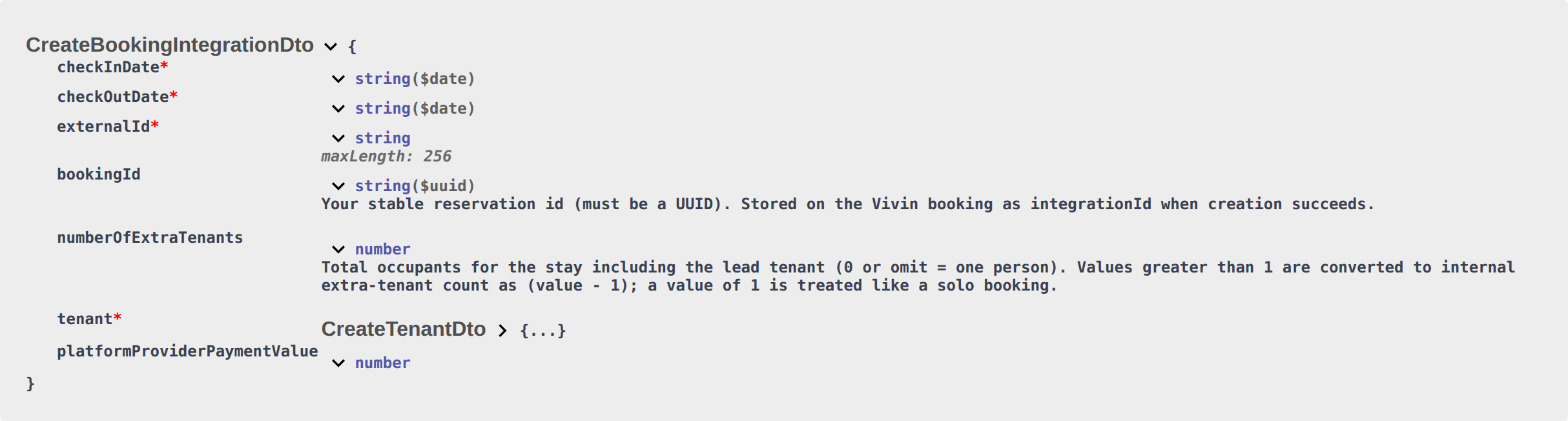
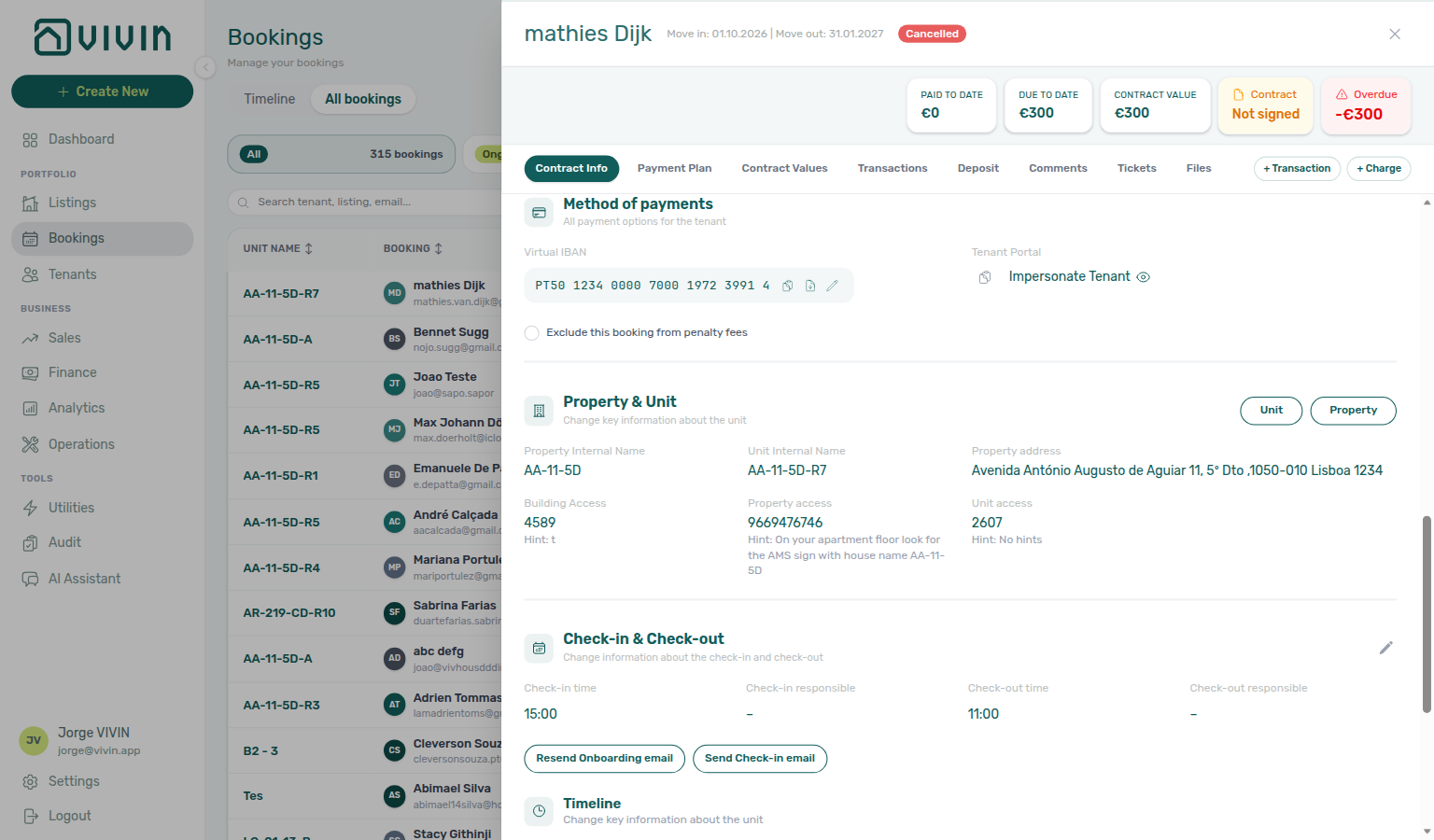
What this is not
- Not + Create New → Booking (the wizard has no create-time checkbox; marketplace POST and Add Booking both start off).
- Not Payment Delay Penalties on Payments (those account rules still apply unless an operator ticks the Contract Info box).
- Not a Penalty Fee Communication Rule field (those emails skip an excluded stay; they are not a POST input).
- Not Handling a Late Payment — Step 5 (operators can still add a one-off extra charge).
- Not Ignore unit preparation days (calendar buffer after checkout).
- Not Maintenance tickets (automatic Operations tickets).
- Not listing JSON
ignorePenaltyFees(that key is absent onGET /listings— it is not a POST input either). - Not Use check in date as contract start date (Contract Info Change contract start/end date; not a penalty exclusion).
- Not Send onboarding (welcome email at create).
- Not Airbnb edit lockdown as a POST field (channel-manager stays lock the checkbox; Uniplaces / Housing Anywhere imports can still tick it after import).
- Not Platform commission (that field is on this POST — channel commission for reconciliation — it does not exclude penalty fees).
Operators: FAQ — Marketplace booking penalty exclusion. Integrators: Bookings — Exclude this booking from penalty fees and Payments — Payment Delay Penalties.
Partner POST does not set tenant category
Operators mark Default for integration-created tenants on Settings → Tenant categories. Direct reservations still need Tenant Info — FAQ — Assign tenant category for a direct booking. Exercise POST …/bookings on your OpenAPI page — Try requests in Swagger.
Marketplace POST /{platform}-integration/bookings has no booking-level tenant category field. Send dates, externalId, occupant headcount, optional platform commission, and tenant identity / billing. After the worker creates or links the tenant, Vivin assigns Default for integration-created tenants when all of these hold:
- The stay is imported on an allowlisted booking integration (Uniplaces, Inlife, RoomLess / Spacest, Housing Anywhere, Spotahome, Vivin Booking Engine, Edu Portugal, Erasmus Life Lisboa, Kiwi, Capital Rooms, Porta85, or Lisbeyond)
- The tenant is new or still has no category
- The account has one category marked Default for integration-created tenants
A returning guest (same email or fiscal id already in the account) keeps their existing category. The default never overwrites a segment you already assigned.
+ Create New → Booking never auto-assigns a category — pick Category on Tenant Info. Channex (Airbnb / Booking.com), Idealista, and Coliving imports also skip this default.
OpenAPI may list tenantCategoryId on nested CreateTenantDto. Omit it. That value is an operator UUID for + Create New → Tenant, not a marketplace listing id. A valid id on a brand-new tenant stores that segment and skips the default. A returning guest (same email / fiscal id) keeps the category already on file.
{
  "checkInDate": "2026-09-01",
  "checkOutDate": "2027-01-31",
  "externalId": "abc-123",
  "tenant": {
    "firstName": "Maria",
    "lastName": "Silva",
    "email": "[email protected]"
  }
}
There is no "tenantCategoryId" key next to those fields.
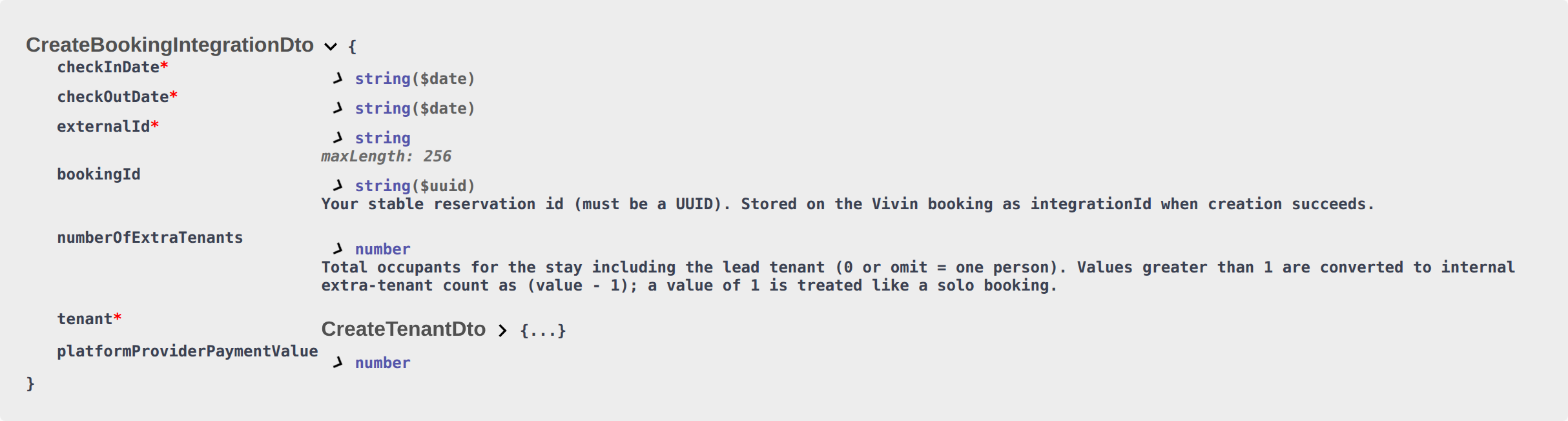
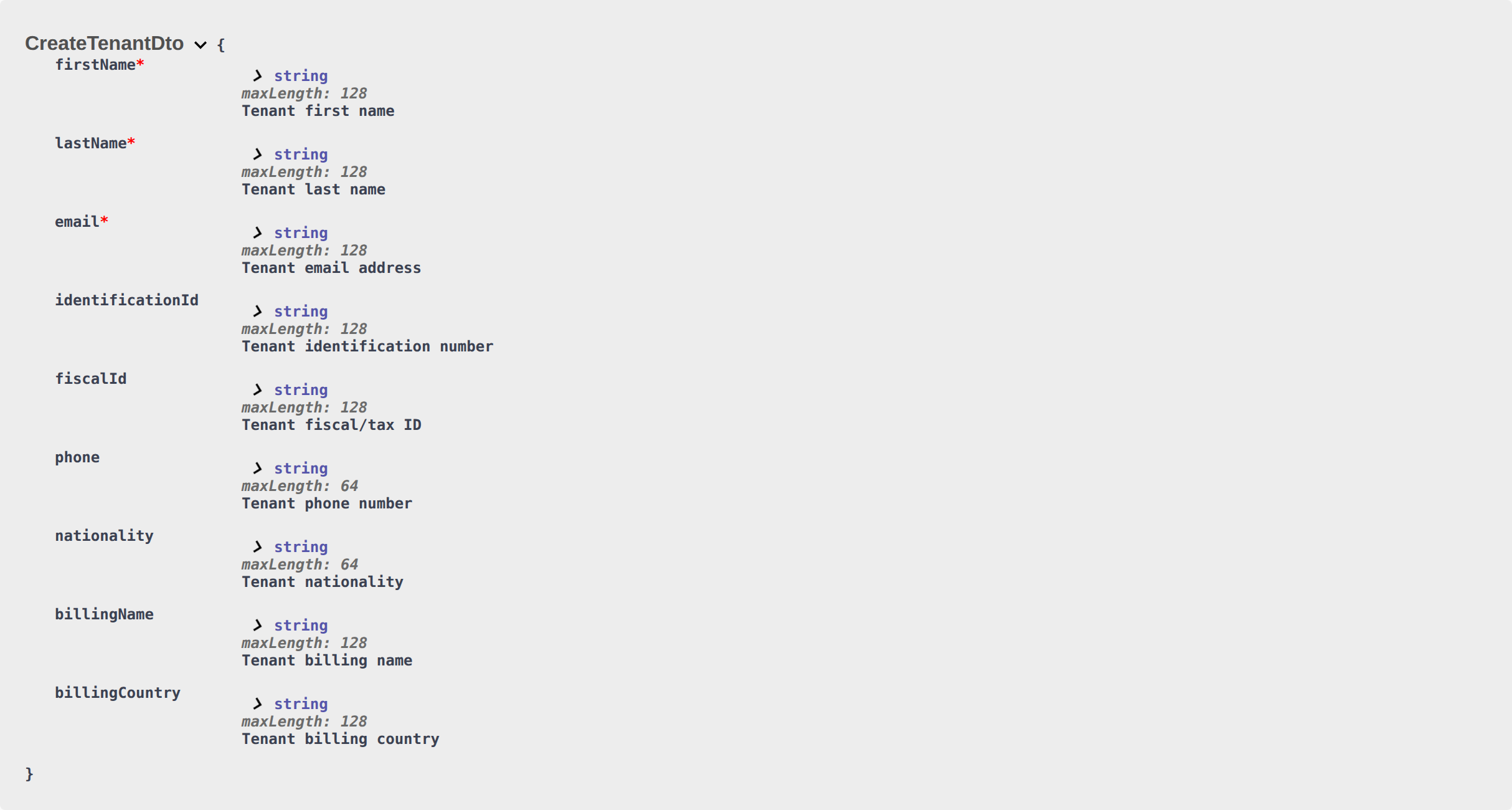
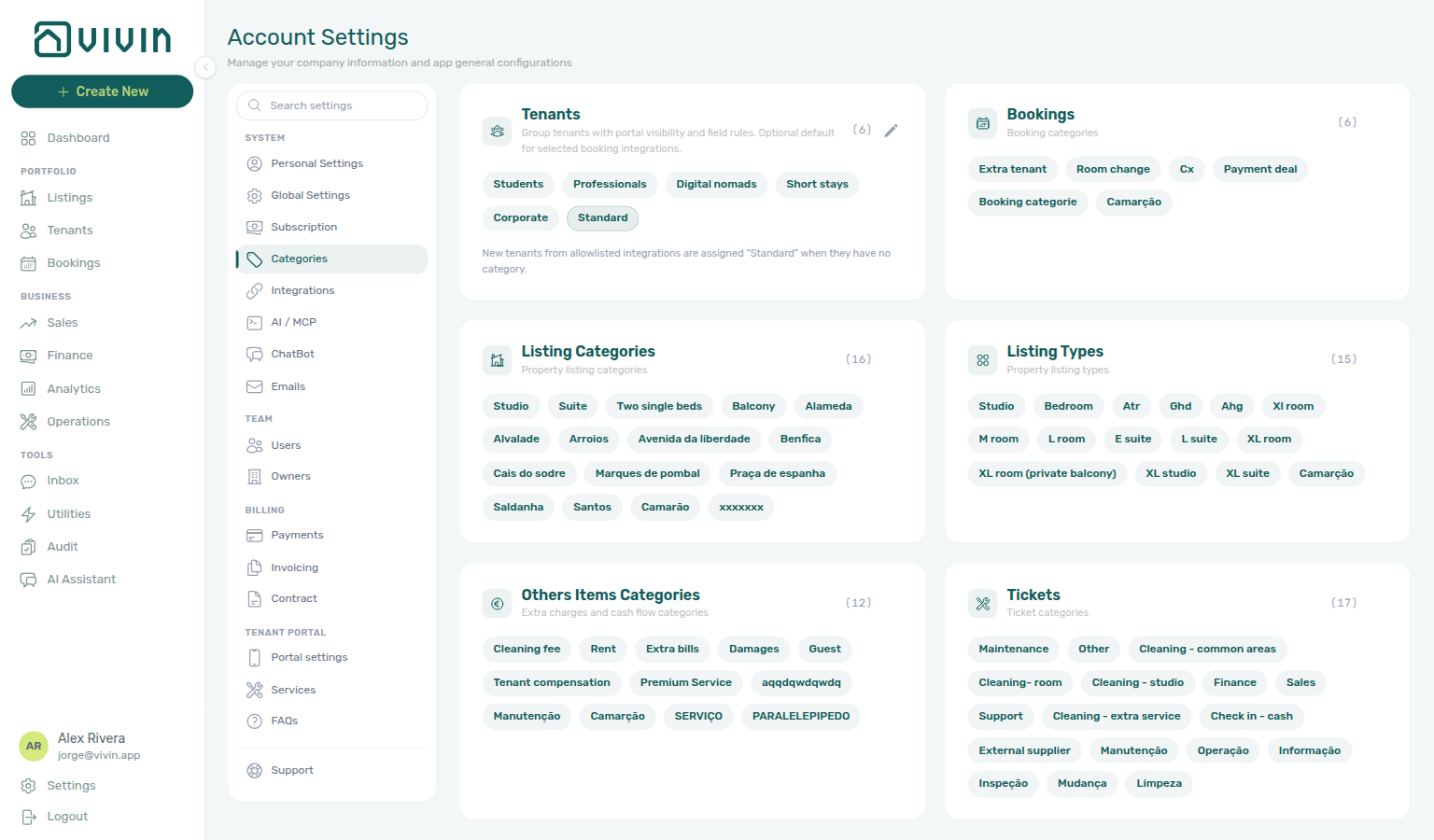
What this is not
- Not + Create New → Booking (operators assign Category on Tenant Info; the wizard has no category field).
- Not overwriting a returning guest (same email / fiscal id keeps the stored segment).
- Not Channex / Airbnb / Booking.com, Idealista, or Coliving (those platforms are not on the default-assignment list).
Operators: FAQ — Marketplace booking tenant category. Integrators: Tenant categories — Default for integration-created tenants.
Honour listing capacity and stay bounds
Marketplace POST /{platform}-integration/bookings trusts your platform to honour listing JSON capacity, minStayPeriod, maxStayPeriod, and availableFrom. Compare occupant headcount (numberOfExtraTenants, including the lead tenant) to capacity, keep stay length within the published months (0 means no bound on that side; 12 is twelve months), and do not start before availableFrom. Extra Charge / Extra Deposit euros are not on this body — send headcount only — Extra Charge. Second tenant identity is not on this body either — Second tenant. Guarantor identity and Guarantor amount (€) are not on this body — Guarantor. This POST does record platform commission — Platform commission.
Occupied nights still reject. If checkInDate–checkOutDate overlap listing unavailabilities (existing stays, preparation nights after checkout, manual blocks, or platform calendar holds), the worker does not create the booking. Partner POST cannot skip that prep buffer — Ignore unit preparation days. Partner POST cannot send Allow check-in date in the past — Allow check-in date in the past. On RoomLess, nights before availableFrom already appear in that array — RoomLess nights before move-in. On Housing Anywhere, nights outside the first still-open booking window already appear there — Housing Anywhere booking windows.
+ Create New → Booking still enforces unit Capacity, Minimum / Maximum Stay Period, and listing available from. Marketplace import is the exception: honour those fields on the channel before you POST.
Creating Bookings section cross-reference
Use the endpoints and fields above. Related integrator pages are linked inline where useful.
Related
Related below links POST /bookings enqueue to setup, companion API guides, operator workflows, and escalation paths.
Setup sequence after go-live
Complete Account Settings — Recommended setup order before partner traffic.
- Setup steps 1–10 — Complete operator workspace basics (Recommended setup order) before requesting partner Bearer keys; property managers automating outside the browser use Management session authentication after step 3 (Users)
- Setup steps 11–12 (Integrations, Integration field capability, Tenant categories default for integrations) — Channel credentials, calendar horizons, and payload field expectations before
[email protected]onboarding; operator context: Integrations & Distribution - Setup step 13 (Listings) — Property wizard,
externalIdmapping, and Channels tab before first partner listing reads or writes - Setup steps 14–15 (Bookings, Tenants) — Validate imported reservation shape and tenant segments after partner traffic
- After steps 13–15 — Onboarding a New Property — Step 7 go-live verification before escalating partner pull, webhook, or mapping defects
- After steps 14–15 — send
POST …/bookingsonly after Property & Unit Mapping confirms eachexternalId; follow enqueue handling in Booking Lifecycle & Validations and operator triage in Processing a New Booking - Partner credential requests — Email
[email protected](distinct from in-app Vivin support tickets in Get Help & Support)
Documentation map & escalation
- Getting Started — Recommended Setup Sequence before partner HTTP traffic;
- API Reference hub — Hub pairing matrix across integration guides;
- Get Help & Support — Request credentials or onboarding via
[email protected](hub: Setup sequence after go-live) - FAQ & Troubleshooting — Management-app answers distinct from partner HTTP integration retries (hub: Setup sequence after go-live)
- Glossary — Term definitions used across API and operator docs (hub: Setup sequence after go-live)
Companion API guides
Companion guides share Bearer authorization or error shapes with this page — start from API Reference hub.
- Listings & Availability —
GET /listingspartial pulls to verifyexternalIdbefore enqueue (depositValueis the computed property deposit — Computed deposit; a €0 rent omits the unit — Usable rent required; honour listing JSONcapacity/ stay /availableFrom— Honour listing; POST does not setrent— Rent; POST does not set Extra Charge / Extra Deposit euros — Extra Charge; POST does not set Second tenant identity — Second tenant; POST does not set Guarantor identity or amount — Guarantor; POST does record platform commission — Platform commission; POST does not setcleaningFeeValue— Cleaning fee; POST does not setdepositValue— Deposit; POST does not setadminFeeValue— Admin fee; POST does not setbillsIncludedMaxValue— Bills included; POST does not setcontractType/contractDayType— Contract type; POST does not set confirmation / check-in payments — Confirmation payments; POST does not set due day / due month — Due date; POST does not set check-in / check-out times — Check-in times; POST does not set days before due — Days before due; POST does not set check-in / check-out responsible — Check-in responsible; POST does not setleasePurpose— Lease purpose; POST does not setdepositReturnDueDay— Deposit Refund Limit; POST does not setbookingTags— Booking tags; POST does not setcreateCheckInMaintenanceTicket/createCheckOutMaintenanceTicket— Maintenance tickets; POST does not setignoreListingPreparationDays— Ignore unit preparation days; POST does not setignoreAvailableFrom— Allow check-in date in the past; POST does not setignorePenaltyFees— Exclude from penalty fees; POST does not setuseCheckInDateInContract/useCheckOutDateInContract— Use check in date as contract start date; POST always sends onboarding — Send onboarding; POST always uses unit contract rents — Use unit contract rents; POST does not set tenant category — Tenant category; nolocalRentCapon GET or POST — Local rent cap) - Booking Lifecycle & Validations — Step-by-step validation table after enqueue (occupied nights, windows; marketplace POST honours listing JSON for Capacity / stay /
availableFrom— Honour listing; duplicatebookingIdhandling) - Webhooks & Notifications — Optional push events (
booking.created,booking.cancelled, calendar blocks) when Vivin configures callbacks for your platform - Property & Unit Mapping — How
externalIdand listing keys map beforePOST …/bookingsaccepts a payload - Error Handling —
409overlap and422business-rule responses on enqueue - Authentication — Bearer token required on every
POST …/bookingscall - Booking engine integration — White-label
POST /bookingson the same queue and validation pipeline - Full listing feeds — Rich catalogue context partners validate against before enqueue
- iCal feeds — Calendar retrofeed imports that may need a separate
POST /bookingsconfirmation after availability blocks land - Management session — Operator JWT contrast; integration Bearer keys return
401on AI usage
Upstream & downstream workflows
- Onboarding a New Property — Operator setup before partner traffic targets live inventory
- Processing a New Booking — Operator workflow after your platform import (confirmation payment, portal access, contract)
- Managing a Check-in — Post-import arrival workflow after background processing creates the reservation
- Managing a Check-out & Deposit Refund — Settlement workflow for partner-imported stays whose deposits appear on Finance → Deposits
- Handling a Late Payment — Step 1 — Collections when imported stays land without confirmation payment; upstream path from Notifications — Payment overdue alerts
- Cancelling a Booking — Void duplicate or mistaken imports after
booking.createdwebhook delivery - Manual block hygiene — Audit pass when availability validation fails because stale manual holds remain on the unit
Operator UI & settings
- Listings — Extra Charge per Tenant — Unit Extra Charge (listing JSON
extraPricePerTenant) and Extra Deposit; marketplace POST copies those rates from occupant headcount — Extra Charge - Bookings — Second tenant — Co-occupant identity on Contract Info after marketplace import; Add Booking cannot fill it at create; marketplace POST cannot send it — Second tenant
- Bookings — Guarantor — Rent-backer identity and Guarantor amount (€) on Contract Info after marketplace import; Add Booking cannot fill it at create; marketplace POST cannot send it — Guarantor
- Bookings — Provider platform payment — Read-only Provider platform payment on Contract Info after marketplace import; Add Booking First payment value (€) when Platform is a channel; marketplace POST records
platformProviderPaymentValue— Platform commission - Settings > Preferences — Second tenant — Account toggle that shows the accordion when Tenants number is at least 2
- Settings > Preferences — Guarantor — Account toggle that shows the accordion on every booking (not gated on occupant count)
- Listings — Step 3 Extra payments — Property Security Deposit (published as listing JSON
depositValue; marketplace POST copies that hold plus Extra Deposit from headcount — Deposit), Cleaning fee (amount copies on marketplace POST — Cleaning fee), Admin fee (fixed amount or stay-duration tier resolved at create — Admin fee), and Bills Included ceilings that shape overage charges on imported stays - Listings — Step 4 Contract details — Rental payment frequency and Contract type copy onto marketplace bookings — Contract type. Confirmation payments and Check-in payments copy onto the payment plan — Confirmation payments. Due date and Due Month on Contract Information (or account Tenant Due Day / Tenant Due Month) copy onto the schedule — Due date. Check-in time / Check-out time copy from account Preferences — Booking Defaults — Check-in times. Days before due date copies from account Payments — When to show payment as due — Days before due. Check-in responsible / Check-out responsible stay empty on marketplace bookings until an operator assigns a teammate — Check-in responsible. Lease purpose stays empty until an operator or tenant selects a chip — Lease purpose. Deposit Refund Limit inherits account Payments until an operator overrides it — Deposit Refund Limit. Booking categories stay empty until an operator picks chips — Booking tags. Automatic check-in/out tickets follow the property Maintenances tab — Maintenance tickets. Ignore unit preparation days is operator-only — Ignore unit preparation days. Allow check-in date in the past is operator-only — Allow check-in date in the past. Exclude this booking from penalty fees stays off until an operator ticks it on Contract Info — Exclude from penalty fees. Use check in date as contract start date / Use check out date as contract end date stay off until an operator ticks them on Contract Info — Use check in date as contract start date. Marketplace POST always sends the onboarding email and generates the contract — Send onboarding. Marketplace POST always uses Use unit contract rents and other contract details — Use unit contract rents. Extra Charge / Extra Deposit euros copy from the unit using occupant headcount — Extra Charge
- Settings > Tenant categories — Default segment for integration-created tenants on high-volume imports (marketplace POST does not send a category — Tenant category)
- Settings > Invoicing & Payments — Fee labels and payment priorities on schedules enqueue creates. Tenant Due Day / Tenant Due Month copy onto marketplace bookings when the property has no override — Due date. Days before due date copies onto marketplace bookings from When to show payment as due — Days before due. Deposit Refund Limit is not copied onto the stay — imported bookings inherit it until Contract Info overrides it — Deposit Refund Limit. Payment Delay Penalties still apply until Contract Info ticks Exclude this booking from penalty fees — Exclude from penalty fees
- Settings > Preferences — Booking Defaults — Check-in time / Check-out time copy onto marketplace bookings — Check-in times. That card does not name a default Check-in responsible or Check-out responsible — Check-in responsible. Mid-term Prep / Short-term Prep close extra nights after checkout; marketplace POST cannot skip them — Ignore unit preparation days
- Bookings — Check-in responsible — Assign teammates after marketplace import; Add Booking can pick them at create
- Settings > Categories — Lease purpose — Allowed chips only; marketplace POST does not copy a default label — Lease purpose
- Bookings — Lease purpose — Set after marketplace import; Add Booking can pick it at create; tenants may pick on portal Your Details
- Settings > Categories — Bookings — Allowed chips only; marketplace POST does not copy a default tag — Booking tags
- Bookings — Booking tags — Set after marketplace import; Add Booking can pick them at create
- Listings — Maintenances tab — Property check-in/out ticket defaults; marketplace POST cannot skip or force them — Maintenance tickets
- Bookings — Creating a New Booking — Operator-only Create check-in ticket / Create check-out ticket skip
- Settings > Preferences — Booking Defaults — Mid-term Prep / Short-term Prep close extra nights after checkout; marketplace POST cannot skip them — Ignore unit preparation days
- Bookings — Ignore unit preparation days — Operator-only Add booking skip; marketplace POST always honours prep nights in
unavailabilities - Bookings — Allow check-in date in the past — Operator-only Add booking skip; marketplace POST honours listing
availableFrom— Allow check-in date in the past - Bookings — Exclude this booking from penalty fees — Contract Info checkbox after marketplace import; Add Booking cannot pick it at create; marketplace POST always starts off — Exclude from penalty fees
- Bookings — Use check in date as contract start date — Contract Info checkbox after marketplace import; Add Booking cannot pick it at create; marketplace POST always starts off — Use check in date as contract start date
- Bookings — Send onboarding email & contract — Add Booking can skip; marketplace POST always sends — Send onboarding
- Bookings — Use unit contract rents — Add Booking can turn the box off; marketplace POST always copies unit contract values — Use unit contract rents
- Settings > Emails — Onboarding — Account trigger still applies after marketplace import; No trigger skips the welcome email
- Operations — Automatic Ticket Creation — Marketplace imports follow the property rule; cancel an unwanted row on Tickets
- Bookings — Deposit Refund Limit — Inherited from Payments after marketplace import; Add Booking cannot pick it at create; Contract Info can still override that reservation
- Operations — Assigned responsible — Without lists marketplace stays that still have no assignee
- Settings > Preferences — In-app notifications — Account-wide booking-created alerts when partner imports reach
/notifications - Settings > Emails — Onboarding and payment Communication Rules after
POST /bookingscreates live reservations - Finance — Contract Values — Operator reconciliation after enqueue succeeds
- Property & listing details (booking engine) — Rich marketing fields distinct from booking import payloads
Deeper concept reads
- Booking Lifecycle — How operators see computed
bookingStatusin the management app once the booking exists - Payment Allocation — How confirmation receipts allocate to the generated schedule (distinct from partner enqueue semantics)
- Integrations concept — Operator channel setup before partner
POST /bookingstraffic - Services Marketplace — Ancillary charge types partners may not enqueue via
POST /bookings - Tenant Portal — What imported tenants see on the payment schedule and portal home after
POST /bookingssucceeds - FAQ — Tenant contract signing blocked — No PDF yet, mandatory Your Details gates, category locks, or Lease purpose; portal signing vs paper upload on Contract Info
Deeper workflow reads
See Upstream & downstream workflows above for the same guides.
Operator habit hubs
Day-to-day operator habits (lockout catch-up, pending receipts, payment triage, handoffs, and related playbooks) live on the Common Workflows habit hub.
Deep-link anchors for habit hubs
Lockout catch-up after password recovery
Pending manual receipt approval
Reject/revert mistaken receipts
Portfolio segmentation by tenant category
Notification row-click navigation
Payment alert to receivables triage
Confirmation alert triage
Finance debt receivables triage
Handling a Late Payment collections
Finance Income status drill-down
Cash flow forecast drill-down
Key glossary terms
- Glossary — Credit note (payment reject/revert) — Operator accounting follow-up when a mistaken import receipt is rejected after invoicing
- Glossary — Invoiced floor (rent) — Rent edits blocked below exported invoice totals on live imported bookings
- Glossary — Honour listing capacity and stay bounds — Marketplace POST honours listing JSON
capacity/ stay months /availableFrom; occupied nights still reject - Glossary — Maintenance tickets not on partner POST — Marketplace POST omits ticket opt-out; property Maintenances tab copies onto the stay
- Glossary — Ignore unit preparation days not on partner POST — Marketplace POST omits the prep-buffer skip; listing
unavailabilitiesstill reject those nights - Glossary — Allow check-in date in the past not on partner POST — Marketplace POST omits the available-from skip; honour listing JSON
availableFrom - Glossary — Use check in date as contract start date not on partner POST — Marketplace POST omits the contract-date overlay; Contract Info can still tick it after import
- Glossary — Send onboarding always on partner POST — Marketplace POST always sends the welcome email and generates the contract; Add Booking can skip
- Glossary — Use unit contract rents always on partner POST — Marketplace POST always copies unit contract values; Add Booking can turn the box off
- Glossary — Exclude from penalty fees not on partner POST — Marketplace POST omits penalty exclusion; Contract Info can still tick it after import
- Glossary — Tenant category not on partner POST — Marketplace POST omits tenant category; allowlisted channels assign Default for integration-created tenants
- Glossary — Extra Charge not on partner POST — Marketplace POST omits Extra Charge / Extra Deposit euros; occupant headcount multiplies the unit rates
- Glossary — Second tenant not on partner POST — Marketplace POST omits co-occupant identity; occupant headcount can open the accordion
- Glossary — Guarantor not on partner POST — Marketplace POST omits guarantor identity and amount; occupant headcount does not fill that accordion
- Glossary — Platform commission on partner POST — Marketplace POST records channel commission for reconciliation; it does not change tenant rent except Booking Engine Daily stays shorter than one month
- Glossary — Cleaning fee not on partner POST — Marketplace POST omits
cleaningFeeValue; the property amount and Frequency copy onto the payment plan - Glossary — Deposit not on partner POST — Marketplace POST omits
depositValue; listing JSON copies onto the hold and Extra Deposit is added from occupant headcount - Glossary — Admin fee not on partner POST — Marketplace POST omits
adminFeeValue; Vivin resolves the property fixed amount or stay-duration tier - Glossary — Deposit lifecycle status — Occupant headcount seeds Extra Deposit at create; refund
depositStatusis operator-managed after enqueue - Glossary — End-of-Booking cost split — Charge Time → End of Booking splits daily overage across every occupied unit; still-staying roommates stay in the denominator
- Glossary — Change history — Operator-initiated edits on Listings setup and Bookings Changelog; create-time defaults excluded
- Glossary — Archived booking ledger visibility — Delete Booking hides manual/provider_platform rows on Finance → Transactions; vIBAN and credit card stay visible
- Glossary — Full term list
Module documentation hubs
for screen-by-screen operator follow-up.
- Bookings module — Operator UI for reservations created via
POST /bookings(hub) - Tenants module — Operator enrichment of imported tenant profiles (fiscal ID, categories) after enqueue succeeds (hub)
- Utilities module — Bills Included ceiling model, Connections, AI bill upload, and tenant overage charges on payment plans (hub)
- Operations module — Maintenance tickets, cash flows, check-in/out coordination, Draft ticket queues, and linked cash flows (hub)
- Dashboard module — Post-login Today, Total debt, Vacant Units, and forecast KPI snapshot with bell notification triage (hub)
- Analytics module — Month-range portfolio KPI charts (Overview, Revenue, Occupancy, ADR, RevPAR, Maintenance) with rankings and heatmaps (hub)
- Listings module — Property wizard, Channels tab, Archived inventory, and unit management (hub)
- Properties workspace — Legacy
/propertiesURL redirects into Listings (hub) - Booking engine details — Rich marketplace payload editor via the Full integration pill (hub)
- Finance module — Portfolio ledgers (Overview, Income, Contract Values, Transactions, Payouts, Deposits) with payment approval and deposit settlement (hub)
- Sales module — Portfolio availability, monthly rent editing, and channel manager connections (hub)
- Inbox module — Portfolio-wide WhatsApp workspace with Dashboard bell Inbox sub-tab deep links (hub)
- Notifications module — Full
/notificationshistory with search, filters, and row-click navigation (hub); Payment overdue alerts when imported schedules are overdue - AI Chat module — AI Assistant using Landlord MCP tools for portfolio Q&A (hub)
- Audit module — Portfolio-wide Manual Blocks and Discounts contract-value review (hub)
- Account Settings — Workspace-wide financial policies, templates, integrations, and operational defaults (hub)